Comand MERCEDES-BENZ E-Class 2012 W212 Comand Manual
[x] Cancel search | Manufacturer: MERCEDES-BENZ, Model Year: 2012, Model line: E-Class, Model: MERCEDES-BENZ E-Class 2012 W212Pages: 234, PDF Size: 6.74 MB
Page 200 of 234

alread
ysave dareas inthemem ory
(Y page 199).
i COMA NDreceive sweat herforecas tdata
fr om thene ares tweat herstatio nat the
selec teddest ination.
Opt ion 1:select ingthelocat ioninthe
infor mation chart X
Sel ect Position in
theinf orm ationch art
by turnin gcVd theCOMA NDcontroll er
and pres sW toconfirm .
Am enu appears. "Select
ingthe area forthe weather forecast"menu
X To select thecurr entvehicle position:
select Current Position and
press Wto
con firm.
COMAND receivestheweather dataforthe
curren tvehicle position fromthenearest
weather stationand displays it
automatic ally.
X To select thevicinity ofthe
destina tion:select NearDestina tion in
the menu byturn ingcVd theCOMAND
con troller andpress Wtocon firm.
i You canselect NearDestina tion if
a
route hasbeen calculated (Ypage 57).The
menu itemisother wisegrayed out.
X To select winter sportareas:select In Winter
SportsAreas in
the menu, and
con firm bypressing W. X
Select astat e,e.g. Colorad o ,
and press
W tocon firm.
X Select awinter sportsarea from themenu
and press Wtocon firm.
The weather dataandother information is
displayed forthe winter sportsarea that
has been select ed.The data issupplied by
the nearest weather station.
The infor mation chartshows thefollowing
infor mation (ifavailable):
R ski slopes/sk ilifts
R snowboardin gand night time openin g
R snow conditions (e.g.snow depth)
R temper ature X
To select thevicinity ofanoth er
location: selectSearch Locatio
ns in
the
menu byturn ingcVd theCOMAND
con troller andpress Wtocon firm. 198
SIRIUS
WeatherWeat herservices
Page 201 of 234
X
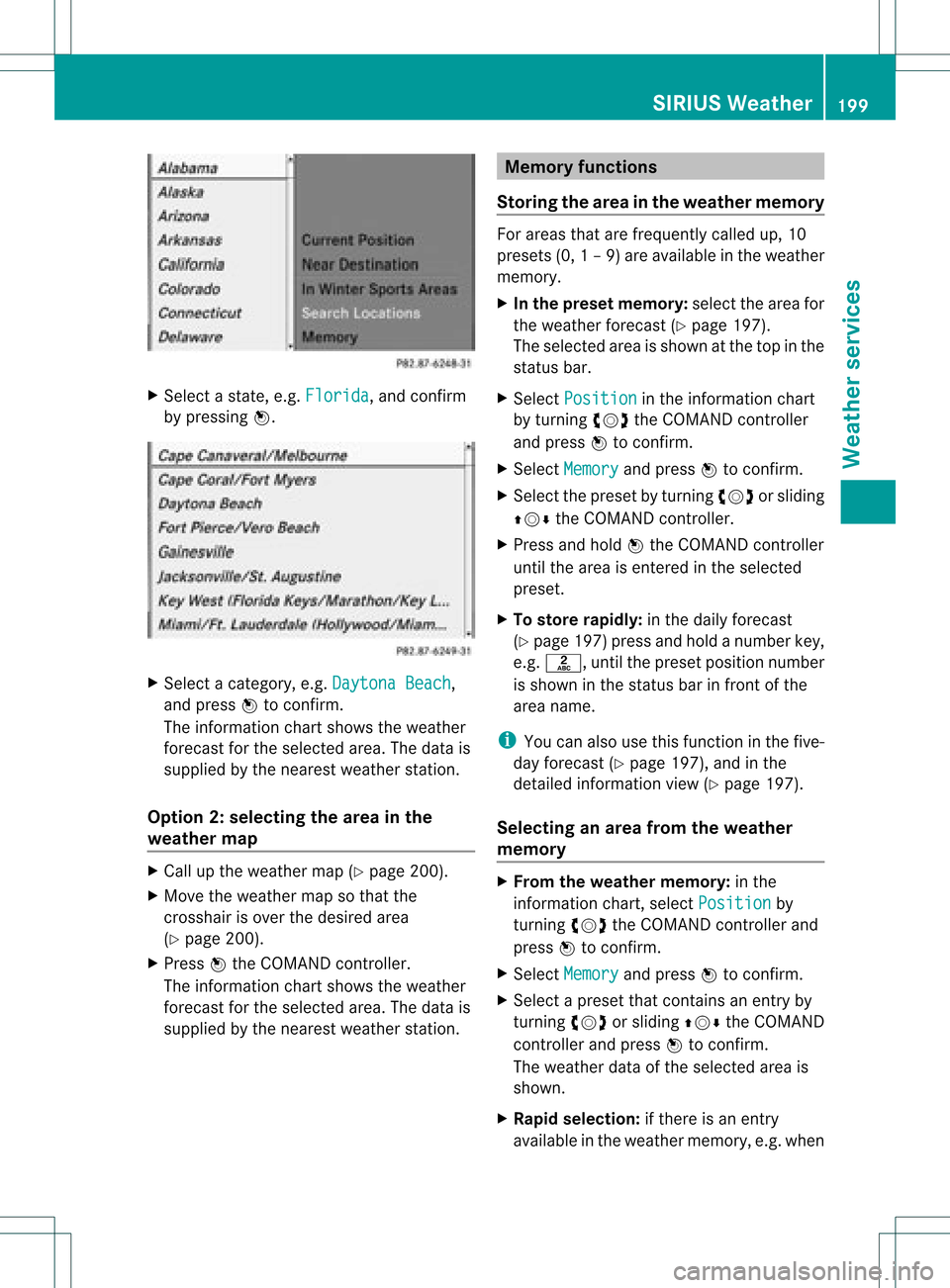
Sel ect astate ,e.g. Florida ,
and confi rm
by pre ssing W. X
Sel ect acate gory,e.g. DaytonaBea ch ,
and pressW toconfi rm.
The informa tion chartsho wsthe weath er
fore castfor the selected area.Thedata is
supplied bythe nearest weather station.
Option 2:selec tingthearea inthe
weather map X
Call upthe weather map(Ypage 200).
X Move theweather mapsothat the
crosshair isover thedesired area
(Y page 200).
X Press Wthe COMAND controller.
The inform ationchart shows theweather
forecast forthe selected area.Thedata is
supplied bythe nearest weather station. Memory
functions
Storing thearea inthe weather memory For
areas thatarefrequently calledup,10
presets (0,1–9 )are available inthe weather
memor y.
X In thep res etmemo ry:select the area for
the weath erfor eca st(Y page 197) .
Th ese lected area issho wnatthe top inthe
sta tus bar.
X Sel ect Position in
the inform ation cha rt
by turning cVd theCOMAND controller
and pressW toconfi rm.
X Sel ect Memory and
pressW toconfi rm.
X Sel ect the presetb ytur ning cVd orslid ing
ZVÆ theCOMA NDcontro ller .
X Pre ssand holdW theCOMA NDcontro ller
unt ilth eare ais en tered inthesele cted
pre set.
X To stor era pidl y: inthedaily forec ast
(Y page 197)pre ssand holdanum berkey,
e. g. l, untilth epre set position num ber
is sho wninthest at us bar infron tof the
are anam e.
i You canalso usethis fun ction inthefiv e-
day forec ast (Y page 197), and inthe
det ailed info rm ation view(Y page 197).
Select inganarea from theweat her
me mo ry X
Fro mtheweat hermemo ry:in the
in fo rm ation chart ,sele ctPos ition by
tur ning cVd theCOMA NDcontro ller and
pre ssW toconfirm .
X Se lec tMem ory and
pressW toconfirm .
X Se lec ta pre set that contain san entry by
tur ning cVd orslid ingZVÆ theCOMA ND
co ntro ller and pressW toconfirm .
The weat herdataof thesele cted are ais
sho wn.
X Ra pids election :if th ere isan ent ry
available intheweath ermem ory,e.g.when SIRIUS
Weather
199Weatherservice s
Page 202 of 234
the
daily for eca stissho wn, brieflypre ssa
num berk ey, such asl.
The weather dataofthe select edarea is
shown. Weat
hermap
Calling upthe weather map X
Select Map in
the infor mation chartby
turn ingcVd theCOMAND controller and
press Wtocon firm.
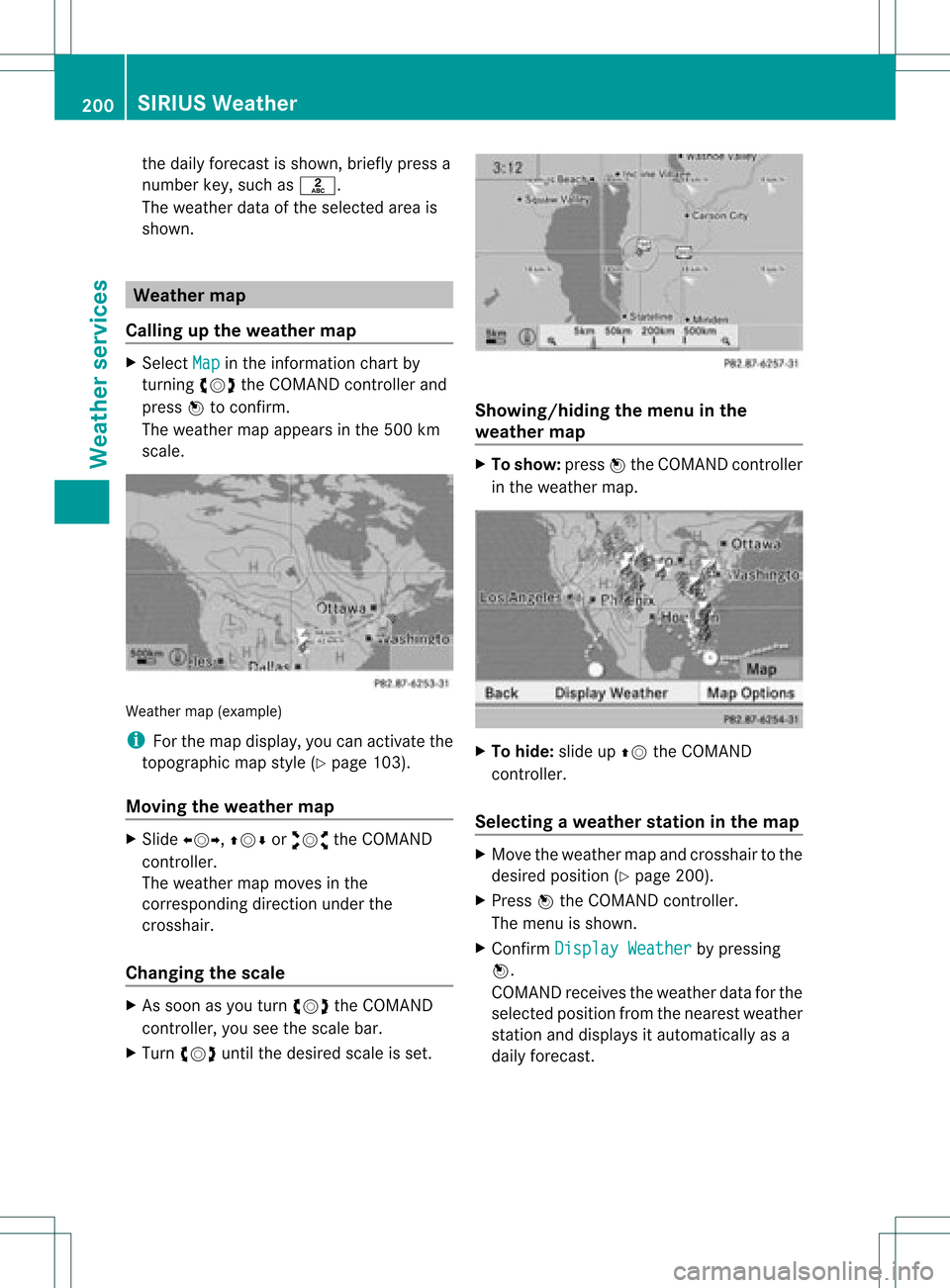
The weather mapappears inthe 500 km
scale. Weather
map(example)
i For themap display, youcan activat ethe
topogr aphicmapstyle (Ypage 103).
Moving theweather map X
Slide XVY, ZVÆoraVb theCOMAND
con troller.
The weather mapmoves inthe
corr espondin gdirect ionunder the
cross hair.
Changing thescale X
As soon asyou turn cVd theCOMAND
con troller, youseethescale bar.
X Turn cVd untilthedesired scaleisset. Showing/hiding
themenu inthe
weather map X
To show: pressWthe COMAND controller
in the weather map. X
To hide: slideupZV theCOMAND
con troller .
Selecting aweather stationinthe map X
Move theweather mapandcross hairtothe
desired position (Y page 200).
X Press Wthe COMAND controller.
The menu isshown.
X Confirm Display Weather by
pressing
W.
COMAND receivestheweather dataforthe
select edposition fromthenearest weather
stat ionand displays itautomatic allyasa
daily forecast. 200
SIRIUS
WeatherWeat herservices
Page 203 of 234

Switching
layersonthe map on/off You
canswitch ondiffering layers,for example todisplay therain radar, weather frontsand
the course oftropical stormsonthe map.
X Display themenu onthe weather map(Ypage 200).
X Select Layers by
turnin gcVd theCOMAND controller andpress Wtoconf irm.
Am enu appears. X
Select thelayer byturn ingcVd andsliding ZVÆtheCOMAND controller andpress Wto
con firm.
Switc hthe display onO oroff ª.
Explana tion Layer Map
displa y Selectable
scales Radar
Map Shows
therain radar asacolored areaonthe map,
for anexplanat ionofthe colors, seethe"Legend"
sect ion(Ypage 204). All
Storm
Charact
eristic s Shows
thecharact eristicsof astor m
Character isticsare:
R torn adic storm:
stor mcellwith strong winds (super cells),from
which atorn ado (also know astwist er)can
develop.
R cyclon e:
stor mcells, fromwhich atorn adic stormcan
develop
R hailstorm
R the likelihood ofahailstorm All
Atmosph
eric Pressur
e Shows
theposition ofhigh andlow-pressure areas
(H, L),weather frontsand isobars 200
km,500 km SIRIUS
Weather
201Weatherservices
Page 204 of 234

Layer Ma
pdisp lay Select
able
scales Tro
pical Sto
rmTracks Sho
wsthepath /directionalmov emen tspeed ofa
tro pical stormwith time andstrengt hinfor mation All
Winds Shows
thewind direct ionand wind speed 5
km There
areanumber ofillustrate dexamples inthe following section.
Sam pledispla ysofweather datain the
ma p Rain
radar
The Radar Map display
layerisactiv ated
(Y page 201)and weather dataisavailable. Weather
mapshowing therain radar
The precipit ationradar legend canbecalled
up at(Y page 204).
Stor mchar acter istics
The Storm Characteristics display
layer
is activ ated (Ypage 201)and weath erdata is
av ailabl e. We
ath erma psho wing aha ilstor mandtorna dic
storm swi th the path and directi onalmove ment
spe ed(examp le) Wea
ther map showing aha ilstorm (examp le)
The storm sle gend canbecalled up
(Y page 204) .
Di spl aying additi onalinformati on
X Sli de XVY ,ZVÆ oraVb theCOMAND
control lerand move thecros shaironto a
corre sponding symbo l.
X Pre ssW the COMAND controller. 20
2 SI
RIU SWea therWea ther servic es
Page 206 of 234

Path
oftrop icalstorm s
The Tropical StormTracks display
layer
is activated (Ypage 201)andweather datais
availa ble.
Symbol ?shows thecurrent position ofthe
tropical cyclone.
Ad ashed linesho wsthepat htodate andthe
predicted pathofthe cyclone.
More inform ation;can beshown onthe
following positions:
R positions ofprevious path=
R current position ?
R positions onthe predicted routewith
inform ationondate :
X In the map, slideXVY, ZVÆoraVb the
COMAND controller andslide thecrosshair
to ; or=.
X Press Wthe COMAND controller. Weather
mapshowing thepath ofatropical low-
pressure areaandfurther informat ion(example)
Showing information;(ifavaila ble):
R name ofthe tropical stormandcategory
R time stamp
R direction almovemen tspeed andpath
(Wind )
R maximum windspeed (Max. WindSpeed )
i The direct ionalmovem entspeed isthe
speed atwhich thestor mcellofatropic al
stor mmoves.
At ropica lstorm issepa rated intodiffere nt
categori esaccordi ngtothe loca tion atwhi ch
it devel ops. Regi
onof
origi n Categ
ory Atlantic,
North and
South Pacific
Oceans Tropical
Low Pressure
System Tropical
RainZone Tropical
Storm Hurrican
eCategory 1 to
Hurrican eCategory 5
Northwes
t
Paci fic Tropical
Low Pressure
System Tropical
Cyclone Typhoon
Super-Ty
phoon Wind
directi onsand windspee ds Wea
ther map showing wind directi onsand wind
spe eds (exa mple)
Le ge nd (pre cipitati onradar andstorms) X
Disp laythe menu onthe weathe rmap
(Y page 200).
X Sel ect Layers by
turnin gcVd the
COMA NDcontroll erand pres sW to
co nfirm .
X Sel ect Legend and
pres sW toconfirm . 204
SIRIU
SWea therWea ther ser vices
Page 207 of 234

i
The symbol foratorn adic storm isalso
valid foracyclone (mesocyclone). Precipita
tiontype Color
scale Rain Seven
colorlevels
from light(light
green) toheavy (red) Mixed Light
(light violet) to
heavy (violet) Snow Light
(light
turquoise) toheavy
(turquoise) Time
stamp The
time stamp shows whentheweather data
was created bythe weather station.
X Display themenu onthe weather map
(Y page 200).
X Select Layers by
turnin gcVd the
COMAND controller andpress Wto
conf irm.
X Select Timestamp and
press Wto
conf irm. The
time stamps correspon dto the time at
the vehicle's currentposition. Thechange
over from summer timetostandard timeis
performed automatically.
Changing tothe informa tionchart X
Display themenu onthe weather map
(Y page 200).
X Select Display Weather and
press Wto
conf irm. SIRIUS
Weather
205Weath erservices
Page 209 of 234
COMAN
Dfea tures ........ .......... ........... 208
Gener alinfor mation <0021002100210021002100210021002100210021002100210021002100210021
002100210021002100210021002100210021V 208
Basic functions <0021002100210021002100210021002100210021002100210021002100210021
0021002100210021002100210021002100210021002100210021002100210021
0021> 213
System settings <0021002100210021002100210021002100210021002100210021002100210021
0021002100210021002100210021002100210021002100210021002100210021V 215
Audio CD/DVD andMP3 mode ........ 216
Video DVDmode <0021002100210021002100210021002100210021002100210021002100210021
002100210021002100210021002100210021002100210021002100210021V 221
Opera tionwith anactive COMAND
source <0021002100210021002100210021002100210021002100210021002100210021
0021002100210021002100210021002100210021002100210021002100210021
0021002100210021002100210021002100210021002100210021002100210021> 225
AUX mode <0021002100210021002100210021002100210021002100210021002100210021
0021002100210021002100210021002100210021002100210021002100210021
0021002100210021002100210021002100210021> 228 207Rear
SeatEntert ainmentSystem
Page 210 of 234
COMAN
Dfea tures
Thes eOper atingIn st ruc tions desc ribeall
st andar dand optionalequipm enta vail able
for you rCOMAND systematthe time of
purcha se.Cou ntry-specifi cdeviation sare
possible. Pleasenotethat your COMAND
system maynotbeequipped withallthe
features described. General
information Impor
tantsafet ynotes G
WARN
ING
The RSE CD/D VDplayer isaClass 1laser
prod uct.There isadanger ofinvisible laser
radiation whenyouopen ordamage thecover.
Do not remove thecover. TheRSE CD/DVD
play erdoes notcont ainany parts which can
be serviced bythe user. Forsafety reasons,
have anynecessary serviceworkperformed
by qual ified personnel. G
WARNING
The driver should notwear aRear Seat
Ent ertainment headsetwhileoperating the
vehicle underanycircumstan ces.Theuseof
a headset whiledriving thevehicle could
drastically impairtheabili tyto react toaudi ble
traffic conditions (e.g.emergency sirensfrom
<0010000F000C0009000300050022000600090012000500220001000D00020015
000C0001000E000300050032V anothercar'shorn,
etc. ). G
WARNING
When notinuse, headsets orextern alvideo
sources shouldbestored inas afe locatio n
(e. g.on eof theveh icle'sstorag e
com partmen ts)so that they are notloose
within thepassenger compartmentduring
braking, vehiclemaneuvers oratraffic
accident .Object smoving withinthe
passenger compartmentcould cause serious
personal injurytovehicle occupant s. G
WARNING
Due toapotent ialchokin ghazar d,wired
heads etusage bychildre nshould onlyoccur
with adultsuper vision . Comp
onents
Over view The
Rear SeatEntertainm entSys tem is
co mpr ised of:
R two rear-comp artmen tsc ree nsbehin dth e
fr on t-seat head restraint s
R therem oteco ntrol
R aCD/ DVDdriv e
R AU Xjac kson bot hsc ree ns(AU Xdispl ay)
and ontheCD/ DVDdriv e(AU Xdriv e)
R two setsof cordle ssheadp hones 208
Gener
alinfor mationRea rSe at Ent ertai nme ntSyste m
Page 215 of 234
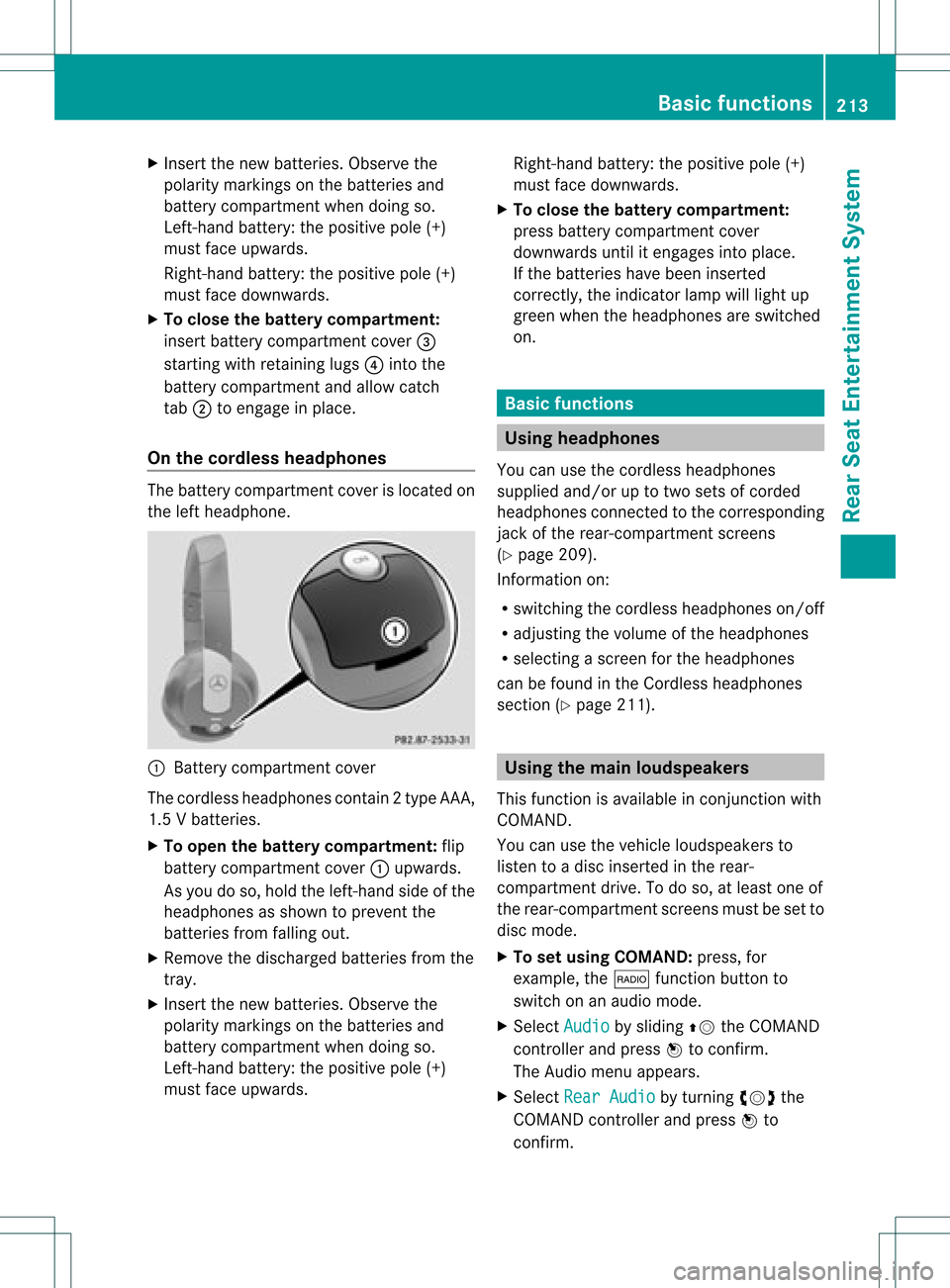
X
Insert thenew batteries. Observethe
pola ritymarkings onthe batteries and
battery compartment whendoing so.
Left-hand battery:thepositive pole(+)
must faceupwards.
Rig ht-hand battery: thepositive pole(+)
must facedownwa rds.
X To clo sethe battery compartment:
insert battery compartment cover=
starting withretaining lugs? into the
battery compartment andallow catch
tab ;toengage inpla ce.
On the cordle ssheadphones The
battery compartment coverislocated on
the left head phone. :
Battery compartment cover
The cordless headphones contain 2type AAA,
1. 5V bat terie s.
X To ope nth ebat tery com partme nt:fli p
bat tery compar tmentco ver :upwar ds.
As you doso, holdth elef t-han dside ofthe
head phonesas sho wntopre ven tthe
batteries fromfalling out.
X Remove thedischarged batteriesfromthe
tray.
X Insert thenew batteries. Observethe
polarity markings onthe batteries and
battery compartmen twhen doing so.
Left- hand battery: thepositive pole(+)
must faceupwa rds. Right-hand
battery:thepositive pole(+)
must facedownwards.
X To close thebatt erycompart ment:
press battery compartmen tcover
downwards untilitengages intoplace.
If the batteries havebeen inserted
correct ly,the indicator lampwilllight up
green whentheheadphones areswitched
on. Basic
functions Using
headph ones
You canusethecordless headphones
suppli edand/or uptotwo sets ofcorded
headphones connected tothe corresponding
jack ofthe rear-compart mentscreens
(Y page 209).
Inform ationon:
R switching thecordless headphones on/off
R adjusting thevolume ofthe headphones
R selecting ascreen forthe headphones
can befound inthe Cordless headphones
section (Ypage 211). Using
themain loudspeakers
This funct ionisavaila bleinconj unction with
COMAND.
You canusethevehicle loudspea kersto
listen toadisc inserted inthe rear-
compartmen tdrive. Todo so, atlea stone of
the rear-compa rtmentscreens mustbeset to
disc mode.
X To set using COMA ND:press, for
exampl e,the $ function buttonto
swi tch onanaudio mode.
X Select Audio by
sliding ZVtheCOMAND
controller andpress Wtoconfirm.
The Audi omenu appears.
X Select RearAudio by
turning cVdthe
COMAND controller andpress Wto
confirm. Basic
functio ns
213Rear SeatEntertainment System Z