Comand MERCEDES-BENZ E-Class 2012 W212 Comand Manual
[x] Cancel search | Manufacturer: MERCEDES-BENZ, Model Year: 2012, Model line: E-Class, Model: MERCEDES-BENZ E-Class 2012 W212Pages: 234, PDF Size: 6.74 MB
Page 177 of 234
Disp
laying details X
Se lec taBl uetooth ®
au dio dev iceinthe
Blu etoo th®
dev icelist.
X Sele ctthe symbo lto the right ofthe
Blu etoo th®
au dio dev icebysliding VY the
CO MAND controllera nd pre ssW to
confi rm.
X Sel ect Detail s and
pressW toconfi rm.
The followi ng info rma tionc oncer ningthe
selected mobilephoneisshown:
R Bluetooth ®
name
R Bluetooth ®
address
R availa bilitystatus (shown afteran
update)
R authorization status
X To close thedetailed view:turncVd or
slide XVY theCOMAND controller.
De-author izing(de-registering) a
Bluetooth ®
audio device X
Select aBluetooth ®
audio device inthe
Bluetooth ®
device list.
X Select thesymbol tothe right ofthe
Bluetooth ®
audio device bysliding VYthe
COMAND controller andpress Wto
conf irm.
X Select De-Authorize and
press Wto
conf irm.
Ap rompt appears asking whethe ryou
really wishtode-authorize thisdevice.
X Select Yes or
No .
If you select Yes ,
the device willbedeleted
from theBluetooth ®
device list.
If you select No ,
the process willbeaborted.
i Before re-authoriz ingthe Bluetooth ®
audio device, youshould alsodelete the
device nameMBBluetooth from
your
Bluetooth ®
audio device's Bluetooth ®
list
(see theBluetooth ®
audio device's
operating instructions). Switching
toBluetooth ®
audio mode
Option 1 X
Connect (Ypage 172)orrecon nect
(Y page 174)aBluetooth ®
audio device.
COMAND activatestheBluetooth ®
audio
device. Thebasic display appears andthe
device startsplayi ng.
Option 2 X
Press theh functionbutton oneormore
times.
i Bypressing thefunct ionbutton
repeatedly, youcan change theoperating
mode inthe following order:
R audio CD/DVD/MP3 (disc)
R memory cardmode
R MUSIC REGISTER
R USB storage device
R Media Interface oraudio AUXmode
R Bluetooth ®
audio mode
Option 3 X
Select Bluetooth Audio (Y
page 159)in
the media listbyturnin gcVd theCOMAND
cont roller andpress Wtoconf irm.
COMAND activatestheconn ected device.
You willsee amessage tothis effect .The
basic displa ythen appea rs. Bluetooth
®
aud iomode 175Audio Z
Page 178 of 234
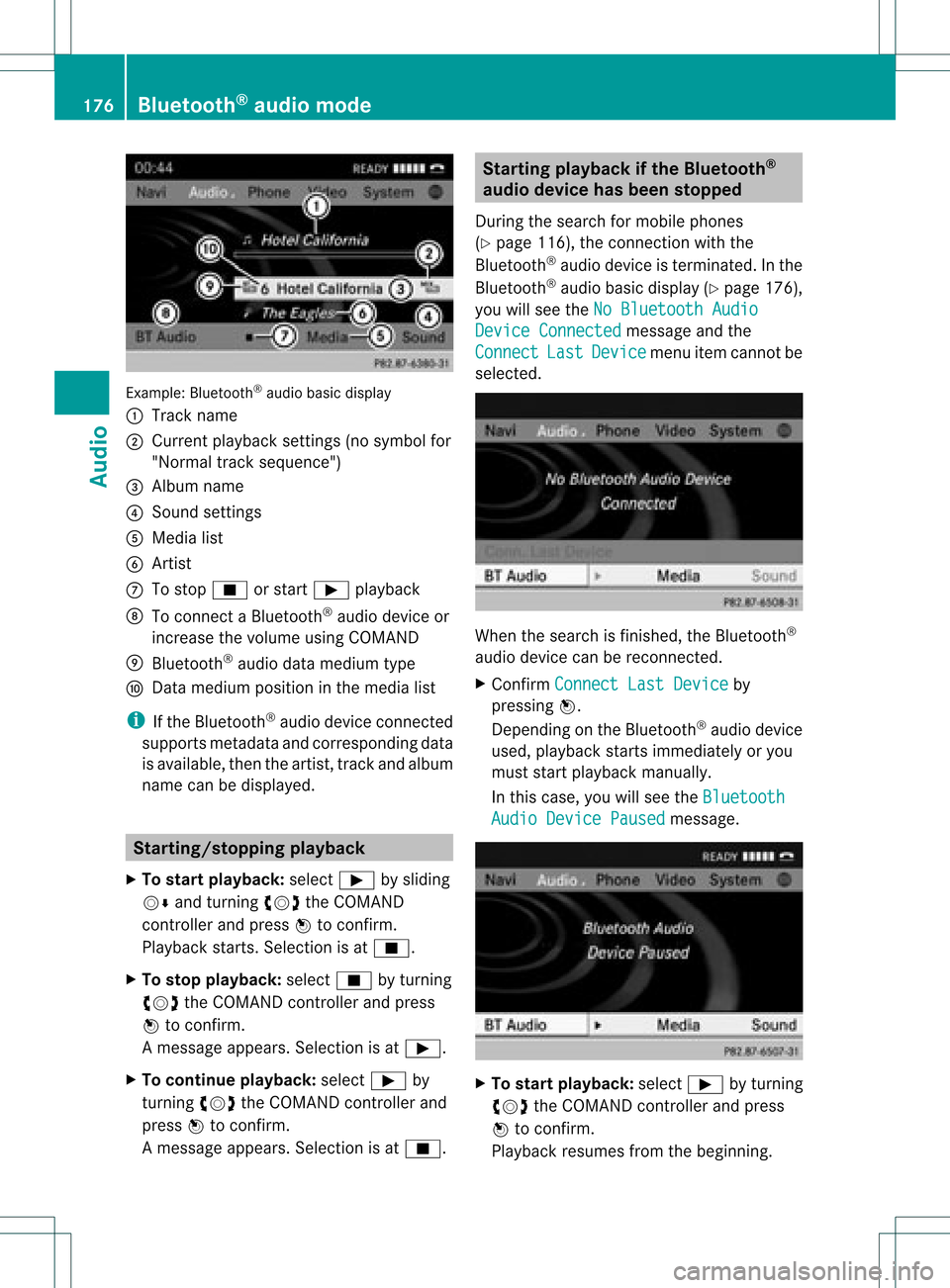
Exam
ple: Blu etoo th®
au dio ba sicd isplay
: Track name
; Curren tplayback settings (no symbol for
"Norm altrack sequen ce")
= Album name
? Soun dset tings
A Media list
B Artis t
C Tostop É orstart Ì playback
D Tocon necta Bluet ooth®
audio deviceor
inc rease thevolume usingCOMA ND
E Bluet ooth®
audio datamedium type
F Datamedium positioninthe media list
i Ifthe Bluet ooth®
audio devicecon nected
support smet adata andcorrespo ndingdata
is available, thenthe artist, trackandalbu m
name canbedispla yed. Star
ting/stopping playback
X To star tplayback: selectÌbysliding
VÆ andturning cVdtheCOMAND
cont roller andpress Wtoconfirm .
Play back starts. Selection isat É.
X To stop playback: selectÉbyturning
cVd theCOMAND controller andpress
W toconfirm .
Am essage appears. Selectionisat Ì.
X To continue playback:select Ìby
turn ingcVd theCOMAND controller and
press Wtocon firm.
Am essage appears. Selectionisat É. Sta
rting playba ckifthe Bluet ooth®
aud iodevice hasbeen stopp ed
Durin gthe search formobile phones
(Y page 116),the connection with the
Bluetoot h®
audio device isterm inated. Inthe
Bluetoot h®
audio basicdisplay (Ypage 176),
you willsee theNoBluetoo thAudio Device
Connected message
andthe
Connect Last Device menu
itemcannotbe
select ed. When
thesearch isfinished, theBluetoot h®
audio device canberecon nected.
X Confirm Connect LastDevice by
pressing W.
Depen dingonthe Bluetoot h®
audio device
used, playback startsimmediately oryou
must startplayback manually.
In this case, youwillsee theBluetoo th Audio
Device Paused message.
X
To star tplayba ck:select Ìbyturn ing
cVd theCOMAND controller andpress
W tocon firm.
Playback resumesfromthebeginn ing. 176
Bluetooth®
aud iomod eAudio
Page 179 of 234
Selec
tingatrac k
Th isfunctio nisnot supported byall
Bluetooth ®
audi odevices.
X To skip forwards orbackwards toa
tra ck: press theE orF button on
COMAND.
or
X Press the9 or: button brieflyon
the multifunction steeringwheel.
X Rapid scroll: pressandhold the9
or : button onthe multifunction
steering wheeluntilthedesired trackis
reached.
If you hold down the9 or: button,
the system runsthrough thelistmore
quickly. Selec
tingplayback options
If the Bluetooth ®
audi odevice supports the
corresponding function,the followi ngoptions
are avail able:
R Normal TrackSequence The
tracks areplay edinthe normal order
(e.g. track 1,2,3, etc. ).
Audio dataplayback isdetermined bythe
order inwhich thetracks arewritten tothe
data carrier. Alphabetical orderisthe most
common. Onceallthe tracks inafolder
have been played,the tracks inthe next
folder areplay ed.
R Random Tracks All
the tracks onthe medium areplay edin
random order(e.g.track 3,8, 5etc. ). X
Select BT Audio by
sliding VÆandturning
cVd theCOMAND controller andpress
W toconfirm.
The #dot indicates theoption selected.
X Select theoption byturning cVdthe
COMAND controller andpress Wto
confirm.
If you select Random Tracks ,
you willsee
a corresponding symbolinthe displa y/
selection window. Adjusting
thesound settings
The sound settings aredescribed usingradio
mode asan example inthe "Basic function s
of COMAND" section(Ypage 34). Increasin
gthe volume usingCOMAND
X Select BT Audio by
sliding VÆandturning
cVd theCOMAND controller andpress
W toconfirm.
X Select Volume and
press Wtoconfirm.
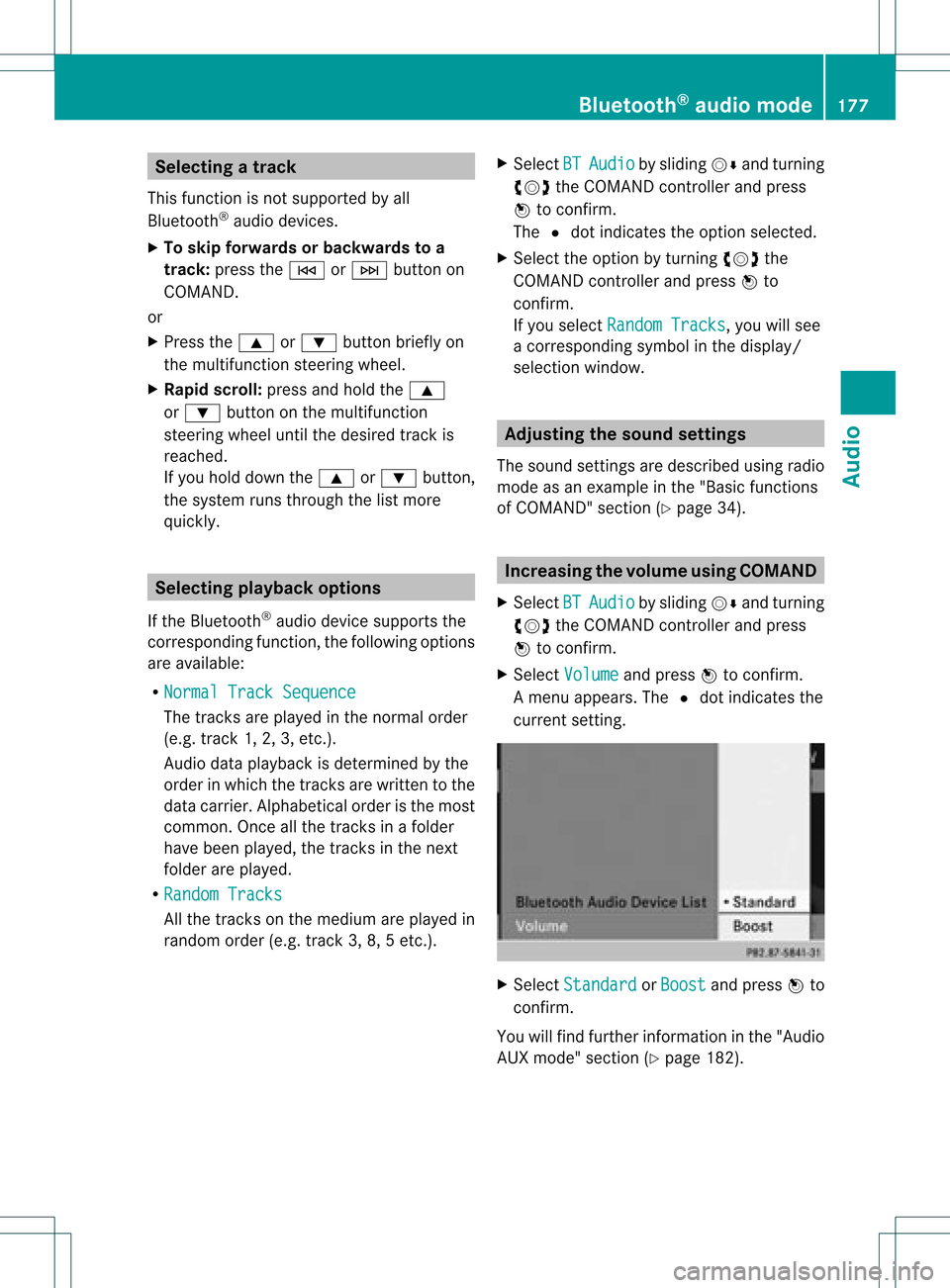
Am enu appears. The#dot indicat esthe
curren tsett ing. X
Select Standar d or
Boost and
press Wto
con firm.
You willfind furth erinfor mation inthe "Audio
AUX mode" section(Ypage 182). Bluet
ooth®
aud iomod e177Audio Z
Page 180 of 234
Media
Interface mode Co
nne ctio noption s
Overvi ew The
connection socketsareloca tedinthe
stowa gecompartme ntinthe center console.
Device-spe cificadapter cables,inclu dedwith
the Medi aInterface, arerequ iredtoconnect
external devicestothe Medi aInterface.
i Store individualparts inas afe plac e.
On lyuse genuine Mercedes-Ben z
co nn ect ion cabl es.
You canconn ect thefoll owin gdat amedi ato
COMA NDviatheMedia Inte rface:
R iPod ®
R cer tain MP3 player s
i iPod ®
is areg istere dtrademar kofApple
Inc .,Cupertino ,California, USA.
Supp orted devices For
details andalist ofsupported devices,
visit http://www .mbusa- mobile.com.
Alt ernat ively, calltheMercede s-Benz
Customer AssistanceCente rat
1-800-FOR-MERC edes(1-800-367-6372)
(for USA) orCu stomer Relatio nsat
1-800-387-0100 (forCanada ). Co
nne ctin gan exte rnal device
i Donot leaveexternal devicesinthe
vehi cle,astheir correct function cannotbe
gua ranteed ifthey aresubjected to
extreme temperatures,e.g.from expos ure
to dire ctsunl ight orvery lowoutsi de
tempera tures(seetheoper ating
instructio nsofthe respe ctivedevice).
Merced es-Benz USA,LLCaccep tsno
lia bil ity for dam agetoexternal devices.
Never connect morethanonedeviceata
time. Youwillotherw isenot beableto pla y
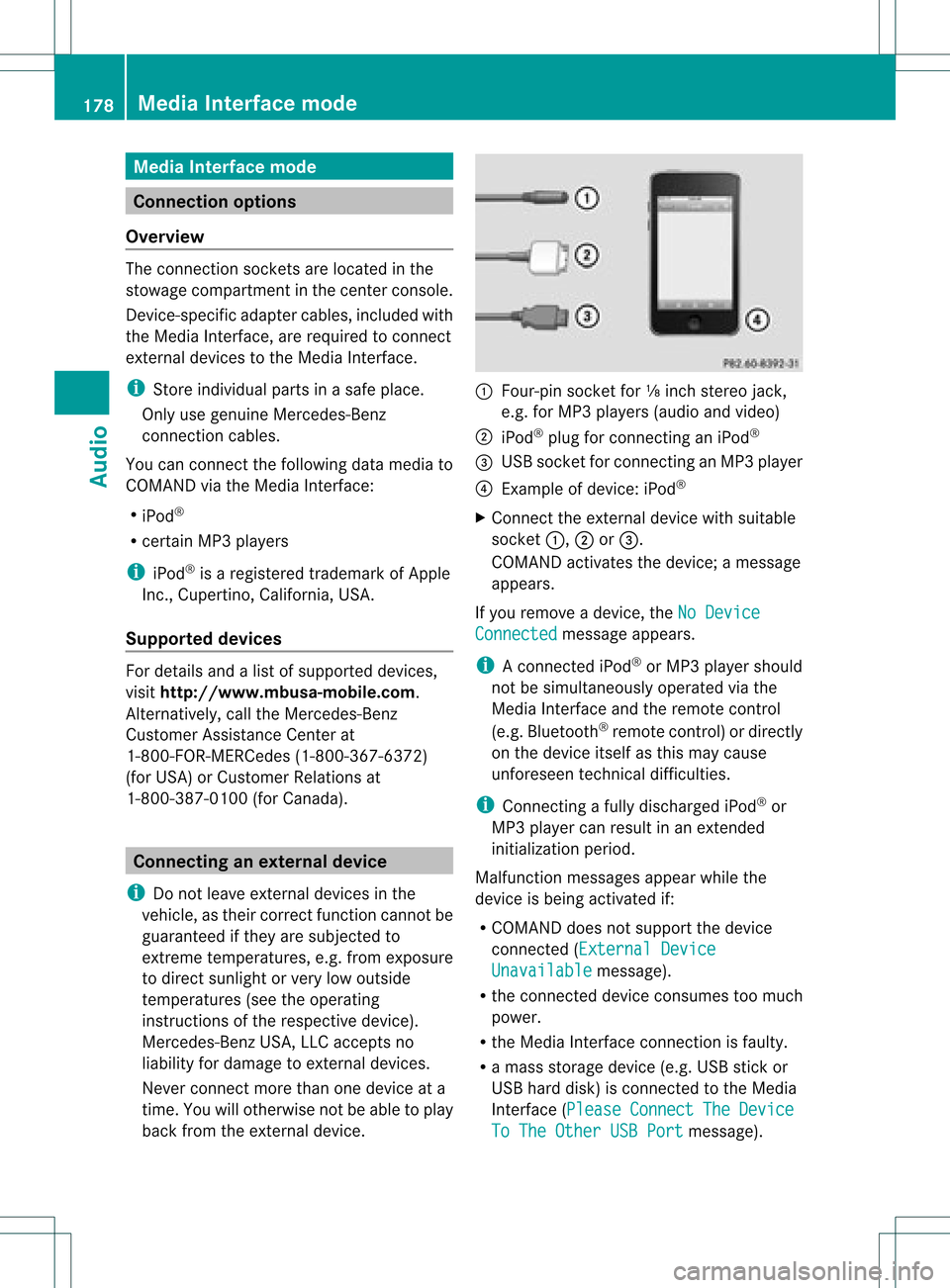
back fromtheexternal device. :
Four-p insocket for⅛inch stereo jack,
e.g. forMP3 players (audi oand video)
; iPod®
plu gfor connecting aniPo d®
= USB socket forconnecting anMP3 player
? Exampl eof devi ce:iPod®
X Connect theexternal devicewith sui tabl e
socket :,;or=.
COM AND activa testhe devi ce;amessa ge
app ears .
If you remove adevi ce,the NoDevice Connec
ted messa
geapp ears .
i Aconnected iPod®
or MP3 players hould
not besimultaneously operatedviathe
Media Interface andtheremote control
(e.g. Bluetooth ®
remote control)ordirectly
on the device itselfasthis may cause
unforeseen technicaldifficulties.
i Connect ingafully discharged iPod®
or
MP3 playercan result inan exten ded
initialization period.
Malfunction messagesappearwhile the
device isbeing activated if:
R COMAND doesnotsupport thedevice
conn ected (External Device Unavailable message).
R the conn ected device consumes toomuch
power.
R the Media Interface connection isfaulty.
R amass storage device(e.g.USBstick or
USB hard disk) isconn ected tothe Media
Int erface (Please Connect The Device
To
The Other USBPort message).178
Media
Interface modeAudio
Page 181 of 234
i
The separate USBconn ection ensures
quick access andexpanded mediacontent
options.
i Consult anauthorized Mercedes-Benz
Center ifyou have further questions. Switching
toMedia Interfa cemode
General information In
extr eme cases, startingupindividual
funct ionscantake uptoseveral minutes –
this depends onthe exter naldevice andits
cont ent(e.g. video podcasts).
Only usetheoriginal software tosave fileson
iPods orMP3 players. Otherwise, someorall
funct ionsmay notbeavailab le.
Option 1 X
Connec tan exter naldevice (Ypage 178).
COMAND activatesthe device. Thebasic
display thenappears.
Option 2 The
exter naldevice isconn ected tothe Media
Int erface.
X Press theh functionbutton oneormore
times.
By pressing thefunct ionbutton repeatedly,
you can change theoperating modeinthe
following order:
R audio CD/DVD/MP3 (disc)
R memory cardmode
R MUSIC REGISTE R
R USB storage device
R Media Interface oraudio AUXmode
R Bluetoot h®
audio mode
Option 3 X
Press thei number button.
This selects theconn ected externalaudio
device directly. Option
4 X
In the media list(Ypage 159), select the
ent ryat position 0by turnin gcVd the
COMAND controller andpress Wto
conf irm.
COMAND activatesthe conn ected device.
You willsee amessage tothis effect .The
basic displa ythen appea rs.
If no device isconn ected, youwillsee the
Media Int. entr
yinstead ofadevice
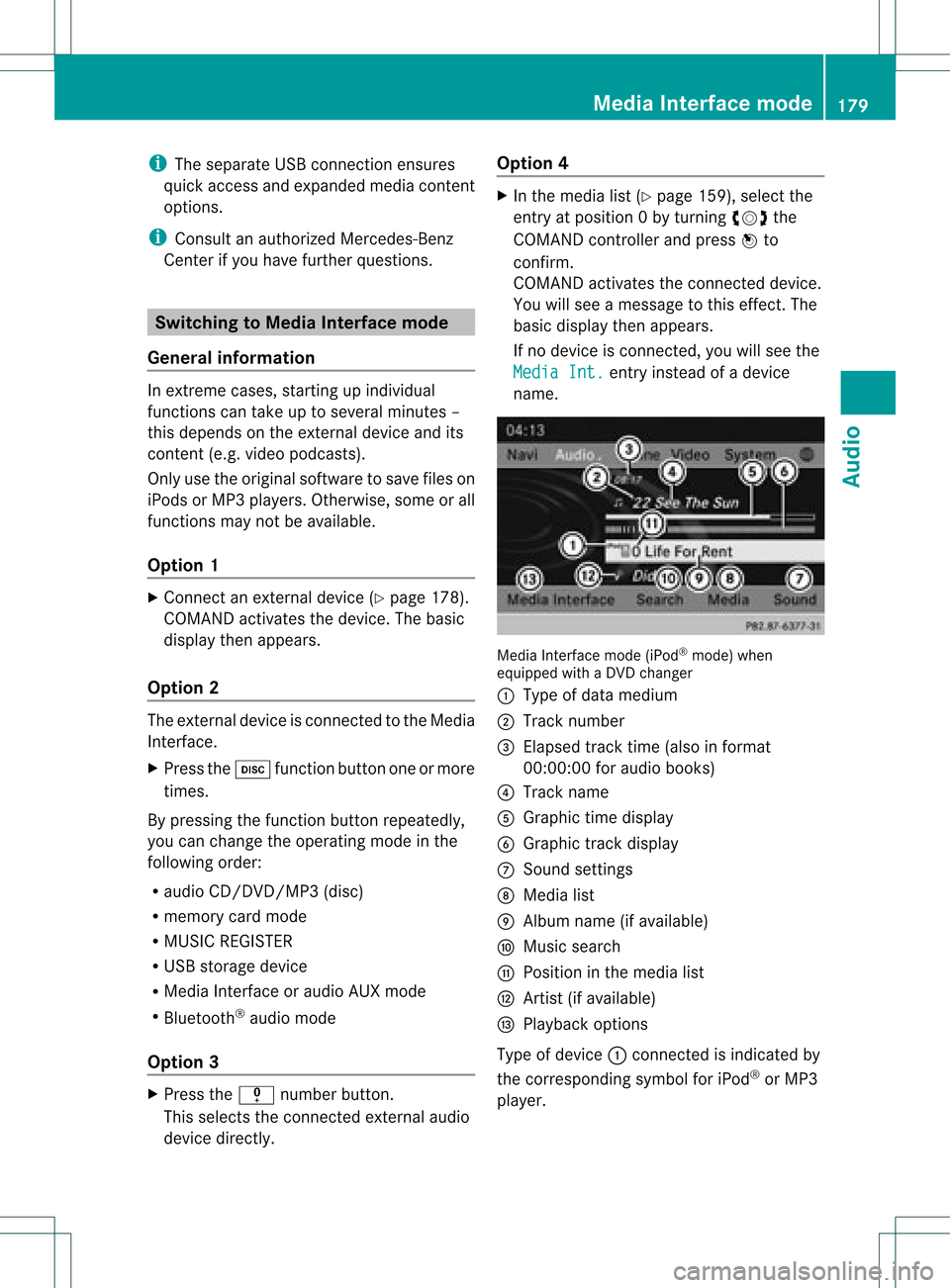
name. Media
Interface mode (iPod®
mode) when
equippe dwith aDVD changer
: Type ofdata medium
; Track number
= Elapsed tracktime(also informat
00:0 0:00 foraudi obooks)
? Track name
A Graphic timedispla y
B Graphic trackdispla y
C Sound settings
D Media list
E Album name(ifavaila ble)
F Music search
G Position inthe media list
H Artist (ifavaila ble)
I Play back options
Type ofdevice :conn ected isindicated by
the corresponding symbolforiPod ®
or MP3
play er. Media
Interface mode
179Audio Z
Page 182 of 234
The
curren tplayback option (Ypage 163)is
shown withasymbol behindalbum name
E (no display forNorm al Trac
k Sequ
ence ).
i Ifthe devic econ nected does notcontain
any playable track s,amess ageappears to
this effect . Selecting
music files
Not e COMA
NDdisplays thedata stored onthe
iPod ®
or MP3 player accordin gtothe filing
struct ureused inthe respect ivemedium.
Selecting byskipping toatrac k X
To ski pfo rwa rdsorbac kto atrac k:tur n
cVd theCOMAND controllerwh en the
di sp lay/ selectio nwindow isact ive.
or
X Press theE orF button.
The skip forward function skipsto the next
tr ack .The skip back function skipsto the
begin ningof the curr enttrack ifthe track
has been playing formor ethan eight
seco nds.Ift he track hasbeen playingfor
less than eight seconds, itskips tothe start
of the previous track.Ify ou have selected
a playb ackoption otherthanNormal Track
Sequence ,
the track sequence is
random.
Selecting usingthenumber keypad X
To mak eane ntr y:press thel button .
An input menu appears. Thenumber of
charact ersavailable forinput depends on
the number ofstor edtrac ks.
X To enter atr ack number :press anumber
key, e.g.q.
The digit isent ered inthe first position in
the input line.
i COMAND willignore andnotdisplay an
invalid digit. X
En ter more numbers ifdesired.
The trackplays afterthe last possible
numb erisent ered.
i Press ingand holdin ganumb erkey for
mor ethan twoseco ndscom plete sthe
ent ry,and thecorrespo ndingtrack is
played.
Fast forwar ding/r ewinding X
While thedisplay/s electionwindow is
act ive, slide XVY andhold theCOMA ND
con troller untilthe desire dposition has
been reached.
or
X Press andhold theF orE button
until thedesired position isreached.
i OnaniPod ®
/iPhone ®
,fast rewind only
funct ionswithin thecurrent track. Selecting
acatego ry/play list/fo lder
Ove rview iPo
d®
and certain MP3playe rs
For aniPo d®
or MP3 player,you can select
tracks using catego riesorfold ers.
Depend ingonthe devi ceconnected, the
foll owi ngcatego riesmay beava ilable ,for
examp le:
R Curre ntTrack list R
Playl ists (e.g.
All )
R Artis ts R
Album s R
Track s R
Podca sts R
Genre s R
Compo sers R
Audio books i
Some playback catego riescontain the
entry All .I
ft his entr yhas been selected,
the entire contentofthe category selected
will beplay ed. 180
Media
Interface modeAudio
Page 183 of 234
Callin
gup acatego rylist X
Sele ctSearc h in
the basicdis pla yby
sli ding VÆandturning cVdtheCOM AND
controll erand pres sW toconfirm.
The catego rylista ppears.
i The Search menu
itemisnot available
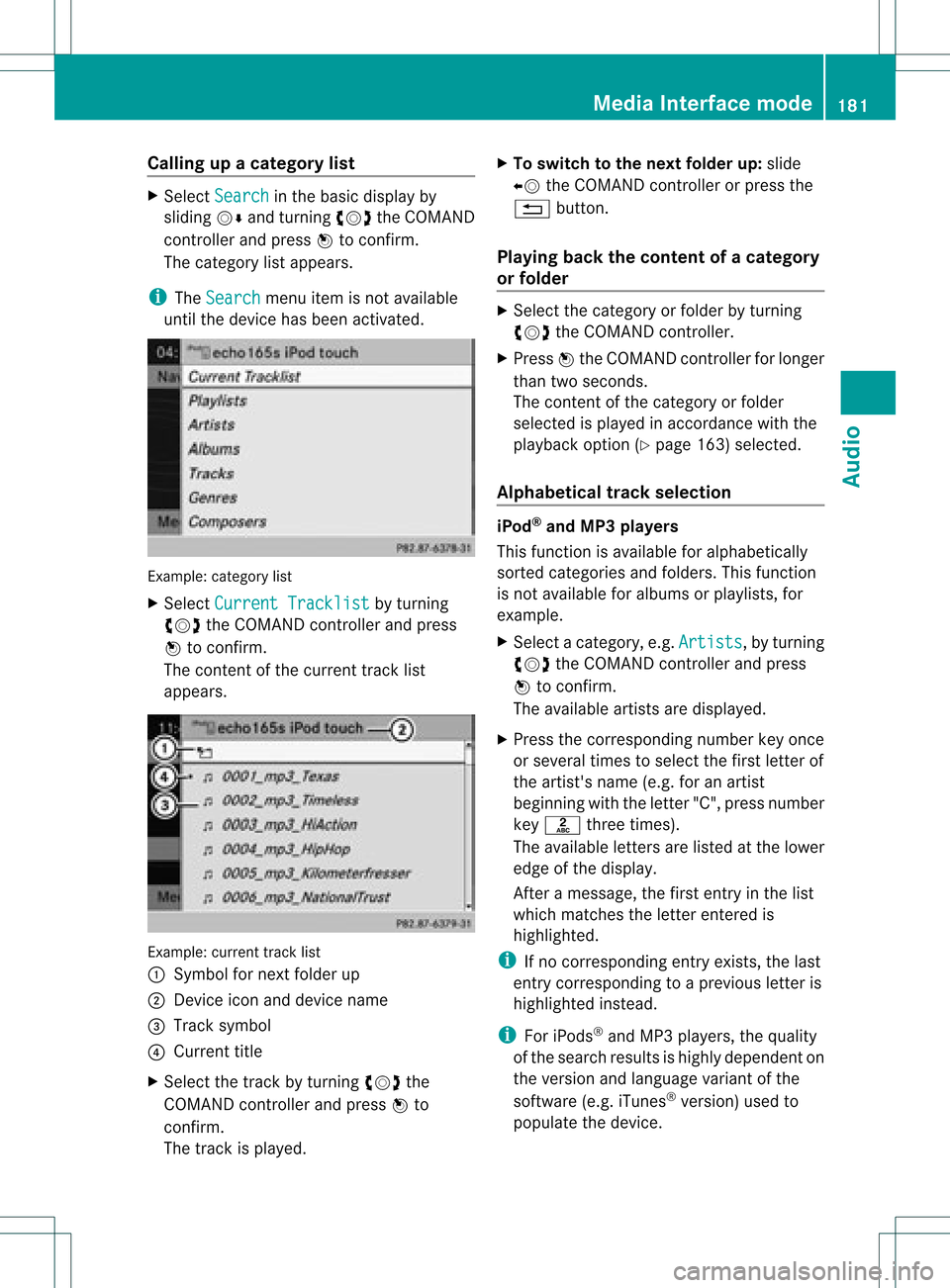
until thedevice hasbeen activated. Ex
ample: categorylist
X Select Curren tTrackl ist by
turn ing
cVd theCOMAND controller and press
W tocon firm.
The contentof the curren ttrac klist
appears. Ex
ample: currenttrac klist
: Symbol fornex tfolder up
; Devic eicon anddevice name
= Track symbol
? Current title
X Select thetrac kby turn ingcVd the
COMAND controller and press Wto
con firm.
The trackisplay ed. X
To switch tothe next folder up:slide
XV theCOMAND controller orpress the
% button.
Playing backthecontent ofacategory
or folder X
Select thecategory orfolder byturning
cVd theCOMAND controller.
X Press Wthe COMAND controller forlonger
than twoseconds.
The cont entofthe category orfolder
selected isplay edinaccordance withthe
play back option (Ypage 163)selected.
Alphabetical track sele ction iPod
®
and MP3 players
This function isavail able foralpha betically
sorted categories andfolders. Thisfunction
is not avail able foralbu msorplay lists, for
example.
X Select acategory, e.g.Artists ,
by turning
cVd theCOMAND controller andpress
W toconfirm.
The avail able artists aredispla yed.
X Press thecorresponding numberkeyonce
or several timestoselect thefirst letter of
the artist's name(e.g.foranartist
beginning withtheletter "C",press number
key l three times).
The avail able letters arelisted atthe lower
edge ofthe displa y.
Aft eramessage, thefirst entry inthe list
which matches theletter entered is
highlig hted.
i Ifno corresponding entryexists, thelast
entry corresponding toap reviou sletter is
high lighted instead .
i For iPod s®
and MP3 players ,the quality
of the search resultsishigh lydepe ndent on
the versio nand langu ageva ria nt ofthe
sof twa re(e.g. iTune s®
ver sion) used to
po pulate the devic e. Me
dia Interfac emode
181Au dio Z
Page 184 of 234
If
different sortingrulesare defined (e.g.in
iTu nes ®
), the search iscanceled without
any resul t. Playbac
koptio ns
The followi ng opti ons areavailab le:
R Nor mal TrackSequence Norm
altrack sequence: youhea rthe
track sin their normal order(e.g.numerical
or alpha betical).
R Random Medium All
the track son the medium areplay edin
random order.
R Random TrackList The
track sin the current lyactive category
or folder, including anysubfolders, are
play edinrandom order.
i For MP3 players, therandom playlists
offer amaximum of300 track schosen at
random.
X To selec ta playback option:select
Media Interface in
the basic displa yby
sliding VÆandturning cVdtheCOMAND
cont roller andpress Wtoconfirm .
The options listappea rs.The #dot
indicates theoption selected.
X Select anoption andpress Wtoconfirm . MP3
player instructions
Data forma ts MP3
andWMA aresupported asdata formats
with fixed andvariable bitrates (upto
320 kbits/s ).
Special considerationswhen using MP3
players Up
toeight directory levelswithupto1000
track sper directory aresupported.
Do not use USB exten sionleads oradapters.
They canimpair functionality. i
DRM (Digital RightsManagement)
protect edfiles arenot supported bythe
Media Interface. Audio
AUXmode Notes
onaudio AUXmode
You canconn ectanextern alaudi osource
(AUX) toCOMAND. Thesocket forthis is
located inthe glove box.
If COMAND isequipp edwith aMedia
Int erface, externalaudi osources are
conn ected usingthecorresponding cableset.
An AUX socket isnot provided. The
conn ections forthe Media Interface are
located inthe stowage compartmen tint he
cent erconsole.
i You willfind further information onlineat
htt <0010002C002100210017001700170020000D00020015001300010024000D000F
00020009000C000500200003000F000DH.O rcall
th eMer cedes-Ben zCust ome rAssistance
Center at1-80 0-FOR-ME RCedes
(1-800 -367-6372)(for theUSA) or
Customer Relations at1-80 0-387-0100
(for Canada ). Activating
audioAUXmode
When youconn ectanextern alaudi osource,
audi oAUX isnot selected automaticall y.
X Select Audio in
the main function barby
sliding ZVandturning cVdtheCOMAND
cont roller andpress Wtoconfirm.
If AUX mode wasthelast mode selected, it
will now beactive.
If another audiosource isswitched on,you
can now switch toaudi oAUX mode inthe
audi omenu.
X Select Audio using
ZVandpress Wto
confirm.
The audi omenu appears. 182
Audio
AUXmodeAudio
Page 185 of 234
X
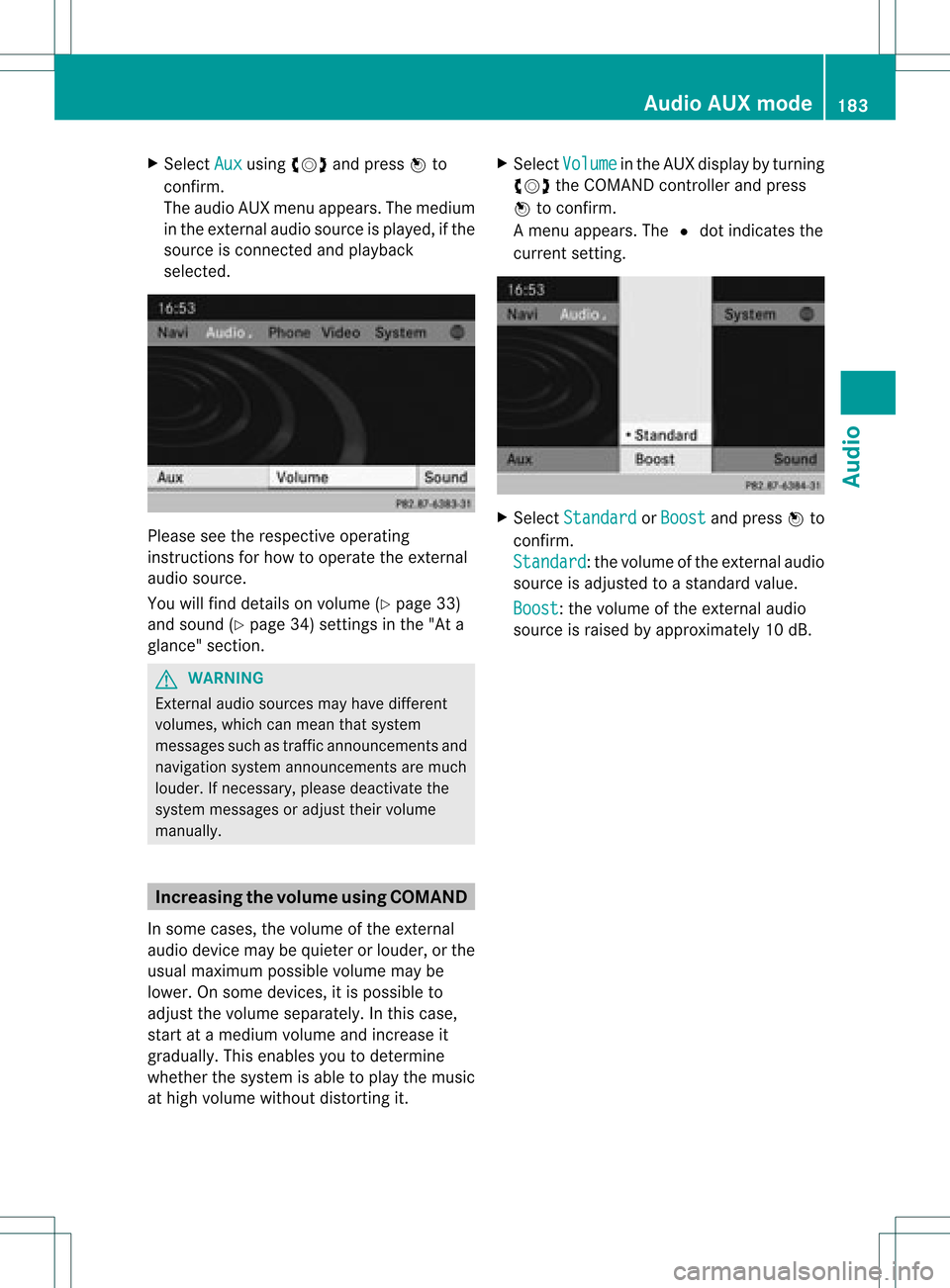
Sel ect Aux us
ing cVd andpressW to
confi rm.
The audioAUX menu appe ars .The medium
in the extern alaudi osource isplay ed,ifthe
source isconn ected andplayback
selected. Please
seetherespective operating
instruct ionsforhow tooperate theextern al
audi osource.
You willfind details onvolume (Ypage 33)
and sound (Ypage 34)settin gsinthe "Ata
glance" section. G
WARNING
Ext ernal audiosources mayhave different
volumes, whichcanmean thatsystem
messages suchastraffic announcemen tsand
navigation systemannouncemen tsare much
louder. Ifnecessary, pleasedeactivate the
system messages oradjust theirvolume
manually . Increasing
thevolume usingCOMAND
In some cases, thevolume ofthe extern al
audi odevice maybequieter orlouder, orthe
usua lmaximum possiblevolumemaybe
lower. Onsome devices, itis possible to
adjust thevolume separately. Inthis case,
start atamedium volumeandincrease it
gradua lly.This enables youtodetermine
whether thesystem isable toplay themusic
at high volume without distorting it. X
Select Volume in
the AUX displa yby turning
cVd theCOMAND controller andpress
W toconfirm .
Am enu appears. The#dot indicat esthe
curren tsett ing. X
Select Standar d or
Boost and
press Wto
con firm.
Standar d :t
he volume ofthe extern alaudi o
source isadjusted toastandard value.
Boost :t
he volume ofthe extern alaudi o
source israised byapproximately 10dB. Audio
AUXmode
183Audio Z
Page 188 of 234
COMAN
Dfea tures
Thes eOper atingIn st ruc tions desc ribeall
st andar dand optionalequipm enta vail able
for you rCOMAND systematthe time of
purcha se.Cou ntry-specifi cdeviation sare
possible. Pleasenotethat your COMAND
system maynotbeequipped withallthe
features described. General
information Autom
aticpictu reshut off
The video image isonly displayed ifthe
select orlever ofthe tran smission isin
position P.
If the select orlever ofthe tran smission is
changed fromposition P,the In order not
to
distrac tyou from thetraffic situati
on, the picture is faded out
while
thevehicle isinmotion. message
appears
As soon asthe select orlever ofthe
tran smission isreturn edtoposition P,the
video image isshown. Basic
settings Pictur
esettings
Adju sting thebright ness,contra stor
color X
Press Wthe COMAND controller toshow
the menu.
X Select DVD-Vid eo by
sliding VÆand
turn ingcVd theCOMAND controller and
press Wtocon firm.
Am enu appears.
X Select Brightn ess ,
Contras t or
Color by
turn ingcVd theCOMAND controller and
press Wtocon firm. Changing
thepictu reform at X
Press Wthe COMAND controller toshow
the menu.
X Select DVD-Vid eo by
sliding VÆand
turn ingcVd theCOMAND controller and
press Wtocon firm.
Am enu appears.
X Select 16:9Optimiz ed ,
4:3 or
Widescr een and
press Wtocon firm.
The dotinfron tof the entryindicat esthe
curren tlyselect edformat .
X Select asett ingbyturn ingcVd the
COMAND controller andpress Wto
con firm. Video
DVDmode Safet
ynotes G
WARN
ING
COMAND isclassified asaClass 1laser
prod uct.You must notopen thecasing. Ifyou
open thecasing, orifthe casing isfaulty or
damaged, thereisarisk ofexposure to
invisible laserradiation. Thismay damage
your eyes, orthose ofothers.
COMAND doesnotcont ainany parts thatcan
be serviced bythe user. Forsafety reasons,
all mainten ancework must becarried outby
quali fiedaftersales technicians. G
WARNING
Only when thevehicle isstation aryshould
you:
R load adisc
R eject adisc
There isarisk ofbeing distract edfrom the
road andtraffic conditionsifthis isdone while
the vehicle isin motion . 186
Video
DVDmodeVideo