C 20 seconds MERCEDES-BENZ E-Class 2012 W212 Comand Manual
[x] Cancel search | Manufacturer: MERCEDES-BENZ, Model Year: 2012, Model line: E-Class, Model: MERCEDES-BENZ E-Class 2012 W212Pages: 234, PDF Size: 6.74 MB
Page 38 of 234
X
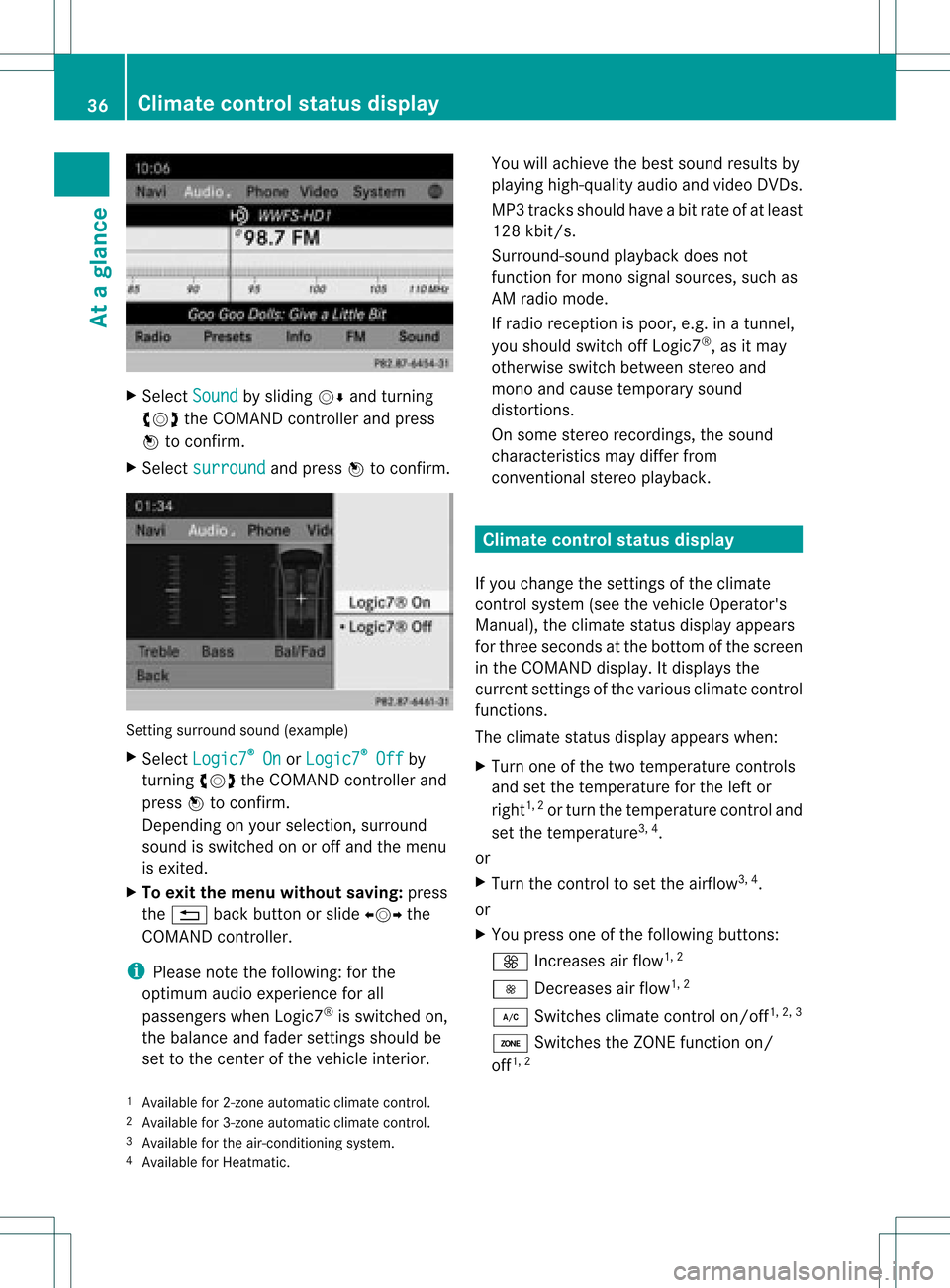
Sel ect Sound by
sliding VÆ andturni ng
cVd theCOMAND controllerand press
W toconfi rm.
X Sel ect surround and
pressW toconfi rm. Setting
surrou ndsou nd(examp le)
X Sel ect Logic7 ®
On or
Log ic7 ®
Off by
turni ngcVd theCOMAND controllerand
pre ssW toconfi rm.
Depe nding on your sel ecti on, surrou nd
sou ndissw itche don oroff and themenu
is exi ted.
X To exitthe men uwi thout saving:pre ss
the % back button orslide XVY the
CO MAND controller.
i Plea se note thefollowi ng: forthe
opti mum audio expe rience forall
pa sse nger swh en Log ic7®
is sw itche don,
the balance and fadersetti ngsshould be
set tothe center ofthe vehicleinter ior. Yo
uwi llach ieve the best sou ndresults by
pl ay ing high-q uality audio and video DVDs.
MP3 tracks shouldha ve ab itrat eof at least
128 kbit/s.
Surr ound- soundplayback doesnot
func tion formon osign alsourc es,such as
AM radio mode.
If radio receptio nispoor, e.g.inatunnel,
you should switchoffLogic7 ®
,as itmay
otherwise switchbetween stereoand
mono andcause temporary sound
distortions.
On some stereo recordings, thesound
characteristics maydiffer from
conven tionalstereo playback. Climate
controlstatusdisplay
If you change thesettings ofthe climate
cont rolsystem (seethevehicle Operator's
Manual ),the climate statusdisplayappea rs
for three seconds atthe bottom ofthe screen
in the COMAND display.Itdispla ysthe
current settings ofthe various climate control
function s.
The climate statusdisplayappea rswhen:
X Turn oneofthe two temperature controls
and setthe temperature forthe left or
right 1,
2
or turn thetemperature controland
set the temperature 3,
4
.
or
X Turn thecont roltoset the airflow 3,
4
.
or
X You press oneofthe followi ngbuttons:
K Increases airflow 1,
2
I Decreases airflow 1,
2
¿ Switches climatecontrolon/off 1,
2, 3
á Switches theZONE function on/
off 1,
2
1 Available for2-zon eautomatic climatecontrol.
2 Available for3-zon eautomatic climatecontrol.
3 Available forthe air-conditioning system.
4 Available forHeatmatic. 36
Cli
mat econ trol stat usdisplayAt aglanc e
Page 76 of 234
X
To del ete acate gory: select Delete and
pre ssW toconfi rm.
Ap rompt appears asking whethe rthe
category shouldbedeleted.
i Ifyou delete acategory, allpoints of
interest ofthis category arealso deleted.
X Select Yes and
press Wtoconfirm .
If you select Yes ,
the category willbe
deleted.
If you select No ,
the process willbe
canceled.
Managing personalpointsofinterest X
Select Manage Personal POIs in
the
menu andpress Wtoconfirm .
X Select NotClassified ,
COMAND or
your
own category andpress Wtoconfirm .
X Select apersonal pointofinterest and
press Wtoconfirm .
The personal pointofinterest isdispla yed.
The following functionsaredescribed inthe
"Select asdestination" section
(Y page 75):
R renaming
R changing thecategory
R deleting Saving
personal pointsofinterest
There arethree waysto save personal points
of interest .You must insert anSD memory
card todo so. The No Memory Card message
otherwise appears.
i Personal pointsofinterest androutes are
written tothe memory cardinadata format
based uponopenformat GPX(GPS
Exchange Format).Geodataissaved inthis
format. Option
1
X Insert theSDmemory card(Ypage 157).
X Hide themenu (Ypage 51)todispla ythe
map infull screen mode.
X Press Wthe COMAND controller forlonger
than twoseconds.
The current position ofthe vehicle issaved
as apersonal pointofinterest onthe SD
memory cardinthe "Unclassified"
category.
i The crosshair positionissaved while
scrolling themap (Ypage 61).
Option 2
X Insert theSDmemory card(Ypage 61).
X To show themenu: pressWthe COMAND
cont roller.
X Select Position in
the navigation system
menu barbyturning cVdtheCOMAND
cont roller andpress Wtoconfirm .
X Select SavePosition AsPersonal POI or
Save Crosshair Pos.As Personal
POI ("Move
map"function
active) andpress Wtoconfirm .
The listofpersonal categories appears.
X Select acategory andpress Wtoconfirm .
X Name forthe personal pointofinterest .
Proceed asdescribed under"Entering
characters" inthe "Ent ering characters in
the address andphone books" section
(Y page 31).
Option 3
X Insert theSDmemory card(Ypage 157).
X Select Save from
theaddress entrymenu
and press Wtoconfirm .
X Select SaveAsPersonal POI and
press
W toconfirm .
X Select acategory.
X Ent erthe name.
The current address issaved asapersonal
point ofinterest onthe SDmemory card. 74
Personal
pointsofinterestNavigat ion
Page 124 of 234
Redi
aling On
COMAND
X Ca llup the telepho nebasic menu
(Y page 119).
X Sel ect °inthe characte rba rand press
W toconfi rm.
or
X Ifthe telepho nebasic menu isdispl ayed,
pre ssthe 6 button inCO MAND.
In both cases, the callsdialed list appea rs.
The most recentlydialed numb erisat the
top.
X To select ac all: turn cVd theCOM AND
controll er.
X To conne ctthe call:press Wthe
COM AND controll er.
Co nne ctin gac all toan entry inac all list
or inthe COM AND phone book X
Open acall lista nd select anentry
(Y page 129) .
or
X Ca llup the COMAND phone book and
sel ect anentry (Ypage 126) .
X To conn ectac all:press Wthe COM AND
controlle ror the 6 button.
Making acal lvia spee ddial The
spee ddia llis tc ont ains stored phone
book entries(Ypage 131).
Option 1:
X Hold down oneofthe number keysfor
longer thantwoseconds.
Option 2:
X Call upthe telephone basicmenu
(Y page 119).
X Select CallLists by
sliding VÆand
turnin gcVd theCOMAND controller and
press Wtoconf irm.
The speed diallistappears. X
Select Speed DialPreset List by
turnin gcVd theCOMAND controller and
press Wtoconf irm.
The speed diallistappears.
X Select thestorage location andpress Wto
conf irm.
Irrespect iveofthe option chosen, the
telephone basicmenu appears and
display sthe selected entry.This initiates
dialing. Functions
availableduring acall
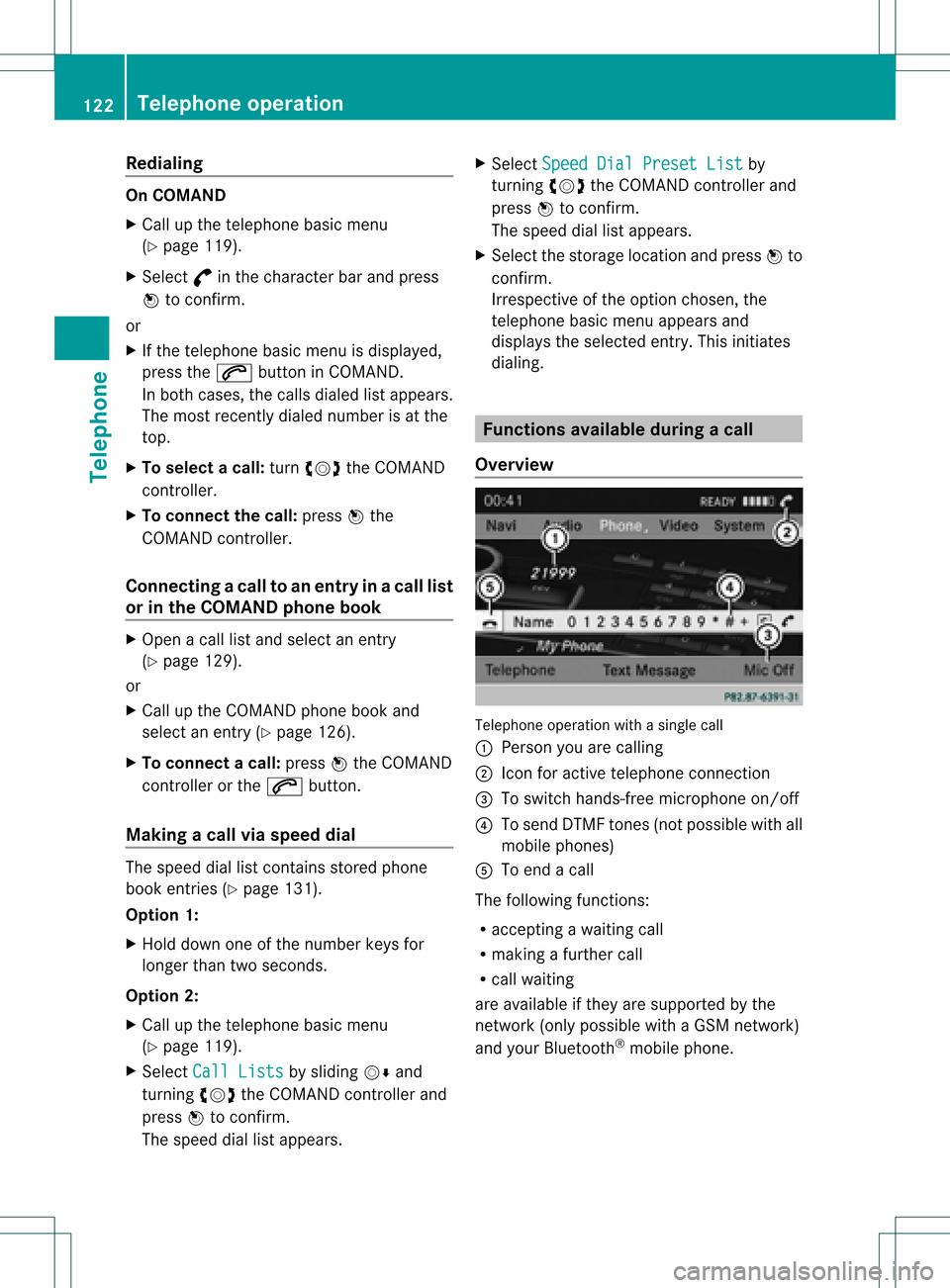
Ove rview Tel
epho neoper ationwithasing lecall
: Perso nyou are calling
; Icon foractive telephone connection
= Toswitch hands-fr eemicrophon eon/of f
? Tosend DTMF tones(not possible withall
mobile phones)
A Toend acall
The following functions:
R acceptin gawaiting call
R making afurther call
R call waiting
are availa bleifthey aresupported bythe
network (onlypossible withaGSM network )
and your Bluetooth ®
mobile phone. 122
Telephone
operationTelephone
Page 157 of 234
The
DVD changer loadsthedisc intothe
selected magazine tray.TheLoading disc
appears.
i Itmay take some timeforthe disc tobe
loaded, depending onthe type ofdisc. Ifno
disc isinsert edfor approximately 20
seconds, thedisplay returnstothe
magazine menu.
The DVD changer playsthedisc if:
R ithas been insert edcorrec tly.
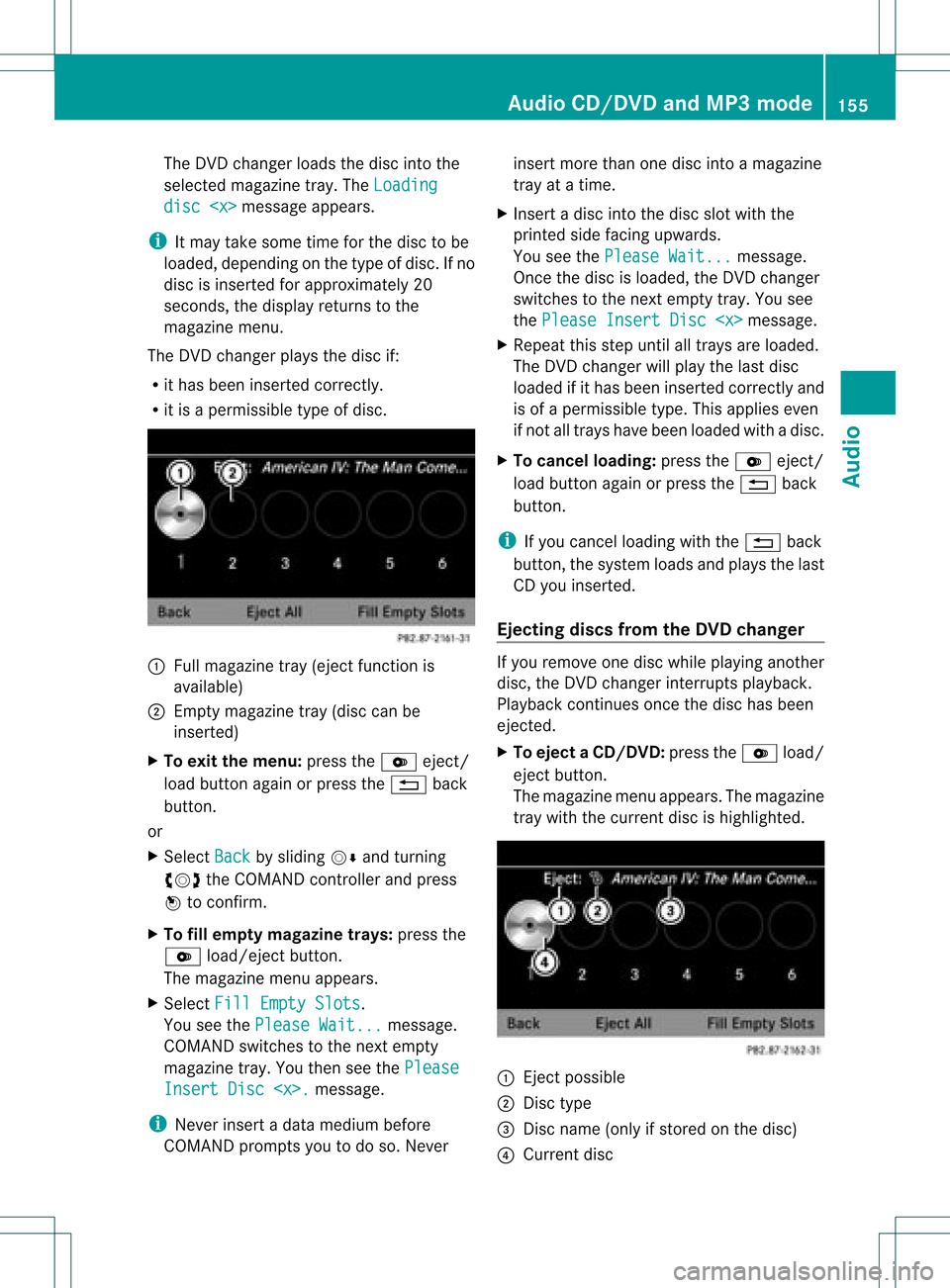
R itis apermissible typeofdisc. :
Full magazine tray(eject functionis
availa ble)
; Empt ymagazine tray(disc canbe
insert ed)
X To exit themenu: presstheV eject/
load button againorpress the% back
button .
or
X Select Back by
sliding VÆandturnin g
cVd theCOMAND controller andpress
W toconf irm.
X To fill empt ymagaz inetrays: press the
V load/eject button.
The magazine menuappears.
X Select FillEmpty Slots .
You seethePlease Wait... message.
COMAND switchestothe next empty
magazine tray.Youthen seethePlease Insert
Disc
i Never insertadata medium before
COMAND promptsyoutodo so. Never insert
morethanonedisc intoamagazine
tray atatime.
X Insert adisc intothedisc slotwith the
printed sidefacing upwards.
You seethePlease Wait... message.
Once thedisc isloaded, theDVD changer
switches tothe next empty tray.Yousee
the Please InsertDisc
X Repeat thisstep until alltrays areloaded.
The DVD changer willplay thelast disc
loaded ifit has been insert edcorrec tlyand
is of apermissible type.Thisapplies even
if not alltrays havebeen loaded withadisc.
X To cancel loading: presstheV eject/
load button againorpress the% back
button .
i Ifyou cancel loading withthe% back
button ,the system loadsandplays thelast
CD you insert ed.
Ejecting discsfromtheDVD changer If
you remove onedisc while playinganother
disc, theDVD changer interruptsplayb ack.
Playba ckcont inues oncethedisc hasbeen
eject ed.
X To eject aCD/DVD: presstheV load/
ej ec tbut ton.
The mag azine men uappea rs.T he magazine
tray with thecurrent discishighlighted. :
Ejec tpossible
; Disc type
= Disc name (onlyifstored onthe disc)
? Current disc Audio
CD/DVD andMP3 mode
155Audio Z
Page 162 of 234
Media
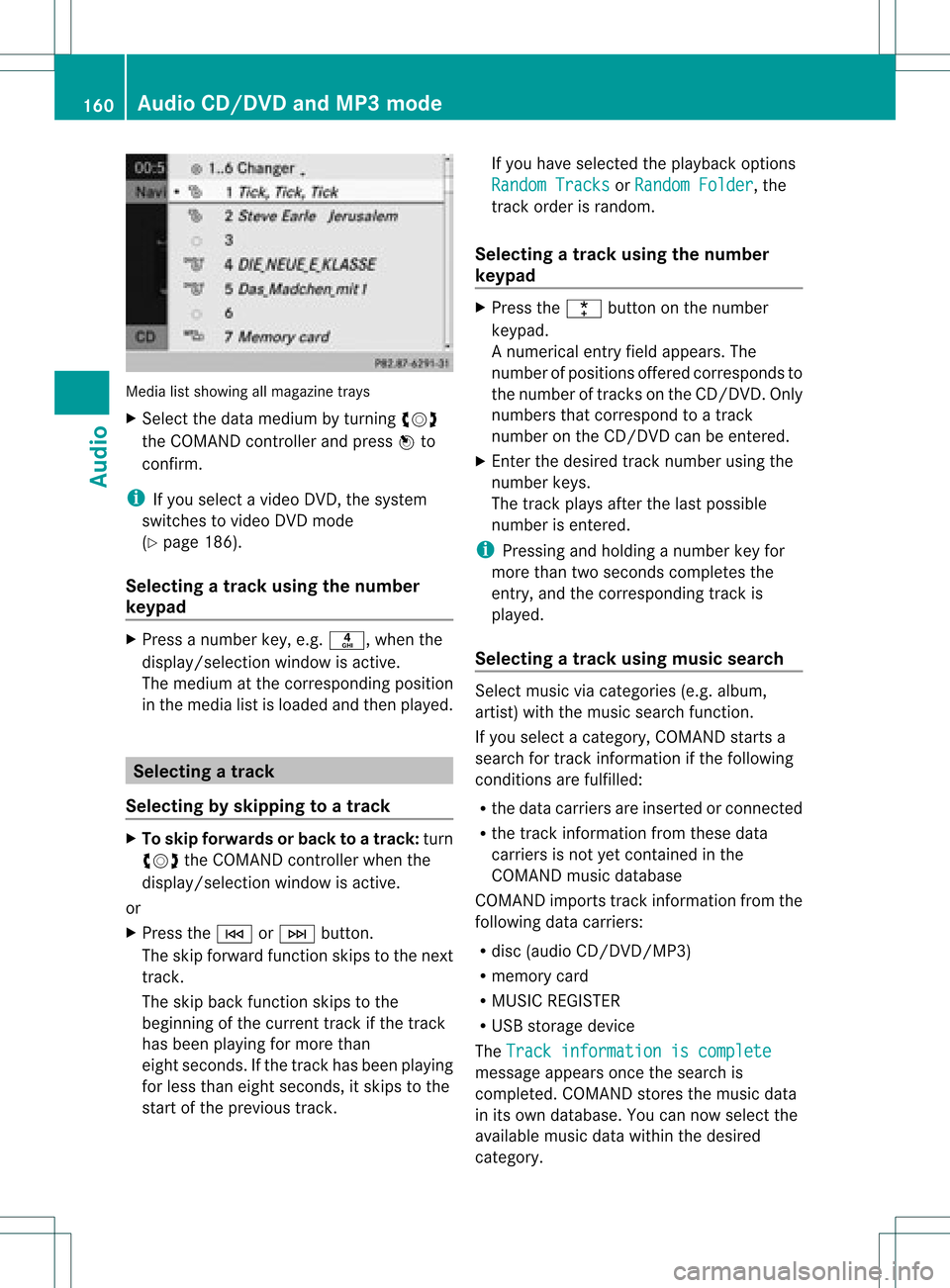
listshowing allmagazine trays
X Select thedata medium byturning cVd
the COMAND controller andpress Wto
confirm .
i Ifyou select avideo DVD,the system
switches tovideo DVDmode
(Y page 186).
Selec tingatrac kusing thenumber
keypa d X
Press anumber key,e.g.n, whenthe
<0004000900130010000C0001001A002200130005000C0005000300140009000F
000EV windowisactive.
The medium atthe corr espondin gposition
in the media listisloaded andthen played. Selecting
atrac k
Se lecti ng byskippin gto atrac k X
To ski pfo rwa rdsorbac kto atrac k:tur n
cVd theCOMAND controllerwh en the
di sp lay/ selectio nwindow isact ive.
or
X Press theE orF button.
The skip forward function skipsto the next
tr ack .
The skip back function skipsto the
begin ningof the curr enttrack ifthe track
has been playing formor ethan
eight seconds.Ift he track hasbeen playing
for less than eight seconds, itskips tothe
start ofthe previous track. If
you have selected theplay back options
Random Tracks or
Random Folder ,
the
track order israndom.
Selec tingatrac kusing thenumber
keypa d X
Press the¯ button onthe number
keypad.
An umer icalentry fiel dappear s.The
num berofposi tion soff ere dcorresponds to
the number oftrack sonthe CD/DV D.Onl y
num bers tha tcorr espond toatrac k
num beron the CD/DV Dcan beente red.
X Enter thedesired trac knum berus ing the
num berk eys.
The trackplays afterthe last possible
numb erisent ered.
i Press ingand holdin ganumb erkey for
mor ethan twoseco ndscom plete sthe
ent ry,and thecorrespo ndingtrack is
played.
Selecting atrac kusing music search Select
musicviacategor ies(e.g. album,
artist )with themusic search function.
If you select acategor y,COMAND startsa
search fortrac kinfor mation ifthe following
con ditions arefulfilled:
R the data carriers areinsert edorcon nect ed
R the trac kinfor mation fromthese data
carriers isnot yetcontained inthe
COMAND musicdatabase
COMAND importstrackinfor mation fromthe
following datacarriers:
R disc (audio CD/DVD/MP3)
R memory card
R MUSIC REGISTE R
R USB storage device
The Track informat ioniscomplete message
appearsoncethe search is
complet ed.COMAND storesthe music data
in its own database. Youcannow select the
available musicdatawithin thedesired
categor y. 160
Audio
CD/DVD andMP3 modeAudio
Page 182 of 234
The
curren tplayback option (Ypage 163)is
shown withasymbol behindalbum name
E (no display forNorm al Trac
k Sequ
ence ).
i Ifthe devic econ nected does notcontain
any playable track s,amess ageappears to
this effect . Selecting
music files
Not e COMA
NDdisplays thedata stored onthe
iPod ®
or MP3 player accordin gtothe filing
struct ureused inthe respect ivemedium.
Selecting byskipping toatrac k X
To ski pfo rwa rdsorbac kto atrac k:tur n
cVd theCOMAND controllerwh en the
di sp lay/ selectio nwindow isact ive.
or
X Press theE orF button.
The skip forward function skipsto the next
tr ack .The skip back function skipsto the
begin ningof the curr enttrack ifthe track
has been playing formor ethan eight
seco nds.Ift he track hasbeen playingfor
less than eight seconds, itskips tothe start
of the previous track.Ify ou have selected
a playb ackoption otherthanNormal Track
Sequence ,
the track sequence is
random.
Selecting usingthenumber keypad X
To mak eane ntr y:press thel button .
An input menu appears. Thenumber of
charact ersavailable forinput depends on
the number ofstor edtrac ks.
X To enter atr ack number :press anumber
key, e.g.q.
The digit isent ered inthe first position in
the input line.
i COMAND willignore andnotdisplay an
invalid digit. X
En ter more numbers ifdesired.
The trackplays afterthe last possible
numb erisent ered.
i Press ingand holdin ganumb erkey for
mor ethan twoseco ndscom plete sthe
ent ry,and thecorrespo ndingtrack is
played.
Fast forwar ding/r ewinding X
While thedisplay/s electionwindow is
act ive, slide XVY andhold theCOMA ND
con troller untilthe desire dposition has
been reached.
or
X Press andhold theF orE button
until thedesired position isreached.
i OnaniPod ®
/iPhone ®
,fast rewind only
funct ionswithin thecurrent track. Selecting
acatego ry/play list/fo lder
Ove rview iPo
d®
and certain MP3playe rs
For aniPo d®
or MP3 player,you can select
tracks using catego riesorfold ers.
Depend ingonthe devi ceconnected, the
foll owi ngcatego riesmay beava ilable ,for
examp le:
R Curre ntTrack list R
Playl ists (e.g.
All )
R Artis ts R
Album s R
Track s R
Podca sts R
Genre s R
Compo sers R
Audio books i
Some playback catego riescontain the
entry All .I
ft his entr yhas been selected,
the entire contentofthe category selected
will beplay ed. 180
Media
Interface modeAudio
Page 183 of 234
Callin
gup acatego rylist X
Sele ctSearc h in
the basicdis pla yby
sli ding VÆandturning cVdtheCOM AND
controll erand pres sW toconfirm.
The catego rylista ppears.
i The Search menu
itemisnot available
until thedevice hasbeen activated. Ex
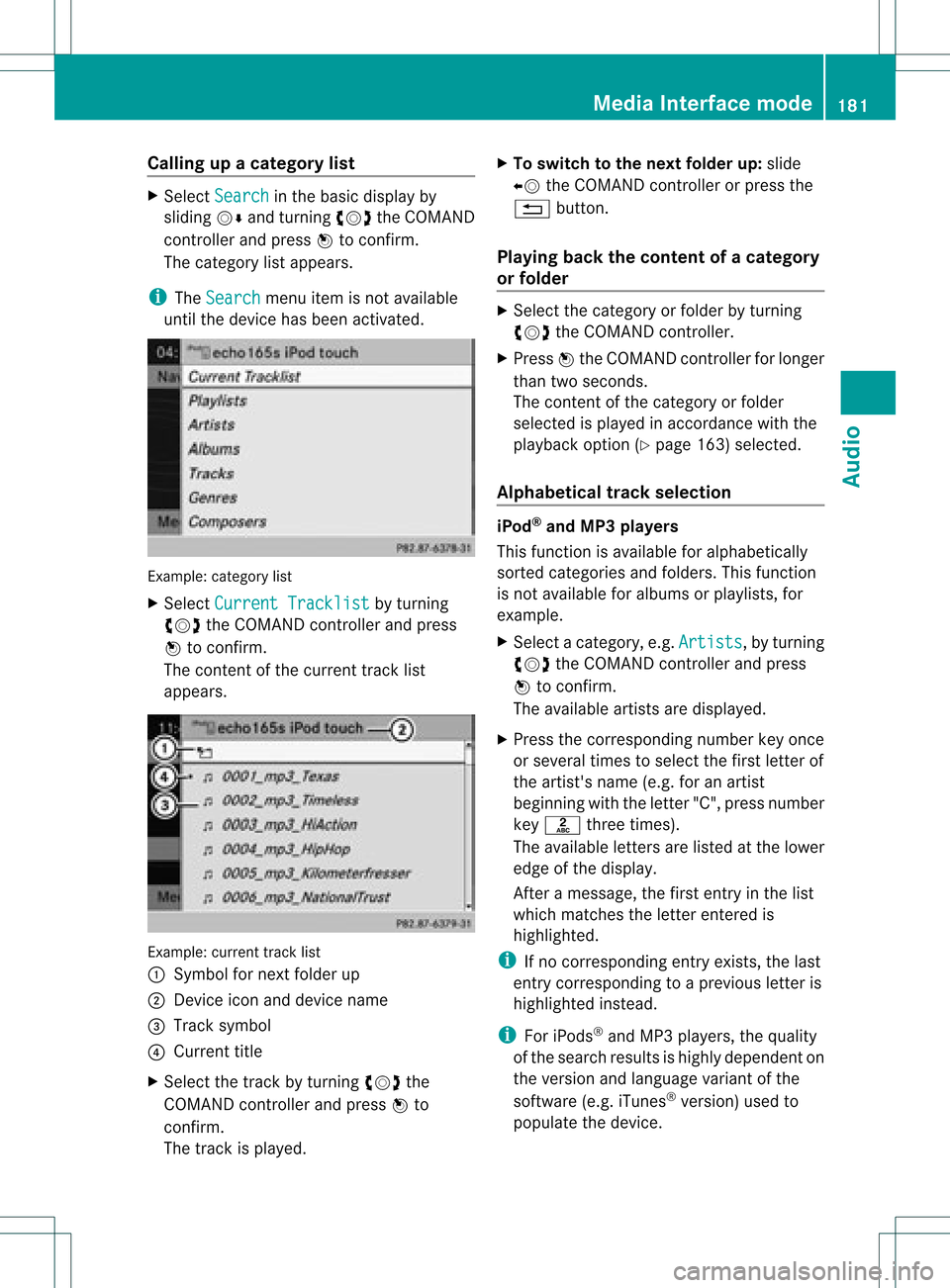
ample: categorylist
X Select Curren tTrackl ist by
turn ing
cVd theCOMAND controller and press
W tocon firm.
The contentof the curren ttrac klist
appears. Ex
ample: currenttrac klist
: Symbol fornex tfolder up
; Devic eicon anddevice name
= Track symbol
? Current title
X Select thetrac kby turn ingcVd the
COMAND controller and press Wto
con firm.
The trackisplay ed. X
To switch tothe next folder up:slide
XV theCOMAND controller orpress the
% button.
Playing backthecontent ofacategory
or folder X
Select thecategory orfolder byturning
cVd theCOMAND controller.
X Press Wthe COMAND controller forlonger
than twoseconds.
The cont entofthe category orfolder
selected isplay edinaccordance withthe
play back option (Ypage 163)selected.
Alphabetical track sele ction iPod
®
and MP3 players
This function isavail able foralpha betically
sorted categories andfolders. Thisfunction
is not avail able foralbu msorplay lists, for
example.
X Select acategory, e.g.Artists ,
by turning
cVd theCOMAND controller andpress
W toconfirm.
The avail able artists aredispla yed.
X Press thecorresponding numberkeyonce
or several timestoselect thefirst letter of
the artist's name(e.g.foranartist
beginning withtheletter "C",press number
key l three times).
The avail able letters arelisted atthe lower
edge ofthe displa y.
Aft eramessage, thefirst entry inthe list
which matches theletter entered is
highlig hted.
i Ifno corresponding entryexists, thelast
entry corresponding toap reviou sletter is
high lighted instead .
i For iPod s®
and MP3 players ,the quality
of the search resultsishigh lydepe ndent on
the versio nand langu ageva ria nt ofthe
sof twa re(e.g. iTune s®
ver sion) used to
po pulate the devic e. Me
dia Interfac emode
181Au dio Z
Page 190 of 234
i
Bypre ssing this functi onbutton
rep eatedl y,yo ucan change theoperating
mod ein the follow ing order:
R au dio CD/DVD, video DVD orMP3 disc
in the DVD changer
R memo rycard mode
R MUSIC REGISTER
R USB stora gedev ice
R Med iaInterfa ceoraudio AUX mode
R Blu etoo th®
au dio mod e
X Sele ctMedi a by
sliding VÆ andturni ng
cVd theCOMAND controllerand press
W toconfir m.
X Sele ctaý video DVD from themed ialist
(Y page 190).
Optio n3 X
Sele ctVide o in
the mainfuncti onbarby
sli ding ZV andturni ngcVd theCOMAND
control lera nd pre ssW toconfi rm.
Vi de oDVD modeis sw itch edon. Hidi
ng/show ingthe navigatio nmen u
X To dis play :sl id e ZVÆ theCOMAND
contro ller.
i Thisfu nctio nisnot avail able while the
DVD's ownmenu (Ypage 190)isbeing
displa yed.
X To hide: slideZVÆ theCOMAND
cont roller.
or
X Wait forapproximately eightseconds. Navigation
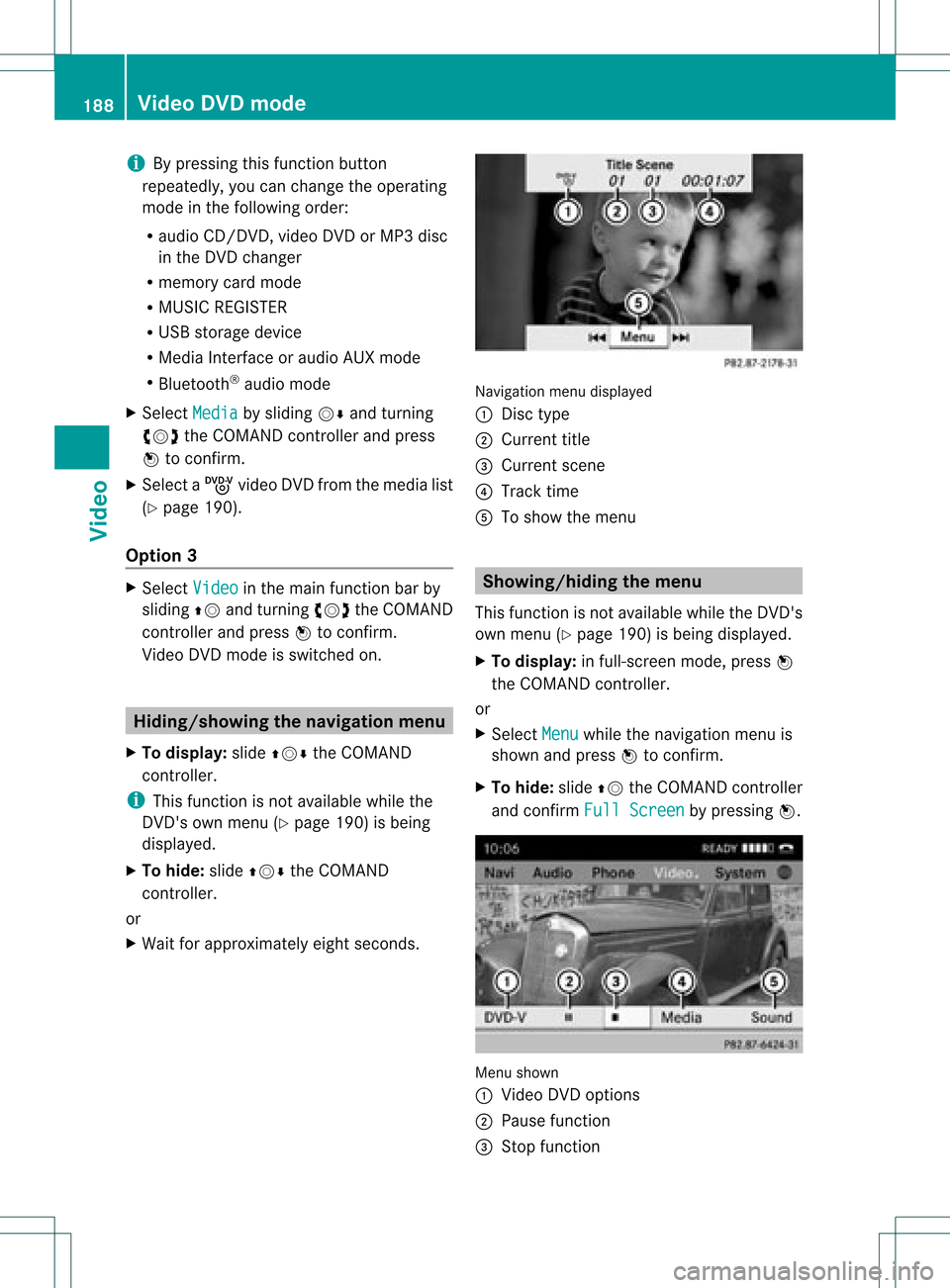
menudisplayed
: Disc type
; Current title
= Current scene
? Track time
A Toshow themenu Showin
g/hiding themenu
This function isnot avail able while theDVD's
own menu (Ypage 190)isbeing displayed.
X To display: infull-screen mode,pressW
the COMAND controller.
or
X Select Menu while
thenavigation menuis
shown andpress Wtoconfirm.
X To hide: slideZVtheCOMAND controller
and confirm FullScreen by
pressing W. Menu
shown
: Video DVDoptions
; Pause function
= Stop function 188
Video
DVDmodeVideo
Page 212 of 234
A
Con firms asele ction orset ting
B Swit ches soun don /o ff(fo rcorded
headphones)
C Adjust sthe volume (forcorded
headphones)
D Skips toatrack, fast-forwa rd/fast-rew ind
E Selects atrack; directentry
F Exits amenu (back)
Sel ecting thescre enfor the remote
co ntrol You
canusetheremote controltoopera te
one ofthe two rear screens atatime. Todo
so, you must switch the remote controltothe
desi redscreen.
X To sele ctthe left-hand screen:turn
thumbw heel=until "LREAR" is
high lighted inthe windo w.
X To sele ctthe right-hand screen:turn
thumbw heel=until "REAR R"is
high lighted inthe windo w.
Swi tching thescre enon/ off If
the SmartKey isin posi tion 0or 1in the
ignitio nlock (see thevehicle Operator's
Manual), orthe Smart Keyisnot insert ed,the
screen sin the rear willswitch offafter 30
minutes. Beforethescreen sswitch off,they
show amessage tothis effect .
You canswitch thescreen sback on.
How ever,this will disc harg eth est art er
bat tery.
X Poin tth erem oteco ntrol attherear -
co mpar tments cree nwhich hasbeen
selected forremote operation.
X Press button :onthe remote control.
The respective rearscreen switches onor
off.
i You canonly switch thescreens onusing
the remote controlifthe ignition is
switched on. Switching
thebutt onlighting on/off X
Press button ;onthe remote control.
Depending onthe previous status,the
button lighting isswitched onoroff.
i Ifyou donot use theremote controlfor
about 15seconds, thebutton lighting
switches offautomatically .
Switching thesound on/off(corded
headph onesonly) X
Press button Bonthe remote control.
The sound isswitched on/off.
Selec tingamenu/m enuitem and
confir mingyour select ion X
Sele ctamen u/m enuitemusin gth e
=;9 :buttonson the
rem otecon trol and pres sth e9 butt onto
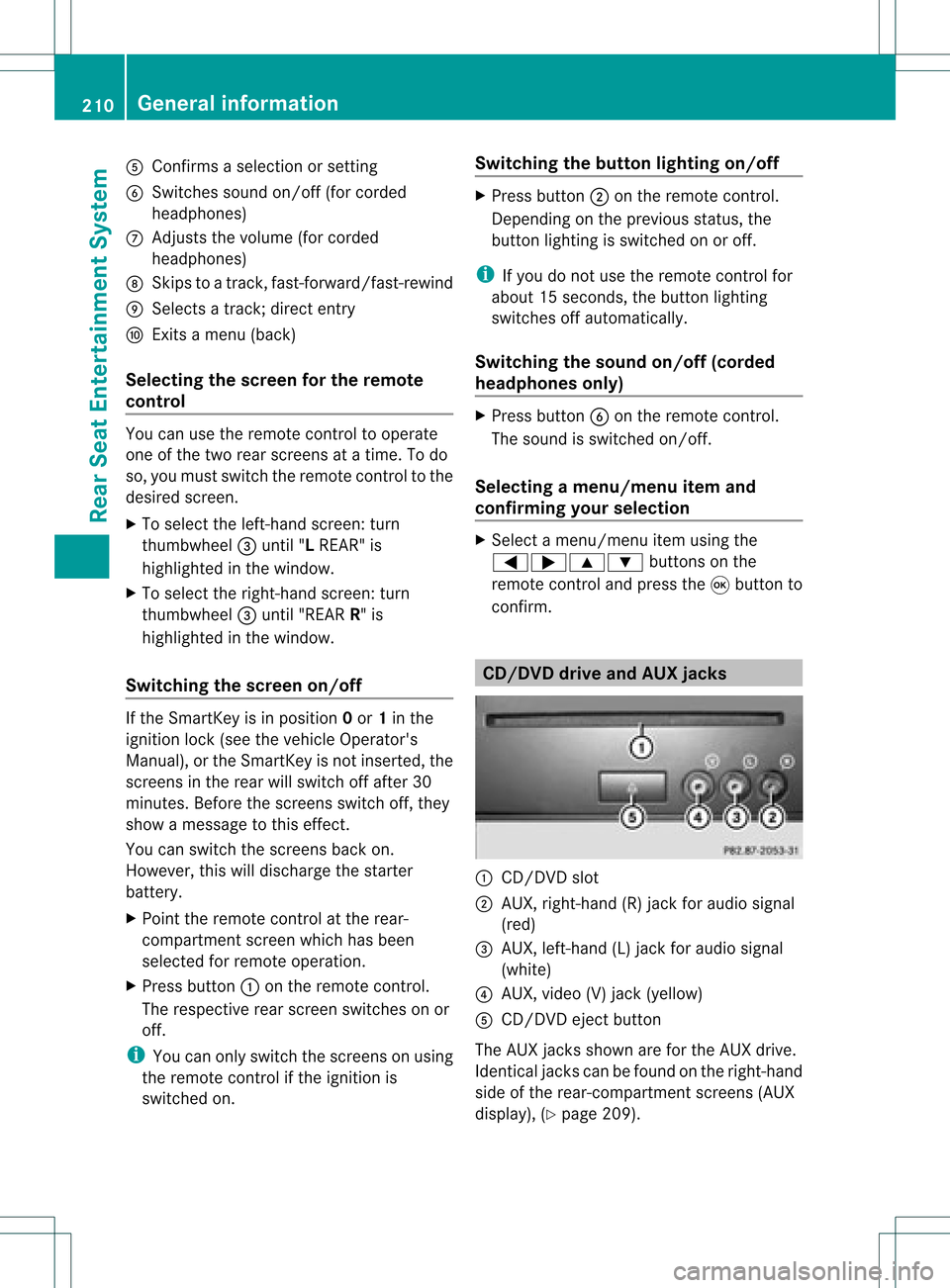
con firm. CD/DVD
drive and AUX jacks :
CD/ DVDslot
; AUX,righ t-han d(R) jackfor audio signal
(red)
= AUX, left-hand (L)jack foraudio signal
(white)
? AUX, video (V)jack (yellow )
A CD/D VDeject button
The AUX jacksshown areforthe AUX drive.
Ident icaljack scan befound onthe right- hand
side ofthe rear-com partmentscreen s(AUX
display ),(Y page 209). 210
General
informationRearSeatEntert ainment System
Page 221 of 234
Making
aselection byenter ingthetr ack
num berdirectly X
Pres sth eh buttonon therem ote
con trol.
The track entrydisplay appears .
Ex ample: track 2
X Pres snum berbutt on2.
Ex ample: track 12
X Pres sth ecor respon ding numberkeys in
rapid successio n.
i Itis no tp ossible toenter numbers that
exceed thenumber oftrack son the CDor
in the current lyactive folder.
X Wait forapproximately threeseconds after
making theentr y.
You willhear thetrack which hasbeen
enter ed.The correspon dingbasic menu
then reappears. Fast
forward ing/rewinding
X With thedisplay /select ionwindow active,
press the= or; button onthe
remote controlrepeatedly untilyoureach
the desired position.
or
X Press andhold theE orF button
until thedesired position isreached. Selecting
afolder
This function ison lyavailable inMP3 mode .
X Sele ctFol der in
MP3 mode using
th e:=; buttonson therem ote
con troller andpres sth e9 butt onto
con firm.
or
X Pres sth e9 butt onwhen thedisplay/
selec tionw indow isselec ted.
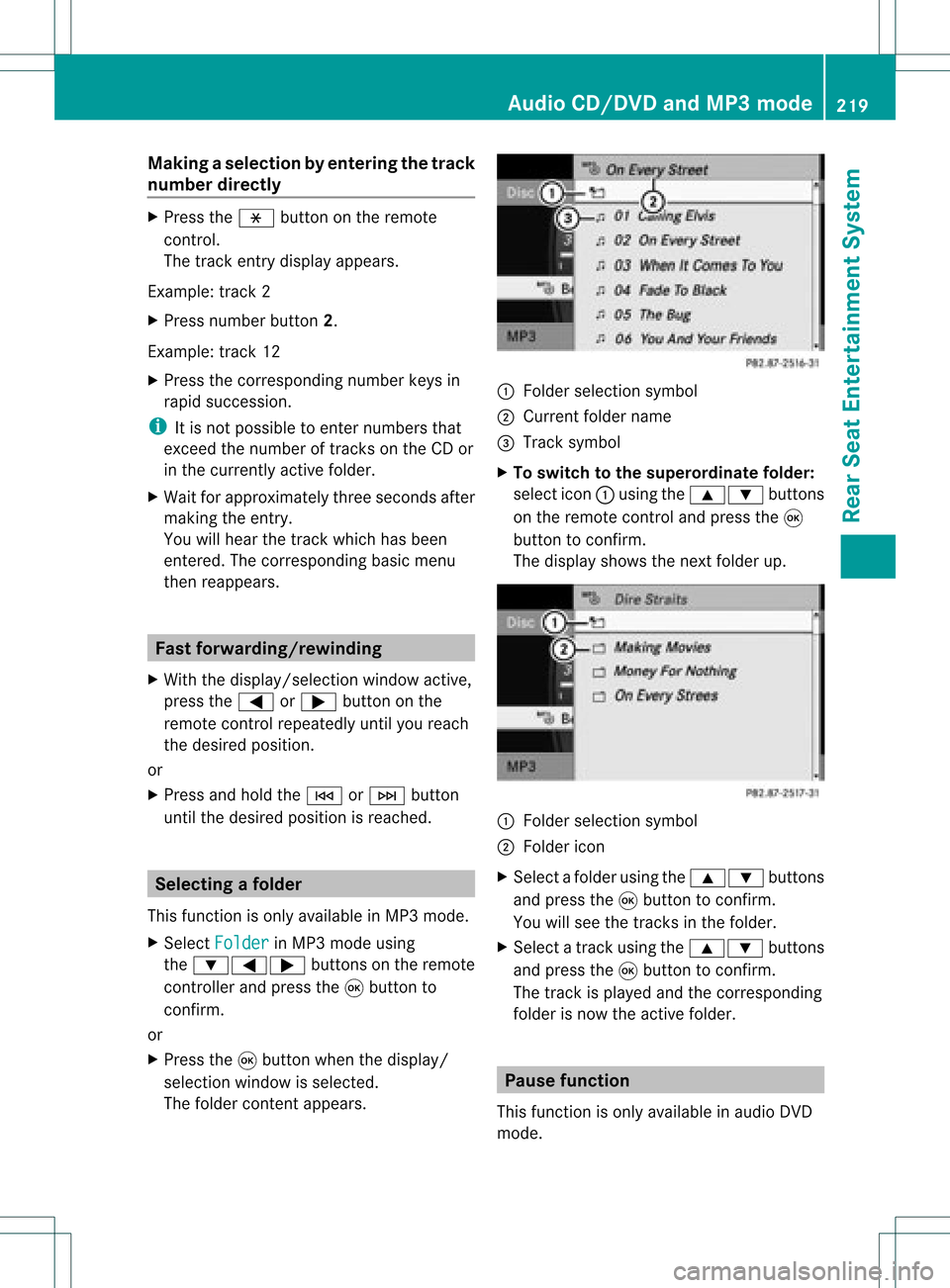
The folder contentappears. :
Folder selectionsymbol
; Current foldername
= Track symbol
X To switch tothe super ordina tefolder :
select icon:using the9: buttons
on the remot econ troland press the9
butt ontocon firm.
The display showsthenextfolder up. :
Folder selection symbol
; Folder icon
X Select afolder usingthe9: buttons
and press the9button toconf irm.
You willsee thetrack sin the folder.
X Select atrack using the9: buttons
and press the9button toconf irm.
The track isplaye dand thecorrespon ding
folder isnow theactive folder. Pause
function
This funct ionisonly availa bleinaudio DVD
mode. Audio
CD/DVD andMP3 mode
219RearSeatEntert ainment System Z