lock MERCEDES-BENZ E-CLASS CABRIOLET 2010 Owners Manual
[x] Cancel search | Manufacturer: MERCEDES-BENZ, Model Year: 2010, Model line: E-CLASS CABRIOLET, Model: MERCEDES-BENZ E-CLASS CABRIOLET 2010Pages: 333, PDF Size: 7.64 MB
Page 184 of 333
R
if the area is lit by fluorescen tlight (the dis-
play may flicker)
R if ther eisas udden change in temperature,
e.g. when drivin gintoah eatedgarage in
winter
R if the camer alens is dirt yorobstruc ted
R if the rear of your vehicle is damaged. In this
even thave the camera position and setting
checked at aqualified specialist workshop.
Mercedes-Ben zrecom mends that you use
aM ercedes-Benz Ser vice Centre for this
purpose.
Do not use the reversing camera in these
type sofs ituation .You could, otherwise,
injure other sordamage objects and your
vehicle while you are parking.
Activating the reversing camera X
Make sure that the key is in position 2in
the ignition lock.
X Make sure that the "Reversing camera"
function is selected in COMAND APS (see
the separate operating instructions for
COMAND APS).
X Engage reverse gear.
The area behind the vehicle is shown in the
COMAND APS display.
Guide lines in the COMAND APS display
Depending on the date of manufacture of the
vehicle, the guide lines are shown in the
COMAND APS display. G
Risk of accident
Please note that objects not on ground level
may appear to be further away than they
actually are. Thes einclude:
R the bumper of the vehicl eparked behind
R trailer tow bars
R the tail-end of alorry
R slanted posts
The lines are only guides, not accurate meas-
urements of the distance to an obstacle.
Therefore, you should never pass the red line
when approachin ganobstacle. You could oth- erwise cause an accident and injur
eyourself
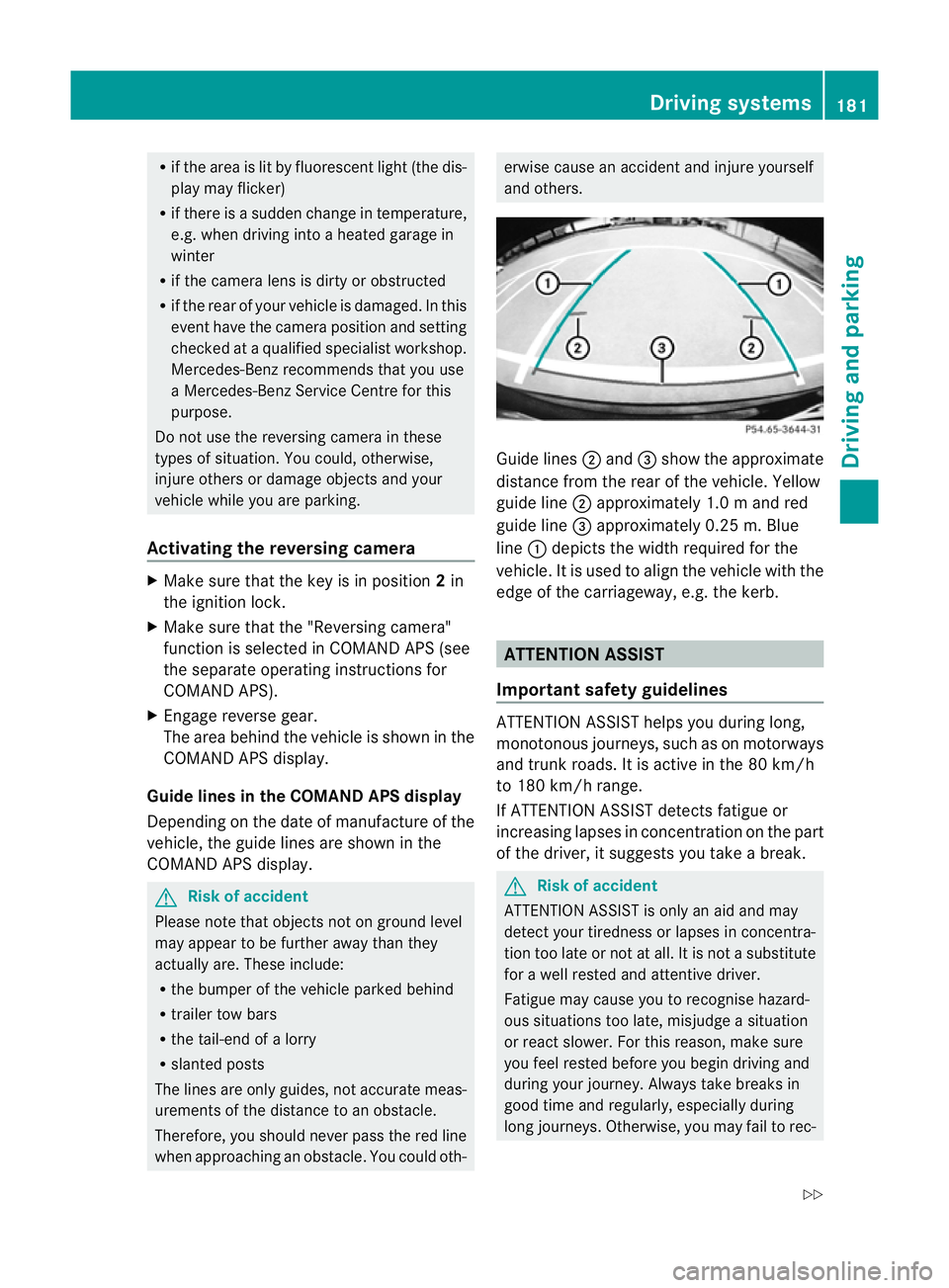
and others. Guide lines
;and =show the approximate
distance from the rear of the vehicle. Yellow
guide line ;approximately 1. 0mand red
guid eline =approximately 0.2 5m.Blue
line :depicts the width required for the
vehicle. It is used to align the vehicle with the
edge of the carriageway, e.g. the kerb. ATTENTION ASSIST
Important safet yguidelines ATTENTION ASSIST help
syou during long,
monotonous journeys, such as on motorways
and trunk roads. It is active in the 80 km /h
to 180 km/ hrange.
If ATTENTION ASSIST detects fatigue or
increasing lapses in concentration on the part
of the driver, it suggests you take abreak. G
Ris
kofa ccident
ATTENTION ASSIST is only an aid and may
detect your tiredness or lapses in concentra-
tion too late or not at all. It is not asubstitute
for aw ell reste dand attentiv edriver.
Fatigue may cause yo utorecognise hazard-
ous situations to olate ,misjudge asituation
or reac tslower .For this rea son, make sure
you fee lreste dbefore you begin driving and
duri ngyour jour ney. Always tak ebreaks in
good time and regularly ,especiall yduring
long jour neys. Otherwise ,you may fai ltorec- Driving systems
181Driving and parking
BA 207 ECE ÄJ 2010/1a; 1; 2, en-GB
mkalafa Version: 3.0.2.11 2010-01-26T13:03:22+01:00-Seite 181 Z
Page 188 of 333
lar, this may be the case if the vehicles are
drivin gatthe edge of their lan enearest your
vehicle. Due to the nature of the system,
warnings may be issued in err or when driving
clos etoc rashb arriers or similar solid lane
borders.
The two sensors for Blind Spot Assis tare
integrate dinto the sides of the rear bumper.
Make sure that the bumpe risfree from dirt,
ice or slus haround th esensors. For example,
the rada rsensors must not be covered by
cycle racks or overhanging loads. Followin ga
severe impac torinthe even tofdamage to
the bumpers, have the function of the radar
sensors checked at aqualified specialist
workshop, e.g. aMercedes-Ben zService
Cent re.B lind Spot Assist may otherwise not
work properly.
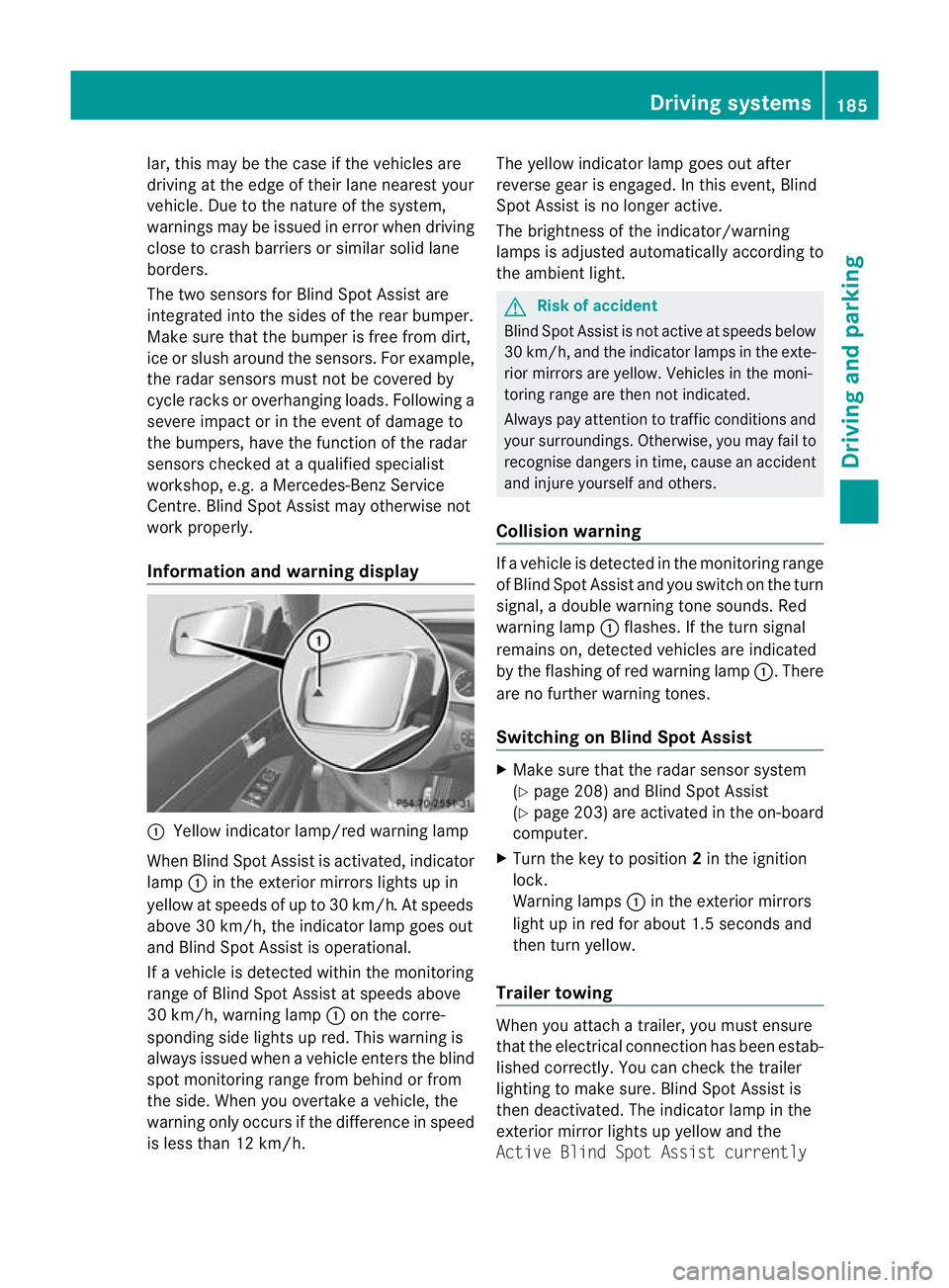
Information and warning display :
Yellow indicator lamp/red warnin glamp
When Blind Spot Assis tisa ctivated, indicator
lamp :in the exterior mirrors lights up in
yellow at speed sofupto30km/ h.At speeds
above 30 km/h, the indicator lamp goe sout
and Blind Spo tAssist is operational.
If av ehicle is detected within the monitoring
range of Blin dSpot Assist at speeds above
30 km/h, warning lamp :on the corre-
sponding side lights up red. This warning is
always issued when avehicle enter sthe blind
spot monitoring range from behind or from
the side. When you overtak eavehicle, the
warning only occurs if the difference in speed
is less than 12 km/h. The yellow indicator lam
pgoes out after
reverse gear is engaged. In this event, Blind
Spot Assist is no longer active.
The brightness of the indicator/warning
lamps is adjusted automatically according to
the ambient light. G
Risk of accident
Blind Spot Assist is not active at speeds below
30 km/h, and the indicator lamps in the exte-
rio rm irror sare yel low.Vehicles in the moni-
toring range are then not indicated.
Alway spay attention to traffic conditions and
your surroundings. Otherwise ,you may fai lto
recognise dangers in time ,cause an accident
and injure yoursel fand others.
Collisio nwarning If
av ehicle is detected in the mon itoring range
of Blind Spot Assis tand you switch on the turn
signal, adouble warnin gtone sounds. Red
warnin glamp :flashes .Ifthe tur nsignal
remains on, detected vehicles are indicated
by the flashing of red warnin glamp :.T here
ar enof urther warning tones.
Switching on Blind Spot Assist X
Make sure that the radar senso rsystem
(Y page 208) and Blind Spot Assist
(Y page 203) are activated in the on-board
computer.
X Turn the key to position 2in the ignition
lock.
Warning lamps :in the exterior mirrors
ligh tupinr ed for about 1. 5seconds and
then tur nyellow.
Trailer towing When you attach
atrailer, yo umust ensure
that the electrical connection has been estab-
lished correctly. You can check the trailer
lighting to make sure. Blind Spot Assis tis
then deactivated .The indicator lam pint he
exterior mirror lights up yellow and the
Active Blin dSpot Assist currently Drivin
gsystems
185Drivingand pa rking
BA 20 7ECE ÄJ 2010 /1a;1;2,e n-GB
mkalafa Version: 3.0.2.11 2010-01-26T13:03:22+01:00-Seite 185 Z
Page 189 of 333
unavailable See Owner's Manual
mes-
sage appe arsint he multifunction display. Trailer towing
Folding out th
eball coupling
Before you can tow atrailer wit hyour vehicle,
you must fold out the ball coupling.
The release wheel is located behind the left-
hand side trim panel in the boot. G
Risk of accident
Make sur ethat the ball coupling is engaged,
either in its folded-ou torfolded-i nposition,
and that the indicator lam pisoff.
Do not turn the releas ewheel when atrailer
is coupled up. Otherwise, th etrailer might
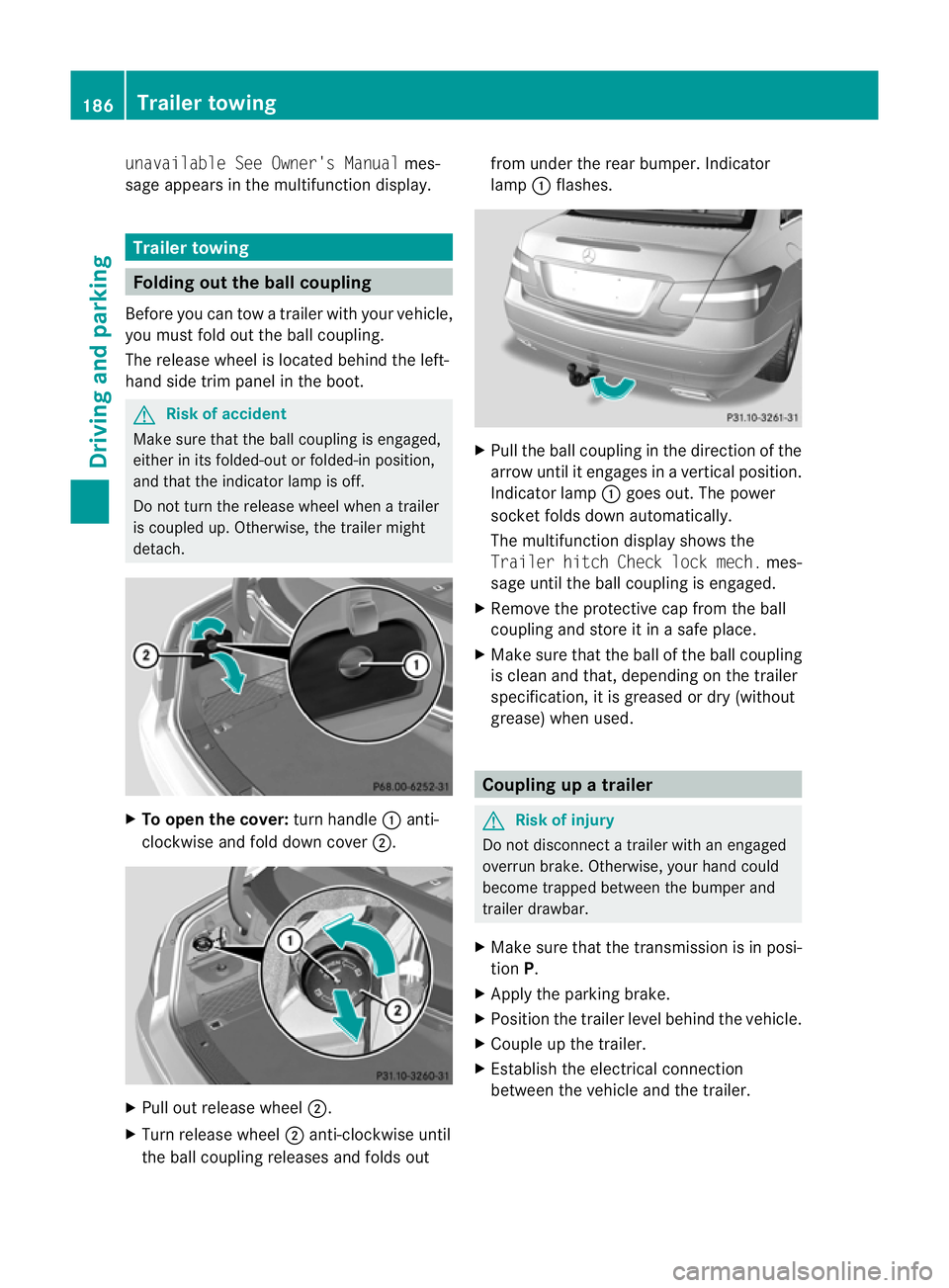
detach. X
To ope nthe cov er:turn handle :anti-
clockwis eand fold dow ncover ;. X
Pull out release wheel ;.
X Tur nrelease wheel ;anti-clockwise until
the ball couplin greleases and folds out from under the rear bumper
.Indicator
lamp :flashes. X
Pull the ball coupling in the direction of the
arrow until it engages in avertical position.
Indicator lamp :goes out. The power
socket folds down automatically.
The multifunction display shows the
Traile rhitch Check lock mech. mes-
sage until th eball coupling is engaged.
X Remove the protective cap from the ball
coupling and store it in asafe place.
X Make sure that the ball of the ball coupling
is clean and that, depending on the trailer
specification, it is greased or dry (without
grease) when used. Coupling up
atrailer G
Risk of injury
Do not disconnect atrailer wit hanengaged
overrun brake. Otherwise, your hand could
become trappe dbetween the bumper and
trailer drawbar.
X Make sure that the transmission is in posi-
tion P.
X Apply the parking brake.
X Position the trailer level behind the vehicle.
X Couple up the trailer.
X Establish the electrical connection
between the vehicl eand the trailer. 186
Trailer towingDriving and parking
BA 207 ECE ÄJ 2010/1a; 1; 2, en-GB
mkalafa
Version: 3.0.2.11
2010-01-26T13:03:22+01:00
-Seite 186
Page 190 of 333
Uncoupling
atrailer G
Ris
kofi njury
As soon as yo uraise the trailer drawbar, the
unladen vehicl erises slightly .The vehicl ethen
lowers to driving level.
Make sure that nobody is in the vicinity of the
wheel arch or the underbody. You coul doth-
erwise trap yoursel forothers. G
Risk of injury
The vehicle is lowered as soo nasyou discon-
nec tthe trailer cable. Make sur ethat nobody
is in the vicinit yofthe wheel arch or the
underbody. You coul dotherwis etrap yourself
or others.
As soon as you decoupl ethe trailer ,the unla-
den vehicle rise sslightly. Make sure that you
or others are not injured in the process.
! Do not uncouple atrailer wit hoverrun
brake between th ebumper and drawbar,
otherwis eyour vehicle coul dbedamaged
by the spring action of the overrun brake.
X Make sure that the transmission is in posi-
tion P.
X Apply the parking brake.
X Secure the trailer against rolling away.
X Remove the trailer cable and decouple the
trailer. Notes on towing
atrailer
Important safety instructions G
Ris
kofa ccident
When reversing the vehicle towards the
trailer, mak esure there is nobody between
the trailer and the vehicle.
Couple and uncouple the trailer carefully. If
you do not couple the trailer to the towing
vehicle correctly, the trailer could become
detached.
Make sure that the following values are not
exceeded: R
the permissible trailer drawbar noseweight
R the permissible trailer load
R the permissible rear axle load of the towing
vehicle
R the maximu mpermissible gross vehicle
weight of both the towing vehicle and the
trailer
You will fin dthe applicable permissible val-
ues, whic hmust not be exceeded ,inthe vehi-
cle documen ts.
You will find the values approved by the man-
ufacturer on the vehicle identification plates
and those for the towing vehicle in the "Tech-
nical data" section. G
Risk of accident
If the Checktrailer hitch locking
mechanism message appears in th emulti-
function display while the vehicle is in motion,
pull over immediately and check whethe rthe
ball coupling is correctly engaged. G
Risk of accident
Always observ ethe maximum speed permit-
ted in Germany for vehicle/ trailer combina-
tions, even in countries where higher speeds
are permitted. This lowers the risk of an acci-
dent. G
Risk of accident
Never depress the brake pedal continuously
while the vehicle is in motion ,e.g. never cause
the brakes to rub by appl yingc onstant slight
pedal pressure. This causes the brake system
to overheat, increases the brakin gdistance
and can lead to the brakes failing completely. G
Risk of accident
On no account should you attempt to draw the
vehicle/trailer combination out by increasing
speed. Trailer towing
187Driving and parking
BA 207 ECE ÄJ 2010/1a; 1; 2, en-GB
mkalafa Version: 3.0.2.11
2010-01-26T13:03:22+01:00
-Seite 187 Z
Page 192 of 333
level. When drivin
ginmountainous areas,
not ethat the power output of the engine,
and consequently the vehi cle's gradient-
climbing capability, decrease with increas-
ing altitude.
If the trailer swing sfrom side to side:
X Do not accelerate.
X Do not cou nter-steer.
X Brake if necessary. Folding in th
eball coupling
i Foldthe ball couplin gback in if you are
not using the trailer tow hitch. G
Risk of injury
Make sure that no persons or animals are in
the pivoting rang eofthe ball coupling. Other-
wise, the ycould be injured.
X Place the protective cap on the ball cou-
pling.
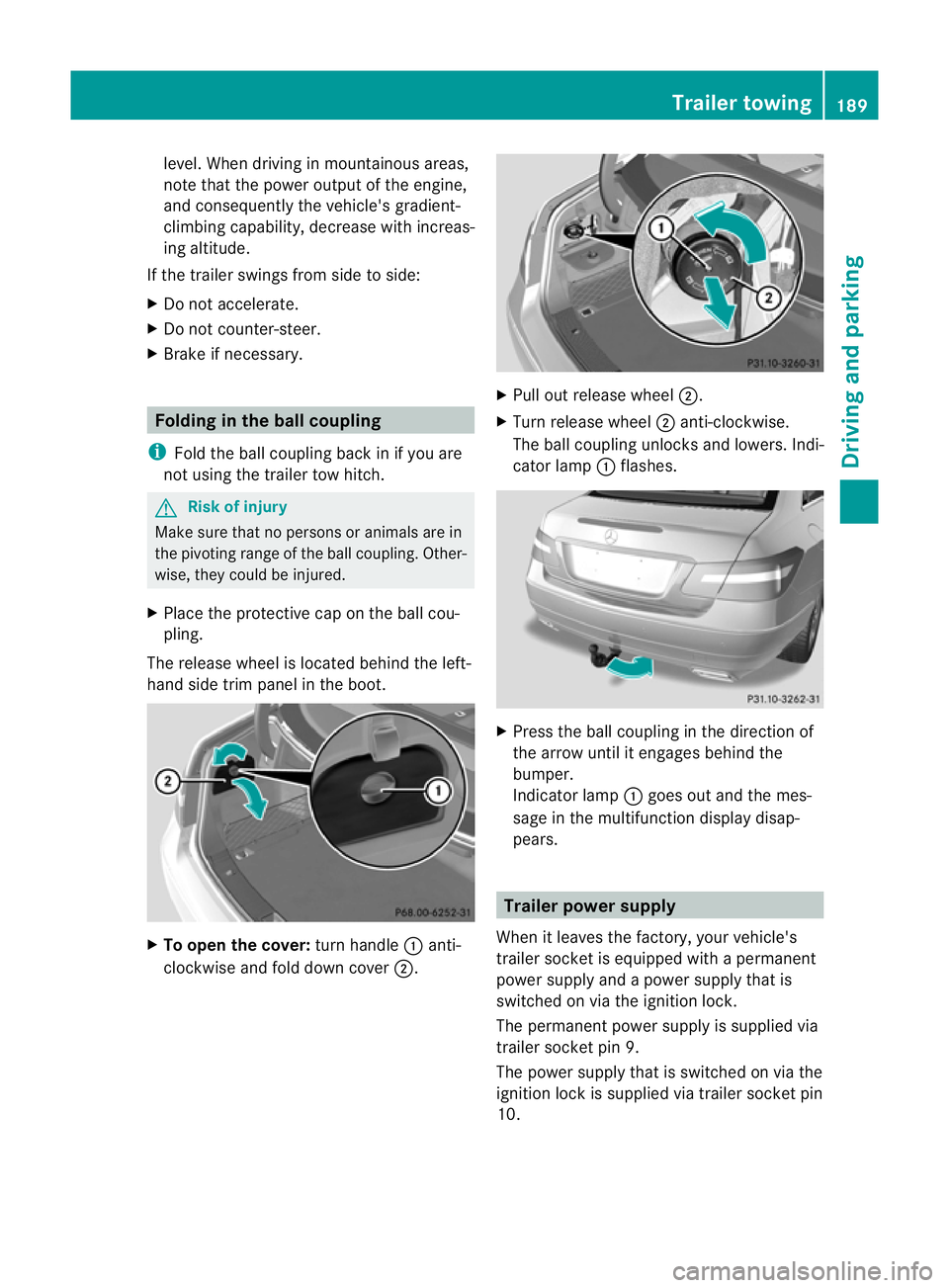
The release wheel is located behin dthe lef t-
hand side trim pane linthe boot. X
To ope nthe cover: turnh andle :anti-
cloc kwise and fold down cover ;. X
Pull out release wheel ;.
X Turn release wheel ;anti-clockwise.
The ball couplin gunlock sand lowe rs.Ind i-
cator lamp :flashes. X
Press th eball couplin gint he direction of
th ea rrow until it engage sbehin dthe
bumper.
Indicato rlamp :goes out and the mes-
sage in the multifunction display disap-
pears. Trailer power supply
When it leaves the factory, your vehicle's
trailer socket is equipped wit hapermanent
power supply and apower supply that is
switched on via the ignition lock.
The permanen tpower supply is supplied via
trailer socket pin 9.
The power supply that is switched on via the
ignition lock is supplied via trailer socket pin
10. Trailer towing
189Driving and parking
BA 20 7ECE ÄJ 2010/1a; 1; 2, en-GB
mkalafa Version: 3.0.2.11 2010-01-26T13:03:22+01:00-Seite 189 Z
Page 193 of 333
!
You can connect consumer swithapower
ratin gofupto2 40Wtot he permanent
power supply and up to 18 0Wto the power
supp lythat is switched on via the ignition
lock.
You must not charge atrailer battery using
th ep ower supply.
The trailer's permanen tpower supply is
switched off in the even toflow vehicle supply
voltage and after six hour satthe latest.
You can obtai nfurther information about
installing the trailer electrics from aqualified
specialist workshop, e.g. aMercedes-Benz
Ser vice Centre.
X To switch the connected power supply
on or off: turn the key in the ignitio nlock
to position 2or 0respec tively. Bulb failur
eindicator for LEDs
i If LE Dlamps are fitted in the trailer, an
error message may appear in the multi-
function display –even if there is no fault –
if th ecorrespondin gLED chain's current
draw drops below 50 milliamperes (mA).
To ensure reliabl eoperation of the bulb failure
indic ator,am inimum current of 50 mA must
be guaranteed by the manufacturer of each
LED chain in the trailer lighting. Trailer with 7-pin connector
General information If you
rtrailer ha sa7-pin connector, you can
connect it to the 13-pin socket on the ball
coupling using an adapter or, if necessary, an
adapter cable. Both of thes ecan be obtained
at aq ualified specialist workshop, e.g. at a
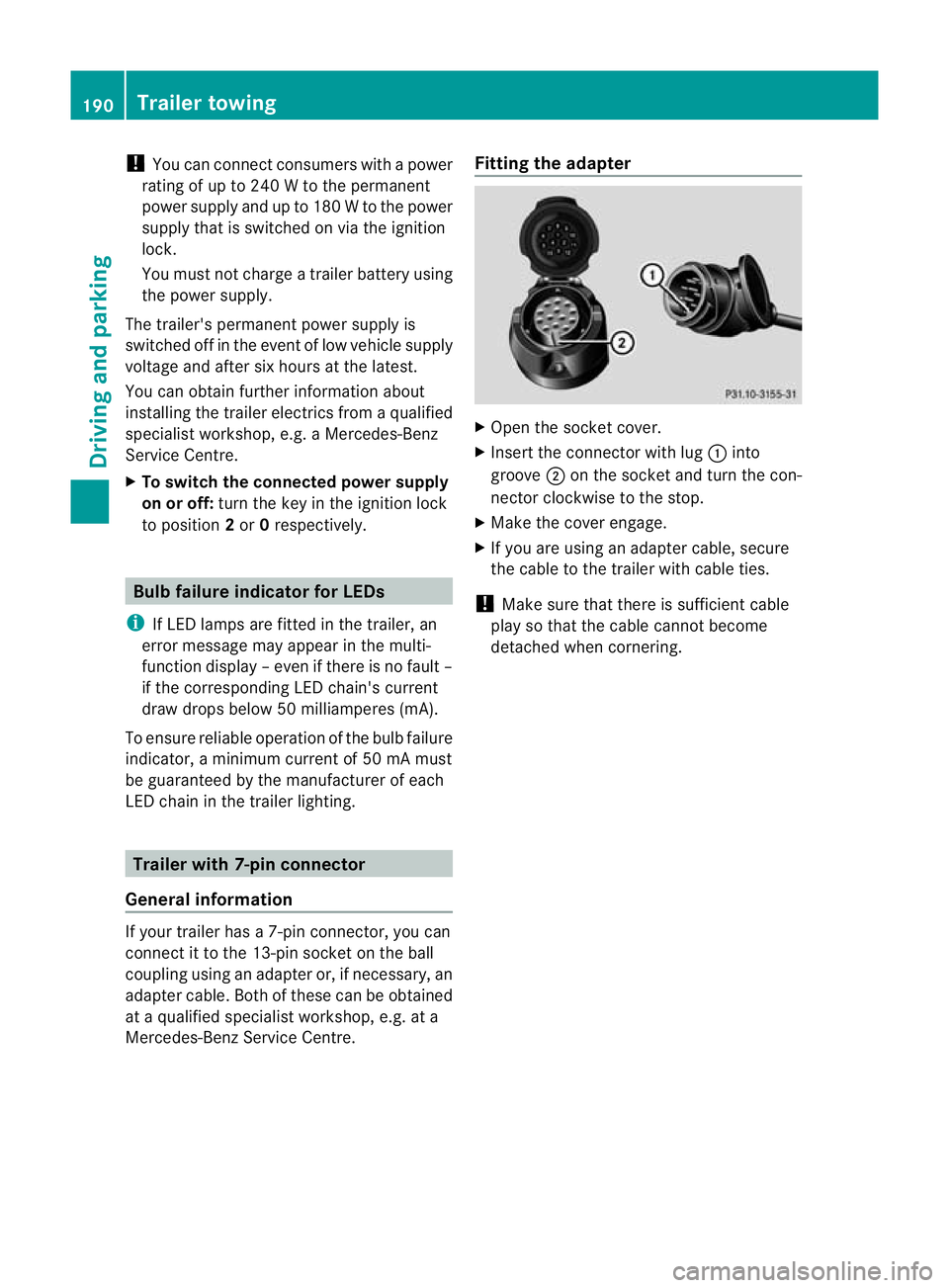
Mercedes-Benz Service Centre. Fittin
gthe adapter X
Open th esocke tcover.
X Insert the connector with lug :into
groove ;on the socket and tur nthe con-
nector clockwi seto the stop.
X Make the cover engage.
X If you are using an adapter cable, secure
the cabl etothe trailer with cable ties.
! Make sur ethat ther eissufficient cable
pla ysot hat the cable cannot become
detached when cornering. 190
Trailer towingDriving and parking
BA 20
7ECE ÄJ 2010/1a; 1; 2, en-GB
mkalafa Version: 3.0.2.11 2010-01-26T13:03:22+01:00-Seite 190
Page 196 of 333
Outsid
etemperature display
The outside temperature display is in the mul-
tifunction display. G
Risk of accident
At temperatures just above freezing point ,the
str eetm ay be icy, especially in woode dareas
or on bridges .Ifyou do not adapt your driving
style to the conditions, th evehicle could skid.
For this reason ,adapt your driving style and
speed to the weather conditions.
Changes in the outside temperatur eare dis-
played afte rashort delay. Speedomete
rwith segments
The segments in the speedometer indicate
which speed range is available.
Cruise control mode:
The segments light up from the stored speed
to the maximum speed.
Variable SPEEDTRONI Cmode:
The segments light up from the star tofthe
scal etot he selected limit speed.
DI ST RONIC PLUS mode:
One or two segments around the stored
speed ligh tup. Opera
ting th eon-board computer
The on-board computer is activated as soon
as you tur nthe key to position 1in the ignition
lock.
You can con trolthe multifunction display and
the setti ngsint he on-boar dcomputer using
the buttons on the multifunction steering
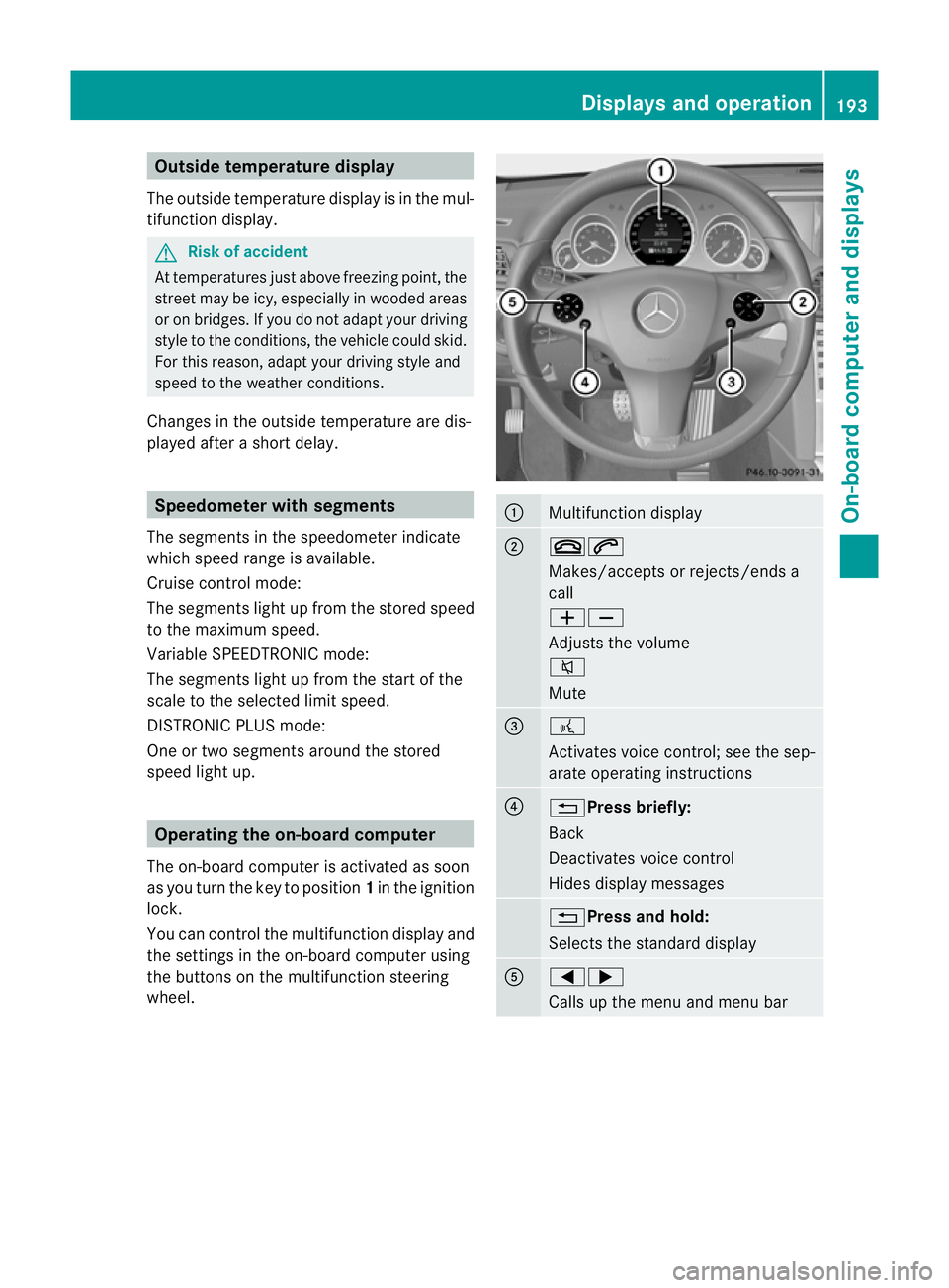
wheel. :
Multifunction display
;
~6
Makes/accepts or rejects/ends a
call
WX
Adjusts the volume
8
Mute
=
?
Activates voic
econtrol; see the sep-
arate operatin ginstructions ?
%Press briefly:
Back
Deactivate
svoice con trol
Hide sdispla ymessages %Press and hold:
Selects the standard display
A
=;
Calls up the men
uand menu bar Displays and operation
193On-board computer and displays
BA 207 ECE ÄJ 2010/1a; 1; 2, en-GB
mkalafa Version: 3.0.2.11 2010-01-26T13:03:22+01:00 -Seite 193 Z
Page 210 of 333
Activating/deactivating th
esurround
lighting and ex terior lightin gdelayed
switch-off
The Surround lighting: function allows
yo utos et whether th eexterior lighting should
com eonw hen it is dar k:
R for 40 se conds after unlockin gthe ve hicle
with th ekey
The exterior lighting switche soff wh en you
open the driver’s door.
R for 15 seconds after switching off the
engine and closing the doors
If the engine is switched off and then none
of the doors are opened, or if an ope ndoor
is not closed, the exte rior lightin ggoes out
after 60 seconds.
If you activate the Surround lighting:
func tion, the following light up:
R the side lamps
R the foglamps 35
R the dipped-beam headlamps 36
R the daytime drivin glamps 37
R the licence plate lighting
X Press the =or; button on the steer-
ing wheel to select the Settingsmenu.
X Press the :or9 button to select the
Light submenu.
X Press the abutton to confirm.
X Press the :or9 button to select the
Surround lighting: function.
You will see the selected setting: onor
off.
X Press the abutton to save the setting. Deactivating the delayed switch-off tempora-
rily:
X
Before leaving the vehicle, turn the key to
position 0in the ignition lock.
X Turn the key to position 2in the ignition
lock and back to position 0.
The delayed switch-off is deactivated.
Delayed switch-off is reactivated the next
time you start the engine.
Activating/deactivating the interior light-
ing delayed switch-off
When you activate the Interior lighting
dela ysw. off: function and remov ethe
key from the ignition lock ,the interior lighting
remain sonfor 10 seconds.
X Press the =or; button on the steer-
ing wheel to select the Settingsmenu.
X Press the :or9 button to select the
Light submenu.
X Press the abutton to con firm.
X Press the :or9 buttontos elect the
Interior lighting dela ysw. off:
function.
Yo uw ill see the selected setting: onor
off.
X Press the abutton to save the setting.
Vehicle Setting permanent SPEEDTRONIC
You can use the func
tion Limi tspeed
(winter tyres): to setpermanen tSPEED-
TRONI C(Ypage 171).
X Press the =or; button on the steer-
ing wheel to select the Settingsmenu.
X Press the :or9 button to select the
Vehicle submenu.
X Press the abutton to confirm.
35 Only for vehicles with front foglamps.
36 Only for vehicles withou tfront foglamps.
37 Onl yvehicles with Intelligent Light System. Menus and submenus
207On-board computer and displays
BA 207ECE ÄJ 2010 /1a; 1; 2, en-GB
mkalafa Version: 3.0.2.11 2010-01-26T13:03:22+01:00 -Seite 207 Z
Page 211 of 333

X
Press :or9 to select the Limit
spee d(winter tyres): function.
Th ec urren tsetting is displayed.
X Press the abutton to confirm.
X Press :or9 to set permanent
SPEEDTRONI Cinincrements of ten
(240 km/h to160 km/h). Permanent
SPEEDTRONIC is deactivated with the Off
setting.
X Pres sthe a button to stor ethe entry.
Activating/deactiva ting th eautomatic
lockin gfeature
If you select the Automaticd oor locks:
function, th evehicle is centrally locked above
as peed of around 15 km/h.
i Further information on the automatic
locki ngfeature (Y page71).
X Press the =or; button on the stee r-
ing wheel to select the Settingsmenu.
X Press the :or9 buttontos elect the
Vehicle submenu.
X Press the abutton to confirm.
X Press the :or9 button to select the
Automa ticd oor locks: function.
Yo uw ill see the selected setting: onor
off.
X Press the abutton to save the setting.
Activating/deactiva ting th eacoustic
locking confirmation
If you switch on the AcousticLock feed‐
back: function, an acousti csignal sounds
when you lock or unlock the vehicle. When
unlocking, the signal sounds once. When
locking, it sounds three times.
X Press the =or; button on the steer-
ing wheel to select the Settingsmenu.
X Press the :or9 buttontos elect the
Vehicle submenu.
X Press the abutton to confirm. X
Press the :or9 button to select the
Acoust icLock feedback: function.
Yo uw ill see the selected setting: Activa‐
ted orDeacti vated.
X Press the abuttontos ave the setting.
Activating/deactivating the radar sensor
system
i You must deactivat ethe radar sensor sys-
tem in cer tain countries and near radio
telescope facilities. Fur ther information
(Y page 32 4).
Ve hicles with anavigation system: the radar
senso rsystem is deactivated automatically if
you are close to radio teles cope facilities.
The followin gsystems are switched off when
the radar sensor syste misdeactiva ted:
R DIST RONIC PLUS (Y page 160)
R BA SP LUS (Y page 56)
R PRE-SAFE ®
Brake (Y page 59)
R Blind Spo tAssist (Y page 18 4)
X Press the =or; button on the steer-
ing wheel to select the Settingsmenu.
X Press the :or9 buttontos elect the
Vehicle submenu.
X Press the abutton to confirm.
X Press the 9or: button to select
Rada rsensor (See Owner's Man.).
Yo uw ill see the selected setting: onor
off.
X Press the abutton to save the setting.
Convenience Activating/deactiva
ting th eEASY-
ENTRY/EXIT feature
You can use the Easy Entry/Exit function
to activate or deactivate the easy-entry/exit
feature (Y page 100). G
Ris
kofi njury
The steering wheel moves when the EASY-
ENTRY/EXIT feature is active. There is arisk
of occupant sbecoming trapped. Before acti- 208
Menus and submenusOn-board computer and displays
BA 20
7ECE ÄJ 2010 /1a;1;2,e n-GB
mkalafa Version: 3.0.2.11 2010-01-26T13:03:22+01:00-Seite 208
Page 212 of 333

vating th
eEASY-ENTRY/EXIT feature, make
sure that nobody can become trapped.
Do not leave children unsupervise dinthe
vehicle, even if they ar esecur edinac hild
restraint system .The chil dren could open the
driver's door and thereby unintentionally acti-
vat ethe EASY-ENTRY/EXIT feature and
becom etrapp ed.
X Press the =or; button on the steer-
ing whee ltoselect the Settings menu.
X Press the :or9 button to select the
Convenience submenu.
X Press the abutton to confirm.
X Press the :or9 button to select the
Easy Entry/Exit feature.
You will see the selected setting: onor
off.
X Press the abutton to save the setting.
Switching th ebelta djustmen ton/off
Fur ther information on belt adjust ment
(Y pag e42).
X Press the =or; button on the steer-
ing whee ltoselect the Settings menu.
X Press the :or9 button to select the
Convenience submenu.
X Press the abutton to confirm.
X Press the :or9 button to select the
Belt adjustment: function.
You will see the selected setting: onor
off.
X Press the abutton to save the setting.
Switching the fold in mirrors when lock-
ing function on/off
If you switch on the Fold mirrorsinwhen
locking: function, th eexterior mirror sfold
in when you lock the vehicle. When you
unloc kthe vehicle and then open adoor, the
exterior mirror sfold out again.
If you have switched the function on and you
fold the exterior mirror sinusing the button
on the door (Y page 101), they will not fold
out automatically. The exterior mirrors can then only be folded out usin
gthe button on
the door.
X Press the =or; button on the steer-
ing wheel to selec tthe Settings menu.
X Press the :or9 button to selec tthe
Convenience submenu.
X Press the abutton to confirm.
X Press the :or9 button to selec tthe
Fold mirror sinwhen locking: func-
tion.
Yo uw ill see the selected setting: onor
off.
X Press the abutton to save the setting.
Resetting to factory settings For safety reasons, not all function
sare reset:
the Limit speed (winter tyres): func-
tio ninp ermanen tSPEEDTRONIC can only be
set in the Vehiclesubmenu. If you want to
reset the Daytimedriving lamps: in the
Light submenu, yo umust turn the key in the
ignition lock to position 1.
X Press the =or; button on the steer-
ing wheel to select the Settingsmenu.
X Press the :or9 button to select the
Factor ysetting submenu.
X Press the abuttontoc onfirm.
The Rese tall settings? message
appe ars.
X Pres sthe : or9 button to select
No orYes.
X Press the abutton to confir mthe selec-
tion.
If you hav eselected Yes,the multifunction
display shows aconfirmation message. Menu
sand submenus
209On-board computer and displays
BA 207ECE ÄJ 2010/1a; 1; 2, en-GB
mkalafa Version: 3.0.2.11 2010-01-26T13:03:22+01:00-Seite 209 Z