radio MERCEDES-BENZ E-CLASS CABRIOLET 2010 User Guide
[x] Cancel search | Manufacturer: MERCEDES-BENZ, Model Year: 2010, Model line: E-CLASS CABRIOLET, Model: MERCEDES-BENZ E-CLASS CABRIOLET 2010Pages: 333, PDF Size: 7.64 MB
Page 180 of 333
Problems wit
hPARKTRONIC Problem Possible causes/consequences and
M Solutions
Only the red segments
in the PARKTRONIC
warning display
sare lit.
Yo ua lso hear awarning
tone for approximately
two seconds.
PARKTRONIC is deacti-
vated after approx-
imately 20 seconds and
the indicator lamp in
the PARKTRONIC but-
ton lights up. PARKTRONIC has malfunctioned and has switched itself off.
X
If problems persist, have PARKTRONIC checked at aqualified
specialist workshop. Only the red segments
in the PARKTRONIC
warning display
sare lit.
PARKTRONIC is deacti-
vate dafter approx-
imatel y20seconds. The PARKTRONI
Csensors are dirt yorthere is interference.
X Clean the PARKTRONI Csensors (Y page 267).
X Switch the ignition back on. The problem may be caused by an exter
nalsource of radio or
ultrasoun dwaves.
X See if PARKTRONIC functions in adifferent location. Parking Guidance
Important safet ynotes Parking Guidance is an electronic parking aid
with ultrasound. Ultrasound is used to meas-
ure the road on both sides of the vehicle. A
suitable parking space is indicated by the
parking symbol. You receiv esteering instruc-
tions when parking. You may also use PARK-
TRONIC (Y page 174). G
Risk of accident
Parking Guidance is merely an aid and may
recommen dparking spaces that are not suit-
able for parking. For example, these might be
spaces where parking is prohibited ,drive-
ways, unsuitabl esurfaces, etc.
Parking Guidance measures the parking
space as you drive past it. Any later changes
to the parking space are not taken into
account. For instance, this may be the case when the vehicle parked in front of or behind
the space changes its position or when an
obstacle is moved into the parking space.
Parking Guidance does not relieve you of the
responsibility for paying attention. If you rely
solely on Parking Guidance, you could cause
an accident and injure yourself and others.
You are always responsible for safety and
must continue to pay attention to your imme-
diate surroundings when parking and
manoeuvring.
G
Risk of accident
Objects located above the height range of
Parking Guidance will not be detected when
the parking space is measured. Thes eare not
take ninto account whe nthe parkin gproce-
dure is calculated, e.g .overhanging loads ,tail
sections or loading ramps of good svehicles.
In some circumstances, Parking Guidance Driving systems
177Drivingand pa rking
BA 20 7ECE ÄJ 2010 /1a;1;2,e n-GB
mkalafa Version: 3.0.2.11 2010-01-26T13:03:22+01:00-Seite 177 Z
Page 187 of 333
R
the roa dtypec hanges (e.g. mot orway,
country road).
R yo uh avet ravelle dacertainminimum
distanc ewithou tthe roa dsign being
repeated or detec teda gain. Blind Spot Assist
Important safety guidelines Blin
dSpot Assist uses aradar sensor system
to monitor the areas on both sides of your
vehicle. Blin dSpot Assist provides assistance
at speeds higher than 30 km/h. Awarning
display in the exterior mirrors draws your
attention to vehicles in the monitored area. If
you then indicat eaturn toward sthat side
before changing lane, you will also receive
visual and audible collision warnings. For this
purpose, Blind Spot Assist uses sensor sinthe
rea rbumper. G
Risk of accident
Blind Spot Assis tiso nly an aid designe dto
assis tdriving. It may fail to detec tsome vehi-
cles and is no substitute for attentiv edriving.
Blind Spo tAssist can notd etect road and traf-
fic conditions. It may fail to detect narrow
vehicles, such as motor cycles or bicycles ,or
only detec tthem too late.
Monitoring ma ybeaffected by dirty sensors,
stro ngspra yorp oor visibility caused by snow,
rai norm ist, for example. In this case, vehicles
are detected late or not at all.
Always pay attention to traffic conditions and
your surroundings. Otherwise, you may fail to
recognise dangers in time, cause an accident
and injur eyoursel fand others.
The radar senso rsystem is automatically
deactivated near radio telescope facilities
(Y page 324).
For Blind Spot Assist to assist you when driv-
ing, the radar sensor syste mmust be activa-
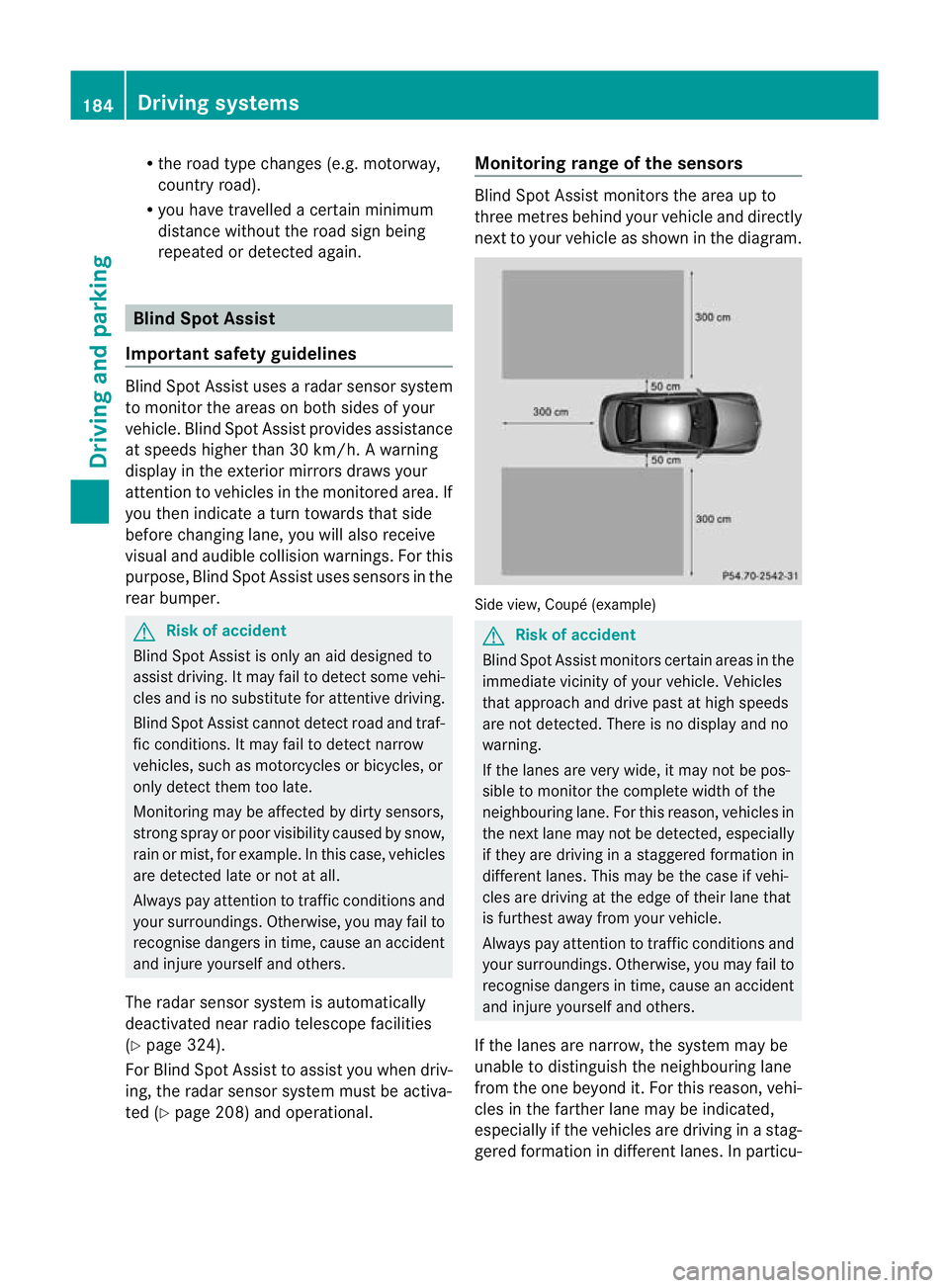
ted (Y page 208 )and operational. Monitoring range of the sensors Blind Spot Assist monitors the area up to
three metres behind your vehicl
eand directly
next to your vehicl easshown in the diagram. Sid
eview, Coupé (example) G
Risk of accident
Blind Spot Assist monitors certain areas in the
immediate vicinit yofyour vehicle. Vehicles
that approach and driv epast at high speeds
are not detected. There is no display and no
warning.
If the lanes are very wide, it may not be pos-
sible to monitor the complete width of the
neighbouring lane. For this reason, vehicles in
the next lane may not be detected, especially
if they are driving in astaggered formation in
different lanes .This ma ybethe case if vehi-
cles ar edrivin gatt he edge of their lan ethat
is furthest away from your vehicle.
Always pay attention to traffic conditions and
your surroundings. Otherwise, you ma yfail to
recognise dangers in time, cause an accident
and injure yourself and others.
If the lanes are narrow, the system may be
unable to distinguish the neighbouring lane
from the one beyond it. For this reason, vehi-
cles in the farther lane may be indicated,
especially if the vehicles are driving in astag-
gered formation in different lanes .Inparticu- 184
Driving systemsDriving and parking
BA 207 ECE ÄJ 2010/1a; 1; 2, en-GB
mkalafa
Version:3.0.2.11
2010-01-26T13:03:22+01:00
-Seite 184
Page 202 of 333
Change of direction announced with a
lane recommend
ation
Lan erecommendations are only displaye dif
the relevan tdata is available on thed igital
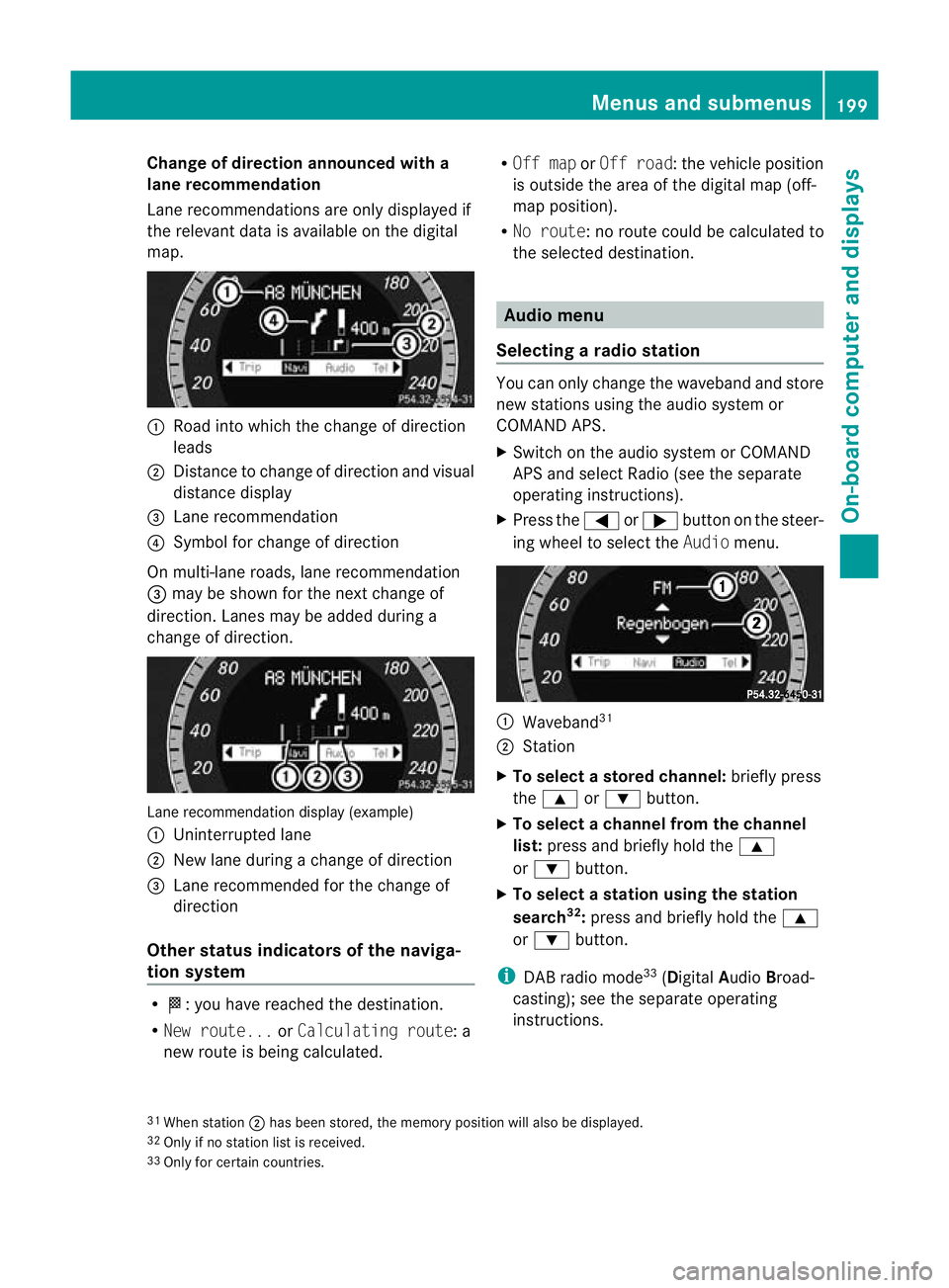
map. :
Road into which the change of direction
leads
; Distanc etochange of direction and visual
distanc edisplay
= Lane recommendation
? Symbol for change of direction
On multi-lane roads, lane recommendation
= may be shown for the next change of
direction. Lanes may be added during a
change of direction. Lan
erecommendation display (example)
: Uninterrupted lane
; New lane durin gachange of direction
= Lane recommended for the change of
direction
Other sta tusindicators of the naviga-
tion system R
O:y ou have reached the destination.
R Ne wr oute... orCalculating route:a
new route is being calculated. R
Off map orOff road :the vehicle position
is outside the area of the digital ma p(off-
ma pp osition).
R No route :noroute coul dbecalculated to
the selected destination. Audio menu
Selectin garadio station Yo
uc an only change the waveband and store
new stations using the audio system or
COMAND APS.
X Switch on the audio system or COMAND
APS and select Radio (se ethe separate
operating instructions).
X Press the =or; button on the steer-
ing wheel to select the Audiomenu. :
Wav eband 31
; Station
X To selec tastoredchann el:briefly press
the 9 or: button.
X To select achann elfrom the chan nel
list: press and briefly hold the 9
or : button.
X To select astatio nusing th estation
search 32
:press and briefl yholdt he 9
or : button.
i DAB radio mode 33
(Digit alAudio Broad-
castin g);s ee the separate operating
instructions.
31 Whe nstation ;hasb eens tored ,the memor yposition will also be displayed.
32 Only if no statio nlist is received.
33 Only for certain countries. Menus and submenus
199On-boardcomputer and displays
BA 20 7ECE ÄJ 2010/1a; 1; 2, en-GB
mkalaf aV ersion: 3.0.2.11
2010-01-26T13:03:22+01:00
-Seite 199 Z
Page 203 of 333
Audio player or audio media operation
Audio dat
afromv arious audio device sor
media can be played, depending on the equip-
ment fitted in the vehicle.
X Switch on the audio system or COMAND
APS and select the audi odrive or medium
(see th eseparate operating instructions).
X Press the =or; button on the steer-
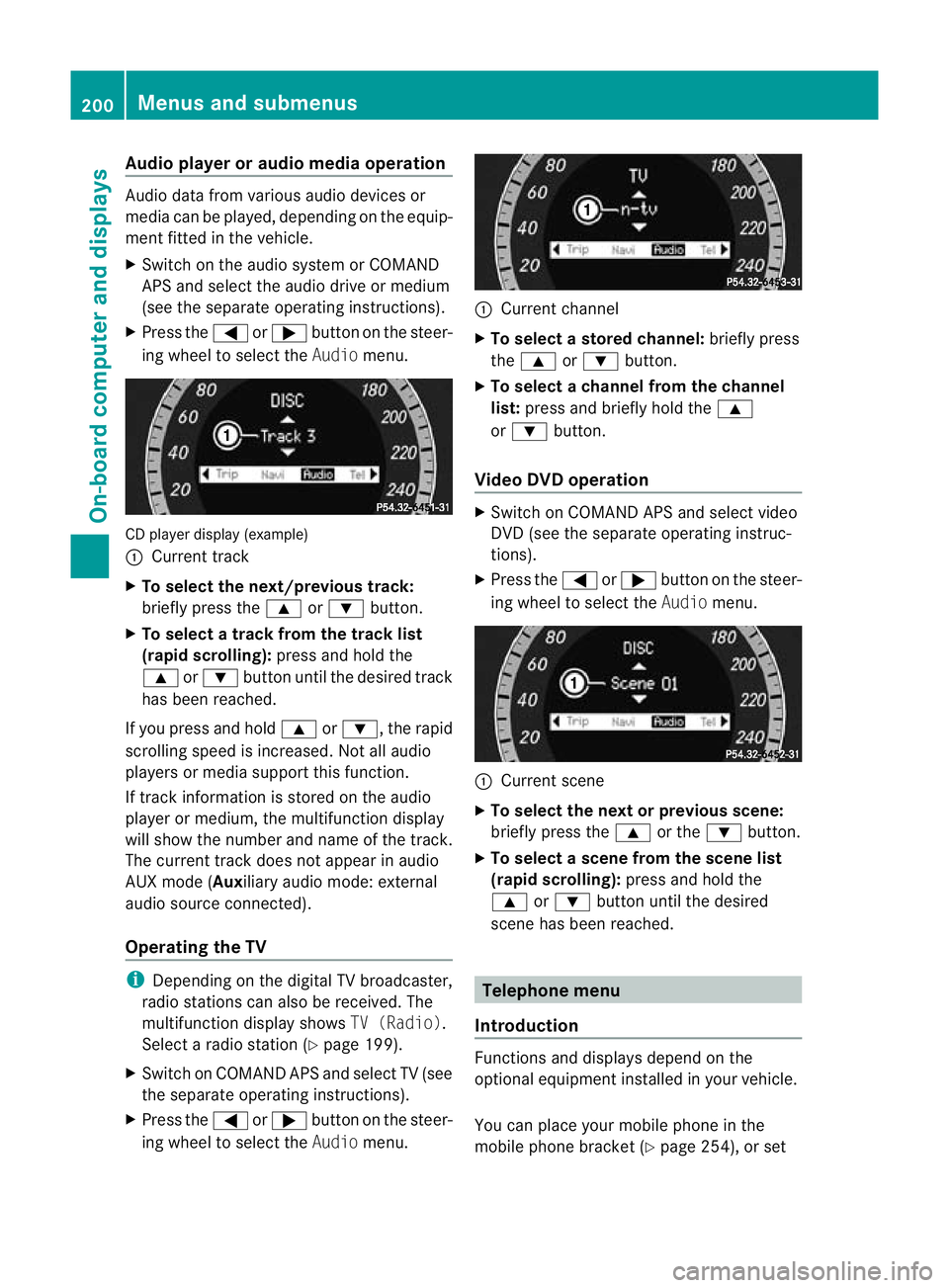
ing whee ltoselect the Audiomenu. CD player display (example)
:
Current track
X To select the next/previous track:
briefl ypress the 9or: button.
X To select atrack from the track list
(rapi dscrolling): press and hold the
9 or: button until th edesired track
ha sb eenr eached.
If yo upress and ho ld9 or:,t he rapid
scr olling speed is incre ased.Not allaudio
players or media support this function.
If track information is stored on the audio
playe rorm edium ,the multifunction display
will show the number and nam eofthe track.
The curren ttrack does not ap pear in audio
AUX mode (Auxiliar yaudi om ode: external
audio sourc econnected).
Operating th eTV i
Depending on the digital TV broadcaster,
radi ostations can als obereceived.The
multifunction display shows TV (Radio).
Select aradi ostation (Y page199).
X Switch on COMAND APS and select TV (see
the separate operating instructions).
X Press the =or; button on the steer-
ing whee ltoselect the Audiomenu. :
Curren tchannel
X To select astore dchann el:briefly press
the 9 or: button.
X To select achann elfrom the chan nel
list: press and briefly hold the 9
or : button.
Video DVD operation X
Switc honC OMAN DAPS and select video
DV D(see the separate oper ating instruc-
tions).
X Press the =or; button on the steer-
ing wheel to select the Audiomenu. :
Current scene
X To select th enext or previous scene:
briefly press the 9or the :button.
X To select ascene from th escene list
(rapid scrolling): press and hold the
9 or: button until th edesired
scene ha sbeenr eached. Telephon
emenu
Introdu ction Functions and display
sdepen dont he
optional equipment installe dinyourvehicle.
Yo uc an place your mobil ephone in the
mobil ephone bracket (Y page 254), or set200
Menus and submenusOn-board computer and displays
BA 207 ECE ÄJ 2010/1a; 1; 2, en-GB
mkalafa
Version: 3.0.2.11 2010-01-26T13:03:22+01:00-Seite 200
Page 211 of 333

X
Press :or9 to select the Limit
spee d(winter tyres): function.
Th ec urren tsetting is displayed.
X Press the abutton to confirm.
X Press :or9 to set permanent
SPEEDTRONI Cinincrements of ten
(240 km/h to160 km/h). Permanent
SPEEDTRONIC is deactivated with the Off
setting.
X Pres sthe a button to stor ethe entry.
Activating/deactiva ting th eautomatic
lockin gfeature
If you select the Automaticd oor locks:
function, th evehicle is centrally locked above
as peed of around 15 km/h.
i Further information on the automatic
locki ngfeature (Y page71).
X Press the =or; button on the stee r-
ing wheel to select the Settingsmenu.
X Press the :or9 buttontos elect the
Vehicle submenu.
X Press the abutton to confirm.
X Press the :or9 button to select the
Automa ticd oor locks: function.
Yo uw ill see the selected setting: onor
off.
X Press the abutton to save the setting.
Activating/deactiva ting th eacoustic
locking confirmation
If you switch on the AcousticLock feed‐
back: function, an acousti csignal sounds
when you lock or unlock the vehicle. When
unlocking, the signal sounds once. When
locking, it sounds three times.
X Press the =or; button on the steer-
ing wheel to select the Settingsmenu.
X Press the :or9 buttontos elect the
Vehicle submenu.
X Press the abutton to confirm. X
Press the :or9 button to select the
Acoust icLock feedback: function.
Yo uw ill see the selected setting: Activa‐
ted orDeacti vated.
X Press the abuttontos ave the setting.
Activating/deactivating the radar sensor
system
i You must deactivat ethe radar sensor sys-
tem in cer tain countries and near radio
telescope facilities. Fur ther information
(Y page 32 4).
Ve hicles with anavigation system: the radar
senso rsystem is deactivated automatically if
you are close to radio teles cope facilities.
The followin gsystems are switched off when
the radar sensor syste misdeactiva ted:
R DIST RONIC PLUS (Y page 160)
R BA SP LUS (Y page 56)
R PRE-SAFE ®
Brake (Y page 59)
R Blind Spo tAssist (Y page 18 4)
X Press the =or; button on the steer-
ing wheel to select the Settingsmenu.
X Press the :or9 buttontos elect the
Vehicle submenu.
X Press the abutton to confirm.
X Press the 9or: button to select
Rada rsensor (See Owner's Man.).
Yo uw ill see the selected setting: onor
off.
X Press the abutton to save the setting.
Convenience Activating/deactiva
ting th eEASY-
ENTRY/EXIT feature
You can use the Easy Entry/Exit function
to activate or deactivate the easy-entry/exit
feature (Y page 100). G
Ris
kofi njury
The steering wheel moves when the EASY-
ENTRY/EXIT feature is active. There is arisk
of occupant sbecoming trapped. Before acti- 208
Menus and submenusOn-board computer and displays
BA 20
7ECE ÄJ 2010 /1a;1;2,e n-GB
mkalafa Version: 3.0.2.11 2010-01-26T13:03:22+01:00-Seite 208
Page 215 of 333

Displa
ymessages Possible causes/consequences and
M Solutions
PR
E-SAFE Function
currently
limited
See Own‐
er'
sM an‐
ual G
Risk of accident
PRE-SAFE ®
Brake is tempora rily inoperative if:
R theD ISTRONIC PLUScove rint he ra diatorgrille is di rty.
R the sensor sint he bumpers are dirty.
R itsf unction is impaire ddue to heav yrain or snow.
R ther adar sensor system is temporarily inoperative ,e.g. due
to electromagnetic radiation emitted by nearby TV or radio
stations or other sources of electromagnetic radiation.
R the system is outside the operating tempe rature range.
R the on-board voltage is insufficient.
R E63A MG: you deactivat eESP®
.
PRE- SAFE ®
Brake is operational again and the displa ymes-
sage disappear swhen:
R the dir t(e.g. slush) drops away while the vehicle is in
motion.
R the system detects that the sensor sare full yavailable
again.
R thes ystem is within the operatin gtemperatur erange.
R E63A MG: you reactivate ESP ®
.
If the displa ymessage continues to be displayed:
X Clean the DI STRONIC PLUS cover in the radiator grille
(Y page 267).
X Clean the bumpers (Y page 267).
X Restart the engine.
X Wait until the batter yissufficiently charged. PRE-SA
FE Functions
limited
See Own‐
er's Man‐
ual
G
Ris
kofa ccident
PRE-SAFE ®
Brak eisfaulty. BA SPLUS or th edistance warning
signal may also have failed.
X Visit aqualified specialist workshop. A Malfunc‐
tion Con‐
sult work‐
shop
G
Risk of injury
Cabriolet: the roll bars are faulty.
X Visit aqualified specialist worksho pimmed iately. 212
Display messagesOn-board computer and displays
BA 207 ECE ÄJ 2010/1a; 1; 2, en-GB
mkalafa
Version: 3.0.2.11 2010-01-26T13:03:22+01:00 -Seite 212
Page 228 of 333
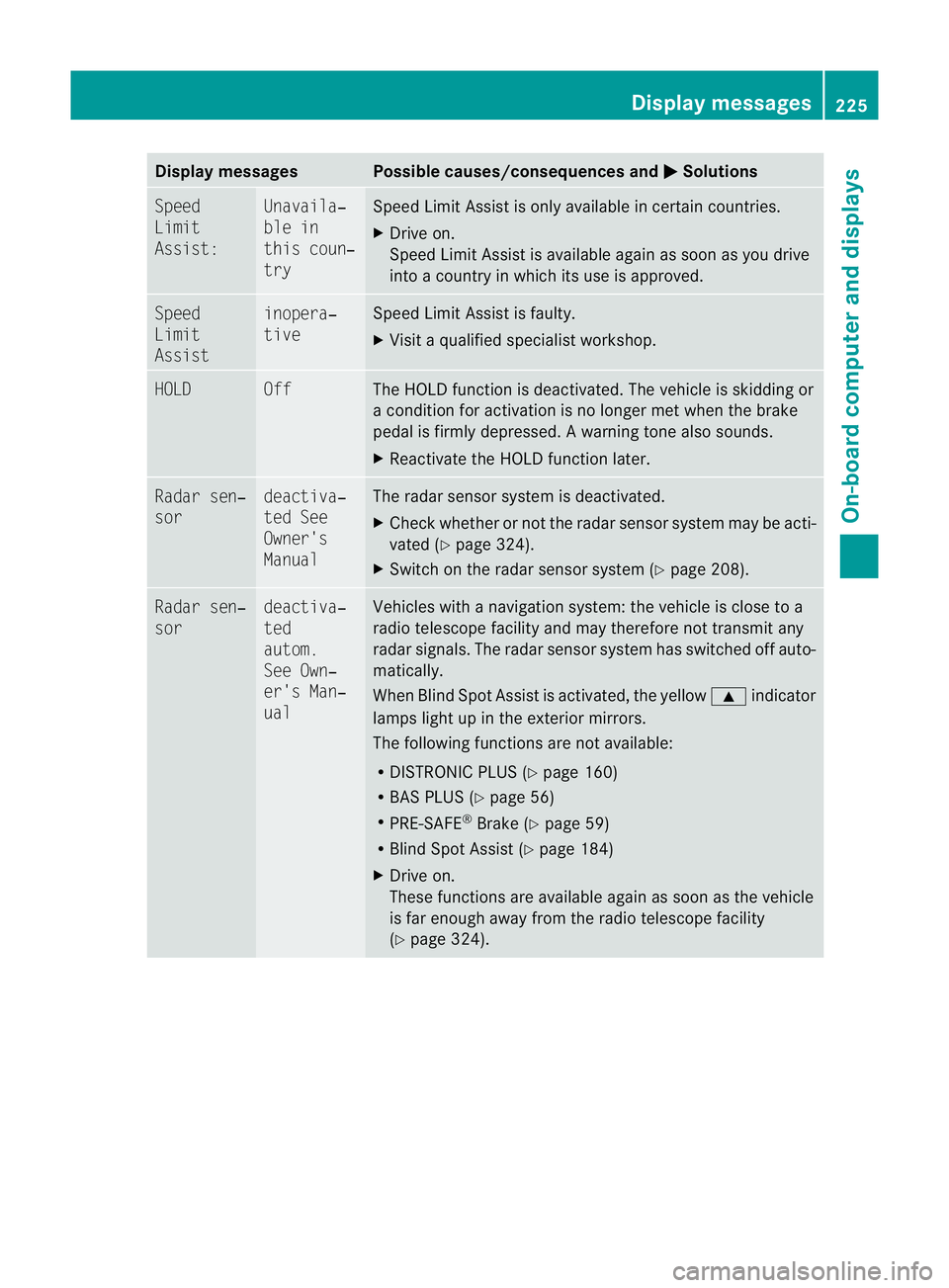
Displa
ymessages Possible causes/consequences and
M Solutions
Sp
eed
Limit
Assist: Unavaila‐
ble in
thi
sc oun‐
try Spee
dLimit Assist is onl yavailable in certain countries.
X Drive on.
Speed Limit Assist is avai lable again as soon as you drive
into acountry in which its use is approved. Speed
Limit
Assist inopera‐
tive Speed Limit Assist is faulty.
X
Visit aqualified special istworkshop. HOLD Off The HOLD function is deactivated. The vehicle is skidding or
ac
ondition for activation is no longer met when the brake
pedal is firmly depressed. Awarning ton ealso sounds.
X Reactivat ethe HOL Dfunction later. Ra
dars en‐
sor deactiva‐
ted See
Owner's
Manual Th
er adar sensor system is deactivated.
X Check whether or not the radar sensor system ma ybeacti-
vated (Y page324).
X Switch on the rada rsensor system (Y page 208). Rada
rsen‐
sor deactiva‐
ted
autom.
See Own‐
er's Man‐
ual Vehicles with
anavigation system: the vehicle is close to a
radio telescop efacility and may therefore not transmit any
radar signals .The radar sensor system has switched off auto-
matically.
When Blind Spot Assist is activated, the yellow 9indicator
lamps light up in the exterior mirrors.
The followin gfunctions are not available:
R DISTRONIC PLUS (Y page 160)
R BAS PLUS (Y page 56)
R PRE-SAFE ®
Brake (Y page 59)
R Blind Spot Assis t(Ypage 184)
X Drive on.
These functions are available again as soon as the vehicle
is far enough away from the radio telescope facility
(Y page 324). Display messages
225On-board computer and displays
BA 207ECE ÄJ 2010 /1a;1;2,e n-GB
mkalafa Version: 3.0.2.11 2010-01-26T13:03:22+01:00-Seite 225 Z
Page 229 of 333
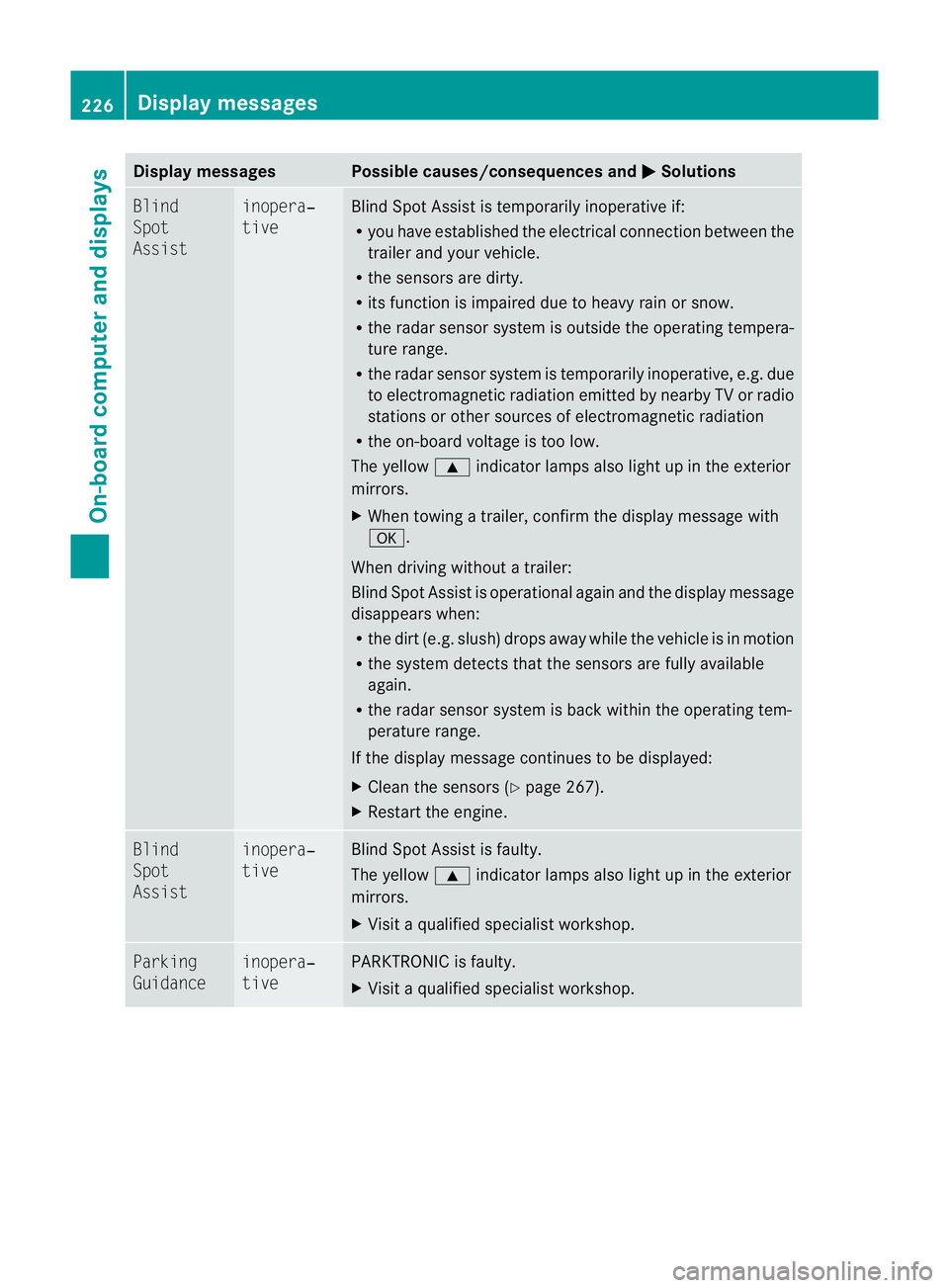
Displa
ymessages Possible causes/consequences and
M Solutions
Bl
ind
Spot
Assist inopera‐
tive Blind Spot Assist is temporarily inoperative if:
R
you have established the electrical connection between the
trailer and your vehicle.
R the sensors are dirty.
R its function is impaired due to heavy rain or snow.
R the radar sensor syste misoutside the operating tempera-
ture range.
R the radar senso rsystem is temporarily inoperative, e.g. due
to electromagnetic radiation emitted by nearby TV or radio
stations or othe rsources of electromagnetic radiation
R the on-boar dvoltage is too low.
The yellow 9indicator lamps also light up in the exterior
mirrors.
X When towin gatrailer, confirm th edispla ymessage with
a.
When driving without atrailer:
Blind Spo tAssist is operational again and th edisplay message
disappears when:
R thed irt( e.g. slush) drops away whil ethe vehicle is in mot ion
R the system detects tha tthe sensor sare full yavail able
again.
R the radar sensor system is back within the operating tem-
peratur erange.
If the displ aymessage continues to be displayed:
X Cle anthe sensor s(Ypage 267).
X Restar tthe engine. Blind
Spot
Assist inopera‐
tive Blind Spot Assist is faulty.
The yellow
9indicator lamps also light up in the exterior
mirrors.
X Visit aqualified specialist workshop. Parking
Guidance inopera‐
tive PARKTRONIC is faulty.
X
Visit aqualified specialist workshop. 226
Display messagesOn-board computer and displays
BA 207 ECE ÄJ 2010/1a; 1; 2, en-GB
mkalaf
aV ersion: 3.0.2.11
2010-01-26T13:03:22+01:0
0-Seite 226
Page 231 of 333
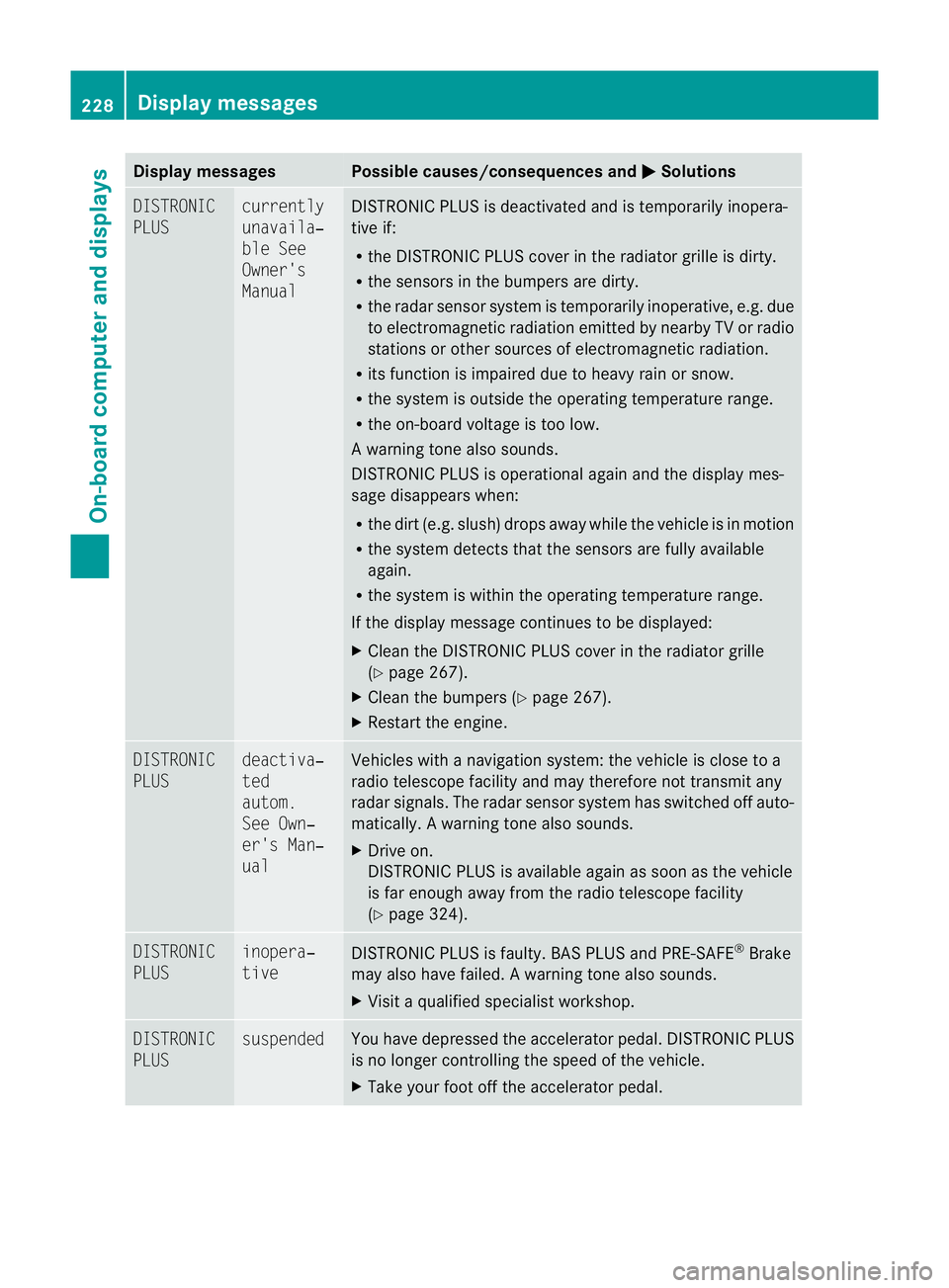
Displa
ymessages Possible causes/consequences and
M Solutions
DI
STRONIC
PLUS currently
unavaila‐
ble See
Owner's
Manual DISTRONIC PLUS is deactivated and is temporarily inopera-
tive if:
R
the DISTRONIC PLUS cover in the radiator grille is dirty.
R the sensors in the bumpers are dirty.
R the radar sensor syste mistemporarily inoperative, e.g. due
to electromagnetic radiation emitted by nearby TV or radio
station sorother sources of electromagnetic radiation.
R its function is impaired due to heavy rain or snow.
R the syste misoutside the operating temperature range.
R the on-board voltage is too low.
Aw arning ton ealso sounds.
DISTRONI CPLUSiso perational again and th edisplay mes-
sage disappears when:
R thed irt( e.g. slush) drops away whil ethe vehicle is in mot ion
R the system detects tha tthe sensor sare full yavail able
again.
R the system is within the operating temperature range.
If the displa ymessage continues to be displayed:
X Clean the DI STRONIC PLUS cover in the radiator grille
(Y page 267).
X Clea nthe bumper s(Ypage 267).
X Restar tthe engine. DISTRONIC
PLUS deactiva‐
ted
autom.
Se
eO wn‐
er's Man‐
ual Vehicles with
anavigation system: the vehicle is close to a
radio telescop efacility and may therefore not transmit any
radar signals .The radar sensor system has switched off auto-
matically .Awarning ton ealso sounds.
X Drive on.
DISTRONI CPLUSisa vailable agai nassoon as the vehicle
is far enough away from the radio telescope facility
(Y page 324). DISTRONIC
PLUS inopera‐
tive
DISTRONIC PLU
Sisfaulty. BAS PLUS and PRE-SAFE ®
Brake
may also have failed .Awarning ton ealso sounds.
X Visi taq ualifieds pecialist workshop. DISTRONIC
PLUS suspended You have depressed the accelerator pedal. DI
STRONIC PLUS
is no longe rcontr ollin gthe speed of the vehicle.
X Take your foot off the accelerator pedal. 228
Displa
ymessagesOn-boar dcomputer and displays
BA 20 7ECE ÄJ 2010/1a; 1; 2, en-GB
mkalafa Version:3.0.2.11
2010-01-26T13:03:22+01:0
0-Seite 228
Page 238 of 333
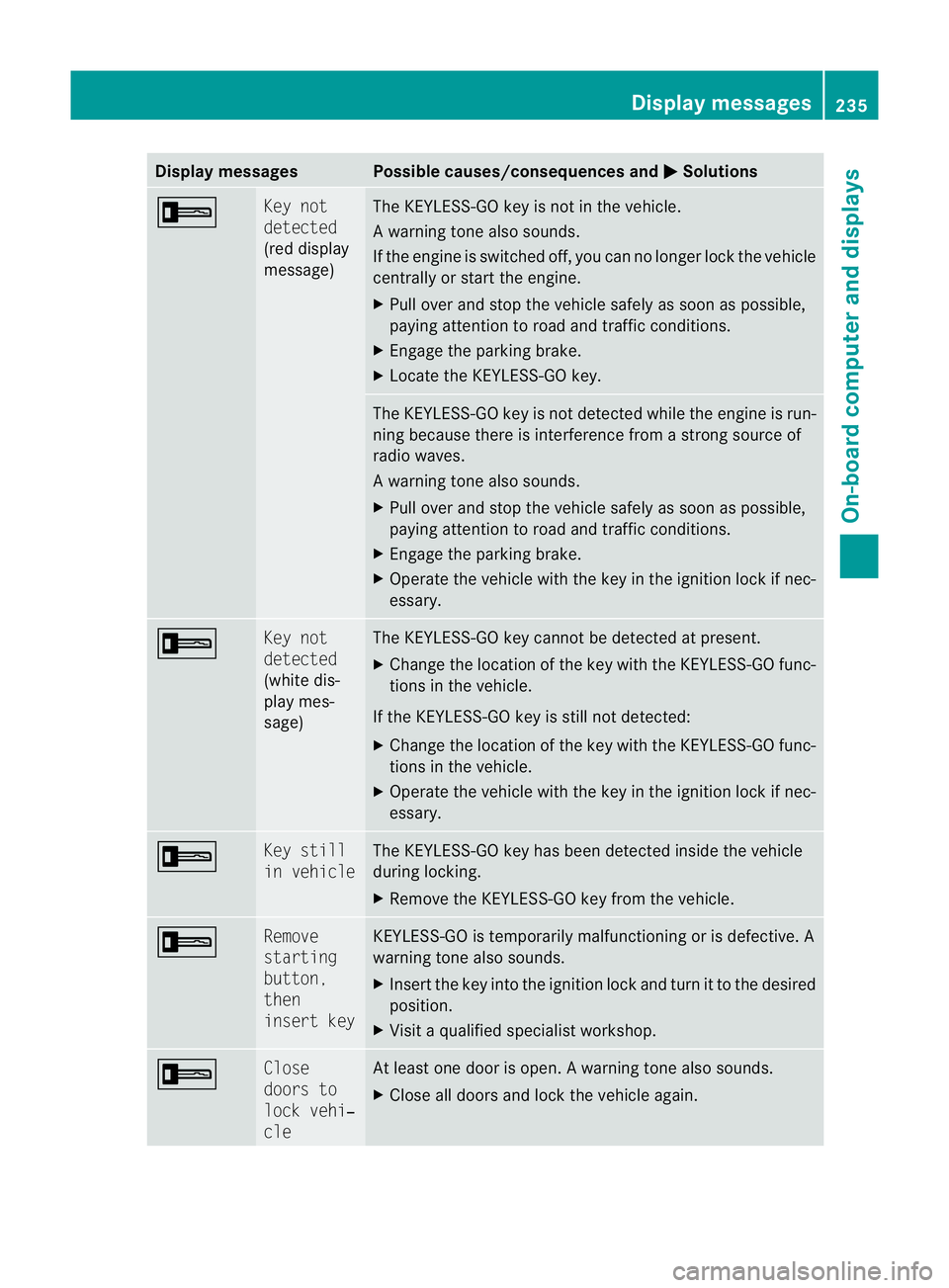
Displa
ymessages Possible causes/consequences and
M Solutions
+ Ke
yn ot
detected
(red display
message) Th
eK EYLESS-GO key is not in the vehicle.
Aw arning ton ealso sounds.
If th eengineiss witched off ,you can no longer loc kthe vehicle
cen trally or start the engine.
X Pull over and stop the vehicle safely as soon as possible,
paying attention to road and traffic conditions.
X Engage the parkin gbrake.
X Locate th eKEYLESS-GO key. The KEYLESS-GO key is not detected whil
ethe engin eisrun-
ning because there is interference from astron gsource of
radio waves.
Aw arning ton ealso sounds.
X Pull ove rand sto pthe vehicle safel yassoonasp ossible,
paying attention to roa dand traffic conditions.
X Engag ethe parkin gbrake.
X Operate th evehicle with the key in the ignition lock if nec-
essary. + Ke
yn ot
detected
(white dis-
play mes-
sage) Th
eK EYLESS-GO key cannot be detected at present.
X Chang ethe location of the key with the KEYLESS-GO func-
tion sint he vehicle.
If the KEYLESS-GO key is still not detected:
X Change the location of the key with the KEYLESS-GO func-
tion sint he vehicle.
X Operate the vehicle with the key in the ignition lock if nec-
essary. + Ke
ys till
in vehicle Th
eK EYLESS-GO key has bee ndetected inside the vehicle
during locking.
X Remov ethe KEYLESS-GO key from the vehicle. + Remove
starting
button,
then
insert key KEYLESS-GO is temporarily malfunctioning or is defective
.A
warning tone also sounds.
X Insert the key into the ignition lock and turn it to the desired
position.
X Visit aqualified special istworkshop. + Close
door
sto
lock vehi‐
cle At leas
tone doo risopen. Awarning ton ealso sounds.
X Close all door sand lock the vehicle again. Display messages
235On-board computer and displays
BA 207ECE ÄJ 2010 /1a;1;2,e n-GB
mkalafa Version: 3.0.2.11 2010-01-26T13:03:22+01:00-Seite 235 Z