warning light MERCEDES-BENZ E-CLASS CABRIOLET 2010 Owner's Manual
[x] Cancel search | Manufacturer: MERCEDES-BENZ, Model Year: 2010, Model line: E-CLASS CABRIOLET, Model: MERCEDES-BENZ E-CLASS CABRIOLET 2010Pages: 333, PDF Size: 7.64 MB
Page 144 of 333

Problem Possible causes/consequences and
M Solutions
Vehicles with
apetrol
engine:
The engine is not run-
ning smoothly and is
misfiring. There is
amalfunction in the engine electronics or amechanical
componen tofthe engin emanagement system.
X Only depress the accelerator pedal slightly.
X Have the cause rectified immediately at aqualified specialist
workshop.
Otherwise, non-combusted fuel may get into the catalytic con-
verter and damage it. The coolant tempera-
ture display is showing
more than 120 †. The
coolant warning lamp
may also be lit and a
warning tone may
sound. (Y
page 192). The coolant level is too low. The coolant is too hot and the engine
is no longer being cooled sufficiently.
X
Stop as soo naspossible and allow the engin eand the coolant
to cool down.
X Check the coolant level (Y page261). Observe the warning
notes as you do so and top up the coolan tifnecessary. If the coolan
tlevel is correc t,the radiator fan may be faulty. The
coolant is too hot and the engine is no longe rbeing cooled suffi-
cien tly.
X If the coolant temperature is less than 120 †, you can continue
driving to the nearest qualified specialist workshop.
X Avoid heavy loads on the engine as you do so, e.g. driving on
mountain roads and stop/start driving. Manual transmission
Gear lever
Gear lever
!
Whe nshifting between 5thand 6thgear,
you should always push the gear lever all
the way to the right. Otherwise, you could
shift uninte ntionally into 3rdor4th gear
and damage the transmission. Do not exceed the maximum speed for the
individual gears.
Shiftin
gdown at too high aspeed (trans-
mission braking) can cause the engine to
overrev ,leading to engine damage.
! On long and steep downhill gradients,
especiall yifthe vehicle is laden or towing
at railer, yo umust shift into gear 1, 2or3
in good time. This uses the engine's braking
effect .This relieves the load on the brake
system and prevents the brakes from over-
heating and wearing too quickly. Neutral
Nwhen the ECO start/stop
functio nisactive
In neutral N,the engin eisswitched off when
the vehicle speed is below acertain threshold
and the clut chpedal is not depressed. Manual transmission
141Driving and parking
BA 207ECE ÄJ 2010/1a; 1; 2, en-GB
mkalafa Version:3.0.2.11
2010-01-26T13:03:22+01:0
0-Seite 141 Z
Page 165 of 333
mus
talsoa pply the brakes yourself if this
braking powe risnot sufficient.
If DISTRONIC PLU Sdetect sarisk of collision
with avehicle in front, an intermit tent warning
tone sounds. In addition, the ·distance
warning lamp in the instrument cluste rlights
up. Brak etoavoidac ollision.
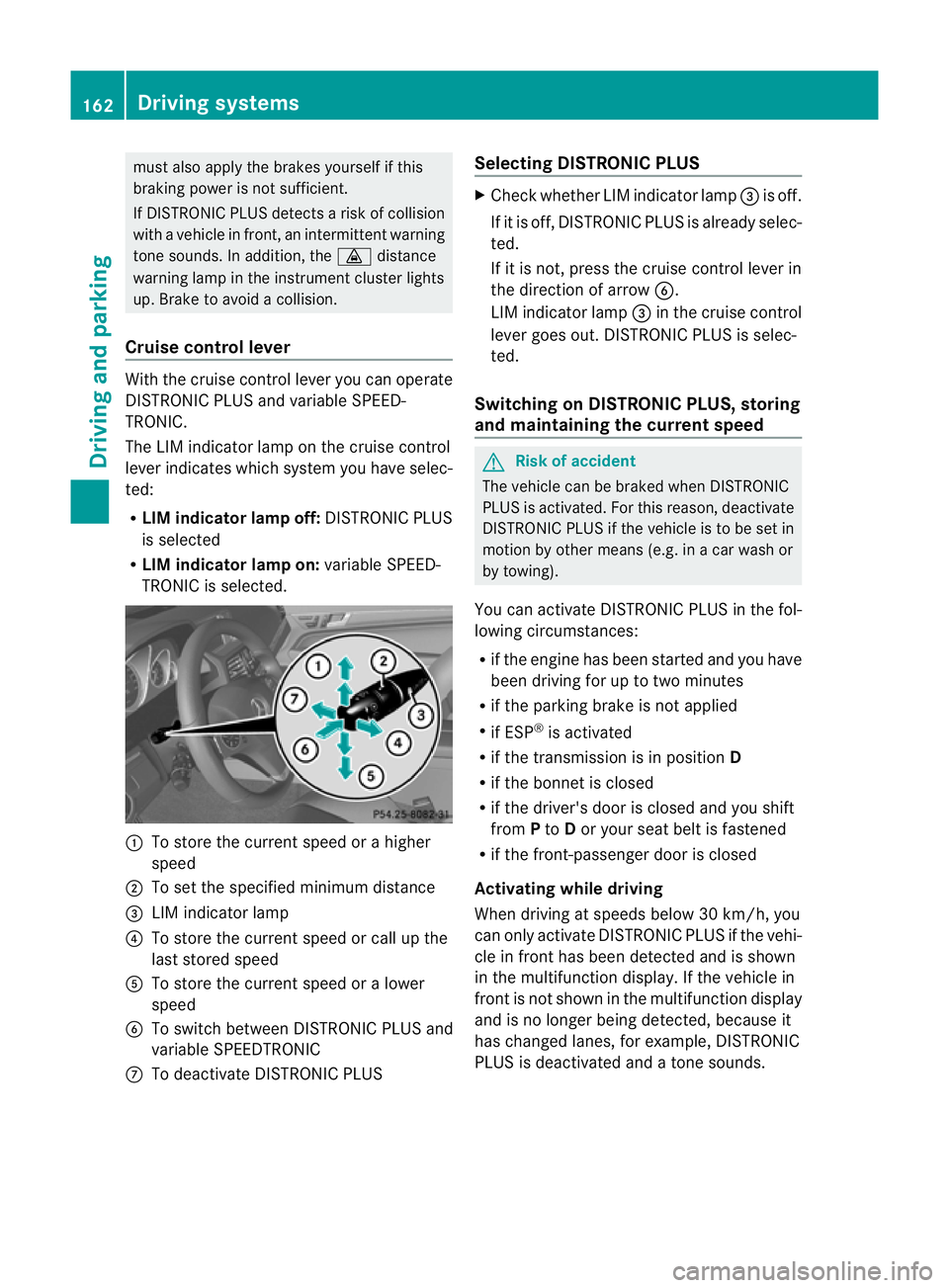
Cruise control lever With the cruise control lever you can operate
DI ST RONIC PLUS and variable SPEE D-
TRONIC.
The LI Mindicator lamp on the cruise control
lever indicates which system you have selec-
ted:
R LIM indicator lamp off: DISTRONIC PLUS
is selected
R LIM indicator lamp on: variable SPEED-
TRONIC is selected. :
To sto rethe curren tspeed or ahigher
speed
; To set the specified minimum distance
= LIMi ndicator lamp
? To sto rethe curren tspeed or call up the
last stored speed
A To stor ethe curren tspeed or alower
speed
B To switc hbetween DI STRONIC PLUS and
variable SPEEDTRONIC
C To deactivate DISTRONIC PLUS Selecting DISTRONIC PLUS X
Check whether LIM indicator lamp =is off.
If it is off, DISTRONIC PLUS is already selec-
ted.
If it is not ,pres sthe cruise contr ol leverin
the direction of arrow B.
LIM indicator lamp =in the cruise control
lever goe sout. DISTRONIC PLUS is selec-
ted.
Switching on DISTRONIC PLUS ,storing
and maintaining the current speed G
Risk of accident
The vehicle can be braked when DISTRONIC
PLUS is activated. For this reason, deactivate
DISTRONIC PLUS if the vehicle is to be set in
motion by othe rmeans (e.g. in acar wash or
by towing).
You can activate DISTRONIC PLUS in the fol-
lowing circumstances:
R if the engine has been started and you have
been drivin gfor up to two minutes
R if the parkin gbrake is not applied
R if ESP ®
is acti vated
R if the transmission is in position D
R if the bonnet is closed
R if the driver' sdoor is closed and you shift
from Pto Dor your seat belt is fastened
R if the front-passenger door is closed
Activating while driving
When drivin gatspeeds below 30 km/h, you
can only acti vate DISTRONIC PLUS if the vehi-
cle in fron thas been detected and is shown
in the multifunction display. If the vehicle in
front is not shown in the multifunction display
and is no longe rbeing detected, because it
has changed lanes, for example, DISTRONIC
PLU Sisd eactivated and atone sounds. 162
Driving systemsDriving and pa
rking
BA 20 7ECE ÄJ 2010 /1a; 1; 2, en-GB
mkalafa Version: 3.0.2.11 2010-01-26T13:03:22+01:00 -Seite 162
Page 178 of 333
:
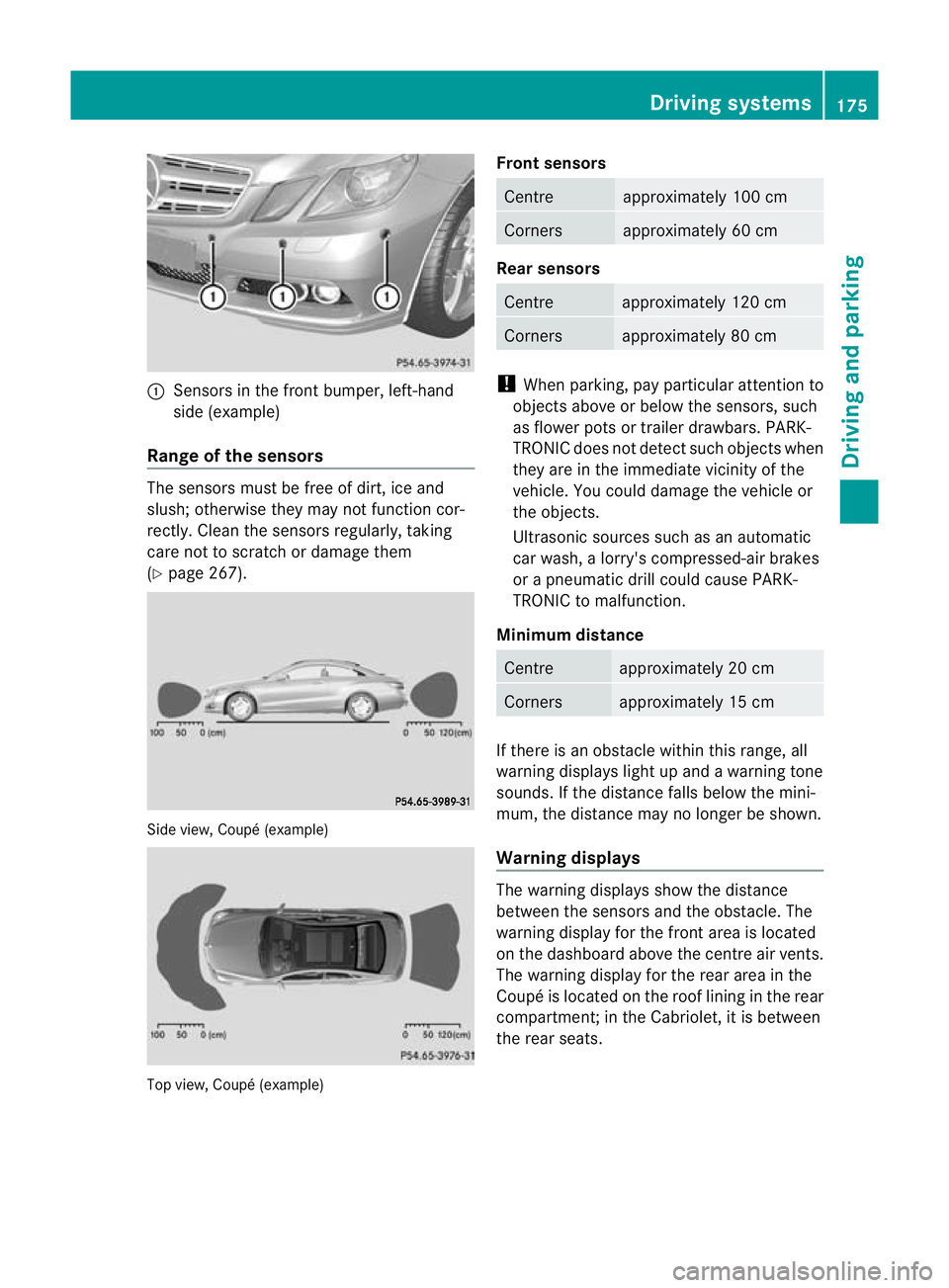
Sens orsint he front bumper, left-hand
sid e(example)
Rang eoft he sens ors The sensors mu
st befree of dirt, ice and
slush; otherwis ethey ma ynot function cor-
rec tly. Clean the sensor sregularly, taki ng
care not to scratch or damag ethem
(Y page 26 7). Side view, Coup
é(example) Top view, Coupé (example) Front sensors Centre approximately 10
0cm Corners approximately 60 cm
Rear sensors
Centre approximately 120 cm
Corners approximately 80 cm
!
When parking, pay particular attention to
objects above or below the senso rs,s uch
as flower pots or trailer drawbars. PARK-
TRONIC does not detect such ob jectswhen
they ar eintheimmediat evicinity of the
vehicle. You could damage the vehicle or
the objec ts.
Ultrasonic sources such as an automatic
car wash ,alorry' scompressed-ai rbrakes
or ap neumatic drill could cause PARK-
TRONI Ctom alfunction.
Minimum distance Centre approximately 20 cm
Corners approximately 15 cm
If ther
eisano bstacle within this ran ge,all
warnin gdisplays light up and awarnin gtone
sounds. If the distanc efalls below the mini-
mum, the distanc emay no longer be shown.
Warning displays The warnin
gdisplays show the distance
between the sensor sand the obs tacle. The
warning displa yfor the fr ont area is located
on the dashboar dabove the centr eair vents.
The warnin gdisplay for the rear area in the
Coupé is located on the roof linin ginthe rear
compar tment;inthe Cabriolet ,itisbetween
the rear seats. Driving systems
175Driving and parking
BA 207ECE ÄJ 2010/1a; 1; 2, en-GB
mkalafa Version: 3.0.2.11 2010-01-26T13:03:22+01:00-Seite1 75 Z
Page 179 of 333
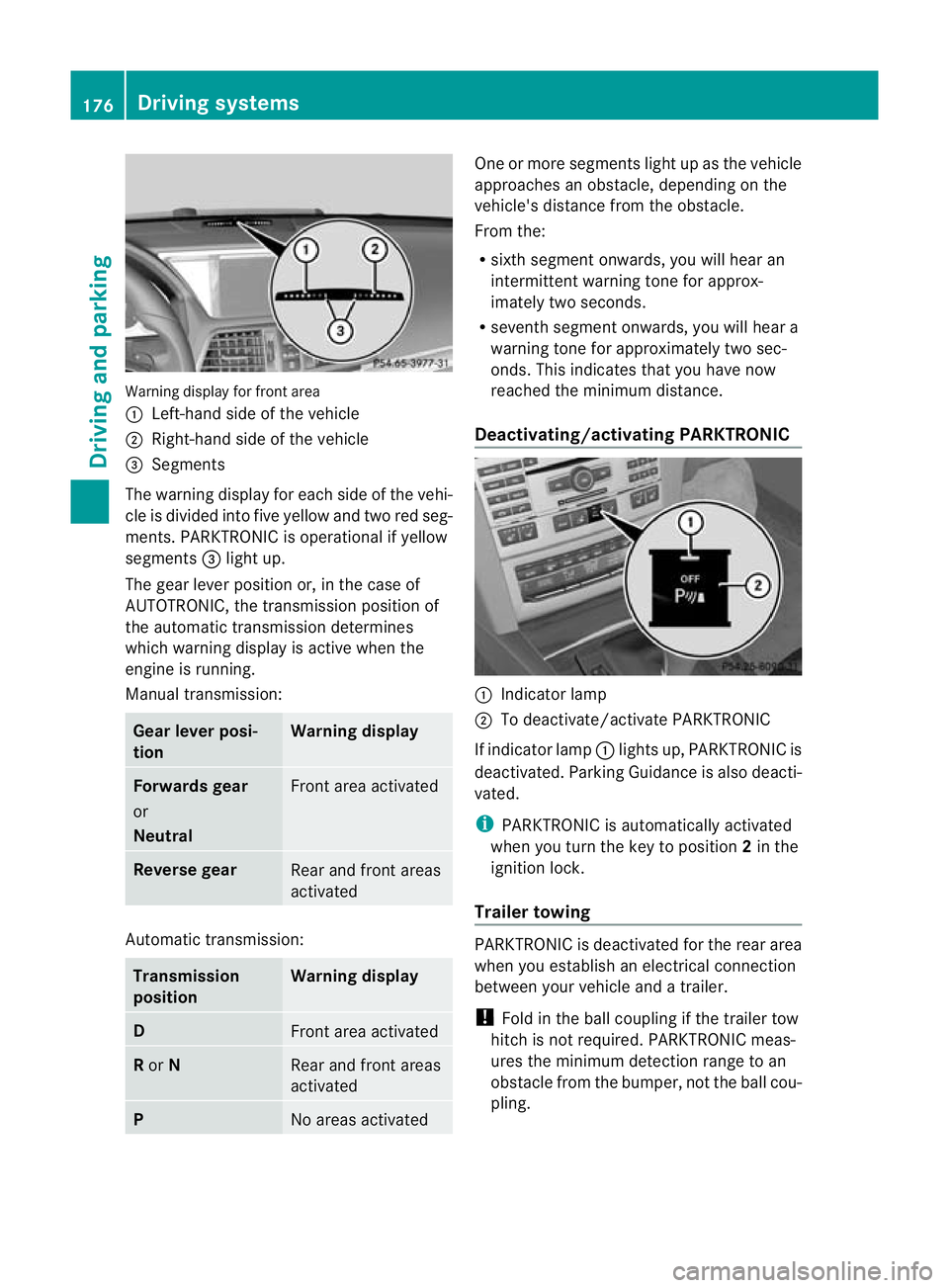
Warning display for fron
tarea
: Left-hand side of th evehicle
; Right-hand side of the vehicle
= Segments
The warning display for each side of the vehi-
cle is divided into fiv eyellow and two red seg-
ments. PARKTRONI Cisoperational if yellow
segments =ligh tup.
The gear lever position or, in the case of
AUTOTRO NIC, the transmission position of
the automatic transmission determines
which warning display is active when the
engine is running.
Manual transmission: Gear lever posi-
tion Warning display
Forward
sgear
or
Neutral Fron
tarea activated Revers
egear Rear and fron
tareas
activated Auto
matic transmission: Transmission
position Warning display
D
Fron
tarea activated R
or N Rear and front areas
activated
P
No areas activated On
eorm ore segments light up as the vehicle
approaches an obstacle, depending on the
vehicle' sdistanc efrom th eobstacle.
From the:
R sixt hsegmen tonwards ,you will hea ran
intermitten twarnin gtonef or approx-
imately two seconds.
R seven thsegment onwards, you will hear a
warnin gtonef or approximately two sec-
onds. This indicates that you have now
reached the minimu mdistance.
Deactivating/activating PARKTRONIC :
Indicator lamp
; To deactivate/activate PARKTRONIC
If indicator lamp :lights up, PARKTRONIC is
deactivated. Parking Guidance is also deacti-
vated.
i PARKTRONIC is automatically activated
when you turn the key to position 2in the
ignition lock.
Trailer towing PARKTRONIC is deactivated for the rear area
when you establish an electrical connection
between your vehicle and
atrailer.
! Foldint he ball couplin gifthe trailer tow
hitc hisn ot required .PARKTRONIC meas-
ures the minimum detection range to an
obstacle from the bumper, not the ball cou-
pling. 176
Drivin
gsystemsDrivin gand pa rking
BA 20 7ECE ÄJ 2010 /1a; 1; 2, en-GB
mkalafa Version: 3.0.2.11 2010-01-26T13:03:22+01:00 -Seite 176
Page 180 of 333
Problems wit
hPARKTRONIC Problem Possible causes/consequences and
M Solutions
Only the red segments
in the PARKTRONIC
warning display
sare lit.
Yo ua lso hear awarning
tone for approximately
two seconds.
PARKTRONIC is deacti-
vated after approx-
imately 20 seconds and
the indicator lamp in
the PARKTRONIC but-
ton lights up. PARKTRONIC has malfunctioned and has switched itself off.
X
If problems persist, have PARKTRONIC checked at aqualified
specialist workshop. Only the red segments
in the PARKTRONIC
warning display
sare lit.
PARKTRONIC is deacti-
vate dafter approx-
imatel y20seconds. The PARKTRONI
Csensors are dirt yorthere is interference.
X Clean the PARKTRONI Csensors (Y page 267).
X Switch the ignition back on. The problem may be caused by an exter
nalsource of radio or
ultrasoun dwaves.
X See if PARKTRONIC functions in adifferent location. Parking Guidance
Important safet ynotes Parking Guidance is an electronic parking aid
with ultrasound. Ultrasound is used to meas-
ure the road on both sides of the vehicle. A
suitable parking space is indicated by the
parking symbol. You receiv esteering instruc-
tions when parking. You may also use PARK-
TRONIC (Y page 174). G
Risk of accident
Parking Guidance is merely an aid and may
recommen dparking spaces that are not suit-
able for parking. For example, these might be
spaces where parking is prohibited ,drive-
ways, unsuitabl esurfaces, etc.
Parking Guidance measures the parking
space as you drive past it. Any later changes
to the parking space are not taken into
account. For instance, this may be the case when the vehicle parked in front of or behind
the space changes its position or when an
obstacle is moved into the parking space.
Parking Guidance does not relieve you of the
responsibility for paying attention. If you rely
solely on Parking Guidance, you could cause
an accident and injure yourself and others.
You are always responsible for safety and
must continue to pay attention to your imme-
diate surroundings when parking and
manoeuvring.
G
Risk of accident
Objects located above the height range of
Parking Guidance will not be detected when
the parking space is measured. Thes eare not
take ninto account whe nthe parkin gproce-
dure is calculated, e.g .overhanging loads ,tail
sections or loading ramps of good svehicles.
In some circumstances, Parking Guidance Driving systems
177Drivingand pa rking
BA 20 7ECE ÄJ 2010 /1a;1;2,e n-GB
mkalafa Version: 3.0.2.11 2010-01-26T13:03:22+01:00-Seite 177 Z
Page 188 of 333
lar, this may be the case if the vehicles are
drivin gatthe edge of their lan enearest your
vehicle. Due to the nature of the system,
warnings may be issued in err or when driving
clos etoc rashb arriers or similar solid lane
borders.
The two sensors for Blind Spot Assis tare
integrate dinto the sides of the rear bumper.
Make sure that the bumpe risfree from dirt,
ice or slus haround th esensors. For example,
the rada rsensors must not be covered by
cycle racks or overhanging loads. Followin ga
severe impac torinthe even tofdamage to
the bumpers, have the function of the radar
sensors checked at aqualified specialist
workshop, e.g. aMercedes-Ben zService
Cent re.B lind Spot Assist may otherwise not
work properly.
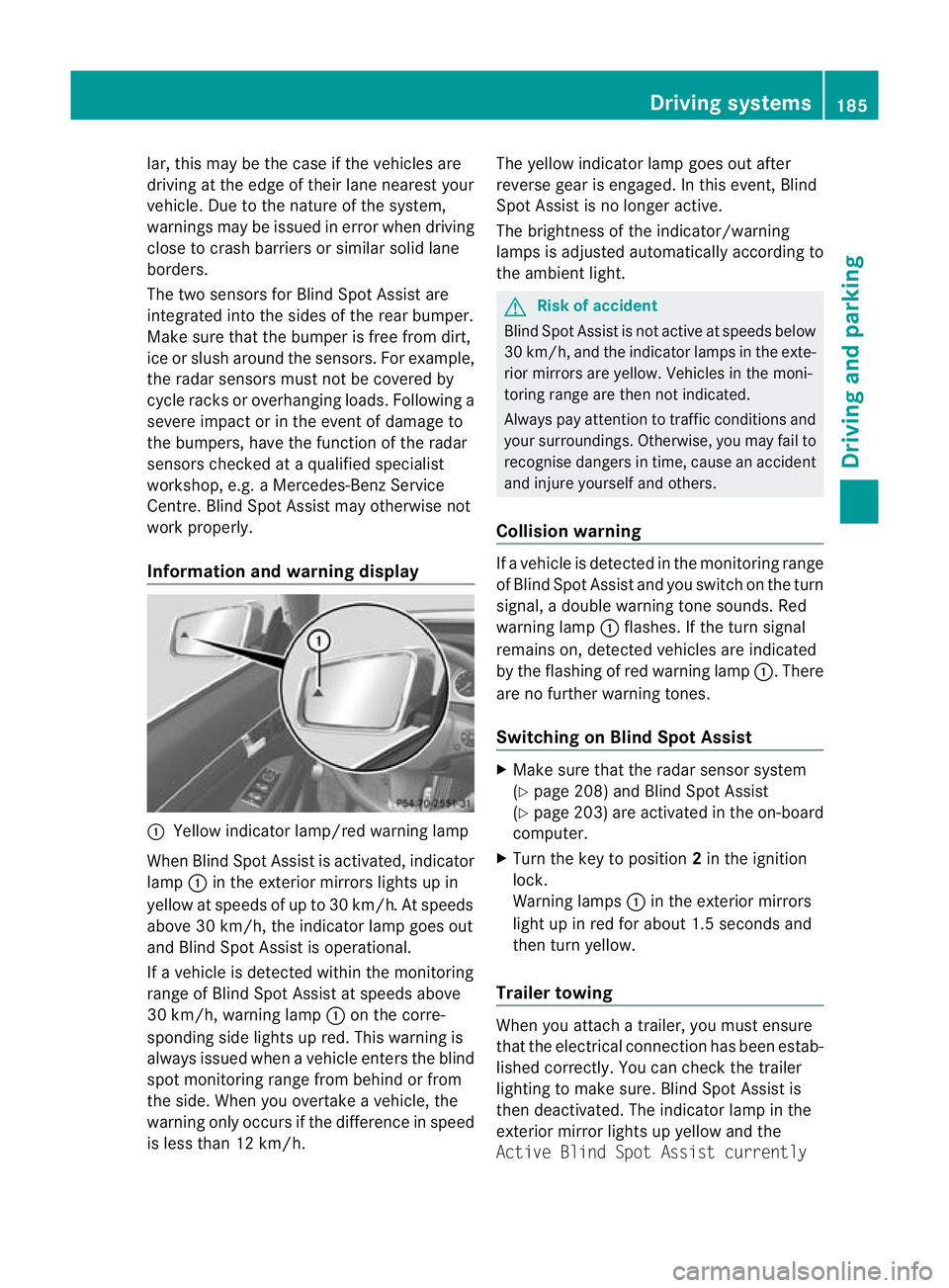
Information and warning display :
Yellow indicator lamp/red warnin glamp
When Blind Spot Assis tisa ctivated, indicator
lamp :in the exterior mirrors lights up in
yellow at speed sofupto30km/ h.At speeds
above 30 km/h, the indicator lamp goe sout
and Blind Spo tAssist is operational.
If av ehicle is detected within the monitoring
range of Blin dSpot Assist at speeds above
30 km/h, warning lamp :on the corre-
sponding side lights up red. This warning is
always issued when avehicle enter sthe blind
spot monitoring range from behind or from
the side. When you overtak eavehicle, the
warning only occurs if the difference in speed
is less than 12 km/h. The yellow indicator lam
pgoes out after
reverse gear is engaged. In this event, Blind
Spot Assist is no longer active.
The brightness of the indicator/warning
lamps is adjusted automatically according to
the ambient light. G
Risk of accident
Blind Spot Assist is not active at speeds below
30 km/h, and the indicator lamps in the exte-
rio rm irror sare yel low.Vehicles in the moni-
toring range are then not indicated.
Alway spay attention to traffic conditions and
your surroundings. Otherwise ,you may fai lto
recognise dangers in time ,cause an accident
and injure yoursel fand others.
Collisio nwarning If
av ehicle is detected in the mon itoring range
of Blind Spot Assis tand you switch on the turn
signal, adouble warnin gtone sounds. Red
warnin glamp :flashes .Ifthe tur nsignal
remains on, detected vehicles are indicated
by the flashing of red warnin glamp :.T here
ar enof urther warning tones.
Switching on Blind Spot Assist X
Make sure that the radar senso rsystem
(Y page 208) and Blind Spot Assist
(Y page 203) are activated in the on-board
computer.
X Turn the key to position 2in the ignition
lock.
Warning lamps :in the exterior mirrors
ligh tupinr ed for about 1. 5seconds and
then tur nyellow.
Trailer towing When you attach
atrailer, yo umust ensure
that the electrical connection has been estab-
lished correctly. You can check the trailer
lighting to make sure. Blind Spot Assis tis
then deactivated .The indicator lam pint he
exterior mirror lights up yellow and the
Active Blin dSpot Assist currently Drivin
gsystems
185Drivingand pa rking
BA 20 7ECE ÄJ 2010 /1a;1;2,e n-GB
mkalafa Version: 3.0.2.11 2010-01-26T13:03:22+01:00-Seite 185 Z
Page 199 of 333
Menus and submenus
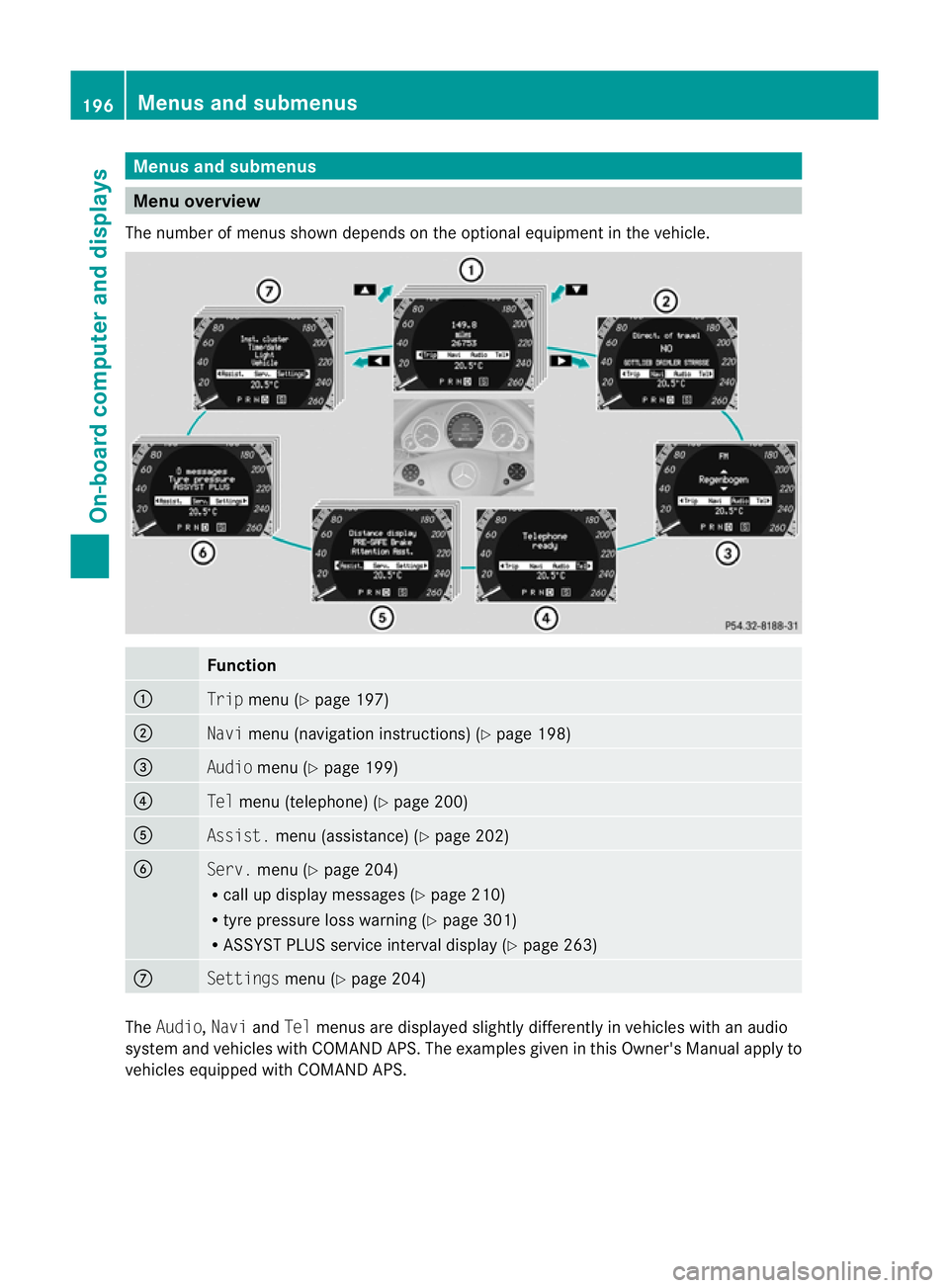
Men
uoverview
The number of menu sshown depends on the optional equipment in the vehicle. Function
:
Trip
menu (Y page 197) ;
Navi
menu (navigation instructions) (Y page 198)=
Audio
menu (Y page 199) ?
Tel
menu (telepho ne)(Y page 20 0) A
Assist.
menu (assistance) (Y page202) B
Serv.
menu (Y page204)
R call up display message s(Ypage 21 0)
R tyre pressure los swarning (Y page 301)
R ASSYST PLUS servic einterval display (Y page263) C
Settin
gsmenu (Y page 204) The
Audio, NaviandTel menu sare displayed slightly differe ntly in vehicles with an audio
system and vehicles with COMAND APS .The examples given in this Owner's Manual apply to
vehicles equipped with COMAN DAPS. 196
Menu
sand submenusOn-board computer and displays
BA 20 7ECE ÄJ 2010 /1a;1;2,e n-GB
mkalafa Version: 3.0.2.11 2010-01-26T13:03:22+01:00-Seite 196
Page 206 of 333
X
Press the =or; button on the steer-
ing wheel to select the Assist.menu.
X Press the 9or: button to select
Distance display.
X Press a.
The DI STRONIC PLUS distance display
(Y page 166) appears in the multifunction
display.
Deactivating/activating ESP ®G
Risk of accident
If the ä warning lamp in the instrument
cluster flashes ,proceed as follows:
R do not deactivate ESP ®
under any circum-
stances.
R onl ydepress the accelerator pedal as far as
necessary when pullin gaway.
R adapt your driving style to suit the prevail-
ing road and weather conditions.
Otherwise, the vehicle could skid.
ESP ®
cannot reduce the risk of an accident if
you drive too fast. ESP ®
cannot override the
laws of physics.
Further information about ESP ®
(Y page 57).
X Start the engine.
X Press the =or; button on the steer-
ing wheel to select the Assist.menu.
X Press 9or: to select ESP.
X Press a.
X To deactivate: pressaagain.
The å warning lamp in the instrument
cluster comes on. G
Risk of accident
If the å warning lamp in the instrument
cluster lights up when the engine is running,
ESP ®
is deactivated or is unavailable due to a
malfunction. The risk that your vehicle may
start to skid then increases in certain situa-
tions.
Always adapt your driving style to the prevail-
ing road and weather conditions. X
To activate: pressaagain.
The å warning lamp in the instrument
cluster goes out.
Activating/deactivating the PRE-SAFE ®
Brake This function is only availabl
ewith DIS-
TRONIC PLUS.
X Press the =or; button on the steer-
ing wheel to select the Assist.menu.
X Press 9or: to select PRE-SAFE
Brake.
X Press a.
The curren tselection is displayed.
X To activate/deac tivate: press a
again.
When PRE-SAFE ®
Brak e(Ypage 59 )isacti-
vated ,the multifunction displa yshows the
Ä symbol.
Activating/deactiva ting Attention
Assist X
Press the =or; button on the steer-
ing wheel to select the Assist.menu.
X Press the 9or: button to select
Attent ionA sst.
X Press a.
Th ec urren tselection is displayed.
X To activate/deac tivate: press a
again.
When ATTENTION ASSI ST (Ypage 18 1)is
activated, the Àsymbol appears in the
multifunction display when the ignition is on.
Activating/deactivating Blind Spot
Assist You can use the
BlindSpot Asst. function
to activate or deactivate Blind Spot Assist
(Y page 184). Menus an
dsubmenus
203On-board computer and displays
BA 207 ECE ÄJ 2010/1a; 1; 2, en-GB
mkalafa Version:3.0.2.11
2010-01-26T13:03:22+01:00
-Seite 203 Z
Page 214 of 333

Safety systems
Display messages Possible causes/consequences and
M Solutions
ü If the symbol appear
sinthe multifunc tion display, aseat belt
tongue has been clipped into arear seat belt buckle.
Further information on the statu sindicato rfor the rea rseat
belts (Y page 43). ý G
Risk of injury
If the symbol appears in the multifunc tion display, aseat belt
tongue has not been clipped into arear seat belt buckle.
X If necessary, ask the occupant sinthe rea rtofasten their
seat belts.
Further information on the status indicator for the rear seat
belts (Y page 43). ÷ ES
Pi nop‐
erative
See Own‐
er's Man‐
ual G
Ris
kofa ccident
ESP ®
,B AS ,PRE-SAFE ®
,t he HOL Dfunction, hill start assist
and ESP ®
trailer stabilisation are not available due to amal-
function. BAS PLUS and PRE-SAFE ®
Brake may also have
failed. In addition, the äandå warning lamps light up
in the instrumen tcluster.
ATTENTION ASSIST is deactivated.
The brake system continues to func tion normally, but without
the func tions listed above.
X Drive on carefully.
X Visit aqualified specialist workshop. PRE-SAFE inopera‐
tive See
Owner's
Manual
G
Risk of injury
Importan tfunctions of PRE-SAFE ®
have failed. All other occu-
pant safety systems, e.g. airbags, remain available.
X Visit aqualified specialist workshop. Display messages
211On-board computer and displays
BA 207 ECE ÄJ 2010/1a; 1; 2, en-GB
mkalafaV ersion: 3.0.2.11
2010-01
-26T13:03:22+01:00 -Seite 211 Z
Page 216 of 333

Displa
ymessages Possible causes/consequences and
M Solutions
Ch
ilds eat in wrong
position
See Own‐
er'
sM an‐
ual G
Risk of in
jury
Vehicles with automatic child seat recognition on the front-
passenge rseat: the child seat is positioned incorrectly.
X Fit the child seat in the correc tposition. G
Risk of injury
Vehicles with automatic child seat recognition on the front-
passenger seat: the automatic child seat recognition sensor
is faulty.
X Visit aqualified specialist workshop. 6 Restraint
sys. mal‐
function
Consult
workshop
G
Risk of injury
There is amalfunction in the SRS (Supplemental Restraint
System). The 6warning lamp also lights up in the instru-
ment cluster.
X Visit aqualified specialist workshop. 6 Front
left mal‐
function
Consult
workshop
or
Front
righ
tmal‐
function
Consult
workshop G
Ris
kofi njury
SRS has malfunctioned at the front on the left or right. The
6 warning lamp also lights up in the instrumen tcluster.
X Visit aqualified specialist workshop. Display mess
ages
213On-board computer and displays
BA 207ECE ÄJ 2010/1a; 1; 2, en-GB
mkalafa Version: 3.0.2.11 2010-01-26T13:03:22+01:00-Seite2 13 Z