transmission MERCEDES-BENZ E-CLASS CABRIOLET 2010 Service Manual
[x] Cancel search | Manufacturer: MERCEDES-BENZ, Model Year: 2010, Model line: E-CLASS CABRIOLET, Model: MERCEDES-BENZ E-CLASS CABRIOLET 2010Pages: 333, PDF Size: 7.64 MB
Page 186 of 333
:
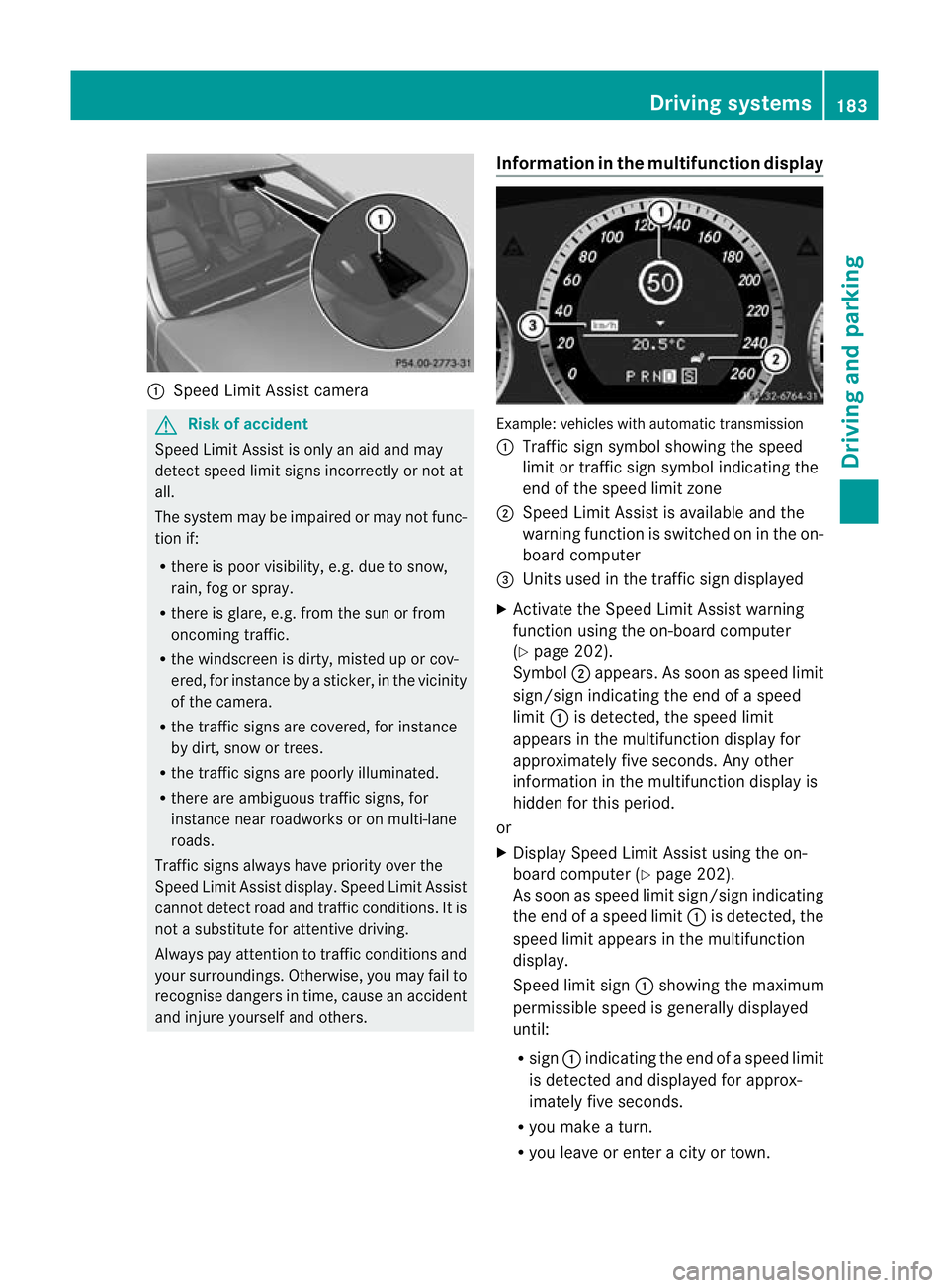
Speed Limi tAssist camera G
Risk of accident
Speed Limit Assis tiso nlyana id and may
detect speed limit sign sincorrectly or not at
all.
The sys temm ay be impaired or may not fun c-
tion if:
R there is poo rvisibility, e.g .due to snow,
rain ,fog or spray.
R there is glare, e.g .fro mt hesun or from
oncomi ngtraffic.
R the windscreen is dirty, misted up or cov-
ered, for instance by asticker, in the vicinity
of the camera.
R the traffic signs are covered, for instance
by dirt, snow or trees.
R the traffic signs are poorly illuminated.
R there are ambiguous traffic signs, for
instance near roadworks or on multi-lane
roads.
Traffic signs always have priority over the
Speed Limit Assist display. Speed Limit Assist
cannot detect road and traffic conditions. It is
not asubstitute for attentive driving.
Always pay attention to traffic conditions and
your surroundings. Otherwise, you may fail to
recognise dangers in time, cause an accident
and injure yoursel fand others. Information in the multifunctio
ndisplay Exam
ple:vehicle swith automatic transmission
: Traffic sign symbol showing the speed
limit or traf fics ign symbol indicatin gthe
end of the speed limit zone
; Speed Limi tAssist is available and the
warnin gfunction is switched on in the on-
board computer
= Unit sused in the traf fics ign displayed
X Activate the Speed Limit Assist warning
function using the on-board computer
(Y page 202).
Symbol ;appears. As soon as speed limit
sign/sign indicatin gthe end of aspeed
limit :is detected, the speed limit
appear sint he multifunction displa yfor
approximately fiv eseconds. An yother
information in the multifunction display is
hidden for this period.
or
X Display Speed Limit Assist using the on-
board computer (Y page 202).
As soo nasspeed limit sign/sign indicating
the end of aspeed limit :is detected, the
speed limit appear sint he multifunction
display.
Speed limit sign :showin gthe maximum
permissible speed is generally displayed
until:
R sign :indicatin gthe end of aspeed limit
is detected and displayed for approx-
imately fiv eseconds.
R you mak eaturn.
R you leave or enter acity or town. Drivin
gsystems
183Drivingand pa rking
BA 20 7ECE ÄJ 2010/1a; 1; 2, en-GB
mkalafa Version: 3.0.2.11 2010-01-26T13:03:22+01:00-Seite 183 Z
Page 189 of 333
unavailable See Owner's Manual
mes-
sage appe arsint he multifunction display. Trailer towing
Folding out th
eball coupling
Before you can tow atrailer wit hyour vehicle,
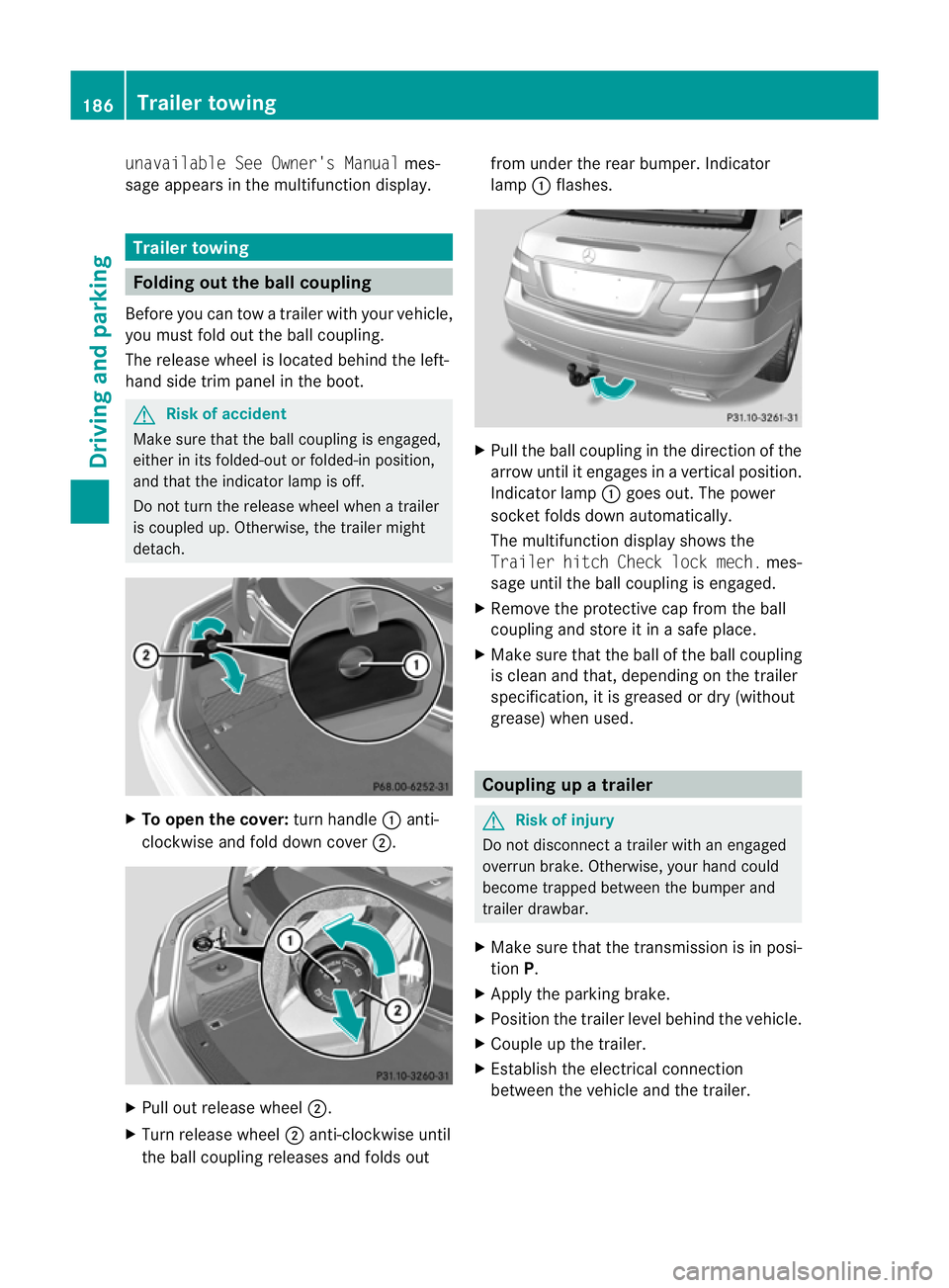
you must fold out the ball coupling.
The release wheel is located behind the left-
hand side trim panel in the boot. G
Risk of accident
Make sur ethat the ball coupling is engaged,
either in its folded-ou torfolded-i nposition,
and that the indicator lam pisoff.
Do not turn the releas ewheel when atrailer
is coupled up. Otherwise, th etrailer might
detach. X
To ope nthe cov er:turn handle :anti-
clockwis eand fold dow ncover ;. X
Pull out release wheel ;.
X Tur nrelease wheel ;anti-clockwise until
the ball couplin greleases and folds out from under the rear bumper
.Indicator
lamp :flashes. X
Pull the ball coupling in the direction of the
arrow until it engages in avertical position.
Indicator lamp :goes out. The power
socket folds down automatically.
The multifunction display shows the
Traile rhitch Check lock mech. mes-
sage until th eball coupling is engaged.
X Remove the protective cap from the ball
coupling and store it in asafe place.
X Make sure that the ball of the ball coupling
is clean and that, depending on the trailer
specification, it is greased or dry (without
grease) when used. Coupling up
atrailer G
Risk of injury
Do not disconnect atrailer wit hanengaged
overrun brake. Otherwise, your hand could
become trappe dbetween the bumper and
trailer drawbar.
X Make sure that the transmission is in posi-
tion P.
X Apply the parking brake.
X Position the trailer level behind the vehicle.
X Couple up the trailer.
X Establish the electrical connection
between the vehicl eand the trailer. 186
Trailer towingDriving and parking
BA 207 ECE ÄJ 2010/1a; 1; 2, en-GB
mkalafa
Version: 3.0.2.11
2010-01-26T13:03:22+01:00
-Seite 186
Page 190 of 333
Uncoupling
atrailer G
Ris
kofi njury
As soon as yo uraise the trailer drawbar, the
unladen vehicl erises slightly .The vehicl ethen
lowers to driving level.
Make sure that nobody is in the vicinity of the
wheel arch or the underbody. You coul doth-
erwise trap yoursel forothers. G
Risk of injury
The vehicle is lowered as soo nasyou discon-
nec tthe trailer cable. Make sur ethat nobody
is in the vicinit yofthe wheel arch or the
underbody. You coul dotherwis etrap yourself
or others.
As soon as you decoupl ethe trailer ,the unla-
den vehicle rise sslightly. Make sure that you
or others are not injured in the process.
! Do not uncouple atrailer wit hoverrun
brake between th ebumper and drawbar,
otherwis eyour vehicle coul dbedamaged
by the spring action of the overrun brake.
X Make sure that the transmission is in posi-
tion P.
X Apply the parking brake.
X Secure the trailer against rolling away.
X Remove the trailer cable and decouple the
trailer. Notes on towing
atrailer
Important safety instructions G
Ris
kofa ccident
When reversing the vehicle towards the
trailer, mak esure there is nobody between
the trailer and the vehicle.
Couple and uncouple the trailer carefully. If
you do not couple the trailer to the towing
vehicle correctly, the trailer could become
detached.
Make sure that the following values are not
exceeded: R
the permissible trailer drawbar noseweight
R the permissible trailer load
R the permissible rear axle load of the towing
vehicle
R the maximu mpermissible gross vehicle
weight of both the towing vehicle and the
trailer
You will fin dthe applicable permissible val-
ues, whic hmust not be exceeded ,inthe vehi-
cle documen ts.
You will find the values approved by the man-
ufacturer on the vehicle identification plates
and those for the towing vehicle in the "Tech-
nical data" section. G
Risk of accident
If the Checktrailer hitch locking
mechanism message appears in th emulti-
function display while the vehicle is in motion,
pull over immediately and check whethe rthe
ball coupling is correctly engaged. G
Risk of accident
Always observ ethe maximum speed permit-
ted in Germany for vehicle/ trailer combina-
tions, even in countries where higher speeds
are permitted. This lowers the risk of an acci-
dent. G
Risk of accident
Never depress the brake pedal continuously
while the vehicle is in motion ,e.g. never cause
the brakes to rub by appl yingc onstant slight
pedal pressure. This causes the brake system
to overheat, increases the brakin gdistance
and can lead to the brakes failing completely. G
Risk of accident
On no account should you attempt to draw the
vehicle/trailer combination out by increasing
speed. Trailer towing
187Driving and parking
BA 207 ECE ÄJ 2010/1a; 1; 2, en-GB
mkalafa Version: 3.0.2.11
2010-01-26T13:03:22+01:00
-Seite 187 Z
Page 191 of 333
Gen
eral information i
When towing atrail er,s et the tyr epres-
sure on th erear axle of the towing vehicle
for am aximum load; se ethe tyr epressure
table in th efuel filler flap.
You will find installatio ndimensions and loads
in the "Technical data” section
(Y page 322).
The maximum permissible trailer drawbar
noseweight on the ball coupling is 75 kg.
However ,the actual noseweight must not
exceed the value given on the trailer tow hitch
and trailer identification plates. The lowest
weight applies.
! Use anoseweight as close as possible to
the maximum permissible noseweight .Do
not use anoseweight of less than 50 kg,
otherwise the trailer ma ycome loose.
Bear in min dthat the payload and the rear
axl eload ar ereduced by the actual nose-
weight.
Please not ethat when towing atrailer, PARK-
TRONIC (Y page 174) and parkin gguidance
(Y page 177 )are onl yavail ablew ith limita-
tions, or not at all.
i The height of the ball coupling changes
with the load of the vehicle. If necessary,
use atrailer wit haheight-adjustable draw-
bar.
Driving tips i
Observ ethe notes on ESP ®
trailer stabi-
lisation (Y page 58).
In Germany, the maximum permissible speed
for vehicle/ trailer combinations depends on
the type of trailer and is either 80 km/ hor
100 km/h. In some countries ,higher maxi-
mum speeds are permissible for vehicle/
trailer combinations. Befor ebeginnin gthe
journey ,check the trailer's documen tsto see
what the maximum permitted speed is.
For certain Mercedes-Benz vehicles, the max-
imum permissible rear axle load is increased
when towing atrailer. Refer to th e"Technical data
"section to fin dout whether this applies
to your vehicle. If you utilise any of the added
maximum rear axle load when towing atrailer,
th ev ehicle/ trailer combination may not
exceed amaximum spee dof100 km/h for
reasons concerning the operating permit.
This als oapplies in countries in which the
permissible maximum speed for vehicle/
trailer combinations is above 10 0km/h.
When towing atrailer, your vehicle's handling
characteristics wil lbedifferent in comparison
to when drivin gwithout atrailer.
Th ev ehicle/ trailer combination:
R is heavier
R is restricted in its acceleration and gradi-
ent-climbin gcapability
R has an increased braking distance
R is affected more by stron gcrosswinds
R demand smore sensitive steering
R consume smore fuel
On long and steep downhil lgradients ,you
must shift to alower gear in good time, or on
vehicles with automatic transmission ,select
the shift range 1,2or 3.
i This also applies if you have activated
cruise control, SPEEDTRONIC or DI S-
TRONIC PLUS.
This will use the brakin geffect of th eengine,
so les sbraking wil lberequired to maintain
the speed. This relieves the load on the brake
system and prevent sthe brakes from over-
heating and wearing too quickly .Ifyou need
additional braking, depress the brake pedal
repeatedly rather than con tinuously.
Driving tips R
Maintain agreater distance from th evehi-
cle in front than when driving without a
trailer.
R Avoid braking abruptly. If possible, brake
gently at first to allow the trailer to run on.
Then increase the braking force rapidly.
R The values given for gradient-climbing
capabilities from astandstill refer to sea 188
Trailer towingDrivin
gand pa rking
BA 20 7ECE ÄJ 2010 /1a; 1; 2, en-GB
mkalafa Version: 3.0.2.11 2010-01-26T13:03:22+01:00 -Seite 188
Page 197 of 333
9:Pres
sbriefly:
Selects the submenu or scrolls
throug hlists
In the Audio menu: selects astored
station, an audi otrack or avideo
scene
In the Tel(telephone) menu:
switches to the phone book and
selects aname or telephone number 9:
Press and hold:
In the Audio menu: selects the pre-
vious/next station or selects an
audi otrack or avideo scene using
rapid scrolling.
In the Tel(telephone) menu: starts
rapid scrolling through the phone
book a
Confirms selections and hides dis-
play messages
In the
Tel(telephone) menu:
switches to the phone book and
starts dialling Multifunction display
To activate the multifunction display:
R switch on the ignition.
R switch on the lights.
R open the driver's door.
Values and settings as well as displa ymes-
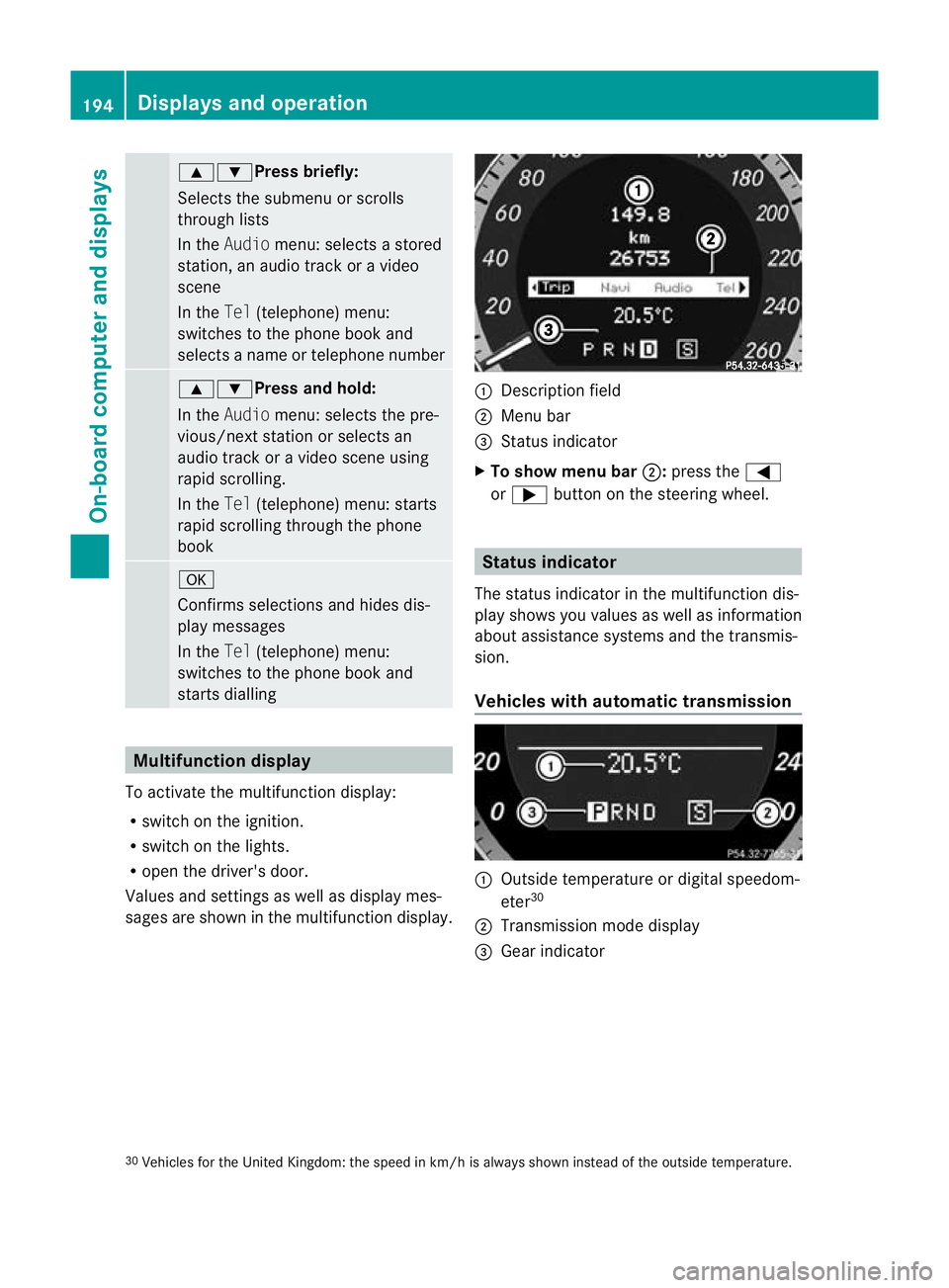
sages are shown in the multifunction display. :
Description field
; Menu bar
= Status indicator
X To show menu bar ;:press the =
or ; button on the steerin gwheel. Statu
sindicator
The status indicator in the multifunction dis-
play shows you values as well as information
about assistanc esystems and the transmis-
sion.
Vehicle swith automatic transmission :
Outside temperatur eordigital speedom-
eter 30
; Transmission mode display
= Gear indicator
30 Vehicles for the United Kingdom: the speed in km/ hisalways shown instead of the outside temperature. 194
Displays and operationOn-board computer and displays
BA 207 ECE ÄJ 2010/1a; 1; 2, en-GB
mkalafa
Version:3.0.2.11
2010-01-26T13:03:22+01:0
0-Seite 194
Page 198 of 333
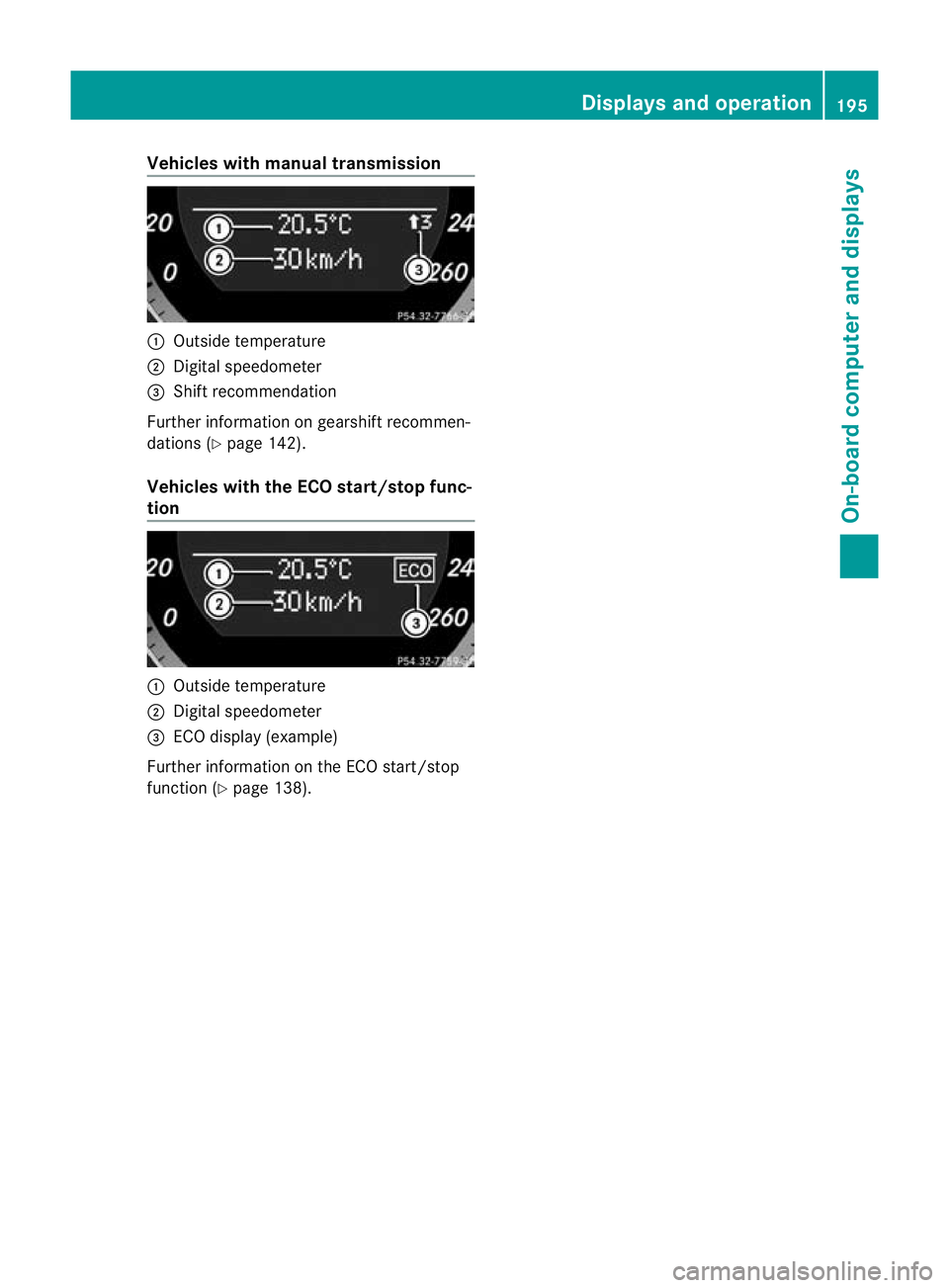
Vehicles with manual transmission
:
Outsid etemperature
; Digita lspeedometer
= Shift rec ommendation
Further informatio nongearshift rec ommen-
dations (Y page 142).
Vehicles with the EC Ostart/sto pfunc-
tion :
Outsid etemperature
; Digita lspeedometer
= ECO display (example)
Further inf ormatio nont he ECO start/stop
function ( Ypage 138). Displays and operation
195On-board computer and displays
BA 207ECE ÄJ 2010/1a; 1; 2, en-GB
mkalafa Version:3 .0.2.11
2010-01-26T13:03:22+01:0
0-Seite 195 Z
Page 207 of 333
X
Press the =or; button on the steer-
ing wheel to select the Assist.menu.
X Press the 9or: button to select
Blin dSpot Asst..
X Press a.
Th ec urren tselection is displayed.
X To activate/deac tivate: press a
again. Servic
emenu In the
Serv. menu, you can:
R call up display messages (Y page 210)
R reset the tyre pressure loss warnin gsystem
(Y page 301)
R call up the service due date (Y page 263)Settings menu
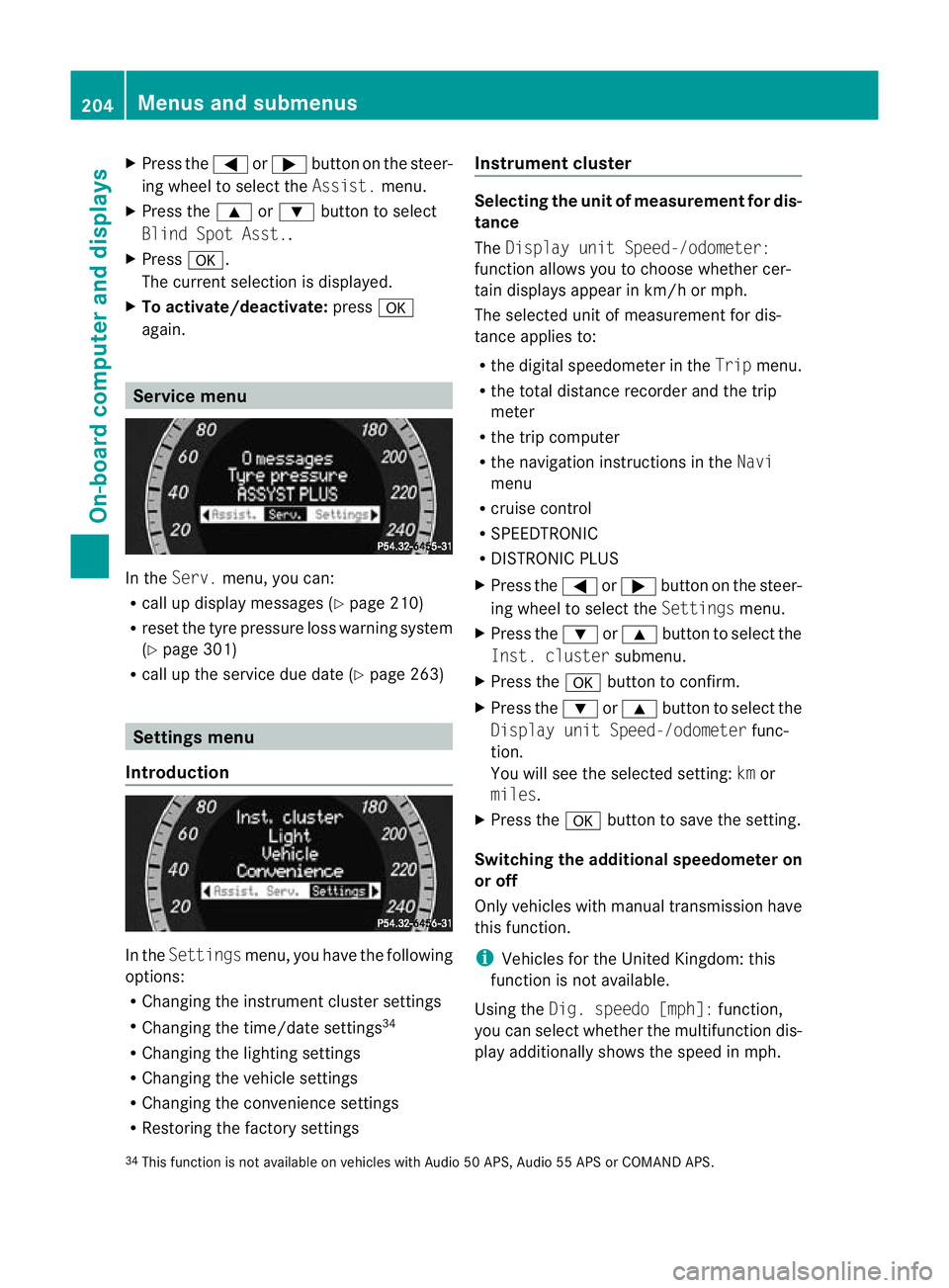
Introduction In the
Settin gsmenu ,you have the following
options:
R Changing the instrumen tcluster settings
R Changing the time/date settings 34
R Changing the lighting settings
R Changing the vehicle settings
R Changing the convenience settings
R Restorin gthe factory settings Instr
ument cluster Selecting the unit of measurement for dis-
tance
The
Displa yunit Speed-/odometer:
functio nallows you to choose whether cer-
tain displays appear in km/ horm ph.
The selected unit of measuremen tfor dis-
tan ceapplies to:
R the digital speedometer in the Tripmenu.
R the total distance recorder and the trip
meter
R the trip computer
R the navigation instructions in the Navi
menu
R cruise control
R SPEEDTRONIC
R DISTRONIC PLUS
X Press the =or; button on the steer-
ing wheel to select the Settingsmenu.
X Press the :or9 button to select the
Inst .cluster submenu.
X Press the abuttontoc onfirm.
X Press the :or9 button to select the
Displa yunit Speed-/odometer func-
tion.
Yo uw ill see the selected setting: kmor
miles.
X Press the abutton to save the setting.
Switching the additional speedometer on
or off
Only vehicles with manual transmission have
this func tion.
i Vehicles for the United Kingdom: this
func tion is not available.
Usin gthe Dig. speedo [mph]: function,
you can select whether the multifunc tion dis-
play additionally shows the speed in mph.
34 This func tion is not available on vehicles with Audio 50 APS, Audio 55 APS or COMAN DAPS. 204
Menus and submenusOn-board computer and displays
BA 20
7ECE ÄJ 2010 /1a; 1; 2, en-GB
mkalafa Version: 3.0.2.11 2010-01-26T13:03:22+01:00 -Seite 204
Page 208 of 333
X
Press the =or; button on the steer-
ing wheel to select the Settingsmenu.
X Press the :or9 button to select the
Inst .cluster submenu.
X Press the abuttontoc onfirm.
X Press the :or9 button to select the
Dig. speedo [mph]: function.
You will see the selected setting: onor
off.
X Press the abutton to save the setting.
Selecting th epermanent display function
Only vehicles with automatic transmission
have this func tion.
i Vehicles for the United Kingdom: this
func tion is not available.
The Permanen tdisplay: function allows
yo utoc hoose whether the multifunction dis-
play always shows the outside temperature
or the speed in mph.
X Press the =or; button on the steer-
ing wheel to selec tthe Settings menu.
X Press the :or9 button to selec tthe
Inst .cluster submenu.
X Press the abuttontoc onfirm.
X Press :or9 to select the Perma‐
nent display function.
You will see the selected setting: outside
temperat ureorDig. speedo m[mph].
X Press the abuttontos ave the setting.
Time/date This submenu is only availabl
eonvehicles
with Audio 20.
In the Time/date submenu, you can set the
tim eand date.
Your vehicl ecould have the following audio
equipment:
A: Audi o20
B: Audi o50A PS
C: COMAN DAPS X
Refer to the separate operating instruc-
tions to fin dout which audio system is fit-
ted in your vehicle.
Depending on the audio system, the time and
date are received from GPS satellites and
cannot be set using the on-board computer
(see the following table). A B C
Setting using the on-board com-
puter X
Automatic GPS satellite recep-
tion X X
Set the time zone once; see the
separate operating instructions X X
X
Press the =or; button on the steer-
ing wheel to select the Settingsmenu.
X Press the :or9 button to select the
Time/date submenu.
X Press the abutton to confirm.
X Press the :or9 button to select
Time: orDate:.
The curren ttime or date set is displayed.
X Press ato change the setting.
X Press the =or; button to select the
display you wan ttochange :hour ,minute,
day, month, year.
X Press the :or9 button to set the
selected display.
X Press the abutton to store the entry.
Lights Switching the day
time drivin glights on/
off
If you have activated the Daytimedriving
lights: functionand the light switch is in the
c position, the daytime driving lights are
switched on automatically whe nthe engin eis
running. When it is dark, th eside lamps and
the dipped-bea mheadlamps are switched on
automatically. Menus and submenus
205On-boardcomputer and displays
BA 20 7ECE ÄJ 2010/1a; 1; 2, en-GB
mkalafa Version:3.0.2.11
2010-01-26T13:03:22+01:0
0-Seite 205 Z
Page 233 of 333
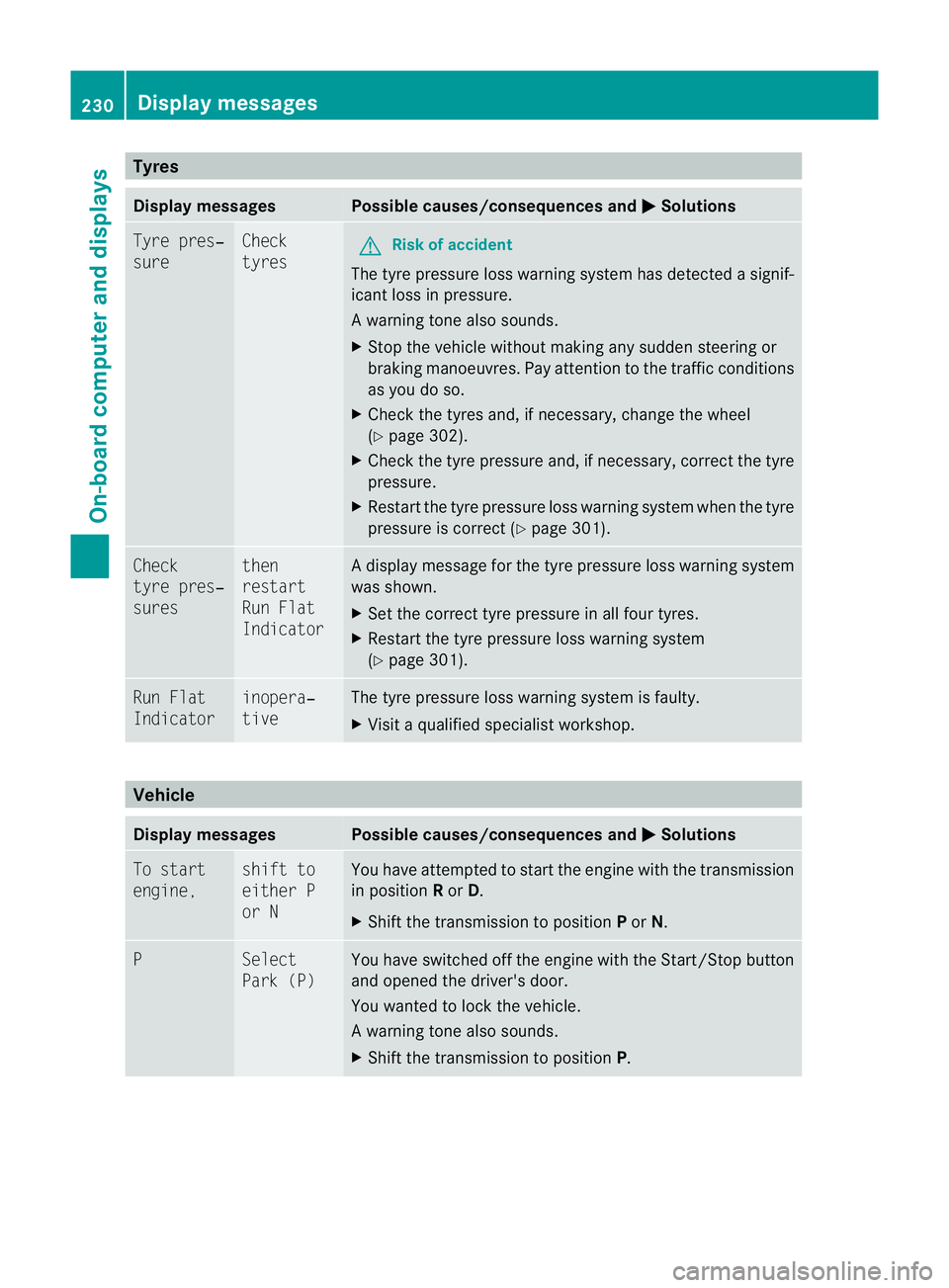
Tyres
Display messages Possible caus
es/consequences andM Solutions
Tyre pres‐
sure Check
tyres
G
Ris
kofa ccident
The tyr epressure loss warning system ha sdetected asignif-
ican tloss in pressure.
Aw arning ton ealso sounds.
X Stop th evehicle without making any sudde nsteering or
braking mano euvres.P ay attention to the traffic conditions
as you do so.
X Check the tyres and, if necessary ,change the wheel
(Y page 302).
X Chec kthe tyr epressure and ,ifnecessary, correc tthe tyre
pressure.
X Restart the tyr epressure loss warning system when th etyre
pressure is correct (Y page 301).Check
tyr
epres‐
sures then
restart
Run Flat
Indicator Ad
isplay message for the tyre pressure loss warnin gsystem
was shown.
X Set the cor recttyrep ressur eina ll four tyres.
X Restart th etyrep ressur eloss war ningsystem
(Y page 301). Ru
nF lat
Indicator inopera‐
tive Th
et yrep ressur eloss war ningsystem is faulty.
X Visit aq ualified specialist workshop. Vehicle
Display messages Possible causes/consequences and
M Solutions
To st
art
engine, shift to
either P
or N Yo
uh avea ttempted to startthe engin ewitht he transmiss ion
in position Ror D.
X Shift th etransmission to position Por N. P Select
Park (P) You have switched off the engine with the Star
t/Stop button
and opened the driver's door.
You wante dtolock the vehicle.
Aw arning ton ealso sounds.
X Shift th etransmissio ntoposition P. 230
Display messagesOn-boar
dcomputer and displays
BA 20 7ECE ÄJ 2010/1a; 1; 2, en-GB
mkalafa Version:3.0.2.11
2010-01-26T13:03:22+01:00
-Seite 230
Page 234 of 333
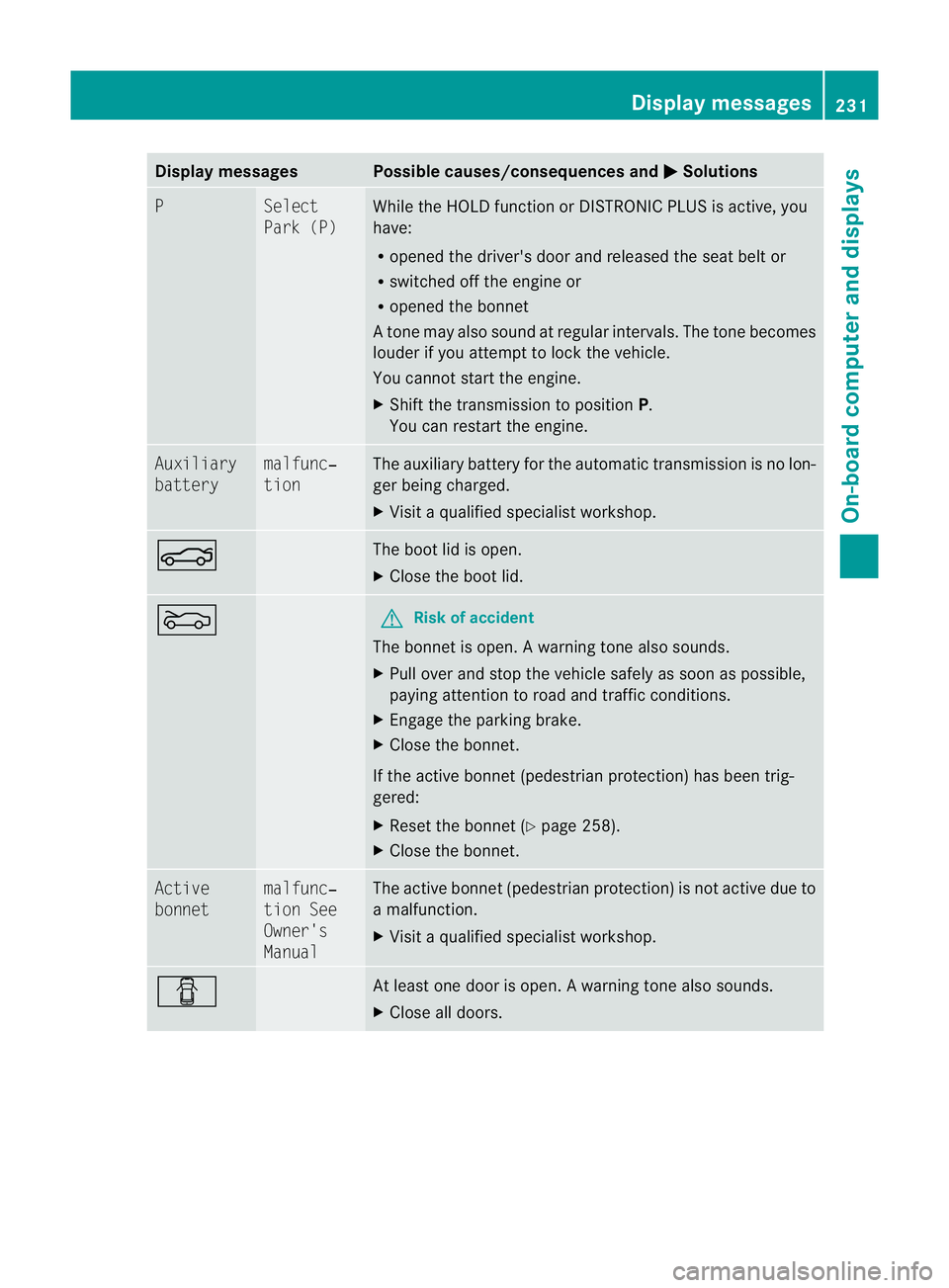
Displa
ymessages Possible causes/consequences and
M Solutions
P Se
lect
Par k( P) While the HOLD functio
norDISTRONIC PLUSisa ctive, you
have:
R opened the driver's door and releasedthe sea tbelt or
R switched off the engin eor
R opened the bonnet
At one ma yalso sound at regular intervals. The ton ebecomes
louder if you attempt to lock the vehicle.
You can notstart the engine.
X Shift the transmission to position P.
You can restart the engine. Auxiliary
battery malfunc‐
tion The auxiliary battery for the automatic transmission is no lon-
ger being charged.
X
Visit aqualified specialist workshop. N The boot lid is open.
X
Close the boot lid. M G
Risk of accident
The bonnet is open. Awarning ton ealso sounds.
X Pull ove rand sto pthe vehicle safel yassoonasp ossible,
paying attention to roa dand traffic conditions.
X Engag ethe parkin gbrake.
X Close th ebonnet.
If the active bonnet (pedestrian protection) has been trig-
gered:
X Reset the bonnet (Y page 258).
X Close the bonnet. Active
bonnet malfunc‐
tion See
Owner's
Manual The active bonnet (pedestrian protection) is not active due to
am
alfunction.
X Visit aqualified special istworkshop. C At least one door is open.
Awarning ton ealso sounds.
X Close all doors. Display messages
231On-boardcomputer and displays
BA 20 7ECE ÄJ 2010/1a; 1; 2, en-GB
mkalafa Version:3.0.2.11
2010-01-26T13:03:22+01:00
-Seite 231 Z