audio MERCEDES-BENZ E-CLASS CABRIOLET 2010 Owners Manual
[x] Cancel search | Manufacturer: MERCEDES-BENZ, Model Year: 2010, Model line: E-CLASS CABRIOLET, Model: MERCEDES-BENZ E-CLASS CABRIOLET 2010Pages: 333, PDF Size: 7.64 MB
Page 8 of 333
Interio
rmotion sensor ..................... 62
To w-awa yprotectio n........................ 61
Aquaplaning ....................................... 156
Ashtray ............................................... 252
Assistanc emenu (on-board com-
puter) ................................................. .202
AS SYST PLUS
see ASSYS TPLUS service interval
di sp lay
ASSYST PLU Sservice interval dis-
play ..................................................... 262
Displaying aservice message (on-
board computer) ............................ 263
ATA (Anti-Theft Alarm system)
Activating/deactivating ...................61
Functio n.......................................... .61
Switchin goff th ealarm .................... 61
ATTENTIO NASSIST ........................... 181
Activating/deactivating (on-
bo ardc omputer )............................ 203
Display message ............................ 224
Audio men u(on-boa rd computer) ....199
AUT Olights
see Light sensor
Automatic car wash ..........................263
Automatic en gine start
With ECO start/stop function ........139
Automatic en gine switch-off
With ECO start/stop function ........138
Automatic transmission
Display message ............................ 230
Driving tip s.................................... 143
Emergency running mod e.............. 148
Kickdow n....................................... 144
Ma lfunction ...... ............................. .148
Progra mselecto rbutton ................ 144
Pullin gaway................................... 137
Releasing the parking lock man-
ually ............................................... 148
Sel ector leve r................................ 142
Starting .......................................... 136
Traile rtowing ................................. 144
Ax leload, permissible
Rea r(trai lert owing) ....................... 324 B
Backre st(display message) .............232
Bag hook ............................................ 248
Ball coupli ng
Folding in ....................................... 189
Fol ding out ..................................... 186
BAS (Brake Assist System) .................56
BAS PL US(Brak eAssist System
Plus) ...................................................... 56
Battery Changing (key )................................. 68
Ch arging ........................................ 287
Ch ecking (key )................................. 68
Disconnecting ................................ 286
Display message ............................ 223
Important safety gu idelines (key) .....68
Installati on location....................... 286
Jump-starting ................................. 289
Rec onnecting ................................. 288
Removing/fittin g........................... 287
Safety notes .................................. 285
Belt
seeS eat belt
Belt tensioner
Activation ...... ................................... 33
Functio n.......................................... .43
Blind Spo tAssist ............................... 184
Activating/deactivating (on-
bo ardc omputer )............................ 203
Display message ............................ 226
Traile rtowing ................................. 185
Bon net
Active bonne t(pedestrian protec-
tion) ............................................... 258
Closing ........................................... 260
Display message ............................ 231
Opening ......................................... 259
Boot
Automatic op ening ........................... 73
Emergency releas e.......................... 73
Boo tlid
Display message ............................ 231
Opening/closing .............................. 72
Opening dimensions ......................322
Boo tload (maximum) ........................ 317 Index
5 BA 207 ECE ÄJ 2010/1a; 1; 2, en-GB
mkalafa
Version: 3.0.2.11 2010-01-26T13:03:22+01:00-Seite 5
Page 11 of 333
Draugh
tstop (cleaning instruc-
tions) .................................................. 266
Dri nksh older
see Cu pholder
Drive program .................................... 145
Manua l.......................................... .146
Dri veprogram display ......................143
Dri ving abroad ................................... 157
Dri ving on flooded roads ..................156
Dri ving safety system
BAS PLU S(Brake Assis tSystem
PLUS) .............................................. .56
EBD (Electroni cBrake force Dis-
tribution) .......................................... 58
ESP ®
(Electroni cStability Pro-
gram) ............................................... 57
Important safety gu idelines ............. 55
Dri ving safety systems
ABS (Anti-loc kBraking System) .......55
ADAPTIVE BRAKE ............................. 59
Ada ptive brake lamps ......................57
BAS (Brak eAssist System ).............. 56
ETS (Electroni cTraction System) .....57
Overview .......................................... 55
PRE-SAFE ®
Brake ............................. 59
Driv ing systems
ATTENTION ASSIST ........................ 181
Blind Spot Assist ............................ 184
Cruis econtrol ................................ 158
Distronic Pl us................................ 160
Dynami chandlin gpackage with
sport smode.................................. 172
HOLD function ............................... 172
Parking Guid ance ........................... 177
Parktroni c...................................... 174
Revers ingc amera .......................... 180
Speed Limi tAssist ......................... 182
Speedtronic ................................... 169
Dri ving tips ........................................ 143
Distronic Pl us................................ 168
Downhill gradients .........................154
Driving abroa d............................... 157
Driving on flo oded roads ................ 156
Traile rtowing ................................. 187
We troad surf ace. .......................... 155
Winte r............................................ 157
DVD audio (on-b oard computer) ......200 Dynamic handl
ingpackage with
sports mode ....................................... 172 E
EASY-ENTRY feature ...................96, 100
Activating/deactivating (on-
bo ardc omputer )............................ 208
EASY- EXIT feature ............................. 100
Activating/deactivating (on-
bo ardc omputer )............................ 208
Crash-res ponsive ........................... 100
EBD (Electronic Brake force Distribution)
Function/notes ................................ 58
EBV (electronic brake force distribution)
Display message ............................ 216
EC Os tart/stop function ...................138
Electri calfuses
se eF uses
Electronic brake-p owerdistributio n)
see EBD
Electronic Stability Program
see ESP ®
Electronic Traction Support see ETS
Emergency closing
Softtop ............................................ 78
Emergency key element
Function/ notes ................................ 67
Emergency locking
Vehicle ............................................ .71
Emergency running mode
Automatic transmission .................148
Emergency spar ewheel
Notes/d ata. ................................... 306
Storage locatio n............................ 275
Emergency starting ...........................293
Emergency unl ocking
Boo t................................................. 73
Veh icle ............................................ .71
Engine
Running irregularly ........................ .140
Starting pro blems .......................... 140
Starting with KEYLESS GO .............136
Starting with the key ...................... 136
Stopp ing. ....................................... 137
Warn ingl am p(engine diagnos-
tics) ............................................... 2408
Index BA 207 ECE ÄJ 2010/1a; 1; 2, en-GB
mkalafa
Version: 3.0.2.11 2010-01-26T13:03:22+01:00-Seite 8
Page 30 of 333
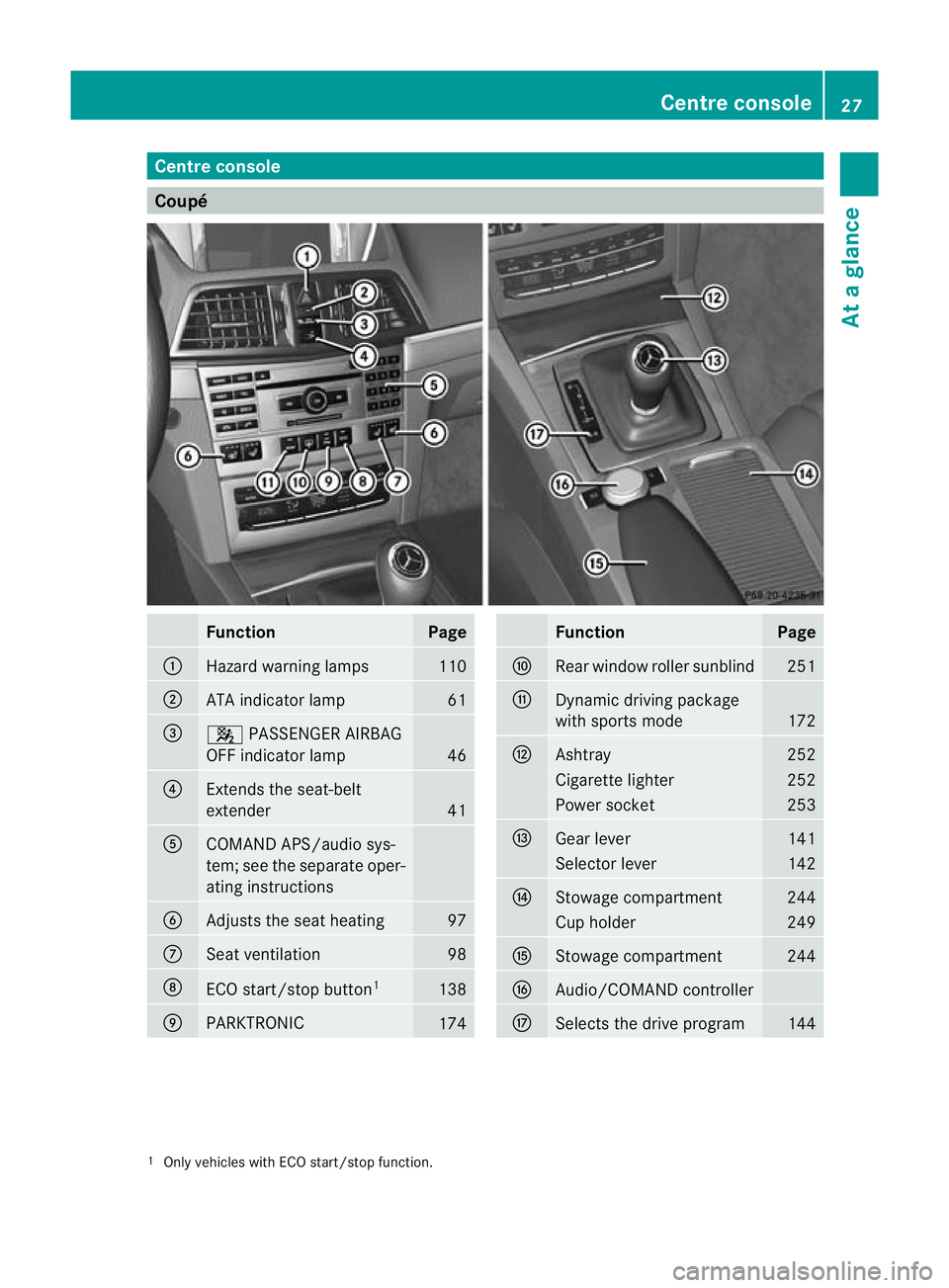
Centre console
Coupé
Function Page
:
Hazard warning lamps 110
;
AT
Ai ndicator lamp 61
=
4
PASSENGER AIRBAG
OFF indicator lamp 46
?
Extend
sthe seat-belt
extender 41
A
COMAND APS/audi
osys-
tem ;see th eseparate oper-
atin ginstructions B
Adjusts the sea
theating 97
C
Seat ventilation 98
D
ECO start/sto
pbutton 1 138
E
PARKTRONIC
174 Function Page
F
Rear window roller sunblind 251
G
Dynamic driving package
with sports mode
172
H
Ashtray 252
Cigarett
elighter 252
Power socket 253
I
Gear lever 141
Selector lever 142
J
Stowage compartment 244
Cup holder 249
K
Stowage compartment 244
L
Audio/COMAND controller
M
Select
sthe driv eprogram 144
1
Only vehicles with ECO start/stop function. Centre console
27Atag lance
BA 20 7ECE ÄJ 2010/1a; 1; 2, en-GB
mkalafa Version:3.0.2.11
2010-01-26T13:03:22+01:00
-Seite 27
Page 31 of 333
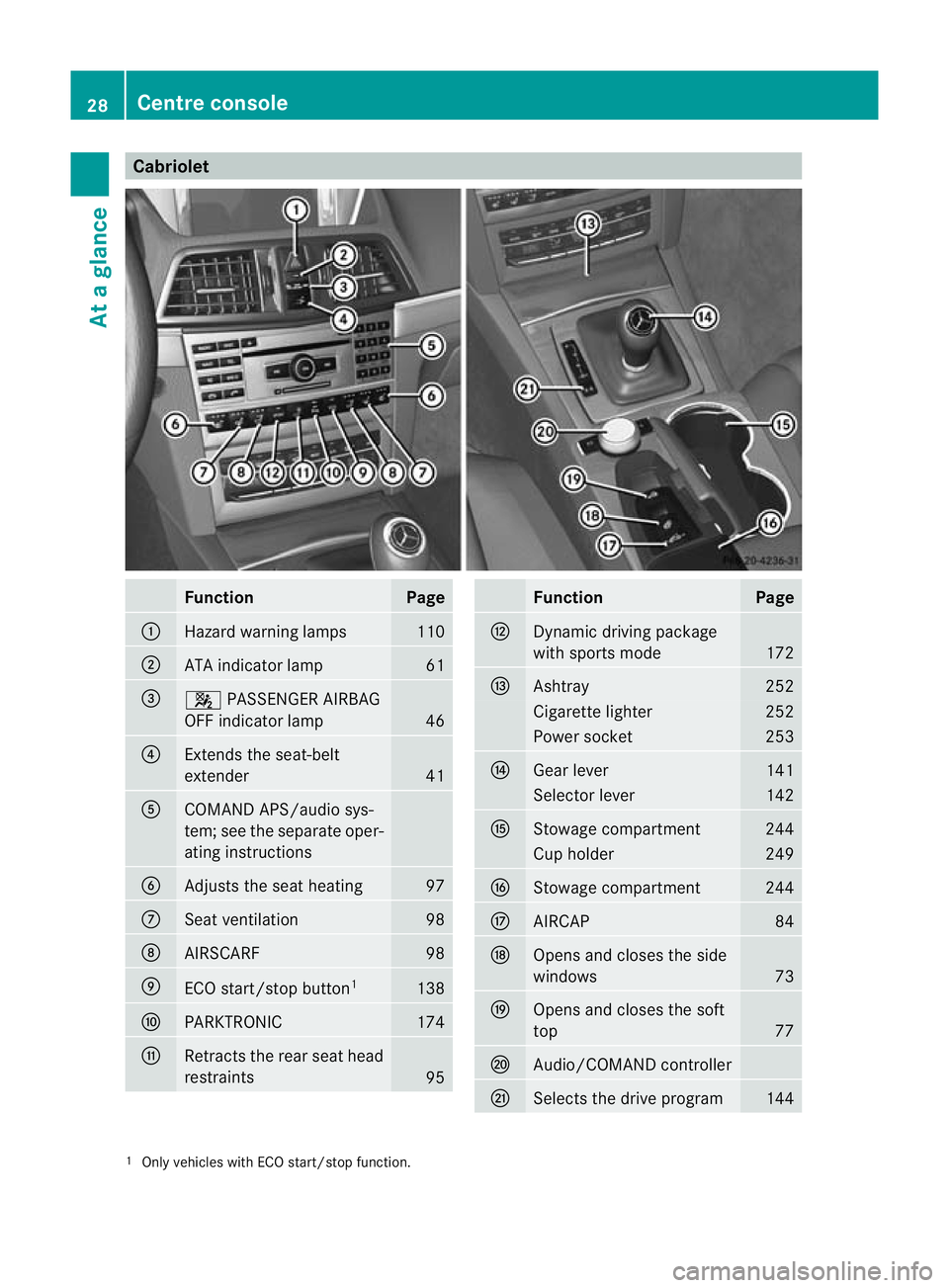
Cabriolet
Function Page
:
Hazard warning lamps 110
;
AT
Ai ndicator lamp 61
=
4
PASSENGER AIRBAG
OFF indicator lamp 46
?
Extend
sthe seat-belt
extender 41
A
COMAND APS/audi
osys-
tem ;see th eseparate oper-
atin ginstructions B
Adjusts the sea
theating 97
C
Seat ventilation 98
D
AIRSC
ARF 98
E
ECO start/stop button
1 138
F
PARKTRONIC 174
G
Retracts the rear seat head
restrain
ts 95 Func
tion Page
H
Dynamic driving package
wit
hsports mode 172
I
Ashtray 252
Cigar
ettelighter 252
Power socket 253
J
Gear lever 141
Selector lever 142
K
Stowage compartment 244
Cup holder 249
L
Stowage compartment 244
M
AIRCAP 84
N
Open
sand closes the side
windows 73
O
Ope
nsand closes the soft
top 77
P
Audio/COMAN
Dcontroller Q
Selec
tsthe driv eprogram 144
1
Only vehicles with ECO start/stop function. 28
Centre consoleAt
ag lance
BA 20 7ECE ÄJ 2010/1a; 1; 2, en-GB
mkalafa Version:3.0.2.11
2010-01-26T13:03:22+01:00
-Seite 28
Page 167 of 333
If thes
econditions ar efulfilled ,your vehicle
will accelerate. Acceleration will be interrup-
ted if changin glanes takes too long or the
distanc ebetween your vehicle and the vehi-
cle in fron tbecomes too small. G
Risk of accident
DI ST RONIC PLUS and Active Blind Spot Assist
are only an aid designed to assist driving.
The ydon ot relieve you of the responsibility
of payin gattention. The driver remains fully
responsible for the vehicle's distance from
other vehicles, the vehicle's speed and for
braking in good time. Always pay attention to
traffic conditions and your surroundings. Oth-
erwise, you may fail to recognise dangers in
time, cause an accident and injure yourself
and others.
Vehicles with COMAND APS/Audio 50
APS
i The following functions are not available
in all countries.
DISTRONIC PLUS uses additional information
from your navigation system so that it can
react appropriately to certain traffic situa-
tions. This is the case when, following another
vehicle with the help of DISTRONIC PLUS,
you:
R approach or drive through aroundabout
R approach or tur nataTjunction
R turn off at amotorway exit
Even if the vehicle in front leaves the detec-
tion range, DI STRONIC PLUS temporarily
maintains the current driving speed and does
not accelerate. This is base donthe current
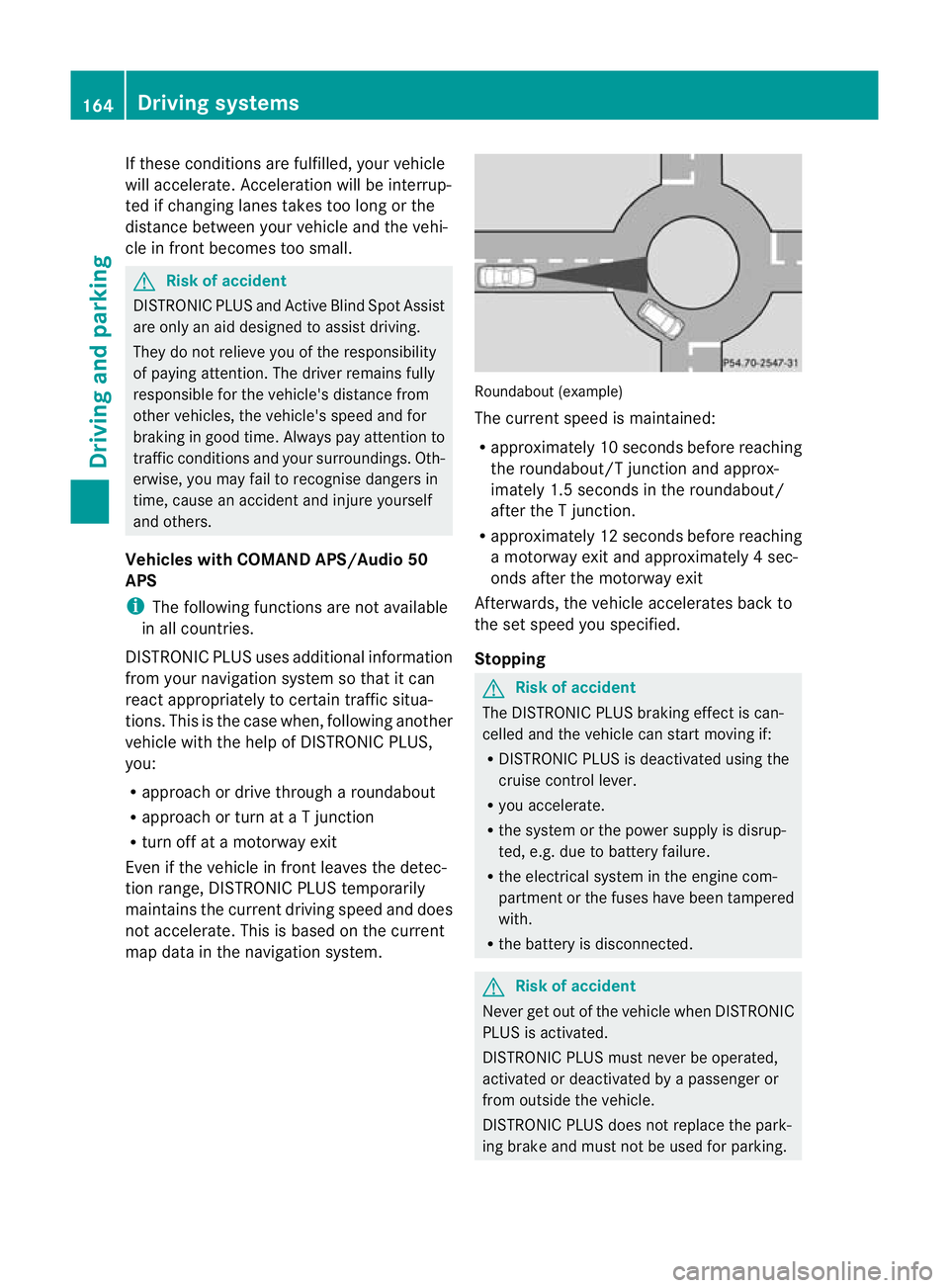
ma pd ata in the navigation system. Roundabout (example)
The current spee
dismaintained:
R approximately 10 seconds before reaching
the roundabout/T junction and approx-
imately 1.5 seconds in the roundabout/
after the Tjunction.
R approximately 12 seconds before reaching
am otorway exit and approximately 4sec-
onds after the motorwa yexit
Afterwards ,the vehicle accelerates bac kto
the set speed you specified.
Stopping G
Risk of accident
The DISTRONIC PLUS braking effec tisc an-
celled and the vehicle can start movin gif:
R DISTRONIC PLUS is deactivated using the
cruis econtrol lever.
R you accelera te.
R the syste morthe power supply is disrup-
ted, e.g. due to batter yfailure.
R the electrical system in the engine com-
partmen torthe fuses hav ebeen tampered
with.
R the batter yisdisconnected. G
Risk of accident
Never get out of the vehicle when DISTRONIC
PLU Sisa ctivated.
DISTRONIC PLUS must never be operated,
activate dordeactivated by apassenger or
from outside the vehicle.
DISTRONI CPLUS does no treplace the park-
ing brak eand must not be use dfor parking. 164
Driving systemsDriving and parking
BA 20
7ECE ÄJ 2010/1a; 1; 2, en-GB
mkalafa Version: 3.0.2.11 2010-01-26T13:03:22+01:00 -Seite 164
Page 197 of 333
9:Pres
sbriefly:
Selects the submenu or scrolls
throug hlists
In the Audio menu: selects astored
station, an audi otrack or avideo
scene
In the Tel(telephone) menu:
switches to the phone book and
selects aname or telephone number 9:
Press and hold:
In the Audio menu: selects the pre-
vious/next station or selects an
audi otrack or avideo scene using
rapid scrolling.
In the Tel(telephone) menu: starts
rapid scrolling through the phone
book a
Confirms selections and hides dis-
play messages
In the
Tel(telephone) menu:
switches to the phone book and
starts dialling Multifunction display
To activate the multifunction display:
R switch on the ignition.
R switch on the lights.
R open the driver's door.
Values and settings as well as displa ymes-
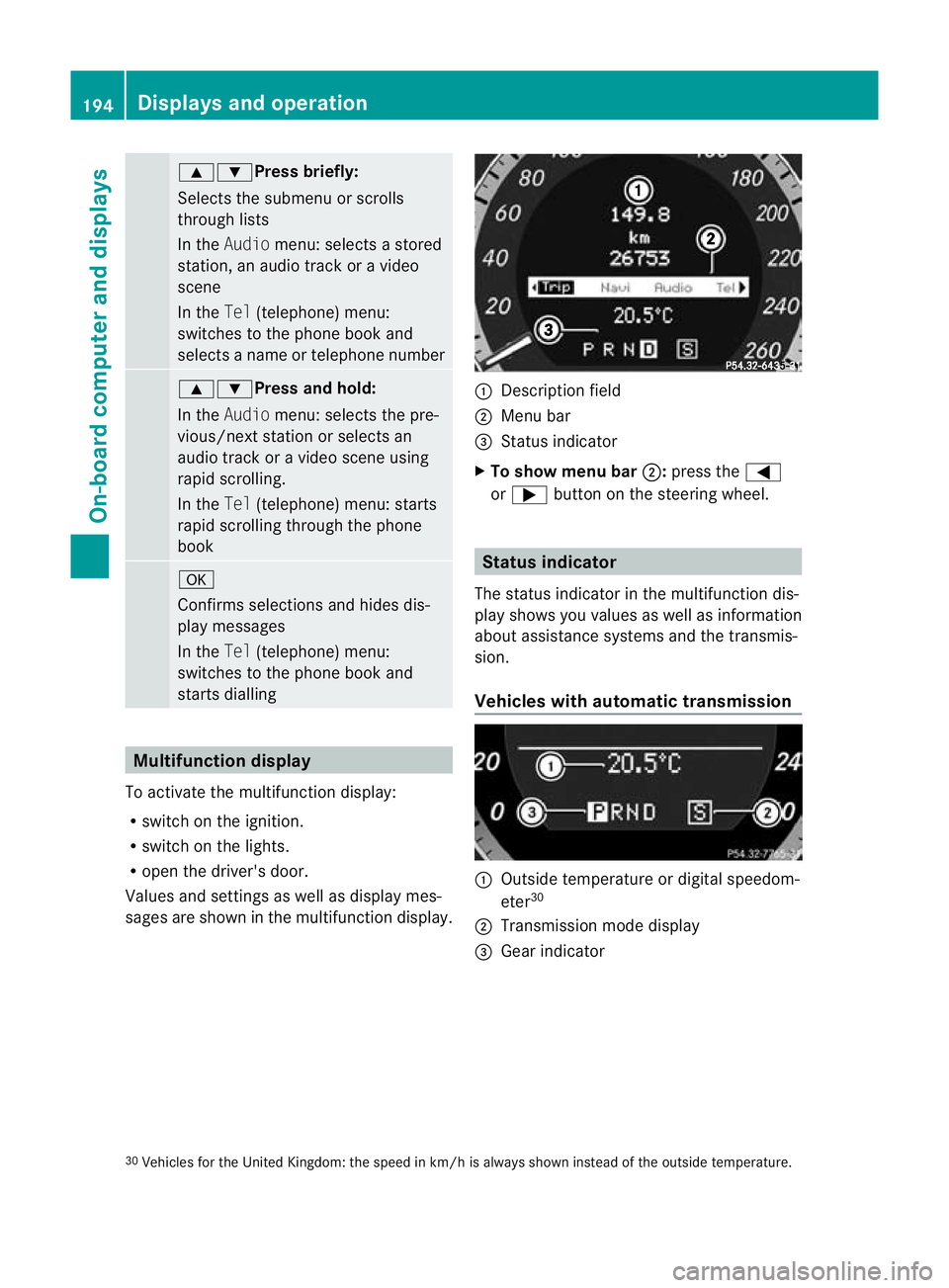
sages are shown in the multifunction display. :
Description field
; Menu bar
= Status indicator
X To show menu bar ;:press the =
or ; button on the steerin gwheel. Statu
sindicator
The status indicator in the multifunction dis-
play shows you values as well as information
about assistanc esystems and the transmis-
sion.
Vehicle swith automatic transmission :
Outside temperatur eordigital speedom-
eter 30
; Transmission mode display
= Gear indicator
30 Vehicles for the United Kingdom: the speed in km/ hisalways shown instead of the outside temperature. 194
Displays and operationOn-board computer and displays
BA 207 ECE ÄJ 2010/1a; 1; 2, en-GB
mkalafa
Version:3.0.2.11
2010-01-26T13:03:22+01:0
0-Seite 194
Page 199 of 333
Menus and submenus
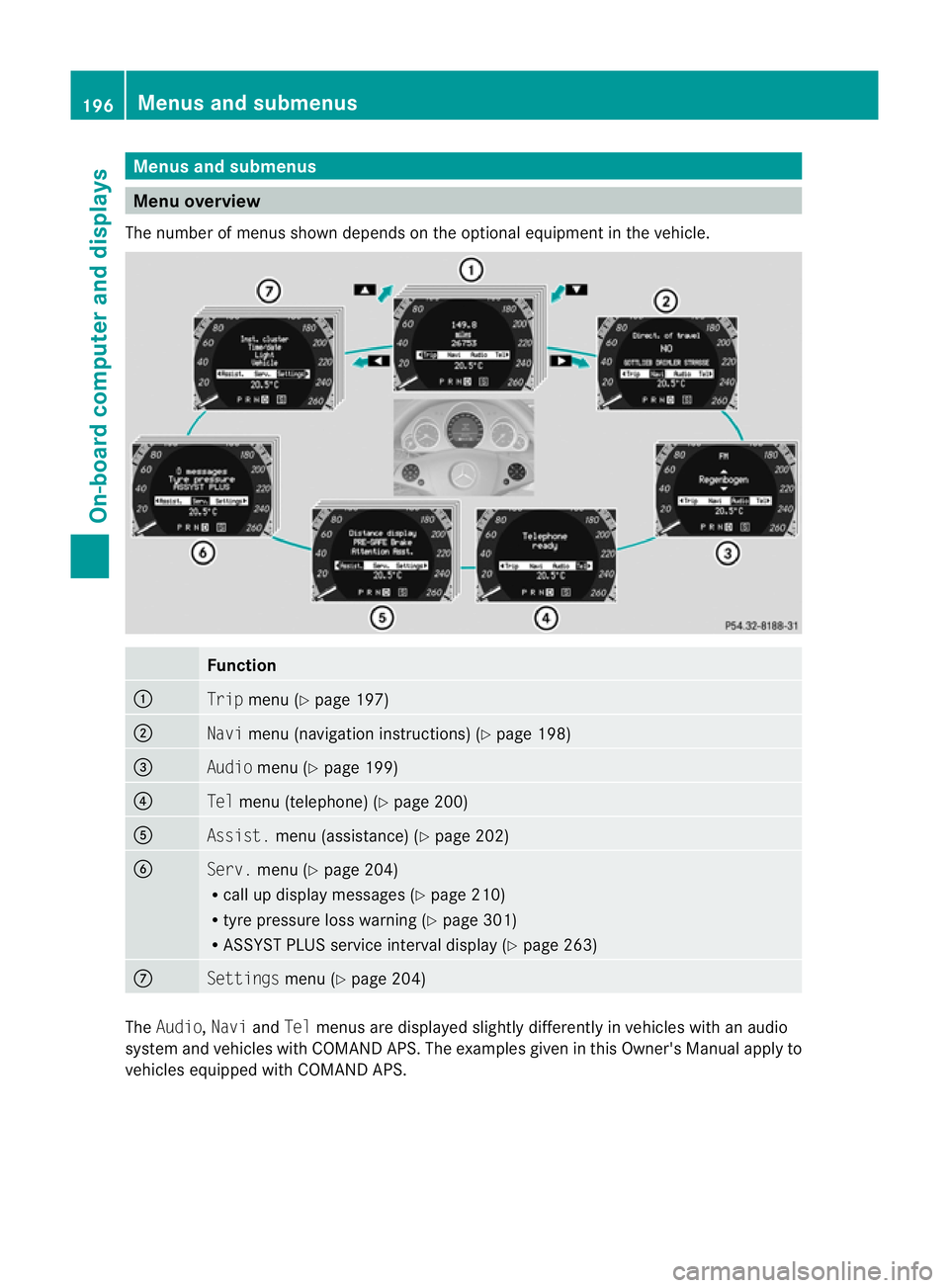
Men
uoverview
The number of menu sshown depends on the optional equipment in the vehicle. Function
:
Trip
menu (Y page 197) ;
Navi
menu (navigation instructions) (Y page 198)=
Audio
menu (Y page 199) ?
Tel
menu (telepho ne)(Y page 20 0) A
Assist.
menu (assistance) (Y page202) B
Serv.
menu (Y page204)
R call up display message s(Ypage 21 0)
R tyre pressure los swarning (Y page 301)
R ASSYST PLUS servic einterval display (Y page263) C
Settin
gsmenu (Y page 204) The
Audio, NaviandTel menu sare displayed slightly differe ntly in vehicles with an audio
system and vehicles with COMAND APS .The examples given in this Owner's Manual apply to
vehicles equipped with COMAN DAPS. 196
Menu
sand submenusOn-board computer and displays
BA 20 7ECE ÄJ 2010 /1a;1;2,e n-GB
mkalafa Version: 3.0.2.11 2010-01-26T13:03:22+01:00-Seite 196
Page 201 of 333
i
If th egearshift recommendation is shown
in the multif unctio ndisplay ,itisn ot shown
in the status bar.
Further information on gearshift recommen-
dation s(Ypage 142).
Resetting values You can reset the values of the following func-
tions:
R tripm eter
R trip computer "After start"
R trip computer "After reset"
X Press =or; on the steerin gwheel
to selec tthe Trip menu.
X Press 9or: to selec tthe function
that you wish to reset.
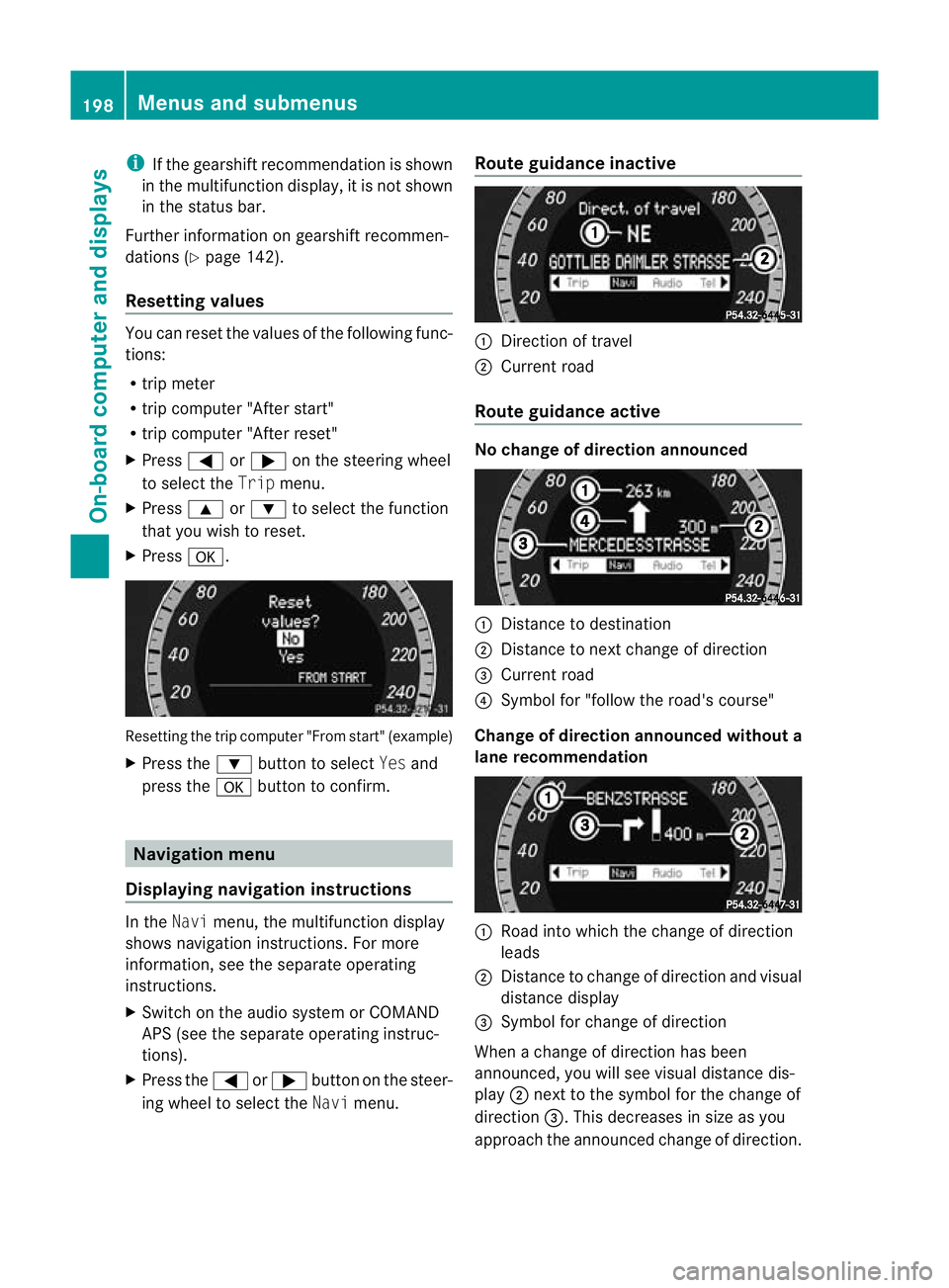
X Press a. Resetting the trip computer "From start" (example)
X Press the :button to select Yesand
press the abutton to confirm. Navigation menu
Displaying navigation instructions In the
Navimenu, the multifunction display
shows navigation instructions. For more
information, see the separat eoperating
instructions.
X Switch on the audio system or COMAND
APS (see the separat eoperating instruc-
tions).
X Press the =or; button on the steer-
ing whee ltoselect the Navimenu. Route guidance inactive :
Direction of travel
; Curren troad
Route guidance active No change of direction announced
:
Distanc etodestination
; Distance to next change of direction
= Curren troad
? Symbol for "follow the road's course"
Change of direction announced without a
lane recommendation :
Road int owhich the change of direction
leads
; Distanc etochange of direction and visu al
distanc edisplay
= Symbol for change of direction
When achange of direction has been
announced, you will see visu al distancedis-
play ;nex ttot he symbol for the change of
direction =.This decreases in size as you
approach the announced change of direction. 198
Menu
sand submenusOn-board computer and displays
BA 20 7ECE ÄJ 2010 /1a;1;2,e n-GB
mkalafa Version: 3.0.2.11 2010-01-26T13:03:22+01:00-Seite 198
Page 202 of 333
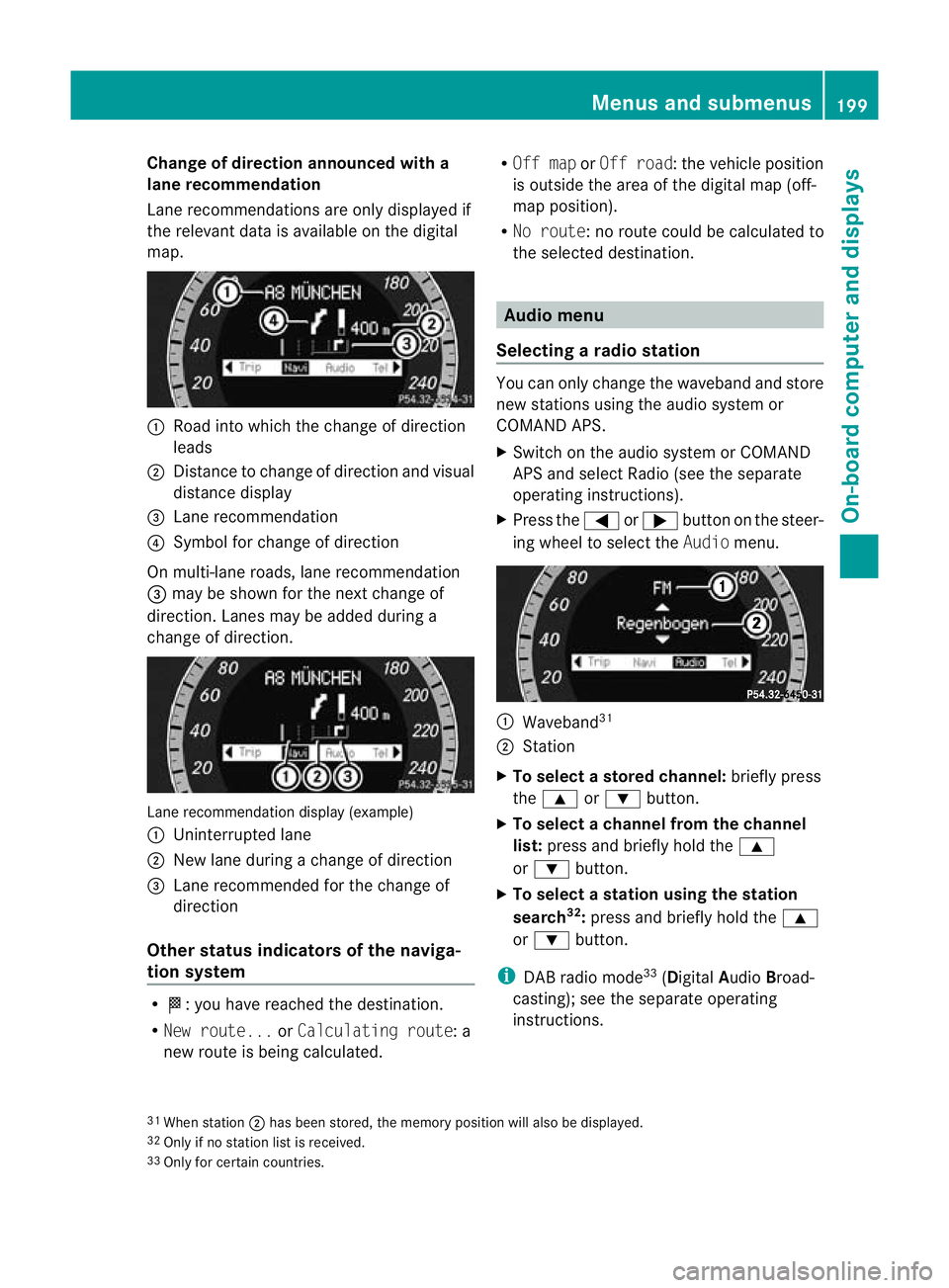
Change of direction announced with a
lane recommend
ation
Lan erecommendations are only displaye dif
the relevan tdata is available on thed igital
map. :
Road into which the change of direction
leads
; Distanc etochange of direction and visual
distanc edisplay
= Lane recommendation
? Symbol for change of direction
On multi-lane roads, lane recommendation
= may be shown for the next change of
direction. Lanes may be added during a
change of direction. Lan
erecommendation display (example)
: Uninterrupted lane
; New lane durin gachange of direction
= Lane recommended for the change of
direction
Other sta tusindicators of the naviga-
tion system R
O:y ou have reached the destination.
R Ne wr oute... orCalculating route:a
new route is being calculated. R
Off map orOff road :the vehicle position
is outside the area of the digital ma p(off-
ma pp osition).
R No route :noroute coul dbecalculated to
the selected destination. Audio menu
Selectin garadio station Yo
uc an only change the waveband and store
new stations using the audio system or
COMAND APS.
X Switch on the audio system or COMAND
APS and select Radio (se ethe separate
operating instructions).
X Press the =or; button on the steer-
ing wheel to select the Audiomenu. :
Wav eband 31
; Station
X To selec tastoredchann el:briefly press
the 9 or: button.
X To select achann elfrom the chan nel
list: press and briefly hold the 9
or : button.
X To select astatio nusing th estation
search 32
:press and briefl yholdt he 9
or : button.
i DAB radio mode 33
(Digit alAudio Broad-
castin g);s ee the separate operating
instructions.
31 Whe nstation ;hasb eens tored ,the memor yposition will also be displayed.
32 Only if no statio nlist is received.
33 Only for certain countries. Menus and submenus
199On-boardcomputer and displays
BA 20 7ECE ÄJ 2010/1a; 1; 2, en-GB
mkalaf aV ersion: 3.0.2.11
2010-01-26T13:03:22+01:00
-Seite 199 Z
Page 203 of 333
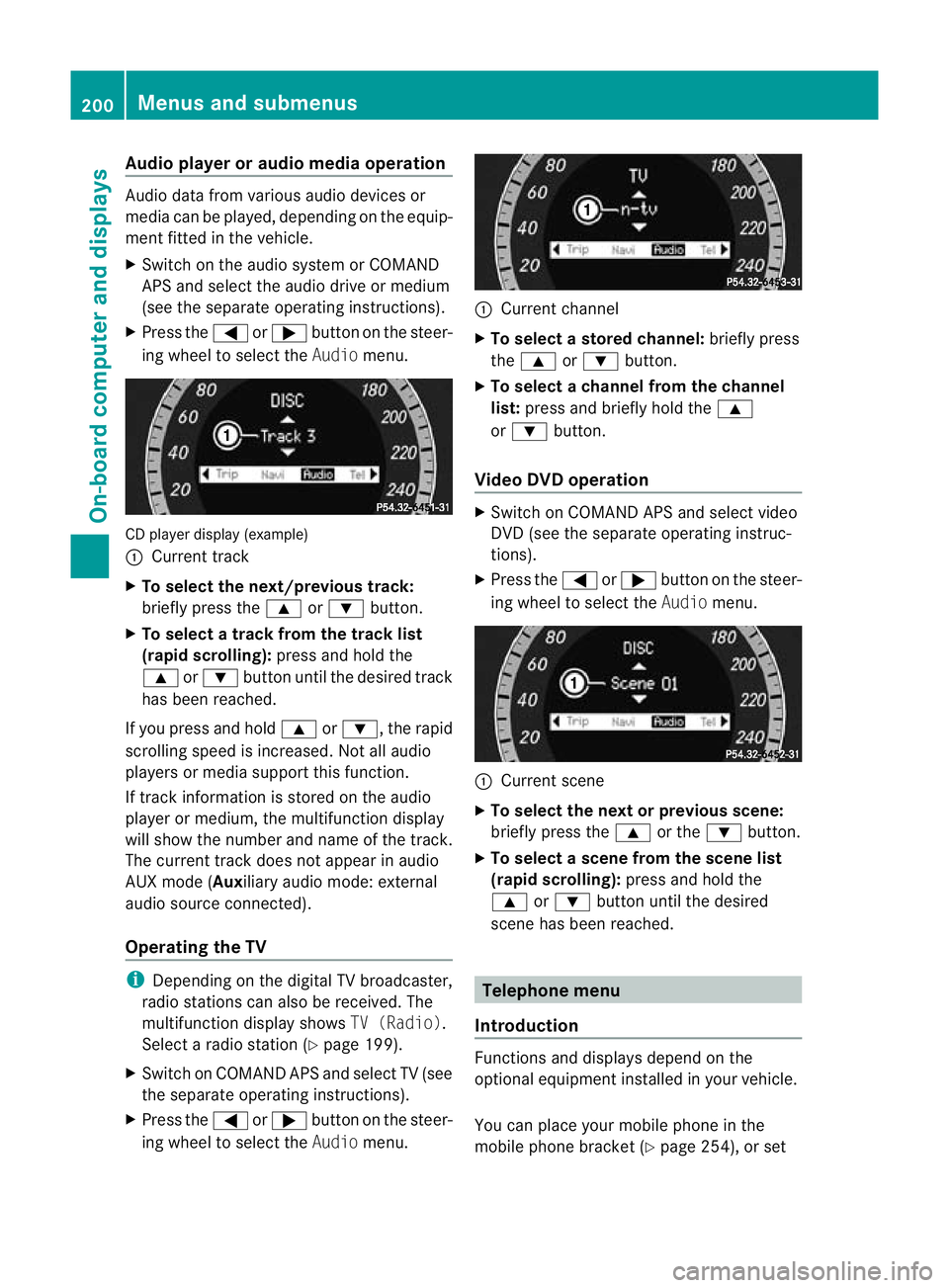
Audio player or audio media operation
Audio dat
afromv arious audio device sor
media can be played, depending on the equip-
ment fitted in the vehicle.
X Switch on the audio system or COMAND
APS and select the audi odrive or medium
(see th eseparate operating instructions).
X Press the =or; button on the steer-
ing whee ltoselect the Audiomenu. CD player display (example)
:
Current track
X To select the next/previous track:
briefl ypress the 9or: button.
X To select atrack from the track list
(rapi dscrolling): press and hold the
9 or: button until th edesired track
ha sb eenr eached.
If yo upress and ho ld9 or:,t he rapid
scr olling speed is incre ased.Not allaudio
players or media support this function.
If track information is stored on the audio
playe rorm edium ,the multifunction display
will show the number and nam eofthe track.
The curren ttrack does not ap pear in audio
AUX mode (Auxiliar yaudi om ode: external
audio sourc econnected).
Operating th eTV i
Depending on the digital TV broadcaster,
radi ostations can als obereceived.The
multifunction display shows TV (Radio).
Select aradi ostation (Y page199).
X Switch on COMAND APS and select TV (see
the separate operating instructions).
X Press the =or; button on the steer-
ing whee ltoselect the Audiomenu. :
Curren tchannel
X To select astore dchann el:briefly press
the 9 or: button.
X To select achann elfrom the chan nel
list: press and briefly hold the 9
or : button.
Video DVD operation X
Switc honC OMAN DAPS and select video
DV D(see the separate oper ating instruc-
tions).
X Press the =or; button on the steer-
ing wheel to select the Audiomenu. :
Current scene
X To select th enext or previous scene:
briefly press the 9or the :button.
X To select ascene from th escene list
(rapid scrolling): press and hold the
9 or: button until th edesired
scene ha sbeenr eached. Telephon
emenu
Introdu ction Functions and display
sdepen dont he
optional equipment installe dinyourvehicle.
Yo uc an place your mobil ephone in the
mobil ephone bracket (Y page 254), or set200
Menus and submenusOn-board computer and displays
BA 207 ECE ÄJ 2010/1a; 1; 2, en-GB
mkalafa
Version: 3.0.2.11 2010-01-26T13:03:22+01:00-Seite 200