light MERCEDES-BENZ E-CLASS CABRIOLET 2010 Workshop Manual
[x] Cancel search | Manufacturer: MERCEDES-BENZ, Model Year: 2010, Model line: E-CLASS CABRIOLET, Model: MERCEDES-BENZ E-CLASS CABRIOLET 2010Pages: 333, PDF Size: 7.64 MB
Page 118 of 333
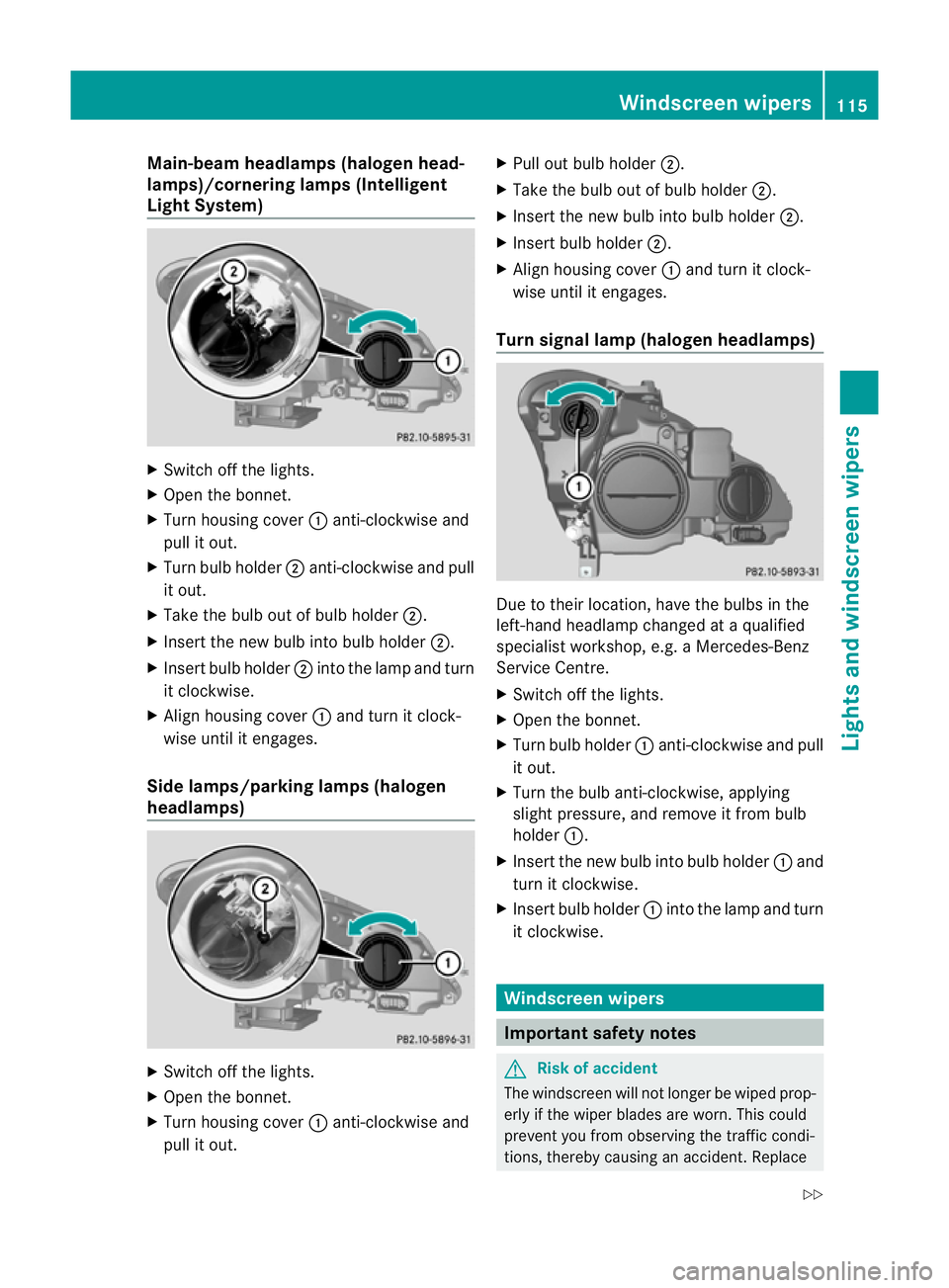
Main-beam headlamps (hal
ogen head-
lamps)/cornering lamps (Intelligent
Light System) X
Switch off the lights.
X Open the bonnet.
X Turn housing cover :anti-clockwis eand
pul lito ut.
X Turn bul bholder ;anti-clockwise and pull
it out.
X Take the bulb out of bulb holder ;.
X Insert the new bulb int obulbh older ;.
X Insert bulb holder ;intothe lamp and turn
it clockwise.
X Alig nhousing cover :and tur nitclock-
wis euntil it enga ges.
Side lamps/parking lamps (halogen
headlamps) X
Switc hoff th elights.
X Open the bonnet.
X Turn housing cover :anti-clockwis eand
pul lito ut. X
Pul lout bul bholder ;.
X Take the bulb out of bulb holder ;.
X Insert the new bulb int obulbh older ;.
X Insert bulb holder ;.
X Align housing cover :and tur nitclock-
wis euntil it enga ges.
Turn signal lam p(haloge nheadlamps) Due to their location, have the bulbs in the
left-hand headlamp changed at
aqualified
specialist workshop, e.g. aMercedes-Benz
Ser vice Centre.
X Switch off the lights.
X Open the bonnet.
X Turn bul bholder :anti-cloc kwise and pull
it out.
X Turn the bulb anti-clockwise, applying
slight pressure, and remov eitfrom bulb
holder :.
X Insert the new bul binto bulb holder :and
turn it clockwise.
X Insert bulb holder :into the lamp and turn
it clockwise. Windscreen wipers
Important safety notes
G
Risk of accident
The windscreen will not longer be wipe dprop-
erl yift he wiper blades ar eworn.This could
prevent you from observing the traffic condi-
tions, thereby causing an accident .Replace Windscreen wipers
115Lights and windscreen wipers
BA 207ECE ÄJ 2010 /1a;1;2,e n-GB
mkalafa Version: 3.0.2.11 2010-01-26T13:03:22+01:00-Seite 115 Z
Page 119 of 333
the wipe
rblades twic eayear, ideally in spring
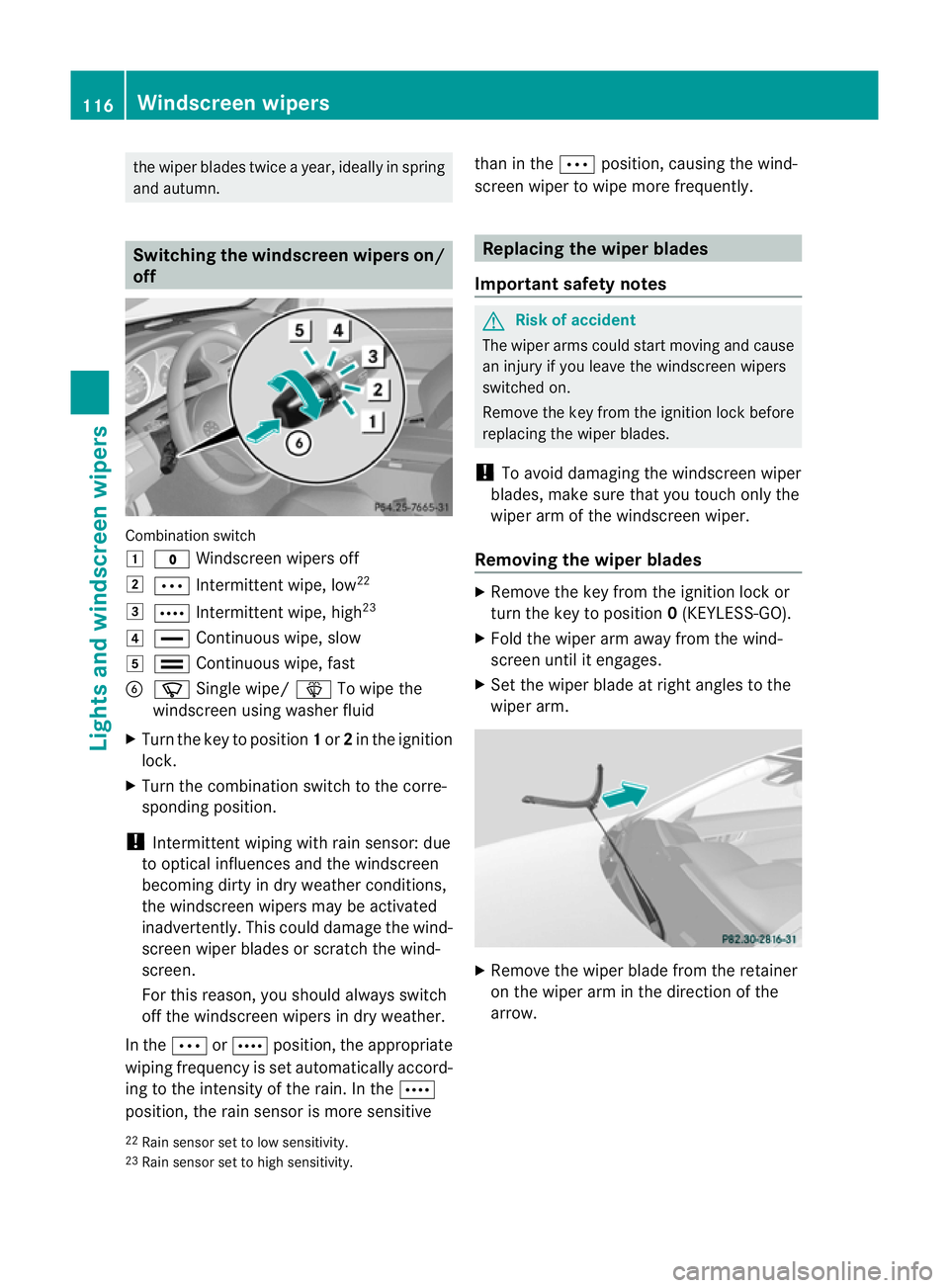
and autumn. Switchin
gthe windscreen wipers on/
off Combination switch
1
$ Windscreen wipers off
2 Ä Intermitten twipe, low 22
3 Å Intermitten twipe, high 23
4 ° Continuous wipe, slow
5 ¯ Continuous wipe, fast
B í Single wipe/ îTo wipe the
windscreen using washer fluid
X Turn the key to position 1or 2in the ignition
lock.
X Turn the combination switc htothe corre-
sponding position.
! Intermi tten tw iping with rain sensor: due
to optical influences and the windscreen
becoming dirt yindry weather conditio ns,
the winds creen wipers may be activated
inadvertently. This could damage the wind-
screen wiper blades or scratc hthe wind-
screen.
For this reason ,you should always switch
off the windscreen wiper sindry weather.
In the ÄorÅ position, th eappropriate
wiping frequenc yisset automatically accord-
ing to the intensity of the rain. In the Å
position, the rai nsensor is mor esensitive than in the
Äposition, causin gthe wind-
screen wiper to wipe mor efrequently. Replacing the wiper blades
Important safety notes G
Ris
kofa ccident
The wiper arms could star tmovin gand cause
an injury if you leave the windscreen wipers
switched on.
Remove the key from the ignition lock before
replacing the wipe rblades.
! To avoid damaging the windscreen wiper
blades, make sure that you touch only the
wiper arm of the windscreen wiper.
Removing the wiper blades X
Remove the key from the ignition lock or
turn the key to position 0(KEYL ESS-GO ).
X Fold the wiper arm away from the wind-
screen until it engages.
X Set the wiper blade at right angles to the
wiper arm. X
Remov ethe wiper blade from the retainer
on the wiper ar minthe direction of the
arrow.
22 Rai nsensor set to low sensitivity.
23 Rain sensor set to high sensitivity. 116
Windscreen wipersLights and windscreen wipers
BA 20
7ECE ÄJ 2010 /1a; 1; 2, en-GB
mkalafa Version: 3.0.2.11 2010-01-26T13:03:22+01:00 -Seite 116
Page 120 of 333
Fitting th
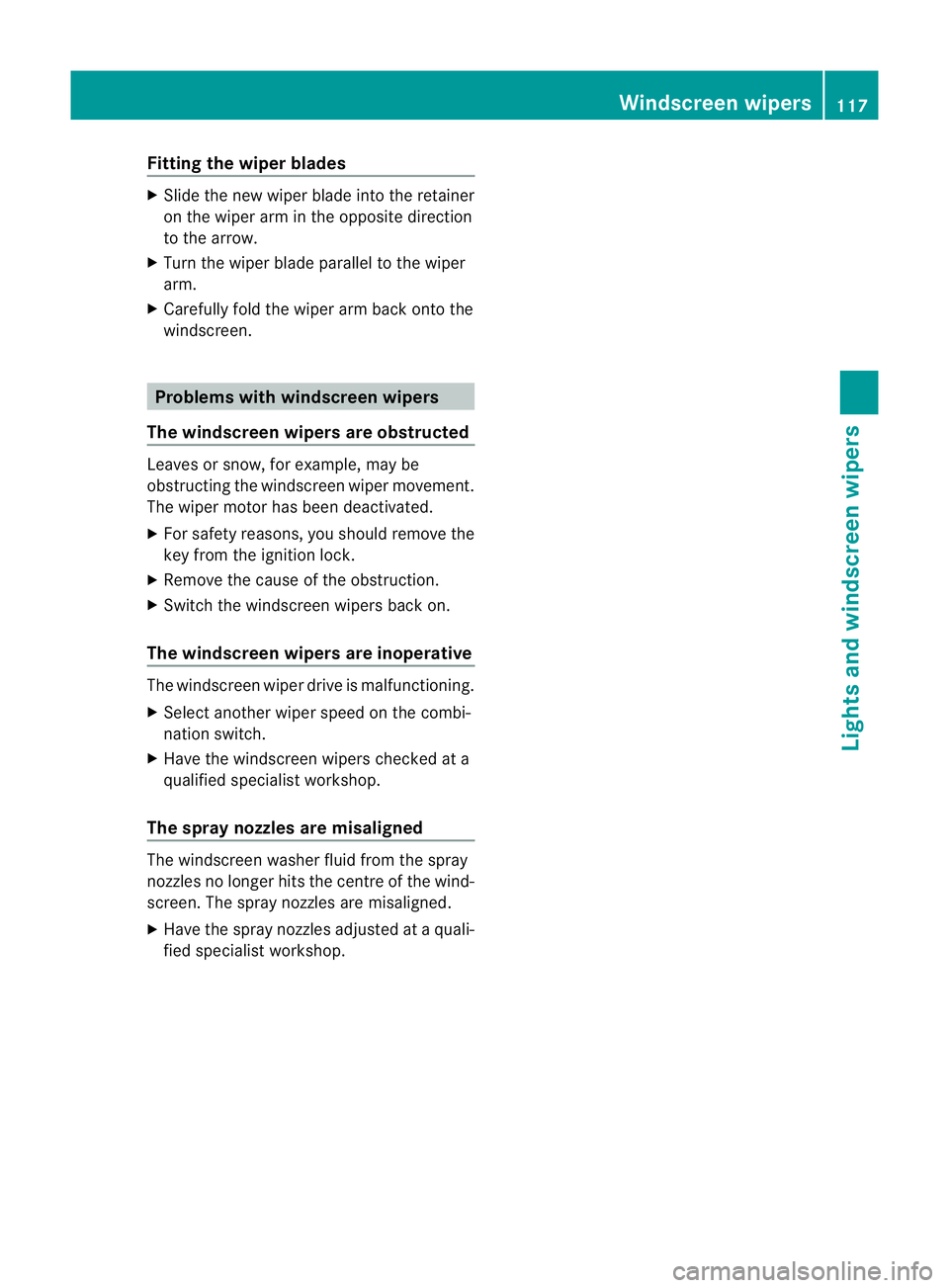
ewiper blades X
Slide th enew wi per blade int othe retainer
on th ewiper arm in th eopposite direc tion
to the arrow.
X Tur nthe wiper blade parallel to the wiper
arm.
X Carefully fol dthe wiper ar mback ont othe
windscreen. Problems wit
hwindscreen wipers
The windscree nwipers ar eobstructed Leaves or snow, for example, may be
obstructin gthe windscreen wiper movement.
The wiper motor has been deactivated.
X For safety reasons ,you should remov ethe
key from the igni tion lock.
X Remove the cause of the obstruction.
X Swit chthe windscreen wipers back on.
The windscreen wipers ar einoper ative The windscreen wiper driv
eismalfunctioning.
X Select another wiper spee donthe combi-
nation switch.
X Hav ethe windscreen wiper schecked at a
qualified specialist workshop.
Th es pray nozzles ar emisaligned The windscreen washer fluid from the spray
nozzles no longer hits the centre of the wind-
screen. The spray nozzles are misaligned.
X Hav ethe spra ynozzles adjusted at aquali-
fied specialist workshop. Windsc
reen wipers
117Lights and windscreen wipers
BA 207ECE ÄJ 2010/1a; 1; 2, en-GB
mkalafa Version:3.0.2.11
2010-01-26T13:03:22+01:0
0-Seite 117 Z
Page 124 of 333
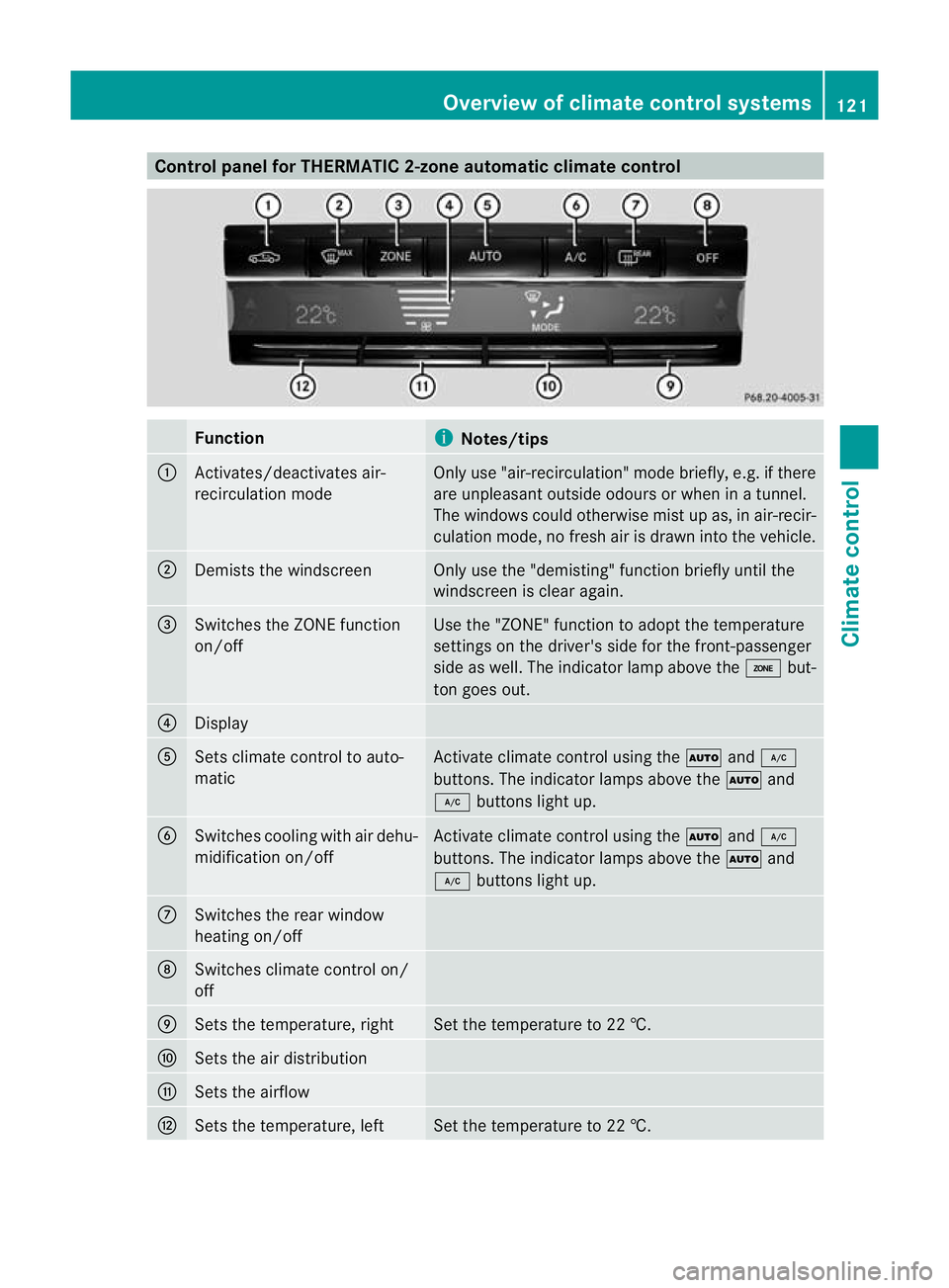
Control panel for THERMATIC 2-zone automatic clima
tecontrol Function
i
Notes/tips
:
Activates/deactivate
sair-
recirculation mode Only use "air-recirculation
"modeb riefly, e.g. if there
are unpleas anto utside odours or when in atunnel.
The windows could otherwis emist up as, in air-recir-
culation mode, no fresh air is drawn into the vehicle. ;
Demists the windscreen Only use the "demisting" func
tion briefly until the
windscreen is clea ragain. =
Switches the ZONE func
tion
on/off Use the "ZONE" func
tion to adopt the temperature
settings on the driver's side for the front-passenger
side as well. The indicator lam pabove the ábut-
ton goes out. ?
Display
A
Sets climate control to auto-
matic Activat
eclimate control using the Ãand¿
buttons. The indicator lamps above the Ãand
¿ buttons light up. B
Switches cooling with air dehu-
midification on/off Activate climat
econtrol using the Ãand¿
buttons. The indicator lamps abov ethe à and
¿ buttons light up. C
Switches the rea
rwindow
heating on/off D
Switches climate control on/
off
E
Sets the temperature, right Set the temperature to 22 †.
F
Sets the air distribution
G
Sets the airflow
H
Sets the temperature, left Set the temperature to 22 †. Overview of climate control systems
121Climatecontrol
BA 20 7ECE ÄJ 2010 /1a;1;2,e n-GB
mkalafa Version: 3.0.2.11 2010-01-26T13:03:22+01:00-Seite 121 Z
Page 125 of 333
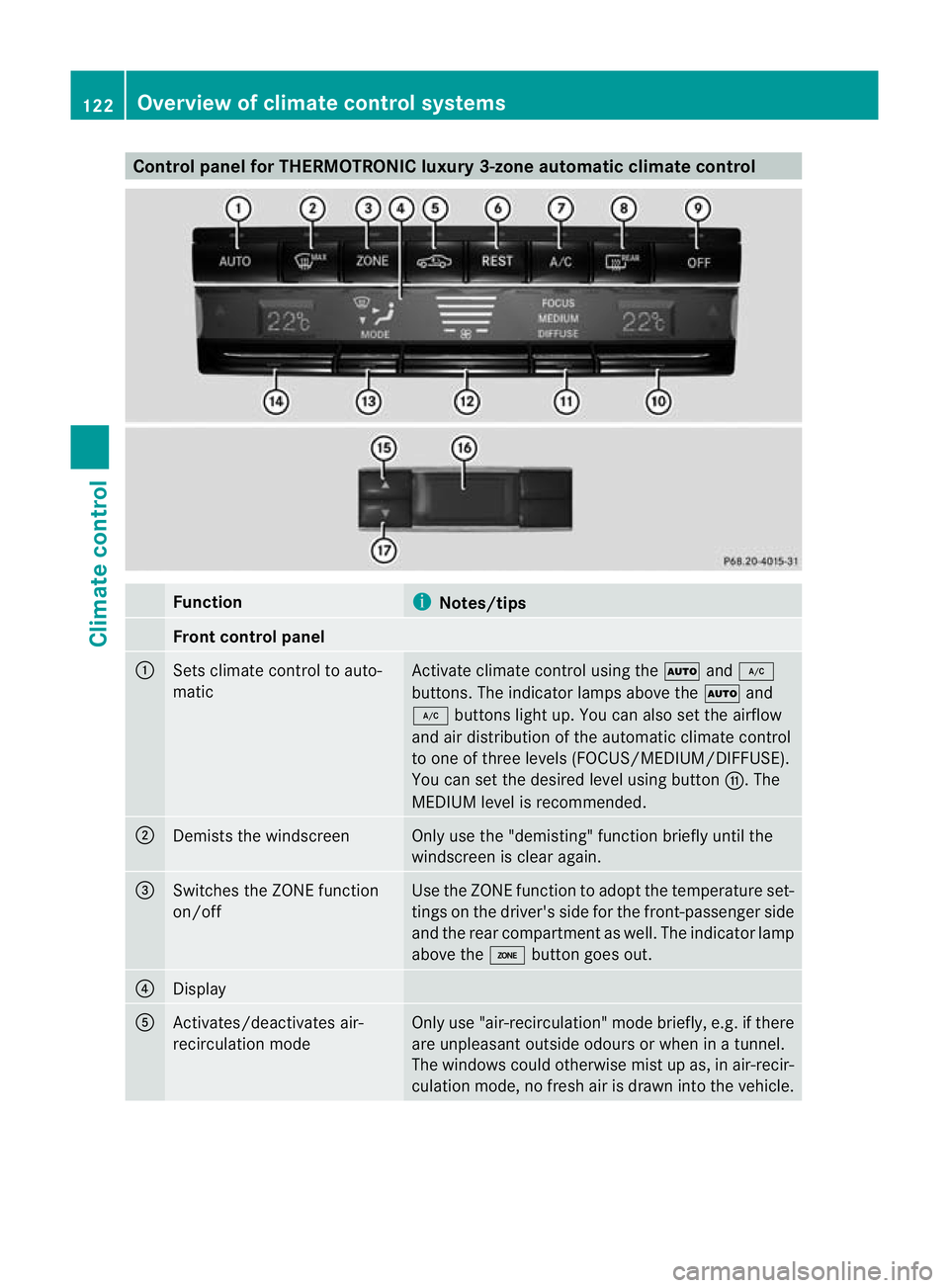
Control panel for THERMOTRONIC luxur
y3-zon eautomatic climat econtrol Function
i
Notes/tips
Fron
tcontrol panel :
Set
sclimate control to auto-
matic Activate climate control usin
gthe à and¿
buttons. Th eindicato rlamps above the Ãand
¿ buttons light up. You can also set the airflow
and air distribution of the automatic climate control
to one of three levels (FOCUS/MEDIUM/DIFFUSE).
You can set the desired level using button G.The
MEDIUM level is recommended. ;
Demists the windscreen Only use the "demisting" func
tion briefly until the
windscreen is clea ragain. =
Switches the ZONE func
tion
on/off Use the ZONE func
tion to adopt the temperatur eset-
tings on the driver' sside for the front-passenger side
and the rear compartmen taswell. The indicator lamp
above the ábutton goes out. ?
Display
A
Activates/deactivates air-
recirculation mode Only use "air-recirculation
"mode briefly ,e.g. if there
are unpleasant outside odours or whe ninatunnel.
The windows could otherwis emist up as, in air-recir-
culation mode, no fresh air is drawn into the vehicle. 122
Overview of climate control systemsClimat
econtrol
BA 20 7ECE ÄJ 2010 /1a;1;2,e n-GB
mkalafa Version: 3.0.2.11 2010-01-26T13:03:22+01:00-Seite 122
Page 126 of 333
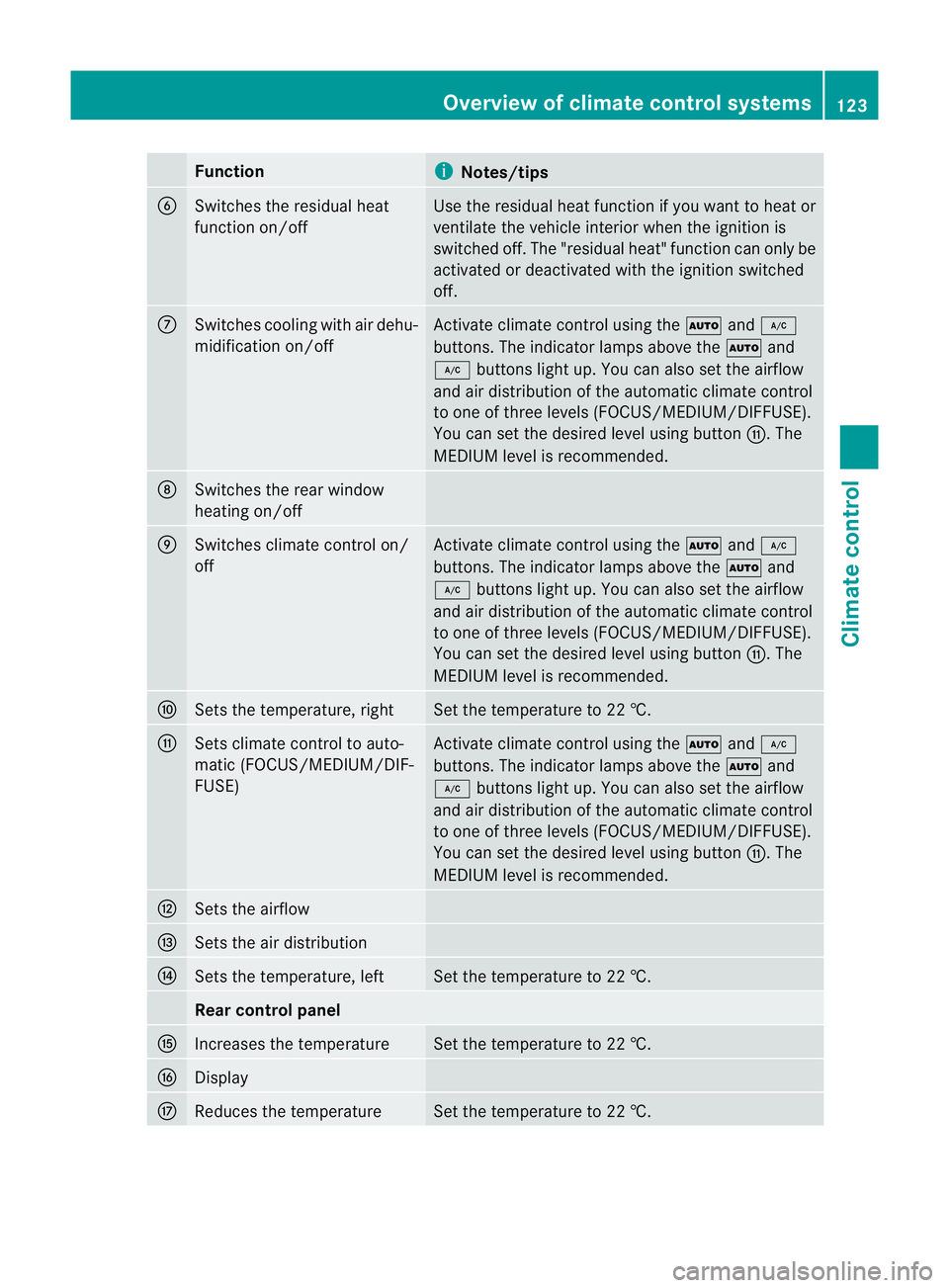
Function
i
Notes/tips
B
Switches the residual heat
function on/off Use the residual heat function if you want to heat or
ventilat
ethe vehicl einterior when the ignition is
switched off .The "residual heat" func tion can only be
activated or deactivated with the ignition switched
off. C
Switches coolin
gwith air dehu-
midification on/off Activate climat
econtrol using the Ãand¿
buttons. The indicator lamps abov ethe à and
¿ buttons light up. You can also set the airflow
and air distribution of the automatic climate con trol
to one of three levels (FOCUS/MEDIUM/DIFFUSE).
You can set the desired level using button G.The
MEDIUM level is recommended. D
Switches the rea
rwindow
heating on/off E
Switches climate control on/
off Activate climat
econtrol using the Ãand¿
buttons. The indicator lamps abov ethe à and
¿ buttons light up. You can also set the airflow
and air distribution of the automatic climate con trol
to one of three levels (FOCUS/MEDIUM/DIFFUSE).
You can set the desired level using button G.The
MEDIUM level is recommended. F
Set
sthe temperature, right Set the temperature to 22 †.
G
Set
sclimate control to auto-
matic (FOCUS/MEDIUM/DIF-
FUSE) Activate climat
econtrol using the Ãand¿
buttons. The indicator lamps abov ethe à and
¿ buttons light up. You can also set the airflow
and air distribution of the automatic climate con trol
to one of three levels (FOCUS/MEDIUM/DIFFUSE).
You can set the desired level using button G.The
MEDIUM level is recommended. H
Set
sthe airflow I
Set
sthe air distribution J
Set
sthe temperature, left Set the temperature to 22 †.
Rea
rcontrol panel K
Inc
reases the temperature Set the temperature to 22 †.
L
Display
M
Reduces the temperature Set the temperature to 22 †. Overview of climate control systems
123Climatecontrol
BA 20 7ECE ÄJ 2010 /1a;1;2,e n-GB
mkalafa Version: 3.0.2.11 2010-01-26T13:03:22+01:00-Seite 123 Z
Page 127 of 333
Oper
ating climat econtrol systems Switching climat
econtrol on/off
Important information i
When climat econtrol is switched off ,the
air supply and air cir culation are also
switched off. Only select this setting briefly;
otherwise, the windows may mist up.
i Activat eclimate control primarily using
the à button (Y page 124).
Activating/deactivating X
Turn the key to position 2in the ignition
lock.
X To activate: press theÃbutton.
The indicator lamp above the Ãbutton
lights up. Airflow and air distribution are set
to automatic mode.
or
X Press the ^button.
The indicator lamp above the ^button
goes out. The previously selected settings
come int oeffect again.
X To deactiv ate: press the ^button.
The indicator lamp above the ^button
lights up. Switching cooling with air dehu
midi-
ficatio non/off
Important information The coolin
gwith air dehumidification function
is only available when the engin eisrunning.
The air inside the vehicle is cooled and dehu-
midified according to the temperature selec-
ted. G
Risk of accident
If the "cooling with air dehumidification" func-
tion is deactivated, the air inside the vehicle
will not be cooled (during warm weather) or
dehumidified. The windows could mist up
more quickly. This may preven tyou from observing the traffic conditions, thereby caus-
ing an accident.
Condensation may drip from the underside of
the vehicle when THERMOTRONI Cisincool-
ing mode. This is norma land not asign that
there is amalfunction.
i The cooling with air dehumidification
function uses refrigerant R134a. This cool-
ant does not contain chlorofluorocarbons,
and therefor edoes not damage the ozone
layer.
Switching on/off X
To switch on: press the¿button.
The indicator lam pabove the ¿button
lights up.
X To switch off: press the¿button.
The indicator lamp above the ¿button
goes out. The cooling with air dehumidifi-
cation function has adelayed switch-off
feature.
Problems with the "cooling with air
dehumidification" function If the indicator lam
pint he ¿ button does
not go out when switched off ,the cooling with
air dehumidification func tion is switched off
due to amalfunction. You can no longer
switch on the cooling with air dehumidifica-
tion function.
X Consult aqualified specialist workshop. Setting climate control to automatic
In automatic mode, the set temperature is
maintained automatically at aconstant level.
The system automatically regulates the tem-
peratur eofthe dispensed air ,the airflo wand
the air distribution.
Automatic mode will achieve optimal opera-
tion if cooling with air dehumidification is also
activated .Ifdesired, coolin gwith air dehu-
midification can be deactivated. 124
Operating climate control systemsClimate control
BA 20
7ECE ÄJ 2010 /1a; 1; 2, en-GB
mkalafa Version: 3.0.2.11 2010-01-26T13:03:22+01:00 -Seite 124
Page 128 of 333
X
Tur nthe key to position 2in the ignition
lock.
X Set the desired temperature.
X To activa te:press the Ãbutton.
The indicator lamp above the Ãbutton
lights up. Automatic air distribution and air-
flow are activated.
X THERMOTRONI Cluxury 3-zone automatic
climate control: press switch Gup or down
and select the desired level (Y page 122).
FOCUS Air flow high/air distributio nvia
the centre and side vents
MEDIU MAir flow medium/air distribution
via the centre and side vents
DIFFUSE Air flow low/air distribution via the centre, side and defroster vents
i This setting is especially effec tive in auto-
mati cmode when outside tempera tures
are high.
X To deactivate: press the air distribution
button.
THERMATIC 2-zone automatic climate con-
trol: press button F(Ypage 121).
THERMOTRONIC luxury 3-zone automatic
climate control: press button
I (Ypage 122).
The indicator lamp above the Ãbutton
goes out.
or
X Press the airflow button.
THERMATIC 2-zone automatic climate con-
trol: press button G(Ypage 121).
THERMOTRONIC luxury 3-zone automatic
climate control: press button
H (Ypage 122).
The indicator lamp above the Ãbutton
goes out. Setting the temperature
THERMATIC 2-zone automatic climate
control Different temperatures can be set for the
driver'
sand front-passenger sides.
X Turn the key to position 2in the ignition
lock.
X To increase/reduce: pressbutton Eor
H up or down (Y page 121).
Only change the temperature setting in
small increments. Start at 22 †.
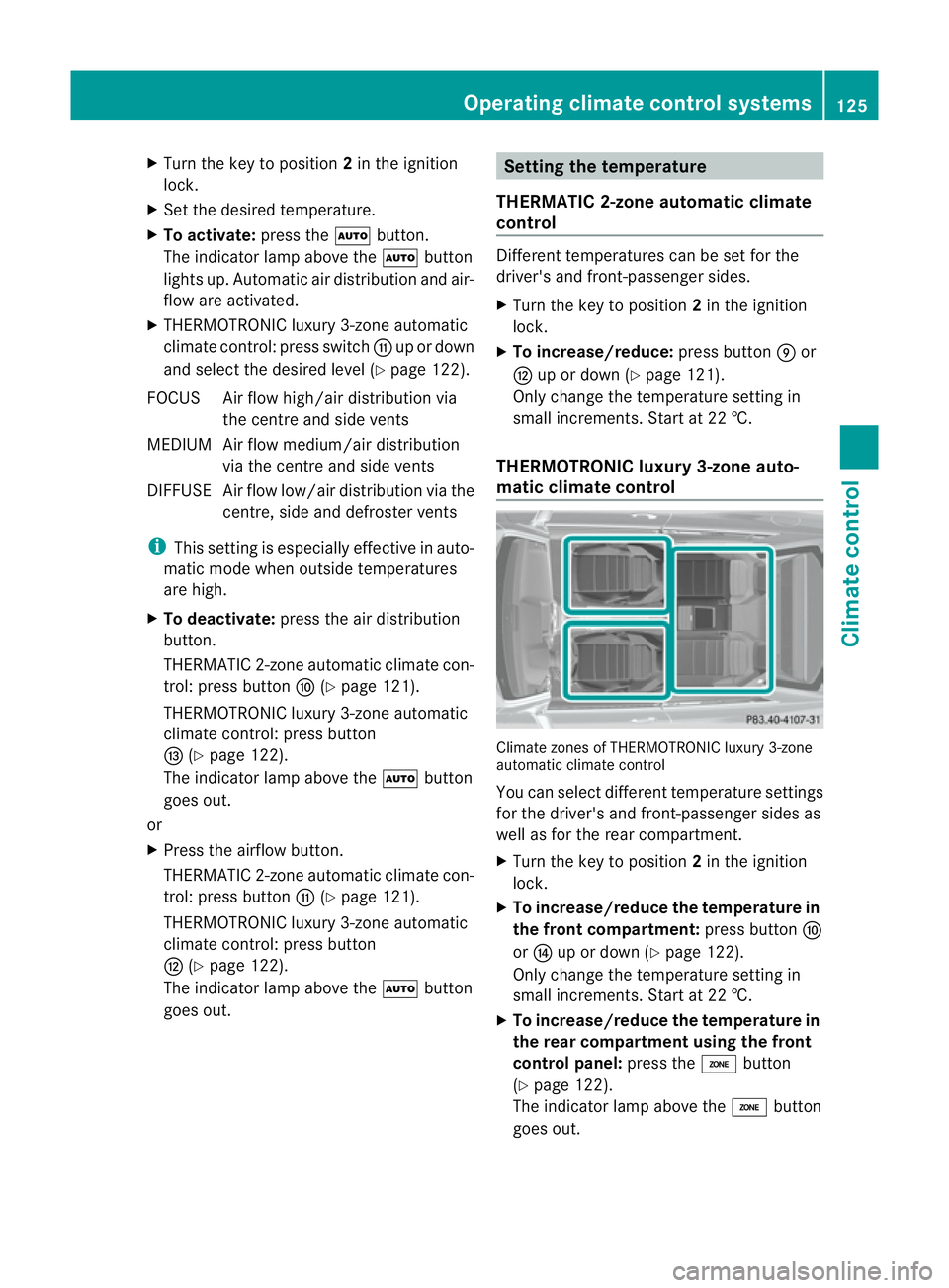
THERMOTRONIC luxur y3-zon eauto-
matic climate control Climate zone
sofTHERMOTRONIC luxury 3-zone
automatic climat econtrol
You can select different temperature settings
for the driver' sand front-passenger sides as
well as for the rear compartment.
X Turn the key to position 2in the ignition
lock.
X To increase/reduce the temperature in
the front compartment: pressbutton F
or J up or down (Y page 122).
Only change the temperature setting in
small increments. Start at 22 †.
X To increase/reduce the temperature in
the rear compartment using the front
control panel: press theábutton
(Y page 122).
The indicator lamp above the ábutton
goes out. Operating climate contro
lsystems
125Climate co ntrol
BA 207ECE ÄJ 2010 /1a; 1; 2, en-GB
mkalafa Version: 3.0.2.11 2010-01-26T13:03:22+01:00 -Seite 125 Z
Page 129 of 333
X
Press button ForJ up or down
(Y page 122).
Only change the tempera turesetting in
small inc rements. Start at 22 †.
X To increase/reduce the tem perature in
the rear compartment using the rear
control panel: press buttonKor
M(Y page 122).
Only change the temperature setting in
small increments. Start at 22 †. Settin
gthe air distribution
¯ directsthe airflo wthrough the demis-
ter ven ts
P directs the airflow through the centre
and side air vents
O directs the airflow through the footwell
air vents
S directs the airflow through the centre
and side air vent saswell as the foot-
well air ven ts25
b directs the airflow through the demis-
ter, centre and side air vents 26
a directs the airflow through the footwell
and demister vents
i Regardless of the air distribution setting,
airflow is always directed through the side
air vents. The side air vent scan only be
closed when the controls on the side air
vent sare turned downwards.
THERMATIC 2-zone automatic climate
control X
Turn th ekey to position 2in the ignition
lock.
X Press switch Fup or down repeatedly until
the desired symbol appear sint he display
(Y page 121). THERMOTRONIC luxu
ry3-zone au to-
matic climate control X
Turn the key to position 2in the ignition
lock.
X Press switch Iup or down repeatedly until
the desired symbol appears in the display
(Y page 122). Settin
gthe airflow
THERMATIC 2-zone automatic climate
control X
Turn th ekey to position 2in the ignition
lock.
X To increase/reduce: press switchGup
or down (Y page 121).
THERMOTRONIC luxu ry3-zone au to-
matic climate control X
Turn the key to position 2in the ignition
lock.
X To increase/reduce: press switchHup
or down (Y page 122). Switchin
gthe ZONE functio non/off
X To switc hon:press the ábutton
(Y page 121), (Y page 122).
The indicator lam pabove the ábutton
lights up.
THERMATIC 2-zone automatic climate con-
trol: the temperature setting for the driver's
side is not adopted for the front-passenger
side.
THERMOTRONI Cluxury 3-zone automatic
climate control: the temperature setting on
the driver' sside is not adopted for the
front-passenger side or the rear compar t-
me nt.
25 This air distribution setting is only available on the Cabriolet.
26 Canada only. 126
Operatin
gclimat econtrol systemsClimate control
BA 20 7ECE ÄJ 2010/1a; 1; 2, en-GB
mkalafa Version: 3.0.2.11 2010-01-26T13:03:22+01:00-Seite 126
Page 130 of 333
When the button
sfor temperature, airflow or
air distribution ar eactivated, the tempe rature
setting on the driver's sid eisnot adopted for
the other climate control zones.
X To switch off: press theábutton
(Y page 121), (Y page 122).
The indicato rlamp above the ábutton
goes out.
THERMATI C2-zon eautomatic climate con-
trol: the temperatur esettin gfor th edriver's
side is not adopted for the front-passenger
side.
THERMOTRONIC luxury 3-zone automatic
climate control: the tempe rature setting on
the driver' sside is not adopted for the
front-passenger side or the rear compar t-
ment. Demistin
gthe windscreen
Yo uc an use this function to defrost the wind-
screen or to demist the inside of the wind-
screen and the side windows.
i You should only select the demisting
function until the windscreen is clear again.
X Turn the key to position 2in the ignition
lock.
X To activate: press the¬button.
The indicator lamp above the ¬button
lights up.
The climat econtr olsyste mswitches to the
following functions:
R cooling with air dehumidification on
R high airflow 27
R high temperature 27
R air distribution to the windscreen and
fron tside windows
R air-recirculation mode off
X To deactivate: press the¬button.
The indicator lamp above the ¬button
goes out. The previously selected settings
com eintoe ffect again .The cooli ngwith air dehumidification function remain
son. Air-
recirculatio nmode remain sdeactiva ted.
or
X Press the Ãbutton.
The indicator lamp above the ¬button
goes out. Airflow and air distribution are set
to automatic mode.
or
X THERMATIC 2-zone au tomatic climate
control: press switch EorH up or down
(Y page 121).
THERMOTRONIC luxury 3-zone auto-
matic climate control: press switchFor
J up or down (Y page 122).
or
X THERMATIC 2-zone automatic climate
control: press switch Gup or down
(Y page 121).
THERMOTRONIC luxury 3-zone auto-
matic climate control: press switchHup
or down (Y page 122). Demisting th
ewindows
Windows misted up on th einside X
Activat ethe "coolin gwith air dehumidifica-
tion "function ¿.
X Activat eautomatic mode Ã.
X If the windows continue to mist up, activate
the demisting function (Y page 127).
i You should only select this setting until
the windscreen is clear again.
Windows misted up on the outside X
Activat ethe windscreen wipers.
X THERMATIC 2-zone au tomatic climate
control: press switch Fup or down
(Y page 121 )until the PorO symbol
appears in the display.
X THERMOTRONIC luxury 3-zone auto-
matic climate control: press switchIup
27 Depending on the outside temperature. Operatin
gclimate contro lsystems
127Climate co ntrol
BA 207ECE ÄJ 2010/1a; 1; 2, en-GB
mkalafa Version:3.0.2.11
2010-01-26T13:03:22+01:0
0-Seite 127 Z