light MERCEDES-BENZ E-CLASS CABRIOLET 2010 Owners Manual
[x] Cancel search | Manufacturer: MERCEDES-BENZ, Model Year: 2010, Model line: E-CLASS CABRIOLET, Model: MERCEDES-BENZ E-CLASS CABRIOLET 2010Pages: 333, PDF Size: 7.64 MB
Page 210 of 333
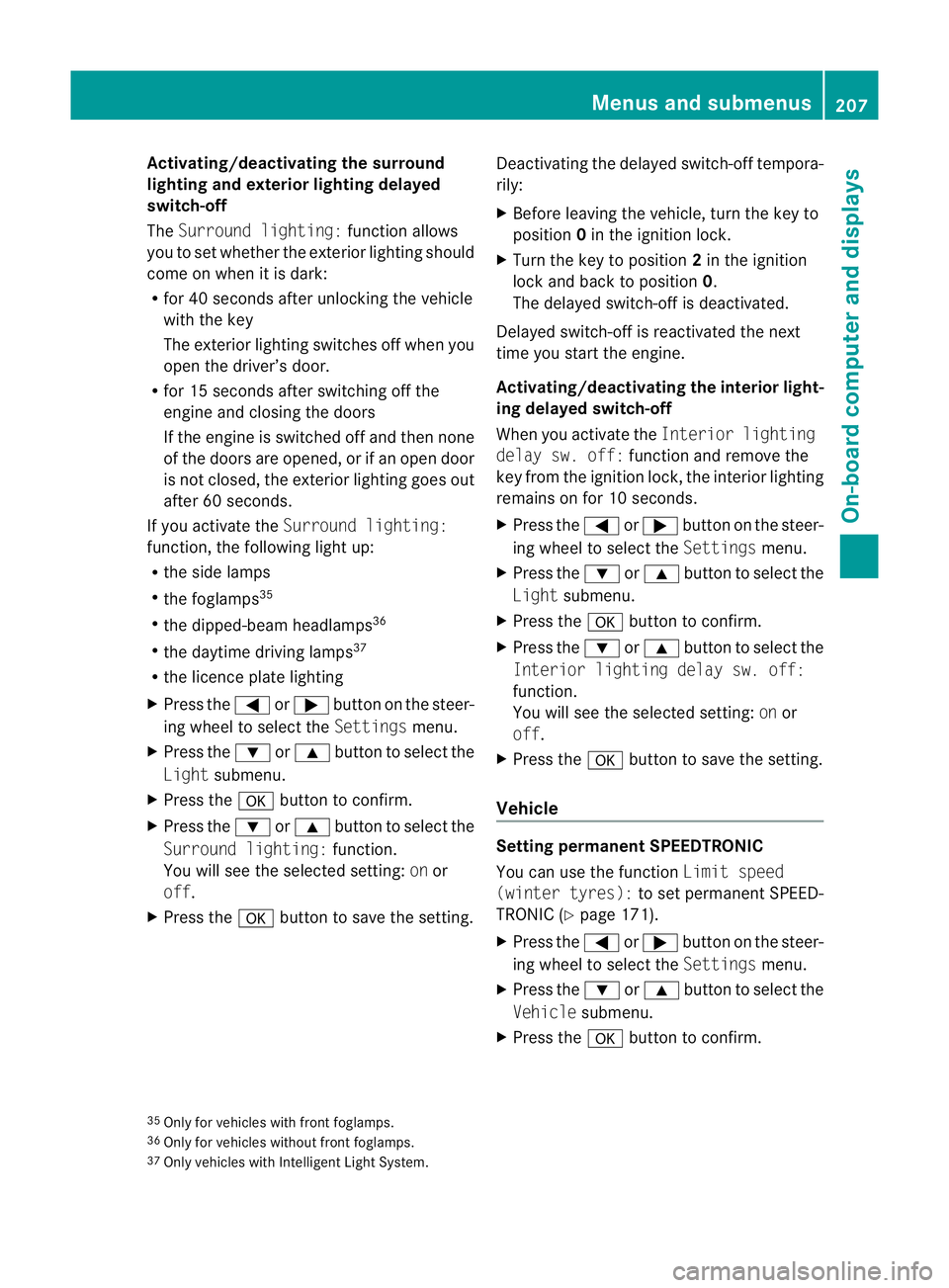
Activating/deactivating th
esurround
lighting and ex terior lightin gdelayed
switch-off
The Surround lighting: function allows
yo utos et whether th eexterior lighting should
com eonw hen it is dar k:
R for 40 se conds after unlockin gthe ve hicle
with th ekey
The exterior lighting switche soff wh en you
open the driver’s door.
R for 15 seconds after switching off the
engine and closing the doors
If the engine is switched off and then none
of the doors are opened, or if an ope ndoor
is not closed, the exte rior lightin ggoes out
after 60 seconds.
If you activate the Surround lighting:
func tion, the following light up:
R the side lamps
R the foglamps 35
R the dipped-beam headlamps 36
R the daytime drivin glamps 37
R the licence plate lighting
X Press the =or; button on the steer-
ing wheel to select the Settingsmenu.
X Press the :or9 button to select the
Light submenu.
X Press the abutton to confirm.
X Press the :or9 button to select the
Surround lighting: function.
You will see the selected setting: onor
off.
X Press the abutton to save the setting. Deactivating the delayed switch-off tempora-
rily:
X
Before leaving the vehicle, turn the key to
position 0in the ignition lock.
X Turn the key to position 2in the ignition
lock and back to position 0.
The delayed switch-off is deactivated.
Delayed switch-off is reactivated the next
time you start the engine.
Activating/deactivating the interior light-
ing delayed switch-off
When you activate the Interior lighting
dela ysw. off: function and remov ethe
key from the ignition lock ,the interior lighting
remain sonfor 10 seconds.
X Press the =or; button on the steer-
ing wheel to select the Settingsmenu.
X Press the :or9 button to select the
Light submenu.
X Press the abutton to con firm.
X Press the :or9 buttontos elect the
Interior lighting dela ysw. off:
function.
Yo uw ill see the selected setting: onor
off.
X Press the abutton to save the setting.
Vehicle Setting permanent SPEEDTRONIC
You can use the func
tion Limi tspeed
(winter tyres): to setpermanen tSPEED-
TRONI C(Ypage 171).
X Press the =or; button on the steer-
ing wheel to select the Settingsmenu.
X Press the :or9 button to select the
Vehicle submenu.
X Press the abutton to confirm.
35 Only for vehicles with front foglamps.
36 Only for vehicles withou tfront foglamps.
37 Onl yvehicles with Intelligent Light System. Menus and submenus
207On-board computer and displays
BA 207ECE ÄJ 2010 /1a; 1; 2, en-GB
mkalafa Version: 3.0.2.11 2010-01-26T13:03:22+01:00 -Seite 207 Z
Page 212 of 333

vating th
eEASY-ENTRY/EXIT feature, make
sure that nobody can become trapped.
Do not leave children unsupervise dinthe
vehicle, even if they ar esecur edinac hild
restraint system .The chil dren could open the
driver's door and thereby unintentionally acti-
vat ethe EASY-ENTRY/EXIT feature and
becom etrapp ed.
X Press the =or; button on the steer-
ing whee ltoselect the Settings menu.
X Press the :or9 button to select the
Convenience submenu.
X Press the abutton to confirm.
X Press the :or9 button to select the
Easy Entry/Exit feature.
You will see the selected setting: onor
off.
X Press the abutton to save the setting.
Switching th ebelta djustmen ton/off
Fur ther information on belt adjust ment
(Y pag e42).
X Press the =or; button on the steer-
ing whee ltoselect the Settings menu.
X Press the :or9 button to select the
Convenience submenu.
X Press the abutton to confirm.
X Press the :or9 button to select the
Belt adjustment: function.
You will see the selected setting: onor
off.
X Press the abutton to save the setting.
Switching the fold in mirrors when lock-
ing function on/off
If you switch on the Fold mirrorsinwhen
locking: function, th eexterior mirror sfold
in when you lock the vehicle. When you
unloc kthe vehicle and then open adoor, the
exterior mirror sfold out again.
If you have switched the function on and you
fold the exterior mirror sinusing the button
on the door (Y page 101), they will not fold
out automatically. The exterior mirrors can then only be folded out usin
gthe button on
the door.
X Press the =or; button on the steer-
ing wheel to selec tthe Settings menu.
X Press the :or9 button to selec tthe
Convenience submenu.
X Press the abutton to confirm.
X Press the :or9 button to selec tthe
Fold mirror sinwhen locking: func-
tion.
Yo uw ill see the selected setting: onor
off.
X Press the abutton to save the setting.
Resetting to factory settings For safety reasons, not all function
sare reset:
the Limit speed (winter tyres): func-
tio ninp ermanen tSPEEDTRONIC can only be
set in the Vehiclesubmenu. If you want to
reset the Daytimedriving lamps: in the
Light submenu, yo umust turn the key in the
ignition lock to position 1.
X Press the =or; button on the steer-
ing wheel to select the Settingsmenu.
X Press the :or9 button to select the
Factor ysetting submenu.
X Press the abuttontoc onfirm.
The Rese tall settings? message
appe ars.
X Pres sthe : or9 button to select
No orYes.
X Press the abutton to confir mthe selec-
tion.
If you hav eselected Yes,the multifunction
display shows aconfirmation message. Menu
sand submenus
209On-board computer and displays
BA 207ECE ÄJ 2010/1a; 1; 2, en-GB
mkalafa Version: 3.0.2.11 2010-01-26T13:03:22+01:00-Seite 209 Z
Page 214 of 333

Safety systems
Display messages Possible causes/consequences and
M Solutions
ü If the symbol appear
sinthe multifunc tion display, aseat belt
tongue has been clipped into arear seat belt buckle.
Further information on the statu sindicato rfor the rea rseat
belts (Y page 43). ý G
Risk of injury
If the symbol appears in the multifunc tion display, aseat belt
tongue has not been clipped into arear seat belt buckle.
X If necessary, ask the occupant sinthe rea rtofasten their
seat belts.
Further information on the status indicator for the rear seat
belts (Y page 43). ÷ ES
Pi nop‐
erative
See Own‐
er's Man‐
ual G
Ris
kofa ccident
ESP ®
,B AS ,PRE-SAFE ®
,t he HOL Dfunction, hill start assist
and ESP ®
trailer stabilisation are not available due to amal-
function. BAS PLUS and PRE-SAFE ®
Brake may also have
failed. In addition, the äandå warning lamps light up
in the instrumen tcluster.
ATTENTION ASSIST is deactivated.
The brake system continues to func tion normally, but without
the func tions listed above.
X Drive on carefully.
X Visit aqualified specialist workshop. PRE-SAFE inopera‐
tive See
Owner's
Manual
G
Risk of injury
Importan tfunctions of PRE-SAFE ®
have failed. All other occu-
pant safety systems, e.g. airbags, remain available.
X Visit aqualified specialist workshop. Display messages
211On-board computer and displays
BA 207 ECE ÄJ 2010/1a; 1; 2, en-GB
mkalafaV ersion: 3.0.2.11
2010-01
-26T13:03:22+01:00 -Seite 211 Z
Page 216 of 333

Displa
ymessages Possible causes/consequences and
M Solutions
Ch
ilds eat in wrong
position
See Own‐
er'
sM an‐
ual G
Risk of in
jury
Vehicles with automatic child seat recognition on the front-
passenge rseat: the child seat is positioned incorrectly.
X Fit the child seat in the correc tposition. G
Risk of injury
Vehicles with automatic child seat recognition on the front-
passenger seat: the automatic child seat recognition sensor
is faulty.
X Visit aqualified specialist workshop. 6 Restraint
sys. mal‐
function
Consult
workshop
G
Risk of injury
There is amalfunction in the SRS (Supplemental Restraint
System). The 6warning lamp also lights up in the instru-
ment cluster.
X Visit aqualified specialist workshop. 6 Front
left mal‐
function
Consult
workshop
or
Front
righ
tmal‐
function
Consult
workshop G
Ris
kofi njury
SRS has malfunctioned at the front on the left or right. The
6 warning lamp also lights up in the instrumen tcluster.
X Visit aqualified specialist workshop. Display mess
ages
213On-board computer and displays
BA 207ECE ÄJ 2010/1a; 1; 2, en-GB
mkalafa Version: 3.0.2.11 2010-01-26T13:03:22+01:00-Seite2 13 Z
Page 217 of 333

Displa
ymessages Possible causes/consequences and
M Solutions
6 Re
ar left
malfunc‐
tio nC on‐
sul tw ork‐
shop
or
Rear
right mal‐
function
Consult
workshop G
Risk of in
jury
SRS has malfunctioned at the rear on the left or right .The
6 warning lamp also lights up in th einstrument clu ster.
X Visit aqualified specialist workshop. 6 Left
windowbag
malfunc‐
tion Con‐
sult work‐
shop
or
Right
windowbag
malfunc‐
tion Con‐
sult work‐
shop G
Risk of injury
There is amalfunction in the left-han dand/or right-hand
windowbag. The 6warnin glamp also lights up in the
instrumen tcluster.
X Visit aqualified specialist workshop. 214
Display messagesOn-board computer and displays
BA 207 ECE ÄJ 2010/1a; 1; 2, en-GB
mkalaf
aV ersion: 3.0.2.11
2010-01-26T13:03:22+01:0
0-Seite 214
Page 218 of 333

Applying th
ebrakes Display messages Possible causes/consequences and
M Solutions
J ABS and
ESP cur‐
rently
unavaila‐
ble See
Owner's
Manual G
Risk of accident
AB S(Anti-lock Brakin gSystem), ESP ®
(Electronic Stability
Program), BA S(Brake Ass ist), PRE-SAFE ®
,t he HOL Dfunction,
hill start assis tand ESP ®
trailer stabilisation are temporarily
not available .For example, the on-boar dvoltage ma ybeinsuf-
ficient. BAS PLUS (Brake Assist PLUS) and PRE-SAFE ®
Brake
may be inoperative as well .Ina ddition, the ä,å
and ! warning lamps light up in the instrumen tcluster.
ATTE NTION ASSIS Tisdeactiva ted.
The brak esystem continues to function normally, but without
the function slisted above. The wheels could therefore lock if
you brak ehard, for example.
X Drive on carefully.
If the display message disappears, the functions listed
above are available again.
If the display message continues to be displayed:
X Drive on carefully.
X Visit aqualified specialist workshop. J AB
Sa nd
ESP inop‐
erative
See Own‐
er's Man‐
ual G
Ris
kofa ccident
ABS, ESP ®
,B AS ,PRE-SAFE ®
,t he HOL Dfunction, hill start
assis tand ESP ®
traile rstabilisatio nare not avail able due to a
malf unction. BAS PLUS and PRE-SAFE ®
Brake may als ohave
failed. In addition, the ä,åand! warning lamps
light up in the instrument cluster.
ATTENTION ASSIST is deactivated.
The brake system continues to function normally, but without
the functions listed above. The wheels coul dtherefore lock if
you brake hard, for example.
X Drive on carefully.
X Visit aquali fieds pecialist workshop. Display messages
215On-boardcomputer and displays
BA 20 7ECE ÄJ 2010/1a; 1; 2, en-GB
mkalafa Version:3.0.2.11
2010-01-26T13:03:22+01:0
0-Seite 215 Z
Page 219 of 333

Displa
ymessages Possible causes/consequences and
M Solutions
J EB
D, ABS
and ESP
inopera‐
tiv eS ee
Owner's
Manual G
Risk of accident
EBD (Electronic Brake-for ceDistribution), ABS, ESP ®
,B AS,
PRE-SAFE ®
,t he HOL Dfunction ,hill start assist and ESP ®
trailer stabilisation are no tavailab ledue to amalfunction. In
addition, the ä,åand! warning lamp sinthe
instrumen tcluster light up and awarning tone sounds.
ATTENTION ASSIST is deactivated.
The brake system continue stofunction normally, but without
the functions listed above. The wheels coul dtherefore lock if
you brake hard, for example.
X Drive on carefully.
X Visit aquali fieds pecialist workshop immediately. J Release
parking
brake You are drivin
gwith the parkin gbrake engaged .Awarning
ton ealso sounds.
X Release th eparking brake. J Br
ake
immedi‐
ately Am
alfunction has occurred while the HOL Dfunction or DIS-
TRONI CPLUSisa ctive.
or
Vehicles with manual transmissio n:with the HOL Dfunction
activated, you have either:
R opened the driver' sdoor and released th eseat belt or
R switched off th eengineor
R opened th ebonnet
At one ma yalso sound at regular intervals. The ton ebecomes
louder if you attempt to lock the vehicle.
You can notstart the engine.
X Paying attention to the traffic situation, immediately
depress the brake peda lfirmly and hold until the display
message disappears.
X Prevent the vehicle from rolling away before you leave it
(Y page 153).
You can restart the engine. 216
Display messagesOn-board computer and displays
BA 20
7ECE ÄJ 2010 /1a; 1; 2, en-GB
mkalafa Version: 3.0.2.11 2010-01-26T13:03:22+01:00 -Seite 216
Page 220 of 333

Displa
ymessages Possible causes/consequences and
M Solutions
J Ch
eck
brake
fluid
level G
Risk of accident
There is insufficient brake fluid in the brake fluid reservoir. In
addition, the red Jwarning lamp in the instrumen tcluster
lights up and awarning tone sounds.
X Pul lover and stop th evehicle safely as soon as possible,
paying attention to road and traffic conditions. Do not con-
tinu edriving under any circumst ances.
X Engag ethe parkin gbrake.
X Cons ultaq ualified specialist worksho p.
X Do not top up the brake fluid. Thi swilln ot rectif ythe prob-
lem. # Check
brak
ewear Th
eb rake pa ds/linings have reach edthei rwearlimit.
X Visit aqualified specialist workshop. Lights
i Display messages about LEDs:
This display message will only appear if all LEDs have failed. Displa
ymessages Possible causes/consequences and
M Solutions
b Le
ft cor‐
nering
light
or
Right cor‐
nering
light Th
eleft or right-hand cornering light is faulty.
X Chec kwhether you ar epermitted to change the bulb your-
self (Y page 113).
or
X Visit aqualified specialist workshop. b Left
dipped
beam
or
Right
dipped
beam The left or right-hand dipped-bea
mheadlam pisfaulty.
X Check whethe ryou ar epermitted to change the bulb your-
self (Y page 11 3).
or
X Visit aqualified specialist workshop. Display messages
217On-board computer and displ ays
BA 207 ECE ÄJ 2010/1a; 1; 2, en-GB
mkalafa Version: 3.0.2.11
2010-01-26T13:03:22+01:00
-Seite 217 Z
Page 223 of 333
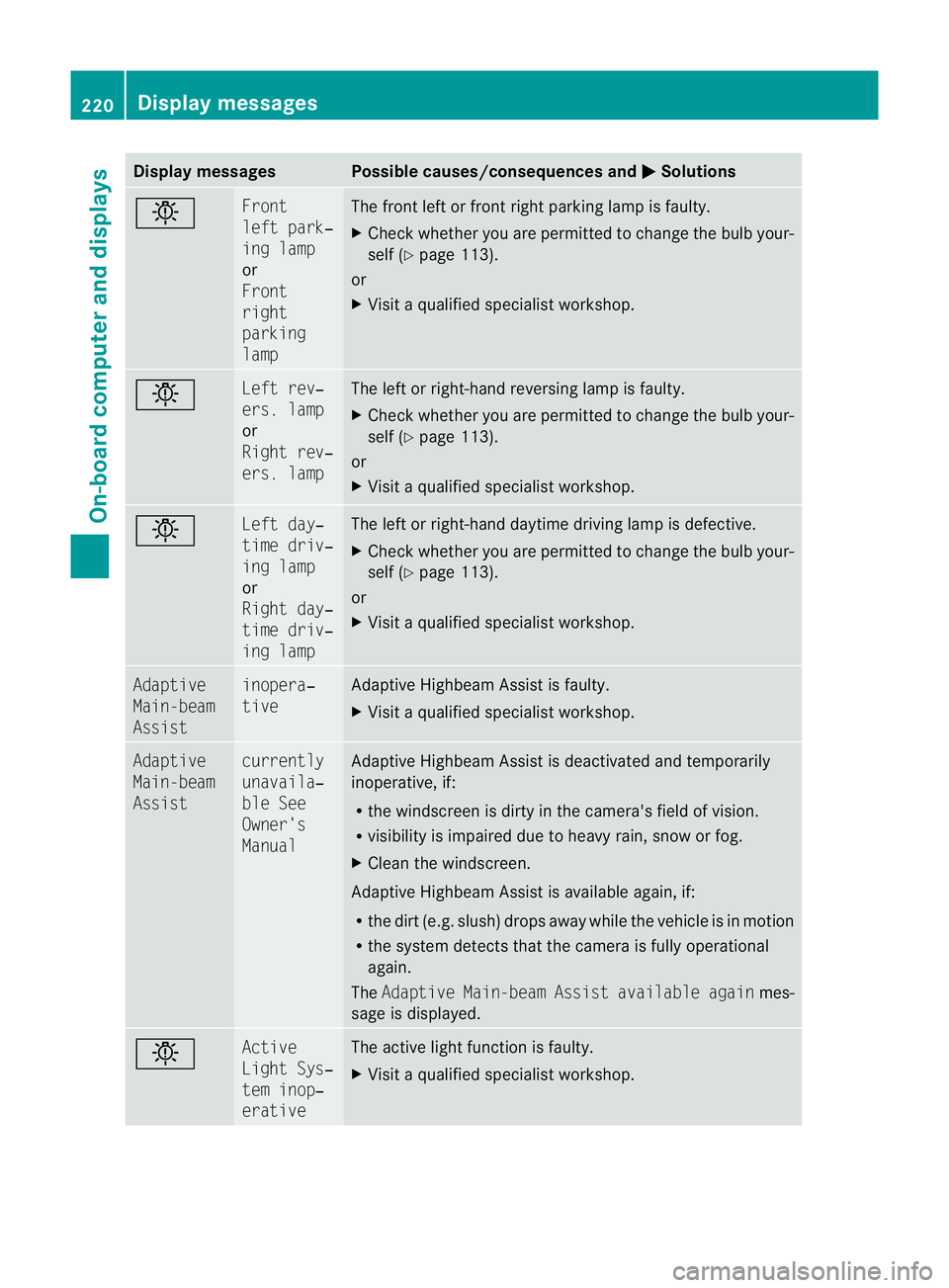
Displa
ymessages Possible causes/consequences and
M Solutions
b Fr
ont
lef tp ark‐
ing lamp
or
Front
right
parking
lamp Th
ef ront leftorf rontright parking lamp is faul ty.
X Chec kwhether you ar epermitted to change the bulb your-
self (Y page 113).
or
X Visit aqualified specialist workshop. b Left rev‐
ers. lamp
or
Righ
trev‐
ers. lamp Th
eleft or right-hand reversin glamp is faulty.
X Check whethe ryou ar epermitted to change the bulb your-
self (Y page 113).
or
X Visit aqualified specialist workshop. b Left day‐
time driv‐
in
gl amp
or
Right day‐
time driv‐
ing lamp Th
eleft or right-hand daytime driving lam pisdefective.
X Check whether you are permitted to change the bulb your-
self (Y page 113).
or
X Visit aqualified specialist workshop. Adaptive
Main-beam
Assist inopera‐
tive Adaptive Highbeam Assis
tisf aulty.
X Visit aqualified specialist workshop. Adaptive
Main-beam
Assist currently
unavaila‐
bl
eS ee
Owner's
Manual Adaptive Highbea
mAssist is deactivate dand temporarily
inoperative, if:
R the windscreen is dirty in the camera's field of vision.
R visibility is impaired due to heavy rain, sno worfog.
X Clean the windscreen.
Adaptive Highbea mAssist is available again, if:
R the dir t(e.g. slush) drops away while the vehicle is in motion
R the system detect sthat the camera is fully operational
again.
The Adaptive Main-bea mAssist available again mes-
sage is displayed. b Active
Light Sys‐
tem inop‐
erative Th
ea ctive light function is faulty.
X Visi taq ualified specialist workshop. 220
Display messagesOn-board computer and displays
BA 207 ECE ÄJ 2010/1a; 1; 2, en-GB
mkalaf
aV ersion: 3.0.2.11
2010-01-26T13:03:22+01:0
0-Seite 220
Page 224 of 333
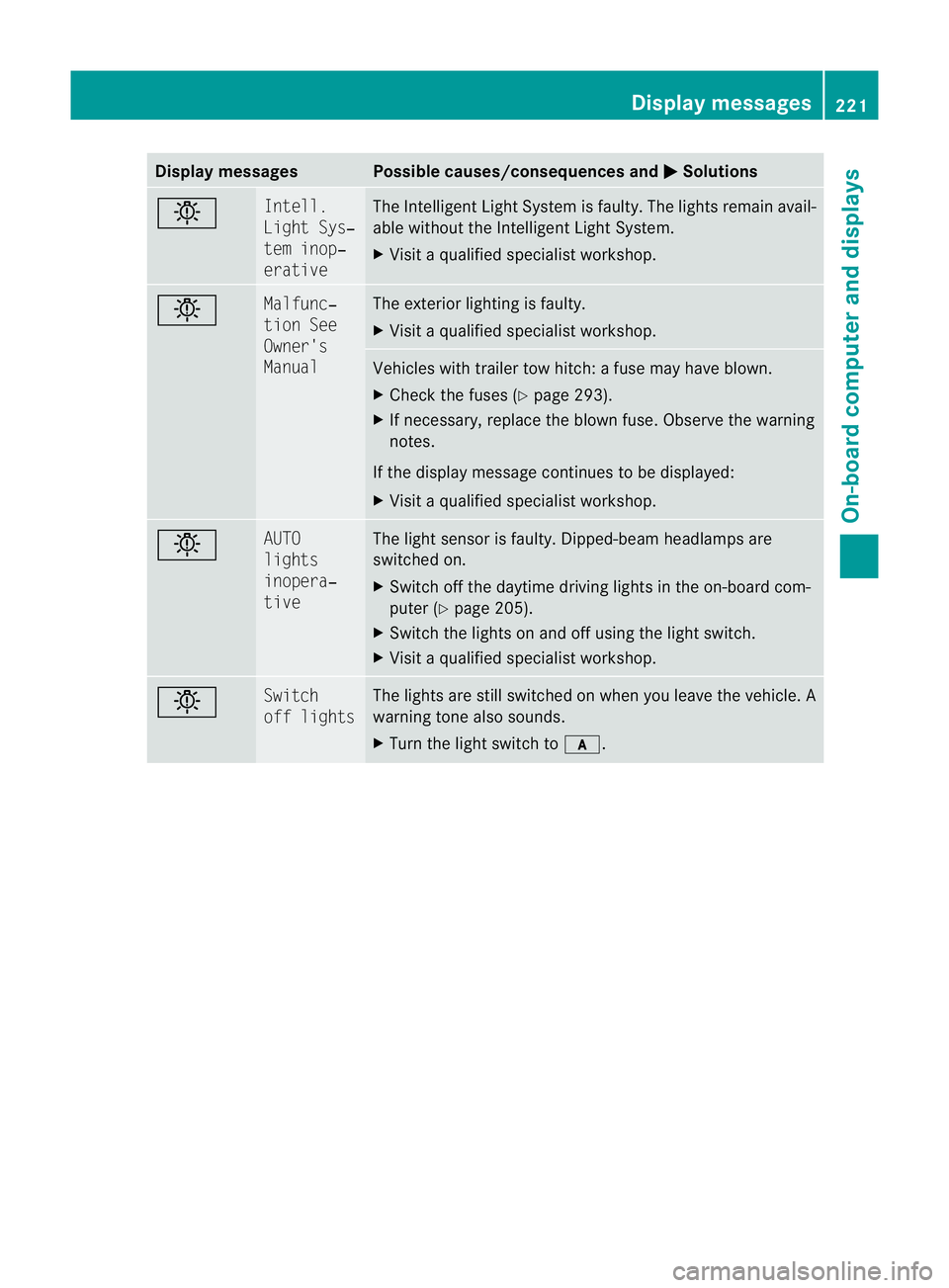
Displa
ymessages Possible causes/consequences and
M Solutions
b In
tell.
Light Sys‐
tem inop‐
erative Th
eI ntel ligen tLight Syste misfaulty. The lights remain avail-
able without the Intelligent Light System.
X Visit aqualified special istworkshop. b Malfunc‐
tion See
Owner's
Manual The exterior lighting is faulty.
X
Visit aqualified special istworkshop. Vehicles with trailer tow hitch:
afuse may have blown.
X Check the fuses (Y page 293).
X If necessary, replace the blown fuse. Observe the warning
notes.
If the displa ymessage continues to be displayed:
X Visit aqualified special istworkshop. b AUTO
lights
inopera‐
tive The light sensor is faulty. Dipped-beam headlamps are
switched on.
X
Switch off the daytime driving lights in the on-board com-
puter (Y page 205).
X Switch the lights on and off using the light switch.
X Visit aqualified special istworkshop. b Switch
of
fl ights Th
elights are still switched on when you leave the vehicle. A
warnin gtone also sounds.
X Tur nthe light switc htoc. Display messages
221On-board computer and displays
BA 207 ECE ÄJ 2010/1a; 1; 2, en-GB
mkalafa Version: 3.0.2.11 2010-01-26T13:03:22+01:00-Seite 221 Z