instrument cluster MERCEDES-BENZ E-CLASS CABRIOLET 2011 User Guide
[x] Cancel search | Manufacturer: MERCEDES-BENZ, Model Year: 2011, Model line: E-CLASS CABRIOLET, Model: MERCEDES-BENZ E-CLASS CABRIOLET 2011Pages: 353, PDF Size: 8.42 MB
Page 68 of 353
It may be best to deactivate ESP
®
in the fol-
lowing situations:
R when using snow chains
R in deep snow
R on sand or gravel G
WARNING
Activate ESP ®
as soon as the situations
describe dabove no longer apply. ESP ®
will
otherwis enot be abletos tabilise the vehicle
if the vehicle starts to skid or awhee lstarts
to spin.
When you deactivate ESP ®
:
R ESP ®
no longer improves driving stability.
R the engine's torque is no longer limited and
the drive wheels can spin. The spinning of
the wheels results in acutting action, which
provide sbetter grip.
R traction control is still activated.
R ESP ®
still provide ssupport when you
brake.
If ESP ®
is deactivated and one or more wheels
start to spin, the ÷ESP®
warning lamp in
the instrument cluster flashes. In such situa-
tions, ESP ®
willn ot stabilise the vehicle.
X To deactivate: (Ypage 223).
The å ESP®
OFF warning lamp in the
instrument cluster lights up. G
WARNING
ESP ®
is deactivated if the åwarning lamp
in the instrument cluster lights up continu-
ouslyw hen the engine is running.
If the ÷ warning lamp and åwarning
lamp are lit continuously, ESP ®
is not availa-
ble due to amalfunction.
There is an increased risk of yourv ehicle skid-
ding in certain situations.
You should alway sadapt your driving style to
suit the prevailing road and weather condi-
tions. X
To activate:(Y page 223).
The å ESP®
OFF warning lamp in the
instrument cluster goes out.
ESP ®
trailer stabilisation If your vehicle with trailer (vehicle/trailer
combination) begins to lurch, you can only
stabilise the vehicle/trailer combination by
depressing the brake firmly.
In this situation ,ESP ®
assists you and can
detec tifthe vehicle/trailer combination
begins to lurch. ESP ®
slows the vehicle down
by braking and limiting the engine output until
the vehicle/trailer combination has stabi-
lised.
Trailer stabilisation is active above speeds of
about 65 km/h. G
WARNING
If road and weather conditions are poor,
trailer stabilisation will not be able to prevent
the trailer from swerving and will thus be
unable to reduce the risk of an accident. Trail-
ers with ahigh centre of gravity can tip over
before ESP ®
can detect this.
Trailer stabilisation does not work if ESP ®
is
deactivated or disabled because of amal-
function. EBD (electronic brake force distribu-
tion)
i Observe the "Important safety notes" sec-
tion (Y page 61).
EBD monitors and controls the brake pres-
sure on the rear wheels to improve driving
stability while braking. G
WARNING
If EBD has malfunctioned, the braking system
remains available with full brake boosting
effect.H owever, the rear wheels can still lock,
e.g. under full braking. This could cause you
to lose control of your vehicle and cause an
accident .You should therefor eadapt your Driving safety systems
65Safety
Z
Page 69 of 353
driving style to the differen
thandling charac-
teristics.
X Observ ethe note sonw arning and indicator
lamps (Y page 257) as well as display mes-
sages ( Ypage 234). ADAPTIV
EBRAKE
ADAPTIV EBRAKE enhances braking safety
and offers increased braking comfort. In addi-
tio ntot he brakin gfunction, ADAPTIVE BRAKE
alsoh as the HOLD function (Y page184) and
hills tart assist (Y page149). For further
information, see Driving tips (Y page167). PRE-SAFE
®
Brake
PRE-SAFE ®
Brake is only available in vehicles
with DISTRONIC PLUS.
i Observe the "Important safety notes" sec-
tion (Y page61).
PRE-SAFE ®
Brake can help you to minimise
the risk of afrontal collision with avehicle
ahead or reduce the effects of such acolli-
sion. If PRE-SAFE ®
Brake has detected arisk
of collision, you willbew arned visuallya nd
acoustically as wellasbya utomatic braking.
PRE-SAFE ®
Brake cannot prevent acollision
without youri ntervention.
Thi sfun ctio nwill issue awarnin gats peeds of
aroun d30k m/horm orei f:
R for aperiod of several seconds ,the dis-
tance to the vehicle in front is too shor tfor
the speed at which you are travelling. The
· distance warning lamp then lights up
in the instrument cluster.
R you are rapidly approaching the vehicle in
front.Ani ntermittent warning tonew ill
then sound and the ·distance warning
lamp will light up in the instrument cluster. X
Brake immediately in order to increase the
distance from the vehicle in front.
or
X Take evasive action provided it is safe to do
so.
If the driver and passengers have fastened
their seat belts, PRE-SAFE ®
Brake can also
can also perform the following at speeds of
above approximately 30 km/h:
R brake the vehicle automatically from a
speed of up to approximately 200 km/h
R trigger preventative passenger protection
measures (PRE-SAFE ®
)( Ypage 45)
Due to the nature of the system, particularly
complicated driving conditions may cause
unnecessary warnings or the unnecessary
intervention of PRE-SAFE ®
Brake. To end this,
you can either depress the accelerator pedal
further, activate kickdown or release the
brake pedal.
The braking action of PRE-SAFE ®
Brake is
ended automatically if:
R you drive slower than approximately
15 km/h.
R you manoeuvre to avoid the obstacle.
R there is no longer any danger of arear-end
collision.
R there is no longer an obstacle detected in
front of your vehicle.
With the help of the radar sensor system,
PRE-SAFE ®
Brake can detect obstacles that
are in front of your vehicle for an extended
period of time.
At speeds up to approximately 70 km/h,
PRE-SAFE ®
Brake may also detect stationary
obstacles, for example stopped or parked
vehicles.
If you approach an obstacle and PRE-SAFE ®
Brake detect sarisk of acollision, the system
will initially alert you both visually and acous-
tically. If you do not brake or take evasive
action, the system will warn you by automat-
ically braking the vehicle gently. If there is an
increased risk of collision, preventative 66
Driving safety systemsSafety
Page 118 of 353
If you hear
awarning tone when you leave the
vehicle ,the lights may still be switched on.
X Turn the lights witchtoà .
Dipped-beam headlamps X
To switch on th edipped-bea mhead-
lamps: turnthe key in th eignitio nlock to
position 2or start th eengine.
X Turn th elight switch to L.
The L indicator lamp in th einstrument
cluster light sup.
Daytime driving lights You can activat
eordeactivat ethe daytime
driving light sfunction usin gthe on-board
compute r(Ypage 226).
X Daytime driving lights: activatethe day-
tim edriving light sfunction usin gthe on-
board computer.
X Turn th elight switch to Ã.
When th eengine is on: depending on the
ambien tlight conditions, the daytime driv-
ing light sorthe parking and dipped-beam
headlamps are switched on.
When the dipped-beam headlamps are
switched on, the Lindicator lamp in the
instrumen tcluster light sup.
Automatic headlam pmode X
To switch on automatic headlamp
mode: turnthe light switc htoÃ.
Key in position 1in the ignition lock :the
side lamps are switched on or off automat-
ically depending on the brightnes softhe
ambien tlight.
With the engine running: depending on the
brightnes softhe ambien tlight ,the daytime
drivin glights 8
or the dipped-beam head-
lamps are switched on or off automatically.
When the dipped-beam headlamps are
switched on, the Lindicator lamp in the
instrumen tcluster light sup. G
WARNING
If the light switc hisset to Ã,t he dipped-
beam headlamps will not com eonautomati-
cally if it is foggy. This could endanger you and
others. Therefore, tur nthe light switch to
L in fog.
The automatic headlamp feature is only an
aid. The driver is responsible for the vehicle's
lighting at all times.
Foglampsa nd rear foglamp Front foglamps
Only vehicles with front foglamps have the
"Foglamps" function.
G
WARNING
If you suspect that driving conditions will be
foggy, turn the light switch to Lbefore you
start your journey. Otherwise, your vehicle
may not be visible and you could endanger
yourself and others.
X To switch on the front foglamps: turn the
key in the ignition lock to position 2or start
the engine.
X Turn the light switch to T,Lor
Ã.
X Press the Nbutton.
The green Nindicator lamp in the instru-
ment cluster lights up.
X To switch off the front foglamps: press
the N button.
The green Nindicator lamp in the instru-
ment cluster goes out.
i If you switch the engine off (key in posi-
tion 1in the ignition lock) and then restart
it, the previous foglamp settings are
restored.
8 Only if daytime driving lights have been activated via the on-board computer. Exterior lighting
115Lights and windscreen wipers Z
Page 119 of 353
Rear foglamp
X
To switc honthe rear foglamp: turn the
key in the ignition lock to position 2or start
the engine.
X Turn the light switch to LorÃ.
X Press the Rbutton.
The yellow Rindicator lamp in the
instrument cluster lights up.
X To switc hoff the rear foglamp: press the
R button.
The yellow Rindicator lamp in the
instrument cluster goe sout.
Vehicles with front foglamps: when the light
switch is in the Tposition, the rea rfog-
lamp can only be switched on if the foglamps
(without dipped-beam headlamps) are
switched on.
i If you switch the engine off (key in posi-
tion 1in the ignition lock) and then restart
it, the previous rear foglamp settings are
restored.
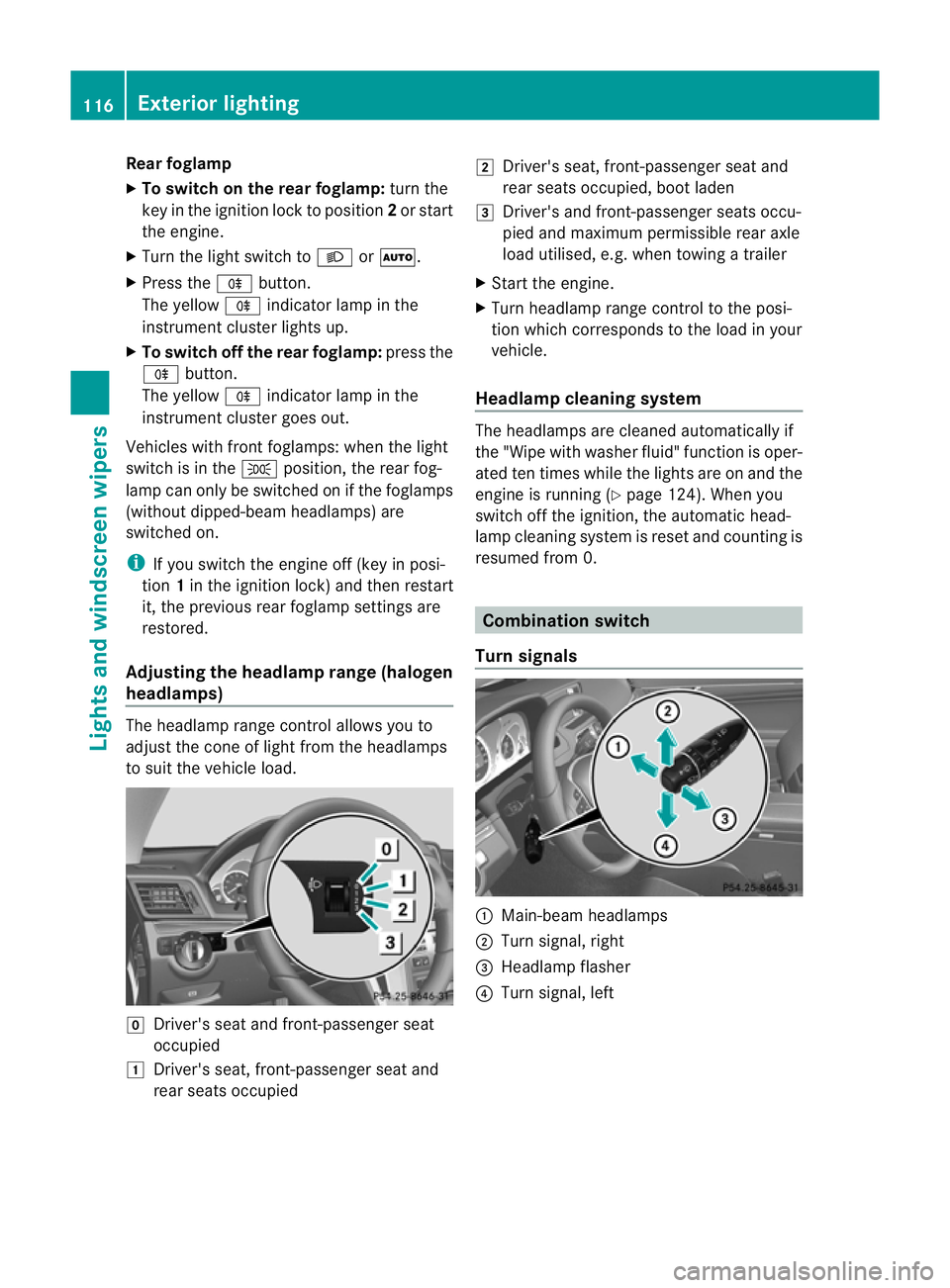
Adjusting the headlam prange (halogen
headlamps) The headlamp range control allow
syou to
adjust the cone of light from the headlamps
to sui tthe vehicle load. g
Driver's seat and front-passenger seat
occupied
1 Driver's seat, front-passenger seat and
rear seats occupied 2
Driver's seat, front-passenger seat and
rear seats occupied, boot laden
3 Driver's and front-passenger seats occu-
pied and maximum permissible rear axle
load utilised, e.g. when towing atrailer
X Start the engine.
X Turn headlamp range control to the posi-
tion which corresponds to the load in your
vehicle.
Headlampc leaning system The headlamps are cleaned automatically if
the "Wipe with washer fluid" function is oper-
ated ten times while the light
sare on and the
engin eisrunning (Y page 124). When you
switc hoff the ignition, the automatic head-
lamp cleaning syste misreset and counting is
resumed from 0. Combination switch
Turns ignals :
Main-beam headlamps
; Turn signal, right
= Headlamp flasher
? Turn signal, left 116
Exterior lightingLights and windscreen wipers
Page 120 of 353
X
To indicate briefly: press the combination
switch briefl ytothe pressure point in the
direction of arrow ;or?.
The corresponding tur nsignal flashes three
times.
X To indicate: press the combination switch
beyond the pressure point in the direction
of arrow ;or?.
Main-bea mheadlamps X
To switch on th emain-bea mhead-
lamps: turnthe key in the ignition lock to
position 2or start the engine.
X Turn the light switc htoLorÃ.
X Press the combination switc hbeyond the
pressure point in the direction of
arrow :.
In the Ãposition ,the main-beam head-
lamps are only switched on when it is dark
and the engin eisrunning.
The K indicator lamp in the instrument
cluster lights up when the main-beam head-
lamps are switched on.
X To switch off the main-beam head-
lamps: move the combination switch back
to its normal position.
The K indicator lamp in the instrument
cluster goes out.
Headlamp flasher X
To switch on: turn the key in the ignition
lock to position 1or 2or start the engine.
X Pull the combination switch in the direction
of arrow =. Hazard warning lamps
The hazard warning lamps automatically
switch on if:
R
an airbag is deployed.
R the vehicle decelerates rapidly from a
speed of more than 70 km/ha nd comesto
as tandstill.
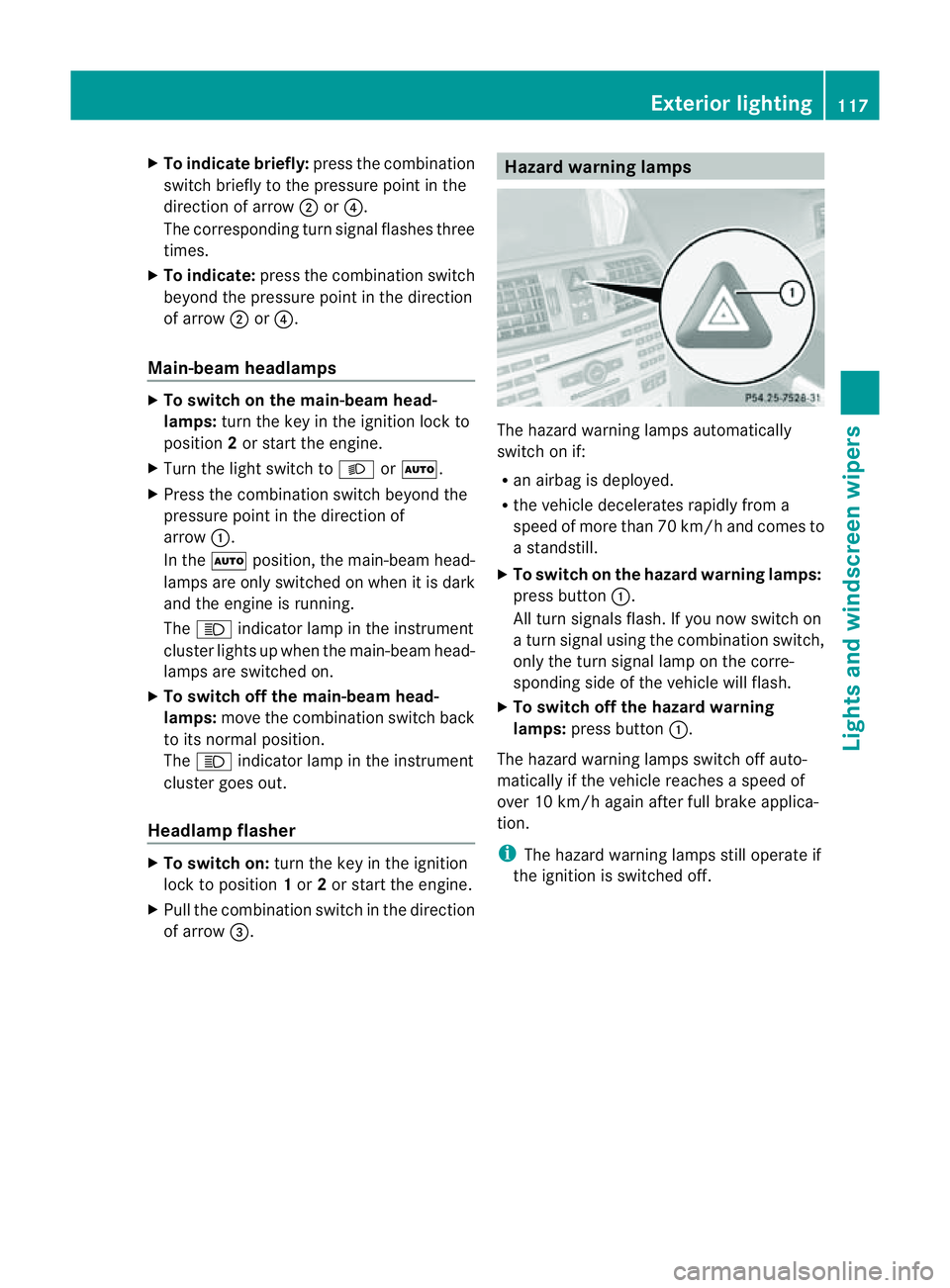
X To switc honthe hazard warning lamps:
press button :.
All tur nsignals flash. If you now switc hon
at urns ignal using the combination switch,
only the tur nsignal lamp on the corre-
sponding side of the vehicle will flash.
X To switch off th ehazar dwarning
lamps: press button :.
The hazar dwarnin glamps switc hoff auto-
matically if the vehicle reaches aspeed of
over 10 km/h again after full brak eapplica-
tion.
i The hazar dwarnin glamps still operat eif
the ignition is switched off. Exterior lighting
117Lightsand windscreen wipers Z
Page 122 of 353
Active:
if you are driving at speeds below
70 km/h and you switch on th erear foglamp
Not active: if you are driving at speeds above
10 0k m/h or if you switch off the rear foglamp
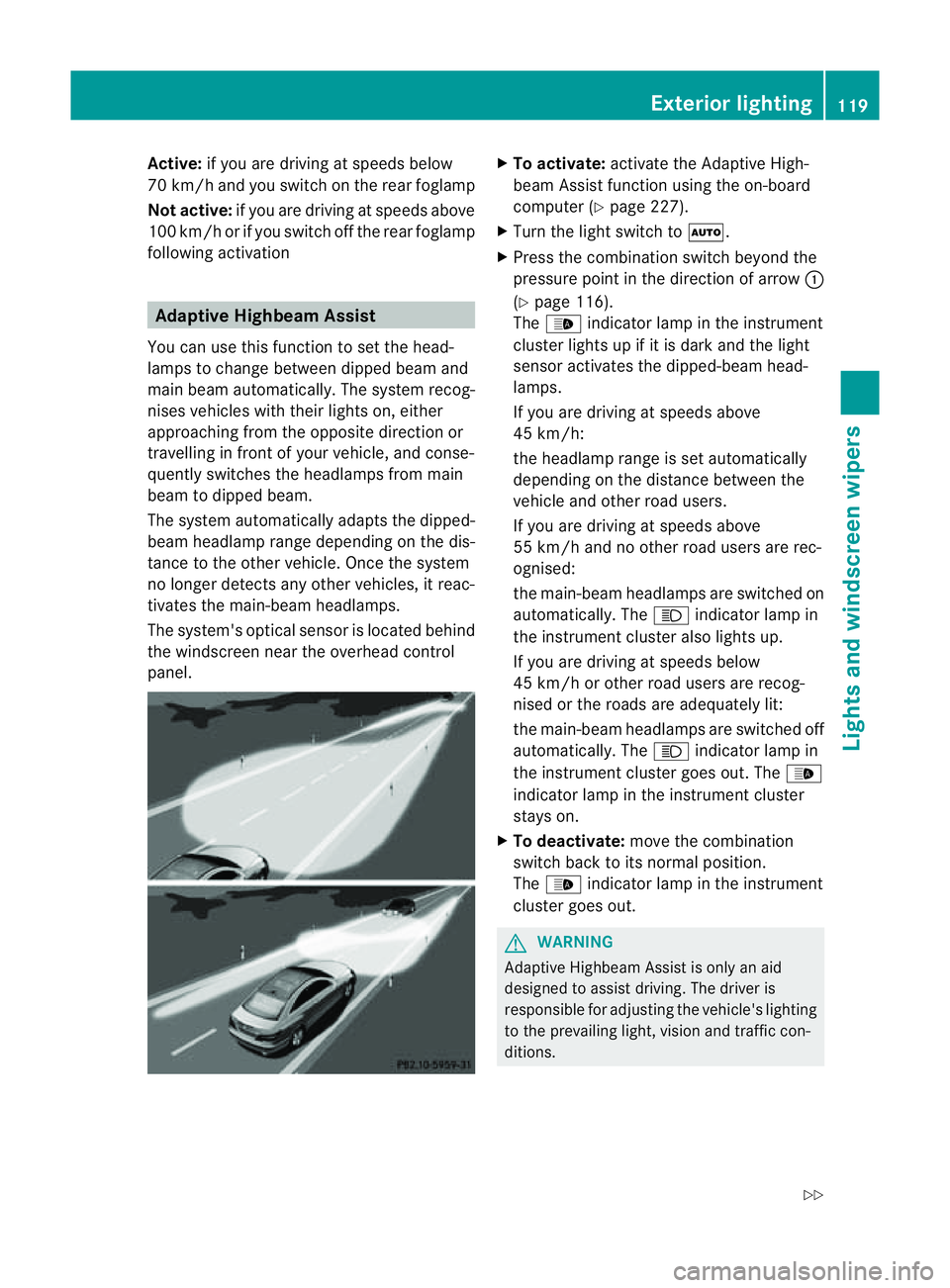
following activation Adaptive Highbeam Assist
You can use this function to set the head-
lamp stoc hange between dipped beama nd
main beam automatically. The system recog-
nises vehicles with thei rlight son, either
approaching fro mthe opposite direction or
travelling in front of your vehicle, and conse-
quently switches the headlamps from main
beam to dipped beam.
The system automatically adapts the dipped-
beam headlamp range depending on the dis-
tance to the other vehicle. Once the system
no longer detects any other vehicles, it reac-
tivates the main-beam headlamps.
The system's optical sensor is located behind
the windscreen near the overhead control
panel. X
To activate: activate the Adaptive High-
beam Assist function using the on-board
computer (Y page 227).
X Turn the light switch to Ã.
X Press the combination switch beyond the
pressure point in the direction of arrow :
(Y page 116).
The _ indicator lamp in the instrument
cluster lights up if it is dark and the light
sensor activates the dipped-beamh ead-
lamps.
If you are driving at speeds above
45 km/h:
the headlamp range is set automatically
depending on the distanc ebetween the
vehicle and other road users.
If you are driving at speeds above
55 km/ha nd no other road users are rec-
ognised:
the main-beam headlamps are switched on
automatically. The Kindicator lamp in
the instrument cluster also lights up.
If you are driving at speeds below
45 km/ho rother road users are recog-
nised or the roads are adequately lit:
the main-beam headlamps are switched off
automatically. The Kindicator lamp in
the instrument cluster goes out. The _
indicator lamp in the instrument cluster
stays on.
X To deactivate: move the combination
switch back to its normal position.
The _ indicator lamp in the instrument
cluster goes out. G
WARNING
Adaptiv eHighbeam Assist is only an aid
designed to assist driving. The driver is
responsible for adjustin gthe vehicle's lighting
to the prevailing light, vision and traffic con-
ditions. Exterior lighting
119Lights and windscreen wipers
Z
Page 169 of 353
Vehicles with automatic transmission
X
Apply the parking brake firmly.
X Shift the transmission to position P.
Usin gthe key
X Turn the key to position 0in the ignition
lock and remove it.
The immobiliser is activated.
i The key can onl yberemove difthe trans-
mission is in position P.
Usin gKEYLESS -GO
X Press the Start/Sto pbutton (Y page 147).
The engine stop sand al lthe indicator
lamps in the instrument cluster go out.
i Whe nthe driver's door is closed, this cor-
responds to key position 1.When the driv-
er's door is open, this corresponds to key
position 0,i.e. key removed.
i The engine can be turned off while the
vehicle is in motion by pressing and holding
the Start/Stop button for three seconds.
This function operates independently of the
ECO start/stop automatic engine switch-
off function. Parking brake X
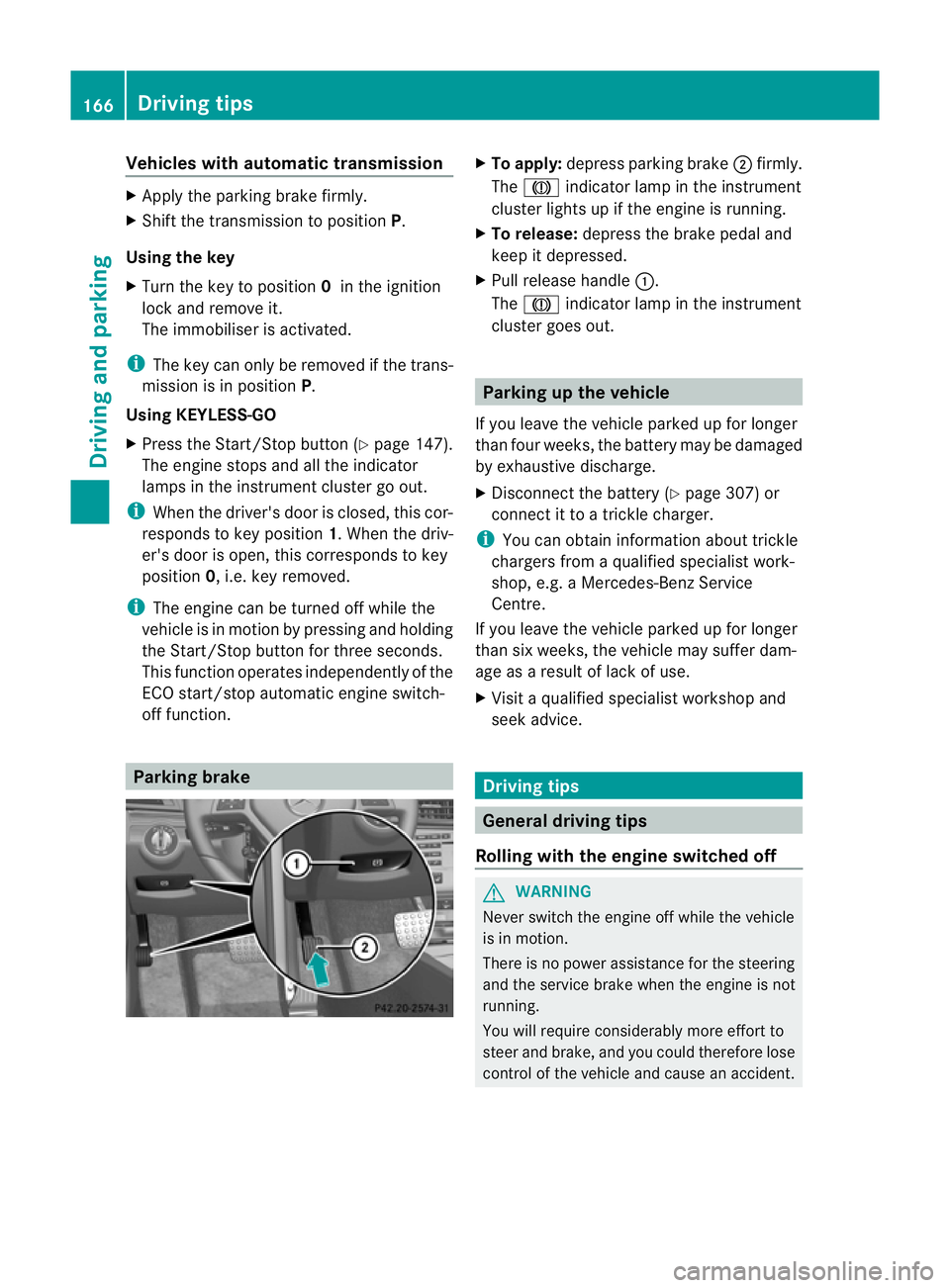
To apply: depress parking brake ;firmly.
The J indicator lamp in the instrument
cluster lights up if the engine is running.
X To release: depress the brake pedal and
keep it depressed.
X Pull release handle :.
The J indicator lamp in the instrument
cluster goes out. Parking up the vehicle
If you leave the vehicle parked up for longer
than four weeks, the battery may be damaged
by exhaustive discharge.
X Disconnect the battery (Y page 307) or
connect it to atrickle charger.
i You can obtain information about trickle
chargers from aqualified specialist work-
shop, e.g. aMercedes-Ben zService
Centre.
If you leave the vehicle parked up for longer
than six weeks, the vehicle may suffer dam-
age as aresult of lack of use.
X Visit aqualified specialist worksho pand
seek advice. Driving tips
General driving tips
Rolling with the engine switched off G
WARNING
Never switch the engin eoff while the vehicle
is in motion.
There is no power assistanc efor the steering
and the service brake when the engine is not
running.
You will require considerably more effort to
steer and brake, and you could therefor elose
control of the vehicle and cause an accident. 166
Driving tipsDriving and parking
Page 176 of 353
If there is no vehicle in front, DISTRONIC
PLUS operates in the same way as cruise
control in the speed range between
30 km/h and 200 km/h. If avehicle is driving
in fron tofyou, DISTRONIC operates in the
speed range between 0km/h and
200 km/h.
Do not use DISTRONIC PLUS while driving on
road swith steep gradients. G
WARNING
DISTRONIC PLUS brakes yourv ehicle up to a
maximum of 4m/s2
depending on its speed.
This corresponds to approximately 40% of
your vehicle's maximum braking power. You
must also apply the brakes yourself if this
braking power is not sufficient.
If DISTRONIC PLUS detect sarisk of collision
with avehicle in front, an intermittent warning
tones ounds. In addition, the ·distance
warning lamp in the instrument cluster lights
up. Brak etoavoidacollision.
Cruise control lever With the cruise control lever, you can operate
DISTRONIC PLUS and variable SPEED-
TRONIC.
The LIM indicator lamp on the cruise control
lever indicates which system you have selec-
ted:
R LIM indicator lamp off: DISTRONIC PLUS
is selected.
R LIM indicator lamp on: variable SPEED-
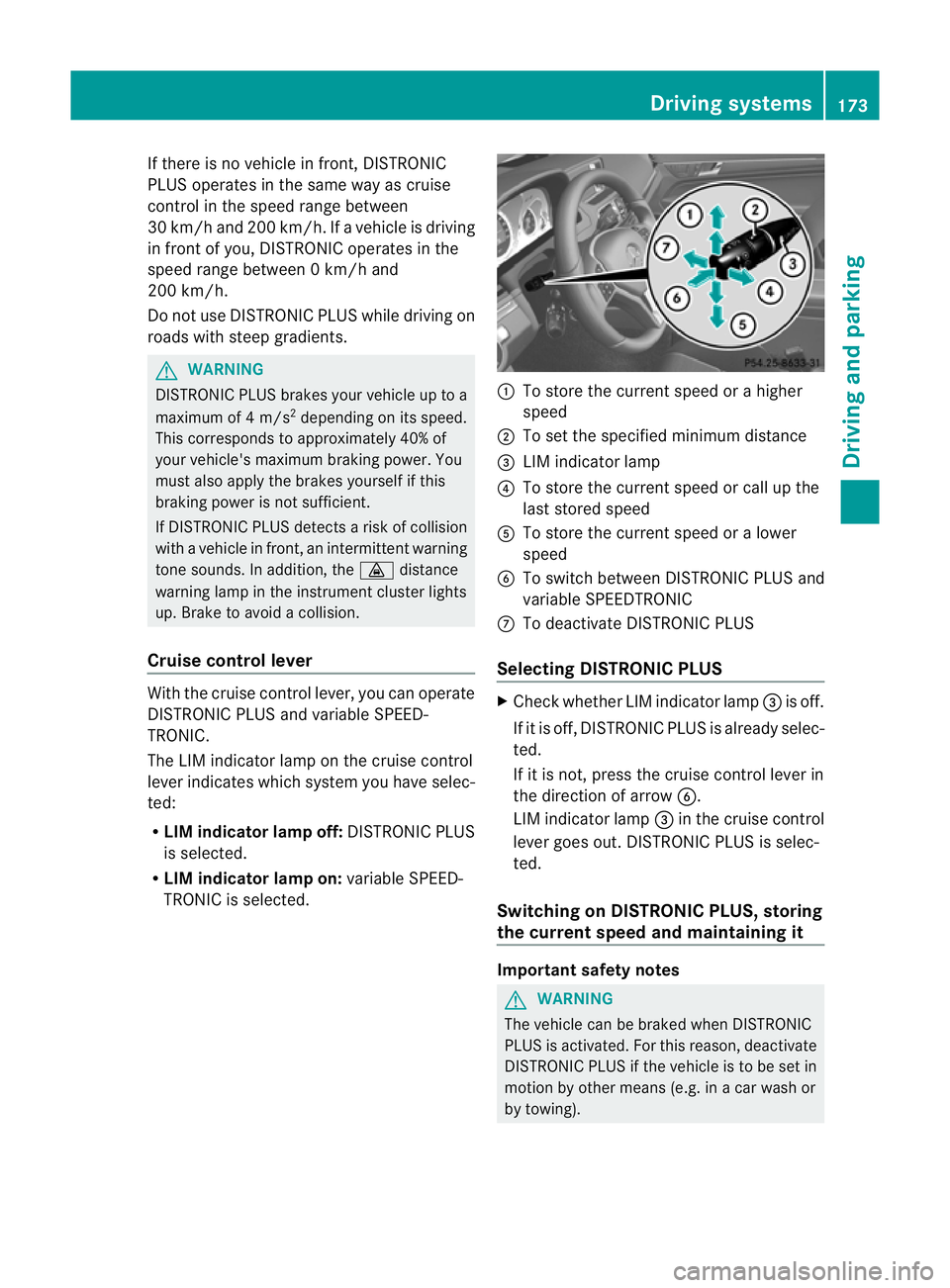
TRONIC is selected. :
To stor ethe curren tspeed or ahigher
speed
; To set the specified minimum distance
= LIM indicator lamp
? To stor ethe curren tspeed or call up the
last stored speed
A To stor ethe curren tspeed or alower
speed
B To switc hbetween DISTRONIC PLUS and
variable SPEEDTRONIC
C To deactivate DISTRONIC PLUS
Selecting DISTRONIC PLUS X
Check whether LIM indicator lamp =is off.
If it is off, DISTRONIC PLUS is already selec-
ted.
If it is not ,press the cruise contro llever in
the direction of arrow B.
LIM indicator lamp =in the cruise control
lever goes out. DISTRONIC PLUS is selec-
ted.
Switching on DISTRONIC PLUS, storing
the current speed and maintaining it Important safet
ynotes G
WARNING
The vehicle can be braked when DISTRONIC
PLUS is activated. For this reason, deactivate
DISTRONIC PLUS if the vehicle is to be set in
motion by other means (e.g. in acar wash or
by towing). Driving systems
173Driving and parking Z
Page 177 of 353
To activat
ethe DISTRONIC PLUS, the follow-
ing conditions must be fulfilled:
R the engine must be running. It may take up
to two minutes of driving before DIS-
TRONIC PLUS is ready for use.
R the parking brake is not applied.
R ESP ®
is activated.
R the transmission is in position D.
R the bonnet is closed.
R the driver's door must be closed when you
shift from Pto Dor your seat belt must be
fastened.
R the frontp assenger door is closed.
R thev ehicle is no tskidding.
Activatin gwhile driving
When drivin gatspeeds below30k m/h,you
can onl yactivate DISTRONI CPLUSift he vehi-
cle in front has been detected and is shown
in the multifunction display. If the vehicle in
front is not shown in the multifunction display
and is no longer being detected, for example
because it has changed lanes, DISTRONIC
PLUS is deactivated and atone sounds.
X Briefly pull the cruise control lever towards
you ?or press it up :or down Ato the
pressure point.
DISTRONIC PLUS is selected.
X Keep the cruise control lever pressed
up : or down Auntil the desired speed
is set.
X Remove your foot from the accelerator
pedal.
Your vehicle adapts its speed to that of the
vehicle in front,b ut only up to the desired
stored speed.
i If you do not fully release the accelerator
pedal, the DISTRONIC PLUS suspended message appears in the multifunction dis-
play. The set distance to
aslower-moving
vehicle in front will then not be maintained.
You will be driving at the speed you deter-
mine by the position of the accelerator
pedal. Activating when driving toward
sasta-
tionary vehicle
If the vehicl einfront of yo uisstationary, you
can onl yactivate DISTRONI CPLUSo nce your
vehicl eisstationar yaswell.
X Briefl ypullt he cruis econtro llev er towards
you ?or press it up :or down Ato the
pressure point.
DISTRONI CPLUSiss elected.
i DISTRONIC PLUS can only be activated at
under 30 km/h if avehicle in front has been
detected. Therefore, the DISTRONIC PLUS
distance displayint he instrument cluster
should be activated (Y page 223).
X Keep the cruise control lever pressed
up : or down Auntil the desired speed
is set.
i You can use the cruise control lever to set
the stored speed and the control on the
cruise control lever to set the specified
minimum distance (Y page 177).
Pulling away
X If the vehicleinf ront pulls away:remove
your foot from the brake pedal.
X Briefly pull the cruise control lever towards
you ?.
or
X Accelerate briefly.
Your vehicle pullsa wayand adapts its
speed to that of the vehicle in front.
Driving
If there is no vehicle in front,D ISTRONIC
PLUS operates in the same way as cruise
control.
If as lower-moving vehicle is detected in front,
DISTRONIC PLUS causes your vehicle to
brake and maintain apreset distance to the
vehicle in front.
If DISTRONIC PLUS detects afaster-moving
vehicle in front,iti ncreases the driving speed,
but only up to the desired speed you have
stored. 174
Driving systemsDriving and parking
Page 193 of 353
might therefore issu
esteering instructions
too soon. This may leadtoac ollision. For this
reason, you should avoi dusing Parking Guid-
ance in such situations. G
WARNING
Make sure that no persons or animals are in
the manoeuvring range. Otherwise, they
could be injured.
When PARKTRONIC is deactivated, Parking
Guidance is alsou navailable.
Use Parking Guidance for parking spaces:
R that are paralleltot he directionoftravel
R that are on straight roads, not bends
R that are on the same leve lasthe road ,i.e.
not on the pavement, for example. Parking
Guidance may not detect flat kerbs
Parking tips:
R on narrow roads, drive pastt he parking
space as close as possible.
R parking spaces that are littered, overgrown
or partially occupied by trailer drawbars
might be identified incorrectly or not at all.
R snowfall or heavy rain may lead to aparking
space being measured inaccurately.
R pay attention to the PARKTRONIC
(Y page 187) warning messages during the
parking procedure.
R when transporting aload which protrudes
from your vehicle, you must not use Parking
Guidance.
R never use Parking Guidance with snow
chains or an emergency spare wheel fitted.
R make sure that the tyre pressures are
always correct.T his hasadirec teffect on
the steering instructions.
R the wayy ourv ehicle is positioned in the
parkin gspace after parkin gisdependent
on various factors. These include the posi-
tion and shape of the vehicles parked in
front and behind it and the conditions of the
location. In some cases, Parking Guidance
may guide you too far or not far enough into
ap arking space. In some cases, it may also lead you across or onto the kerb. If neces-
sary, cancel the parking procedure with
Parking Guidance.
! If unavoidable, you should drive over
obstacles such as kerbs slowly and not at
as harp angle. Otherwise, you may damage
the wheels or tyres.
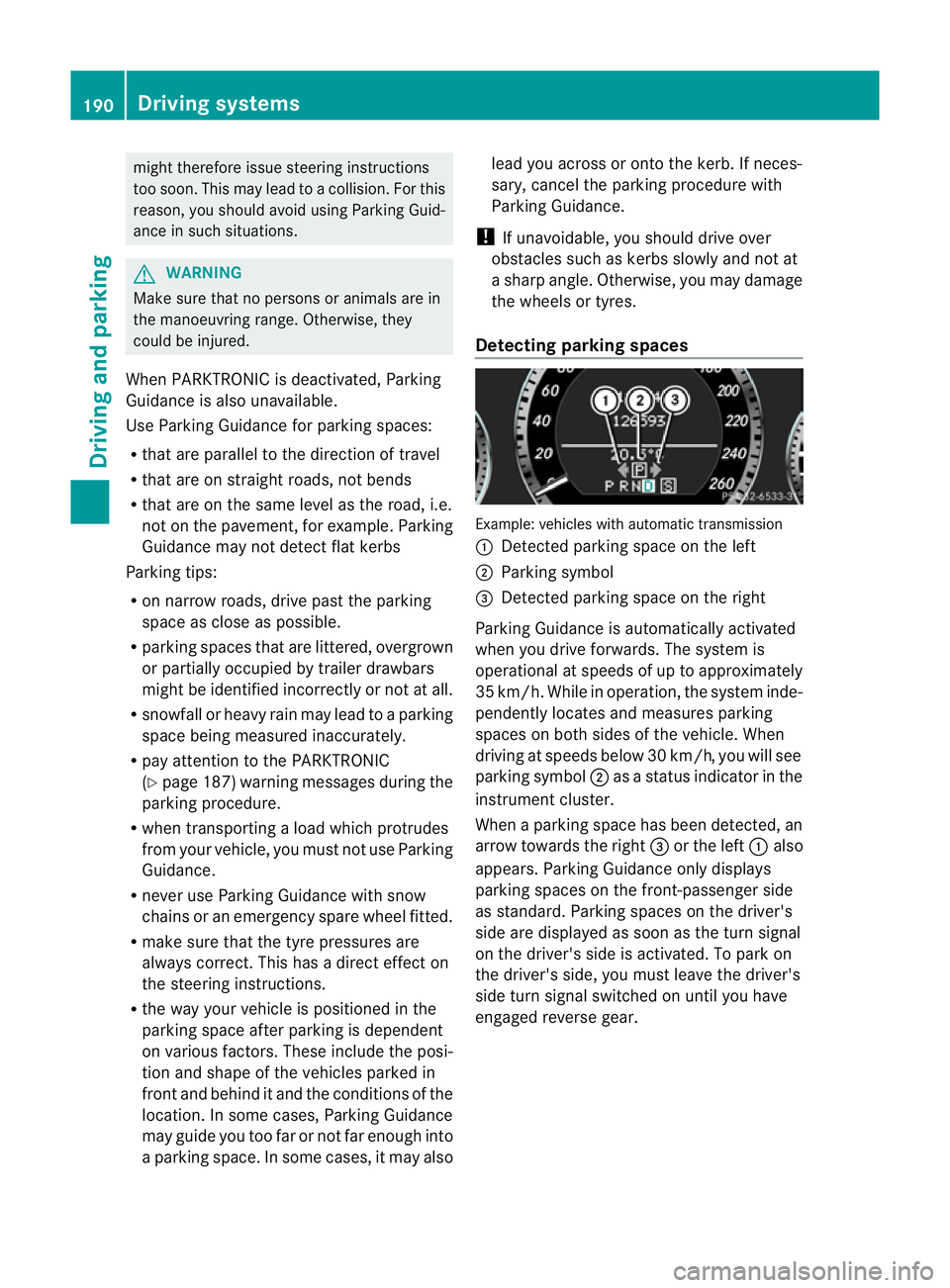
Detecting parking spaces Example: vehicles with automatic transmission
:
Detected parking space on the left
; Parking symbol
= Detected parking space on the right
Parking Guidance is automaticallya ctivated
when you drive forwards. The system is
operational at speeds of up to approximately
35 km/h. While in operation, the system inde-
pendently locates and measures parking
spaces on both sides of the vehicle. When
driving at speeds below 30 km/h ,you will see
parking symbol ;asastatus indicator in the
instrument cluster.
When aparking space has been detected, an
arrow towards the right =or the left :also
appears. Parking Guidance only displays
parking spaces on the front-passenger side
as standard. Parking spaces on the driver's
side are displayed as soon as the turn signal
on the driver's side is activated. To park on
the driver's side, you must leave the driver's
side turn signal switched on until you have
engaged reverse gear. 190
Driving systemsDriving and parking