transmission MERCEDES-BENZ E-CLASS CABRIOLET 2011 Owner's Guide
[x] Cancel search | Manufacturer: MERCEDES-BENZ, Model Year: 2011, Model line: E-CLASS CABRIOLET, Model: MERCEDES-BENZ E-CLASS CABRIOLET 2011Pages: 353, PDF Size: 8.42 MB
Page 174 of 353
X
Briefly pull the cruise control lever towards
you =.
X Remove your foot from the accelerator
pedal.
The firs ttime cruise control is activated, it
stores the current speed or regulates the
speed of the vehicle to the previously
stored speed.
Setting aspeed X
Press the cruise control lever to the pres-
sure point, up :for ahighe rs peed or
down ?for alower speed.
X Keep the cruise contro llever pressed until
the desired speed is reached.
X Release the cruise contro llever.
The new speed is stored.
i Cruise contro lisnot deactivated if you
depress the accelerator pedal. For exam-
ple, if you accelerate briefly to overtake,
cruise contro ladjusts the vehicle's speed
to the last speed stored after you have fin-
ished overtaking.
Making adjustments in 1km/h incre-
ments X
Briefly press the cruise contro llever to the
pressure point ,up:for ahigher speed or
down ?for alower speed.
The last speed stored is increased or
reduced.
Making adjustments in 10 km/h incre-
ments X
Briefly press the cruise contro llever
beyond the pressure point ,up:for a
higher speed or down ?for alower speed.
The last speed stored is increased or
reduced. Deactivating cruise control There are several ways to deactivate cruise
control:
X Briefly press the cruise contro llever for-
wards B.
or
X Brake.
or
X Briefly press the cruise contro llever in the
direction of arrow A.
Variable SPEEDTRONIC is selected. LIM
indicator lamp ;in the cruise contro llever
lights up.
Cruise control is automatically deactivated if:
R you depress the parkin gbrake.
R you are driving at less than 30 km/h.
R ESP ®
intervenes or if you deactivat eESP®
.
R you shift inton eutral inavehicle with man-
ual transmission while driving or depress
the clutc hpedal for longer than six sec-
onds.
R on vehicles with manual transmission ,you
shift to agear that is too high and as aresult
the engin espeed is too low.
R on vehicles with automatic transmission,
you shift intop ositionNwhile driving.
If cruise control is deactivated, you will hear
aw arning tone. You will see the Cruise control off message in the multifunction
display for approximately five seconds.
i The last speed stored is cleared when you
switch off the engine. DISTRONIC PLUS
Important safet ynotes DISTRONIC PLUS regulates the speed and
automatically helps you maintain the dis-
tanc
etot he vehicle detected in front. It
brakes automatically in order to avoid
exceeding the set speed. Driving systems
171Driving and parking Z
Page 177 of 353
To activat
ethe DISTRONIC PLUS, the follow-
ing conditions must be fulfilled:
R the engine must be running. It may take up
to two minutes of driving before DIS-
TRONIC PLUS is ready for use.
R the parking brake is not applied.
R ESP ®
is activated.
R the transmission is in position D.
R the bonnet is closed.
R the driver's door must be closed when you
shift from Pto Dor your seat belt must be
fastened.
R the frontp assenger door is closed.
R thev ehicle is no tskidding.
Activatin gwhile driving
When drivin gatspeeds below30k m/h,you
can onl yactivate DISTRONI CPLUSift he vehi-
cle in front has been detected and is shown
in the multifunction display. If the vehicle in
front is not shown in the multifunction display
and is no longer being detected, for example
because it has changed lanes, DISTRONIC
PLUS is deactivated and atone sounds.
X Briefly pull the cruise control lever towards
you ?or press it up :or down Ato the
pressure point.
DISTRONIC PLUS is selected.
X Keep the cruise control lever pressed
up : or down Auntil the desired speed
is set.
X Remove your foot from the accelerator
pedal.
Your vehicle adapts its speed to that of the
vehicle in front,b ut only up to the desired
stored speed.
i If you do not fully release the accelerator
pedal, the DISTRONIC PLUS suspended message appears in the multifunction dis-
play. The set distance to
aslower-moving
vehicle in front will then not be maintained.
You will be driving at the speed you deter-
mine by the position of the accelerator
pedal. Activating when driving toward
sasta-
tionary vehicle
If the vehicl einfront of yo uisstationary, you
can onl yactivate DISTRONI CPLUSo nce your
vehicl eisstationar yaswell.
X Briefl ypullt he cruis econtro llev er towards
you ?or press it up :or down Ato the
pressure point.
DISTRONI CPLUSiss elected.
i DISTRONIC PLUS can only be activated at
under 30 km/h if avehicle in front has been
detected. Therefore, the DISTRONIC PLUS
distance displayint he instrument cluster
should be activated (Y page 223).
X Keep the cruise control lever pressed
up : or down Auntil the desired speed
is set.
i You can use the cruise control lever to set
the stored speed and the control on the
cruise control lever to set the specified
minimum distance (Y page 177).
Pulling away
X If the vehicleinf ront pulls away:remove
your foot from the brake pedal.
X Briefly pull the cruise control lever towards
you ?.
or
X Accelerate briefly.
Your vehicle pullsa wayand adapts its
speed to that of the vehicle in front.
Driving
If there is no vehicle in front,D ISTRONIC
PLUS operates in the same way as cruise
control.
If as lower-moving vehicle is detected in front,
DISTRONIC PLUS causes your vehicle to
brake and maintain apreset distance to the
vehicle in front.
If DISTRONIC PLUS detects afaster-moving
vehicle in front,iti ncreases the driving speed,
but only up to the desired speed you have
stored. 174
Driving systemsDriving and parking
Page 179 of 353
The DISTRONIC PLUS braking effect is can-
celled and the vehicle can start moving if:
R DISTRONIC PLUS is deactivated using the
cruise control lever.
R you accelerate.
R there is amalfunction in the system or an
interruption in the power supply, e.g. bat-
tery failure.
R the electrical system in the engine com-
partment, the battery or the fuses are tam-
pered with.
R the battery is disconnected.
If you wish to leave the vehicle or park it,
deactivate DISTRONIC PLUS and secure the
vehicle against rolling away.
If DISTRONIC PLUS detect sthat the vehicle
in frontiss topping, it brakes your vehicle until
it is stationary.
Once your vehicle is stationary, it remains
stationary and you do not need to depress the
brake.
i Depending on the specified minimum dis-
tance, your vehicle will come to astandstill
at as ufficient distance behind the vehicle
in front.T he specified minimum distance is
set using the control on the cruise control
lever.
You will see awarning message in the multi-
function displayifD ISTRONIC PLUS is acti-
vated and:
R the driver's door is open and the driver's
seat belt is unfastened.
R the engine is switched off, unless it is auto-
matically switched off by the ECO start/
stop function.
R the bonnet is opened.
Select Park (P) X
Move the selector lever to Pto prevent the
vehicle from rolling away.
DISTRONIC PLUS is deactivated. The warn-
ing message in the multifunction display
disappears. The horn will also sound at regular intervals if
DISTRONIC PLUS is activated and you:
R
switch the engine off, open the driver's
door and take off your seat belt
R open the bonnet
The sounding of the horn alerts you to the fact
that the vehicle has been parked while DIS-
TRONIC PLUS is still activated. The sound
becomes louder if you attempt to lock the
vehicle. The vehicle is not locked until DIS-
TRONIC PLUS is deactivated.
i If the engine has been switched off, it
cannot be started again until DISTRONIC
PLUS has been deactivated.
If DISTRONIC PLUS is activated and afault
occurs in the system or if there is adisruption
in the power supply,t heBrake immedi‐ ately message is shown in the multifunction
display. Immediately depress the brake firmly
until the warning message in the multifunc-
tion displayg oes out or shift the transmission
to position P.DISTRONIC PLUS is deactiva-
ted.
Setting aspeed X
Press the cruise control lever to the pres-
sure point, up :for ahighe rs peed or
down Afor alower speed.
X Keep the cruise contro llever pressed until
the desired speed is reached.
X Release the cruise contro llever.
The new speed is stored. DISTRONIC PLUS
is activated and adjusts the vehicle's speed
to the new speed stored.
Making adjustments in 1km/h incre-
ments X
Briefly press the cruise contro llever to the
pressure point ,up:for ahigher speed or
down Afor alower speed.
The last speed stored is increased or
reduced. 176
Driving systemsDriving and parking
Page 182 of 353
or
X
Briefly press the cruise control lever in the
direction of arrow =.
Variable SPEEDTRONIC is selected. LIM
indicator lamp ;in the cruise control lever
lights up.
If you deactivate DISTRONIC PLUS, the DIS‐TRONIC PLUS off message is shown in the
multifunction display for approximately five
seconds.
i The last speed stored remains stored until
you switch off the engine.
i DISTRONIC PLUS is not deactivated if you
depress the accelerator pedal. If you accel-
erate to overtake, DISTRONIC PLUS
adjusts the vehicle's speed to the last
speed stored after you have finished over-
taking.
DISTRONIC PLUS is automatically deactiva-
ted if:
R you apply the parking brake.
R you are driving slower than 25 km/ha nd
there is no vehicle in front,orift he vehicle
in front is no longer detected.
R ESP ®
intervenes or if you deactivate ESP ®
.
R the transmission is in the P,Ror Nposition.
R the vehicle is near aradio telescope facility
(Y page 345).
R you switch off the radar sensor system
(Y page 229).
R you pull the cruise control lever towards
you in order to pull away and the front-
passenger door is open.
R the vehicle has skidded.
If DISTRONIC PLUS is deactivated, you will
hear awarning tone. The DISTRONIC PLUS off message is shown in the multifunction
display for approximately five seconds.
If the vehicle has been stopped by DISTRONIC
PLUS and afault occurs in the system, the
Brake immediately message appears in the
multifunction. Depress the brake pedal
immediately so that the vehicle does not roll away.D
ISTRONIC PLUS is then deactivated,
and the messag edisappears.
Tips for driving with DISTRONIC PLUS General notes
The following contains descriptions of certain
road and traffic conditions in which you must
be particularly attentive. In such situations,
brake if necessary .DISTRONIC PLUS is then
deactivated.
Cornering, going into and comingo ut of a
bend The ability of DISTRONIC PLUS to detect vehi-
cles when cornering is limited. Yourv
ehicle
may brake unexpectedly or late.
Vehicles travelling on adifferent line DISTRONIC PLUS may not detec
tvehicles
travelling on adifferent line. The distance to
the vehicle in fron twill be too short. Driving systems
179Driving and parking Z
Page 183 of 353
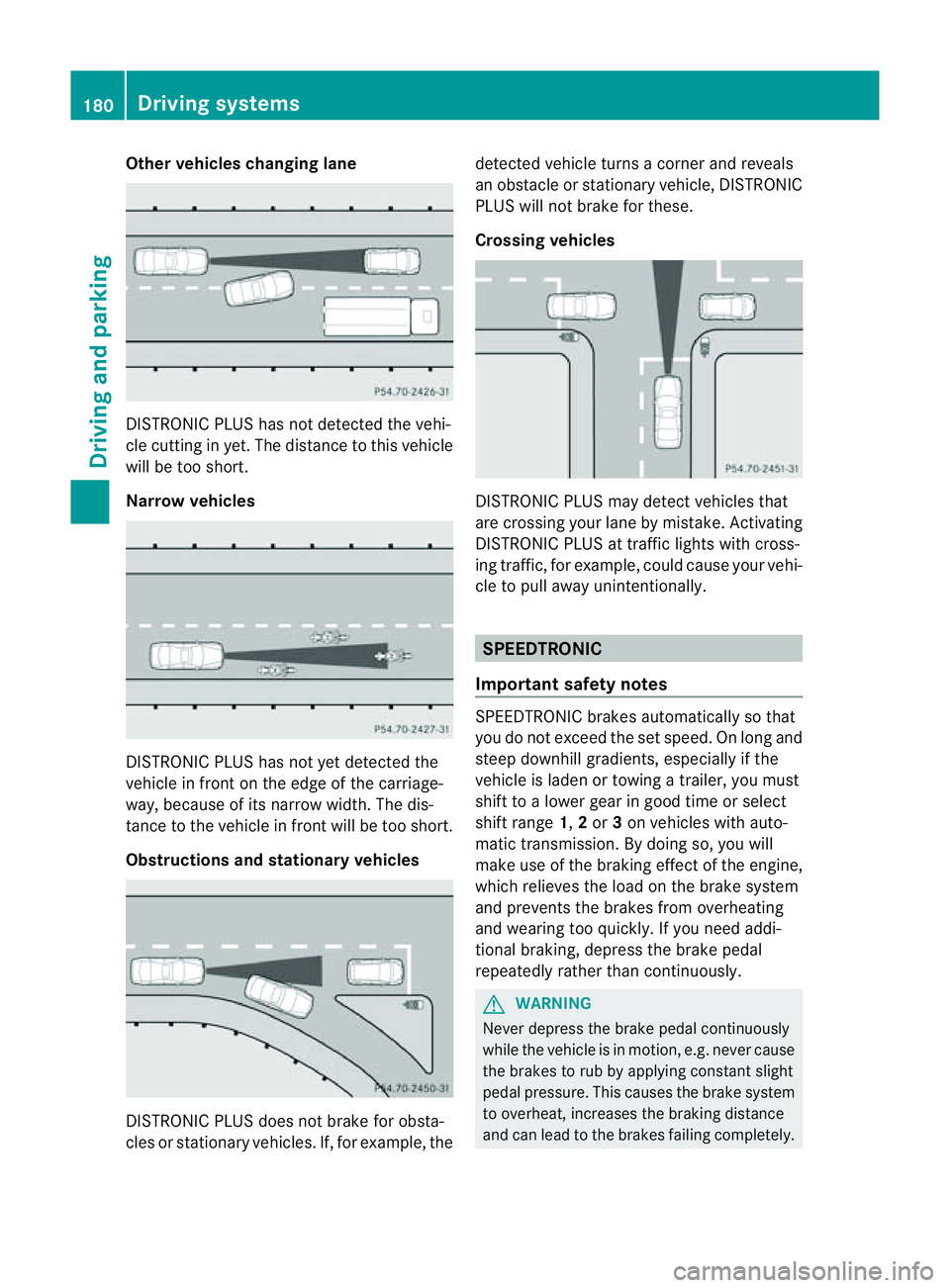
Other vehicles changing lane
DISTRONIC PLUS has not detected the vehi-
cle cutting in yet. The distanc
etothis vehicle
will be too short.
Narrow vehicles DISTRONIC PLUS has not yet detected the
vehicle in fron
tonthe edge of the carriage-
way,b ecause of its narrow width. The dis-
tance to the vehicle in front will be too short.
Obstructions and stationary vehicles DISTRONIC PLUS does not brake for obsta-
cles or stationary vehicles. If, for example, the detected vehicle turns
acorner and reveals
an obstacle or stationary vehicle, DISTRONIC
PLUS will not brake for these.
Crossing vehicles DISTRONIC PLUS may detect vehicles that
are crossing your lane by mistake. Activating
DISTRONIC PLUS at traffic lights with cross-
ing traffic, for example, could cause your vehi-
cle to pull away unintentionally.
SPEEDTRONIC
Important safety notes SPEEDTRONIC brakes automatically so that
you do not exceed the set speed. On long and
steep downhill gradients, especiallyift
he
vehicle is laden or towing atrailer, you must
shift to alower gear in good time or select
shift range 1,2or 3on vehicles with auto-
matic transmission. By doing so, you will
make use of the braking effect of the engine,
which relieves the load on the brake system
and prevents the brakes from overheating
and wearing too quickly. If you need addi-
tional braking, depress the brake pedal
repeatedly rather than continuously. G
WARNING
Never depress the brake pedal continuously
while the vehicle is in motion, e.g. never cause
the brakes to rub by applying constant slight
pedal pressure. This causes the brake system
to overheat, increases the braking distance
and can lead to the brakes failing completely. 180
Driving systemsDriving and parking
Page 185 of 353
It is not possible to deactivate variable
SPEEDTRONIC by braking.
Storing the current speed
You can use the cruise control lever to limit
the speed to any speed above 30 km/h while
the engine is running.
X Briefly press the cruise control lever
up : or down ?to the pressure point.
The current speed is stored and shown in
the multifunction display.
The segments in the multifunction display
lightupf rom the start of the scale up to the
stored speed.
Storing the current speed or calling up the
last stored speed G
WARNING
Only select astored speed if you know what
that speed is and whether it is suitable for the
curren tdrivin gand traffic situation .Other-
wise, sudden brakin gcould endanger you or
others.
X Briefly pull the cruise contro llever towards
you =.
Making adjustments in 10 km/h incre-
ments
X Briefly press the cruise contro llever
beyond the pressure point ,up:for a
higher speed or down ?for alower speed.
or
X Keep the cruise contro llever pressed
beyond the pressure point until the desired
speed is set. Press the cruise contro llever
up : for ahigher speed or down ?for a
lower speed. Making adjustments in
1km/h incre-
ments
X Briefly press the cruise contro llever to the
pressure point ,up:for ahigher speed or
down ?for alower speed.
or
X Keep the cruise contro llever pressed to the
pressure point until the desired speed is
set. Press the cruise contro llever up :for
ah igher speed or down ?for alower
speed.
Deactivating variable SPEEDTRONIC
There are several ways to deactivate variable
SPEEDTRONIC:
X Briefly press the cruise contro llever for-
wards B.
or
X Briefly press the cruise contro llever in the
direction of arrow A.
LIM indicator lamp ;in the cruise control
lever goes out. Variable SPEEDTRONIC is
deactivated.
Cruise contro lorDISTRONIC PLUS is selec-
ted.
Variable SPEEDTRONIC is automatically
deactivated:
R when you depress the accelerator pedal
beyond the pressure point (kickdown), but
only if your curren tspeed does not differ by
more than 20 km/ hfrom the stored speed.
You willh earawarningtoneift hisist he
case.
R on vehicles with manual transmission ,if
you shif ttoahigher gear and as aresult the
engine speed is too low. G
WARNING
It is not possible to deactivate variable Speed-
tronic by braking.
i The last speed stored is cleared when you
switch off the engine. 182
Driving systemsDriving and parking
Page 186 of 353
Permanent SPEEDTRONIC
You can use the on-board computer to limit
the speed permanently to avalue between
16 0k m/ h(e.g. for driving on winter tyres)
and th emaximum spee d(Ypage 228).
Shortly before th estoreds peed is reached, it
appears in the multifunction display.
Permanent SPEEDTRONIC remains active,
even if variable SPEEDTRONIC is deactivated.
You cannot exceed the stored limit speed,
even if you depress the accelerator pedal
beyond the pressure point (kickdown). Dynamic handling package with
sports mode
General notes The most important part of the dynamic han-
dling package with sport smode is the adjust-
able suspension system. This automatically
controls and adapts the suspension to the
respective drivin gsituation.
The calibration of the suspension depends
on:
R your drivin gstyle
R the road surface conditions
R your individual selection; see the following
description
If your vehicle is equipped with automatic
transmission ,the dynamic handling package
with sport smode also includes steering
wheel gearshift paddles (Y page 157)with a
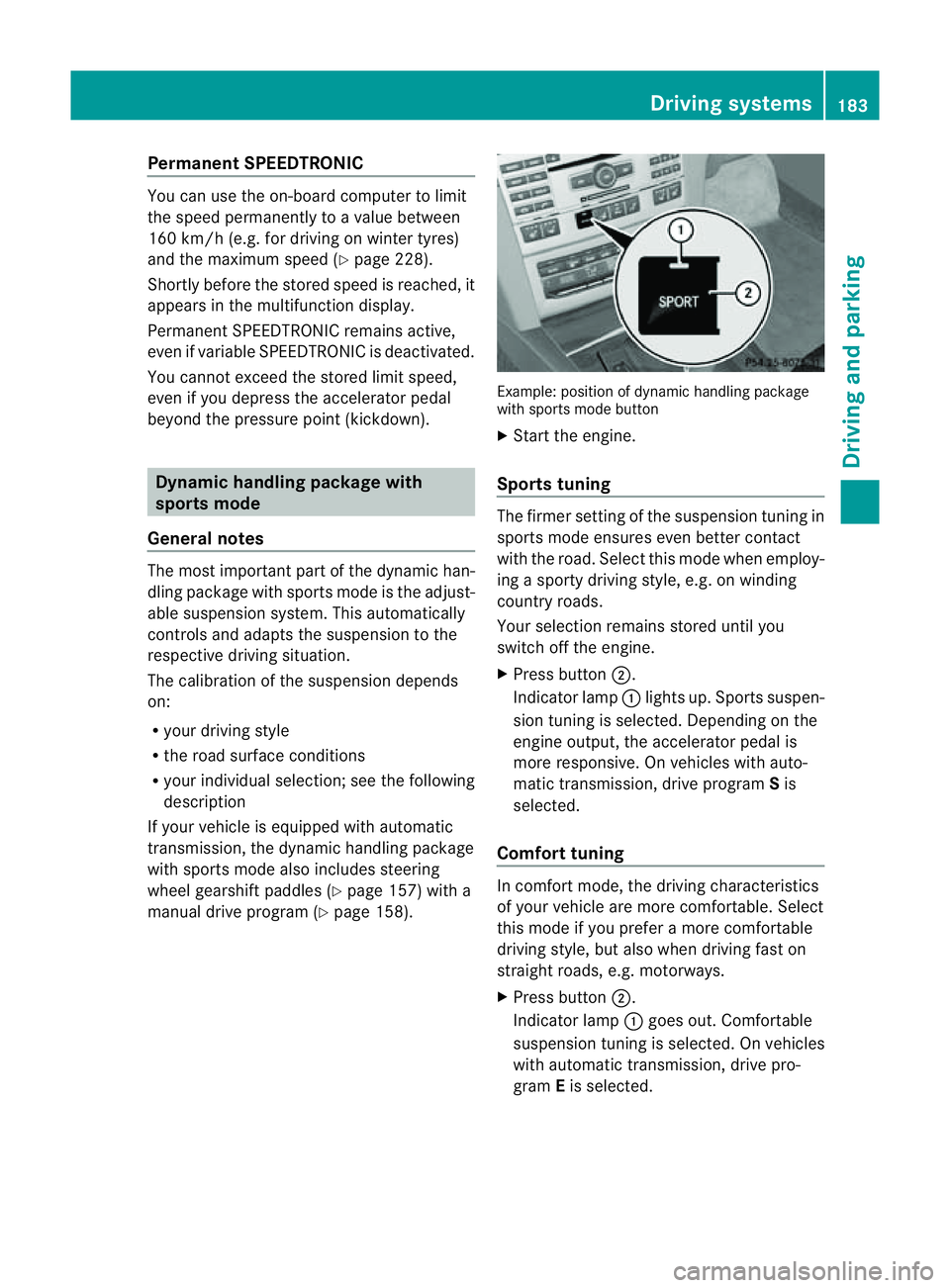
manual drive program (Y page 158). Example: position of dynamic handling package
with sport smode button
X Start the engine.
Sports tuning The firmer setting of the suspension tunin
gin
sport smode ensures even better contact
with the road. Select this mode when employ-
ing asport ydrivin gstyle, e.g. on winding
country roads.
Your selection remains stored until you
switc hoff the engine.
X Press button ;.
Indicator lamp :lights up. Sport ssuspen-
sion tunin gisselected. Depending on the
engin eoutput, the accelerator pedal is
more responsive. On vehicles with auto-
matic transmission ,drive program Sis
selected.
Comfor ttuning In comfort mode, the drivin
gcharacteristics
of your vehicle are more comfortable. Select
this mode if you prefer amore comfortable
drivin gstyle, but also when drivin gfast on
straight roads, e.g. motorways.
X Press button ;.
Indicator lamp :goes out. Comfortable
suspension tunin gisselected. On vehicles
with automatic transmission ,drive pro-
gram Eis selected. Driving systems
183Driving and parking Z
Page 187 of 353
HOLD function
General notes The HOLD function can assist the drive
rinthe
following situations:
R when pulling away,e speciallyonsteep
slopes
R when manoeuvring on steep slopes
R when waiting in traffic
The vehicle is kept stationary without the
driver having to depress the brake pedal.
The braking effect is cancelled and the HOLD
function is deactivated when you depress the
accelerator pedal to pull away.
Activation conditions You can activate the HOLD function if:
R the vehicle is stationary.
R the engine is running or if it has been auto-
matically switched off by the ECO start/
stop function.
R the driver's door is closed or if your seat
belt is fastened.
R the parking brake is not applied.
R the bonnet is closed.
R the selector lever is in position D,Ror Non
vehicles with automatic transmission.
R DISTRONIC PLUS is deactivated.
Activating the HOLD function X
Make sure that the activation conditions
are met.
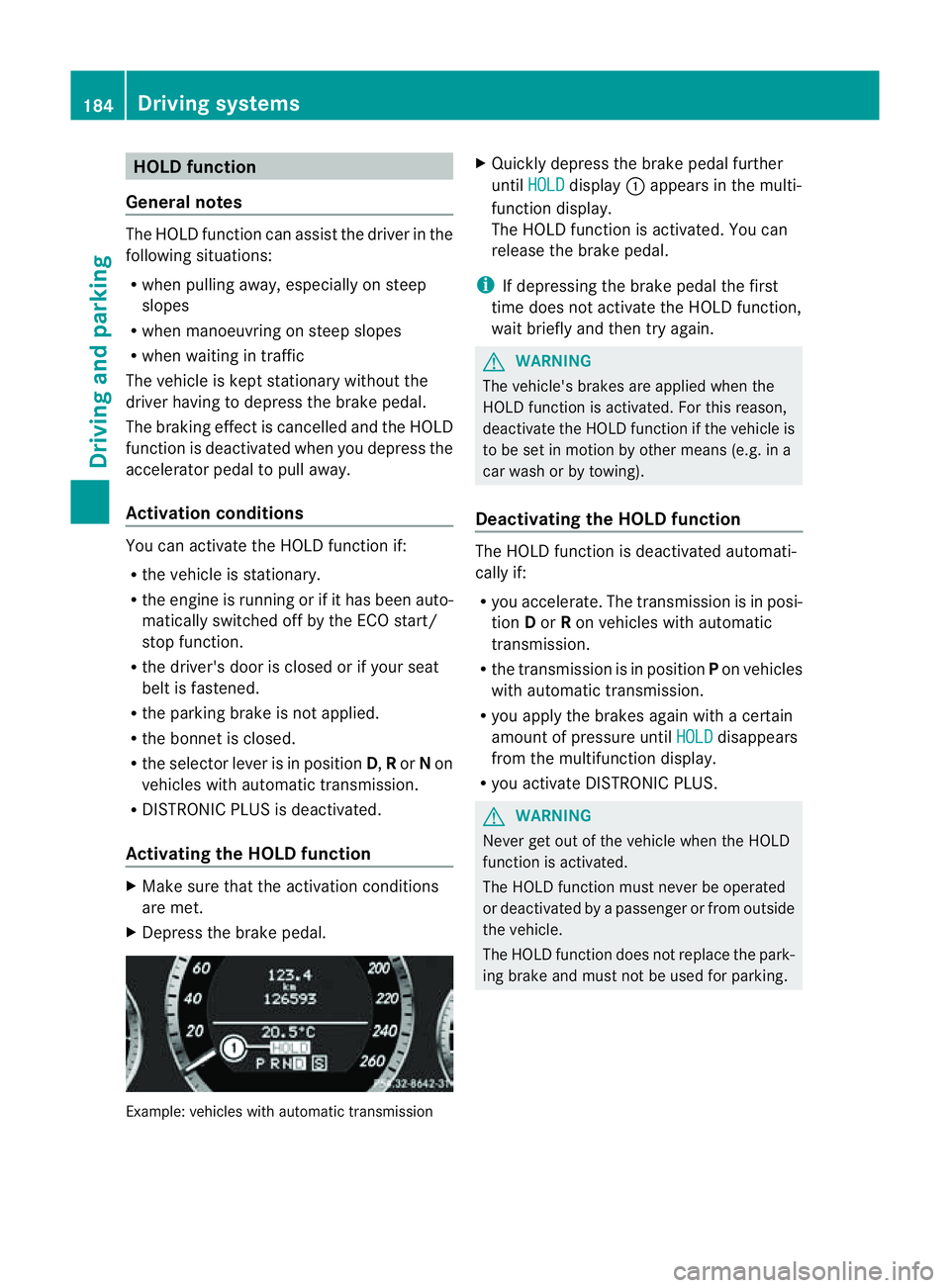
X Depress the brake pedal. Example: vehicles with automatic transmission X
Quickly depress the brake pedal further
until HOLD display
:appears in the multi-
function display.
The HOLD function is activated. You can
release the brake pedal.
i If depressing the brake pedal the first
time does not activate the HOLD function,
wait briefly and then try again. G
WARNING
The vehicle's brakes are applied when the
HOLD function is activated. For this reason,
deactivate the HOLD function if the vehicle is
to be set in motion by other means (e.g. in a
car wash or by towing).
Deactivating the HOLD function The HOLD function is deactivated automati-
cally if:
R
you accelerate. The transmission is in posi-
tion Dor Ron vehicles with automatic
transmission.
R the transmission is in position Pon vehicles
with automatic transmission.
R you apply the brakes again with acertain
amount of pressure until HOLD disappears
from the multifunction display.
R you activate DISTRONIC PLUS. G
WARNING
Never get out of the vehicle when the HOLD
function is activated.
The HOLD function must never be operated
or deactivated by apassenger or from outside
the vehicle.
The HOLD function does not replace the park-
ing brake and must not be used for parking. 184
Driving systemsDriving and parking
Page 188 of 353
The braking effect of the HOLD function is
cancelled and the vehicle could roll away if:
R the HOLD function is deactivated by
depressing the accelerator pedal or the
brake pedal.
R there is amalfunction in the system or an
interruption in the power supply, e.g. bat-
tery failure.
R the electrical system in the engine com-
partment, the battery or the fuses are tam-
pered with.
R the battery is disconnected.
If you leave the vehicle or park it, deactivate
the HOLD function and secure the vehicle
against rolling away.
You will see awarning message in the multi-
function display if the HOLD function is acti-
vated and:
R the driver's door is open and the driver's
seat belt is unfastened.
R the engine is switched off, unless it is auto-
matically switched off by the ECO start/
stop function.
R the bonnet is opened.
For vehicles with manual transmission:
Brake immediately X
Immediately depress the brake pedal firmly
until the warning message in the multifunc-
tion display goes out. This deactivates the
HOLD function.
On vehicles with automatic transmission:
Select Park (P) X
Move the selector lever to Pto prevent the
vehicle from rolling away.
The HOLD function is deactivated. The
warning message in the multifunction dis-
play disappears.
Ah orn will also sound at regular intervals if
the HOLD function is activated and you:
R switch the engine off, open the driver's
door and take off your seat belt
R open the bonnet The sounding of the horn alerts you to the fact
that the vehicle has been parked while the
HOLD function is still activated. The tone
becomes louder if you attempt to lock the
vehicle. The vehicle is not locked until the
HOLD function is deactivated.
i If the engine has been switched off, it
cannot be started again until the HOLD
function has been deactivated.
If there is afault in the system or power supply
while the HOLD function is activated, the
Brake immediately message is shown in
the multifunction display .Immediately
depress the brake firmly until the warning
message in the multifunction display goes
out.
On vehicles with automatic transmission, you
can alsos hift into position P.This deactivates
the HOLD function. PARKTRONIC
Important safety notes G
WARNING
PARKTRONIC is only an aid and may not
detect all obstacles. It is not asubstitute for
attentive driving.
You are always responsible for safety and
must continue to pay attention to your imme-
diate surroundings when parking and
manoeuvring. You could otherwise endanger
yourself and others. G
WARNING
Make sure that no persons or animals are in
the manoeuvring range. Otherwise, they
could be injured.
PARKTRONIC is an electronic parking aid with
ultrasonic sensors. It indicates visuallya nd
audibly the distance between your vehicle
and an object. Driving systems
185Driving and parking Z
Page 189 of 353
PARKTRONIC is activated automatically when
you:
R switch on the ignition
R shift to position D,Ror Non vehicles with
automatic transmission
R release the parking brake
PARKTRONIC is deactivated at speeds above
18 km/h. It is reactivated at lower speeds.
PARKTRONIC monitors the area around your
vehicle using six sensors in the frontb umper
and four sensor sintherear bumper. :
Sensors in th efront bumper, left-hand
side (example)
Range of th esensors General notes
The sensor
smust be free of dirt ,ice and
slush ;otherwise, they may no tfunction cor-
rectly. Clean th esensor sregularly, taking
care not to scratch or damage them
(Y page 290). Example: side view (Coupé) Example; top view (Coupé)
Front sensors
Centre approximately 100 cm
Corners approximately 60 cm
Rear sensors
Centre approximately 120 cm
Corners approximately 80 cm
!
When parking, pay particular attention to
objects above or below the sensors, such
as flower pots or trailer drawbars. PARK-
TRONIC does not detec tsuch objects when
they are in th eimmediat evicinity of the
vehicle. You could damage the vehicle or
the objects.
The sensors may not detect sno wand
object swhich absorb ultrasonic sources.
Ultrasonic sources, such as an automatic
car wash, alorry's compressed-air brakes
or ap neumatic drill, could cause PARK-
TRONI Ctom alfunction.
PARKTRONI Cmay not function correctly on
uneven terrain.
Minimum distance Centre approximately 20 cm
Corners approximately 15 cm
If there is an obstacle within this range, the
relevant warnin
gdisplays light up and awarn-
ing ton esounds. If the distanc efalls below 186
Driving systemsDriving and parking