transmission MERCEDES-BENZ E-CLASS CABRIOLET 2011 Workshop Manual
[x] Cancel search | Manufacturer: MERCEDES-BENZ, Model Year: 2011, Model line: E-CLASS CABRIOLET, Model: MERCEDES-BENZ E-CLASS CABRIOLET 2011Pages: 353, PDF Size: 8.42 MB
Page 217 of 353
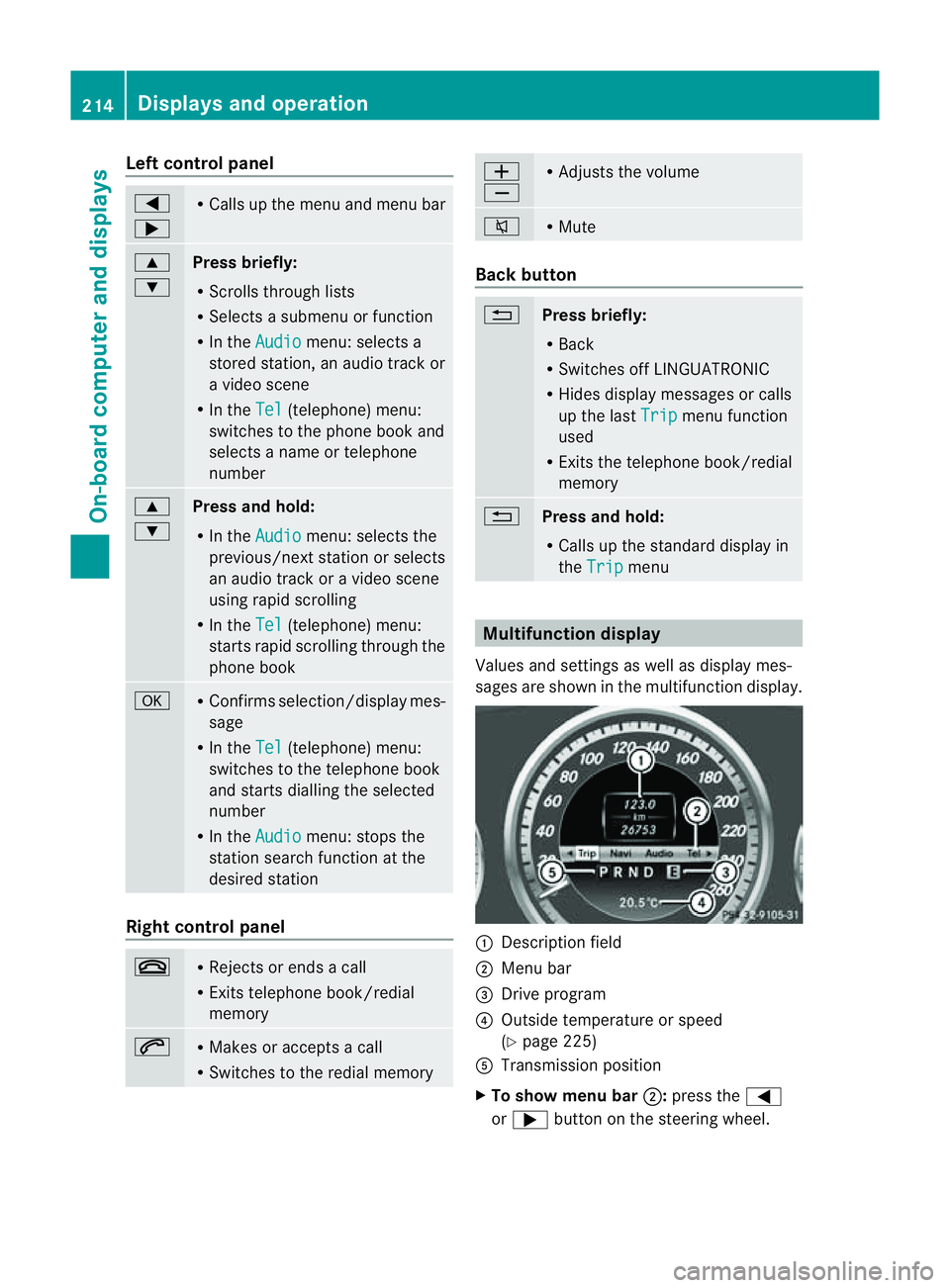
Left control panel
=
; R
Calls up th emenua nd men ubar 9
:
Press briefly:
R
Scrolls through lists
R Select sasubmenu or function
R In the Audio menu: selects a
stored station, an audio track or
av ideo scene
R In the Tel (telephone) menu:
switche stothephon ebook and
selects anam eort elephone
number 9
:
Press and hold:
R
In the Audio menu: selects the
previous/nex tstation or selects
an audi otrack or avideo scene
using rapi dscrolling
R In the Tel (telephone
)menu:
starts rapi dscrolling throug hthe
phone book a R
Confirms selection/displa ymes-
sage
R In the Tel (telephone
)menu:
switches to the telephone book
and starts dialling the selected
number
R In the Audio menu
:stops the
statio nsearch functio natthe
desired station Right contro
lpanel ~ R
Rejects or end sacall
R Exits telephone book/redial
memory 6 R
Makes or accepts acall
R Switche stothe redia lmemory W
X R
Adjusts the volume 8 R
Mute Bac
kbutton %
Press briefly:
R
Back
R Switche soff LINGUATRONIC
R Hides displa ymessage sorcalls
up the last Trip menu function
used
R Exits the telephone book/redial
memory %
Press and hold:
R
Call supthe standard displa yin
the Trip menu
Multifunctio
ndisplay
Values and setting saswellasd isplay mes-
sage sareshown in the multifunctio ndisplay. :
Descriptio nfield
; Men ubar
= Drive program
? Outside temperature or speed
(Ypage 225)
A Transmission position
X To show menu bar ;:press the =
or ; button on the steerin gwheel. 214
Display
sand operationOn-board computer and displays
Page 218 of 353
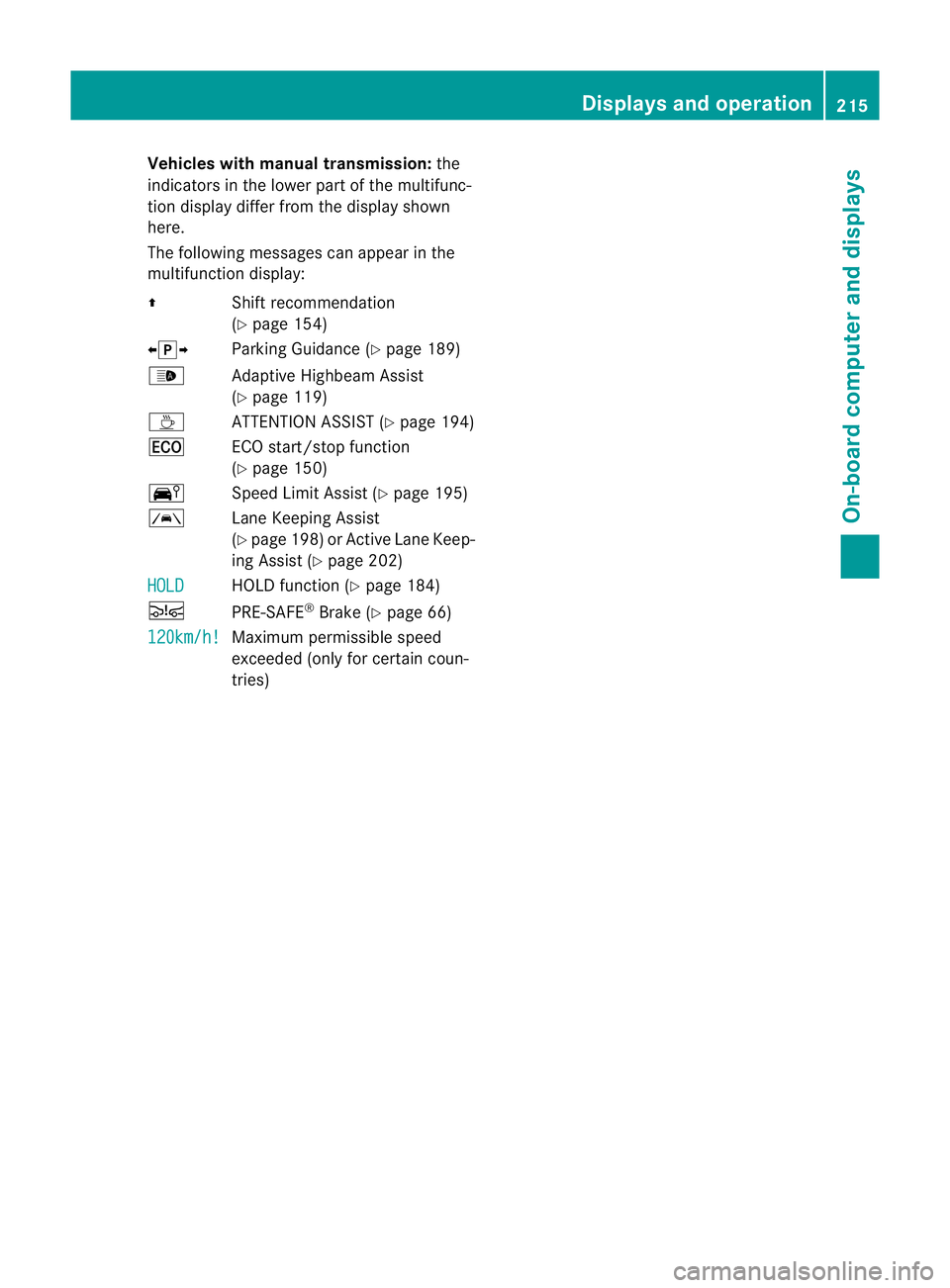
Vehicles with manual transmission:
the
indicators in the lowe rpartoft he multifunc-
tion display differ from the display shown
here.
The following messages can appear in the
multifunction display:
Z Shift recommendation
(Ypage 154)
XjY Parking Guidance (Y page 189)
_ Adaptive Highbeam Assist
(Ypage 119)
À ATTENTIONASSIST (Y page 194)
¤ ECO start/stop function
(Ypage 150)
Ä Speed Limit Assist (Y page 195)
à Lane Keeping Assist
(Ypage 198) or Active Lane Keep-
ing Assist (Y page 202)
HOLD HOLD function (
Ypage 184)
Ä PRE-SAFE®
Brake (Y page 66)
120km/h! Maximu
mpermissible speed
exceeded (only for certain coun-
tries) Displays and operation
215On-boardcomputer and displays Z
Page 228 of 353
R
changing the instrument cluster settings
R changing the time/date settings 20
R changing the light settings
R changing the vehicle settings
R changing the auxiliary heating settings
R changing the convenience settings
R restoring the factory settings
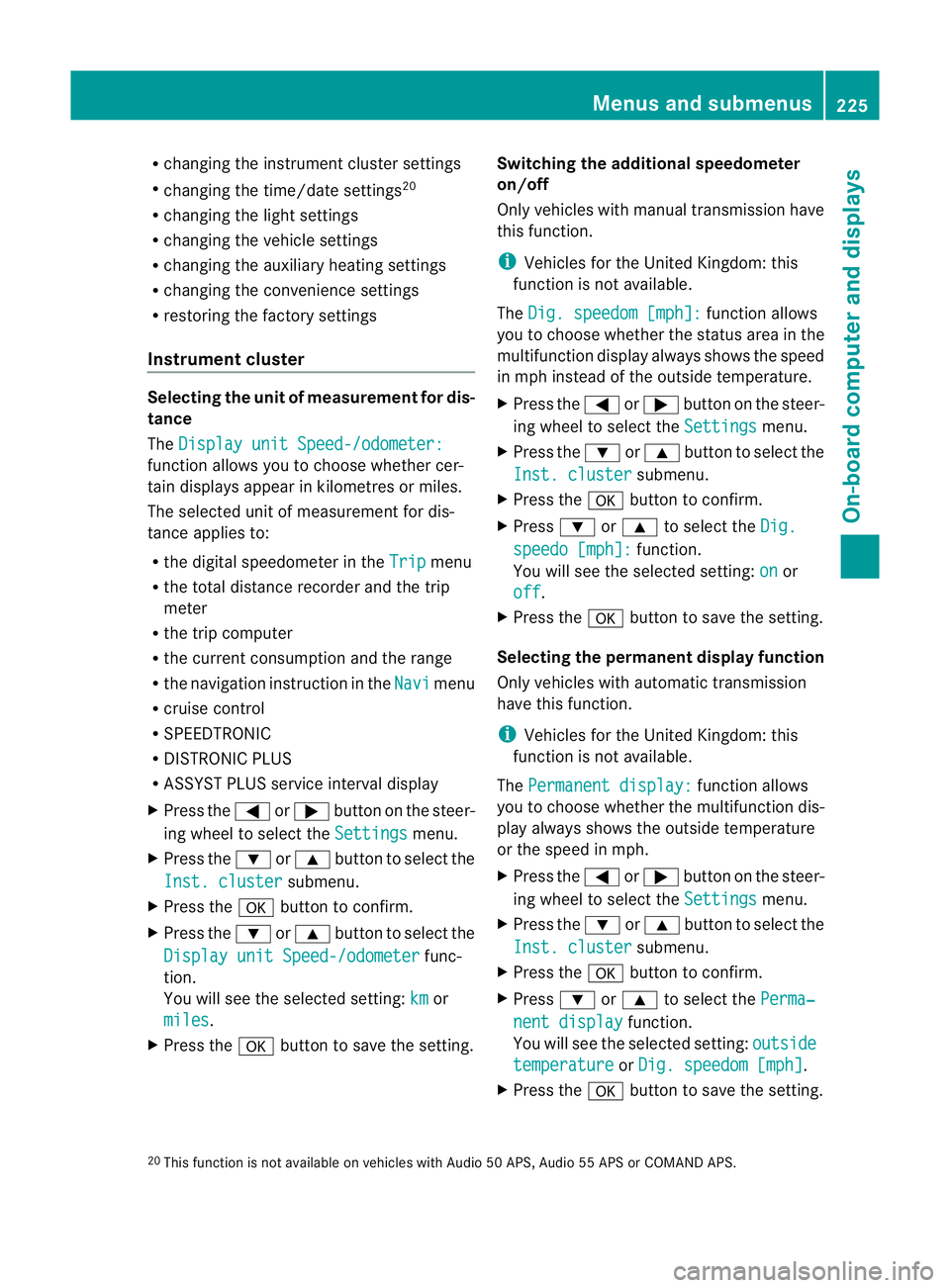
Instrumen tcluster Selecting th
eunit of measurement for dis-
tance
The Display unit Speed-/odometer: function allows you to choose whether cer-
tain displays appear in kilometres or miles.
The selected unit of measurement for dis-
tance applies to:
R the digital speedometer in the Trip menu
R the total distanc erecorder and the trip
meter
R the trip computer
R the current consumption and the range
R the navigation instruction in the Navi menu
R cruis econtrol
R SPEEDTRONIC
R DISTRONIC PLUS
R ASSYS TPLUS service interval display
X Press the =or; button on the steer-
ing wheel to selec tthe Settings menu.
X Press the :or9 button to select the
Inst. cluster submenu.
X Press the abutton to confirm.
X Press the :or9 button to select the
Display unit Speed-/odometer func-
tion.
You will see the selected setting: km or
miles .
X Press the abutton to save the setting. Switching the additional speedometer
on/off
Only vehicles with manual transmission have
this function.
i
Vehicles for the United Kingdom: this
function is not available.
The Dig. speedom [mph]: function allows
you to choose whether the status area in the
multifunction displaya lways shows the speed
in mph instead of the outside temperature.
X Press the =or; button on the steer-
ing wheel to select the Settings menu.
X Press the :or9 button to select the
Inst. cluster submenu.
X Press the abutton to confirm.
X Press :or9 to select the Dig. speedo [mph]: function.
You will see the selected setting: on or
off .
X Press the abutton to save the setting.
Selecting the permanent display function
Only vehicles with automatic transmission
have this function.
i Vehicles for the United Kingdom: this
function is not available.
The Permanent display: function allows
you to choose whether the multifunction dis-
play always shows the outside temperature
or the speed in mph.
X Press the =or; button on the steer-
ing wheel to select the Settings menu.
X Press the :or9 button to select the
Inst. cluster submenu.
X Press the abutton to confirm.
X Press :or9 to select the Perma‐ nent display function.
You will see the selected setting: outside temperature or
Dig. speedom [mph] .
X Press the abutton to save the setting.
20 This function is not available on vehicles with Audio 50 APS, Audio 55 APS or COMAND APS. Menus and submenus
225On-board computer and displays Z
Page 238 of 353
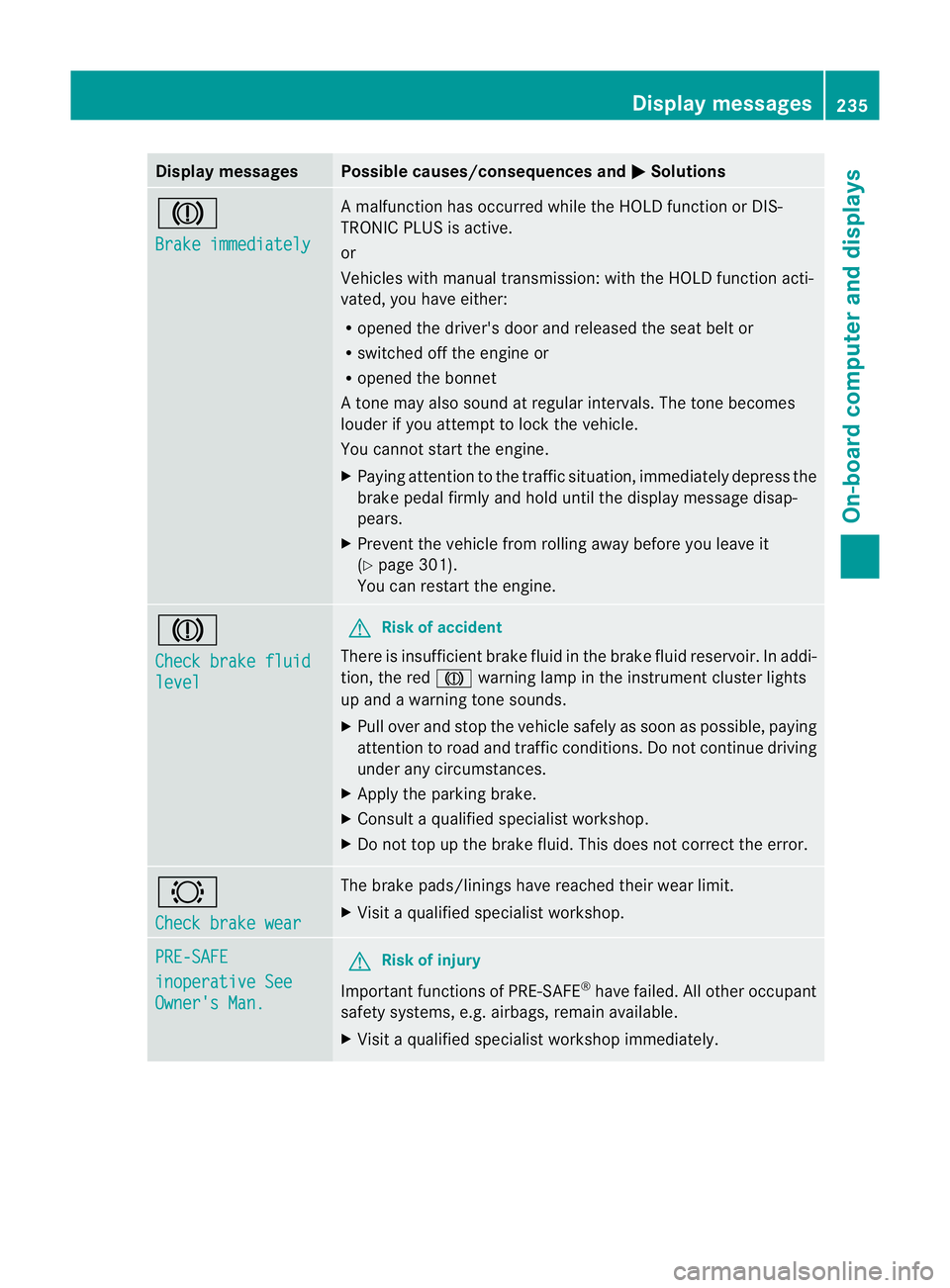
Display messages Possible causes/consequences and
M Solutions
J
Brake immediately Am
alfunction has occurred while th eHOLDf unction or DIS-
TRONIC PLU Sisactive.
or
Vehicles wit hmanual transmission: wit hthe HOLD function acti-
vated, you hav eeither:
R opened th edriver's doo rand released the sea tbelt or
R switched off the engin eor
R opened the bonnet
At one may also sound at regular intervals. The toneb ecomes
louder if you attempt to lock the vehicle.
You cannot start the engine.
X Paying attention to the traffic situation, immediately depress the
brake pedal firmly and hold until the display message disap-
pears.
X Prevent the vehicle from rolling away before you leave it
(Y page 301).
You can restart the engine. J
Check brake fluid
level G
Risk of accident
There is insufficient brake fluid in the brake fluid reservoir. In addi-
tion, the red Jwarning lamp in the instrument cluster lights
up and awarning tone sounds.
X Pullo ver and stop the vehicl esafel yass oon as possible,p aying
attention to road and traffic conditions. Do not continue driving
under any circumstances.
X Apply the parking brake.
X Consult aqualified specialist workshop.
X Do not top up the brake fluid. This does not correct the error. #
Check brake wear The brake pads/linings have reache
dtheir wearl imit.
X Visit aqualified specialist workshop. PRE-SAFE
inoperative See
Owner's Man. G
Risk of injury
Important function sofPRE-SAFE ®
have failed .All other occupant
safet ysystems, e.g. airbags, remain available.
X Visit aqualified specialist workshop immediately. Display messages
235On-board computer and displays Z
Page 253 of 353
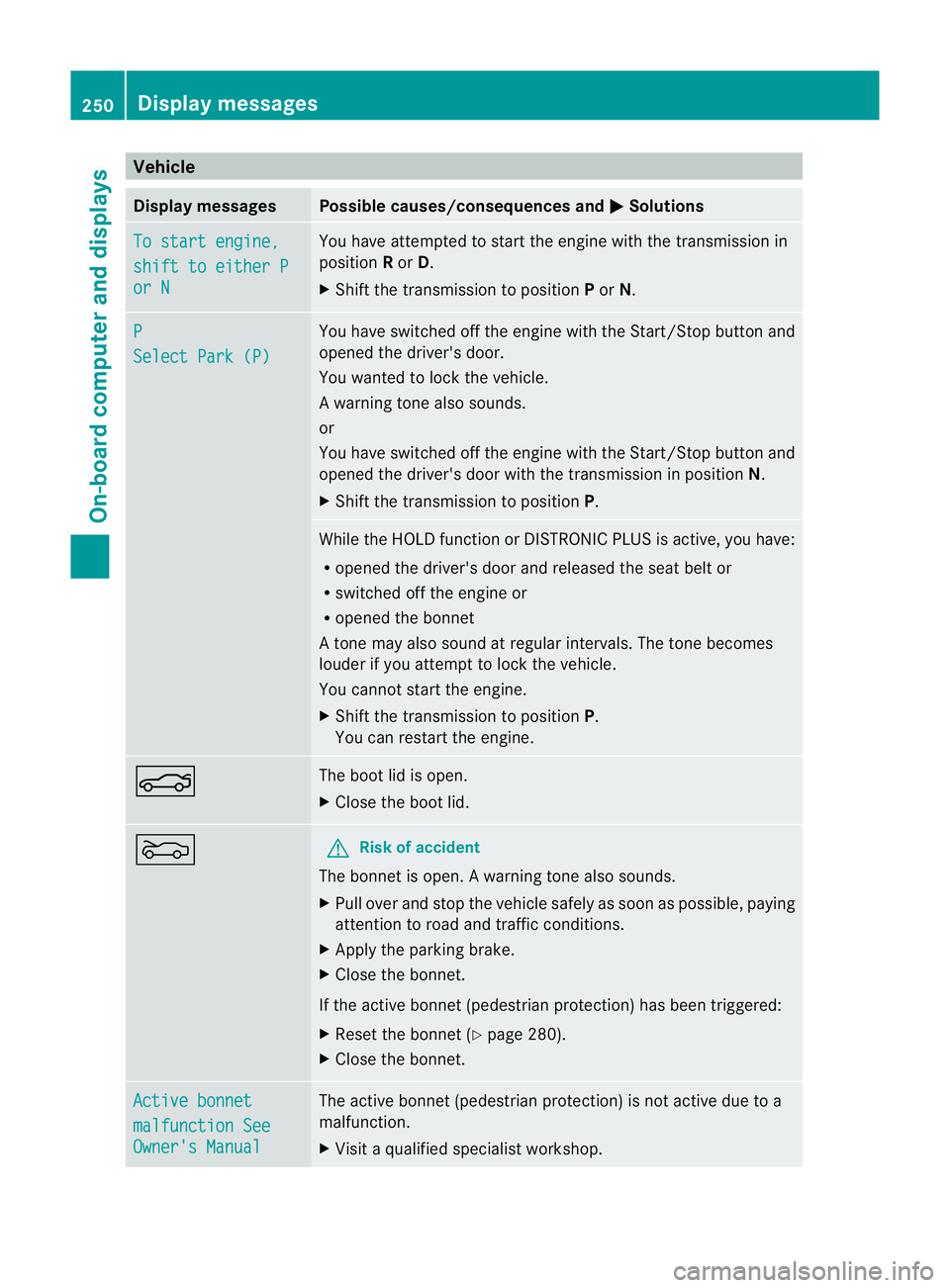
Vehicle
Display messages Possible causes/consequences and
M Solutions
To start engine,
shift to either P
or N Yo
uh avea ttempte dtostart the engine with the transmission in
position Ror D.
X Shift the transmission to position Por N. P
Select Par
k(P) Yo
uh aves witched off the engine with the Start/Sto pbutton and
opene dthe driver' sdoor.
Yo uw anted to lock the vehicle.
Aw arning tone also sounds.
or
You have switched off th eenginew itht he Start/Sto pbutto nand
opene dthe driver's door with the transmission in position N.
X Shift the transmission to position P. While the HOLD functio
norDISTRONIC PLUS is active, you have:
R opened the driver's door and released the seat belt or
R switched off the engine or
R opened the bonnet
At one may also sound at regular intervals. The toneb ecomes
louder if you attempt to lock the vehicle.
You cannot start the engine.
X Shift the transmission to position P.
You can restart the engine. N The boot lid is open.
X
Close the boot lid. M G
Risk of accident
The bonnet is open. Awarning tone also sounds.
X Pull ove rand stop the vehicl esafelyass oonasp ossible,p aying
attention to road and traffic conditions.
X Apply the parking brake.
X Close the bonnet.
If the active bonnet (pedestrian protection) has been triggered:
X Reset the bonnet (Y page 280).
X Close the bonnet. Active bonnet
malfunction See
Owner's Manual The active bonnet (pedestrian protection) is not active due to a
malfunction.
X
Visit aqualified specialist workshop. 250
Display messagesOn-board computer and displays
Page 279 of 353
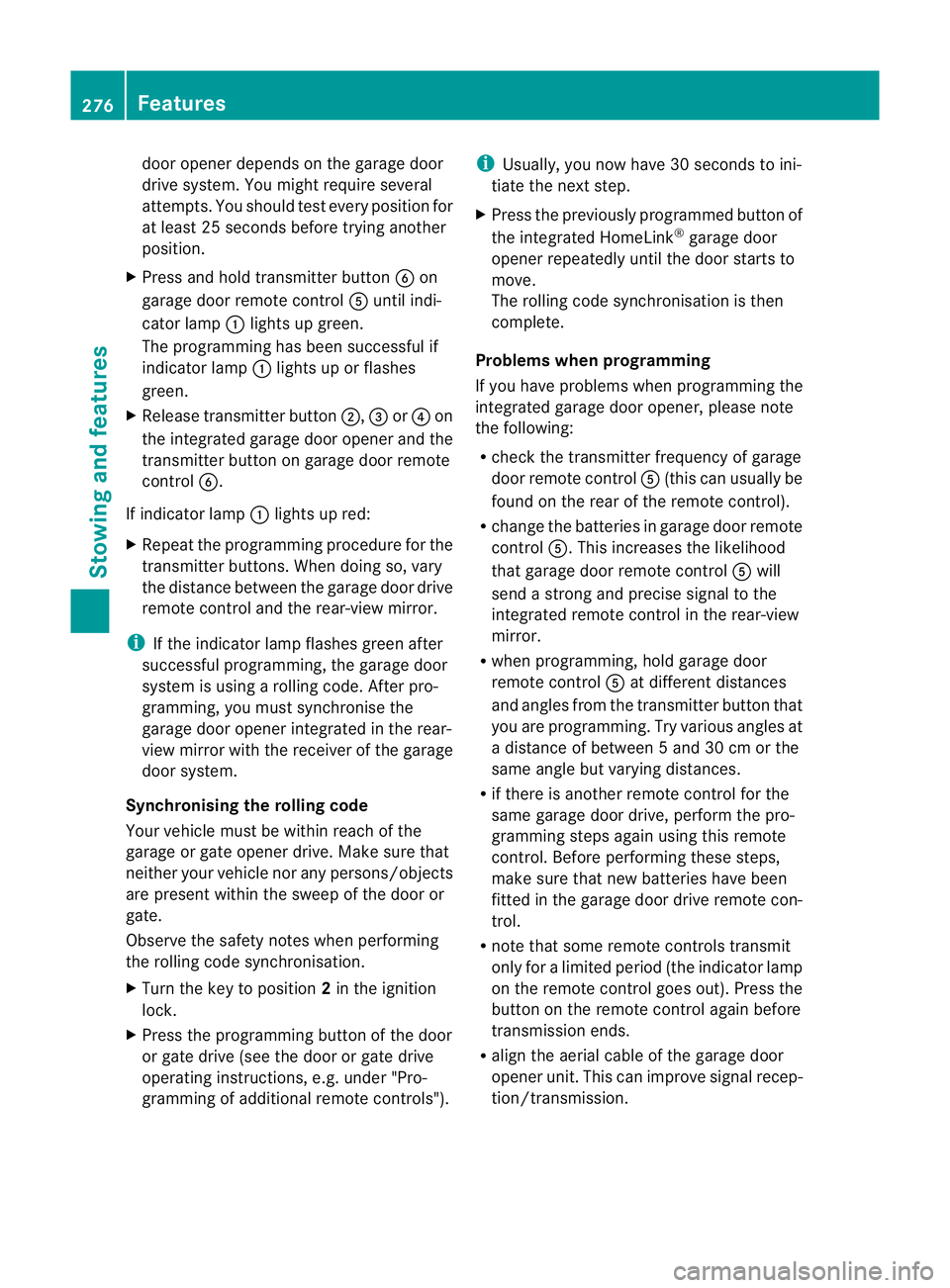
door opener depends on the garage door
drive system. You might require several
attempts
.You should test every position for
at least 25 seconds before trying another
position.
X Press and hold transmitter button Bon
garage door remote control Auntil indi-
cator lamp :lights up green.
The programming has been successful if
indicator lamp :lights up or flashes
green.
X Release transmitter button ;,=or? on
the integrated garage door opener and the
transmitter button on garage door remote
control B.
If indicator lamp :lights up red:
X Repeat the programming procedure for the
transmitter buttons. When doing so, vary
the distance between the garage door drive
remote control and the rear-view mirror.
i If the indicator lamp flashes green after
successful programming, the garage door
system is using arolling code. After pro-
gramming, you must synchronise the
garage door opener integrated in the rear-
view mirror with the receiver of the garage
door system.
Synchronising the rolling code
Your vehicle must be within reach of the
garage or gate opener drive. Make sure that
neither your vehicle nor any persons/objects
are present within the sweep of the door or
gate.
Observe the safety notes when performing
the rolling code synchronisation.
X Turn the key to position 2in the ignition
lock.
X Press the programming button of the door
or gate drive (see the door or gate drive
operating instructions, e.g. under "Pro-
gramming of additional remote controls"). i
Usually ,you now have 30 seconds to ini-
tiate the next step.
X Press the previously programmed button of
the integrated HomeLink ®
garage door
opener repeatedly until the door startsto
move.
The rolling code synchronisation is then
complete.
Problems when programming
If you have problems when programming the
integrated garage door opener, please note
the following:
R check the transmitter frequency of garage
door remote control A(this can usually be
found on the rear of the remote control).
R change the batteries in garage door remote
control A.This increases the likelihood
that garage door remote control Awill
send astronga nd precise signal to the
integrated remote control in the rear-view
mirror.
R when programming, hold garage door
remote control Aat different distances
and angles from the transmitter button that
you are programming. Try various angles at
ad istance of between 5and 30 cm or the
same angle but varying distances.
R if there is another remote control for the
same garage door drive, perform the pro-
gramming steps again using this remote
control. Before performing these steps,
make sure that new batteries have been
fitted in the garage door drive remote con-
trol.
R note that some remote controls transmit
only for alimited period (the indicator lamp
on the remote control goes out). Press the
button on the remote control again before
transmission ends.
R align the aerial cable of the garage door
opener unit. This can improve signal recep-
tion/transmission. 276
FeaturesStowing and features
Page 280 of 353
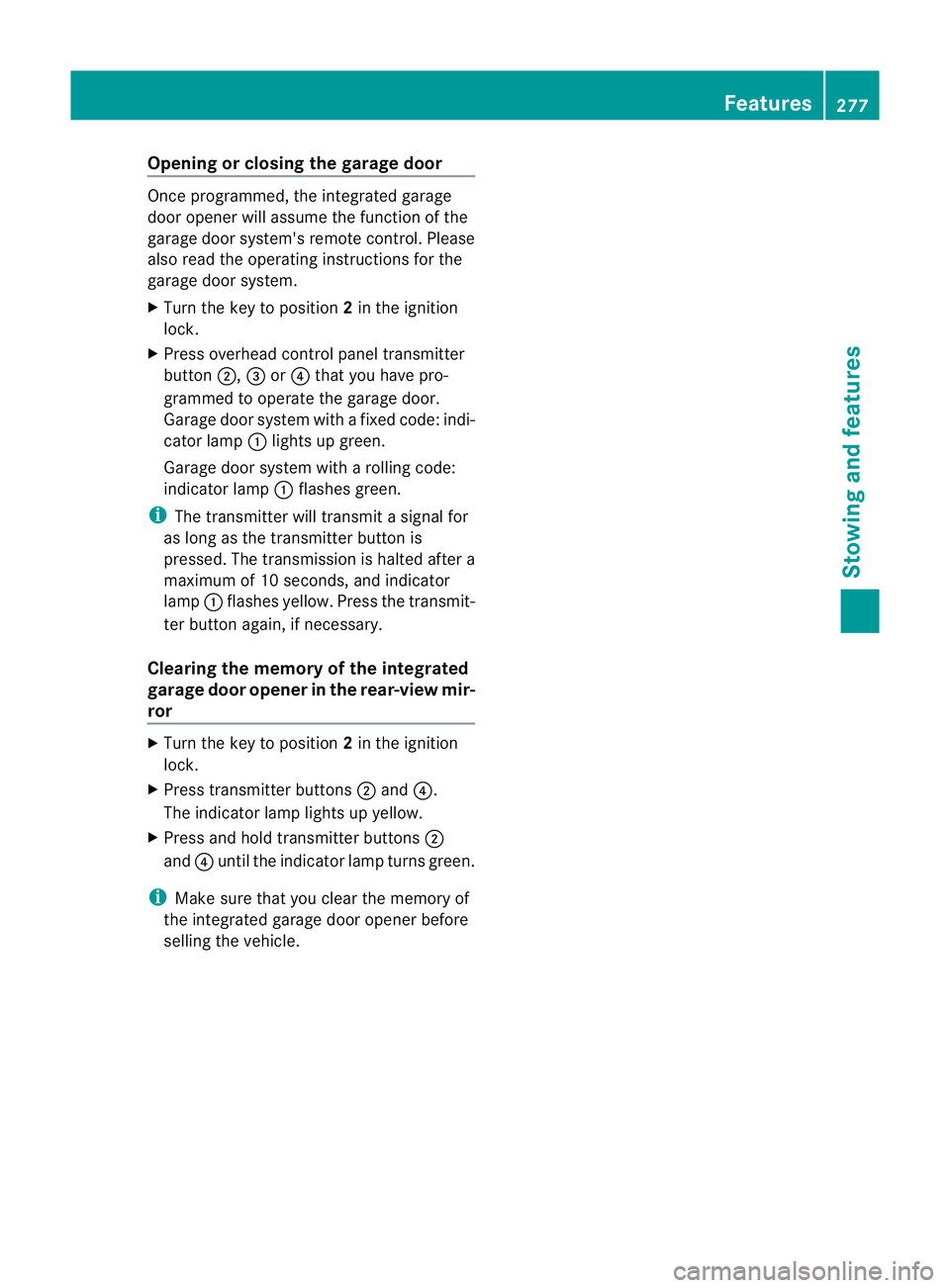
Opening or closing the garage door
Oncep
rogrammed, the integrated garage
door opener will assume the function of the
garage door system's remot econtrol. Please
also read the operatin ginstructions for the
garage door system.
X Turn the key to position 2in the ignition
lock.
X Press overhead control panel transmitter
button ;,=or? that you have pro-
grammed to operate the garage door.
Garage door system with afixed code: indi-
cator lamp :lights up green.
Garage door system with arolling code:
indicator lamp :flashes green.
i The transmitter will transmit asignal for
as long as the transmitter button is
pressed. The transmission is halted after a
maximum of 10 seconds, and indicator
lamp :flashes yellow. Press the transmit-
ter button again, if necessary.
Clearing the memory of the integrated
garage door opener in the rear-view mir-
ror X
Turn the key to position 2in the ignition
lock.
X Press transmitter buttons ;and ?.
The indicator lamp lights up yellow.
X Press and hold transmitter buttons ;
and ?until the indicator lamp turn sgreen.
i Make sure that you clear the memory of
the integrated garage door opener before
selling the vehicle. Features
277Stowing and features Z
Page 289 of 353
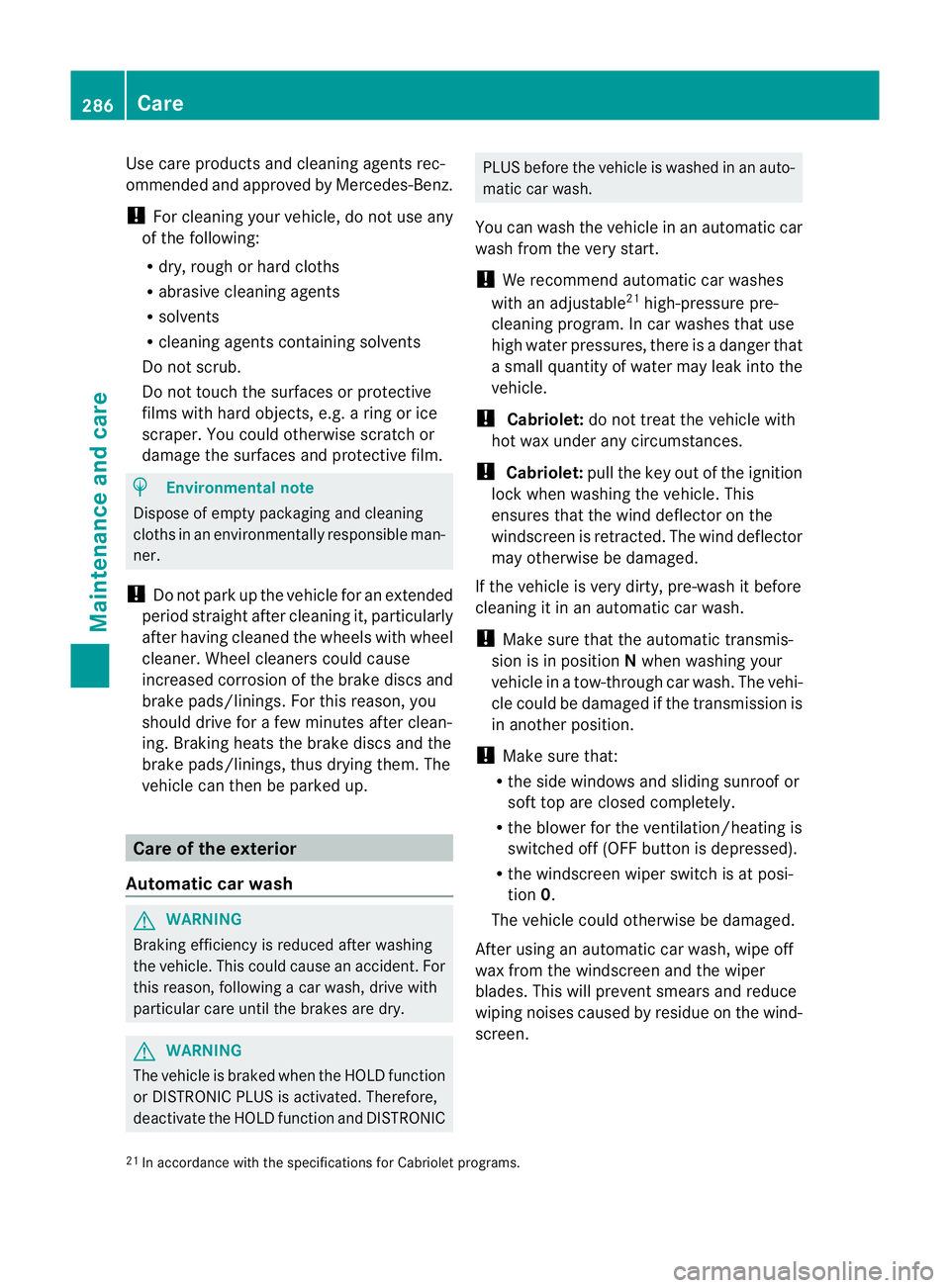
Use care products and cleaning agents rec-
ommended and approved by Mercedes-Benz.
! For cleaning your vehicle, do not use any
of the following:
R dry, rough or hard cloths
R abrasive cleaning agents
R solvents
R cleaning agents containing solvents
Do not scrub.
Do not touch the surfaces or protective
films with hard objects, e.g. aring or ice
scraper. You could otherwise scratch or
damage the surfaces and protective film. H
Environmental note
Dispose of empty packaging and cleaning
cloths in an environmentally responsible man-
ner.
! Do not park up the vehicle for an extended
period straight after cleaning it, particularly
after having cleaned the wheels with wheel
cleaner. Wheel cleaners could cause
increased corrosion of the brake discs and
brake pads/linings. For this reason, you
should drive for afew minutes after clean-
ing. Braking heats the brake discs and the
brake pads/linings, thus drying them. The
vehicle can then be parked up. Care of the exterior
Automatic car wash G
WARNING
Braking efficiency is reduced after washing
the vehicle. This could cause an accident. For
this reason, following acar wash, drive with
particular care until the brakes are dry. G
WARNING
The vehicle is braked when the HOLD function
or DISTRONIC PLUS is activated. Therefore,
deactivate the HOLD function and DISTRONIC PLUS before the vehicle is washed in an auto-
matic car wash.
You can wash the vehicle in an automatic car
wash from the very start.
! We recommend automatic car washes
with an adjustable 21
high-pressure pre-
cleaning program. In car washes that use
high water pressures, there is adanger that
as mall quantity of water may leak into the
vehicle.
! Cabriolet: do not treat the vehicle with
hot wax under any circumstances.
! Cabriolet: pull the key out of the ignition
lock when washing the vehicle. This
ensures that the wind deflector on the
windscreen is retracted. The wind deflector
may otherwise be damaged.
If the vehicle is very dirty, pre-wash it before
cleaning it in an automatic car wash.
! Make sure that the automatic transmis-
sion is in position Nwhen washing your
vehicle in atow-through car wash. The vehi-
cle could be damagedift he transmission is
in another position.
! Make sure that:
R the side windows and sliding sunroof or
soft top are closed completely.
R the blowerf or the ventilation/heatin gis
switched off (OFF button is depressed).
R the windscreen wiper switch is at posi-
tion 0.
The vehicle could otherwise be damaged.
After using an automatic car wash, wipe off
wax from the windscreen and the wiper
blades. This will prevent smears and reduce
wiping noises caused by residue on the wind-
screen.
21 In accordanc ewith the specification sfor Cabriolet programs. 286
CareMaintenance and care
Page 299 of 353
R
Jack
R Centrin gpin
R On ep air of gloves
R Whee lwrench
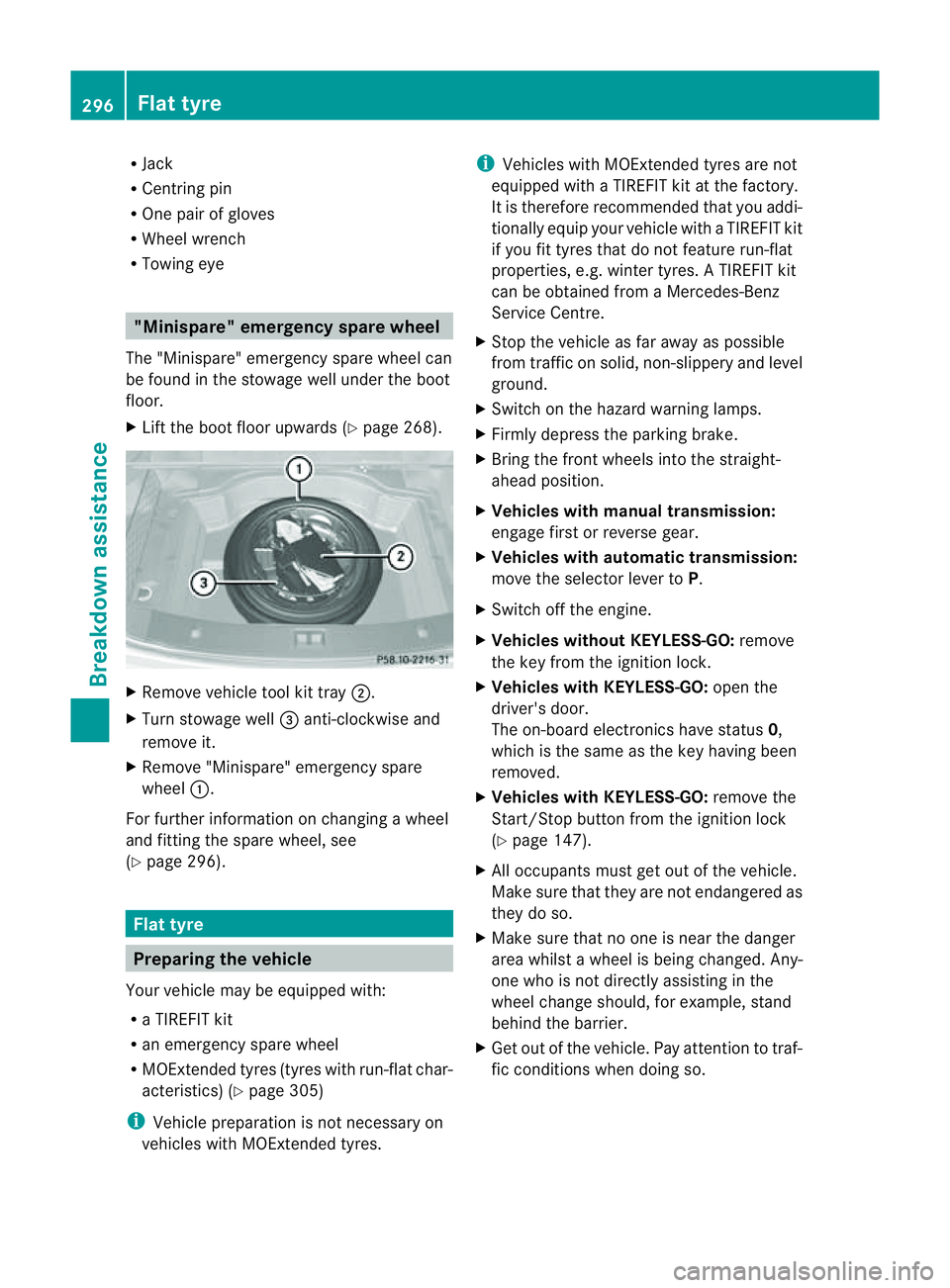
R Towin geye "Minispare" emergency spare wheel
The "Minispare" emergency spar ewheel can
be foun dinthestowage well unde rthe boot
floor.
X Lift the boot floor upwards (Y page 268).X
Remove vehicle tool kit tray ;.
X Turn stowage well =anti-clockwise and
remove it.
X Remove "Minispare" emergency spare
wheel :.
For further information on changing awheel
and fittingt he spare wheel, see
(Y page 296). Flat tyre
Preparing the vehicle
Your vehicle may be equipped with:
R aT IREFIT kit
R an emergency spare wheel
R MOExtended tyres (tyres with run-flat char-
acteristics) (Y page 305)
i Vehicle preparation is not necessary on
vehicles with MOExtended tyres. i
Vehicles with MOExtended tyres are not
equipped with aTIREFIT kit at the factory.
It is therefore recommended that you addi-
tionally equip your vehicle with aTIREFIT kit
if you fit tyres that do not feature run-flat
properties, e.g. winter tyres. ATIREFIT kit
can be obtained from aMercedes-Benz
Service Centre.
X Stop the vehicle as far away as possible
from traffic on solid, non-slippery and level
ground.
X Switch on the hazard warning lamps.
X Firmly depress the parking brake.
X Bring the front wheels into the straight-
ahead position.
X Vehicles with manualt ransmission:
engage first or reverse gear.
X Vehicles with automatic transmission:
move the selector lever to P.
X Switch off the engine.
X Vehicles without KEYLESS-GO: remove
the key from the ignition lock.
X Vehicles with KEYLESS-GO: open the
driver's door.
The on-board electronicsh ave status0,
which is the same as the key having been
removed.
X Vehicles with KEYLESS-GO: remove the
Start/Stop button from the ignition lock
(Y page 147).
X All occupants must get out of the vehicle.
Make sure that they are not endangered as
they do so.
X Make sure that no one is near the danger
area whilst awheel is being changed. Any-
one who is not directly assisting in the
wheel change should, for example, stand
behind the barrier.
X Get out of the vehicle. Pay attention to traf-
fic conditionsw hen doing so.296
Flat tyreBreakdown assistance
Page 310 of 353
may otherwise destroy electronic compo-
nents, such as the alternator.
i When you park the vehicle, remove the
key if you do not require any electrica lcon-
sumers .The vehicle will then use very little
energy, thus conserving battery power.
Mercedes-Ben zrecommends that you do not
carry out work on batteries yourself, e.g.
removin gorcharging. Have this work per-
formed at aqualified specialist workshop, e.g.
aM ercedes-Benz Service Centre. Installation location of the battery
Your vehicle is equipped with abatter yint he
engin ecompartment .Itislocated on the front
bulkhead under the filter box on the right-
hand side of the vehicle when viewed in the
direction of travel.
X Apply the parking brake firmly and on vehi-
cles with automatic transmission, shift the
transmission to position P.
X Switch off all electrical consumers (e.g.
radio, blower, etc.).
X Turn the key to position 0(Y page 147) in
the ignition lock and remove it, or, on vehi-
cles with KEYLESS-GO, make sure that the
ignition has been switched off
(Y page 147). All indicator lamps in the
instrument cluster must be off.
X Open the bonnet (Y page 281). X
Release clamps ;on filter box :using a
suitableo bject, such as ascrewdriver.
X Remove filter box :.
i Information on disconnecting the battery
(Y page 307). Disconnecting the battery
! Alwaysd isconnect the battery in
the order described below. Never swap the
terminal clamps. You may otherwise dam-
age the vehicle electronics.
In vehicles with automatic transmission,
the transmission is locked in position P
after disconnecting the battery. The vehicle
is secured against rolling away. You can
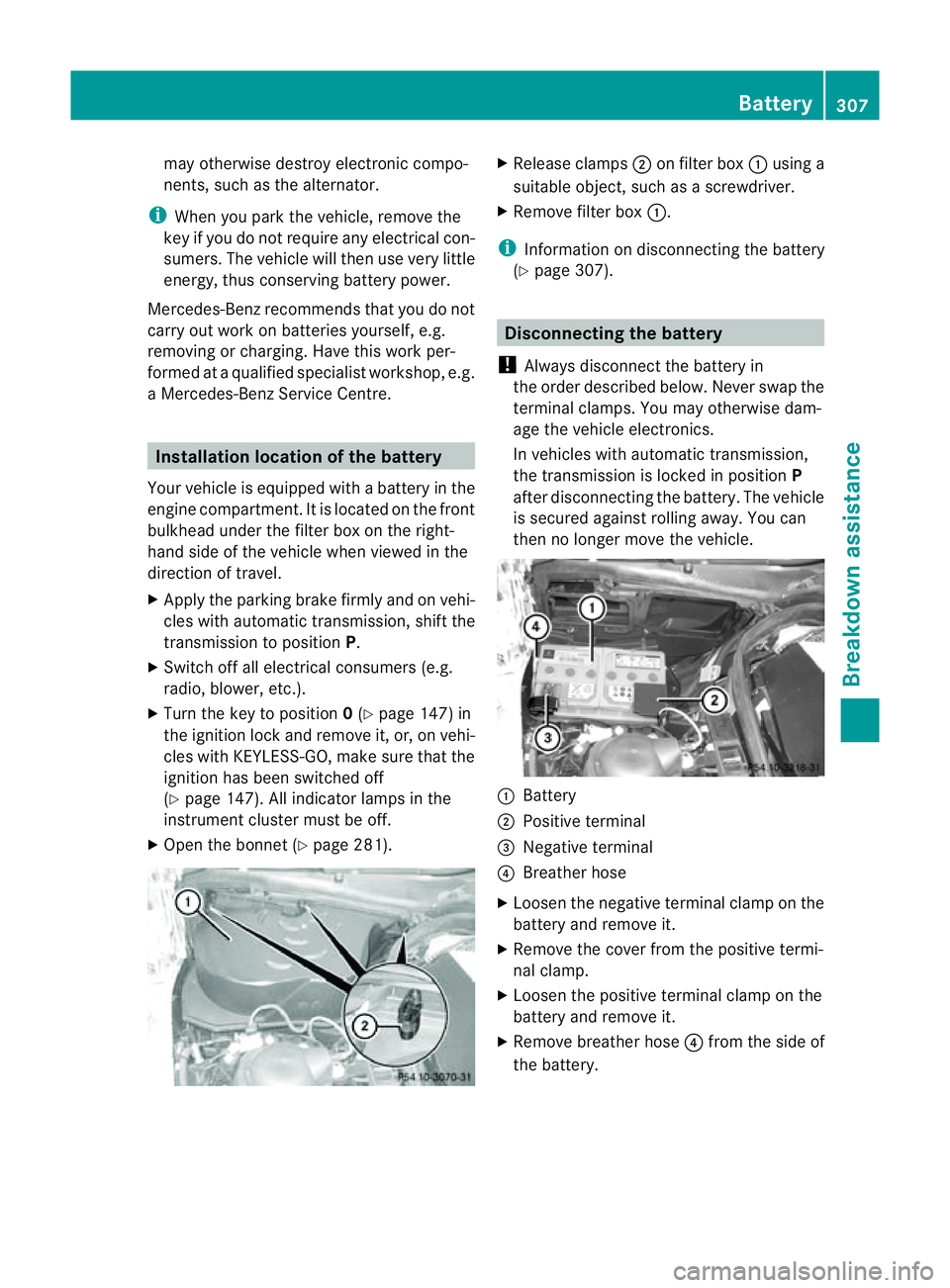
then no longer move the vehicle. :
Battery
; Positive terminal
= Negative terminal
? Breather hose
X Loosen the negative terminal clamp on the
battery and remove it.
X Remove the cover from the positive termi-
nal clamp.
X Loosen the positive terminal clamp on the
battery and remove it.
X Remove breather hose ?from the side of
the battery. Battery
307Breakdown assistance Z