display MERCEDES-BENZ E-CLASS CABRIOLET 2015 Owner's Manual
[x] Cancel search | Manufacturer: MERCEDES-BENZ, Model Year: 2015, Model line: E-CLASS CABRIOLET, Model: MERCEDES-BENZ E-CLASS CABRIOLET 2015Pages: 349, PDF Size: 12.51 MB
Page 26 of 349
Introduction
The printed Owner's Manual provides informa-
tion about the safe operation of your vehicle.
The Digital Owner's Manual additionally
describes further functions and equipment fit-
ted in your vehicle. The functions of the vehicle
and multimedia system are described in the Dig-
ital Owner's Manual. You can call up the Digital
Owner's Manual via the multimedia system.
i You will not incur any costs when calling up
the Digital Owner's Manual. The Digital Own-
er's Manual works without connecting to the
Internet.
There are three ways to access the topics of the Digital Owner's Manual:
R Visual search
The visual search allows you to explore your
vehicle "virtually". Starting from either the
vehicle exterior view or interior view, you can access many of the different topics covered
by the Digital Owner's Manual. To access the
vehicle interior section, select the "Vehicle
interior" view.
R Keyword search
The keyword search allows you to search for a
keyword by entering characters. Further
information can be found in the Digital Own-
er's Manual in the "Audio 20" or "COMAND
Online" section under the "Character entry
(telephony)" keyword.
R Contents
You can select individual sections in the con-
tents.
i The Digital Owner's Manual is deactivated
for safety reasons while driving. Operation
Calling up the Digital Owner's Manual
X Press the Øbutton in the centre console.
The overview relating to the vehicle appears.
X Select the "Owner's Manual" menu item by
turning 3or pressing 7the controller.
X Confirm 7the message about the warning
and safety notes.
The basic menu for the Digital Owner's Man-
ual appears. Operating the Digital Owner's Manual
General notes Please observe the information about the oper-
ation of the controller (Y page 264).
Content pages You can access the content pages by means of
a visual search, a keyword search or using the
contents.
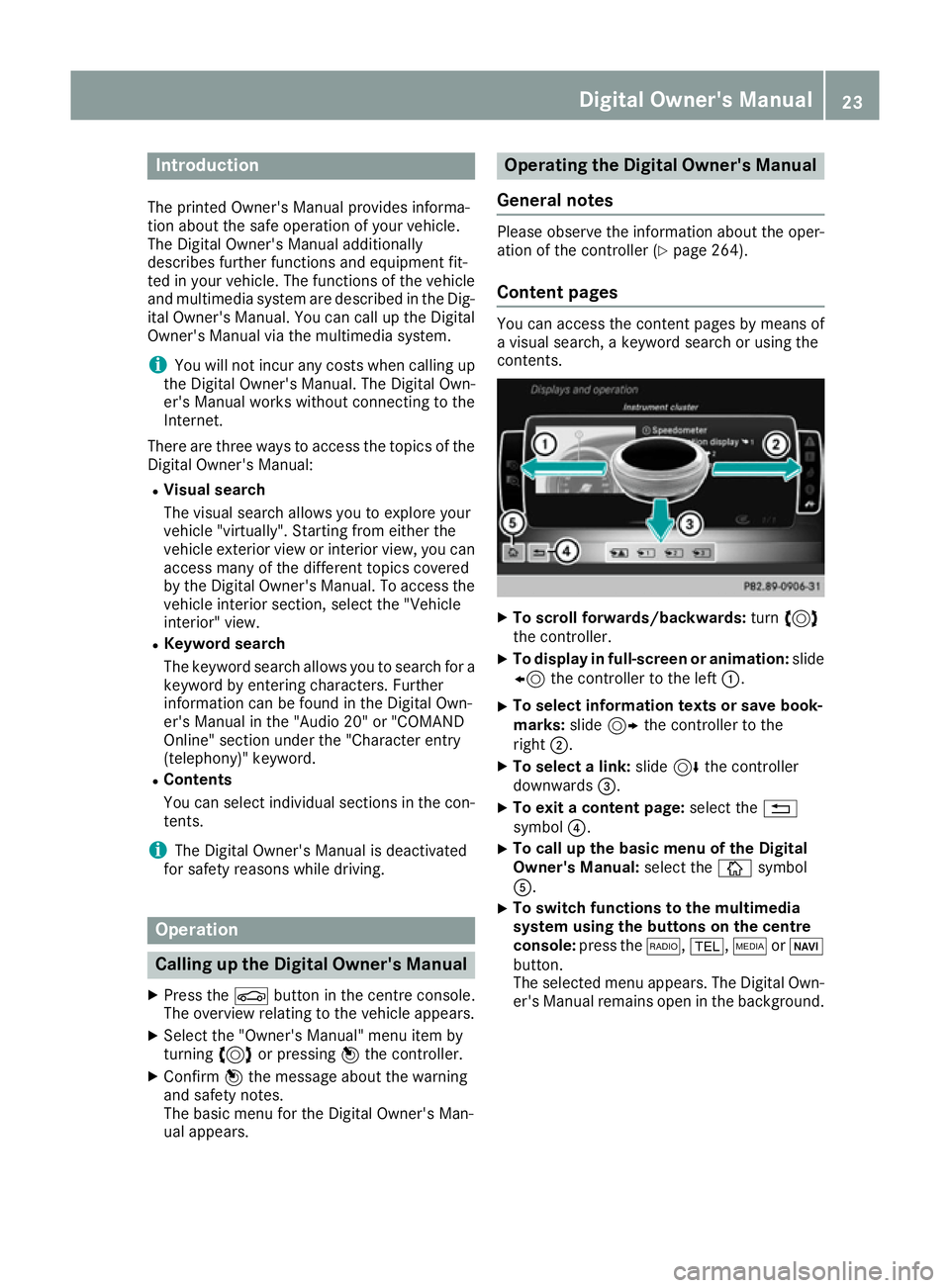
X
To scroll forwards/backwards: turn3
the controller.
X To display in full-screen or animation: slide
8 the controller to the left :.
X To select information texts or save book-
marks:
slide9 the controller to the
right ;.
X To select a link: slide6the controller
downwards =.
X To exit a content page: select the%
symbol ?.
X To call up the basic menu of the Digital
Owner's Manual:
select theÞsymbol
A.
X To switch functions to the multimedia
system using the buttons on the centre
console: press the $,%,ÕorØ
button.
The selected menu appears. The Digital Own- er's Manual remains open in the background. Digital Owner's Manual
23
Page 34 of 349
Instrument cluster
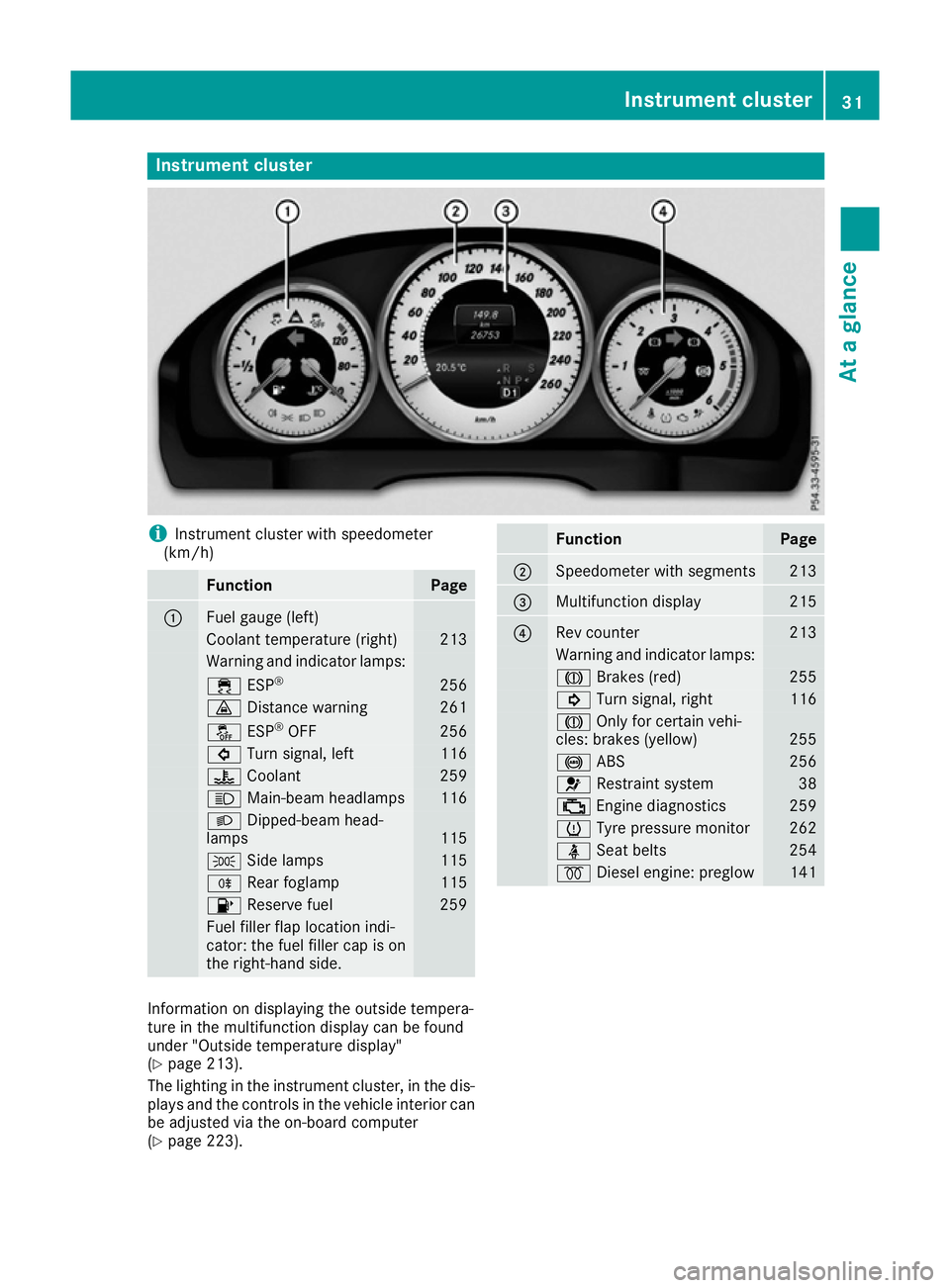
i
Instrument cluster with speedometer
(km/h) Function Page
:
Fuel gauge (left)
Coolant temperature (right) 213
Warning and indicator lamps:
÷
ESP® 256
·
Distance warning 261
å
ESP®
OFF 256
#
Turn signal, left 116
?
Coolant 259
K
Main-beam headlamps 116
L
Dipped-beam head-
lamps 115
T
Side lamps 115
R
Rear foglamp 115
8
Reserve fuel 259
Fuel filler flap location indi-
cator: the fuel filler cap is on
the right-hand side. Function Page
;
Speedometer with segments 213
=
Multifunction display 215
?
Rev counter 213
Warning and indicator lamps:
J
Brakes (red) 255
!
Turn signal, right 116
J
Only for certain vehi-
cles: brakes (yellow) 255
!
ABS 256
6
Restraint system 38
;
Engine diagnostics 259
h
Tyre pressure monitor 262
ü
Seat belts 254
%
Diesel engine: preglow 141
Information on displaying the outside tempera-
ture in the multifunction display can be found
under "Outside temperature display"
(Y
page 213).
The lighting in the instrument cluster, in the dis- plays and the controls in the vehicle interior can
be adjusted via the on-board computer
(Y page 223). Instrument cluster
31At a glance
Page 35 of 349
Multifunction steering wheel
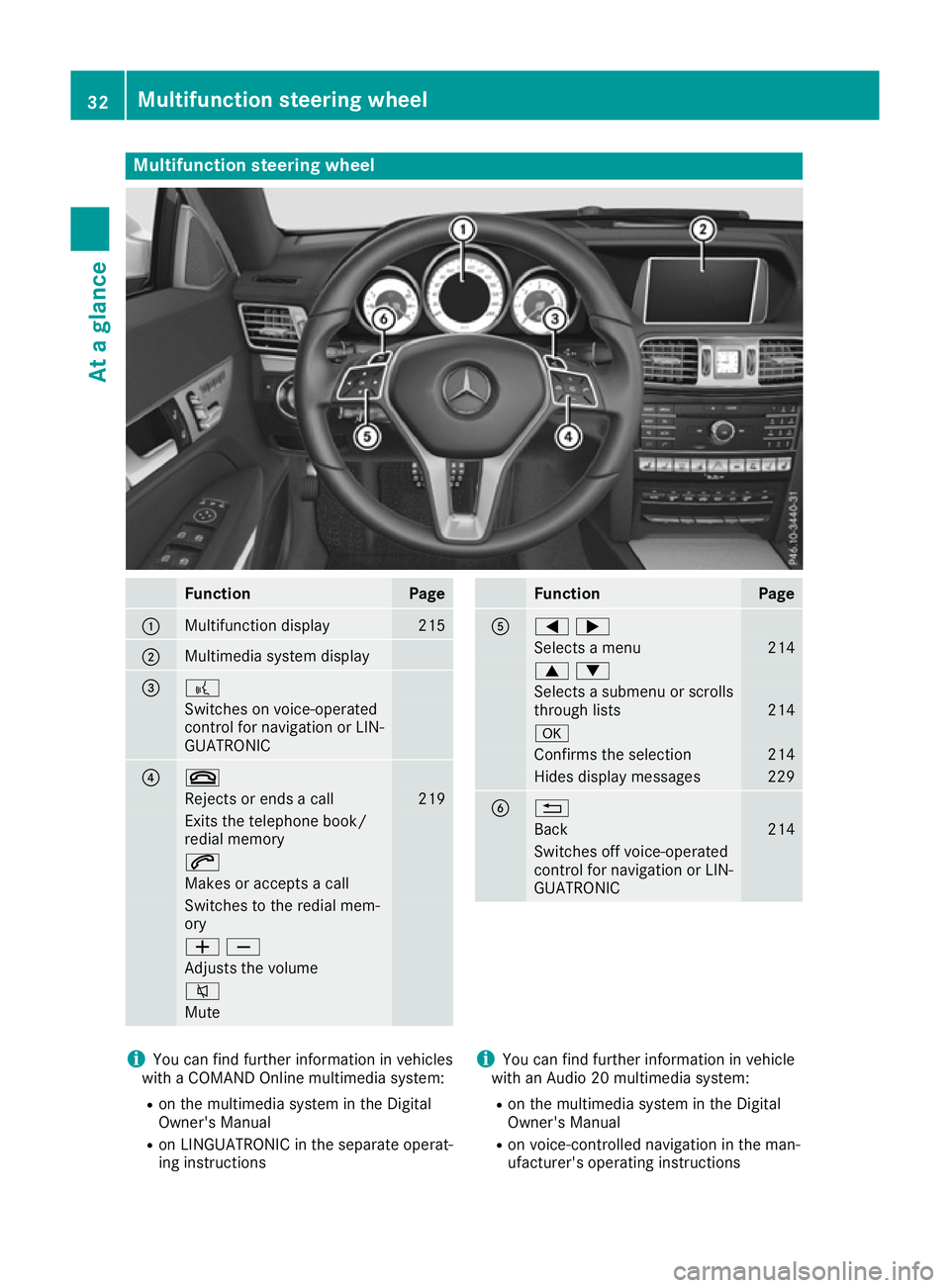
Function Page
:
Multifunction display 215
;
Multimedia system display
= ?
Switches on voice-operated
control for navigation or LIN-
GUATRONIC ? ~
Rejects or ends a call 219
Exits the telephone book/
redial memory
6
Makes or accepts a call
Switches to the redial mem-
ory WX
Adjusts the volume
8
Mute Function Page
A
=;
Selects a menu 214
9:
Selects a submenu or scrolls
through lists 214
a
Confirms the selection 214
Hides display messages 229
B %
Back 214
Switches off voice-operated
control for navigation or LIN-
GUATRONIC i
You can find further information in vehicles
with a COMAND Online multimedia system:
R on the multimedia system in the Digital
Owner's Manual
R on LINGUATRONIC in the separate operat-
ing instructions i
You can find further information in vehicle
with an Audio 20 multimedia system:
R on the multimedia system in the Digital
Owner's Manual
R on voice-controlled navigation in the man-
ufacturer's operating instructions 32
Multifunction steering wheelAt a glance
Page 65 of 349
ABS (Anti-lock Braking System)
General notes ABS regulates brake pressure in such a way that
the wheels do not lock when you brake. This
allows you to continue steering the vehicle when braking.
The ! ABS warning lamp in the instrument
cluster lights up when the ignition is switched
on. It goes out when the engine is running.
ABS works from a speed of about 8 km/h,
regardless of road-surface conditions. ABS
works on slippery surfaces, even when you only
brake gently.
Important safety notes i
Observe the "Important safety notes" sec-
tion (Y page 61). G
WARNING
If ABS is faulty, the wheels could lock when
braking. The steerability and braking charac-
teristics may be severely impaired. Addition-
ally, further driving safety systems are deac-
tivated. There is an increased danger of skid- ding and accidents.
Drive on carefully. Have ABS checked imme-
diately at a qualified specialist workshop.
If ABS is malfunctioning, other systems, includ-
ing driving safety systems, will also become
inoperative. Observe the information on the ABS warning lamp (Y page 256) and display mes-
sages which may be shown in the instrument
cluster (Y page 230).
Brakes X
If ABS intervenes: continue to depress the
brake pedal with force until the braking sit-
uation is over.
X To make a full brake application: depress
the brake pedal with full force.
If ABS intervenes when braking, you will feel a
pulsing in the brake pedal.
The pulsating brake pedal can be an indication
of hazardous road conditions; this serves as a
reminder to take extra care while driving. BAS (Brake Assist)
General notes BAS operates in emergency braking situations.
If you depress the brake pedal quickly, BAS
automatically boosts the braking force, thus
shortening the stopping distance.
Important safety notes i
Observe the "Important safety notes" sec-
tion (Y page 61). G
WARNING
If BAS is malfunctioning, the braking distance
in an emergency braking situation is
increased. There is a risk of accident.
In an emergency braking situation, depress
the brake pedal with full force. ABS prevents
the wheels from locking.
Brakes X
Keep the brake pedal depressed firmly until
the emergency braking situation is over.
ABS prevents the wheels from locking.
The brakes will function as usual once you
release the brake pedal. BAS is deactivated. BAS PLUS (Brake Assist PLUS) with
Cross-Traffic Assist
General notes BAS PLUS can help you to minimise the risk of a
collision with a vehicle or a pedestrian and
reduce the effects of such a collision. If BAS
PLUS detects a danger of collision, you are
assisted when braking.
i Pay attention to the important safety notes
in the "Driving safety systems" section
(Y page 61).
BAS PLUS is only available on vehicles with the
Driving Assistance package.
For BAS PLUS to assist you when driving, the
radar sensor system and the camera system
must be operational. 62
Driving safety systemsSafety
Page 67 of 349
Function
To avoid a collision, BAS PLUS calculates the
brake force necessary if:
R you approach an obstacle and
R BAS PLUS has detected a risk of a collision
When driving at a speed under 30 km/h: if
you depress the brake pedal, BAS PLUS is acti-
vated. Braking assistance from BAS PLUS is car-
ried out at the last possible moment.
When driving at a speed above 30 km/h: if
you depress the brake pedal sharply, BAS PLUS automatically increases the brake pressure to adegree suited to the traffic situation.
BAS PLUS provides braking assistance in haz-
ardous situations with vehicles in front within a
speed range between 7 km/h and 250 km/h.
Up to a speed of approximately 70 km/h, BAS
PLUS may react to:
R stationary objects in the path of your vehicle,
e.g. stopped or parked vehicles
R pedestrians in the path of your vehicle
R obstacles crossing your path, which move in
the detection range of the sensors and are
detected
i If BAS PLUS demands particularly high brak-
ing force, preventative passenger protection
measures (PRE-SAFE ®
) are activated simulta-
neously.
X Keep the brake pedal depressed until the
emergency braking situation is over.
ABS prevents the wheels from locking.
BAS PLUS is deactivated and the brakes func-
tion as usual, if:
R you release the brake pedal
R there is no longer a risk of collision
R no obstacle is detected in front of your vehicle
R you depress the accelerator pedal
R you activate kickdown COLLISION PREVENTION ASSIST
PLUS
General notes i
Observe the "Important safety notes" sec-
tion (Y page 61).
COLLISION PREVENTION ASSIST PLUS consists of a distance warning function with an autono- mous braking function and Adaptive Brake
Assist.
COLLISION PREVENTION ASSIST PLUS can help
you to minimise the risk of a collision with the
vehicle in front or reduce the effects of such a
collision.
If COLLISION PREVENTION ASSIST PLUS
detects that there is a risk of a collision, you will
be warned visually and acoustically. If you do not react to the visual and audible collision warning,
autonomous braking can be initiated in critical
situations. If you apply the brake yourself in a
critical situation, the COLLISION PREVENTION
ASSIST PLUS Adaptive Brake Assist assists you.
Important safety notes In particular, the detection of obstacles can be
impaired in the case of:
R dirt on the sensors or obscured sensors
R snow or heavy rain
R interference by other radar sources
R strong radar reflections, for example, in multi-
storey car parks
R a narrow vehicle travelling in front, e.g. a
motorcycle
R a vehicle travelling in front on a different line
R new vehicles or after a service on the COLLI-
SION PREVENTION ASSIST PLUS system
Please observe the information in the section on running-in the vehicle (Y page 138).
Following damage to the front end of the vehicle, have the configuration and operation of the
radar sensor checked at a qualified specialist
workshop. This also applies to collisions at slow speeds where there is no visible damage to thefront of the vehicle.
Activating/deactivating The COLLISION PREVENTION ASSIST PLUS is
automatically active after switching on the igni-
tion.
You can activate or deactivate COLLISION PRE-
VENTION ASSIST PLUS in the on-board com-
puter (Y page 221). When deactivated, the dis-
tance warning function and the autonomous
braking function are also deactivated.
If COLLISION PREVENTION ASSIST PLUS is
deactivated, the æsymbol appears in the
assistance graphics display. 64
Driving safety systemsSafety
Page 68 of 349
Distance warning function
General notes
The distance warning function can help you to
minimise the risk of a collision with the vehicle in front or reduce the effects of such a collision. If
the distance warning function detects that there
is a risk of a collision, you will be warned visually and acoustically.
Important safety notes i Observe the "Important safety notes" sec-
tion for driving safety systems (Y page 61).G
WARNING
The distance warning function does not react:
R to people or animals
R to oncoming vehicles
R to crossing traffic
R when cornering
Thus, the distance warning function cannot
provide a warning in all critical situations.
There is a risk of an accident.
Always pay careful attention to the traffic sit-
uation and be ready to brake. G
WARNING
The distance warning function cannot always
clearly identify objects and complex traffic
situations.
In such cases, the distance warning function
may:
R give an unnecessary warning
R not give a warning
There is a risk of an accident.
Always pay careful attention to the traffic sit-
uation; do not rely on the distance warning
function alone.
Function The distance warning function issues a warning at speeds:
R of approximately 30 km/h or more, if, over
several seconds, the distance maintained to
the vehicle travelling in front is insufficient. The
· distance warning lamp then lights
up in the instrument cluster.
R of approximately 7 km/h or more, if you rap-
idly approach a vehicle in front. An intermit-
tent warning tone will then sound and the
· distance warning lamp will light up in the
instrument cluster.
X Brake immediately in order to increase the
distance from the vehicle in front.
or
X Take evasive action provided it is safe to do
so.
Due to the nature of the system, particularly
complicated but non-critical driving conditions
may also cause the system to display a warning.
With the help of the radar sensor system, the
distance warning function can detect obstacles
that are in the path of your vehicle for an exten-
ded period of time.
Up to a speed of approximately 70 km/h, the
distance warning function can also react to sta-
tionary obstacles, such as stopped or parked
vehicles.
Autonomous braking function If the driver does not react to the distance warn-
ing signal in a critical situation, COLLISION PRE- VENTION ASSIST PLUS can assist with the
autonomous braking function.
The autonomous braking function:
R gives the driver more time to react to critical
driving situations
R can help the driver to avoid an accident or
R reduces the effects of an accident
The autonomous braking function is available in
the following speed ranges:
R from 7 km/h to approximately 105 km/h for
moving objects
R from 7 km/h to approximately 50 km/h for
stationary objects
Due to the nature of the system, complicated
but non-critical driving conditions may also
cause the autonomous braking function to inter- vene.
If the autonomous braking function demands
particularly high braking force, preventative
passenger protection measures (PRE-SAFE ®
)
are activated simultaneously. Driving safety syste
ms
65Safety Z
Page 70 of 349
You can also switch off the hazard warning
lamps using the hazard warning button
(Y page 116). ESP
®
(Electronic Stability Program)
General notes i
Observe the "Important safety notes" sec-
tion (Y page 61).
ESP ®
monitors driving stability and traction, i.e.
power transmission between the tyres and the
road surface.
If ESP ®
detects that the vehicle is deviating from
the direction desired by the driver, one or more
wheels are braked to stabilise the vehicle. The
engine output is also modified to keep the vehi- cle on the desired course within physical limits.
ESP ®
assists the driver when pulling away on
wet or slippery roads. ESP ®
can also stabilise
the vehicle during braking.
ETS (Electronic Traction System) ETS traction control is part of ESP
®
.
Traction control brakes the drive wheels indi-
vidually if they spin. This enables you to pull
away and accelerate on slippery surfaces, for
example if the road surface is slippery on one
side. In addition, more drive torque is transfer-
red to the wheel or wheels with traction.
Traction control remains active if you deactivate ESP ®
.
Important safety notes i
Observe the "Important safety notes" sec-
tion (Y page 61). G
WARNING
If ESP ®
is malfunctioning, ESP ®
is unable to
stabilise the vehicle. In addition, other driving
safety systems are switched off. This increa-
ses the risk of skidding and an accident.
Drive on carefully. Have ESP ®
checked at a
qualified specialist workshop.
! Vehicles with 4MATIC: function or perform-
ance tests may only be carried out on a 2-axle dynamometer. Before operating the vehicle
on such a dynamometer, please consult a qualified specialist workshop. You could oth-
erwise damage the drive train or the brake
system.
Vehicles without 4MATIC: when towing your
vehicle with the rear axle raised, observe the
notes on ESP ®
(Y page 317).
If the å ESP®
OFF warning lamp lights up
continuously, then ESP ®
is deactivated.
If the ÷ ESP®
warning lamp and the å
ESP ®
OFF warning lamp are lit continuously,
ESP ®
is not available due to a malfunction.
Observe the information on warning lamps
(Y page 256) and display messages which may
be shown in the instrument cluster
(Y page 230).
i Only use wheels with the recommended tyre
sizes. Only then will ESP ®
function properly.
Characteristics of ESP ® General notes
If the ÷ ESP warning lamp goes out before
beginning the journey, ESP ®
is automatically
active.
If ESP ®
intervenes, the ÷ESP®
warning lamp
flashes in the instrument cluster.
If ESP ®
intervenes:
X Do not deactivate ESP ®
under any circum-
stances.
X When pulling away, only depress the acceler-
ator pedal as far as is necessary.
X Adapt your driving style to suit the prevailing
road and weather conditions.
ECO start/stop function
The ECO start/stop function switches the
engine off automatically if the vehicle stops
moving. When pulling away again, the engine
starts automatically. ESP ®
remains in its previ-
ously selected status. Example:if ESP®
was
deactivated before the engine was switched off,
ESP ®
remains deactivated when the engine is
switched on again. Driving safety systems
67Safety Z
Page 72 of 349
EBD (electronic brake force distribu-
tion)
General notes EBD monitors and controls the brake pressure
on the rear wheels to improve driving stability
while braking.
Important safety notes i
Observe the "Important safety notes" sec-
tion for driving safety systems (Y page 61).G
WARNING
If EBD is malfunctioning, the rear wheels can
lock, e.g. under full braking. This increases the risk of skidding and an accident.
You should therefore adapt your driving style
to the different handling characteristics. Have the brake system checked at a qualified spe-
cialist workshop.
Observe information regarding indicator and
warning lamps (Y page 256) as well as display
messages (Y page 231). ADAPTIVE BRAKE
i Observe the "Important safety notes" sec-
tion (Y page 61).
ADAPTIVE BRAKE enhances braking safety and
offers increased braking comfort. In addition to
the braking function, ADAPTIVE BRAKE also has the HOLD function (Y page 177) and hill start
assist (Y page 142). PRE-SAFE
®
Brake
General notes PRE-SAFE
®
Brake can help you to minimise the
risk of a collision with a vehicle ahead or a
pedestrian, and reduce the effects of such a
collision. If PRE-SAFE ®
Brake has detected a risk
of a collision, you will be warned visually and
acoustically as well as by automatic braking.
i Pay attention to the important safety notes
in the "Driving safety systems" section
(Y page 61). PRE
‑SAFE ®
Brake is only available in vehicles
with the Driving Assistance Plus package.
For PRE-SAFE ®
Brake to assist you when driving,
the radar sensor system and the camera system must be switched on and operational.
With the help of the radar sensor system and the
camera system, PRE-SAFE ®
Brake can detect
obstacles that are in front of your vehicle for an extended period of time.
In addition, pedestrians in the path of your vehi-
cle can be detected.
PRE-SAFE ®
Brake detects pedestrians using
typical characteristics such as the body con-
tours and posture of a person standing upright.
i Observe the restrictions described in the
"Important safety notes" section
(Y page 69).
Important safety notes G
WARNING
PRE-SAFE ®
Brake will initially brake your vehi-
cle by a partial application of the brakes if a
danger of collision is detected. There may be
a collision unless you brake yourself. Even
after subsequent full application of the brakes
a collision cannot always be avoided, partic-
ularly when approaching at too high a speed.
There is a risk of an accident.
Always apply the brakes yourself and try to
take evasive action, provided it is safe to do
so.
In the event of a partial application of the brakes, the vehicle is braked with up to 50% of the full
braking pressure. G
WARNING
PRE-SAFE ®
Brake cannot always clearly iden-
tify objects and complex traffic conditions.
In these cases, PRE-SAFE ®
Brake may:
R give an unnecessary warning and then
brake the vehicle
R neither give a warning nor intervene
There is a risk of an accident.
Always pay particular attention to the traffic
situation and be ready to brake, especially if Driving safety systems
69Safety
Z
Page 92 of 349
Make sure that the soft top is dry and clean
before closing it. Otherwise, water or dirt could
enter the vehicle interior or boot.
You can open or close the soft top:
R when the vehicle is stationary or
R when you do not exceed a speed of
40 km/h
If there is a strong headwind, it may not be pos-
sible to close the soft top fully. In this case,
reduce speed or stop in order to close the soft
top fully.
For safety reasons, Mercedes-Benz recom-
mends that you only open or close the soft top
when the vehicle is stationary.
If the soft top does not open or close fully, the
soft-top hydraulics are depressurised and the
soft top is lowered:
R after about seven minutes if the ignition is
switched on
R immediately if the ignition is switched off Opening/closing with the soft-top
switch
Important safety notes G
WARNING
When opening or closing the soft top, there is a risk that parts of the body could become
trapped by moving parts such as the roof
mechanism, the boot lid, or the side windows.
There is a risk of injury.
When opening or closing the roof, make sure
that no parts of the body are in the vicinity of moving parts. Release the switch if somebody
becomes trapped. G
WARNING
If the vehicle speed exceeds 40 km/h, the
soft top stops during the opening or closing
procedure. This impairs your view to the rear. There is a risk of an accident.
Reduce your speed to below 40 km/h or stop the vehicle in accordance with the traffic con-
ditions. Operate the soft-top switch again in
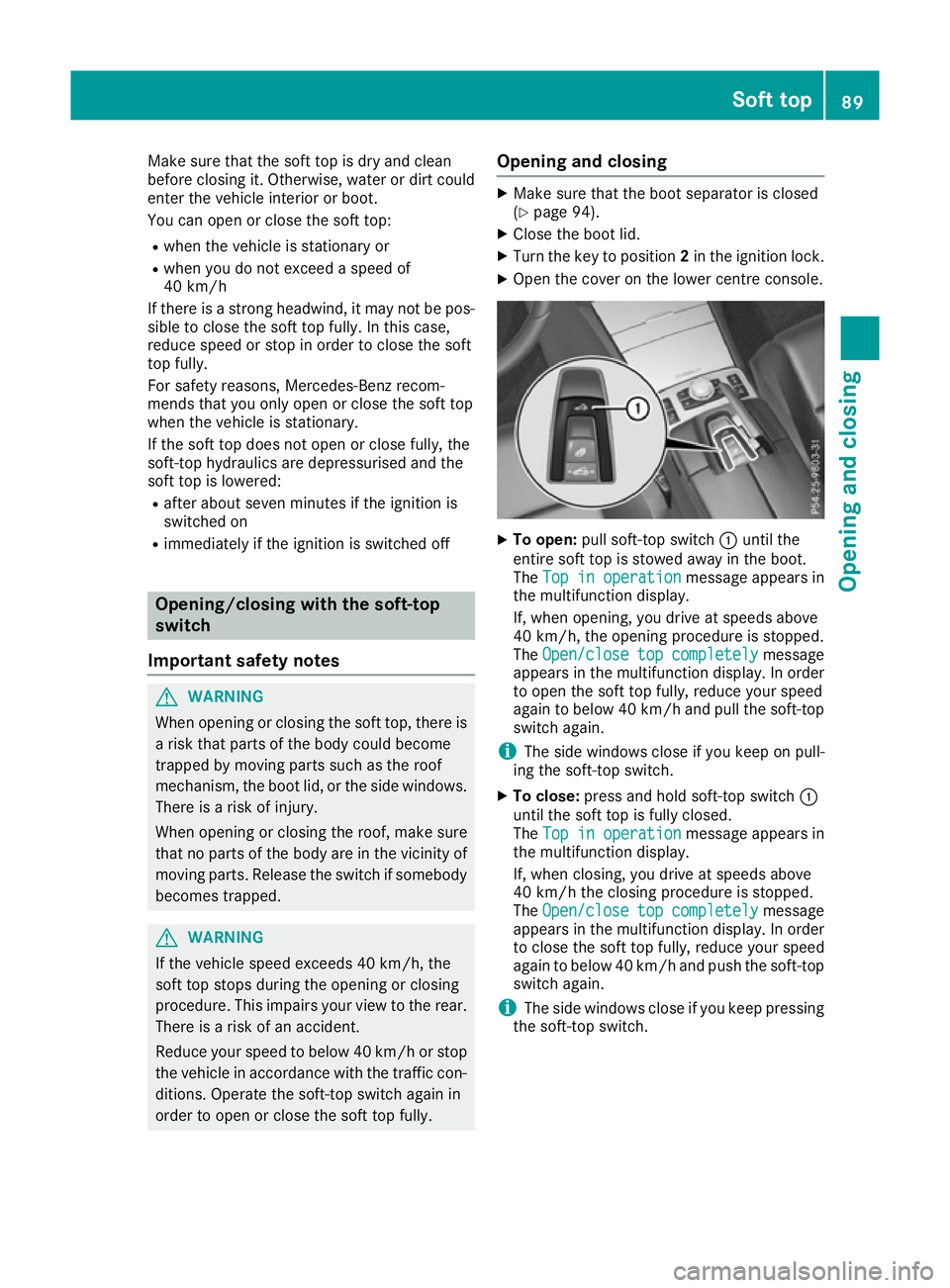
order to open or close the soft top fully. Opening and closing X
Make sure that the boot separator is closed
(Y page 94).
X Close the boot lid.
X Turn the key to position 2in the ignition lock.
X Open the cover on the lower centre console. X
To open: pull soft-top switch :until the
entire soft top is stowed away in the boot.
The Top in operation Top in operation message appears in
the multifunction display.
If, when opening, you drive at speeds above
40 km/h, the opening procedure is stopped.
The Open/close Open/close top
topcompletely
completely message
appears in the multifunction display. In order to open the soft top fully, reduce your speed
again to below 40 km/h and pull the soft-top switch again.
i The side windows close if you keep on pull-
ing the soft-top switch.
X To close: press and hold soft-top switch :
until the soft top is fully closed.
The Top in operation Top in operation message appears in
the multifunction display.
If, when closing, you drive at speeds above
40 km/h the closing procedure is stopped.
The Open/close Open/close top
topcompletely
completely message
appears in the multifunction display. In order
to close the soft top fully, reduce your speed
again to below 40 km/h and push the soft-top switch again.
i The side windows close if you keep pressing
the soft-top switch. Soft top
89Opening and closing Z
Page 93 of 349
Opening and closing with the key
Important safety notes G
WARNING
When opening or closing the soft top, there is a risk that parts of the body could become
trapped by moving parts such as the roof
mechanism, the boot lid, or the side windows.
There is a risk of injury.
When opening or closing the roof, make sure
that no parts of the body are in the vicinity of moving parts. Release the switch if somebody
becomes trapped.
Opening and closing The key must be near the door handle.
X To open: press the %button in the key
until the soft top is completely opened.
The Top in operation
Top in operation message appears in
the multifunction display. The seat ventilation
is switched on. The rear side windows open.
X To close: press the&button in the key
until the soft top is completely closed.
The Top in operation
Top in operation message appears in
the multifunction display. The soft top and the
side windows close. Closing the soft top manually
Important safety notes G
WARNING
Closing the soft top manually is a complex,
technically challenging procedure which can
also be physically demanding. It could lead to you trapping yourself or other persons. There
is a risk of injury.
Where possible, have the soft top closed man-
ually at a qualified specialist workshop.
If the soft top cannot be closed automatically,
check the following points:
R Is the boot separator engaged (Y page 94)?
R Are the head restraints on the rear bench
seats extended? R
Is the boot lid closed?
R Is the on-board voltage sufficient?
Start the engine if necessary.
If automatic operation still does not work, the
soft top can be closed manually.
The help of a second person is required in car-
rying out this procedure.
Closing the soft top X
Apply the parking brake.
X Open the side windows.
X Lower the head restraints automatically
(Y page 102) or manually (Y page 102).
X Remove the key from the ignition lock.
X Open the boot.
X Take the two straps out of the vehicle tool kit
(Y page 305).
X Take the Allen key out of the Owner's Manual
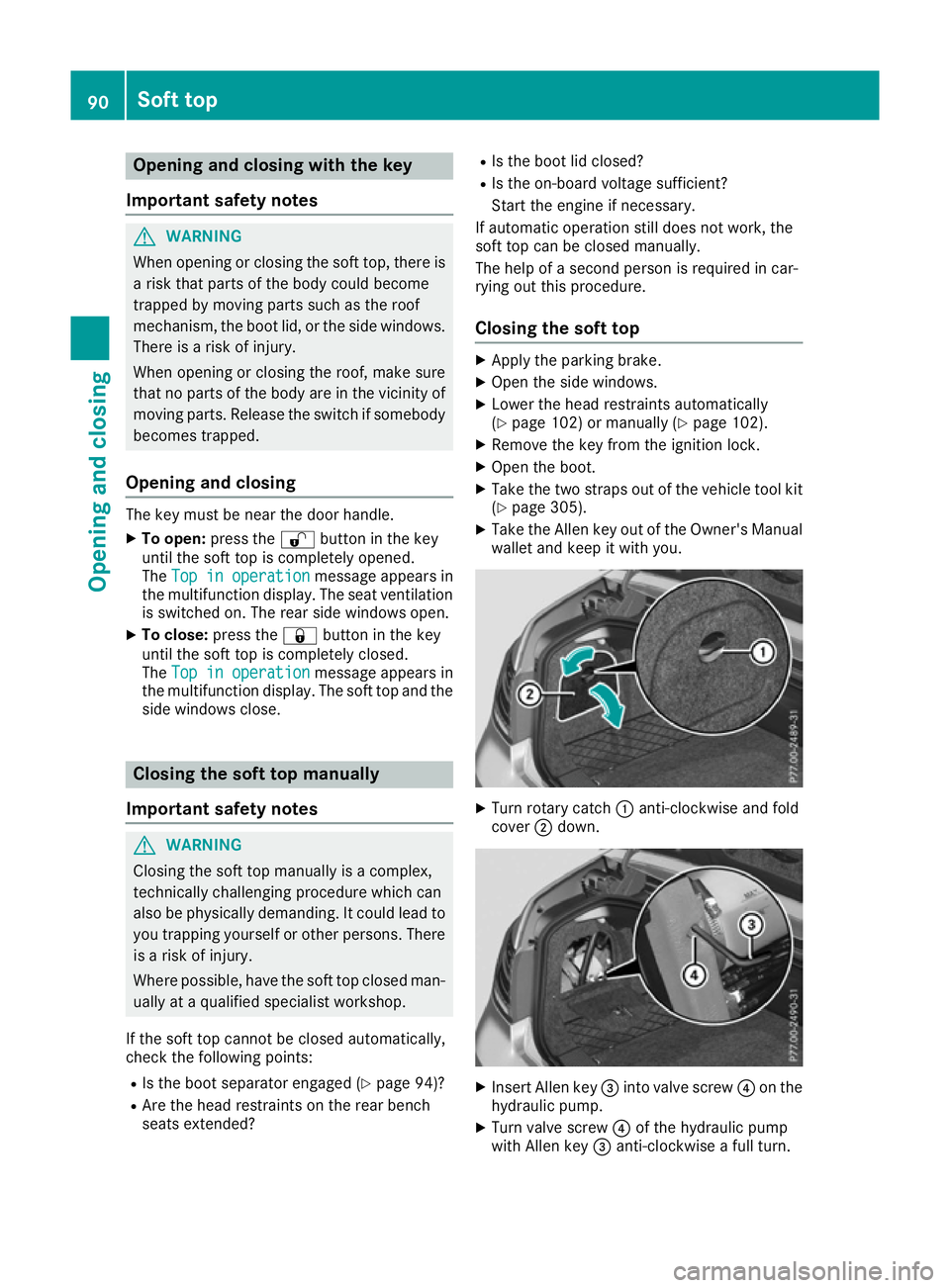
wallet and keep it with you. X
Turn rotary catch :anti-clockwise and fold
cover ;down. X
Insert Allen key =into valve screw ?on the
hydraulic pump.
X Turn valve screw ?of the hydraulic pump
with Allen key =anti-clockwise a full turn. 90
Soft topOpening and closing