oil MERCEDES-BENZ E-CLASS CABRIOLET 2015 Owners Manual
[x] Cancel search | Manufacturer: MERCEDES-BENZ, Model Year: 2015, Model line: E-CLASS CABRIOLET, Model: MERCEDES-BENZ E-CLASS CABRIOLET 2015Pages: 349, PDF Size: 12.51 MB
Page 6 of 349
1, 2, 3 ...
12 V socket see Sockets
360° camera
Cleaning .........................................3 00
Display in the multimedia system .. 194
Function/notes ............................ .192 A
ABS (Anti-lock Braking System) Display message ............................ 230
Function/notes ................................ 62
Important safety notes .................... 62
Warning lamp ................................. 256
Accident
Automatic measures after an acci-
dent ................................................. 49
Activating media mode
General notes ................................ 270
Activating/deactivating air-recir-
culation mode ................................... .131
Activating/deactivating cooling
with air dehumidification ................. 127
Active Blind Spot Assist
Activating/deactivating (on-
board computer) ............................ 222
Display message ............................ 242
Function/notes ............................ .203
Towing a trailer .............................. 205
Active Driving Assistance package .. 203
Active Lane Keeping Assist
Activating/deactivating (on-
board computer) ............................ 222
Display message ............................ 242
Function/notes ............................ .206
Towing a trailer .............................. 208
Active light function ......................... 117
Active Parking Assist
Detecting parking spaces .............. 184
Display message ............................ 243
Exiting a parking space .................. 186
Function/notes ............................ .183
Important safety notes .................. 183
Parking .......................................... 185
Towing a trailer .............................. 187
ADAPTIVE BRAKE ................................. 69 Adaptive Brake Assist
Function/notes ................................ 66
Adaptive brake lights .......................... 66
Adaptive Highbeam Assist Plus
Display message ............................ 237
Function/notes ............................ .117
Switching on/off ........................... 118
AdBlue ®
Display message ............................ 240
Filling capacity ............................... 340
Important safety notes .................. 340
Service indicator ............................ 295
AdBlue ®
service indicator ................ 295
Additional speedometer ................... 223
Additives (engine oil) ........................ 341
Address book
See also Digital Owner's Manual ... 263
Adjusting the volume
COMAND Online ............................ 264
Adjusting volume
Audio 20 ........................................ 264
Air conditioning
General notes ................................ 123
Air filter (white display message) .... 240
Air pressure
see Tyre pressure
Air vents
Glove compartment ....................... 136
Important safety notes .................. 136
Setting .......................................... .136
Setting the blower output of the
AIRSCARF vents ............................ .137
Setting the side air vents .............. .136
Switching AIRSCARF on/off .......... 106
Air-conditioning system
see Climate control
Airbag
Headbag .......................................... 44
Introduction ..................................... 42
PASSENGER AIR BAG OFF indica-
tor lamp .......................................... .38
Airbags
Front airbag (driver, front
passenger) ...................................... .43
Important safety guidelines .............42
Kneebag ........................................... 43
Pelvis airbag .................................... 44 Index
3
Page 13 of 349
Emergency unlocking
Vehicle ............................................ .82
Engine
Display message ............................ 238
ECO start/stop function ................ 142
Engine number .............................. .337
Jump-starting ................................. 313
Running irregularl y......................... 145
Starting problems .......................... 145
Starting the engine with the key .... 141
Starting with KEYLESS GO ............. 141
Stopping ........................................ 158
Tow-starting (vehicle) ..................... 318
Warning lamp (engine diagnos-
tics) ............................................... 259
Engine electronics
Notes ............................................. 335
Problem (fault) ............................... 145
Engine jump starting
see Jump starting (engine)
Engine oil
Additives ........................................ 341
Checking the oil level ..................... 291
Checking the oil level using the
dipstick .......................................... 291
Display message ............................ 239
Filling capacity ............................... 341
Notes about oil grade s................... 340
Notes on oil level/consumption .... 291
Topping up ..................................... 292
Entering an address
See also Digital Owner's Manua l... 263
Environmental protection
Returning an end-of-life vehicle ....... 24
ESP ®
(Electronic Stability Pro-
gram)
Characteristics ................................. 67
Deactivating/activating ................. 221
Deactivating/activating (notes) ....... 68
Display message ............................ 230
Function/note s................................ 67
General notes .................................. 67
Important safety guidelines ............. 67
Trailer stabilisation .......................... 68
Warning lamp ................................. 256
ETS/4ETS (Electronic Traction Sys-
tem) ...................................................... 67 Exhaust pipe (cleaning instruc-
tions)
.................................................. 301
Exterior lighting
Settings options ............................. 114
see Lights
Exterior mirrors
Adjusting ....................................... 110
Anti-dazzle mode (automatic) ........ 111
Folding in when locking (on-boardcomputer) ...................................... 227
Folding in/out (automatically )....... 111
Folding in/out (electrically) ........... 111
Out of position (troubleshooting) ... 111
Parking position ............................. 112
Resetting ....................................... 111
Storing settings (memory func-
tion) ............................................... 112 F
Fault message see Display messages
Favourites
Overview ........................................ 264
Filler cap
see Fuel filler flap
Fire extinguisher ............................... 304
First-aid kit ......................................... 304
Fitting a wheel
Fitting a wheel ............................... 332
Lowering the vehicle ...................... 332
Preparing the vehicle ..................... 329
Raising the vehicl e......................... 330
Removing a whee l.......................... 331
Securing the vehicle against roll-
ing away ........................................ 330
Flat tyre
MOExtended tyre s......................... 306
Preparing the vehicle ..................... 306
TIREFIT kit ...................................... 307
see Emergency spare wheel
Floormat ............................................. 287
Foglamps
Extended rang e.............................. 117
Frequencies
Garage door opener ....................... 285
Mobile phone ................................. 335
Two-way radio ................................ 335 10
Index
Page 17 of 349
PARKTRONIC ................................. 179
PRE-SAFE ®
(anticipatory occu-
pant protection) ...............................47
PRE-SAFE ®
PLUS (anticipatory
occupant protection PLUS) .............. 48
Reversing camera .......................... 188
SPEEDTRONIC ...............................1 65
Traffic Sign Assist .......................... 197
Mercedes-Benz Service Centre
see Qualified specialist workshop
Message memory (on-board com-
puter) ................................................. .229
Messages
see Display messages
Mirrors
see Exterior mirrors
see Rear-view mirror
see Vanity mirror (in sun visor)
Mobile phone
Connecting (Bluetooth ®
inter-
face) .............................................. 266
Connecting another mobile
phone ............................................ 267
Connecting the telephone module
with Bluetooth ®
(SAP profile) ......... 269
Frequencies ................................... 335
Installation ..................................... 335
Menu (on-board computer) ............ 219
Notes/placing in the bracket ......... 281
Transmission output (maximum) .... 335
Mobile telephone
Pre-installed bracket ..................... .282
Modifying the programming (key) ..... 76
MOExtended tyres .............................306
Motorway mode ................................ 117
MP3
Operating ....................................... 218
See also Digital Owner's Manual ... 263
Multicontour seat
Adjusting (on the seat) .................. 104
Multifunction display
Function/notes ............................ .215
Permanent display ......................... 223
Multifunction steering wheel
Operating the on-board computer .. 214
Overview .......................................... 32 Multimedia system
see Separate operating instructions
Music files
See also Digital Owner's Manual ... 263 N
Navigation Menu (on-board computer) ............ 217
See also Digital Owner's Manual ... 263
NECK-PRO head restraints
Important safety notes .................... 47
Operation ......................................... 47
Resetting triggered .......................... 47
Notes on running in a new vehicle .. 138 O
Occupant safety Airbags ............................................ 42
Automatic measures after an acci-
dent ................................................. 49
Children in the vehicle ..................... 49
Important safety notes .................... 37
PASSENGER AIRBAG indicator
lamp ................................................. 38
Pets in the vehicle ........................... 61
PRE-SAFE ®
(anticipatory occu-
pant protection) ............................... 47
PRE-SAFE ®
PLUS (anticipatory
occupant protection PLUS) .............. 48
Restraint system introduction .......... 37
Restraint system warning lamp ....... .38
Odometer ...........................................2 15
Oil
see Engine oil
On-board computer
Assistance menu ........................... 220
Audio menu ................................... 218
Convenience submenu .................. 227
Display messages .......................... 229
Displaying a service message ....... .294
DISTRONIC PLUS ........................... 173
Factory setting submenu .............. .228
Heating submenu ........................... 226
Important safety notes .................. 213
Instrument cluster submenu .......... 223
Light submenu ............................... 223 14
Index
Page 20 of 349
Safety system
see Driving safety systems
SD memory card
Ejecting .......................................... 270
Inserting ........................................2 70
Inserting/removing ........................ 270
See also Digital Owner's Manual ... 263
Selecting ........................................ 218
Seat
Adjusting the multicontour seat ..... 104
Seat backrest display message ..... 250
Seat belt
Automatic comfort-fit feature .......... 41
Correct usage .................................. 40
Switching belt adjustment on/off
(on-board computer) ..................... .227
Seat belts
Adjusting the driver's and front-
passenger seat bel t......................... 41
Cleaning ......................................... 303
Display message ............................ 234
Fastening ......................................... 40
Important safety guidelines ............. 39
Introduction ..................................... 38
Rear seat belt status indicator ......... 42
Releasing ......................................... 41
Warning lamp ................................. 254
Warning lamp (function) ................... 42
Seats
Adjusting (electrically) ................... 101
Adjusting (manually and electri-
cally ).............................................. 100
Adjusting the 4-way lumbar sup-
port ................................................ 104
Adjusting the head restraint .......... 101
Cleaning the cover ......................... 302
Correct driver's seat position ........... 99
Folding the backrests forward/
back ............................................... 103
Important safety notes .................... 99
Overview .......................................... 99
Seat heating .................................. 104
Seat heating problem .................... 106
Storing settings (memory func-
tion) ............................................... 112
Switching AIRSCARF on/of f.......... 106
Switching seat heating on/of f....... 104 Switching the seat ventilation on/
off .................................................. 105
Section
Boot ................................................. 82
Securing a load
see Stowage space
Securing luggage ............................... 276
Selector lever
Cleaning ......................................... 302
Sensors (cleaning instructions) ....... 300
Service
see ASSYST PLUS
Service Centre
see Qualified specialist workshop
Service menu (on-board com-
puter) .................................................. 222
Service message
see ASSYST PLUS
Service products
AdBlue ®
special additive s.............. 340
Brake fluid ..................................... 341
Coolant (engine) ............................ 341
Engine oil ....................................... 340
Fuel ................................................ 337
Important safety notes .................. 337
Washer fluid ................................... 342
Setting the air distribution ............... 128
Setting the airflow ............................ 129
Setting the date/time format
See also Digital Owner's Manua l... 263
Setting the language
See also Digital Owner's Manua l... 263
Setting the time
See also Digital Owner's Manua l... 263
Settings
Factory (on-board computer) ......... 228
On-board compute r....................... 223
Side lamps
Switching on/of f........................... 115
Side windows
Important safety notes .................... 84
Opening/closing .............................. 85
Opening/closing all ......................... 86
Problem (malfunction) ..................... 88
Resetting ......................................... 87
Reversing feature ............................. 85
Sidebag ................................................ 44 Index
17
Page 157 of 349
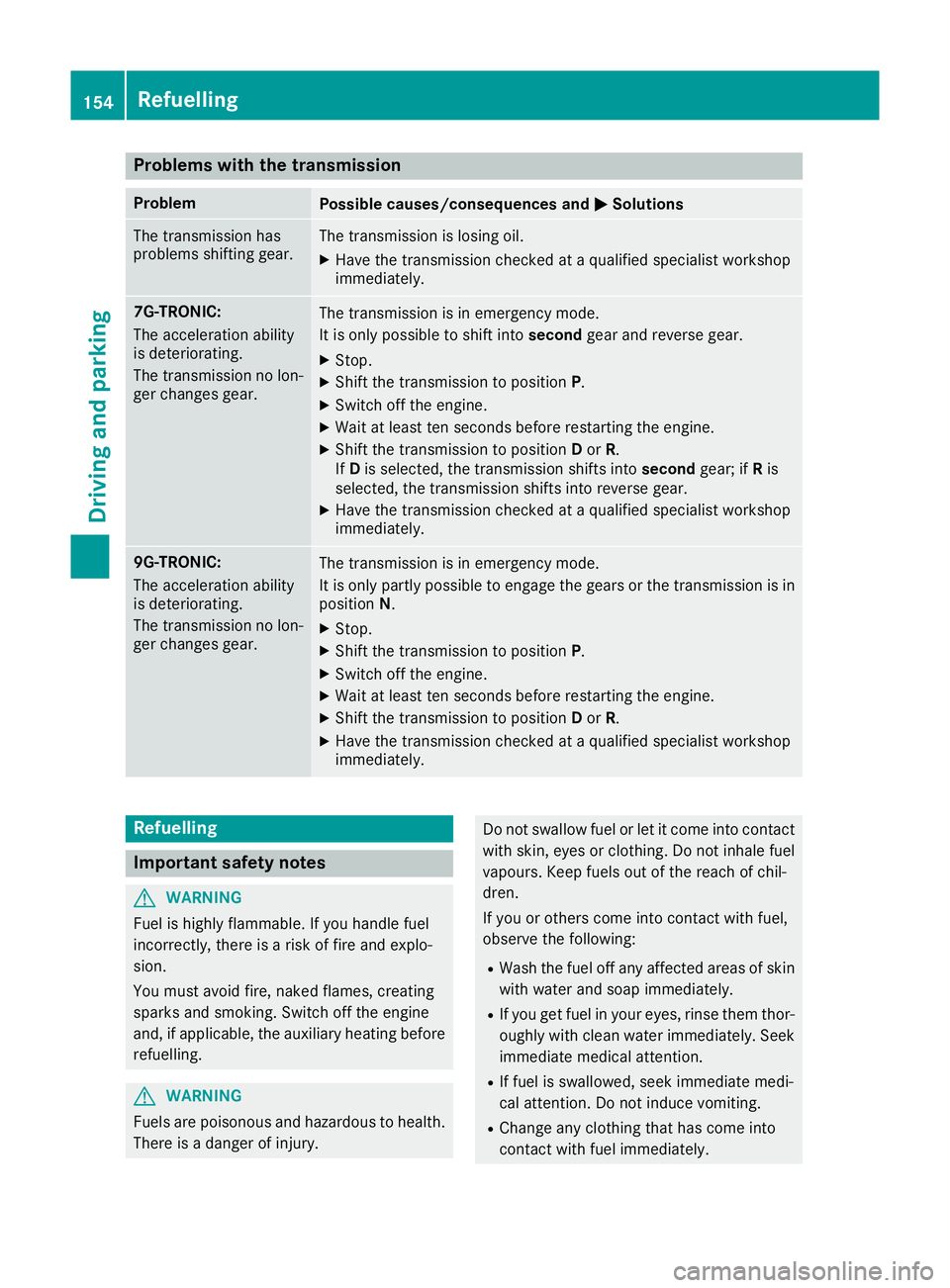
Problems with the transmission
Problem
Possible causes/consequences and
M
MSolutions The transmission has
problems shifting gear. The transmission is losing oil.
X Have the transmission checked at a qualified specialist workshop
immediately. 7G-TRONIC:
The acceleration ability
is deteriorating.
The transmission no lon-
ger changes gear. The transmission is in emergency mode.
It is only possible to shift into
secondgear and reverse gear.
X Stop.
X Shift the transmission to position P.
X Switch off the engine.
X Wait at least ten seconds before restarting the engine.
X Shift the transmission to position Dor R.
If D is selected, the transmission shifts into secondgear; ifRis
selected, the transmission shifts into reverse gear.
X Have the transmission checked at a qualified specialist workshop
immediately. 9G-TRONIC:
The acceleration ability
is deteriorating.
The transmission no lon-
ger changes gear. The transmission is in emergency mode.
It is only partly possible to engage the gears or the transmission is in
position N.
X Stop.
X Shift the transmission to position P.
X Switch off the engine.
X Wait at least ten seconds before restarting the engine.
X Shift the transmission to position Dor R.
X Have the transmission checked at a qualified specialist workshop
immediately. Refuelling
Important safety notes
G
WARNING
Fuel is highly flammable. If you handle fuel
incorrectly, there is a risk of fire and explo-
sion.
You must avoid fire, naked flames, creating
sparks and smoking. Switch off the engine
and, if applicable, the auxiliary heating before refuelling. G
WARNING
Fuels are poisonous and hazardous to health. There is a danger of injury. Do not swallow fuel or let it come into contact
with skin, eyes or clothing. Do not inhale fuel
vapours. Keep fuels out of the reach of chil-
dren.
If you or others come into contact with fuel,
observe the following:
R Wash the fuel off any affected areas of skin
with water and soap immediately.
R If you get fuel in your eyes, rinse them thor-
oughly with clean water immediately. Seek
immediate medical attention.
R If fuel is swallowed, seek immediate medi-
cal attention. Do not induce vomiting.
R Change any clothing that has come into
contact with fuel immediately. 154
RefuellingDriving and parking
Page 242 of 349
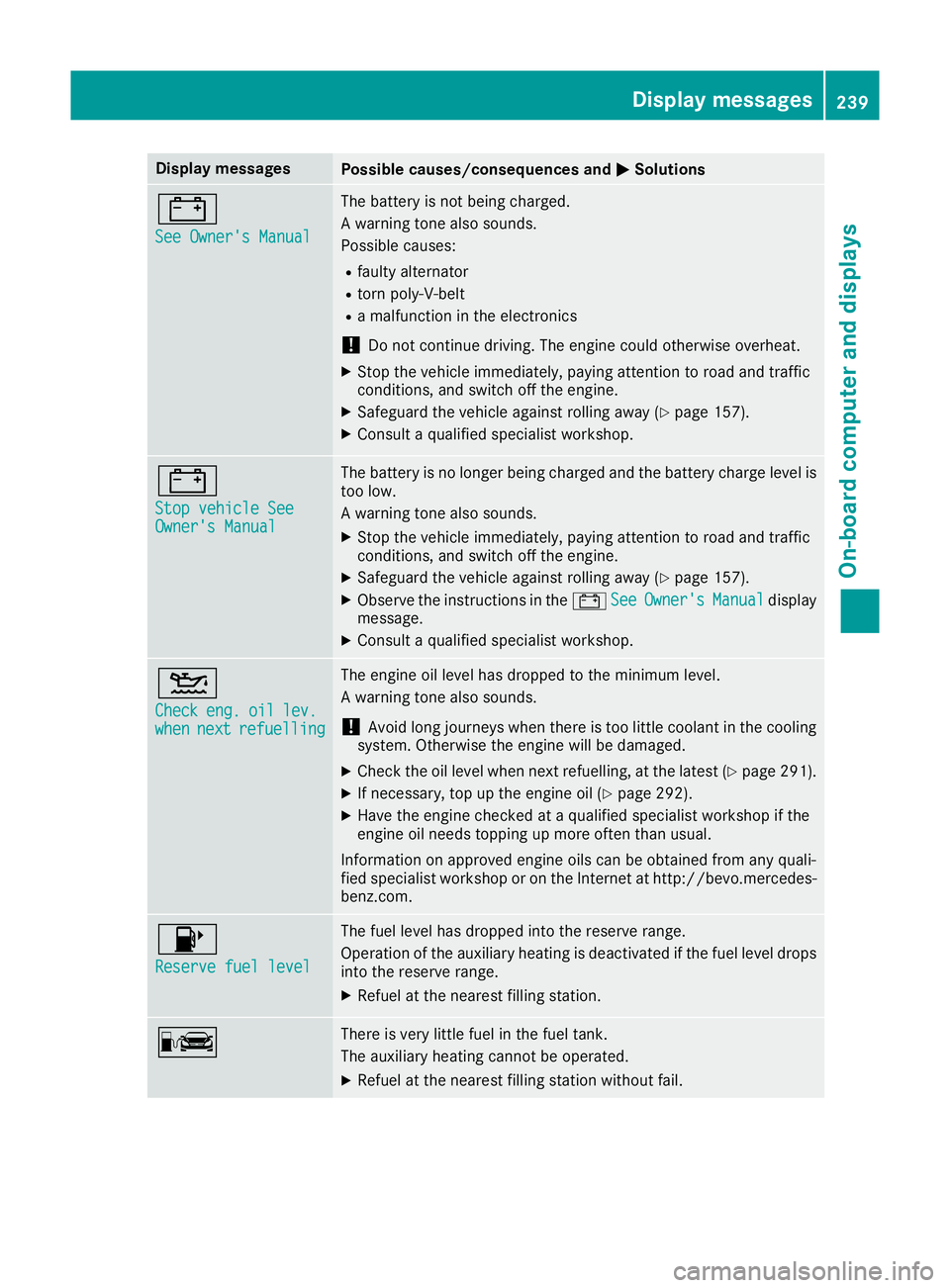
Display messages
Possible causes/consequences and
M
MSolutions #
See Owner's Manual See Owner's Manual The battery is not being charged.
A warning tone also sounds.
Possible causes:
R faulty alternator
R torn poly-V-belt
R a malfunction in the electronics
! Do not continue driving. The engine could otherwise overheat.
X Stop the vehicle immediately, paying attention to road and traffic
conditions, and switch off the engine.
X Safeguard the vehicle against rolling away (Y page 157).
X Consult a qualified specialist workshop. #
Stop vehicle See Stop vehicle See
Owner's Manual Owner's Manual The battery is no longer being charged and the battery charge level is
too low.
A warning tone also sounds.
X Stop the vehicle immediately, paying attention to road and traffic
conditions, and switch off the engine.
X Safeguard the vehicle against rolling away (Y page 157).
X Observe the instructions in the #See SeeOwner's
Owner's Manual
Manualdisplay
message.
X Consult a qualified specialist workshop. 4
Check Check
eng.
eng.oil
oillev.
lev.
when
when next
nextrefuelling
refuelling The engine oil level has dropped to the minimum level.
A warning tone also sounds.
! Avoid long journeys when there is too little coolant in the cooling
system. Otherwise the engine will be damaged.
X Check the oil level when next refuelling, at the latest (Y page 291).
X If necessary, top up the engine oil (Y page 292).
X Have the engine checked at a qualified specialist workshop if the
engine oil needs topping up more often than usual.
Information on approved engine oils can be obtained from any quali-
fied specialist workshop or on the Internet at http://bevo.mercedes-
benz.com. 8
Reserve fuel level Reserve fuel level The fuel level has dropped into the reserve range.
Operation of the auxiliary heating is deactivated if the fuel level drops
into the reserve range.
X Refuel at the nearest filling station. C There is very little fuel in the fuel tank.
The auxiliary heating cannot be operated.
X Refuel at the nearest filling station without fail. Display
messages
239On-board computer and displays Z
Page 294 of 349
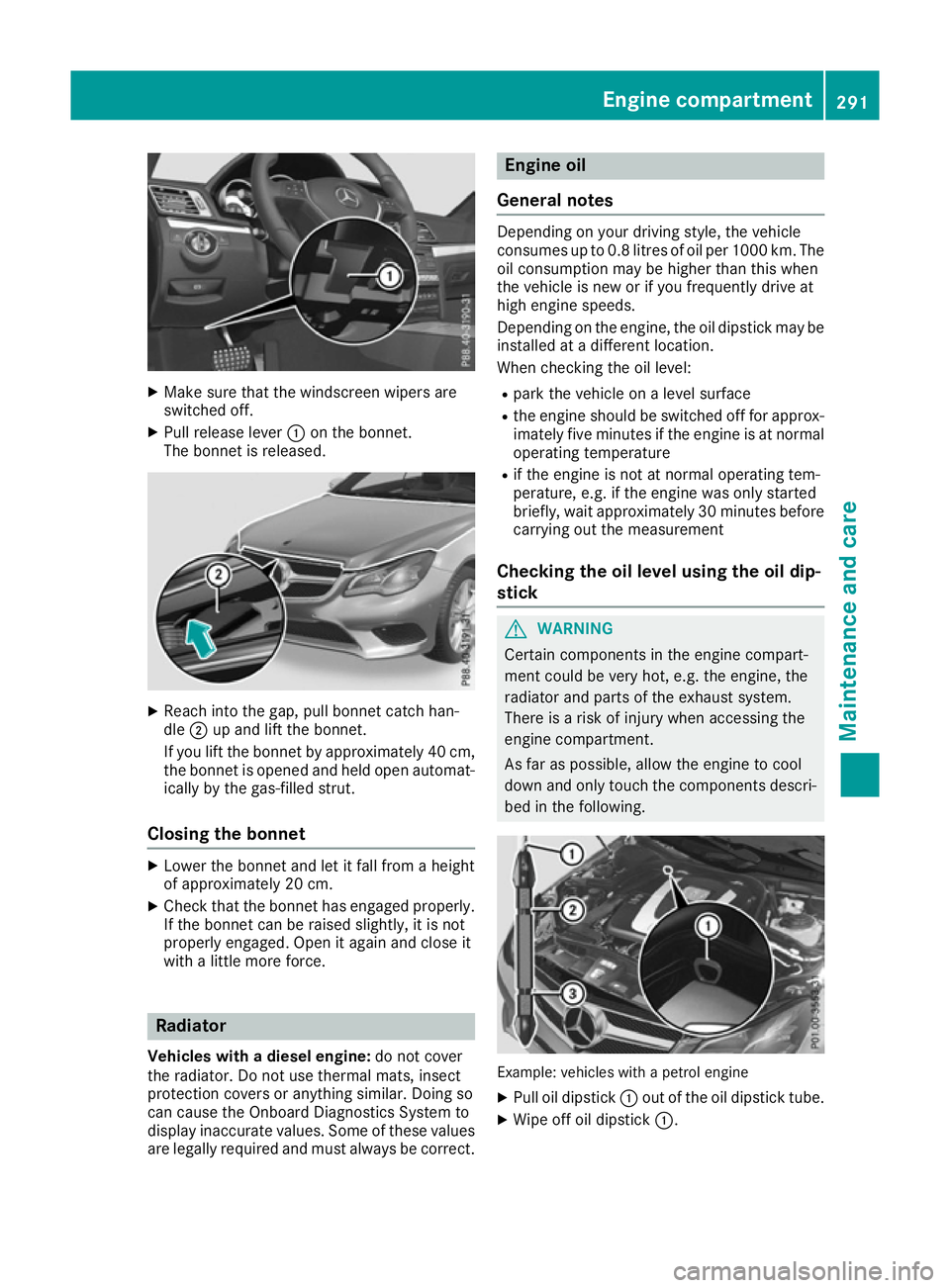
X
Make sure that the windscreen wipers are
switched off.
X Pull release lever :on the bonnet.
The bonnet is released. X
Reach into the gap, pull bonnet catch han-
dle ;up and lift the bonnet.
If you lift the bonnet by approximately 40 cm, the bonnet is opened and held open automat-
ically by the gas-filled strut.
Closing the bonnet X
Lower the bonnet and let it fall from a height
of approximately 20 cm.
X Check that the bonnet has engaged properly.
If the bonnet can be raised slightly, it is not
properly engaged. Open it again and close it
with a little more force. Radiator
Vehicles with a diesel engine: do not cover
the radiator. Do not use thermal mats, insect
protection covers or anything similar. Doing so
can cause the Onboard Diagnostics System to
display inaccurate values. Some of these values are legally required and must always be correct. Engine oil
General notes Depending on your driving style, the vehicle
consumes up to 0.8 litres of oil per 1000 km. The
oil consumption may be higher than this when
the vehicle is new or if you frequently drive at
high engine speeds.
Depending on the engine, the oil dipstick may be installed at a different location.
When checking the oil level:
R park the vehicle on a level surface
R the engine should be switched off for approx-
imately five minutes if the engine is at normal
operating temperature
R if the engine is not at normal operating tem-
perature, e.g. if the engine was only started
briefly, wait approximately 30 minutes before carrying out the measurement
Checking the oil level using the oil dip-
stick G
WARNING
Certain components in the engine compart-
ment could be very hot, e.g. the engine, the
radiator and parts of the exhaust system.
There is a risk of injury when accessing the
engine compartment.
As far as possible, allow the engine to cool
down and only touch the components descri- bed in the following. Example: vehicles with a petrol engine
X Pull oil dipstick :out of the oil dipstick tube.
X Wipe off oil dipstick :. Engine compartment
291Maintenance and care Z
Page 295 of 349
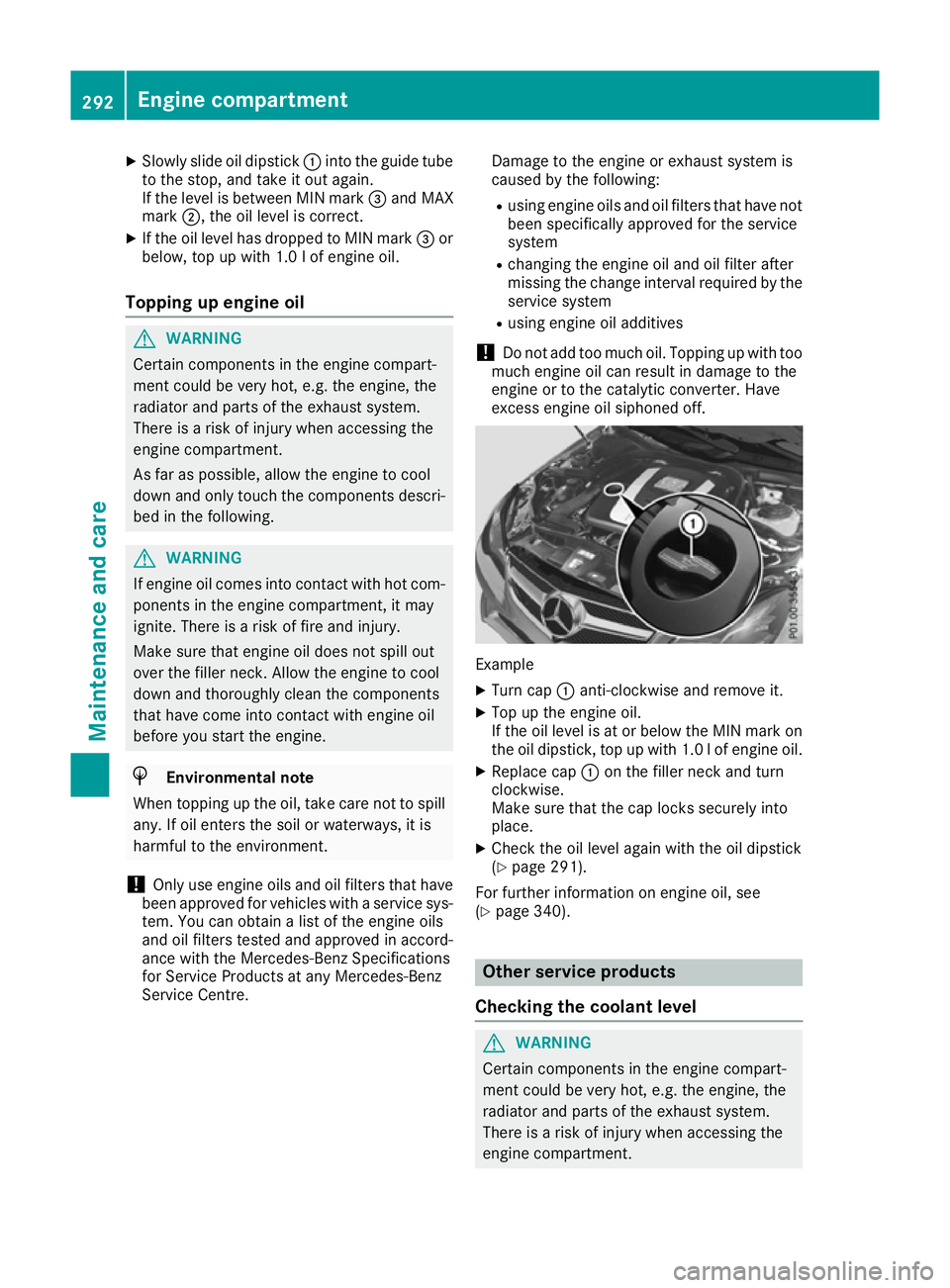
X
Slowly slide oil dipstick :into the guide tube
to the stop, and take it out again.
If the level is between MIN mark =and MAX
mark ;, the oil level is correct.
X If the oil level has dropped to MIN mark =or
below, top up with 1.0 lof engine oil.
Topping up engine oil G
WARNING
Certain components in the engine compart-
ment could be very hot, e.g. the engine, the
radiator and parts of the exhaust system.
There is a risk of injury when accessing the
engine compartment.
As far as possible, allow the engine to cool
down and only touch the components descri- bed in the following. G
WARNING
If engine oil comes into contact with hot com- ponents in the engine compartment, it may
ignite. There is a risk of fire and injury.
Make sure that engine oil does not spill out
over the filler neck. Allow the engine to cool
down and thoroughly clean the components
that have come into contact with engine oil
before you start the engine. H
Environmental note
When topping up the oil, take care not to spill
any. If oil enters the soil or waterways, it is
harmful to the environment.
! Only use engine oils and oil filters that have
been approved for vehicles with a service sys-
tem. You can obtain a list of the engine oils
and oil filters tested and approved in accord-
ance with the Mercedes-Benz Specifications
for Service Products at any Mercedes-Benz
Service Centre. Damage to the engine or exhaust system is
caused by the following:
R using engine oils and oil filters that have not
been specifically approved for the service
system
R changing the engine oil and oil filter after
missing the change interval required by the
service system
R using engine oil additives
! Do not add too much oil. Topping up with too
much engine oil can result in damage to the
engine or to the catalytic converter. Have
excess engine oil siphoned off. Example
X Turn cap :anti-clockwise and remove it.
X Top up the engine oil.
If the oil level is at or below the MIN mark on
the oil dipstick, top up with 1.0 lof engine oil.
X Replace cap :on the filler neck and turn
clockwise.
Make sure that the cap locks securely into
place.
X Check the oil level again with the oil dipstick
(Y page 291).
For further information on engine oil, see
(Y page 340). Other service products
Checking the coolant level G
WARNING
Certain components in the engine compart-
ment could be very hot, e.g. the engine, the
radiator and parts of the exhaust system.
There is a risk of injury when accessing the
engine compartment. 292
Engine compartmentMaintenance and care
Page 297 of 349
Further information on windscreen washer
fluid/antifreeze (Y page 342).Service
ASSYST PLUS
Service messages The ASSYST PLUS service interval display
informs you of the next service due date.
Information on the type of service and service
intervals (see the separate Service Booklet).
You can obtain further information from a
Mercedes-Benz Service Centre.
i The ASSYST PLUS service interval display
does not show any information on the engine oil level. Observe the notes on the engine oil
level (Y page 291).
The multifunction display shows a service mes-
sage for a few seconds, e.g.:
R Service A in .. days Service A in .. days
R Service A overdue
Service A overdue
R Service A overdue by .. days
Service A overdue by .. days
Depending on the operating conditions of the
vehicle, the remaining time or distance until the next service due date is displayed.
The letter indicates which service is due. A A
stands for a minor service and B
Bfor a major ser-
vice. A number or another letter may be dis-
played after the letter.
Only for certain countries: the position after the
letter A
A or B Bindicates any necessary additional
maintenance work to be performed. If you notify a qualified specialist workshop of this display,
you will receive a statement on the associated
costs.
The ASSYST PLUS service interval display does
not take into account any periods of time during
which the battery is disconnected.
Maintaining the time-dependent service sched-
ule:
X Note down the service due date displayed in
the multifunction display before disconnect-
ing the battery.
or X After reconnecting the battery, subtract the
battery disconnection periods from the ser-
vice date shown on the display. Hiding service messages X
Press the aor% button on the steering
wheel.
Displaying service messages X
Switch the ignition on.
X Press the =or; button on the steering
wheel to select the Service Servicemenu.
X Press the 9or: button to select the
ASSYST
ASSYST PLUS
PLUSsubmenu and confirm by press-
ing the abutton.
The service due date appears in the multi-
function display.
Information about Service Resetting the ASSYST PLUS service inter-
val display
! If the ASSYST PLUS service interval display
has been inadvertently reset, this setting can
be corrected at a qualified specialist work-
shop.
Have service work carried out as described in
the Service Booklet. This may otherwise lead to increased wear and damage to the major
assemblies or the vehicle.
A qualified specialist workshop, e.g. a
Mercedes-Benz Service Centre, will reset the
ASSYST PLUS service interval display after the
service work has been carried out. You can also
obtain further information on maintenance
work, for example.
Special service requirements The prescribed service interval is based on nor-
mal operation of the vehicle. Service work will
need to be performed more often if the vehicle is operated under arduous conditions or increased
loads, for example:
R regular city driving with frequent intermediate
stops
R if the vehicle is primarily used to travel short
distances
R for frequent operation in mountainous terrain
or on poor road surfaces
R if the engine is often left idling for long periods
In these or similar operating conditions, have,
for example, the air filter, engine oil and oil filter changed more frequently. The tyres must be
checked more frequently if the vehicle is oper- 294
ServiceMaintenance and care
Page 298 of 349
ated under increased loads. Further information
can be obtained at a qualified specialist work-
shop, e.g. a Mercedes-Benz Service Centre.
Driving abroad An extensive Mercedes-Benz Service network is
also available in other countries. You can obtain
further information from any Mercedes-Benz
Service Centre. AdBlue
®
service indicator
i For BlueTEC vehicles only.
To function properly, BlueTEC exhaust gas after-
treatment must be operated with the reducing
agent AdBlue ®
. AdBlue ®
is topped up as part of
the service. Under normal operating conditions,
a full tank of AdBlue ®
should last until the next
service due date.
Depending on how and where the vehicle is
used, there may be an increase in the AdBlue ®
consumption, resulting in the next service due
date being brought forward.
Certain display messages show that AdBlue ®
must be topped up, e.g.:
Refill Refill AdBlue
AdBlue at
atworkshop
workshop See
SeeOwner's
Owner's
Manual
Manual
Refill AdBlue at workshop No start Refill AdBlue at workshop No start
in .. km
in .. km
A warning signal also sounds.
You can no longer start the vehicle when the
AdBlue ®
supply has been used up (Y page 240).
! Have the AdBlue ®
tank topped up at a quali-
fied specialist workshop only. The vehicle
may otherwise be damaged or soiled.
Before driving your vehicle outside Europe, have the AdBlue ®
supply checked at a qualified spe-
cialist workshop. If necessary, have AdBlue ®
topped up. Before a prolonged stay outside of
Europe, consult a qualified specialist workshop.
Observe the notes on AdBlue ®
(Y page 340).
Further information about BlueTEC exhaust gas
aftertreatment and AdBlue ®
can be obtained at
a qualified specialist workshop, e.g. a
Mercedes-Benz Service Centre. Care
General notes
H
Environmental note
Dispose of empty packaging and cleaning
cloths in an environmentally responsible man- ner.
! For cleaning your vehicle, do not use any of
the following:
R dry, rough or hard cloths
R abrasive cleaning agents
R solvents
R cleaning agents containing solvents
Do not scrub.
Do not touch the surfaces or protective films
with hard objects, e.g. a ring or ice scraper.
You could otherwise scratch or damage the
surfaces and protective film.
! Do not park up the vehicle for an extended
period straight after cleaning it, particularly
after having cleaned the wheels with wheel
cleaner. Wheel cleaners could cause
increased corrosion of the brake discs and
brake pads/linings. For this reason, you
should drive for a few minutes after cleaning. Braking heats the brake discs and the brake
pads/linings, thus drying them. The vehicle
can then be parked up.
Regular care of your vehicle is a condition for
retaining the quality in the long term.
Use care products and cleaning agents recom-
mended and approved by Mercedes-Benz. Washing the vehicle and cleaning the
paintwork
Automatic car wash G
WARNING
Braking efficiency is reduced after the vehicle has been washed. There is a risk of an acci-
dent.
After washing the vehicle, brake carefully
while paying attention to the traffic conditions in order to restore full braking efficiency. Care
295Maintenance and care Z