dome MERCEDES-BENZ E-Class CABRIOLET 2017 A207 Owner's Manual
[x] Cancel search | Manufacturer: MERCEDES-BENZ, Model Year: 2017, Model line: E-Class CABRIOLET, Model: MERCEDES-BENZ E-Class CABRIOLET 2017 A207Pages: 322, PDF Size: 7.97 MB
Page 9 of 322
Setting a speed .............................. 152
Storing and maintaining current
speed ............................................. 151
Cup holder
Center console .............................. 243
Important safety notes .................. 243
Rear compartment ......................... 244
Customer Assistance Center
(CAC) ..................................................... 28
Customer Relations Department ....... 28
D
Dashboard
see Instrument cluster
Data
see Technical data
Data carrier
Selecting ........................................ 194
Daytime running lamps
Display message ............................ 211
Function/notes ............................. 109
Switching on/off (on-board com-
puter) ............................................. 199
Declarations of conformity ................. 27
Delayed switch-off
Exterior lighting (on-board com-
puter) ............................................. 199
Interior lighting .............................. 200
Diagnostics connection ...................... 28
Digital Operator's Manual
Help ................................................. 22
Introduction ..................................... 22
Digital speedometer ......................... 192
DIRECT SELECT lever
Automatic transmission ................. 134
Display messages
ASSYST PLUS ................................ 260
Calling up (on-board computer) ..... 202
Driving systems ............................. 214
Engine ............................................ 212
General notes ................................ 202
Hiding (on-board computer) ........... 202
KEYLESS-GO .................................. 224
Lights ............................................. 211
Safety systems .............................. 203
SmartKey ....................................... 223
Tires ............................................... 219 Vehicle ........................................... 220
Distance recorder ............................. 191
Distance warning (warning lamp) .... 232
Distance warning function
Function/notes ................................ 65
DISTRONIC PLUS
Activating ....................................... 155
Activation conditions ..................... 155
Deactivating ................................... 158
Display message ............................ 216
Displays in the multifunction dis-
play ................................................ 158
Function/notes ............................. 153
Important safety notes .................. 153
Setting the specified minimum
distance ......................................... 157
Stopping ........................................ 156
Doors
Automatic locking (on-board com-
puter) ............................................. 200
Automatic locking (switch) ............... 79
Central locking/unlocking
(SmartKey) ....................................... 73
Control panel ................................... 39
Display message ............................ 222
Emergency locking ........................... 80
Emergency unlocking ....................... 80
Important safety notes .................... 78
Opening (from i
nside) ...................... 78
Drinking and driving ......................... 147
Drive program
Automatic ...................................... 138
Display (DIRECT SELECT lever) ...... 134
Manual ........................................... 138
Manual (vehicles with Sports
package AMG) ............................... 139
Driver's door
see Doors
Driving abroad
Mercedes-Benz Service ................. 261
Driving on flooded roads .................. 150
Driving safety systems
ABS (Anti-lock Braking System) ....... 62
ADAPTIVE BRAKE ............................. 68
Adaptive Brake Assist ...................... 66
BAS (Brake Assist System) .............. 62
BAS PLUS with Cross-Traffic
Assist ............................................... 62
Index7
Page 15 of 322
MOExtended tires.............................. 270
Mounting wheels
Lowering the vehicle ...................... 307
Mounting a new wheel ................... 306
Preparing the vehicle .....................3 04
Raising the vehicle ......................... 305
Removing a wheel .......................... 306
Securing the vehicle against roll-
ing away ........................................ 304
MP3
Operation ....................................... 194
see also Digital Operator's Man-
ual ..................................................2 34
Multicontour seat
Adjusting (on the seat) .................. 100
Multifunction display
Function/notes .............................1 91
Permanent display ......................... 198
Multifunction steering wheel
Operating the on-board computer .. 190
Overview .......................................... 34
Multimedia system
see Separate operating instructions
Music files
see also Digital Operator's Man-
ual ..................................................2 34
N
Navigation
Menu (on-board computer) ............ 193
see also Digital Operator's Man-
ual ..................................................2 34
NECK-PRO head restraints
Important safety notes .................... 54
Operation ......................................... 55
Resetting triggered .......................... 55
Notes on breaking-in a new vehi-
cle ....................................................... 127
O
Occupant Classification System
(OCS)
Conditions ....................................... 49
Faults ............................................... 52
Operation ......................................... 49
System self-test ............................... 51 Occupant safety
Air bags ...........................................4 5
Automatic measures after an acci-
dent ................................................. 56
Children in the vehicle ..................... 57
Important safety notes .................... 40
Introduction to the restraint sys-
tem .................................................. 40
Occupant Classification System
(OCS) ............................................... 48
PASSENGER AIR BAG indicator
lamps ............................................... 41
Pets in the vehicle ........................... 61
PRE-SAFE
®(anticipatory occu-
pant protection) ............................... 55
PRE-SAFE
®PLUS (anticipatory
occupant protection PLUS) .............. 56
Restraint system warning lamp ........ 40
OCS
Conditions ....................................... 49
Faults ............................................... 52
Operation ......................................... 49
System self-test ............................... 51
Odometer ........................................... 191
Oil
see Engine oil
On-board computer
Assistance menu ........................... 196
Audio menu ................................... 194
Convenience submenu .................. 200
Display messages .......................... 202
Displaying a service message ........ 261
DISTRONIC PLUS ........................... 158
Factory settings submenu ............. 201
Important safety notes .................. 189
Instrument cluster submenu .......... 198
Lighting submenu .......................... 199
Menu overview .............................. 191
Message memory .......................... 202
Navigation menu ............................ 193
Operation ....................................... 190
Service menu ................................. 198
Settings menu ............................... 198
Standard display ............................ 191
Telephone menu ............................ 195
Trip menu ...................................... 191
Vehicle submenu ........................... 200
Index13
Page 19 of 322
SMSsee also Digital Operator's Man-
ual .................................................. 234
Snow chains ...................................... 287
Sockets
General notes ................................ 245
Rear compartment .........................2 46
Soft top
AIRCAP ............................................ 92
Cleaning ......................................... 264
Closing manually in an emer-
gency ............................................... 87
Display message ............................ 223
Important safety notes .................... 85
Installing/removing the AIRCAP
wind screen ..................................... 93
Opening/closing (SmartKey) ........... 87
Opening/closing (with soft-top
switch) ............................................. 86
Problem (malfunction) ..................... 95
Relocking ......................................... 91
wind screen ..................................... 91
Soft-top switch ....................................8 6
Sound
Switching on/off ........................... 235
Special seat belt retractor .................. 57
Specialist workshop ............................28
Speed, controlling
see Cruise control
Speedometer
Digital ............................................ 192
In the Instrument cluster ................. 33
Segments ...................................... 189
Selecting the display unit ............... 198
Standing lamps
Display message ............................2 11
Switching on/off ........................... 110
Start/stop function
see ECO start/stop function
Starting (engine) ................................ 129
STEER CONTROL .................................. 71
Steering
Display message ............................ 222
Steering Assist and Stop&Go Pilot
(DISTRONIC PLUS)
Activating/deactivating ................. 197
Display message ............................ 218 Steering assistant
STEER CON-
TROL
see STEER CONTROL
Steering wheel
Adjusting (electrically) ................... 103
Button overview ............................... 34
Buttons (on-board computer) ......... 190
Cleaning ......................................... 268
Important safety notes .................. 102
Paddle shifters ............................... 138
Steering wheel heating .................. 103
Storing settings (memory func-
tion) ............................................... 108
Steering wheel heating
Problem (malfunction) ................... 104
Switching on/off ........................... 103
Steering wheel paddle shifters ........138
Stowage areas ................................... 240
Stowage compartments
Armrest (under) .............................2 41
Center console .............................. 241
Cup holders ................................... 243
Glove box ....................................... 241
Important safety information ......... 240
Stowage net ................................... 242
Under driver's seat/front-
passenger seat .............................. 241
Stowage net ....................................... 242
Stowage well beneath the trunk
floor .................................................... 243
Summer tires ..................................... 287
Sun visor ............................................ 244
Surround lighting (on-board com-
puter) .................................................. 199
Switching air-recirculation mode
on/off ................................................. 125
Switching on media mode
Via the device list .......................... 239
T
Tachometer ........................................ 189
Tail lamps
Display message ............................ 211
Tank
see Fuel tank
Tank content
Fuel gauge ....................................... 33
Index17
Page 21 of 322
Replacing...................................... .303
Service life ..................................... 286
Sidewall (definition) ....................... 303
Speed rating (definition) ................ 302
Storing ...........................................3 04
Structure and characteristics
(definition) ..................................... 301
Temperature .................................. 298
TIN (Tire Identification Number)
(definition) ..................................... 303
Tire bead (definition) ......................3 03
Tire pressure (definition) ................ 303
Tire pressures (recommended) ...... 302
Tire size (data) ............................... 307
Tire size designation, load-bearing
capacity, speed rating .................... 298
Tire tread ....................................... 286
Tire tread (definition) ..................... 303
Total load limit (definition) ............. 303
Traction ......................................... 297
Traction (definition) ....................... 303
Tread wear ..................................... 297
Uniform Tire Quality Grading
Standards ...................................... 297
Uniform Tire Quality Grading
Standards (definition) .................... 301
Wear indicator (definition) ............. 303
Wheel and tire combination ........... 307
Wheel rim (definition) .................... 302
see Flat tire
Tow-starting
Emergency engine starting ............ 282
Important safety notes .................. 280
Towing a trailer
ESP
®(Electronic Stability Pro-
gram) ............................................... 68
Towing away
Important safety guidelines ........... 280
Installing the towing eye ................ 281
Removing the towing eye ............... 281
Transporting the vehicle ................ 282
With both axles on the ground ....... 281
With the rear axle raised ................ 282
Towing eye ......................................... 270
Traffic reports
see al so Di
gital Operator's Man-
ual .................................................. 234 Traffic Sign Assist
Display message ............................ 214
Function/notes ............................. 179
Important safety notes .................. 179
Instrument cluster display ............. 179
Transfer case ..................................... 141
Transmission
see Automatic transmission
Transmission position display ......... 134
Transmission position display
(DIRECT SELECT lever) ...................... 134
Transporting the vehicle .................. 282
Trim pieces (cleaning instruc-
tions) .................................................. 268
Trip computer (on-board com-
puter) .................................................. 192
Trip odometer
Calling up ....................................... 191
Resetting (on-board computer) ...... 192
Trunk
Emergency release .......................... 81
Important safety notes .................... 80
Locking separately ........................... 81
Opening (automatically from
inside) .............................................. 81
Opening/closing (manually from
outside) ............................................ 80
Trunk lid
Display message ............................ 222
Opening dimensions ...................... 317
Trunk load (maximum) ...................... 317
Trunk partition
Display message ............................ 222
General notes .................................. 91
Opening/closing .............................. 91
Turn signals
Display message ............................ 211
Switching on/off ........................... 110
Two-way radio
Frequencies ................................... 310
Installation ..................................... 310
Transmission output (maximum) .... 310
Type identification plate
see Vehicle identification plate
Index19
Page 27 of 322
systems, e.g. the brake system. Use only genu-
ine Mercedes-Benz parts or parts of equal qual-ity. Only use tires, wheels and accessories that
have been specifically approved for your vehi-
cle.
Genuine Mercedes-Benz parts are subject to
strict quality control. Every part has been spe-
cifically developed, manufactured or selected
for and adapted to Mercedes-Benz vehicles.
Only genuine Mercedes-Benz parts should
therefore be used.
More than 300,000 different genuine
Mercedes-Benz parts are available for
Mercedes-Benz models.
All authorized Mercedes-Benz Centers maintain
a supply of genuine Mercedes-Benz parts for
necessary service and repair work. In addition,
strategically located parts delivery centers pro-
vide quick and reliable parts service.
Always specify the vehicle identification number
(VIN) when ordering genuine Mercedes-Benz
parts (
Ypage 311).
Operator's Manual
Vehicle equipment
i
This Operator's Manual describes all models
and all standard and optional equipment of
your vehicle available at the time of going to
print. Country-specific differences are possi-
ble. Bear in mind that your vehicle may not
feature all functions described here. This also applies to safety-relevant systems and func-
tions. The equipment in your vehicle may
therefore differ from that shown in the
descriptions and illustrations.
The original purchase agreement lists all sys-
tems installed in your vehicle.
Should you have any questions concerning
equipment and operation, please consult an
authorized Mercedes-Benz Center.
The Operator's Manual and Maintenance Book-
let are important documents and should be kept
in the vehicle.
Service and vehicle operation
Warranty
The implied warranty for your vehicle applies in
accordance with the warranty terms and condi- tions in the Service and Warranty Information
booklet.
Your authorized Mercedes-Benz Center will
replace and repair all factory-installed parts in
accordance with the following warranty terms
and conditions:
RNew Vehicle Limited Warranty
REmission System Warranty
REmission Performance Warranty
RCalifornia, Connecticut, Maine, Massachu-
setts, New York, Pennsylvania, Rhode Island
and Vermont Emission Control System War-
ranty
RState warranty enforcement laws (lemon
laws)
Replacement parts and accessories are covered
by the Mercedes-Benz Parts and Accessories
warranties. These are available at any author-
ized Mercedes-Benz Center.
iShould you lose your Service and Warranty
Information booklet, have an authorized
Mercedes-Benz Center arrange for a replace-
ment. The new Service and Warranty Infor-
mation booklet will be posted to you.
Information for customers in Califor-
nia
Under California law you may be entitled to a
replacement of your vehicle or a refund of the
purchase price or lease price, if after a reason-
able number of repair attempts Mercedes-Benz
USA, LLC and/or its authorized repair or service
facilities fail to fix one or more substantial
defects or malfunctions in the vehicle that are
covered by its express warranty.
During the period of 18 months from original
delivery of the vehicle or the accumulation of
18,000 miles (approximately 29,000 km) on the
odometer of the vehicle, whichever occurs first,
a reasonable number of repair attempts is pre-
sumed for a retail buyer or lessee if one or more of the following occurs:
(1) the same substantial defect or malfunction results in a condition that is likely to cause
death or serious bodily injury if the vehicle is
driven, that defect or malfunction has been
subject to repair two or more times, and you
Service and vehicle operation25
Introduction
Z
Page 35 of 322
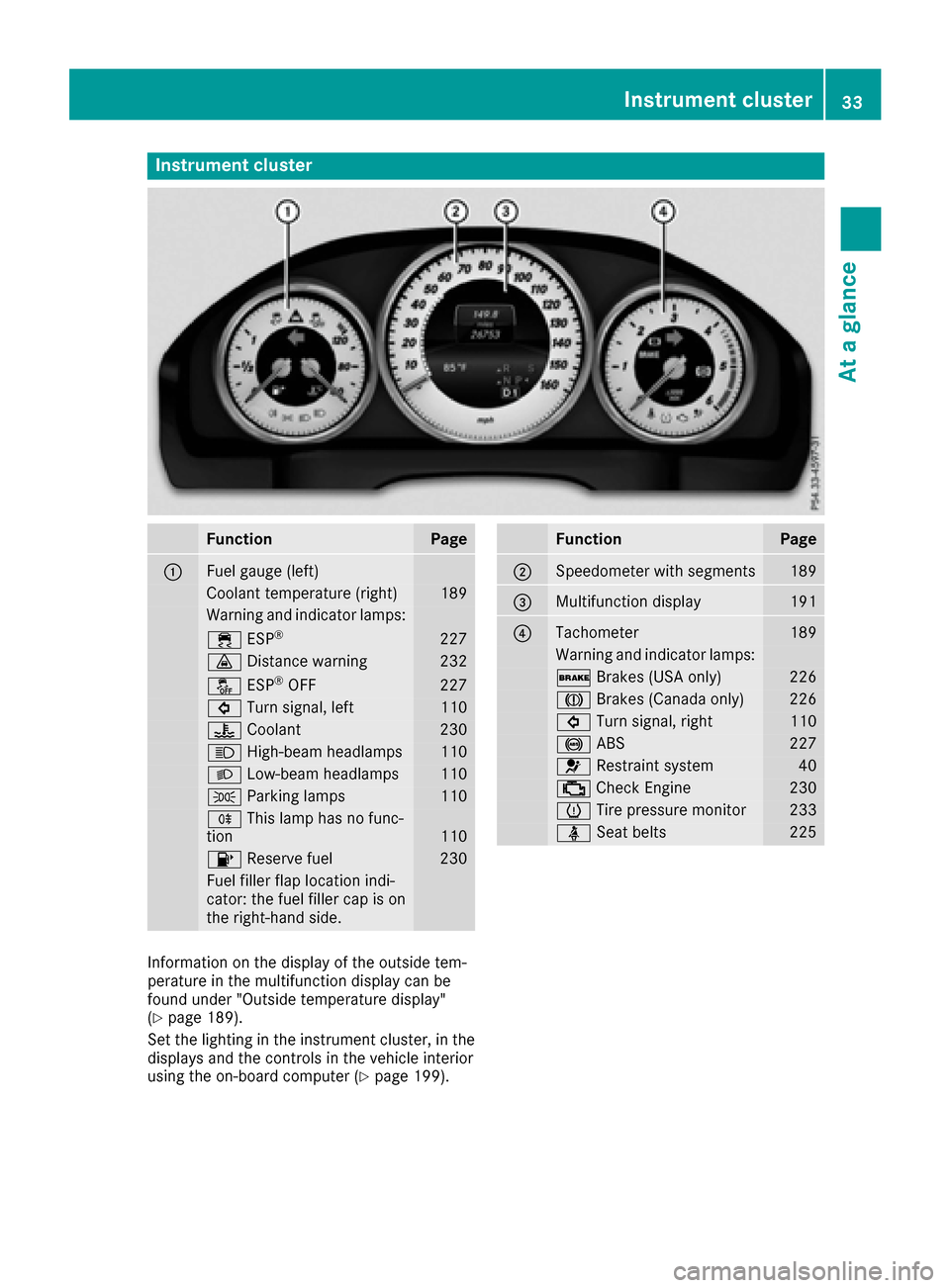
Instrument cluster
FunctionPage
:Fuelgauge (left)
Coolan ttemperature (right )189
Warning and indicator lamps:
÷ ESP®22 7
· Distanc ewarning23 2
å ESP®OF F227
# Turn signal, lef t110
? Coolan t230
K High-beam headlamps110
L Low-beam headlamps110
T Parking lamp s110
R This lamp has no func-
tion11 0
8 Reserve fuel230
Fue lfiller flap location indi-
cator: th efuel filler cap is on
th eright-hand side .
FunctionPage
;Speedometer wit hsegments18 9
=Multifunction display191
?Tachometer189
Warning and indicator lamps:
$ Brakes(US Aonly)22 6
J Brakes(Canada only)22 6
# Turn signal, right110
! ABS227
6 Restrain tsystem40
; CheckEngin e230
h Tirepressur emonitor23 3
ü Seat belt s225
Information on th edisplay of th eoutside tem-
peratur ein th emultifunction display can be
foun dunder "Outside temperature display"
(
Ypage 189).
Se tth elighting in th einstrumen tcluster, in th e
displays and th econtrol sin th evehicl einterior
usin gth eon-board computer (
Ypage 199).
Instrument cluster33
At a glance
Page 44 of 322
The seat belt system comprises:
RSeat belts
REmergency Tensioning Devices for the front
seat belts and the outer seat belts in the rear
RSeat belt force limiters for the front seat belts
and the outer seat belts in the rear
If the seat belt is pulled by the seat belt extender
quickly or with a jerky movement, the belt
retractor locks. The belt strap cannot be extrac-
ted any further.
The Emergency Tensioning Device tightens the
seat belt in an accident, pulling the belt close
against the body. However it does not pull the
vehicle occupant back in the direction of the
backrest.
The Emergency Tensioning Device does not cor-
rect an incorrect seat position or the routing of
an incorrectly fastened seat belt.
When triggered, a seat belt force limiter helps to
reduce the force exerted by the seat belt on the
vehicle occupant.
The seat belt force limiters for the front seats are
synchronized with the front air bags, which
absorb part of the deceleration force. This can
reduce the force exerted on the vehicle occu-
pants during an accident.
!If the front-passenger seat is not occupied,
do not engage the seat belt tongue in the
buckle on the front-passenger seat. Other-
wise, in the event of an accident, the Emer-
gency Tensioning Device and front-passenger
front air bag may be triggered and would need
to be replaced.
Important safety notes
The use of seat belts and child restraint systems
is required by law in:
Rall 50 states
Rthe U.S. territories
Rthe District of Columbia
Rall Canadian provinces
Even where this is not required by law, all vehicle
occupants should correctly fasten their seat
belts before starting the journey.
GWARNING
If the seat belt is incorrectly fastened, it can-
not protect as intended. Furthermore, an
incorrectly fastened seat belt can cause addi-
tional injury, for example, in an accident, dur-
ing braking or when abruptly changing direc-
tion. This poses an increased risk of injury or
even fatal injury.
Make sure that all vehicle occupants are
seated properly with a correctly fastened seat belt.
GWARNING
The seat belt does not offer the intended level of protection if you have not moved the back-
rest to an almost vertical position. When brak-
ing or in the event of an accident, you could
slide underneath the seat belt and sustain
abdomen or neck injuries, for example. This
poses an increased risk of injury or even fatal injury.
Adjust the seat properly before beginning
your journey. Always ensure that the backrest
is in an almost vertical position and that the
shoulder section of your seat belt is routed
across the center of your shoulder.
GWARNING
Persons under 5 ft (1.50 m) in height cannot
fasten the seat belt correctly without an addi- tional suitable restraint system. If the seat
belt is incorrectly fastened, it cannot protect
as intended. Furthermore, an incorrectly fas-
tened seat belt can cause additional injury, for
example, in an accident, during braking or an
abrupt change of direction. This poses an
increased risk of injury or even fatal injury.
For this reason, always secure persons under
5 ft (1.50 m) in height in suitable restraint
systems.
If a child younger than twelve years old and
under 5 ft (1.50 m)in height is traveling in the
vehicle:
Ralways secure the child in a child restraint
system suitable for this Mercedes-Benz vehi-
cle. The child restraint system must be appro-
priate to the age, weight and size of the child
Ralways observe the instructions and safety
notes on "Children in the vehicle"
(
Ypage 57) in addition to the child restraint
42Occupant safety
Safety
Page 45 of 322
system manufacturer's installation and oper-
ating instructions
Rbe sure to observe the instructions and safety
notes on the "Occupant classification system(OCS)" (
Ypage 48)
GWARNING
The seat belts may not perform their intended protective function if:
Rthey are damaged, modified, extremely
dirty, bleach or dyed
Rthe seat belt buckle is damaged or
extremely dirty
Rthe Emergency Tensioning Devices, belt
anchorages or inertia reels have been modi-
fied
Seat belts may sustain non-visible damage in an accident, e.g. due to glass splinters. Modi-
fied or damaged seat belts may tear or fail,
e.g. in an accident. Modified Emergency Ten-
sioning Devices could accidentally trigger or
fail to deploy when necessary. This poses an
increased risk of injury or even fatal injury.
Never modify the seat belts, Emergency Ten-
sioning Devices, belt anchorages or inertia
reels. Make sure that the seat belts are
undamaged, not worn out and clean. Follow-
ing an accident, have the seat belts checked
immediately at a qualified specialist work-
shop.
Only use seat belts that have been approved for
your vehicle by Mercedes-Benz.
Proper use of the seat belts
Pay attention to the safety notes about the seat
belt (Ypage 42).
All vehicle occupants must fasten the seat belt
correctly before setting off. Make sure that all
occupants are wearing their seat belts correctly
for the entire journey.
When fastening the seat belt, make sure that:
RThe seat belt tongue is inserted into the belt
buckle that belongs to the seat.
RThe seat belt is tightened across your body.
Avoid wearing bulky clothing, e.g. a winter
coat.
RThe seat belt is not twisted. Only then can the forces produced in the
event of an accident be evenly distributed
across the belt.
RThe shoulder section of the belt must always
be routed across the center of the shoulder.
The shoulder section of the belt should not
come into contact with your neck and must
not be routed under the arm.
RThe lap belt must be taut and as low as pos-
sible over your lap.
The lap belt must always pass across your hip
joints and never across your stomach or
abdomen. Pregnant women must take partic-
ular care. If necessary, the lap belt can be
pushed down across the hip joints and pulled
tight using the shoulder section.
RThe seat belt is not routed over sharp, pointed
or fragile objects.
If these items are on or in your clothing, e.g.
eyeglasses, pens, keys, etc., stow these items
in a more suitable location.
ROnly one person should use each seat belt at
any one time.
On no account should babies or children
travel sitting on the lap of another vehicle
occupant. During an accident, they could be
crushed between the occupant and seat belt.
RObjects are not secured with a seat belt if the
seat belt is being used by one of the vehicle’s
occupants.
Also make sure that there are no objects, e.g.
cushions, between the occupant and the seat.
Seat belts are solely intended for the protection
and restraint of the vehicle occupants. To
secure objects, luggage or loads, always
observe the "Loading guidelines" (
Ypage 240).
Fastening a seat belt
Observe the safety notes on the seat belt
(Ypage 42) and the notes on correct use of seat
belts (Ypage 43).
GWARNING
If the seat-belt extender is extended during
the journey, the seat belt is not fitted properly
on the body. The seat belt can then no longer
perform its intended protective function. This poses an increased risk of injury or even fatal
injury.
Occupant safety43
Safety
Z
Page 160 of 322
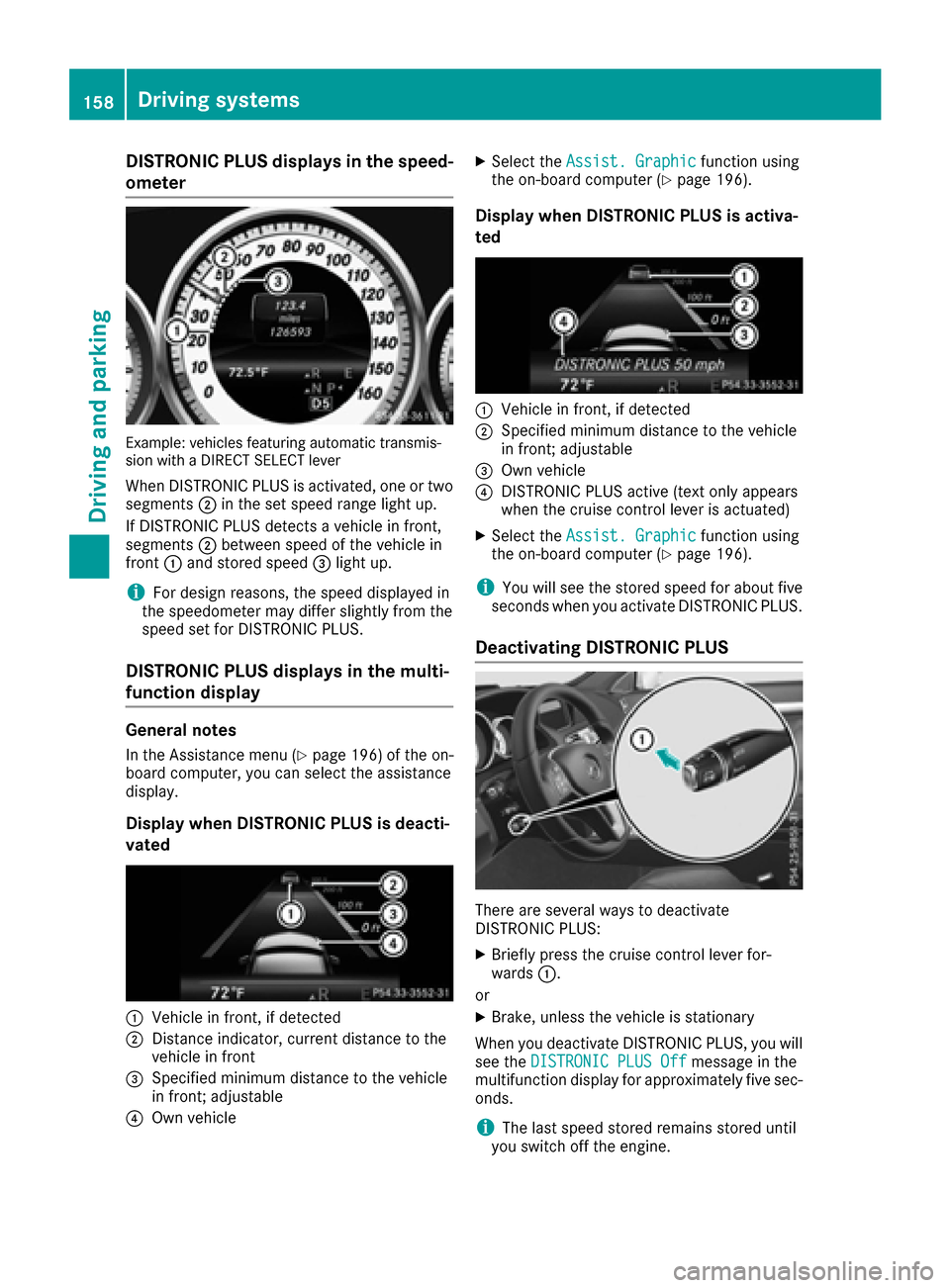
DISTRONICPLUS display sin th espeed -
ometer
Example: vehicles featurin gautomatic transmis -
sio nwit h a DIREC TSELECT lever
Whe nDISTRONIC PLU Sis activated, on eor tw o
segments ;in th eset speed range ligh tup.
If DISTRONIC PLU Sdetects avehicle in front,
segments ;between speed of th evehicle in
fron t: and stored speed =ligh tup.
iFo rdesign reasons, th espeed displaye din
th espeedometer may diffe rslightly from th e
speed set fo rDISTRONIC PLUS.
DISTRONI CPLUS display sin th emulti-
function display
General notes
In th eAssistanc emen u (Ypage 196) of th eon -
boar dcomputer, you can selec tth eassistanc e
display.
Display when DISTRONI CPLUS is deacti -
vate d
:Vehicle in front, if detecte d
;Distanceindicator ,curren tdistanc eto th e
vehicle in fron t
=Specified minimum distanc eto th evehicle
in front; adjustable
?Own vehicle
XSelec tth eAssist .Graphi cfunction usin g
th eon-boar dcompute r (Ypage 196).
Display when DISTRONI CPLUS is activa -
te d
:Vehicle in front, if detecte d
;Specified minimum distanc eto th evehicle
in front; adjustable
=Own vehicle
?DISTRONIC PLU Sactive (tex tonly appears
when th ecruise contro llever is actuated)
XSelec tth eAssist .Graphi cfunction usin g
th eon-boar dcompute r (Ypage 196).
iYou will see th estored speed fo rabout fiv e
seconds when you activat eDISTRONIC PLUS.
Deactivating DISTRONI CPLUS
There are severa lways to deactivat e
DISTRONIC PLUS:
XBriefly press th ecruise contro llever for-
ward s:.
or
XBrake, unless th evehicle is stationary
Whe nyou deactivat eDISTRONIC PLUS, you will
see th eDISTRONIC PLU SOff
messag ein th e
multifunction display fo rapproximately fiv esec -
onds.
iThe last speed stored remain sstored until
you switch of fth eengine.
158Driving systems
Driving an d parking
Page 191 of 322
Important safety notes
GWARNING
If you operate information systems and com-
munication equipmen tintegrate din th evehi-
cle while driving ,you will be distracte dfrom
traffic conditions. You could also lose control
of th evehicle. Ther eis aris kof an accident.
Only operate th eequipmen twhen th etraffic
situation permits. If you are no tsur ethat this
is possible ,park th evehicl epayin gattention
to traffic condition sand operate th eequip-
men twhen th evehicl eis stationary.
You must observ eth elegal requirements for th e
country in whic hyou are currentl ydriving when
operating th eon-board computer.
GWARNIN G
If th einstrumen tcluste rhas faile dor mal-
functioned, you may no trecognize function
restriction sin systems relevan tto safety. The
operating safet yof your vehicl emay be
impaired .Ther eis aris kof an accident.
Drive on carefully. Hav eth evehicl echecke d
at aqualified specialist workshop immedi-
ately.
The on-board computer only shows message sor
warning sfrom certain systems in th emultifunc-
tion display. You should therefor emak esur e
your vehicl eis operating safely at all times .
If th eoperating safet yof your vehicl eis
impaired ,pull ove ras soo nas it is saf eto do so.
Contac t aqualified specialist workshop.
Fo ran overview, see th einstrumen tpanel illus-
tration (
Ypage 33).
Displays and operation
Speedometer with segments
The segments in th espeedometer indicat e
whic hspee drange is available.
RCruis econtrol activated (Ypage 151):
The segments ligh tup from th estore dspee d
to th etype-tested maximum speed.
RDISTRONI CPLU Sactivated (Ypage 153): On
eor two segments in th eset spee drange
ligh tup.
RDISTRONI CPLU Sdetects avehicl ein front:
The segments between th espee dof th evehi-
cle in fron tand th estore dspee dligh tup.
Tachometer
!
Do no tdriv ein th eoverrevving range, as this
could damag eth eengine.
The red ban din th etachometer indicates th e
engine's overrevving range.
The fuel suppl yis interrupted to protect th e
engin ewhen th ered ban dis reached.
Outside temperature display
You should pay special attention to road condi-
tion swhen temperatures are aroun dfreezing
point.
Bea rin min dthat th eoutside temperature dis-
play indicates th etemperature measured and
does no trecord th eroad temperature.
The outside temperature display is in th emulti-
function display (
Ypage 191).
The multifunction display shows changes in th e
outside temperature wit h adelay.
Coolant temperature display
GWARNIN G
Opening th ehoo dwhen th eengin eis over-
heated or when there is afir ein th eengin e
compartmen tcould expos eyou to hot gase s
or other servic eproducts .Ther eis aris kof
injury.
Let an overheate dengin ecool down before
opening th ehood. If there is afir ein th e
engin ecompartment, keep th ehoo dclosed
and contact th efir edepartment.
!A display message is shown if th ecoolan t
temperature is to ohigh .
If th ecoolan ttemperature is ove r24 8 ‡
(12 0†), do no tcontinue driving .The engin e
will otherwise be damaged.
The coolan ttemperature gauge is in th einstru-
men tcluste ron th eleft-han dside (
Ypage 33).
Displays and operation189
On-board computer and displays
Z