lights MERCEDES-BENZ E-CLASS CABRIOLET 2017 User Guide
[x] Cancel search | Manufacturer: MERCEDES-BENZ, Model Year: 2017, Model line: E-CLASS CABRIOLET, Model: MERCEDES-BENZ E-CLASS CABRIOLET 2017Pages: 521, PDF Size: 10.64 MB
Page 94 of 521
#
Toselect the front passenger seat: press
button 1.
When the indicator lamp lights up, the front
passenger seat is selected. #
Adjust the front passenger seat using the
buttons in the door control panel on the driv‐
er's side. Ad
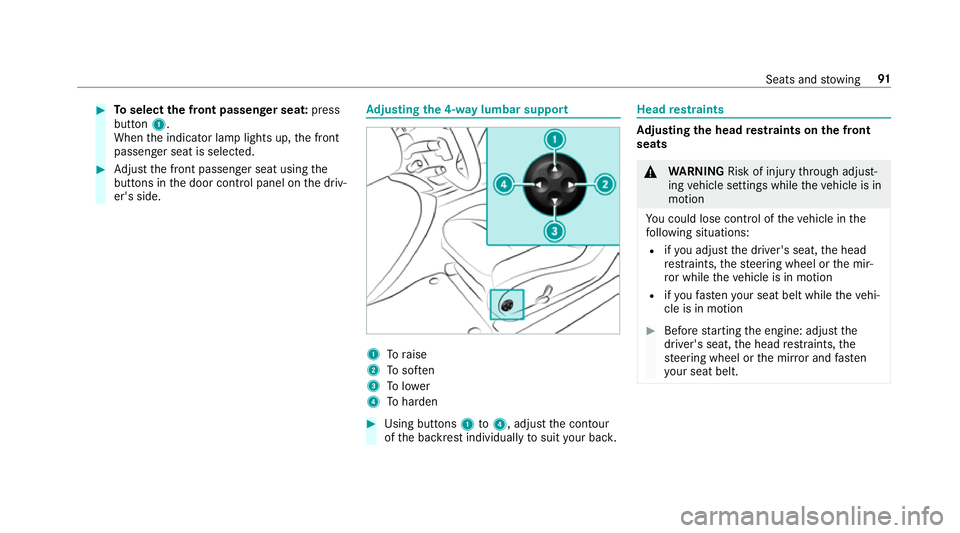
justing the 4-w aylumbar support 1
Toraise
2 Tosof ten
3 Tolower
4 Toharden #
Using buttons 1to4 , adjust the conto ur
of the backrest individually tosuit your bac k. Head
restra ints Ad
justing the head restra ints on the front
seats &
WARNING Risk of inju rythro ugh adjust‐
ing vehicle settings while theve hicle is in
motion
Yo u could lose cont rol of theve hicle in the
fo llowing situations:
R ifyo u adjust the driver's seat, the head
re stra ints, thesteering wheel or the mir‐
ro r while theve hicle is in motion
R ifyo ufast enyour seat belt while theve hi‐
cle is in motion #
Before starting the engine: adjust the
driver's seat, the head restra ints, the
st eering wheel or the mir ror and fasten
yo ur seat belt. Seats and
stowing 91
Page 117 of 521
Exterior lighting
Changing
the lights when driving abroad Ve
hicles with static LED headlamps: It is not
necessa ryto change the headlamps. The legal
re qu irements are also met in countries where
people drive on theot her side of thero ad.
Ve hicles with Intelligent Light Sy stem: Before
crossing the border into count ries where they
drive on theot her side of thero ad, it is neces‐
sary toset the headlamps tosymmetrical dipped
beam (→ page120).
Af terch anging the headlamps:
R Oncoming tra ffic is not dazzled.
R The edge of thero ad is not illuminated as far
or as high.
R The "mo torw ay mode" and "enhanced fog
light functions" are not available.
The headlamps must be reset toasymm etrical
dipped beam af terre turning from ab road. Lighting sy
stems and your responsibility The
various lighting sy stems of theve hicle are
only aids. The driver of theve hicle is responsible
fo r cor rect vehicle illumination in accordance
with the pr evailing light and visibility conditions,
legal requirements and traf fic situation. Light switch
Ope
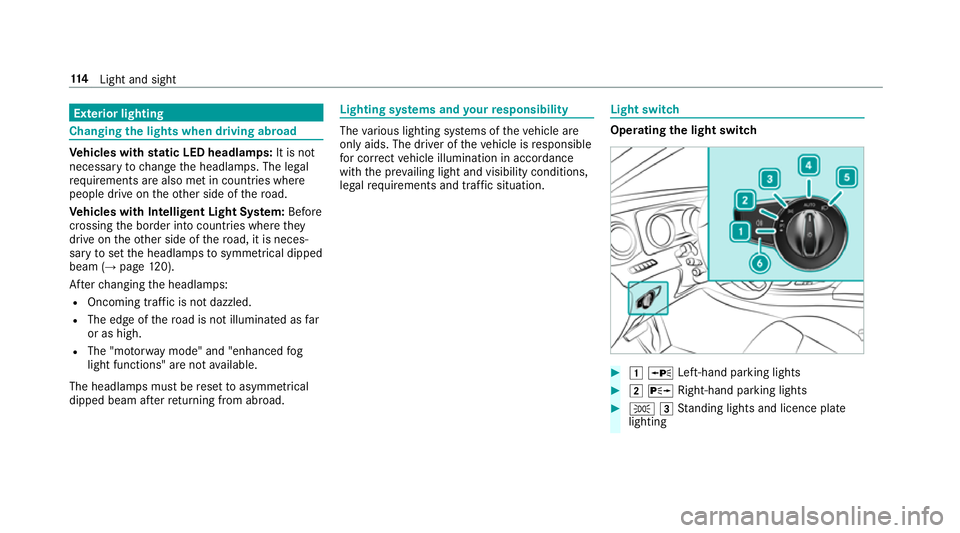
rating the light switch #
1 W Left-hand pa rking lights #
2 X Right-hand parking lights #
T 3Standing lights and licence plate
lighting 11 4
Light and sight
Page 118 of 521
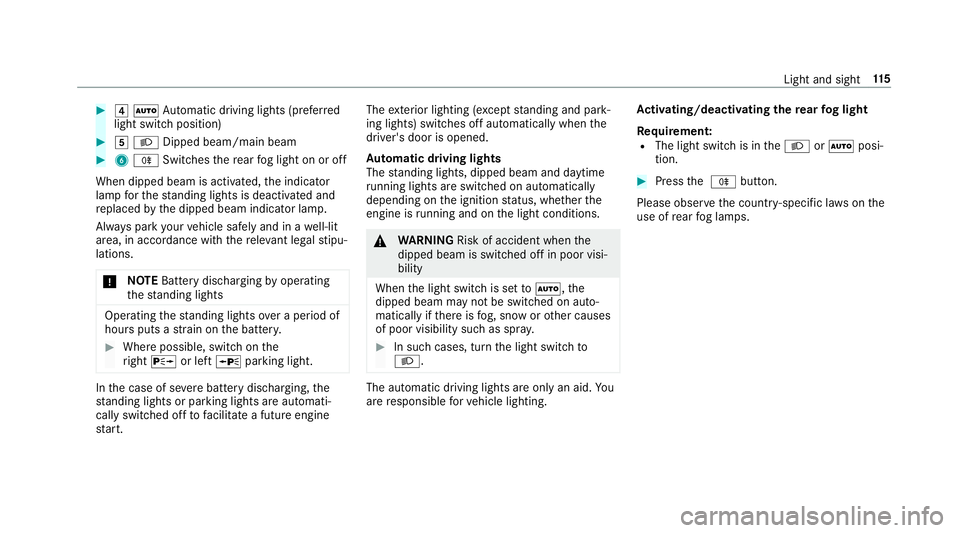
#
4 Ã Automatic driving lights (prefer red
light switch position) #
5 L Dipped beam/main beam #
6 R Switches there ar fog light on or off
When dipped beam is activated, the indicator
lamp forth est anding lights is deactivated and
re placed bythe dipped beam indicator lamp.
Alw ays park your vehicle safely and in a well-lit
area, in accordance with there leva nt le galst ipu‐
lations.
* NO
TEBattery discharging byoperating
th est anding lights Operating
thest anding lights over a period of
hours puts a stra in on the batter y. #
Where possible, switch on the
ri ght X or left Wparking light. In
the case of se vere battery discharging, the
st anding lights or parking lights are automati‐
cally swit ched off tofacilitate a futu reengine
st art. The
exterior lighting (e xcept standing and park‐
ing lights) swit ches off automatically when the
driver's door is opened.
Au tomatic driving lights
The standing lights, dipped beam and daytime
ru nning lights are switched on au tomatical ly
depending on the ignition status, whe ther the
engine is running and on the light conditions. &
WARNING Risk of accident when the
dipped beam is switched off in poor visi‐
bility
When the light switch is set toà ,the
dipped beam may not be switched on auto‐
matically if there is fog, snow or other causes
of poor visibility such as spr ay. #
In such cases, turn the light switch to
L . The automatic driving lights are only an aid.
Yo u
are responsible forve hicle lighting. Ac
tivating/deactivating the rear fog light
Re quirement:
R The light switch is in theL orà posi‐
tion. #
Press the R button.
Please obser vethe count ry-specific la wsonthe
use of rear fog lamps. Light and sight
11 5
Page 122 of 521
Switching
the Intelligent Light Sy stem
on/off
Re quirement:
The light switch is in theà position.
Multimedia sy stem:
, Vehicle .
÷ Light settings .
Intell.
Light System #
Activate Oor deacti vate ª the function. Ad
aptive Highbeam Assist Plus Fu
nction of Adaptive Highbeam Assist Plus &
WARNING Risk of accident despi te
Ad aptive Highbeam Assist Plus
Ad aptive Highbeam Assist Plus does not rec‐
ognise thefo llowing road users:
R Road users without lights, e.g. pedes‐
trians
R Road users with poor lighting, e.g.
cyclists R
Road users whose lighting is obstructed,
e.g. bya bar rier
In very rare cases, Adaptive Highbeam Assist
Plus may not recognise road users who do
ha ve lights, or may recognise them too late.
In this, or in similar situations, the automatic
main beam will not be deactivated or will be
activated despite the presence of other road
users. #
Alw ays obser vethe tra ffic carefully and
switch off the main beam in good time. Sy
stem limitations
Ad aptive Highbeam Assist Plus cannot take into
account road, weather or traf fic conditions.
De tection may be restricted if:
R Visibility is impaired, forex ample in fog,
heavy rain or sno w.
R There is dirt on the sensors or the sensors
are obscured.
Ad aptive Highbeam Assist Plus is on lyan aid.
Yo u are responsible for adju sting theve hicle's lighting
tothe pr evailing light, visibility and traf‐
fi c conditions. Ad
aptive Highbeam Assist Plus swit ches auto‐
matically between:
R Dipped beam
R Partial main beam
R Main beam Light and sight
11 9
Page 123 of 521
The partial main beam uses
the main beam to
shine past other road users rath er than dazzling
th em. The vehicle in front is illuminated bythe
dipped beam.
At speeds abo ve30 km/h:
R If no other road users are de tected, the main
beam is automatically switched on.
R Ifot her road users are de tected, the partial
main beam is automatically switched on.
At speeds below 25 km/h or when there is suf fi‐
cient stre et lighting:
R The partial main beam switches off automati‐
call y.
R The main beam switches off automatically.
At speeds abo veappr ox. 50 km/h:
R The headlamp range of the dipped beam is
re gulated automatically based on the dis‐
ta nce to ot herroad users.
The sy stem's optical sensor is located behind
th e windscreen near theove rhead control panel. Switching
Adaptive Highbeam Assist Plus
on/off #
Toswitch on: turnthe light switch to
th eà position. #
Switch on the main beam using the combina‐
tion switch.
When the main beam is switched on auto‐
matically in the dar k,the_ indicator
lamp in the multifunction display comes on. #
Toswitch off: switch offthe main beam
using the combination switch. Setting
the dipped beam Multimedia sy
stem:
, Vehicle .
÷ Light set-
tings .
Dipped-beams #
Select Left-side traffic orRight-side traffic. Setting
the sur round lighting Re
quirement:
The light switch is in theà position. Multimedia sy
stem:
, Vehicle .
÷ Light settings .
Loca-
tor lighting
Exterior switch-off delay time: theex terior
lighting is switched on for a short time af terthe
ve hicle is switched off. #
Set the switch-off delay time.
Locator lighting: if a switch-off delay time is
set, theex terior lighting remains lit for 30 sec‐
onds af terth eve hicle is unloc ked. When you
st art theve hicle, the locator lighting is switched
off and automatic driving lights are activated. 12 0
Light and sight
Page 138 of 521
*
NO
TEBattery discharge caused bysta‐
tionary heater or stationary ventilation
operation Ope
rating thest ationary heater or stationary
ve ntilation drains the batter y. #
After heating or ventilating theve hicle
twice, drive for a longer period of time. Re
quirement:
R The fuel tank is filled toat least reser vefuel
le ve l. #
Set the desired temp erature using thew
button. #
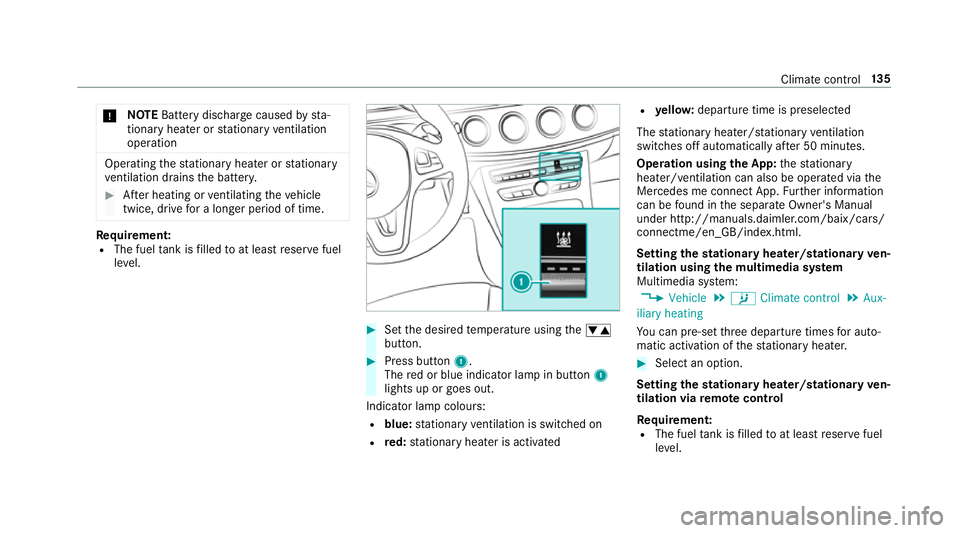
Press button 1.
The red or blue indicator lamp in button 1
lights up or goes out.
Indicator lamp colours: R blue: stationary ventilation is switched on
R red: stationary heater is activated R
yello w: departure time is preselected
The stationary heater/ stationary ventilation
switches off au tomatically af ter 50 minutes.
Operation using the App: thest ationary
heater/ ventilation can also be operated via the
Mercedes me connect App. Further information
can be found in the separate Owner's Manual
under http://manuals.daimler.com/baix/cars/
connectme/en_GB/index.html.
Setting thest ationary heater/stationary ven‐
tilation using the multimedia sy stem
Multimedia sy stem:
, Vehicle .
b Climate control .
Aux-
iliary heating
Yo u can pre-set thre e departure times for auto‐
matic activation of thest ationary heater. #
Select an option.
Setting thest ationary heater/stationary ven‐
tilation via remo tecont rol
Re quirement:
R The fuel tank is filled toat least reser vefuel
le ve l. Climate control
13 5
Page 150 of 521
The
è symbol appears in the multifunction
display when theve hicle is stationar y.If not all
th eve hicle conditions are met, theç symbol
appears in the multifunction displa y.
The engine is restar ted automatically if:
R Youre lease the brake pedal with the trans‐
mission in position hwhen the HOLD func‐
tion is not active.
R You shift from transmission position j.
R You en gage transmission position hork.
R You depress the accelerator pedal.
R Youch ange theve hicle le vel.
R You open or close the soft top.
R An automatic engine start is necessar y.
If th e engine was switched off bythe ECO start/
st op function and you lea vetheve hicle, a warn‐
ing tone sounds. The Vehicle is operational
Switch off the ignition before exiting display
messa gealso appears in the multifunction dis‐
pla y.Ifyo u do not swit choff the ignition, the
ignition is automatically switched off af ter one
minute. Switching
the ECO start/s top function
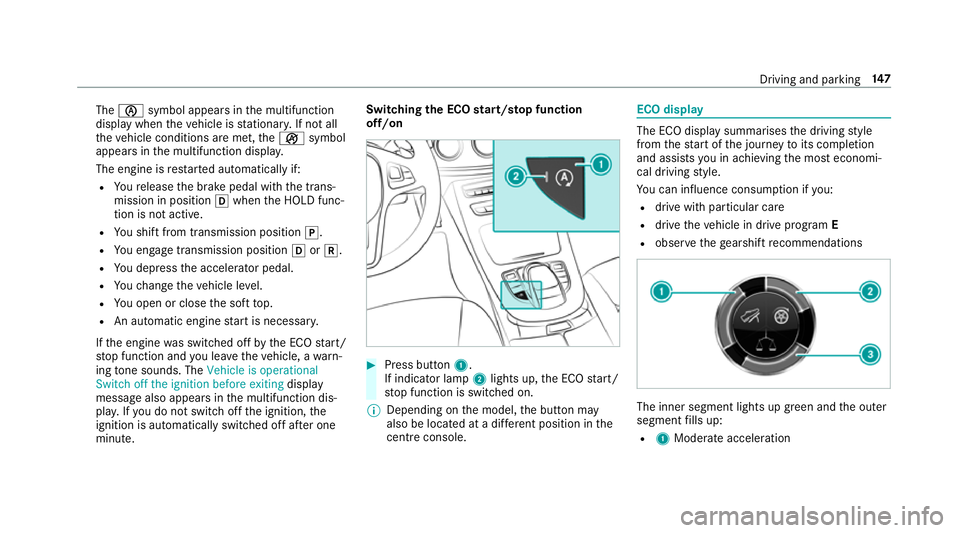
off/on #
Press button 1.
If indicator la mp2lights up, the ECO start/
st op function is switched on.
% Depending on the model, the button may
also be located at a dif fere nt position in the
centre console. ECO displ
ay The ECO display summarises
the driving style
from thest art of the journey toits completion
and assists you in achieving the most economi‐
cal driving style.
Yo u can influence consum ption if you:
R drive with particular care
R drive theve hicle in drive program E
R obser vethege arshift recommendations The inner segment lights up green and
the outer
segment fills up:
R 1 Moderate acceleration Driving and parking
147
Page 151 of 521
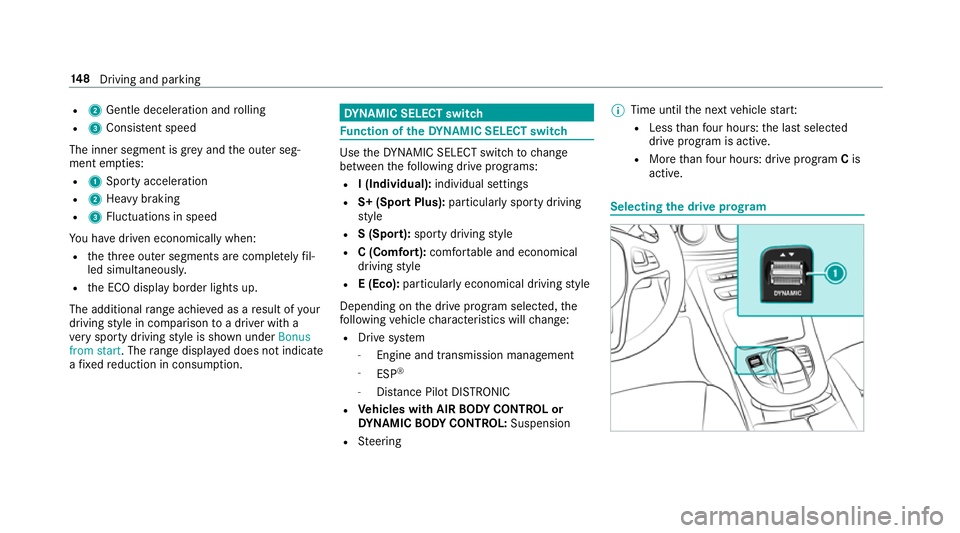
R
2 Gentle deceleration and rolling
R 3 Consis tent speed
The inner segment is gr eyand the outer seg‐
ment em pties:
R 1 Sporty acceleration
R 2 Heavy braking
R 3 Fluctuations in speed
Yo u ha vedriven economically when:
R theth re e outer segments are comple tely fil‐
led simultaneousl y.
R the ECO display border lights up.
The additional range achi eved as a result of your
driving style in comparison toa driver with a
ve ry sporty driving style is shown under Bonus
from start. The range displ ayed does not indicate
a fixe dre duction in consum ption. DY
NA MIC SELECT switch Fu
nction of theDY NA MIC SELECT switch Use
theDY NA MIC SELECT switch tochange
between thefo llowing drive programs:
R I (Individual): individual settings
R S+ (Sport Plus): particularlysporty driving
st yle
R S (Sport): sporty driving style
R C (Comfort): comfortable and economical
driving style
R E (Eco): particular lyeconomical driving style
Depending on the drive program selected, the
fo llowing vehicle characteristics will change:
R Drive sy stem
- Engine and transmission management
- ESP ®
- Distance Pilot DISTRONIC
R Vehicles with AIR BODY CONT ROL or
DY NA MIC BODY CONT ROL:Suspension
R Steering %
Time until the next vehicle star t:
R Less than four hours: the last selected
drive program is active.
R More than four hours: drive program Cis
active. Selecting
the drive prog ram 14 8
Driving and pa rking
Page 163 of 521
persons in
thera nge of mo vement of the
ga rage door can become trapped or stru ck
by thega rage door. #
When using the integrated garage door
opener, alw ays make sure that nobody
is within the sweep of thega rage door. Prior
toprog ramming a garage door opener, park
th eve hicle outside thega rage and swit choff the
engine. #
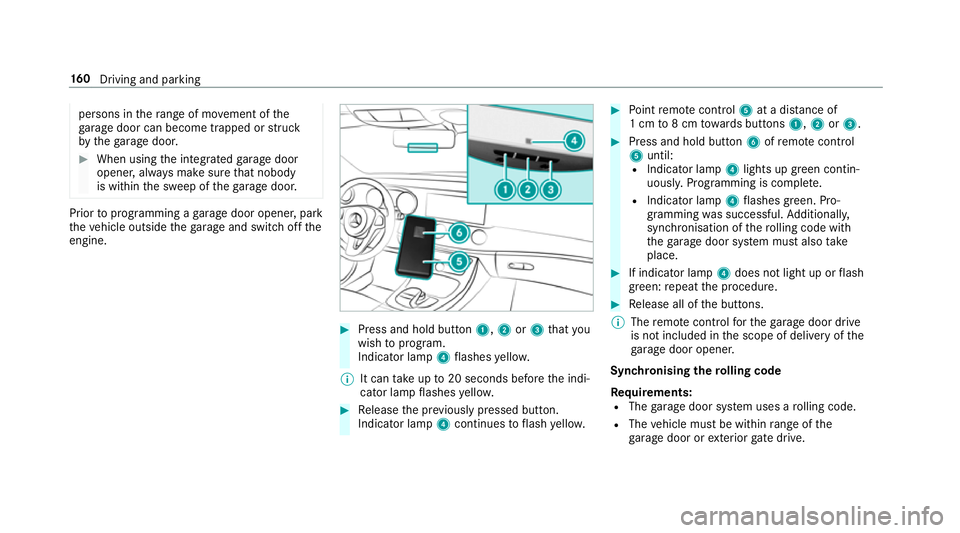
Press and hold button 1,2or3 that you
wish toprog ram.
Indicator lamp 4flashes yello w.
% It can take up to20 seconds before the indi‐
cator lamp flashes yello w. #
Release the pr eviously pressed button.
Indicator lamp 4continues toflash yello w. #
Point remo tecontrol 5at a di stance of
1 cm to8 cm towa rds buttons 1,2or3. #
Press and hold button 6ofremo tecontrol
5 until:
R Indicator la mp4lights up green contin‐
uousl y.Programming is comple te.
R Indicator lamp 4flashes green. Pro‐
gr amming was successful. Additionally,
synchronisation of thero lling code with
th ega rage door sy stem must also take
place. #
If indicator lamp 4does not light up or flash
green: repeat the procedure. #
Release all of the buttons.
% The remo tecontrol forth ega rage door drive
is not included in the scope of delivery of the
ga rage door opener.
Synchronising thero lling code
Re quirements:
R The garage door sy stem uses a rolling code.
R The vehicle must be within range of the
ga rage door or exterior gate drive. 16 0
Driving and pa rking
Page 165 of 521
Opening or closing
thega rage door
Re quirement:
R The cor responding button is programmed to
operate thega rage door. #
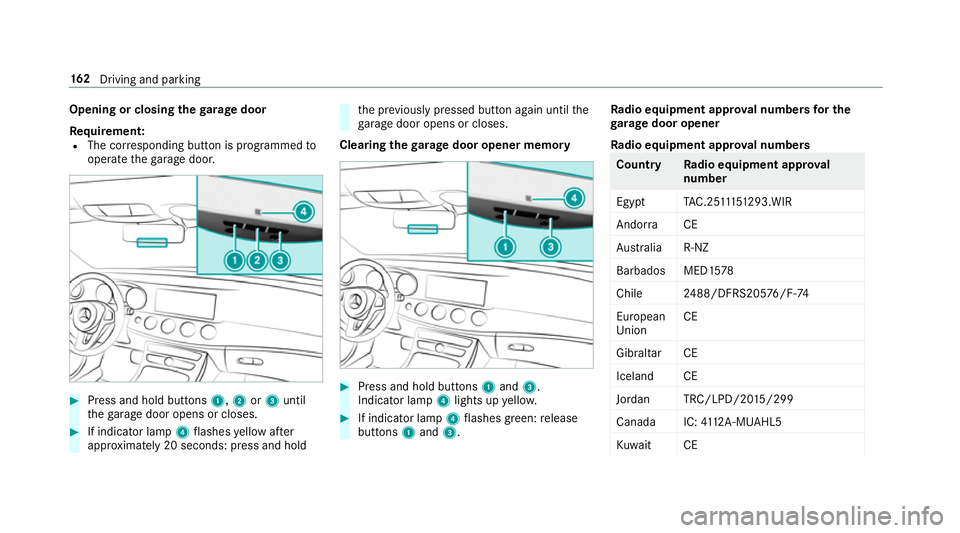
Press and hold buttons 1,2or3 until
th ega rage door opens or closes. #
If indicator lamp 4flashes yellow af ter
appr oximately 20 seconds: press and hold th
e pr eviously pressed button again until the
ga rage door opens or closes.
Clearing thega rage door opener memo ry #
Press and hold buttons 1and 3.
Indicator lamp 4lights up yello w. #
If indicator lamp 4flashes green: release
buttons 1and 3. Ra
dio equipment appr oval numbers for the
ga rage door opener
Ra dio equipment appr oval numbers Countr
yRadio equipment appr oval
number
Egyp tT AC.25 111 51293.WIR
Andor ra CE
Au stra lia R-NZ
Barbados MED1 578
Chile 2488/DFRS205 76/F-74
European
Union CE
Gibral tarCE
Iceland CE
Jordan TRC/LPD/20 15/299
Canad aI C:4112 A-MUAHL5
Ku wa it CE 16 2
Driving and pa rking