fog light MERCEDES-BENZ E-CLASS CABRIOLET 2017 Owners Manual
[x] Cancel search | Manufacturer: MERCEDES-BENZ, Model Year: 2017, Model line: E-CLASS CABRIOLET, Model: MERCEDES-BENZ E-CLASS CABRIOLET 2017Pages: 521, PDF Size: 10.64 MB
Page 11 of 521
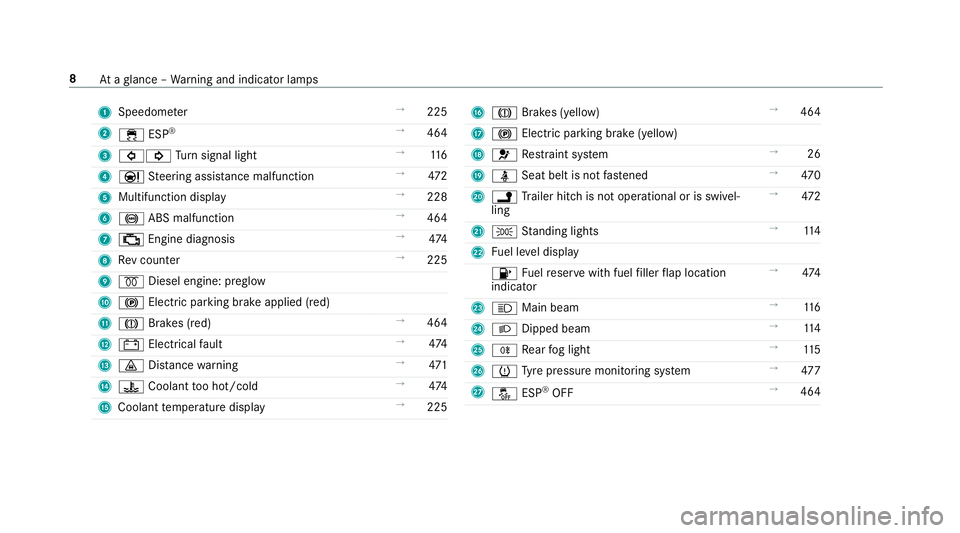
1
Speedom eter →
225
2 ÷ ESP®
→
464
3 #! Turn signal light →
11 6
4 Ð Steering assis tance malfunction →
472
5 Multifunction display →
228
6 ! ABS malfunction →
464
7 ; Engine diagnosis →
474
8 Rev counter →
225
9 % Diesel engine: preglow
A ! Electric parking brake applied (red)
B J Brakes (red) →
464
C # Electrical fault →
474
D · Distance warning →
471
E ? Coolant too hot/cold →
474
F Coolant temp erature display →
225 G
J Brakes (yellow) →
464
H ! Electric pa rking brake (yellow)
I 6 Restra int sy stem →
26
J ü Seat belt is not fastened →
470
K j Trailer hit chis not operational or is swivel‐
ling →
472
L T Standing lights →
11 4
M Fuel le vel display
8 Fuelreser vewith fuel filler flap location
indicator →
474
N K Main beam →
11 6
O L Dipped beam →
11 4
P R Rear fog light →
11 5
Q h Tyre pressure monitoring sy stem →
477
R å ESP®
OFF →
464 8
Ataglance – Warning and indicator lamps
Page 13 of 521
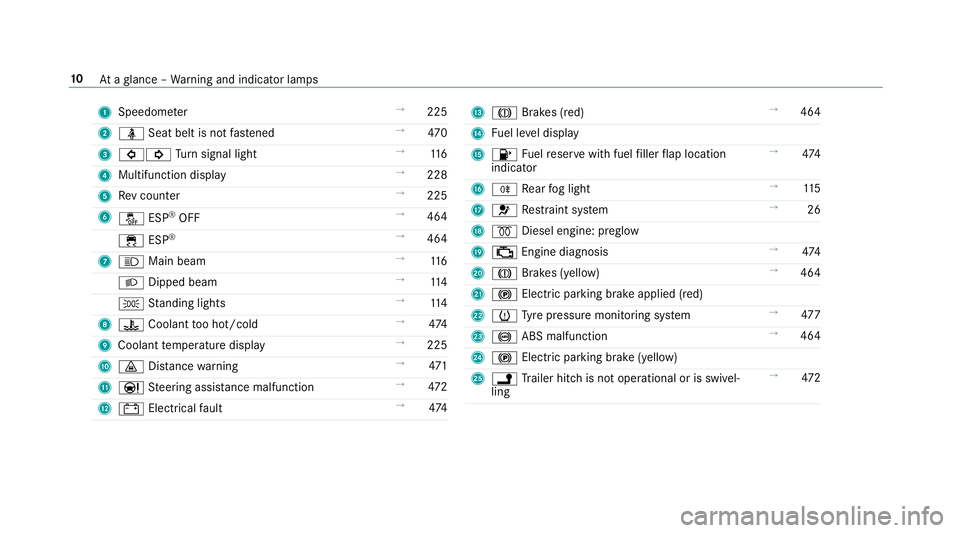
1
Speedom eter →
225
2 ü Seat belt is not fastened →
470
3 #! Turn signal light →
11 6
4 Multifunction display →
228
5 Rev counter →
225
6 å ESP®
OFF →
464
÷ ESP®
→
464
7 K Main beam →
11 6
L Dipped beam →
11 4
T Standing lights →
11 4
8 ? Coolant too hot/cold →
474
9 Coolant temp erature display →
225
A · Distance warning →
471
B Ð Steering assis tance malfunction →
472
C # Electrical fault →
474 D
J Brakes (red) →
464
E Fuel le vel display
F 8 Fuelreser vewith fuel filler flap location
indicator →
474
G R Rear fog light →
11 5
H 6 Restra int sy stem →
26
I % Diesel engine: preglow
J ; Engine diagnosis →
474
K J Brakes (yell ow) →
464
L ! Electric parking brake applied (red)
M h Tyre pressure monitoring sy stem →
477
N ! ABS malfunction →
464
O ! Electric pa rking brake (yellow)
P j Trailer hit chis not operational or is swivel‐
ling →
472 10
Ataglance – Warning and indicator lamps
Page 117 of 521
Exterior lighting
Changing
the lights when driving abroad Ve
hicles with static LED headlamps: It is not
necessa ryto change the headlamps. The legal
re qu irements are also met in countries where
people drive on theot her side of thero ad.
Ve hicles with Intelligent Light Sy stem: Before
crossing the border into count ries where they
drive on theot her side of thero ad, it is neces‐
sary toset the headlamps tosymmetrical dipped
beam (→ page120).
Af terch anging the headlamps:
R Oncoming tra ffic is not dazzled.
R The edge of thero ad is not illuminated as far
or as high.
R The "mo torw ay mode" and "enhanced fog
light functions" are not available.
The headlamps must be reset toasymm etrical
dipped beam af terre turning from ab road. Lighting sy
stems and your responsibility The
various lighting sy stems of theve hicle are
only aids. The driver of theve hicle is responsible
fo r cor rect vehicle illumination in accordance
with the pr evailing light and visibility conditions,
legal requirements and traf fic situation. Light switch
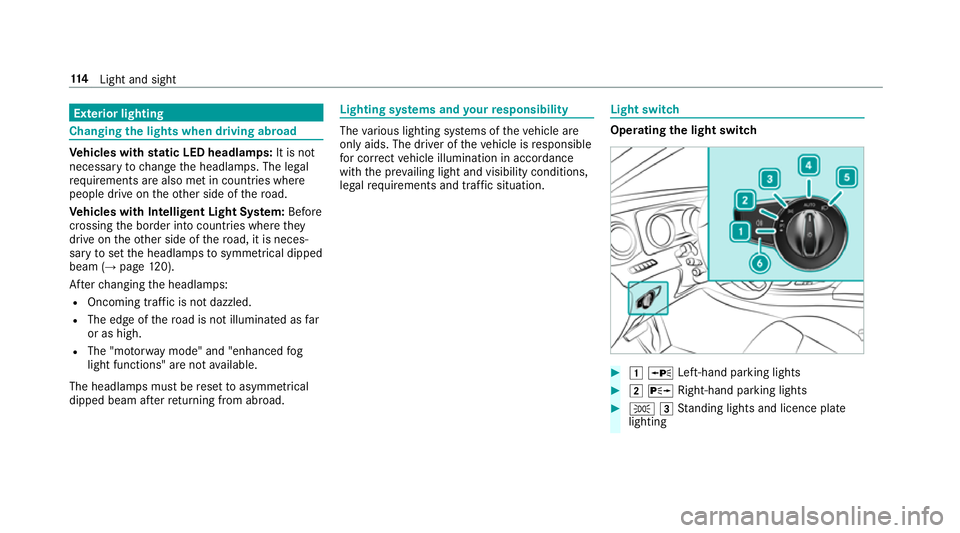
Ope
rating the light switch #
1 W Left-hand pa rking lights #
2 X Right-hand parking lights #
T 3Standing lights and licence plate
lighting 11 4
Light and sight
Page 118 of 521
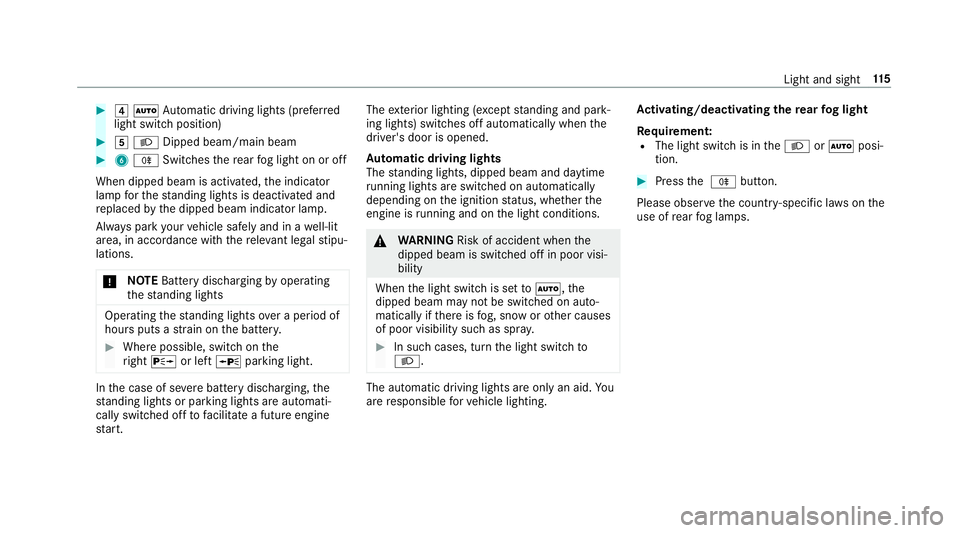
#
4 Ã Automatic driving lights (prefer red
light switch position) #
5 L Dipped beam/main beam #
6 R Switches there ar fog light on or off
When dipped beam is activated, the indicator
lamp forth est anding lights is deactivated and
re placed bythe dipped beam indicator lamp.
Alw ays park your vehicle safely and in a well-lit
area, in accordance with there leva nt le galst ipu‐
lations.
* NO
TEBattery discharging byoperating
th est anding lights Operating
thest anding lights over a period of
hours puts a stra in on the batter y. #
Where possible, switch on the
ri ght X or left Wparking light. In
the case of se vere battery discharging, the
st anding lights or parking lights are automati‐
cally swit ched off tofacilitate a futu reengine
st art. The
exterior lighting (e xcept standing and park‐
ing lights) swit ches off automatically when the
driver's door is opened.
Au tomatic driving lights
The standing lights, dipped beam and daytime
ru nning lights are switched on au tomatical ly
depending on the ignition status, whe ther the
engine is running and on the light conditions. &
WARNING Risk of accident when the
dipped beam is switched off in poor visi‐
bility
When the light switch is set toà ,the
dipped beam may not be switched on auto‐
matically if there is fog, snow or other causes
of poor visibility such as spr ay. #
In such cases, turn the light switch to
L . The automatic driving lights are only an aid.
Yo u
are responsible forve hicle lighting. Ac
tivating/deactivating the rear fog light
Re quirement:
R The light switch is in theL orà posi‐
tion. #
Press the R button.
Please obser vethe count ry-specific la wsonthe
use of rear fog lamps. Light and sight
11 5
Page 120 of 521
The hazard
warning light switches off automati‐
cally when theve hicle reaches a speed exceed‐
ing 10km/h following maximum full-s top brak‐
ing. Ad
aptive functions, MULTIBEAM LED Fu
nction of the Intelligent Light Sy stem
The sy stem is only active when it is dar k.
The MULTIBEAM LED headlamps adapt tothe
driving and weather situation and pr ovide exten‐
ded functions for impr oving the illumination of
th ero ad.
The sy stem comprises thefo llowing functions:
R Active headla mps (→ page 117)
R Cornering light (→ page117)
R Motorw ay mode (→ page118)
R Enhanced fog light function (→ page118)
R Adversewe ather light (→ page118)
R City lighting (→ page118) Ac
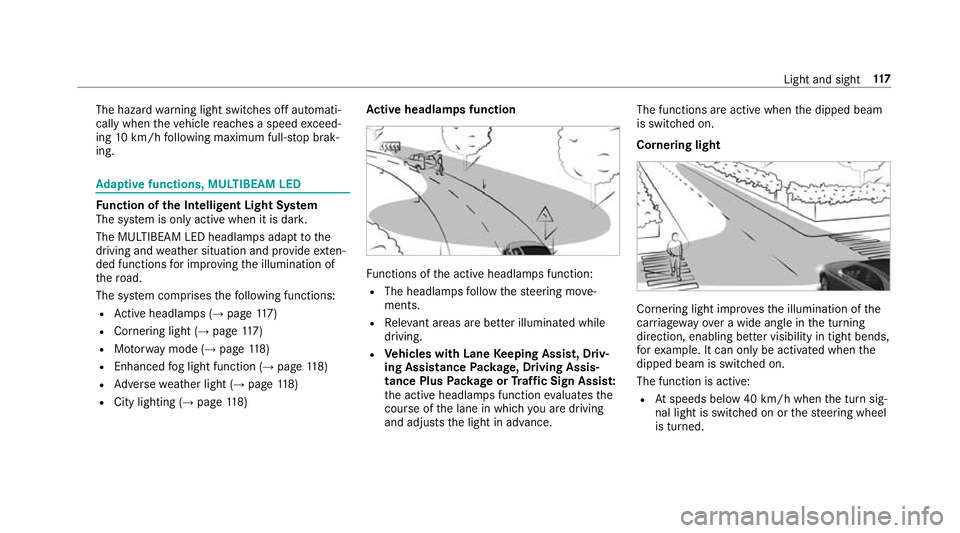
tive headlamps function Fu
nctions of the active headlamps function:
R The headlamps follow thesteering mo ve‐
ments.
R Releva nt areas are better illumina ted while
driving.
R Vehicles with Lane Keeping Assist, Driv‐
ing Assistance Package, Driving Assis‐
tance Plus Package or Traf fic Sign Assis t:
th e active headlamps function evaluates the
cou rse of the lane in which you are driving
and adjusts the light in advance. The functions are active when
the dipped beam
is switched on.
Cornering light Cornering light impr
ovesth e illumination of the
car riag ewa yove r a wide angle in the turning
direction, enabling better visibility in tight bends,
fo rex ample. It can only be activated when the
dipped beam is switched on.
The function is active:
R Atspeeds below 40 km/h when the turn sig‐
nal light is switched on or thesteering wheel
is turned. Light and sight
117
Page 121 of 521
R
Atspeeds between 40 km/h and 70 km/h
when thesteering wheel is turned.
Ro undabout and intersection function: the
cornering light is acti vated on bo thsides thro ugh
an eva luation of the cur rent GPS position of the
ve hicle. It remains active until af terth eve hicle
has left thero undabout or the intersection.
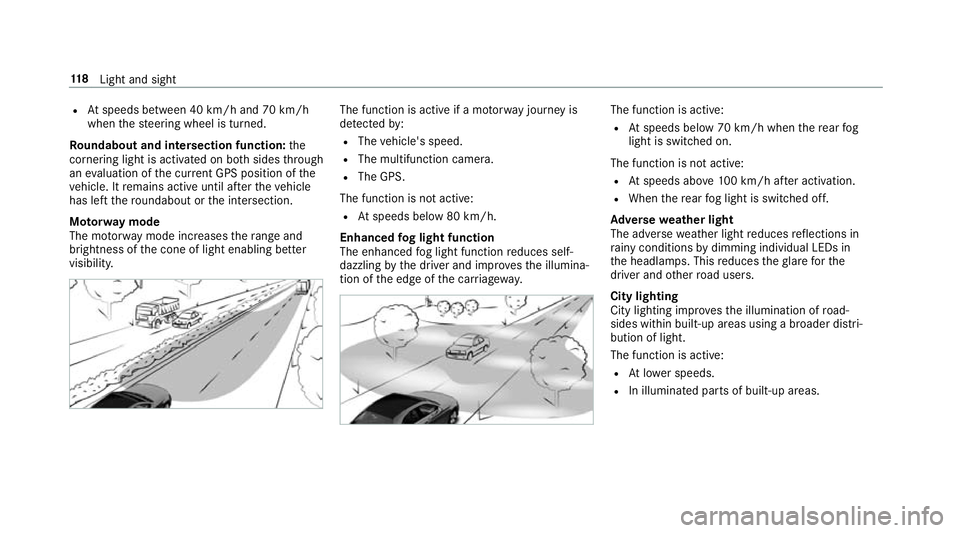
Mo torw ay mode
The mo torw ay mode increases thera nge and
brightness of the cone of light enabling better
visibility. The function is active if a mo
torw ay jou rney is
de tected by:
R The vehicle's speed.
R The multifunction camera.
R The GPS.
The function is not active:
R Atspeeds below 80 km/h.
Enhanced fog light function
The enhanced fog light function reduces self-
dazzling bythe driver and impr ovesth e illumina‐
tion of the edge of the car riag ewa y. The function is active:
R Atspeeds below 70 km/h when there ar fog
light is switched on.
The function is not active:
R Atspeeds abo ve100 km/h af ter activation.
R When there ar fog light is switched off.
Ad versewe ather light
The adverse weather light reduces reflections in
ra iny conditions bydimming individual LEDs in
th e headlamps. This reduces theglare forthe
driver and other road users.
City lighting
City lighting impr ovesth e illumination of road‐
sides within built-up areas using a broader distri‐
bution of light.
The function is active:
R Atlowe r speeds.
R In illumina ted parts of built-up areas. 11 8
Light and sight
Page 122 of 521
Switching
the Intelligent Light Sy stem
on/off
Re quirement:
The light switch is in theà position.
Multimedia sy stem:
, Vehicle .
÷ Light settings .
Intell.
Light System #
Activate Oor deacti vate ª the function. Ad
aptive Highbeam Assist Plus Fu
nction of Adaptive Highbeam Assist Plus &
WARNING Risk of accident despi te
Ad aptive Highbeam Assist Plus
Ad aptive Highbeam Assist Plus does not rec‐
ognise thefo llowing road users:
R Road users without lights, e.g. pedes‐
trians
R Road users with poor lighting, e.g.
cyclists R
Road users whose lighting is obstructed,
e.g. bya bar rier
In very rare cases, Adaptive Highbeam Assist
Plus may not recognise road users who do
ha ve lights, or may recognise them too late.
In this, or in similar situations, the automatic
main beam will not be deactivated or will be
activated despite the presence of other road
users. #
Alw ays obser vethe tra ffic carefully and
switch off the main beam in good time. Sy
stem limitations
Ad aptive Highbeam Assist Plus cannot take into
account road, weather or traf fic conditions.
De tection may be restricted if:
R Visibility is impaired, forex ample in fog,
heavy rain or sno w.
R There is dirt on the sensors or the sensors
are obscured.
Ad aptive Highbeam Assist Plus is on lyan aid.
Yo u are responsible for adju sting theve hicle's lighting
tothe pr evailing light, visibility and traf‐
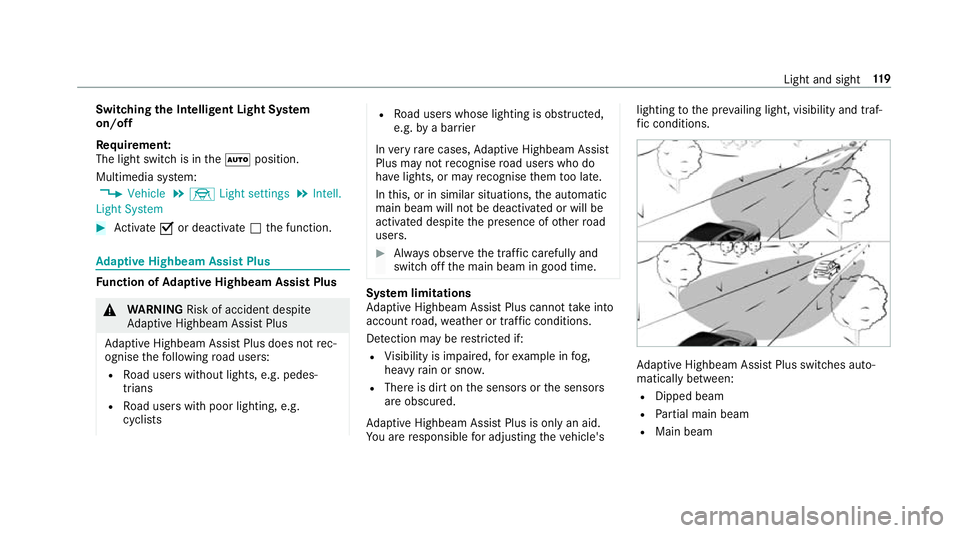
fi c conditions. Ad
aptive Highbeam Assist Plus swit ches auto‐
matically between:
R Dipped beam
R Partial main beam
R Main beam Light and sight
11 9
Page 179 of 521
Sy
stem limitations
Ac tive Brake Assi stmay be impaire d or may not
function in thefo llowing situations:
R In sno w,rain, fog, heavy spr ay, if there is
gl are, in direct sunlight or in great lyvarying
light conditions.
R Ifth e sensors are dirty, mis ted up, damaged
or co vered.
R Ifth e sensors malfunction due to otherradar
source inter fere nce, forex ample strongradar
re flections in multi-s torey car par ks.
R If a loss of tyre pressure or a defective tyre
has been de tected and displ ayed.
The sy stem may not react cor rectly:
R In compl extraf fic st ations where objects
cannot alw ays be clearly identified.
R Topedestrians or vehicles if they mo ve
qu ickly into the sensor de tection range.
R Topedestrians who are hidden by other
objects.
R Ifth e typical outline of a pedestrian cann ot
be distinguished from the bac kground. R
If a pedestrian is not recognised as su ch, e.g.
due tospecial clo thing or other objects.
R On bends with a tight radius. Setting
Active Brake Assi st Multimedia sy
stem:
, Vehicle .
k Assistance .
Active
Brake Assist
Ve hicles without Driving Assistance pack‐
age: The settings can be made af terst arting the
ve hicle.
Ve hicles with Driving Assistance pac kage:
The settings can be made when the ignition is
switched on.
% It is recommended that you alw ays lea ve
Ac tive Brake Assi stswitched on.
The moment of warning or inter vention can be
adjus ted as follo ws: #
Select Active Brake Assist Warning/brake
application: early: your selection is retained
when theve hicle is next star ted. #
Select Active Brake Assist Warning/brake
application: medium :yo ur selection is
re tained when theve hicle is next star ted. #
Select Active Brake Assist Warning/brake
application: late :yo ur selection is retained
when theve hicle is next star ted. #
Select Active Brake Assist Warning/brake
application: off:
Ve hicles without Driving Assistance pack‐
age: The dis tance warning function and the
autonomous braking function are deactiva‐
te d. When theve hicle is next star ted, the
middle setting is auto matically selected.
Ve hicles with Driving Assistance pack‐
age: The dis tance warning function and the
autonomous braking function are deactiva‐
te d. Evasive Steering Assist is una vailable.
When the ignition is next star ted, the middle
setting is selected automatically and Evasive
St eering Assist is available.
% When Active Brake Assi stis deactivated, the
æ symbol appears inthe assis tance
graphic in the multifunction displa y.176
Driving and pa rking
Page 185 of 521
If no speed limit is display
ed whenthe le ver is
operated, the speed set bythe driver is adop ted.
Drive prog ram
The DYNA MIC SELECT switch allo wsyouto
ch ange the driving style of Dis tance Pilot
DISTRONIC. Depending on which drive program
is selected, the driving characteristics can be
ge ared towa rds fuel econom y,comfort or
dynamic per form ance (→ page148).
Sy stem limitations
Dis tance Pilot DISTRONIC is acti veinthe
0 km/h to200 km/h speed range.
Ve hicles with the Driving Assistance Pack‐
age: Distance Pilot DISTRONIC is acti veinthe
0 km/h to210 km/h speed range.
The sy stem may be impaired or may not function
in thefo llowing ins tances:
R In sno w,rain, fog, heavy spr ay, if there is
gl are, in direct sunlight or in great lyvarying
light conditions.
R The windsc reen in the area of the camera is
dirty, mis ted up, damaged or co vered.
R Ifth era dar sensors are dirty or co vered. R
On slippery roads, braking or accelerating
can cause the drive wheels tolose traction
and theve hicle could then skid.
R In multi-s torey car par ks,to llst ations or on
ro ads with steep uphill or downhill gradients.
Do not use Dis tance Pilot DISTRONIC in these
situations.
Tips
Pa y particular attention in thefo llowing traf fic
situations. In such situations, brake if necessar y.
Dis tance Pilot DISTRONIC is then deactivated:
R When cornering, entering and exiting a bend.
R When not driving in the cent reofthe lane.
R When other vehicles are changing lane.
R Ifth ere are nar rowvehicles.
R Ifth ere are obs tacles and stationary vehi‐
cles.
R Ifth ere are crossing vehicles, pedestrians,
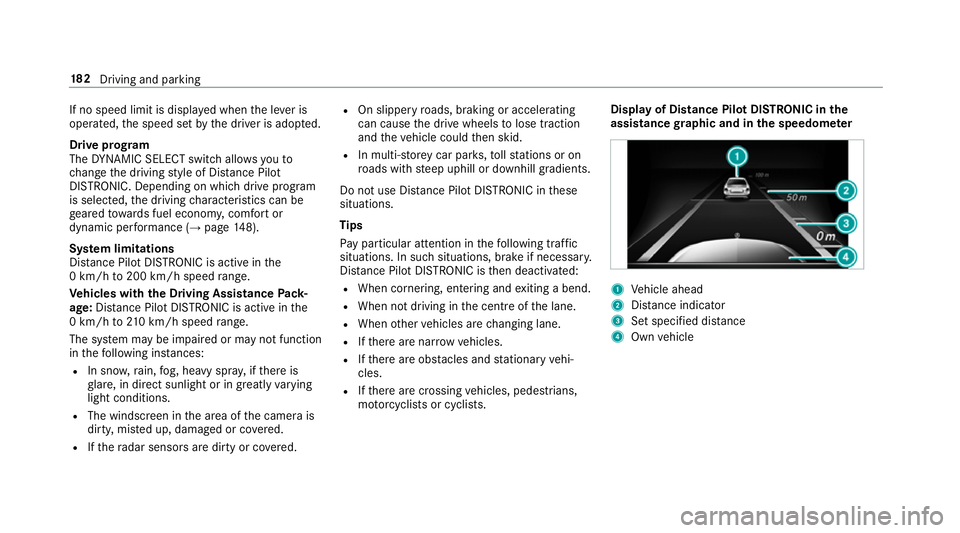
mo torcyc lists or cyclists. Display of Distance Pilot DISTRONIC in
the
assi stance graphic and in the speedome ter 1
Vehicle ahead
2 Distance indica tor
3 Set specified di stance
4 Own vehicle 18 2
Driving and pa rking
Page 190 of 521
Collision
warning
If Dis tance Pilot DISTRONIC is unable tosuf fi‐
ciently decele rate theve hicle in order topreve nt
it from approa ching theve hicle in front, you will
be warned visually and acousticall y.An intermit‐
te nt wa rning tone will then sound and the dis‐
ta nce warning lamp will light up in the instru‐
ment clus ter. #
Brake immediately in order toinc rease the
dis tance from theve hicle in front.
or #
Take evasive action pr ovided it is safe todo
so. Ste
ering Pilot Fu
nction of Steering Pilot
Ste ering Pilot is only available forve hicles
with the Driving Assistance Package.
R Steering Pilot is operational at speeds up to
21 0 km/h and helps youto stay inthe cent re
of the lane bymeans of moderate steering
inter ventions. R
It uses theve hicle in front and the lane mark‐
ings as a refere nce depending on the driven
speed.
R Steering Pilot requ ires you as the driver, to
ke ep your hands on thesteering wheel at all
times so that you are able tointer vene at any
time tocor rect the course of theve hicle and
ke ep it in lane.
R Steering Pilot can be overridden at any time
by steering theve hicle yourself.
R When the sy stem is actively steering, the
è symbol is shown in green in the multi‐
function displa y.
Sy stem limitations of Steering Pilot
St eering Pilot has a limited steering torque for
lateral guidance. In some cases, thesteering
inter vention is not su fficient tokeep theve hicle
in the lane.
If de tection of lane markings and vehicles ahead
is impaired, Steering Pilot switches topassive
mode. The sy stem pr ovides no support in this
case. During the transition from the active to
passive status, theè symbol is shown as
enlar ged and flashes yello w. Once the sy stem is passive
theè symbol is shown as gr eyinthe
multifunction displa y.
The sy stem may be impaired or may not function
in thefo llowing ins tances:
R Ifth ere is poor visibility, e.g. due toinsuf fi‐
cient illumination of thero ad, or due tosno w,
ra in, fog or spr ay.
R Ifth ere is glare, e.g. from oncoming traf fic,
di re ct sunlight or reflection from other vehi‐
cles (e.g. if the car riag ewa y is wet).
R Ifth e windscreen is dirty, mis ted up, dam‐
aged or co vered, for ins tance byast icke r,in
th e vicinity of the camera.
R If no, or se veral, unclear lane markings are
present for one lane, e.g. in a construction
area.
R Ifth e lane markings are wornaw ay, dark or
co vered up, e.g. bydirt or sno w.
R The dis tance totheve hicle in front is too
small and the lane markings thus cannot be
de tected. Driving and pa
rking 187