warning light MERCEDES-BENZ E-CLASS CABRIOLET 2018 Owner's Guide
[x] Cancel search | Manufacturer: MERCEDES-BENZ, Model Year: 2018, Model line: E-CLASS CABRIOLET, Model: MERCEDES-BENZ E-CLASS CABRIOLET 2018Pages: 498, PDF Size: 6.28 MB
Page 138 of 498
0071WARNING Risk of accident due tothe
brake sy stem overheating
If yo u lea veyour foot on the brake pedal
when driving, the brake sy stem may over‐
heat.
This increases the braking dis tance and the
brake sy stem may evenfa il.
00BBNe ver use the brake pedal as a foot re st.
00BBDo not depress the brake pedal and the
accelerator pedal at the same time
while driving.
0075 NO
TEWearing out the brake linings by
continuously dep ressing the brake pedal
00BBDo not depress the brake pedal contin‐
uously whilst driving.
00BBTo use the braking ef fect of the engine,
shift toa lo werge ar in good time.
0075 NO
TEDama getothe driv etra in and the
engine when pulling away
00BBDo not warm upthe engine when the
ve hicle is stationar y.Pull away immedi‐
atel y.
00BBAvoid high engine speeds and driving at
full thro ttle until the engine has reached
operating temp erature.
00BBDo not allow the wheels tospin.
0075 NO
TEDama getothe catalytic con verter
due tonon-combu sted fuel
The engine is not running smoot hly and is
misfiring.
Non-combus ted fuel may get into the cata‐
lytic con verter.
00BBOnly depress the accelera tor pedal
slightl y.
00BBHave the cause rectified immediately at
a qu alified specialist workshop.
Limited braking ef fect on salt-treate dro ads:
Rdue tosalt build-up on the brake discs and
brake lining, the braking dis tance can
increase conside rably or result in braking
only on one side.
Rmaintain a much greater safe dis tance tothe
ve hicle in front.
To preve nt salt build-up:
Rbrake occasionally while paying attention to
th e tra ffic conditions.
Rcarefully depress the brake pedal at the end
of the journey and when starting the next
journe y.
ECOstart/s top function
Opera ting the ECO start/s top function
The engine is au tomatically switched off if the
fo llowing conditions are me t:
RYoubr ake theve hicle toast andstill in trans‐
mission position 005Bor005C.
RAll vehicle conditions for an au tomatic
engine stop are met.
13 6
Driving and pa rking
Page 156 of 498
Overview of driving systems and driving
saf ety sy stems
In this section, youwill find information about
th efo llowing driving sy stems and driving saf ety
sy stems:
R360° Camera (→page 181)
RABS ( Anti-lock Braking Sys tem)
(→page 154)
RAc tive Dis tance Assist DISTRONIC
(→pa ge 162)
RAIR BODY CONTROL (→page 171)
RAc tive Brake Assi st(→page 156)
RAc tive Lane Keeping Assist (→page 195)
RATTENTION ASSIST (→page 189)
RBA S (Brak eAssist System) (→page 154)
REBD ( Electronic Brakeforc eDistribution)
(→page 155)
RESP®(E lectronic Sta bility Program)
RHill Start Assist
RHOLD function (→page 170)
RSTEER CONTROL (→page 155)
RAc tive Steering Assist (→page 167)
RAc tive Parking Assist (→page 184)
RParking Assist PARKTRONI C (→page17 5)
RRe ar view camera (→page 178)
RCruis e control (→page 160)
RBlind Spot Assist and Active Blind Spot Assi st
(→page 193)
RTraf fic Sign Assist (→page191)
Fu nctions of ABS (Anti-lock Brake Sy stem)
ABS regulates the brake pressure in critical driv‐
ing situations:
RDuring braking, e.g. at maximum full-s top
braking or insuf ficient traction of the tires,
th e wheels are pr evented from blocking.
RVehicle steerability while braking is ensured.
If ABS inter venes when braking, you will feel a
pulsing in the brake pedal. The pulsating brake
pedal can be an indication of hazardous road
conditions and can ser veas a reminder totake
ex tra care while driving. Sy
stem limitations
RABS is active from speeds of appr ox. 5 mph
(8 km/h).
RABS may be impaired or may not function if a
malfunction has occur red and theye l‐
low 0025 ABSwarning lamp lights up contin‐
uously in the instrument clus ter af terth e
engine is star ted.
Fu nction of BAS (Brake Assist Sy stem)
0071
WARNING Risk of an accident caused by
a malfunction in BAS (Brake Assist Sys‐
te m)
If BA S is malfunctioning, the braking dis tance
in an eme rgency braking situation is
increased.
00BBDepress the brake pedal with full forc e
in emer gency braking situations. ABS
pr eve nts the wheels from locking.
BA S suppo rts yo ur eme rgency braking situation
with additional brake forc e.
15 4
Driving and pa rking
Page 157 of 498
Ifyo udepr essthe brake pedal quickl y,BA S is
acti vated:
RBA S au tomatical lyboosts the brake pres‐
sure.
RBA S can short enthe braking dis tance.
RABS pr events the wheels from locking.
The brakes will function as usual once you
re lease the brake pedal. BAS is deactivated.
Activating/deactivating ESP®(Electronic Sta‐
bility Prog ram)
Multimedia sy stem:
00869HKLFOH00CFk $VVLVWDQFH00CF(63
00BBActivate 0073or deacti vate 0053 the function.
ESP
®is deactivated if the00BB ESP®OFFwarn‐
ing lamp lights up continuously in the instrument
clus ter.
Obser vethe information on warning lamps and
display messages which may be shown in the
instrument clus ter.
Fu nctions of ESP®Crosswind Assist
ESP®Crosswind Assist de tects sudden gust s of
side wind and helps the driver tokeep theve hi‐
cle in the lane:
RESP®Crosswind Assist is active at vehicle
speeds between 50 mph(8 0 km/h) and
12 5mp h(2 00 km/h) when driving stra ight
ahead or cornering slightly .
RThevehicle is stabilized bymeans of individ‐
ual brake application on one side.
Fu nction of EBD (Electronic Brake forc e Dis‐
tribution)
EBD is characterized bythefo llowing:
RMonitoring and regulating the brake pressure
on there ar wheels.
RImpr oved driving stability when braking,
especially on bends.
ST EER CONT ROL function
STEER CONTROL helps youby transmitting a
noticeable steering forc eto thesteering wheel in
th e direction requ ired forve hicle stabilization.
This steering recommendation is given part icu‐
larly in thefo llowing situations:
RBo th right wheels or bo thleft wheels are on
a we t or slippe ryroad sur face when you
brake.
RThe vehicle starts toskid.
Sy stem limitations
ST EER CONTROL may be impaire d or may not
function in thefo llowing situations:
RESP®is deactivated.
RESP®is malfunctioning.
RThe steering is malfunctioning.
If ESP
®is malfunctioning, youwill be assis ted
fur ther by the electric po werst eering.
Driving and parking 15
5
Page 158 of 498
Function of Active Brake Assi st
Active Brake Assi stconsist s of:
RDistance warning function
RAu tonomous braking function
RSituation-dependent braking assist ance
RVehicles with Driving Assistance Pack‐
age: Evasi veSteering Assist
Ac tive Brake Assi stcan help youto minimize the
ri sk of a collision with vehicles or pedestrians or
to reduce the ef fects of such a collision.
If Ac tive Brake Assi sthas de tected a risk of colli‐
sion, youwill be warned visually and acousti‐
cally.
If yo udo not react tothe visual and audible colli‐
sion warning, autonomous braking can be initi‐
ated in critical situations.
In especially critical situations, Active Brake
Assi stcan initiate autonomous braking direct ly.
In this case, the visual and acoustic warning
occurs simultaneously with the braking applica‐
tion. If
yo u apply the brake yourself ina critical situa‐
tion or apply the brake during autonomous brak‐
ing, situation-dependent braking assis tance
occurs . This increases the brake pressure up to
maximum full-s top braking if necessar y.
If th e autonomous braking function or the situa‐
tion-dependent braking assis tance is trig gered,
additional pr eventive measures for occupant
pr otection (PRE-SAFE
®) may also be initiated, if
th eve hicle is equipped with these.
0071
WARNING Risk of an accident caused by
limited de tection per form ance of Active
Brake Assi st
Ac tive Brake Assi stcannot al ways clearly
identify objects and complex traffic situa‐
tions.
In such cases,Active Brake Assi stmight:
RGive a warning or brake without reason
RNot give a warning or not brake
00BBAlw ays pay careful attention tothe traf‐
fi c situation; do not rely on Active Brake
Assi stalone. Active Brake Assi stis only
an aid. The driver is responsible for
maintaining a sui table dis tance tothe
ve hicle in front, vehicle speed and for
braking in good time.
00BBBe prepared tobrake or swer veif nec‐
essar y.
Also obser vethe sy stem limitations of Active
Brake Assi st.
The individual subfunctions are available in
th efo llowing speed ranges:
Distance warning function
The dis tance warning function issues a warning
at speeds:
RFr om appr oximately 4 mph (7 km/h), if your
ve hicle is critically close toave hicle or
pedestrian. An intermittent warning tone
sounds and the00BA distance warning lamp
lights up in the instrument clus ter.
Brake immediately or take evasive action, pr ovi‐
ded it is safe todo so and the traf fic situation
allo wsthis.
15 6
Driving and pa rking
Page 161 of 498
0071WARNING Risk of an accident despite
Evasive Steering Assist
Evasive Steering Assist cannot always clearly
identify objects and complex traf fic situa‐
tions.
In addition, thesteering support of Evasive
St eering Assist is general lynot suff icientto
avo id a collision.
In such cases Evasive Steering Assist can:
Rgive an unnecessary warning or pr ovide
assis tance
Rnot give awa rning or not pr ovide assis‐
ta nce
00BBAlw ays pay careful attention tothe traf‐
fi c situation; do not rely on Ev asive
St eering Assist alone.
00BBBe ready tobrake and take evasive
action if necessar y.
00BBPreve ntthe assis tance byactively steer‐
ing in non-critical driving situations.
00BBDrive at an appropriate speed if pedes‐
trians are close tothe path of your vehi‐
cle.
Also obser vethe sy stem limitations of Evasive
St eering Assist.
Sy stem limitations
The sy stem may be impaired or may not function
in thefo llowing situations:
RIn sno w,rain, fog, heavy spr ay, if there is
gl are, in direct sunlight or in greatlyvarying
light conditions.
RIf th e sensors are dirty, mis ted up, damaged
or co vered.
RIfth e sensors malfunction due to otherradar
source inter fere nce, forex ample stro ng radar
re flections in parking garage s.
RIf a loss of tire pressure or a defective tire
has been de tected and displ ayed.
The sy stem may not react cor rectly:
RIn complex traffic situations whe reobjects
cannot always be clearly identified.
RTo pedestrians or vehicles if they mo ve
qu ickly into the sensor de tection range.
RTo pedestrians who are hidden by other
objects.
RIf th e typical outline of a pedestrian cannot
be distinguished from the bac kground.
RIf a pedestrian isnot recognized as such , e.g.
due tospecial clo thing or other objects.
ROn bends with a tight radius.
Setting Active Brake Assi st
Multimedia system:
00869HKLFOH00CFk $VVLVWDQFH00CF$FWLYH
%UDNH $VVLVW
Ve hicles without Driving Assistance pack‐
age: The settings can be made af terst arting the
ve hicle.
Ve hicles with Driving Assistance pac kage:
The settings can be made when the ignition is
switched on.
00CE It is recommended that you alw ays lea ve
Ac tive Brake Assi stactivated.
Driving and parking 15
9
Page 169 of 498
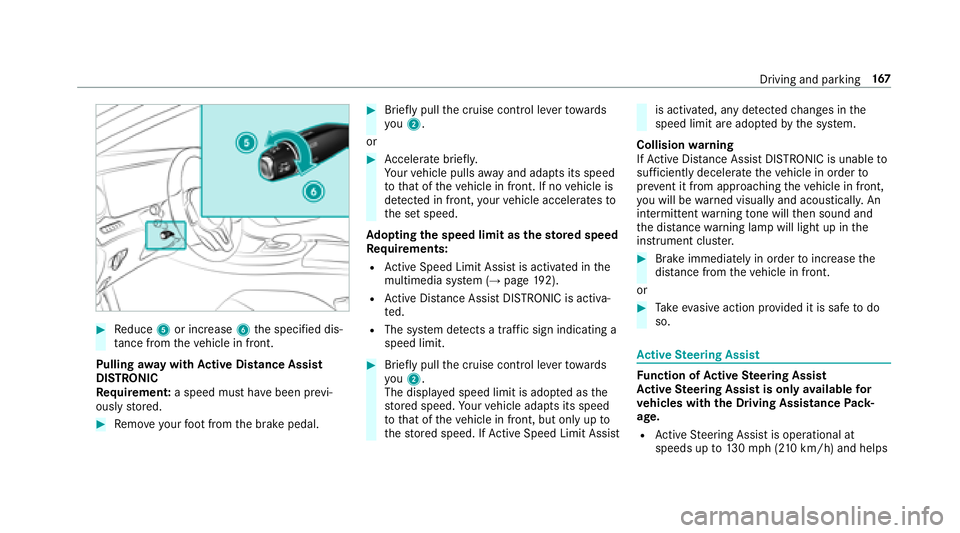
00BBReduce 5or increase 6the specified dis‐
ta nce from theve hicle in front.
Pulling away wit hAc tive Di stance Assist
DI STRO NIC
Re quirement: a speed must ha vebeen pr evi‐
ously stored.
00BBRe mo veyour foot from the brake pedal.
00BBBrief lypull the cruise control le verto wa rds
yo u2.
or
00BBAc celerate brie fly.
Yo ur vehicle pulls away and adapts its speed
to that of theve hicle in front. If no vehicle is
de tected in front, your vehicle accelerates to
th e set speed.
Ad opting the speed limit as thesto red speed
Re quirements:
RActive Speed Limit Assi stis activated in the
multimedia sy stem (→page 192).
RAc tive Dis tance Assist DISTRONIC is acti va‐
te d.
RThe sy stem de tects a traf fic sign indicating a
speed limit.
00BBBrie fly pull the cruise control le verto wa rds
yo u2.
The display ed speed limit is adop ted as the
st ored speed. Your vehicle adapts its speed
to that of theve hicle in front, but only up to
th estored speed. If Active Speed Limit Assi st
is activated, any detected changes in the
speed limit are adop tedby the sy stem.
Collision warning
If Ac tive Dis tance Assist DISTRONIC is unable to
suf ficiently decele rate theve hicle in order to
pr eve nt it from approach ingtheve hicle in front,
yo u will be warned visually and acousticall y.An
intermittent warning tone will then sound and
th e dis tance warning lamp will light up in the
instrument clus ter.
00BBBrake immediately in order toinc rease the
dis tance from theve hicle in front.
or
00BBTa ke evasive action pr ovided it is safe todo
so.
Ac tive Steering Assist
Function of Active Steering Assist
Ac tive Steering Assist is only available for
ve hicles with the Driving Assistance Pack‐
age.
RAc tive Steering Assist is operational at
speeds up to130mp h(210 km/h) and helps
Driving and pa rking 16
7
Page 175 of 498
Driveprog ramC haracteristics
S
(Sport)
RThe suspension tuning is firm er.
RThe vehicle is set tothe low le vel.
RThe vehicle is not lo wered any fur ther if you are tra veling at higher speeds.
S+
(Sport Plus)
RThe suspension tuning is evenfirm er.
RThe vehicle is set tothe low le vel.
RThe vehicle is not lo wered any fur ther if you are tra veling at higher speeds.
Setting theve hicle le vel
0071
WARNING Risk of accident because
ve hicle le vel is too high
If yo udriv e at a higher vehicle le vel,th e driv‐
ing characteristics may be impaired due to
th e higher vehicle center of gr avity.
The vehicle can drift outwards, forex ample,
when steering or cornering.
00BBAlw aysch oose a vehicle le vel which is
suited tothe driving style and thero ad
sur face conditions.
0071
WARNING Risk of entrapment from vehi‐
cle lo wering
When lo wering theve hicle, people could
become trapped if their limbs are between
th eve hicle body and the tires or underneath
th eve hicle.
00BBMake sure no one is underneath the
ve hicle or in the immediate vicinity of
th e wheel ar ches when you lo werth e
ve hicle.
0071
WARNING Risk of entrapment from vehi‐
cle lo wering
Ve hicles with AIR BODY CONT ROL or
le ve l control sy stem: When you unload lug‐
ga ge or lea vetheve hicle, theve hicle firs t
ri ses slightly and then returns tothe set le vel
shortly af terw ards.
Yo u or an yone else in the vicinity of the
wheel ar ches or the underbody could thus
become trapped.
The vehicle can also be lo wered af ter being
loc ked.
Driving and parking 17
3
Page 178 of 498

Cleanthe sensors regularly, taking care not to
scratch or damage them.
Fu nction of the passive side impact pr otec‐
tion
Pa ssive side impact pr otection is an additional
Pa rking Assist PARKTRONI Cfunction whic h
wa rnsth e driver about obs tacles at the side of
th eve hicle. A warning is issued when obs tacles
are de tected between the front and rear de tec‐
tion range. In order for an object tobe de tected,
th e sensors in the front and rear bumper must
de tect the object while you are driving past it.
During the parking procedure or maneuvering,
objects are de tected as theve hicle drives past.
If yo usteer in the direction of a de tected obs ta‐
cle and there is a risk of a lateral collision, a
wa rning is issued. The lateral segments light up
orange or red, depending on the dis tance tothe
obs tacle. Segment color depending on distance
Color Lateral distance in
cm
Re dA pprox. < 30
Orang eA pprox. 30 - 60
In order for lateral front or rear segments tobe
displa yed, theve hicle must firs t tr ave l a dis tance
of at least half of theve hicle length. Once the
ve hicle has tr aveled the length of theve hicle, all
of the lateral front and rear segments can be dis‐
pla yed.
Ve hicles without 360° Camera
1Parking Assist PARKTRONI Cis on ly oper a‐
tional in the front and rear
2Pa rking Assist PARKTRONI Cis operational
and can also warnthe driver about obs tacles
at the side of theve hicle
3Obs tacle de tected at the front right (orange)
and rear (red)
17 6
Driving and pa rking
Page 182 of 498
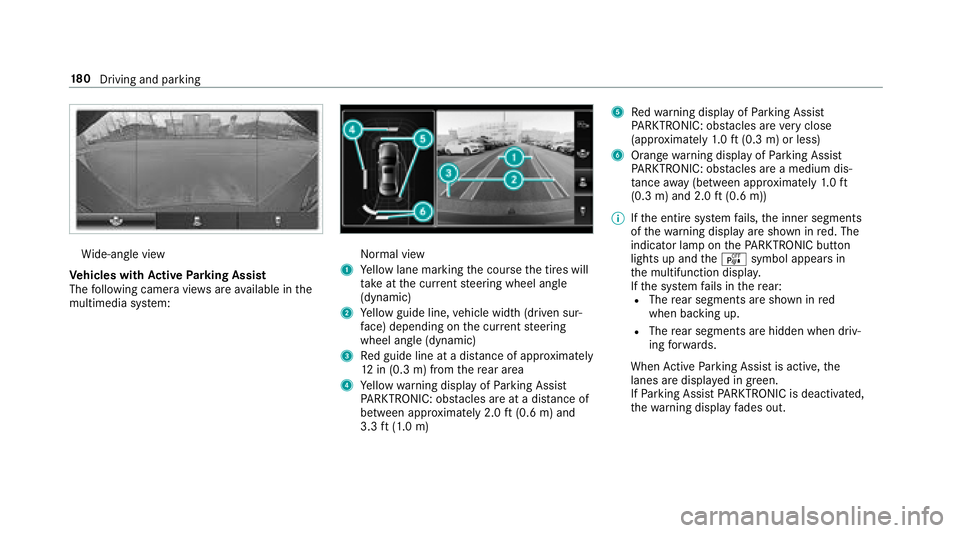
Wide-angle view
Ve hicles with Active Parking Assist
The following camera vie wsare available in the
multimedia sy stem:Normal view
1Ye llow lane marking the course the tires will
ta ke atthe cur rent steering wheel angle
(dynamic)
2Ye llow guide line, vehicle width (driven sur‐
fa ce) depending on the cur rent steering
wheel angle (dynamic)
3Re d guide line at a dis tance of appr oximately
12 in (0.3 m) from there ar area
4Ye llow warning display of Parking Assist
PA RKTRONIC: obstacles ar eat adis tance of
between appr oximately 2.0 ft(0.6 m) and
3.3 ft(1.0 m)
5Re dwa rning display of Parking Assist
PA RKTRONIC: obstacles ar eve ry close
(appr oximately 1.0 ft (0.3 m) or less)
6Orange warning display of Parking Assist
PA RKTRONIC: obstacles ar e amedium dis‐
ta nce away (between appr oximately 1.0 ft
(0.3 m) and 2.0 ft(0.6 m))
00CE Ifth e entire sy stem fails, the inner segments
of thewa rning display are shown in red. The
indicator lamp on thePA RKTRONI Cbut ton
lights up and theé symbol appears in
th e multifunction displa y.
If th e sy stem fails in there ar:
RThe rear segments are shown in red
when backing up.
RThe rear segments are hidden when driv‐
ing forw ards.
When Active Parking Assist is active, the
lanes are displa yed in green.
If Pa rking Assist PARKTRONI Cis deacti vate
d,
th ewa rnin
g display fades out.
18 0
Driving and pa rking
Page 184 of 498
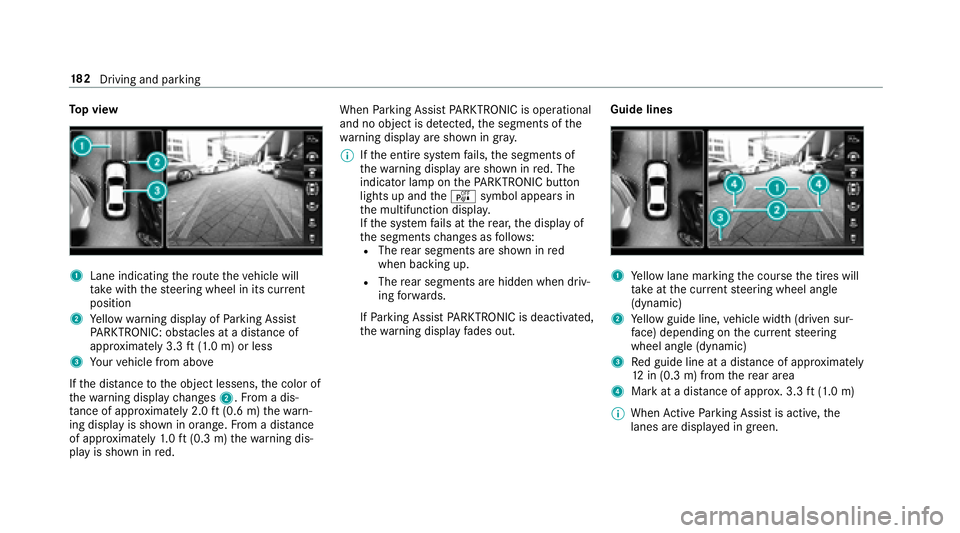
Top view
1Lane indicating thero ute theve hicle will
ta ke with thesteering wheel in its cur rent
position
2Ye llow warning display of Parking Assist
PA RKTRONIC: obstacles at adis tance of
appr oximately 3.3 ft(1.0 m) or less
3Yo ur vehicle from abo ve
If th e dis tance tothe object lessens, the color of
th ewa rning display changes 2.From a dis‐
ta nce of appr oximately 2.0 ft(0.6 m) thewa rn‐
ing display is shown in orange. From a dis tance
of appr oximately 1.0 ft (0.3 m) thewa rning dis‐
play is shown in red. When
Parking Assist PARKTRONI Cis operational
and no objec tis de tected, the segments of the
wa rning display are shown in gray .
00CE Ifth e entire sy stem fails, the segments of
th ewa rning display are shown in red. The
indicator lamp on thePA RKTRONI Cbut ton
lights up and theé symbol appears in
th e multifunction displa y.
If th e sy stem fails at there ar, the display of
th e segments changes as follo ws :
RThe rear segments are shown in red
when backing up.
RThe rear segments are hidden when driv‐
ing forw ards.
If Pa rking Assist PARKTRONI Cis deacti vated,
th ewa rning display fades out. Guide lines1Ye
llow lane marking the course the tires will
ta ke atthe cur rent steering wheel angle
(dynamic)
2Ye llow guide line, vehicle width (driven sur‐
fa ce) depending on the cur rent steering
wheel angle (dynamic)
3Re d guide line at a dis tance of appr oximately
12 in (0.3 m) from there ar area
4Mark at a distance of appr ox. 3.3 ft(1.0 m)
00CE When Active Parking Assist is active, the
lanes are displa yed in green.
18 2
Driving and pa rking