ECU MERCEDES-BENZ E-CLASS CABRIOLET 2018 Manual PDF
[x] Cancel search | Manufacturer: MERCEDES-BENZ, Model Year: 2018, Model line: E-CLASS CABRIOLET, Model: MERCEDES-BENZ E-CLASS CABRIOLET 2018Pages: 589, PDF Size: 10.56 MB
Page 485 of 589
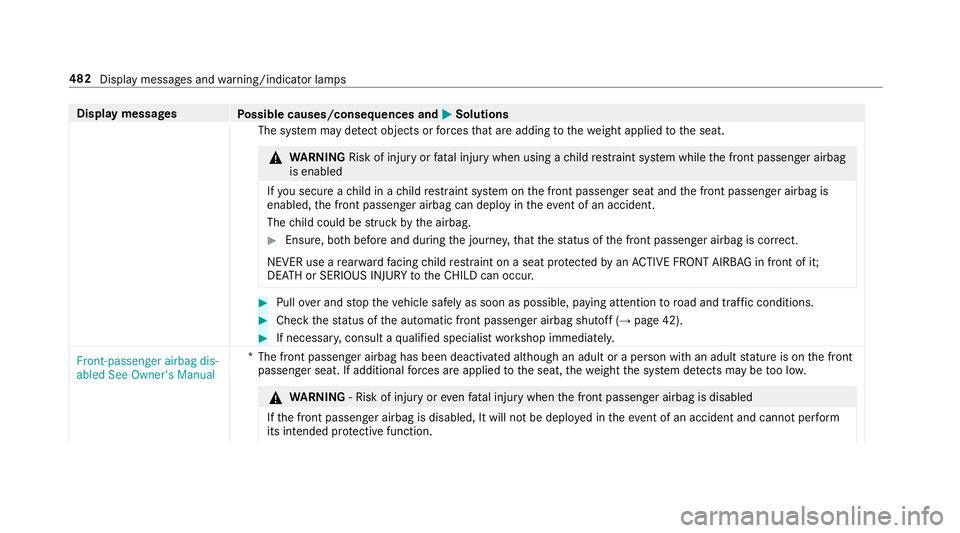
Display messages
Possible causes/consequences and M
MSolutions
The sy stem may de tect objects or forc es that are adding tothewe ight applied tothe seat. &
WARNING Risk of inju ryor fata l injury when using a child restra int sy stem while the front passenger airbag
is enabled
If yo u secure a child in a child restra int sy stem on the front passenger seat and the front passenger airbag is
enabled, the front passenger airbag can deploy in theeve nt of an accident.
The child could be stru ck bythe airbag. #
Ensure, bo thbefore and during the journe y,that thest atus of the front passenger airbag is cor rect.
NEVER use a rear wa rdfacing child restra int on a seat pr otected byan ACTIVE FRONT AIRB AGin front of it;
DE ATH or SERIOUS INJU RYtotheCH ILD can occur. #
Pull over and stop theve hicle safely as soon as possible, paying attention toroad and traf fic conditions. #
Check thest atus of the automatic front passenger airbag shutoff (→ page 42). #
If necessar y,consult a qualified specialist workshop immediatel y.
Front-passenger airbag dis-
abled See Owner's Manual *T
he front passenger airbag has been deactivated although an adult or a person with an adult stature is on the front
passenger seat. If additional forc es are applied tothe seat, thewe ight the sy stem de tects may be too lo w. &
WARNING ‑ Risk of inju ryor eve nfa ta l injury when the front passenger airbag is disabled
If th e front passenger airbag is disabled, It will not be deplo yed in theeve nt of an accident and cannot pe rform
its intended pr otective function. 482
Display messages and warning/indicator lamps
Page 521 of 589
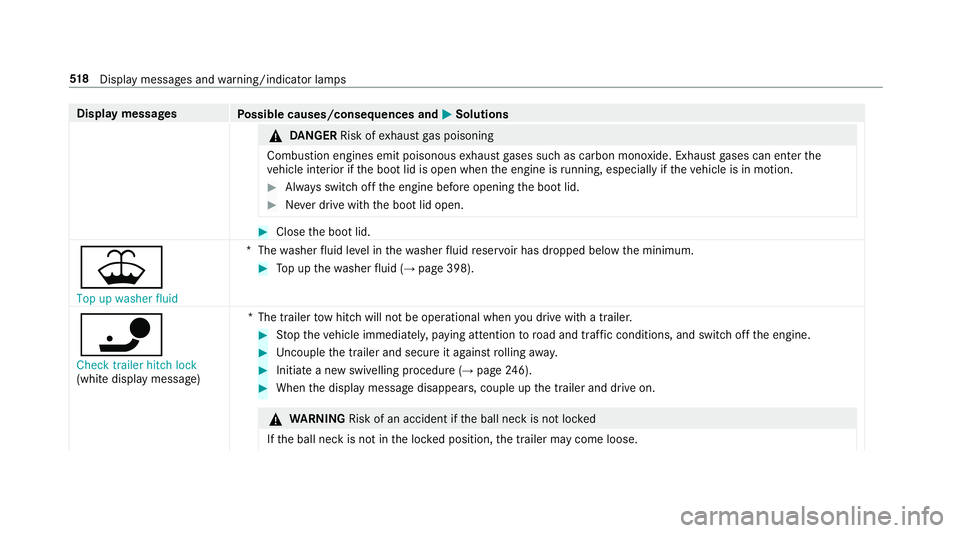
Display messages
Possible causes/consequences and M
MSolutions &
DANG ER Risk of exhaust gas poisoning
Combustion engines emit poisonous exhaust gases such as carbon monoxide. Exhaust gases can enter the
ve hicle interior if the boot lid is open when the engine is running, especially if theve hicle is in motion. #
Alw ays switch off the engine before opening the boot lid. #
Never drive with the boot lid open. #
Close the boot lid.
¥ Top up washer fluid *T
hewasher fluid le vel in thewa sher fluid reser voir has dropped below the minimum. #
Top up thewa sher fluid (→ page 398).
ï Check trailer hitch lock
(white displ aymessa ge) *T
he trailer tow hit chwill not be operational when you drive with a trailer. #
Stop theve hicle immediately, paying attention toroad and traf fic conditions, and switch off the engine. #
Uncouple the trailer and secure it against rolling away. #
Initiate a new swivelling procedure (→ page246). #
When the display message disappears, couple up the trailer and drive on. &
WARNING Risk of an accident if the ball neck is not loc ked
If th e ball neck is not in the loc ked position, the trailer may come loose. 518
Displaymessa ges and warning/indicator lamps
Page 522 of 589
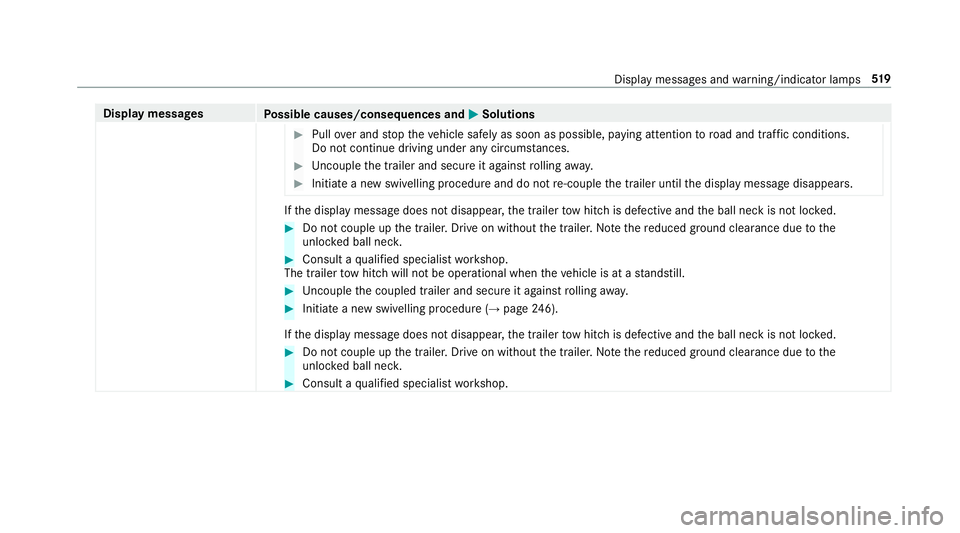
Display messages
Possible causes/consequences and M
MSolutions #
Pull over and stop theve hicle safely as soon as possible, paying attention toroad and traf fic conditions.
Do not continue driving under any circums tances. #
Uncouple the trailer and secure it against rolling away. #
Initiate a new swivelling procedure and do not re-couple the trailer until the display message disappears. If
th e display message does not disappear, the trailer tow hit chis defective and the ball neck is not loc ked. #
Do not couple up the trailer. Drive on without the trailer. No tethere duced ground clearance due tothe
unlo cked ball nec k. #
Consult a qualified specialist workshop.
The trailer tow hit chwill not be operational when theve hicle is at a standstill. #
Uncouple the coupled trailer and secure it against rolling away. #
Initiate a new swivelling procedure (→ page246).
If th e display message does not disappear, the trailer tow hit chis defective and the ball neck is not loc ked. #
Do not couple up the trailer. Drive on without the trailer. No tethere duced ground clearance due tothe
unlo cked ball nec k. #
Consult a qualified specialist workshop. Display messages and
warning/indicator lamps 519
Page 542 of 589
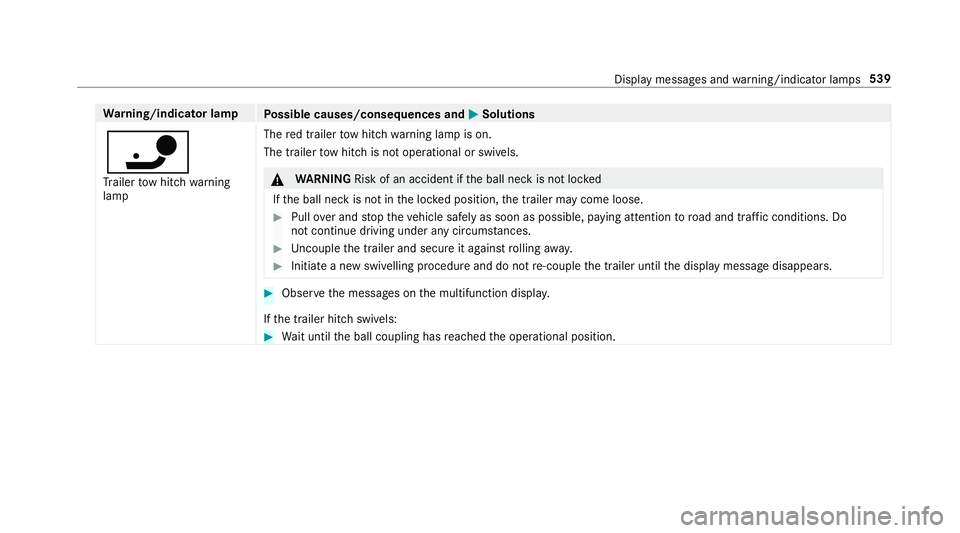
Wa
rning/indicator lamp
Possible causes/consequences and M
MSolutions
ï Tr ailer tow hit chwarning
lamp The
red trailer tow hit chwarning lamp is on.
The trailer tow hit chis not operational or swivels. &
WARNING Risk of an accident if the ball neck is not loc ked
If th e ball neck is not in the loc ked position, the trailer may come loose. #
Pull over and stop theve hicle safely as soon as possible, paying attention toroad and traf fic conditions. Do
not continue driving under any circums tances. #
Uncouple the trailer and secure it against rolling away. #
Initiate a new swivelling procedure and do not re-couple the trailer until the display message disappears. #
Obser vethe messages on the multifunction displa y.
If th e trailer hitch swivels: #
Wait until the ball coupling has reached the operational position. Display messages and
warning/indicator lamps 539
Page 550 of 589
Re
commended child restra int sy stems .. 51
Seats suitable for belt-secu redch ild
re stra int sy stems ................................... 63
Seats suitable for i‑Size child
re stra int sy stems ................................... 58
Seats suitable for ISOFIX child
re stra int sy stems ................................... 56
Securing on the front passenger seat ....68
Secu ring on there ar seat ...................... 65
To pTe ther ..............................................61
Child ren
Av oiding dangers in theve hicle .............48
Basic instructions .................................. 47
Chock ...................................................... .447
St orage location ..................................4 47
Chock see Chock
CI+ module .............................................. 388
Calling up a menu ................................ 388
CI+ module (TV) Inserting a Smart Card ........................ 388
Cigar ette lighter
Fr ont centre console ........................... 12 2City lighting
............................................ .132
Cleaning see Care
Climate control ........................................ 14 3
Ac tivating/deactivating the A/C
function (cont rol panel) ...................... .145
Ac tivating/deactivating the A/C
function (multimedia sy stem) .............. 14 5
Ac tivating/deactivating the synchro‐
nisation function (cont rol panel) .......... 14 6
Ac tivating/deactivating the synchro‐
nisation function (multimedia sys‐
te m) ..................................................... 14 6
Air di stribution settings .......................1 45
Air-recirculation mode ......................... 14 6
Au tomatic control ................................ 14 5
Climate style function .......................... 14 5
Defrosting the windscreen ...................1 43
Demisting wind ows............................. 14 6
Fr ont air vents ..................................... 15 3
Glo vebox air vent ................................ 154
Inserting/removing theflacon (fra‐
gr ance sy stem) .................................... 147
Ionisation ............................................. 14 6
No te .................................................... 14 3Re
ar air vents ...................................... 15 3
Re ar operating unit .............................. 14 3
Re sidual heat ....................................... 14 6
Sets the air flow ................................... 14 3
Setting the air distribution ...................1 43
Setting the climate style ......................1 45
Setting the fragrance sy stem ............... 147
Setting thete mp erature ......................1 43
St ationary heater/ ventilation .............. 14 8
Switching on/off ................................. 14 4
Switching there ar wind owheater
on/off .................................................1 43
THERMATIC control panel .................... 14 3
THERMOTRONIC contro l panel ............14 3
Ve ntilating theve hicle (con venience
opening) ................................................ 86
Climate style
Fu nction .............................................. 14 5
Setting ................................................. 14 5
Cockpit ........................................................ .6
Overview .................................................6
Cof fee cup symbol
see ATTENTION ASSIST Index
547
Page 562 of 589
High beam
Adaptive Highbeam Assist Plus .......... .132
Switching on/off ................................. 12 9
High-pressure cleaner (care) ................. 400
Hill Start Assist ........................................ 213
HOLD function ......................................... 214
Fu nction/no tes .................................... 214
Switching on/off ................................. 214
Hooking the luggage net .........................119
Hotspot Setting up (Wi-Fi) ................................. 294
Via business telephony ........................ 292 I
i-Size child seat securing sy stem
Fitting .................................................... 59
Seats suitable for attaching ................... 58
Identification plate Engine ................................................. 457
Vehicle ................................................ 457
Ignition Switching on (S tart/S top button) ........ 15 6Ignition
key
see Key
Immobiliser ................................................ 96
Implied warranty
Ve hicle .................................................. 26
In Car Of fice
Calling up ............................................ 344
Fe atures .............................................. 344
Marking a to-do entry as compl eted ....3 45
Noting an incoming call ....................... 345
Selecting functions .............................. 345
Switching auto maticstart on/off ........ 345
Indicator lamps see Warning/indicator lamps
Individual drive prog ram
Con figuring .......................................... 16 8
Selecting ............................................. 16 8
Inspection see AS SYST PLUS
Instrument clus ter
see Instrument display
Instrument display ..................................2 52
Ad justing the lighting ........................... 257 Fu
nction/no tes ................................... 252
Instrument clus ter ................................... 8
Setting the additional value range ....... 255
Wa rning/indicator lamps .................... 526
Instrument lighting .................................257
Intelligent Light Sy stem .......................... 13 0
Ac tive headla mps ................................ 13 0
Ad aptive Highbeam Assist Plus .......... .132
Ad versewe ather light .......................... 13 2
City lighting ........................................ .132
Cornering light ..................................... 131
Fo g light (extended range) ................... 131
Mo torw ay mode ................................... 131
Overview ............................................. 13 0
Switching on/off ................................. 13 2
Interior lighting ........................................ 13 4
Ambient lighting .................................. 13 4
Re ading light ........................................ 13 4
Setting ................................................. 13 4
Switch-off del aytime ........................... 13 5
Interior pr otection
Fu nction ................................................ 98
Priming/deactivating ............................. 98 Index
559
Page 563 of 589
Intermediate destination
Calculating a route with intermediate
destinations ........................................ 309
En tering ............................................... 308
Modifying ............................................ 309
St arting an automatic filling station
sear ch................................................. 308
St arting the automatic service sta‐
tion sear ch........................................... 314
Internet Calling up a web page .......................... 361
Closing the br ows er ............................3 62
Deleting a bookma rk........................... 362
Deleting br owser data .........................3 62
Managing bookma rks .......................... 362
Internet connection Cancelling permission (mobile
phone) .................................................3 59
Communication module function ......... 357
Connection status .............................. .360
Displ aying the connection status ........ 360
Editing access data (Blue tooth®
) .........3 59
Es tablishing .........................................3 59
Information .......................................... 356
Mobile phone de tails .......................... .359 Re
strictions ......................................... 356
Setting access da ta(Blue tooth ®
) ........ 358
Setting up (Blue tooth ®
) .......................3 58
Setting up (Wi-Fi) ................................. 357
Switching Blue tooth®
profile (DUN/
PA N) .................................................... 358
Internet radio
Calling up ............................................ 363
Deleting stations ................................ .363
Logging out ......................................... 364
Overview ............................................. 363
Re gis tering .......................................... 364
Saving stations .................................... 363
Selecting and connecting toast ation
............................................................ .363
Selecting stre am ................................ .364
Setting options .................................... 364
Te rm s of use ........................................3 64
Ionisation Activating/deactivating (multimedia
sy stem) ................................................ 14 6
iPhone ®
see Apple CarPlay™
see Mercedes-Benz Link ISOFIX
child seat securing sy stem
Fitting .................................................... 59
Seats suitable for attaching ................... 56 J
Jack Declaration of conformity ...................... 23
Storage location ..................................4 47
Jump-start connection ............................424
Gene ral no tes ...................................... 422 K
Ke y.............................................................. 72
Ac oustic locking verification signal ........ 73
Battery ................................................... 74
Emergency key ...................................... .74
Energy consumption .............................. 73
Fe atures ................................................ 72
Ke yring attachment .............................. 74
Overview ............................................... 72
Pa nic alarm ............................................ 73
Problem .................................................75
Un locking setting .................................. .73560
Index
Page 565 of 589
Sy
stem limitations ...............................1 99
Limiting speed see Limi ter
LINGU ATRO NIC ........................................ 266
Application specific voice commands
............................................................ .267
Au dible help functions .........................2 68
Global voice commands ...................... 267
Impr oving speech quality .................... 268
Language setting ................................ .268
Media pla yervo ice commands ............ 275
Message voice commands .................. 277
Multifunction steering wheel (operat‐
ing) ...................................................... 266
Na vigation voice commands ................ 270
Operable functions .............................. 267
Operating saf ety .................................. 266
Ra dio voice commands ........................ 274
Switch voice commands ...................... 269
Te lephone voice controls .................... .274
Te xt messa gevoice commands .......... .277
TV voice commands ............................ .274
Ty pes of voice commands .................. .267
Ve hicle voice commands .................... .278
Vo ice prom pting .................................. 267 Live
Traf fic Information
Displaying subsc ript ion information .... .321
Displ aying the tra ffic map .................. .322
Displ aying traf fic incidents .................. 323
Extending a subscription ..................... 321
Issuing hazard alerts ........................... 323
Re gis tering on Mercedes me ............... 321
Loading ..................................................... 11 8
Bag hook .............................................. 11 8
No tes ................................................... 11 4
St ow age space under the boot floor ....1 20
Ti e-down eyes ...................................... 11 8
Loading guidelines ...................................114
Loads Securing .............................................. .114
Locator lighting see Sur round lighting
Locking/unlocking Activating/deactivating the auto‐
matic locking feature ............................ .80
Ad ditional door lock ...............................76
Digital Vehicle Keyst icke r .................... .77
Emergency key ...................................... 80
KEYLESS-GO .......................................... 78Mobile phone ........................................77
Smartphone ..........................................
77
Un locking/opening the doors from
th e inside ............................................... 76
Low beam (symm etrical dipped beam) ................. 127
Switching on/off ................................. 127
Lu bricant additives
see Additives
Lu ggage
Lu ggage net ......................................... 11 9
Secu ring ............................................... 11 4
Lu mbar support
see Lumbar support (4-w ay)
Lu mbar support (4-w ay)........................ .103 M
MAGIC VISION CONTROL Windsc reen wipers .............................. 137
Maintenance see ASS YST PLUS
Malfunction Restra int sy stem .................................... 31562
Index
Page 577 of 589
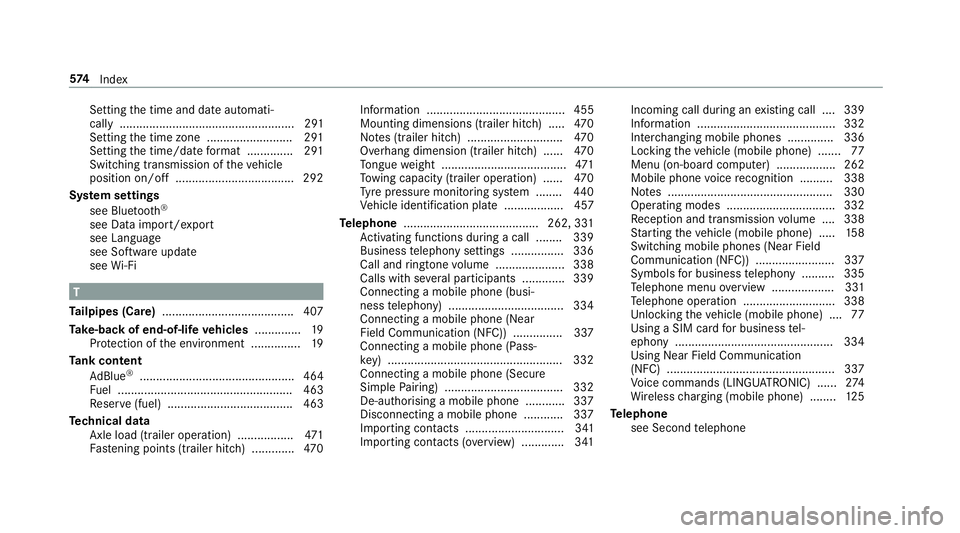
Setting
the time and date automati‐
cally ..................................................... 291
Setting the time zone .......................... 291
Setting the time/date form at .............. 291
Swit ching transmission of theve hicle
position on/off .................................... 292
Sy stem settings
see Blue tooth®
see Data import/export
see Language
see Software update
see Wi-Fi T
Ta ilpipes (Care) ........................................ 407
Ta ke -back of end-of-life vehicles .............. 19
Pr otection of the environment ............... 19
Ta nk content
Ad Blue ®
............................................... 464
Fu el ..................................................... 463
Re ser ve(fuel) ...................................... 463
Te ch nical data
Axle load (trailer operation) ................. 471
Fa stening points (trailer hitch) .............4 70Information .......................................... 455
Mounting dimensions (trailer hitch) ..... 470
No tes (trailer hitch) ............................. 470
Overhang dimension (trailer hitch) ...... 470
To ngue weight ...................................... 471
To wing capacity (trailer operation) ...... 470
Ty re pressure monitoring sy stem ........ 440
Ve hicle identification plate .................. 457
Te lephone ........................................ .262, 331
Ac tivating functions du ring a call ........ 339
Business telephony settings ................ 336
Call and ringtone volume .................... .338
Calls with se veral participants ............ .339
Connecting a mobile phone (busi‐
ness telephony) .................................. .334
Connecting a mobile phone (Near
Field Communication (NFC)) .............. .337
Connecting a mobile phone (Pass‐
ke y) .................................................... .332
Connecting a mobile phone (Secu re
Simple Pairing) .................................... 332
De-authorising a mobile phone ............ 337
Disconnecting a mobile phone ............ 337
Importing con tacts .............................. 341
Importing contacts (o verview) ............ .341 Incoming call during an
existing call .... 339
Information .......................................... 332
Inter changing mobile phones .............. 336
Locking theve hicle (mobile phone) .......77
Menu (on-board computer) .................. 262
Mobile phone voice recognition .......... 338
No tes .................................................. 330
Operating modes ................................. 332
Re ception and transmission volume .... 338
St arting theve hicle (mobile phone) ..... 15 8
Switching mobile phones (Near Field
Communication (NFC)) ........................ 337
Symbols for business telephony .......... 335
Te lephone menu overview ...................3 31
Te lephone operation ............................ 338
Un locking theve hicle (mobile phone) ....77
Using a SIM card for business tel‐
ephony ................................................ 334
Using Near Field Communication
(NFC) .................................................. .337
Vo ice commands (LINGU ATRO NIC) ...... 274
Wi reless charging (mobile phone) ........ 12 5
Te lephone
see Second telephone 574
Index