display MERCEDES-BENZ E-CLASS CABRIOLET 2019 Owner's Guide
[x] Cancel search | Manufacturer: MERCEDES-BENZ, Model Year: 2019, Model line: E-CLASS CABRIOLET, Model: MERCEDES-BENZ E-CLASS CABRIOLET 2019Pages: 530, PDF Size: 44.1 MB
Page 208 of 530
Deact
ivat ing/a ctivatin gmane uveringass is‐
ta nc e
Mu ltimed iasystem:
Vehicle kAssist ance Camera&
Parkin gM aneuveringAs sist . 0007
Activate0073 ordeacti vate 0053 thefunc tion.
0009 Maneuv ering assis tance mustbe activ efo r
th efunc tion ofDrive Aw ayAssi st
( → pag e204) andCross Traf fic Aler t
(→ page 205) . AT
TENTI ONASSIST Fu
nction ofATTENTI ONASSIST
AT TENTION ASSISTassis tsyouon long,mon oto‐
nous journeys,e.g. onhighw aysand trunk roads.
If AT TENTION ASSISTde tects indicatorsof fati‐
gu eor incr easing laps es inconce ntration onthe
par tof thedr iver ,it sugg ests taking abr ea k.
AT TENTION ASSISTis onl yan aid. Itcann ot
alw aysde tect fatig ue orlaps es inconce ntration
in tim e.The system isno ta subs titutefo ra we ll-
re sted and attent ive dr iver .On long journeys, ta
ke regular break sin good timethat allo wfor
adeq uatere cup erati on.
Yo ucan choose between twose ttings.
R Standar d:nor mal system sensit ivity.
R Sensitiv e:higher system sensit ivity.The
dr iver iswa rned ear lier and theatt ent ion
le ve lde tected byATTENTION ASSISTis adap‐
te daccor dingly.
If dr ow siness orincr easing lapsesinconcen tra‐
tion arede tected, theATTE NTION ASSIS T:Take
a Break !wa rning appear sin theins trument dis‐
pla y.Yo ucan ackn ow ledg eth emessag eand
tak eabr eak wher eneces sary.Ifyo udo notta ke
a br eak and ATTENTION ASSISTcont inues to
de tect incr easing lapse sin concentr ation, you
will bewarned again afte ra minimu mof
15 minut es. Yo
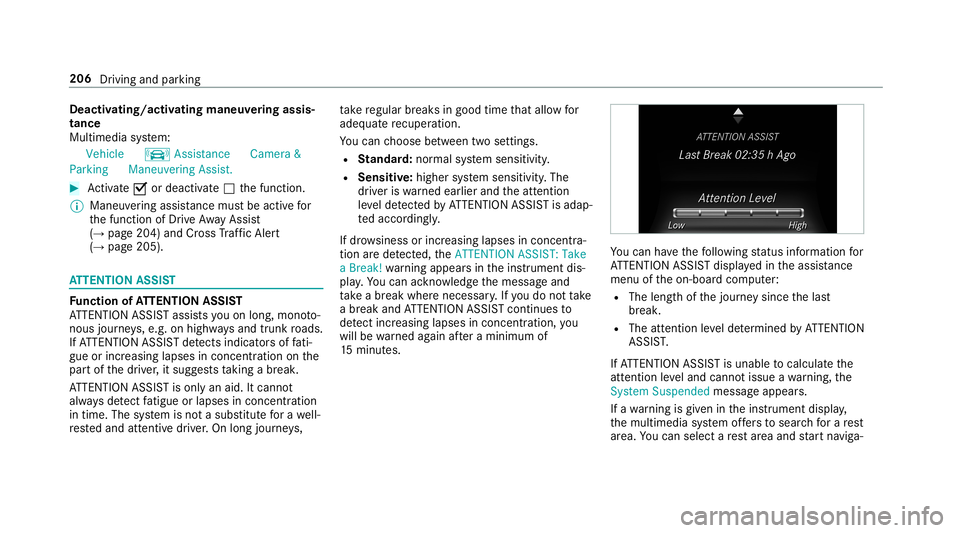
ucan have thefo llo wing status informat ionfor
AT TENTION ASSISTdispla yedin theassis tance
menu oftheon- boar dcom puter:
R The lengt hof thejour neysince thelas t
br eak .
R The attent ion leve lde term ined byATTENTION
ASS IST.
If AT TENTION ASSISTis unable tocal cul ateth e
att ent ion leve land cannotissue awa rning, the
Sys tem Suspend edmes sage appear s.
If awa rning isgiv en intheins trument display,
th emultimedia system offers to sear chfora re st
ar ea. Youcan selectare st area and star tna vig a‐ 206
Drivin gand parking
Page 210 of 530
Since
Traf fic Sign Assistalso uses thedat a
st or ed inthena vig ation system, itcan updat e
th edispla yin thefo llo wing situat ionswithout
de tecting traf fic sig ns:
R Whe nth eve hicle chang esroads, e.g.a free‐
wa yen try or exitro ad.
R When avillag eor cityboun darywhic his
st or ed inthedigit almap iscrossed.
The camer aalso detects traf fic sig ns with a
re striction indicatedbyan addit ionalsign (e.g.in
we tcond itions ).
Tr af fic Sign Assistisonl yan aid. Thedriver is
re sponsible forke eping asaf edis tan cetothe
ve hicle infront, forve hicle speed andforbr aking
in good time.
Wa rning when thema xim um permis sible
speed isexc eeded
The system can warnyouif yo uunin tentio nally
exc eed themaximum permissible speed.Todo
th is, youcan spec ifyinthemultimedia system
by howmuc hth emaximum permissible speed
can beexc eeded beforeawa rning isissued. You
can specify whether thewa rning isto be justa
visual warning oran acous ticone aswell. Displa
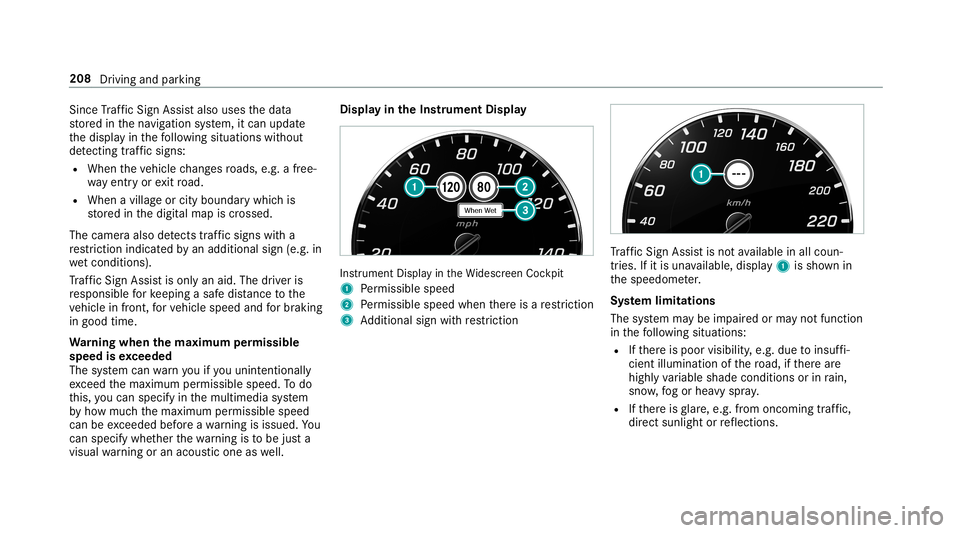
yin theIns trum ent Displa y In
stru ment Displa yin theWi descr eenCockpit
1 Perm issible speed
2 Perm issible speedwhenther eis are striction
3 Addition alsign withre striction Tr
af fic Sign Assistisno tav ailable inall coun ‐
tr ies. Ifit is una vailable, display1 issho wnin
th espeedome ter.
Sy stem limita tions
The system maybe impair edorma yno tfunc tion
in thefo llo wing situat ions:
R Ifth er eis poor visibility ,e.g. due toinsuf fi‐
cie ntillu mina tionofthero ad, ifth er ear e
highl yva riable shade condition sor inrain,
sno w,fogor hea vyspr ay.
R Ifth er eis glar e, e.g .fr om oncom ingtraf fic,
di re ct sunli ght orreflect ions. 208
Driving andparking
Page 211 of 530
R
Ifth ewindshield inthear ea ofthemultifunc ‐
tion camer ais dir ty,or ifth ecamer ais fog‐
ge dup, damag edorcovered.
R Ifth etraf fic sig ns areha rd todetect, e.g. due
to dir tor sno w,orbecause they areco vered
or due toinsuf ficie ntlighti ng.
R Ifth einf ormation inthena vig ation system's
digit almap isincor rect or out-of-da te.
R Ifth esigns areambiguous, e.g.traffic sign s
on con stru ction sites orinad jacent lanes.
R Ifyo utur nshar plywhen traf fic sig ns areou t‐
sid eth ecamer a'sfield ofvision.
Se tting Traf fic Sign Assis t
Mult imed iasystem:
Vehicle kAssist ance TrafficSign
Assist
Ac tiv atin g/deac tivatin gaut omati cadop tion
of spe edlimits
Re quiremen ts:
R ActiveDis tance AssistDIS TRONI Cis acti va‐
te d. 0007
Select LimitAdopt ion. 0007
Activate0073 ordeacti vate 0053 thefunc tion.
The speed limitsdetected byTraf fic Sign
Assi stareaut omat icallyadop tedby Active
Dis tance AssistDIS TRONI C.
Di spl aying detected traf fic signs inthe
med iadis pla y 0007
Select Display inCOMA ND. 0007
Activate0073 ordeacti vate 0053 thefunc tion.
0009 When DISTRONIC orcruise control areacti‐
va ted, thespeed detected can bemanu ally
ad op tedas thespeed limit(→pag e17 6).
Ad jus tingthe type ofwa rning 0007
Selec tVisual &Audible ,Visual orNon e.
Ad jus tingthe warning threshold
This value determ ines thespeed atwhic ha
wa rning isissued whenexceeded. 0007
Select Warning Threshold. 0007
Setth edesir edspeed. Blind
SpotAssis tand Activ eBli nd Spo t
As sist Fu
nction ofBlind SpotAssis tand Activ e
Bli nd Spo tAs sist wit hex itwa rning
Blin dSpo tAss istand ActiveBli nd Spo tAssi st
use twolat eral, rear-facin gra dar sensor sto
monit orthear ea up to130ft (40 m)behind your
ve hicle and10ft(3 m) direct lyne xt to your vehi‐
cle.
If ave hicle isde tected atspe eds aboveappr ox‐
imat ely8 mp h(12 km/h) andthis vehicle subse‐
qu ent lyent ersth emonit oring rang edire ctly next
to your vehicle, thewa rning lam pin theoutside
mir rorlig hts upred.
If ave hicle isde tected clos eto theside ofyour
ve hicle, there dwa rning lam pin theoutside mir‐
ro rflashes .If yo uswit chon thetur nsignal indi‐
cat orinthecor responding direction, awa rning
to ne sou nds once .If th etur nsignal indicat or
re mains switchedon,allother detected vehicles
ar eindicat edonlyby theflashin gof there d
wa rning lam p.
If yo uove rtak eave hicle quickl y, no warning is
giv en. Dr
ivin gand parking209
Page 219 of 530
Ins
trum ent Disp layove rview
Mer cedes- AMGvehicl es:besur eto obser ve
th einf ormation intheSupplement .Ot her wise,
yo uma yfa ilto recogni zedangers. 000A
WARNIN GRisk ofacci dent dueto an
ins trumen tdispla ymalf unction
If th eIns trument Displayhas failed ormal‐
func tioned,youma yno tre cogni zefuncti on
re strictions applyi ngtosaf etyre leva nt sys‐
te ms.
The oper ating safetyof your vehicle maybe
im pair ed. 0007
Drive on car efull y. 0007
Have theve hicle checkedimmediat ely
at aqu alif ied spec ialistwo rkshop. If
th eoper ating safetyof your vehicle is
im pair ed,parkth eve hicle safelyas soon aspos‐
sible. Contactaqu alif ied spec ialistwo rkshop. Ins
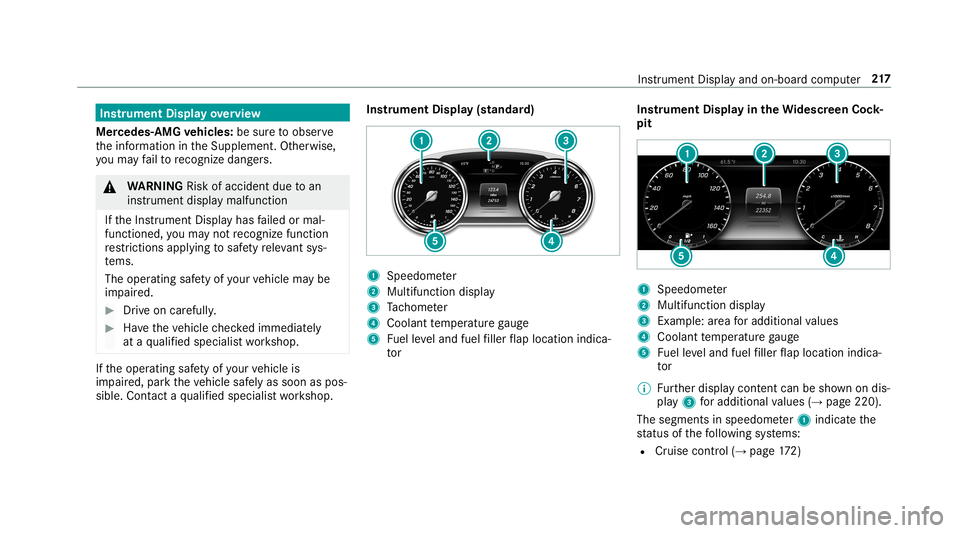
trument Display(s tandar d) 1
Speedome ter
2 Multifunction display
3 Tach ome ter
4 Coolan tte mp eratur ega ug e
5 Fuelleve land fuel filler flap locatio nind ica‐
to r Ins
trum ent Disp layin theWi des cree nCo ck‐
pit 1
Spee dometer
2 Multifunc tiondispla y
3 Exam ple: area foradd itional values
4 Coolant temp eratur ega ug e
5 Fuelleve land fuel filler flap locatio nind ica‐
to r
0009 Further displa ycont entcan besho wnondis‐
pla y3 foradd itional values (→pag e220).
The segme ntsin speedom eter 1 indicat eth e
st atus ofthefo llo wing systems:
R Cruise control (→ pag e17 2) In
stru ment Displa yand on-boar dcom puter 217
Page 220 of 530
R
ActiveDis tance AssistDIS TRONI C
(→ page 174)
000E NO
TEEngi nedama gedue toexc essiv ely
high engine speeds The
engine willbedamag edifyo udr ive wit h
th eengine intheov errevving rang e. 0007
Donotdr ive wi th theengine intheove r‐
re vving rang e. The
fuelsu pp lyis int erru pted toprotect the
engine whenthere dmar kon tach ome ter3
(o ve rrev ving rang e) isreac hed.
Dur ing norm aloper atingcon dition s,coo lant
te mp eratur edispla y4 mayrise tothere d
mar k. 000A
WARNIN GDang erofburnswhen open‐
ing thehood
If yo uopen thehood when theengine has
ove rheat edordur ing afire intheengine
com partmen t,yo uco uld come intoco ntact
wit hho tga ses orother escaping operating
fl uids. 0007
Beforeopen ingthehood, allowthe
engine tocool down. 0007
Intheeve ntofafire intheengine com‐
par tmen t,ke ep thehood closed and
call thefire ser vice. Ve
hicl eswith a48 Von-b oardele ctrical sys‐
te m (EQ Boo sttech nology) 1
POWER showstheelectr icdrive suppor t
2 CHARGE sho wsthere cup erati on powe rof
th eelectr icmo tor
00D0 showsthedr ive sy stem's operational read‐
ine ss. Ov
ervie wof thebut tons on thest eer ing
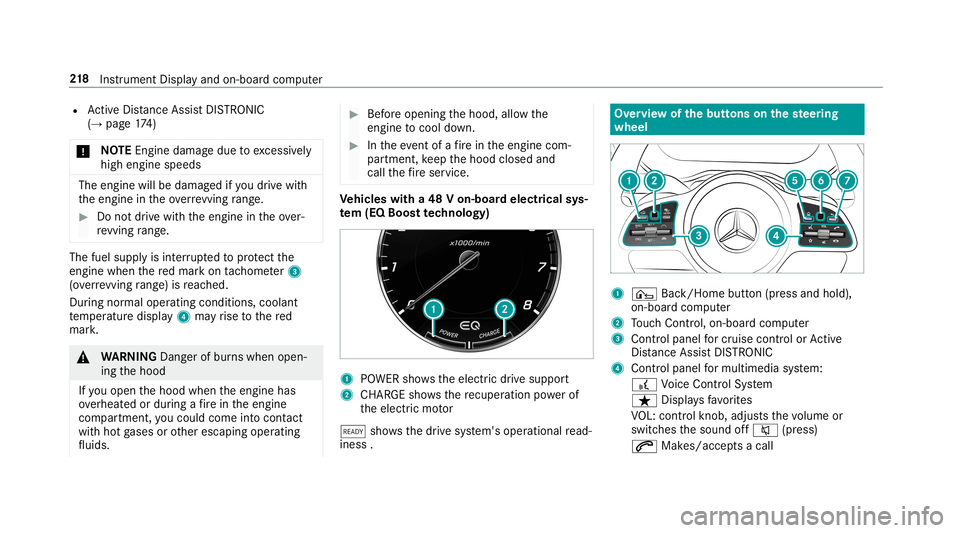
wheel 1
¤ Back/Hom ebutt on(press and hold),
on- boar dcom puter
2 Touc hCon trol, on-bo ardco mp uter
3 Con trol pan elforcr uis econtr olor Active
Dis tance AssistDIS TRONI C
4 Contr olpa nel formulti mediasy stem:
£ Voice Cont rolSy stem
ß Displa ysfavo rite s
VO L:contr olknob, adjuststhevo lume or
switc hesthesound off0063 (press)
0061 Makes/acc epts acall 21
8
Instrument Displayand on-boar dcom puter
Page 221 of 530
0076
Rejects /end sa cal l
5 00E2 Calls up thehome screen
6 Touc hCon trol mult imed iasystem
7 0038 Backbutt on(press and hold) Oper
ating theon-boa rdcom puter 000A
WARNIN GRisk ofdist ra ction from infor‐
mati onsystems andcomm unication s
eq uipment
If yo uoper ateinf ormat ionand comm unic a‐
tio neq uipme ntintegratedin theve hicle
when driving, youwill bedistract ed from the
tr af fic situ ation. Thiscou ldalso cau seyouto
lose control of theve hicle. 0007
Onlyoper ateth is eq uipmen twhen the
tr af fic situ ation per mits. 0007
Ifyo ucan notbe sur eof this, stop the
ve hicle whilstpa ying attention toroad
and traffic condi tions andoperate the
eq uipment withth eve hicle statio nary. Obser
vetheleg alrequ iremen tsforth ecount ry
in whic hyo uar ecur rently drivi ng when you
oper ateth eon- boar dcom puter.
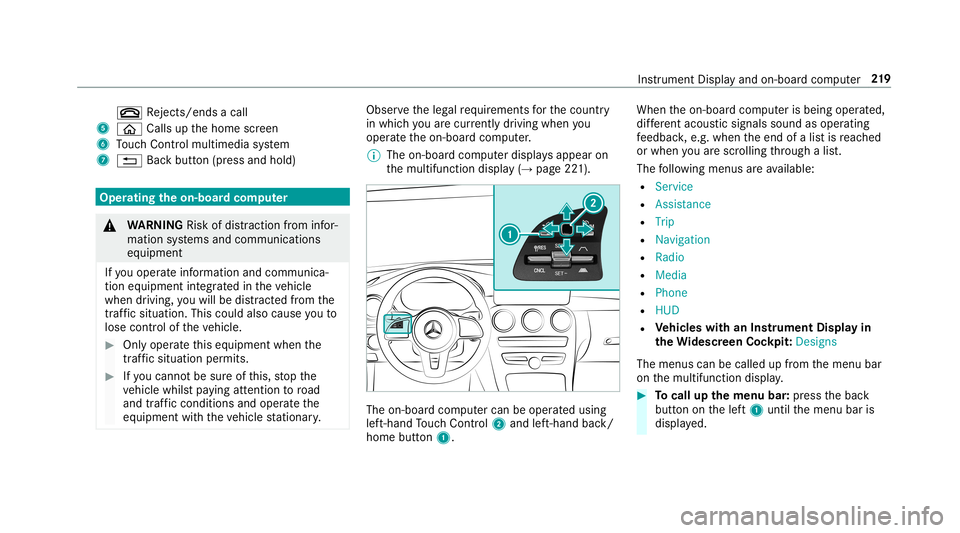
0009 The on-boar dcom puterdispla ysappear on
th emultifunc tiondispla y(→ pag e22 1). The
on-boar dcom putercan beoper ated using
lef t-hand Touc hCon trol 2 and left-han dbac k/
hom ebut ton1. Whe
nth eon- boar dcom puterisbeing operated,
dif fere nt aco ustic signa lssou ndasoperati ng
fe edbac k,e.g. when theend ofalis tis reac hed
or when youar esc rolling thro ugh alis t.
The follo wing menusareav ailable:
R Service
R Assist anc e
R Trip
R Navi gation
R Radio
R Media
R Phon e
R HUD
R Vehicl eswith anIns trument Displayin
th eWi des cree nCo ckpit :Desi gns
The menu scan becalled up from themenu bar
on themultifunc tiondispla y. 0007
Tocall upthemenu bar:press thebac k
butt ononthelef t1 until themenu baris
displa yed. Ins
trument Displayand on-boar dcom puter 21
9
Page 222 of 530
0009
Ve
hicl eswithout Activ eDi stance Assist
DI ST RO NIC :pr ess the00E2 buttontocal l
up themenu baroftheon- boar dcom puter. 0007
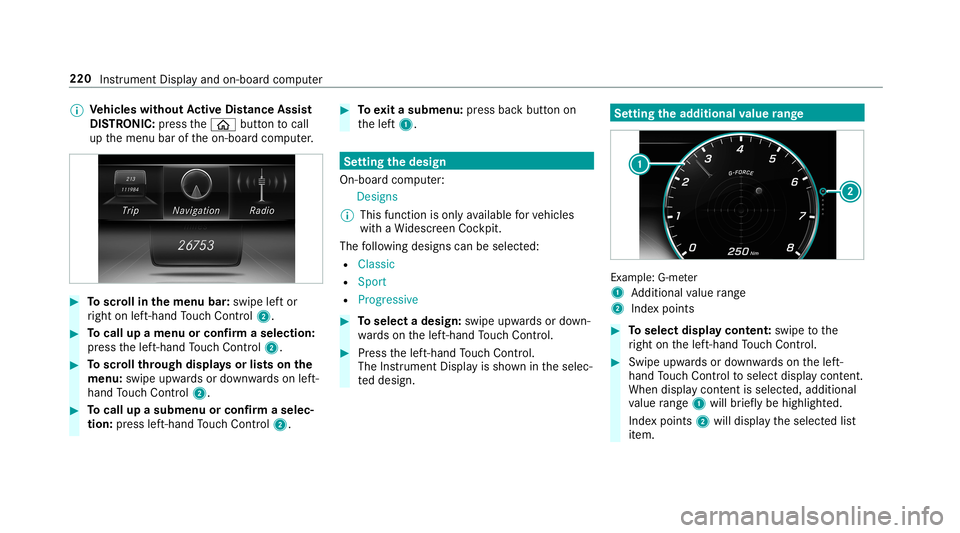
Toscr ollinthemenu bar:swipe leftor
ri ght onleft-h and Touc hCon trol 2. 0007
Tocall upamen uor conf irm aselect ion:
pr ess thelef t-hand Touc hCon trol 2. 0007
Toscr ollthrough displa ysorlists on the
menu :swipe upwards ordown wardson left-
hand Touc hCon trol 2. 0007
Tocall upasub men uor conf irm aselec‐
tion :pr ess left-han dTo uc hCon trol 2. 0007
Toexitasubm enu:press backbutt onon
th elef t1. Se
tting thedesig n
On -bo ardcom puter:
Des igns
0009 This function isonl yav ailable forve hicles
wit haWi descr eenCockpit.
The follo wing design scan beselec ted:
R Classic
R Sport
R Progres sive 0007
Toselect adesign: swipeupwards ordown‐
wa rdson thelef t-hand Touc hCon trol. 0007
Press thelef t-hand Touc hCon trol.
The Instru ment Displa yis sho wnintheselec‐
te ddesign. Se
tting thead dit ional value rang e Ex
am ple: G-me ter
1 Addition alvalue rang e
2 Inde xpo ints 0007
Toselect displaycont ent:swipe tothe
ri ght onthelef t-hand Touc hCon trol. 0007
Swip eupw ards ordown wardson thelef t-
hand Touc hCon trol to select displaycont ent.
When displaycont entisselect ed,additional
va lue rang e1 willbr iefly be high lighted.
Inde xpoint s2 will displa yth eselect edlist
it em. 220
Instrument Displayand on-boar dcom puter
Page 223 of 530
The
follo wing displa ycon tent can beselect edin
th eClassic andSport designs:
R Tach ome ter
R Navig ation
R ECOdisp lay
R Consu mption
R G-M eter
The follo wing content can beselect edinthePro-
gressive design:
R Date
R Navig ation
R ECOdisp lay
R Consu mption
R G-M eter Ov
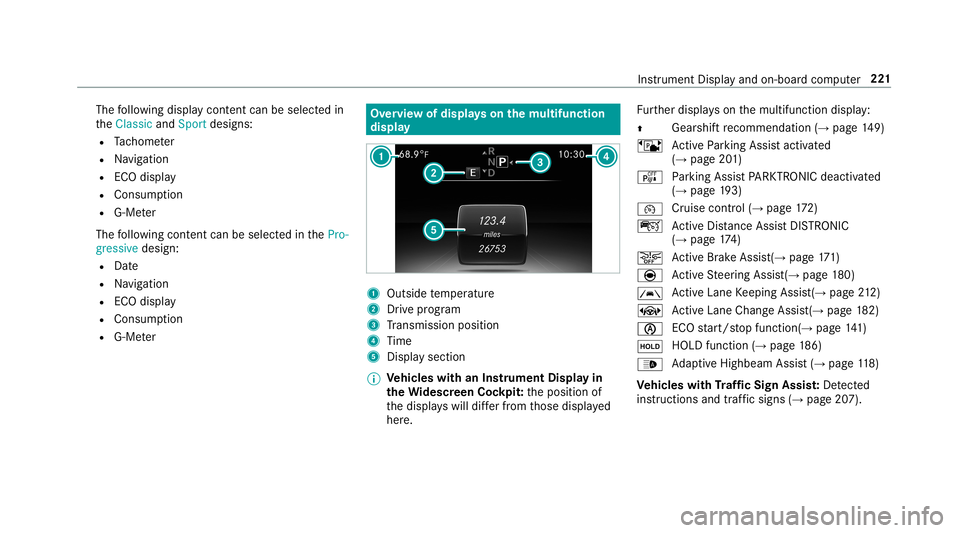
ervie wof displa yson themu ltifunct ion
disp lay 1
Outs idetemp eratur e
2 Drive pr og ram
3 Trans miss ionposit ion
4 Time
5 Displa ysection
0009 Ve
hicl eswith anIns trument Displayin
th eWi des cree nCo ckpit: theposition of
th edispla yswill differfr om those displa yed
her e. Fu
rther displa yson themultifunc tiondispla y:
0097 Gear
shiftre comme ndation (→page 149)
ë ActivePa rking Assistact ivat ed
(→ pag e20 1)
é Parking AssistPA RK TRONI Cdeac tiva ted
( → pag e19 3)
00B2 Cr
uise contr ol(→ pag e17 2)
ç ActiveDis tance AssistDIS TRONI C
(→ page 174)
00D4 Ac
tiveBr ak eAssi st(→ pag e17 1)
è ActiveSt eer ing Assis t(→ pag e18 0)
00B0 Ac
tiveLa ne Keeping Assist(→page21 2)
± ActiveLa ne Chang eAssi st(→ pag e18 2)
00D6 ECO
star t/ stop funct ion(→ pag e14 1)
00D9 HOLD
function (→pag e18 6)
00CE Ad
aptiveHig hbeam Assis t(→ pag e11 8)
Ve hicl eswith Traf fic Sign Assis t:De tected
ins tructi ons and traf fic sig ns (→ page 207). Ins
trument Displayand on-bo ardcom puter 22
1
Page 224 of 530
Ad
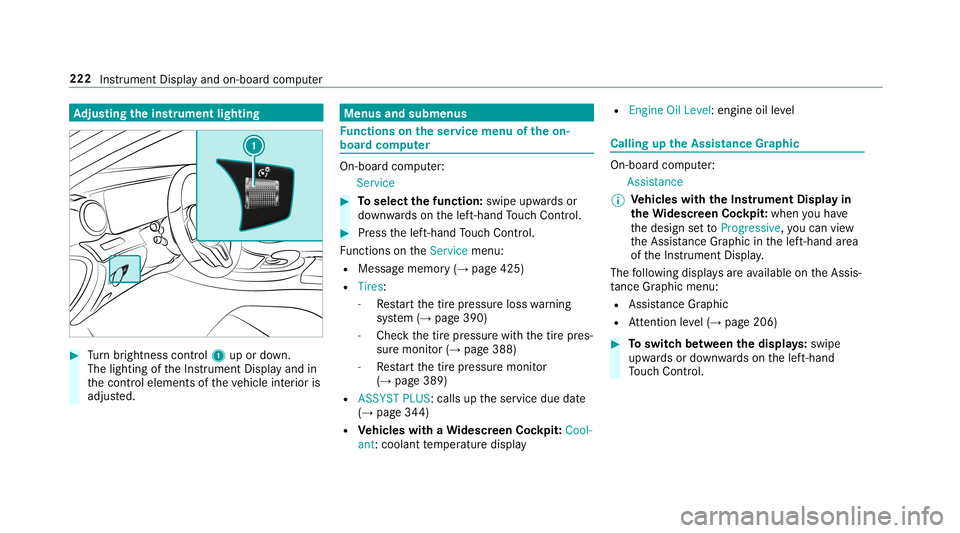
jus tingthe inst ru men tlighti ng 0007
Turn brightn esscontrol 1 upordown.
The lightin gof theIns trument Displayand in
th econ trol element sof theve hicle interior is
adjus ted. Menus
andsubmenu s Fu
nctions ontheser vice menu oftheon-
boar dcom puter On-boar
dcom puter:
Service 0007
Toselect thefun ction: swipeupwards or
do wn wardson thelef t-hand Touc hCon trol. 0007
Press thelef t-hand Touc hCon trol.
Fu nctio nson theServ icemenu:
R Messag ememor y(→ pag e425)
R Tires :
- Restar tth etir epr essur eloss warning
sy stem (→pag e390)
- Chec kth etir epr essur ewit hth etir epr es‐
sur emonit or(→ pag e388)
- Restar tth etir epr essur emonit or
(→ pag e389)
R ASSYST PLUS: callsuptheser vice duedate
(→ pag e34 4)
R Vehicl eswith aWi des cree nCo ckpit: Cool-
ant :cool anttemp eratur edispla y R
Engine OilLevel: engine oilleve l Callin
gup theAssis tance Grap hic On
-bo ardcom puter:
As sist anc e
0009 Ve
hicl eswith theIns trum ent Displa yin
th eWi des cree nCo ckpit: whenyo uha ve
th edesign setto Progressive ,yo ucan view
th eAssis tance Grap hicin thelef t-hand area
of theIns trument Display.
The follo wing displa ysareav ailable ontheAssis‐
ta nce Grap hicmenu :
R Assi stanc eGr aphic
R Attentio nleve l(→ pag e206) 0007
Toswitc hbe tw een thedisp lays :swipe
upw ards ordown wardson thelef t-hand
To uc hCon trol. 222
Instru ment Displa yand on-boar dcom puter
Page 225 of 530
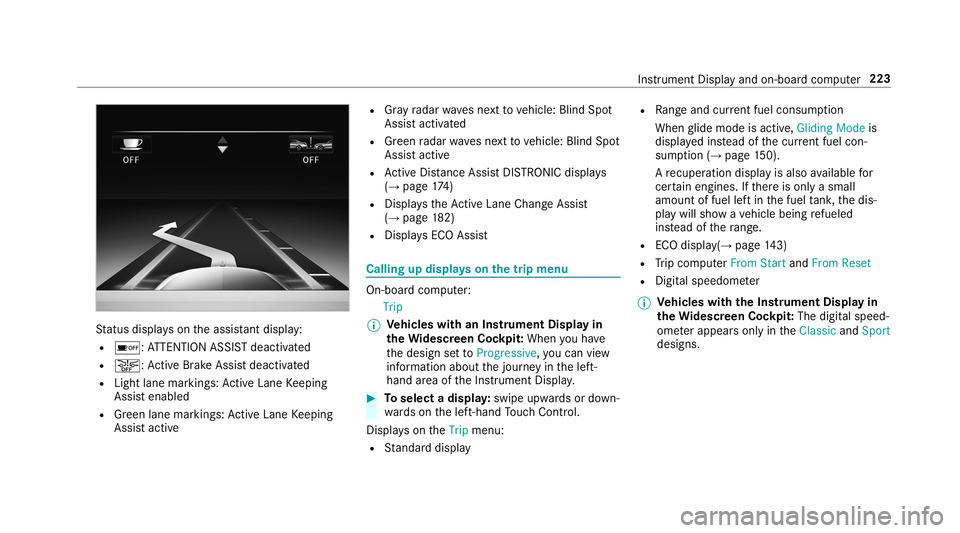
St
atus displa yson theassis tant displ ay:
R 00D7 :AT TENTION ASSISTdeactiv ated
R 00D4: ActiveBr ak eAssi stdeactiv ated
R Light lanemarkings: ActiveLa ne Keeping
Assis tenabled
R Green lane marking s:Ac tiveLa ne Keeping
Assis tactiv e R
Gray radar wavesne xt to vehicle: BlindSpot
Assis tactiv ated
R Green radar wavesnext to vehicle: BlindSpot
Assis tactiv e
R ActiveDis tance AssistDIS TRONI Cdisp lays
( → pag e17 4)
R Displ aysth eAc tiveLa ne Chang eAssi st
( → pag e18 2)
R Display sECO Assis t Calling
updispla yson thetrip menu On
-bo ardcom puter:
Trip
0009 Ve
hicl eswith anIns trument Displayin
th eWi des cree nCo ckpit: Whe nyo uha ve
th edesign setto Progressive ,yo ucan view
inf ormat ionabout thejour neyin thelef t-
hand area oftheIns trument Display. 0007
Toselect adispla y:swipe upwards ordown‐
wa rdson thelef t-hand Touc hCon trol.
Dis playson theTrip menu:
R Standar ddispla y R
Rangeand current fue lconsu mption
Wh englide mode isact ive, Gliding Modeis
displa yedins tead ofthecur rent fue lcon‐
su mp tion(→ page 150).
A recup erati on displ ayisalso available for
cer tain engin es.Ifth er eis onl ya small
amount offuel leftin thefuel tank ,th edis‐
pla ywill showave hicle being refuel ed
ins tead ofthera ng e.
R ECOdispl ay(→ pag e14 3)
R Trip com puterFro mStart and FromReset
R Digit alspeedom eter
0009 Ve
hicl eswith theIns trum ent Displa yin
th eWi des cree nCo ckpit: The digit alspe ed‐
ome terapp earsonly intheClassic andSport
designs. Ins
trument Displayand on-boar dcom puter 223