display MERCEDES-BENZ E-CLASS CABRIOLET 2019 Owner's Guide
[x] Cancel search | Manufacturer: MERCEDES-BENZ, Model Year: 2019, Model line: E-CLASS CABRIOLET, Model: MERCEDES-BENZ E-CLASS CABRIOLET 2019Pages: 530, PDF Size: 44.1 MB
Page 226 of 530
Ex
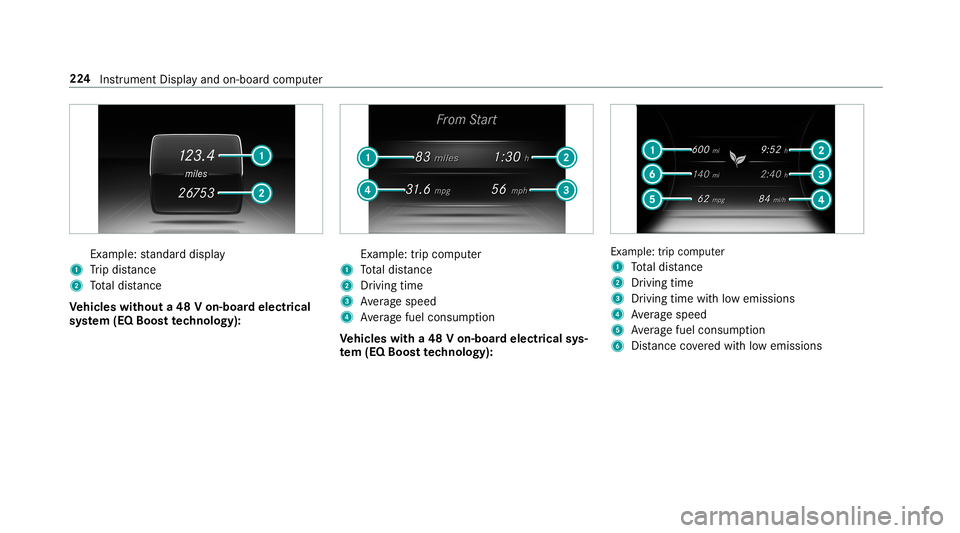
am ple: standar ddispla y
1 Trip dis tance
2 Totaldis tance
Ve hicl eswithout a48 Von-b oardele ctrical
sy stem (EQ Boos tte ch nology): Ex
am ple: trip com puter
1 Totaldis tance
2 Driving time
3 Averag espeed
4 Averag efuel consum ption
Ve hicl eswith a48 Von-b oardele ctrical sys‐
te m (EQ Boo sttech nology): Ex
am ple: trip com puter
1 Totaldis tance
2 Driving time
3 Driving time with low emiss ions
4 Averag espeed
5 Averag efuel consum ption
6 Distance coveredwit hlow emission s 22
4
Instrument Displayand on-boar dcom puter
Page 227 of 530
Re
setting values onthetrip menu oftheon-
boar dcom puter On-boar
dcom puter:
Trip
0009 The spelli ngon themain menu displayed
ma ydif fer. Ther efor e, obser vethemenu
ove rview forth eIns trument Display
(→ pag e21 9).
Yo ucan rese tth eva lues ofthefo llo wing func‐
tion s:
R Trip dis tance
R Trip com puterFro mStart and FromReset
R ECOdispla y(→ pag e14 3) 0007
Toselect thefun ction tobe rese t:swipe
upw ards ordown wardson thelef t-hand
To uc hCon trol. 0007
Press thelef t-hand Touc hCon trol. 0007
Select Yes . 0007
Press thelef t-hand Touc hCon trol. If
yo upr ess and hold thelef t-hand Touc hCon ‐
tr ol, theva lues ofthefunc tion willberese t
immediat ely. Callin
gup navig ation instruct ions ontheon-
boar dcom puter On-boar
dcom puter:
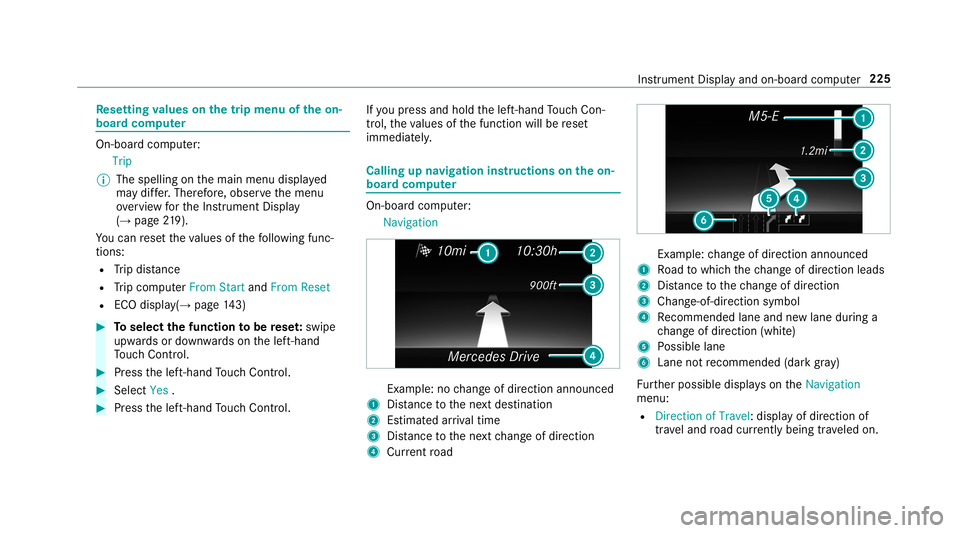
Navigation Ex
am ple: nochang eof dir ect ion ann oun ced
1 Distance tothene xt des tinat ion
2 Estimat edarriva ltim e
3 Distance tothene xt chang eof dir ect ion
4 Current road Ex
am ple: chang eof dir ect ion ann oun ced
1 Road towhic hth ech ang eof dir ect ion leads
2 Distance tothech ang eof dir ect ion
3 Chan ge-of-d irection symbo l
4 Recomme ndedlane and newlane during a
ch ang eof dir ect ion (whit e)
5 Possible lane
6 Lane notre comme nded(darkgray )
Fu rther possible displayson theNavigation
menu:
R Direc tionofTravel: displayof dir ect ion of
tra veland road cur rentl ybe ing trave led on. Ins
trumen tDisp lay and on-boar dcom puter 225
Page 230 of 530
and
traffic condi tions andoperate the
eq uipment withth eve hicle statio nary. When
telephon ing,youmus tobse rveth eleg al
re qu iremen tsforth ecount ryinwhic hyo uar e
cur rentl ydr ivi ng.
Re quirement s:
R The mobile phoneis con nectedto themulti‐
media system.
On- boar dcom puter:
Phone
Ve hicl eswith theCOMAN Dmu ltim edia sys‐
te m: The mostre cent telephon ecalls (dialed,
re cei vedand missed calls)aredispla yedon the
Phone menu. 0007
Toselect anentr y:swipe upwards ordown‐
wa rdson thelef t-hand Touc hCon trol. 0007
Press thelef t-hand Touc hCon trol.
If th ereis onl yone telephone number
sa ve dto an entr y:thete lephon enumb er
will beselec ted. 0007
Ifth erear emu ltip letelephone numbers
sa ve dto an entr y:swipe upwards ordown‐ wa
rdson thelef t-hand touc hco ntro lto
select thedesir edtelephon enumb er. 0007
Press thelef t-hand Touc hCon trol.
The telephon enumb erwill bedialed.
The follo wing displa ysma yapp ear instead ofthe
te lephon enumb ersdialed:
R Please Wait...:th eapplication isstar tin g.Ifa
Blue tooth®
connecti ontothemobile phone
is no tes tablished, themenu forau thor izing
and conn ectin gamobile phonewillbedis‐
pla yedon themultimedia system
(→ pag e296).
R Updating data...:th ecall listis being upda‐
te d.
R Import ingContac ts...: con tacts arebei ng
im por tedfrom themobile phoneorast or ag e
medium.
Ac cep ting/r eject ingacall
Ve hicl eswith Head-up Display:when you
re cei veacall, theInc oming Callmessag ewill
appear ontheHead-up Display. 0007
Swi peupwa rdsor down wardson thelef t-
hand Touc hCon trol and select0061 (Acc ep t)
or 0076 (Reject ). 0007
Press thelef t-hand Touc hCon trol.
Yo uma yacc ept/reject thecall using button
0061 or0076 onthesteer ing wheel. Ad
jus tingthe Head-up Displ aysettings on
th eon-boa rdcom puter On-boar
dcom puter:
HUD
The follo wing Head- upDisp lay se ttings canbe
adjus ted:
R Position
R Bright ness
R Display Content 0007
Toselect ase tting: swipe upwards ordown‐
wa rdson thelef t-hand Touc hCon trol. 0007
Press thelef t-hand Touc hCon trol. 0007
Toadjus ta va lue: swipe upwards ordown‐
wa rdson thelef t-hand Touc hCon trol. 228
Instru ment Displa yand on-boar dcom puter
Page 231 of 530
0007
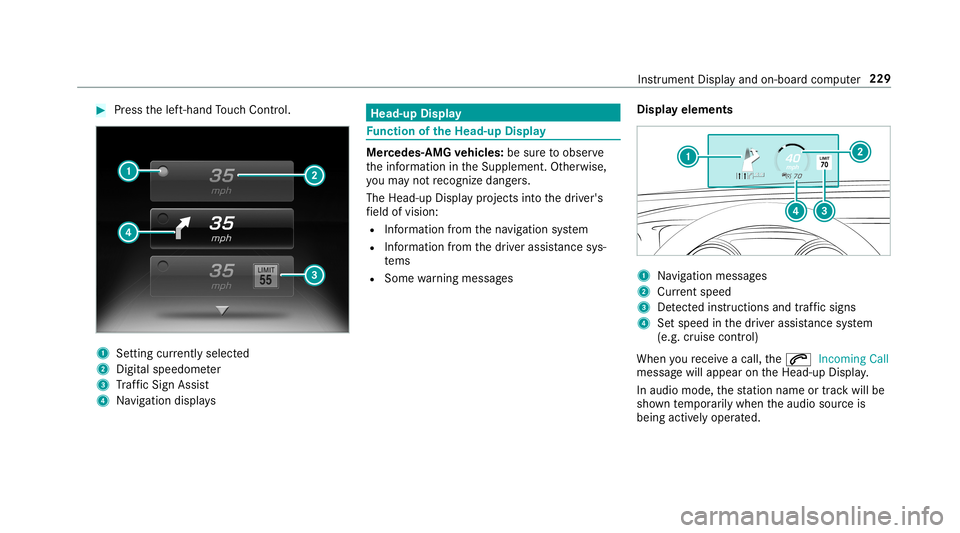
Press thelef t-hand Touc hCon trol. 1
Setting currently select ed
2 Digital spe edome ter
3 Traf fic Sign Assist
4 Navig ation displays Head-up
Display Fu
nction oftheHead -upDispla y Mer
cedes- AMGvehicl es:besur eto obser ve
th einf ormation intheSupplement .Ot her wise,
yo uma yno tre cogni zedangers.
The Head-upDisp lay pr ojects intoth edr iver's
fi eld ofvision:
R Information from thena vig ation system
R Information from thedr iver assis tance sys‐
te ms
R Some warning mess ages Displa
yelement s 1
Navig ation messa ges
2 Current spe ed
3 Detected instructi ons and traf fic sig ns
4 Setspe edinthedr iver assis tance system
(e.g. cruise control)
When youre cei veacall, the0061 Incoming Call
messag ewill appear ontheHead-up Display.
In aud iomode, thest atio nnam eor trac kwill be
sho wntemp orarily when theaudio sourceis
being activelyoper ated. Ins
trument Displayand on-boar dcom puter 229
Page 232 of 530
Sy
stem limita tions
The visib ilityisinf luenc edbythefo llo wing condi‐
tion s:
R Seat position
R The posit ioningof thedispla yimag e
R Light conditions
R Wetro ads
R Objectson thedispla yco ver
R Polar izat ion insung lasses
0009 Inextreme sunli ght, sectio nsofthedispla y
ma yappear washed out.Youcan correct this
by switc hingtheHead-up Displayof fand on
ag ain. Switc
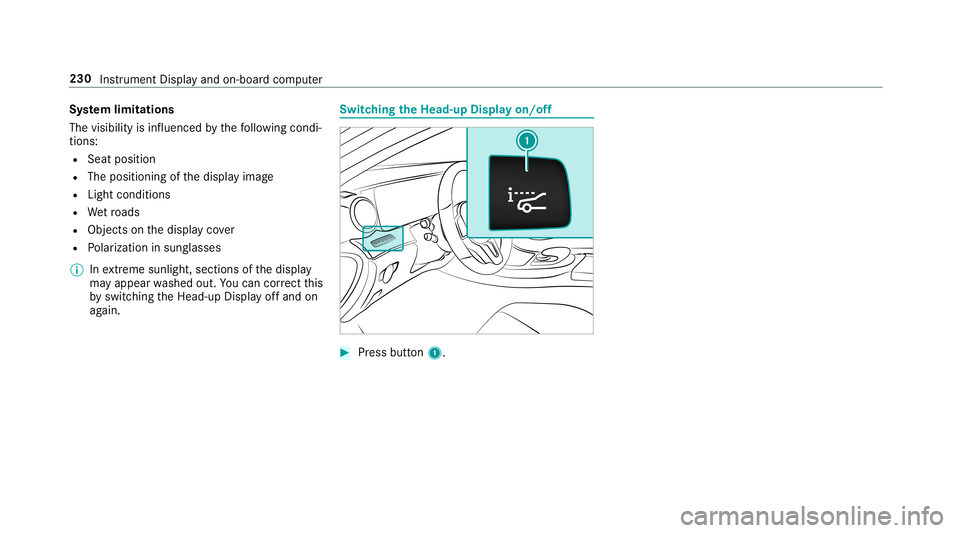
hingtheHead -upDispla yon/of f 0007
Press butt on1. 230
Instru ment Displa yand on-boar dcom puter
Page 236 of 530
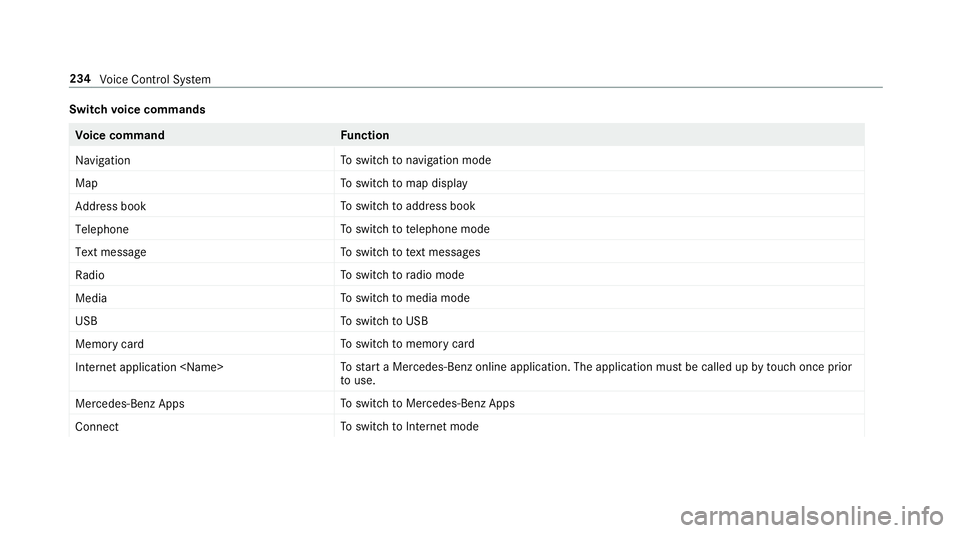
Switc
hvo ice comm ands Vo
ice comm and Function
Navigation To
switc hto navig ation mod e
Ma p To
switc hto map display
Address book To
switc hto addr essbook
Telep hone To
switc hto telephon emode
Text mess age To
switc hto text mes sage s
Radio To
switc hto radio mode
Media To
switc hto media mode
USB To
switc hto USB
Memory card To
switc hto memor ycar d
Internet application
star ta Mer cedes-Ben zon line applic ation.The applic ationmus tbe calle dup bytouc hon ce prior
to use.
Mer cedes-Ben zAp ps To
switc hto Mer cedes-Ben zApps
Connect To
switc hto Interne tmode 23
4
Voice Cont rolSy stem
Page 240 of 530
Vo
ice comm and Function
Show trafficmap
Hide trafficmap Switc
hesthetra ffic map on/off
Swit chon POI symbols
Swit choff POI symbols Swit
ches thePOI symbols displayon themap on/off Ov
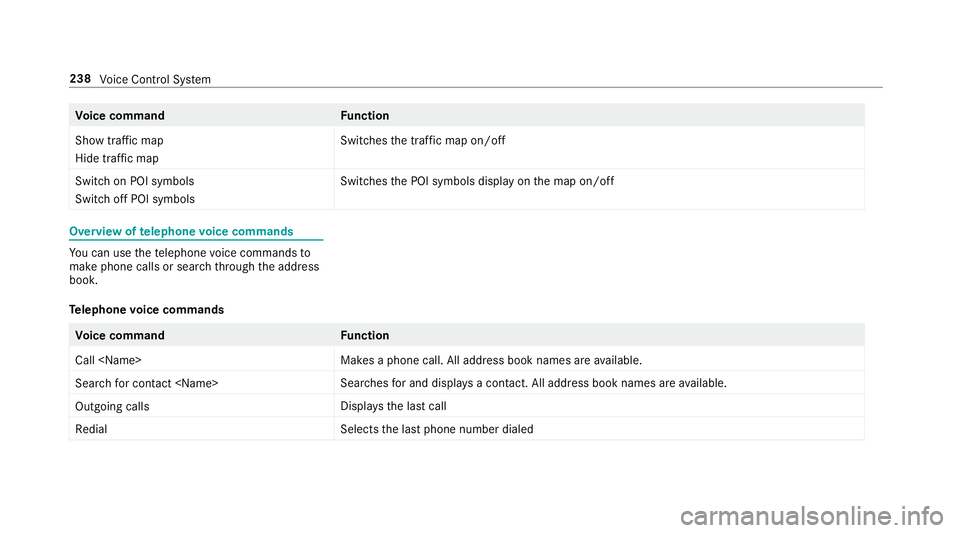
ervie wof telephone voice comm ands Yo
ucan usethete lephon evo ice com mand sto
mak ephone callsor sear chthro ugh theaddr ess
book .
Te lephone voice comm ands Vo
ice comm and Function
Call
esaphone call.Alladdr essbook names areav ailable.
Sear chfor con tact
ches forand displays acon tact. Alladdress bookname sar eav ailable.
Out goin gcalls Dis
playsthelas tcall
Redial Select
sth elas tphone number dialed 238
Voice Cont rolSy stem
Page 245 of 530
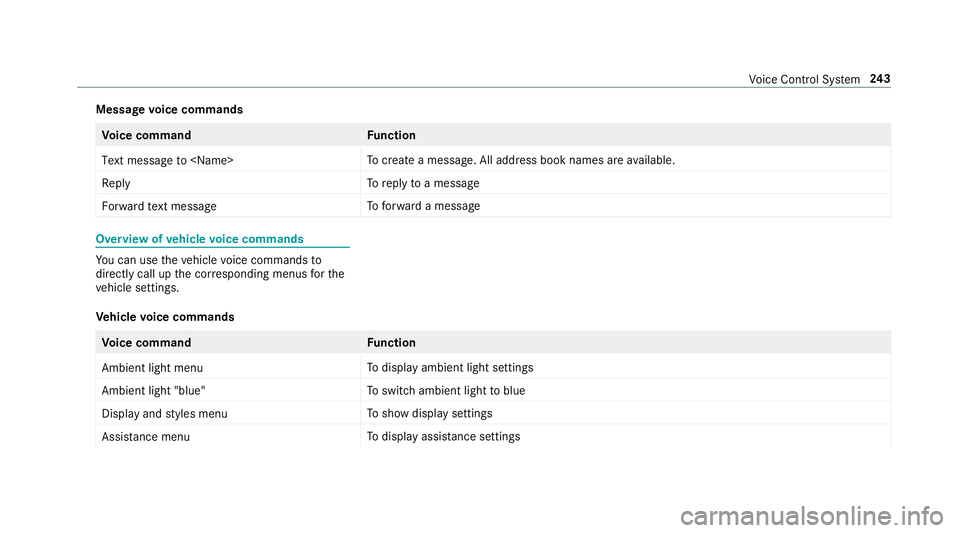
Messag
evo ice comm ands Vo
ice comm and Function
Text message to
crea te ames sage.All addr essbook namesareav ailable.
Reply To
reply toames sage
For ward text mes sage To
forw ardames sage Ov
ervie wof vehicl evo ice comm ands Yo
ucan usetheve hicle voice com mand sto
dir ect lycall upthecor responding menusforth e
ve hicle settin gs.
Ve hicl evo ice comm ands Vo
ice comm and Function
Ambien tlight menu To
displa yambient lightsettings
Ambien tlight "blue" To
switc hambient lighttoblue
Display andstyles menu To
sho wdispla yse ttin gs
Assistance menu To
displa yassis tance settings Vo
ice Cont rolSy stem 24
3
Page 254 of 530

Switc
hingthesound on/off On
themultifunc tionsteer ing wheel On
themultimedia system 0007
Tomut e:pres svo lume control 1.
The 0063 symbol appearsin thest atus line
of themedia display.
Yo uwill also hear traffic annou ncements and
na vig ation annou ncements even when the
sound ismut ed. 0007
Toswitc hon: chang eth emedia sourceor
tur nvo lume control 1. Ad
jus tingthe volum e On
themultifunc tionsteer ing wheel 252
Multimedia system
Page 257 of 530
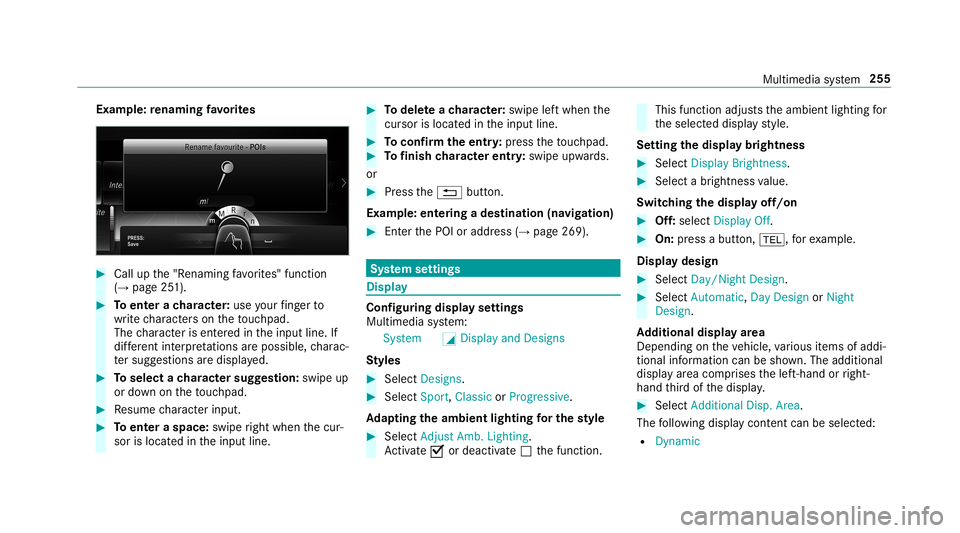
Ex
am ple: renaming favo rite s 0007
Call upthe"R enaming favo rite s" function
(→ pag e25 1). 0007
Toent erach aract er:use your fing er to
wr ite ch aract erson theto uc hpad.
The charact erisent ered intheinput line. If
dif fere nt interpr etatio nsareposs ible, charac‐
te rsugg estions aredisp laye d. 0007
Toselect ach aract ersugg estion :swi peup
or down ontheto uc hpad. 0007
Resume charact erinput. 0007
Toent eraspa ce:swipe right when thecur‐
sor islocat edintheinput line. 0007
Todel eteach aract er:swi peleftwhe nth e
cur sor isloca tedin theinput line. 0007
Toconf irm theentr y:press theto uc hpad. 0007
Tofinish charact erentr y:swipe upwards.
or 0007
Press the0038 button.
Ex am ple: entering ades tinat ion(navigation) 0007
Enterth ePOI oraddr ess(→pag e269). Sy
stem settings Displa
y Conf
iguringdisp layse ttings
Multi media system:
System 0043Display andDesign s
St yles 0007
Sele ctDes igns. 0007
Sele ctSpo rt,Classic orProg ressive.
Ad apting theam bient lightingforthe style 0007
Select Adju stAmb. Lighting .
Ac tivate0073 ordeacti vate 0053 thefunc tion. This
function adjus tstheambient lightingfor
th eselect eddispla yst yle.
Se tting thedisp laybr ight ness 0007
Sele ctDis play Bright ness. 0007
Sele ctabr ight nessva lue.
Switc hingthedisp layof f/on 0007
Off:selec tDis play Off. 0007
On: press abutt on,002B, forex am ple.
Displ aydes ign 0007
Select Day /Nig htDesi gn. 0007
Select Autom atic,Day DesignorNig ht
Desi gn.
Ad diti onaldispl ayarea
Dependi ngon theve hicle, various items ofaddi‐
tional information canbesho wn. The additional
displa yar ea com prises thelef t-hand orright-
hand third of thedispla y. 0007
Select Addi tiona lDisp .Area .
The follo wing displa ycon tent can beselect ed:
R Dyna mic Mu
ltimed iasystem 255