display MERCEDES-BENZ E-CLASS CABRIOLET 2019 Workshop Manual
[x] Cancel search | Manufacturer: MERCEDES-BENZ, Model Year: 2019, Model line: E-CLASS CABRIOLET, Model: MERCEDES-BENZ E-CLASS CABRIOLET 2019Pages: 530, PDF Size: 44.1 MB
Page 308 of 530
0009
The service prov ider isresponsible forth ese
apps andtheser vices andcontent conne c‐
te dto it.
Connecting Mercedes-B enzLink withth e
mu ltim edia system 0007
Conn ecttheMer cedes- BenzLinkcontrol bo x
wit hth e00C2 USBportof themultimedia
con nect ionunit using asuit able connect ing
cable.
0009 Asuit able connect ingcable isavailable sep‐
ar atelyat an aut hor izedMer cedes-Ben zCen‐
te r.
Using Mercedes-Benz Link
Re quirement s:
R The Mercedes- BenzLink control bo xis con ‐
nec tedwit hth emultimedia system using the
00C2 USBport.
Multimedi asy stem:
Connec t 0007
Select Mercedes- BenzLink. 0007
Select MBLink.
The mobile phonefunctionsand apps are
av ailable andshownonthemedia display.
Yo ucan find mor einf orma tionin theMer cedes-
Benz Linkcontrol bo xoper ating instruction s.
Ending Mercedes-Benz Link
Multimedia system:
Connec tMercedes- BenzLink 0007
Select Disconnect.
The connect ionisended.
The mobile phonecontinues tobe supplied
wit helect ricity .
or 0007
Disco nnect thecon nect ingcable between
th eMer cedes- BenzLinkcontrol bo xand the
multime diasystem.
0009 Mer cedes- Benzrecomme ndsdisconnecti ng
th econ nect ingcable onlywhen theve hicle
is statio nary. App
leCar Play™ Ov
ervie wof App leCar Play™ 000A
WARNIN GRisk ofdist ra ction from infor‐
mati onsystems andcomm unication s
eq uipment
If yo uoper ateinf ormat ionand comm unic a‐
tio neq uipme ntintegratedin theve hicle
when driving, youwill bedistract ed from the
tr af fic situ ation. Thiscou ldalso cau seyouto
lose control of theve hicle. 0007
Onlyoper ateth is eq uipmen twhen the
tr af fic situ ation per mits. 0007
Ifyo ucan notbe sur eof this, stop the
ve hicle whilstpa ying attention toroad
and traffic condi tions andoperate the
eq uipment withth eve hicle statio nary. Yo
umus tobse rveth eleg alrequ iremen tsforth e
cou ntryin whi chyouar ecur rentl ydr ivi ng when
op erati ng themultimedia system.
iPhone ®
func tionscan beused viathemultime‐
dia system using Apple CarPla y™.Theyar eoper‐
at ed using thecent ralcon trol elemen tor the 306
Multimedia system
Page 316 of 530
0009
Ifth er eis amalfunct ionintheemer gency
cal lsy stem (e.g. amalfunct ionwithth e
speak er,micr ophone, airbag,SOS button), a
cor responding messageappea rsinthemul‐
tifun ction displa yof theins trument cluster.
Tr igg ering anaut omat icemer gency call
Re quirement s
R The ignit ionisswitc hedon.
R The star terbatt eryis suf ficie ntlych arge d.
If re stra int systems suchas airbags orEmer ‐
ge ncy Tensi oni ng Device sha ve been activated
af te ran accide nt,theMer cedes- Benzemer‐
ge ncy callsy stem mayaut omaticall yinitiat ean
emer gency call.
The eme rgency callhas been made:
R Avo ice con nection ismade totheMer cedes-
Benz emergency callcent er.
R Ames sage withacc iden tdat ais transm itted
to theMer cedes- Benzemergency callcent er.
The Mercedes-B enzeme rgency callcent er
can trans mit theve hicle position datato one
of theemer gency callcent ers. The
SOS button intheove rhead control panel
fl ashes untilth eemer gency callis finis hed .
It is no tpo ssi ble to immed iatelyend anaut o‐
matic emergency call.
If no conne ctioncan bemade totheemer gency
ser vice sei th er,a cor responding message
appea rsinthemedia display. 0007
Dialth elocal emergency num beron your
mob ilephon e.
If an eme rgency callhas been initiat ed:
R Remain intheve hicle ifth ero ad and traffic
condi tions permit youto do sountil avo ice
con nection ises tablished withth eemer‐
ge ncy callcent eroperator.
R Bas edon thecall, theoper ator decides
whe ther itis neces saryto cal lre scue teams
and/ orthepolice totheacciden tsit e.
R Ifno vehicle occupant answers, an ambu‐
lance issent totheve hicle immediat ely.
Tr igg ering ama nual emer gency call 0007
Press and hold theSOS buttonintheove r‐
head controlpanel forat lea stone second. The
emer gency callha sbe en ma de:
R Avo ice con nection ismade totheMer cedes-
Benz emergency callcent er.
R Ames sage withacc iden tdat ais transm itted
to theMer cedes- Benzemergency callcent er.
The Mercedes-Be nzeme rgency callcent er
can trans mit theve hicle position datato one
of theemer gency callcent ers.
R Remain intheve hicle ifth ero ad and traffic
condi tions permit youto do sountil avo ice
con nection ises tablished withth eemer‐
ge ncy callcent erser vice prov ider .
R Onthebasis ofthecall, theser vice prov ider
decide swhe ther itis neces saryto cal lre s‐
cue teams and/ orthepolice totheacciden t
sit e.
If no con nect ioncan bemade totheemer gency
ser vice sei th er,a cor responding message
appea rsinthemedia display. 0007
Dialth elocal emergency num beron your
mob ilephon e. 31
4
Multimedia system
Page 327 of 530
Connect
ingUSB devices
000E NO
TEDama gecau sed byhigh temp era‐
tur es High
temp eratur escan damag eUSB devices. 0007
Remo vetheUSB device afte ruse and
ta ke itout oftheve hicle. The
multimedia connection unitisfound inthe
st ow agecom partment unde rth ear mr estand
has twoUSB ports.
Depen dingontheve hicle's equipment, addi‐
tional USBportscan befound inthestow age
com partment ofthecent ercon sole andinthe
re ar passe nger com partment . 0007
Con nectth eUSB device totheUSB port.
Pla yable music files arepla yedbac konl yif
th ecor responding mediadisplayis activ ated.
0009 Use theUSB portidentif iedby00C2 touse
Ap ple CarPla y™and Android Auto.
0009 Dep endingontheve hicle equipment ther eis
an additional USBportin there ar passe nger
com partment .Po rts th at arelabeled witha bat
tery symbol canonly beused tocharge
USB devices.
Selec tingatrac kin themed iapla yba ck
Multimedia system:
Media
Selecting atrac kby skipping toatrac k 0007
Toskip backwards orforw ards toa
tr ac k: navig ateup ordown.
Sel ecting atrac kusin gth ecur rent trac klis t 0007
Select 00D3. 0007
Select Current TrackList. 0007
Select atra ck.
Selec tingplaybac kop tions
Multimedia system:
Media ZOption s
Pla ying backsimilar trac ks 0007
Select Play Simi larTra cks.
A trac klist wit hsimilar trac ks iscreat edand
pla yedbac k. Pla
ybac kmode 0007
Select Random Mode-Current Playlist.
The current trac klist ispla yedin rando m
or de r. 0007
Select Random Mode-Cu rrent Medium.
All trac ks on theactiv edat ast or ag emedium
ar epla yedin rando morde r. 0007
Select Norm alTra ckSequ ence.
The current trac klist ispla yedin theor der it
appear son thedat ast or ag emedium.
Contr olling media playbac k
Multimedia system:
Media YPlayback Control
A bar withpla ybac kcon trols issho wn. 0007
Topause playbac k:sel ect and conf irm
Y with thecent ralcon trol elemen t.
The 00CF symbol isdispla yed. 0007
Toresume playbac k:select andconf irm
Y again withth ecent ralcon trol elemen t.
The 00D0 symbol isdispla yed.
To fast forw ard/r ewind 0007
Move00CF onthetimelin e. Multimedia
system 325
Page 339 of 530
0007
Select Move Highlighte dStati on. 0007
Select amemo ryprese t.
Dele ting station s: 0007
Highl ightapr ese tentr yand navig ateto the
lef t. 0007
Selec tDelet eHighlig htedSt ation. 0007
Selec tYes. Ta
gging musictrac ks Multimedia
system:
Radio
If ra dio statio nsprov ide there leva nt informati on,
th is func tion allowsyouto trans ferinf ormation
on themusic trac kcur rently play ing toan
App le®
de vic e.Youcan then pur chase theaudio
fi le from theiTune sSt ore®
. 0007
Select ♫→Tag This Song.
The trac kinf ormation issave d. Ac
tiv atin g/deac tivatin gra dio text Multimedia
system:
Radio ZOption sDisplayRadio
Text Informat ion 0007
Activate0073 ordeacti vate 0053 thefunc tion. Sat
ellit era dio In
fo rm ation onthesat ellit era dio
SIRI USXM®
sat ellite radio offers mor eth an 175
digit al-quality radio chann elsprov iding 100%
commer cial-free musi c,spor ts,news and enter‐
ta inm ent,fo rex am ple. SIRIUS XMsatellit era dio
em ploysaflee tof high-per form anc esat ellit esto
br oadcas tar ound thecloc kth ro ughout theUS A
and Canada. Thesatellit era dio progr am isavail‐
able fora mont hlyfe e. Inf ormation aboutthis
can beobt ained from aSir ius XM®
Ser vice Cen‐
te rand athttp://www .siriusxm.com (USA)or
http://www .siriusxm.ca (Canada ).
0009 Sirius ,XM and allrelat ed mar ksand logos
ar etrademar ksofSir ius XM Radio Inc.and
its subsidiar ies.Allother mar ks,ch ann el nam
esand logos areth epr oper tyof their
re spectiv eow ner s.All rights reser ved.
Sat ellit era dio restriction s
Sat ellit era dio mode maybe temp orarily una vail‐
able orinterru pte dfo ra va riet yof reason s.
Thes einc lude environ men talor topog raphical
con dition sbe yond thecon trol of Mer cedes- Benz
US A,LLC. Thus, operation atcer tain locat ions
ma yno tbe possible .
Re gis tering sat ellit era dio
Re quirement s:
R Satellit era dio equipment
R Regis tration withasat ellit era dio prov ider
R Ifre gis tration isno tincluded whenpurchas‐
ing thesy stem, your credit cardde tails will
be requ ired toact ivat eyo ur acc oun t Mult
imed iasystem 33
7
Page 346 of 530
ASS
YSTPL US service interva ldisp lay Fu
nction oftheASS YSTPL US service interva l
displ ay The
ASSYSTPL US service interva ldispla yon the
Ins trument Displaypr ov ides informatio non the
re maini ngtime ordis tance before thene xt
ser vice duedate.
Yo ucan hide this ser vice mess ageusing the
bac kbutt onon thelef t-hand sideofthesteer ing
wheel.
Depen dingonhowtheve hicle isused, the
ASS YSTPL US service interva ldispla yma y
shor tenth eser vice interva l,e.g. inthefo llo wing
cases :
R Mainl yshor t-dis tance drivi ng
R Whe nth eengine isoftenleft idling forlong
per iods
R Intheeve ntoffreq uent col dstar tphase s
Mer cedes-Ben zre comme ndsavoiding such
oper ating condit ions.
Yo ucan obtain further information concerning
th eser vicing ofyour vehicle from aqu alif ied spec
ialistwo rkshop, e.g.anaut hor ized
Mer cedes-Benz Center. Displa
yingtheser vice dueda te On-boar
dcom puter:
Service ASSYST PLUS
The next ser vice duedateis displa yed. 0007
Toexitth edisp lay: press thebac kbutt on
on thelef t-hand sideofthesteer ing wheel.
Mak esur eto obser vethefo llo wing further rela‐
te dsubjec t:
R Oper ating theon- boar dcom puter
(→ pag e21 9). Inf
ormatio non regular maintenance work 000E
NO
TEPrema turewe arthro ugh failur eto
obser veser vice duedates Ser
vice workwhic his no tcar ried out atthe
ri ght time orincom pletely can lead to
inc reased wearand damag eto theve hicle. 0007
Alw aysobser vethepr escr ibed service
int erva ls. 0007
Alw aysha ve thepr escr ibed service
wo rkcar ried out ataqu alif ied spec ialist
wo rkshop. Special
service requ irement s The
prescr ibed service interva lis based onnor ‐
mal opera tionoftheve hicle. Maintenance work
will needto be per form ed mor eof tenif th eve hi‐
cle isoper ated under arduous conditions or
incr eased loads.
The ASSYSTPL US service interva ldispla yis onl y
an aid. Thedriver oftheve hicle bearsre sponsi‐
bility asrega rdsto whe ther maint enanc ewo rk
nee dstobe per form ed mor eof tenth an spec i‐
fi ed based ontheactual operating conditions
and/or loads.
Ex am ples ofarduous operating conditions :
R regular citydriving withfreq uent intermedi‐
at estops
R mainly short-distance drivi ng 34
4
Maint enance andcare
Page 347 of 530
R
freq uent operation inmount ainouste rrain or
on poor road sur faces
R whe nth eengine isoftenleft idling forlong
per iods
R oper ation inpar ticula rly dus tycond ition s
and /orif air -rec ircula tion mod eis freq uen tly
used
In these orsimilar operating conditions ,ha ve the
int erior airfilt er ,engin eair clean er,engin eoil
and oilfilt er etc. chang edmor efreq uent ly.The
tir es mus tbe checkedmor efreq uentl yif th e
ve hicle isoper ated under increased loads. Fur‐
th er information canbeobt ained ataqu alif ied
spec ialistwo rkshop. Batt
erydisconne ctionperiods The
ASSYSTPL US service interva ldisp lay
can onlycalculat eth eser vice dueda te when
th ebat tery isconnect ed. 0007
Notedown theser vice duedatedispla yedon
th eins trument displaybef orediscon necting
th ebatt ery(→ pag e34 4). Engine
compartment Ac
tiv ehoo d(pe des trian protection) Oper
ation oftheact ive hood (pedestrian pro‐
te ction )
In cer tain acc ident situations,th erisk ofinjur y
to pedes trians canbereduced bytheactuation
of theactiv ehood. Therear area ofthehood is
ra ised byappr oximat ely3 in (85 mm).
Fo rth edr ive to thewo rkshop, rese tth etrig‐
ge redactiv ehood yourself .Af terth eactiv ehood
has been trigg ered, pedes trian protect ion may
be limit ed.
A qu alif ied spec ialistwo rkshop mustre -ins tate
th efull func tionality oftheactiv ehood.
The activ ehood isno tav ailable inall coun tries.
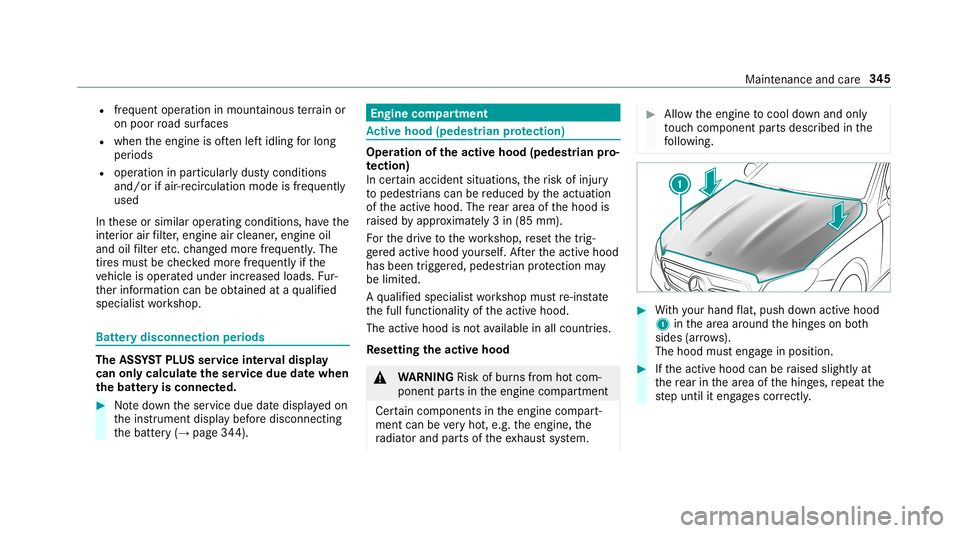
Re setting theact ive hood 000A
WARNIN GRisk ofburnsfrom hotcom‐
ponent partsintheengine compartmen t
Cer tain com pone ntsin theengine compart‐
ment canbevery hot,e.g. theengine, the
ra diat orand partsof theex haus tsy stem. 0007
Allo wtheengine tocool down and only
to uc hco mp onent partsdescr ibedinthe
fo llo wing. 0007
With your han dflat, push down active hood
1 inthear ea around thehing eson both
sides (arrow s).
The hood musteng agein position. 0007
Ifth eactiv ehood canberaised slight lyat
th ere ar inthear ea ofthehing es,repeat the
st ep until iteng ages cor rectl y. Maint
enance andcare34
5
Page 390 of 530
The
system checks thetir epr essur eand thetir e
te mp eratur eof thetir es installed ontheve hicle
by means ofatir epr essu resensor .
Ne wtirepr essur esensor s,e.g. inwint ertires,
ar eaut omaticall yta ught -indur ing thefirs tjou r‐
ne yth ey areused.
The tirepr essur eand thetir ete mp eratur e
appear inthemultifunc tiondispla y
(→ pag e388).
If th er eis asubs tantia lpr ess ure loss orifth e
tir ete mp eratur eis exc essiv e,youwill bewarned
in thefo llo wing ways:
R viadisp lay messa ges(→ pag e458)
R viathe0077 warning lam pin theins trument
clus ter(→ pag e48 4)
The tirepr essu remonit oring system isonl yan
aid. Itis thedr iver's responsibili tyto setth etir e
pr essur eto there comme ndedcoldtirepr ess ure
su itab leforth eoper ating situation .Se tth etir e
pr essur efo rcold tires using atir epr essu re
ga ug e. No tethat thecor rect tirepr ess urefo rth e
cur rent operati ng situa tionmu stfirs tbe taught -
in to thetir epr essur emonit oring system. In
mos tcases, thetir epr essur emonit oring sys‐
te m wil lau tomatical lyupdat eth ene wrefere nce
va lues afte ryo uha ve chang edthetir epr essur e.
Yo ucan ,ho we ver,also updat eth ere fere nce val‐
ues byrestar tin gth etir epr essur emonit oring
sy stem manually (→pag e389).
Sy stem limita tions
The system maybe impair edorma yno tfunc tion
in thefo llo wing situat ions:
R Ifth etir epr essur eis setincor rectl y
R Ifth er eis asudden pressur eloss caused, for
ex am ple, byafo re ign obje ctpene trating the
tir e
R Ifth er eis amalfunct ioncaused byano ther
ra dio signal source
Mak esur eto obser vethefo llo wing further rela‐
te dsubjec t:
R Noteson tirepr essur e(→ pag e38 4)
Chec kingthetir epr essur ewit hth etir epr es‐
sur emoni toring system
Re quirement s:
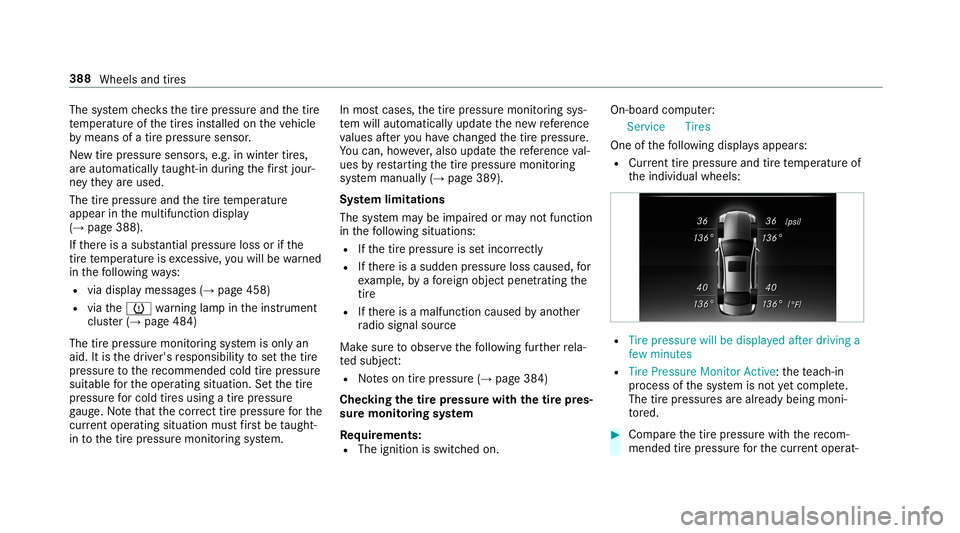
R The ignit ionisswitc hedon. On-
boar dcom puter:
Ser vice Tires
One ofthefo llo wing displa ysappear s:
R Cur rent tirepr ess ureand tirete mp eratur eof
th eindividual wheels: R
Tire pressure willbedisplayed afterdriving a
few minutes
R Tire Pressure MonitorAct ive: thete ac h-in
pr oce ssofthesy stem isno tye tcomple te.
The tirepr essur esarealr eady being moni‐
to re d. 0007
Com pareth etir epr essur ewit hth ere com‐
mend edtirepr ess urefo rth ecur rent operat‐ 38
8
Whe elsand tires
Page 427 of 530
Disp
laymes sages Int
roducti on No
teson displa ymessag es
Displa ymessag esappear onthemultifunc tion
displa y.
Dis play messa geswit hgr aphic symbols aresim‐
plif ied intheOper ator's Manual andmaydif fer
fr om thesymbols onthemultifunc tiondispla y.
The multifunct iondispla ysho wshigh-pr iority dis‐
pla ymessag esinred. Cer tain displa ymess ages
ar eacc ompanied byawa rning tone.
Pl ea se respond inaccor dance withth edispla y
messag esand follo wtheadditional notesin this
Opera tor's Manua l.
Fo rsome display messa ges,asymbol isalso
sho wn:
R 0091 Further information R
0061 Hidedispla ymessag e
Yo ucan selectthedesir edsymbol byswiping
lef tor right onthelef t-hand Touc hCon trol.
Pr ess the0091 symbol tosho wfur ther informa‐
tion onthemultifunc tiondispla y.Press the0061
symbol tohide thedispla ymessag e.
Yo ucan hide low- prior ity displa ymessag esby
pr essing the¤ buttonorthelef t-hand Touc h
Con trol. The displ aymessa gesar eth en stor ed in
th emessag ememor y.
Re ctify thecause ofadispla ymessag eas
qu ickl yas possible .
High- prior ity displa ymess ages can notbe hid‐
den. Themultif unction displa ysho wsthese dis‐
pla ymessag escon tinuousl yuntil thecause of
th emessag ehas been rectif ied. Cal
ling up sto reddispl aymes sages
On-b oard com puter:
Servi ce 1Mes sage
If th er ear eno displa ymessag es,NoMessages
appear son themultifunc tiondispla y. 0007
Scrollth ro ugh thedispla ymessag esby swip‐
ing upw ards ordown wardson thelef t-hand
To uc hCon trol. 0007
Toexitth emess agemem ory: press the
¤ button. Displa
ymessag esand warning/ indic ator lam ps 425
Page 446 of 530
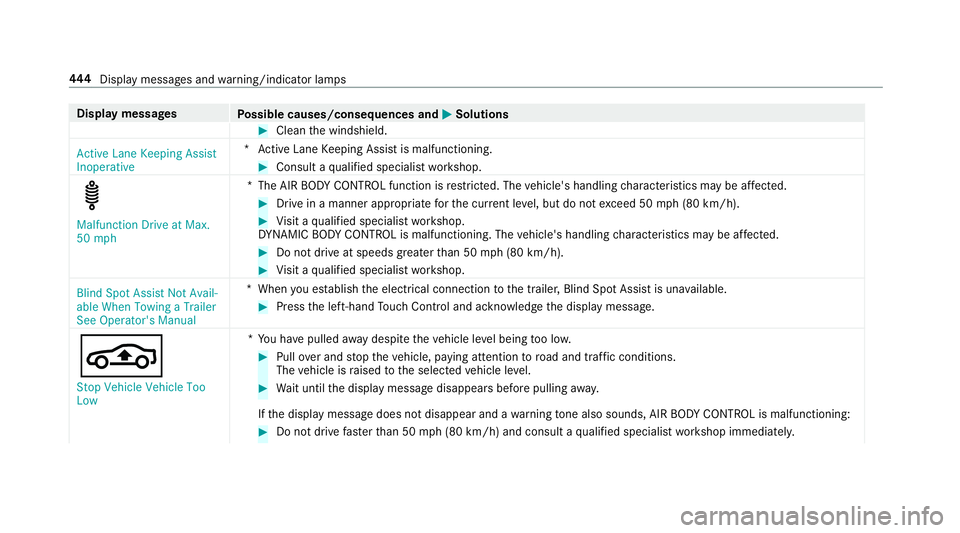
Disp
laymes sages
Possible causes/conseq uencesand0050 0050
Solutions 0007
Clean thewindshield.
Act ive Lane Keeping Assist
Inoper ative *A
ctiveLane Keeping Assistis malfunct ioning. 0007
Consult aqu alif ied spec ialistwo rkshop. Malfunction
DriveatMax.
50 mph *T
heAIR BODY CONTR OLfunction isrestrict ed. The vehicle's handling charact eristic sma ybe affect ed. 0007
Drive in amanne rap propr iate forth ecur rent leve l,but donotex ceed 50mph(80 km/h). 0007
Visit aqu alif ied spec ialistwo rkshop.
DY NA MIC BODY CONT ROLis malfu nctioning. Thevehicle's handling charact eristic sma ybe affect ed. 0007
Donotdr ive at spe eds grea terth an 50 mph(80 km/h). 0007
Visit aqu alif ied spec ialistwo rkshop.
Blind SpotAssist NotAvail-
able When Towing aTrailer
See Operator's Manual *W
hen youes tablish theelectr icalconnect iontothetra iler ,Blind SpotAssis tis una vailable. 0007
Press thelef t-hand Touc hCon trol and ackn ow ledg eth edispla ymessag e.
00CC St op Vehicle Vehicle Too
Low *Y
ouhave pulled away despit eth eve hicle leve lbeing toolow. 0007
Pull overand stop theve hicle, paying attention toroad and traffic condi tions.
The vehicle israised totheselect edvehicle leve l. 0007
Waitunt ilth edispla ymessag edisappear sbef orepulling away.
If th edispla ymessag edoes notdisappear andawa rning tone also sou nds, AIRBOD YCO NTR OLismalfu nctioning: 0007
Donotdr ive fa ster than 50 mph(80 km/h) andconsult aqu alif ied spec ialistwo rkshop immediat ely. 444
Display messa gesand warning/ indic ator lam ps
Page 452 of 530
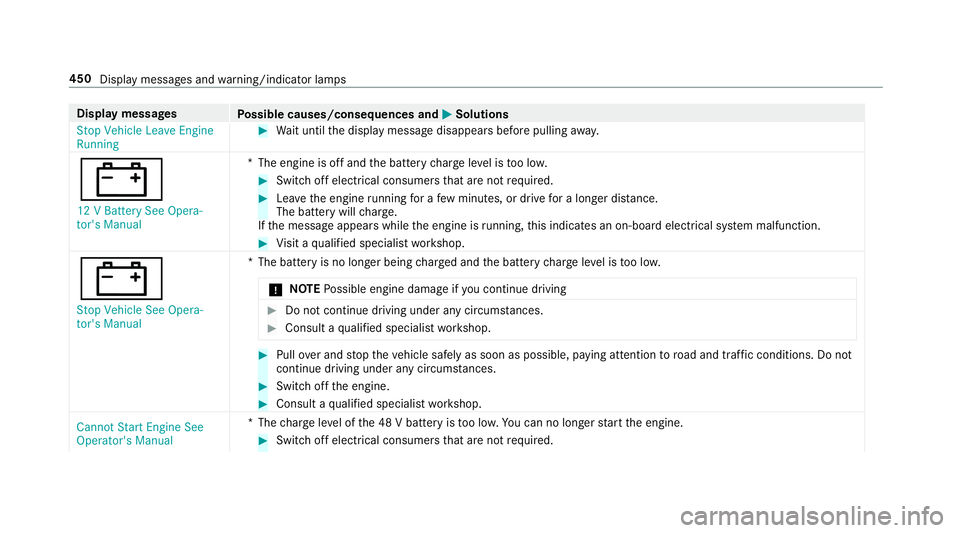
Disp
laymes sages
Possible causes/conseq uencesand0050 0050
Solutions
St op Vehicle LeaveEngine
Running 0007
Waitunt ilth edispla ymessag edisappear sbef orepulling away.
003D 12 VBattery SeeOpera -
tor's Manu al *T
heengine isoffand thebatt erych arge leve lis toolow. 0007
Swi tchof fel ectr icalconsu mersth at areno tre qu ired. 0007
Lea vetheengine running fora fe w min utes, ordrive fo ra long erdis tance.
The batter ywi llch arge .
If th emessag eappear swhile theengine isrunning ,th is indic ates an on- boar delect rical system malfunct ion. 0007
Visit aqu alif ied spec ialistwo rkshop.
003D Stop Vehicle SeeOpera-
tor's Manual *T
hebatt eryis no long erbeing charge dand thebatt erych arge leve lis toolow.
000E NO
TEPossible engine damageif yo uco ntinue drivin g 0007
Donotco ntinue drivin gund eranycir cum stanc es. 0007
Con sult aqu alif ied spec ialistwo rkshop. 0007
Pull overand stop theve hicle safely assoon aspossible, paying attention toroad and traf fic condi tions.Do not
continu edr ivi ng und eranycir cums tances. 0007
Swi tchof fth eengine. 0007
Consult aqu alif ied spec ialistwo rkshop.
Cannot StartEngine See
Operator's Manual *T
hecharge leve lof the48 Vbatt eryis toolow. Youcan nolongerst ar tth eengine. 0007
Switc hof felectr icalconsumer sth at areno tre qu ired. 450
Display mess ages and warning/ indic ator lam ps