driver seat adjustment MERCEDES-BENZ E-CLASS CABRIOLET 2020 Owners Manual
[x] Cancel search | Manufacturer: MERCEDES-BENZ, Model Year: 2020, Model line: E-CLASS CABRIOLET, Model: MERCEDES-BENZ E-CLASS CABRIOLET 2020Pages: 469, PDF Size: 8.47 MB
Page 5 of 469
Symbols
........................................................ 5At
agl ance .................................................... 6
Cockpit ........................................................... 6
Indica tor and warning lamps ........................ .10
Overhead contro l panel ................................ 12
Door control panel and seat adjustment ....... 14
Emergencies and breakdowns ...................... 16Digital Owner's Manual
.............................18
Calling up the Digital Owner's Manual ..........18 Genera
l notes............................................. 20
Pr otection of the environment ......................20
Ta ke -ba ckof end-of-life vehicles ...................20
Mercedes-Benz GenuineParts ....................... 21
Owner's Manual ...........................................22
Operating saf ety .......................................... .22
Declaration of conformity ............................. 24
Diagno stics connection ................................ 28
Qualified specialist workshop ....................... 29
Ve hicle registration ....................................... 29
Cor rect use of theve hicle ............................30 Information on
the REA CHregulation ........... 30
No tesfo r persons with electronic medi‐
cal aids ......................................................... 30
Implied warranty .......................................... .31
QR code forre scue card ...............................31
Data storage .................................................31
Copyright ...................................................... 34 Occupant saf
ety......................................... 35
Re stra int sy stem ...........................................35
Seat belts ..................................................... 37
Airbags ......................................................... 42
Ro ll bar ........................................................ .49
PRE-SAFE ®
sy stem ....................................... 50
Safely transporting children in theve hi‐
cle ................................................................. 51
No tes on pets in theve hicle .........................70 Opening and closing
.................................. 71
Ke y ................................................................ 71
Doo rs............................................................ 74
Boot .............................................................. 79
Soft top ........................................................ 82
Side windo ws............................................... 88 Anti-theft pr
otection .....................................92 Seats and
stowing ..................................... 96
No tes on the cor rect driver's seat posi‐
tion ............................................................... 96
Seats ............................................................ 97
St eering wheel ............................................ 108
Easy entry and exitfeature ........................ .110
Memory function ......................................... 111
St ow age areas ............................................ .113
Soc kets ....................................................... 11 8
Wi reless charging of the mobile phone
and connection with theex terior aerial .......1 19
Fitting and removing thefloor mats ............ 121 Light and sight
......................................... 12 2
Exterior lighting .......................................... 12 2
Interior lighting ........................................... 131
Wi ndsc reen wipers and windscreen
wa sher sy stem ............................................ 13 2
Mir rors ........................................................ 13 62
Contents
Page 44 of 469
*
NO
TEDeployment of the seat belt ten‐
sioner and side impact airbag when the
front passenger seat is unoccupied If
th e seat belt tongue is engaged in the seat
belt buckle of the unoccupied front
passenger seat, the seat belt tensioner and
th e side impact airbag may also deploy in the
ev ent of an accident along with other sys‐
te ms. #
Only one person should use each seat
belt at any one time. Ve
hicles without automatic front passen ger
airbag shu toff:
* NO
TEDeployment of the seat belt ten‐
sioner when the front passenger seat is
unoccupied If
th e seat belt tongue is engaged in the seat
belt buckle of the unoccupied front
passenger seat, the seat belt tensioner may
also depl oyintheev ent of an accident along
with other sy stems. #
Only one person should use each seat
belt at any one time. Seat belt adjustment function
Ve
hicles with PRE-SAFE ®
:if th e front seat belt
is not pulled tight lyacross your body, the seat
belt adjustment may automatically apply a cer‐
ta in tigh tening forc e. Do not hold the seat belt
tight lywhile it is adjusting.
Yo u can activate and deactivate the seat belt
adjustment function using the multimedia sys‐
te m (/ page41). Re
leasing a seat belt #
Press there lease button in the seat belt
buckle and guide the seat belt back with the
seat belt tongue. Ac
tivating/deactivating seat belt adjustment
via the multimedia sy stem Multimedia sy
stem:
4 © 5
Settings 5
Vehicle #
Activate or deacti vate Belt adjustment. Seat belt
warning function for the driver and
front passen ger The
ü seat belt warning lamp in the instru‐
ment display is a reminder that all vehicle occu‐
pants must weartheir seat belts cor rectly.
In addition, a warning tone may sound.
As soon as the driver and front passenger fasten
th eir seat belts, the seat belt warning goes out. Fu
nction of there ar seat belt status display The
rear seat belt status display is on lyavailable
fo r cer tain countries. Occupant saf
ety41
Page 53 of 469
&
WARNING Danger of inju ryor death due
to obstructed roll bars
If yo u lea veobjects or items of clo thing on
th e co vers of thero ll bars, thero ll bars can‐
not pr otect as intended.
Fu rthermore, the objects may endanger vehi‐
cle occupants when thero ll bars extend. #
Alw ays make sure that theth ere is
no thing in the sweep of thero ll bars. #
Alw aysstow and secure objects in the
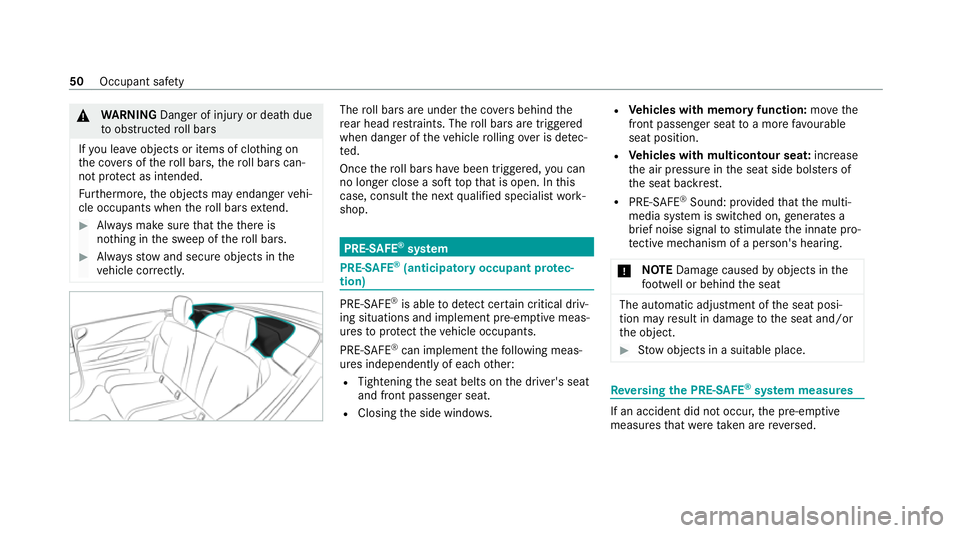
ve hicle cor rectl y. The
roll bars are under the co vers behind the
re ar head restra ints. The roll bars are triggered
when danger of theve hicle rolling over is de tec‐
te d.
Once thero ll bars ha vebeen triggered, you can
no lon ger close a soft topth at is open. In this
case, consult the next qualified specialist work‐
shop. PRE-SAFE
®
sy stem PRE-
SAFE®
(anticipa tory occupant pr otec‐
tion) PRE-
SAFE®
is able todetect cer tain critical driv‐
ing situations and implement pre-em ptive meas‐
ures toprotect theve hicle occupants.
PRE-SAFE ®
can implement thefo llowing meas‐
ures independently of each other:
R Tightening the seat belts on the driver's seat
and front passenger seat.
R Closing the side windo ws. R
Vehicles with memory function: movethe
front passenger seat toa more favo urable
seat position.
R Vehicles with multicontour seat: increase
th e air pressure in the seat side bols ters of
th e seat backrest.
R PRE-SAFE ®
Sound: pr ovided that the multi‐
media sy stem is switched on, generates a
brief noise signal tostimulate the innate pro‐
te ctive mechanism of a person's hea ring.
* NO
TEDama gecaused byobjects in the
fo ot we ll or behind the seat The automatic adjustment of
the seat posi‐
tion may result in damage tothe seat and/or
th e object. #
Stow objects in a suitable place. Re
versing the PRE- SAFE®
sy stem measures If an accident did not occur,
the pre-em ptive
measures that we retak en are reve rsed. 50
Occupant saf ety
Page 100 of 469
Seats
Ad
justing the front seat mechanically and
electrically (without Seat Comfort Package) &
WARNING Risk of becoming trapped if
th e seats are adjus tedby children
Children could become trapped if they adjust
th e seats, particularly when unattended. #
When leaving theve hicle, alw aysta ke
th eke y with you and lock theve hicle. #
Never lea vechildren unat tended in the
ve hicle. This also applies
tothe Digital Vehicle Key
st icke r.
Yo u can adjust the seats when the ignition is
switched off. &
WARNING Risk of becoming trapped
du ring seat adjustment
When you adjust a seat, you or other vehicle
occupants could become trapped, e.g. on the
seat guide rail. #
Make sure when adjusting a seat that
no one has any body parts in the sweep
of the seat. Obser
vethe saf ety no tes on "Airbags" and "Chil‐
dren in theve hicle". &
WARNING Risk of accident due tothe
driver's seat not being engaged
The driver's seat may mo veunexpectedly
while driving.
This could cause youto lose control of the
ve hicle. #
Alw ays make sure that the driver's seat
is engaged before starting theve hicle. &
WARNING Risk of accident due to
adjusting vehicle settings while theve hi‐
cle is in motion
Yo u could lose cont rol of theve hicle in the
fo llowing situations in particular:
R Ifyo u adjust the driver's seat, the head
re stra ints, thesteering wheel or the mir‐
ro r while theve hicle is in motion.
R Ifyo ufast enyour seat belt while theve hi‐
cle is in motion. #
Before starting the engine: adjust the
driver's seat, the head restra ints, the
st eering wheel and the mir ror and fas‐
te nyo ur seat belt. &
WARNING Risk of becoming trapped if
th e seat height is adjus ted carelessly
If yo u adjust the seat height carelessly, you
or other vehicle occupants could be trapped
and thereby injured. Seats and
stowing 97
Page 105 of 469
Fi
tting/ removing the rear seat head
re stra ints
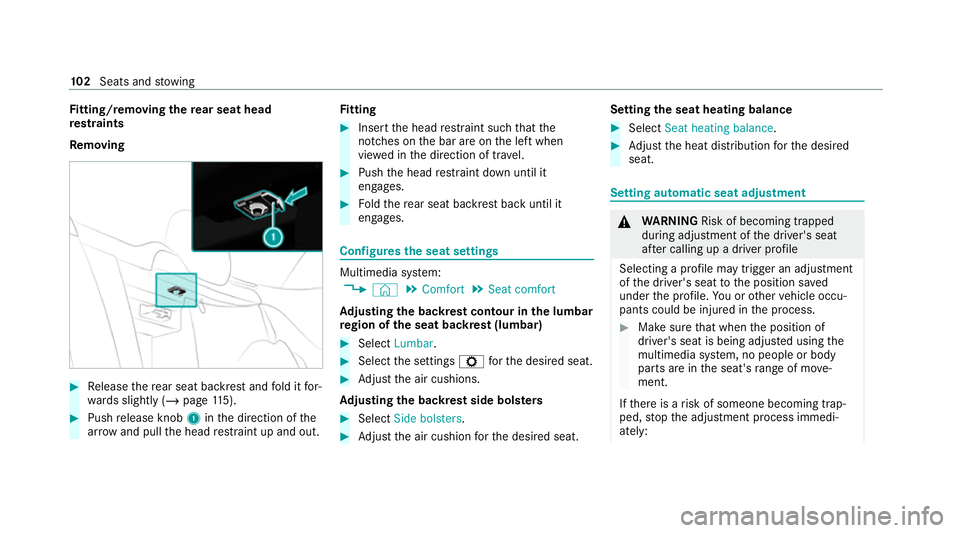
Re moving #
Release there ar seat backrest and fold it for‐
wa rds slightly (/ page115). #
Push release knob 1inthe direction of the
ar row and pull the head restra int up and out. Fi
tting #
Inse rtthe head restra int such that the
notches on the bar are on the left when
vie we d in the direction of tra vel. #
Push the head restra int down until it
engages. #
Foldthere ar seat backrest back until it
engages. Configures
the seat settings Multimedia sy
stem:
4 © 5
Comfort 5
Seat comfort
Ad justing the backrest contour in the lumbar
re gion of the seat backrest (lumbar) #
Select Lumbar . #
Select the settings Zforth e desired seat. #
Adjust the air cushions.
Ad justing the backrest side bols ters #
Select Side bolsters . #
Adjust the air cushion forth e desired seat. Setting
the seat heating balance #
Select Seat heating balance. #
Adjust the heat distribution forth e desired
seat. Setting automatic seat adjustment
&
WARNING Risk of becoming trapped
du ring adjustment of the driver's seat
af te r calling up a driver profile
Selecting a profile may trigger an adju stment
of the driver's seat tothe position sa ved
under the profile. You or other vehicle occu‐
pants could be injured in the process. #
Make sure that when the position of
driver's seat is being adjus ted using the
multimedia sy stem, no people or body
parts are in the seat's range of mo ve‐
ment.
If th ere is a risk of someone becoming trap‐
ped, stop the adjustment process immedi‐
ately: 102
Seats and stowing
Page 106 of 469
#
a)Tapth ewa rning message on the
media displa y.
or #
b) Press a memory position button or a
seat adjustment switch on the driver's
door.
The adjustment process is stopped. Re
quirements:
R Adapting the driver's seat position tothe
body size: automatic seat adjustment has
been switched on.
Multimedia sy stem:
4 © 5
Settings 5
Vehicle
5 Automatic seat adjustment
Switching automatic seat adjustment on/off
When the active user profile is changed while
th eve hicle is stationar y,the driver's seat, out‐
side mir ror and seat contour will auto matically
be adap tedto the driver. #
Select OnorOff. %
This setting is available on lyfor individual
user profiles. Forth e guest profile, auto‐
matic seat adjustment cann otbe switched
on or off. Further information about user
profiles .
Ad justing the driver's seat position tobody
size
The vehicle will calculate a suitable driver's seat
position on the basis of the driver's body size
and set this direct ly. #
Toset the unit of measurement: selectcm
or ft/in. #
Set the size using the scale. #
Select Start positioning .
The driver's seat position will be adjus tedto
th e body size that has been set.
% Ifth e driver's seat position calculated bythe
ve hicle is not practical or comfor table, it can
be changed manually at any time via the but‐
to ns.
The exterior mir rors are not set via this func‐
tion. Ins tead, they have tobe set manually
via the switches. %
You can also make these settings via the
Mercedes me por talfo ryo ur user profile. By
syn chro nising the profiles in theve hicle and
th e Mercedes me connect profiles, you can
car ryove rth ese settings foryo ur vehicle.
Fu rther information about synchronising
user profiles .
Setting the easy entry and exitfeature #
Activate or deacti vate the function.
% Ifyo u use an individual user profile and ha ve
set your body size, this information is car ried
ove rfo rth e easy entry andexitfeature. This
causes the driver's seat toautomatically
mo veinto the cor rect position . Overview of massage prog
rams The
following programmes can be selec ted:
R Relaxing Massage Itstarts bymassaging the
bac k,beginning in the pelvic area.
R Activating Massage Activating massa gewith
upward-m oving massage waves.
R Classic Massage Relaxing back massage. Seats and
stowing 103
Page 113 of 469
R
The po wer supp lyor the ignition is switched
on. #
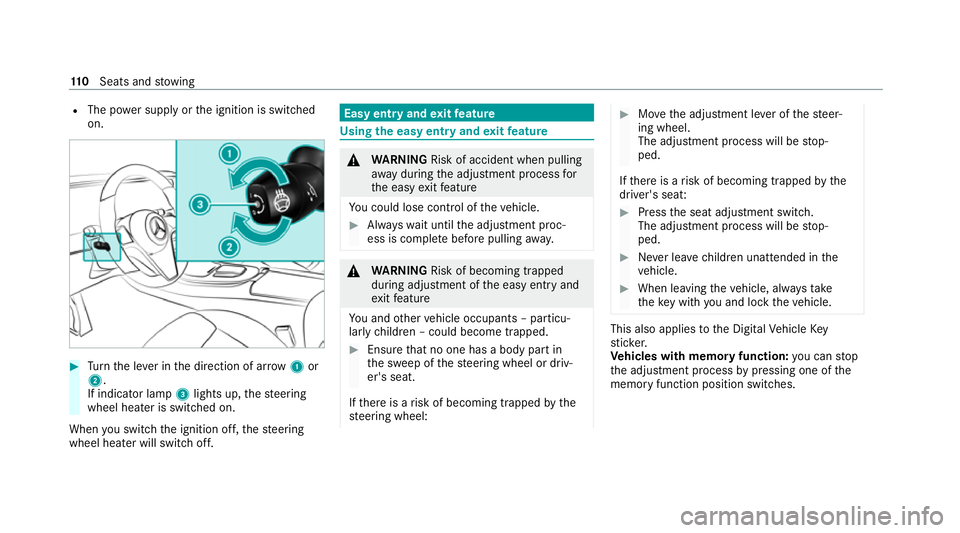
Turn the le ver in the direction of ar row1or
2.
If indicator lamp 3lights up, thesteering
wheel heater is switched on.
When you swit ch the ignition off, thesteering
wheel heater will switch off. Easy entry and
exitfeature Using
the easy entry and exitfeature &
WARNING Risk of accident when pulling
aw ay during the adjustment process for
th e easy exitfeature
Yo u could lose cont rol of theve hicle. #
Alw ayswa it until the adjustment proc‐
ess is comple tebefore pulling away. &
WARNING Risk of becoming trapped
du ring adjustment of the easy entry and
ex itfeature
Yo u and other vehicle occupants – particu‐
lar lych ildren – could become trapped. #
Ensure that no one has a body part in
th e sweep of thesteering wheel or driv‐
er's seat.
If th ere is a risk of becoming trapped bythe
st eering wheel: #
Movethe adjustment le ver of thesteer‐
ing wheel.
The adjustment process will be stop‐
ped.
If th ere is a risk of becoming trapped bythe
driver's seat: #
Press the seat adjustment switch.
The adjustment process will be stop‐
ped. #
Never lea vechildren unat tended in the
ve hicle. #
When leaving theve hicle, alw aysta ke
th eke y with you and lock theve hicle. This also applies
tothe Digital Vehicle Key
st icke r.
Ve hicles with memory function: you can stop
th e adjustment process bypressing one of the
memory function position switches. 11 0
Seats and stowing
Page 114 of 469
&
WARNING Risk of becoming trapped if
ch ildren activate the easy entry andexit
fe ature‑
Children could become trapped if they acti‐
va te the easy entry ‑ andexitfeature, particu‐
lar lywhen unat tended. #
Never lea vechildren unat tended in the
ve hicle. #
When leaving theve hicle, alw aysta ke
th eke y with you and lock theve hicle. This also applies
tothe Digital Vehicle Key
st icke r.
If th e easy entry andexitfeature is active, the
st eering wheel will mo veupwards and the driv‐
er's seat will mo veback in thefo llowing situa‐
tions:
R You swit chthe ignition off with the driver's
door open.
R You open the driver's door with the ignition
switched off.
% The steering wheel will then mo veupwards
on ly if it is not already as high as it will go. The driver's seat will
then mo vebackwards
only if it is not already in there armost posi‐
tion.
The steering wheel and the driver's seat will
mo veback tothe last drive position in thefo l‐
lowing cases:
R You swit chthe po wer supp lyor the ignition
on when the driver's door is closed
R You close the driver's door with the ignition
switched on.
The last drive position will be sa ved when:
R You swit chthe ignition off.
R Vehicles with memory function: you call
up the seat settings via the memory function.
R Vehicles with memory function: you sa ve
th e seat settings via the memory function.
Ve hicles with memory function: press one of
th e memory function memory position switches
to stop the adjustment process. Setting
the easy entry and exitfeature Multimedia sy
stem:
4 © 5
Settings 5
Vehicle
5 Automatic seat adjustment
5 Easy Entry/Exit #
Activate or deacti vate the function. Memory function
Fu
nction of the memory function &
WARNING Risk of an accident if the
memory function is used while driving
If yo u use the memory function on the driv‐
er's side while driving, you could lose cont rol
of theve hicle as a result of the adjustments
being made. #
Only use the memory function on the
driver's side when theve hicle is station‐
ar y. Seats and
stowing 111
Page 255 of 469
#
Press the© button on theTo uch Control
or on theto uchpad.
The home sc reen appears. #
Call up the application (/ page249). Fu
nctions of LINGU ATRO NIC Wi
th LINGU ATRO NIC, various applications in the
MBUX multimedia sy stem are operable using
vo ice input. LINGU ATRO NIC is operational
appr oximately thirty seconds af terth e ignition is
switched on and is available forth e driver's seat
and front passenger seat.
The following multimedia sy stem applications
can be operated:
R Navigation
R Telephone
R Radio and TV
R Media pla yer
R Messages
R Vehicle functions St
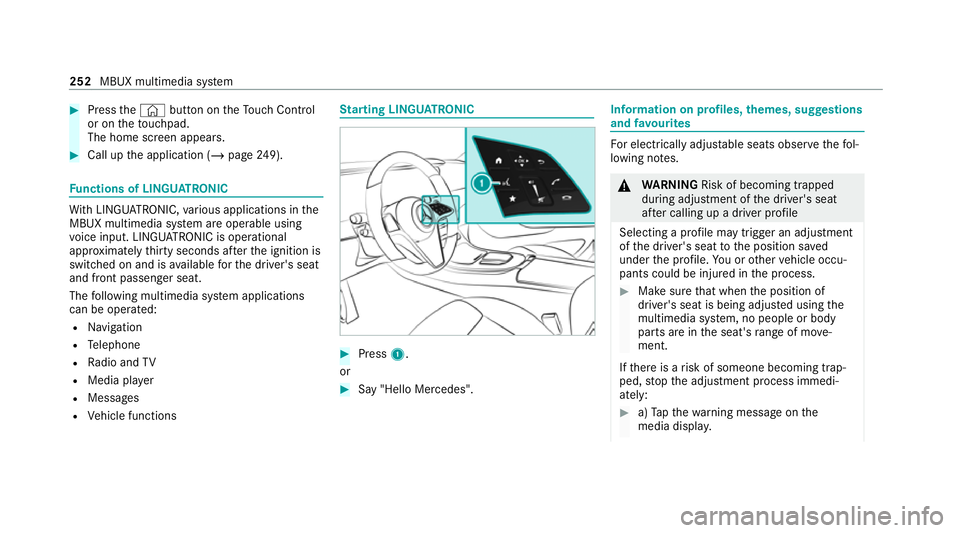
arting LING UATRONIC #
Press 1.
or #
Say "Hello Mercedes". In
fo rm ation on profiles, themes, suggestions
and favo urites Fo
r electrical lyadjus table seats obser vethefo l‐
lowing no tes. &
WARNING Risk of becoming trapped
du ring adjustment of the driver's seat
af te r calling up a driver profile
Selecting a profile may trigger an adju stment
of the driver's seat tothe position sa ved
under the profile. You or other vehicle occu‐
pants could be injured in the process. #
Make sure that when the position of
driver's seat is being adjus ted using the
multimedia sy stem, no people or body
parts are in the seat's range of mo ve‐
ment.
If th ere is a risk of someone becoming trap‐
ped, stop the adjustment process immedi‐
ately: #
a)Tapth ewa rning message on the
media displa y. 252
MBUX multimedia sy stem
Page 256 of 469
or
#
b) Press a memory position button or a
seat adjustment switch on the driver's
door.
The adjustment process is stopped. The driver's seat is equipped with an access pre‐
ve nter.
If th e driver's door is open, the driver's seat will
not be set af ter calling up the driver's profile.
Profiles store your vehicle settings and settings
fo rth e multimedia sy stem. If theve hicle is used
by several drivers, the driver can select their
ow n profile wi thout changing thestored profile
settings of other drivers.
% Information on profiles from Mercedes me
connect can be found in the Digital Opera‐
to r's Manual.
Ve hicle settings are, forex ample, driver's seat,
st eering wheel and mir ror settings, clima tecon‐
trol and ambient lighting. Forth e settings of the
multimedia sy stem, you can select, forex ample,
ra dio stations, pr evious destinations as well as
th emes, suggestions and favo urites. Fo
rre cur ring driving situations, su chas long
drives on the mo torw ay,yo u can sa veyour pre‐
fe rred settings in a theme in theve hicle. In a
th eme you can sa vethe display of the digital
map, your prefer redra dio station and prefer red
drive prog ram, forex ample.
The vehicle can learn the habits of the driver. It
th en of fers suggestions forth e most probable
navigation destinations, media sources, radio
st ations or con tacts. The pre-requirements for
th at are the selection of a profile, your consent
to there cording of da taand suf ficient collected
da ta.
Fa vourites pr ovide quick access toapplications
th at are used of ten. You can select favo urites
from categories or add them directly toan appli‐
cation. Configuring profiles,
themes and sugges‐
tions Multimedia sy
stem:
4 © 5
f Profiles
Creating a new profile #
Select WCreate profile . #
Select an avatar. #
Enterth e name and confi rmwith a. #
Select Continue r. #
Select Current settings. #
Select Save. #
Activate Blu etoo th®
and select Connect
phone, toconnect a mobile phone wi th the
user profile . #
Select Finished.
Selecting profile options #
Select Äfor a profile.
The following functions are available:
R Editing, resetting or deleting a profile
R Resetting themes or favo urites MBUX multimedia sy
stem 253