change wheel MERCEDES-BENZ E-CLASS COUPE 2009 User Guide
[x] Cancel search | Manufacturer: MERCEDES-BENZ, Model Year: 2009, Model line: E-CLASS COUPE, Model: MERCEDES-BENZ E-CLASS COUPE 2009Pages: 313, PDF Size: 7.76 MB
Page 122 of 313
X
Press the 0040or003E button to select the
display to be changed: day, month, year.
X Press the 003Dor003C button to set the
selected display.
X Press the 0064button to store the entry.
Lights Switching the daytime driving lights on/
off
If you have activated the Daytime driving
lamps: function and the light switch is in the
Coupé: 0027or0066
Cabriolet: 0066
position, the daytime driving lights are
switched on automatically when the engine is
running. When it is dark, the side lamps and
the dipped-beam headlamps are switched on
automatically.
In countries where daytime driving lights are
legally required, Onis the factory setting.
X Press the 0040or003E button on the steer-
ing wheel to select the Settingsmenu.
X Press the 003Dor003C button to select the
Light submenu.
X Press the 0064button to confirm.
X Press the 003Dor003C button to select the
Daytime driving lamps function.
You will see the selected setting: onor
off.
X Press the 0064button to save the setting.
Activating/deactivating the Intelligent
Light System*
When you activat ethe Intell. Light Sys‐
tem: function, you activat ethe following:
R motorway mode
R active light function
R cornering light function
R extended range foglamps X
Press the 0040or003E button on the steer-
ing wheel to select the Settingsmenu.
X Press the 003Dor003C button to select the
Light submenu.
X Press the 0064button to confirm.
X Press the 003Dor003C button to select the
Intell. Light System: function.
You will see the selected setting: onor
off.
X Press the 0064button to save the setting.
Setting the dipped-beam headlam pfor
driving on the right/left*
This function is only availabl eonvehicles with
the Intelligent Light System*.
When you set the dipped-beam headlamps for
driving on the left/right:
R the multifunction display shows the
Intell. Light System: System inop‐
erative Inactive for right-hand
drive display message in the Lightsub-
menu.
R motorway mode and extended range fog-
lamps are inoperative.
You can only set the dipped-beam headlamps
for driving on the right/left when stationary:
X Press the 0040or003E button on the steer-
ing wheel to select the Settingsmenu.
X Press the 003Dor003C button to select the
Light submenu.
X Press the 0064button to confirm.
X Press 003Dor003C to select the Dipped
headl. Setting for: function.
You will see the selected setting: Right-
hand drive orLeft-hand drive.
X Press the 0064button to save the setting.
You can also have the dipped-beam head-
lamps set for driving on the right/left at a
qualified specialist workshop, e.g. a
Mercedes-Benz Servic eCentre.
Further information (Y page 87)(Ypage 81)
and (Y page 192). On-board computer
119Controls
*optional
207_AKB; 2; 3, en-GB
mkalafa,
Version: 2.11.8.1 2009-07-23T10:23:49+02:00-Seite 119 Z
Page 126 of 313
to avoi
dexceeding the se tspeed. On long and
steep downhil lgradients ,especially if the
vehicl eisladen or towing atrailer, yo umust
shift to alower gear in good tim eorselect
shift range 1,2or 3on vehicles with auto-
matic transmission* .Bydoing so ,you will
make us eofthe braking effect of the engine,
which relieves the load on the brake system
and prevents the brakes fro moverheating
and wearing too quickly. G
Ris
kofa ccident
Do not change down for additional engine
braking on aslipper yroads urface. This could
cause the drive wheels to lose their gri pand
the vehicl ecould skid.
Use cruis econtrol onl yifroada nd traffi ccon-
ditions make it appropriate to maintain a
stead yspeed foraprolonge dperiod. Youc an
store any roa dspeed above 30 km/h. G
Ris
kofa ccident
Cruise control cannot take account of road
and traffi cconditions.
Alway spayattentio ntotrafficconditions
eve nw henc ruis econtrol is activated.
Cruise control is onl yanaiddesigne dtoassist
driving. Yo uareresponsibl efor the vehicle's
spee dand for braking in good time. G
Ris
kofa ccident
Do not us ecruis econtrol:
R in roa dand traffi cconditions which do not
allo wyouto maintain aconstant spee d(e.g.
heav ytraffi corw inding roads). Yo ucould
otherwis ecause an accident.
R on slippery roads .Braking or accelerating
could cause the drive wheels to lose trac-
tio na nd the vehicl ecould the nskid.
R when there is poor visibility, e.g .due to fog,
heav yrainors now
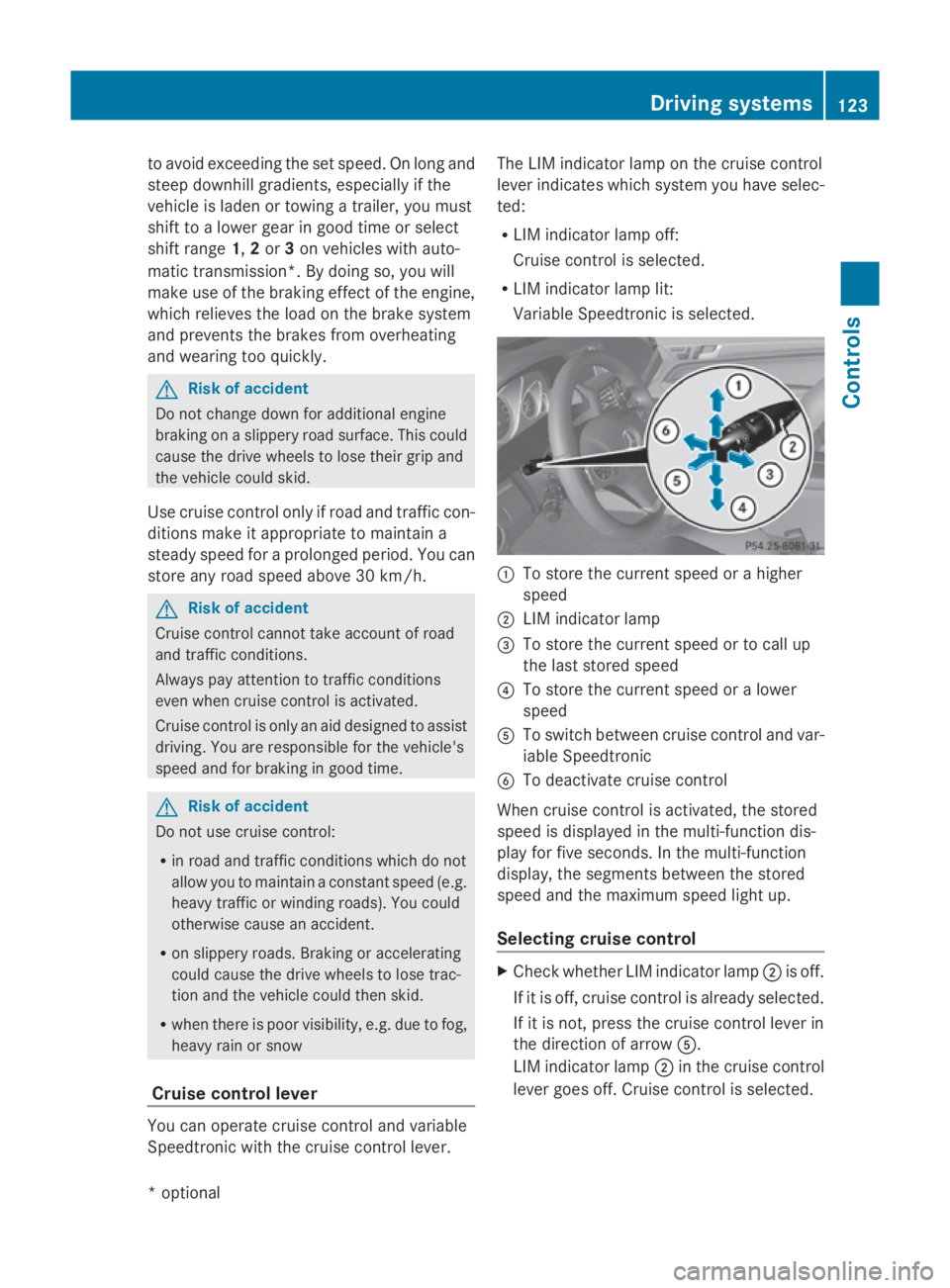
Cruis econtro llever Yo
uc an operate cruis econtrol and variable
Speedtroni cwitht he cruis econtrol lever. Th
eL IM indicator lamp on the cruis econtrol
lever indicates which syste myouhave selec-
ted:
R LIM indicator lamp off:
Cruise control is selected.
R LIM indicator lamp lit:
Variable Speedtroni ciss elect ed. 0046
To store the current spee dorahigher
speed
0047 LIM indicator lamp
008A To store the current spee dortocallup
the last stored speed
0088 To store the current spee doralower
speed
0086 To switch between cruis econtrol and var-
iabl eSpeedtronic
0087 To deactivate cruis econtrol
When cruis econtrol is activated ,the stored
spee disd isplayed in the multi-functio ndis-
play for five seconds. In the multi-function
display, the segments between the stored
spee dand the maximum spee dlight up.
Selecting cruis econtrol X
Check whether LIM indicator lamp 0047is off.
If it is off ,cruis econtrol is already selected.
If it is not, press the cruis econtrol lever in
the directio nofarrow 0086.
LIM indicator lamp 0047in the cruis econtrol
lever goes off .Cruise control is selected. Driving systems
123Controls
*optio nal
207_AKB; 2; 3, en-GB
mkalafa
,V ersion: 2.11.8.1
2009-07-23T10:23:49+02:00
-Seite 123 Z
Page 128 of 313
X
Briefly press the cruise control lever in the
direction of arrow 0086.
Variabl eSpeedtroni cisselected .LIM indi-
cator lamp 0047in the cruise control lever
lights up.
Cruise control is automaticall ydeactivated if:
R yo ud epress the parking brake.
R yo ud rive at less than 30 km/h
R ESP ®
intervenes or yo udeactivate ESP ®
R yo uc hange into neutral in avehicle with
manual transmission while driving or if the
clutch is depressed for longer than 6sec-
onds
R on vehicle swithm anual transmission, you
shift to ahigher gea rand as aresult the
engine speed is too low
R yo um ove the selector lever to Non vehi-
cle sw itha utomatic transmission* while
driving
If cruise control is deactivated, yo uwillh ear
aw arning tone. You see the Cruise con‐
trol off messageinthe multi-function dis-
play for approximately five seconds.
i The last speed store disclearedwheny ou
switch off the engine. DISTRONI
CPLUS*
i Distronic Plu sisnot available in al lcoun-
tries.
Distronic Plu sregulates the speed and auto-
matically maintains the distance to the vehi-
cle in front. It brakes automaticall yinorder
to avoid exceeding the set speed. On long and
stee pdownhil lgradients, especially if the
vehicle is laden or towing atrailer, yo umust
select shift range 1,2or 3in goo dtime .By
doing so, yo uwillm ake us eofthe braking
effect of the engine, which relieves the load
on the brake system and prevents the brakes
from overheating and wearing too quickly. G
Risk of accident
Do not change dow nfor additiona lengine
braking on aslippery roa dsurface .Thisc ould
cause the drive wheel stoloset hei rgripa nd
the vehicle could skid. G
Risk of accident
DISTRONIC PLUS is only an ai ddesigne dto
assist driving .The driver is fully responsible
for the vehicle's distance from othe rvehicles,
the vehicle's speed and for braking in good
time.
DISTRONIC PLUS doe snot react to:
R pedestrians
R stationar yobstacles on the road, e.g. stop-
ped or parked vehicles
R oncoming and crossing traffic
DISTRONIC PLUS may not detect narro wvehi-
cle sdriving in front, e.g. motorcycles, or vehi-
cle sd riving on adifferent line. Therefore,
always pa yattention to traffi cconditions even
whe nDISTRONIC PLUS is activated. Other-
wise, yo umay fai ltorecognise dangers in
time ,cause an accident and injure yourself
and others.
If as lower-moving vehicle is detected in front,
Distronic Plu scauses your vehicle to brake
and maintai napreset distance to the vehicle
in front. G
Risk of accident
DISTRONIC PLUS cannot take account of road
and traffi cconditions .IfDISTRONIC doe snot
recognise or no longer recognise sthe vehicle
in front, do not activate DISTRONIC or, if it is
already active, deactivate it. Thi sisespecially
the case:
R before corners
R in filter lanes Drivin
gsystems
125Controls
*optional
207_AKB; 2; 3, en-GB
mkalafa
,V ersion: 2.11.8.1
2009-07-23T10:23:49+02:00
-Seite 125 Z
Page 130 of 313
Selecting Distronic Plus
X
Check whether LIM indicator lamp 008Ais off.
If it is off, Distronic Plus is already selected.
If it is not, press the cruise control lever in
the direction of arrow 0087.
LIM indicator lamp 008Ain the cruise control
lever goes off. Distronic Plus is selected.
Switching on Distronic, storing the cur-
rent speed and maintaining it G
Risk of accident
The vehicle can be braked when DISTRONIC
PLUS is activated. For this reason, deactivate
DISTRONIC PLUS if the vehicle is to be set in
motion by other means (e.g. in acar wash or
by towing).
You can activate Distronic Plus in the follow-
ing circumstances:
R after the engine has been running for about
two minutes
R if the parking brake is not applied
R if ESP ®
is activated
R if the automatic transmission* is in position
D
R if the bonnet is closed
R if the driver's door is closed and you switch
from Pto Dor your seat belt is fastened.
R if the front-passenger door is closed
Activating while driving
When driving at speeds below 30 km/h, you
can only activate Distronic Plus if the vehicle
in front has been detected and is shown in the
multi-function display.Ift he vehicle in front is
not shown in the multi-function display and is
no longer being detected, because it has
changed lanes, for example, Distronic Plus is
deactivated and atone sounds. X
Briefly pull the cruise control lever towards
you 0088or press it up 0046or down 0086to the
pressure point.
Distronic Plus is selected.
X Keep the cruise control lever pressed
up 0046 or down 0086until the desired speed
is set.
X Remove your foot from the accelerator
pedal.
Your vehicle adapts its speed to that of the
vehicle in front,b ut only up to the stored
speed.
i If you do not fully release the accelerator
pedal, the DISTRONIC PLUS suspended
message appears in the multi-function dis-
play.T he set distance to aslower-moving
vehicle in front will then not be maintained.
You will be driving at the speed you deter-
mine by the position of the accelerator
pedal.
Activating when driving towards asta-
tionary vehicle
If the vehicle in front of you is stationary, you
can only activate Distronic Plus once your
vehicle is stationary as well.
X Briefly pull the cruise control lever towards
you 0088.
Distronic Plus is selected.
i Distronic Plus can only be activated at
under 30 km/hi favehicle in front has been
detected. Therefore, the Distronic Plu sdis-
tance displayint he instrument cluster
should be activated.
X Keep the cruis econtrol leve rpressed
up 0046 or down 0086until the desired speed
is set.
i You can use the cruis econtrol leve rtoset
the stored spee dand the thumbwheel on
the cruis econtrol leve rtoset the specified
minimu mdistance (Y page129). Driving systems
127Controls
*optional
207_AKB; 2; 3, en-GB
mkalafa,
Version: 2.11.8.1 2009-07-23T10:23:49+02:00-Seite 127 Z
Page 136 of 313
Distroni
cPlusm aydetect vehicles tha tare
crossing your lane by mistake. Activating Dis-
troni cPlusatt rafficlight swithc rossing traf-
fic ,for example, could cause your vehicl eto
pull away unintentionally. SPEEDTRONIC
Speedtroni cbrakes automaticall ysothatyou
do not exceed the se tspeed. On long and
steep downhil lgradients ,especially if the
vehicl eisladen or towing atrailer, yo umust
shift to alower gear in good tim eorselect
shift range 1,2or 3on vehicles with auto-
matic transmission* .Bydoing so, yo uwill
make us eofthe braking effect of the engine,
which relieves the load on the brake system
and prevents the brakes fro moverheating
and wearing too quickly. If yo uneeda ddi-
tional braking ,depress the brake pedal
repeatedly rathe rtha nc ontinuously. G
Ris
kofa ccident
Never depress the brake peda lcontinuously
whil ethe vehicl eisinmotion, e.g .neve rcause
the brakes to ru bbyapplyingconstant slight
peda lpressure. This cause sthe brake system
to overheat, increase sthe braking distance
and can lead to the brakes failing completely. G
Ris
kofa ccident
Do not change down for additional engine
braking on aslipper yroads urface. This could
cause the drive wheels to lose their gri pand
the vehicl ecould skid.
Yo uc an se tavariable or permanent limit
speed:
R variable for speedlimit s, e.g .inbuilt-up
areas
R permanent for long-term spee drestric-
tions, e.g .for driving on winter tyres
(Y page 135) G
Ris
kofa ccident
Speedtroni ciso nlyana iddesigne dtoassist
driving. Yo uareresponsibl efor the vehicle's
spee dand for braking in good time.
i Thes peed indicated in the speedometer
ma ydiffe rs ligh tlyf romt he limi tspeed
stored.
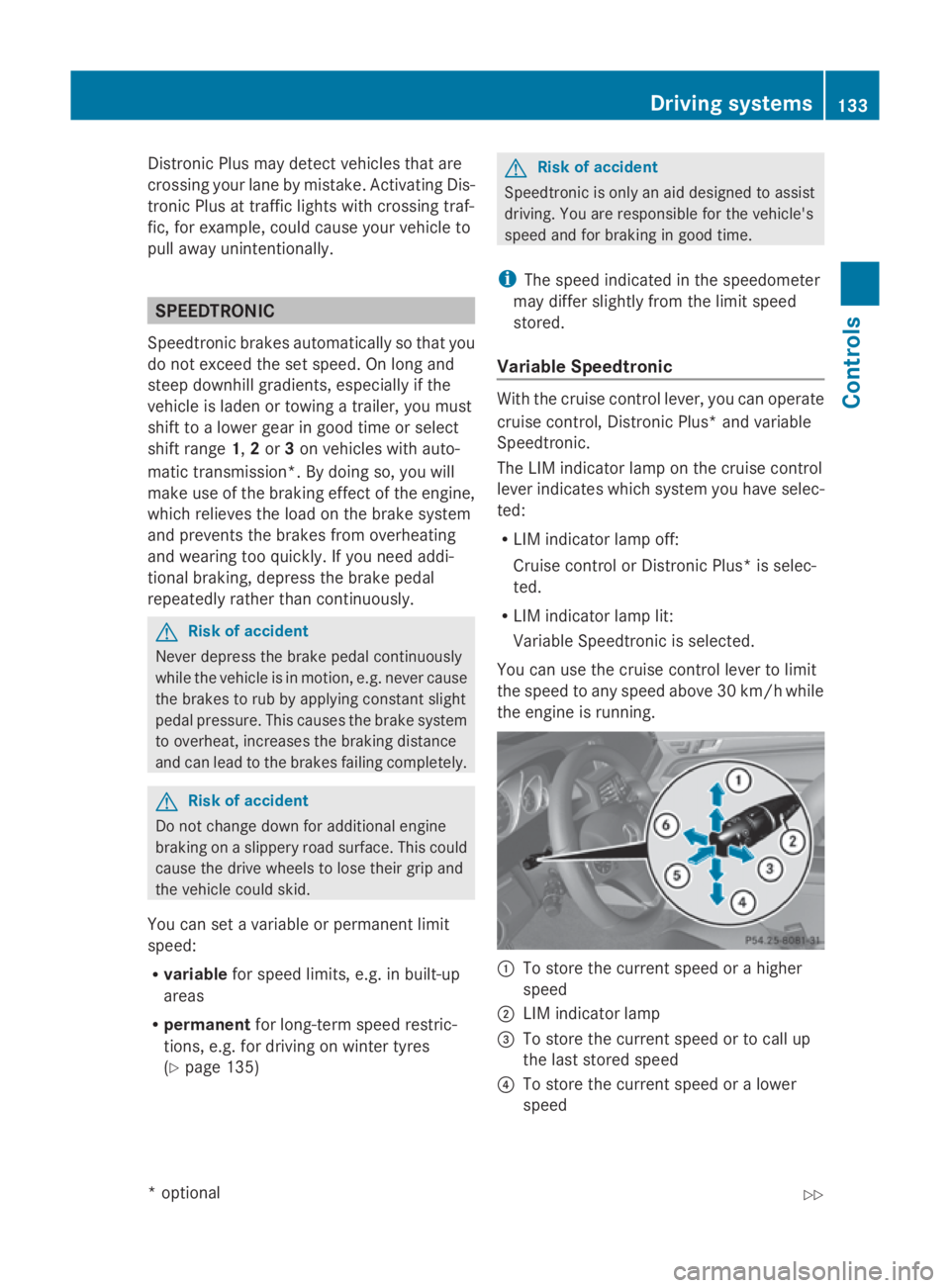
Variabl eSpeedtronic With the cruis
econtro llev er,y ou can operate
cruis econtrol, Distroni cPlus* and variable
Speedtronic.
Th eL IM indicator lamp on the cruis econtrol
lever indicates which syste myouhave selec-
ted:
R LIM indicator lamp off:
Cruise contro lorDistroni cPlus* is selec-
ted.
R LIM indicator lamp lit:
Variable Speedtroni ciss elect ed.
Yo uc an us ethe cruis econtro llev er to limit
the spee dtoany spee dabove 30 km/h while
the engine is running. 0046
To stor ethe current spee dorahigher
speed
0047 LIM indicator lamp
008A To stor ethe current spee dortocallup
the last stored speed
0088 To stor ethe current spee doralower
speed Driving systems
133Controls
*optio nal
207_AKB; 2; 3, en-GB
mkalafa
,V ersion: 2.11.8.1
2009-07-23T10:23:49+02:00
-Seite 133 Z
Page 191 of 313
The tyre pressure loss warning system does
not replace the need to regularly check your
vehicle's tyre pressures, since an even loss of
pressure on several tyres at the same time
cannot be detected by the tyre pressure loss
warning system.
The tyre pressure monitor is not able to warn
you of asudden loss of pressure, e.g. if the
tyre is penetrated by aforeign object.
In the event of asudden loss of pressure, bring
the vehicle to ahalt by braking carefully. Do
not make any sudden steerin gmovements
when doing so.
The function of the tyre pressure loss warning
system is limited or delaye dif:
R snow chains are fitted to your vehicle's
tyres.
R road conditions are wintry.
R you are driving on sand or gravel.
R you adopt avery sporty driving style (cor-
nering at high speeds or driving with high
rates of acceleration).
R you are towing avery heavy or large trailer.
R you are driving with aheavy load (in the
vehicle or on the roof).
Restarting the tyrep ressureloss warn-
ing system Restart the tyre pressure loss warning system
if you have:
R
changed the tyre pressure
R changed the wheels or tyres
R fitted new wheels or tyres
X Before restarting, consult the table of tyre
pressures on the inside of the fuel filler flap
to ensure that the tyre pressure in all four
tyres is set correctly for the respective
operating conditions.
X Observe the notes in the section on tyre
pressures (Y page 186). G
Risk of accident
The tyre pressure loss warning system can
only give reliable warnings if you have set the
correc ttyre pressure.
If an incorrect tyre pressure is set, these
incorrect values will be monitored.
At yre with insufficien tpressure results in
vehicle instability when driving, thus increas-
ing the risk of an accident.
X Make sure that the key is in position 2in
the ignition lock.
In the multi-function display you will see the
standard display (Y page 108).
X Press the 0040or003E button to select the
Service menu.
X Press the 003Cor003D button to select
Tyre pressure.
X Press the 0064button.
The multi-function display shows the mes-
sage:
Run Flat Indicator active Restart
with OK
If you wish to confirm the restart:
X Press the 0064button.
The multi-function display shows the mes-
sage:
Tyre press. now OK?
X Press the 003Cor003D button to select
Yes.
X Press the 0064button.
You will see the following message in the
multi-function display:
Run Flat Indicator restarted
After ateach-in period, the tyre pressure
loss warning system will monitor the set
tyre pressures of all four tyres.
If you wish to cancel the restart:
X Press the 0041button.
or
X When the Tyre press. now OK? message
appears, press 003Cor003D to select
Cancel. 188
Tyres and wheelsOperation
207_AKB; 2; 3, en-GB
mkalafa,
Version: 2.11.8.1 2009-07-23T10:23:49+02:00-Seite 188
Page 192 of 313
X
Press the 0064button.
The tyre pressure values stored at the last
restart will continue to be monitored. Interchanging the wheels
G
Risk of accident
Interchange the fron tand rear wheels only if
they have the same dimensions :for example
size, offset ,etc.
After awheel is changed, have the tightening
torque checked at aspecialist workshop that
has the necessary specialist knowledge and
tools to carry out the work required.
Mercedes-Benz recommends that you use a
Mercedes-Benz Servic eCentre for this pur-
pose. In particular, work relevant to safety or
on safety-related systems must be carried out
at aq ualified specialist workshop.
The wheels could work loose if they are not
tightened to atorque of 130 Nm.
For safety reasons, Mercedes-Benz recom-
mends that you only use wheel bolts of the
correc tsize which have been approved for
Mercedes-Benz vehicles.
The wear patterns on the fronta nd rear tyres
differ, depending on the operating conditions.
Interchange the wheels before aclear wear
patter nhas formed on the tyres. Frontt yres
typically wear more on the shoulders and the
rear tyres in the centre.
On vehicles that have the same size fronta nd
rear wheels you can interchange the wheels
every 5,000 km to 10,00 0kmdepending on
the degree of tyre wear. Do not reverse the
direction of tyre rotation.
Clean the contact surfaces of the wheel and
the brake disc thoroughly every time awheel
is interchanged. Check the tyre pressure and,
if necessary, restart the tyre pressure loss
warning system*. Winter driving
Points to remember
Have your vehicle winterproofed at aqualified
specialist workshop, e.g. at aMercedes-Benz
Servic eCentre, at the onset of winter.
Observe the notes in the "Changing awheel"
section (Y page 189). Winter tyres
Use winter tyres at temperatures below
+7 ˚C and in wintry road conditions. Only
winter tyres displaying the 004Dsnowflake
symbol in addition to the M+S markin gpro-
vide optimum grip in wintry road conditions.
Only these tyres will allow the ABS and ESP
driving systems to function optimally in win-
ter, as these tyres have been designed spe-
cifically for driving on snow.
Use winter tyres of the same make and tread
on all wheels to maintain safe handling char-
acteristics. G
Risk of accident
Winter tyres with atread depth of less than
4mmm ust be replaced immediately. They are
no longer suitable for winter use and can no
longer provide sufficient grip. This could
cause you to lose control of your vehicle and
cause an accident.
Always observe the maximum permissible
speed specified for the winter tyres you have
fitted. If you fit winter tyres which have a
lower maximum permissible speed than that
of the vehicle, affix an appropriate warning
sign in the driver's field of vision. This can be
obtained at aqualified specialist workshop,
e.g. from aMercedes-Benz Servic eCentre.
Under these circumstances, you should also
restrict the maximum speed of the vehicle
using permanen tSpeedtronic 37
to the maxi-
mum permissible speed for the winter tyres
(Y page 135).
37 Only available for certain countries. Winter driving
189Operation
*optional
207_AKB; 2; 3, en-GB
mkalafa,
Version: 2.11.8.1 2009-07-23T10:23:49+02:00-Seite 189 Z
Page 194 of 313
Brakes
G
Ris
kofa ccident
Do not change down for additional engine
braking on aslipper yroads urface. Thi scould
cause the drive wheels to lose thei rgripa nd
the vehicl ecould skid. G
Ris
kofa ccident
Make sure tha tothe rroa du sers are not
endangere dbyyourb raking.
Downhil lgradients On long and stee
pdownhil lstretches ,espe-
ciall yift he vehicl eisladen or towing atrailer,
yo um usts hift to alower gearing oodtime or,
on vehicles with automatic transmission*,
select shift range 1,2or 3.
i Thisalsoa pplies if youhavea ctivated
cruis econtrol, SPEEDTRONIC or DIS-
TRONIC PLUS*.
Thi sw illu se the braking effect of the engine,
so less braking will be required to maintain
the speed .Thisr elieves the load on the brake
system and prevents the brakes from over-
heating and wearing too quickly. If yo uneed
additional braking ,depress the brake pedal
repeatedly rather tha ncontinuously.
Heavy and light loads If the brakes have been subjected to
aheavy
load ,don ot stop the vehicl eimmediately, but
drive on for ashort while. Thi sallow sthe air-
flo wtoc oolthe brakes more quickly. G
Ris
kofa ccident
Never depress the brake peda lcontinuously
whil ethe vehicl eisinmotion, e.g .neve rcause
the brakes to ru bbyapplyingconstant slight
peda lpressure. Thi scauses the brake system
to overheat, increases the braking distance
and can lead to the brakes failing completely.
If the brakes have been used onl ymoderately,
yo us houl doccasionall ytest thei reffective-
ness .Todot his, brake more firmly from a highe
rspeed .Thisi mprove sthe gri pofthe
brakes.
Wet roads If driving in heavy rain for
aprolonged period
of time withou tbraking ,ther em aybe a
delaye dreactio nfrom the brakes when brak-
ing for the first time .Thism ayalso occu rafter
the vehicl ehasbeen washed.
Yo uh avetod epress the brake peda lmore
firmly .Maintain agreate rdistance from the
vehicl einfront.
After driving on awetroa dorh aving the vehi-
cle washed, brake firmly whil epayin gatten-
tio ntot he traffic conditions. Thi swaythe
brake discs will become warm, drying more
quickly, which will protect them against cor-
rosion.
Limite dbraking performanc eonsalt
treate droads G
Ris
kofa ccident
The laye rofsaltont he brake discs and the
brake pads/lining smaycause adelay in the
braking effect, resulting in asignificantly lon-
ger braking distance, which could lead to an
accident.
To avoid thi sdanger ,you should:
R occasionall ybrake carefully, withou tput-
ting othe rroa du sers at risk, when yo uare
driving on salte droads. Thi shelps to
remove any salt tha tmayhave started to
buil dupont he brake discs and the brake
pads/linings.
R maintain agreate rdistance to the vehicle
ahea dand drive with particula rcare.
R carefull yapply the brakes at the end of a
trip and immediatel yaftercommencing a
new trip ,sothats altr esidue sare removed
from the brake discs. Driving tips
191Operation
*optional
207_AKB; 2; 3, en-GB
mkalafa,
Version: 2.11.8.1 2009-07-23T10:23:49+02:00-Seite 191 Z
Page 196 of 313
countries. Whe
nusing symmetrical lights, the
edg eoft he carriageway is not illuminated as
widel yand as far ahea dasnormal.
On vehicle swithI ntelligent Light System*,
yo uc an switch the headlamp susing the "Tou-
ris tm ode" function in the on-board computer
(Y page 119).
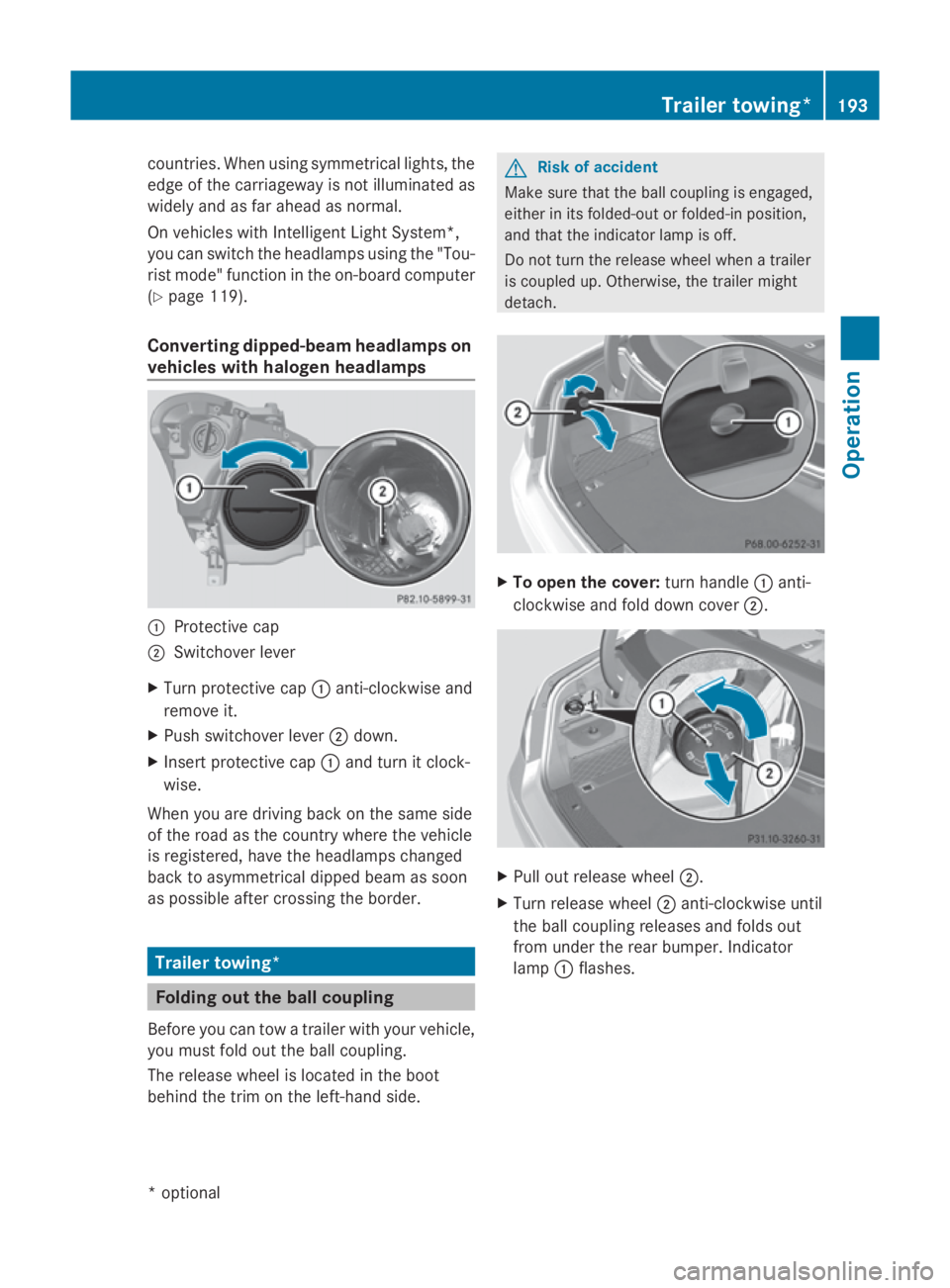
Converting dipped-beam headlamps on
vehicle swithh aloge nheadlamps 0046
Protective cap
0047 Switchove rlev er
X Turn protective cap 0046anti-clockwise and
remove it.
X Push switchove rlev er 0047 down.
X Inser tprotective cap 0046and turn it clock-
wise.
Whe nyou are driving back on the same side
of the roa dasthe country where the vehicle
is registered ,havet he headlamp schanged
back to asymmetrical dippe dbeamass oon
as possible afte rcrossing the border. Trailer towing*
Folding out the bal
lcou pling
Before yo ucan tow atraile rwithy ourvehicle,
yo um ustfoldo utthe ball coupling.
The release wheel is locate dinthe boot
behind the trim on the left-hand side. G
Risk of accident
Make sure that the ball coupling is engaged,
either in its folded-ou torfolded-in position,
and that the indicator lamp is off.
Do not turn the release wheel whe natrailer
is coupled up .Otherwise, the traile rmight
detach. X
To ope nthe cover: turn handle 0046anti-
clockwise and fol ddownc over 0047. X
Pull ou trelease wheel 0047.
X Turn release wheel 0047anti-clockwise until
the ball coupling releases and folds out
from under the rea rbum per. Indicator
lamp 0046flashes. Traile
rtowing* 193Operation
*o
ptional
207_AKB; 2; 3, en-GB
mkalafa
,V ersion: 2.11.8.1
2009-07-23T10:23:49+02:00
-Seite 193 Z
Page 210 of 313
Vehicl
etoolkit and "Minispare"
emergenc yspare wheel*
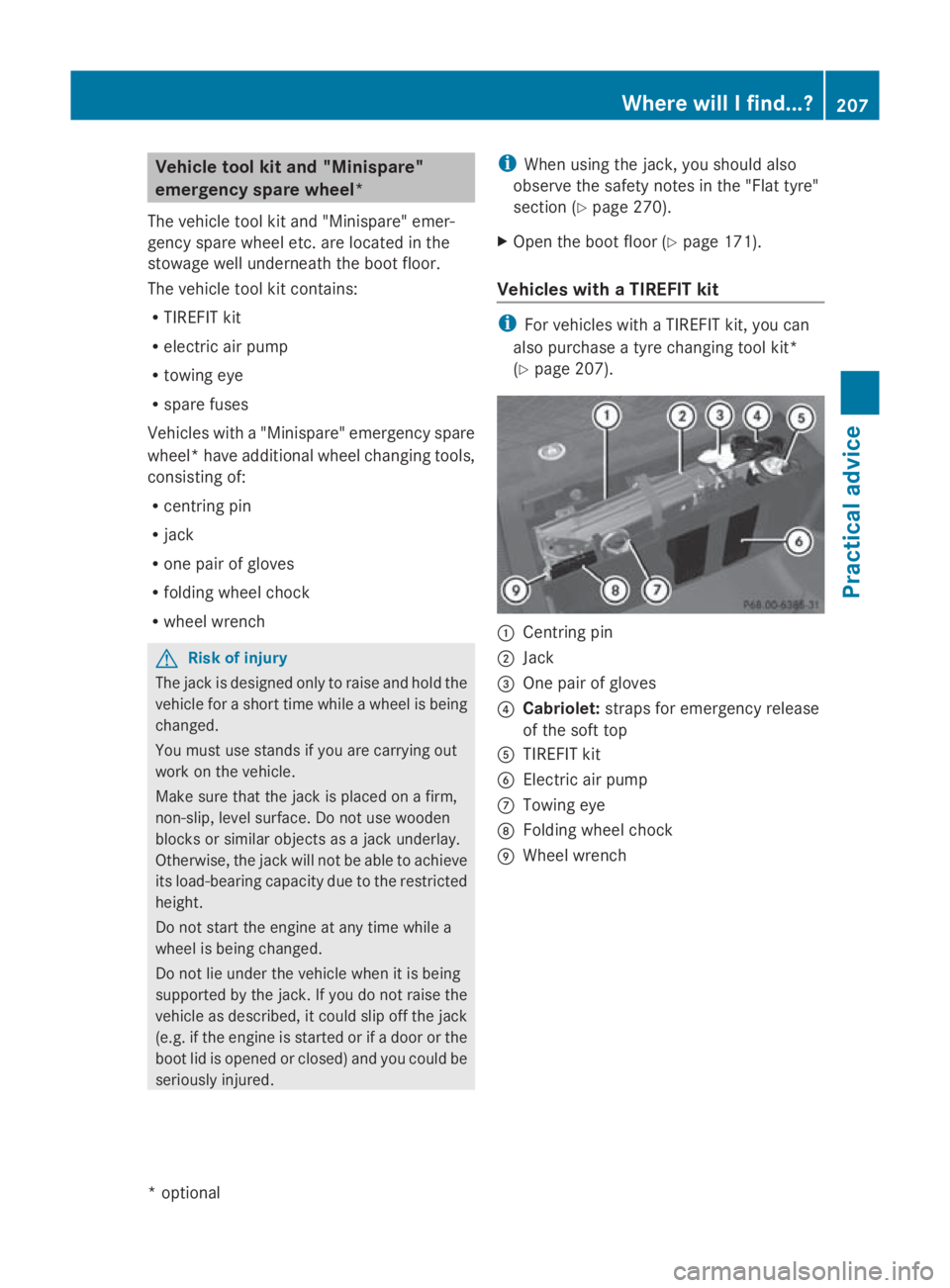
The vehicl etool kit and "Minispare" emer-
genc yspare whee letc. ar eloc ate dint he
stowag ewellu nderneath the boot floor.
The vehicl etool kit contains:
R TIREFIT kit
R electri cairpump
R towing eye
R spare fuses
Vehicles with a"Minispare" emergency spare
wheel* have additional whee lchanging tools,
consisting of:
R centring pin
R jack
R one pair of gloves
R folding whee lchock
R whee lwrench G
Ris
kofi njury
The jack is designed onl ytoraise and hol dthe
vehicl efor as hort time whil eawheelis being
changed.
Yo um ustu se stands if yo uare carrying out
work on the vehicle.
Make sure tha tthe jack is place donafirm,
non-slip ,lev el surface. Do not us ewooden
blocks or similar objects as ajack underlay.
Otherwise, the jack will not be able to achieve
its load-bearing capacity du etothe restricted
height.
Do not start the engine at any time whil ea
whee lisbeing changed.
Do not li eunder the vehicl ewhenitisb eing
supporte dbythe jack. If yo udonot raise the
vehicl easd escribed, it could slip off the jack
(e.g. if the engine is started or if adoorort he
boot li disopenedorc losed)and yo ucould be
seriously injured. i
Whe nusing the jack, yo ushoul dalso
observe the safety notes in the "Flat tyre"
section ( Ypage 270).
X Ope nthe boot floor (Y page 171).
Vehicles with aTIREFI Tkit i
For vehicles with aTIREFIT kit, yo ucan
also purchase atyrec hanging tool kit*
(Y page 207). 0046
Centring pin
0047 Jack
008A One pair of gloves
0088 Cabriolet: straps for emergency release
of the sof ttop
0086 TIREFIT kit
0087 Electric ai rpump
006E Towing eye
006F Folding whee lchock
0070 Wheel wrench Where will
Ifind...?
207Practical advice
*optional
207_AKB; 2; 3, en-GB
mkalafa,
Version: 2.11.8.1 2009-07-23T10:23:49+02:00-Seite 207 Z