service MERCEDES-BENZ E-CLASS COUPE 2009 User Guide
[x] Cancel search | Manufacturer: MERCEDES-BENZ, Model Year: 2009, Model line: E-CLASS COUPE, Model: MERCEDES-BENZ E-CLASS COUPE 2009Pages: 313, PDF Size: 7.76 MB
Page 40 of 313
have belt tensionersw
hich have been trig-
gered replaced at aqualified specialist work-
shop.
Comply with safety regulations when dispos-
ing of belt tensioners. Any Mercedes-Benz
Service Centre can provide details of these
regulations.
Airbags Airbag deployment slows down and restricts
the movement of the vehicle occupant.
If the airbags are deployed, you will hear a
bang and asmall amount of powder may also
be released. Only in rare cases will the bang
affect your hearing. The powder that escapes
does not generally constitute ahealth hazard.
The 0081 SRS warning lamp lights up.
The AIRBAG label indicates the location of the
airbags. G
Risk of injury
Airbags provide additional protection; they
are not, however, asubstitute for seat belts.
Observe the following notes to reduce the risk
of serious or even fatal injury caused by airbag
deployment:
R All vehicle occupants ―inparticular, preg-
nant women ―must wear their seat belt
correctly at all times and lean back against
the backrest, which should be positioned
as close to the vertical as possible. The
head restraint must support the back of the
head at about eye level.
R Always secure children less than 1.50 mtall
and under 12 years of age in suitable child
restraint systems.
R All vehicle occupants must select aseat
position that is as far away from the airbag
as possible. The driver's seat position must
allow the vehicle to be driven safely. The
driver's chest should be as far away from
the centre of the driver's front airbag cover
as possible. R
Move the front-passenger seat as far back
as possible. This is especially important if
you have secured achild in achild restraint
system on the front-passenger seat.
R Coupé: vehicle occupants —inparticular,
children —must not lean their head into the
area of the window in which the sidebag/
windowbag is deployed.
R Cabriolet: vehicle occupants —inparticular,
children —must not lean their head into the
area of the window in which the sidebag/
headbagisd eployed.
R Rearward-facing child restraint systems
must not be fitted to the front-passenger
seat unless the front-passenger front air-
bag has been disabled. On the front-
passenger seat, the front-passenger front
airbag is only disabledifac hild restraint
system with automatic child seat recogni-
tion is fitted to the front-passenger seat*.
The 007F PASSENGER AIRBAG OFF warn-
ing lamp must be continuously lit.
If the front-passenger seat of your vehicle
does not have automatic child seat recog-
nition*, or your rearward-facing child
restraint system does not have automatic
child seat recognition, children must be
secured in achild restraint system on a
suitable seat in the rear. If you secure a
forward-facing child restraint system to the
front-passenger seat, you must move the
front-passenger seat as far back as possi-
ble.
R Make sure there are no heavy or sharp-
edged objectsinp ockets of clothing.
R Do not lean forwards, e.g. over the cover of
the driver's/front-passenger front airbag,
particularly when the vehicle is in motion.
R Do not put your feet on the dashboard.
R Only hold the steering wheel by the rim.
This allowst he airbag to deploy fully.Y ou
could be injured if the airbag is deployed Occupant safety
37Safety
*optional
207_AKB; 2; 3, en-GB
mkalafa,
Version: 2.11.8.1 2009-07-23T10:23:49+02:00-Seite 37 Z
Page 45 of 313
You can obtain information about the correct
child restraint system fro
many Mercedes-
Ben zService Centre.
i It is advisable to use Mercedes-Ben zcare
products to clean child restraint systems.
Informatio nabout this can be obtained
fro ma ny Mercedes-Ben zService Centre. G
Risk of injury
Do not leave children unsupervised in the
vehicle, even if the yare secured in achild
restraint system. Children could injure them-
selves on part softhe vehicle. They could also
be seriously or even fatally injured by pro-
longed exposure to extreme heat or cold.
Do not expose the child restraint system to
direc tsunlight. Part softhe child restraint sys-
tem could heat up and the child could burn
herself/himself on them.
If ac hild open sadoor, the child or other per-
son scould be injured as aresult .The child
could get out and be injured in the process or
be injured by apassin gvehicle. G
Risk of injury
An unsecured or an incorrectly positioned
load increases the risk of injury for the child
and all other occupants, during:
R an accident
R ab raking manoeuvre
R as udden change of direction
Do not carr yheavy or hard object sinside the
vehicle unless the yare secured. You will find
further information under "Loadin gguide-
lines "int he index.
Child restraint systems Mercedes-Ben
zrecommends that you only
use the child restraint systems liste don
( Ypage 47). G
Risk of injury
To reduc ethe risk of serious or even fatal
injury to the child in the even tofasudden
change in direction ,braking or an accident:
R children less than 1.50 mtall and under
twelv eyears of age must always be secured
in special child restraint systems on asuit-
able vehicle seat. This is necessary
because the seat belts are not designed for
children of this size.
R do not secur echildren less than 1.50 mtall
or under twelv eyears of age on the front-
passenger seat. Exception: the child is
secured in avehicle with automatic child
seat recognition on the front-passenger
seat* and is secured in achild restraint
system with automatic child seat recogni-
tion.
R if you secur eaforward-facin gchild
restraint system to the front-passenger
seat, you must move the front-passenger
seat as far back as possible.
R children must never travel sitting on the lap
of another occupant .Due to the forces
occurrin ginthe even tofasudden change
of direction ,heavy braking or an accident,
it would not be possible to restrain the
child. The child could be thrown against
part soft he vehicle interior and be seriously
or even fatally injured. G
Risk of injury
The child restraint system cannot perform its
protective function if it is not correctly fitted
to as uitable vehicle seat. The child cannot be
restraine dinthe even tofana ccident,heavy
braking or sudden changes of direction .The
child could be seriously or even fatally injured.
For this reason ,when fittin gachild restraint
system, observe the manufacturer' sinstalla-
tion instructions and the correc tuse of the
child restraint system. 42
Occupant safetySafety
*o
ptional
207_AKB; 2; 3, en-GB
mkalafa,
Version: 2.11.8.1 2009-07-23T10:23:49+02:00-Seite42
Page 46 of 313
Child restraint systems should be fitte
dtothe
rear seats. Children are generall ybette rpro-
tected there.
The entir ebase of th echild restraint system
must always res tontheseat cushion .There-
fore, never plac eobjects, e.g .acushion,
unde rthe child restraint system.
Only use child restraint systems wit hthe orig-
inal cover designe dfor them. Only replace
damaged cover swithg enuine Mercedes-Benz
covers.
We recommen dthe use of child restraint sys-
tems whic hhave been approve dfor
Mercedes-Ben zvehicles.
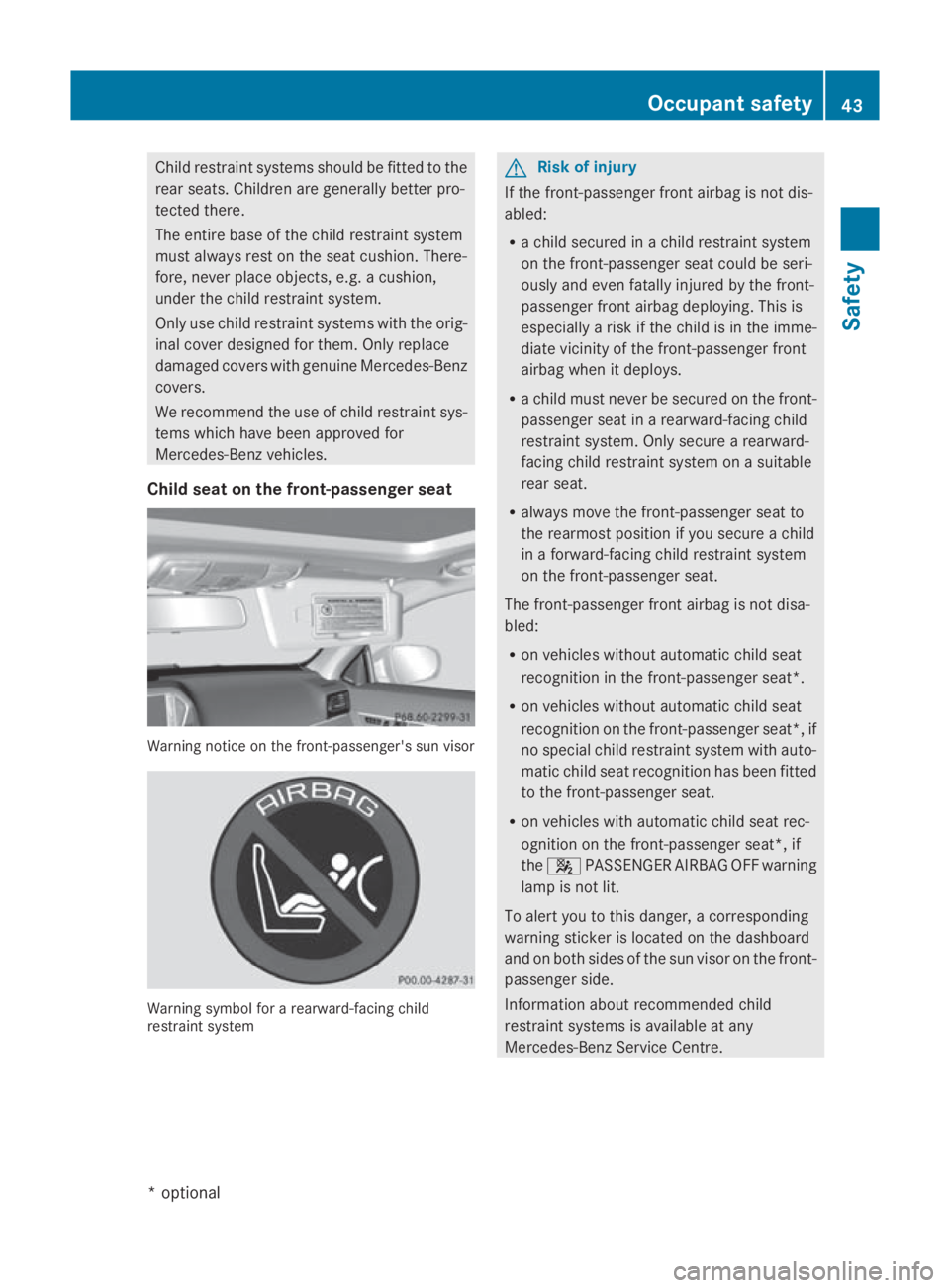
Child seat on th efront-passenger seat Warning notic
eonthefront-passenger's sun visor Warning symbol for
arearward-facing child
restraint system G
Ris
kofi njury
If th efront-pa ssenger fron tairbag is no tdis-
abled:
R ac hild secured in achild restraint system
on th efront-pa ssenger seat could be seri-
ously and eve nfatally injured by th efront-
passenger fron tairbag deploying .This is
especiall yariskift hechild is in th eimme-
diat evicinity of th efront-pa ssenger front
airbag when it deploys.
R ac hild must never be secured on th efront-
passenger seat in arearward-facing child
restraint system. Only secure arearward-
facing child restraint system on asuitable
rear seat.
R always mov ethe front-passenger seat to
th er earmos tpositio nifyou secure achild
in af orward-facing child restraint system
on th efront-pa ssenger seat.
The front-passenger fron tairbag is no tdisa-
bled:
R on vehicle swithout automatic child seat
recognition in th efront-pa ssenger seat *.
R on vehicles without automatic child seat
recognition on the front-passenger seat* ,if
no special child restraint system with auto-
matic child seat recognition has been fitted
to the front-passenger seat.
R on vehicles with automatic child seat rec-
ognition on the front-passenger seat*, if
the 007F PASSENGER AIRBAGO FF warning
lamp is not lit.
To alert you to this danger, acorresponding
warning sticker is located on the dashboard
and on both sides of the sun visor on the front-
passenger side.
Information about recommended child
restraint systems is available at any
Mercedes-Benz Service Centre. Occupant safety
43Safety
*optional
207_AKB; 2; 3, en-GB
mkalafa,
Version: 2.11.8.1 2009-07-23T10:23:49+02:00-Seite 43 Z
Page 57 of 313
R
dirt on the sensor sorthe sensor sare cov-
ered
R snow or heavy rain
R interferencebyo ther radar sources
R strong radar reflections, for example in
multi-storey car parks
BASP LUS does not react to people or ani-
mals, oncoming vehicles and crossing traffic.
BASP LUS may not detec tnarro wvehicles
such as motorcycles and vehicles driving on
ad ifferen tline.
Following acollision or crash-related damage
to the fron tend of the vehicle, have the con-
figuration and operation of the radar sensors
checked at aMercedes-Benz Service Centre.
If BASP LUS is not available due to amalfunc-
tion in the radar sensor system, the braking
system remains available with full brake
boostin geffec tand BAS. Adaptive brake lamps
i Adaptiv ebrake lamps are only available in
certain countries.
If you brake sharply from aspeed of more
than 50 km/ horifb raking is assisted by BAS
or BAS PLUS* ,the brake lamp sflashr apidly.
In this way, traffic travelling behind you is
warned in an even more noticeable manner.
If you brake sharply from aspee dofm ore
than 70 km/h to astandstill, the hazard warn-
ing lamp sare activated automatically.Ift he
brakes are applieda gain, the brake lamps
light up continuously.T he hazard warning
lamp sswitch off automatically if you travel
faster than 10 km/h .You can alsos witch off
the hazard warning lamp susing the hazard
warning switch button (Y page84). ESP
®
(Electronic Stability Program)
ESP ®
monitors driving stability and traction,
i.e. power transmission between tyres and
the road surface.
If ESP ®
detects that the vehicl eisdeviating
from the direction desired by the driver, one
or more wheels are braked to stabilise the
vehicle. If necessary ,the engine outpu tisalso
modified to keep the vehicl eonthe desired
course withi nphysical limits. ESP ®
assists
the drive rwhen pulling away on wet or slip-
pery roads. ESP ®
can alsos tabilise the vehi-
cle during braking.
When ESP ®
intervenes, the 00C6warning
lamp flashes in the instrument cluster. G
Risk of accident
If the 00C6 warning lamp in the instrument
cluster flashes, proceed as follows:
R do not deactivate ESP ®
under any circum-
stances.
R only depress the accelerator peda lasfar as
necessary when pulling away.
R adapt yourd riving style to suitt he prevail-
ing road and weather conditions.
Otherwise, the vehicl ecoulds kid.
ESP ®
cannot reduce the risk of an accident if
you drive too fast. ESP ®
cannot overrid ethe
lawsofp hysics.
! If the vehicl eistobetowed with the front
or rear axle raised, the ignitio nmust be
switched off (key in position 0or 1in the
ignitio nlock). Application of the brakes by
ESP ®
coul dotherwise destroy the brake
system on the front or rear axle.
i Only use wheels with the recommended
tyre sizes. Only then willE SP®
function
properly. 54
Driving safety systemsSafety
*o
ptional
207_AKB; 2; 3, en-GB
mkalafa,
Version: 2.11.8.1 2009-07-23T10:23:49+02:00-Seite 54
Page 70 of 313
childre
nshoul dnever be left unsupervised in
the vehicle .The yc ould become trapped when
adjusting aseat G
Risk of accident
Only adjust the driver' sseatw hent he vehicle
is stationary. You will otherwise be distracted
from the roa dand traffi cconditions and you
could los econtrol of the vehicle as aresult of
the sea tmoving. Thi scould cause an acci-
dent. G
Risk of injury
Make sure that nobody can become trapped
whe nyou adjust the seat.
Observe the notes concerning the airba gsys-
tem.
Secure childre nasrecommended; see the
"Childre ninthe vehicle "section. G
Risk of injury
Make sure that the centra lareaoft he head
restraint supports the back of your hea dat
abou teye level .You could seriously injure
your neck if your hea disnot correctly sup-
ported by the hea drestraint in the event of an
accident. Neve rtrave lwithou tac orrectly
adjuste dand engaged hea drestraint.
! Whe nyou move the seats, make sure that
there are no objects in the footwel lor
behind the seats. Otherwise, yo ucould
damag ethe seats and the objects.
i The hea drestraints in the front seats are
fitted with the NECK-PR Osystem
(Y page 41). For this reason, it is not pos-
sible to remove the hea drestraints from
the front seats.
Pleas econtact aMercedes-Benz Service
Centre for more information. Adjusting the seats manually and
electrically
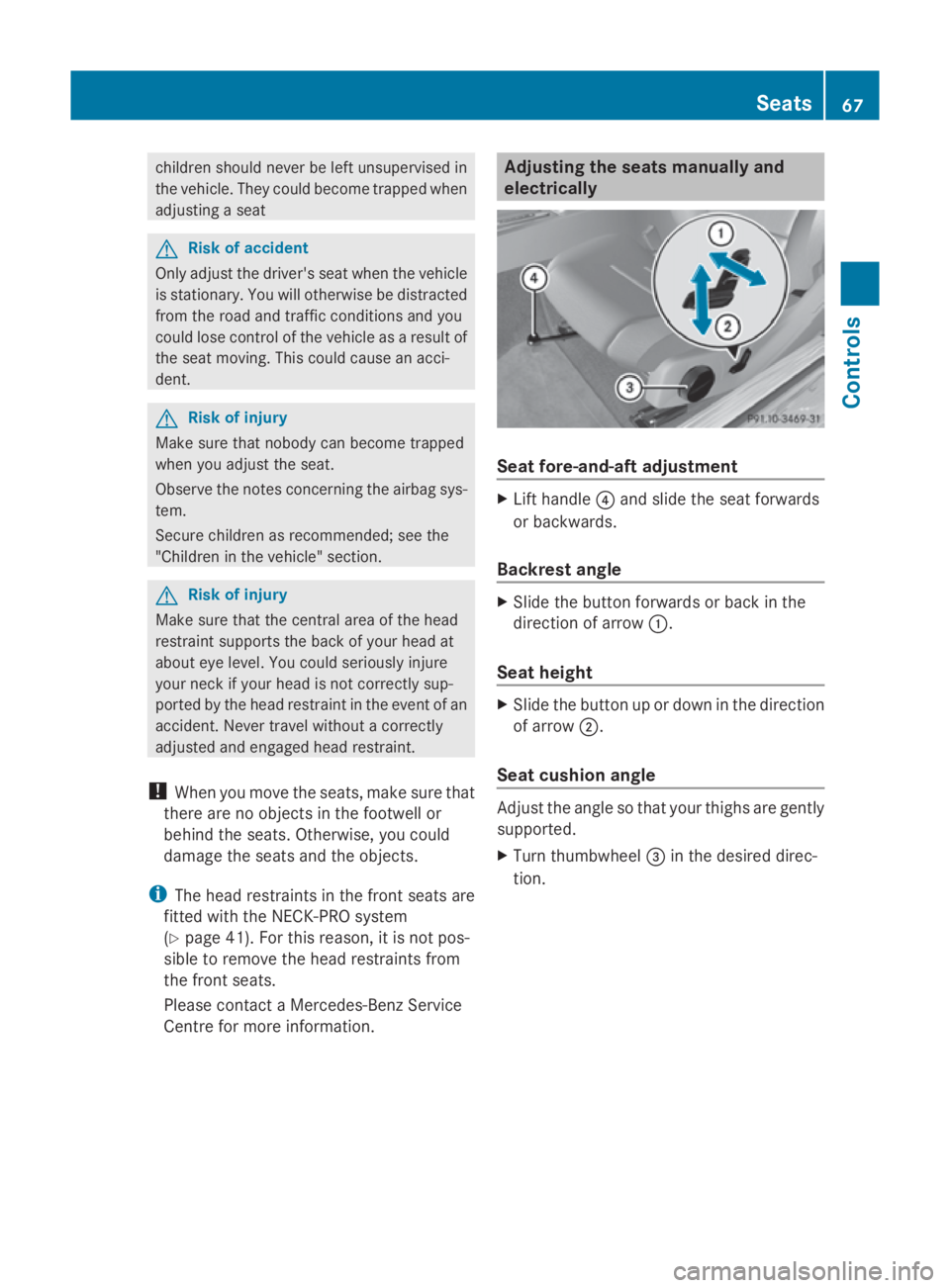
Seat fore-and-aft adjustment
X
Lift handle 0088and slide the sea tforwards
or backwards.
Backrest angle X
Slide the button forward sorbackint he
direction of arrow 0046.
Seat height X
Slide the button up or dow ninthe direction
of arrow 0047.
Seat cushio nangle Adjus
tthe angl esothat your thighs are gently
supported.
X Turn thumbwheel 008Ain the desire ddirec-
tion. Seats
67Controls
207_AKB;2;3,en-GB
mkalafa ,V ersion: 2.11.8.1
2009-07-23T10:23:49+02:00
-Seite 67 Z
Page 84 of 313
tries
,ope ratio noft he headlamps varies due
to lega lrequirements and self-impose dobli-
gations. In these countries ,the daytime driv-
ing lights ar eautomaticall yswitched on when
the engine is started.
Th ee xterior lighting (excep tthe side lamp/
parking lamp) switches off automaticall yif
you:
R remove the key fro mthe ignition lock
R open the driver's door when the ignition is
switched off (ke yinposition 0in the igni-
tio nlock)
! Switch off the side lamps and parking
lamp when yo uleave the vehicle. This pre-
vents the battery fro mdischarging.
Informatio nabout drivin gabroad Converting to symmetrica
ldipped beam
when drivin gabroad: switch the headlamps
to symmetrical dipped beam in countries in
which traffi cdrives on the opposite side of the roa
dtot he country where the vehicl eisreg-
istered. This prevents oncoming traffi cfrom
being dazzled.
Have the headlamps converte dataqualified
specialis tworkshop ,e.g.aM ercedes-Benz
Service Centre, as close to the borde raspos-
sibl ebefor ed riving in these countries .Sym-
metrica llight sdon ot illuminate as large an
area of the edge of the carriageway.
Converting to asymmetrica ldipped beam
afte rreturning: have the headlamps conver-
ted back to asymmetrica ldippe dbeamata
qualifie dspecialis tworkshop ,e.g.a
Mercedes-Benz Service Centre, as soon as
possibl eafter crossing the borde rwhen
returning.
Vehicle swithI ntelligent Light System*: if
the headlamps ar econverte dtosymmetrical
dipped beam ,not al llight functions ar eavail-
able ."Mo torway mode" and the "extended
range foglamps "aredeactivated
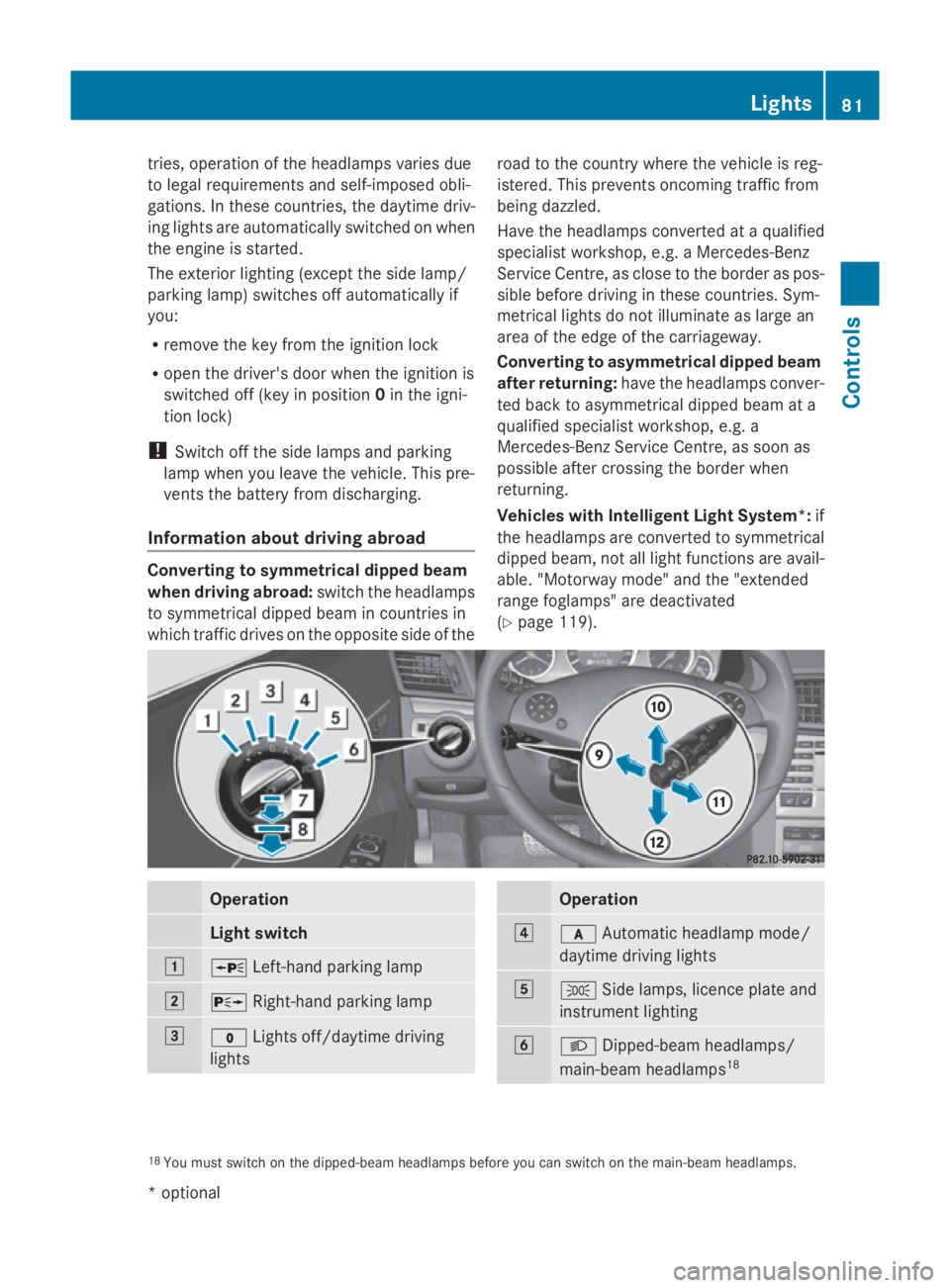
(Y page 119). Operation
Light switch
004A
006F
Left-hand parking lamp 004B
0070
Right-hand parking lamp 004C
0027
Lights off/daytime driving
lights Operation
004D
0066
Automatic headlamp mode/
daytime driving lights 004E
006C
Sidelam ps,licence plate and
instrument lighting 004F
0064
Dipped-bea mheadlam ps/
main-bea mheadlam ps18 18
Youm usts witch on the dipped-beam headlamps befor eyou can switch on the main-bea mheadlam ps. Lights
81Controls
*optional
207_AKB; 2; 3, en-GB
mkalafa
,V ersion: 2.11.8.1
2009-07-23T10:23:49+02:00
-Seite 81 Z
Page 110 of 313
lamps, display messages or system failures.
The vehicle's handlin gcharacteristics may be
affected. Adjust your drivin gstyle and speed
accordingly.
Immediately consult aqualified specialist
workshop which has the necessary specialist
knowledge and tools to carr yout the work
required. Mercedes-Ben zrecommends that
you use aMercedes-Ben zService Centre for
this purpose .Inparticular, work relevant to
safet yoro nsafety-related systems must be
carried out at aqualified specialist workshop. Coolant temperatur
egauge
The coolan ttemperature gauge is in the
instrumen tcluster on the right-han dside.
Under normal operating condition sand with
the specified coolan tlevel, the coolan ttem-
perature may rise to 120 †. The coolan ttem-
perature may rise to the top end of the scale
at high outside temperatures and on long
uphill stretches. Speedometer with segments
The segment sinthe speedometer indicate
which speed rang eisavailable.
Cruise control mode:
The segment slight up fro mthe stored speed
to the maximum speed.
Variable Speedtronic mode:
The segment slight up fro mthe star tofthe
scale to the selected limit speed.
Distronic Plus* mode:
One or two segment saround the stored
speed light up. Rev counter
The red band in the rev counter indicates the
engine's overrevving range. The fuel supply is
interrupted to protect the engin ewhen the
red band is reached. !
Do not drive in the overrevving range.
Doin gsow ill damage the engine. Outside temperatur
edisplay G
Risk of accident
At temperatures just above freezin gpoint ,the
street may be icy, especially in wooded areas
or on bridges .Ifyou do not adapt your driving
style to the conditions, the vehicle could skid.
For this reason ,adapt your drivin gstyle and
speed to the weathe rconditions.
Changes in the outside temperature are dis-
played after ashor tdelay. On-board computer
Points to remember
The on-board computer is activate dassoon
as you turn the key to position 1in the ignition
lock. G
Risk of accident
Only use the on-board computer when road
and traffic condition spermit. You would oth-
erwise be distracted and unable to concen-
trate properly on driving, and could cause an
accident. Multifunction steering wheel
You can control the multi-function display and
the settings in the on-board computer using On-board computer
107Controls
*optional
207_AKB; 2; 3, en-GB
mkalafa,
Version: 2.11.8.1 2009-07-23T10:23:49+02:00-Seite1 07 Z
Page 113 of 313
Function
0046
Trip
menu(Ypage 110) 0047
Navi*m
enu( navigation details)
(Y page 111) 008A
Audio
menu(Ypage 113) 0088
Tel
men u(telephone) ( Ypage 114) 0086
Assist
menu(Assistance)
(Y page 115) 0087
Service
(Ypage 117) menu
R calls up display messages
(Y page 208)
R Tyre pressur eloss warning
(Y page 187)
R ASSYS TPLUSs ervic einterval dis-
play (Y page 197) 006E
Settings
menu(Ypage 117) The number of menus shown depends on the
optional equipmen tinthevehicle.
The Audio, Navi*a ndTel menus are dis-
played slightly differently in vehicle swithan
audio system and vehicle swithC OMAND
APS* .The example sgivenint hisO wner's
Manual apply to vehicle sequipped with
COMAND APS*. Trip menu
i Reset th etripm eter or trip computer
(Y page 111).
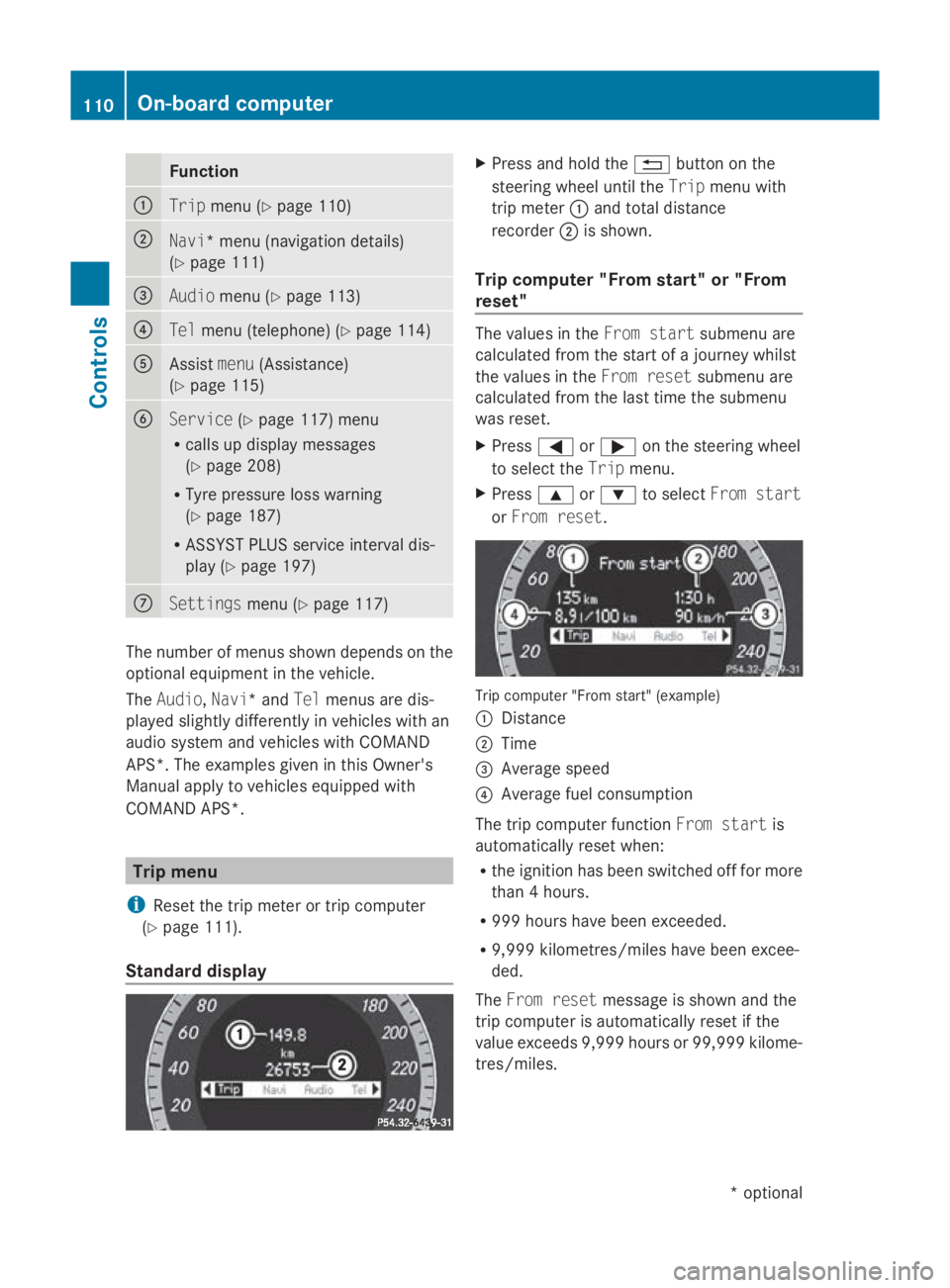
Standar ddisplay X
Press and hold the 0041buttonont he
steering wheel until the Tripmenuwith
trip meter 0046and total distance
recorder 0047is shown.
Trip computer "From start" or "From
reset" The values in the
Froms tart submen uare
calculate dfromt hestart of ajou rney whilst
th ev alues in the Fromr eset submen uare
calculate dfromt helast tim ethe submenu
was reset.
X Press 0040or003E on thesteering wheel
to select the Tripmenu.
X Press 003Cor003D to select Froms tart
or Fro mr eset. Trip computer "From start
"(example)
0046 Distance
0047 Time
008A Averag espeed
0088 Averag efuel consumption
The trip computer function Froms tart is
automaticall yreset when:
R thei gnition has been switched off for more
than 4hours.
R 99 9h our shave been exceeded.
R 9,999 kilometres/mile shave been excee-
ded.
The Fromr eset message is shown and the
trip computer is automaticall yreset if the
value exceeds 9,999 hour sor99,99 9k ilome-
tres/miles. 110
On-boar
dcomputerControls
*optional
207_AKB
;2;3,en-GB
mkalafa ,V ersion: 2.11.8.1
2009-07-23T10:23:49+02:00
-Seite 110
Page 117 of 313
play. The curren
ttrac kdoes not appear in
audio AUX mode ( Auxiliary audio mode: exter-
nal audio source connected).
Operating the TV* i
Depending on the digital TV broadcaster,
radio stations can also be received. The
multi-function display shows TV (Radio).
Selecting aradio station (Y page 113).
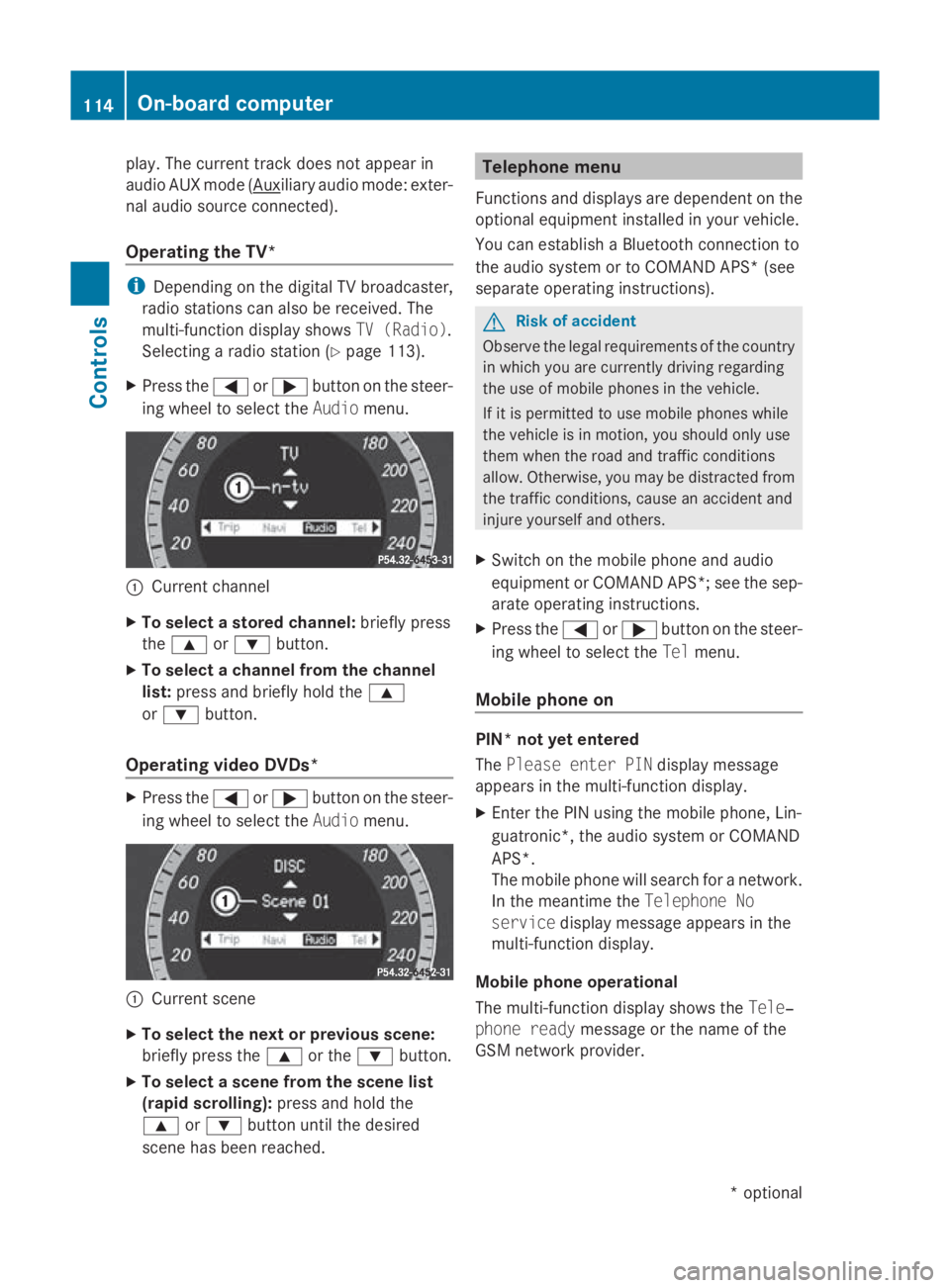
X Press the 0040or003E button on the steer-
ing wheel to select the Audiomenu. 0046
Current channel
X To select astored channel: briefly press
the 003C or003D button.
X To select achannel from the channel
list: press and briefly hold the 003C
or 003D button.
Operating video DVDs* X
Press the 0040or003E button on the steer-
ing wheel to select the Audiomenu. 0046
Current scene
X To select the next or previous scene:
briefly press the 003Cor the 003Dbutton.
X To select ascene from the scene list
(rapid scrolling): press and hold the
003C or003D button until the desired
scen ehas been reached. Telephone menu
Function sand displays are dependen tonthe
optional equipment installed in your vehicle.
You can establish aBluetoot hconnection to
the audio system or to COMAND APS *(see
separate operatin ginstructions). G
Risk of accident
Observ ethe legal requirements of the country
in which you are currently drivin gregarding
the use of mobile phones in the vehicle.
If it is permitted to use mobile phones while
the vehicle is in motion ,you should only use
them when the road and traffic conditions
allow. Otherwise, you may be distracted from
the traffic conditions, cause an acciden tand
injure yourself and others.
X Switc hont he mobile phone and audio
equipment or COMAND APS*; see the sep-
arate operatin ginstructions.
X Press the 0040or003E button on the steer-
ing wheel to select the Telmenu.
Mobile phone on PIN* not yet entered
The
Please enter PIN display message
appears in the multi-function display.
X Enter the PIN using the mobile phone, Lin-
guatronic*, the audio system or COMAND
APS*.
The mobile phone will search for anetwork.
In the meantime the Telephone No
service display message appears in the
multi-function display.
Mobile phone operational
The multi-function display shows the Tele‐
phone ready message or the name of the
GSM network provider. 114
On-boar
dcomputerControls
*optional
207_AKB
;2;3,en-GB
mkalafa, Version:2.11.8.1
2009-07-23T10:23:49+02:0
0-Seite 114
Page 120 of 313
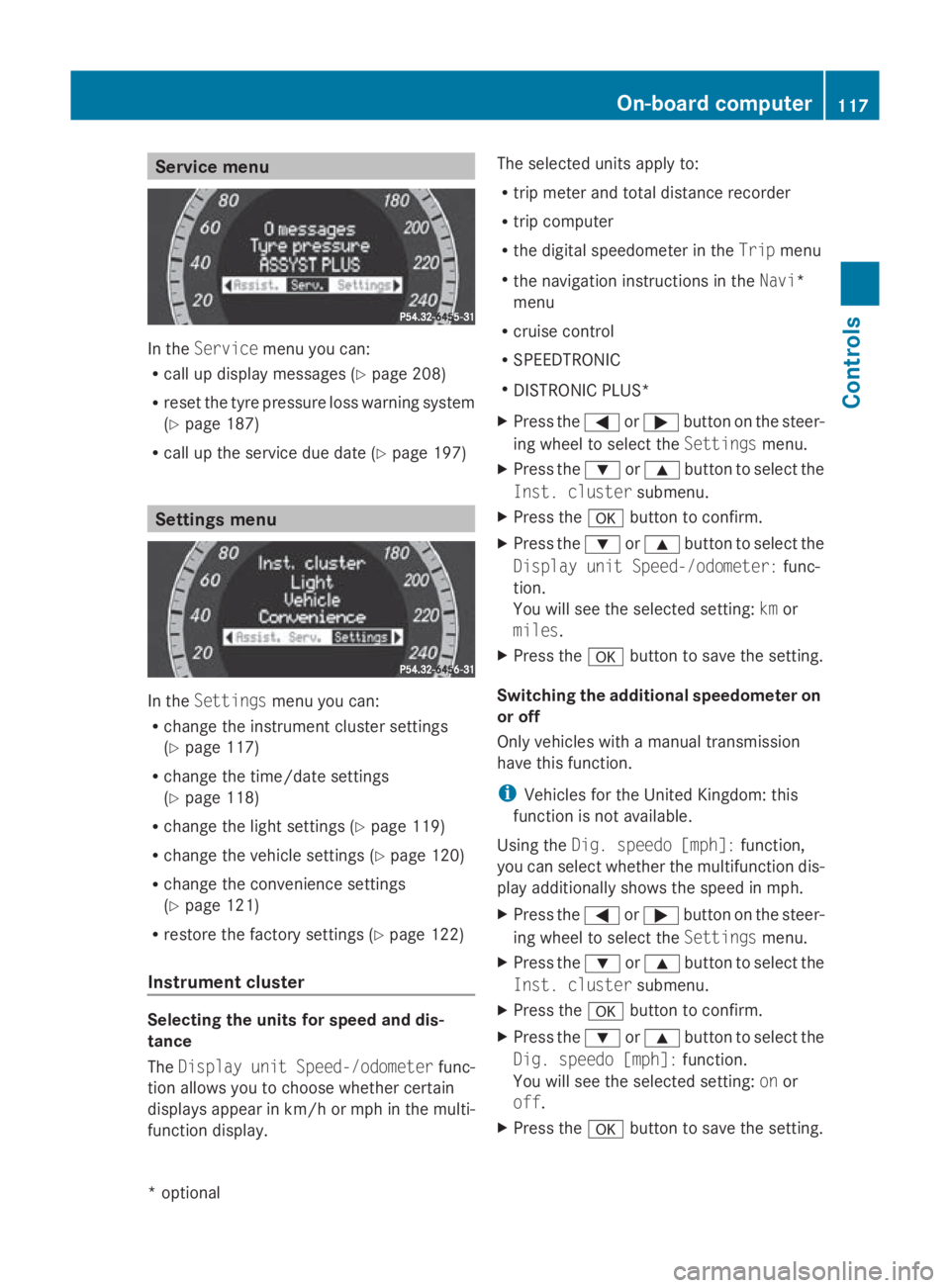
Service menu
In the
Service menu you can:
R call up display messages (Y page 208)
R reset the tyre pressure loss warning system
(Y page 187)
R call up the service due date (Y page 197)Settings menu
In the
Settings menu you can:
R change the instrumen tcluster settings
(Y page 117)
R change the time/date settings
(Y page 118)
R change the light settings (Y page 119)
R change the vehicle settings (Y page 120)
R change the convenience settings
(Y page 121)
R restore the factory settings (Y page 122)
Instrument cluster Selecting the units for speed and dis-
tance
The Display unit Speed-/odometer func-
tion allowsy ou to choose whether certain
displaysa ppearinkm/ horm ph in the multi-
function display. The selected units apply to:
R
trip meter and total distance recorder
R trip computer
R the digital speedometer in the Tripmenu
R the navigation instructions in the Navi*
menu
R cruise control
R SPEEDTRONIC
R DISTRONIC PLUS*
X Press the 0040or003E button on the steer-
ing wheel to select the Settingsmenu.
X Press the 003Dor003C button to select the
Inst. cluster submenu.
X Press the 0064button to confirm.
X Press the 003Dor003C button to select the
Display unit Speed-/odometer: func-
tion.
You will see the selected setting: kmor
miles.
X Press the 0064button to save the setting.
Switching the additional speedometer on
or off
Only vehicles with amanual transmission
have this function.
i Vehicles for the United Kingdom: this
function is not available.
Using the Dig. speedo [mph]: function,
you can select whether the multifunction dis-
play additionally shows the speed in mph.
X Press the 0040or003E button on the steer-
ing wheel to select the Settingsmenu.
X Press the 003Dor003C button to select the
Inst. cluster submenu.
X Press the 0064button to confirm.
X Press the 003Dor003C button to select the
Dig. speedo [mph]: function.
You will see the selected setting: onor
off.
X Press the 0064button to save the setting. On-board computer
117Controls
*optional
207_AKB; 2; 3, en-GB
mkalafa,
Version: 2.11.8.1 2009-07-23T10:23:49+02:00-Seite 117 Z