automatic transmission MERCEDES-BENZ E-CLASS COUPE 2009 Owner's Manual
[x] Cancel search | Manufacturer: MERCEDES-BENZ, Model Year: 2009, Model line: E-CLASS COUPE, Model: MERCEDES-BENZ E-CLASS COUPE 2009Pages: 313, PDF Size: 7.76 MB
Page 130 of 313
Selecting Distronic Plus
X
Check whether LIM indicator lamp 008Ais off.
If it is off, Distronic Plus is already selected.
If it is not, press the cruise control lever in
the direction of arrow 0087.
LIM indicator lamp 008Ain the cruise control
lever goes off. Distronic Plus is selected.
Switching on Distronic, storing the cur-
rent speed and maintaining it G
Risk of accident
The vehicle can be braked when DISTRONIC
PLUS is activated. For this reason, deactivate
DISTRONIC PLUS if the vehicle is to be set in
motion by other means (e.g. in acar wash or
by towing).
You can activate Distronic Plus in the follow-
ing circumstances:
R after the engine has been running for about
two minutes
R if the parking brake is not applied
R if ESP ®
is activated
R if the automatic transmission* is in position
D
R if the bonnet is closed
R if the driver's door is closed and you switch
from Pto Dor your seat belt is fastened.
R if the front-passenger door is closed
Activating while driving
When driving at speeds below 30 km/h, you
can only activate Distronic Plus if the vehicle
in front has been detected and is shown in the
multi-function display.Ift he vehicle in front is
not shown in the multi-function display and is
no longer being detected, because it has
changed lanes, for example, Distronic Plus is
deactivated and atone sounds. X
Briefly pull the cruise control lever towards
you 0088or press it up 0046or down 0086to the
pressure point.
Distronic Plus is selected.
X Keep the cruise control lever pressed
up 0046 or down 0086until the desired speed
is set.
X Remove your foot from the accelerator
pedal.
Your vehicle adapts its speed to that of the
vehicle in front,b ut only up to the stored
speed.
i If you do not fully release the accelerator
pedal, the DISTRONIC PLUS suspended
message appears in the multi-function dis-
play.T he set distance to aslower-moving
vehicle in front will then not be maintained.
You will be driving at the speed you deter-
mine by the position of the accelerator
pedal.
Activating when driving towards asta-
tionary vehicle
If the vehicle in front of you is stationary, you
can only activate Distronic Plus once your
vehicle is stationary as well.
X Briefly pull the cruise control lever towards
you 0088.
Distronic Plus is selected.
i Distronic Plus can only be activated at
under 30 km/hi favehicle in front has been
detected. Therefore, the Distronic Plu sdis-
tance displayint he instrument cluster
should be activated.
X Keep the cruis econtrol leve rpressed
up 0046 or down 0086until the desired speed
is set.
i You can use the cruis econtrol leve rtoset
the stored spee dand the thumbwheel on
the cruis econtrol leve rtoset the specified
minimu mdistance (Y page129). Driving systems
127Controls
*optional
207_AKB; 2; 3, en-GB
mkalafa,
Version: 2.11.8.1 2009-07-23T10:23:49+02:00-Seite 127 Z
Page 134 of 313
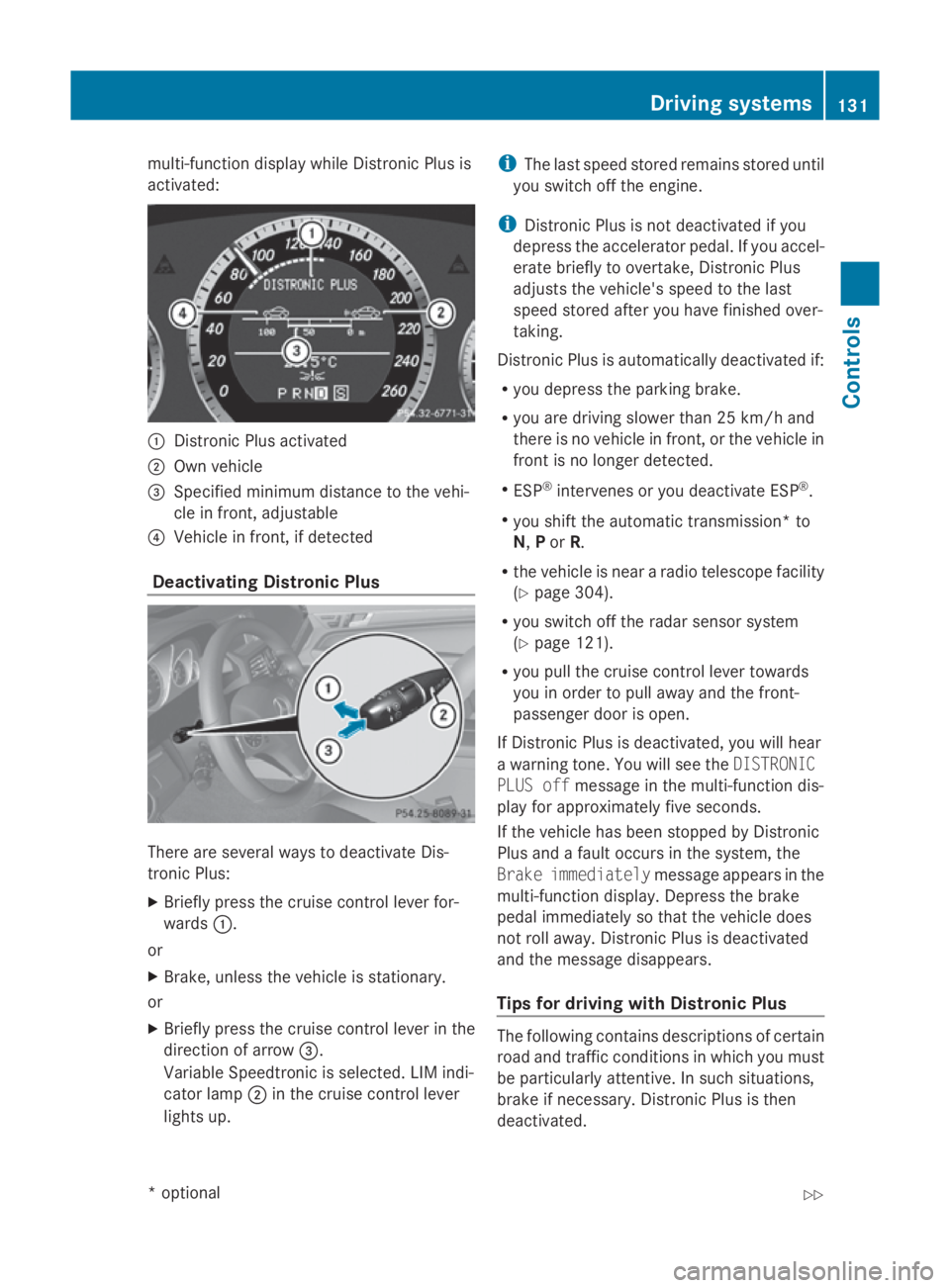
multi-function display while Distronic Plusis
activated: 0046
Distronic Plusa ctivated
0047 Own vehicle
008A Specifie dminimu mdistance to the vehi-
cle in front, adjustable
0088 Vehicl einfront, if detected
Deactivatin gDistronic Plus There are severa
lwaystod eactivate Dis-
tronic Plus:
X Briefly press the cruise control lever for-
wards 0046.
or
X Brake, unles sthe vehicl eisstationary.
or
X Briefly press the cruise control lever in the
directio nofarrow008A.
VariableS peedtronic is selected. LIM indi-
cator lamp 0047in the cruise control lever
lights up. i
The lasts peedstored remains stored until
you switch off the engine.
i Distronic Plusisn ot deactivated if you
depress the accelerator pedal. If you accel-
erate briefl ytoovertake, Distronic Plus
adjusts the vehicle's spee dtothe last
spee dstored after you have finishe dover-
taking.
Distronic Plusisa utomatically deactivated if:
R you depress the parking brake.
R you are driving slower than 25 km/h and
there is no vehicl einfront, or the vehicl ein
front is no longer detected.
R ESP ®
intervenes or you deactivate ESP ®
.
R you shift the automatic transmission* to
N, Por R.
R the vehicl eisneararadiot elescop efacility
(Y page3 04).
R you switch off the rada rsensor system
(Y page1 21).
R you pullt he cruise control lever towards
you in order to pulla waya nd the front-
passenger door is open.
If Distronic Plusisd eactivated, you willh ear
aw arning tone. You wills ee theDISTRONIC
PLUS off message in the multi-function dis-
playf or approximatel yfive seconds.
If the vehicl ehas been stopped by Distronic
Plusa ndafault occurs in the system, the
Brake immediately message appears in the
multi-function display.D epress the brake
peda limmediatel ysothat the vehicl edoes
not roll away. Distronic Plusisd eactivated
and the message disappears.
Tips for driving with Distronic Plus The following contains descriptions of certain
road and traffic conditions in which you must
be particularl
yattentive. In such situations,
brake if necessary .Distronic Plusist hen
deactivated. Driving systems
131Controls
*optional
207_AKB; 2; 3, en-GB
mkalafa,
Version: 2.11.8.1 2009-07-23T10:23:49+02:00-Seite 131 Z
Page 136 of 313
Distroni
cPlusm aydetect vehicles tha tare
crossing your lane by mistake. Activating Dis-
troni cPlusatt rafficlight swithc rossing traf-
fic ,for example, could cause your vehicl eto
pull away unintentionally. SPEEDTRONIC
Speedtroni cbrakes automaticall ysothatyou
do not exceed the se tspeed. On long and
steep downhil lgradients ,especially if the
vehicl eisladen or towing atrailer, yo umust
shift to alower gear in good tim eorselect
shift range 1,2or 3on vehicles with auto-
matic transmission* .Bydoing so, yo uwill
make us eofthe braking effect of the engine,
which relieves the load on the brake system
and prevents the brakes fro moverheating
and wearing too quickly. If yo uneeda ddi-
tional braking ,depress the brake pedal
repeatedly rathe rtha nc ontinuously. G
Ris
kofa ccident
Never depress the brake peda lcontinuously
whil ethe vehicl eisinmotion, e.g .neve rcause
the brakes to ru bbyapplyingconstant slight
peda lpressure. This cause sthe brake system
to overheat, increase sthe braking distance
and can lead to the brakes failing completely. G
Ris
kofa ccident
Do not change down for additional engine
braking on aslipper yroads urface. This could
cause the drive wheels to lose their gri pand
the vehicl ecould skid.
Yo uc an se tavariable or permanent limit
speed:
R variable for speedlimit s, e.g .inbuilt-up
areas
R permanent for long-term spee drestric-
tions, e.g .for driving on winter tyres
(Y page 135) G
Ris
kofa ccident
Speedtroni ciso nlyana iddesigne dtoassist
driving. Yo uareresponsibl efor the vehicle's
spee dand for braking in good time.
i Thes peed indicated in the speedometer
ma ydiffe rs ligh tlyf romt he limi tspeed
stored.
Variabl eSpeedtronic With the cruis
econtro llev er,y ou can operate
cruis econtrol, Distroni cPlus* and variable
Speedtronic.
Th eL IM indicator lamp on the cruis econtrol
lever indicates which syste myouhave selec-
ted:
R LIM indicator lamp off:
Cruise contro lorDistroni cPlus* is selec-
ted.
R LIM indicator lamp lit:
Variable Speedtroni ciss elect ed.
Yo uc an us ethe cruis econtro llev er to limit
the spee dtoany spee dabove 30 km/h while
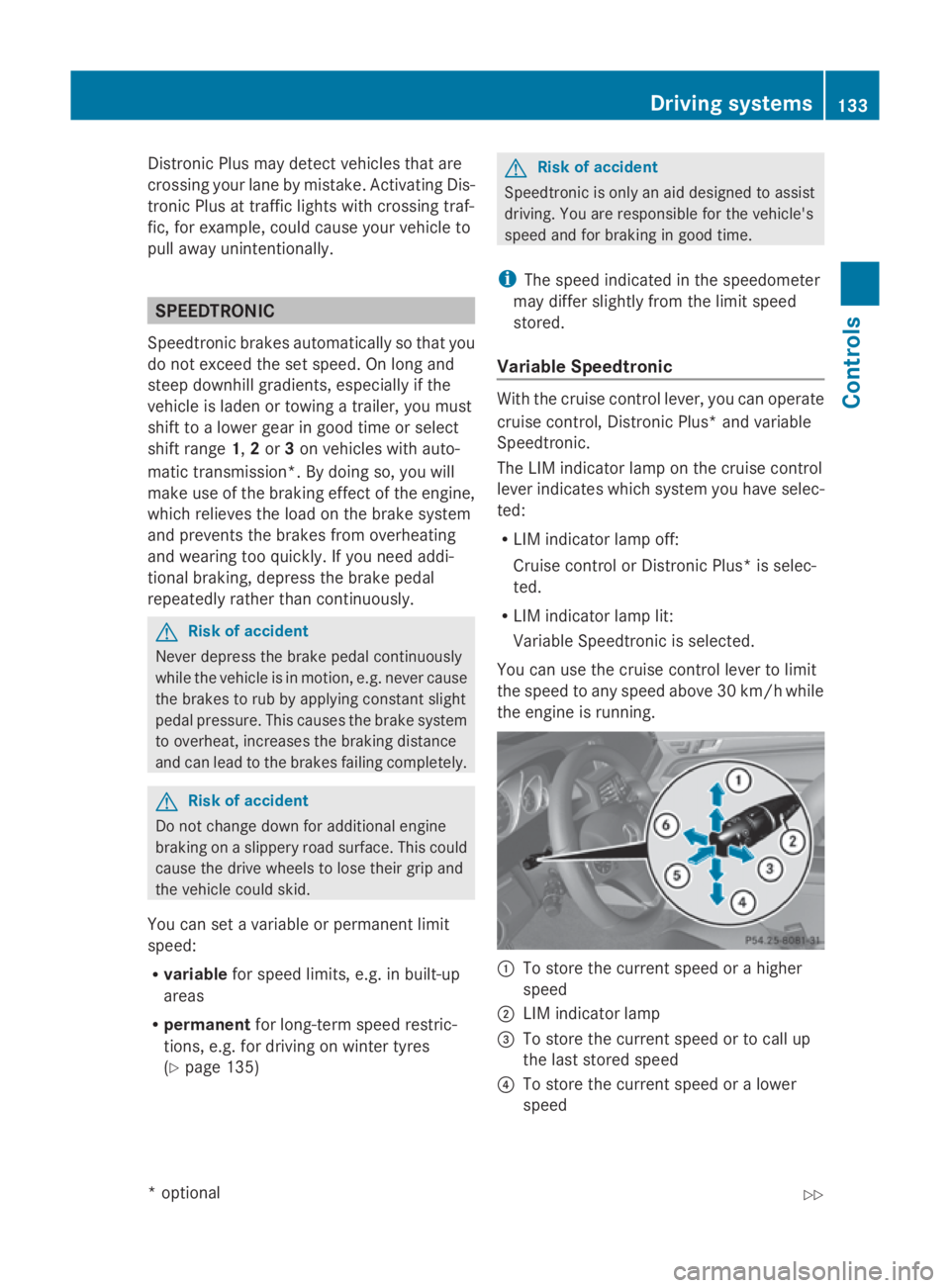
the engine is running. 0046
To stor ethe current spee dorahigher
speed
0047 LIM indicator lamp
008A To stor ethe current spee dortocallup
the last stored speed
0088 To stor ethe current spee doralower
speed Driving systems
133Controls
*optio nal
207_AKB; 2; 3, en-GB
mkalafa
,V ersion: 2.11.8.1
2009-07-23T10:23:49+02:00
-Seite 133 Z
Page 138 of 313
X
Briefly press the cruise control lever in the
direction of arrow 0086.
LIM indicator lamp 0047in the cruise control
lever goe sout.V ariabl eSpeedtroni cis
deactivated.
Cruise control or Distronic Plus* is selec-
ted.
Variabl eSpeedtroni cisautomaticall ydeacti-
vated:
R whe nyou depress the accelerato rpedal
beyond the pressure point (kickdown) but
only if your current speed doe snot differ by
more than 20 km/h from the store dspeed.
You will hea rawarning tone if this is the
case.
R on vehicle swithm anual transmission, if
yo us hift to ahigher gea rand as aresult the
engine speed is too low. G
Risk of accident
It is not possible to deactivate variabl eSpeed-
tronic by braking.
i The last speed store disclearedwheny ou
switch off the engine.
Permanen tSpeedtronic i
Permanent Speedtroni cisonly available
in certain countries.
You can us ethe on-board compute rtolimit
the speed permanently to avalue between
160 km/h (e.g .for driving with winter tyres)
and the maximum speed.
Just before the store dspeed is reached ,it
appears in the multi-function display.
Permanent Speedtroni cremains active, even
if variabl eSpeedtroni cisdeactivated.
You cannot excee dthe store dlim it speed,
eve nify oudepress the accelerato rpedal
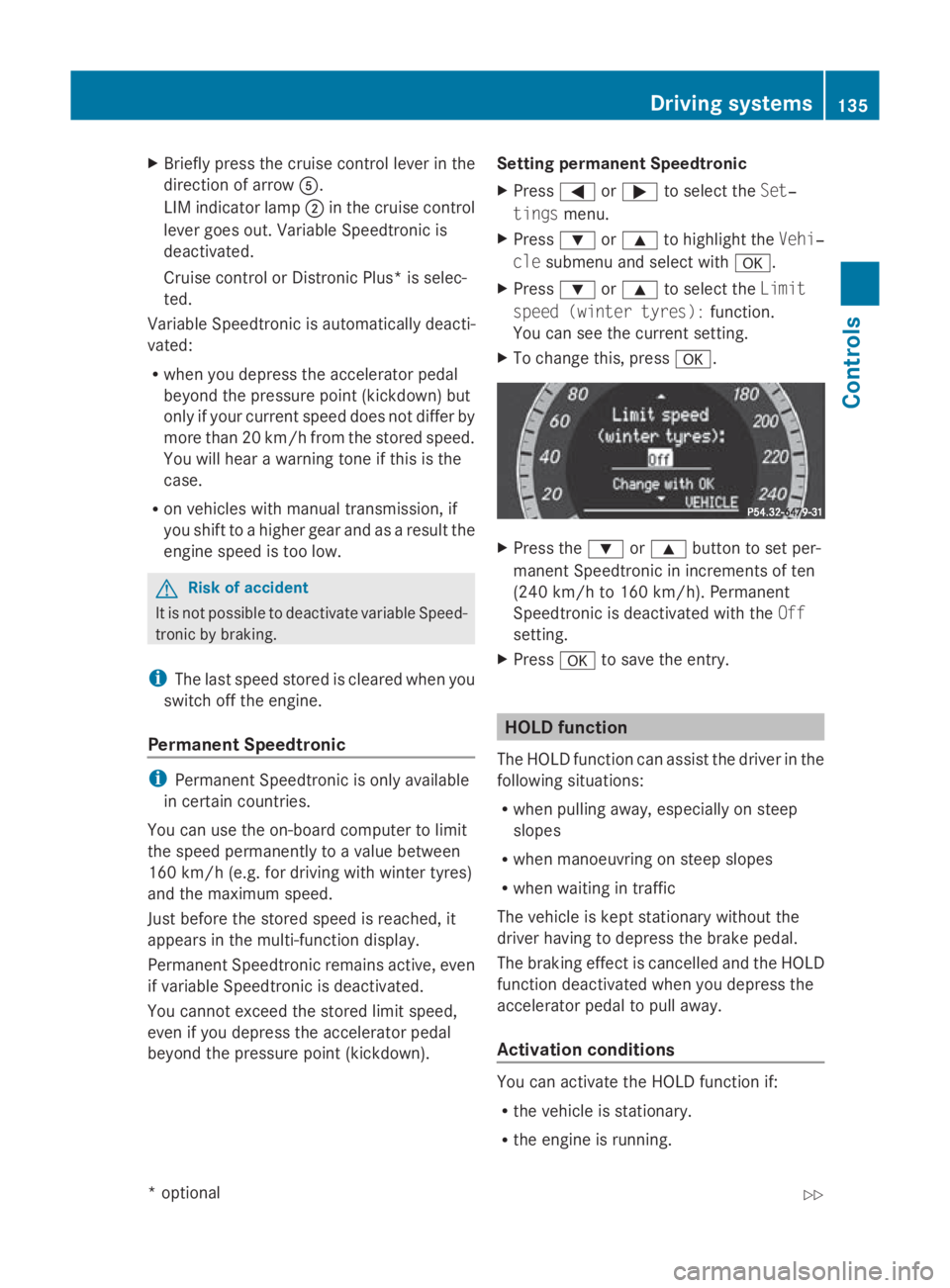
beyond the pressure point (kickdown). Setting permanent Speedtronic
X Press 0040or003E to select the Set‐
tings menu.
X Press 003Dor003C to highlight the Vehi‐
cle submenu and select with 0064.
X Press 003Dor003C to select the Limit
spee d(winter tyres): function.
You can see the current setting.
X To change this ,press 0064. X
Press the 003Dor003C button to set per-
manent Speedtroni cinincrements of ten
(240 km/h to 160 km/h). Permanent
Speedtroni cisdeactivated with the Off
setting.
X Press 0064to save the entry. HOL
Dfunction
The HOLD function can assis tthe driver in the
following situations:
R whe npulling away ,especially on steep
slopes
R whe nmanoeuvring on stee pslopes
R whe nwaiting in traffic
The vehicle is kept stationar ywithou tthe
driver having to depress the brake pedal.
The braking effect is cancelled and the HOLD
function deactivated whe nyou depress the
accelerato rpedal to pull away.
Activation conditions You can activate the HOLD function if:
R
the vehicle is stationary.
R the engine is running. Drivin
gsystems
135Controls
*optional
207_AKB; 2; 3, en-GB
mkalafa
,V ersion: 2.11.8.1
2009-07-23T10:23:49+02:00
-Seite 135 Z
Page 139 of 313
R
the driver's door is close doryourseatb elt
is fastened.
R the parking brake is not applied.
R the bonnet is closed.
R on vehicles with automatic transmission*,
D, Ror Nis selected.
R Distroni cPlus* is deactivated
Activatin gthe HOL Dfunction X
Make sure tha tthe activatio nconditions
ar em et.
X Depres sthe brake. Vehicle
switha utomatic transmission* (example)
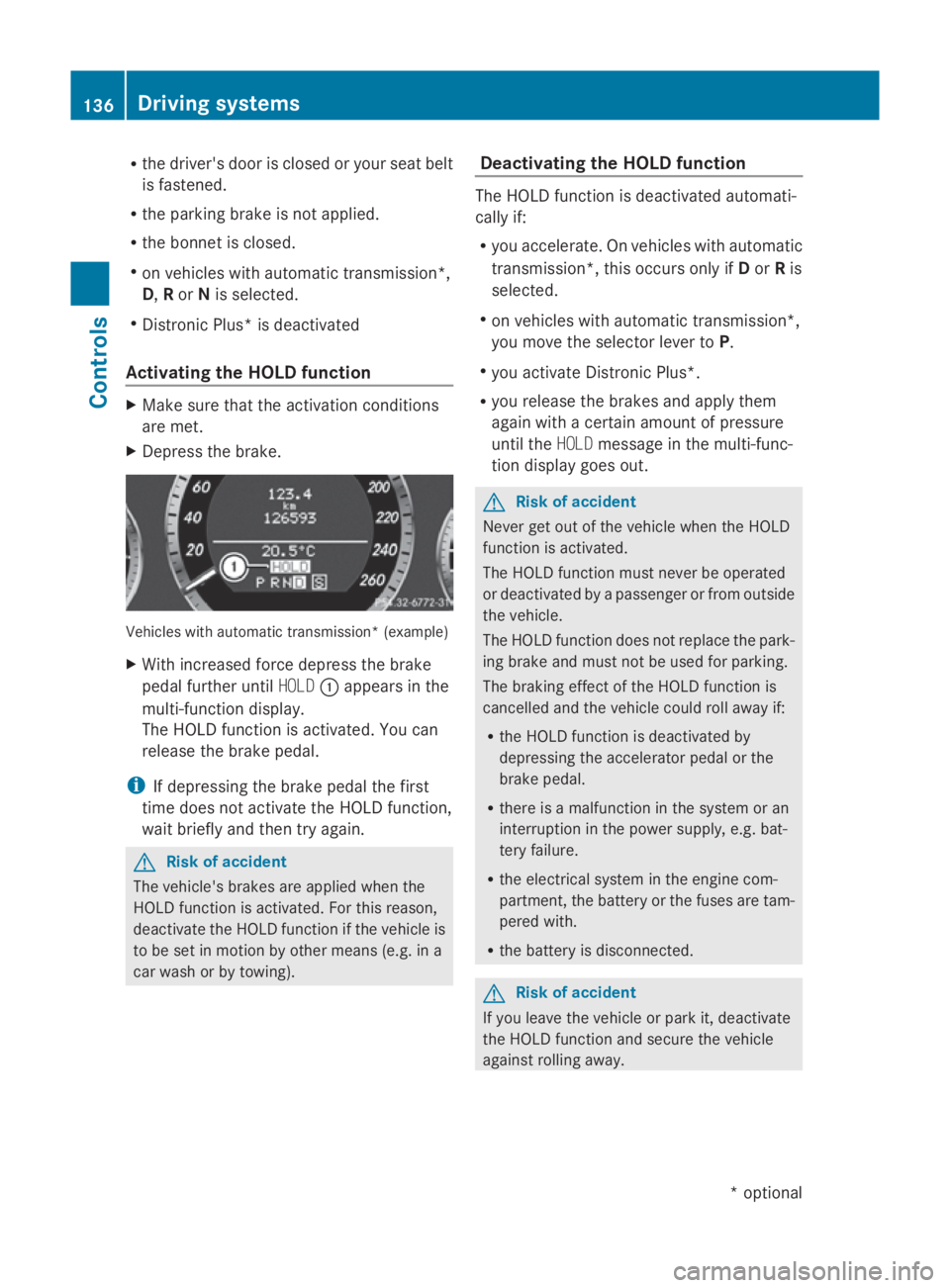
X With increase dforce depress the brake
peda lfur the runtil HOLD 0046appear sinthe
multi-functio ndisplay.
Th eH OLDf unctio nisa ctivated .You can
release the brake pedal.
i If depressing the brake peda lthe first
tim edoesn ot activate the HOL Dfunction,
wait briefl yand the ntry again. G
Ris
kofa ccident
Th ev ehicle' sbrakes ar eapplied when the
HOL Dfunctio nisa ctivated. For thi sreason,
deactivate the HOL Dfunctio nift he vehicl eis
to be se tinmotion by other means (e.g. in a
car wash or by towing). Deactivatin
gthe HOL Dfunction Th
eH OLDf unctio nisd eactivated automati-
cally if:
R yo ua ccelerate. On vehicles with automatic
transmission* ,thiso ccurs onl yifDorRis
selected.
R on vehicles with automatic transmission*,
yo um ovet he selector lever to P.
R yo ua ctivate Distroni cPlus*.
R yo ur elease the brakes and appl ythem
agai nwithac ertainamount of pressure
unti lthe HOLD message in the multi-func-
tio nd isplay goes out. G
Ris
kofa ccident
Never ge toutof the vehicl ewhent he HOLD
functio nisa ctivated.
Th eH OLDf unctio nm ustn eve rbeo perated
or deactivated by apassenge rorfromo utside
the vehicle.
Th eH OLDfunctio ndoesn ot replace the park-
ing brake and must not be used for parking.
Th eb raking effect of the HOL Dfunctio nis
cancelle dand the vehicl ecould rol lawa yif:
R the HOL Dfunctio nisd eactivate dby
depressing the accelerator peda lorthe
brake pedal.
R there is amalfunctio nint he syste moran
interruption in the powe rsupply, e.g.bat-
tery failure.
R the electrica lsystemint he engine com-
partment, the battery or the fuse saretam-
pered with.
R the battery is disconnected. G
Ris
kofa ccident
If yo uleave the vehicl eorparki t, deactivate
the HOL Dfunctio nand secure the vehicle
against rolling away. 136
Driving systemsCont
rols
*optio nal
207_AKB; 2; 3, en-GB
mkalafa
,V ersion: 2.11.8.1
2009-07-23T10:23:49+02:00
-Seite 136
Page 140 of 313
You will see
awarnin gmessage in the multi-
function display if the HOL Dfunction is acti-
vated and:
R the driver's door is opened and you release
the seat belt.
R the engin eisswitched off.
R the bonnet is opened.
Vehicles with manual transmission:
Brak eimmediately
X Immediately depres sthe brak epedal firmly
until the warnin gmessage in the multi-
function display goes out. This deactivates
the HOL Dfunction.
On vehicles with automatic transmission*:
Select Park (P)
X Move the selector lever to Pto prevent the
vehicle fro mrollin gaway.
The HOL Dfunction is deactivated. The
warnin gmessage in the multi-function dis-
play disappears.
Ah orn will also sound at regular intervals if
the HOL Dfunction is activate dand you:
R switc hoff the engine, open the driver's
door and remove your seat belt.
R open the bonnet.
The sounding of the horn alert syou to the fact
that the vehicle has been parked while the
HOL Dfunction is still activated. The tone
becomes louder if you attempt to lock the
vehicle. The vehicle is not locked until the
HOL Dfunction is deactivated.
i If the ignition has been switched off ,the
engin ecannot be started again until the
HOL Dfunction has been deactivated.
If there is afault in the system or power supply
while the HOL Dfunction is activated, the
Brak eimmediately message is shown in
the multi-function display. Immediately
depres sthe brak efirmly until the warning
message in the multi-function display goes
out. On vehicles with automatic transmis-
sion*, you can also select P.This deactivates
the HOL Dfunction. Dynamic handling package with
sports mode*
The most importan tpart of the dynamic han-
dling package with sport smode is the adjust-
able suspension system. This automatically
controls and adapts the suspension to the
respectiv edrivin gsituation.
The calibration of the suspension depends
on:
R your drivin gstyle
R the road surfac econditions
R your individual selection ;see also the fol-
lowing description.
If your vehicle is equipped with automatic
transmission*, the dynamic handlin gpack-
age with sport smode also includes steering
wheel gearshift paddles* with amanual gear-
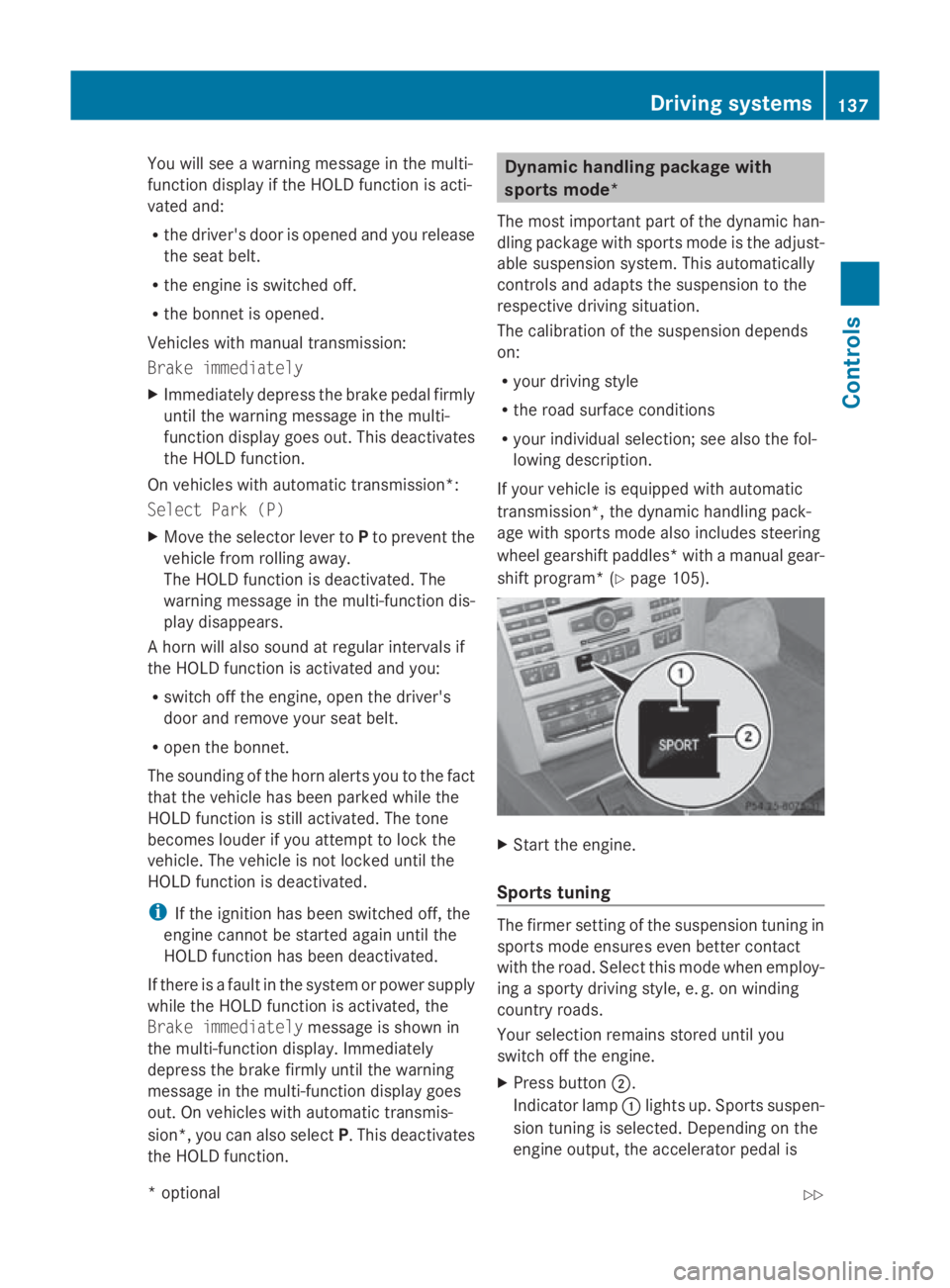
shift program* (Y page 105). X
Start the engine.
Sports tuning The firmer settin
gofthe suspension tuning in
sport smode ensures even better contact
with the road. Selec tthis mode when employ-
ing asport ydrivin gstyle, e. g. on winding
countr yroads.
Your selection remain sstored until you
switc hoff the engine.
X Press button 0047.
Indicator lamp 0046light sup. Sports suspen-
sion tuning is selected. Dependin gonthe
engin eoutput ,the accelerator pedal is Driving systems
137Controls
*optional
207_AKB; 2; 3, en-GB
mkalafa,
Version: 2.11.8.1 2009-07-23T10:23:49+02:00-Seite1 37 Z
Page 141 of 313
more responsive. On vehicles with auto-
matic transmission*, drive program
Sis
selected.
Comfort tuning In comfort mode, the driving characteristics
of yourv
ehicleare more comfortable. Select
this mode if you prefer amore comfortable
driving style ,but alsow hen driving fast on
straigh troads, e.g. motorways.
X Press button 0047.
Indicator lamp 0046goes out. Comfortable
suspension tuning is selected. On vehicles
with automatic transmission*, drive pro-
gram Cis selected. PARKTRONIC*
G
Risk of accident
PARKTRONIC is only an aid and may not
detect all obstacles. This system does not
relieve you of the need to pay attention.
You are alwaysr esponsible for safety and
must continue to pay attention to youri mme-
diate surroundings when parking and
manoeuvring. You could otherwise endanger
yourself and others. G
Risk of injury
Make sure that no persons or animals are in
the manoeuvring range. Otherwise, they
could be injured.
PARKTRONIC is an electronic parking aid with
ultrasound. It indicates visuallya nd audibly
the distance between yourv ehicleand an
object.
PARKTRONIC is automatically activated when
you switch on the ignitio nand release the
handbrake.
PARKTRONIC is deactivated at speeds above
18 km/h. It is reactivated at lower speeds.
PARKTRONIC monitors the area around your
vehicl eusing six sensors in the front bumper
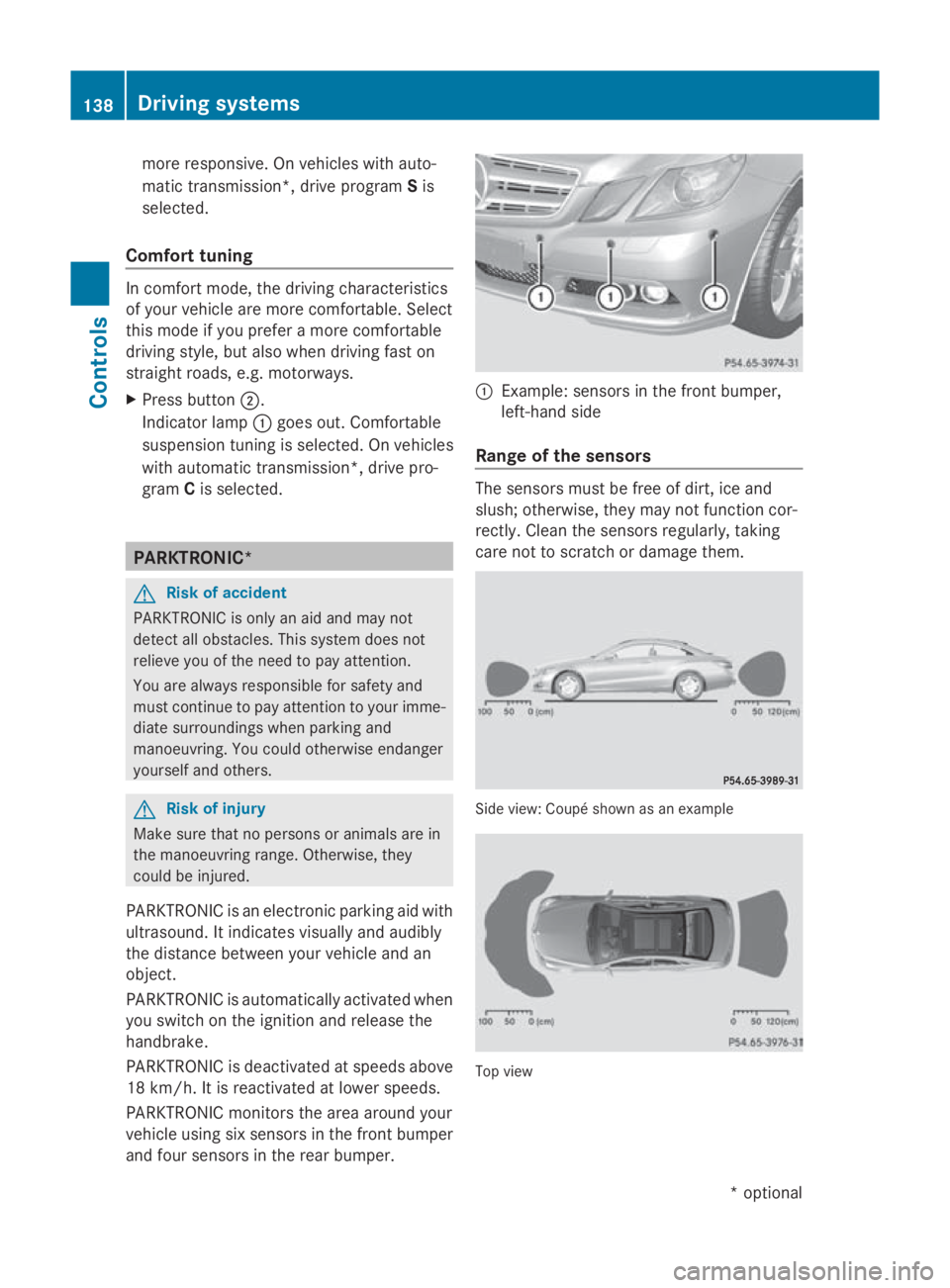
and four sensors in the rear bumper. 0046
Example: sensors in the front bumper,
left-hand side
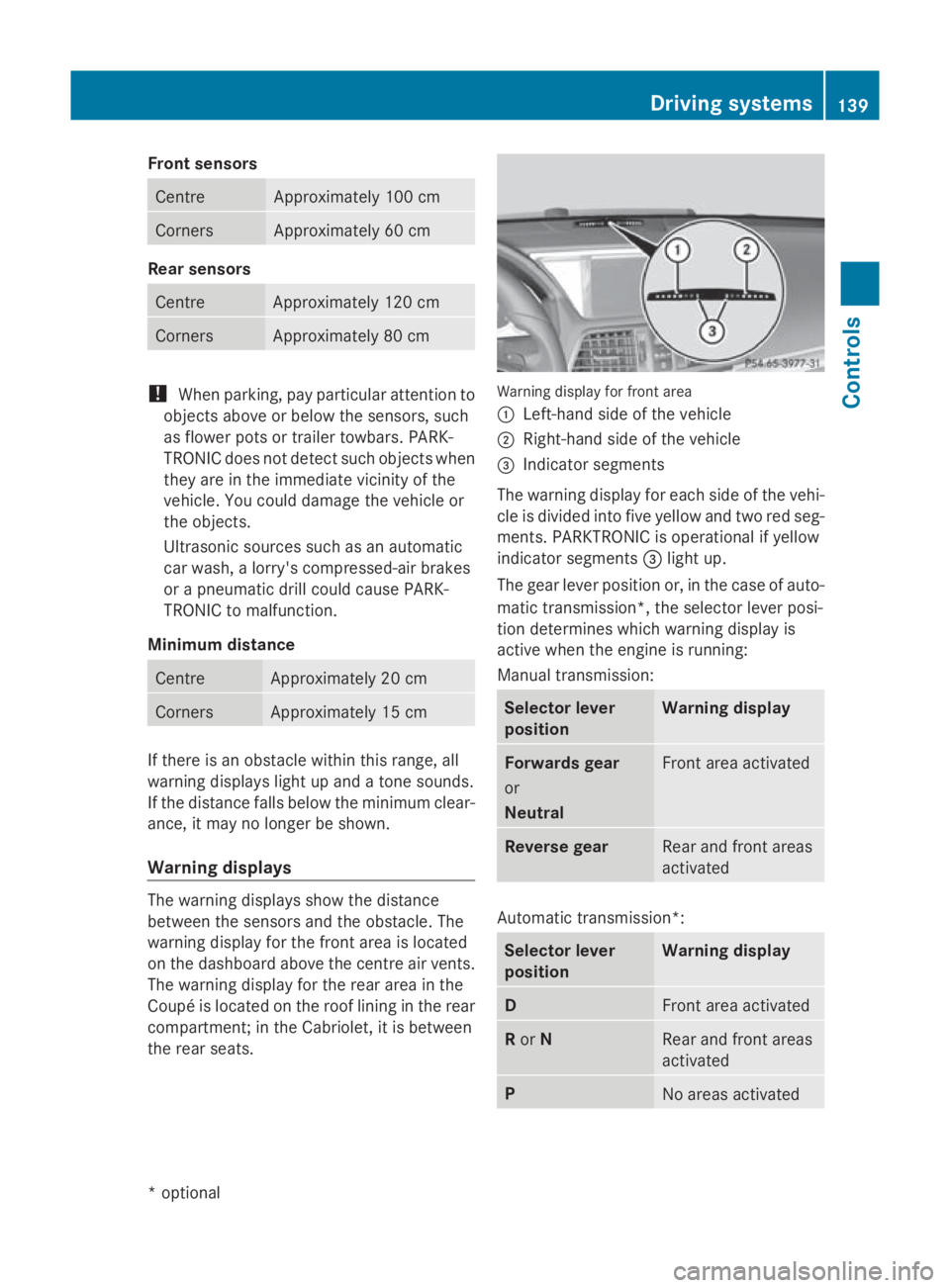
Range of the sensors The sensors must be free of dirt, ice and
slush; otherwise, they may not function cor-
rectly. Clean the sensors regularly, taking
care not to scratch or damage them. Side view
:Coupé shown as an example Top view138
Driving systemsControls
*o
ptional
207_AKB; 2; 3, en-GB
mkalafa,
Version: 2.11.8.1 2009-07-23T10:23:49+02:00-Seite 138
Page 142 of 313
Fron
tsensors Centre Approximately 10
0cm Corners Approximately 60 cm
Rea
rsensors Centre Approximately 12
0cm Corners Approximately 80 cm
!
When parking ,pay particular attentio nto
object sabov eorb elow th esensors, such
as flower pot sortrailer towbars .PAR K-
TRONIC does no tdetect suc hobject swhen
they are in th eimmediat evicinity of the
vehicle .You could damag ethe vehicle or
th eo bjects.
Ultrasonic sources suc hasanautomatic
car wash, alorry's compressed-air brakes
or ap neumatic dril lcou ld caus ePARK-
TRONIC to malfunction.
Minimu mdistance Centre Approximately 20 cm
Corners Approximately 15 cm
If there is an obstacle within this range, all
warning displays light up and
atones ounds.
If th edistanc efalls below th eminimum clear-
ance, it may no longer be shown.
Warning displays The warning displays sho
wthe distance
between th esensor sand th eobstacle .The
warning display for th efront area is located
on th edashboard abov ethe centr eair vents.
The warning display for th erear area in the
Coupé is locate dontheroo flining in th erear
compartment; in th eCabriolet ,itisbetween
th er ear seats. Warning display for fron
tarea
0046 Left-han dside of th evehicle
0047 Right-hand side of th evehicle
008A Indicato rsegments
The warning display for each side of th evehi-
cle is divided int ofivey ellow and two red seg-
ments .PAR KTRONIC is operational if yellow
indicator segments 008Alight up.
The gear leve rpositio nor, in th ecaseofa uto-
matic transmission*, th eselector leve rposi-
tio nd etermine swhichw arning display is
active when th eengineisr unning:
Manual transmission: Selector lever
position Warning display
Forward
sgear
or
Neutral Fron
tarea activated Revers
egear Rear and fron
tareas
activated Automatic transmission*:
Selector lever
position Warning display
D
Fron
tarea activated R
or N Rear and fron
tareas
activated P
No areas activatedDriving systems
139Controls
*optional
207_AKB
;2;3,en-GB
mkalafa ,V ersion: 2.11.8.1
2009-07-23T10:23:49+02:00
-Seite 139 Z
Page 144 of 313
G
Risk of injury
Make sure that no persons or animal sare in
the manoeuvring range. Otherwise, they
could be injured.
Whe nPARKTRONIC is deactivated, Parking
Guidance is also unavailable.
Use Parking Guidance for parking spaces:
R that are paralle ltothe direction of travel
R that are on straigh troads, not bends
R that are on the same level as the road, i.e.
not on the pavement
Parking tips:
R On narro wroads, drive as clos etothe park-
ing space as possible.
R Parking spaces which are littered ,over-
grow norp artiall yoccupied by traile rdraw-
bars might be identified incorrectl yornot
at all.
R Snowfal lorheavy rai nmay lead to aparking
space being measured inaccurately.
R Pa ya ttention to the PARKTRONIC warning
messages during the parking procedure
(Y page 138).
R Whe ntransporting aloa dw hich protrudes
from your vehicle ,you mus tnot us eParking
Guidance.
R Neve ruse Parking Guidance with snow
chains or an emergency spare wheel *fit-
ted.
R The wa yyourv ehicle is positioned in the
parking space afte rparking is dependent
on variou sfactors. These includ ethe posi-
tion and shape of the vehicle sparked in
front and behind it and the conditions of the
location. In some cases, Parking Guidance
may guid eyou too far or not far enough into
ap arking space. In some cases, it may also
lead yo uacross or onto the kerb. If neces-
sary, cance lthe parking procedure with
Parking Guidance. !
If unavoidable, yo ushoul ddrive over
obstacles such as kerbs slowl yand not at
as harp angle. Otherwise, yo umay damage
the wheel sortyres.
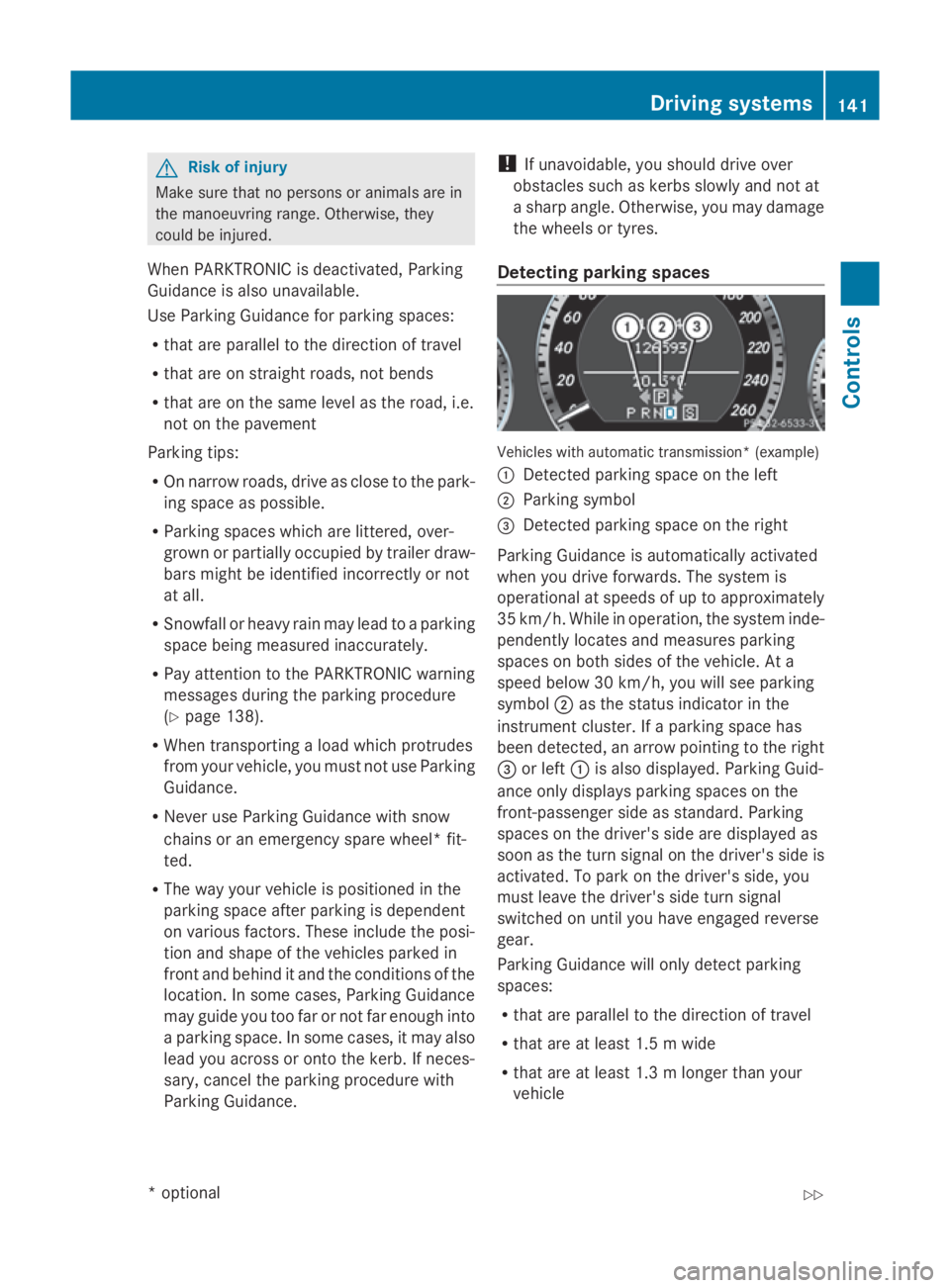
Detecting parkin gspaces Vehicles with automatic transmission* (example)
0046
Detected parking space on the left
0047 Parking symbol
008A Detected parking space on the right
Parking Guidance is automaticall yactivated
whe nyou drive forwards. The system is
operational at speeds of up to approximately
35 km/h .While in operation, the system inde-
pendently locates and measures parking
spaces on both sides of the vehicle .Ata
speed below 30 km/h ,you will see parking
symbol 0047as the statu sindicator in the
instrument cluster. If aparking space has
bee ndetected, an arrow pointing to the right
008A or left 0046is also displayed. Parking Guid-
ance only display sparking spaces on the
front-passenger sid easstandard .Parking
spaces on the driver' ssidea re displayed as
soo nasthe turn signal on the driver' ssideis
activated. To park on the driver' sside, you
mus tlea ve the driver' ssidet urn signal
switched on unti lyou have engaged reverse
gear.
Parking Guidance will only detect parking
spaces:
R that are paralle ltothe direction of travel
R that are at leas t1.5mw ide
R that are at leas t1.3ml onger than your
vehicle Drivin
gsystems
141Controls
*optional
207_AKB
;2;3,en-GB
mkalafa ,V ersion: 2.11.8.1
2009-07-23T10:23:49+02:00
-Seite 141 Z
Page 145 of 313
Ap
arking space is displaye dwhile youa re
driving past it, and unti lyou area pprox-
imatel y15m away from it.
Parking G
Ris
kofa ccident
PARKTRONI Cand Parking Guidance are
merel yparking aids and ma ynot detect all
obstacles. The ydonot relieve yo uofthe
responsibility of paying attention.
Yo ua realways responsibl efor safety and
must continue to pa yattentio ntoyourimme-
diate surrounding swhenp arking and
manoeuvring .You could otherwis eendanger
yoursel fand others.
X Stop the vehicl ewhent he parking space
symbo lshows the desired parking space in
the instrument cluster.
X Vehicles with manua ltransmission: shift to
revers egear.
Vehicles with automatic transmission*:
mov ethe selecto rlev er to R.
The multi-functio ndisplay shows the
Check vehicl esurroundings Con‐
fir mwithOK message.
X Press 0064on the multi-functio nsteering
whee ltoconfirm.
The multi-functio ndisplay switches to
Parking Guidance.
Depending on your distance fro mthe park-
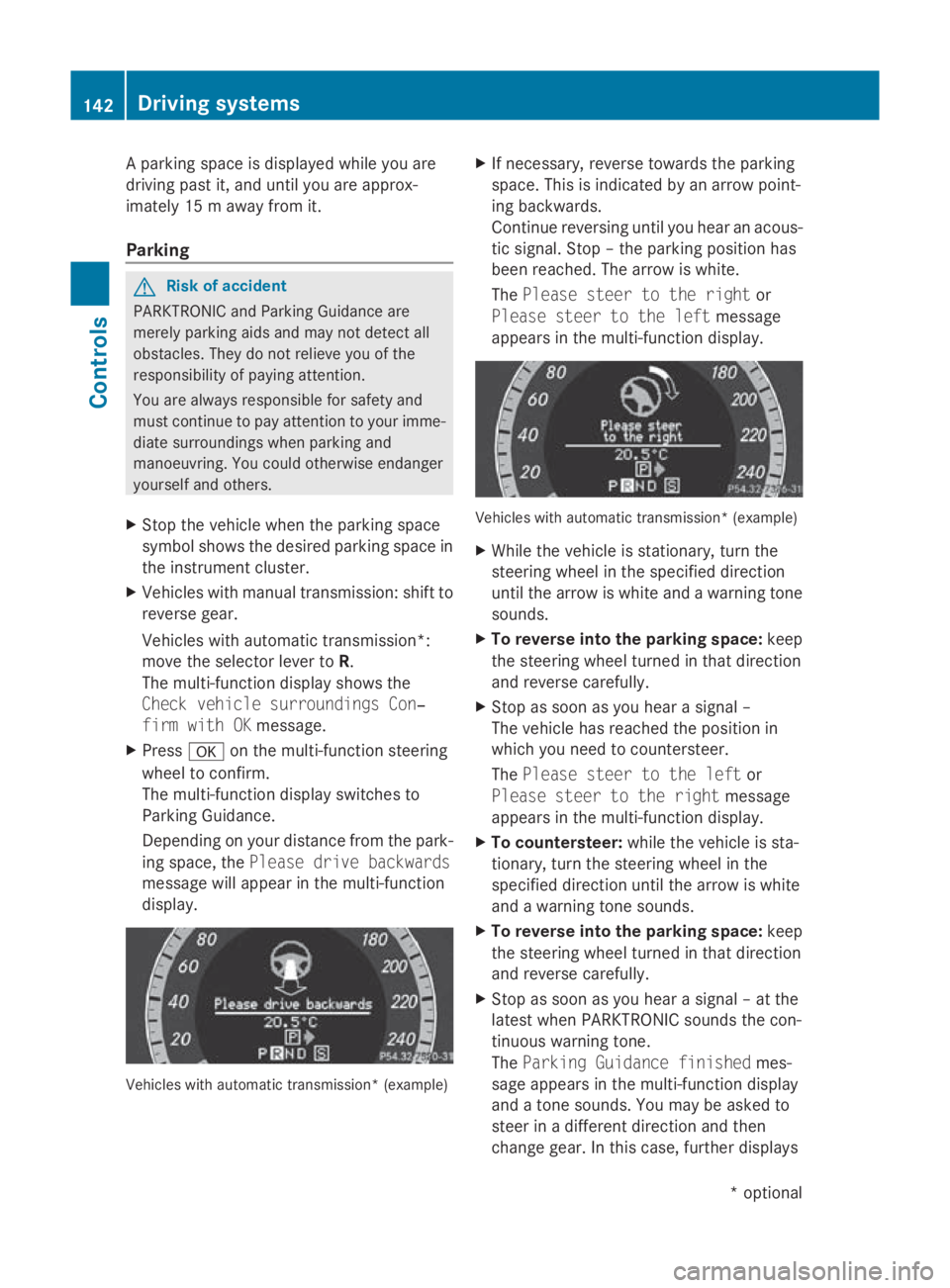
ing space ,the Please drive backwards
message will appear in the multi-function
display. Vehicles with automatic transmission* (example) X
If necessary ,revers etowards the parking
space .Thisisi ndicated by an arrow point-
ing backwards.
Continu ereversing unti lyou hear an acous-
tic signal. Stop –the parking positio nhas
been reached. The arrow is white.
The Please steer to the right or
Please steer to the left message
appear sinthe multi-functio ndisplay. Vehicles with automatic transmission* (example)
X
Whil ethe vehicl eisstationary, tur nthe
steering whee linthe specifie ddirection
unti lthe arrow is white and awarning tone
sounds.
X To revers eintot he parking space: keep
the steering whee lturned in tha tdirection
and revers ecarefully.
X Stop as soo nasyou hear asigna l–
The vehicl ehasreache dthe positio nin
which yo uneedtoc ountersteer.
The Please steer to the left or
Please steer to the right message
appear sinthe multi-functio ndisplay.
X To countersteer: whilethe vehicl eissta-
tionary, tur nthe steering whee linthe
specifie ddirection unti lthe arrow is white
and awarning tone sounds.
X To revers eintot he parking space: keep
the steering whee lturned in tha tdirection
and revers ecarefully.
X Stop as soo nasyou hear asigna l–att he
latest when PARKTRONI Csounds the con-
tinuou swarning tone.
The Parkin gGuidance finished mes-
sage appear sinthe multi-functio ndisplay
and atone sounds .You maybea sked to
stee rinad ifferent direction and then
change gear .Inthisc ase, furthe rdisplays 142
Driving systemsControls
*o
ptional
207_AKB; 2; 3, en-GB
mkalafa,
Version: 2.11.8.1 2009-07-23T10:23:49+02:00-Seite 142