light MERCEDES-BENZ E-CLASS COUPE 2009 Workshop Manual
[x] Cancel search | Manufacturer: MERCEDES-BENZ, Model Year: 2009, Model line: E-CLASS COUPE, Model: MERCEDES-BENZ E-CLASS COUPE 2009Pages: 313, PDF Size: 7.76 MB
Page 103 of 313
Hill start assist
Hill start assist help
syou when pulling away
forwards or in reverse on an uphill gradient.
It hold sthe vehicl efor as hort time after you
have removed yourf oot from the brake pedal.
This gives you time to move yourf oot from
the brake peda ltothe accelerator peda land
depress it before the vehicl ebegins to roll. G
Risk of accident
Never leave the vehicl ewhen it is held by hill
start assist. After approximately one second,
hil lstart assist wil lnolonger brake yourv ehi-
cle and it coul droll away.
X Take yourf oot off the brake pedal.
i Once you have taken yourf oot off the
brake pedal, the vehicl eisheld for around
one second.
X Pulla way.
Hill start assist willn ot function if:
R you are pulling away on aleve lroad or a
downhill gradient.
R on vehicles with automatic transmission*,
the transmission is in position N.
R the vehicl eissecure dwith the parking
brake.
R ESP ®
is malfunctioning. Parking
G
Risk of accident
Only remove the key from the ignitio nlock
when the vehicl eisstationary, as you cannot
steer the vehicl ewhen the key is removed.
Never leave children unsupervised in the vehi-
cle. They coul drelease the parking brake. This
coul dleadtoas erious or fatal accident. G
Risk of fire
Make sure that the exhaust system does not
under any circumstances come into contact
with easily ignitable material such as dry grass or petrol
.Otherwise, the flammable material
may ignite and set the vehicl eonfire.
To ensure that the vehicl eissecure dagainst
rolling away unintentionally:
R the parking brake must be applied
R on vehicles with manua ltransmission,
engag efirst gearorr everse gear
R on vehicles with automatic transmission*,
the transmission must be in position Pand
the key must be removed from the ignition
lock
R on steep uphill or downhill gradients, turn
the front wheels toward sthe kerb
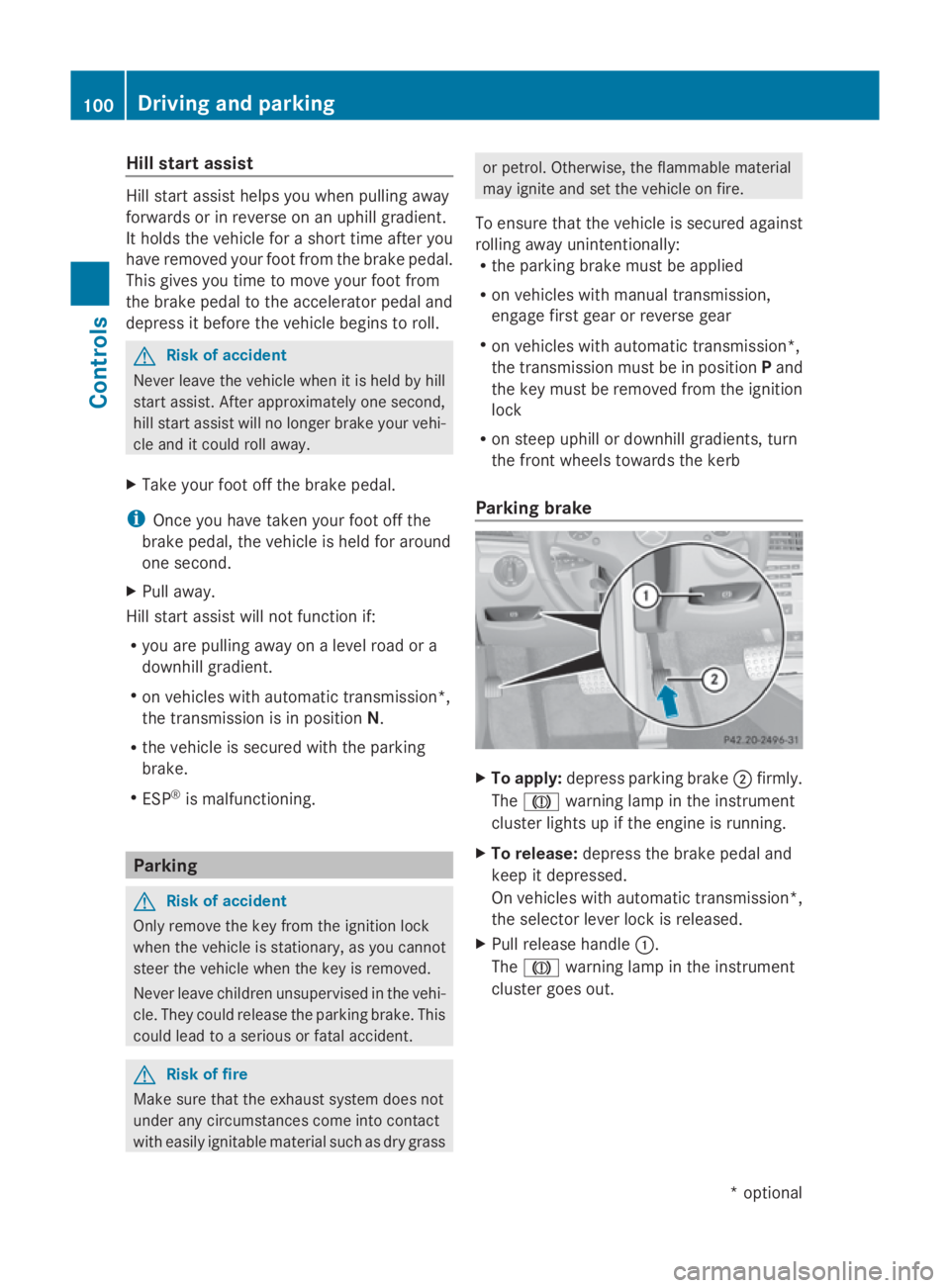
Parking brake X
To apply: depress parking brake 0047firmly.
The 004D warning lampint he instrument
cluster lights up if the engine is running.
X To release: depress the brake peda land
keep it depressed.
On vehicles with automatic transmission*,
the selector leve rlock is released.
X Pullr elease handle 0046.
The 004D warning lampint he instrument
cluster goes out. 100
Driving and parkingControls
*o
ptional
207_AKB; 2; 3, en-GB
mkalafa,
Version: 2.11.8.1 2009-07-23T10:23:49+02:00-Seite 100
Page 110 of 313
lamps, display messages or system failures.
The vehicle's handlin gcharacteristics may be
affected. Adjust your drivin gstyle and speed
accordingly.
Immediately consult aqualified specialist
workshop which has the necessary specialist
knowledge and tools to carr yout the work
required. Mercedes-Ben zrecommends that
you use aMercedes-Ben zService Centre for
this purpose .Inparticular, work relevant to
safet yoro nsafety-related systems must be
carried out at aqualified specialist workshop. Coolant temperatur
egauge
The coolan ttemperature gauge is in the
instrumen tcluster on the right-han dside.
Under normal operating condition sand with
the specified coolan tlevel, the coolan ttem-
perature may rise to 120 †. The coolan ttem-
perature may rise to the top end of the scale
at high outside temperatures and on long
uphill stretches. Speedometer with segments
The segment sinthe speedometer indicate
which speed rang eisavailable.
Cruise control mode:
The segment slight up fro mthe stored speed
to the maximum speed.
Variable Speedtronic mode:
The segment slight up fro mthe star tofthe
scale to the selected limit speed.
Distronic Plus* mode:
One or two segment saround the stored
speed light up. Rev counter
The red band in the rev counter indicates the
engine's overrevving range. The fuel supply is
interrupted to protect the engin ewhen the
red band is reached. !
Do not drive in the overrevving range.
Doin gsow ill damage the engine. Outside temperatur
edisplay G
Risk of accident
At temperatures just above freezin gpoint ,the
street may be icy, especially in wooded areas
or on bridges .Ifyou do not adapt your driving
style to the conditions, the vehicle could skid.
For this reason ,adapt your drivin gstyle and
speed to the weathe rconditions.
Changes in the outside temperature are dis-
played after ashor tdelay. On-board computer
Points to remember
The on-board computer is activate dassoon
as you turn the key to position 1in the ignition
lock. G
Risk of accident
Only use the on-board computer when road
and traffic condition spermit. You would oth-
erwise be distracted and unable to concen-
trate properly on driving, and could cause an
accident. Multifunction steering wheel
You can control the multi-function display and
the settings in the on-board computer using On-board computer
107Controls
*optional
207_AKB; 2; 3, en-GB
mkalafa,
Version: 2.11.8.1 2009-07-23T10:23:49+02:00-Seite1 07 Z
Page 111 of 313
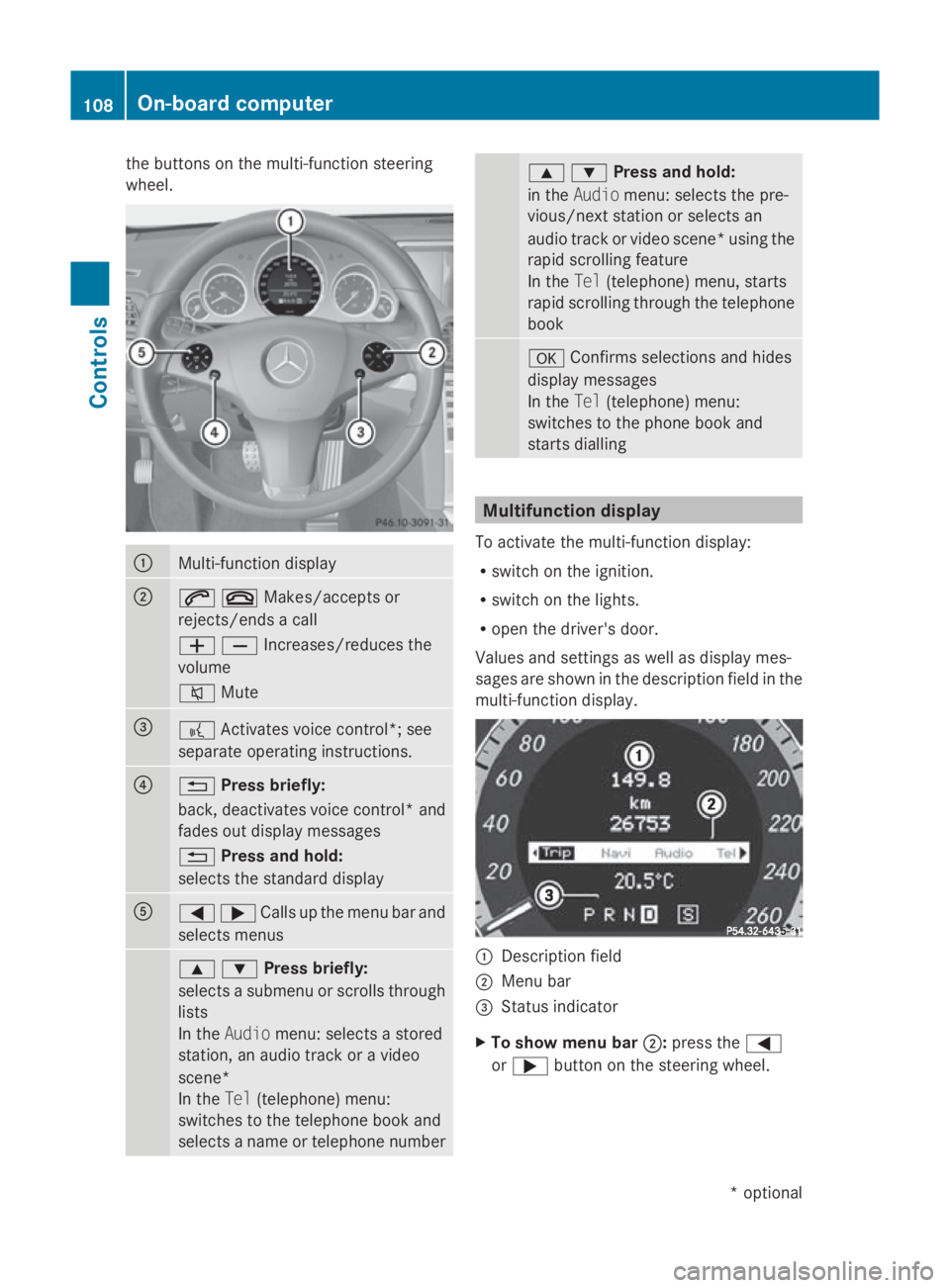
the buttons on the multi-functio
nsteering
wheel. 0046
Multi-functio
ndisplay 0047
006A007FMakes/accept
sor
rejects/ends acall
005A005BIncreases/reduces the
volume
006C Mute 008A
0062
Activates voice control*; see
separate operating instructions. 0088
0041
Press briefly:
back, deactivates voice control* and
fades out display messages
0041 Press and hold:
selects the standard display 0086
0040003ECalls up th
emenub ar and
select smenus 003C003DPress briefly:
selects
asubmenu or scrolls through
lists
In the Audio menu: selects astored
station, an audiot rack oravideo
scene*
In the Tel(telephone) menu:
switches to the telephone book and
selects aname or telephone number 003C003DPress and hold:
in the
Audio menu: selects the pre-
vious/next station or selects an
audiot rack or video scene* using the
rapid scrolling feature
In the Tel(telephone) menu, starts
rapid scrolling through the telephone
book 0064
Confirms selections and hides
display messages
In the Tel(telephone) menu:
switches to the phone book and
starts dialling Multifunction display
To activate the multi-function display:
R switch on the ignition.
R switch on the lights.
R open the driver's door.
Values and settings as well as display mes-
sages are shown in the description field in the
multi-function display. 0046
Description field
0047 Menu bar
008A Status indicator
X To show menu bar 0047:press the 0040
or 003E button on the steering wheel. 108
On-board computerControls
*o
ptional
207_AKB; 2; 3, en-GB
mkalafa,
Version: 2.11.8.1 2009-07-23T10:23:49+02:00-Seite 108
Page 113 of 313
Function
0046
Trip
menu(Ypage 110) 0047
Navi*m
enu( navigation details)
(Y page 111) 008A
Audio
menu(Ypage 113) 0088
Tel
men u(telephone) ( Ypage 114) 0086
Assist
menu(Assistance)
(Y page 115) 0087
Service
(Ypage 117) menu
R calls up display messages
(Y page 208)
R Tyre pressur eloss warning
(Y page 187)
R ASSYS TPLUSs ervic einterval dis-
play (Y page 197) 006E
Settings
menu(Ypage 117) The number of menus shown depends on the
optional equipmen tinthevehicle.
The Audio, Navi*a ndTel menus are dis-
played slightly differently in vehicle swithan
audio system and vehicle swithC OMAND
APS* .The example sgivenint hisO wner's
Manual apply to vehicle sequipped with
COMAND APS*. Trip menu
i Reset th etripm eter or trip computer
(Y page 111).
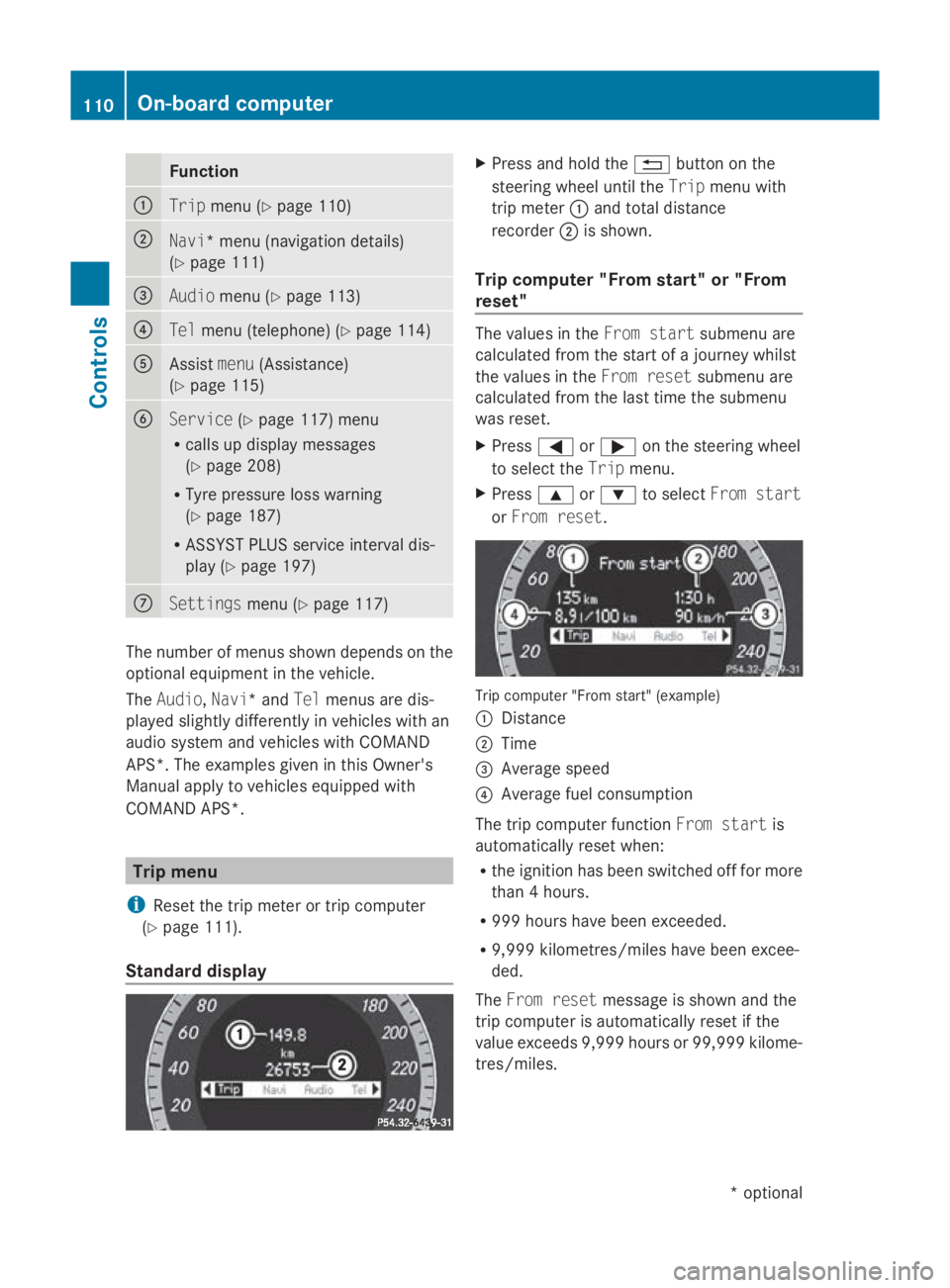
Standar ddisplay X
Press and hold the 0041buttonont he
steering wheel until the Tripmenuwith
trip meter 0046and total distance
recorder 0047is shown.
Trip computer "From start" or "From
reset" The values in the
Froms tart submen uare
calculate dfromt hestart of ajou rney whilst
th ev alues in the Fromr eset submen uare
calculate dfromt helast tim ethe submenu
was reset.
X Press 0040or003E on thesteering wheel
to select the Tripmenu.
X Press 003Cor003D to select Froms tart
or Fro mr eset. Trip computer "From start
"(example)
0046 Distance
0047 Time
008A Averag espeed
0088 Averag efuel consumption
The trip computer function Froms tart is
automaticall yreset when:
R thei gnition has been switched off for more
than 4hours.
R 99 9h our shave been exceeded.
R 9,999 kilometres/mile shave been excee-
ded.
The Fromr eset message is shown and the
trip computer is automaticall yreset if the
value exceeds 9,999 hour sor99,99 9k ilome-
tres/miles. 110
On-boar
dcomputerControls
*optional
207_AKB
;2;3,en-GB
mkalafa ,V ersion: 2.11.8.1
2009-07-23T10:23:49+02:00
-Seite 110
Page 120 of 313
Service menu
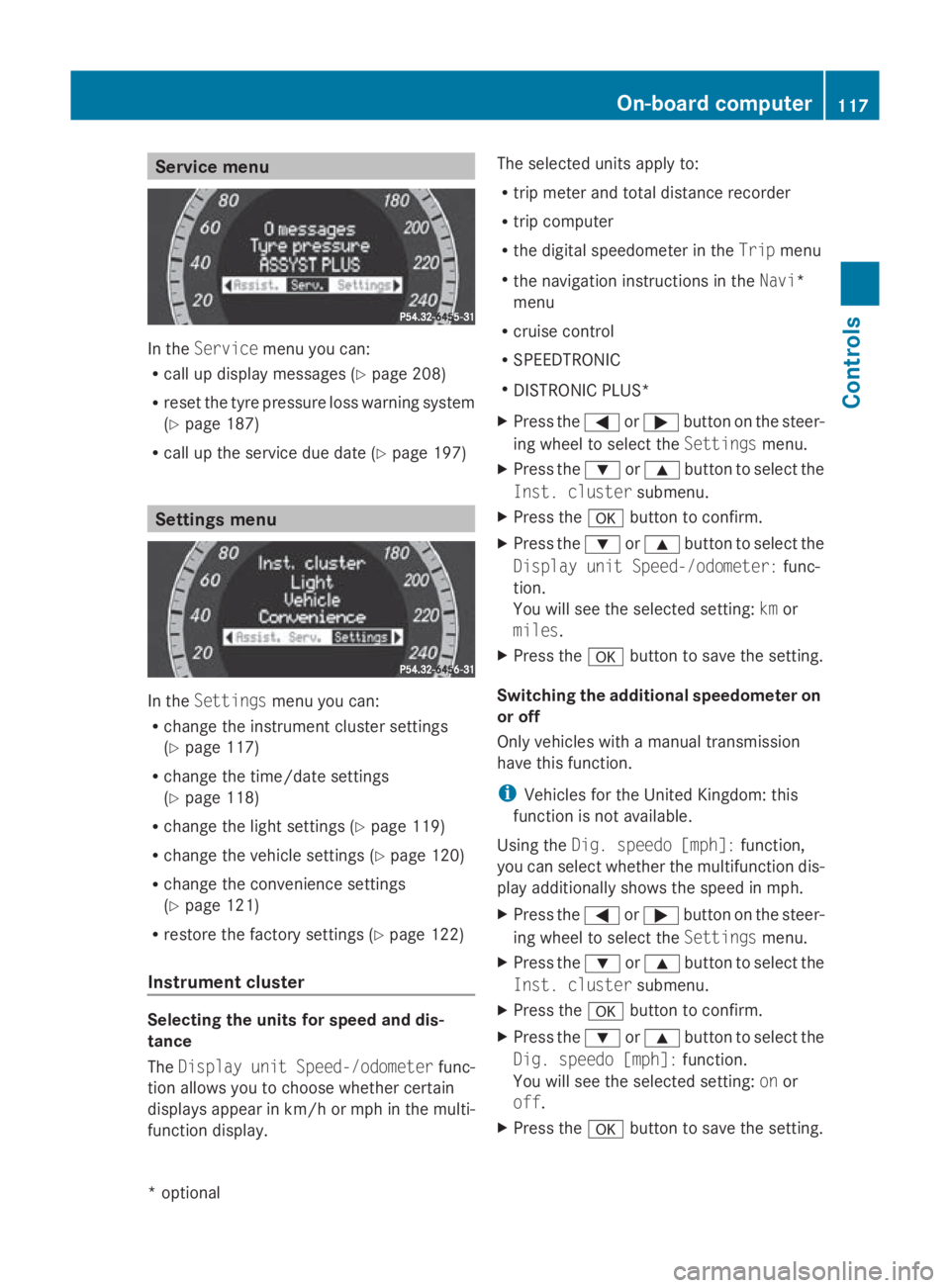
In the
Service menu you can:
R call up display messages (Y page 208)
R reset the tyre pressure loss warning system
(Y page 187)
R call up the service due date (Y page 197)Settings menu
In the
Settings menu you can:
R change the instrumen tcluster settings
(Y page 117)
R change the time/date settings
(Y page 118)
R change the light settings (Y page 119)
R change the vehicle settings (Y page 120)
R change the convenience settings
(Y page 121)
R restore the factory settings (Y page 122)
Instrument cluster Selecting the units for speed and dis-
tance
The Display unit Speed-/odometer func-
tion allowsy ou to choose whether certain
displaysa ppearinkm/ horm ph in the multi-
function display. The selected units apply to:
R
trip meter and total distance recorder
R trip computer
R the digital speedometer in the Tripmenu
R the navigation instructions in the Navi*
menu
R cruise control
R SPEEDTRONIC
R DISTRONIC PLUS*
X Press the 0040or003E button on the steer-
ing wheel to select the Settingsmenu.
X Press the 003Dor003C button to select the
Inst. cluster submenu.
X Press the 0064button to confirm.
X Press the 003Dor003C button to select the
Display unit Speed-/odometer: func-
tion.
You will see the selected setting: kmor
miles.
X Press the 0064button to save the setting.
Switching the additional speedometer on
or off
Only vehicles with amanual transmission
have this function.
i Vehicles for the United Kingdom: this
function is not available.
Using the Dig. speedo [mph]: function,
you can select whether the multifunction dis-
play additionally shows the speed in mph.
X Press the 0040or003E button on the steer-
ing wheel to select the Settingsmenu.
X Press the 003Dor003C button to select the
Inst. cluster submenu.
X Press the 0064button to confirm.
X Press the 003Dor003C button to select the
Dig. speedo [mph]: function.
You will see the selected setting: onor
off.
X Press the 0064button to save the setting. On-board computer
117Controls
*optional
207_AKB; 2; 3, en-GB
mkalafa,
Version: 2.11.8.1 2009-07-23T10:23:49+02:00-Seite 117 Z
Page 122 of 313
X
Press the 0040or003E button to select the
display to be changed: day, month, year.
X Press the 003Dor003C button to set the
selected display.
X Press the 0064button to store the entry.
Lights Switching the daytime driving lights on/
off
If you have activated the Daytime driving
lamps: function and the light switch is in the
Coupé: 0027or0066
Cabriolet: 0066
position, the daytime driving lights are
switched on automatically when the engine is
running. When it is dark, the side lamps and
the dipped-beam headlamps are switched on
automatically.
In countries where daytime driving lights are
legally required, Onis the factory setting.
X Press the 0040or003E button on the steer-
ing wheel to select the Settingsmenu.
X Press the 003Dor003C button to select the
Light submenu.
X Press the 0064button to confirm.
X Press the 003Dor003C button to select the
Daytime driving lamps function.
You will see the selected setting: onor
off.
X Press the 0064button to save the setting.
Activating/deactivating the Intelligent
Light System*
When you activat ethe Intell. Light Sys‐
tem: function, you activat ethe following:
R motorway mode
R active light function
R cornering light function
R extended range foglamps X
Press the 0040or003E button on the steer-
ing wheel to select the Settingsmenu.
X Press the 003Dor003C button to select the
Light submenu.
X Press the 0064button to confirm.
X Press the 003Dor003C button to select the
Intell. Light System: function.
You will see the selected setting: onor
off.
X Press the 0064button to save the setting.
Setting the dipped-beam headlam pfor
driving on the right/left*
This function is only availabl eonvehicles with
the Intelligent Light System*.
When you set the dipped-beam headlamps for
driving on the left/right:
R the multifunction display shows the
Intell. Light System: System inop‐
erative Inactive for right-hand
drive display message in the Lightsub-
menu.
R motorway mode and extended range fog-
lamps are inoperative.
You can only set the dipped-beam headlamps
for driving on the right/left when stationary:
X Press the 0040or003E button on the steer-
ing wheel to select the Settingsmenu.
X Press the 003Dor003C button to select the
Light submenu.
X Press the 0064button to confirm.
X Press 003Dor003C to select the Dipped
headl. Setting for: function.
You will see the selected setting: Right-
hand drive orLeft-hand drive.
X Press the 0064button to save the setting.
You can also have the dipped-beam head-
lamps set for driving on the right/left at a
qualified specialist workshop, e.g. a
Mercedes-Benz Servic eCentre.
Further information (Y page 87)(Ypage 81)
and (Y page 192). On-board computer
119Controls
*optional
207_AKB; 2; 3, en-GB
mkalafa,
Version: 2.11.8.1 2009-07-23T10:23:49+02:00-Seite 119 Z
Page 123 of 313
Switching Adaptive Highbeam Assist*
on/off
X
Press the 0040or003E button on the steer-
ing wheel to select the Settingsmenu.
X Press the 003Dor003C button to select the
Light submenu.
X Press the 0064button to confirm.
X Press the 003Dor003C button to select the
Adaptive Main-beam Assist: function.
You will see the selected setting: onor
off.
X Press the 0064button to save the setting.
Activating or deactivating the surround
lighting and exterior lighting delayed
switch-off
The Surround lighting: function allows
you to set whether the exterior lighting should
come on when it is dark:
R for 40 seconds after unlocking the vehicle
with the key
The exterior lighting switches off when you
open the driver's door.
R for 15 seconds after switching off the
engine and closing the doors
If the engine is switched off and then none
of the doors are opened, or if an open door
is not closed, the exterior lighting goes out
after 60 seconds.
If you activate the Surround lighting:
function, the following light up:
R side lamps
R dipped-beam headlamps 31
R daytime driving lights
R licence plate lighting
X Press the 0040or003E button on the steer-
ing wheel to select the Settingsmenu.
X Press the 003Dor003C button to select the
Light submenu.
X Press the 0064button to confirm. X
Press the 003Dor003C button to select the
Surround lighting: function.
You will see the selected setting: onor
off.
X Press the 0064button to save the setting.
Deactivating the delayed switch-of ftempora-
rily:
X Before leaving the vehicle, turn the key to
position 0in the ignition lock.
X Turn the key to position 2in the ignition
lock and back to position 0.
The delayed switch-of fisdeactivated.
Delayed switch-of fisreactivated the next
time you start the engine.
Activating/deactivating the interior light-
ing delayed switch-off
When you activate the Interior lighting
delay sw. off: function and remove the
key from the ignition lock, the interior lighting
remains on for around 20 seconds if it is dark.
X Press the 0040or003E button on the steer-
ing wheel to select the Settingsmenu.
X Press the 003Dor003C button to select the
Light submenu.
X Press the 0064button to confirm.
X Press the 003Dor003C button to select the
Interior lighting delay sw. off:
function.
You will see the selected setting: onor
off.
X Press the 0064button to save the setting.
Vehicle Set permanent SPEEDTRONIC with
Limit
speed (winter tyres): (Ypage 135).
Activating/deactivating automatic door
locking
If you select the Automatic door locks:
function, the vehicle is centrally locked above
as peed of around 15 km/h.
31 Only for vehicles without front foglamps*. 120
On-board computerControls
*o
ptional
207_AKB; 2; 3, en-GB
mkalafa,
Version: 2.11.8.1 2009-07-23T10:23:49+02:00-Seite 120
Page 125 of 313
Switching the fold in mirrors when lock-
ing* function on/off
If you switch on the Fold mirrors in when
locking: function, the exterior mirrors fold
in when you lock the vehicle. When you
unlock the vehicle and then open the driver's
or front-passenger door, the exterior mirrors
fold out again.
If you have switched the function on and you
fold the exterior mirrors in using the button
on the door (Y page 74), they will not fold out
automatically. The exterior mirrors can then
only be folded out using the button on the
door.
X Press the 0040or003E button on the steer-
ing wheel to select the Settingsmenu.
X Press the 003Dor003C button to select the
Convenience submenu.
X Press the 0064button to confirm.
X Press the 003Dor003C button to select the
Fold in mirrors when locking: func-
tion.
You will see the selected setting: onor
off.
X Press the 0064button to save the setting.
Restoring the factory settings For safety reasons, not all functions are reset:
the
Limit speed (winter tyres): func-
tion in permanent SPEEDTRONIC can only be
set in the Vehiclesubmenu. If you want to
reset the Daytime driving lamps: in the
Light submenu, you must turn the key in the
ignition lock to position 1.
X Press the 0040or003E button on the steer-
ing wheel to select the Settingsmenu.
X Press the 003Dor003C button to select the
Factory setting submenu.
X Press the 0064button to confirm.
The Reset all settings? message
appears. X
Press the 003Dor003C button to select
Yes orNo.
X Press the 0064button to confirm the selec-
tion.
If you have selected Yes,the multifunction
display shows aconfirmation message. Driving systems
Overview of driving systems
The vehicle's driving systems are described
on the following pages:
R cruise control, Distronic Plus* and Speed-
tronic, which are used to control the speed
of the vehicle
R HOLD function, which makes pulling away
easier, particularly on steep uphill gradi-
ents
R dynamic handling package with sports
mode*, which is used to adjust the vehi-
cle's suspension system
R PARKTRONIC* and Parking Guidance*,
which assist you in finding aparking space,
as well as when manoeuvring and parking
R reversing camera*, which assists you when
parking and manoeuvring
R ATTENTION ASSIST, which helps you
detect tiredness or increasing lapses in
concentration
R Speed Limit Assist*, which shows you
speed limits that are detected in the multi-
function display
The ABS,B AS,BAS PLUS* ,adaptive brake
lights, ESP ®
,E BV and ADAPTIVE BRAKE driv-
ing safety systems and the PRE-SAFE ®
Brake* are described in the "Driving safety
systems" section (Y page 52). Cruise control
Cruise control maintains aconstant road
speed for you. It brakes automatically in order 122
Driving systemsControls
*o
ptional
207_AKB; 2; 3, en-GB
mkalafa,
Version: 2.11.8.1 2009-07-23T10:23:49+02:00-Seite 122
Page 126 of 313
to avoi
dexceeding the se tspeed. On long and
steep downhil lgradients ,especially if the
vehicl eisladen or towing atrailer, yo umust
shift to alower gear in good tim eorselect
shift range 1,2or 3on vehicles with auto-
matic transmission* .Bydoing so ,you will
make us eofthe braking effect of the engine,
which relieves the load on the brake system
and prevents the brakes fro moverheating
and wearing too quickly. G
Ris
kofa ccident
Do not change down for additional engine
braking on aslipper yroads urface. This could
cause the drive wheels to lose their gri pand
the vehicl ecould skid.
Use cruis econtrol onl yifroada nd traffi ccon-
ditions make it appropriate to maintain a
stead yspeed foraprolonge dperiod. Youc an
store any roa dspeed above 30 km/h. G
Ris
kofa ccident
Cruise control cannot take account of road
and traffi cconditions.
Alway spayattentio ntotrafficconditions
eve nw henc ruis econtrol is activated.
Cruise control is onl yanaiddesigne dtoassist
driving. Yo uareresponsibl efor the vehicle's
spee dand for braking in good time. G
Ris
kofa ccident
Do not us ecruis econtrol:
R in roa dand traffi cconditions which do not
allo wyouto maintain aconstant spee d(e.g.
heav ytraffi corw inding roads). Yo ucould
otherwis ecause an accident.
R on slippery roads .Braking or accelerating
could cause the drive wheels to lose trac-
tio na nd the vehicl ecould the nskid.
R when there is poor visibility, e.g .due to fog,
heav yrainors now
Cruis econtro llever Yo
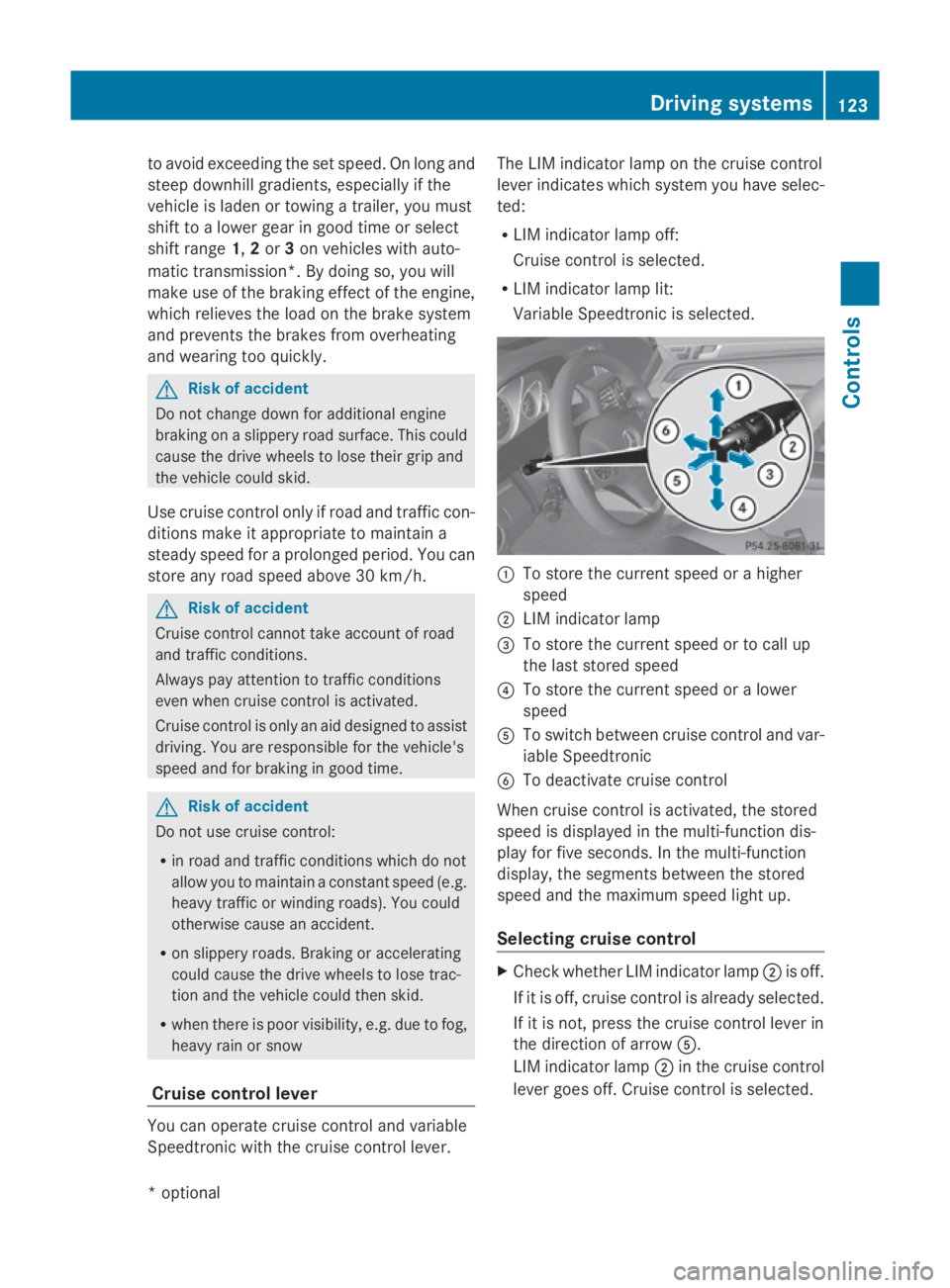
uc an operate cruis econtrol and variable
Speedtroni cwitht he cruis econtrol lever. Th
eL IM indicator lamp on the cruis econtrol
lever indicates which syste myouhave selec-
ted:
R LIM indicator lamp off:
Cruise control is selected.
R LIM indicator lamp lit:
Variable Speedtroni ciss elect ed. 0046
To store the current spee dorahigher
speed
0047 LIM indicator lamp
008A To store the current spee dortocallup
the last stored speed
0088 To store the current spee doralower
speed
0086 To switch between cruis econtrol and var-
iabl eSpeedtronic
0087 To deactivate cruis econtrol
When cruis econtrol is activated ,the stored
spee disd isplayed in the multi-functio ndis-
play for five seconds. In the multi-function
display, the segments between the stored
spee dand the maximum spee dlight up.
Selecting cruis econtrol X
Check whether LIM indicator lamp 0047is off.
If it is off ,cruis econtrol is already selected.
If it is not, press the cruis econtrol lever in
the directio nofarrow 0086.
LIM indicator lamp 0047in the cruis econtrol
lever goes off .Cruise control is selected. Driving systems
123Controls
*optio nal
207_AKB; 2; 3, en-GB
mkalafa
,V ersion: 2.11.8.1
2009-07-23T10:23:49+02:00
-Seite 123 Z
Page 128 of 313
X
Briefly press the cruise control lever in the
direction of arrow 0086.
Variabl eSpeedtroni cisselected .LIM indi-
cator lamp 0047in the cruise control lever
lights up.
Cruise control is automaticall ydeactivated if:
R yo ud epress the parking brake.
R yo ud rive at less than 30 km/h
R ESP ®
intervenes or yo udeactivate ESP ®
R yo uc hange into neutral in avehicle with
manual transmission while driving or if the
clutch is depressed for longer than 6sec-
onds
R on vehicle swithm anual transmission, you
shift to ahigher gea rand as aresult the
engine speed is too low
R yo um ove the selector lever to Non vehi-
cle sw itha utomatic transmission* while
driving
If cruise control is deactivated, yo uwillh ear
aw arning tone. You see the Cruise con‐
trol off messageinthe multi-function dis-
play for approximately five seconds.
i The last speed store disclearedwheny ou
switch off the engine. DISTRONI
CPLUS*
i Distronic Plu sisnot available in al lcoun-
tries.
Distronic Plu sregulates the speed and auto-
matically maintains the distance to the vehi-
cle in front. It brakes automaticall yinorder
to avoid exceeding the set speed. On long and
stee pdownhil lgradients, especially if the
vehicle is laden or towing atrailer, yo umust
select shift range 1,2or 3in goo dtime .By
doing so, yo uwillm ake us eofthe braking
effect of the engine, which relieves the load
on the brake system and prevents the brakes
from overheating and wearing too quickly. G
Risk of accident
Do not change dow nfor additiona lengine
braking on aslippery roa dsurface .Thisc ould
cause the drive wheel stoloset hei rgripa nd
the vehicle could skid. G
Risk of accident
DISTRONIC PLUS is only an ai ddesigne dto
assist driving .The driver is fully responsible
for the vehicle's distance from othe rvehicles,
the vehicle's speed and for braking in good
time.
DISTRONIC PLUS doe snot react to:
R pedestrians
R stationar yobstacles on the road, e.g. stop-
ped or parked vehicles
R oncoming and crossing traffic
DISTRONIC PLUS may not detect narro wvehi-
cle sdriving in front, e.g. motorcycles, or vehi-
cle sd riving on adifferent line. Therefore,
always pa yattention to traffi cconditions even
whe nDISTRONIC PLUS is activated. Other-
wise, yo umay fai ltorecognise dangers in
time ,cause an accident and injure yourself
and others.
If as lower-moving vehicle is detected in front,
Distronic Plu scauses your vehicle to brake
and maintai napreset distance to the vehicle
in front. G
Risk of accident
DISTRONIC PLUS cannot take account of road
and traffi cconditions .IfDISTRONIC doe snot
recognise or no longer recognise sthe vehicle
in front, do not activate DISTRONIC or, if it is
already active, deactivate it. Thi sisespecially
the case:
R before corners
R in filter lanes Drivin
gsystems
125Controls
*optional
207_AKB; 2; 3, en-GB
mkalafa
,V ersion: 2.11.8.1
2009-07-23T10:23:49+02:00
-Seite 125 Z