lock MERCEDES-BENZ E-CLASS COUPE 2009 Workshop Manual
[x] Cancel search | Manufacturer: MERCEDES-BENZ, Model Year: 2009, Model line: E-CLASS COUPE, Model: MERCEDES-BENZ E-CLASS COUPE 2009Pages: 313, PDF Size: 7.76 MB
Page 100 of 313
X
Press and hold the 0036button again until
the panorama sliding sunroof* is in the
desired position. Convenience closing (Coupé)
When you lock the vehicle, you can simulta-
neously:
R close the side windows
R close the panorama sliding sunroof*
On vehicles with apanorama sliding sun-
roof*, you can then close the roller sunblind. G
Risk of injury
When using the convenienc eclosing feature,
make sure that nobody can become trapped.
Proceed as follows if there is arisk of entrap-
ment:
With the key:
R release the 0037button.
R press and hold the 0036button until the
side windows and the panorama sliding
sunroof* open again.
With KEYLESS GO*:
R release the sensor surface on the door han-
dle.
R pull the door handle immediately and hold
it.
The side windows and the panorama sliding
sunroof* open.
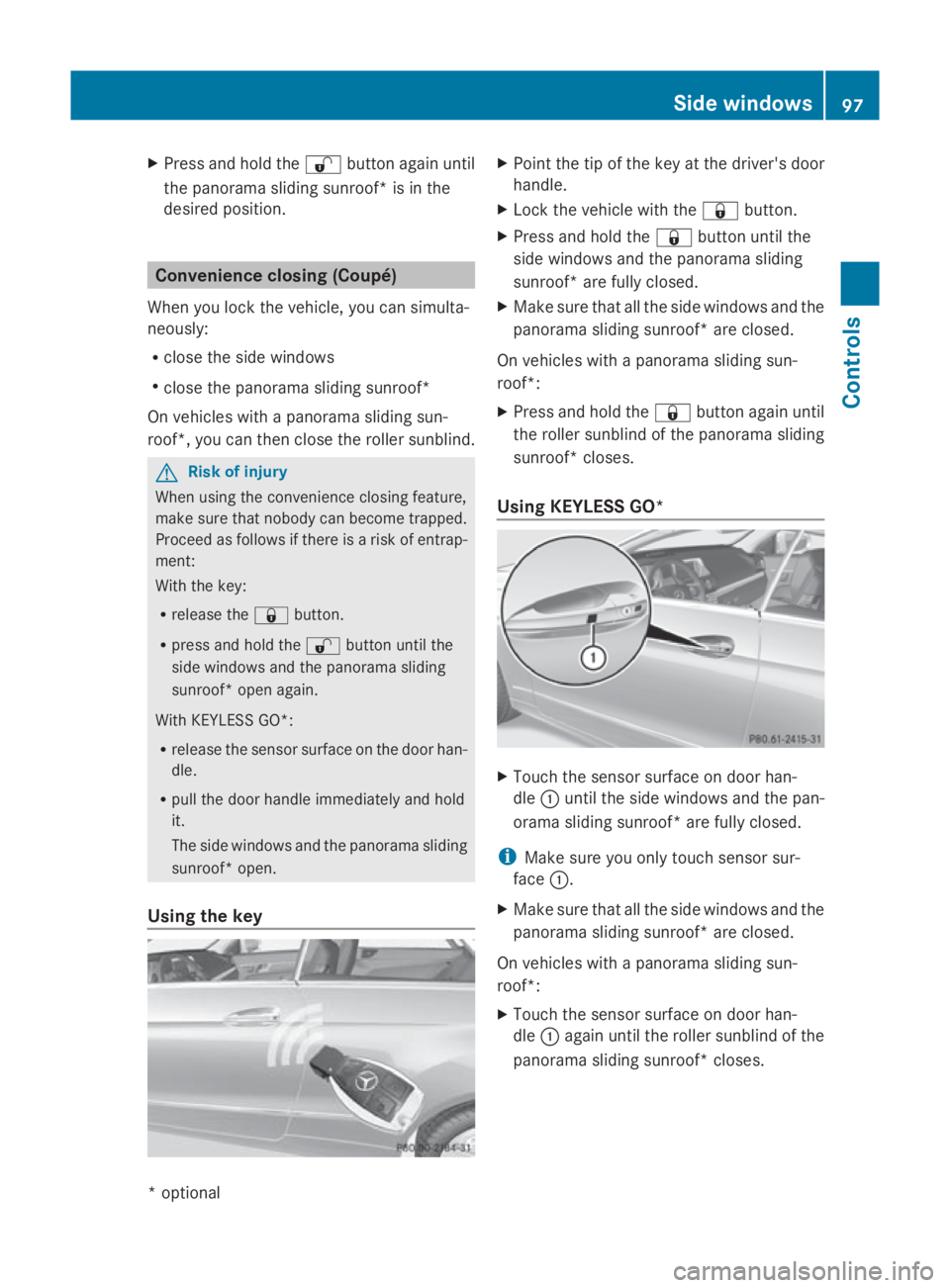
Using the key X
Point the tip of the key at the driver's door
handle.
X Lock the vehicle with the 0037button.
X Press and hold the 0037button until the
side windows and the panorama sliding
sunroof* are fully closed.
X Make sure that all the side windows and the
panorama sliding sunroof* are closed.
On vehicles with apanorama sliding sun-
roof*:
X Press and hold the 0037button again until
the roller sunblind of the panorama sliding
sunroof* closes.
Using KEYLESS GO* X
Touch the sensor surface on door han-
dle 0046until the side windows and the pan-
orama sliding sunroof* are fully closed.
i Make sure you only touch sensor sur-
face 0046.
X Make sure that all the side windows and the
panorama sliding sunroof* are closed.
On vehicles with apanorama sliding sun-
roof*:
X Touch the sensor surface on door han-
dle 0046again until the roller sunblind of the
panorama sliding sunroof* closes. Side windows
97Controls
*optional
207_AKB; 2; 3, en-GB
mkalafa,
Version: 2.11.8.1 2009-07-23T10:23:49+02:00-Seite 97 Z
Page 101 of 313
Drivin
gand parking Starting th
eengine G
Risk of accident
Do no tplac ea ny objects in th edriver's foot-
well. If you use afloormat or carpet in the
driver's footwell, mak esuret hatitisc orrectly
secure dand that there is sufficien tclearance
fo rt he pedals.
Do no tplac es evera lfloormat sontopof one
another.
Loose objects or th efloormat scould other-
wise get caught between th epedals if you
accelerat eorbrake suddenly. You will then
no tbea ble to brake ,declutch or accelerate
as intended. Thi scould lead to accidents and
injury. G
Risk of poisoning
Never leav ethe engin erunning in enclosed
spaces. The exhaus tgases contain carbon
monoxide. Inhaling exhaus tfumes consti-
tute sah ealth hazard and could lead to loss
of consciousness or eve ndeath.
! Do no tdepress th eaccelerator pedal
when startin gthe engine.
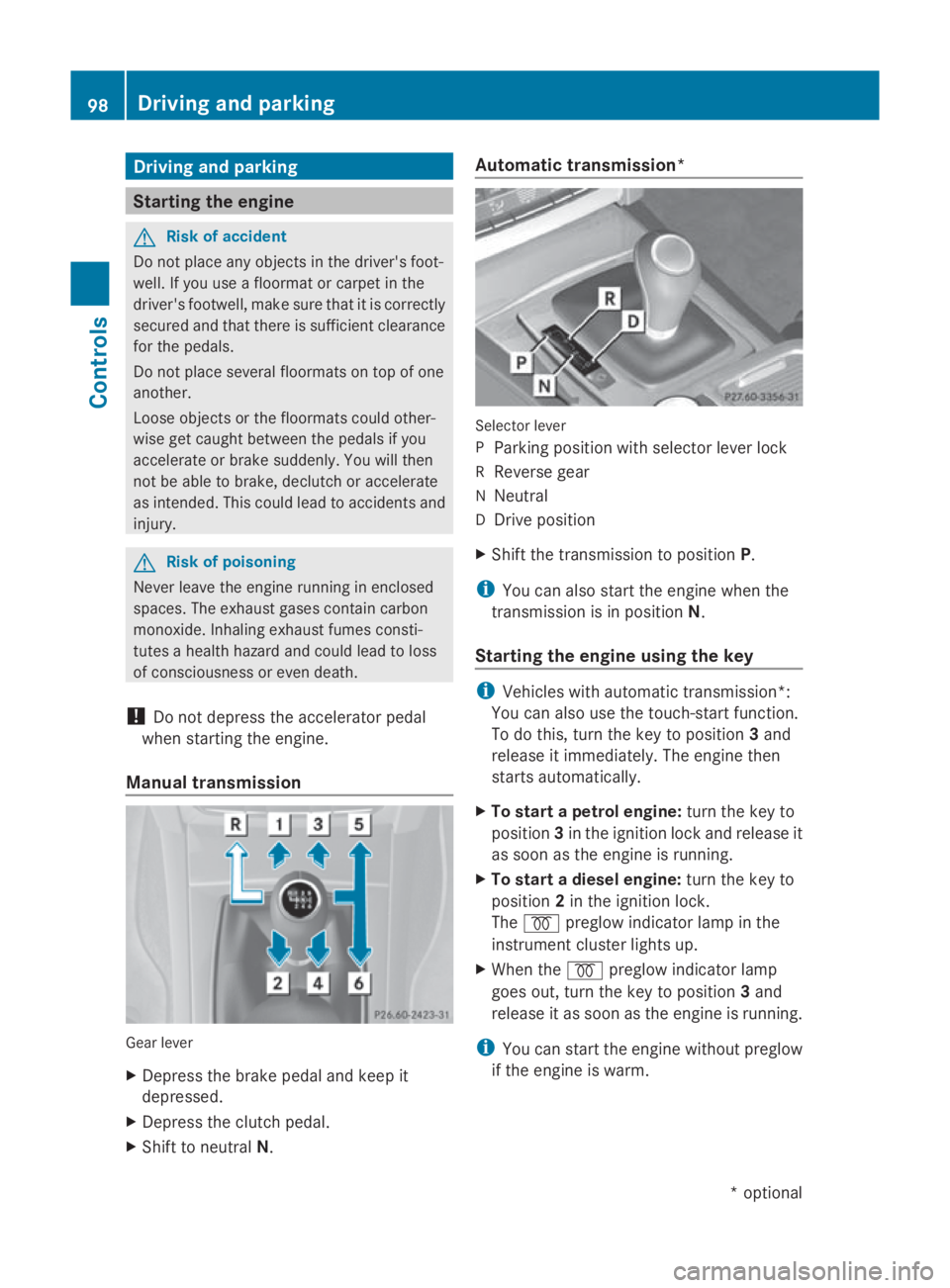
Manual transmission Gear lever
X
Depress th ebrake peda land keep it
depressed.
X Depress th eclutc hpedal.
X Shift to neutral N. Automatic transmission*
Selecto
rlever
P Parking position wit hselecto rlever lock
R Revers egear
N Neutral
D Drive position
X Shift th etransmissio ntoposition P.
i You can also start th eenginew hen the
transmissio nisinpositionN.
Starting th eengin eusing th ekey i
Vehicles wit hautomatic transmission*:
You can also use th etouch-start function.
To do this, turn th ekeyto position 3and
release it immediately. The engin ethen
start sautomatically.
X To star tapetrolengine: turn thekeyto
position 3in th eignition loc kand release it
as soo nastheengin eisrunning.
X To star tadiesel engine: turn thekeyto
position 2in th eignition lock.
The 0028 preglo windicator lamp in the
instrumen tcluster lights up.
X Whe nthe 0028 preglo windicator lamp
goe sout,tur nt he keyt op osition 3and
release it as soo nastheengin eisrunning.
i You can start th eenginew ithout preglow
if th eengineisw arm. 98
Driving an
dpark ingCont rols
*optio nal
207_AKB; 2; 3, en-GB
mkalafa
,V ersion: 2.11.8.1
2009-07-23T10:23:49+02:00
-Seite 98
Page 102 of 313
Starting the engine using KEYLESS-
GO* G
Risk of injury
Your vehicle can be started using avalid KEY-
LESS-GO* key. For this reason, children
should never be left unsupervised in the vehi-
cle. Always take the key with you when leaving
the vehicle, even if you are only leaving it for
as hort time.
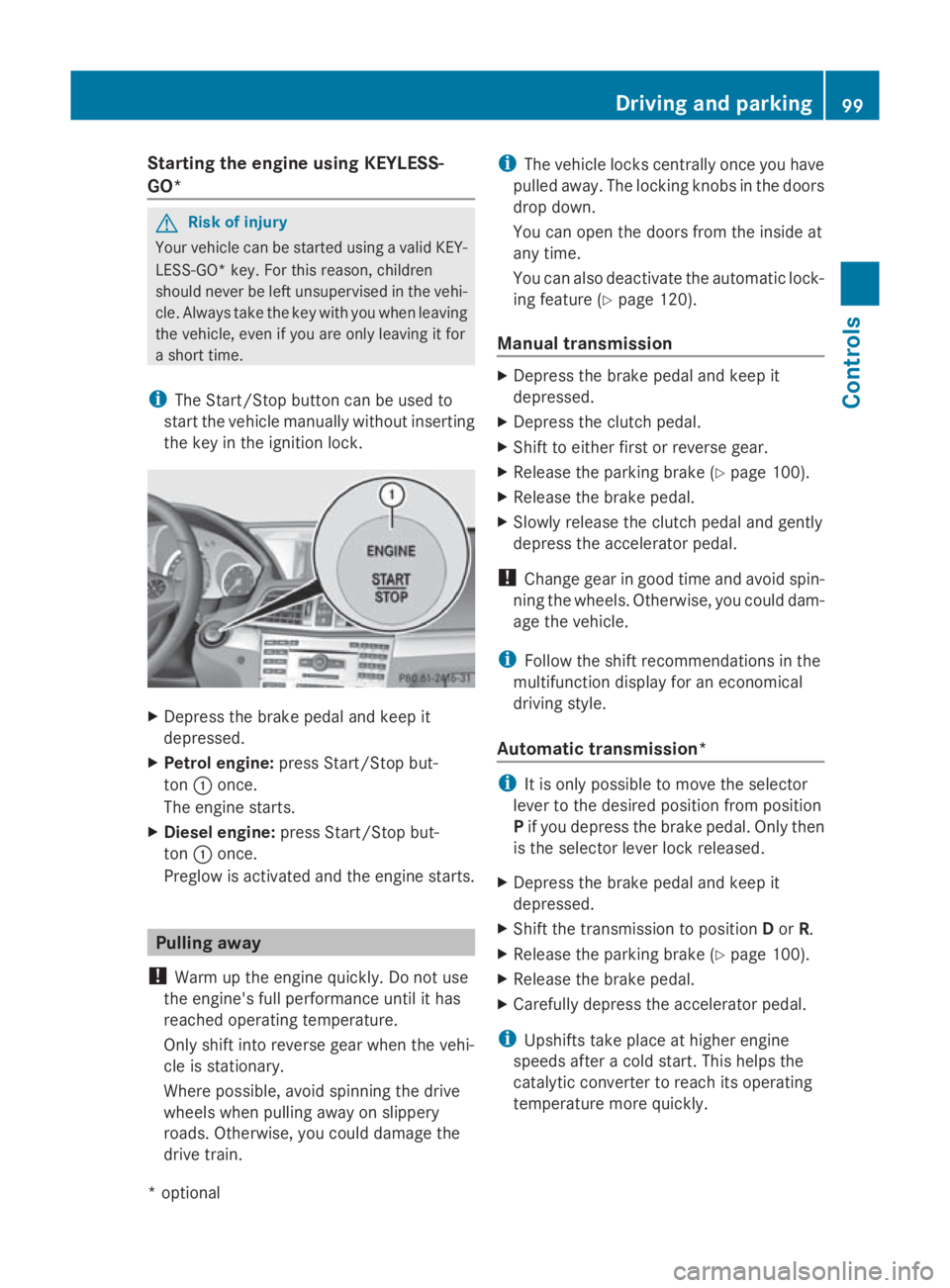
i The Start/Stop button can be used to
start the vehicle manually without inserting
the key in the ignition lock. X
Depress the brake pedal and keep it
depressed.
X Petrol engine: press Start/Stop but-
ton 0046once.
The engine starts.
X Diesele ngine:press Start/Stop but-
ton 0046once.
Preglow is activated and the engine starts. Pulling away
! Warm up the engine quickly. Do not use
the engine's full performanc euntil it has
reached operating temperature.
Only shift into reverse gear when the vehi-
cle is stationary.
Where possible, avoid spinning the drive
wheels when pulling away on slippery
roads. Otherwise, you could damage the
drive train. i
The vehicle locks centrally once you have
pulleda way.The locking knobs in the doors
drop down.
You can open the doors from the inside at
any time.
You can also deactivate the automatic lock-
ing feature (Y page 120).
Manual transmission X
Depress the brake pedal and keep it
depressed.
X Depress the clutch pedal.
X Shift to either first or reverse gear.
X Release the parking brake (Y page 100).
X Release the brake pedal.
X Slowly release the clutch pedal and gently
depress the accelerator pedal.
! Change gear in good time and avoid spin-
ning the wheels. Otherwise, you could dam-
age the vehicle.
i Follow the shift recommendations in the
multifunction display for an economical
driving style.
Automatic transmission* i
It is only possible to move the selector
lever to the desired position from position
P if you depress the brake pedal. Only then
is the selector lever lock released.
X Depress the brake pedal and keep it
depressed.
X Shift the transmission to position Dor R.
X Release the parking brake (Y page 100).
X Release the brake pedal.
X Carefull ydepress the accelerator pedal.
i Upshifts take place at higher engine
speeds after acold start. This helps the
catalytic converter to reach its operating
temperature more quickly. Driving and parking
99Controls
*optional
207_AKB; 2; 3, en-GB
mkalafa,
Version: 2.11.8.1 2009-07-23T10:23:49+02:00-Seite 99 Z
Page 103 of 313
Hill start assist
Hill start assist help
syou when pulling away
forwards or in reverse on an uphill gradient.
It hold sthe vehicl efor as hort time after you
have removed yourf oot from the brake pedal.
This gives you time to move yourf oot from
the brake peda ltothe accelerator peda land
depress it before the vehicl ebegins to roll. G
Risk of accident
Never leave the vehicl ewhen it is held by hill
start assist. After approximately one second,
hil lstart assist wil lnolonger brake yourv ehi-
cle and it coul droll away.
X Take yourf oot off the brake pedal.
i Once you have taken yourf oot off the
brake pedal, the vehicl eisheld for around
one second.
X Pulla way.
Hill start assist willn ot function if:
R you are pulling away on aleve lroad or a
downhill gradient.
R on vehicles with automatic transmission*,
the transmission is in position N.
R the vehicl eissecure dwith the parking
brake.
R ESP ®
is malfunctioning. Parking
G
Risk of accident
Only remove the key from the ignitio nlock
when the vehicl eisstationary, as you cannot
steer the vehicl ewhen the key is removed.
Never leave children unsupervised in the vehi-
cle. They coul drelease the parking brake. This
coul dleadtoas erious or fatal accident. G
Risk of fire
Make sure that the exhaust system does not
under any circumstances come into contact
with easily ignitable material such as dry grass or petrol
.Otherwise, the flammable material
may ignite and set the vehicl eonfire.
To ensure that the vehicl eissecure dagainst
rolling away unintentionally:
R the parking brake must be applied
R on vehicles with manua ltransmission,
engag efirst gearorr everse gear
R on vehicles with automatic transmission*,
the transmission must be in position Pand
the key must be removed from the ignition
lock
R on steep uphill or downhill gradients, turn
the front wheels toward sthe kerb
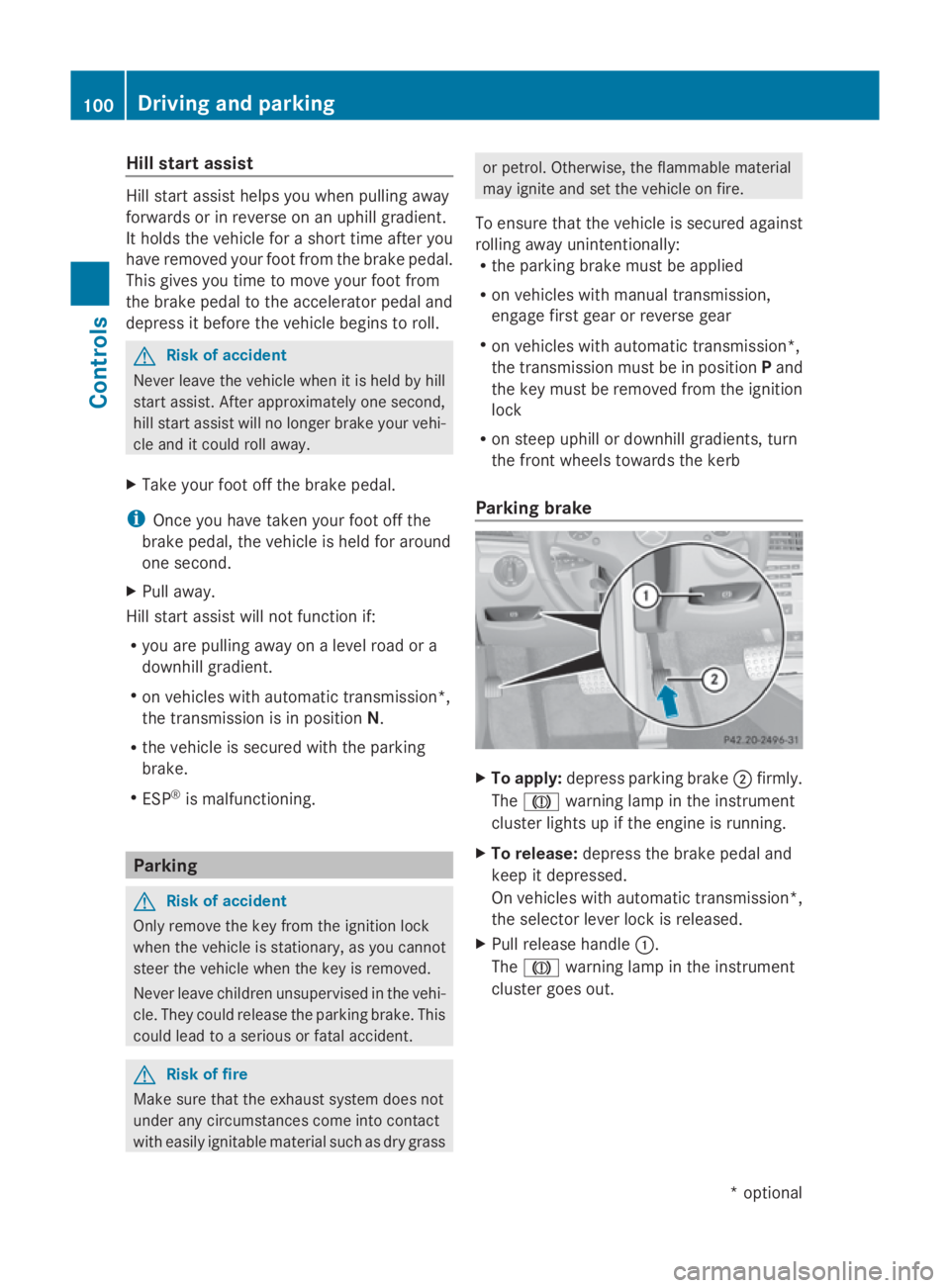
Parking brake X
To apply: depress parking brake 0047firmly.
The 004D warning lampint he instrument
cluster lights up if the engine is running.
X To release: depress the brake peda land
keep it depressed.
On vehicles with automatic transmission*,
the selector leve rlock is released.
X Pullr elease handle 0046.
The 004D warning lampint he instrument
cluster goes out. 100
Driving and parkingControls
*o
ptional
207_AKB; 2; 3, en-GB
mkalafa,
Version: 2.11.8.1 2009-07-23T10:23:49+02:00-Seite 100
Page 104 of 313
Switching off the engine
G
Risk of accident
If the engine is not running, there is no power
assistance for the steering and brakes. Steer-
ing and braking will then require significantly
greater effort.
As aresult, you might lose control of the vehi-
cle, cause an accident and injure yourself and
others.
Therefore, do not switch off the engine while
you are driving.
Vehicles with manualt ransmission X
Shift to either first or reverse gear.
X Turn the key to position 0in the ignition
lock and remove it.
The immobiliser is activated.
Vehicles with automatic transmission* X
Shift the transmission to position P.
Using the key
X Turn the key to position 0in the ignition
lock and remove it.
The immobiliser is activated.
i The key can only be removed when the
selector lever is in position P.
Using KEYLESS GO*
X Press the Start/Stop button (Y page 66).
The engine stops and all the indicator
lamps in the instrumen tcluster go out
(Y page 25).
i The engine can be turned off while the
vehicle is in motion by pressing and holding
the Start/Stop button for three seconds. Transmission
Notes on the transmission
G
Risk of accident
The movement of the pedals must not be
impaired in any way. Do not keep any objects
in the driver's footwell. Make sure that floor-
mats or carpets are correctly secured and
that there is sufficient clearance for the ped-
als.
Do not place several floormats on top of one
another. G
Risk of accident
Do not change down for additional engine
braking on aslippery road surface. This could
cause the drive wheels to lose their grip and
the vehicle could skid. This could cause you
to lose control of your vehicle and cause an
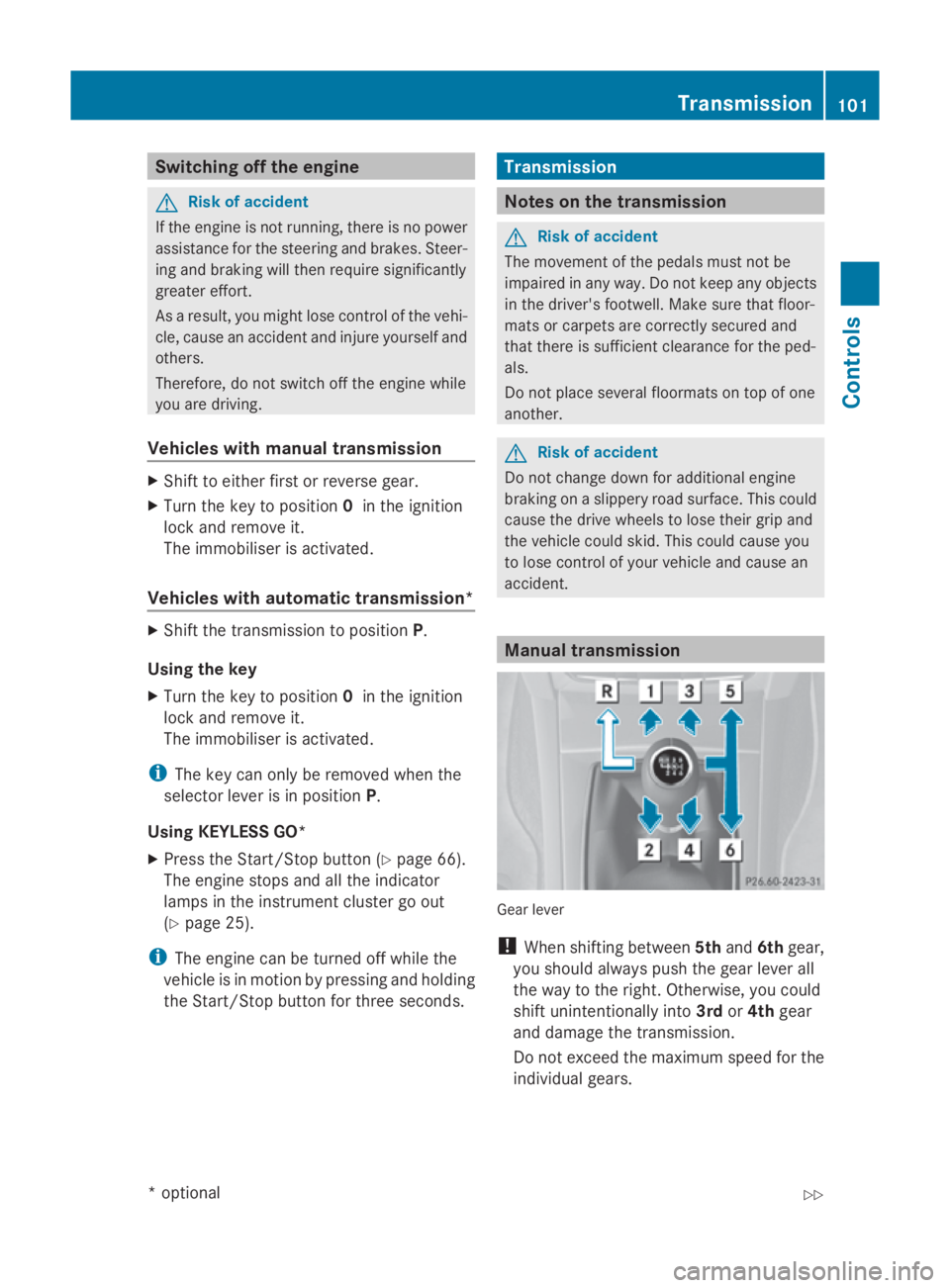
accident. Manual transmission
Gear lever
!
When shifting between 5thand 6thgear,
you should always push the gear lever all
the way to the right. Otherwise, you could
shift unintentionally into 3rdor4th gear
and damage the transmission.
Do not exceed the maximum speed for the
individual gears. Transmission
101Controls
*optional
207_AKB; 2; 3, en-GB
mkalafa,
Version: 2.11.8.1 2009-07-23T10:23:49+02:00-Seite 101 Z
Page 105 of 313
Shifting dow
nattoo high aspeed (trans-
missio nbraking) can cause the engine to
overrev ,leadin gtoe ngine damage.
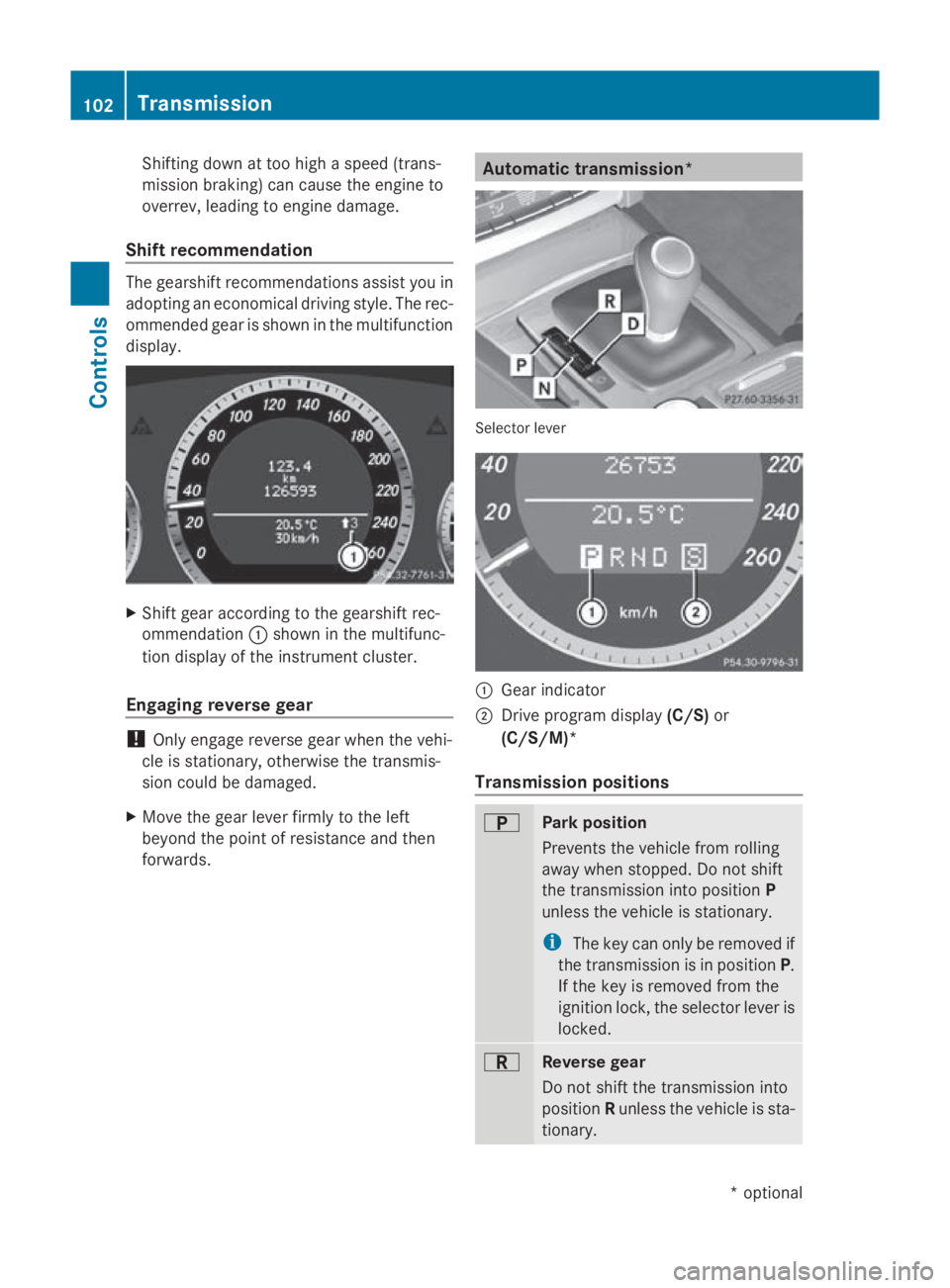
Shift recommendation The gearshift recommendations assis
tyou in
adopting an economica ldriving style .The rec-
ommended gea risshown in the multifunction
display. X
Shift gea raccording to the gearshift rec-
ommendation 0046shown in the multifunc-
tion display of the instrument cluster.
Engagin greverse gear !
Only engage reverse gea rwhent he vehi-
cle is stationary ,otherwise the transmis-
sio nc ould be damaged.
X Mov ethe gea rlev er firmly to the left
beyond the point of resistance and then
forwards. Automatic transmission*
Selector lever
0046
Gear indicator
0047 Drive progra mdisplay (C/S) or
(C/S/M)*
Transmission positions 0045
Park position
Prevents the vehicl
efrom rolling
away when stopped. Do not shift
the transmissio ninto position P
unless the vehicl eisstationary.
i The key can onl yberemoved if
the transmissio nisinp osition P.
If the key is removed from the
ignition lock, the selector lever is
locked. 0046
Revers
egear
Do not shift the transmissio ninto
position Runless the vehicl eissta-
tionary. 102
TransmissionControls
*o
ptional
207_AKB; 2; 3, en-GB
mkalafa
,V ersion: 2.11.8.1
2009-07-23T10:23:49+02:00
-Seite 102
Page 110 of 313
lamps, display messages or system failures.
The vehicle's handlin gcharacteristics may be
affected. Adjust your drivin gstyle and speed
accordingly.
Immediately consult aqualified specialist
workshop which has the necessary specialist
knowledge and tools to carr yout the work
required. Mercedes-Ben zrecommends that
you use aMercedes-Ben zService Centre for
this purpose .Inparticular, work relevant to
safet yoro nsafety-related systems must be
carried out at aqualified specialist workshop. Coolant temperatur
egauge
The coolan ttemperature gauge is in the
instrumen tcluster on the right-han dside.
Under normal operating condition sand with
the specified coolan tlevel, the coolan ttem-
perature may rise to 120 †. The coolan ttem-
perature may rise to the top end of the scale
at high outside temperatures and on long
uphill stretches. Speedometer with segments
The segment sinthe speedometer indicate
which speed rang eisavailable.
Cruise control mode:
The segment slight up fro mthe stored speed
to the maximum speed.
Variable Speedtronic mode:
The segment slight up fro mthe star tofthe
scale to the selected limit speed.
Distronic Plus* mode:
One or two segment saround the stored
speed light up. Rev counter
The red band in the rev counter indicates the
engine's overrevving range. The fuel supply is
interrupted to protect the engin ewhen the
red band is reached. !
Do not drive in the overrevving range.
Doin gsow ill damage the engine. Outside temperatur
edisplay G
Risk of accident
At temperatures just above freezin gpoint ,the
street may be icy, especially in wooded areas
or on bridges .Ifyou do not adapt your driving
style to the conditions, the vehicle could skid.
For this reason ,adapt your drivin gstyle and
speed to the weathe rconditions.
Changes in the outside temperature are dis-
played after ashor tdelay. On-board computer
Points to remember
The on-board computer is activate dassoon
as you turn the key to position 1in the ignition
lock. G
Risk of accident
Only use the on-board computer when road
and traffic condition spermit. You would oth-
erwise be distracted and unable to concen-
trate properly on driving, and could cause an
accident. Multifunction steering wheel
You can control the multi-function display and
the settings in the on-board computer using On-board computer
107Controls
*optional
207_AKB; 2; 3, en-GB
mkalafa,
Version: 2.11.8.1 2009-07-23T10:23:49+02:00-Seite1 07 Z
Page 123 of 313
Switching Adaptive Highbeam Assist*
on/off
X
Press the 0040or003E button on the steer-
ing wheel to select the Settingsmenu.
X Press the 003Dor003C button to select the
Light submenu.
X Press the 0064button to confirm.
X Press the 003Dor003C button to select the
Adaptive Main-beam Assist: function.
You will see the selected setting: onor
off.
X Press the 0064button to save the setting.
Activating or deactivating the surround
lighting and exterior lighting delayed
switch-off
The Surround lighting: function allows
you to set whether the exterior lighting should
come on when it is dark:
R for 40 seconds after unlocking the vehicle
with the key
The exterior lighting switches off when you
open the driver's door.
R for 15 seconds after switching off the
engine and closing the doors
If the engine is switched off and then none
of the doors are opened, or if an open door
is not closed, the exterior lighting goes out
after 60 seconds.
If you activate the Surround lighting:
function, the following light up:
R side lamps
R dipped-beam headlamps 31
R daytime driving lights
R licence plate lighting
X Press the 0040or003E button on the steer-
ing wheel to select the Settingsmenu.
X Press the 003Dor003C button to select the
Light submenu.
X Press the 0064button to confirm. X
Press the 003Dor003C button to select the
Surround lighting: function.
You will see the selected setting: onor
off.
X Press the 0064button to save the setting.
Deactivating the delayed switch-of ftempora-
rily:
X Before leaving the vehicle, turn the key to
position 0in the ignition lock.
X Turn the key to position 2in the ignition
lock and back to position 0.
The delayed switch-of fisdeactivated.
Delayed switch-of fisreactivated the next
time you start the engine.
Activating/deactivating the interior light-
ing delayed switch-off
When you activate the Interior lighting
delay sw. off: function and remove the
key from the ignition lock, the interior lighting
remains on for around 20 seconds if it is dark.
X Press the 0040or003E button on the steer-
ing wheel to select the Settingsmenu.
X Press the 003Dor003C button to select the
Light submenu.
X Press the 0064button to confirm.
X Press the 003Dor003C button to select the
Interior lighting delay sw. off:
function.
You will see the selected setting: onor
off.
X Press the 0064button to save the setting.
Vehicle Set permanent SPEEDTRONIC with
Limit
speed (winter tyres): (Ypage 135).
Activating/deactivating automatic door
locking
If you select the Automatic door locks:
function, the vehicle is centrally locked above
as peed of around 15 km/h.
31 Only for vehicles without front foglamps*. 120
On-board computerControls
*o
ptional
207_AKB; 2; 3, en-GB
mkalafa,
Version: 2.11.8.1 2009-07-23T10:23:49+02:00-Seite 120
Page 124 of 313
For more information on the automatic door
locking feature ,see (Y page 63).
X Pres sthe 0040 or003E button on the steer-
ing wheel to select the Settingsmenu.
X Pres sthe 003D or003C button to select the
Vehicle submenu.
X Pres sthe 0064 button to confirm.
X Pres sthe 003D or003C button to select the
Automati cdoor locks: function.
You will see the selected setting: onor
off.
X Pres sthe 0064 button to sav ethe setting.
Activating/deactivating the radar sensor
system*
i You mus tdeactivate the radar senso rsys-
tem in certain countries and nea rradio
telescop efacilities .You will find further
information under "Radar senso rsystem"
in the index.
Vehicles with anavigation system*: the radar
senso rsystem is deactivated automaticall yif
yo ua re clos etoradio telescop efacilities.
The following systems are switched off when
the radar senso rsystem is deactivated:
R DISTRONIC PLUS* (Y page 125)
R BAS PLUS* (Y page 53)
R PRE-SAFE ®
Brake *(Ypage 56)
X Pres sthe 0040 or003E button on the steer-
ing wheel to select the Settingsmenu.
X Pres sthe 003D or003C button to select the
Vehicle submenu.
X Pres sthe 0064 button to confirm.
X Pres sthe 003C or003D button to select the
Rada rsensor (See Owner's Man.):
You will see the selected setting: onor
off.
X Pres sthe 0064 button to sav ethe setting. Convenience Activating/deactivating the EASY-
ENTRY/EXI
Tfeature*
You can us ethe Easy Entry/Exit: function
to activate or deactivate the easy-entry/exit
feature (Y page 72). G
Risk of injury
The steering wheel move swhent he EASY-
ENTRY/EXIT feature is active. There is arisk
of occupants becoming trapped .Befor eacti-
vating the EASY-ENTRY/EXIT feature ,make
sur ethat nobody can become trapped.
Do not leave childre nunsupervised in the
vehicle, eve nifthey are secured in achild
restraint system. The childre ncould ope nthe
driver' sdoorand thereby unintentionall yacti-
vate the EASY-ENTRY/EXIT feature and
become trapped.
X Pres sthe 0040 or003E button on the steer-
ing wheel to select the Settingsmenu.
X Pres sthe 003D or003C button to select the
Convenience submenu.
X Pres sthe 0064 button to confirm.
X Pres sthe 003D or003C button to select the
Easy Entry/Exit: function.
You will see the selected setting: onor
off.
X Pres sthe 0064 button to sav ethe setting.
Switchin gthe belt adjustmen ton/off
Further information on bel tadjustment
(Y page 79).
X Pres sthe 0040 or003E button on the steer-
ing wheel to select the Settingsmenu.
X Pres sthe 003D or003C button to select the
Convenience submenu.
X Pres sthe 0064 button to confirm.
X Pres sthe 003D or003C button to select the
Belt adjustment: function.
You will see the selected setting: onor
off.
X Pres sthe 0064 button to sav ethe setting. On-board computer
121Controls
*optional
207_AKB; 2; 3, en-GB
mkalafa
,V ersion: 2.11.8.1
2009-07-23T10:23:49+02:00
-Seite 121 Z
Page 125 of 313
Switching the fold in mirrors when lock-
ing* function on/off
If you switch on the Fold mirrors in when
locking: function, the exterior mirrors fold
in when you lock the vehicle. When you
unlock the vehicle and then open the driver's
or front-passenger door, the exterior mirrors
fold out again.
If you have switched the function on and you
fold the exterior mirrors in using the button
on the door (Y page 74), they will not fold out
automatically. The exterior mirrors can then
only be folded out using the button on the
door.
X Press the 0040or003E button on the steer-
ing wheel to select the Settingsmenu.
X Press the 003Dor003C button to select the
Convenience submenu.
X Press the 0064button to confirm.
X Press the 003Dor003C button to select the
Fold in mirrors when locking: func-
tion.
You will see the selected setting: onor
off.
X Press the 0064button to save the setting.
Restoring the factory settings For safety reasons, not all functions are reset:
the
Limit speed (winter tyres): func-
tion in permanent SPEEDTRONIC can only be
set in the Vehiclesubmenu. If you want to
reset the Daytime driving lamps: in the
Light submenu, you must turn the key in the
ignition lock to position 1.
X Press the 0040or003E button on the steer-
ing wheel to select the Settingsmenu.
X Press the 003Dor003C button to select the
Factory setting submenu.
X Press the 0064button to confirm.
The Reset all settings? message
appears. X
Press the 003Dor003C button to select
Yes orNo.
X Press the 0064button to confirm the selec-
tion.
If you have selected Yes,the multifunction
display shows aconfirmation message. Driving systems
Overview of driving systems
The vehicle's driving systems are described
on the following pages:
R cruise control, Distronic Plus* and Speed-
tronic, which are used to control the speed
of the vehicle
R HOLD function, which makes pulling away
easier, particularly on steep uphill gradi-
ents
R dynamic handling package with sports
mode*, which is used to adjust the vehi-
cle's suspension system
R PARKTRONIC* and Parking Guidance*,
which assist you in finding aparking space,
as well as when manoeuvring and parking
R reversing camera*, which assists you when
parking and manoeuvring
R ATTENTION ASSIST, which helps you
detect tiredness or increasing lapses in
concentration
R Speed Limit Assist*, which shows you
speed limits that are detected in the multi-
function display
The ABS,B AS,BAS PLUS* ,adaptive brake
lights, ESP ®
,E BV and ADAPTIVE BRAKE driv-
ing safety systems and the PRE-SAFE ®
Brake* are described in the "Driving safety
systems" section (Y page 52). Cruise control
Cruise control maintains aconstant road
speed for you. It brakes automatically in order 122
Driving systemsControls
*o
ptional
207_AKB; 2; 3, en-GB
mkalafa,
Version: 2.11.8.1 2009-07-23T10:23:49+02:00-Seite 122