ESC MERCEDES-BENZ E-Class COUPE 2010 C212 Comand Manual
[x] Cancel search | Manufacturer: MERCEDES-BENZ, Model Year: 2010, Model line: E-Class COUPE, Model: MERCEDES-BENZ E-Class COUPE 2010 C212Pages: 224, PDF Size: 7.4 MB
Page 68 of 224
XIn the Enter Destination menu select ZIP.
The zip code list is displayed with or without
predictive speller ( Y page 64). The display
of the predictive speller depends on how
many zip codes are available for the
selected state/province.
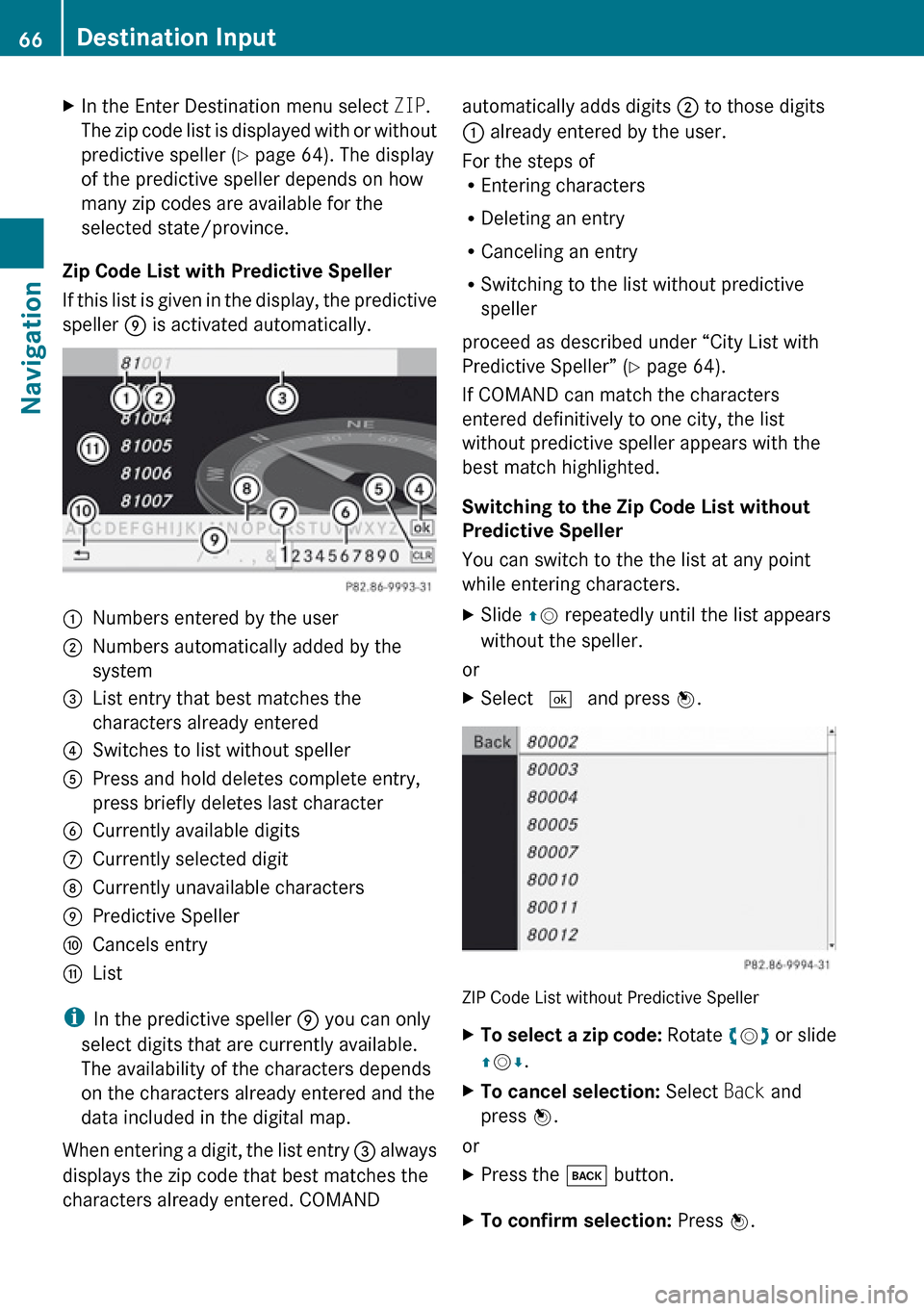
Zip Code List with Predictive Speller
If this list is given in the display, the predictive
speller 9 is activated automatically.
1Numbers entered by the user2Numbers automatically added by the
system3List entry that best matches the
characters already entered4Switches to list without speller5Press and hold deletes complete entry,
press briefly deletes last character6Currently available digits7Currently selected digit8Currently unavailable characters9Predictive SpelleraCancels entrybList
i In the predictive speller 9 you can only
select digits that are currently available.
The availability of the characters depends
on the characters already entered and the
data included in the digital map.
When entering a digit, the list entry 3 always
displays the zip code that best matches the
characters already entered. COMAND
automatically adds digits 2 to those digits
1 already entered by the user.
For the steps of
R Entering characters
R Deleting an entry
R Canceling an entry
R Switching to the list without predictive
speller
proceed as described under “City List with
Predictive Speller” ( Y page 64).
If COMAND can match the characters
entered definitively to one city, the list
without predictive speller appears with the
best match highlighted.
Switching to the Zip Code List without
Predictive Speller
You can switch to the the list at any point
while entering characters.XSlide qm repeatedly until the list appears
without the speller.
or
XSelect d and press n.
ZIP Code List without Predictive Speller
XTo select a zip code: Rotate ym z or slide
q m r.XTo cancel selection: Select Back and
press n.
or
XPress the k button.XTo confirm selection: Press n.66Destination InputNavigation
Page 69 of 224
If COMAND can assign the zip code to a
unique address, the Enter Destination menu
is displayed again. The address data has been
entered automatically. Now you can start the
route calculation ( Y page 70).
If COMAND is unable to assign the zip to a
unique address, the Enter Destination menu
is also displayed again. The zip code has been
entered automatically. To further limit the
choice, you can now enter the street. When
entering the street, only those streets within
the area of the entered zip code are available.
Entering a Street
i Any city center that has already been
entered is deleted when a street is entered.
You can only enter those streets that are
stored in the digital map.
XIn the Enter Destination menu select
Street .
The street list is displayed with or without
predictive speller. The display of the
predictive speller depends on how many
streets are available for the selected city,
state or province.
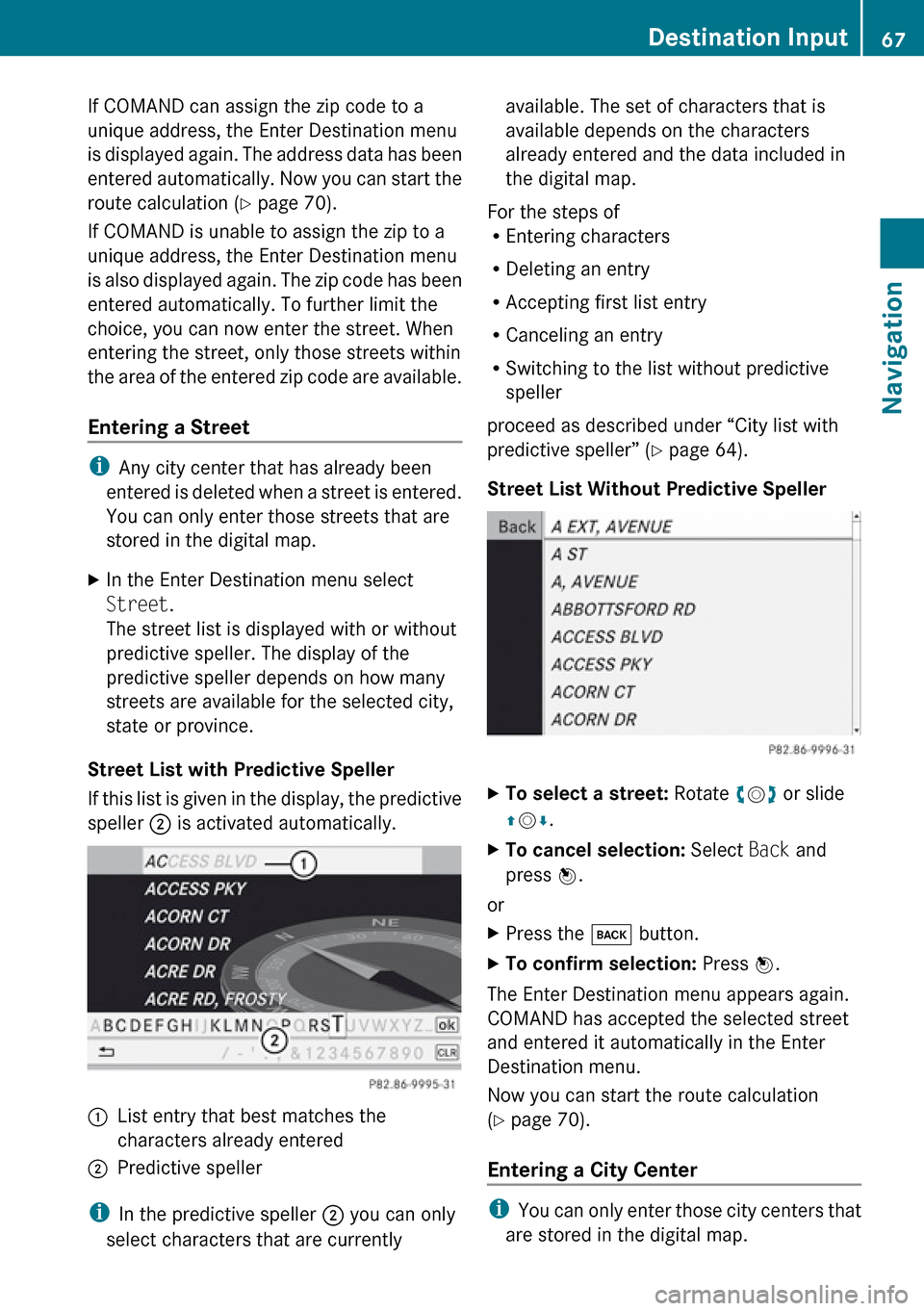
Street List with Predictive Speller
If this list is given in the display, the predictive
speller 2 is activated automatically.
1List entry that best matches the
characters already entered2Predictive speller
i In the predictive speller 2 you can only
select characters that are currently
available. The set of characters that is
available depends on the characters
already entered and the data included in
the digital map.
For the steps of
R Entering characters
R Deleting an entry
R Accepting first list entry
R Canceling an entry
R Switching to the list without predictive
speller
proceed as described under “City list with
predictive speller” ( Y page 64).
Street List Without Predictive SpellerXTo select a street: Rotate ym z or slide
q m r.XTo cancel selection: Select Back and
press n.
or
XPress the k button.XTo confirm selection: Press n.
The Enter Destination menu appears again.
COMAND has accepted the selected street
and entered it automatically in the Enter
Destination menu.
Now you can start the route calculation
( Y page 70).
Entering a City Center
i You can only enter those city centers that
are stored in the digital map.
Destination Input67NavigationZ
Page 70 of 224
XIn the Enter Destination menu select
Center .
The city center list is displayed.XTo select a city center: Rotate ym z or
slide qm r.XTo cancel selection: Select Back and
press n.
or
XPress the k button.XTo confirm selection: Press n.
After the confirmation, the Enter
Destination menu appears again. COMAND
has accepted the selected city center and
entered it automatically in the Enter
Destination menu.
Now you can start the route calculation
( Y page 70).
Entering a House Number
i
It is not possible to enter house numbers
until a street has been entered. You can
only enter house numbers that are stored
in the digital map. The digital map does not
contain all house numbers for all streets.
XIn the Enter Destination menu select No..
The house number list is displayed with or
without predictive speller. The display of
the predictive speller depends on how
many house numbers are available for the
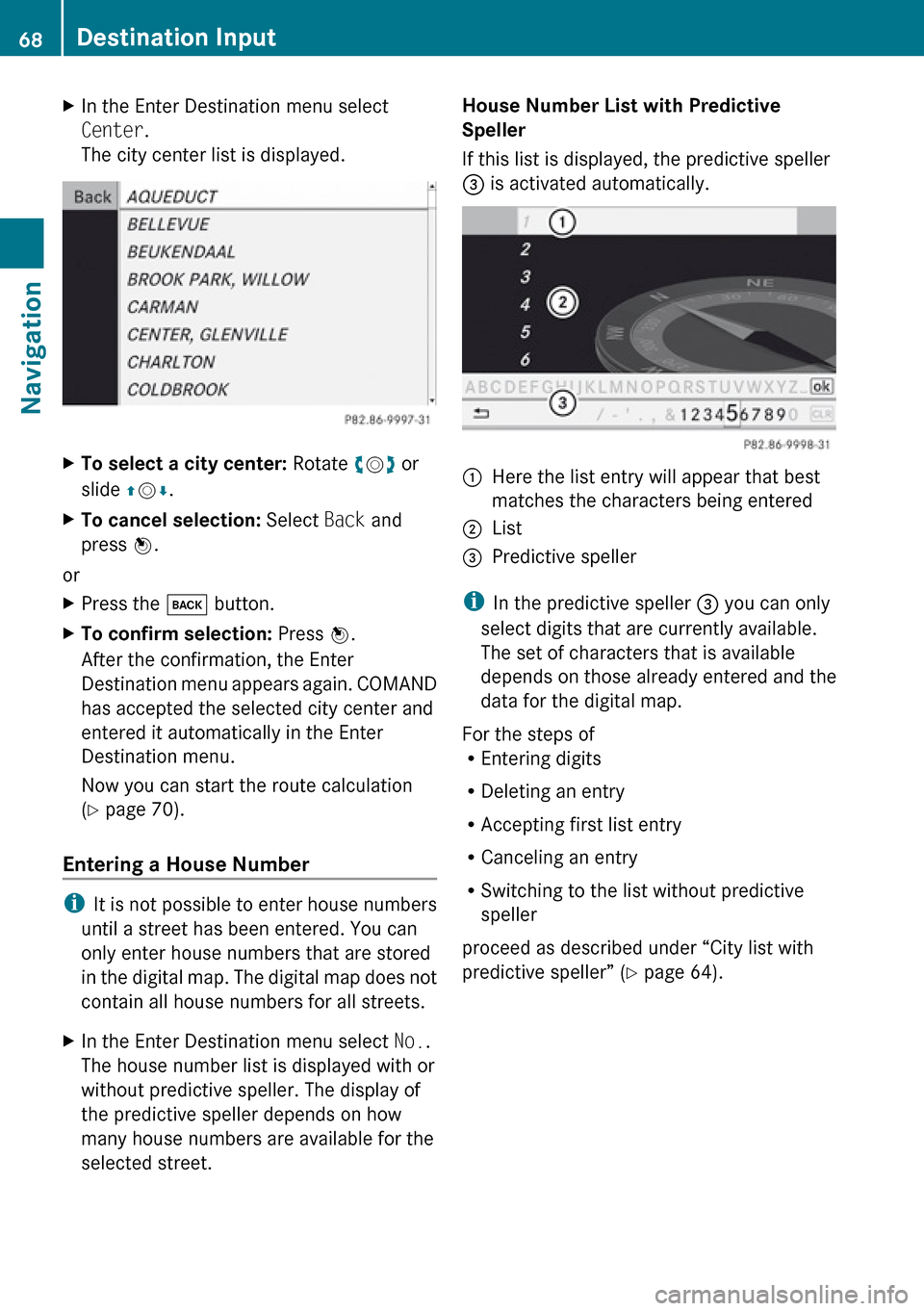
selected street.House Number List with Predictive
Speller
If this list is displayed, the predictive speller
3 is activated automatically.1Here the list entry will appear that best
matches the characters being entered2List3Predictive speller
i In the predictive speller 3 you can only
select digits that are currently available.
The set of characters that is available
depends on those already entered and the
data for the digital map.
For the steps of
R Entering digits
R Deleting an entry
R Accepting first list entry
R Canceling an entry
R Switching to the list without predictive
speller
proceed as described under “City list with
predictive speller” ( Y page 64).
68Destination InputNavigation
Page 71 of 224
House Number List Without Predictive
SpellerXTo select a house number: Rotate ym z
or slide qm r.XTo cancel selection: Select Back and
press n.
or
XPress the k button.XTo confirm selection: Press n.
After the confirmation, the Enter
Destination menu appears again. COMAND
has accepted the selected house number
and entered it automatically in the Enter
Destination menu.
Now you can start the route calculation
( Y page 70).
Entering a Junction
i
A junction can be entered once you have
entered a street ( Y page 67). You can only
enter those juntions that are stored in the
digital map.
XIn the Enter Destination menu select
Intersection .
The junction list is displayed with or without
predictive speller. The display of the
predictive speller depends on how many
junctions are available for the selected
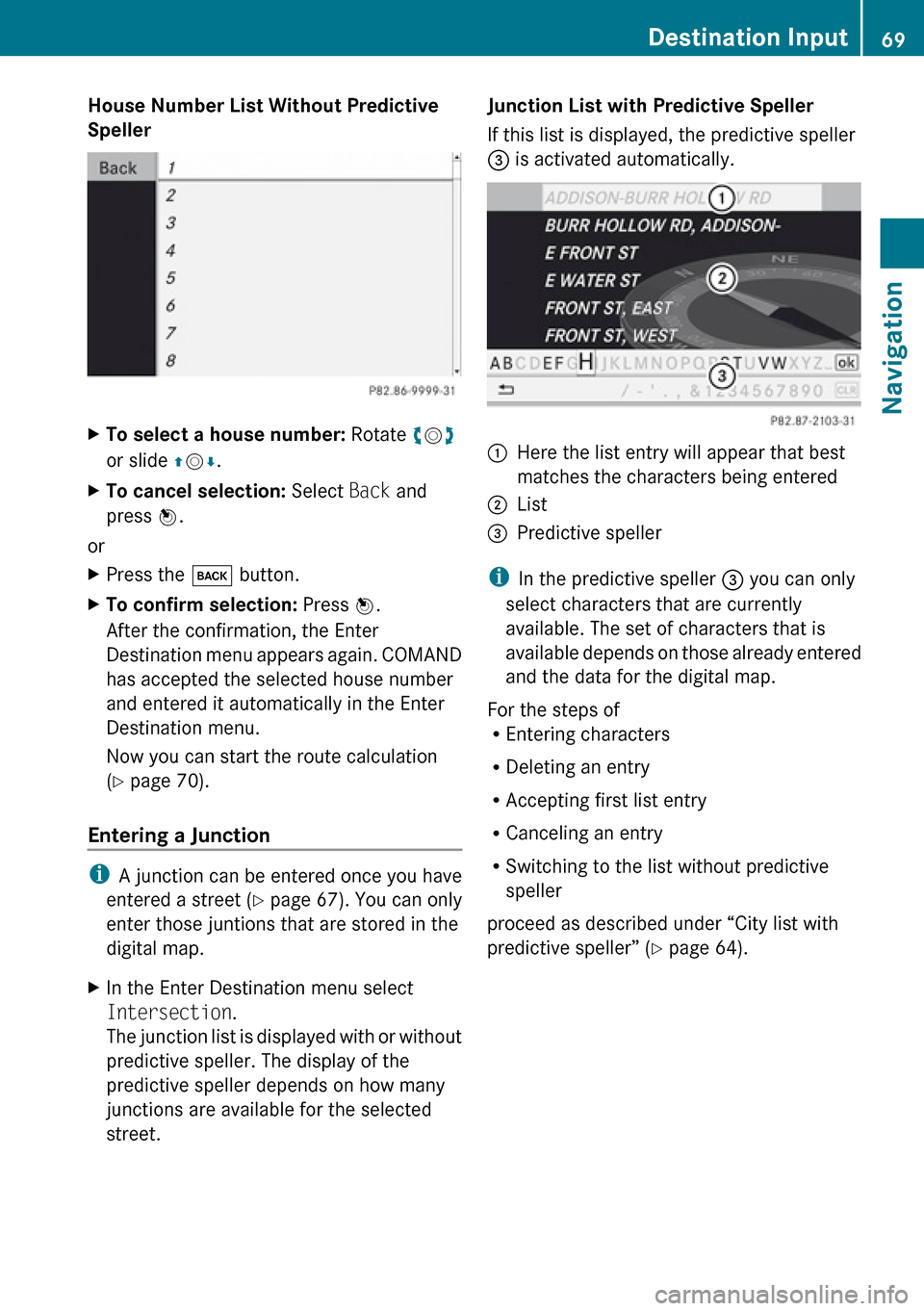
street.Junction List with Predictive Speller
If this list is displayed, the predictive speller
3 is activated automatically.1Here the list entry will appear that best
matches the characters being entered2List3Predictive speller
i In the predictive speller 3 you can only
select characters that are currently
available. The set of characters that is
available depends on those already entered
and the data for the digital map.
For the steps of
R Entering characters
R Deleting an entry
R Accepting first list entry
R Canceling an entry
R Switching to the list without predictive
speller
proceed as described under “City list with
predictive speller” ( Y page 64).
Destination Input69NavigationZ
Page 73 of 224
Entering a Destination from the
Destination Memory XIf necessary switch to navigation mode and
display menu system ( Y page 54).XSelect Destination £From Memory .
The destination memory list with or without
predictive speller is displayed. The display
of the predictive speller depends on how
many entries exist in the destination
memory.( Y page 72).
i
There is always an entry in the destination
memory with the name My Address. You
can assign your home address, for
example, to this entry and select it for route
guidance ( Y page 91). This entry is at the
top of the list in the destination memory.
Destination Memory List with
Predictive Speller
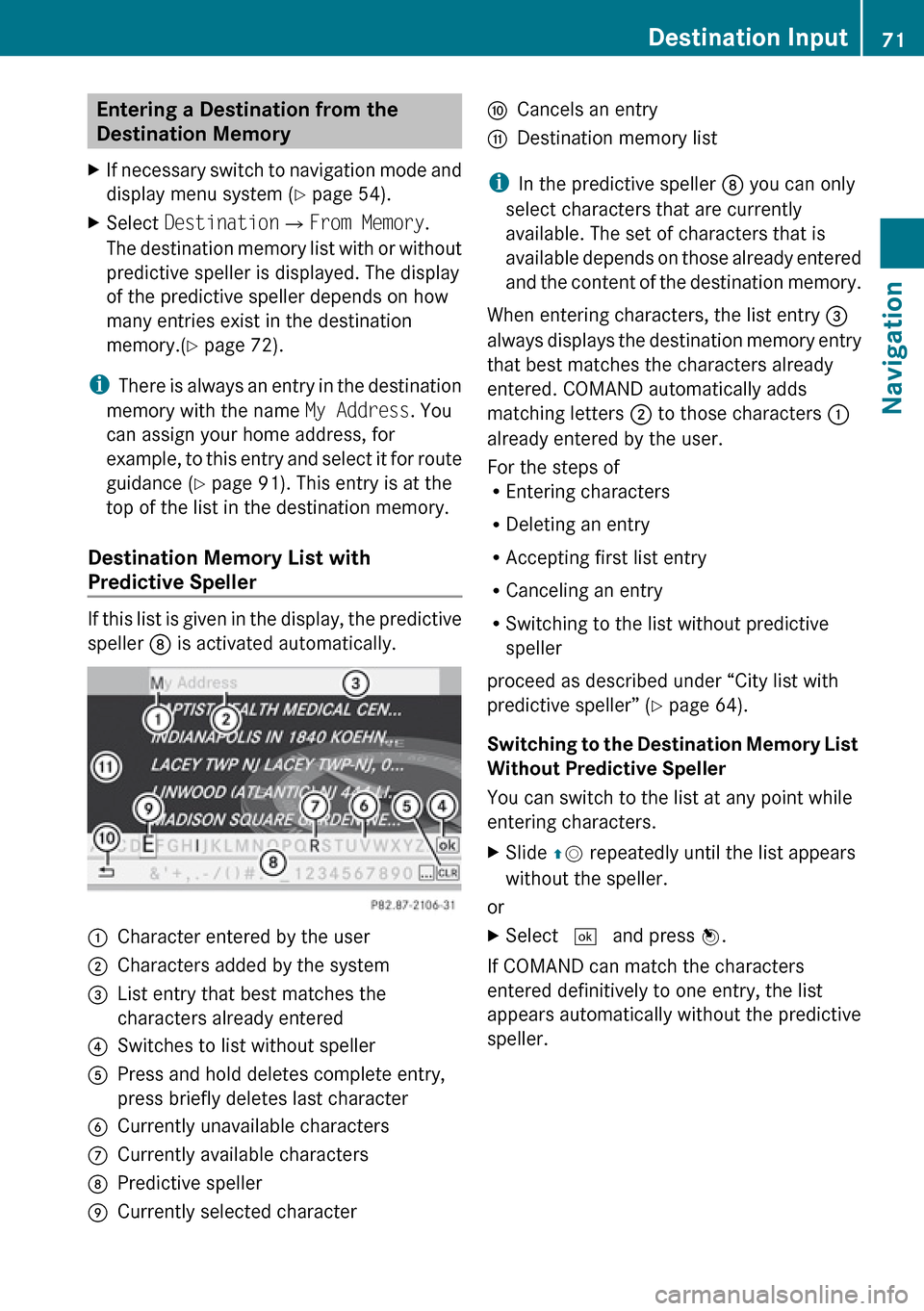
If this list is given in the display, the predictive
speller 8 is activated automatically.
1Character entered by the user2Characters added by the system3List entry that best matches the
characters already entered4Switches to list without speller5Press and hold deletes complete entry,
press briefly deletes last character6Currently unavailable characters7Currently available characters8Predictive speller9Currently selected characteraCancels an entrybDestination memory list
i In the predictive speller 8 you can only
select characters that are currently
available. The set of characters that is
available depends on those already entered
and the content of the destination memory.
When entering characters, the list entry 3
always displays the destination memory entry
that best matches the characters already
entered. COMAND automatically adds
matching letters 2 to those characters 1
already entered by the user.
For the steps of
R Entering characters
R Deleting an entry
R Accepting first list entry
R Canceling an entry
R Switching to the list without predictive
speller
proceed as described under “City list with
predictive speller” ( Y page 64).
Switching to the Destination Memory List
Without Predictive Speller
You can switch to the list at any point while
entering characters.
XSlide qm repeatedly until the list appears
without the speller.
or
XSelect d and press n.
If COMAND can match the characters
entered definitively to one entry, the list
appears automatically without the predictive
speller.
Destination Input71NavigationZ
Page 77 of 224
Entering a POI in the Vicinity of the
Location XIn the map display with the menu system
displayed, select Destination£From
POIs £Current Position .XContinue by selecting the POI category
( Y page 75).
Entering a POI in the Vicinity of a
Specific Location
i Using this option you will get a list of
alphabetically sorted POIs that belong to
the city entered.
Option 1
XIn the map display with the menu system
displayed, select Destination£From
POIs £Other City .XIf necessary proceed as described under
“Selecting a State/Province” ( Y page 63).XTo enter a city: Select City.
The city input menu appears.XProceed as described in the “Entering a
City” section ( Y page 64)XAfter entering the city, continue by
selecting the POI category ( Y page 75).
Option 2
XEnter an address in the Enter Destination
menu ( Y page 63).XSelect POI.XContinue by selecting the POI category
( Y page 75).
Entering POIs via Name Search
i This function gives you access to all POIs
that are available in the digital map.
XIn the map display with the menu system
displayed (Y page 54), select Destination
£ From POIs £Search By Name .
This displays a list of all POIs in the digital
map and the predictive speller.XContinue as described in the “POI List with
Predictive Speller” section ( Y page 78).
Entering a POI via Phone Number
Search
i This function gives you access to all POIs
in the digital map stored with a phone
number.
XIn the map display with the menu system
displayed (Y page 54), select Destination
£ From POIs £ Search By Phone
Number .
This displays a list of all POIs in the digital
map sorted by phone number and the
predictive speller.XContinue as described in the “POI List with
Predictive Speller” section ( Y page 78).
Choosing a POI Category
The categories and POIs available depend on
the area for which you wish to enter the POI.
R POI in local area of destination:
Alphabetically sorted categories and POIs
sorted by distance in the vicinity of the
destination location are available.
R POI in the vicinity of the location:
Alphabetically sorted categories and POIs
sorted by distance in the vicinity of the
vehicle location are available.
R POI in a particular city:
If you have only entered the country and the
city, alphabetically sorted categories and
alphabetically sorted POIs within the city
limits are available.
POI Input75NavigationZ
Page 79 of 224
Switching to the Main Category List
Without Predictive Speller
You can switch to the list at any point while
entering characters.XSlide qm repeatedly until the list appears
without the speller.
or
XSelect d and press n.
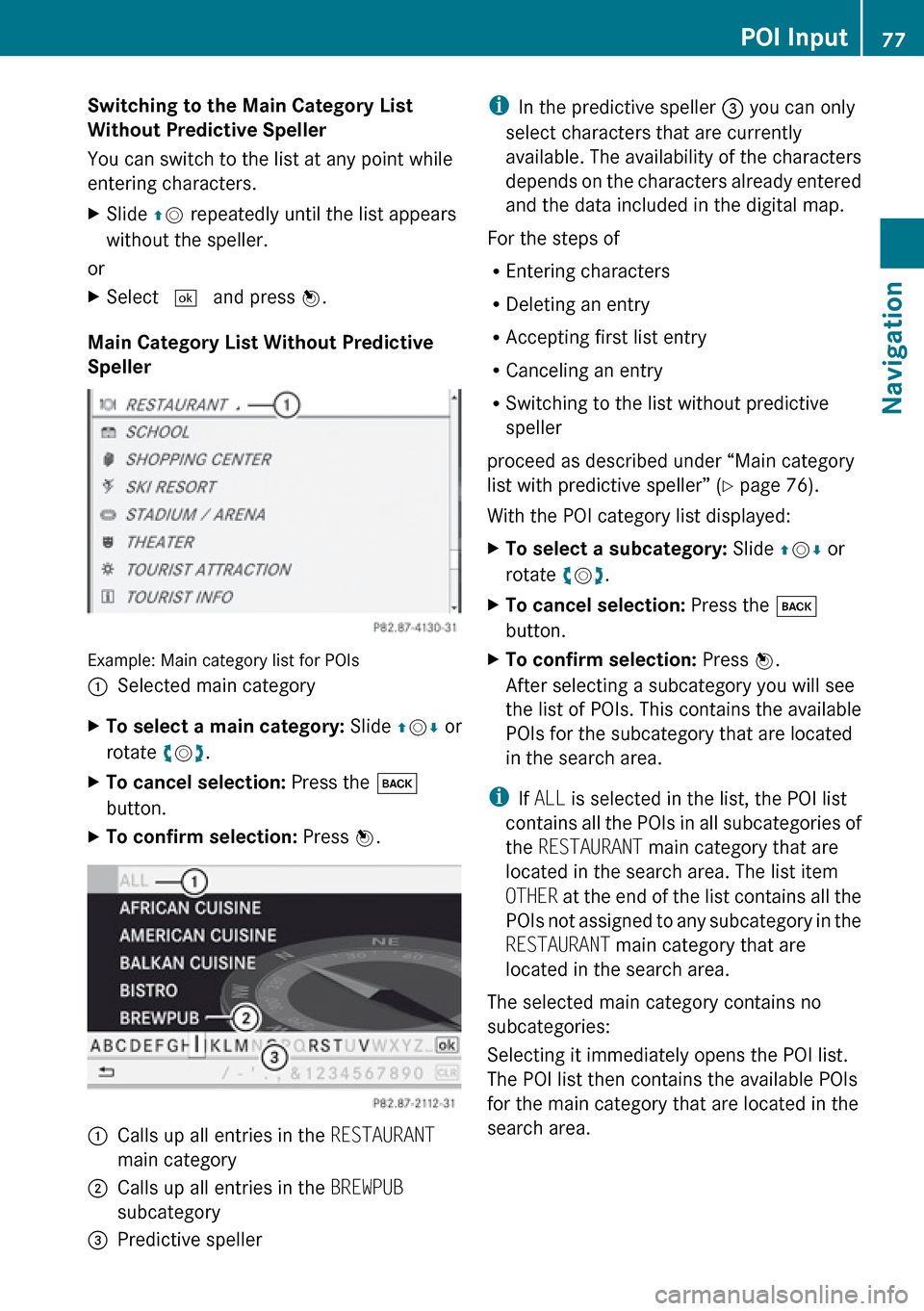
Main Category List Without Predictive
Speller
Example: Main category list for POIs
1Selected main categoryXTo select a main category: Slide qm r or
rotate ym z.XTo cancel selection: Press the k
button.XTo confirm selection: Press n.1Calls up all entries in the RESTAURANT
main category2Calls up all entries in the BREWPUB
subcategory3Predictive spelleri In the predictive speller 3 you can only
select characters that are currently
available. The availability of the characters
depends on the characters already entered
and the data included in the digital map.
For the steps of
R Entering characters
R Deleting an entry
R Accepting first list entry
R Canceling an entry
R Switching to the list without predictive
speller
proceed as described under “Main category
list with predictive speller” ( Y page 76).
With the POI category list displayed:XTo select a subcategory: Slide qm r or
rotate ym z.XTo cancel selection: Press the k
button.XTo confirm selection: Press n.
After selecting a subcategory you will see
the list of POIs. This contains the available
POIs for the subcategory that are located
in the search area.
i If ALL is selected in the list, the POI list
contains all the POIs in all subcategories of
the RESTAURANT main category that are
located in the search area. The list item
OTHER at the end of the list contains all the
POIs not assigned to any subcategory in the
RESTAURANT main category that are
located in the search area.
The selected main category contains no
subcategories:
Selecting it immediately opens the POI list.
The POI list then contains the available POIs
for the main category that are located in the
search area.
POI Input77NavigationZ
Page 81 of 224
iIn the predictive speller 3 you can only
select characters that are currently
available. The set of characters that is
available depends on those already entered
and the data included in the digital map.
For the steps of
R Entering characters
R Deleting an entry
R Accepting first list entry
R Canceling an entry
proceed as described under “Main category
list with predictive speller” ( Y page 76).
Selecting a POI
To accept first list entry:XPress and hold n until the list appears
without speller.
or
If COMAND can match the characters
entered definitively to one entry, the list is
displayed without predictive speller with the
matching entry highlighted.( Y page 78).
You can switch to the list at any point while
entering characters.
XSlide qm repeatedly until the list appears
without the speller.
or
XSelect d and press n.XTo display the full address of the POI:
Select ? and press n.XTo cancel selection: Press the k
button.
or
XSelect Back.
The POI list appears.XTo start route calculation: Select Start.
ZAGAT ®
Rating Service
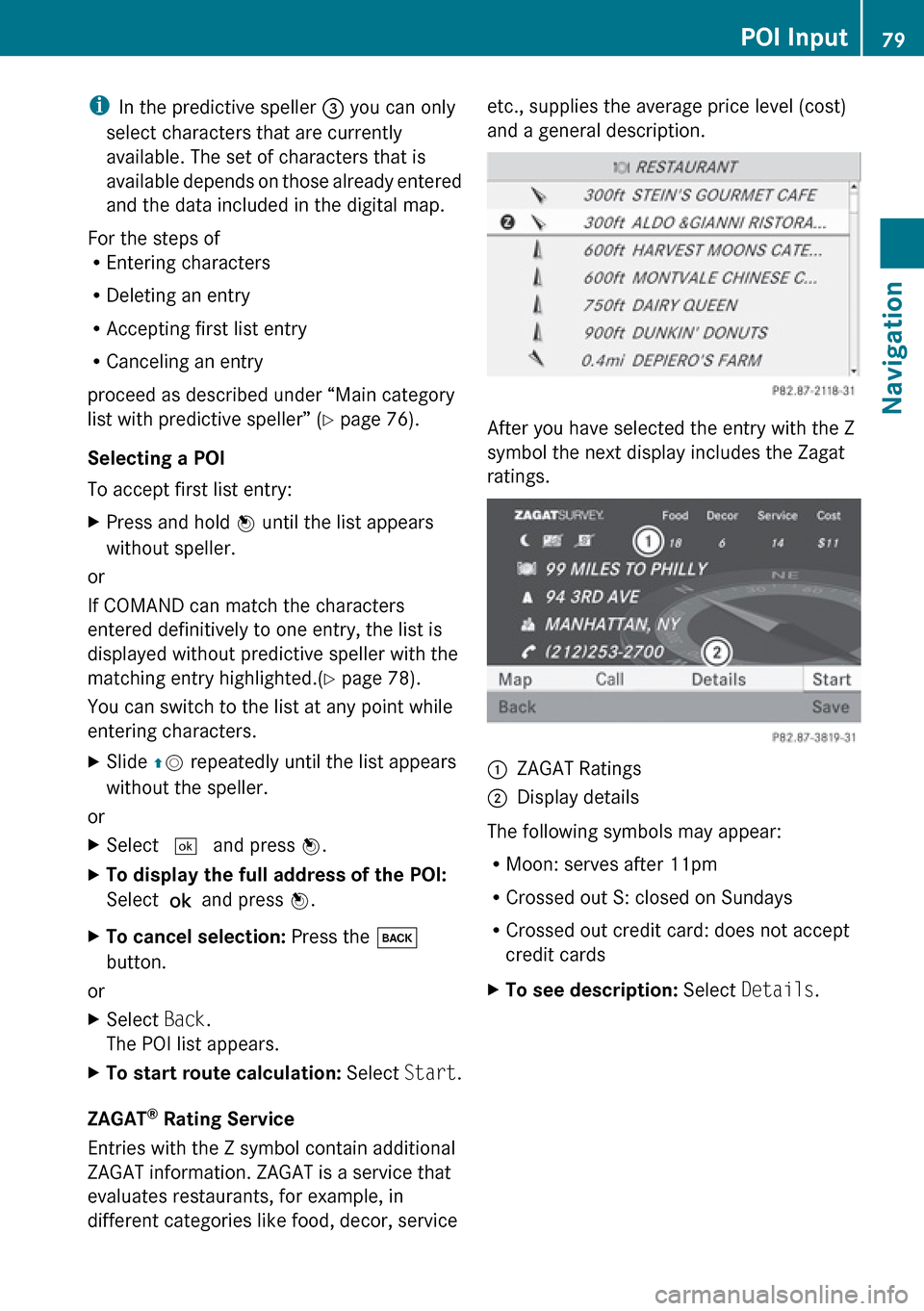
Entries with the Z symbol contain additional
ZAGAT information. ZAGAT is a service that
evaluates restaurants, for example, in
different categories like food, decor, service
etc., supplies the average price level (cost)
and a general description.
After you have selected the entry with the Z
symbol the next display includes the Zagat
ratings.
1ZAGAT Ratings2Display details
The following symbols may appear:
R Moon: serves after 11pm
R Crossed out S: closed on Sundays
R Crossed out credit card: does not accept
credit cards
XTo see description: Select Details .POI Input79NavigationZ
Page 82 of 224
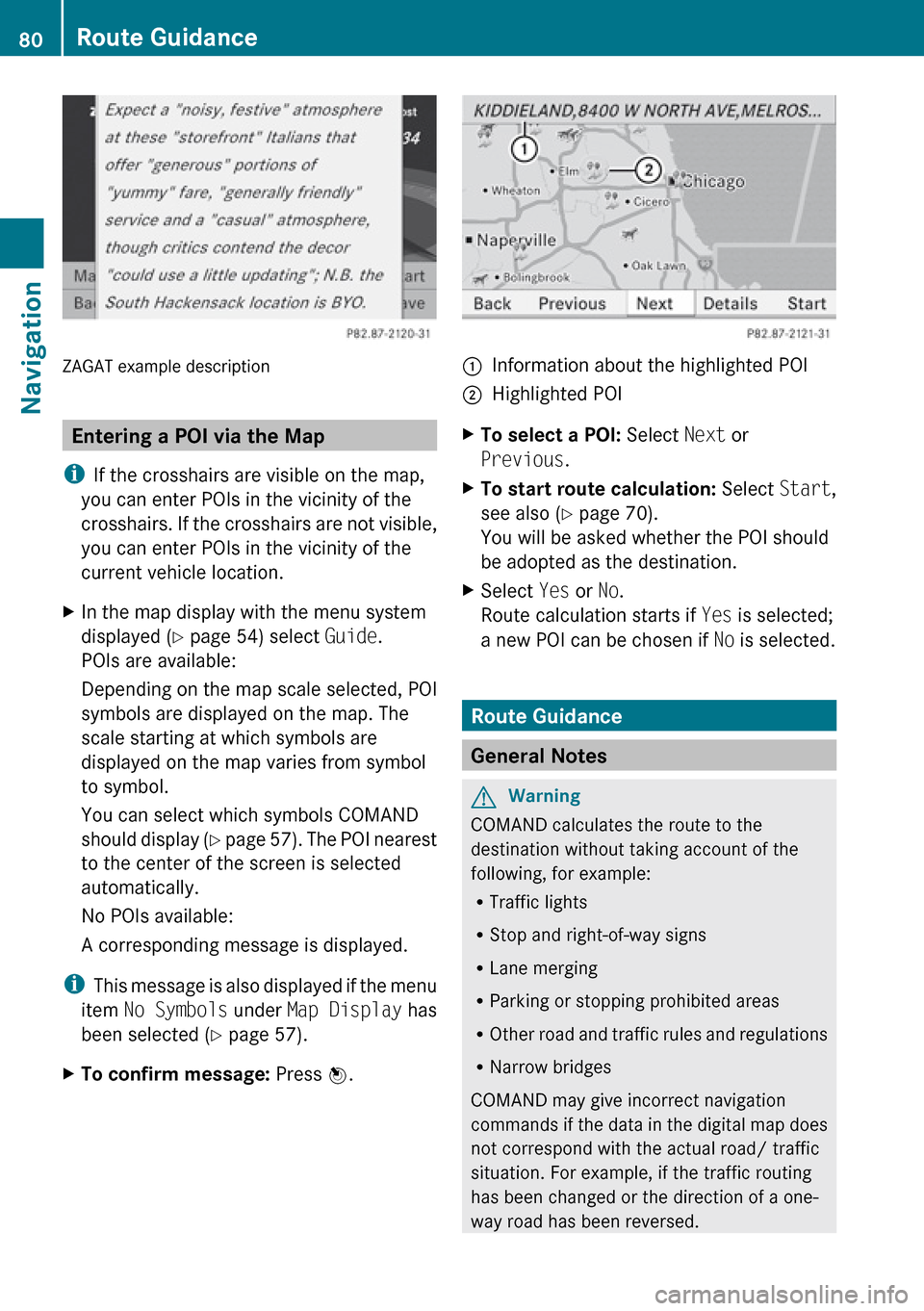
ZAGAT example description
Entering a POI via the Map
i If the crosshairs are visible on the map,
you can enter POIs in the vicinity of the
crosshairs. If the crosshairs are not visible,
you can enter POIs in the vicinity of the
current vehicle location.
XIn the map display with the menu system
displayed ( Y page 54) select Guide.
POIs are available:
Depending on the map scale selected, POI
symbols are displayed on the map. The
scale starting at which symbols are
displayed on the map varies from symbol
to symbol.
You can select which symbols COMAND
should display (Y page 57). The POI nearest
to the center of the screen is selected
automatically.
No POIs available:
A corresponding message is displayed.
i This message is also displayed if the menu
item No Symbols under Map Display has
been selected ( Y page 57).
XTo confirm message: Press n.1Information about the highlighted POI2Highlighted POIXTo select a POI: Select Next or
Previous .XTo start route calculation: Select Start,
see also ( Y page 70).
You will be asked whether the POI should
be adopted as the destination.XSelect Yes or No.
Route calculation starts if Yes is selected;
a new POI can be chosen if No is selected.
Route Guidance
General Notes
GWarning
COMAND calculates the route to the
destination without taking account of the
following, for example:
R Traffic lights
R Stop and right-of-way signs
R Lane merging
R Parking or stopping prohibited areas
R Other road and traffic rules and regulations
R Narrow bridges
COMAND may give incorrect navigation
commands if the data in the digital map does
not correspond with the actual road/ traffic
situation. For example, if the traffic routing
has been changed or the direction of a one-
way road has been reversed.
80Route GuidanceNavigation
Page 90 of 224
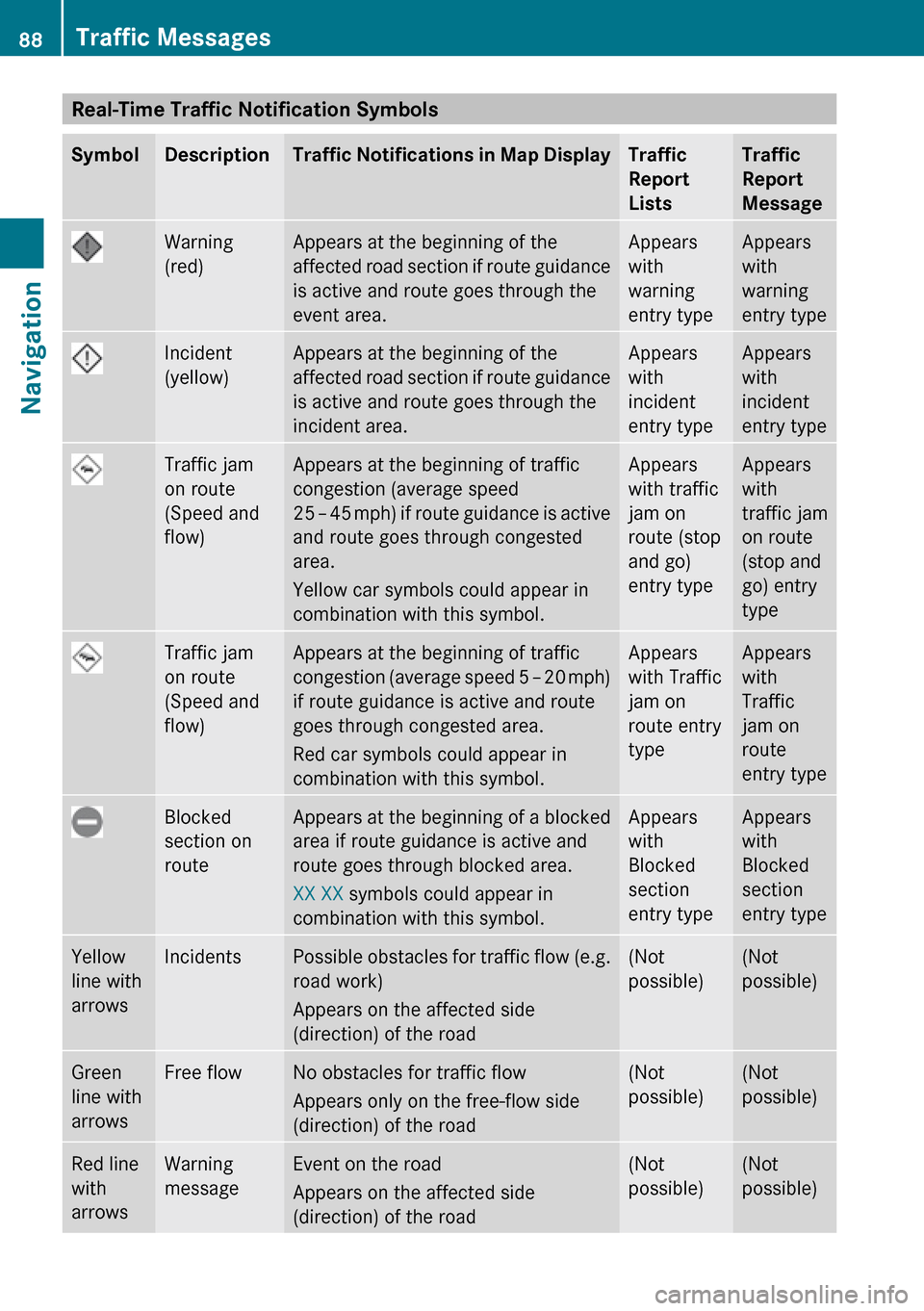
Real-Time Traffic Notification SymbolsSymbolDescriptionTraffic Notifications in Map DisplayTraffic
Report
ListsTraffic
Report
MessageWarning
(red)Appears at the beginning of the
affected road section if route guidance
is active and route goes through the
event area.Appears
with
warning
entry typeAppears
with
warning
entry typeIncident
(yellow)Appears at the beginning of the
affected road section if route guidance
is active and route goes through the
incident area.Appears
with
incident
entry typeAppears
with
incident
entry typeTraffic jam
on route
(Speed and
flow)Appears at the beginning of traffic
congestion (average speed
25 – 45 mph ) if route guidance is active
and route goes through congested
area.
Yellow car symbols could appear in
combination with this symbol.Appears
with traffic
jam on
route (stop
and go)
entry typeAppears
with
traffic jam
on route
(stop and
go) entry
typeTraffic jam
on route
(Speed and
flow)Appears at the beginning of traffic
congestion (average speed 5 – 20 mph)
if route guidance is active and route
goes through congested area.
Red car symbols could appear in
combination with this symbol.Appears
with Traffic
jam on
route entry
typeAppears
with
Traffic
jam on
route
entry typeBlocked
section on
routeAppears at the beginning of a blocked
area if route guidance is active and
route goes through blocked area.
XX XX symbols could appear in
combination with this symbol.Appears
with
Blocked
section
entry typeAppears
with
Blocked
section
entry typeYellow
line with
arrowsIncidentsPossible obstacles for traffic flow (e.g.
road work)
Appears on the affected side
(direction) of the road(Not
possible)(Not
possible)Green
line with
arrowsFree flowNo obstacles for traffic flow
Appears only on the free-flow side
(direction) of the road(Not
possible)(Not
possible)Red line
with
arrowsWarning
messageEvent on the road
Appears on the affected side
(direction) of the road(Not
possible)(Not
possible)88Traffic MessagesNavigation