ESC MERCEDES-BENZ E-Class COUPE 2010 C212 Comand Manual
[x] Cancel search | Manufacturer: MERCEDES-BENZ, Model Year: 2010, Model line: E-Class COUPE, Model: MERCEDES-BENZ E-Class COUPE 2010 C212Pages: 224, PDF Size: 7.4 MB
Page 94 of 224
If characters have been entered using the
predictive speller:XRotate ym z or qm slide in the list until the
My Address entry is highlighted.
or
XTo assign an address for the first time:
Press and hold n until the speller
disappears.
The entry My Address is highlighted
automatically in the list.XTo exit the menu: Select Back.
Subsequent operation depends on whether
you enter the address or wish to use an
address book entry that can be used for
navigation as My address.
Entering or Changing Your Address
XIf necessary, change to the destination list
without speller.XTo enter the address for the first time:
Press n and select New Entry.XTo change the existing address: Select
Options £ New Entry .
In both cases, the address input menu
appears.XEnter the address. Proceed in the same way
as you would enter a destination as
described in the “Entering a destination by
address” section ( Y page 63).XSelect Save after you have entered the
address.
COMAND then stores the entry. You will
see a message and then the address menu
with the selected address. Start is
highlighted automatically.
Using an Address Book Entry as Home
Address
XIf necessary, change to the destination list
without speller ( Y page 91).XTo assign an address for the first time:
Press n and select Assign to Address
Book Entry .XSelect Home or Work if applicable.XTo change home address: Select
Options £ Assign to Address Book
Entry .XSelect Home or Work if applicable.XIn both cases you will see a list with or
without predictive speller depending on the
number of address book entries.XSelect the desired address book entry.
Proceed as described in the “Searching for
an address book entry” section
( Y page 113).
i
Information on how to link address book
entries with navigation data can be found
in “Assigning a destination to an address
book entry” ( Y page 94).
XTo confirm your selection: Press n.
An address is assigned for the first time:
COMAND then stores the entry. You will
see a message and then the address menu
with the selected address. Start is
highlighted automatically.
The address is changed:
A prompt appears, asking if you really wish
to overwrite My Address.XSelect Yes or No.
If you select Yes, COMAND overwrites the
destination. You will see a message and
then the address menu with the selected
address. Start is highlighted
automatically.
If you select No, the list will reappear.
Selecting Home Address for Route
Guidance
i If the My Address (¤ icon) entry already
contains data that can be used for
navigation, you can select it for route
92Destination MemoryNavigation
Page 96 of 224
If the selected address book entry already
contains address data that can be used for
navigation ( ¤ icon), a prompt will appear
asking whether you wish to overwrite the
existing data.XSelect Yes or No.
After selecting Yes, the Saving
Procedure Successful message
appears; selecting No cancels the
procedure.
Saving Destination With Name
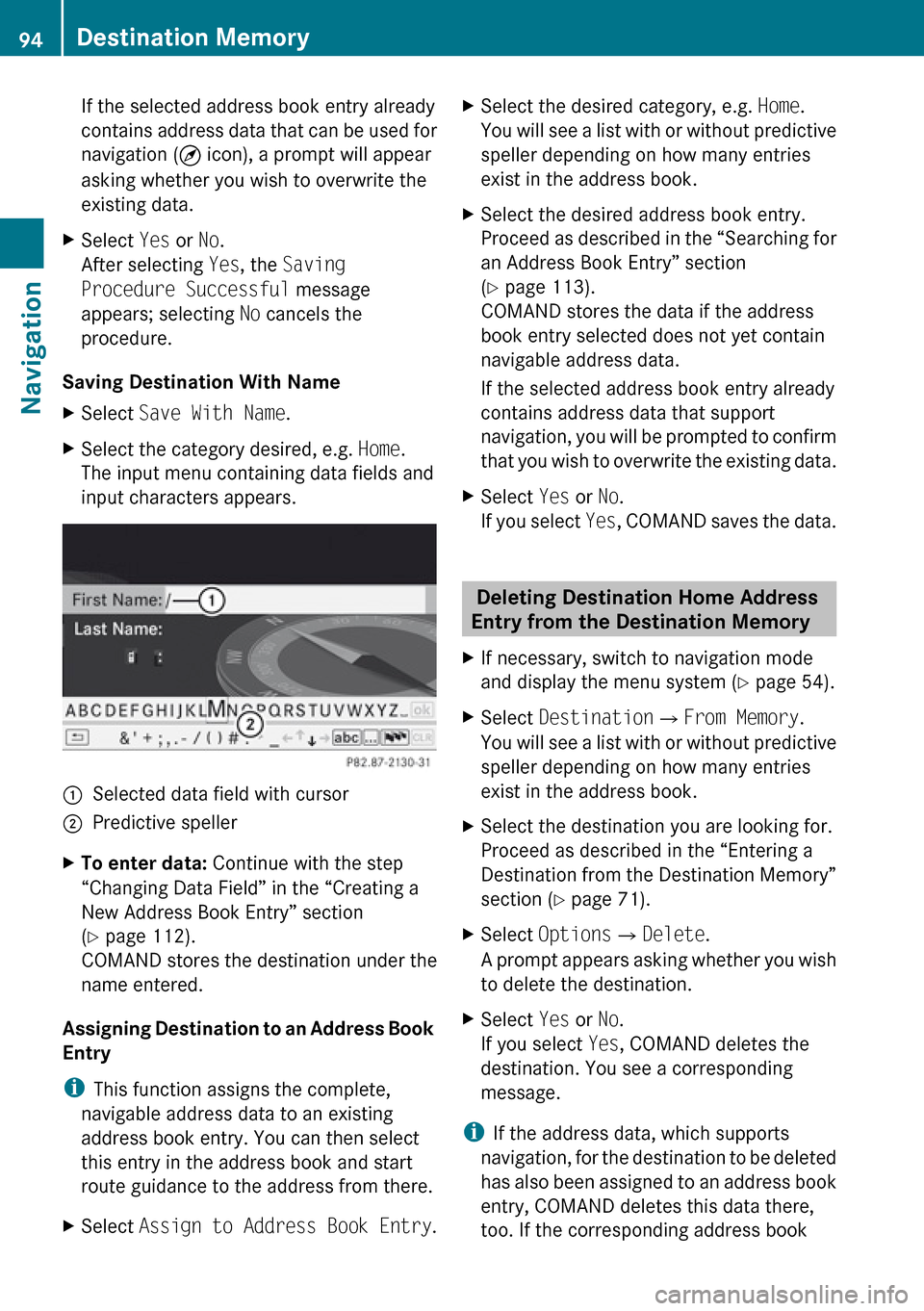
XSelect Save With Name .XSelect the category desired, e.g. Home.
The input menu containing data fields and
input characters appears.1Selected data field with cursor2Predictive spellerXTo enter data: Continue with the step
“Changing Data Field” in the “Creating a
New Address Book Entry” section
( Y page 112).
COMAND stores the destination under the
name entered.
Assigning Destination to an Address Book
Entry
i This function assigns the complete,
navigable address data to an existing
address book entry. You can then select
this entry in the address book and start
route guidance to the address from there.
XSelect Assign to Address Book Entry .XSelect the desired category, e.g. Home.
You will see a list with or without predictive
speller depending on how many entries
exist in the address book.XSelect the desired address book entry.
Proceed as described in the “Searching for
an Address Book Entry” section
( Y page 113).
COMAND stores the data if the address
book entry selected does not yet contain
navigable address data.
If the selected address book entry already
contains address data that support
navigation, you will be prompted to confirm
that you wish to overwrite the existing data.XSelect Yes or No.
If you select Yes, COMAND saves the data.
Deleting Destination Home Address
Entry from the Destination Memory
XIf necessary, switch to navigation mode
and display the menu system ( Y page 54).XSelect Destination £From Memory .
You will see a list with or without predictive
speller depending on how many entries
exist in the address book.XSelect the destination you are looking for.
Proceed as described in the “Entering a
Destination from the Destination Memory”
section ( Y page 71).XSelect Options £Delete .
A prompt appears asking whether you wish
to delete the destination.XSelect Yes or No.
If you select Yes, COMAND deletes the
destination. You see a corresponding
message.
i If the address data, which supports
navigation, for the destination to be deleted
has also been assigned to an address book
entry, COMAND deletes this data there,
too. If the corresponding address book
94Destination MemoryNavigation
Page 97 of 224
entry does not contain any other data, e.g.
phone numbers, COMAND deletes the
entire address book entry.
Last Destinations
i COMAND automatically saves the last
destinations used for the last route
calculation. If the memory is full, COMAND
deletes the oldest destination. You can also
save a destination from the last
destinations to the destination memory.
Here it is saved permanently.
Saving a Destination Permanently in
the Destination Memory
XProceed as described in the “Accepting
from the Last Destinations” section
( Y page 72).
Saving the Vehicle Position in the List
of Last Destinations
XIf necessary, switch to navigation mode
and display the menu system ( Y page 54).XSelect Position £Save Vehicle
Position .
COMAND saves the current vehicle
position as a destination in the list of last
destinations.
Saving the Crosshair Position in the
List of Last Destinations
i A crosshair appears on the map if you
have moved the map manually. You can
store the crosshair position as a
destination in the list of last destinations.
XIf necessary, display the menu system:
Press n.XSelect Position £Save Crosshair
Position .
COMAND saves the crosshair position as a
destination in the list of last destinations.
Deleting One of the Last Destinations
XIf necessary, switch to navigation mode
and display the menu system ( Y page 54).XSelect Destination £From Last
Destinations .
The list of last destinations appears.XSelect the desired destination.XSelect Options £Delete .
A query appears.XSelect Yes or No.
If you select Yes, COMAND deletes the
destination. You see a corresponding
message.Last Destinations95NavigationZ
Page 100 of 224
Safety PrecautionsGWarning
Some jurisdictions prohibit the driver from
using a cellular telephone while driving.
Whether or not prohibited by law, for safety
reasons, the driver should not use the cellular
telephone while the vehicle is in motion. Stop
the vehicle in a safe location before placing or
answering a call.
If you nonetheless choose to use the mobile
phone while driving, please use the handsfree
feature and be sure to pay attention to the
traffic situation at all times. Use the mobile
phone only when road, weather and traffic
conditions permit. Otherwise, you may not be
able to observe traffic conditions and could
endanger yourself and others.
Bear in mind that at a speed of just 30 mph
(approximately 50 km/h), your vehicle is
covering a distance of 44 feet (approximately
14 m) every second.
GWarning
You and others may damage your health due
to excessive electromagnetic radiation. By
using an external antenna, the possible health
risks of electromagnetic fields, which are
under discussion among the scientific
community, should be largely prevented.
General Information
Vehicle Equipment
i This Operator’s Manual describes all
features, standard or optional, potentially
available for your vehicle at the time of
purchase. Please be aware that your
vehicle might not be equipped with all
features described in this manual.
Making Calls via Bluetooth ®
Interface
The telephone function via the Bluetooth ®
interface is available in conjunction with a
Bluetooth-enabled mobile phone.
With a suitable mobile phone, you can use
COMAND’s hands-free feature to download
contacts from your mobile phone (Phone
Book Access profile) and electronic business
cards (vCards) via the Bluetooth ®
interface.
Suitable Mobile Phones
Further information on suitable mobile
phones and connecting Bluetooth-enabled
mobile phones to COMAND is available via
the Internet at www.mbusa-mobile.com. Or
call the Mercedes-Benz Customer Assistance
Center at 1-800-FOR-MERCedes
(1-800-367-6372) (US), or Customer
Relations at 1-800-387-0100 (Canada).
Interruptions to the Connection
While Driving
Interruptions to the connection may occur if
R there is inadequate network coverage in
certain regions
R you are switching from one transmitting/
receiving station (cell) to another and there
is no voice channel available in this cell
R you are using a SIM card that is not
compatible with the available network
R when using a mobile phone with
“Twincard”, the mobile phone is
simultaneously logged into the network
with the second SIM card.
Operating Options
If the mobile phone is connected with
COMAND via the Bluetooth ®
interface, you
can operate the phone using the following
devices:
98General InformationTelephone
Page 101 of 224
RKeypad on the COMAND control unit
R Multifunction steering wheel
R Voice Control
The explanations in this section assume that
the mobile phone is connected to COMAND
via the Bluetooth ®
interface. Exceptions are
explicitly described.
Functional Restrictions
Under the following circumstances, the
phone may not yet be useable:
R If it is not yet logged into a network. The
phone will try independently to log into a
network. If no network is available, you will
not be able to make “911” emergency calls.
If you try to make an outgoing call, the
message No Service appears briefly.
Activating the Mobile Phone
Mobile Phone With Bluetooth ®
Interface
Prerequisites for the Mobile Phone
For making calls using COMAND via the
Bluetooth ®
interface, you will need a
Bluetooth-enabled mobile phone.
i Not all mobile phones available on the
market are comparably suitable. Further
information on suitable mobile phones and
connecting Bluetooth-enabled mobile
phones to COMAND is available via the
Internet at www.mbusa-mobile.com. Or
call the Mercedes-Benz Customer
Assistance Center at 1-800-FOR-
MERCedes (1-800-367-6372) (US), or
Customer Relations at 1-800-387-0100
(Canada).
Activating Bluetooth ®
Before you begin activation of your mobile
phone connection via the Bluetooth ®
interface please ensure it is compatible with
Bluetooth ®
handsfree profile 1.0 or higher
( Y mobile phone operating guide):XSwitch on the mobile phone and enter the
PIN, if applicable ( Y mobile phone
operating guide).XActivate Bluetooth ®
connection on the
mobile phone ( Y mobile phone operating
guide).
i On certain mobile phones, not only do you
have to activate the Bluetooth ®
function
but the device must also be made “visible”
for other devices.
Each Bluetooth ®
device has a Bluetooth ®
device name. It is recommended to give the
device a personal name, by which you can
clearly recognize your mobile phone.
i If the Bluetooth ®
function on the
COMAND is switched off, the message
Bluetooth not activated in system
settings . appears.
XActivate Bluetooth ®
connection on
COMAND ( Y page 45).
Registering a Mobile Phone
(Authorizing)
When you use your mobile phone in
conjunction with COMAND for the first time,
you must register (authorize) it.
It is possible to register several mobile
phones. The connection is always established
to the mobile phone that was activated last.
When you authorize a new mobile phone, it is
activated automatically. You can switch
between the authorized mobile phones
( Y page 101).
Searching for a Mobile Phone
XIn the phone submenu select Phone
£ Bluetooth Phones £Update .
COMAND searches for suitable
Bluetooth ®
phones within range and enters
them in the phone list.Activating the Mobile Phone99TelephoneZ
Page 104 of 224
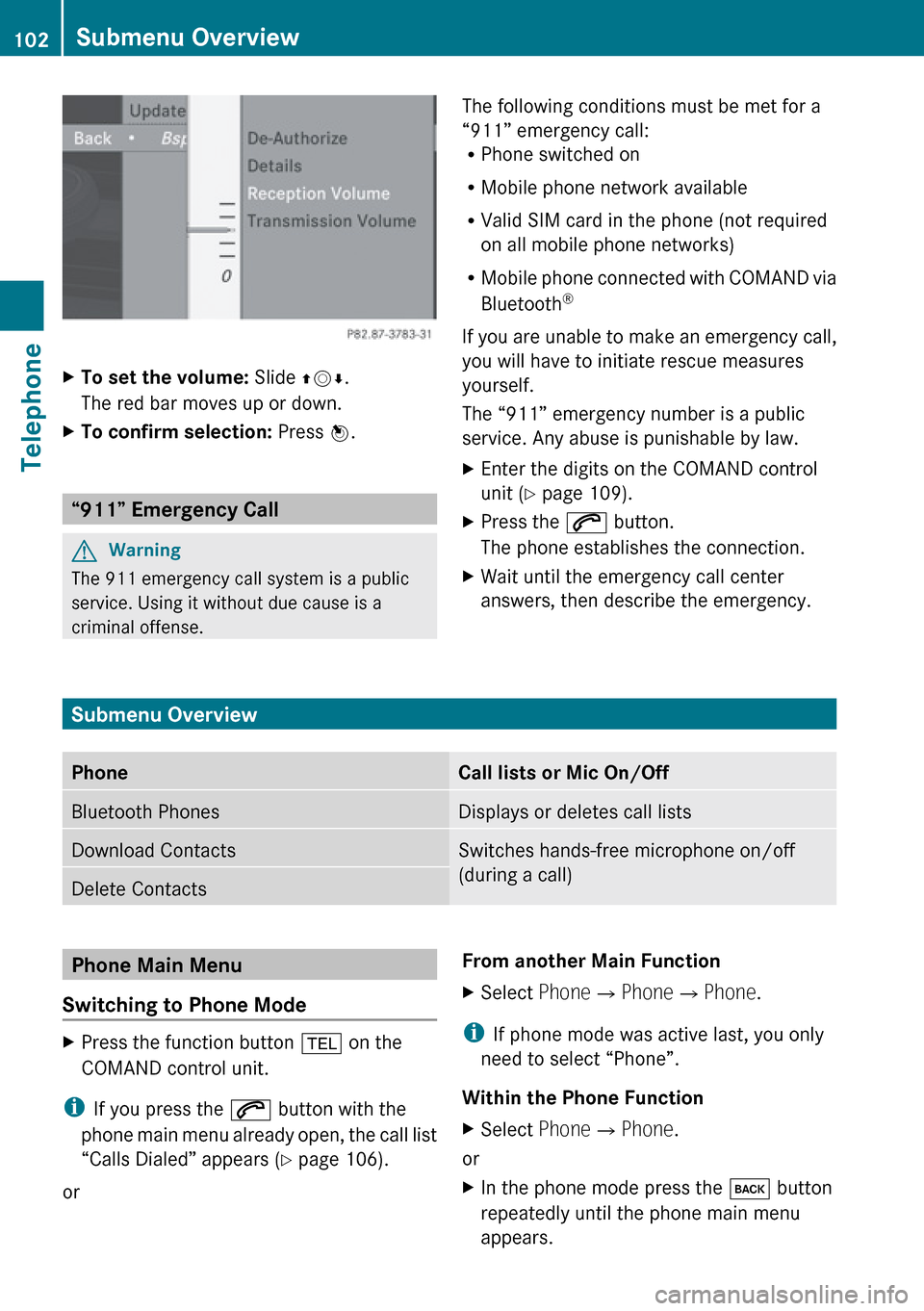
XTo set the volume: Slide qmr.
The red bar moves up or down.XTo confirm selection: Press n.
“911” Emergency Call
GWarning
The 911 emergency call system is a public
service. Using it without due cause is a
criminal offense.
The following conditions must be met for a
“911” emergency call:
R Phone switched on
R Mobile phone network available
R Valid SIM card in the phone (not required
on all mobile phone networks)
R Mobile phone connected with COMAND via
Bluetooth ®
If you are unable to make an emergency call,
you will have to initiate rescue measures
yourself.
The “911” emergency number is a public
service. Any abuse is punishable by law.XEnter the digits on the COMAND control
unit ( Y page 109).XPress the 6 button.
The phone establishes the connection.XWait until the emergency call center
answers, then describe the emergency.
Submenu Overview
PhoneCall lists or Mic On/OffBluetooth PhonesDisplays or deletes call listsDownload ContactsSwitches hands-free microphone on/off
(during a call)Delete ContactsPhone Main Menu
Switching to Phone ModeXPress the function button % on the
COMAND control unit.
i If you press the 6 button with the
phone main menu already open, the call list
“Calls Dialed” appears ( Y page 106).
or
From another Main FunctionXSelect Phone£Phone £Phone .
i
If phone mode was active last, you only
need to select “Phone”.
Within the Phone Function
XSelect Phone£Phone .
or
XIn the phone mode press the k button
repeatedly until the phone main menu
appears.102Submenu OverviewTelephone
Page 110 of 224
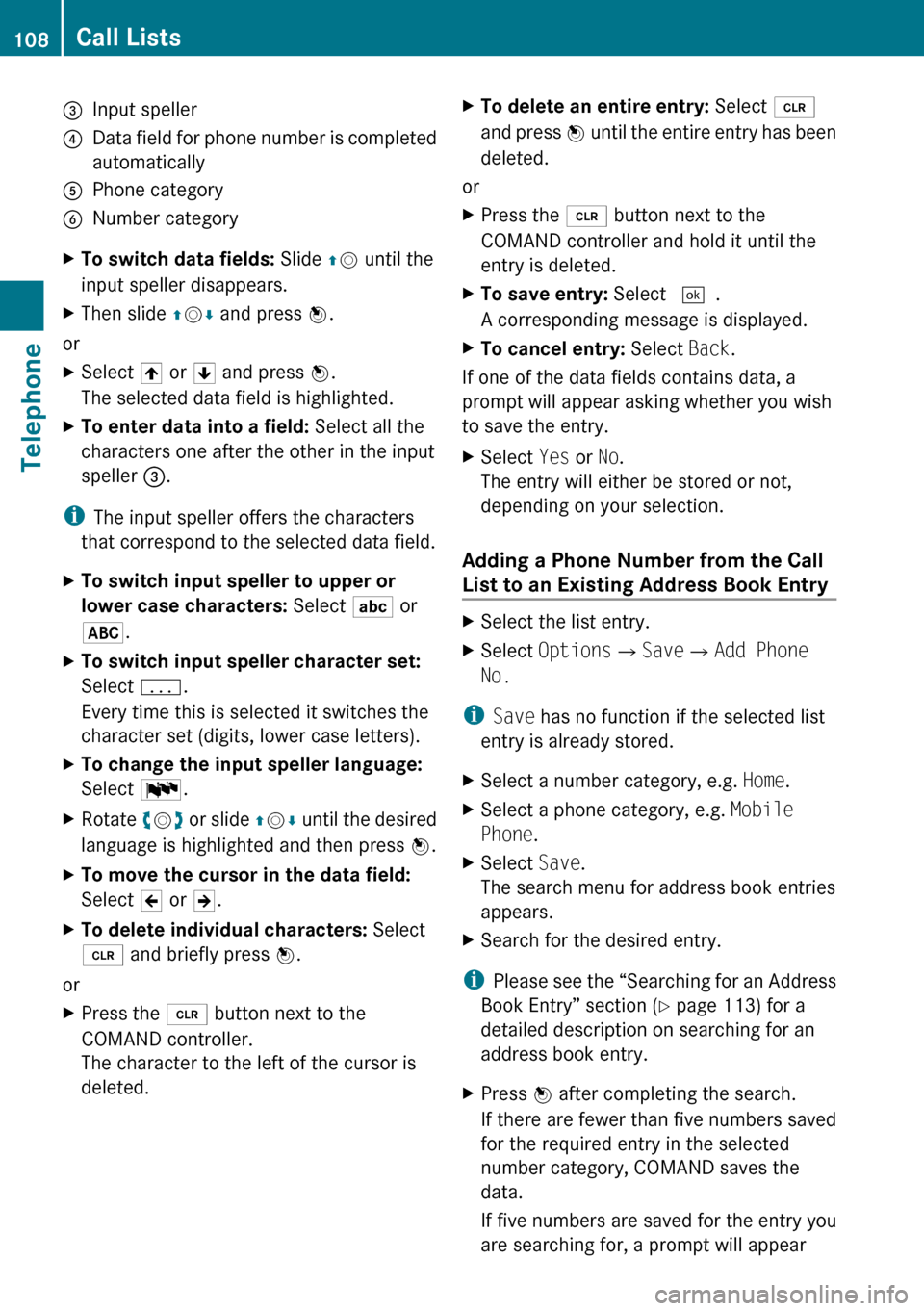
3Input speller4Data field for phone number is completed
automatically5Phone category6Number categoryXTo switch data fields: Slide qm until the
input speller disappears.XThen slide qm r and press n.
or
XSelect [ or ] and press n.
The selected data field is highlighted.XTo enter data into a field: Select all the
characters one after the other in the input
speller 3.
i
The input speller offers the characters
that correspond to the selected data field.
XTo switch input speller to upper or
lower case characters: Select ( or
& .XTo switch input speller character set:
Select k.
Every time this is selected it switches the
character set (digits, lower case letters).XTo change the input speller language:
Select !.XRotate ym z or slide qm r until the desired
language is highlighted and then press n.XTo move the cursor in the data field:
Select Y or Z.XTo delete individual characters: Select
õ and briefly press n.
or
XPress the 2 button next to the
COMAND controller.
The character to the left of the cursor is
deleted.XTo delete an entire entry: Select õ
and press n until the entire entry has been
deleted.
or
XPress the 2 button next to the
COMAND controller and hold it until the
entry is deleted.XTo save entry: Select d.
A corresponding message is displayed.XTo cancel entry: Select Back.
If one of the data fields contains data, a
prompt will appear asking whether you wish
to save the entry.
XSelect Yes or No.
The entry will either be stored or not,
depending on your selection.
Adding a Phone Number from the Call
List to an Existing Address Book Entry
XSelect the list entry.XSelect Options £Save £Add Phone
No.
i Save has no function if the selected list
entry is already stored.
XSelect a number category, e.g. Home.XSelect a phone category, e.g. Mobile
Phone .XSelect Save.
The search menu for address book entries
appears.XSearch for the desired entry.
i Please see the “Searching for an Address
Book Entry” section ( Y page 113) for a
detailed description on searching for an
address book entry.
XPress n after completing the search.
If there are fewer than five numbers saved
for the required entry in the selected
number category, COMAND saves the
data.
If five numbers are saved for the entry you
are searching for, a prompt will appear108Call ListsTelephone
Page 111 of 224
asking whether you wish to overwrite one
of the existing numbers.XSelect Yes or No.
If you select Yes, a selection list with the
five existing numbers is displayed.XSelect the number to be overwritten.
COMAND overwrites the selected number
with the new data.
Deleting Call Lists
This function is only available if you use a
Bluetooth ®
phone without PBAB support, that
is, if the call lists have been created by
COMAND.
XSelect Call Lists £Delete Call
Lists from the basic telephone menu.
A query appears asking if all call lists are to
be deleted.XSelect Yes or No.
The call lists will either be deleted or not,
depending on your selection.
i If you use a mobile phone with PBAP
support, you have to delete the call lists on
the mobile phone. Next time you reconnect
the mobile phone, COMAND downloads the
empty call lists.
Making Calls
Incoming Call
Rejecting or Accepting Calls
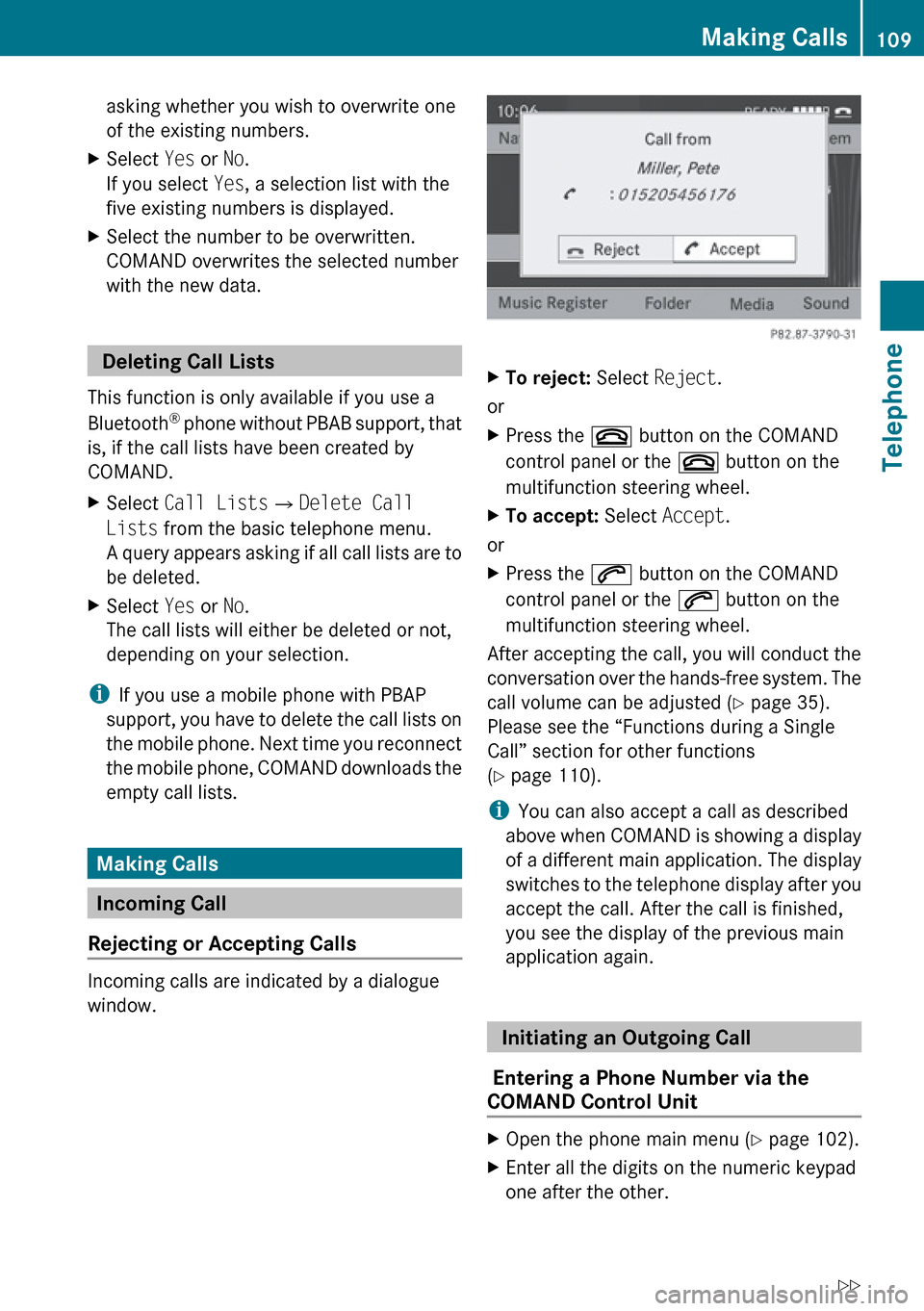
Incoming calls are indicated by a dialogue
window.
XTo reject: Select Reject.
or
XPress the ~ button on the COMAND
control panel or the ~ button on the
multifunction steering wheel.XTo accept: Select Accept.
or
XPress the 6 button on the COMAND
control panel or the 6 button on the
multifunction steering wheel.
After accepting the call, you will conduct the
conversation over the hands-free system. The
call volume can be adjusted ( Y page 35).
Please see the “Functions during a Single
Call” section for other functions
( Y page 110).
i You can also accept a call as described
above when COMAND is showing a display
of a different main application. The display
switches to the telephone display after you
accept the call. After the call is finished,
you see the display of the previous main
application again.
Initiating an Outgoing Call
Entering a Phone Number via the
COMAND Control Unit
XOpen the phone main menu ( Y page 102).XEnter all the digits on the numeric keypad
one after the other.Making Calls109TelephoneZ
Page 124 of 224
Audio Menu
i Information on the COMAND control
system and how to operate it can be found
on ( Y page 18).
i For many operating functions you can
also use the buttons on the multifunction
steering wheel, e.g. the =, ; ,
9 , : buttons, for selecting a channel
or a menu or scrolling through lists
( Y page 25).
Vehicle Equipment
i This Operator’s Manual describes all
features, standard or optional, potentially
available for your vehicle at the time of
purchase. Please be aware that your
vehicle might not be equipped with all
features described in this manual.
Calling up the Audio Menu
XSelect Audio
The audio mode last active is switched on.
or
XPress the $ function button.
Radio mode is switched onXSelect Audio
The audio menu appears.
i If radio mode was active last, you only
need to select Audio.
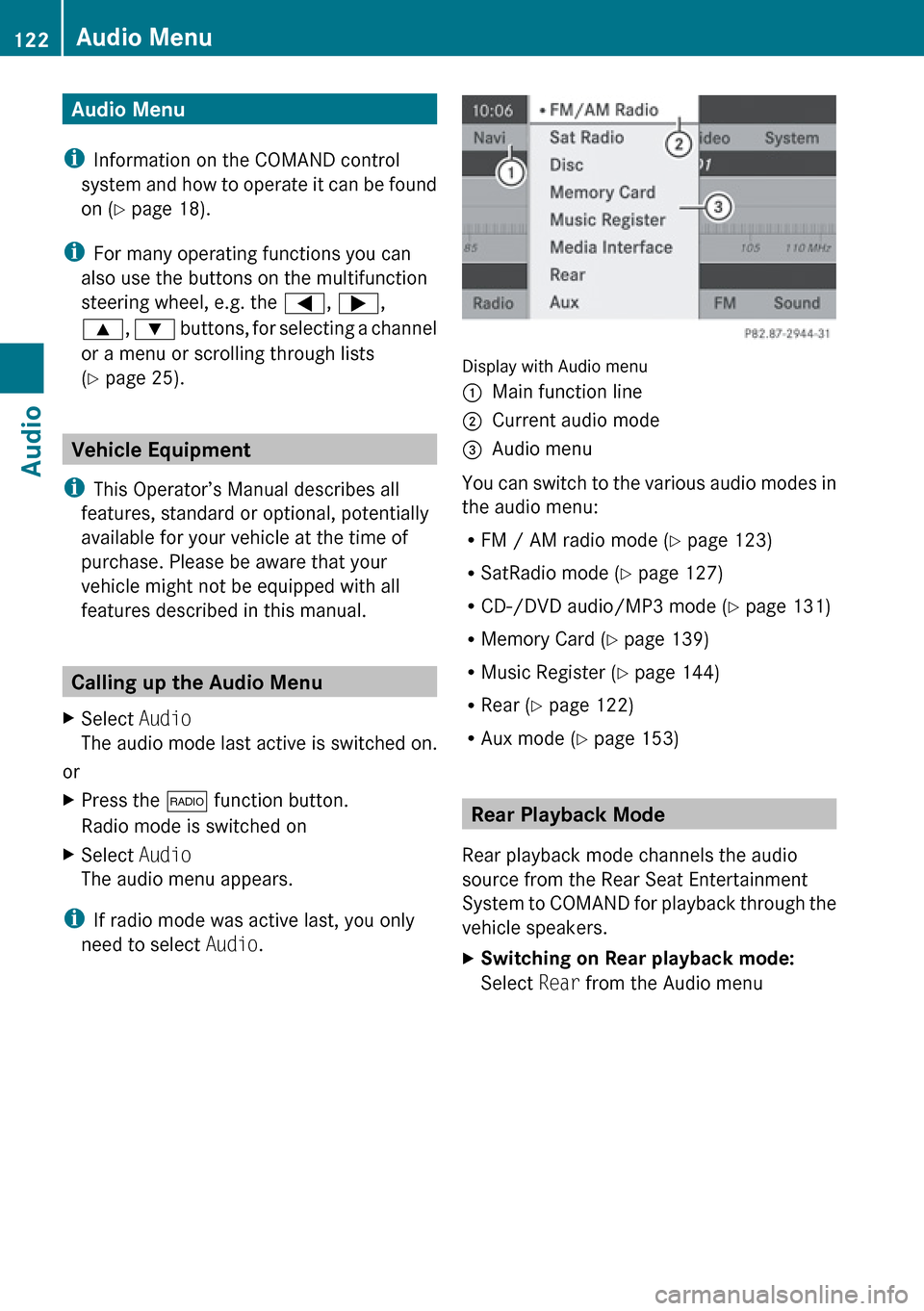
Display with Audio menu
1Main function line2Current audio mode3Audio menu
You can switch to the various audio modes in
the audio menu:
R FM / AM radio mode ( Y page 123)
R SatRadio mode ( Y page 127)
R CD-/DVD audio/MP3 mode ( Y page 131)
R Memory Card ( Y page 139)
R Music Register ( Y page 144)
R Rear ( Y page 122)
R Aux mode ( Y page 153)
Rear Playback Mode
Rear playback mode channels the audio
source from the Rear Seat Entertainment
System to COMAND for playback through the
vehicle speakers.
XSwitching on Rear playback mode:
Select Rear from the Audio menu122Audio MenuAudio
Page 129 of 224
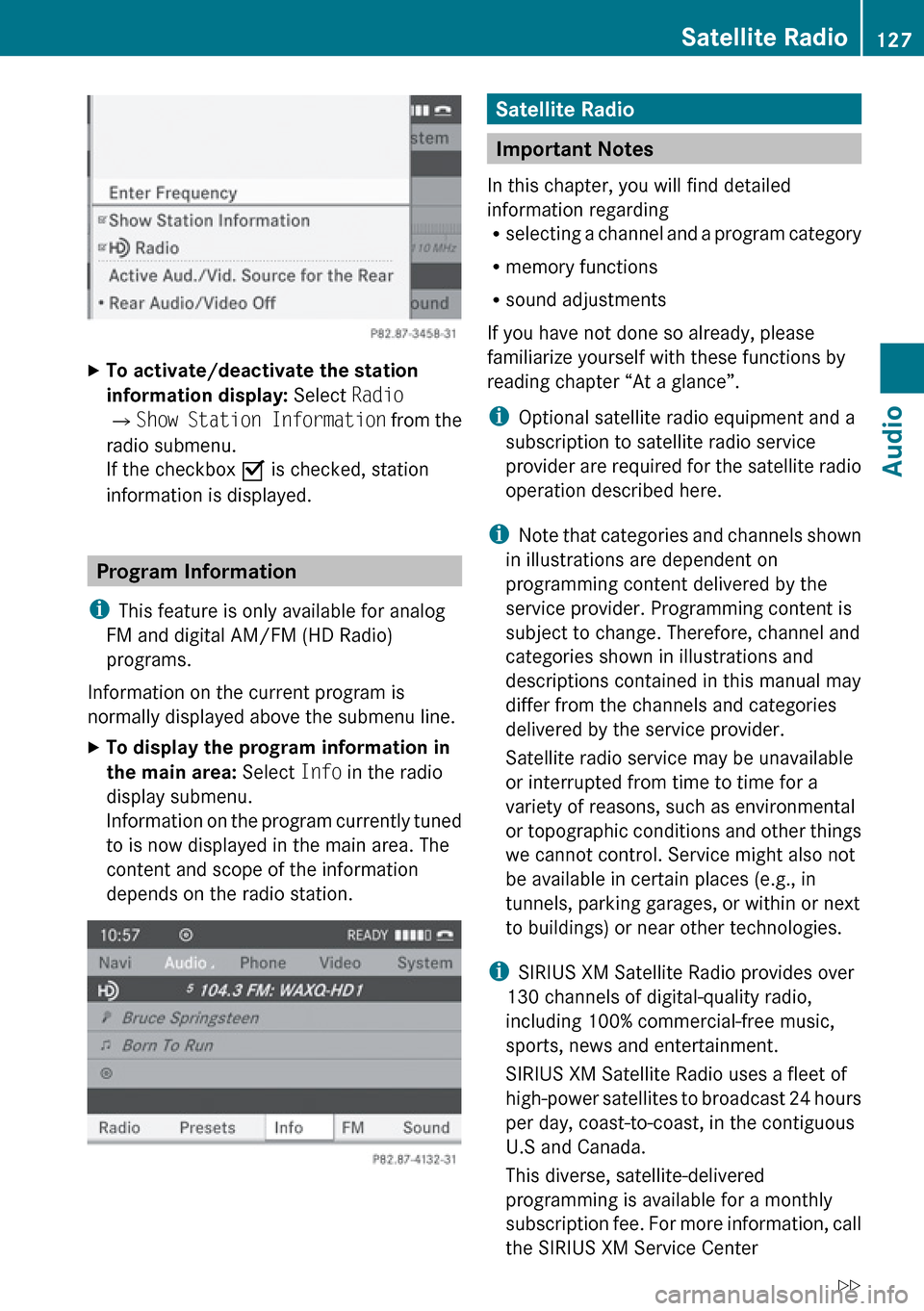
XTo activate/deactivate the station
information display: Select Radio
£ Show Station Information from the
radio submenu.
If the checkbox O is checked, station
information is displayed.
Program Information
i This feature is only available for analog
FM and digital AM/FM (HD Radio)
programs.
Information on the current program is
normally displayed above the submenu line.
XTo display the program information in
the main area: Select Info in the radio
display submenu.
Information on the program currently tuned
to is now displayed in the main area. The
content and scope of the information
depends on the radio station.Satellite Radio
Important Notes
In this chapter, you will find detailed
information regarding
R selecting a channel and a program category
R memory functions
R sound adjustments
If you have not done so already, please
familiarize yourself with these functions by
reading chapter “At a glance”.
i Optional satellite radio equipment and a
subscription to satellite radio service
provider are required for the satellite radio
operation described here.
i Note that categories and channels shown
in illustrations are dependent on
programming content delivered by the
service provider. Programming content is
subject to change. Therefore, channel and
categories shown in illustrations and
descriptions contained in this manual may
differ from the channels and categories
delivered by the service provider.
Satellite radio service may be unavailable
or interrupted from time to time for a
variety of reasons, such as environmental
or topographic conditions and other things
we cannot control. Service might also not
be available in certain places (e.g., in
tunnels, parking garages, or within or next
to buildings) or near other technologies.
i SIRIUS XM Satellite Radio provides over
130 channels of digital-quality radio,
including 100% commercial-free music,
sports, news and entertainment.
SIRIUS XM Satellite Radio uses a fleet of
high-power satellites to broadcast 24 hours
per day, coast-to-coast, in the contiguous
U.S and Canada.
This diverse, satellite-delivered
programming is available for a monthly
subscription fee. For more information, call
the SIRIUS XM Service Center
Satellite Radio127AudioZ