climate control MERCEDES-BENZ E-CLASS COUPE 2011 User Guide
[x] Cancel search | Manufacturer: MERCEDES-BENZ, Model Year: 2011, Model line: E-CLASS COUPE, Model: MERCEDES-BENZ E-CLASS COUPE 2011Pages: 353, PDF Size: 8.42 MB
Page 135 of 353
ant does no
tcontain chlorofluorocarbons,
and therefor edoes not damage the ozone
layer.
Activating/deactivating X
To activate: press the¿button.
The indicator lamp above the ¿button
lights up.
X To switch off: press the¿button.
The indicator lamp above the ¿button
goes out. The cooling with air dehumidifi-
cation function has adelayed switch-off
feature.
Problems with the cooling with air
dehumidification function When you press the
¿button ,the indica-
tor lamp in the button flashes three times or
remains off. You can no longer switch on the
cooling with air dehumidification function.
X Consult aqualified specialist workshop. Setting climate control to automatic
mode
In automatic mode, the set temperature is
maintained automatically at aconstant level.
The system automatically regulates the tem-
perature of the dispensed air, the airflow and
the air distribution.
Automatic mode will achieve optimal opera-
tion if cooling with air dehumidification is also
activated. If desired, cooling with air dehu-
midification can be deactivated.
X Turn the key to position 2in the ignition
lock.
X Set the desired temperature.
X To activate: press theÃbutton.
The indicator lamp above the Ãbutton
lights up. Automatic air distribution and air-
flow are activated.
i THERMOTRONIC automatic climate con-
trol: when automatic mode is activated, you can select
aclimate mode setting
(Y page 132).
X To deactivate: press the air distribution
button.
THERMATIC automatic climate control:
press button F(Ypage 129).
THERMOTRONIC automatic climate con-
trol: press button I(Ypage 130).
The indicator lamp above the Ãbutton
goes out.
or
X Press the airflow button.
THERMATIC automatic climate control:
press button G(Ypage 129).
THERMOTRONIC automatic climate con-
trol: press button H(Ypage 130).
The indicator lamp above the Ãbutton
goes out. Adjusting the climate control settings
This function is only available with the
THERMOTRONIC automatic climate control.
The climate control settings are especially
effective at high temperatures.
You can select the following climate control
settings in automatic mode:
FOCUS high airflow that is set slightly cooler
MEDIUM medium airflow, standard setting
DIFFUSE low airflow that is set slightly warmer and with alower rate of
airflow
X Turn the key to position 2in the ignition
lock.
X Press the Ãbutton.
X Press button Gup or down and select the
desired level (Y page 130)132
Operating the climate control systemClimate control
Page 136 of 353
Setting the temperature
THERMATIC automatic climate control Differen
ttemperatures can be set for the
driver's and front-passenger sides.
X Turn the key to position 2in the ignition
lock.
X To increase/reduce: press buttonEor
H up or down (Y page 129).
Only change the temperature settingin
small increments. Start at 22 †.
THERMOTRONIC automatic climate
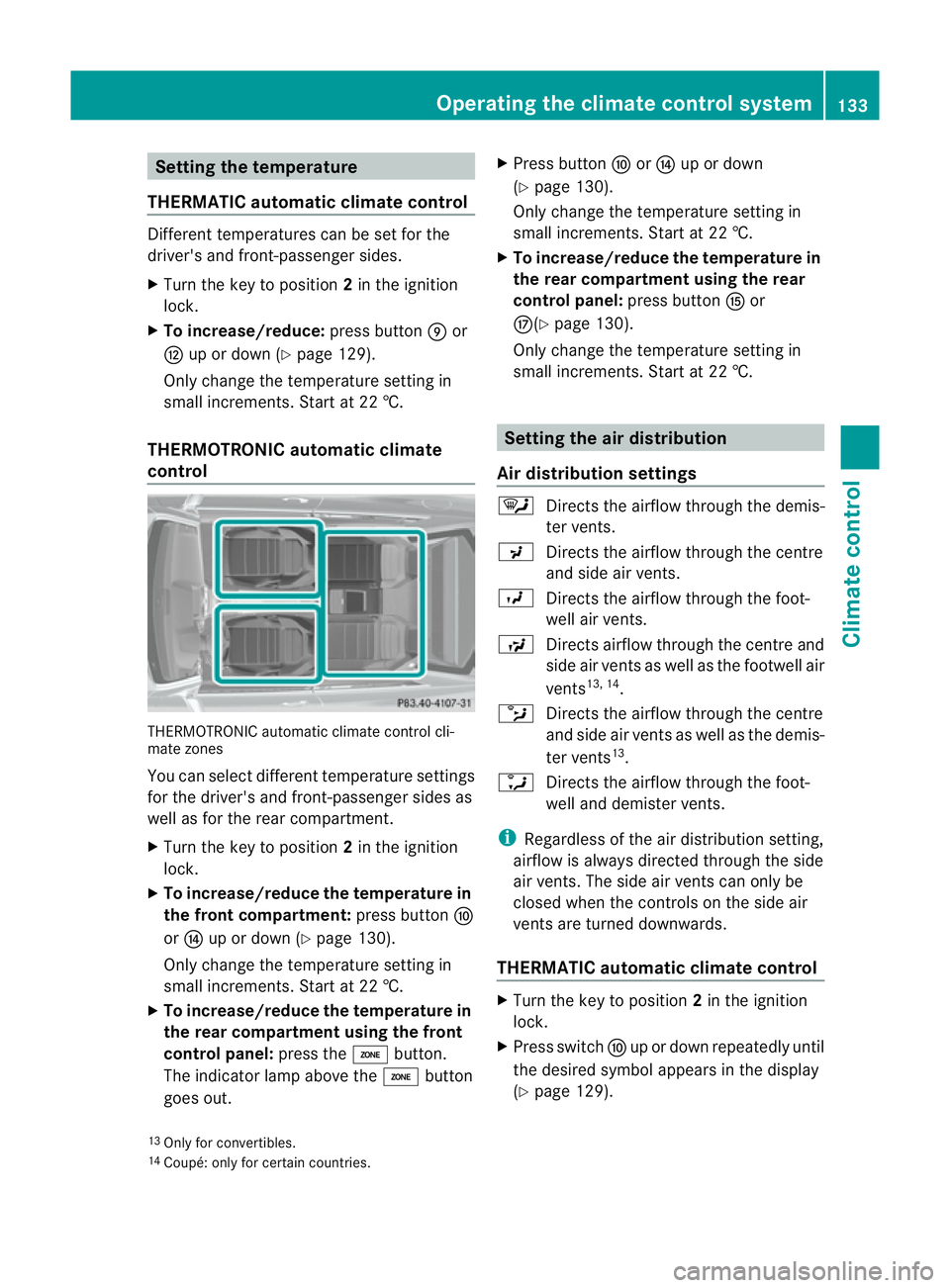
control THERMOTRONIC automatic climate control cli-
mate zones
You can select different temperature settings
for the driver's and front-passenger sides as
well as for the rear compartment.
X Turn the key to position 2in the ignition
lock.
X To increase/reduce the temperature in
the front compartment: press buttonF
or J up or down (Y page 130).
Only change the temperature settingin
small increments. Start at 22 †.
X To increase/reduce the temperature in
the rear compartment using the front
control panel: press theábutton.
The indicator lamp above the ábutton
goes out. X
Press button ForJ up or down
(Y page 130).
Only change the temperature settingin
small increments. Start at 22 †.
X To increase/reduce the temperature in
the rear compartment using the rear
control panel: press buttonKor
M(Y page 130).
Only change the temperature settingin
small increments. Start at 22 †. Setting the air distribution
Air distribution settings ¯
Directst he airflow through the demis-
ter vents.
P Directst he airflow through the centre
and side air vents.
O Directst he airflow through the foot-
well air vents.
S Directsa irflow through the centre and
side air ventsasw ell as the footwell air
vents 13, 14
.
b Directst he airflow through the centre
and side air ventsasw ell as the demis-
ter vents 13
.
a Directst he airflow through the foot-
well and demister vents.
i Regardless of the air distribution setting,
airflow is always directed through the side
air vents. The side air ventsc an only be
closed when the controls on the side air
ventsa re turned downwards.
THERMATIC automatic climate control X
Turn the key to position 2in the ignition
lock.
X Press switch Fup or down repeatedly until
the desired symbol appears in the display
(Y page 129).
13 Only for convertibles.
14 Coupé: only for certain countries. Operating the climate control system
133Climate control Z
Page 137 of 353
THERMOTRONI
Cautomatic climate
control X
Turn the key to position 2in the ignition
lock.
X Press switch Iup or down repeatedly until
the desired symbo lappears in the display
(Y page 130). Settin
gthe airflow
THERMATIC automatic climate control X
Turn the key to position 2in the ignition
lock.
X To increase/reduce: press buttonGup
or down (Y page 129).
THERMOTRONI Cautomatic climate
control X
Turn the key to position 2in the ignition
lock.
X To increase/reduce: press buttonHup
or down (Y page 130). Switchin
gthe ZONE function on/off
X To switc hon:press the ábutton.
The indicator lamp above the ábutton
lights up.
THERMATIC automatic climate control: the
temperature setting for the driver's side is
not adopted for the front-passenger side.
THERMOTRONIC automatic climate con-
trol: the temperature setting for the driver's
side is not adopted for the front-passenger
side and the rear compartment.
When the button sfor temperature, airflow or
air distribution are activated, the temperature
setting for the driver's side is not adopted for
the other climate control zones. X
To switch off: press theábutton.
The indicator lamp above the ábutton
goes out.
THERMATIC automatic climate control: the
temperature setting for the driver's side is
adopted for the front-passenger side.
THERMOTRONIC automatic climate con-
trol: the temperature setting for the driver's
side is adopted for the front-passenger side
and the rear compartment. Demisting the windscreen
You can use this function to defrost the wind-
screen or to demist the inside of the wind-
screen and the side windows.
i You should only select the demisting
function until the windscreen is clear again.
X Turn the key to position 2in the ignition
lock.
X To activate: press the¬button.
The indicator lamp above the ¬button
lights up.
The climate control system switches to the
following functions:
R cooling with air dehumidification on
R high airflow 15
R high temperature 15
R air distribution to the windscreen and
fron tside windows
R air-recirculation mode off
X To switch off: press the¬button.
The indicator lamp above the ¬button
goes out. The previously selected settings
com eintoe ffect again. The coolin gwith air
dehumidification function remain son. Air-
recirculation mode remain sdeactivated.
or
15 Dependin gonthe outside temperature. 134
Operating thec
limate control systemClimate control
Page 138 of 353
X
Press the Ãbutton.
The indicator lamp above the ¬button
goes out. Airflow and air distribution are set
to automatic mode.
or
X THERMATIC automatic climate control:
press temperature button EorH up or
down (Y page 129).
THERMOTRONIC automatic climate
control: press temperature button For
J up or down (Y page 130).
or
X THERMATIC automatic climate control:
press button Gup or down (Y page 129).
THERMOTRONIC luxur yautomatic cli-
matec ontrol: press button Hup or down
(Y page 130). Demisting the windows
Windows misted up on the inside X
Activate the ¿cooling with air dehu-
midification function.
X Activate automatic mode Ã.
X If the windows continue to mist up, activate
the demisting function (Y page 134).
i You should only select this setting until
the windscreen is clear again.
Windows misted up on the outside X
Activate the windscreen wipers.
X THERMATIC automatic climate control:
press button Fup or down
(Y page 129)until the PorO symbol
appears in the display.
X THERMOTRONIC automatic climate
control: press button Iup or down
(Y page 130) until the PorO symbol
appears in the display.
i You should only select this setting until
the windscreen is clear again. Rear window heating
Activating/deactivating G
WARNING
Clear all windows of ice or snow before setting
off. Otherwise, impaired visibility could
endanger you and others.
The rear window heating has ahigh current
draw. You should therefore switc hitoff as
soon as the window is clear .asitonly
switches off automaticallya fter several
minutes.
If the battery voltage is too low, the rear win-
dow heating may switch off.
X Turn the key to position 2in the ignition
lock.
X Press the ¤button.
The indicator lamp above the ¤button
lights up or goes out.
Problems with the rear window heating The rear window heating has switched off
prematurely or cannot be activated.
X
Switch off any consumers that are not
required, e.g. reading lamps or interior
lighting.
When the battery is sufficiently charged,
the rear window heating is activated again
automatically. Activating/deactivating air-recircula-
tion mode
You can deactivate the flow of fresh air if
unpleasant odours are entering the vehicle
from outside. The air already inside the vehi-
cle will then be recirculated.
The operation of air-recirculation mode is the
same for all control panels. G
WARNING
Only switch over to air-recirculation mode
briefly at low outside temperatures. Other-
wise, the windows could mist up, thus impair- Operating the climatec
ontrol system
135Climatecontrol
Z
Page 139 of 353
ing visibilit
yand endangerin gyourself and
others. This may prevent you from observing
the traffic conditions, thereby causing an
accident.
X Turn the key to position 2in the ignition
lock.
X To activate: press thegbutton.
The indicator lamp above the gbutton
lights up.
i In the event of high pollution levels 16
or at
high outside temperatures, air-recircula-
tion mode is automatically activated. When
air-recirculation mode is activated auto-
matically, the indicator lamp above the
g button does not light up.
Outside air is added after about 30
minutes.
X To switch off: press thegbutton.
The indicator lamp above the gbutton
goes out.
i Air-recirculation mode deactivates auto-
matically:
R after approximately five minutes at out-
side temperatures below approximately
5†
R after approximately five minutes if cool-
ing with air dehumidification is deactiva-
ted
R after approximately 30 minutes at out-
side temperatures above approximately
5† Convenience opening/closing using
the air-recirculation button G
WARNING
Make sure that nobody can become trapped
between the side window and the door frame
as the side windows are opened and closed.
Make sure that all object sand body parts are clear of the side windows when they are being
opene
dorclosed.You or the object scould be
drawn in or become trapped between the side
window and the door frame as the window
moves. If there is arisk of entrapment, oper-
ate the Wswitchtom ove the side window
in the opposit edirection.
Coupé: make sure that nobody can become
trapped as the panorama slidin gsunroof is
opened and closed. If there is arisk of entrap-
ment, operat ethe 3 switchtom ove the
panorama slidin gsunroof in the opposite
direction.
X Convenience closing feature: press and
hold the gbutton until the side win-
dows and the panorama sliding sunroof 17
are closed.
The indicator lamp above the gbutton
light sup. Air-recirculation mode is activa-
ted.
X Convenience opening feature: press and
hold the gbutton until the side win-
dows and the panorama sliding sunroof 17
have opened. The side windows and the
panorama sliding sunroof 17
move back to
their original position.
The indicator lamp above the gbutton
goes out. Air-recirculation mode is deacti-
vated.
i If you open the side windows or the pan-
orama sliding sunroof 17
manually after
closing with the convenienc eclosing fea-
ture ,the yw ill remain in this position when
opened using the convenienc eopening fea-
ture. Activating/deactivating th
eresidual
heat function
The residual heat function is only available
with THERMOTRONI Cautomatic climat econ-
trol.
16 THERMOTRONIC automatic climat econtrol only.
17 Coupé only. 136
Operating thec
limate control systemClimate control
Page 140 of 353
It is possible to make use of the residual heat
of the engine to continue heating the station-
ary vehicle for up to 30 minutes after the
engine has been switched off. The heating
time depends on the temperature that has
been set.
Coupé: the residual heat function only works
optimally when the side window sand pano-
rama sliding sunroo fare closed.
Cabriolet: the residualh eatfunction only
work soptimally when th esoftt op is closed.
i The blower will run at alow speed regard-
less of the airflow setting.
i If you activate the residual heat function
at high temperatures, only the ventilation
will be activated. The blower runs at
medium speed.
i It is possible that the residual heat func-
tion may be activated automatically an hour
after the key is removed. The vehicle is then
ventilated for 30 minutes to dry the air-
conditioning system.
X Turn the key to position 0in the ignition
lock or remove it.
X To activate: press theÌbutton.
The indicator lamp above the Ìbutton
lights up.
X To switch off: press theÌbutton.
The indicator lamp above the Ìbutton
goes out.
i Residua lheat is deactivated automati-
cally:
R after about 30 minutes
R when the ignition is switched on
R if the battery voltage drops
R if the coolant temperature is too low Auxiliary heating
Important safety notes G
WARNING
Exhaust fumes are produced when the auxili-
ary heating is in operation. Inhaling these
exhaust fumes can be poisonous. You should
therefor eswitch off the auxiliary heating in
confined spaces without an extraction sys-
tem, e.g. agarage. G
WARNING
When operating the auxiliary heating, parts of
the vehicle may become very hot, and highly
inflammable material such as fuels could be
ignited. Operating the auxiliary heating is thus
prohibited at filling station sorwhen your vehi-
cle is being refuelled. You must therefore
switch off the auxiliary heating at filling sta-
tions.
! Operating the auxiliary heating/ventila-
tion draws on the vehicle battery. After you
have heated or ventilated the vehicle a
maximum of two times, drive for alonger
distance.
i Switch on the auxiliary heating regularly,
e.g. for about ten minutes every month.
The auxiliary heating heats the air in the vehi-
cle interior to the set temperature without
using the heat of the running engine. The aux-
iliary heating is operated directly using the
vehicle's fuel. For this reason, the tank con-
tent must be at least at reserve fuel level to
ensure that the auxiliary heating functions.
The auxiliary heating/ventilation automati-
cally adjusts to changes in temperature and
weather conditions. For this reason, the aux-
iliary heating could switch from ventilation
mode to heating mode or from heating mode
to ventilation mode.
The auxiliary heating switches off automati-
cally after 50 minutes. This time limit can be
altered. To do this, visit aqualified specialist
workshop, e.g. aMercedes-BenzS ervice
Centre. Operating thec
limatecontrol system
137Climatecontrol Z
Page 142 of 353
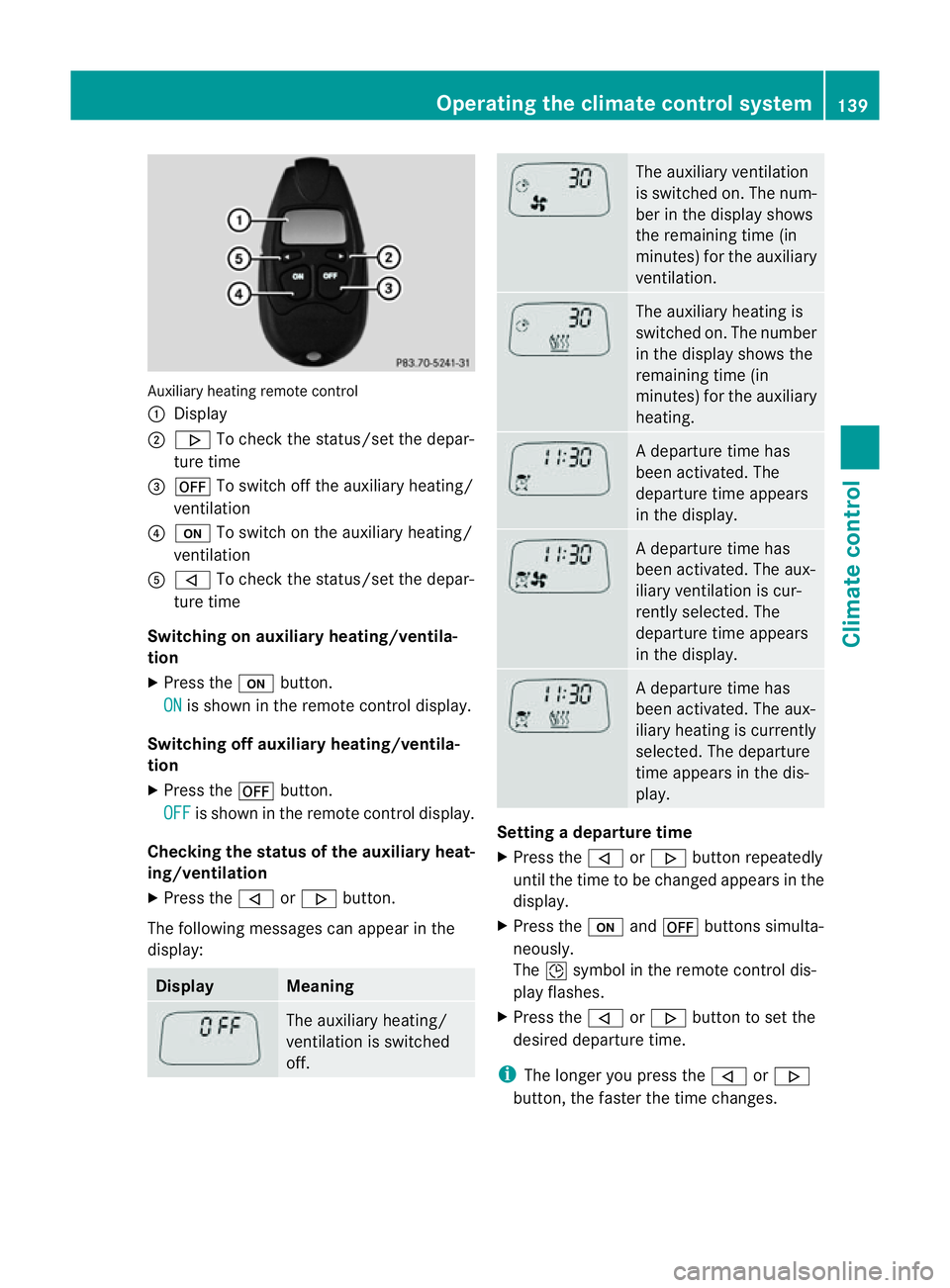
Auxiliary heating remote control
:
Display
; . To chec kthe status/set the depar-
ture time
= ^ To switch off the auxiliary heating/
ventilation
? u To switch on the auxiliary heating/
ventilation
A , To check the status/set the depar-
ture time
Switching on auxiliary heating/ventila-
tion
X Press the ubutton.
ON is shown in the remote control display.
Switching off auxiliary heating/ventila-
tion
X Press the ^button.
OFF is shown in the remote control display.
Checking the status of the auxiliary heat-
ing/ventilation
X Press the ,or. button.
The following messages can appearint he
display: Display Meaning
The auxiliary heating/
ventilation is switched
off. The auxiliary ventilation
is switched on. The num-
ber in the displays
hows
the remaining time (in
minutes) for the auxiliary
ventilation. The auxiliary heating is
switched on. The number
in the displays
hows the
remaining time (in
minutes) for the auxiliary
heating. Ad
eparture time has
been activated. The
departure time appears
in the display. Ad
eparture time has
been activated. The aux-
iliary ventilation is cur-
rently selected. The
departure time appears
in the display. Ad
eparture time has
been activated. The aux-
iliary heating is currently
selected. The departure
time appears in the dis-
play. Setting
adeparture time
X Press the ,or. button repeatedly
until the time to be changed appears in the
display.
X Press the uand^ button ssimulta-
neously.
The Îsymbol in the remot econtrol dis-
play flashes.
X Press the ,or. button to set the
desired departure time.
i The longer you press the ,or.
button ,the faster the time changes. Operating thec
limatecontrol system
139Climatecontrol Z
Page 143 of 353
X
Press the uand^ button ssimulta-
neously.
The new departure time is stored.
Activating aset departuret ime
X Press the ,or. button repeatedly
until the desired departure time appears in
the display.
X Press the ubutton.
The Ísymbol and the departure time
appear in the display.
Deactivating aset departuret ime
X Press the ,or. button.
The status of the auxiliary heating is shown
in the display.
X Press the .button.
The first departure time stored appears in
the display.
X Press the ^button.
The display message OFF appears in the
display.
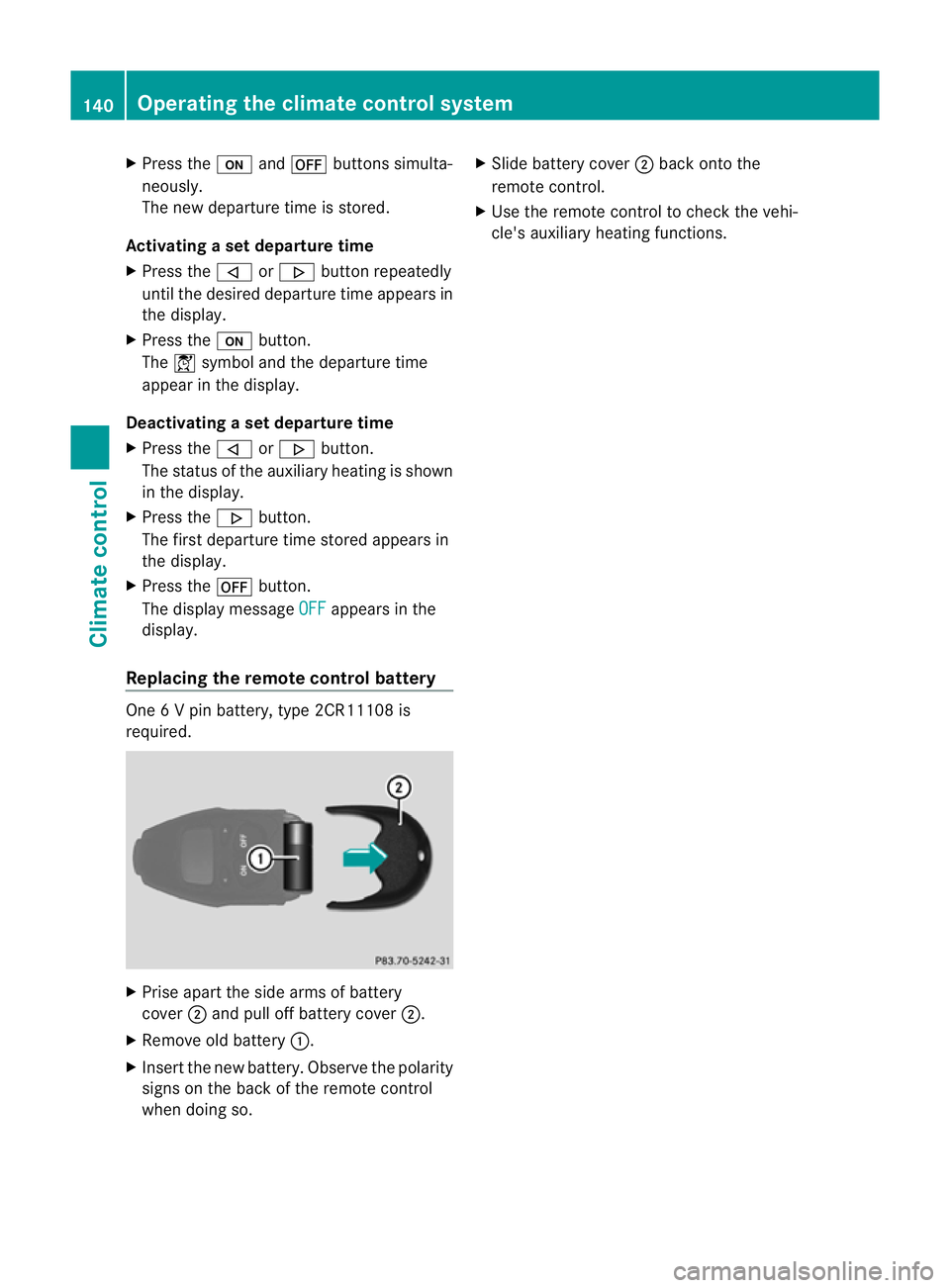
Replacing the remot econtrol battery One
6Vp in battery, type 2CR11108 is
required. X
Prise apart the side arms of battery
cover ;and pull off batter ycover ;.
X Remove old battery :.
X Inser tthe new battery. Observe the polarity
signs on the back of the remote control
when doing so. X
Slide battery cover ;back onto the
remote control.
X Use the remote control to check the vehi-
cle's auxiliary heating functions. 140
Operating the climate control systemClimatec
ontrol
Page 144 of 353
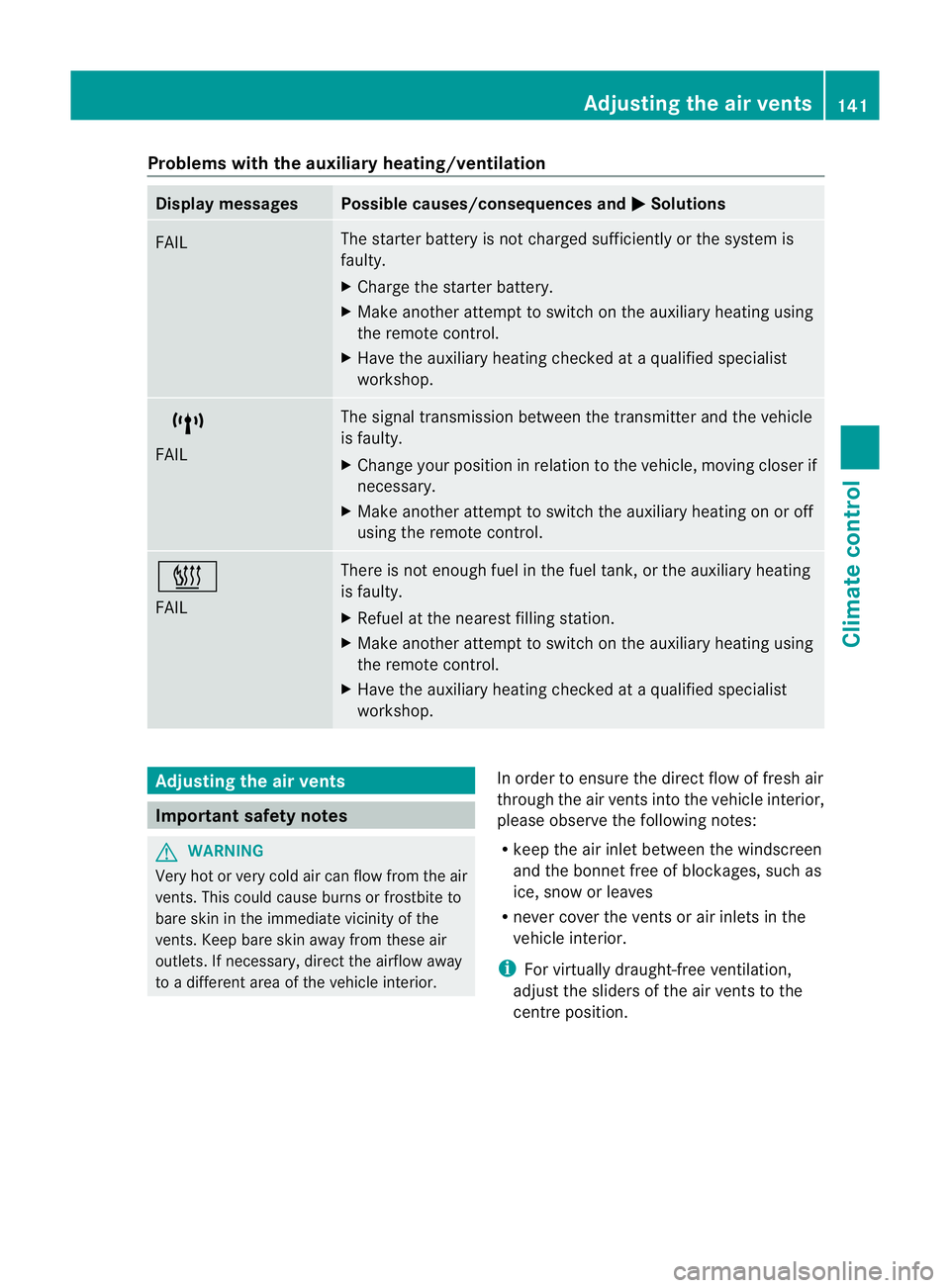
Problems with the auxiliary heating/ventilation
Display messages Possible causes/consequences and
M Solutions
FAIL The starter battery is not charged sufficiently or the system is
faulty.
X
Charge the starter battery.
X Make another attempt to switch on the auxiliary heating using
the remote control.
X Have the auxiliary heating checked at aqualified specialist
workshop. $
FAIL The signal transmission between the transmitter and the vehicle
is faulty.
X
Change your position in relation to the vehicle, moving closer if
necessary.
X Make another attempt to switch the auxiliary heating on or off
using the remote control. ©
FAIL There is not enough fuel in the fuel tank,ort
he auxiliary heating
is faulty.
X Refuel at the nearest filling station.
X Make another attempt to switch on the auxiliary heating using
the remote control.
X Have the auxiliary heating checked at aqualified specialist
workshop. Adjusting the air vents
Important safety notes
G
WARNING
Very hot or very cold air can flow from the air
vents. This could cause burns or frostbit eto
bare skin in the immediate vicinity of the
vents. Keep bare skin away from these air
outlets. If necessary, direct the airflow away
to ad ifferent area of the vehicle interior. In order to ensure the direct flow of fresh air
through the air ventsi
nto the vehicle interior,
please observe the following notes:
R keep the air inlet between the windscreen
and the bonnet free of blockages, such as
ice, snow or leaves
R never cover the ventsora ir inlets in the
vehicle interior.
i For virtually draught-free ventilation,
adjust the sliders of the air ventstot he
centre position. Adjusting the air vents
141Climate control Z
Page 145 of 353
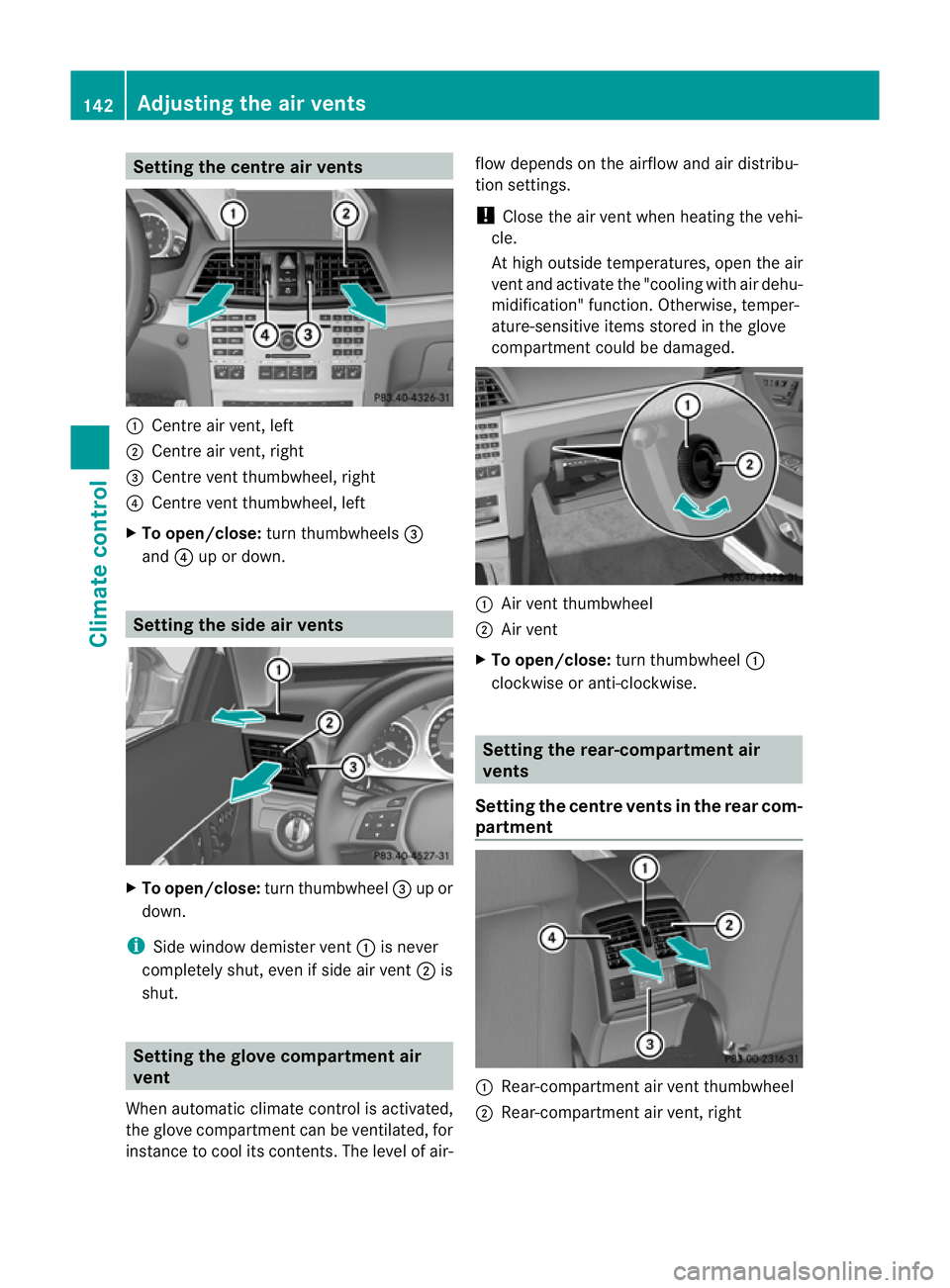
Setting the centre air vents
:
Centre air vent,l eft
; Centre air vent,r ight
= Centre vent thumbwheel, right
? Centre vent thumbwheel, left
X To open/close: turn thumbwheels =
and ?up or down. Setting the side air vents
X
To open/close: turn thumbwheel =up or
down.
i Side window demister vent :is never
completely shut, even if side air vent ;is
shut. Setting the glove compartment air
vent
When automatic climate control is activated,
the glove compartmen tcan be ventilated, for
instance to cool its contents .The level of air- flow depends on the airflow and air distribu-
tion settings.
!
Close the air vent when heating the vehi-
cle.
At high outside temperatures, open the air
vent and activate the "cooling with air dehu-
midification" function. Otherwise, temper-
ature-sensitive items stored in the glove
compartmentc ould be damaged. :
Air vent thumbwheel
; Air vent
X To open/close: turn thumbwheel :
clockwise or anti-clockwise. Setting the rear-compartment air
vents
Setting the centre vents in the rear com-
partment :
Rear-compartment air vent thumbwheel
; Rear-compartment air vent,r ight142
Adjusting the air ventsClimate control