steering MERCEDES-BENZ E-Class COUPE 2014 C207 Owner's Guide
[x] Cancel search | Manufacturer: MERCEDES-BENZ, Model Year: 2014, Model line: E-Class COUPE, Model: MERCEDES-BENZ E-Class COUPE 2014 C207Pages: 394, PDF Size: 5.28 MB
Page 130 of 394

X
Turn the SmartKey to position 1or 2in the
ignition lock (Y page 165).
X Press button 0002for the left-hand exterior
mirror or button 0003for the right-hand
exterior mirror.
The indicator lamp in the corresponding
button lights up in red.
The indicator lamp goes out again after
some time. You can adjust the selected
mirror using adjustment button 0023as long
as the indicator lamp is lit.
X Press adjustmen tbutton 0023up, down, or
to the left or right until you have adjusted
the exterior mirror to the correct position.
You should have a good overview of traffic
conditions.
The convex exterio rmirrors provide a larger
field of vision.
After the engine has been started, the
exterior mirrors are automatically heated if
the rear window defroster is switched on and
the outside temperature is low. Heating takes
a maximum of 10 minutes.
i You can also heat up the exterior mirrors
manually by switching on the rear window
defroster. Folding the exterior mirrors in or out
electrically X
Turn the SmartKey to position 1or 2in the
ignition lock (Y page 165).
X Briefly press button 0002.
Both exterior mirrors fold in or out.
i Make sure that the exterior mirrors are
always folded out fully while driving. They
could otherwise vibrate.
i If you are driving faster than 30 mph
(47 km/h), you can no longer fold in the
exterior mirrors.
Setting the exterior mirrors If the battery has been disconnected or
completely discharged, the exterior mirrors
must be reset
.The exterior mirrors will
otherwise not fold in when you select the
"Fold in mirrors when locking" function in the
on-board computer. (Y page 246)
X Turn the SmartKey to position 1in the
ignition lock (Y page 165).
X Briefly press button 0002.
Folding the exterior mirrors in or out
automatically If the "Fold in mirrors when locking" function
is activated in the on-board computer
(Y
page 246): 128
MirrorsSeats, steering wheel and mirrors
Page 131 of 394
R
the exterior mirrors fold in automatically as
soon as you lock the vehicle fro mthe
outside.
R the exterior mirrors fold out again
automatically as soon as you unlock the
vehicle and then open the driver's or front-
passenger door.
i If the exterior mirrors have been folded in
manually, they do not fold out.
Exterior mirror pushed out of position If an exterior mirror has been pushed out of
position, proceed as follows:
X
Vehicles without electrically folding
exterior mirrors: move the exterior mirror
into the correct position manually.
X Vehicles with electrically folding
exterior mirrors: press and hold mirror-
folding button 0002until you hear a click and
then the mirrors engage in position
(Y page 128).
The mirror housing is engaged again and
you can adjust the exterior mirrors as usual
(Y page 127). Automatic anti-glare mirrors
The rear-view mirror and the exterior mirror
on the driver's side automatically go into anti-
glare mode if the following conditions are met
simultaneously:
R the ignition is switched on and
R incident light from headlamps strikes the
sensor in the rear-view mirror.
The mirrors do not go into anti-glare mode if
reverse gear is engaged. Parking position for the exterior
mirror on the front-passenger side
Setting and storing the parking position Using reverse gear
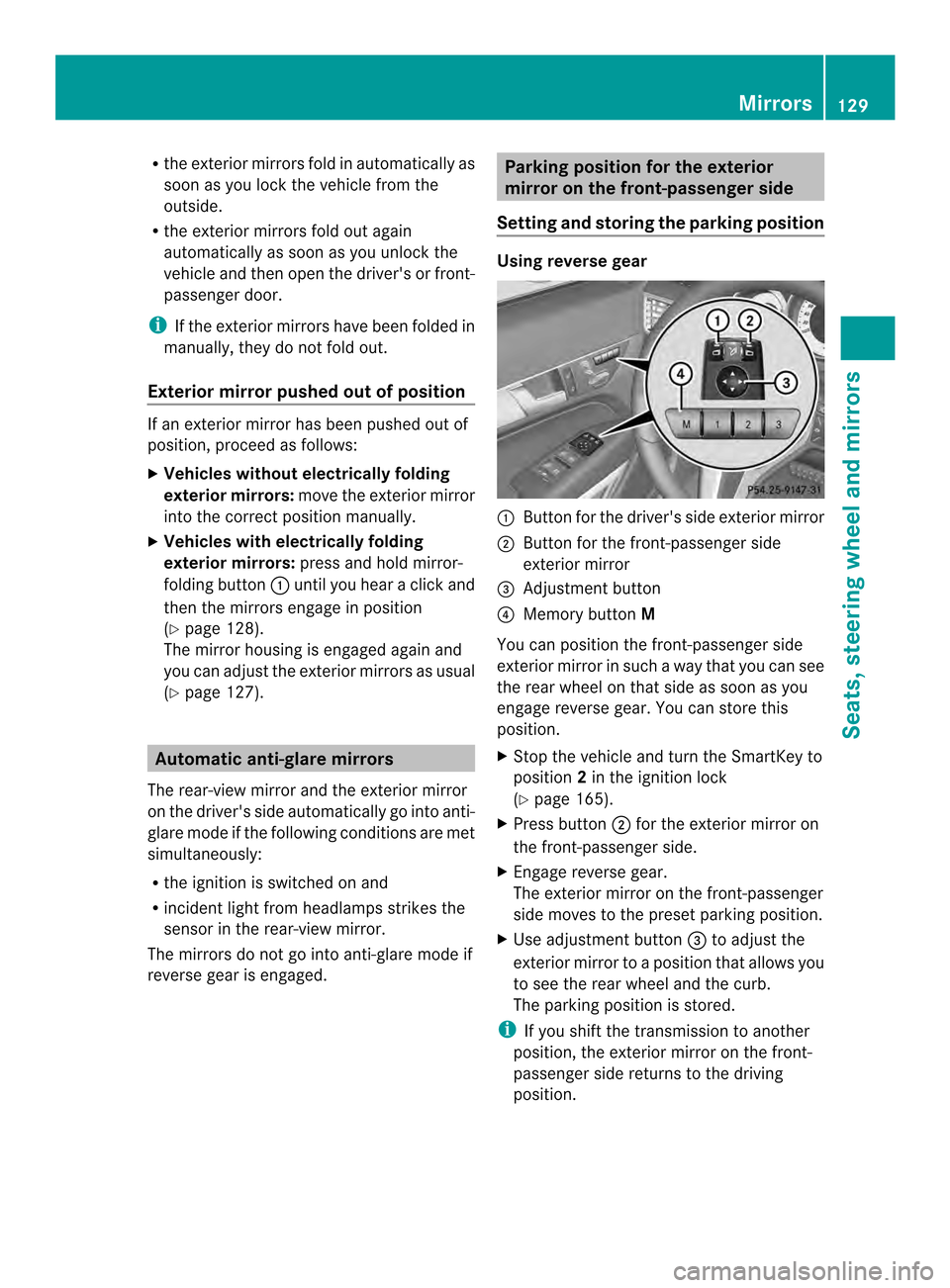
0002
Button for the driver's side exterior mirror
0003 Button for the front-passenger side
exterior mirror
0023 Adjustment button
0022 Memory button M
You can position the front-passenger side
exterior mirror in such a way that you can see
the rear wheel on that side as soon as you
engage reverse gear. You can store this
position.
X Stop the vehicle and turn the SmartKey to
position 2in the ignition lock
(Y page 165).
X Press button 0003for the exterior mirror on
the front-passenger side.
X Engage reverse gear.
The exterior mirror on the front-passenger
side moves to the preset parking position.
X Use adjustment button 0023to adjust the
exterior mirror to a position that allows you
to see the rear wheel and the curb.
The parking position is stored.
i If you shift the transmission to another
position, the exterior mirror on the front-
passenger side returns to the driving
position. Mirrors
129Seats, steering wheel and mirrors Z
Page 132 of 394
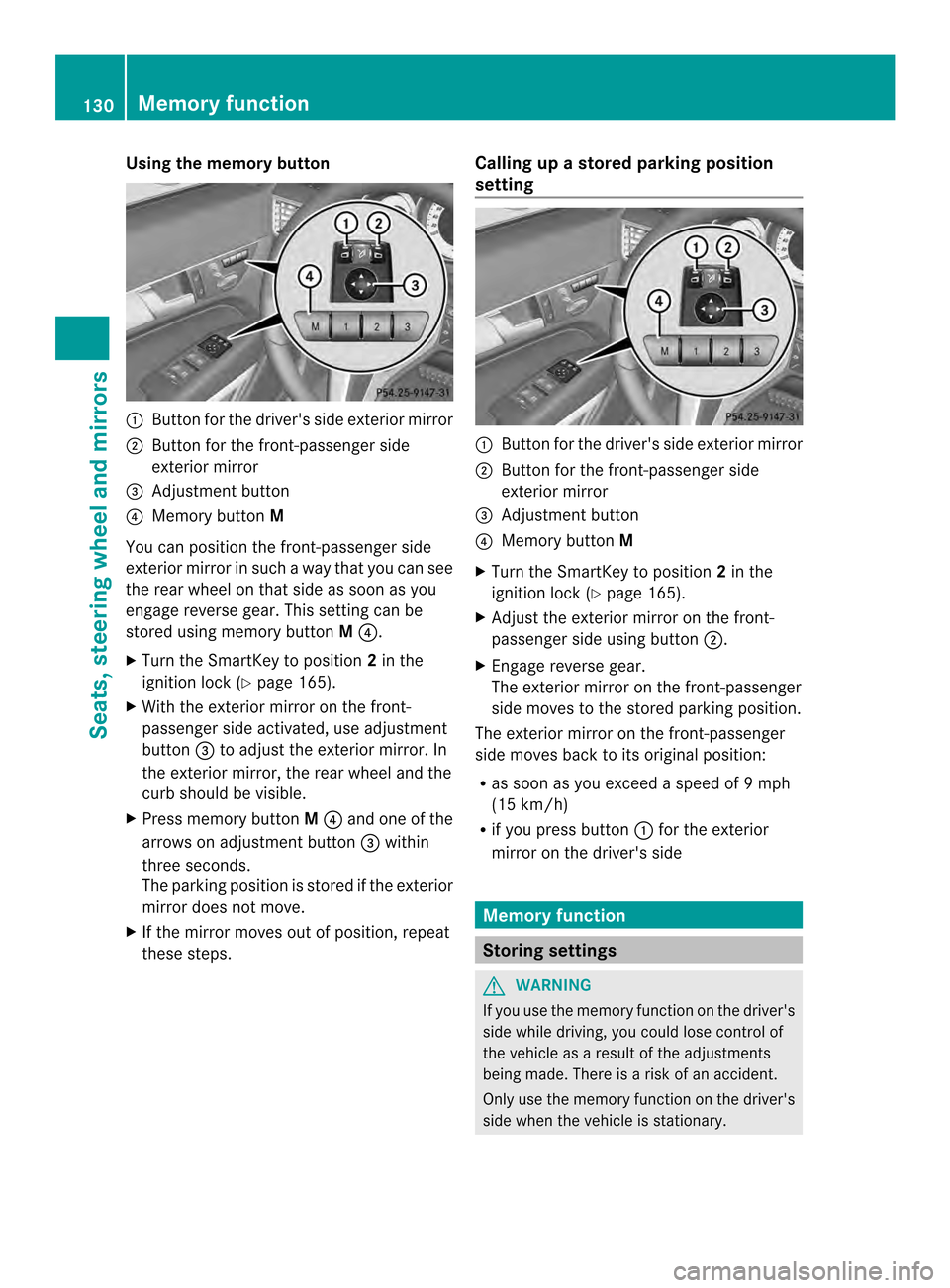
Using the memory button
0002
Button for the driver's side exterior mirror
0003 Button for the front-passenger side
exterior mirror
0023 Adjustment button
0022 Memory button M
You can position the front-passenger side
exterior mirror in such a way that you can see
the rear wheel on that side as soon as you
engage reverse gear. This setting can be
stored using memory button M0022.
X Turn the SmartKey to position 2in the
ignition lock (Y page 165).
X With the exterior mirror on the front-
passenger side activated, use adjustment
button 0023to adjust the exterior mirror. In
the exterior mirror, the rear wheel and the
curb should be visible.
X Press memory button M0022 and one of the
arrows on adjustment button 0023within
three seconds.
The parking position is stored if the exterior
mirror does not move.
X If the mirror moves out of position, repeat
these steps. Calling up a stored parking position
setting 0002
Button for the driver's side exterior mirror
0003 Button for the front-passenger side
exterior mirror
0023 Adjustment button
0022 Memory button M
X Turn the SmartKey to position 2in the
ignition lock (Y page 165).
X Adjust the exterior mirror on the front-
passenger side using button 0003.
X Engage reverse gear.
The exterior mirror on the front-passenger
side moves to the stored parking position.
The exterior mirror on the front-passenger
side moves back to its original position:
R as soon as you exceed a speed of 9mph
(15 km/h)
R if you press button 0002for the exterior
mirror on the driver's side Memory function
Storing settings
G
WARNING
If you use the memor yfunctio nonthe driver's
side while driving, you could lose control of
the vehicle as a result of the adjustments
being made. There is a risk of an accident.
Only use the memory function on the driver's
side when the vehicle is stationary. 130
Memory functionSeats, steering wheel and mirrors
Page 133 of 394
G
WARNING
Childre ncould become trapped if they
activate the memory function, particularly
when unattended. There is arisk of injury.
When leaving the vehicle, always take the
SmartKey with you and lock the vehicle. Never
leave children unsupervised in the vehicle.
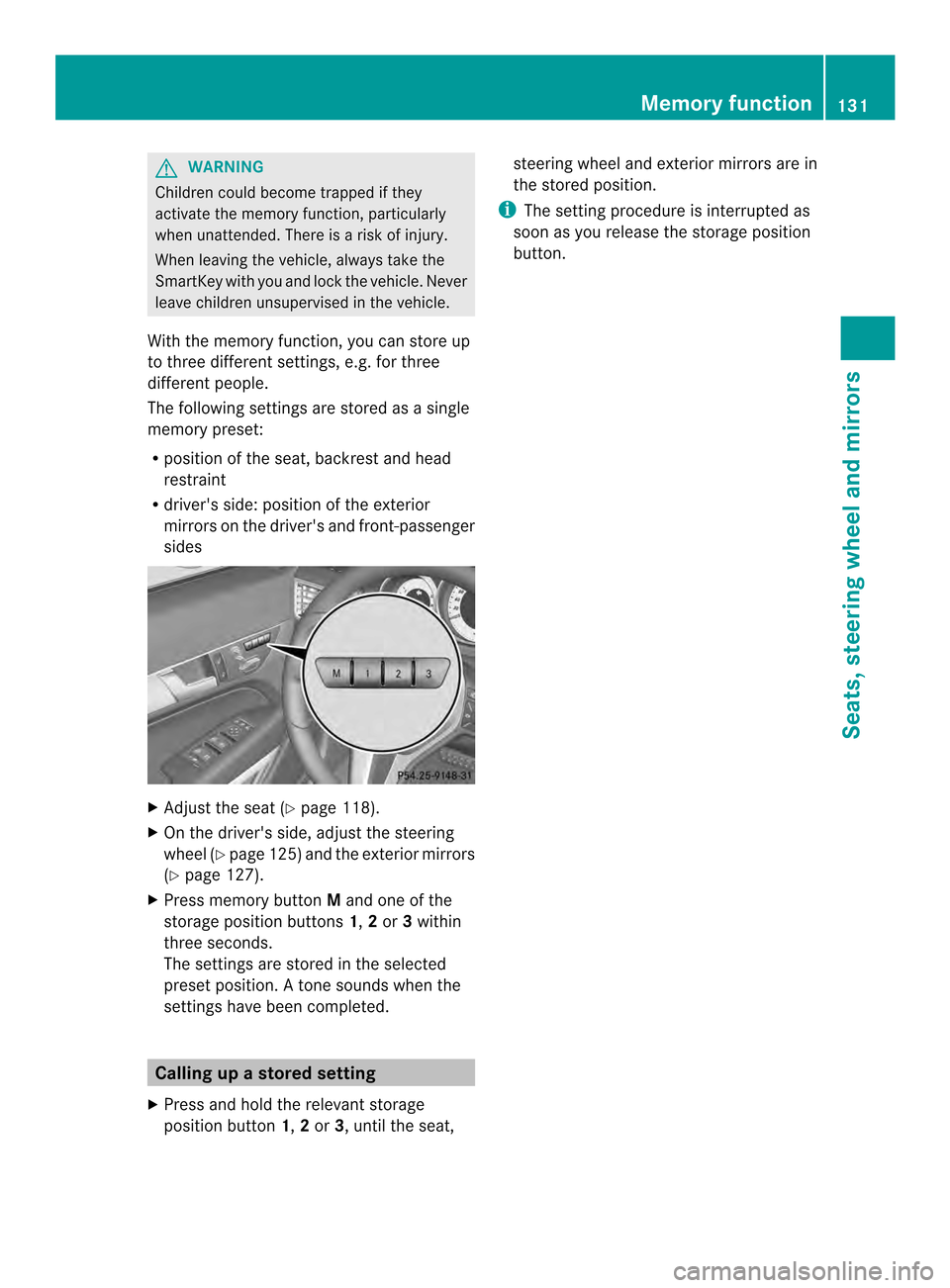
With the memory function, you can store up
to three different settings, e.g. for three
differen tpeople.
The following settings are stored as a single
memory preset:
R position of the seat, backrest and head
restraint
R driver's side: position of the exterior
mirrors on the driver's and front-passenger
sides X
Adjust the seat (Y page 118).
X On the driver's side, adjust the steering
wheel (Y page 125)a nd the exterio rmirrors
(Y page 127).
X Press memory button Mand one of the
storage position buttons 1,2or 3within
three seconds.
The settings are stored in the selected
prese tposition. Atone sounds when the
settings have been completed. Calling up
astore dsetting
X Press and hold the relevant storage
position button 1,2or 3, until the seat, steering wheel and exterio
rmirrors are in
the stored position.
i The setting procedure is interrupted as
soon as you release the storage position
button. Memory function
131Seats, steering wheel and mirrors Z
Page 141 of 394
The hazard warning lamps automatically
switch on if:
R
an air bag is deployed
R the vehicle decelerates rapidly from a
speed of above 45 mph (70 km/h) and
comes to a standstill
The hazard warning lamps switch off
automatically if the vehicle reaches a speed
of above 6 mph (10 km/h) again after a full
brake application.
i The hazard warning lamps still operate if
the ignition is switched off. Cornering light function
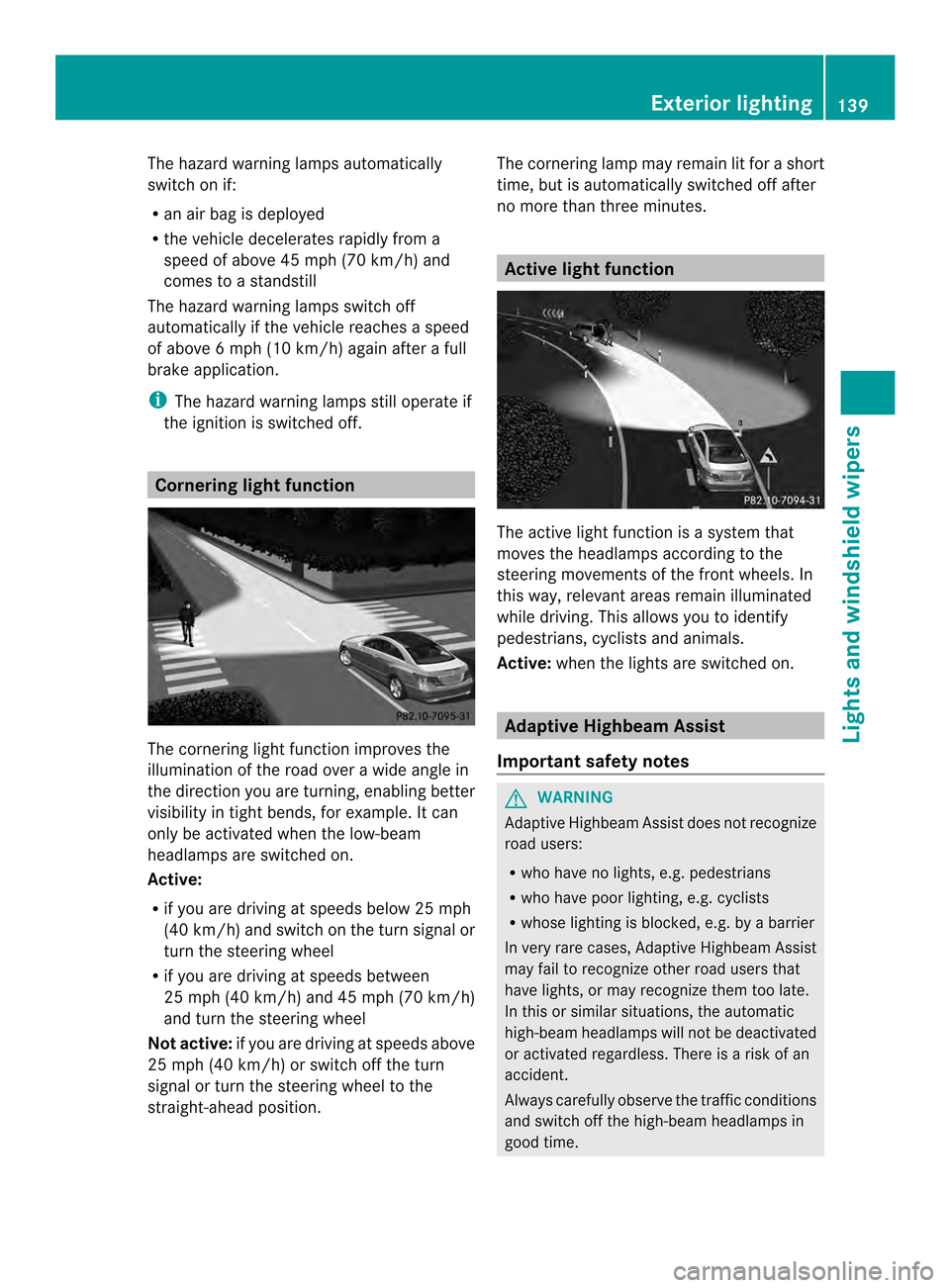
The cornering light function improves the
illumination of the road over a wide angle in
the direction you are turning, enabling better
visibility in tight bends, for example. It can
only be activated when the low-beam
headlamps are switched on.
Active:
R if you are driving at speeds below 25 mph
(40 km/h) and switch on the tur nsignal or
tur nthe steering wheel
R if you are driving at speeds between
25 mph (40 km/h) and 45 mph (70 km/h)
and turn the steering wheel
Not active: if you are driving at speeds above
25 mph (40 km/h) or switch off the turn
signal or turn the steering wheel to the
straight-ahead position. The cornering lamp may remain lit for a short
time, but is automatically switched off after
no more than three minutes. Active light function
The active light function is a system that
moves the headlamps according to the
steering movements of the front wheels. In
this way, relevant areas remain illuminated
while driving. This allows you to identify
pedestrians, cyclists and animals.
Active: whenthe lights are switched on. Adaptive Highbeam Assist
Important safety notes G
WARNING
Adaptive Highbeam Assist does not recognize
road users:
R who have no lights, e.g. pedestrians
R who have poor lighting, e.g. cyclists
R whose lighting is blocked, e.g. by a barrier
In very rare cases, Adaptive Highbeam Assist
may fail to recognize other road users that
have lights, or may recognize them too late.
In this or similar situations, the automatic
high-beam headlamps will not be deactivated
or activated regardless. There is a risk of an
accident.
Always carefully observe the traffic conditions
and switch off the high-beam headlamps in
good time. Exterior lighting
139Lights and windshield wipers Z
Page 166 of 394
Useful information
i This Operator's Manual describes all
models and all standard and optional
equipment of your vehicle available at the
time of publication of the Operator's
Manual. Country-specific differences are
possible. Please note that your vehicle may
not be equipped with all features
described. This also applies to safety-
related systems and functions.
i Read the information on qualified
specialist workshops: (Y page 25).Notes on breaking-in
anew vehicle Important safety notes
New and replaced brake pads and discs only
reach their optimum braking effect after
several hundred kilometers of driving.
Compensate for this by applying greater force
to the brake pedal. The first 1000 miles(1500 km)
The more you look after the engine when it is
new, the more satisfied you will be with its
performance in the future.
R You should therefore drive at varying
vehicle and engine speeds for the first
1000 miles (1500 km).
R Avoid heavy loads, e.g .driving at full
throttle, during this period.
R Change gearing ood time, before the
tachometer needle is 0001of the way to the
red area of the tachometer.
R If possible, do not depress the accelerator
pedal past the point of resistance
(kickdown).
After 1000 miles (1500 km), you can increase
the engine speed gradually and accelerate
the vehicle to full speed. i
You should also observe these notes on
breaking in if the engine or parts of the drive
train on your vehicle have been replaced.
i Always observe the respective speed
limits. Driving
Important safety notes
G
WARNING
Objects in the driver's footwell can restric tthe
pedal travel or obstruct adepressed pedal.
The operating and road safety of the vehicle
is jeopardized. There is a risk of an accident.
Make sure that all objects in the vehicle are
stowed correctly, and that they cannot enter
the driver's footwell. Install the floormats
securely and as specified in order to ensure
sufficien tclearance for the pedals. Do not use
loose floormats and do not place floormats on
top of one another. G
WARNING
Unsuitable footwear can hinde rcorrect usage
of the pedals, e.g.:
R shoes with thick soles
R shoes with high heels
R slippers
There is a risk of an accident.
Wear suitable footwear to ensure correct
usage of the pedals. G
WARNING
If you switch off the ignition while driving,
safety-relevant functions are only available
with limitations, or not at all. This could affect,
for example, the power steering and the brake
boosting effect .You will require considerably
more effort to steer and brake. There is a risk
of an accident.
Do not switch off the ignition while driving. 164
DrivingDriving and parking
Page 174 of 394

Automatic transmission
Important safety notes
G
WARNING
If the engine speed is above the idling speed
and you engage transmission position Dor
R, the vehicle could pull away suddenly. There
is a risk of an accident.
When engaging transmission position Dor R,
always firmly depress the brake pedal and do
no tsimultaneously accelerate. G
WARNING
The automatic transmission switches to
neutral position Nwhen you switch off the
engine. The vehicle may roll away. There is a
risk of an accident.
After switching off the engine, always switch
to parking position P. Prevent the parked
vehicle fro mrolling away by applying the
parking brake. DIRECT SELECTl
ever
Overview of transmission positions 0013
Park position with parking lock
0010 Reverse gear
0011 Neutral
0012 Drive
The DIRECT SELECT lever is on the righ tofthe
steering column.
i The DIRECT SELECT lever always returns
to its original position. The current transmission position
P,R, Nor Dappears
in the transmission position display
(Y page 172) in the multifunction display.
Transmission position and drive
program display !
If the transmission position display in the
multifunction display is not working, you
should pull away carefully to check whether
the desired transmission position is
engaged. Ideally, you should select
transmission position Dand drive program
E or S. 0002
Transmission position display
0003 Drive program display
The current transmission position and drive
program appearint he multifunction display.
i The arrows in the transmission position
display show how and into which
transmission positions you can change
using the DIRECT SELECT lever.
Engaging parkp osition P !
If the engine speed is to ohigh or the
vehicle is moving, do not shift the
automatic transmission directly from Dto
R, from Rto Dor directly to P.The
automatic transmission could otherwise be
damaged. 172
Automatic transmissionDriving and parking
Page 178 of 394
E
Economy Comfortable, economical
driving
S
Sport Sporty driving style
M
Manual Manual gear shifting
i
For further information on the automatic
drive program, see (Y page 176).
Only change fro mautomatic drive program
E or Sto manual drive program Mwhen the
vehicle is stationary.
i The automatic transmission shifts to
automatic drive program Eeach time the
engine is started. Steering wheel paddle shifters
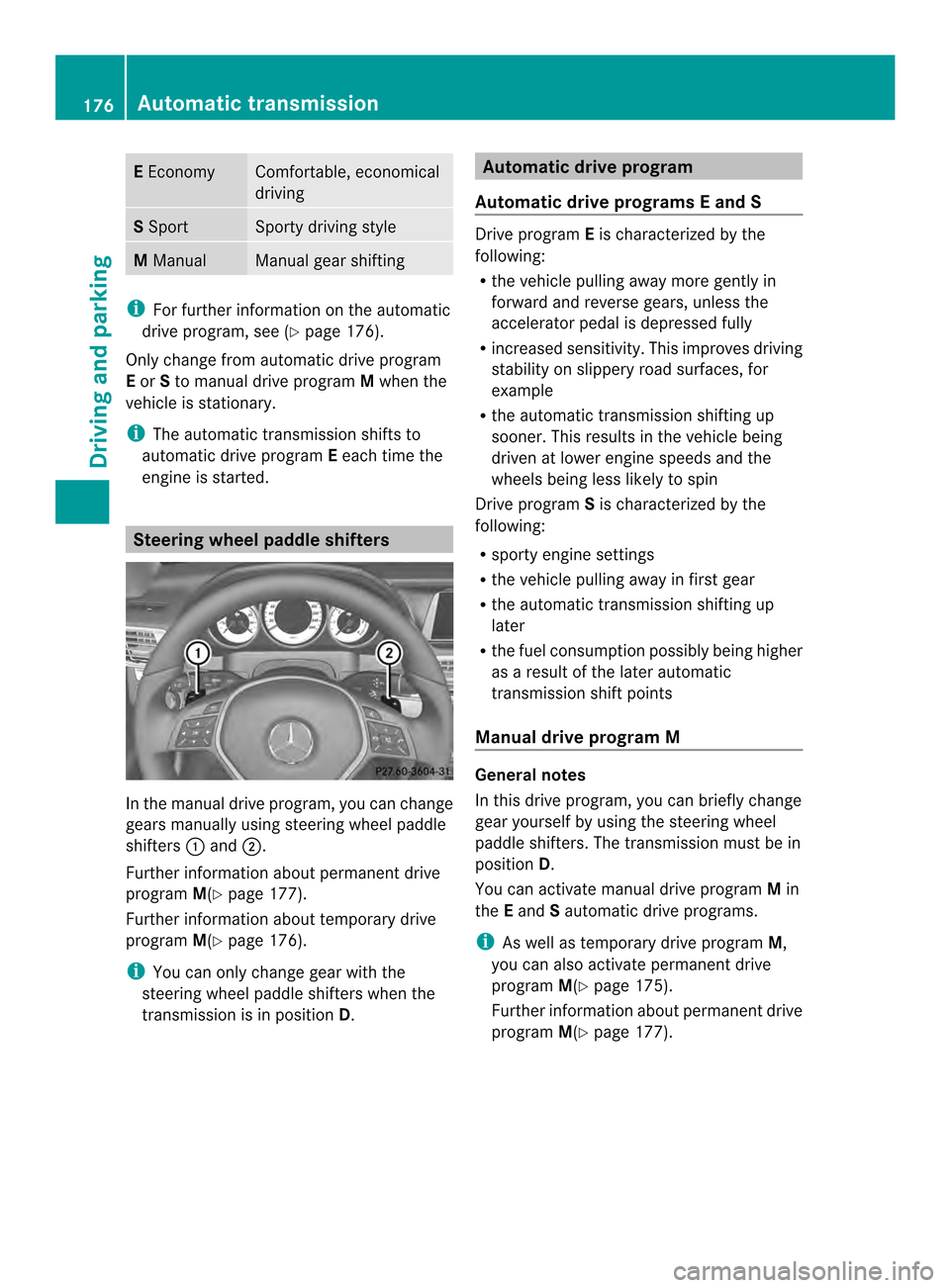
In the manual drive program, you can change
gears manually using steering wheel paddle
shifters
0002and 0003.
Further information about permanent drive
program M(Ypage 177).
Further information about temporary drive
program M(Ypage 176).
i You can only change gear with the
steering wheel paddle shifters when the
transmission is in position D. Automatic drive program
Automatic drive program sEand S Drive program
Eis characterized by the
following:
R the vehicle pulling away more gently in
forward and reverse gears, unless the
accelerator pedal is depressed fully
R increased sensitivity .This improves driving
stability on slippery road surfaces, for
example
R the automatic transmission shifting up
sooner. This results in the vehicle being
driven at lower engine speeds and the
wheels being less likely to spin
Drive program Sis characterized by the
following:
R sporty engine settings
R the vehicle pulling away in first gear
R the automatic transmission shifting up
later
R the fuel consumption possibly being higher
as a result of the later automatic
transmission shift points
Manual drive program M General notes
In this drive program, you can briefly change
gear yourself by using the steering wheel
paddle shifters. The transmission must be in
position
D.
You can activate manual drive program Min
the Eand Sautomatic drive programs.
i As well as temporary drive program M,
you can also activate permanent drive
program M(Ypage 175).
Further information about permanent drive
program M(Ypage 177). 176
Automatic transmissionDriving and parking
Page 179 of 394
Activating
X
Shift the transmission to position D.
X Pull the left or right steering wheel paddle
shifte r(Ypage 176).
Manual drive program Mis temporarily
activated. The selected gear and Mappear
in the multifunction display.
Shifting gears
If you pull on the left or right steering wheel
paddle shifter, the automatic transmission
switches to manual drive program Mfor a
limited amount of time. Depending on which
paddle shifter is pulled, the automatic
transmission immediately shifts into the next
gear down or up, if permitted.
X To shift up: pull the right-hand steering
wheel paddle shifter (Y page 176).
The automatic transmission shifts up to the
next gear.
i If the maximum engine speed on the
currently engaged gear is reached and you
continue to accelerate, the automatic
transmission automatically shifts up in
order to preven tengine damage.
X To shift down: pull on the left-hand
steering wheel paddle shifter
(Y page 176).
The automatic transmission shifts down to
the next gear.
i If the engine exceeds the maximum
engine speed when shifting down, the
automatic transmission protects against
engine damage by not shifting down.
i Automatic down shifting occurs when
coasting.
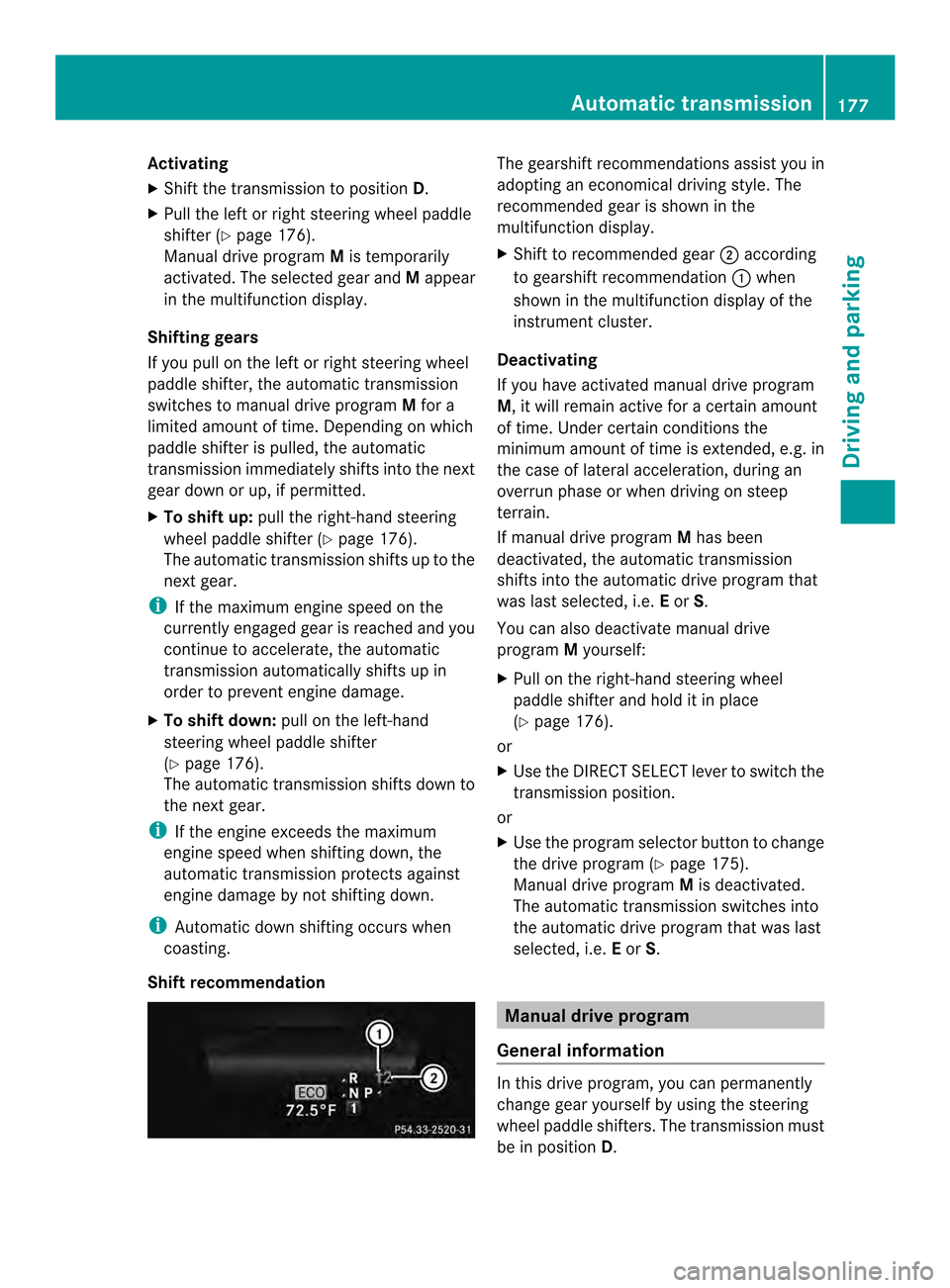
Shift recommendation The gearshift recommendations assist you in
adopting an economical driving style
.The
recommended gear is shown in the
multifunction display.
X Shift to recommended gear 0003according
to gearshift recommendation 0002when
shown in the multifunction display of the
instrument cluster.
Deactivating
If you have activated manual drive program
M, it will remain active for a certain amount
of time. Under certain conditions the
minimum amount of time is extended, e.g. in
the case of lateral acceleration, during an
overrun phase or when driving on steep
terrain.
If manual drive program Mhas been
deactivated, the automatic transmission
shifts into the automatic drive program that
was last selected, i.e. Eor S.
You can also deactivate manual drive
program Myourself:
X Pull on the right-hand steering wheel
paddle shifter and hold it in place
(Y page 176).
or
X Use the DIRECT SELECT lever to switch the
transmission position.
or
X Use the program selector button to change
the drive program (Y page 175).
Manual drive program Mis deactivated.
The automatic transmission switches into
the automatic drive program that was last
selected, i.e. Eor S. Manual drive program
General information In this drive program, you can permanently
change gear yourself by using the steering
wheel paddle shifters. The transmission must
be in position
D. Automatic transmission
177Driving and parking Z
Page 180 of 394
i
As well as this permanent drive program
M, you can also activate temporary drive
program M(Ypage 176).
Switching on the manual drive program X
Press the progra mselecto rbutton
(Y page 175) repeatedly until Mappears in
the multifunction display.
The manual drive program is only available on
vehicles with the dynamic handling package
or AMG sports package.
Manual drive program Mis different from
drive program Swith regard to spontaneity,
responsiveness and smoothness of gear
changes.
Manual drive program Mcan be selected
using the program selector button. In manual
drive program M, you can change gear using
the steering wheel paddle shifters if the
transmission is in position D.The gear
selected is shown in the multifunction
display.
Upshifting X
Pull the right-hand steering wheel paddle
shifter.
The automatic transmission shifts up to the
next gear.
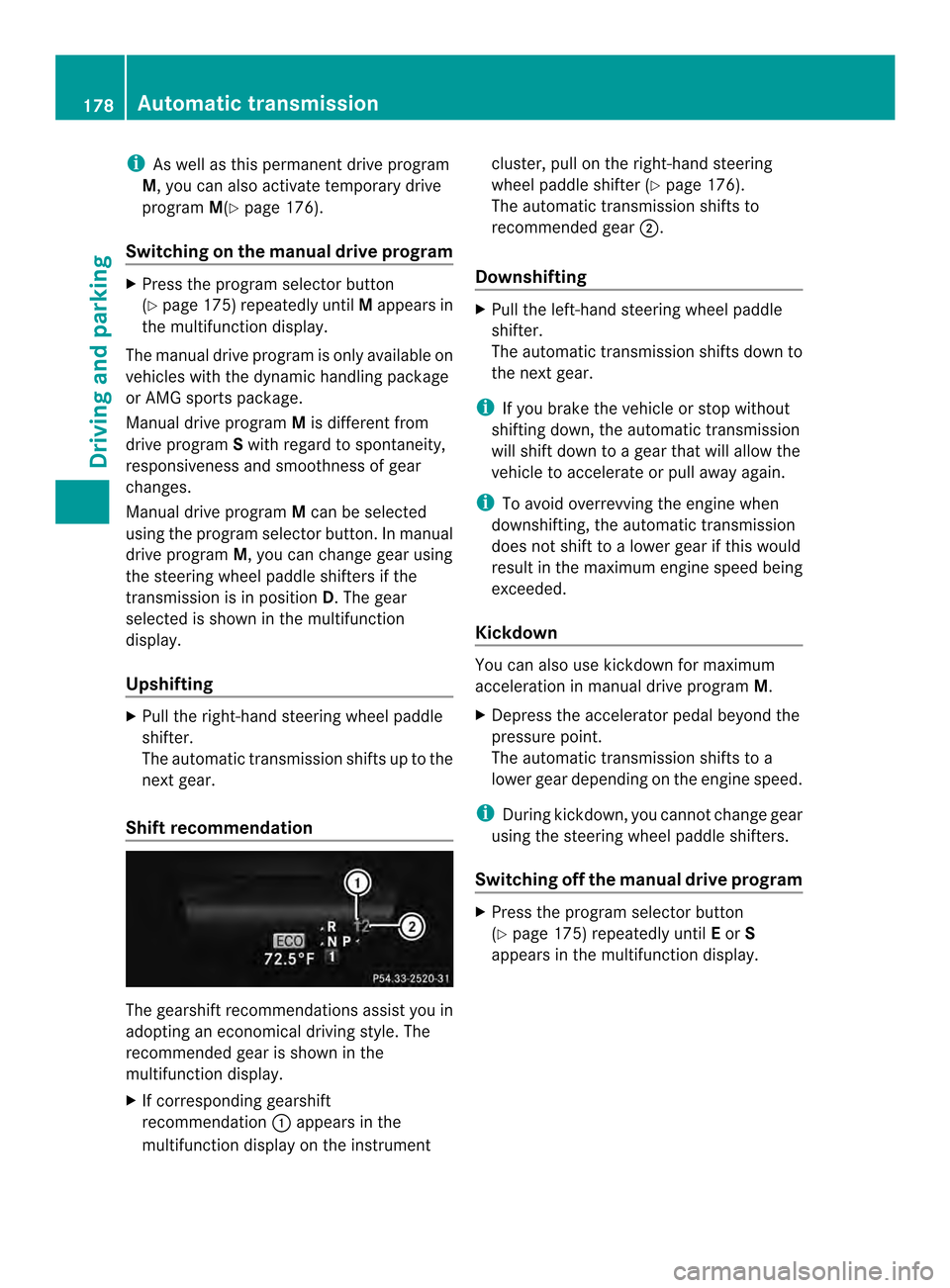
Shift recommendation The gearshift recommendations assist you in
adopting an economical driving style. The
recommended gear is shown in the
multifunction display.
X
If corresponding gearshift
recommendation 0002appears in the
multifunction display on the instrument cluster, pull on the right-hand steering
wheel paddle shifter (Y
page 176).
The automatic transmission shifts to
recommended gear 0003.
Downshifting X
Pull the left-hand steering wheel paddle
shifter.
The automatic transmission shifts down to
the next gear.
i If you brake the vehicle or stop without
shifting down, the automatic transmission
will shift down to a gear that will allow the
vehicle to accelerate or pull away again.
i To avoid overrevving the engine when
downshifting, the automatic transmission
does not shift to a lower gear if this would
result in the maximum engine speed being
exceeded.
Kickdown You can also use kickdown for maximum
acceleration in manual drive program
M.
X Depress the accelerator pedal beyond the
pressure point.
The automatic transmission shifts to a
lower gear depending on the engine speed.
i During kickdown, you cannot change gear
using the steering wheel paddle shifters.
Switching off the manuald rive program X
Press the progra mselecto rbutton
(Y page 175) repeatedly until Eor S
appears in the multifunction display. 178
Automatic transmissionDriving and pa
rking