cruise control MERCEDES-BENZ E-CLASS COUPE 2015 Owners Manual
[x] Cancel search | Manufacturer: MERCEDES-BENZ, Model Year: 2015, Model line: E-CLASS COUPE, Model: MERCEDES-BENZ E-CLASS COUPE 2015Pages: 345, PDF Size: 11.42 MB
Page 10 of 345
Switching on/of
f........................... 117
Switching residual heat on/off ...... 124
Switching the rear window heat-
ing on/of f...................................... 122
Switching the ZONE function on/
off .................................................. 121
THERMATIC automatic climate
control (2-zone) ............................. 116
THERMOTRONIC (3-zone) auto-
matic climate control ..................... 116
Cockpit
Overview .......................................... 28
see Instrument cluster
COLLISION PREVENTION ASSIST
PLUS
Activating/deactivating ................. 214
Display message ............................ 225
Operation/note s.............................. 64
COMAND display
Cleaning ......................................... 294
COMAND Online
Switching on/of f........................... 256
Combination switch .......................... 108
Connecting a USB device
See also Digital Owner's Manua l... 256
Consumption statistics (on-board
computer) .......................................... 209
Controller ........................................... 257
Convenience closing feature .............. 86
Convenience opening feature ............ 86
Convenience opening/closing (air-
recirculation mode) ........................... 123
Coolant (engine)
Checking the level ......................... 286
Display message ............................ 231
Important safety notes .................. 334
Temperature gaug e........................ 206
Warning lamp ................................. 252
Cooling
see Climate control
Copyright ............................................. 27
Cornering light function
Display message ............................ 229
Function/note s............................. 109
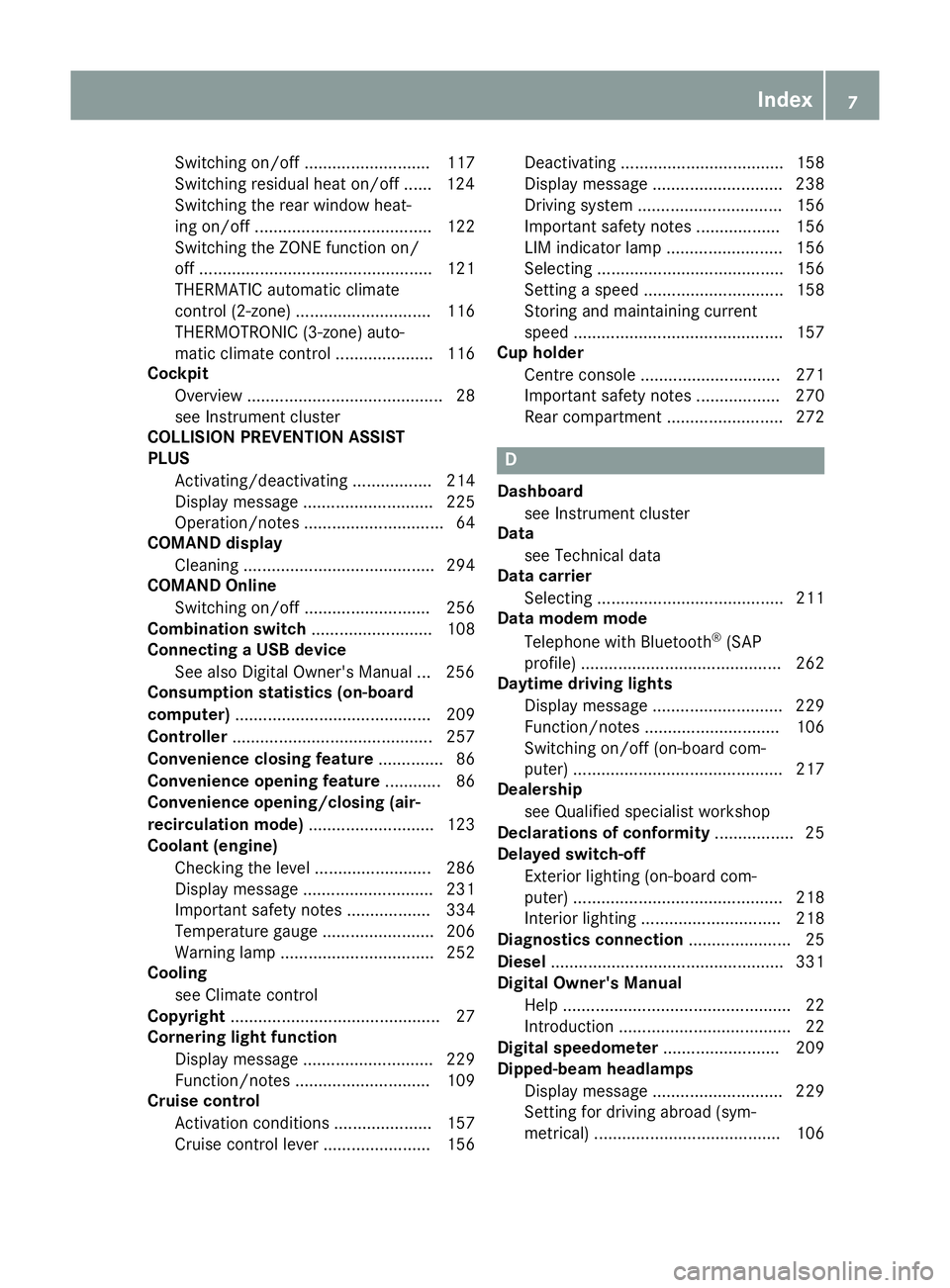
Cruise control
Activation conditions ..................... 157
Cruise control lever ....................... 156 Deactivating ................................... 158
Display message ............................ 238
Driving system ............................... 156
Important safety notes .................. 156
LIM indicator lamp ......................... 156
Selecting ........................................ 156
Setting a speed .............................. 158
Storing and maintaining current
speed ............................................. 157
Cup holder
Centre console .............................. 271
Important safety notes .................. 270
Rear compartment ......................... 272 D
Dashboard see Instrument cluster
Data
see Technical data
Data carrier
Selecting ........................................ 211
Data modem mode
Telephone with Bluetooth ®
(SAP
profile) ........................................... 262
Daytime driving lights
Display message ............................ 229
Function/note s............................. 106
Switching on/off (on-board com-
puter) ............................................. 217
Dealership
see Qualified specialist workshop
Declarations of conformity ................. 25
Delayed switch-off
Exterior lighting (on-board com-
puter) ............................................. 218
Interior lighting .............................. 218
Diagnostics connection ...................... 25
Diesel .................................................. 331
Digital Owner's Manual
Help ................................................. 22
Introduction ..................................... 22
Digital speedometer ......................... 209
Dipped-beam headlamps
Display message ............................ 229
Setting for driving abroad (sym-
metrical) ........................................ 106 Index
7
Page 11 of 345
Setting for driving on the right/
left ................................................. 217
Switching on/of f........................... 107
DIRECT SELECT lever
Automatic transmission ................. 140
Display message
Driving systems ............................. 234
KEYLESS-GO .................................. 245
Display messages
ASSYST PLUS ................................ 288
Calling up (on-board computer) ..... 222
Engine ............................................ 231
General information ....................... 222
Hiding (on-board computer) ........... 222
Key ................................................ 245
Lights ............................................. 229
Safety systems .............................. 223
Tyres .............................................. 239
Vehicle ........................................... 241
Distance warning function
Function/note s................................ 65
Distance warning signal (warning
lamp) .................................................. 254
DISTRONIC PLUS
Activating ....................................... 163
Activation conditions ..................... 163
Deactivating ................................... 167
Display message ............................ 236
Displays in the multifunction dis-
play ................................................ 166
Function/note s............................. 161
Important safety notes .................. 161
Selecting ........................................ 162
Setting the specified minimum
distance ......................................... 165
Stopping ........................................ 165
Door
Automatic locking (on-board com-
puter) ............................................. 218
Automatic locking (switch) ............... 82
Central locking/unlocking (key) ...... 74
Control panel ................................... 35
Display message ............................ 243
Emergency locking ........................... 82
Emergency unlocking ....................... 82
Important safety notes .................... 80
Opening (from the inside) ................ 81 Drive program
Automatic ...................................... 144
Display (DIRECT SELECT lever) ...... 140
Manual ........................................... 144
Manual (vehicles with Sports
package AMG) ............................... 145
Driver's door
see Door
Driving abroad
Mercedes-Benz Service ................. 289
Symmetrical dipped beam ............. 106
Driving on flooded roads .................. 154
Driving safety system
BAS PLUS with Cross-Traffic
Assist ............................................... 62
COLLISION PREVENTION ASSIST
PLUS ................................................ 64
EBD (electronic brake force distri-bution) ............................................. 69
STEER CONTROL ............................. 71
Driving safety systems
ABS (Anti-lock Braking System) ....... 62
ADAPTIVE BRAK E............................. 69
Adaptive Brake Assist ...................... 66
Adaptive brake lights ....................... 66
BAS (Brake Assist System) .............. 62
Distance warning function ............... 65
ESP ®
(Electronic Stability Pro-
gram) ............................................... 67
Important safety guidelines ............. 61
Overview .......................................... 61
PRE-SAFE ®
Brake ............................. 69
Driving system
DISTRONIC PLUS with Steering
Assist and Stop&Go Pilot ............... 169
Driving systems
360°camera .................................. 185
Active Blind Spot Assist ................. 196
Active Driving Assistance pack-
age ................................................. 196
Active Lane Keeping Assist ............ 199
Active Parking Assist ..................... 176
ATTENTION ASSIST ........................ 189
Blind Spot Assist ............................ 193
Cruise control ................................ 156
Display message ............................ 234
Distronic Plus ................................ 161 8
Index
Page 16 of 345
Switching the daytime driving
lights on/off (on-board com-
puter) ............................................. 217
Switching the exterior lighting
delayed switch-off on/off (on-
board computer) ............................ 218
Switching the surround lighting
on/off (on-board computer) .......... 218
Turn signals ................................... 108
see Interior lighting
see Replacing bulbs
LIM indicator lamp
Cruise control ................................ 156
DISTRONIC PLUS ........................... 162
Variable SPEEDTRONIC ................. 159
Limiting the speed
see SPEEDTRONIC
LINGUATRONIC
see Separate operating instructions
Loading guidelines ............................ 265
Locking
see Central locking
Locking (doors)
Automatic ........................................ 82
Emergency locking ........................... 82
From inside (central locking but-
ton) .................................................. 81
Locking centrally
see Central locking
Locking verification signal (on-
board computer) ............................... 219
Lumbar support
Adjusting the 4-way lumbar sup-
port .................................................. 97 M
M+S tyres ........................................... 315
Main-beam headlamps
Adaptive Highbeam Assist PLUS .... 109
Changing bulb s.............................. 112
Display message ............................ 229
Switching on/of f........................... 108
Maintenance
see ASSYST PLUS
Manual transmission
Engaging reverse gear ................... 139
Gear lever ...................................... 139 Pulling away ................................... 134
Shift recommendation ................... 140
Starting the engine ........................ 134
Matt finish (cleaning instructions) .. 291
Media Interface
USB port in the armrest of the
centre console ............................... 267
see Separate operating instructions
Memory card (audio) ......................... 211
Memory function ............................... 104
Mercedes-Benz Contact
Display message ............................ 225
Mercedes-Benz emergency call
system
Switch in the overhead control
panel .............................................. 275
Mercedes-Benz Intelligent Drive
360°camera .................................. 185
Active Blind Spot Assist ................. 196
Active Lane Keeping Assist ............ 199
Active Parking Assist ..................... 176
ATTENTION ASSIST ........................ 189
Blind Spot Assist ............................ 193
Cruise control ................................ 156
DISTRONIC PLUS ........................... 161
DISTRONIC PLUS with Steering
Assist and Stop&Go Pilot ............... 169
General notes ................................ 155
Lane Keeping Assist ...................... 195
PARKTRONIC ................................. 172
PRE-SAFE ®
(anticipatory occu-
pant protection) ............................... 46
PRE-SAFE ®
PLUS (anticipatory
occupant protection PLUS) .............. 47
Reversing camera .......................... 181
SPEEDTRONIC ............................... 158
Traffic Sign Assist .......................... 190
Mercedes-Benz Service Centre
see Qualified specialist workshop
Message memory (on-board com-
puter) .................................................. 222
Messages
see Display messages
Mirrors
see Exterior mirrors
see Rear-view mirror
see Vanity mirror (in sun visor) Index
13
Page 21 of 345
Sound
Switching on/off ........................... 257
Specialist workshop ............................26
Speed, controlling
see Cruise control
Speedometer
Activating/deactivating the addi-
tional speedometer ........................ 216
Digital ............................................ 209
In the Instrument cluster ................. 30
Segments ...................................... 206
Selecting a display unit .................. 216
SPEEDTRONIC
Deactivating variable ..................... 160
Display message ............................2 37
Function/notes ............................ .158
Important safety notes .................. 158
LIM indicator lamp ......................... 159
Permanent ..................................... 161
Selecting ........................................ 159
Storing the current spee d.............. 159
Variabl e......................................... 159
Start/stop function
see ECO start/stop function
Starting (engine) ................................ 133
STEER CONTROL .................................. 71
Steering
Display message ............................ 245
Steering Assist and Stop&Go Pilot
(DISTRONIC PLUS)
Activating/deactivating ................. 215
Display message ............................ 238
Steering assistant STEER CON-
TROL
see STEER CONTROL
Steering wheel
Adjusting (electrically) ................... 100
Adjusting (manually) ........................ 99
Button overview ............................... 31
Buttons (on-board computer) ......... 207
Cleaning ......................................... 295
Gearshift paddle s........................... 144
Important safety notes .................... 99
Steering wheel heating .................. 100
Storing settings (memory func-
tion) ............................................... 104
Steering wheel gearshift paddles .... 144Steering wheel heating
Problem (malfunction) ................... 101
Switching on/of f........................... 100
Stowage areas ................................... 265
Stowage compartments
Armrest (under) ............................. 267
Centre console .............................. 266
Cup holde r..................................... 270
Glove compartment ....................... 266
Important safety information ......... 265
Under driver's seat/front-
passenger sea t.............................. 267
Stowage net ....................................... 267
Stowage space
Stowage net ................................... 267
Stowage well beneath the boot
floor .................................................... 269
Summer tyres .................................... 315
Sun visor ............................................ 272
Surround lighting (on-board com-
puter) .................................................. 218
Switching on media mode
Via the device list .......................... 263 T
Tail lamps Display message ............................ 229
Tank
see Fuel tank
Technical data
Capacities ...................................... 329
Emergency spare wheel ................. 326
Information .................................... 327
Trailer load s................................... 336
Tyres/wheels ................................. 325
Vehicle data ................................... 335
Telephone
Accepting a call (multifunction
steering wheel) .............................. 212
Authorising a mobile phone (con-
necting) ......................................... 259
Connecting a Mobile phone (gen-
eral information) ............................ 259
Display message ............................ 244
Menu (on-board computer) ............ 212
Number from the phone book ........ 213
Redialling ....................................... 213 18
Index
Page 24 of 345
Vehicle data ................................... 335
Vehicle data ....................................... 335
Vehicle dimensions ........................... 335
Vehicle emergency locking ................ 82
Vehicle identification number
see VIN
Vehicle identification plate .............. 328
Vehicle tool kit .................................. 297
Video
Operating the DVD .........................2 11
See also Digital Owner's Manual ... 256
VIN
Seat ............................................... 329
Type plate ...................................... 328 W
Warning and indicator lamps ABS ................................................ 249
Brakes .......................................... .248
Distance warning signal ................. 254
ESP ®
.............................................. 249
ESP ®
OFF ....................................... 250
Fuel tank ........................................ 252
General notes ................................ 246
LIM (cruise control) ........................ 156
LIM (DISTRONIC PLUS) .................. 162
LIM (variable SPEEDTRONIC) ......... 159
Overview .......................................... 30
PASSENGER AIR BAG OFF .............. .37
Reserve fuel .................................. .252
Seat belt ........................................ 247
Tyre pressure monitor ................... 255
Warning triangle ................................ 296
Washer fluid
Display message ............................ 245
Wheel and tyre combinations
Tyres .............................................. 325
Wheel bolt tightening torque ........... 324
Wheel chock ...................................... 322
Wheels
Changing a wheel .......................... 320
Changing/replacing ....................... 321
Checking ........................................ 313
Cleaning ......................................... 292
Emergency spare wheel ................. 325
Fitting a new wheel ........................ 324
Fitting a wheel ............................... 321 Important safety notes .................. 313
Information on driving .................... 313
Removing a wheel .......................... 323
Storing .......................................... .321
Tightening torque ........................... 324
Wheel size/tyre size ..................... .325
Windowbag
Operation ......................................... 43
Windows
Cleaning ......................................... 292
see Side windows
Windscreen
Demisting ...................................... 121
Windscreen washer fluid
see Windscreen washer system
Windscreen washer system
Important safety notes .................. 334
Topping up ..................................... 287
Windscreen wipers
Problem (malfunction) ................... 114
Replacing the wiper blades ............ 112
Switching on/off ........................... 112
Winter operation
Important safety notes .................. 315
Radiator cover ............................... 285
Slippery road surfaces ................... 155
Snow chains .................................. 316
Winter tyres
Limiting the speed (on-board com-
puter) ............................................. 218
M+S tyres ...................................... 315
Wiper blades
Cleaning ......................................... 292
Important safety notes .................. 112
Replacing ....................................... 112
Wooden trim (cleaning instruc-
tions) ................................................. .295
Workshop
see Qualified specialist workshop Z
ZONE function Switching on/off ........................... 121 Index
21
Page 31 of 345
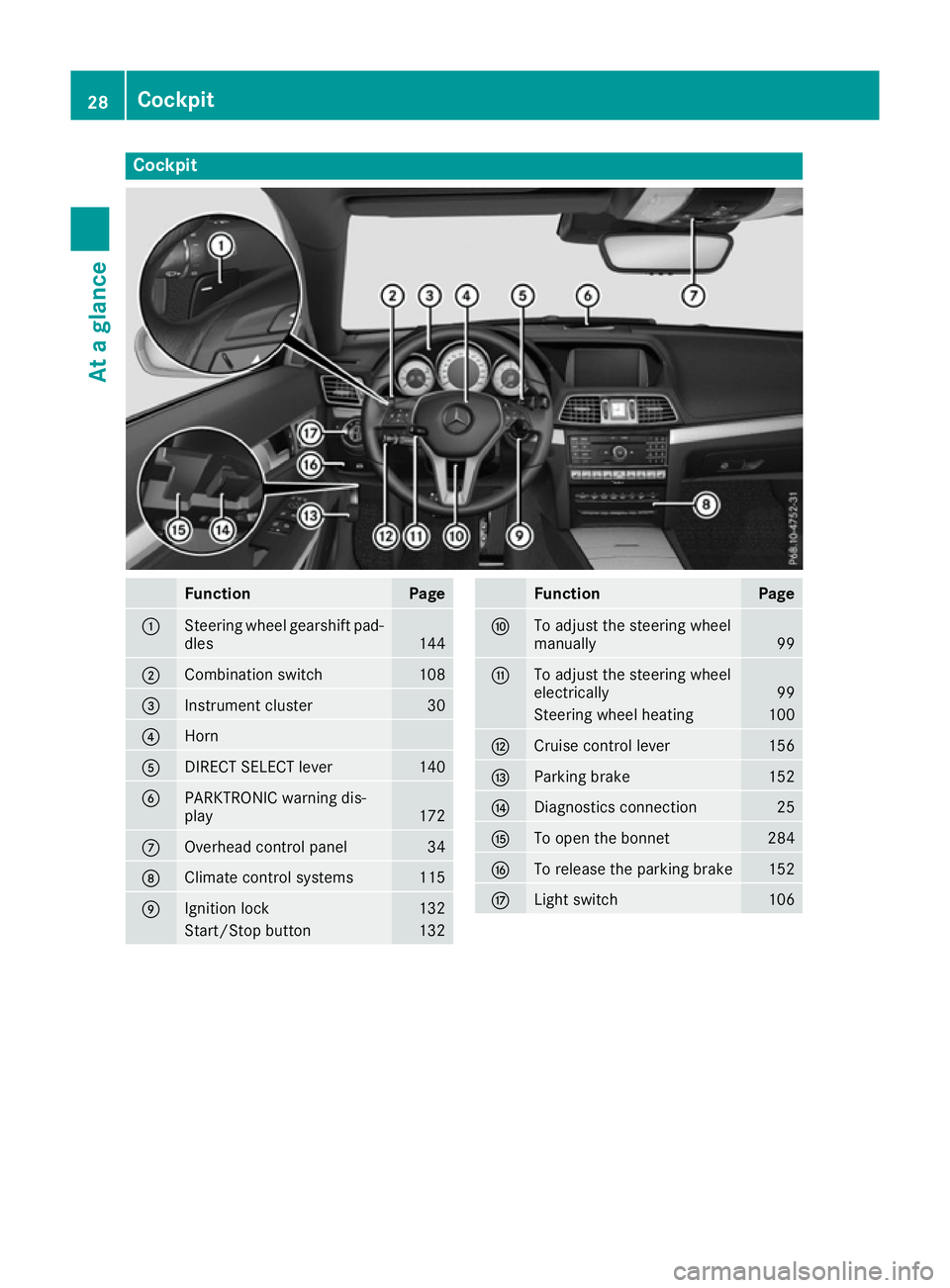
Cockpit
Function Page
:
Steering wheel gearshift pad-
dles 144
;
Combination switch 108
=
Instrument cluster 30
?
Horn
A
DIRECT SELECT lever 140
B
PARKTRONIC warning dis-
play
172
C
Overhead control panel 34
D
Climate control systems 115
E
Ignition lock 132
Start/Stop button 132 Function Page
F
To adjust the steering wheel
manually
99
G
To adjust the steering wheel
electrically
99
Steering wheel heating 100
H
Cruise control lever 156
I
Parking brake 152
J
Diagnostics connection 25
K
To open the bonnet 284
L
To release the parking brake 152
M
Light switch 10628
CockpitAt a glance
Page 32 of 345
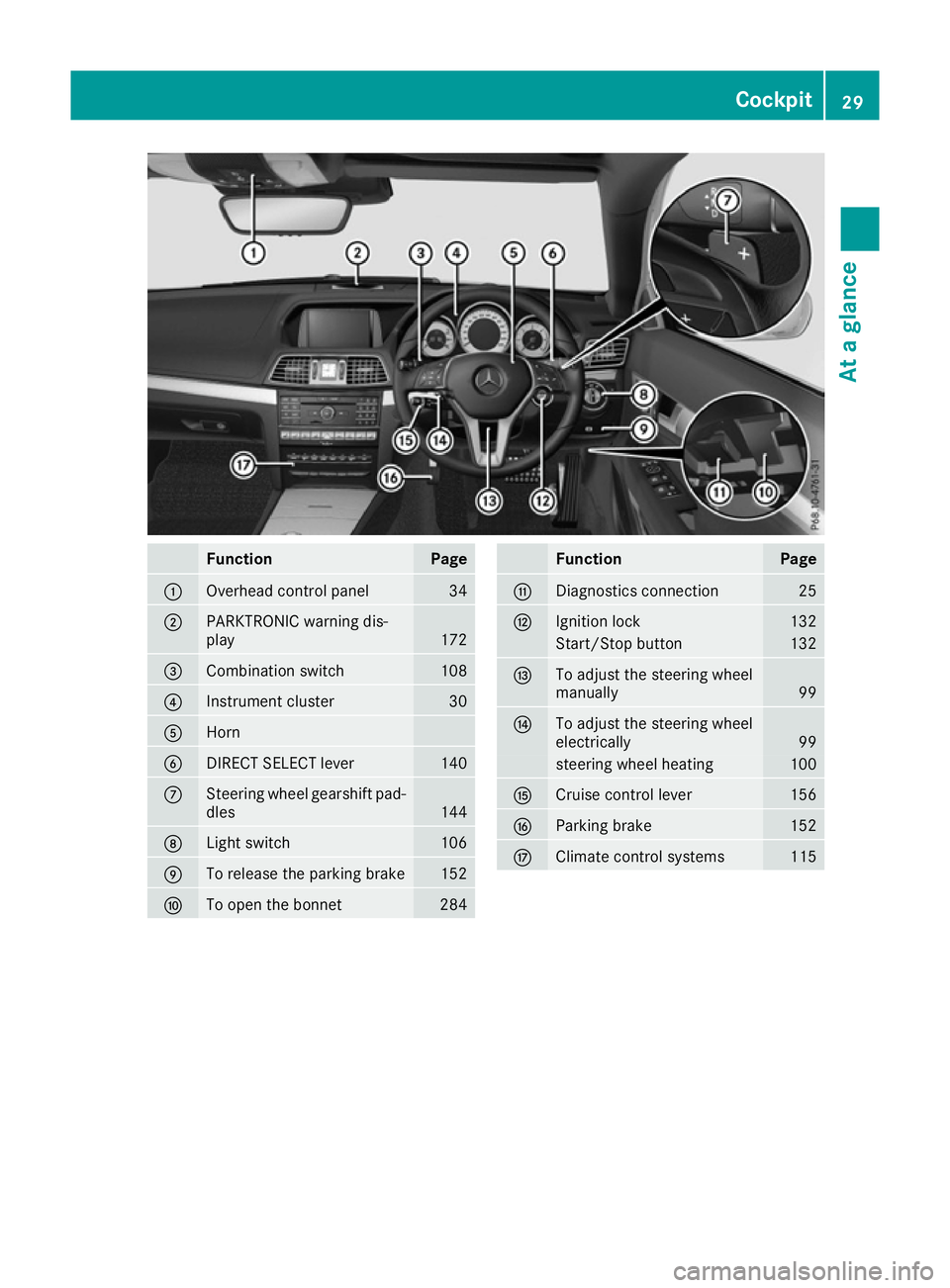
Function Page
:
Overhead control panel 34
;
PARKTRONIC warning dis-
play
172
=
Combination switch 108
?
Instrument cluster 30
A
Horn
B
DIRECT SELECT lever 140
C
Steering wheel gearshift pad-
dles 144
D
Light switch 106
E
To release the parking brake 152
F
To open the bonnet 284 Function Page
G
Diagnostics connection 25
H
Ignition lock 132
Start/Stop button 132
I
To adjust the steering wheel
manually
99
J
To adjust the steering wheel
electrically
99
steering wheel heating 100
K
Cruise control lever 156
L
Parking brake 152
M
Climate control systems 115Cockpit
29At a glance
Page 146 of 345
Double-clutch function
E 500 only:
when shifting down, the double-
clutch function is active regardless of the cur-
rently selected drive program. The double-
clutch function reduces load change reactions
and is conducive to a sporty driving style. The
sound generated by the double-clutch function
depends on the drive program selected.
Kickdown Use kickdown for maximum acceleration:
X Depress the accelerator pedal beyond the
pressure point.
The transmission shifts to a lower gear
depending on the engine speed.
X Ease off the accelerator pedal once the
desired speed is reached.
The automatic transmission shifts back up.
Towing a trailer Towing a trailer is not possible with all models.
For further information, see (Y page 202).
X Drive in the middle of the engine speed range
on uphill gradients.
X Manual drive program: depending on the
uphill or downhill gradient, shift into a gear
(Y page 144) in which the engine will run in
the middle of the engine speed range. This
also applies if cruise control, DISTRONIC
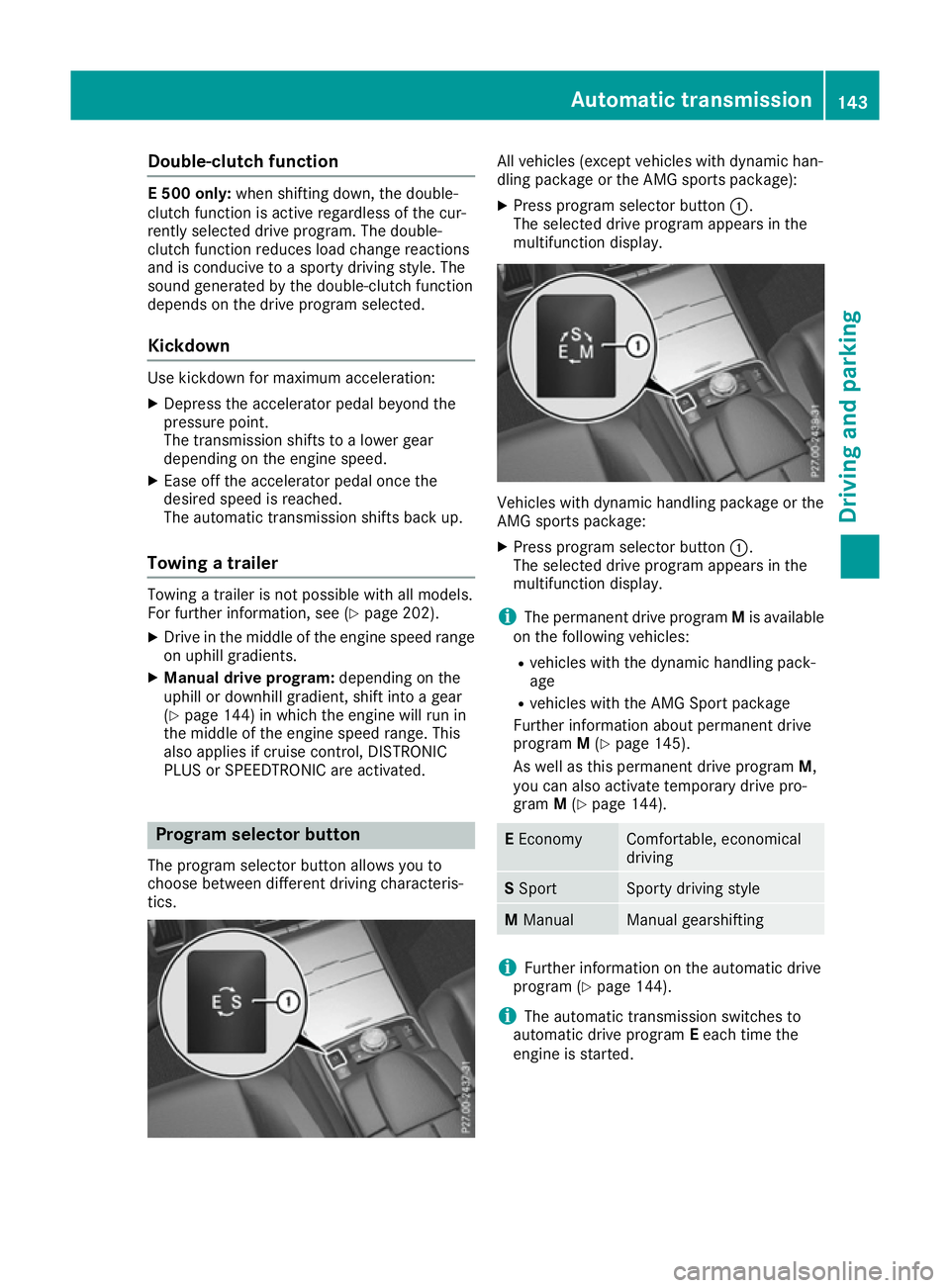
PLUS or SPEEDTRONIC are activated. Program selector button
The program selector button allows you to
choose between different driving characteris-
tics. All vehicles (except vehicles with dynamic han-
dling package or the AMG sports package):
X Press program selector button :.
The selected drive program appears in the
multifunction display. Vehicles with dynamic handling package or the
AMG sports package:
X Press program selector button :.
The selected drive program appears in the
multifunction display.
i The permanent drive program Mis available
on the following vehicles:
R vehicles with the dynamic handling pack-
age
R vehicles with the AMG Sport package
Further information about permanent drive
program M(Y page 145).
As well as this permanent drive program M,
you can also activate temporary drive pro-
gram M(Y page 144). E
Economy Comfortable, economical
driving
S
Sport Sporty driving style
M
Manual Manual gearshifting
i
Further information on the automatic drive
program (Y page 144).
i The automatic transmission switches to
automatic drive program Eeach time the
engine is started. Automatic transmission
143Driving and parking Z
Page 156 of 345
ECO display assists you in achieving the most
economical driving style for the selected set-
tings and prevailing conditions. Consumption
can be significantly influenced by your driving
style.
The ECO display consists of three bars:
R Acceleration Acceleration
R Constant
Constant
R Coasting
Coasting
The percentage count is the mean value of the
three bar values. The three bars and the mean
value begin at the value of 50%. A higher per-
centage count indicates a more economical
driving style.
The ECO display does not indicate the actual fuel
consumption. A fixed percentage count in the
ECO display does not indicate a fixed consump- tion.
In addition to driving style, the consumption is
affected by many other factors, such as:
R load
R tyre pressure
R cold start
R choice of route
R the use of electrical consumers
These factors are not included in the ECO dis-
play.
The evaluation of your driving style takes the
following three categories into consideration:
R Acceleration
Acceleration (evaluation of all acceleration
processes):
- the bar fills up: moderate acceleration,
especially at higher speeds
- the bar empties: sporty acceleration
R Constant
Constant (assessment of driving behaviour
at all times):
- the bar fills up: constant speed and avoid-
ance of unnecessary acceleration and
deceleration
- the bar empties: fluctuations in speed
R Coasting Coasting (assessment of all deceleration
processes):
- the bar fills up: anticipatory driving, keep-
ing your distance and early release of the
accelerator. The vehicle can coast without
use of the brakes.
- the bar empties: frequent braking
i An economical driving style involves driving
at a moderate engine speed. To achieve a higher value in the categories
Acceleration Acceleration andConstant
Constant:
R observe the gearshift recommendation
R drive the vehicle in drive program E(vehi-
cles with automatic transmission)
i On long journeys at a constant speed, e.g.
on the motorway, only the bar for Constant
Constant
will change.
i The ECO display summarises the driving
characteristics from the start of the journey to
its completion. Therefore, there are dynamic
changes in the bars at the start of a journey.
During a prolonged driving time, these
changes are smaller. For more dynamic
changes, perform a manual reset.
Further information on the ECO display
(Y page 209). Brakes
Important safety notes G
WARNING
If you shift down on a slippery road surface in an attempt to increase the engine's braking
effect, the drive wheels could lose their grip.
This increases the risk of skidding and having
an accident.
Do not shift down for additional engine brak-
ing on a slippery road surface.
Downhill gradients Do not depress the brake pedal continuously
while the vehicle is in motion, e.g. never cause
the brakes to rub by constantly applying light
pressure to the pedal. This results in excessive
and premature wear to the brake pads.
Change into a lower gear in good time on long
and steep downhill gradients.
Take particular note of this when driving a laden vehicle and when towing a trailer.
i This also applies if you have activated cruise
control, SPEEDTRONIC or DISTRONIC PLUS.
This will use the braking effect of the engine, so
less braking will be required to maintain vehicle
speed. This relieves the load on the brake sys-
tem and prevents the brakes from overheating
and wearing too quickly. Driving
tips
153Driving an d parking Z
Page 159 of 345
Cruise control
General notes Cruise control maintains a constant road speed
for you. It brakes automatically in order to avoid
exceeding the set speed. You must select a low
gear in good time on long and steep downhill
gradients, especially if the vehicle is laden or
towing a trailer. By doing so, you will make use of
the braking effect of the engine. This relieves the load on the brake system and prevents the
brakes from overheating and wearing too
quickly.
Use cruise control only if road and traffic con-
ditions are appropriate for maintaining a steady speed for a prolonged period. You can store any
road speed above 30 km/h.
Important safety notes If you fail to adapt your driving style, cruise con-
trol can neither reduce the risk of an accident
nor override the laws of physics. Cruise control
cannot take into account road, weather or traffic
conditions. Cruise control is only an aid. You are responsible for the distance to the vehicle in
front, for vehicle speed, for braking in good time
and for staying in lane.
Do not use cruise control:
R in road and traffic conditions which do not
allow you to maintain a constant speed, e.g. in
heavy traffic or on winding roads
R on smooth or slippery roads. Braking or accel-
erating can cause the drive wheels to lose
traction and the vehicle could then skid
R when there is poor visibility, e.g. due to fog,
heavy rain or snow
If there is a change of drivers, advise the new
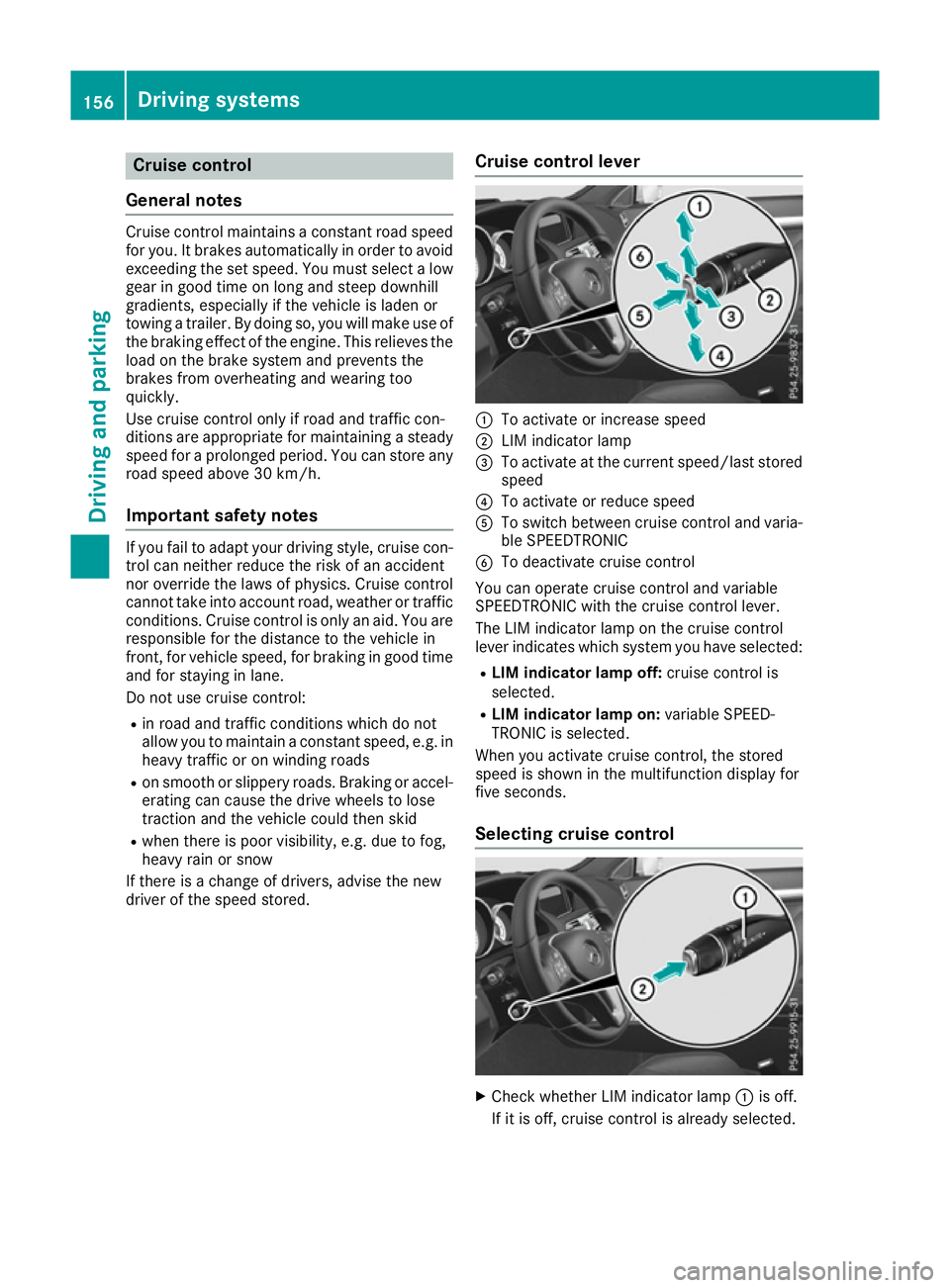
driver of the speed stored. Cruise control lever :
To activate or increase speed
; LIM indicator lamp
= To activate at the current speed/last stored
speed
? To activate or reduce speed
A To switch between cruise control and varia-
ble SPEEDTRONIC
B To deactivate cruise control
You can operate cruise control and variable
SPEEDTRONIC with the cruise control lever.
The LIM indicator lamp on the cruise control
lever indicates which system you have selected:
R LIM indicator lamp off: cruise control is
selected.
R LIM indicator lamp on: variable SPEED-
TRONIC is selected.
When you activate cruise control, the stored
speed is shown in the multifunction display for
five seconds.
Selecting cruise control X
Check whether LIM indicator lamp :is off.
If it is off, cruise control is already selected. 156
Driving systemsDriving and parking