display MERCEDES-BENZ E-CLASS COUPE 2017 User Guide
[x] Cancel search | Manufacturer: MERCEDES-BENZ, Model Year: 2017, Model line: E-CLASS COUPE, Model: MERCEDES-BENZ E-CLASS COUPE 2017Pages: 541, PDF Size: 10.71 MB
Page 49 of 541
also cause additional injuries, e.g. in
the
ev ent of an accident. #
Alw ays lock rear seat backrests af ter
fi tting TopTe ther belts. #
Obser vethe lock verification indicator. If
th e seat backrest is not engaged and loc ked,
th is will be shown in the multifunction display in
th e instrument clus ter.
The risk of injury can be reduced byTopTe ther
as TopTe ther pr ovides an additional connection
between thech ild restra int sy stem secured with
ISOFIX or i-Size and theve hicle.
The child restra int sy stem must be equipped
with a TopTe ther belt. #
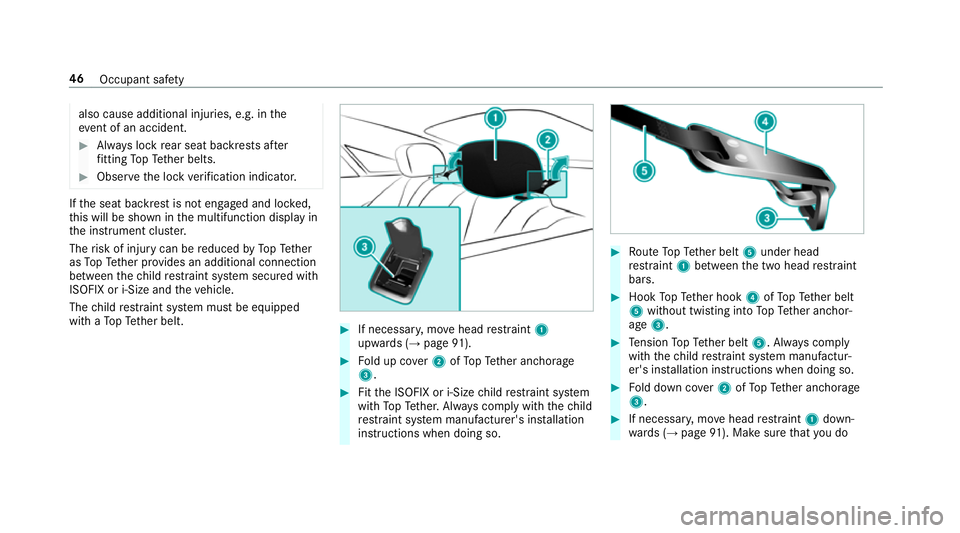
If necessar y,mo vehead restra int 1
upwards (→ page91). #
Fold up co ver2 ofTopTe ther anchorage
3. #
Fitthe ISOFIX or i-Size child restra int sy stem
with TopTe ther. Alw ays comply with thech ild
re stra int sy stem manufacturer's ins tallation
instructions when doing so. #
Route TopTe ther belt 5under head
re stra int 1 between the two head restra int
bars. #
Hook TopTe ther hook 4ofTopTe ther belt
5 without twisting into TopTe ther anchor‐
age 3. #
Tension TopTe ther belt 5. Alw ays comply
with thech ild restra int sy stem manufactur‐
er's ins tallation instructions when doing so. #
Fold down co ver2 ofTopTe ther anchorage
3. #
If necessar y,mo vehead restra int 1 down‐
wa rds (→ page 91). Make sure that you do 46
Occupant saf ety
Page 96 of 541

Fo
lding the front seat backrest forw ards/
back Wi
th th e EASY -ENTRY function, the seat mo ves
fo rw ards if you ha vefolded the seat backrest
fo rw ards. This makes it easier for passengers to
ge t into and out of there ar of theve hicle. Ve
hicles without the memory function #
If necessar y,release the head restra int and
push it down. #
Tofold forw ards: pull seat release handle
1 and fold the seat backrest forw ards until
th e seat backrest engages. #
Push the seat as farfo rw ards as it will go. #
Tofold back: pushthe seat back horizon tally
by the seat backrest until it reaches the seat
position that wa s pr eviously set. #
Foldthe seat backrest back until you hear it
en gage . Do so in a smoo thmanner.
If th e seat backrest is not engaged, this will
be shown on the multifunction display on the
instrument clus ter.A wa rning tone also
sounds. #
Afterth e seat backrest has been folded
bac k,check the position of the head restra int
and set it tothe cor rect position. Ve
hicles with the memory function #
Tofold forw ards: pull seat release handle
1 and fold the seat backrest forw ards as far
as it will go.
The seat mo ves automatically tothefo re‐
most position. Seats and
stowing 93
Page 97 of 541

#
Tofold back: swing back the seat backrest
horizon tally.
If th e seat backrest is not engaged, this will
be shown on the multifunction display in the
instrument clus ter.A wa rning tone also
sounds.
The seat mo ves automatically tothestored
position.
If th e pr evious seat position can no longer be
set, e.g. because of luggage in there ar foot we ll
or af ter occupants ha veentered there ar of the
ve hicle: #
Pull seat release handle 1again and return
th e seat backrest toan upright position.
The seat loc ksinthe new fore -and-aft adjust‐
ment position. Switching the seat hea
ter on/o ff &
WARNING Risk of bu rns due torepeat‐
edly switching on the seat heater
Re peatedly switching on the seat heater can
cause the seat cushion and seat backrest
padding tobecome very hot. The health of persons with limited
temp era‐
ture sensitivity or a limited ability toreact to
exc essively high temp eratures may be af fec‐
te d or they may even suf fer burn-like injuries. #
Do not repeatedly switch on the seat
heater. Re
quirement:
R the po wer supp lyis switched on #
Toswitch on/increase the le vel:press but‐
to n1 repeatedly until the desired heating
le ve l is set.
Depending on the heating le vel, up tothree
indicator lamps light up. 94
Seats and stowing
Page 102 of 541

The
following sy stems can be selected:
R Seat, backrest and head restra int
R Steering wheel
R Outside mir rors
R Head-up Display #
Tosave :set the seat, thesteering wheel, the
Head-up Display and the outside mir rorto
th e desired position. #
Press the memory button M toge ther with
one of thestorage position buttons 1,2 or 3.
An acou stic signal sounds. The settings are
st ored. #
Tocall up: press and hold there leva nt pre‐
set position button 1,2 or 3 until the front
seat is in thestored position. St
ow age areas Note
s on loading theve hicle &
WARNING Risk ofexhaust gas poisoning
Combustion engines emit poisonous exhaust
ga ses such as carbon monoxide. Exhaust
ga ses can enter theve hicle interior if the
boot lid is open when the engine is running,
especially if theve hicle is in motion. #
Alw ays switch off the engine before
opening the boot lid. #
Never drive with the boot lid open. &
WARNING Risk of inju ryfrom unsecu red
items in theve hicle
If objects, luggage or loads are not secured
or not secured suf ficientl y,they could slip,
tip ove r or be throw n around and thereby hit
ve hicle occupants.
There is a risk of injur y,particularly in the
ev ent of sudden braking or a sudden change
in direction. #
Alw aysstow objects in such a wayth at
th ey cannot be thro wn around. #
Before the journe y,secure objects, lug‐
ga ge or loads against slipping or tipping
ove r. &
WARNING Risk of inju ryfrom incor rectly
stowe d objects
If objects in the passenger compartment are
stowe d incor rectl y,they can slide or be
th ro wn around and hit vehicle occupants. In Seats and
stowing 99
Page 106 of 541

#
Fold cor responding seat backrest 1back
until it engages.
Left and right seat backrests: ifth e seat
backrest is not engaged and loc ked, this will
be shown in the multifunction display in the
instrument clus ter.
Centre seat backres t:ifth e seat backrest is
not engaged and loc ked, red lock verification
indicator 2will be visible. Lo
cking the centre rear seat backrest
Lock the cent reseat backrest if youwa ntto
secure the load compartment from unauthorised
access. The cent reseat backrest can then only
be folded forw ards toge ther with the left seat
backrest.
Bo th seat backrests must be engaged and joined
to ge ther. #
Foldthe cent reand left seat backrest for‐
wa rds. #
Tolock: slide cat ch1 upwards.
The release mechanism of the cent reseat
backrest is loc ked. #
Tounlo ck:slide catch 1down wards. Overview of
the tie-down eyes Obser
vethe no tes on loading theve hicle
(→ page 99).
This equipment is only available in vehicles with
th eth ro ugh-loading feature in there ar ben ch
seat. Seats and
stowing 103
Page 115 of 541

R
The charging function and wireless connec‐
tion of the mobile phone totheve hicle's
ex terior aerial are only available if the ignition
is switched on.
R Small mobile phones may not be able tobe
ch arge d in everyposition of the mobile
phone stowage compartment.
R Largemobile phones which do not rest flat in
th e mobile phone stowage compartment may
not be able tobe charge d or connec ted with
th eve hicle's exterior aerial.
R The mobile phone may heat up during the
ch arging process. The mobile phone can be
cooled in the mobile phone stowage com‐
partment when the air conditioning sy stem is
switched on. The cooling output in the
mobile phone stowage compartment is high‐
est when the controller in theglove box is
closed.
R Toensure more ef ficient charging and con‐
nection with theve hicle's exterior aerial,
re mo vethe pr otective co ver from the mobile
phone. R
When charging, the mat should be used if
possible. Wire
lesscharging of the mobile phone Re
quirement:
R The mobile phone must be suitable for wire‐
less charging (Qi-compatible mobile phone).
Yo u can find a li stof Qi-compatible mobile
phones at:
http://www.mercedes-benz.com/connect #
Place the mobile phone as close tothe
centre of mat 1as possible wi th the display
fa cing up wards.
When thech arging symbol is shown in the
multimedia sy stem, the mobile phone is
being charge d.
Malfunctions during thech arging process are
shown in the multimedia sy stem displa y.
% Toclean, the mat can be remo ved. Fi
tting/ removing the floormats &
WARNING Risk of accident due to
objects in the driver's foot we ll
Objects in the driver's foot we ll may impede
pedal tr avel or block a depressed pedal.
This jeopardises the operating and road
saf ety of theve hicle. #
Stow all objects in theve hicle securely
so that they cannot getinto the driver's
fo ot we ll. #
Alw aysfit th efloor mats securely and
as prescribed in order toensure that 11 2
Seats and stowing
Page 123 of 541
th
em. The vehicle in front is illuminated bythe
dipped beam.
At speeds abo ve30 km/h:
R If no other road users are de tected, the main
beam is automatically switched on.
R Ifot her road users are de tected, the partial
main beam is automatically switched on.
At speeds below 25 km/h or when there is suf fi‐
cient stre et lighting:
R The partial main beam switches off automati‐
cally.
R The main beam switches off automatically.
At speeds abo veappr ox. 50 km/h:
R The headlamp range of the dipped beam is
re gulated automatically based on the dis‐
ta nce to ot herroad users.
The sy stem's optical sensor is located behind
th e windscreen near theove rhead control panel.
Sy stem limitations
Ad aptive Highbeam Assist Plus cannot take into
account road, weather or traf fic conditions. De
tection may be restricted if:
R Visibility is impaired, forex ample in fog,
heavy rain or sno w.
R There is dirt on the sensors or the sensors
are obscured.
Switching Adaptive Highbeam Assist Plus
on/off #
Toswitch on: turnthe light switch to
th eà position. #
Switch on the main beam using the combina‐
tion switch.
When the main beam is switched on auto‐
matically in the dar k,the_ indicator
lamp in the multifunction display comes on. #
Toswitch off: switch offthe main beam
using the combination switch. Setting
the dipped beam Multimedia sy
stem:
, Vehicle .
÷ Light set-
tings .
Dipped-beams #
Select Left-side traffic orRight-side traffic. Setting
the sur round lighting Re
quirement:
The light switch is in theà position.
Multimedia sy stem:
, Vehicle .
÷ Light settings .
Loca-
tor lighting
Exterior switch-off delay time: theex terior
lighting is switched on for a short time af terthe
ve hicle is switched off. #
Set the switch-off delay time.
Locator lighting: if a switch-off delay time is
set, theex terior lighting remains lit for 30 sec‐
onds af terth eve hicle is unloc ked. When you
st art theve hicle, the locator lighting is switched
off and automatic driving lights are activated. 12 0
Light and sight
Page 124 of 541
Interior lighting
Ad
justing the in terior lighting Fr
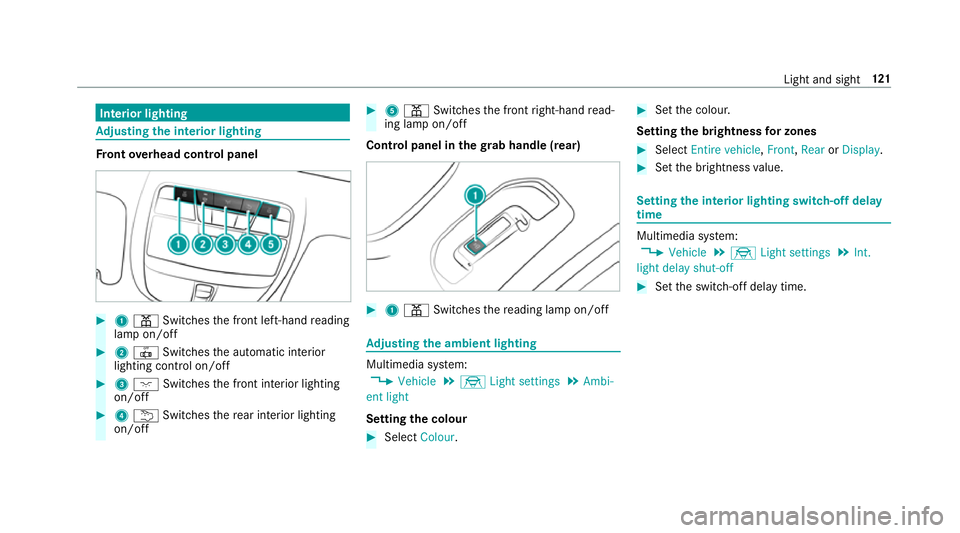
ont overhead control panel #
1 p Switches the front left-hand reading
lamp on/off #
2 | Switches the automatic interior
lighting control on/off #
3 c Switches the front interior lighting
on/off #
4 u Switches there ar interior lighting
on/off #
5 p Switches the front right-hand read‐
ing lamp on/off
Cont rol panel in thegr ab handle (rear) #
1 p Switches there ading lamp on/off Ad
justing the ambient lighting Multimedia sy
stem:
, Vehicle .
÷ Light settings .
Ambi-
ent light
Setting the colour #
Select Colour. #
Set the colour.
Setting the brightness for zones #
Select Entire vehicle ,Front ,Rear orDisplay. #
Set the brightness value. Setting
the interior lighting switch-off delay
time Multimedia sy
stem:
, Vehicle .
÷ Light settings .
Int.
light delay shut-off #
Set the switch-off delay time. Light and sight
121
Page 133 of 541
4
à Toset climate contro lto automatic
mode (→ page131)
5 ¬ Todemist the windscreen
6 ! Tocall up the air conditioning menu
To switch there sidual heat on/off
(→ page 132)
7 ¤ Toswitch there ar wind owheater
on/off
8 Vehicles without a stationary heater:
¿ toswitch the A/C function on/off
(→ page 130)
Ve hicles with a stationary heater: &to
switch thest ationary heater on/off
(→ page 134)
9 g Toswitch air-recirculation mode on/off
(→ page 132)
A _ Toset the front passenger side air dis‐
tribution
B w Toset the front passenger side tem‐
perature
Re ar operating unit
Yo u can set thete mp erature forth e entire rear
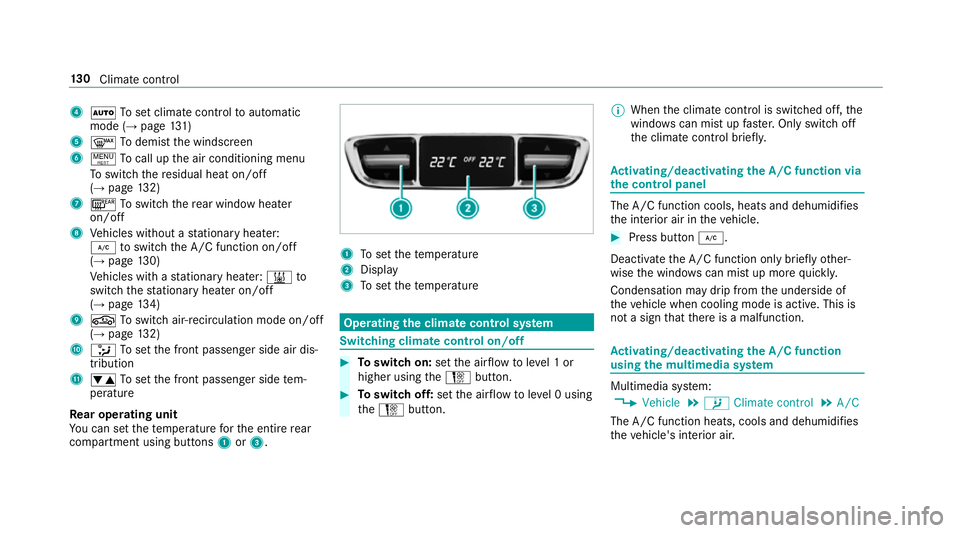
compartment using buttons 1or3. 1
Toset thete mp erature
2 Display
3 Toset thete mp erature Operating
the clima tecont rol sy stem Switching clima
tecont rol on/off #
Toswitch on: setthe air flow toleve l 1 or
higher using theH button. #
Toswitch off: setthe air flow toleve l 0 using
th eH button. %
When the climate control is switched off, the
windo wscan mist up faster. Only switch off
th e climate control brief ly. Ac
tivating/deactivating the A/C function via
the control panel The A/C function cools, heats and dehumidifies
th
e interior air in theve hicle. #
Press button ¿.
Deactivate the A/C function only briefly other‐
wise the windo wscan mist up more quickl y.
Condensation may drip from the underside of
th eve hicle when cooling mode is active. This is
not a sign that there is a malfunction. Ac
tivating/deactivating the A/C function
using the multimedia sy stem Multimedia sy
stem:
, Vehicle .
b Climate control .
A/C
The A/C function heats, cools and dehumidifies
th eve hicle's interior air. 13 0
Climate cont rol
Page 134 of 541
#
Activate Oor deacti vate ª the function. Setting climate control
toautomatic mode In auto
matic mode, the set temp erature is con‐
trolled and maintained at a const ant levelby the
air suppl y. #
Press the à button. #
Toswitch tomanual mode: presstheH
or _ button. Climate
style Climate
style function
In automatic mode you can select thefo llowing
climate style settings forth e driver's and front
passenger areas:
R FOCUS: high air flow , slightly cooler setting
R MEDIUM: medium air flow ,st andard setting
R DIFFUSE: low airflow , slightly warmer and
draught-f ree setting Setting
the clima testyle
Requ irements:
R THERMOTRONIC automatic climate control is
fi tted.
R The à button has been pressed.
Multimedia sy stem:
, Vehicle .
b Climate control .
Cli-
mate mode #
Select FOCUS, MEDIUM orDIFFUSE . Air distribution settings
The symbols in
the display indicate which vents
th e air flow is being directed thro ugh:
R ¯ demis terve nts
R P centre and side air vents
R O foot we llve nts
R S centre, side and foot we llve nts
R a defros ter and foot we llve nts
R _ allvents
R b defros ter,middle and side air vents R
W automatic air distribution Ac
tivating/deactivating the climate control
syn chro nisation function via the control
panel Climate control can be set centrally using
the
synchronisation function. The temp erature and
air distribution setting forth e driver's side is
adop ted automatically forth e front passenger
side. #
Press button 0.
The synchronisation function is deactivated if
th e settings for one of theot her climate zones
are changed. Climate control
131