display MERCEDES-BENZ E-CLASS COUPE 2017 Service Manual
[x] Cancel search | Manufacturer: MERCEDES-BENZ, Model Year: 2017, Model line: E-CLASS COUPE, Model: MERCEDES-BENZ E-CLASS COUPE 2017Pages: 541, PDF Size: 10.71 MB
Page 210 of 541
persons, animals or objects
etc. are in the
manoeuvring range. Pay attention to your sur‐
ro undings and be ready tobrake at all times.
Multimedia sy stem:
, Vehicle .
k Assistance .
Parking
Pilot .
Auto reversing camera #
Activate Oor deacti vate ª the function.
Opening the camera co ver of the reve rsing
camera
Multimedia sy stem:
, Vehicle .
k Assistance .
Parking
Pilot #
Select Open camera cover.
% The camera co ver closes auto maticallyafter
some time or af ter an ignition cycle.
Assigning the camera as a favo urite
Yo u can call up the camera view directly in the
multimedia sy stem byassigning it as a favo urite. #
Press theò button on theto uchpad or
cont roller.
The main functions are displa yed. #
Navigate down wards twice.
The Favourites menu appears. #
Select New favourite. #
Select Vehicle . #
Select Camera. Pa
rking Pilot Fu
nction of Parking Pilot
Pa rking Pilot is an elect ronic pa rking assis tance
sy stem which uses ultrasound and is automati‐
cally activated during forw ard tra vel. The sy stem
is operational at speeds of up toappr oximately
35 km/h. When all the conditions are fulfilled,
th ec symbol appears in the multifunction
display and the sy stem automatically sear ches
fo r and measu res parking spaces on bo thsides
of theve hicle parallel and perpendicular tothe
direction of tr avel. If Parking Pilot is activated,
suitable parking spaces are displa yed in the mul‐
timedia sy stem. The ësymbol appears in the
multifunction displa y.The ar rowsshow on which
side of the car riag ewa y free parking spaces are
located. The parking space and, if necessar
y,the parking
direction can be selected as desired. Parking
Pilot calculates a suitable vehicle path and
assists you in parking and exiting the parking
space.
Ve hicles with automatic transmission: Park‐
ing Pilot changes gear, accelerates, brakes and
st eers theve hicle.
Ve hicles with manual transmission: Parking
Pilot supports youby inter vening acti vely in the
st eering.
% The active brake application and automatic
gear change is on lyavailable on vehicles
with automatic transmission.
Pa rking Pilot is only an aid. It is not a substitute
fo ryo ur attention tothe sur roundings. The
re sponsibility for safe manoeuvring and parking
re mains with you. Make sure that no persons,
animals or objects etc. are in the manoeuvring
ra nge.
Pa rking Pilot is cancelled if, among other things,
one of thefo llowing actions is car ried out:
R You swit choff Parking Assist PARKTRONIC. Driving and parking
207
Page 211 of 541
R
You swit choff Parking Pilot.
R You begin steering.
R You apply the parking brake.
R Vehicles with automatic transmission:
Yo u en gage j.
R ESP ®
inter venes.
Pa rking Pilot sy stem limitations
Objects located abo veor below the de tection
ra nge of Parking Pilot are not de tected when the
parking space is being measured. These are also
not taken into account when the parking
manoeuvre is calculated, e.g. overhanging loads,
ov erhangs or loading ramp s of lor ries or the
boundaries of a parking space. In some circum‐
st ances, Parking Pilot may therefore guide you
into the parking space prematurely. &
WARNING Risk of accident due to
objects located abo veor below the
de tection range of Parking Pilot
If th ere are objects abo veor below the
de tection range, thefo llowing situations may
arise:
R Parking Pilot may steer too ear ly.
R Vehicles with automatic transmis‐
sion: Thevehicle may not stop in front of
th ese objects.
This could cause a collision. #
Inthese situations, do not use Parking
Pilot. Sn
owfa ll or heavy rain may lead toa parking
space being measured inaccuratel y.Pa rking
spaces that are partial lyoccupied bytrailer
dr aw bars might not be identified as such or be
measured incor rectly. Only use Parking Pilot on
le ve l, high-grip ground. Do not use
Parking Pilot, forex ample, in thefo l‐
lowing situations:
R Inextreme weather conditions such as ice or
pac ked snow or in heavy rain.
R Ifyo u are transpo rting a load that pr otru des
be yond theve hicle.
R Ifth e parking space is on a steep downhill or
uphill gradient.
R Ifyo u ha veins talled snow chains.
Pa rking Pilot may also display parking spaces
th at are not suitable for parking, e.g.:
R Parking spaces where parking is prohibited.
R Parking spaces on unsuitable sur faces.
Pa rking Pilot will not assist you with parking
spaces at right angles tothe direction of tr avel
in thefo llowing situations:
R If two parking spaces are located immedi‐
ately next toeach other.
R Ifth e parking space is directly next toa low
obs tacle su chas a low kerb. 208
Driving and parking
Page 212 of 541
Pa
rking Pilot will not assist you with parking
spaces parallel or at right angles tothe direction
of tra vel in thefo llowing situations:
R Ifth e parking space is on a kerb.
R Ifth e parking space is bordered byan obs ta‐
cle, e.g. a tree, a post or a traile r.
Pa rking with Parking Pilot
% Depending on theve hicle's equipment, the
button may also be located at a dif fere nt
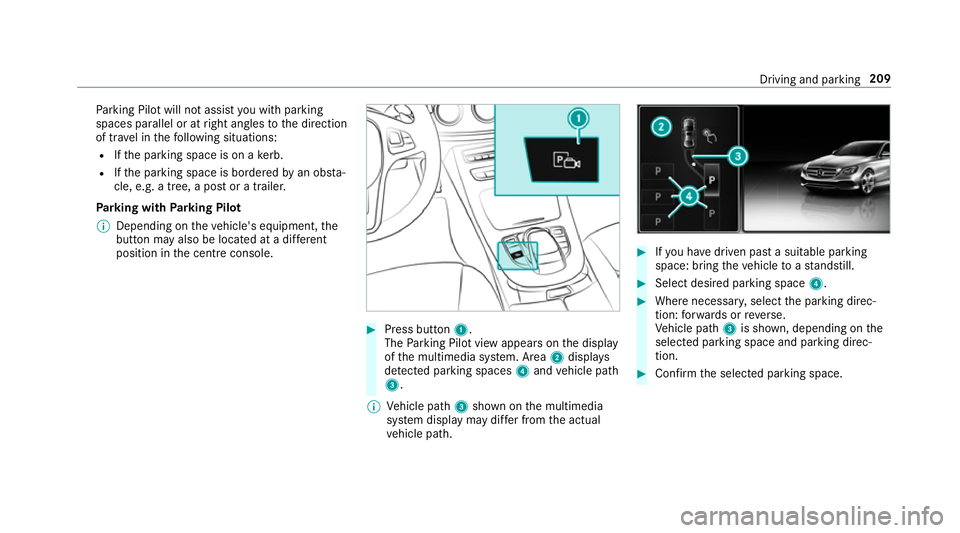
position in the cent reconsole. #
Press button 1.
The Parking Pilot view appears on the display
of the multimedia sy stem. Area 2displa ys
de tected pa rking spaces 4and vehicle path
3.
% Vehicle path 3shown on the multimedia
sy stem display may dif fer from the actual
ve hicle path. #
Ifyo u ha vedriven past a suitable parking
space: bring theve hicle toast andstill. #
Select desired parking space 4. #
Where necessar y,select the parking direc‐
tion: forw ards or reve rse.
Ve hicle path 3is shown, depending on the
selected parking space and parking direc‐
tion. #
Confirm the selected parking space. Driving and parking
209
Page 213 of 541
&
WARNING Risk of accident due tovehi‐
cle swinging out while parking or pulling
out of a parking space
While parking or pulling out of a parking
space, theve hicle swings out and can drive
onto areas of the oncoming lane.
This could cause youto collide wi thobjects
or other road users. #
Pay attention toobjects and other road
users. #
Where necessar y,stop theve hicle or
cancel the parking procedure with Park‐
ing Pilot. #
If,forex ample, theEngage reverse gear mes‐
sage appears in the display of the multimedia
sy stem: select the cor responding transmis‐
sion position.
Ve hicles with automatic transmission:
The vehicle drives into the selected parking
space. #
Vehicles with manual transmission: Stop
as soon as Parking Assist PARKTRONIC
sounds the continuous warning tone, if not be
fore . Depending on the message or as
re qu ired, engage forw ard or reve rsege ar.
On completion of the parking procedure, the
Parking Pilot finished, take control of the vehi-
cle. display message appears. Further manoeu‐
vring may still be necessar y. #
After completion of the parking procedure,
safeguard theve hicle against rolling away.
When requ ired bylegal requirements or local
conditions: turn the wheels towa rdsth eke rb.
% Ve
hicles with automatic transmission:
Yo u can stop theve hicle and change the
transmission position du ring the parking pro‐
cedure. The sy stem then calculates a new
ve hicle path. The parking procedure can
th en be continued. If no new vehicle path is
av ailable, the transmission position will be
ch anged again. If theve hicle has not yet
re ached the parking space, the parking pro‐
cedure will be cancelled, should a gear be
ch anged. Exiting a pa
rking space with Parking Pilot
Re quirement:
Yo u can on lyex it a parking space with Parking
Pilot if you ha veprev iously par kedth eve hicle
with Parking Pilot.
Please no tethat you are responsible forth eve hi‐
cle and sur roundings during the entire parking
procedure. #
Start theve hicle. 210
Driving and pa rking
Page 214 of 541
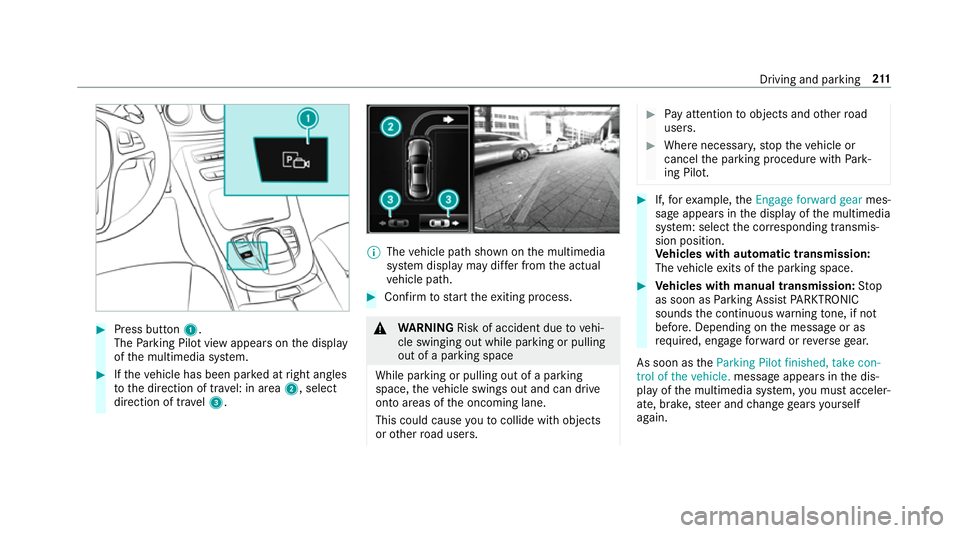
#
Press button 1.
The Parking Pilot view appears on the display
of the multimedia sy stem. #
Ifth eve hicle has been par ked at right angles
to the direction of tra vel: in area 2, select
direction of tra vel3. %
The vehicle path shown on the multimedia
sy stem display may dif fer from the actual
ve hicle path. #
Confirm tostart theex iting process. &
WARNING Risk of accident due tovehi‐
cle swinging out while parking or pulling
out of a parking space
While parking or pulling out of a parking
space, theve hicle swings out and can drive
onto areas of the oncoming lane.
This could cause youto collide wi thobjects
or other road users. #
Pay attention toobjects and other road
users. #
Where necessar y,stop theve hicle or
cancel the parking procedure with Park‐
ing Pilot. #
If,forex ample, theEngage forward gear mes‐
sage appears in the display of the multimedia
sy stem: select the cor responding transmis‐
sion position.
Ve hicles with automatic transmission:
The vehicle exits of the parking space. #
Vehicles with manual transmission: Stop
as soon as Parking Assist PARKTRONIC
sounds the continuous warning tone, if not
be fore . Depending on the message or as
re qu ired, engage forw ard or reve rsege ar.
As soon as theParking Pilot finished, take con-
trol of the vehicle. message appears in the dis‐
play of the multimedia sy stem, you must acceler‐
ate, brake, steer and change gears yourself
again. Driving and parking
211
Page 217 of 541
&
WARNING Danger due toinsuf ficient
view of theve hicle sur roundings
If th eve hicle is being par ked with Remo te
Pa rking Pilot, the view of theve hicle's sur‐
ro undings may be limited. #
When you park theve hicle with Remo te
Pa rking Pilot, obser vethefo llowing
points, forex ample:
R Make sure that you ha vethe best
view possible of theve hicle and the
ve hicle's sur roundings.
R Make sure that no persons, animals
or objects are in the path of your
ve hicle.
R Make sure that you main tain a suita‐
ble dis tance totheve hicle and that
nei ther you nor other road users
could be endangered.
R Beaware of theve hicle's sur round‐
ings at all times and identify possi‐
ble dan gers.
R If necessar y,cancel the parking
process. Ke
ep in mind that the sy stem limits must be
obser ved at all times. If necessar y,cancel the
parking manoeuvre.
Please no tethat you can on lyuse Remo tePark‐
ing Pilot if you ha veava lid driving licence.
No persons or pets are permit tedto remain in
th eve hicle during the parking manoeuvre.
Alw ays make sure that other road users can
access their vehicles.
% Keep theke y with you during the parking
manoeuvre. You can cancel the parking
manoeuvre and bring theve hicle toast and‐
st ill by pressing a button on thekey.
Re quiremen t:
R The mobile phone and Parking Pilot are con‐
nec ted (→ page 216) Pa
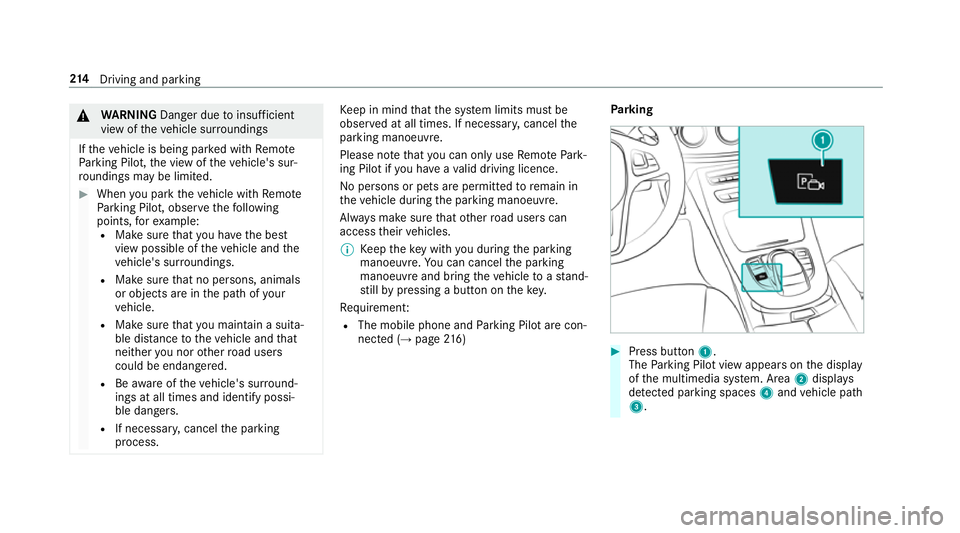
rking #
Press button 1.
The Parking Pilot view appears on the display
of the multimedia sy stem. Area 2displa ys
de tected pa rking spaces 4and vehicle path
3. 214
Driving and pa rking
Page 218 of 541
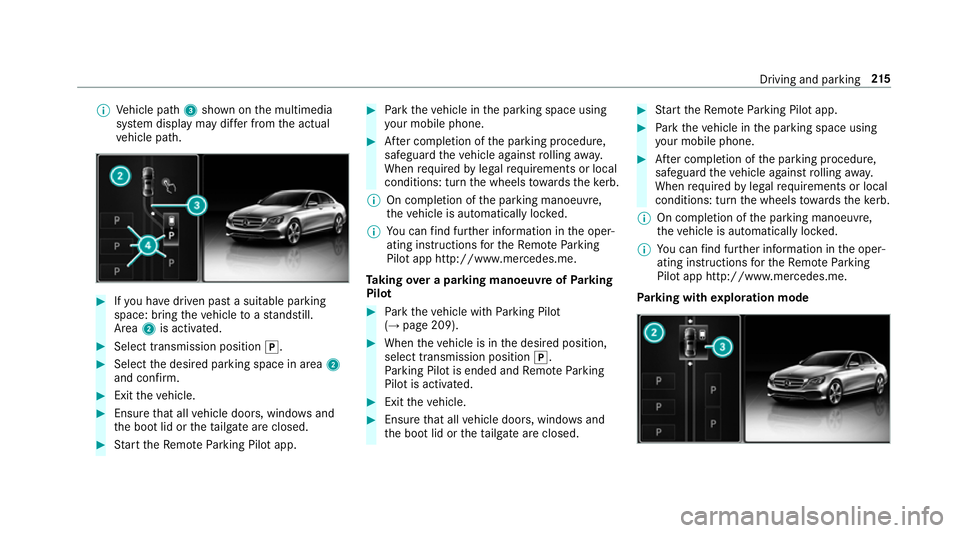
%
Vehicle path 3shown on the multimedia
sy stem display may dif fer from the actual
ve hicle path. #
Ifyo u ha vedriven past a suitable parking
space: bring theve hicle toast andstill.
Area 2is activated. #
Select transmission position j.#
Select the desired parking space in area 2
and confi rm. #
Exit theve hicle. #
Ensure that all vehicle doors, windo wsand
th e boot lid or theta ilgate are closed. #
Start theRe mo teParking Pilot app. #
Park theve hicle in the parking space using
yo ur mobile phone. #
After completion of the parking procedure,
safeguard theve hicle against rolling away.
When requ ired bylegal requirements or local
conditions: turn the wheels towa rdsth eke rb.
% On completion of the parking manoeuvre,
th eve hicle is automatically loc ked.
% You can find fur ther information in the oper‐
ating instructions forth eRe mo teParking
Pilot app http://www.me rcedes.me.
Ta king over a parking manoeuv reofParking
Pilot #
Park theve hicle with Parking Pilot
(→ page 209). #
When theve hicle is in the desired position,
select transmission position j.
Pa rking Pilot is ended and Remo teParking
Pilot is activated. #
Exit theve hicle. #
Ensure that all vehicle doors, windo wsand
th e boot lid or theta ilgate are closed. #
Start theRe mo teParking Pilot app. #
Park theve hicle in the parking space using
yo ur mobile phone. #
After completion of the parking procedure,
safeguard theve hicle against rolling away.
When requ ired bylegal requirements or local
conditions: turn the wheels towa rdsth eke rb.
% On completion of the parking manoeuvre,
th eve hicle is automatically loc ked.
% You can find fur ther information in the oper‐
ating instructions forth eRe mo teParking
Pilot app http://www.me rcedes.me.
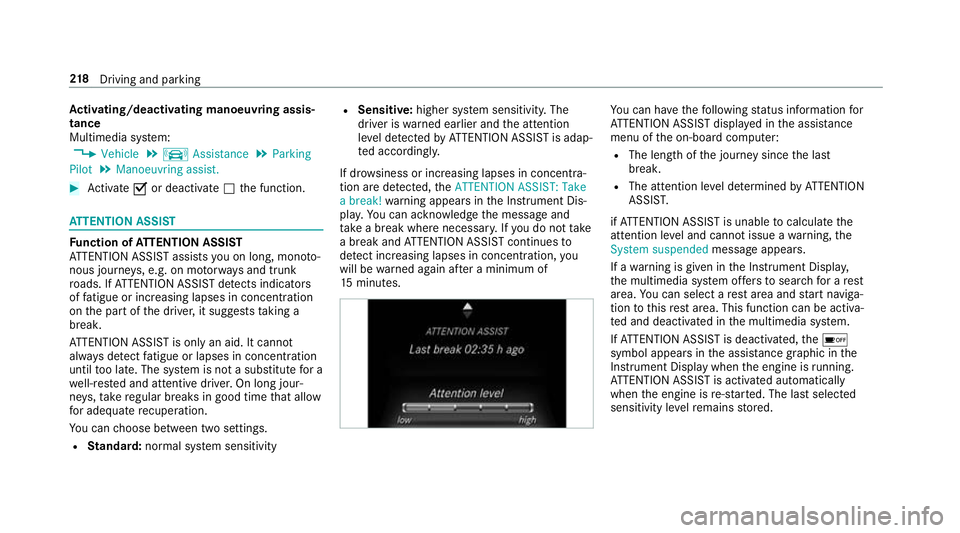
Pa rking with explo ration mode Driving and pa
rking 215
Page 221 of 541
Ac
tivating/deactivating manoeuv ring assis‐
tance
Multimedia sy stem:
, Vehicle .
k Assistance .
Parking
Pilot .
Manoeuvring assist. #
Activate Oor deacti vate ª the function. AT
TENTION ASSI STFu
nction of ATTENTION ASSI ST
AT TENTION ASSIST assists you on long, mon oto‐
nous journe ys, e.g. on mo torw ays and trunk
ro ads. If ATTENTION ASSIST de tects indicators
of fatigue or increasing lapses in concentration
on the part of the driver, it suggests taking a
brea k.
AT TENTION ASSIST is only an aid. It cannot
alw ays de tect fatigue or lapses in concentration
until too late. The sy stem is not a substitute for a
we ll-res ted and attentive driver. On long jour‐
ne ys,tak ere gular breaks in good time that allow
fo r adequ aterecuperation.
Yo u can choose between two settings.
R Standard: normal sy stem sensitivity R
Sensitive: higher system sensitivity. The
driver is warned earlier and the attention
le ve l de tected byATTENTION ASSIST is adap‐
te d accordingly.
If dr owsiness or inc reasing lapses in concentra‐
tion are de tected, theATTENTION ASSIST: Take
a break! warning appears in the Instrument Dis‐
pla y.Yo u can ackn owledge the message and
ta ke a break where necessar y.Ifyo u do not take
a break and ATTENTION ASSIST continues to
de tect increasing lapses in concentration, you
will be warned again af ter a minimum of
15 minutes. Yo
u can ha vethefo llowing status information for
AT TENTION ASSIST displa yed in the assis tance
menu of the on-board computer:
R The length of the journey since the last
break.
R The attention le vel de term ined byATTENTION
ASSIS T.
if AT TENTION ASSIST is unable tocalculate the
attention le vel and cannot issue a warning, the
System suspended messageappears.
If a warning is given in the Instrument Displa y,
th e multimedia sy stem of fers to sear chfor a rest
area. You can select a rest area and start naviga‐
tion tothis rest area. This function can be activa‐
te d and deactivated in the multimedia sy stem.
If AT TENTION ASSIST is deactivated, theé
symbol appears in the assis tance graphic in the
Instrument Display when the engine is running.
AT TENTION ASSIST is activated automatically
when the engine is re-sta rted. The last selected
sensitivity le velre mains stored. 218
Driving and pa rking
Page 222 of 541
Sy
stem limitations
AT TENTION ASSIST is active in the 60 km/h to
200 km/h speed range.
The functionality of ATTENTION ASSIST is
re stricted, and warnings may be dela yed or not
occur at all in thefo llowing situations:
R Ifyo u ha vebeen driving for less than 30
minutes.
R Ifth ero ad condition is poor (une venro ad
sur face or po tholes).
R Ifth ere is a strong side wind.
R Ifyo u adopt a sporty driving style (high cor‐
nering speeds or high rates of acceleration).
R Ifth eSt eering Pilot function of Dis tance Pil ot
DISTRONIC is acti ve.
R Ifth e time has been set incor rectly.
R In acti vedriving situations, if youch ange
lanes and vary your speed frequentl y.
The ATTENTION ASSIST tiredness or alertness
assessment is dele ted and restar ted when con‐
tinuing the journey in thefo llowing situations:
R Ifyo u swit choff the engine. R
Ifyo u unfas tenyo ur seat belt and open the
driver's door (e.g. change drivers or take a
break).
Ac tivating/deactivating ATTENTION ASSI ST
Multimedia sy stem:
, Vehicle .
k Assistance .
ATTEN-
TION ASSIST
Selection options #
Select Standard, SensitiveorOff. Tr
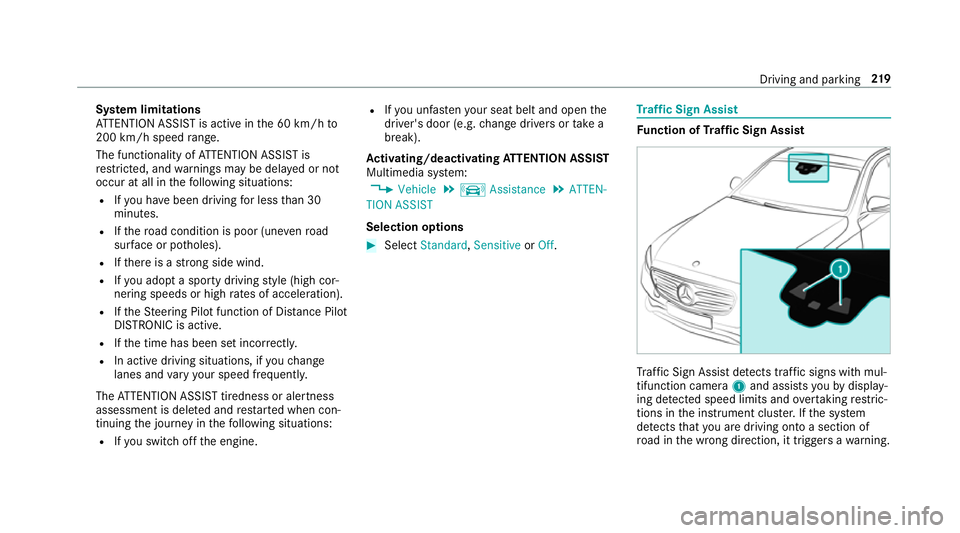
af fic Sign Assist Fu
nction of Traf fic Sign Assist Tr
af fic Sign Assi stdetects traf fic signs wi thmul‐
tifunction camera 1and assi stsyo uby display‐
ing de tected speed limits and overtaking restric‐
tions in the instrument clus ter.If th e sy stem
de tects that you are driving on toa section of
ro ad in the wrong direction, it triggers a warning. Driving and parking
219
Page 223 of 541
The camera also de
tects traf fic signs wi th a
re striction indicated byan additional sign (e.g. in
we t conditions).
Wa rning when the maximum permissible
speed is exceeded
The sy stem can warnyou if you unin tentional ly
exc eed the maximum permissible speed. Todo
th is, you can specify in the multimedia sy stem
by how much the maximum permissible speed
can be exceeded before a warning is issued. Yo u
can specify whe ther thewa rning is tobe just a
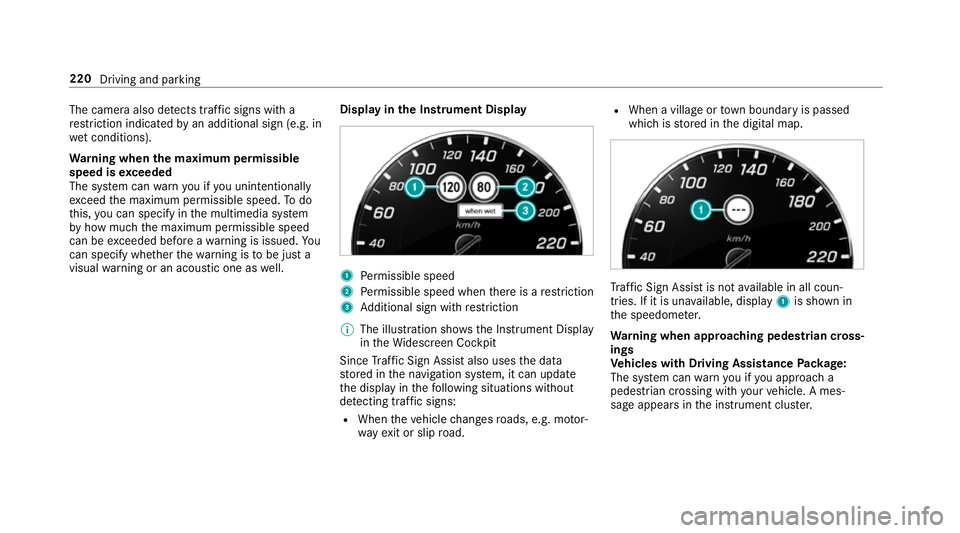
visual warning or an acoustic one as well. Display in
the Instrument Display 1
Perm issible speed
2 Perm issible speed when there is a restriction
3 Additional sign with restriction
% The illu stra tion sho wsthe Instrument Display
in theWi descreen Cockpit
Since Traf fic Sign Assi stalso uses the data
st ored in the navigation sy stem, it can update
th e display in thefo llowing situations without
de tecting traf fic signs:
R When theve hicle changes roads, e.g. mo tor‐
wa yex it or slip road. R
When a village or town boundary is passed
which is stored in the digital map. Tr
af fic Sign Assi stis not available in all coun‐
tries. If it is una vailable, display 1is shown in
th e speedome ter.
Wa rning when app roaching pedestrian cross‐
ings
Ve hicles with Driving Assistance Package:
The sy stem can warnyou if you approach a
pedestrian crossing with your vehicle. A mes‐
sage appears inthe instrument clus ter. 220
Driving and parking