tow MERCEDES-BENZ E-CLASS COUPE 2018 Service Manual
[x] Cancel search | Manufacturer: MERCEDES-BENZ, Model Year: 2018, Model line: E-CLASS COUPE, Model: MERCEDES-BENZ E-CLASS COUPE 2018Pages: 486, PDF Size: 6.31 MB
Page 107 of 486
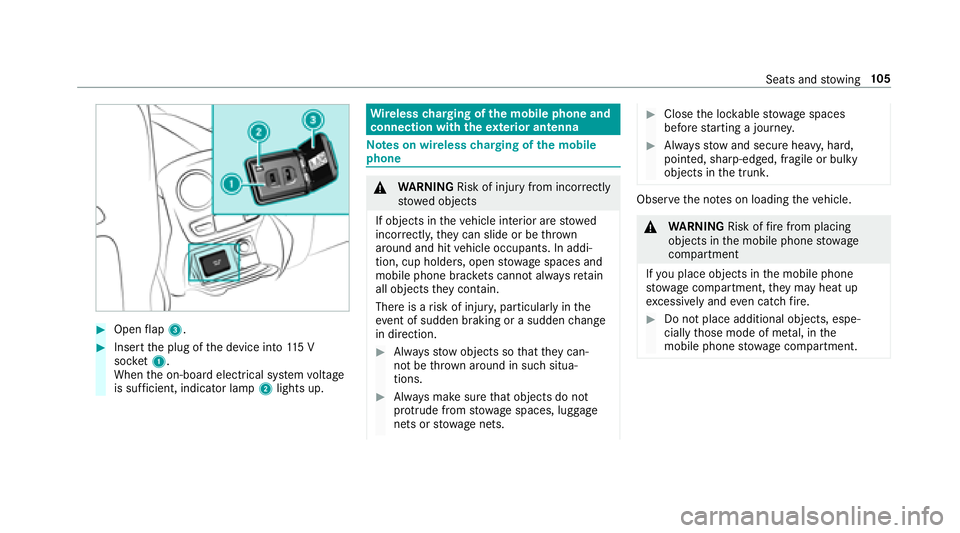
#Openflap 3.
#Insert the plug of the device into 115 V
soc ket1.
When the on-board electrical sy stem voltage
is suf ficient, indicator la mp2lights up.
Wire lesscharging of the mobile phone and
connection with theex terior antenna
Note s on wireless charging of the mobile
phone
& WARNING Risk of injury from incorrectly
stowe d objects
If objects in theve hicle interior are stowed
incor rectly, they can slide or be throw n
around and hit vehicle occupants. In addi‐
tion, cup holders, open stowage spaces and
mobile phone brac kets cann otalw aysre tain
all objects they contain.
There is arisk of injur y,particularly in the
ev ent of sudden braking or a sudden change
in direction.
#Alw aysstow objects so that they can‐
not be throw n around in such situa‐
tions.
#Alw ays make sure that objects do not
pr otru de from stowage spaces, luggage
nets or stowage nets.
#Close the loc kable stow age spaces
before starting a journe y.
#Alwaysstow and secure heavy, hard,
pointe d, sharp-edged, fragile or bulky
objects in the trunk.
Obser vethe no tes on loading theve hicle.
&
WARNING Risk offire from placing
objects in the mobile phone stowage
compartment
If yo u place objects in the mobile phone
stow age compartment, they may heat up
exc essively and even catch fire .
#Do not place additional objects, espe‐
cially those mode of me tal, in the
mobile phone stowage compartment.
Seats and stowing 10
5
Page 108 of 486
*NO
TEDama getoobjects caused by
placing them in the mobile phone stow‐
age compartment
If yo uplac e objects inthe mobile phone
stow age compartment, these may be dam‐
aged byelectromagnetic fields.
#Do not place credit cards, storage
media or other objects sensitive to
electromagnetic fields in the mobile
phone stowage compartment.
* NO
TEDama getothe mobile phone
stow age compartment caused byliquids
If liquids enter the mobile phone stowage
compartment, the compartment may be
damaged.
#Ensure that no liquids enter the mobile
phone stowage compartment.
RDepending on theve hicle equipment, the
mobile phone is connected totheve hicle's
ex terior aerial via thech arging module.
RThe charging function and wireless connec‐
tion of the mobile phone totheve hicle's
ex terior aerial are only available if the ignition
is switched on.
RSmall mobile phones may not be able tobe
ch arge d in everyposition of the mobile
phone stowage compartment.
RLargemobile phones which do not rest flat in
th e mobile phone stowage compartment may
not be able tobe charge d or connec ted with
th eve hicle's exterior aerial.
RThe mobile phone may heat up during the
ch arging process. The mobile phone can be
cooled in the mobile phone stowage com‐
partment when the air conditioning sy stem is
switched on. The cooling output in the
mobile phone stowage compartment is high‐
est when the controller in theglove box is
closed.
RTo ensure more ef ficient charging and con‐
nection with theve hicle's exterior aerial,
re mo vethe pr otective co ver from the mobile
phone.
RWhen charging, the mat should be used if
possible.
Wire lesscharging of the mobile phone
Re quirement:RThe mobile phone must be suitable for wire‐
less charging (Qi-compatible mobile phone).
Yo u can find a li stof Qi-compatible mobile
phones at:
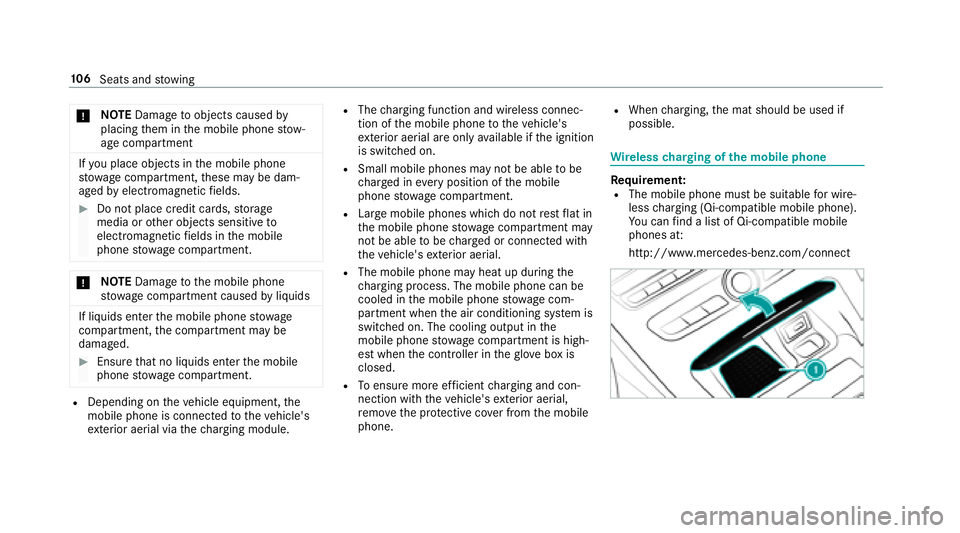
http://www.mercedes-benz.com/connect
10 6
Seats and stowing
Page 109 of 486
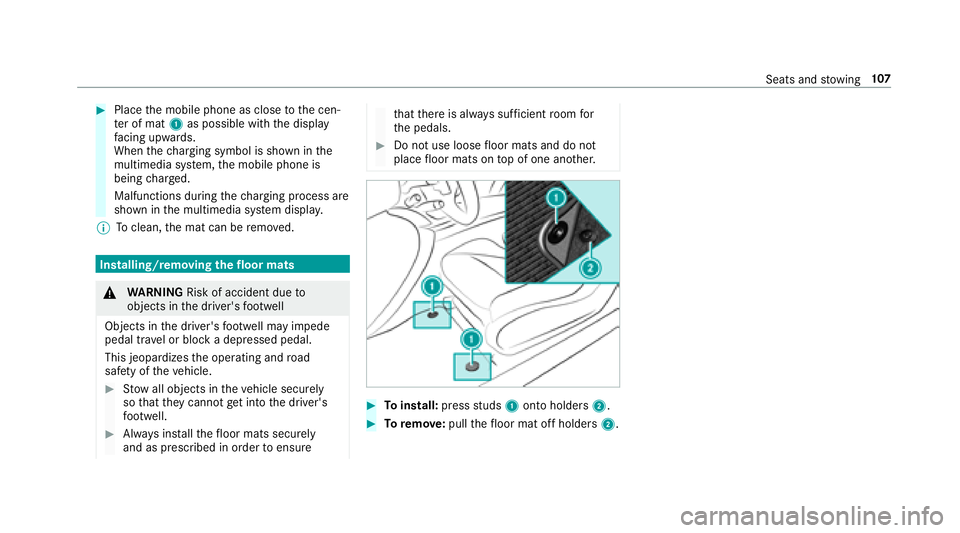
#Placethe mobile phone as close tothe cen‐
te r of mat 1as possible with the display
fa cing up wards.
When thech arging symbol is shown in the
multimedia sy stem, the mobile phone is
being charge d.
Malfunctions during thech arging process are
shown in the multimedia sy stem displa y.
% Toclean, the mat can be remo ved.
Installing/removing thefloor mats
&
WARNING Risk of accident due to
objects in the driver's foot we ll
Objects in the driver's foot we ll may impede
pedal tr avel or block a depressed pedal.
This jeopardizes the operating and road
saf etyof theve hicle.
#Stow all objects in theve hicle securely
so that they cannot getinto the driver's
fo ot we ll.
#Alw ays ins tallth efloor mats securely
and as prescribed in order toensure
that there is alw ays suf ficient room for
th e pedals.
#Do not use loose floor mats and do not
place floor mats on top of one ano ther.
#To install: pressstuds 1onto holders 2.
#Toremo ve:pull thefloor mat off holders 2.
Seats andstowing 10
7
Page 133 of 486
#Depress the brake pedal and start theve hicle
using thest art/ stop button.
% You can also switchon the po wer supp lyor
th e ignition with thest art/ stop button.
Note s on breaking-in a new vehicle
To preser vethe engine during thefirs t
1, 000 miles (1,500 km):
RDrive at varying road speeds and engine
speeds.
RDrive in drive program Cor E.
RChange ge ar beforetheta ch ome ter needle is
Ô ofthewa yto there d area.
RDo not shift down a gear manually in order to
brake.
RAv oid overstraining theve hicle, e.g. driving at
full thro ttle.
RDo not depress the accelera tor pedal be yond
th e pressure point (kickdown).
ROnly increase the engine speed gradually and
accelera tetheve hicle tofull speed af ter
1, 000 miles (1,500 km). This also applies when
the engine or parts of the
driv etra in ha vebeen replaced.
Please also obser vethefo llowing running-in
no tes:
RIn cer tain driving and driving saf etysy stems,
th e sensors adjust automatically while a cer‐
ta in dis tance is being driven af terth eve hicle
has been delivered or af terre pairs. Full sys‐
te m ef fectiveness is not achie ved until the
end of this teach-in process.
RBrake linings, brake discs and tires that are
either new or ha vebeen replaced only ach‐
ie ve optimum braking ef fect and grip af ter
se veral hundred kilom eters of driving. Com‐
pensate forth ere duced braking ef fect by
applying greaterfo rc
eto the brake pedal.
Driving tips
&
WARNING Risk of accident due to
objects in the driver's foot we ll
Objects in the driver's foot we ll may impede
pedal tra vel or block a depressed pedal.
This jeopardizes the operating and road
saf etyof theve hicle.
#Stow all objects in theve hicle securely
so that they cannot getinto the driver's
fo ot we ll.
#Ensure floor mats and carpets cannot
slip and pr ovide suf ficient room forth e
pedals.
#Do not lay multiple floor mats or car‐
pets on top of one ano ther.
&
WARNING Risk of accident due to
unsuit ablefoot we ar
Operation of the pedals may be restricted
due tounsuit ablefoot we ar such as:
RShoes with platfo rmsoles
RShoes with high heels
RSlippers
#When driving alw ayswe ar suitable
shoes in order tobe able tooperate the
pedals safel y.
Driving and pa rking 13
1
Page 139 of 486
pedalfirm lyand do not accelerate at
th e same time.
* NO
TEDama getothe automatic trans‐
mission caused bychanging the trans‐
mission position during the journey
#Only change the transmission position
when theve hicle is stationar y.
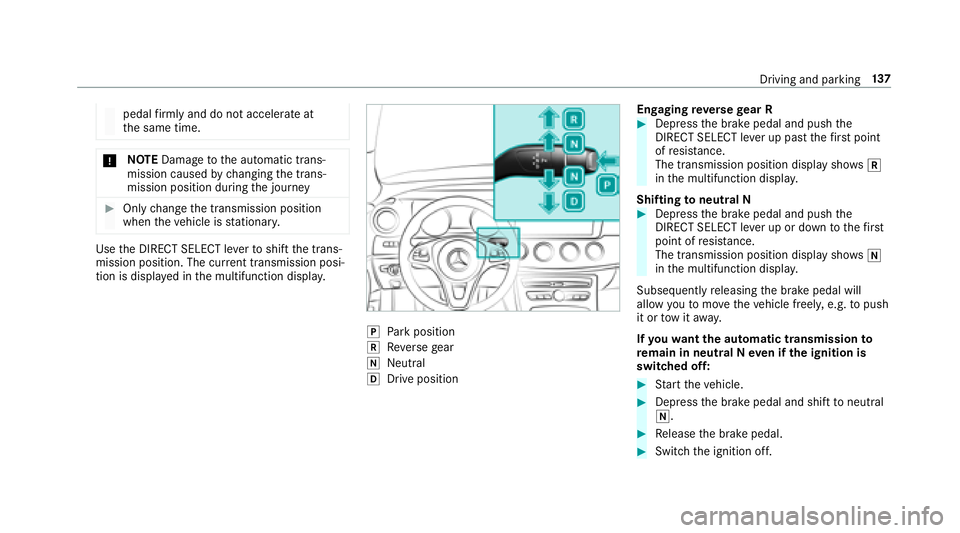
Usethe DIRECT SELECT le verto shift the trans‐
mission position. The cur rent transmission posi‐
tion is displ ayed in the multifunction displa y.
jPark position
kReversege ar
iNeutra l
hDrive position En
gaging reve rsege ar R
#Depress the brake pedal and push the
DIRECT SELECT le ver up past thefirs t point
of resis tance.
The transmission position displ aysho wsk
in the multifunction displa y.
Shifting toneutral N
#Depress the brake pedal and push the
DIRECT SELECT le ver up or down tothefirs t
point of resis tance.
The transmission position displ aysho wsi
in the multifunction displa y.
Subsequently releasing the brake pedal will
allow youto mo vetheve hicle freel y,e.g. topush
it or tow it away.
If yo uwa ntthe automatic transmission to
re main in neutral N even if the ignition is
switched off:
#St art theve hicle.
#Depress the brake pedal and shift toneutral
i.
#Re lease the brake pedal.
#Switch the ignition off.
Driving and parking 13
7
Page 145 of 486
*NO
TEDama getotheve hicle or the driv‐
et ra in caused bytheve hicle rolling away
#Alw ays proper lysecure theve hicle
against rolling away.
#On uphill or downhill inclines, turn the front
wheels towa rdsth e curb.
#Select transmission position j.
#Applythe electric parking brake.
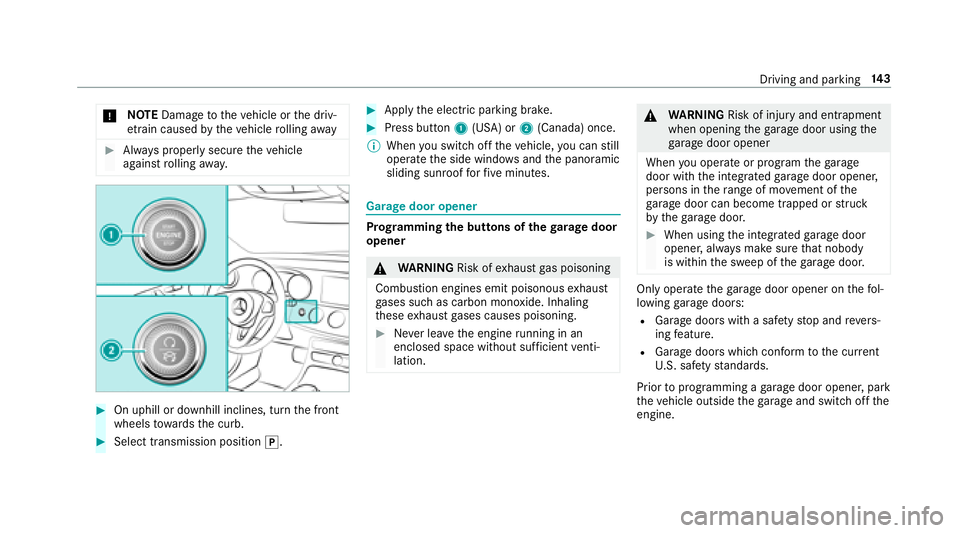
#Press button 1(USA) or 2(Canada) once.
% When youswit choff theve hicle, you can still
opera tethe side windo wsand the panoramic
sliding sunroof forfive minutes.
Garage door opener
Prog ramming the buttons of the garage door
opener
& WARNING Risk ofexhaust gas poisoning
Combustion engines emit poisonous exhaust
ga ses such as carbon monoxide. Inhaling
th ese exhaust gases causes poisoning.
#Ne ver lea vethe engine running in an
enclosed space wi thout suf ficient venti‐
lation.
& WARNING Risk of injury and entrapment
when opening thega rage door using the
ga rage door opener
When you operate or program thega rage
door with the integrated garage door opener,
persons in thera nge of mo vement of the
ga rage door can become trapped or stru ck
by thega rage door.
#When using the integrated garage door
opener, alw ays make sure that nobody
is within the sweep of thega rage door.
Only operate thega rage door opener on thefo l‐
lowing garage doors:
RGarage doors with a saf etyst op and reve rs‐
ing feature.
RGarage doors which con form tothe cur rent
U. S. safe tystandards.
Prior toprogramming a garage door opener, park
th eve hicle outside thega rage and switch offthe
engine.
Driving and parking 14
3
Page 146 of 486
#Checkifth e transmit ter frequency of the
re mo tecontrol has the frequency range of
280 to868 MHz.
Ra dio equipment appr oval number:
RNZLMUA HL5 (USA)
R4112 A-MUAHL5 (Canada)
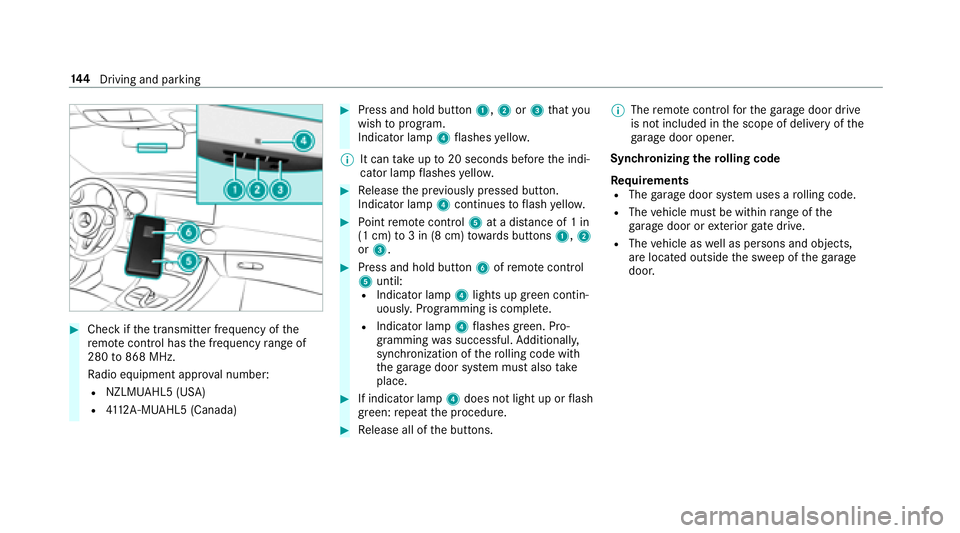
#Press and hold button 1,2or3 that you
wish toprog ram.
Indicator lamp 4flashes yello w.
% It can take up to20 seconds before the indi‐
cator lamp flashes yello w.
#Re lease the pr eviously pressed button.
Indicator lamp 4continues toflash yello w.
#Po int remo tecontrol 5at a dist ance of 1 in
(1 cm) to3 in (8 cm) towa rds buttons 1,2
or 3.
#Press and hold button 6ofremo tecontrol
5 until:
RIndicator la mp4lights up greencontin‐
uousl y.Programming is comple te.
RIndicator lamp 4flashes green. Pro‐
gr amming was successful. Additionally,
synchronization of thero lling code with
th ega rage door sy stem must also take
place.
#If indicator lamp 4does not light up or flash
green: repeat the procedure.
#Re lease all of the buttons. %
The remo tecontrol forth ega rage door drive
is not included in the scope of delivery of the
ga rage door opener.
Synchronizing thero lling code
Re quirements
RThe garage door sy stem uses a rolling code.
RThe vehicle must be within range of the
ga rage door or exterior gate drive.
RThevehicle as well as persons and objects,
are located outside the sweep of thega rage
door.
14 4
Driving and pa rking
Page 165 of 486
taking on theright at speeds over 50 mph
(80 km/h) in right-hand traf fic and overtaking on
th e left in left-hand tra ffic on free ways and high-
speed major roads.
If yo u act ivate the turn signal indicator tochange
lanes, theve hicle will accelerate more briskly to
th e set speed under thefo llowing conditions:
RDis tance Pilot DISTRONIC is acti vated.
RThe driving speed is higher than 45 mph
(70 km/h).
RThe driven speed drops below thestored
speed.
RThe traf fic situation in theov ertak ing lane
permits a safe lane change.
Ve hicles with Driving Assistance Package
and Traf fic Sign Assis t:Distance Pilot
DI ST RO NIC also has the Speed Limit Pilot func‐
tion. This function can be confi gured inthe mul‐
timedia sy stem. If a change in the speed limit is
de tected and Dis tance Pilot DISTRONIC is acti va‐
te d, Dis tance Pilot DISTRONIC assumes this new
speed. The driven speed is adap
ted when theve hicle is
le ve l with the tra ffic signs. The speed limit dis‐
play in the Instrument Display is alw ays update d
when theve hicle is le vel with the tra ffic sign.
If th e Dis tance Pilot DISTRONIC has been put
into passive modebypressing the accelerator
pedal, only speed limits which are higher than
th e se t speed are adop
ted.
Pullin
g th e cruise control le ver will set the dis‐
pla yed speed limit as the speed, pr ovided that:
RThe Speed Limit Pilot has been activated in
the multimedia sy stem and
RDis tance Pilot DISTRONIC has been acti va‐
te d.
If no speed limit is displa yed when the le ver is
operated, the speed set bythe driver is adop ted.
Drive prog ram
The DYNA MIC SELECT switch allo wsyouto
ch ange the driving style of Dis tance Pilot
DISTRONIC. Depending on which drive program
is selected, the driving characteristics can be
ge ared towa rds fuel econom y,comfort or
dynamic per form ance (
→page 135). Sy
stem limits
Ve hicles with the Driving Assistance Pack‐
age: Distance Pilot DISTRONIC is acti veinthe
0 mp h (0 km/h) to130mp h (2 10km/h) speed
ra nge.
The sy stem may be impaired or may not function
in thefo llowing situations:
RIn sno w,rain, fog, heavy spr ay, if there is
gl are, in direct sunlight or in greatly varying
light conditions.
RIf th e windshield in the area of the camera is
dirty, fogged up, damaged or co vered.
RIfth era dar sensors are dirty or co vered.
Do not use Dis tance Pilot DISTRONIC in thefo l‐
lowing situations:
RIn road and traf fic conditions whi chdo not
allow youto maintain a cons tant speed, e.g.
in heavy traf fic or on winding roads.
ROn slippery roads. Braking or accelerating
can cause the drive wheels tolose traction
and theve hicle could then skid.
RWhen there is poor visibility, e.g. due tofog,
heavy rain or sno w.
Driving and pa rking 16
3
Page 168 of 486
RIf Distance Pilot DISTRONIC is deacti va‐
te d with the cruise control le ver,fo r
ex ample byave hicle occupant or from
outside theve hicle.
RIfth e electrics in the engine compart‐
ment, the battery or the fuses are tam‐
pered with.
RIf th e battery is disconnected.
RIfth eve hicle is accelerated, forex ample
by ave hicle occupant.
#Alw ays deactivate Dis tance Pilot
DISTRONIC and secu retheve hicle to
pr eve nt it from rolling away before you
lea vethe driver's seat.
&
WARNING Risk of accident due to
unkno wnstored speed
If yo u call up thestored speed and this is
lo we rth an your cur rent speed, theve hicle
decelerates.
If yo udo not kn owthestored speed, the
ve hicle could decelerate unexpectedl y.
#Take into account the tra ffic situation
before calling up thestored speed.
#If th estored speed is not known, store
th e desired speed again.
&
WARNING Risk of accident due tounex‐
pecte d acceleration byDis tance Pilot
DISTRONIC
If Dis tance Pilot DISTRONIC no longer
de tects a vehicle in front, it may unexpect‐
edly accelerate tothe speed stored.
RThis speed may be too high for a turning
lane or an exit lane.
RIf driving in theright lane, this speed may
be so high that you pass vehicles driving
on the left (in count ries where tra ffic
drives on theright).
RIf driving in the left lane, this speed may
be so high that you pass vehicles driving
on theright (in countri es where traffic
drives on the left).
Alw ays carefully obser vethe tra ffic condi‐
tions and be ready tobrake at all times.
&
WARNING Risk of accident due toDis‐
ta nce Pilot DISTRONIC pulling away auto‐
matically
If Dis tance Pilot DISTRONIC pe rforms an
automatic driving-off procedure, theve hicle
may accelerate unexpectedl y.
Where necessar y,brake theve hicle yourself
and take evasive action.
&
WARNING Risk of accident due toSpeed
Limit Pilot adapting theve hicle's speed
The speed adop tedby the Speed Limit Pilot
may be too high or incor rect in some individ‐
ual cases, such as:
RInthewe t or in fog
RWhen towing a trailer
Ensure that the driven speed complies with
traf fic re gulations.
16 6
Driving and pa rking
Page 171 of 486
RIt uses as arefere nce theve hicle in front or
th e lane markings, depending on the driven
speed.
RSt eering Pilot requiresyou as the driver, to
ke ep your hands onthesteering wheel at all
times so that you are abletointer vene at any
time tocor rect the course of theve hicle and
ke ep it in lane.
RSteering Pilot can be overridden at any time
by steering theve hicle yourself.
RIfth e sy stem de tects that there are no lane
markings, it uses theve hicle ahead as a ref‐
erence up toa speed of 80 mph (130 km/h).
RWhen the sy stem is actively steering, the
è symbol is shown in green in the multi‐
function displa y.
Sy stem limitations of Steering Pilot
St eering Pilot has a limited steering torque for
lateral guidance. In some cases, thesteering
inter vention is not suff icienttokeep theve hicle
in the lane.
If de tection of lane markings and vehicles ahead
is impaired, Steering Pilot switches topassive
mode. The sy stem pr ovides no support in this case. During
the transition from the active to
passive status, theè symbol is shown as
enlar ged and flashes yello w. Once the sy stem is
passive theè symbol is shown as gr ayinthe
multifunction displa y.
The sy stem may be impaired or may not function
in thefo llowin
g ins
tances:
RIfth ere is poor visibility, e.g. due toinsuf fi‐
cient illumination of thero ad, or due tosno w,
ra in, fog or spr ay.
RIfth ere is glare, e.g. from oncoming traf fic,
dire ct sunlight or reflection from other vehi‐
cles (e.g. if thero ad is wet).
RIfth e windshield is dirty, fogged up, damaged
or co vered, for ins tance byast icke r,in the
vicinity of the camera.
RIf no, or se veral, unclear lane markings are
present for one lane, e.g. in a construction
area.
RIf th e lane markings are wornaw ay, dark or
co vered up, e.g. bydirt or sno w.
RThe distance totheve hicle in front is too
small and the lane markings thus cannot be
de tected.
RIfth e lane markings change quickl y,e.g.
lanes branch off, cross one ano ther or
mer ge.
RThe road is nar rowand winding.
RIfth ere are highly variable shade conditions
on thero ad.
RIfth ere are obs tacles such as traffic guid‐
ance posts on the lane or projecting out into
th e lane.
The sy stem does not pr ovide assis tance in the
fo llowing conditions:
ROn very sharp bends.
RWhen towing a trailer.
RIfyo u act ively change lane without switch ing
on the turn signal indicator.
RIfyo u switch onthe turn signal indicator and
th e condit
ions for activating Active Lane
Change Assi stare not fulfilled.
Ac tivating Steering Pilot
Requ irements
RESP®must be switched on, but not inter ven‐
ing.
Driving and pa rking 16
9