sunroof MERCEDES-BENZ E-CLASS COUPE 2018 User Guide
[x] Cancel search | Manufacturer: MERCEDES-BENZ, Model Year: 2018, Model line: E-CLASS COUPE, Model: MERCEDES-BENZ E-CLASS COUPE 2018Pages: 593, PDF Size: 10.63 MB
Page 100 of 593
Interior pr
otection is primed automatically af ter
appr oximately ten seconds:
R afte r locking theve hicle with thekey
R afte r locking theve hicle using KEYLESS-GO
Interior pr otection is only primed when thefo l‐
lowing components are closed:
R the doors
R the boot lid
Interior pr otection is automatically deactivated:
R afte r pressing the% orp button on
th ekey
R afte r pressing thest art/ stop button with the
ke y in thestow age compartment
(→ page 161)
R afte r unlocking theve hicle using KEYLESS-
GO
R when using HANDS-FREE ACCESS
The following situations can lead toafa lse
alarm:
R moving objects such as masc ots in theve hi‐
cle interior R
when the side window is open
R when the panoramic sliding sunroof is open Priming/deactivating interior pr
otection Multimedia sy
stem:
Vehicle îVehicle settings Interior
motion sensor #
Activate Oor deacti vate ª the function.
Interior pr otection is primed again in thefo llow‐
ing cases:
R The vehicle is unloc ked again.
R A door is opened.
R The vehicle is loc ked again. Opening and closing
97
Page 124 of 593
*
NO
TEVehicle damage from non-
appr ovedro of racks The
vehicle could be damaged byroof racks
which ha venot been tested and appr ovedby
Mercedes-Benz. #
Only use roof rack ste sted and
appr ovedby Mercedes-Benz. #
Depending on theve hicle equipment,
ensure that when thero of rack isfitted:
R the sliding sunroof can be fully
ra ised.
R the boot lid can be fully opened. #
Position the load on thero of rack in
such a wayth at theve hicle will not sus‐
ta in damage even when it is in motion. *
NO
TEDama getothe sliding sunroof
when a roof rack isfitted The sliding sunroof may be dama
gedby the
ro of rack ifyo u attem pttoopen it when the
ro of rack isfitted. #
Do not open the sliding sunroof when
th ero of rack isfitted.
In order toallow ventilation of theve hicle
interior, you can raise the sliding sunroof. *
NO
TEDama getothe co vers The co
vers may be dama ged and scratched
when being opened. #
Do not use me tallic or hard objects. #
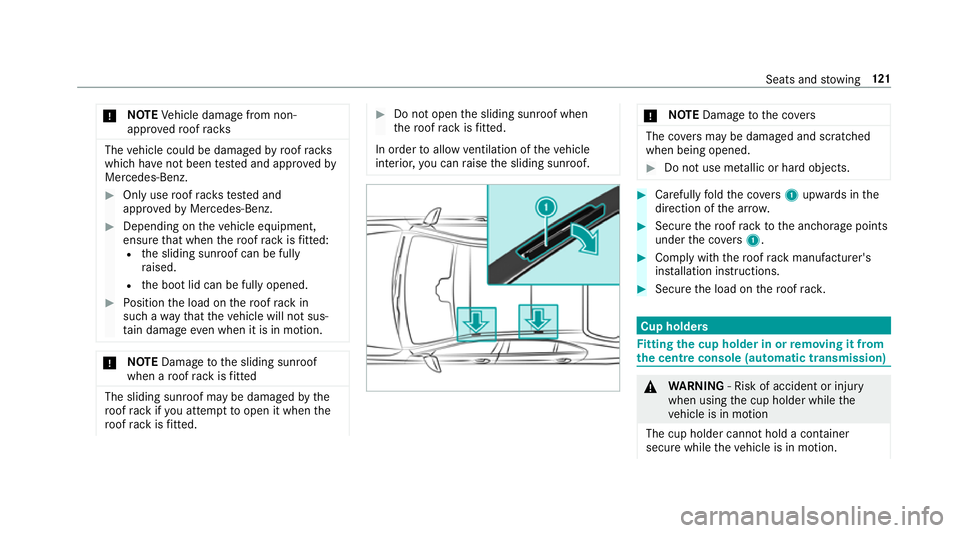
Carefully fold the co vers 1 upwards in the
direction of the ar row. #
Secu rethero of rack tothe anchorage points
under the co vers 1 . #
Comply with thero of rack manufacturer's
ins tallation instructions. #
Secure the load on thero of rack. Cup holders
Fi
tting the cup holder in or removing it from
the centre console (au tomatic transmission) &
WARNING ‑ Risk of accident or inju ry
when using the cup holder while the
ve hicle is in motion
The cup holder cannot hold a container
secure while theve hicle is in motion. Seats and
stowing 121
Page 165 of 593
R
the fuel tank is su fficiently filled.
R thest ar ter battery is suf ficiently charge d.
% You can also set thete mp erature with your
smartphone. In form ation on Mercedes me
connect and other services: http://
www.mercedes.me
This function is not available for all models.
Charging the bat tery before commencing
yo ur journey
R Ifth eve hicle battery is discharged, you
re cei vea message on your smartphone.
R You can then start theve hicle with the
smartphone tocharge the batter y.
R The vehicle is automatically switched off
af te rte n minu tes.
Ensure thefo llowing before starting the engine:
R the legal stipulations in the area where your
ve hicle is par ked allow engine starting via
smartphone.
R it is safe tostart and runth e engine where
yo ur vehicle is par ked.
R the fuel tank is su fficiently filled. St
arting theve hicle &
WARNING Risk of crushing or entrap‐
ment due tounin tentional starting of the
engine
Limbs could be crushed or trapped if the
engine is star ted unintentionally during
service or maintenance work. #
Alw ays secure the engine against unin‐
te ntional starting before car rying out
maintenance or repair work. Re
quirements:
R park position jis selected.
R the anti- theft alarm sy stem is not activated.
R the panic alarm is not activated.
R the hazard warning lights are switched off.
R the bonn etis closed.
R the doors are closed and loc ked.
R the windo wsand sliding sun roof are closed. #
Start theve hicle using the smartphone: R
afte reve ryvehicle start, the engine runs for
te n minu tes.
R you can car ryout a maximum of two consec‐
utive starting attem pts. The vehicle must be
st ar ted once with theke y before trying to
st art theve hicle again with the smartphone.
R you can stop theve hicle again at any time.
R further information can be found in the
smartphone app.
Securing the engine against starting before
car rying out maintenance or repair work: #
switch on the hazard warning lights.
or #
unlock the doors.
or #
open a side window or the sliding sunroof. Ru
nning-in no tes Mercedes-AMG
vehicles: observeth e no tes in
th e Supplement. Otherwise, you may failto rec‐
ognise dangers. 16 2
Driving and pa rking
Page 185 of 593
*
NO
TEDama getotheve hicle due toit
ro lling away #
Alw ays secure theve hicle against roll‐
ing away. #
Bring theve hicle toast andstill byapplying
th e brake pedal. #
On uphill or downhill gradients, turn the front
wheels so that theve hicle rolls towa rdsthe
ke rb if it starts moving. #
App lythe electric parking brake. #
Enga getransmission position jin a station‐
ary vehicle with the brake pedal applied
(→ page 172). #
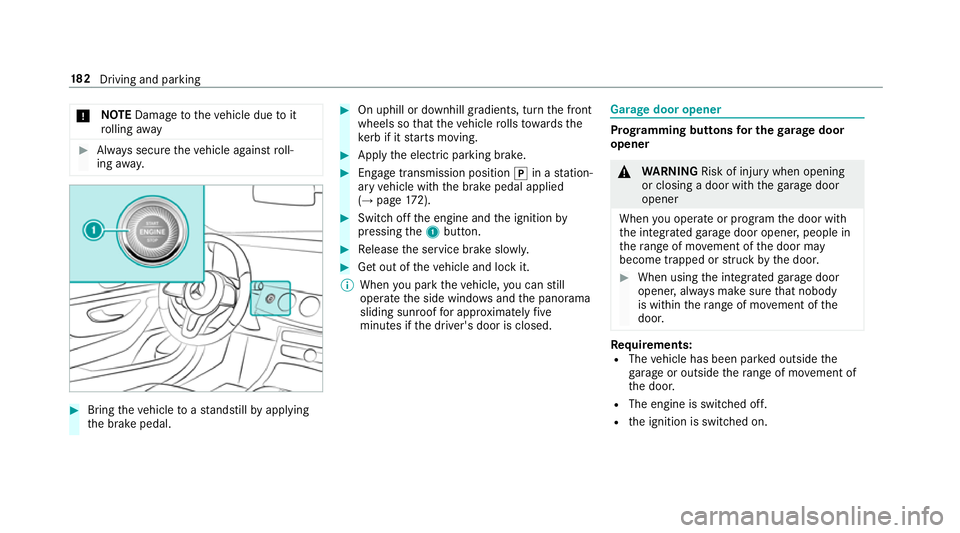
Switch off the engine and the ignition by
pressing the1 button. #
Release the service brake slowl y. #
Get out of theve hicle and lock it.
% When you park theve hicle, you can still
opera tethe side windo wsand the panorama
sliding sunroof for appro ximately five
minutes if the driver's door is closed. Garage door opener
Prog
ramming buttons for the garage door
opener &
WARNING Risk of inju rywhen opening
or closing a door with thega rage door
opener
When you operate or program the door with
th e integrated garage door opener, people in
th era nge of mo vement of the door may
become trapped or stru ck bythe door. #
When using the integrated garage door
opener, alw ays make sure that nobody
is within thera nge of mo vement of the
door. Re
quirements:
R The vehicle has been par ked outside the
ga rage or outside thera nge of mo vement of
th e door.
R The engine is switched off.
R the ignition is switched on. 18 2
Driving and pa rking
Page 465 of 593
#
When operating two-w ayradios in the
ve hicle, alw ays connect them tothe
lo w- reflection exterior aerial. *
NO
TEInva lidation of the operating per‐
mit due tofailure tocomply wi th the
instructions for ins tallation and use The operating permit may be in
validated if
th e instructions for ins tallation and use of
two-w ayradios are not obser ved. #
Only use appr oved frequency bands. #
Obser vethe maximum permissible out‐
put po wer in these frequency bands. #
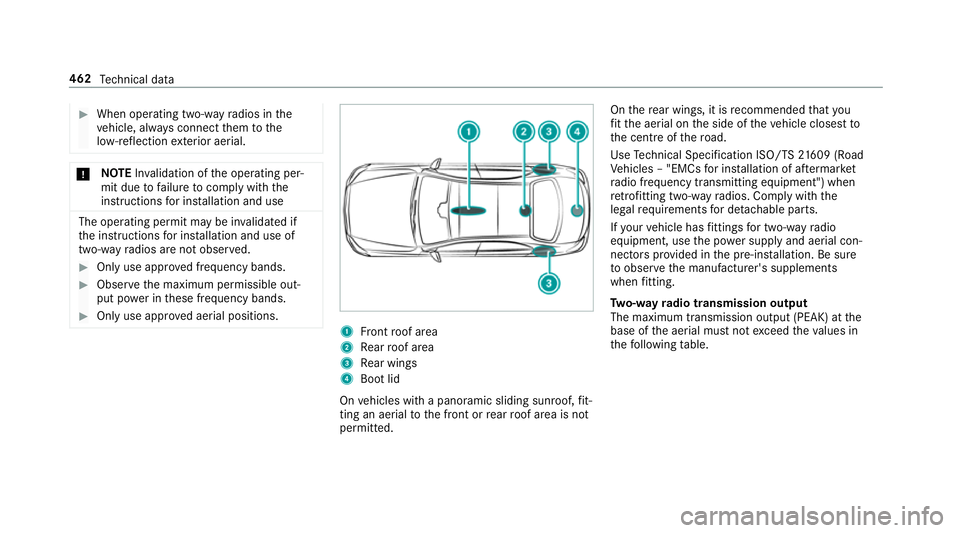
Only use appr oved aerial positions. 1
Front roof area
2 Rear roof area
3 Rear wings
4 Boot lid
On vehicles with a panoramic sliding sunroof, fit‐
ting an ae rial to the front or rear roof area is not
permitted. On
there ar wings, it is recommended that you
fi t th e aerial on the side of theve hicle closest to
th e cent reofthero ad.
Use Tech nical Specification ISO/TS 21609 (Road
Ve hicles – "EMCs for ins tallation of af term arket
ra dio frequency transmitting equipment") when
re trofitting two-w ayradios. Comply with the
legal requirements for de tach able parts.
If yo ur vehicle has fittings for two-w ayradio
equipment, use the po wer supp lyand aerial con‐
nec tors prov ided in the pre-ins tallation. Be sure
to obser vethe manufacturer's supplements
when fitting.
Tw o-w ayradio transmission output
The maximum transmission output (PEAK) at the
base of the aerial must not exceed theva lues in
th efo llowing table. 462
Tech nical da ta
Page 575 of 593
Overview ................................................
12
Owner's Manual Vehicle equipment ................................. 21
Owner's Manual (digital) ...........................18P
Pa int code ................................................ 463
Pa intwork (cleaning instructions) ..........411
Pa nel heating
Setting .................................................1 07
Pa nic alarm ................................................ 72
Ac tivating/deactivating ......................... 72
Pa noramic sliding sunroof
see Sliding sunroof
Pa rk position
Inserting .............................................. 172
Selecting au tomatical ly........................ 172
Pa rking
see Electric parking brake
Pa rking aid
see Parking Assist PARKTRONIC Pa
rking Assist PARKTRONIC ................... 221
Ac tivating ............................................ 224
Ad justing warning tones ...................... 224
Deactivating ........................................ 224
Fu nction .............................................. 221
Side impact pr otection ........................ 222
Sy stem limitations ...............................2 21
Pa rking assistance sy stems
see Active Parking Assist
Pa rking brake
see Electric parking brake
Pa rking lights .......................................... .128
Pa rking position
Outside mir rors .................................... 141
St oring the position of the passenger
outside mir ror using reve rsege ar ........ 14 2
Pa rking up ................................................ 189
PA SSENGER AIR BAGstatus display
see Automatic front passenger front
airbag shutoff
Pe destrian pr otection
see Active bonnet (pedestrian pr otection) Pe
rfume
see Fragrance sy stem
Pe rfume vial
see Fragrance sy stem
Pe rm issible axle load .............................. 463
Pe rm itted towing me thods .................... .432
Pe rsonalisation
see User profile
Pe trol ........................................................ 467
Pe ts in the vehicle .................................... .70
Phone book see Contacts
Picture form ats
see Video mode
Picture settings see Video mode
PIN pr otection
Swit ching on/off ................................ .305
Plastic trim (Care) ................................... .416
Playback options Selecting ..............................................3 76572
Index
Page 576 of 593
POI
Selecting ..............................................3 15
POI symbols Selecting ............................................. 333
Po we r supp ly
Switching on (S tart/S top button) ........ 15 8
Po we r windo ws
see Side windo ws
PRE-SAFE ®
(anticipatory occupant
pr otection) ................................................ .45
Fu nction ................................................ 45
PRE-SAFE ®
Sound ................................. 45
Re versing measures .............................. 45
PRE- SAFE®
PLUS (anticipa tory occu‐
pant pr otection plus) ................................ 45
Fu nction ................................................ 45
Re versing measures .............................. 45
Pr ev entative occupant pr otection sys‐
tem
see PRE-SAFE ®
(anticipatory occu‐
pant pr otection)
Pr ev ious destinations
Selecting .............................................. 315Prog
ramme in form ation
TV channel .......................................... 393
Prog rams
see DYNA MIC SELECT
Pr otection of the environment
No tes ..................................................... 19
Ta ke -ba ckof end-of-life vehicles ............ 19 Q
Qibla ......................................................... 337
QR code Rescue card .......................................... 26
Qualified specialist workshop ................. 25 R
Ra dar senso rs
Fo il co vering ........................................ 19 0
Ra dio
Ac tivating/deactivating radio text ....... 388
Calling up a slide show ........................ 387
Calling up thest ation list .................... .387
Del eting channels ................................ 387
Direct frequency ent ry......................... 387 Displaying information ......................... 388
Displaying
radio text ............................ 388
Editing station presets ........................ .387
Fr equency fix ....................................... 388
Menu (on-boa rdcompu ter) .................. 269
Moving stations .................................. .387
Overview ............................................. 386
Sear ching forst ations ........................ .387
Setting a channel ................................ .387
Setting station tracking ...................... .388
Setting the frequency band ................. 387
Setting the tra ffic information
service volume inc rease ...................... 388
St oring radio stations .......................... 387
Swit ching on ...................................... .385
Switching traf fic announcements
on/off ................................................. 388
Ta gging music trac ks........................... 388
Vo ice commands (LINGU ATRO NIC) .....2 82
Ra dio stations
Dialling (on-boa rdcompu ter) ............... 269
Ra in closing function
Sliding sunroof ...................................... 93
Ra in-closing feature
Side wind ows........................................ 87 Index
573
Page 580 of 593
Side impact pr
otection .......................... .222
Side windo ws............................................. 86
Au tomatic function ................................ 87
Child saf ety lock in there ar .................. .69
Closing .................................................. 86
Closing using theke y ............................ 88
Con venience closing ............................. 88
Co nvenience opening ............................88
Opening .................................................86
Opening with theke y ............................ .88
Problem .................................................89
Ra in-closing feature .............................. .87
Sliding sunroof .......................................... 90
Au tomatic functions .............................. 93
Closing .................................................. 90
Closing using theke y ............................ 88
Opening ................................................ .90
Opening with theke y ............................ .88
Problem .................................................93
Ra in closing function ............................ .93
Smart card Inserting ..............................................3 96
Smartphone Locking theve hicle ................................ 76Un
locking theve hicle ............................76
Smartphone see Android Auto
see Apple CarPlay™
see Mercedes-Benz Link
see Telephone
Snow chains ............................................. 441
Soc ket (12 V) ............................................ 124
Fr ont centre console ............................ 124
Re ar .................................................... .124
Software update ...................................... 307
Impor tant sy stem updates .................. 308
Information .......................................... 307
Pe rforming .......................................... 308
Sound PRE-SAFE ®
Sound ................................. 45
Wheels and tyres ................................. 441
Sound see Burmes ter®
sur round sound sy stem
see Tone settings
Sound settings Adjusting the balance/fader ............... 397 Ad
justing treble, mid-range and bass
settings ............................................... 397
Au tomatic volume adjustment ............ .397
Spare wheel see Emer gency spa rewheel
Spectacles compa rtment ........................ 11 5
Speech dialogue sy stem
see LINGU ATRO NIC
Speed limitation for winter tyres
Setting ................................................. 205
Speedome ter
Digital ................................................. .266
St andby mode
Ac tivating/deactivating ...................... .189
Fu nction .............................................. 189
St anding lights ........................................ 12 8
St art/s top button
Pa rking theve hicle .............................. 181
St arting theve hicle ............................. 15 9
Switching on the po wer supply or
ignition ................................................ 15 8
St art/s top function
see ECO start/ stop function Index
577