service MERCEDES-BENZ E-CLASS COUPE 2018 Manual Online
[x] Cancel search | Manufacturer: MERCEDES-BENZ, Model Year: 2018, Model line: E-CLASS COUPE, Model: MERCEDES-BENZ E-CLASS COUPE 2018Pages: 593, PDF Size: 10.63 MB
Page 524 of 593
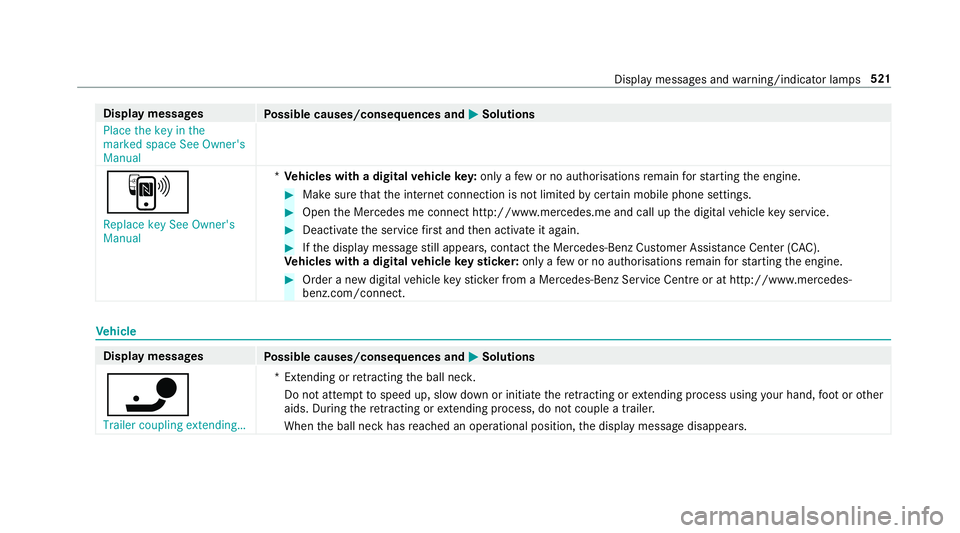
Display messages
Possible causes/consequences and M
MSolutions
Place the key in the
marked space See Owner's
Manual
À
Replace key See Owner's
Manual *
Ve hicles with a digital vehicle key:only a few or no authorisations remain forst arting the engine. #
Make sure that the internet connection is not limited bycer tain mobile phone settings. #
Open the Mercedes me connect http://www.mercedes.me and call up the digital vehicle key service. #
Deactivate the service firs t and then activate it again. #
Ifth e display message still appears, con tact the Mercedes-Benz Cus tomer Assis tance Center (C AC).
Ve hicles with a digital vehicle keyst icke r:on lyafe w or no authorisations remain forst arting the engine. #
Order a new digital vehicle keyst icke r from a Mercedes-Benz Service Centre or at http://www.mercedes-
benz.com/connect. Ve
hicle Display messages
Possible causes/consequences and M MSolutions
ï Trailer coupling extending… *E
xtending or retracting the ball nec k.
Do not attem pttospeed up, slow down or initiate there tracting or extending process using your hand, foot or other
aids. During there tracting or extending process, do not couple a traile r.
When the ball neck has reached an operational position, the display message disappears. Display messages and
warning/indicator lamps 521
Page 543 of 593
Wa
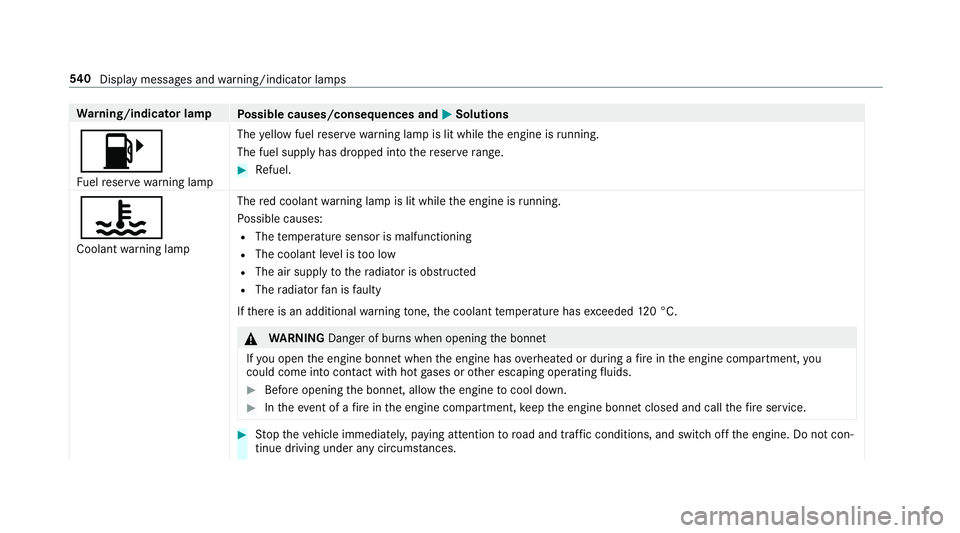
rning/indicator lamp
Possible causes/consequences and M
MSolutions
8 Fu elreser ve wa rning lamp The
yellow fuel reser vewarning lamp is lit while the engine is running.
The fuel supply has dropped into there ser verange. #
Refuel.
?
Coolant warning lamp The
red coolant warning lamp is lit while the engine is running.
Po ssible causes:
R The temp erature sensor is malfunctioning
R The coolant le vel is too low
R The air supply tothera diator is obstructed
R The radiator fan is faulty
If th ere is an additional warning tone, the coolant temp erature has exceeded 120 °C. &
WARNING Danger of bu rns when opening the bonn et
If yo u open the engine bonn etwhen the engine has overheated or during a fire inthe engine compartment, you
could come into contact wi thhot gases or other escaping operating fluids. #
Before opening the bonn et, allow the engine tocool down. #
Intheeve nt of a fire inthe engine compartment, keep the engine bonn etclosed and call thefire service. #
Stop theve hicle immediately, paying attention toroad and traf fic conditions, and switch off the engine. Do not con‐
tinue driving under any circums tances. 540
Displaymessa ges and warning/indicator lamps
Page 550 of 593
Ad
justing the sound optimisation
Burmes ter®
high-end 3D sur round
sound sy stem ...................................... 399
Ad justing treble, mid- range and bass
settings
Burmes ter®
high-end 3D sur round
sound sy stem ...................................... 399
Burmes ter®
sur round sound sy stem ... 398
ADS PLUS damping sy stem
see AIR BODY CONTROL
Ad versewe ather light ............................ .133
Af ter-sales service centre
see ASS YST PLUS
AIR BODY CONT ROL................................ .218
Setting ................................................. 220
Suspension .......................................... 218
Air conditioning sy stem
see Climate control
Air distribution Setting ................................................ .145
Air freshener sy stem
see Frag rance sy stem Air inlet
see Air-water duct
Air pressure see Tyre pressure
Air suspension see AIR BODY CONTROL
Air vents ................................................... 15 5
Ad justing (front) .................................. 15 5
Ad justing (rear) .................................... 15 5
Ad justing the AIRSCARF vents ............. 15 6
Glo vebox .............................................1 56
Air vents
see Air vents
Ai r-re circulation mode ............................ 14 8
Air-water duct .......................................... 408
Ke eping free ........................................4 08
Airbag ........................................................ .38
Ac tivation .............................................. 31
Fr ont airbag (driver, front passenger) ....38
Ins tallation locations ............................ .38
Knee airbag ........................................... 38
Overview ............................................... 38
PA SSENGER AIR BAG indicator lamp .... .42Pr
otection ..............................................38
Re duced pr otection ...............................40
Side impact airbag ................................ 38
Wi ndow airbag ....................................... 38
Ai rflow
Setting ................................................ .145
AIRSCARF Adjusting the outlets ........................... 15 6
Switching on/off ................................. 108
Alarm see Panic alarm
Alarm sy stem
see ATA (anti-theft alarm sy stem)
All-wheel drive see 4MATIC
Alternative route
see Route
Ambient lighting Setting (multimedia sy stem) ................1 35
Android Auto ............................................ 356
Connecting a mobile phone ................. 356
Ending ................................................. 357
Information .......................................... 356 Index
547
Page 551 of 593
Overview ............................................. 356
Sound settings .................................... 357
Tr
ans ferred vehicle data ......................3 57
Animals Pets in theve hicle ................................. 70
Anti-lock braking sy stem
see ABS (Anti-lock Braking Sy stem)
Anti-skid chains
see Snow chains
Anti-theft ala rmsystem
see ATA (anti-theft alarm sy stem)
Anti-theft pr otection
Ad ditional door lock .............................. 75
Immobiliser ...........................................95
Anti-theft pr otection
see ATA (anti-theft alarm sy stem)
Anticipatory occupant pr otection
see PRE- SAFE®
(anticipatory occu‐
pant pr otection)
see PRE-SAFE ®
PLUS (anticipatory
occupant pr otection plus)
Apple CarPlay™ ....................................... 354
Connecting an iPhone ®
....................... 355 Ending .................................................3
55
No tes .................................................. 355
Overview ............................................. 354
Sound settings .................................... 355
Tr ans ferred vehicle data ......................3 57
Asht ray
Fr ont centre console ........................... 12 3
Re ar passenger compartment ............ .123
Assistance sy stems
see Driving saf ety sy stem
Assistant display Menu (on-board computer) .................. 265
ASS YST PLUS ........................................... 400
Battery disconnection pe riods .............4 01
Displ aying the service due date ........... 400
Fu nction/no tes ................................... 400
Re gular maintenance work .................. 400
Special service requ irements .............. 400
ATA (anti-theft ala rmsystem) .................. 95
Deactivating the alarm .......................... 96
Fu nction ................................................ 95
Fu nction of interior pr otection ............... 96
Priming/deactivating interior pr otec‐
tion ........................................................ 97Priming/deactivating
tow- aw ay pro‐
te ction ................................................... 96
To w- aw ay protection function ................96
AT TENTION ASSI ST.......................... 243, 24 4
Fu nction .............................................. 24 3
Setting ................................................. 24 4
Sy stem limitations ...............................2 43
At tention assistant
see ATTENTION ASSIST
Au dio mode
Connecting USB devices ...................... 376
Copyrights .......................................... .373
Information ..........................................3 72
Inserting/removing an SD card ........... 374
Media sear ch....................................... 379
Overview ..............................................3 75
Pa use and playback function .............. .376
Selecting a track .................................. 376
Selecting pl ayback options .................. 376
Switching on media mode .................... 374
Tr ack list .............................................. 376
Au thorised workshop
see Qualified specialist workshop 548
Index
Page 557 of 593
Cup holder in
the centre console
ins talling/ removing (auto matic
transmission) ....................................... 121D
Damage de tection (pa rked vehicle) .......188
Dashboard see Cockpit
Dashboard lighting see Instrument lighting
Data acquisition Vehicle .................................................. 26
Data import/export ................................ 304
Fu nction/no tes ................................... 304
Importing/exporting ........................... 305
Data storage
Electronic control units ........................ .26
Online services ...................................... 28
Ve hicle .................................................. 26
Date Setting the time and date automati‐
cally ..................................................... 299
Deactivating the alarm (A TA).................... 96 Dealership
see Qualified specialist workshop
Declaration of conformity Electromagnetic compatibility ............... 23
Jack .......................................................23
TIREFIT kit ............................................. 24
Wi reless vehicle components ................23
Decorative foil (cleaning instructions) ...4 12
DeNOx agent see AdBlue ®
Designs Menu (on-boa rdcompu ter) .................. 263
Dest ination .............................................. 327
Editing intermediate destinations ........ 317
Editing the pr evious destinations ........ 328
Ex tern al .............................................. .328
Saving (cur rent vehicle position) ......... 327
Saving as global favo urite .................... 328
St oring a map position ........................ 328
Destination entry .....................................3 12
Entering 3 wordaddresses .................. 318
Entering a POI or address .................... 312
Entering an intermedia tedestination ...3 16
Entering geo-coordinates ..................... 318Selecting a contact ..............................
317
Selecting a POI .................................... 315
Selecting from the map ....................... 318
Selecting pr evious destinations .......... .315
De tecting inat tentiveness
see ATTENTION ASSIST
Diagnostics connection ............................24
Diesel Low outside temp eratures ...................4 68
No tes .................................................. 468
Digital Owner's Manual .............................18
Digital speedome ter ............................... 266
Digital TV
see TV
Digital Vehicle Keyst icker
Locking theve hicle ................................ 76
St arting theve hicle ............................. 16 0
Unlocking theve hicle ............................76
Dinghy towing
see Tow- bar sy stem
Dipped beam Setting .................................................1 34554
Index
Page 560 of 593
4Engine oil le
velSt op vehicle
Switch engine off ................................ 508
4Engine oil pressure Stop Switch
off engine ............................................ 509
6Example: Left windowbag mal‐
function Consult workshop ................. 487
Fa ult Drive at max. 80 km/h ...............497
6 Front left malfunction Consult
wo rkshop (Example) ............................4 91
_ Front left seat backrest not
loc ked (Example) .................................5 22
Fr ont-passenger airbag disabled See
Owner's Manual ..................................4 89
Fr ont-passenger airbag enabled See
Owner's Manual ..................................4 88
b Hazard warning lamps mal‐
functioning .......................................... 529
&inoperative Bat tery low .............. .527
& inope rative Refuel vehicle ........... 527
&inoperative See Owner's Man. ....527 !
inope rative See Owner's Man‐
ual ....................................................... 486
÷inoperati veSee Owner's Man‐
ual ....................................................... 486
Tinoperati veSee Owner's Man‐
ual ....................................................... 483
GInoperati ve.................................. 490
bIntelli gent Light Sy stem inoper‐
ative ....................................................5 28
ÁKe y not de tected (red displ ay
messa ge).............................................5 19
Á Key not de tected (white dis‐
pl ay messa ge).....................................5 20
bLeft dipped beam (Example) ....... 528
6Left wind owbag malfunction
Consult workshop (Example) ............... 487
Let fresh air into theve hicle interior!
Air conditioning malf. Visit workshop .. 526
Limiter inoperative .............................. 500
Limiter passive .................................... 501 ¢
Lowe ring .................................... 498
bMalfunction See Owner's Man‐
ual ....................................................... 529
ðMaximum speed exceeded ..........5 01
Mercedes me connect Services limi‐
te d See Owner's Manual .....................490
Mo tor can be star ted again .................5 05
N permanently active Risk of vehicle
ro lling .................................................. .513
ç Off............................................... 499
ëOff ............................................... 496
Only select Park (P) when vehicle is
st ationary ............................................ .514
ï Operation only possible in
transmission position N ....................... 522
ïOperation only possible in
transmission position P ....................... 522
!Pa rking brake See Owner's
Manual ................................................ 480 Index
557
Page 567 of 593
Hooking
the luggage net .........................119
Hotspot Setting up (Wi-Fi) ................................. 302
Via business telephony ........................ 300 I
i-Size child seat securing sy stem
Fitting .................................................... 59
Seats suitable for attaching ................... 58
Identification plate Engine ................................................. 463
Ve hicle ................................................ 463
Ignition Switching on (S tart/S top button) ........ 15 8
Ignition key
see Key
Immobiliser ................................................ 95
Implied warranty
Ve hicle .................................................. 26
In Car Of fice
Calling up ............................................ 352
Fe atures .............................................. 352
Marking a to-do entry as compl eted ....3 53 Noting an incoming call ....................... 353
Selecting functions .............................. 353
Switching auto
maticstart on/off ........ 353
Indicator lamps see Warning/indicator lamps
Individual drive prog ram
Con figuring .......................................... 17 0
Selecting ............................................. 17 0
Inspection see AS SYST PLUS
Instrument clus ter
see Instrument display
Instrument display ..................................2 60
Ad justing the lighting .......................... 265
Fu nction/no tes ................................... 260
Instrument clus ter ................................... 8
Setting the additional value range ....... 263
Wa rning/indicator lamps .................... .531
Instrument lighting .................................265
Intelligent Light Sy stem .......................... 131
Ac tive headla mps ................................ 131
Ad aptive Highbeam Assist Plus .......... .133
Ad versewe ather light .......................... 13 3City lighting ........................................
.133
Cornering light ..................................... 13 2
Fo g light (extended range) ................... 13 2
Mo torw ay mode ................................... 13 2
Overview ..............................................1 31
Switching on/off ................................. 13 3
Interior lighting ........................................ 13 5
Ambient lighting .................................. 13 5
Re ading light ........................................ 13 5
Setting ................................................. 13 5
Switch-off del aytime ........................... 13 6
Interior pr otection
Fu nction ................................................ 96
Priming/deactivating ............................. 97
Intermediate destination Calculating a route with intermediate
destinations ........................................ .317
Entering ............................................... 316
Modifying ............................................. 317
St arting an automatic filling station
sear ch.................................................. 316
St arting the automatic service sta‐
tion sear ch.......................................... 322 564
Index
Page 571 of 593
Displ
aying the satellite map ................. 337
Displaying the tra ffic map .................. .330
Displ aying weather information .......... .337
Map data ............................................. 336
Moving ................................................ 333
Overview ............................................. 332
Selecting POI symbols .........................3 33
Selecting text information ................... 334
Selecting the map orientation .............3 33
Setting the map scale .......................... 333
Setting the map scale automatically ....3 37
Up dating .............................................3 36
Map and comp ass
Overview ............................................. 332
Massage prog rammes
Re setting the settings .......................... 104
Massage prog rams
Overview ............................................ .104
Selecting the front seats ..................... 104
Massage settings Resetting ............................................. 104
Matt finish (cleaning instructions) .........411
Maximum gross vehicle weight ............ .463 Maximum speed
see Limi ter
Mecca ...................................................... .337
Media Menu (on-boa rdcompu ter) .................. 270
Sea rching ............................................ 379
Media display Notes .................................................. 289
Media Inter face
Ac tivating ............................................ 380
Information .......................................... 379
Overview ..............................................3 81
Media mode Activating ............................................ .374
Media playback Operating (on-boa rdcompu ter) .......... .270
Media sear ch
St arting .............................................. .379
Media source Selecting (on-boa rdcompu ter) ............ 270
Memory function Head-up display — Calling up stored
settings ................................................ 11 2Head-up display —
Storing settings ...... 11 2
Operating ............................................. 11 2
Outside mir rors — Calling up stored
settings ................................................ 11 2
Outside mir rors —St oring settings .......1 12
Seat — Calling up stored settings ......... 11 2
Seat — Storing settings ........................ 11 2
St eering wheel — Calling up sa ved
settings ................................................ 11 2
St eering wheel — Saving settings ......... 11 2
Menu (on-board computer) Assis tant displ ay................................. 265
Designs ............................................... 263
Head-up displ ay................................... 271
Media .................................................. 270
Na vigation .......................................... .268
Overview ............................................. 262
Ra dio ...................................................2 69
Service ................................................ 265
Te lephone ............................................ 270
Tr ip ...................................................... 266
Mercedes me connect ............................ 359
Ac cident and breakdown mana ge‐
ment .................................................... 360
Ar ranging a service appointment ........ 360 568
Index
Page 572 of 593
Calling
the Mercedes-Benz Cus tomer
Centre ................................................. 358
Consenting todata transfer .................3 60
Information .......................................... 358
Making a call via theove rhead con‐
trol panel ............................................. 359
Service call with the me button ........... 359
Tr ans ferred data ..................................3 61
Mercedes-AMG vehicles
No tes ................................................... 15 8
Mercedes-Benz Apps Calling up ............................................ 368
Using voice control .............................. 368
Mercedes-Benz emer gency call sys‐
te m ............................................................ 361
Au tomatic emergency call ................... 362
Information .......................................... 361
Information on data processing .......... .363
Manual emer gency call ........................ 362
Overview .............................................. 361
Self-diagnosis (Russia) ........................ 364
St arting/ending ERA-GLONASS test
mode .................................................. .364 Mercedes-Benz Link
................................ 353
Connecting .......................................... 353
Ending ................................................ .354
Overview ............................................. 353
Using ................................................... 354
Mercedes-Benz service centre see Qualifi ed specialist workshop
Message (multifunction display) see Display message
Message memory .................................... 478
Messages Voice commands (LINGU ATRO NIC) .....2 85
Messages see Text messa ges
Mir rors
see Outside mir rors
Mobile phone Authorising (Remo teParking Assist) .... 241
Cancelling permission for Internet
connection .......................................... 367
Damage de tection (pa rked vehicle) ..... 188
Locking theve hicle ................................ 76
St arting theve hicle ............................. 16 0Un
locking theve hicle ............................76
Wi reless charging ................................ 12 6
Mobile phone see Android Auto
see Apple CarPlay™
see Mercedes-Benz Link
see Second telephone
see Telephone
Mobile phone voice recognition
St arting .............................................. .346
St opping ..............................................3 46
Model series see Vehicle identification plate
MOExtended tyres ................................... 421
Mo torw ay mode ....................................... 13 2
MULTIBEAM LED see Intelligent Light Sy stem
Multifunction display Overview of the displa ys...................... 264
Multifunction steering wheel
Overview of buttons ............................ .261
Multifunction steering wheel
see Steering wheel Index
569
Page 574 of 593
O
Occupant saf ety
Pe ts in theve hicle ................................. 70
Occupant saf ety
see Airbag
see Automatic front passenger front
airbag shutoff
see PRE-SAFE ®
(anticipatory occu‐
pant pr otection)
see PRE-SAFE ®
PLUS (anticipatory
occupant pr otection plus)
see Restra int sy stem
see Seat belt
Odome ter
see Total dis tance
Oil see Engine oil
On-board co mputer ................................. 262
Assis tant displ aymenu ........................ 265
Displaying the service due date ........... 400
Head-up display menu .........................2 71
Media menu ........................................2 70
Menu designs ...................................... 263
Menu overview .................................... 262 Multifunction display ..........................
.264
Na vigation menu ................................. 268
Operating ............................................ 262
Ra dio menu .........................................2 69
Service menu ...................................... 265
Te lephone menu .................................. 270
Tr ip menu ............................................ 266
On-boa rddiagno stics inter face
see Diagno stics connection
On-boa rdelectronics
Engine electronics .............................. .461
No tes ................................................... 461
Tw o-w ayradios .................................... 461
Open-source software .............................. 29
Opening the boot lid using your foot
HANDS-FREE ACCESS .......................... .83
Operating fluids
Ad Blue ®
............................................... 470
Ad ditives (fuel) .................................... 468
Brake fluid .......................................... .472
Coolant (engine) .................................. 473
Engine oil ............................................. 471
Fu el (diesel) ......................................... 468
Fu el (petrol) ......................................... 467 No
tes .................................................. 465
Wi ndsc reen washer fluid ...................... 473
Operating saf ety
48 V on-boa rdelectrical sy stem ............ 21
Declaration of Conformity (electro‐
magnetic compatibility) ........................ .23
Declaration of conformity (ja ck) ............ 23
Declaration of con form ity (TIREFIT kit) .. 24
Declaration of conformity (wireless
ve hicle components) ............................. 23
EQ Boost ................................................ 21
Information ............................................ 21
Operating sy stem
see On-board computer
Outside mir rors ................................ 140, 141
Anti-dazzle mode (automatic) ............... 141
Au tomatic mir rorfo lding function ........ 14 2
Fo lding in/out .................................... .140
Operating the memory function ........... 11 2
Pa rking position .................................. .141
Setting ................................................. 14 0
Overhead control panel Making calls (Mercedes me connect).............................................................3 59 Index
571