brake sensor MERCEDES-BENZ E-CLASS ESTATE 2012 Owner's Manual
[x] Cancel search | Manufacturer: MERCEDES-BENZ, Model Year: 2012, Model line: E-CLASS ESTATE, Model: MERCEDES-BENZ E-CLASS ESTATE 2012Pages: 457, PDF Size: 11.62 MB
Page 287 of 457
Display messages Possible causes/consequences and
M Solutions
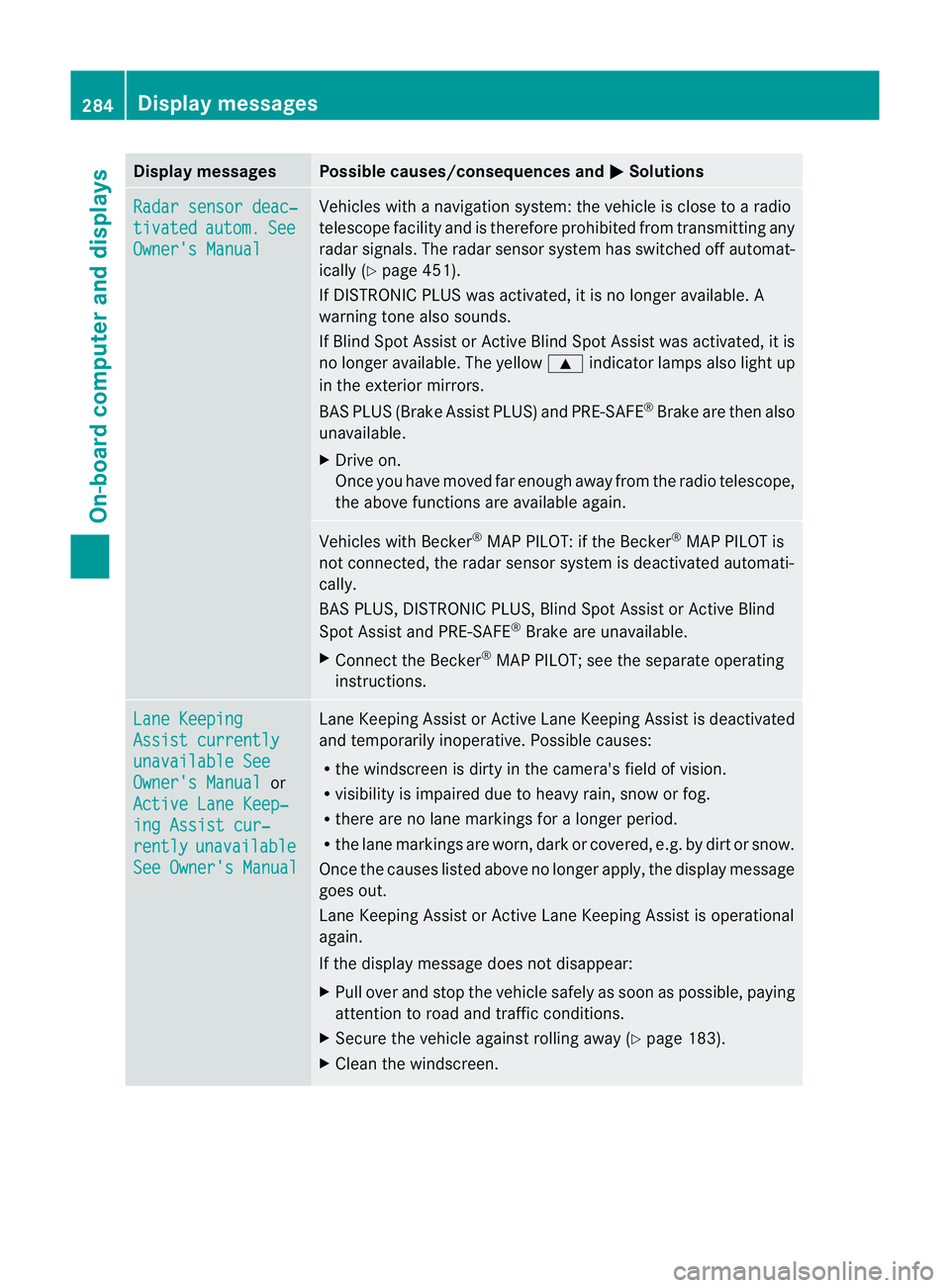
Radar sensor deac‐
tivated autom. See
Owner's Manual Vehicles with a navigation system: the vehicle is close to a radio
telescope facility and is therefore prohibited from transmitting any
rada
rsignals .The radar sensor system has switched off automat-
ically (Y page 451).
If DISTRONIC PLUS was activated, it is no longer available. A
warning tone also sounds.
If Blind Spot Assist or Active Blind Spot Assist was activated, it is
no longer available. The yellow 9indicator lamps also light up
in the exterior mirrors.
BAS PLUS (Brake Assist PLUS) and PRE-SAFE ®
Brake are then also
unavailable.
X Drive on.
Once you have moved far enough away from the radio telescope,
the above functions are available again. Vehicles with Becker
®
MAP PILOT: if the Becker ®
MAP PILOT is
not connected, the radar sensor system is deactivated automati-
cally.
BAS PLUS, DISTRONIC PLUS, Blind Spot Assist or Active Blind
Spot Assist and PRE-SAFE ®
Brake are unavailable.
X Connect the Becker ®
MAP PILOT; see the separate operating
instructions. Lane Keeping
Assist currently
unavailable See
Owner's Manual or
Active Lane Keep‐ ing Assist cur‐
rently unavailable
See Owner's Manual Lane Keeping Assist or Active Lane Keeping Assist is deactivated
and temporarily inoperative. Possible causes:
R
the windscreen is dirty in the camera's field of vision.
R visibility is impaired due to heavy rain, snow or fog.
R there are no lane markings for a longer period.
R the lane markings are worn, dark or covered, e.g. by dirt or snow.
Once the causes listed above no longer apply, the display message
goes out.
Lane Keeping Assist or Active Lane Keeping Assist is operational
again.
If the display message does not disappear:
X Pull over and stop the vehicle safely as soon as possible, paying
attention to road and traffic conditions.
X Secure the vehicle against rolling away (Y page 183).
X Cleant he windscreen. 284
Display messagesOn-board computer and displays
Page 290 of 457
Display messages Possible causes/consequences and
M Solutions
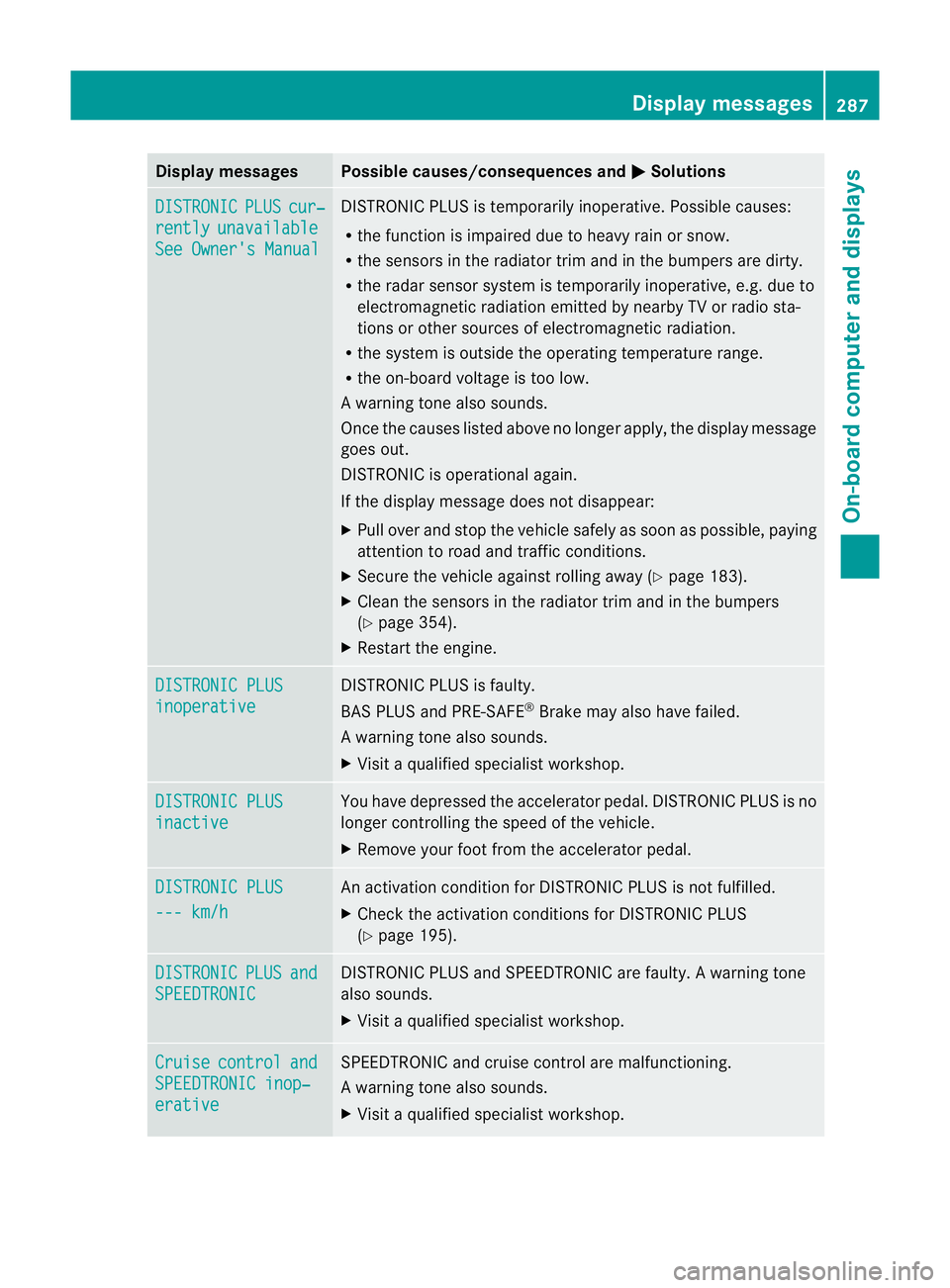
DISTRONIC PLUS cur‐
rently unavailable
See Owner's Manual DISTRONIC PLU
Sis temporarily inoperative. Possible causes:
R the function is impaired due to heavy rain or snow.
R the sensors in the radiator trim and in the bumpers are dirty.
R the radar sensor system is temporarily inoperative, e.g. due to
electromagnetic radiation emitted by nearby TV or radio sta-
tions or other sources of electromagnetic radiation.
R the system is outside the operating temperature range.
R the on-board voltage is too low.
Aw arning tone also sounds.
Once the causes listed abov eno longer apply, the display message
goes out.
DISTRONIC is operational again.
If the display message does not disappear:
X Pull over and stop the vehicle safely as soon as possible, paying
attention to road and traffic conditions.
X Secure the vehicle against rolling away (Y page 183).
X Clean the sensors in the radiator trim and in the bumpers
(Y page 354).
X Restart the engine. DISTRONIC PLUS
inoperative DISTRONIC PLUS is faulty.
BAS PLUS and PRE-SAFE
®
Brake may also have failed.
Aw arning tone also sounds.
X Visi taqualified specialist workshop. DISTRONIC PLUS
inactive You have depressed the accelerator pedal. DISTRONIC PLUS is no
longer controlling the speed of the vehicle.
X
Remove your foot from the accelerator pedal. DISTRONIC PLUS
--- km/h An activation condition for DISTRONIC PLUS is not fulfilled.
X
Check the activation conditions for DISTRONIC PLUS
(Y page 195). DISTRONIC PLUS and
SPEEDTRONIC DISTRONIC PLUS and SPEEDTRONIC are faulty. A warning tone
also sounds.
X Visit a qualified specialist workshop. Cruise control and
SPEEDTRONIC inop‐
erative SPEEDTRONIC and cruise control are malfunctioning.
Aw arning tone also sounds.
X Visi taqualified specialist workshop. Display messages
287On-board computer and displays Z
Page 294 of 457
Display messages Possible causes/consequences and
M Solutions
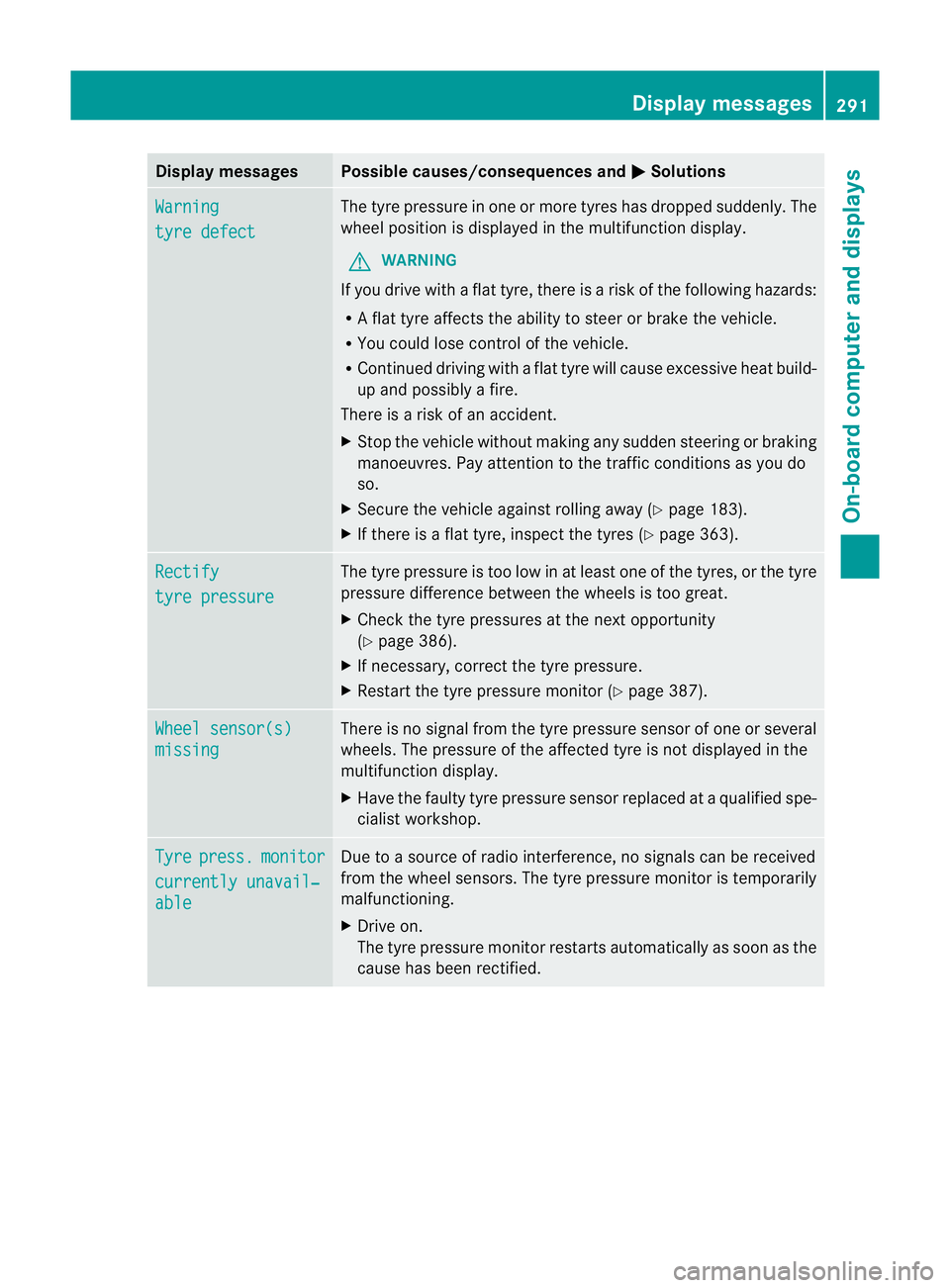
Warning
tyre defect The tyre pressure in on
eormore tyres has dropped suddenly. The
wheel position is displayed in the multifunction display.
G WARNING
If you drive with a flat tyre, there is a risk of the following hazards:
R A flat tyre affects the ability to steer or brake the vehicle.
R You could lose control of the vehicle.
R Continued driving with a flat tyre will cause excessive heat build-
up and possibly a fire.
There is a risk of an accident.
X Stop the vehicle without making any sudden steering or braking
manoeuvres. Pay attention to the traffic conditions as you do
so.
X Secure the vehicle against rolling away (Y page 183).
X If there is a flat tyre, inspect the tyres (Y page 363).Rectify
tyre pressure The tyre pressure is too low in at least one of the tyres, or the tyre
pressure difference between the wheels is too great.
X
Check the tyre pressures at the next opportunity
(Y page 386).
X If necessary, correct the tyre pressure.
X Restart the tyre pressure monitor (Y page 387).Wheel sensor(s)
missing There is no signal from the tyre pressure sensor of one or several
wheels. The pressure of the affected tyre is not displayed in the
multifunction display.
X
Have the faulty tyre pressure sensor replaced at a qualified spe-
cialist workshop. Tyre press. monitor
currently unavail‐
able Due to a source of radio interference, no signals can be received
from the wheel sensors. The tyre pressure monitor is temporarily
malfunctioning.
X Drive on.
The tyre pressure monitor restarts automatically as soon as the
cause has been rectified. Display messages
291On-board computer and displays Z
Page 435 of 457
Useful information
i This Owner's Manual describes all mod-
els, series and optional equipment for your
vehicle that were available at the time of
going to press. National variations are pos-
sible. Note that your vehicle may not be
equipped with all of the functions descri-
bed. This is also the case for systems and
functions relevant to safety.
i Read the information on qualified special-
ist workshops: (Y page 25). Information on technical data
G
WARNING
Hybrid vehicles :ensure tha tyou read the
"HYBRID" supplement. You could otherwise
fail to recognise dangers.
You can find current technical data on the
Internet at:
http://www.mercedes-benz.com
i The technical data was determined in
accordance with EC Directives. All data
applies to the vehicle's standard equip-
ment. The data may therefore differ for
vehicles with optional equipment. You can
obtain further information from a
Mercedes-Benz Service Centre. Genuine Mercedes-Benz parts
G
WARNING
Driving safety may be impaired if non-
approved parts, tyres and wheels or safety-
relevant accessories are used.
This could lead to malfunctions in safety-rel-
evant systems, e.g. the brake system. This
could cause you to lose control of your vehicle
and cause an accident.
For this reason, Mercedes-Benz recommends
that you use genuine Mercedes-Benz parts or parts of equal quality. Only use tyres, wheels
and accessories that have been specifically
approved for your vehicle.
H
Environmental note
Daimler AG also supplies reconditioned
assemblies and parts which are of the same
quality as new parts. For these, the same war-
ranty applies as for new parts.
! Airbags and seat belt tensioners, as well
as control units and sensors for these
restraint systems, may be installed in the
following areas of your vehicle:
R doors
R door pillars
R door sills
R seats
R dashboard
R instrument cluster
R centre console
Do not install accessories such as audio
systems in these areas. Do not carry out
repairs or welding. You could impair the
operating efficiency of the restraint sys-
tems.
Have accessories retrofitted at a qualified
specialist workshop.
Mercedes-Benz tests genuine parts and con-
version parts and accessories that have been
specifically approved for your vehicle for their
reliability, safety and suitability. Despite
ongoing market research, Mercedes-Benz is
unable to assess other parts. Mercedes-Benz
accepts no responsibility for the use of parts
that have been independently or officially
approved.
In Germany, certain parts are only officially
approved for installation or modification if
they comply with legal requirements. This
also applies to some other countries. All gen-
uine Mercedes-Benz parts meet the approval
requirements. The use of non-approved parts
may invalidate the vehicle's general operating
permit. 432
Genuine Mercedes-Benz partsTechnical data
Page 454 of 457
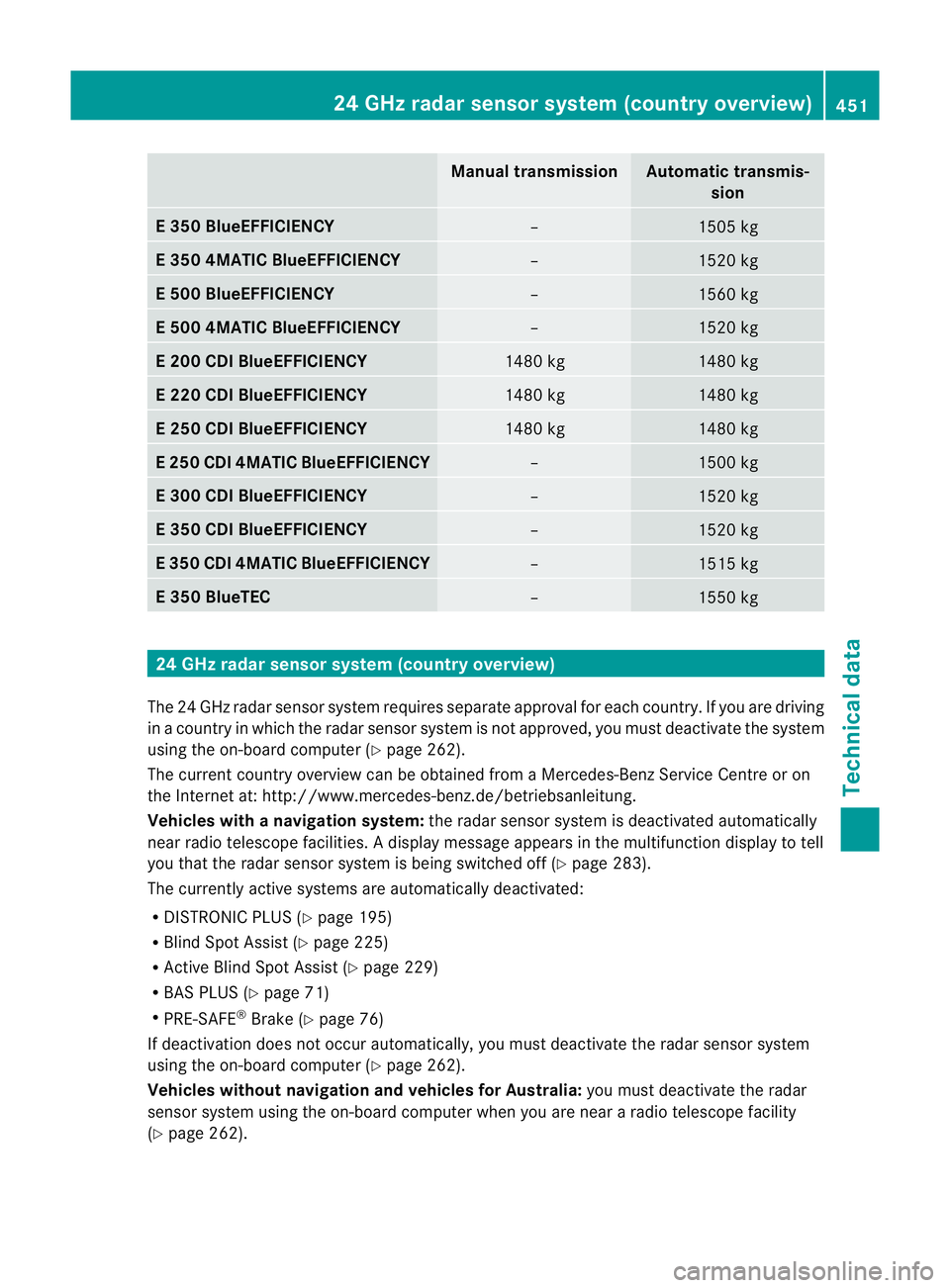
Manual transmission Automatic transmis-
sion E 350 BlueEFFICIENCY
– 1505 kg
E 350 4MATIC BlueEFFICIENCY
– 1520 kg
E 500 BlueEFFICIENCY
– 1560 kg
E 500 4MATIC BlueEFFICIENCY
– 1520 kg
E 200 CDI BlueEFFICIENCY
1480 kg 1480 kg
E 220 CDI BlueEFFICIENCY
1480 kg 1480 kg
E 250 CDI BlueEFFICIENCY
1480 kg 1480 kg
E 250 CDI 4MATIC BlueEFFICIENCY
– 1500 kg
E 300 CDI BlueEFFICIENCY
– 1520 kg
E 350 CDI BlueEFFICIENCY
– 1520 kg
E 350 CDI 4MATIC BlueEFFICIENCY
– 1515 kg
E 350 BlueTEC
– 1550 kg
24 GHz radar sensor system (country overview)
The 24 GHz rada rsensor system requires separate approval for each country. If you are driving
in a country in which the radar sensor system is not approved, you must deactivate the system
using the on-board computer (Y page 262).
The current country overview can be obtained from a Mercedes-Benz Service Centre or on
the Internet at: http://www.mercedes-benz.de/betriebsanleitung.
Vehicles with anavigation system: the radar sensor system is deactivated automatically
near radio telescope facilities. Adisplay message appears in the multifunction display to tell
you that the radar sensor system is being switched off (Y page 283).
The currently active systems are automatically deactivated:
R DISTRONIC PLUS (Y page 195)
R Blind Spot Assist (Y page 225)
R Active Blind Spot Assist (Y page 229)
R BAS PLUS (Y page 71)
R PRE-SAFE ®
Brake (Y page 76)
If deactivation does not occur automatically, you must deactivate the radar sensor system
using the on-board computer (Y page 262).
Vehicles withou tnavigation and vehicles for Australia: you must deactivate the radar
sensor system using the on-board computer whe nyou are near a radio telescope facility
(Y page 262). 24 GHz radar sensor system (country overview)
451Technical data Z