AUX MERCEDES-BENZ E-CLASS ESTATE 2012 Owners Manual
[x] Cancel search | Manufacturer: MERCEDES-BENZ, Model Year: 2012, Model line: E-CLASS ESTATE, Model: MERCEDES-BENZ E-CLASS ESTATE 2012Pages: 457, PDF Size: 11.62 MB
Page 8 of 457
Assistance men
u(on-board com-
puter) .................................................. 255
ASSYST PLUS Displaying a service message ........349
Hiding a service message ..............349
Notes ............................................. 349
Resetting the service interval dis-
pla y................................................ 350
Service message ............................ 349
Special service requirements ......... 350
ATA (Anti-Theft Alarm system)
Activating/deactivating ...................78
Function .......................................... .78
Interior motion sensor .....................79
Switching off the alarm ....................78
Tow-away protection ........................ 79
ATTENTIO NASSIST
Activating/deactivating .................257
Display message ............................ 282
Function/notes ............................. 220
Authorised workshop
see Qualified specialist workshop
AUTO lights
Display message ............................ 278
see Lights
Automatic engine start (ECO start/
stop function) .................................... 167
Automatic engine switch-off (ECO
start/stop function) ..........................166
Automatic headlamp mode ..............125
Automatic transmission Accelerator pedal position .............174
Automatic drive program ...............175
Changing gea r............................... 173
DIRECT SELECT leve r..................... 171
Display message ............................ 293
Drive position (ECO start/stop
function) ........................................ 172
Drive program displa y.................... 172
Driving tips .................................... 174
Emergency running mode ..............179
Engaging drive position .................. 173
Engaging neutra l............................ 172
Engaging revers egear ................... 172
Engaging the par kposition ............ 172
Kickdow n....................................... 174
Manual drive program ....................177
Neutral (ECO start/stop function) .172 Overview
........................................ 170
Problem (fault) ............................... 179
Progra mselecto rbutton ................ 174
Pulling away ................................... 164
Releasing the parking lock man-
ually ............................................... 179
Selector leve r................................ 171
Shift range s................................... 176
Starting the engine ........................163
Steering wheel gearshift paddle s... 175
Trailer towing ................................. 174
Transmissio nposition display ........171
Transmission position display
(DIRECT SELECT lever) ................... 172
Transmission positions ..................173
Automatic transmission emer-
gency running mode .........................179
Auxiliary heating Activating/deactivating .................151
Activating/deactivating (on the
centre console ).............................. 152
Display message ............................ 295
Important safety notes ..................151
Problem (display message) ............155
Remote control .............................. 152
Setting ........................................... 262
Setting the departur etime ............ .153
Auxiliary ventilation
Activating/deactivating .................151
Activating/deactivating (on the
centre console ).............................. 152
Problem (display message) ............155
Remote control .............................. 152
Axle load, permissible (traile rtow-
ing) ...................................................... 450 B
Bag hook ............................................ 319
Ball coupling Folding in ....................................... 239
Folding out ..................................... 237
BAS (Brake Assist System) .................71
BAS PLUS (Brake Assist System
PLUS) .................................................... 71 Index
5
Page 10 of 457
Car wash (care)
................................. 351
CD player/CD changer(on-board
computer) .......................................... 253
Central locking Automatic locking (on-board com-
puter) ............................................. 261
Locking/unlocking (key ).................. 83
Centre console
Lowe rsection .................................. 37
Uppe rsection .................................. 36
Changing bulbs
Dipped-bea mheadlamps ............... 136
Important safety notes ..................135
Infrared lamp ................................. 137
Main-beam headlamps ................... 136
Overview of bul btypes .................. 135
Parking lamps (front) .....................137
Standing lamps .............................. 137
Turn signals (front) ......................... 137
Child-proof locks
Important safety notes ....................69
Rea rdoors ....................................... 69
Children
Fastening seat belts ......................... 62
In the vehicle ................................... 55
Restraint systems ............................ 55
Child seat
Automatic recognition .....................57
Integrated ........................................ 61
Integrated, ICS padded pla ytable ....63
Integrated, side head restraints .......64
Integrated ,storing ........................... 65
ISOFIX .............................................. 58
On the front-passenger sea t............ 56
Problem (malfunction) .....................61
Recommendations ...........................67
Suitable positions ............................ 65
Top Tether ....................................... 59
Cigarette lighter ................................ 331
Cleaning Mirro rturn signal ........................... 354
Trailer tow hitch ............................. 355
Climate control
Auxiliary heating/ventilation .......... 151
Controlling automatically ...............146
Convenience opening/closing
(air-recirculatio nmode) ................. 150
Cooling with aird ehumidification..145 Demisting the windows .................. 149
Demisting the windscreen .............148
Important safety notes ..................142
Indicator lamp ................................ 146
Information on using
THERMOTRONIC automatic cli-
mate control .................................. 145
Notes on using THERMATIC auto-
matic climate control .....................143
Overview of systems ......................142
Problems with cooling with air
dehumidification ............................ 146
Problem with the rear window
heating .......................................... 149
Rea rcontrol panel ......................... 144
Setting the aird istribution.............147
Setting the airflow .........................148
Setting the airv ents...................... 155
Setting the climate mode .............. .146
Setting the temperature ................147
Switching air-recirculation mode
on/off ............................................ 149
Switching on/off ........................... 145
Switching residual hea ton/off ......150
Switching the rear window heat-
ing on/off ...................................... 149
Switching the ZONE function on/
off .................................................. 148
THERMATIC automatic climate
control (2-zone) ............................. 143
THERMOTRONIC (3-zone) auto-
matic climate control .....................144
Coat hooks ......................................... 322
Cockpit Overview .......................................... 30
see Instrument cluster
Collapsible emergency spare
wheel
see Emergency spare wheel
COMAND display
Cleaning ......................................... 355
COMAND Online
see separate operating instructions
Combination switch ..........................128
Combine dluggage cover and net ....320
Consumption statistics (on-board
computer) .......................................... 249
Convenience box ............................... 322 Index
7
Page 20 of 457
Notes for AMG vehicles
.................437
Refuelling proces s......................... 180
see Fuel
Releasing the parking loc kman-
ually (automatic transmission) ........179
Remote control Auxiliary heating/ventilation .......... 152
Changing the batteries (auxiliary
heating) ......................................... 154
Garage door opene r....................... 335
Programming (garage door
opener) .......................................... 336
Replacing the battery (auxiliary
heating remote control) .................... 154
Reserve (fuel tank) see Fuel
Reserve fuel
Display message ............................ 280
Warning lamp ................................. 305
Residual heat (climate control) ........150
Restraint system see SRS (Supplemental Restraint
System)
Rev counter ........................................ 247
Reverse gear Engaging (automatic transmis-
sion) ............................................... 171
Engaging (manual transmission) ....170
Reversing camera
Cleaning instructions .....................354
Function/notes ............................. 218
Switching on/off ........................... 219
Reversing lamp (display message) ..277
Roller sunblind Panorama sliding sunroo f.............. 101
Rea rwindow .................................. 330
Roof carrier ........................................ 327
Roof lining and carpets (cleaning
instructions) ...................................... 357
Roof load (maximum) ........................444 S
Safety Childre ninthe vehicle ..................... 55
Child restraint systems ....................55
Safety net
Attaching ....................................... 321
Important safety information .........321
Safety system
see Driving safety system
Seat
Folding the backres t(rear com-
partment) forwards/back ..............317
Seat belt
Adjusting the driver's and front-
passenger sea tbelt ......................... 52
Adjusting the height ......................... 52
Belt force limiter .............................. 54
Belt tensione r.................................. 54
Centre rear-compartment sea t........ 53
Cleaning ......................................... 357
Display message ............................ 273
Fastening ......................................... 52
Important safety guidelines .............51
Rea rseat belt status indicator .........54
Releasing ......................................... 53
Switching belt adjustment on/off
(on-board computer) ......................263
Warning lamp ................................. 299
Warning lamp (function) ................... 53
Seats
Adjusting (electrically). ..................108
Adjusting (manually and electri-
cally) .............................................. 108
Adjusting lumba rsuppor t.............. 113
Adjusting the 4-way lumba rsup-
por t................................................ 113
Adjusting the head restraint ..........109
Cleaning the cover .........................356
Correct driver's sea tposition ........106
Important safety notes ..................107
Overview ........................................ 107
Seat heating problem ....................116
Seat ventilation problem ................116
Storing settings (memory func-
tion) ............................................... 121 Index
17
Page 39 of 457
Centre console
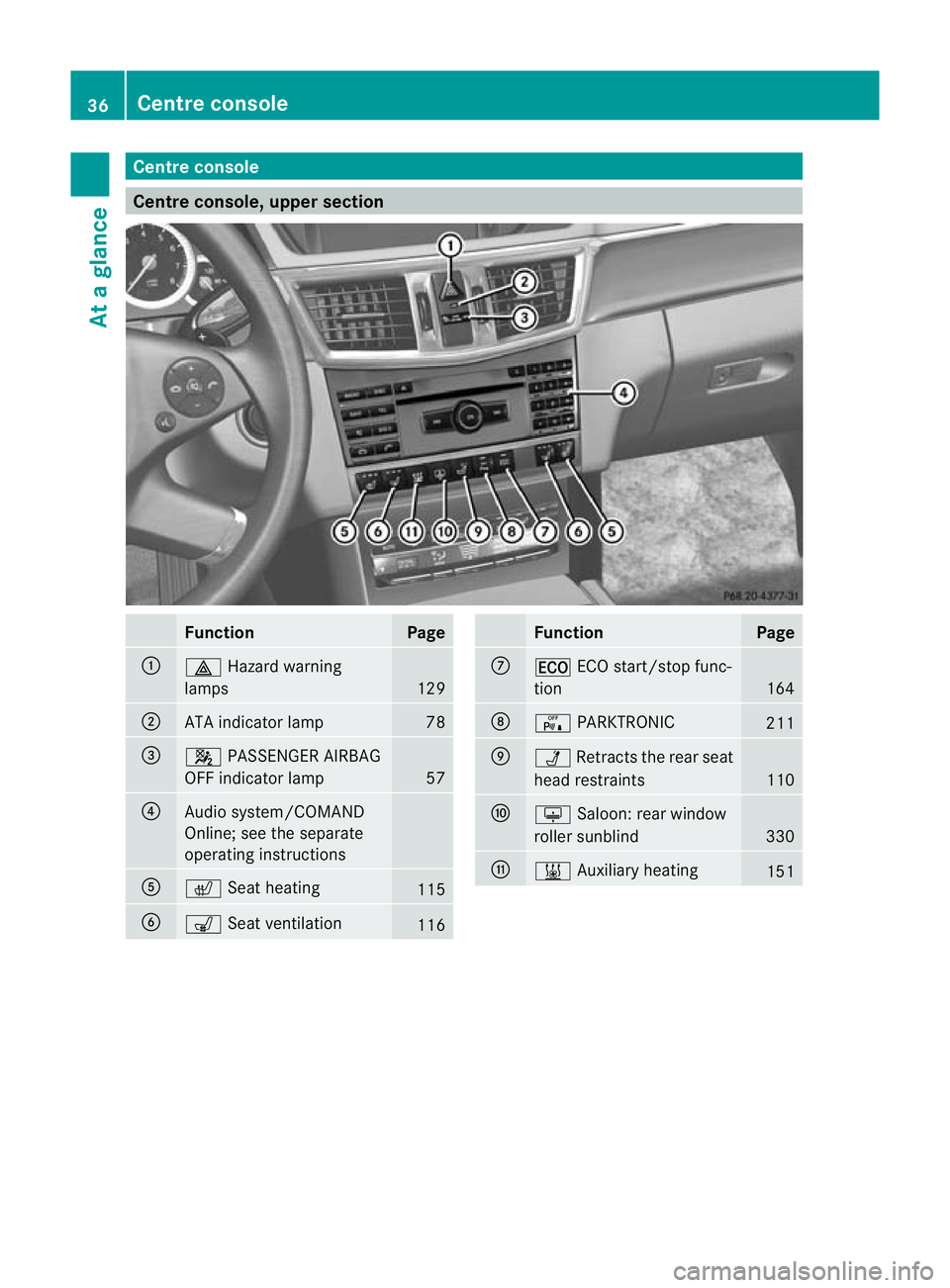
Centre console, upper section
Function Page
:
£
Hazard warning
lamps 129
;
ATA indicator lamp 78
=
4
PASSENGER AIRBAG
OFF indicator lamp 57
?
Audio system/COMAND
Online; see the separate
operating instructions
A
c
Seat heating 115
B
s
Seat ventilation 116 Function Page
C
¤
ECO start/stop func-
tion 164
D
c
PARKTRONIC 211
E
Ü
Retracts the rear seat
head restraints 110
F
u
Saloon :rear window
roller sunblind 330
G
&
Auxiliary heating 15136
Centre consoleAt a glance
Page 154 of 457
engine has been switched off. The heating
time depends on the temperature that has
been set for the vehicle interior.
X To activate: press theÌbutton.
The indicator lamp above the Ìbutton
lights up.
i The blower will run at a low speed regard-
less of the airflow setting.
i If you activate the residual heat function
at high temperatures, only the ventilation
will be activated. The blower runs at
medium speed.
X To deactivate: press theÌbutton.
The indicator lamp above the Ìbutton
goes out.
i It is possible that the residual heat func-
tion may be activated automatically an hour
after the key has been removed. The vehi-
cle is then ventilated for 30minutes to dry
the air-conditioning system.
Residual heat is deactivated automatically:
R after approximately 30 minutes
R when the ignition is switched on
R if the battery voltage drops Auxiliary heating
Important safety notes G
WARNING
Exhaust fumes are produced when the auxili-
ary heating is in operation .Inhaling these
exhaus tfumes can be poisonous. You should
therefore switch off the auxiliary heating in
confined spaces without an extraction sys-
tem, e.g .agarage. G
WARNING
When operating the auxiliary heating parts of
the vehicle can get very hot. Make sure that
the exhaust system does not under any cir-
cumstances come into contact with easily
ignitable material such as dry grass or fuels. The material could otherwise ignite and set
the vehicle alight. Choose your parking spot
accordingly.
Operating the auxiliary heating is thus pro-
hibited at filling stations or when your vehicle
is being refuelled. You must therefore switch
off the auxiliary heating at filling stations.
! Operating the auxiliary heating/ventila-
tion draws on the vehicle battery. After you
have heated or ventilated the vehicle a
maximum of two times, drive for a longer
distance.
i Switch the auxiliary heating on regularly
once a month for about ten minutes.
The auxiliary heating heats the air in the
passenger compartment to the selected tem-
perature. It does not use the heat of the run-
ning engine to do this. The auxiliary heating
is operated directly using the vehicle's fuel.
For this reason, the tank content must be at
least at reserve fuel level to ensure that the
auxiliary heating functions.
The auxiliary heating/ventilation automati-
cally adjusts to changes in temperature and
weather conditions. For this reason, the aux-
iliary heating could switch from ventilation
mode to heating mode or from heating mode
to ventilation mode.
The auxiliary heating switches off automati-
cally after 50 minutes. This time limit can be
altered. To do this, visit a qualified specialist
workshop.
You cannot use the auxiliary ventilation to
cool the vehicle interior to a temperature
lower than the outside temperature.
Before switching on X
Turn the key to position 2in the ignition
lock.
X Set the temperature.
The auxiliary heating/ventilation can be acti-
vated even when climate control is set to
manual. Optimum comfort can be attained Operating the climate control system
151Climate control Z
Page 155 of 457
when the system is set to automatic mode.
Set the temperature to 22 †.
The auxiliary heating/ventilatio ncan be acti-
vated or deactivated using the remote control
or the button on the centre console.
The on-board computer can be used to spec-
ify up to three departur etimes, one of which
may be preselected (Y page 262).
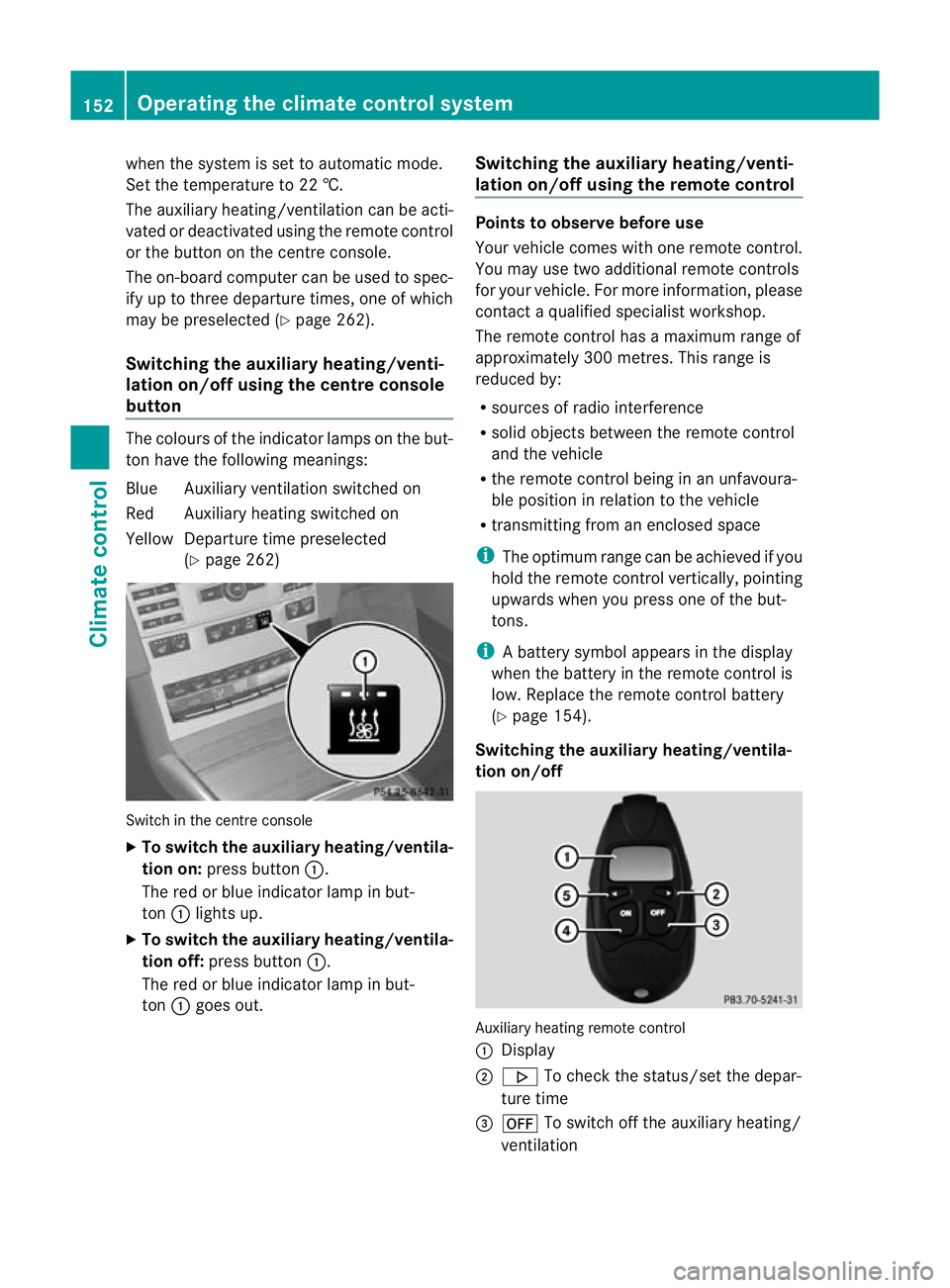
Switching the auxiliar yheating/venti-
lation on/off using the centre console
button The colours of the indicator lamps on the but-
to nh ave the following meanings:
Blue Auxiliary ventilatio nswitched on
Red Auxiliary heating switched on
Yellow Departure time preselected (Ypage 262) Switch in the centre console
X
To switch the auxiliary heating/ventila-
tion on: press button :.
The red or blue indicator lamp in but-
ton :lights up.
X To switch the auxiliary heating/ventila-
tion off: press button :.
The red or blue indicator lamp in but-
ton :goes out. Switching the auxiliary heating/venti-
lation on/off using the remote control Points to observe before use
Your vehicle comes with one remote control.
You may use two additional remote controls
for your vehicle. For more information, please
contac
taqualified specialist workshop.
The remote control has a maximum range of
approximately 300 metres. This range is
reduced by:
R sources of radio interference
R solid objects between the remote control
and the vehicle
R the remote control being in an unfavoura-
ble position in relation to the vehicle
R transmitting from an enclosed space
i The optimum range can be achieved if you
hold the remote control vertically, pointing
upwards when you press one of the but-
tons.
i Abattery symbol appears in the display
when the battery in the remote control is
low. Replace the remote control battery
(Y page 154).
Switching the auxiliary heating/ventila-
tion on/off Auxiliary heating remote control
: Display
; . To check the status/set the depar-
ture time
= ^ To switch off the auxiliary heating/
ventilation 152
Operating the climate control systemClimate control
Page 156 of 457
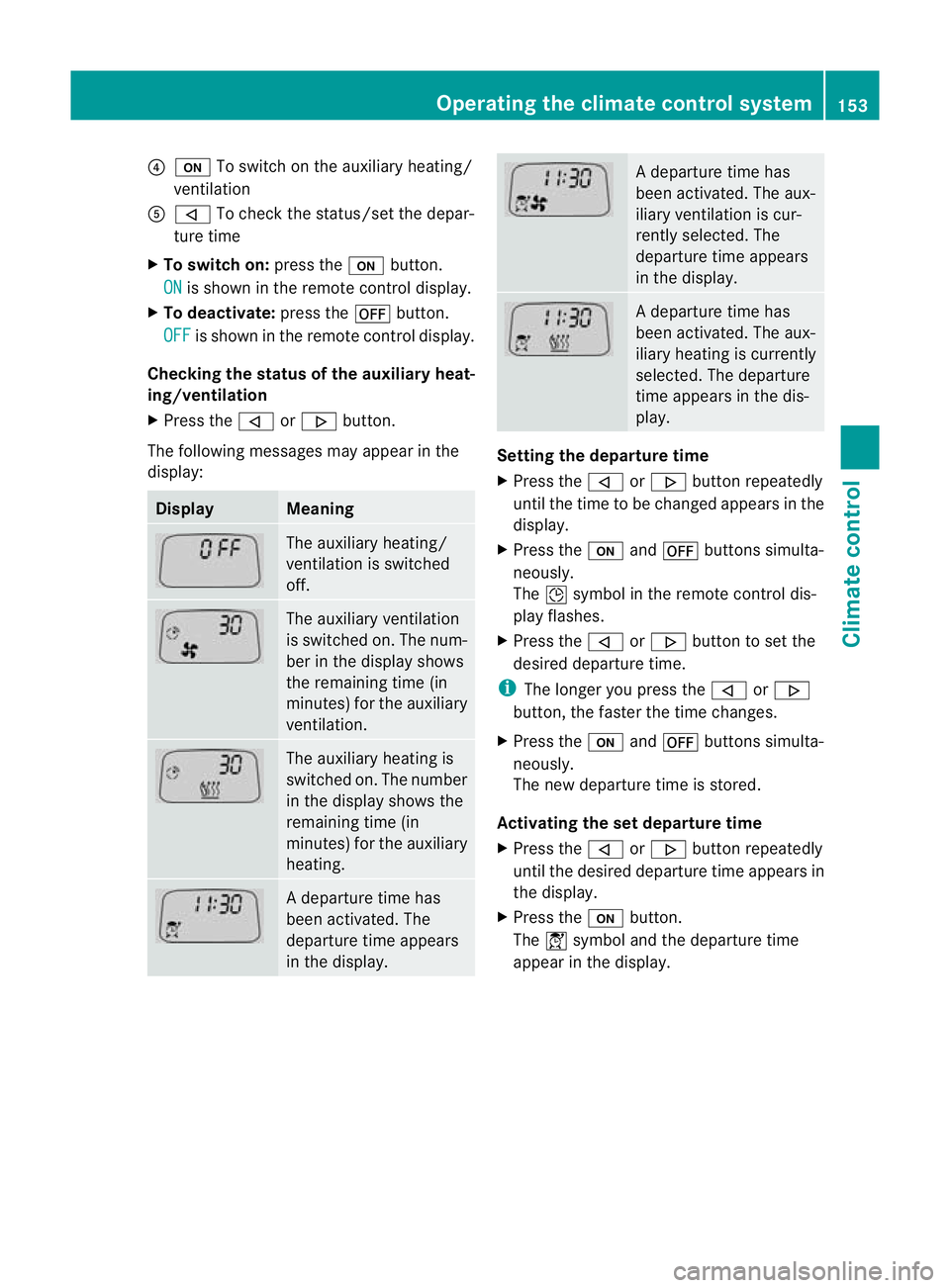
?
u To switch on the auxiliary heating/
ventilation
A , To check the status/set the depar-
ture time
X To switch on: press theubutton.
ON is shown in the remote control display.
X To deactivate: press the^button.
OFF is shown in the remote control display.
Checking the status of the auxiliary heat-
ing/ventilation
X Press the ,or. button.
The following messages may appear in the
display: Display Meaning
The auxiliary heating/
ventilation is switched
off. The auxiliary ventilation
is switched on. The num-
ber in the display shows
the remaining time (in
minutes) for the auxiliary
ventilation. The auxiliary heating is
switched on. The number
in the display shows the
remaining time (in
minutes) for the auxiliary
heating. Ad
eparture time has
been activated. The
departure time appears
in the display. Ad
eparture time has
been activated. The aux-
iliary ventilation is cur-
rently selected. The
departure time appears
in the display. Ad
eparture time has
been activated. The aux-
iliary heating is currently
selected. The departure
time appears in the dis-
play. Setting the departure time
X
Press the ,or. button repeatedly
until the time to be changed appears in the
display.
X Press the uand^ buttons simulta-
neously.
The Îsymbol in the remote control dis-
play flashes.
X Press the ,or. button to set the
desired departure time.
i The longer you press the ,or.
button, the faster the time changes.
X Press the uand^ buttons simulta-
neously.
The new departure time is stored.
Activating the set departure time
X Press the ,or. button repeatedly
until the desired departure time appears in
the display.
X Press the ubutton.
The Ísymbol and the departure time
appear in the display. Operating the climate control system
153Climate control Z
Page 157 of 457
Deactivating a set departure time
X
Press the ,or. button.
The status of the auxiliary heating is shown
in the display.
X Press the .button.
The first departure time stored appears in
the display.
X Press the ^button.
The display message OFF appears in the
display.
Replacing the remote control battery G
WARNING
Batteries contain poisonous substances.
Swallowing/ingesting batteries can result in
serious personal injury or death.
Always keep batteries away from children .If
a battery is swallowed, seek immediate med-
ical attention. H
Environmental note Batteries contain pollutants.
It is illegal to dispose of them
with the household rubbish.
They must be collected sep-
arately and disposed of in an
environmentally responsible
recycling system.
Dispose of batteries in an
environmentally responsible
manner
.Take discharged
batteries to a qualified spe-
cialis tworkshop or to a col-
lection point for used batter-
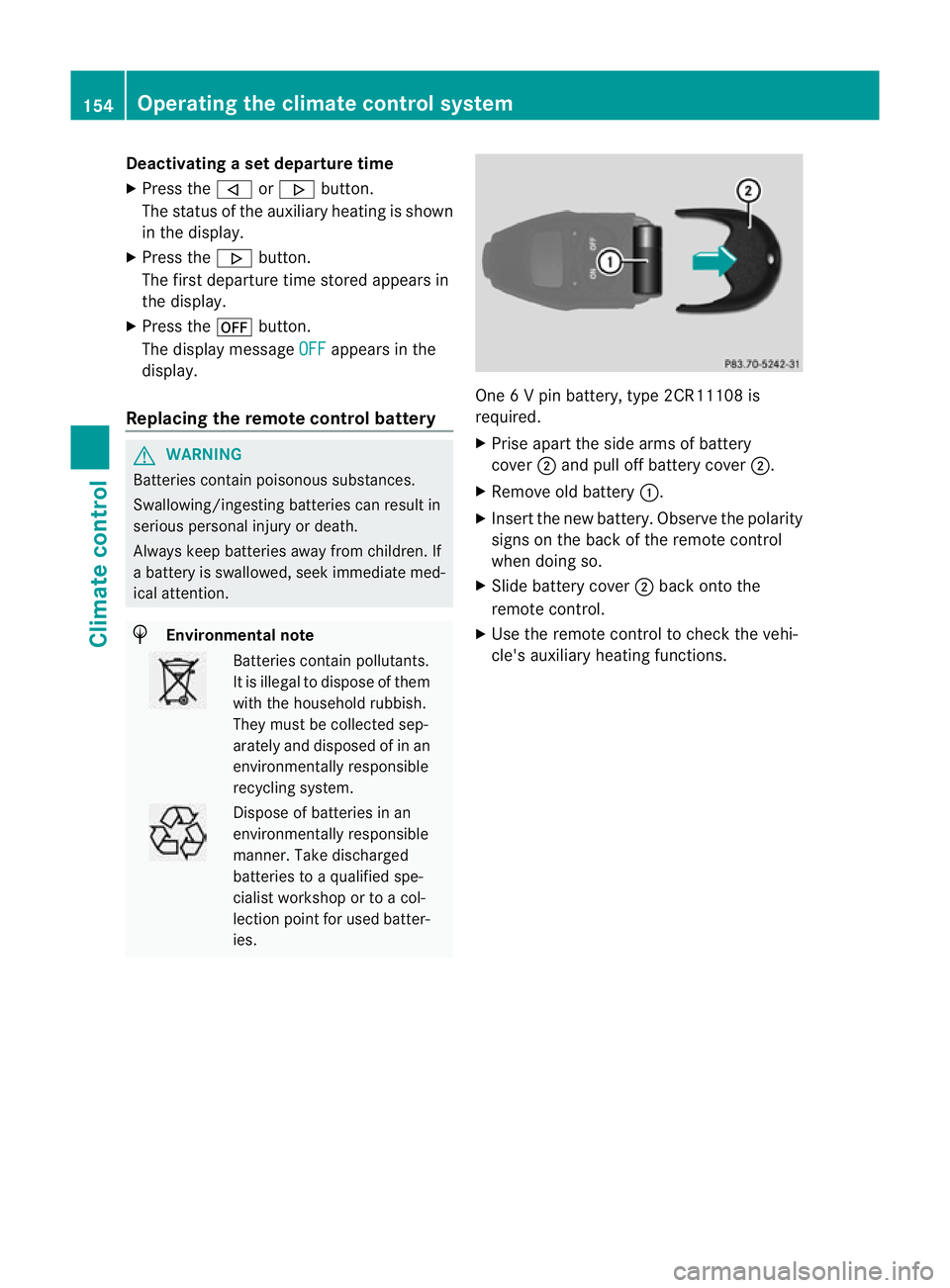
ies. One 6 V pin battery, type 2CR11108 is
required.
X
Prise apart the side arms of battery
cover ;and pull off battery cover ;.
X Remove old battery :.
X Insert the new battery. Observe the polarity
signs on the back of the remote control
when doing so.
X Slide battery cover ;back onto the
remote control.
X Use the remote control to check the vehi-
cle's auxiliary heating functions. 154
Operating the climate control systemClimate control
Page 158 of 457
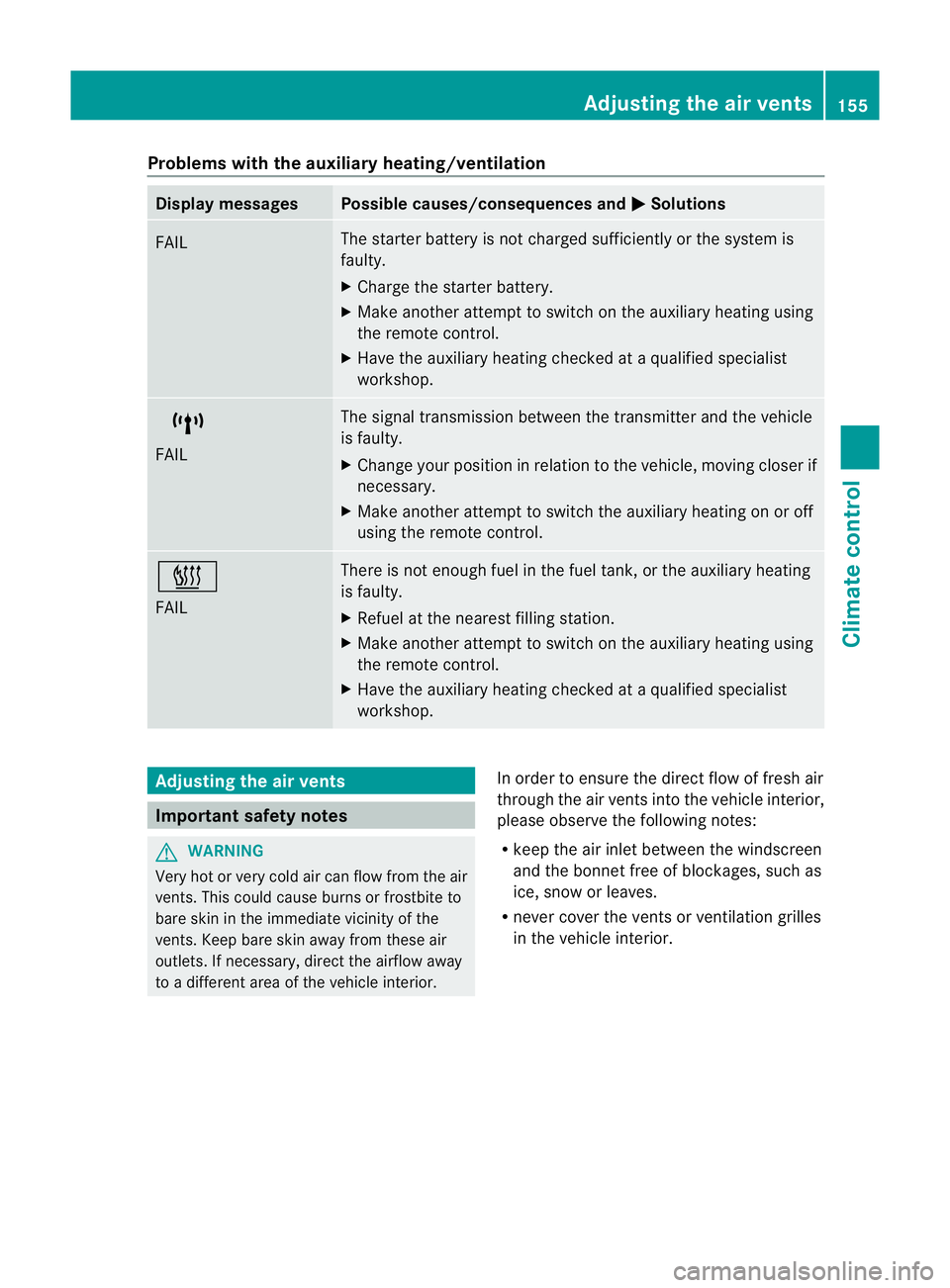
Problems with the auxiliary heating/ventilation
Display messages Possible causes/consequences and
M Solutions
FAIL The starter battery is not charged sufficiently or the system is
faulty.
X
Charge the starter battery.
X Make another attempt to switch on the auxiliary heating using
the remote control.
X Have the auxiliary heating checked at a qualified specialist
workshop. $
FAIL The signal transmission between the transmitter and the vehicle
is faulty.
X
Change your position in relation to the vehicle, moving closer if
necessary.
X Make another attempt to switch the auxiliary heating on or off
using the remote control. ©
FAIL There is not enough fuel in the fuel tank, or the auxiliary heating
is faulty.
X
Refuel at the nearest filling station.
X Make another attempt to switch on the auxiliary heating using
the remote control.
X Have the auxiliary heating checked at a qualified specialist
workshop. Adjusting the air vents
Important safety notes
G
WARNING
Very hot or very cold air can flow from the air
vents. This could cause burns or frostbite to
bare skin in the immediate vicinity of the
vents. Keep bare skin away from these air
outlets. If necessary, direct the airflow away
to a different area of the vehicle interior. In order to ensure the direct flow of fresh air
through the air vents into the vehicle interior,
please observe the following notes:
R
keep the air inlet between the windscreen
and the bonnet free of blockages, such as
ice, snow or leaves.
R never cover the vents or ventilation grilles
in the vehicle interior. Adjusting the air vents
155Climate control Z
Page 182 of 457
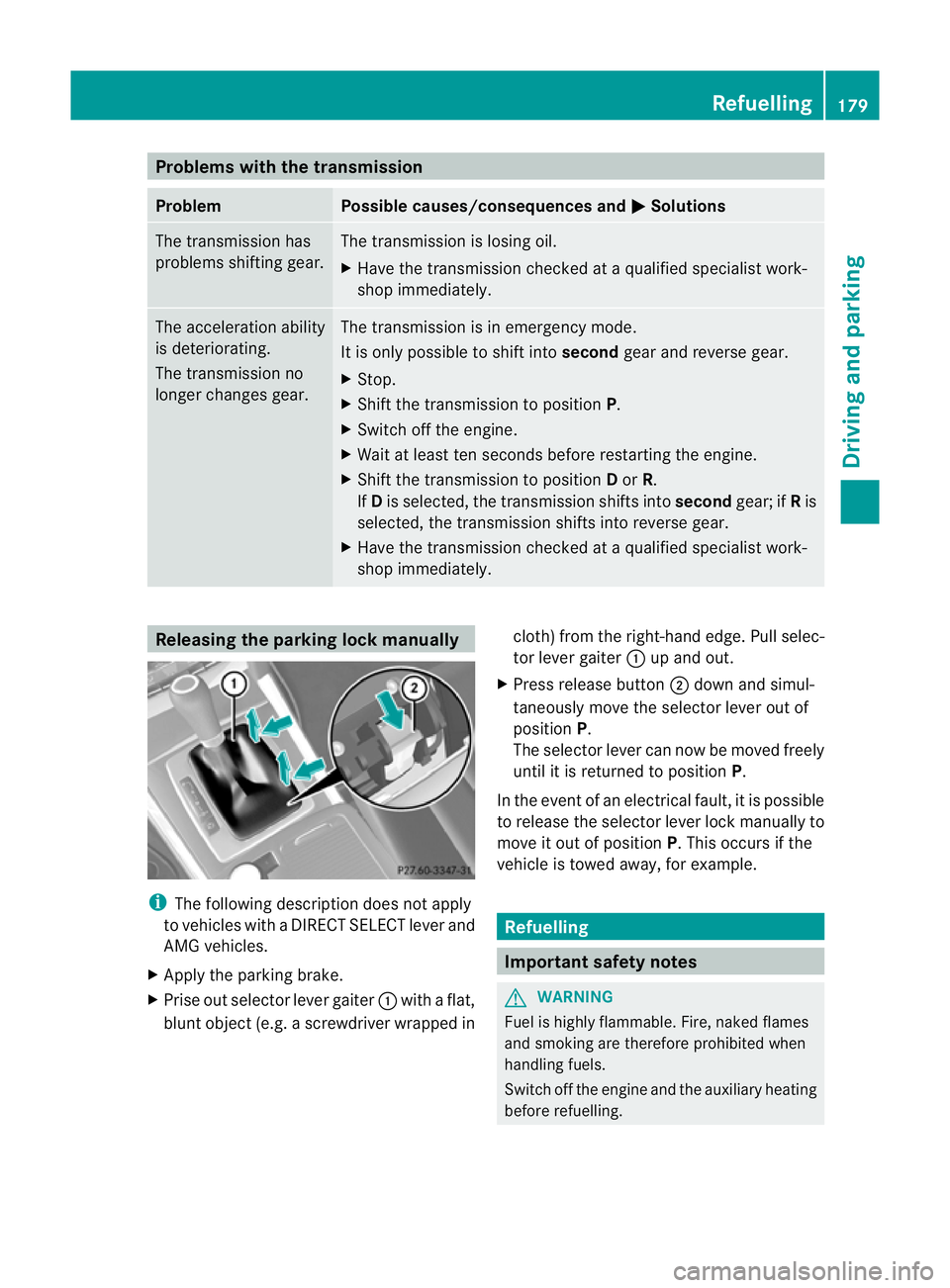
Problems with the transmission
Problem Possible causes/consequences and
M Solutions
The transmission has
problems shifting gear. The transmission is losing oil.
X
Have the transmission checked at a qualified specialist work-
shop immediately. The acceleration ability
is deteriorating.
The transmission no
longer changes gear. The transmission is in emergency mode.
It is only possible to shift into secondgear and reverse gear.
X Stop.
X Shift the transmission to position P.
X Switch off the engine.
X Wait at least ten seconds before restarting the engine.
X Shift the transmission to position Dor R.
If D is selected, the transmission shifts into secondgear; ifRis
selected, the transmission shifts into reverse gear.
X Have the transmission checked at a qualified specialist work-
shop immediately. Releasing the parking lock manually
i
The following description does not apply
to vehicles with a DIRECT SELECT lever and
AMG vehicles.
X Apply the parking brake.
X Prise out selector lever gaiter :with a flat,
blunt object (e.g. a screwdriver wrapped in cloth) from the right-hand edge. Pull selec-
tor lever gaiter
:up and out.
X Press release button ;down and simul-
taneously move the selector lever out of
position P.
The selector lever can now be moved freely
until it is returned to position P.
In the event of an electrical fault, it is possible
to release the selector lever lock manually to
move it out of position P. This occurs if the
vehicle is towed away, for example. Refuelling
Important safety notes
G
WARNING
Fuel is highly flammable. Fire, naked flames
and smoking are therefore prohibited when
handling fuels.
Switch off the engine and the auxiliary heating
before refuelling. Refuelling
179Driving and parking Z