ECU MERCEDES-BENZ E-CLASS ESTATE 2016 Owner's Guide
[x] Cancel search | Manufacturer: MERCEDES-BENZ, Model Year: 2016, Model line: E-CLASS ESTATE, Model: MERCEDES-BENZ E-CLASS ESTATE 2016Pages: 565, PDF Size: 11.34 MB
Page 124 of 565
#
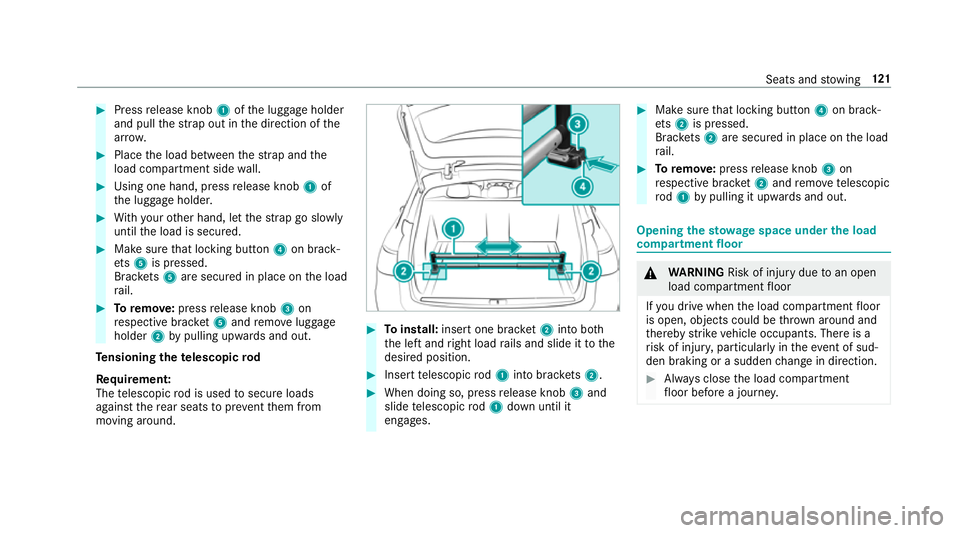
Press release knob 1ofthe luggage holder
and pull thest ra p out in the direction of the
ar row. #
Place the load between thest ra p and the
load compartment side wall. #
Using one hand, press release knob 1of
th e luggage holder. #
With your other hand, let thest ra p go slowly
until the load is secured. #
Make sure that locking button 4on brack‐
et s5 is pressed.
Brac kets 5 are secured in place on the load
ra il. #
Toremo ve:press release knob 3on
re spective brac ket5 and remo veluggage
holder 2bypulling upwards and out.
Te nsioning thete lescopic rod
Re quirement:
The telescopic rod is used tosecure loads
against there ar seats topreve ntthem from
moving around. #
Toinstall: insert one brac ket2 into bo th
th e left and right load rails and slide it tothe
desired position. #
Insert telescopic rod1 into brac kets 2. #
When doing so, press release knob 3and
slide telescopic rod1 down until it
engages. #
Make sure that locking button 4on brack‐
et s2 is pressed.
Brac kets 2 are secured in place on the load
ra il. #
Toremo ve: press release knob 3on
re spective brac ket2 and remo ve te lescopic
ro d1 bypulling it upwards and out. Opening
thesto wage space under the load
compa rtment floor &
WARNING Risk of inju rydue toan open
load compartment floor
If yo u drive when the load compartment floor
is open, objects could be thro wn around and
th ereby strike vehicle occupants. There is a
ri sk of injur y,particular lyin theeve nt of sud‐
den braking or a sudden change in direction. #
Alw ays close the load compartment
fl oor before a journe y. Seats and
stowing 121
Page 125 of 565
#
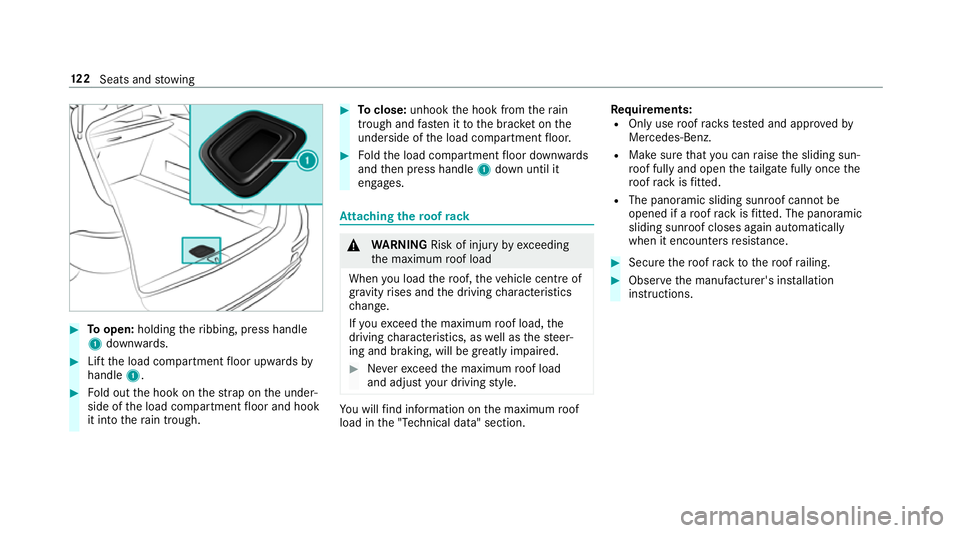
Toopen: holding theribbing, press handle
1 down wards. #
Lift the load compartment floor upwards by
handle 1. #
Fold out the hook on thest ra p on the under‐
side of the load compartment floor and hook
it into thera in trough. #
Toclose: unhook the hook from thera in
trough and fasten it tothe brac ket on the
underside of the load compartment floor. #
Foldthe load compartment floor down wards
and then press handle 1down until it
engages. At
taching thero of rack &
WARNING Risk of inju ryby ex ceeding
th e maximum roof load
When you load thero of, theve hicle centre of
gr av ity rises and the driving characteristics
ch ange.
If yo uexc eed the maximum roof load, the
driving characteristics, as well as thesteer‐
ing and braking, will be greatly impaired. #
Neverexc eed the maximum roof load
and adjust your driving style. Yo
u will find information on the maximum roof
load in the "Technical data" section. Re
quirements:
R Only use roof rack ste sted and appr ovedby
Mercedes-Benz.
R Make sure that you can raise the sliding sun‐
ro of fully and open theta ilgate fully once the
ro of rack isfitted.
R The panoramic sliding sunroof cann otbe
opened if a roof rack isfitted. The panoramic
sliding sunroof closes again au tomatically
when it encounters resis tance. #
Secu rethero of rack tothero of railing. #
Obser vethe manufacturer's ins tallation
instructions. 12 2
Seats and stowing
Page 126 of 565
Cup holders
Fi
tting or removing the cup holder in the
centre console &
WARNING ‑ Risk of accident or inju ry
when using the cup holder while the
ve hicle is in motion
The cup holder cannot hold a container
secure while theve hicle is in motion.
If yo u use a cup holder while theve hicle is in
motion, the conta iner may be flung around
and liquids could be spilled. The vehicle
occupants may come into contact with the
liquid and if it is hot, they could be scalded.
Yo u could be distracted from traf fic condi‐
tions and you may lose cont rol of theve hicle. #
Only use the cup holder when theve hi‐
cle is stationar y. #
Only use the cup holder for containers
of theright size. #
Alw ays close the conta iner, particularly
if th e liquid is hot. #
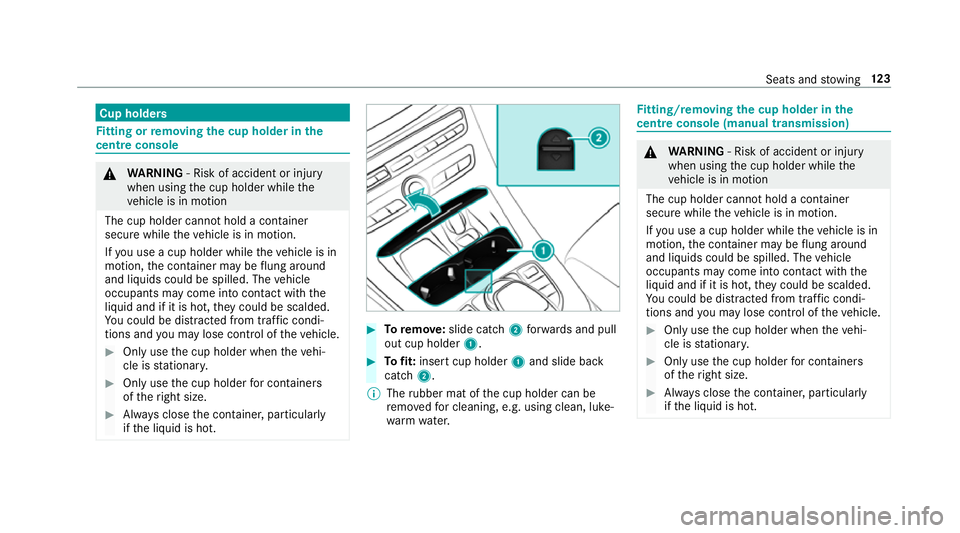
Toremo ve:slide catch 2forw ards and pull
out cup holder 1. #
Tofit: inse rtcup holder 1and slide ba ck
catch 2.
% The rubber mat of the cup holder can be
re mo vedfo r cleaning, e.g. using clean, luke‐
wa rm wate r. Fi
tting/ removing the cup holder in the
centre console (manual transmission) &
WARNING ‑ Risk of accident or inju ry
when using the cup holder while the
ve hicle is in motion
The cup holder cannot hold a container
secure while theve hicle is in motion.
If yo u use a cup holder while theve hicle is in
motion, the conta iner may be flung around
and liquids could be spilled. The vehicle
occupants may come into contact with the
liquid and if it is hot, they could be scalded.
Yo u could be distracted from traf fic condi‐
tions and you may lose cont rol of theve hicle. #
Only use the cup holder when theve hi‐
cle is stationar y. #
Only use the cup holder for containers
of theright size. #
Alw ays close the conta iner, particularly
if th e liquid is hot. Seats and
stowing 12 3
Page 132 of 565
#
Close the loc kable stow age spaces
before starting a journe y. #
Alw aysstow and secure heavy, hard,
poin ted, sharp-edged, fragile or bulky
objects in the boot/load compartment. Obser
vethe no tes on loading theve hicle. &
WARNING Risk offire from placing
objects in the mobile phone stowage
compartment
If yo u place objects in the mobile phone
stow age compartment, they may heat up
exc essively and even catch fire. #
Do not place additional objects, espe‐
cially those mode of me tal, in the
mobile phone stowage compartment. *
NO
TEDama getoobjects caused by
placing them in the mobile phone stow‐
age compartment If
yo u place objects in the mobile phone
stow age compartment, these may be dam‐
aged byelectromagnetic fields. #
Do not place credit cards, storage
media or other objects sensitive to
electromagnetic fields in the mobile
phone stowage compartment. *
NO
TEDama getothe mobile phone
stow age compartment caused byliquids If liquid is spilled in
the mobile phone stow‐
age compartment, the mobile phone stowage
compartment may be damaged. #
Do not spill liquids into the mobile
phone stowage compartment. R
Depending on theve hicle equipment, the
mobile phone is connected totheve hicle's
ex terior aerial via thech arging module. R
The charging function and wireless connec‐
tion of the mobile phone totheve hicle's
ex terior aerial are only available if the ignition
is switched on.
R Small mobile phones may not be able tobe
ch arge d in everyposition of the mobile
phone stowage compartment.
R Largemobile phones which do not rest flat in
th e mobile phone stowage compartment may
not be able tobe charge d or connec ted with
th eve hicle's exterior aerial.
R The mobile phone may heat up during the
ch arging process. The mobile phone can be
cooled in the mobile phone stowage com‐
partment when the air conditioning sy stem is
switched on. The cooling output in the
mobile phone stowage compartment is high‐
est when the controller in theglove box is
closed. Wire
lesscharging of the mobile phone Re
quirements:
R Your mobile phone must be suitable for wire‐
less charging (Qi-compatible mobile phone). Seats and
stowing 12 9
Page 133 of 565
Yo
u can find a li stof Qi-compatible mobile
phones online at:
http://www.mercedes-benz.com/connect
R Toensure more ef ficient charging and con‐
nection with theve hicle's exterior aerial,
re mo vethe pr otective co ver from the mobile
phone.
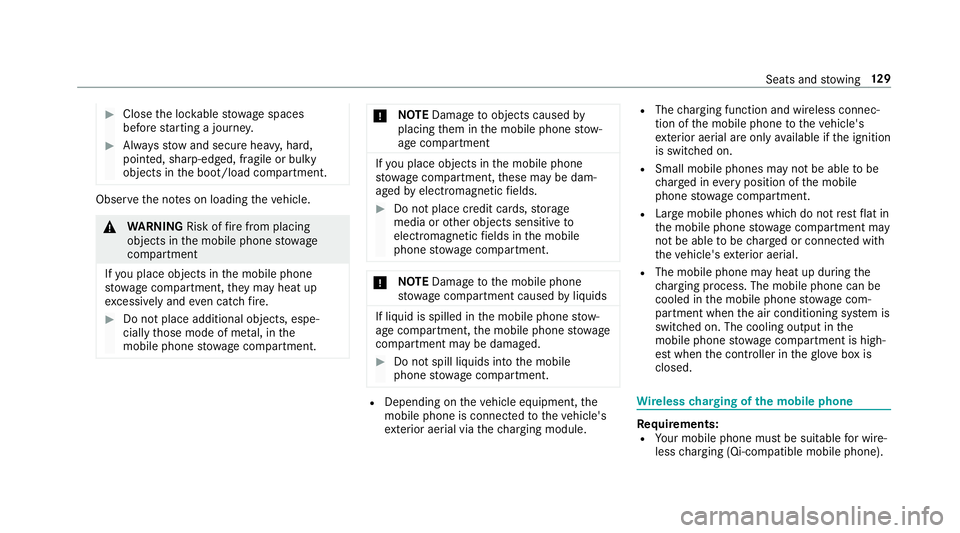
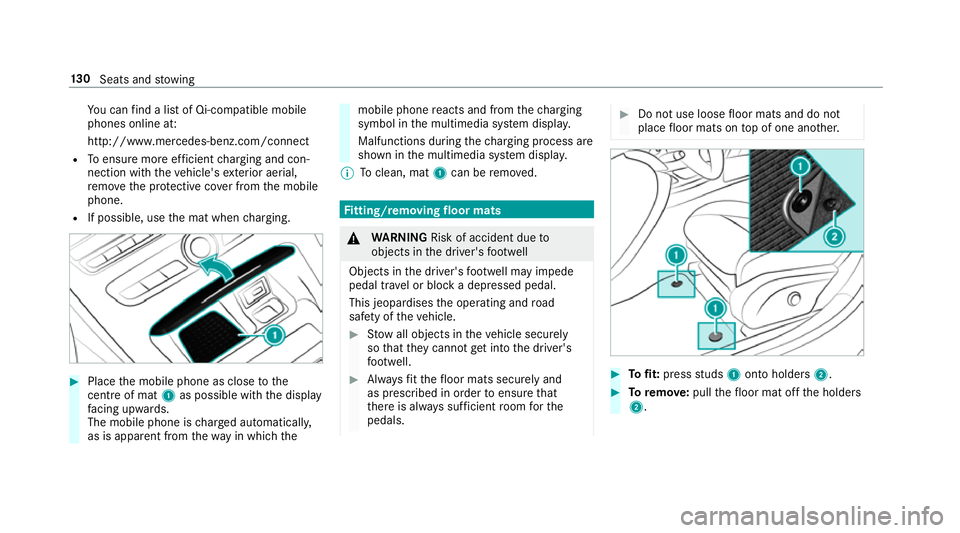
R If possible, use the mat when charging. #
Place the mobile phone as close tothe
centre of mat 1as possible wi th the display
fa cing up wards.
The mobile phone is charge d automatically,
as is apparent from thewa y in which the mobile phone
reacts and from thech arging
symbol in the multimedia sy stem displa y.
Malfunctions during thech arging process are
shown in the multimedia sy stem displa y.
% Toclean, mat 1can be remo ved. Fi
tting/ removing floormats &
WARNING Risk of accident due to
objects in the driver's foot we ll
Objects in the driver's foot we ll may impede
pedal tr avel or block a depressed pedal.
This jeopardises the operating and road
saf ety of theve hicle. #
Stow all objects in theve hicle securely
so that they cannot getinto the driver's
fo ot we ll. #
Alw aysfit th efloor mats securely and
as prescribed in order toensure that
th ere is alw ays suf ficient room forthe
pedals. #
Do not use loose floor mats and do not
place floor mats on top of one ano ther. #
Tofit: press studs 1onto holders 2. #
Toremo ve:pull thefloor mat off the holders
2. 13 0
Seats and stowing
Page 165 of 565
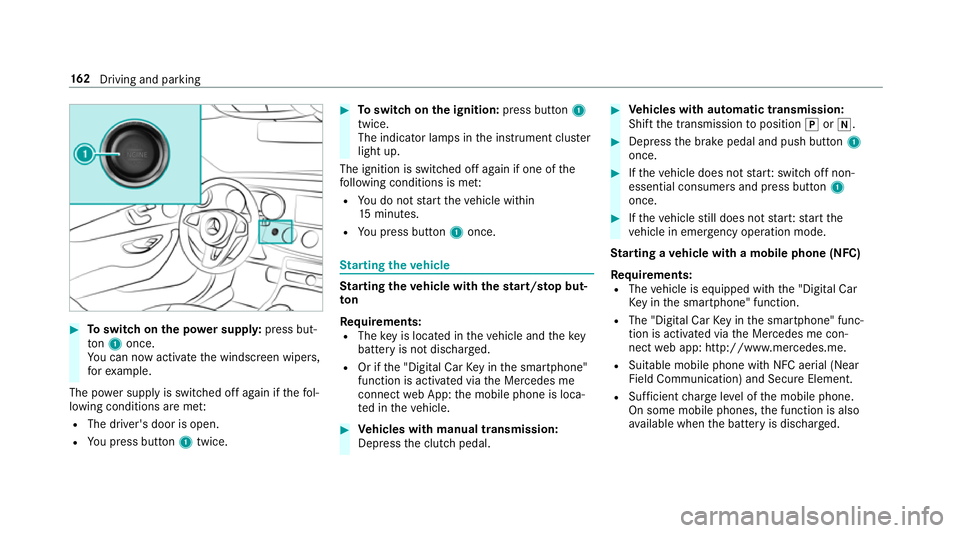
#
Toswitch on the po wer supp ly:press but‐
to n1 once.
Yo u can now activate the windscreen wipers,
fo rex ample.
The po wer supp lyis switched off again if thefo l‐
lowing conditions are me t:
R The driver's door is open.
R You press but ton1 twice. #
Toswitch on the ignition: press button 1
twice.
The indicator lamps in the instrument clus ter
light up.
The ignition is switched off again if one of the
fo llowing conditions is me t:
R You do not start theve hicle within
15 minutes.
R You press but ton1 once. St
arting theve hicle St
arting theve hicle with thest art/s top but‐
ton
Requ irements:
R The key is located in theve hicle and thekey
battery is not dischar ged.
R Or if the "Digital Car Key in the smartphone"
function is activated via the Mercedes me
connect web App: the mobile phone is loca‐
te d in theve hicle. #
Vehicles with manual transmission:
Depress the clutch pedal. #
Vehicles with automatic transmission:
Shift the transmission toposition jori. #
Depress the brake pedal and push button 1
once. #
Ifth eve hicle does not star t:switch off non-
essential consumers and press button 1
once. #
Ifth eve hicle still does not star t:start the
ve hicle in emer gency operation mode.
St arting a vehicle with a mobile phone (NFC)
Re quirements:
R The vehicle is equipped with the "Digital Car
Ke y in the smartphone" function.
R The "Digital Car Key in the smartphone" func‐
tion is activated via the Mercedes me con‐
nect web app: http://www.mercedes.me.
R Suitable mobile phone with NFC aerial (Near
Field Communication) and Secure Element.
R Sufficient charge leve l of the mobile phone.
On some mobile phones, the function is also
av ailable when the battery is dischar ged. 16 2
Driving and pa rking
Page 167 of 565
If
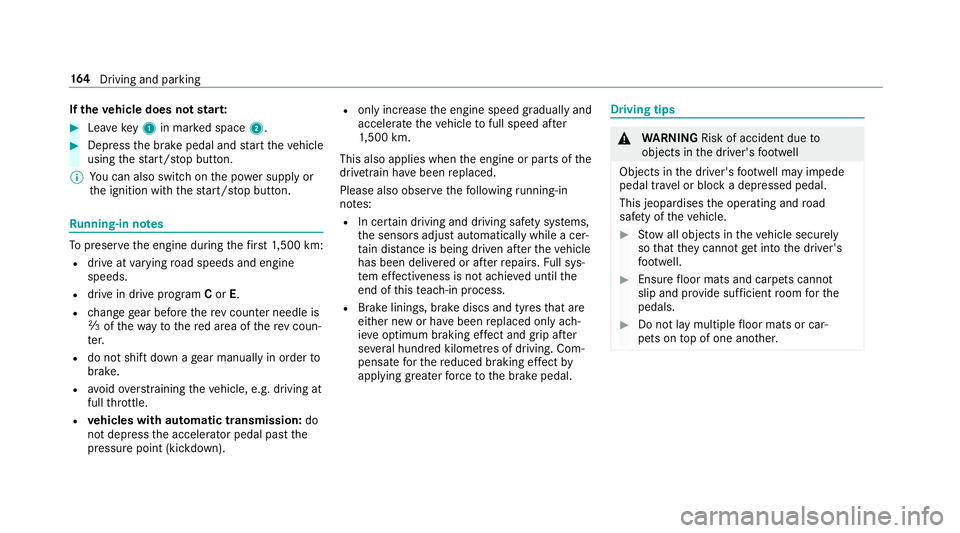
th eve hicle does not star t: #
Lea vekey1 in mar ked space 2. #
Depress the brake pedal and start theve hicle
using thest art/ stop button.
% You can also swit chon the po wer supp lyor
th e ignition with thest art/ stop button. Ru
nning-in no tes To
preser vethe engine during thefirs t1, 500 km:
R drive at varying road speeds and engine
speeds.
R drive in drive program Cor E.
R change gear before there v counter needle is
Ô ofthewa yto there d area of there v coun‐
te r.
R do not shift down a gear manually in order to
brake.
R avoidoverstra ining theve hicle, e.g. driving at
full thro ttle.
R vehicles with automatic transmission: do
not depress the accelera tor pedal past the
pressure point (kickdown). R
only increase the engine speed gradually and
accelera tetheve hicle tofull speed af ter
1, 500 km.
This also applies when the engine or parts of the
driv etra in ha vebeen replaced.
Please also obser vethefo llowing running-in
no tes:
R In cer tain driving and driving saf ety sy stems,
th e sensors adjust automatically while a cer‐
ta in dis tance is being driven af terth eve hicle
has been delivered or af terre pairs. Full sys‐
te m ef fectiveness is not achie ved until the
end of this teach-in process.
R Brake linings, brake discs and tyres that are
either new or ha vebeen replaced only ach‐
ie ve optimum braking ef fect and grip af ter
se veral hundred kilom etre s of driving. Com‐
pensate forth ere duced braking ef fect by
applying greaterfo rc eto the brake pedal. Driving tips
&
WARNING Risk of accident due to
objects in the driver's foot we ll
Objects in the driver's foot we ll may impede
pedal tr avel or block a depressed pedal.
This jeopardises the operating and road
saf ety of theve hicle. #
Stow all objects in theve hicle securely
so that they cannot getinto the driver's
fo ot we ll. #
Ensure floor mats and carpets cannot
slip and pr ovide suf ficient room forthe
pedals. #
Do not lay multiple floor mats or car‐
pets on top of one ano ther. 16 4
Driving and pa rking
Page 184 of 565
*
NO
TEDama getotheve hicle or the driv‐
et ra in caused bytheve hicle rolling away #
Alw ays proper lysecure theve hicle
against rolling away. #
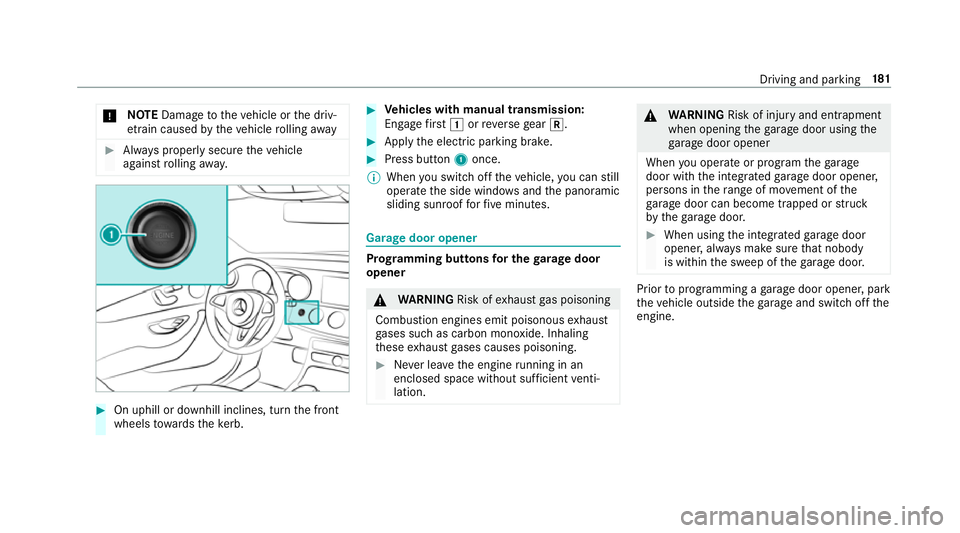
On uphill or downhill inclines, turn the front
wheels towa rdsth eke rb. #
Vehicles with manual transmission:
Engage firs t1 orreve rsege ar k. #
App lythe electric parking brake. #
Press button 1once.
% When you swit choff theve hicle, you can still
opera tethe side windo wsand the panoramic
sliding sunroof forfive minutes. Garage door opener
Prog
ramming buttons for the garage door
opener &
WARNING Risk ofexhaust gas poisoning
Combustion engines emit poisonous exhaust
ga ses such as carbon monoxide. Inhaling
th ese exhaust gases causes poisoning. #
Never lea vethe engine running in an
enclosed space wi thout suf ficient venti‐
lation. &
WARNING Risk of inju ryand ent rapment
when opening thega rage door using the
ga rage door opener
When you operate or program thega rage
door with the integrated garage door opener,
persons in thera nge of mo vement of the
ga rage door can become trapped or stru ck
by thega rage door. #
When using the integrated garage door
opener, alw ays make sure that nobody
is within the sweep of thega rage door. Prior
toprog ramming a garage door opener, park
th eve hicle outside thega rage and swit choff the
engine. Driving and parking
181
Page 209 of 565
As a
result, Dis tance Pilot DISTRONIC may
nei ther give warnings nor inter vene in su ch
situations. #
Alw ays carefully obser vethe traf fic con‐
ditions and be ready tobrake at all
times. &
WARNING Risk of accident due tolimi‐
te d de tectability of road users and traf fic
situations
Dis tance Pilot DISTRONIC cannot al ways
clear lyidentify other road users and complex
traf fic situations.
In these conditions, Dis tance Pil ot
DISTRONIC may:
R give an unnecessary warning and then
brake theve hicle
R neither give a warning nor inter vene
R accele rate or brake unexpectedly #
Continue driving with care and be ready
to brake, particular lyif Dis tance Pilot
DISTRONIC warnsyo u. &
WARNING Risk of accident due toinsuf‐
fi cient decele ration byDis tance Pilot
DISTRONIC
Dis tance Pilot DISTRONIC brakes your vehi‐
cle with up to50% of the maximum possible
braking po wer.If th is decele ration is not suf‐
fi cient, Dis tance Pilot DISTRONIC alerts you
with a visual and acoustic warning. #
Apply the brakes yourself in these situa‐
tions and try totake evasive action. &
WARNING Risk of accident due toDis‐
ta nce Pilot DISTRONIC still being activa‐
te d when you lea vethe driver's seat
If yo u lea vethe driver's seat while theve hicle
is being braked byDis tance Pilot DISTRONIC
only, it can rollaw ay inthefo llowing situa‐
tions:
R Ifth ere is a malfunction in the sy stem or
in the po wer supp ly. R
If Dis tance Pilot DISTRONIC is deacti va‐
te d with the cruise control le ver,e.g. by a
ve hicle occupant or from outside the
ve hicle.
R Ifth e electrics in the engine compart‐
ment, the battery or the fuses are tam‐
pered with.
R Ifth e battery is disconnected.
R Ifth eve hicle is accelerated, e.g. by a
ve hicle occupant. #
Alw ays deactivate Dis tance Pilot
DISTRONIC and secu retheve hicle to
pr eve nt it from rolling away before you
lea vethe driver's seat. &
WARNING Risk of accident due to
unknown stored speed
If yo u call up thestored speed and this is
lo we rth an your cur rent speed, theve hicle
decelerates.
If yo u do not kn owthestored speed, the
ve hicle could decelerate unexpectedl y.206
Driving and parking
Page 215 of 565
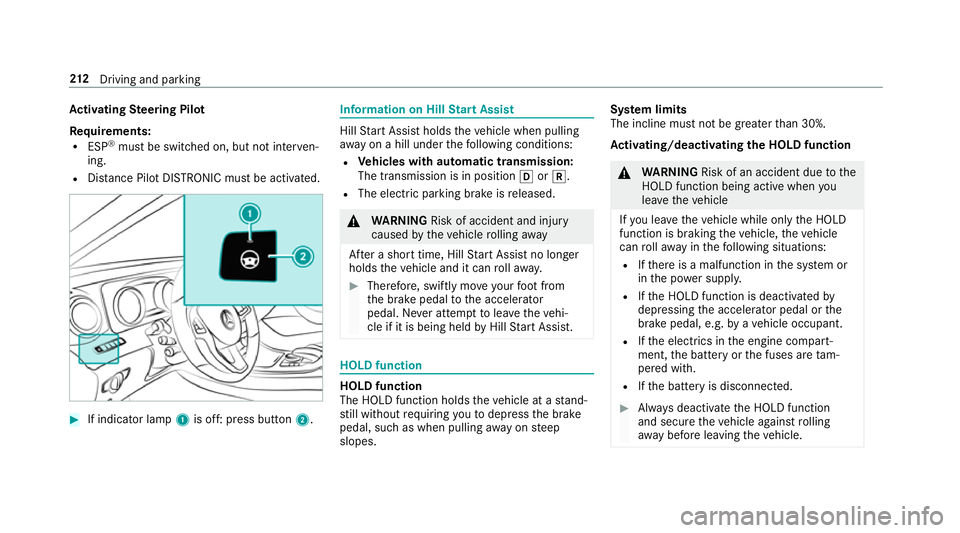
Ac
tivating Steering Pilot
Re quirements:
R ESP ®
must be switched on, but not inter ven‐
ing.
R Distance Pilot DISTRONIC mu stbe activated. #
If indicator lamp 1is off: press button 2. Information on Hill
Start Assist Hill
Start Assist holds theve hicle when pulling
aw ay on a hill under thefo llowing conditions:
R Vehicles with automatic transmission:
The transmission is in position hork.
R The electric parking brake is released. &
WARNING Risk of accident and inju ry
caused bytheve hicle rolling away
Af ter a short time, Hill Start Assist no lon ger
holds theve hicle and it can rollaw ay. #
Therefore, swiftly mo veyour foot from
th e brake pedal tothe accelerator
pedal. Ne ver attem pttolea vetheve hi‐
cle if it is being held byHill Start Assist. HOLD function
HOLD function
The HOLD function holds
theve hicle at a stand‐
st ill without requ iring youto depress the brake
pedal, such as when pulling away on steep
slopes. Sy
stem limits
The incline must not be greaterth an 30%.
Ac tivating/deactivating the HOLD function &
WARNING Risk of an accident due tothe
HOLD function being active when you
lea vetheve hicle
If yo u lea vetheve hicle while only the HOLD
function is braking theve hicle, theve hicle
can rollaw ay inthefo llowing situations:
R Ifth ere is a malfunction in the sy stem or
in the po wer supp ly.
R Ifth e HOLD function is deactivated by
depressing the accelera tor pedal or the
brake pedal, e.g. byave hicle occupant.
R Ifth e electrics in the engine compart‐
ment, the battery or the fuses are tam‐
pered with.
R Ifth e battery is disconnected. #
Alw ays deactivate the HOLD function
and secure theve hicle against rolling
aw ay before leaving theve hicle. 212
Driving and pa rking