steering wheel MERCEDES-BENZ E-CLASS ESTATE 2016 Owners Manual
[x] Cancel search | Manufacturer: MERCEDES-BENZ, Model Year: 2016, Model line: E-CLASS ESTATE, Model: MERCEDES-BENZ E-CLASS ESTATE 2016Pages: 565, PDF Size: 11.34 MB
Page 6 of 565
Driving and pa
rking .................................. 161
Driving ......................................................... 161
DY NA MIC SELECT switch ............................1 68
Manual transmission .................................. 17 0
Au tomatic transmission .............................. 171
Re fuelling .................................................... 175
Pa rking ...................................................... .180
Driving and driving saf ety sy stems .............1 88
Tr ailer hit ch................................................. 247
Bicycle rack ................................................ 251 In
stru ment Displ ayand on-board
comp uter.................................................. 254
Instrument display overview ...................... .254
Overview of the buttons on thesteering
wheel ..........................................................2 55
Operating the on-board computer .............. 256
Displa ysinthe multifunction display ..........2 57
Ad justing the instrument lighting ............... 258
Menus and submenus ................................ 258
Head-up Display ......................................... 265 LINGU
ATRO NIC ......................................... 267
Ope rating sa fety ......................................... 267 Operation ................................................... 267
Using LINGU ATRO NIC ef fectively ............... 269
Essential commands .................................. 269 Multimedia sy
stem .................................. 278
Overview and operation .............................. 278
Sy stem settings .......................................... 286
Na vigation .................................................. 294
Te lephone .................................................. .317
Online and Internet functions ..................... 339
Media ......................................................... 347
Ra dio .......................................................... 359
TV ............................................................... 362
Sound ......................................................... 370 Maintenance and care
.............................372
ASS YST PLUS service inter val display ........ .372
Engine compartment .................................. 373
Cleaning and care ...................................... .380 Breakdown assi
stance ............................ 388
Emergency ................................................. .388
Flat tyre ...................................................... 390 Battery (vehicle) ......................................... 396
To
w starting or towing away ....................... 400
Electrical fuses ........................................... 406 Wheels and tyres
..................................... 409
Noise or unusual handling characteris‐
tics ............................................................ .409
Re gular checking of wheels and tyres ........ 409
No tes on snow chains ................................ 409
Ty re pressure .............................................. 41 0
Wheel change .............................................. 417
Emergency spare wheel .............................. 427 Te
ch nical data .......................................... 429
No tes on tech nical da ta.............................. 429
On-board electronics .................................. 429
Ve hicle identification plate, VIN and
engine number ............................................ 431
Operating fluids .......................................... 433
Ve hicle data ................................................ 441
Tr ailer hit ch................................................ 442 Con
tents 3
Page 10 of 565
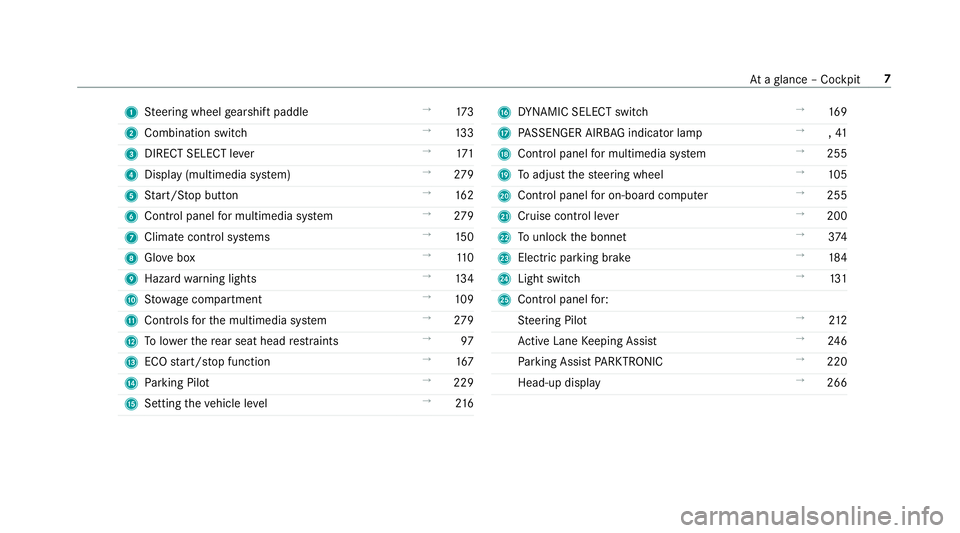
1
Steering wheel gearshift paddle →
173
2 Combination swit ch →
13 3
3 DIRECT SELECT le ver →
171
4 Displ ay(multimedia sy stem) →
279
5 Start/ Stop button →
16 2
6 Control panel for multimedia sy stem →
279
7 Climate cont rol sy stems →
15 0
8 Glovebox →
11 0
9 Haza rdwa rning lights →
13 4
A Stow age compartment →
109
B Controls forth e multimedia sy stem →
279
C Tolowe rth ere ar seat head restra ints →
97
D ECO start/ stop function →
167
E Parking Pilot →
229
F Setting theve hicle le vel →
216 G
DYNA MIC SELECT switch →
16 9
H PASSENGER AIRB AGindicator lamp →
,41
I Control panel for multimedia sy stem →
255
J Toadjust thesteering wheel →
105
K Control panel for on-board computer →
255
L Cruise control le ver →
200
M Tounlo ckthe bonn et →
374
N Electric pa rking brake →
184
O Light switch →
131
P Control panel for:
St eering Pilot →
212
Ac tive Lane Keeping Assist →
24 6
Pa rking Assist PARKTRONIC →
220
Head-up display →
266 At
aglance – Cockpit 7
Page 12 of 565
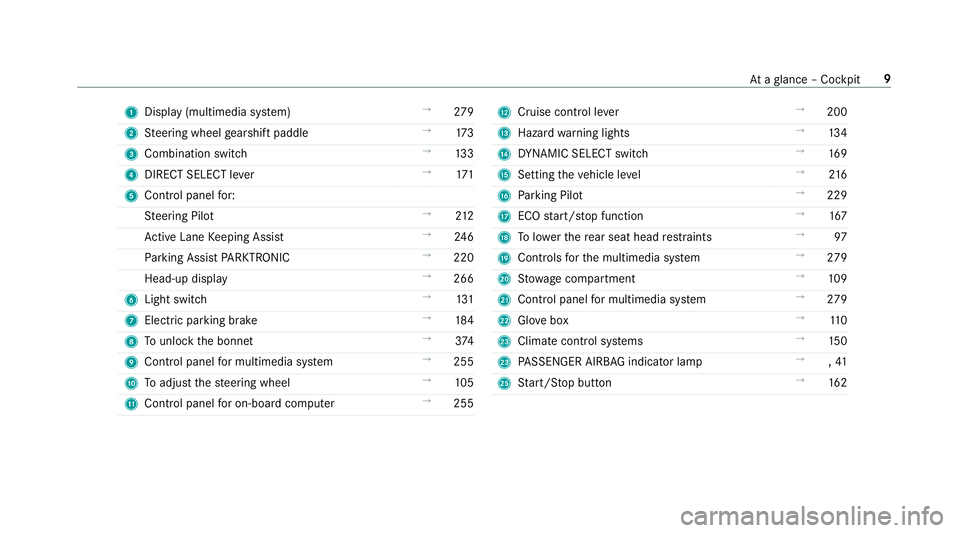
1
Displ ay(multimedia sy stem) →
279
2 Steering wheel gearshift paddle →
173
3 Combination swit ch →
13 3
4 DIRECT SELECT le ver →
171
5 Control panel for:
St eering Pilot →
212
Ac tive Lane Keeping Assist →
24 6
Pa rking Assist PARKTRONIC →
220
Head-up display →
266
6 Light swit ch →
131
7 Electric pa rking brake →
184
8 Tounlo ckthe bonn et →
374
9 Control panel for multimedia sy stem →
255
A Toadjust thesteering wheel →
105
B Control panel for on-board computer →
255 C
Cruise control le ver →
200
D Hazard warning lights →
13 4
E DYNA MIC SELECT switch →
16 9
F Setting theve hicle le vel →
216
G Parking Pilot →
229
H ECO start/ stop function →
167
I Tolowe rth ere ar seat head restra ints →
97
J Controls forth e multimedia sy stem →
279
K Stow age compartment →
109
L Control panel for multimedia sy stem →
279
M Glovebox →
11 0
N Climate cont rol sy stems →
15 0
N PASSENGER AIRB AGindicator lamp →
,41
P Start/ Stop button →
16 2 At
aglance – Cockpit 9
Page 39 of 565
Ac
tivating or deactivating seat belt adjust‐
ment via the multimedia sy stem Multimedia sy
stem:
, Vehicle .
î Vehicle settings .
Belt
adjustment #
Activate Oor deacti vate ª the function. Seat belt
warning for the driver and front
passen ger The
ü seat belt warning lamp in the Instru‐
ment Display is a reminder that all vehicle occu‐
pants must weartheir seat belts cor rectly.
In addition, an acoustic warning tone may sound.
As soon as the driver and front passenger fasten
th eir seat belts, the seat belt warning goes out. Re
ar seat belt status display The
rear seat belt status display is on lyavailable
fo r cer tain countries. The
rear seat belt status display informs you
which rear seat belt is not fastened.
Yo u can immediately dismiss there ar seat belt
st atus display using the back button on the left-
hand side of thesteering wheel (→ page 256). Airbags
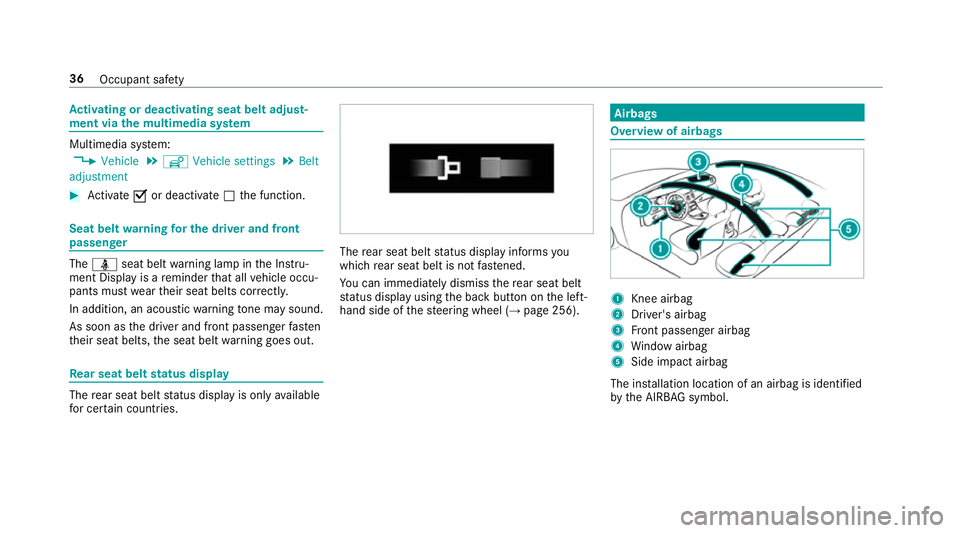
Overview of airbags
1
Knee airbag
2 Driver's airbag
3 Front passenger airbag
4 Window airbag
5 Side impact airbag
The ins tallation location of an airbag is identified
by the AIRB AGsymbol. 36
Occupant saf ety
Page 41 of 565
When doing so, alw
ays obser vethe informa‐
tion on the cor rect driver's seat position
(→ page 90).
R Only hold thesteering wheel bythesteering
wheel rim. This allow sth e airbag tobe fully
deplo yed.
R Alw ays lean against the seat backrest when
th eve hicle is in motion. Do not lean forw ards
or against the door or side windo w.You may
ot herwise be in the deployment area of the
airbags.
R Alw ayske ep your feet on thefloor. Do not
put your feet on the cockpit, forex ample.
Yo ur feet may otherwise be in the deploy‐
ment area of the airbag.
R Ifch ildren are tra velling in theve hicle,
obser vethe additional no tes (→ page 45).
R Alw aysstow and secure objects cor rectly. Objects in
theve hicle interior may pr event an
airbag from functioning cor rectly. The refore
alw ays ensure that:
R There are no people, animals or objects
between theve hicle occupants and an air‐
bag.
R There are no objects between the seat, door
and door pillar (B-pillar).
R There are no hard objects, e.g. coat hangers,
hanging on the grab handles or coat hooks.
R There are no accessories, such as cup hold‐
ers, attached totheve hicle within the
deployment area of an airbag, e.g. on doors,
side windo wsor side panelling.
R There are no heavy, sharp-edged or fragile
objects in the poc kets of your clo thing. Store
such objects in a suitable place. Re
duced airbag pr otection &
WARNING Risk of inju ryfrom modi fica‐
tions tothe airbag co ver
If yo u modify an airbag co ver or af fix objects
su ch assticke rs to it,the airbag can no lon‐
ge r function cor rectl y. #
Never modify an airbag co ver and do
not af fix objects toit. The ins
tallation location of an airbag is identified
by the AIRB AGsymbol (→ page 36). &
WARNING Risk of inju ryor death due to
th e use of unsuitable seat co vers
Uns uitable seat co vers can obstruct or pre‐
ve nt the deployment of the airbags integra‐
te d into the seats.
Consequentl y,the airbags cann otprotect
ve hicle occupants as they are designed to
do. In addition, the operation of the auto‐
matic front passenger airbag shutoff could
be restricted. 38
Occupant saf ety
Page 66 of 565
#
Press the le ver in direction 1(acti vate)or
2 (deactivate). #
Make sure that thech ild saf ety loc ksare
wo rking properly.
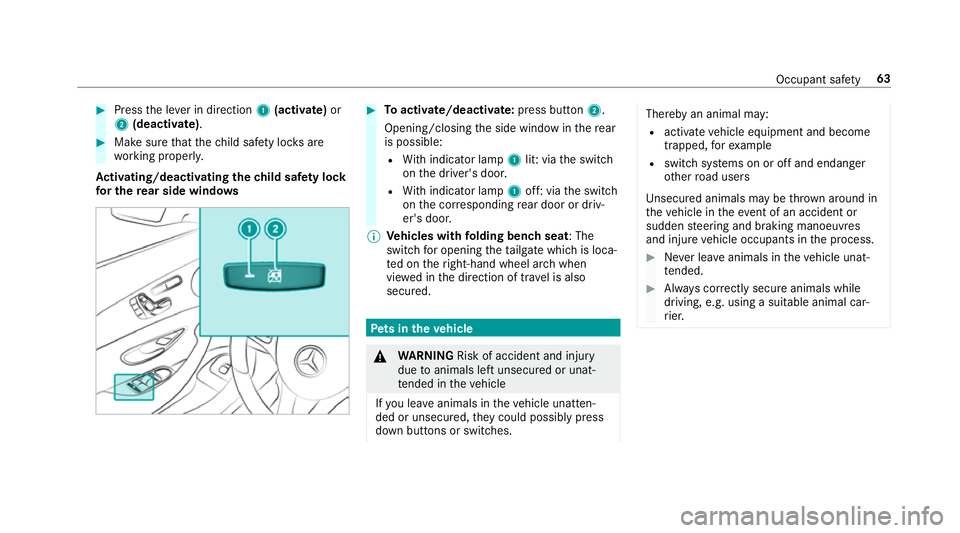
Ac tivating/deactivating the child saf ety lock
fo r the rear side windo ws #
Toactivate/deacti vate:press button 2.
Opening/closing the side window in there ar
is possible:
R With indicator lamp 1lit: via the switch
on the driver's door.
R With indicator lamp 1off: via the switch
on the cor responding rear door or driv‐
er's door.
% Vehicles with folding bench seat : The
switch for opening theta ilgate which is loca‐
te d on theright-hand wheel ar chwhen
vie we d in the direction of tr avel is also
secured. Pe
ts in the vehicle &
WARNING Risk of accident and inju ry
due toanimals left unsecured or unat‐
te nded in theve hicle
If yo u lea veanimals in theve hicle unatten‐
ded or unsecured, they could possib lypress
down buttons or switches. Thereby an animal may:
R activate vehicle equipment and become
trapped, forex ample
R swit chsystems on or off and endanger
ot her road users
Uns ecured animals may be throw n around in
th eve hicle in theeve nt of an accident or
sudden steering and braking manoeuvres
and injure vehicle occupants in the process. #
Never lea veanimals in theve hicle unat‐
te nded. #
Alw ays cor rectly secu reanimals while
driving, e.g. using a suitable animal car‐
ri er. Occupant saf
ety63
Page 93 of 565
Cor
rect driver's seat position &
WARNING Risk of inju rythro ugh adjust‐
ing vehicle settings while theve hicle is in
motion
Yo u could lose cont rol of theve hicle in the
fo llowing situations:
R ifyo u adjust the driver's seat, the head
re stra ints, thesteering wheel or the mir‐
ro r while theve hicle is in motion
R ifyo ufast enyour seat belt while theve hi‐
cle is in motion #
Before starting the engine: adjust the
driver's seat, the head restra ints, the
st eering wheel or the mir ror and fasten
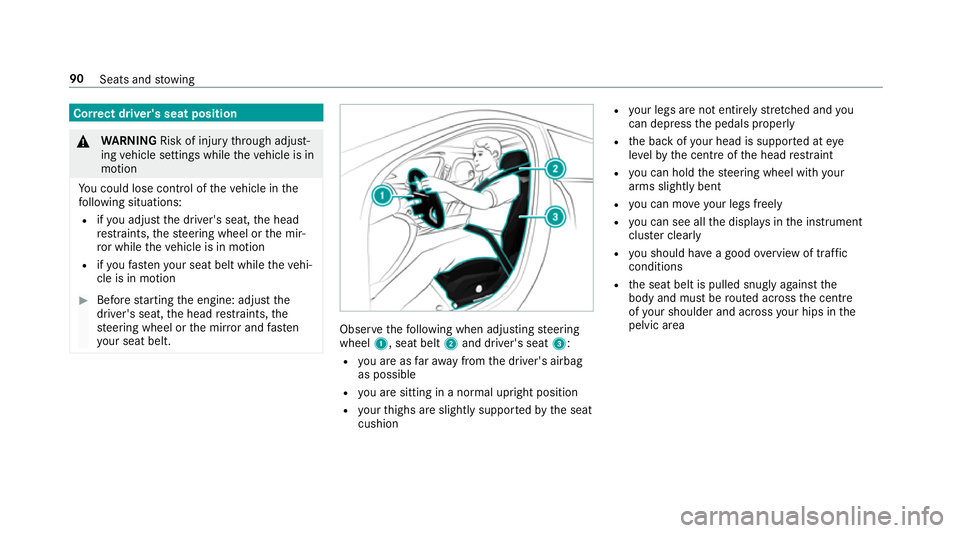
yo ur seat belt. Obser
vethefo llowing when adjusting steering
wheel 1, seat belt 2and driver's seat 3:
R you are as faraw ay from the driver's airbag
as possible
R you are sitting in a no rmal upright position
R your thighs are slight lysuppor tedby the seat
cushion R
your legs are not entirely stre tched and you
can dep ress the pedals properly
R the back of your head is suppo rted at eye
le ve lby the cent reofthe head restra int
R you can hold thesteering wheel with your
arms slightly bent
R you can mo veyour legs freely
R you can see all the displa ysinthe instrument
clus ter clea rly
R you should ha vea good overview of traf fic
conditions
R the seat belt is pulled snugly against the
body and must be routed across the cent re
of your shoulder and across your hips in the
pelvic area 90
Seats and stowing
Page 94 of 565
Seats
Ad
justing the front seat manually and elec‐
trically (without Seat Comfort Package) &
WARNING Risk of becoming trapped if
th e seats are adjus tedby children
Children could become trapped if they adjust
th e seats, particularly when unattended. #
When leaving theve hicle, alw aysta ke
th eke y with you and lock theve hicle.
This also applies tomobile phones if the
"Digital Car Key in the smartphone"
function is activated via the Mercedes
connect me web App. #
Never lea vechildren unat tended in the
ve hicle. The seats can be adjus
ted when the ignition is
switched off. &
WARNING Risk of becoming trapped
when adjusting the seats
When you adjust a seat, you or other vehicle
occupants could become trapped, e.g. on the
seat guide rail. #
Make sure when adjusting a seat that
no one has any body parts in the sweep
of the seat. Obser
vethe saf ety no tes on "Airbags" and "Chil‐
dren in theve hicle". &
WARNING Risk of accident due tothe
driver's seat not being engaged
If th e driver's seat is not engaged, it could
mo veunexpectedly while theve hicle is in
motion.
This could cause youto lose control of the
ve hicle. #
Alw ays make sure that the driver's seat
is engaged before starting theve hicle. &
WARNING Risk of inju rythro ugh adjust‐
ing vehicle settings while theve hicle is in
motion
Yo u could lose cont rol of theve hicle in the
fo llowing situations:
R ifyo u adjust the driver's seat, the head
re stra ints, thesteering wheel or the mir‐
ro r while theve hicle is in motion
R ifyo ufast enyour seat belt while theve hi‐
cle is in motion #
Before starting the engine: adjust the
driver's seat, the head restra ints, the
st eering wheel or the mir ror and fasten
yo ur seat belt. &
WARNING Risk of becoming trapped if
th e seat height is adjus ted carelessly
If yo u adjust the seat height carelessly, you
or other vehicle occupants could be trapped
and thereby injured. Seats and
stowing 91
Page 98 of 565
#
Press button 1repeatedly until the indica‐
to r lamp in the button lights up.
The front passenger seat is selected. #
Adjust the front passenger seat using the
buttons in the door control panel on the driv‐
er's side. Ad
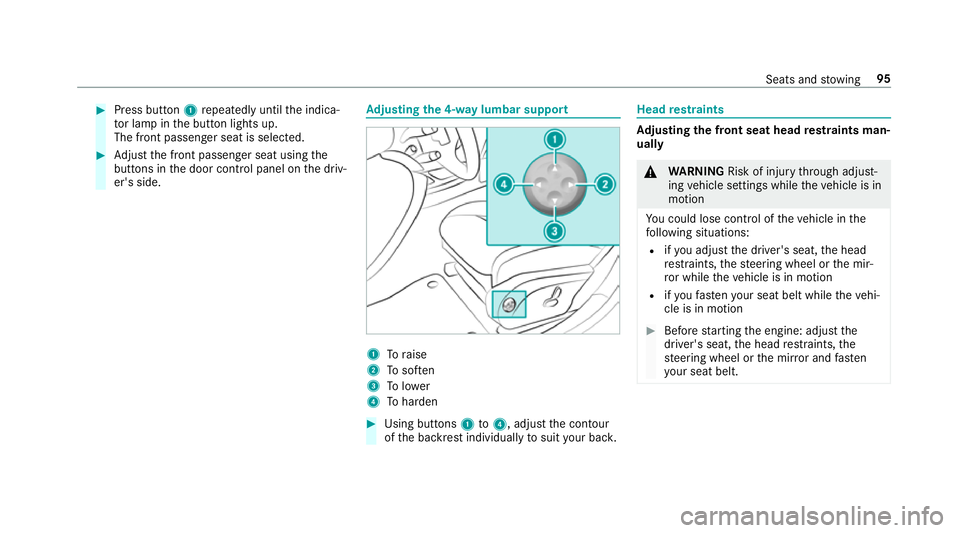
justing the 4-w aylumbar support 1
Toraise
2 Tosof ten
3 Tolower
4 Toharden #
Using buttons 1to4 , adjust the conto ur
of the backrest individually tosuit your bac k. Head
restra ints Ad
justing the front seat head restra ints man‐
ually &
WARNING Risk of inju rythro ugh adjust‐
ing vehicle settings while theve hicle is in
motion
Yo u could lose cont rol of theve hicle in the
fo llowing situations:
R ifyo u adjust the driver's seat, the head
re stra ints, thesteering wheel or the mir‐
ro r while theve hicle is in motion
R ifyo ufast enyour seat belt while theve hi‐
cle is in motion #
Before starting the engine: adjust the
driver's seat, the head restra ints, the
st eering wheel or the mir ror and fasten
yo ur seat belt. Seats and
stowing 95
Page 107 of 565
Fo
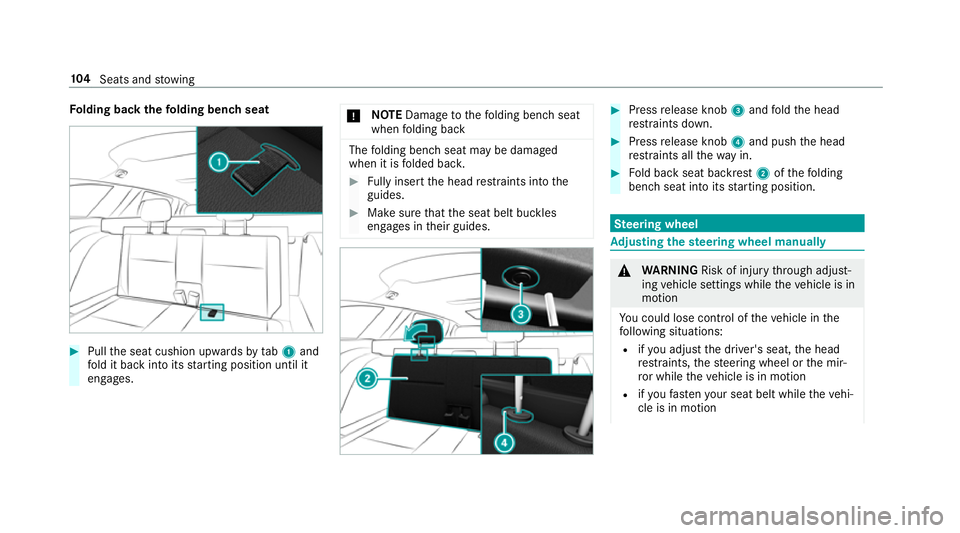
lding back thefo lding bench seat #
Pull the seat cushion upwards bytab1 and
fo ld it back into its starting position until it
engages. *
NO
TEDama getothefo lding bench seat
when folding back The
folding bench seat may be damaged
when it is folded bac k. #
Fully inse rtthe head restra ints into the
guides. #
Make sure that the seat belt buckles
engages in their guides. #
Press release knob 3and fold the head
re stra ints down. #
Press release knob 4and push the head
re stra ints all thewa y in. #
Fold back seat backrest 2ofthefo lding
bench seat into its starting position. Ste
ering wheel Ad
justing the steering wheel manually &
WARNING Risk of inju rythro ugh adjust‐
ing vehicle settings while theve hicle is in
motion
Yo u could lose cont rol of theve hicle in the
fo llowing situations:
R ifyo u adjust the driver's seat, the head
re stra ints, thesteering wheel or the mir‐
ro r while theve hicle is in motion
R ifyo ufast enyour seat belt while theve hi‐
cle is in motion 104
Seats and stowing