service MERCEDES-BENZ E-CLASS ESTATE 2017 Owner's Manual
[x] Cancel search | Manufacturer: MERCEDES-BENZ, Model Year: 2017, Model line: E-CLASS ESTATE, Model: MERCEDES-BENZ E-CLASS ESTATE 2017Pages: 585, PDF Size: 11.8 MB
Page 268 of 585
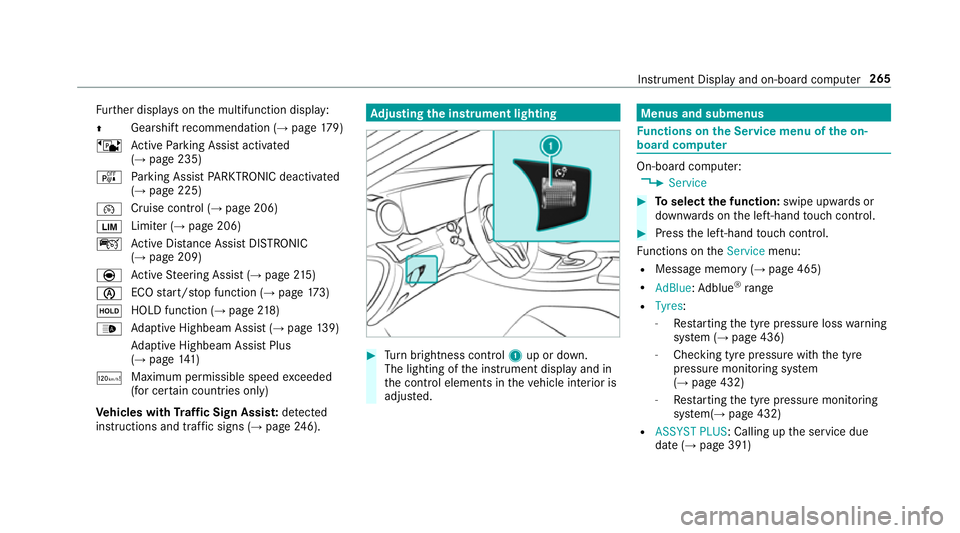
Fu
rther displa yson them ultifunction display:
Z Gearshif
trecommendatio n(→pa ge179)
ë ActiveP arking Assis tactivated
(→ pag e235)
é Parking Assis tPARKTRONIC deactivated
(→ page 225)
¯ Cruise control (→
page206)
È Limiter (→
page206)
ç ActiveD ista nce Assi stDISTRONIC
(→ page 209)
è ActiveS teering Assis t(→ pag e215 )
è EC
Os tart/s topf unction (→ page173)
ë HOLD function (→
page218)
_ Ad
aptiv eHighbeam Assis t(→pag e139)
Ad aptiv eHighbeam Assis tPlus
(→ pag e141 )
ð Maximum permissible spee
dexceeded
(for cer tain countries only)
Ve hicles with Traf ficS ign Assis t:de tected
instructions and traf fics igns (→ page 246). Ad
justin gthe in stru men tlighting #
Turn brightness control 1up or down.
The lightin gofthe instrument displa yand in
th ec ontrol element sinthevehicle interior is
adjus ted. Menus and submenus
Fu
nctions on theS ervice menu of theo n-
boar dcompu ter On-boar
dcomputer:
, Service #
Toselect thef unction: swipe upwards or
down wardsont he left-hand touc hc ontrol. #
Pres sthe left-hand touc hc ontrol.
Fu nctions on theService menu:
R Messag ememor y(→pag e465)
R AdBlue :Adblue ®
ra nge
R Tyres:
- Restartin gthe tyr epressur eloss warning
sy stem (→ page436)
- Checking tyr epressur ewitht he tyre
pressur emonitoring sy stem
(→ pag e432)
- Restartin gthe tyr epressur emonitoring
sy stem(→ page432)
R ASSYST PLUS:C alling upthes ervice due
dat e(→pag e391 ) Instrument Displa
yand on-boar dcomputer 265
Page 285 of 585
Vo
ice command Function
Show station list To
displa ythe names of all recei vable stations
Read out statio nlist To
listentot he names of all recei vable stations
Traffic informatio non
Traffic informatio noff To
switc hthe traf fici nformation service on/off
Radi oinfo on
Radi oinfo off To
switc hthe cur rent statio ninformation on/off Overvie
wofmedia pla yerv oice commands Media pla
yerv oice commands can also be used
when them edia pla yerruns in theb ackg round. 282
LINGU ATRO NIC
Page 306 of 585
Ac
tivatin gPINprotection ford atae xport #
Select Change settings .
Confir mwitht he PIN. #
Select Protect data export.
Ac tivate Oor deacti vate ª thef unction.
Ac tivatin gPINprotection foro ffline mode #
Select Changesettings .
Confir mwitht he PIN. #
Select Protect deactivation of offline mode.
Ac tivate Oor deacti vate ª thef unction.
Un blocking theP IN
Re quirements:
R Ther eisanI nternetconnection.
R AM ercedes me account exists at http://
www.me rcedes.me.
R The Personalisation (→pag e303)service is
activated.
If th eP IN has been entered incor rectly three
times ,the PIN will be bloc ked. Youc an ha ve a
single-use passwor dsent to yo uviathe Mercedes me connect online por
taltor esetthe
PIN pr otection. #
Select Unbloc kPIN. #
Ente rthe single-use password.
PIN pr otection is reset, and youc an se ta
ne wP IN.
% Alternativel y,yo uc an ha vePIN pr otection
re se tata Mercedes-Benz Service Centre. User profile
Setting
auser profile
Multimedia sy stem:
, System .
g Personalisation
Displaying auser profile when starting
If th is function is active, apromp tappear swhen
st artin gthe sy stem asking whic huser profile to
use. #
Select Display profile list after start . #
Activate Oor deacti vate ª thef unction.
Selecting auser profile #
Select Guestor individual profile #.%
Some settings from theu ser profile ar eonly
loaded when thev ehicle is stationar yor
when thei gnition is switched on.
Au tomatic syn chronisation
Eac htime thei gnition is switched of foron,the
individual user profiles ar esynchronised on the
multimedia sy stem and on thes erve r.This
ensures that thel ates tuser profiles ar ealways
av ailable. #
Select Automatic synchronisation. #
Activate Oor deacti vate ª thef unction.
% Form orei nformation about importing/
ex portin guser profiles (→ page304).
Creating auser profile
Multimedia sy stem:
, System .
g Personalisation .
Cre-
ate profile #
Ente ran ame. #
Select a.
Individuals ettings ar esave dint he user profile,
e.g.:
R System settings Multimedia sy
stem 303
Page 307 of 585
R
settings in theTVt uner's channel list
R Navigation and traf fici nformation
The settings di ffer depending on thev ehicle
equipment.
Importing/exporting user profiles
Requ irements:
R Ther eisanI nternetconnection .
R AM ercedes me account exists at http://
www.me rcedes.me.
R The Personalisation service is active.
Multimedia sy stem:
, System .
g Personalisation .
Man-
ual export/import
This function is no tavailable in all countries.
On lyindividual profiles can be impor tedor
ex por ted.
The individual profiles ar ealway sc ollectively
impor tedore xported. #
Impor t:select Import profiles from the
server.
The The profile import overwrites the exist-
ing profiles. Do you want to continue? mes‐
sag eappears. #
Select Yes.
Use rprofile sa reimpor ted. #
Expor t:select Export profiles to the server.
User profiles ar eexpo rted.
% Certain settings ,suc hasa ddress book
ent ries or pr evious destination sfromt he
navigation sy stem, ar enot ex ported.
Setting user profile options
Multimedia sy stem:
, System .
g Personalisation #
Highlight aprofile. #
Select ¥options.
The following option sareavailable:
R Rename
R Delete
R Reset %
The gues tprofile canno tbedeletedor
re named. So
ftwa reupdate Information on softwar
eupdates
The multimedi asystemp rovide sam essage
when an updat eisavailable.
Dependin gonthe source, youc an per form vari‐
ous updates:
Softwar eupdate Source of
the
update Up
dat etype
Interne tN avigation map, sys‐
te mu pdates, Digital
Owner's Manual
External storage
medium, e.g. USB
fl ash drive Na
vigation maps Softwar
eupdates ensur eyour vehicle's tech nol‐
ogy is al ways up-to-date. 304
Multimedia sy stem
Page 308 of 585
In order
tocons tantl yimpr ove theq ualit yofo ur
services youw illrecei vefutur eupdates fory our
multimedia sy stem, theM ercedes me connect
services and your vehicle's communication mod‐
ule. These will con veniently be sent to youvia
th em obile phone connection in your vehicle
and, in man ycases, ins talled automaticall y.Yo u
can moni tort he status of your updates at any
tim eont he Mercedes me por tala nd find infor‐
matio nabout potentia linno vations.
Yo ur advantages at aglance:
R con veniently recei vesoftwar eupdate svia
th em obile phone network
R thel ong-te rmqualit yand availabilit yof
Mercedes me connec tisguaranteed
R keep your multimedia sy stem and communi‐
cation module up-to-date
Fu rther information about softwar eupdates can
be found at http://me.mercedes-benz.com
Pe rformin gasoftwar eupdate
Re quirements:
R An Interne tconnection is requiredfor
updates whic hareobtaine donlin e. Multimedia sy
stem:
, System .
Software update
Au tomatically
Re quirements:
R Your vehicle has abuilt-in communication
module. #
Activate OAutomatic online updates.
Up dates ar eperform ed.
The cur rent status of theu pdates is dis‐
pla yed.
Manually #
Deactivate ªAutomatic online updates. #
Select an updat efromt he lis tand star tt he
update.
Sear ching forn ew Up dates
Re quirements:
R Your vehicle does no thave abuilt-in commu‐
nicatio nmodule.
R An In tern et-enabled mobil ephone is connec‐
te dtot he multimedia sy stem (→ page337). #
Select Search for new updates.
The lis tofavailable updates is refreshed. #
Select an updat eand star tt he update.
The selected updat eisdownloaded via the
connected mobil ephone.
Ac tivatin gthe so ftwa reupdate #
Restar tt he sy stem.
Important sy stem upda tes
Impor tant sy stem updates ma ybenecessar yfor
th es ecurity of your multimedia sy stem's data.
Please ins tallth ese updates, or else thes ecurity
of your multimedia sy stem cann otbe ensured.
% If automatic softwar eupdates ar eactivated,
th es ystemu pdates will be downloaded auto‐
maticall y(→ pag e305).
As soon as an updat eisavailable ford ow nload,
ac orresponding messag eappears onthem ulti‐
media sy stem displa y.
Yo uh ave thef ollowing selection options:
R Download
The updat ewill be downloaded in theb ack‐
ground. Multimedia sy
stem 305
Page 321 of 585
option is enabled.
Amessag eappear sand you
will hear acorresponding message.
Selecting notifications
Multimedia sy stem:
, Naviga-
tion .
Z Options .
Announcements #
Switc hannouncements on Oor off ª.
R Announc etraffic warnings
This function is no tavailable in all coun‐
tries.
R Announc estreet names
The multimedia sy stem announces the
names of ther oads that will follo wt he
upcomin gchang eofd irection.
This function is no tavailable in all coun‐
tries and languages.
Displ aying destination information
Requ irements:
R Adestination is entered. Multimedia sy
stem:
, Navigation #
Select Intermediate destinations and info.
The following informatio nisdisplayed:
R intermediat edestinations and destination
The routec an also include up tofour
intermediat edestinations.
R name, address
R remaining driving dis tance
R time of ar rival
Selecting an alternativ eroute
Multimedia sy stem:
, Navigation .
À Route and position #
Select Alternativ eroute.
The routes ar edispl ayed in accordance with
th es etting made in ther out esettings.
The cur rentl ys elected routeiss hown wit ha
dar kblue line. #
Select thea lternativ eroute. Switching
thea utomatic filling station
sear chon/off
Multimedia sy stem:
, Navigation .
Z Options #
Switch Reserve fuel level onO or off ª.
Switched on O:whenthef uel reser velevel
is reached, apromp tappear sasking whe ther
yo uw ant tostar ts ear ching forf illing sta‐
tions.
St arting thea utomatic service station
sear ch
Re quirements:
R ATTENTION ASSIS Tand the Suggest rest
area function ar eactivated (→ page245).
Driving situation
The Attention Assist Do you want to start the
rest area search? messageis shown. #
Select Yes.
The service statio nsear ch st arts.The availa‐
ble servic estations alon gthe routeorint he
vicinity of thev ehicle's cur rent positio nare
displ ayed. 318
Multimedia sy stem
Page 322 of 585
#
Select thes ervice station.
The servic estatio na ddress is displa yed. #
Ifro uteg uidance is no tactive, select Start
rout eguidance .
The selected servic estatio niss etas ad esti‐
nation .Rout eguidance begins.
or #
Ifro uteg uidance is active, select Start new
rout eguidance orSet as next intermediate
destination .
Start ne wrout eguidance:t he selected
service statio niss etas an ew destination.
The pr evious destination and all intermediate
destination saredele ted. Ro uteg uidance to
th es ervice statio nbegins.
Set as nex tintermediat edestination:t he
selected service statio niss etas then ext
intermediat edestination. Routeg uidance
begins. Ro
uteg uidance Note
sonr outeguidance &
WARNING Risk of di stra ction from oper‐
ating integrated communication equip‐
ment while thev ehicle is in motion
If yo uo perat ecommun icationequipment
integrated in thev ehicle when driving, you
will be distracted from thet raffic situation.
This could also cause youtol ose control of
th ev ehicle. #
Onlyoperat ethis equipment when the
traf fics ituation permits. #
Ifyo uc anno tbes ureoft his,stop the
ve hicle whils tpaying attention toroad
and traf ficc onditions and ope rate the
equipment wit hthe vehicle stationar y. Ro
uteg uidance begin soncear outehas been
calculated.
The road and traf ficr ules and regulations alw ays
ha ve priority overmultimedia sy stem driving rec‐
ommendations. Driving
recommendations are:
R Navigation announcements
R Routeg uidance displ ays
R Lane recommendations
If yo udon otfollo wt he navigation announce‐
ments or if youl eave thec alculated route, anew
ro uteisc alculated automaticall y.
Driving recommendations ma ydiffe rf romt he
actual road and traf ficc onditions if:
R ther out eisd iverted.
R thed irection of aone- ways tree thas been
ch anged.
Fo rthis reason ,you mus talway so bser veroad
and traf ficr ules and regulations during your
journe y.
The routem aydifferf romt he ideal routed ueto
th ef ollowing:
R roadwor ks
R incomple tedigital map data Multimedia sy
stem 319
Page 325 of 585
Ad
justin gthe volum eofn avigation
announcements
Re quirements:
R arout ehas already been created.
R routeg uidance is active.
On them ultifunction steering wheel or on
th em ultimedia sy stem #
Press theW orX button on them ulti‐
function steering wheel during anavigation
announcement.
or #
Turn thev olume control tother ight of the
controller du ring anavigation announcement
(→ page 293).
% Inthef ollowing situations, thev olume is
ra ised tothem inimum volume or lo weredto
th em aximum volume:
R Anew routeg uidance is star ted.
R The routeisr ecalculated.
% The minimum volume can be individuall yset
at aM ercedes-Benz Service Cent re.Vi
as ystems ettings #
Select System. #
Select õAudio . #
Select Navigation and traffic announce-
ments. #
Select Drivingrecommendation volume. #
Setthe volume.
Switching audio fadeout on/o ffduring navi‐
ga tio na nnouncements #
Select System . #
Select õAudio . #
Select Navigation and traffic announce-
ments . #
Switch Audio fadeou tduring driving recom-
mendation onO or off ª.
Re peating navigatio nannouncements
Re quirements:
R arout ehas already been created.
R routeg uidance is active. Multimedia sy
stem:
, Navigation #
Select !Drivingrecommendation . #
Select #Drivingrecommendation .
The cur rent navigation announcement is
re peated.
% Youc an access and add this function as a
fa vo urit eunder Repeat spoken driving rec-
ommendation .
Cancelling rout eg uidance
Re quirements:
R arout ehas already been created.
R routeg uidance is active.
Multimedia sy stem:
, Navigation #
Select Cancel route guidance .
Continuing rout eg uidance
Re quirements:
R arout ehas already been created.
R routeg uidance is inter rupte d. 322
Multimedia sy stem
Page 328 of 585
#
Todel eted estination suggestions: select
Reset history .
Using extern al destinations and routes
External destinations and routes can be recei ved
from thef ollowing sources:
R Mercedes-Benz Apps
R door-to-door navigation
Ap romp tappear sonthe media displa y.
Re cei vedd estinations and routes ar esaved in
th ep reviou sdestinations. #
Ifad estination is received: selectYesand
continue wit hmethod 1or2.
or #
Ifad estination wasreceived wit hphoto
information, select Start routeguidance.
Ro uteg uidance starts. #
Method 1: if routeg uidance is no tactive,
select Start rout eguidance.
The routetot he destination is calculated.
The map sho ws theroute. Routeg uidance
th en begins. #
Method 2: if routeg uidance is active, select
Start ne wrout eguidance orSet as next
intermediat edestination .
Start ne wrout eguidance:t herecei vedd esti‐
nation address is se tasanewd estination.
The pr evious destination sand intermediate
destination saredele ted. Ro uteg uidance to
th en ew destination begins.
Set as nexti ntermediate destination :the
re cei vedd estination address is se tasthe
next ne wintermedia tedestination. Route
guidance begins. #
Arout ehas bee nreceived: selectStart
rout eguidance from th ebeginning orStart
rout eguidance from curren tlocation.
Ro uteg uidance starts from thes elected
position. Ro
uteg uidanc ewith cur rent traf ficr epo rts Tr
af fici nformation overview
% The services ar enotavailable in everycoun‐
tr y. Tr
af ficr eports can be recei vedw itht he following
services:
R LiveT raffic In form ation
R FM RDS-TMC
It is no tpossible touse bo thservices simul‐
ta neously.
Liv eT raffic In form ation or FM RDS-TMC is
displ ayedw ithas ymbol.
% Hazar dalerts can be recei vedu sing theC ar-
to -X service.
% Therema ybed iffe re nces betwee nthe traf fic
re ports recei veda nd thea ctual road and
traf ficc onditions.
Impor tant informatio nonLiveT raffic In form a‐
tion:
R Current tra ffic reports ar ereceived via the
Interne tconnection or via dat aroaming (for
sele cted European count ries).
R The tra ffic situation is updated at short, regu‐
lar inter vals.
R In selec tedE uropean count ries, thes ubscrip‐
tion service is available free of charge fora Multimedi
asyst em 325
Page 329 of 585
period of
thre ey ear sfromt he manufacturing
date.
The status of thes ubscription can be dis‐
pla yed( → pag e326).
Re gis tering Liv eTraffic In form ation
R The service is initially acti vatedf or three
months uponv ehicle handover.
R The service mus tberegistered
( → pag e326):
- Upon vehicle hando ver
- Within thre em onths
R This ensures thef ull, free usag eperiod.
R Registration is car ried out at aMercedes-
Benz Service Centr eonthe Mercedes me
we bsite.
R Ifre gistration is no tcomple tedw ithin this
tim eperiod, Liv eTraffic In form ation will be
deactivated. If Liv eTraffic In form ation is
used af tert his period, e.g. af ters ix months,
th er emaining time forf reeu sage is 2.5
ye ars. In
fo rm atio nont hevehicle's position is regularly
sent toDaimle rAG. Th edataisi mmediatel yren‐
dered anonymous byDaimle rAGandforw arded
to thet raffic dat aprovide r.Usin gthis data, traf‐
fi cr eports releva nt tothev ehicle's position are
sent tothev ehicle. The vehicle acts as asensor
fo rt he flow of traf fica nd helps toimpr ovet he
qu alit yoft he tra ffic reports.
If yo udon otwish totransmi tyour vehicle posi‐
tion, youc an ha vethis service deactivated at a
Mercedes-Benz Service Cent re.
Useful information on FM RDS-TMC:
R AFMR DS-TMC radio statio nbroadcasts traf‐
fi cr eports alongside ther adio prog ramme.
R FM RDS-TMC is no tavailable in all countries.
Displ aying subscription information
Re quirements:
R The vehicle is equipped wit hLiveT raffic
Information. Multimedia sy
stem:
, Navigation .
Z Options
The subscription expir yd ateisa utomaticall ydis‐
pla yed:
R one mont hbefor ethe expir yd ate
R one week befor ethe expir yd ate
R onthee xpirydate #
Todispl aymanuall y:select Live Traffic Sub-
scription Info.
Depending on thes tatus ,one ofthef ollowing
messages appears:
R thep eriod of validity fort he subscription
is displa yed.
R thes ubscription has expired.
Re gis tering on Mercedes me
Liv eT raffic In form ation mus tberegis tere d. Re g‐
istration is car ried out at aMercedes-Benz
Service Centre.
Requ irement: youh ave auser accoun tonthe
Mercedes me website. 326
Multimedia sy stem