wheel MERCEDES-BENZ E-CLASS ESTATE 2017 Service Manual
[x] Cancel search | Manufacturer: MERCEDES-BENZ, Model Year: 2017, Model line: E-CLASS ESTATE, Model: MERCEDES-BENZ E-CLASS ESTATE 2017Pages: 585, PDF Size: 11.8 MB
Page 231 of 585
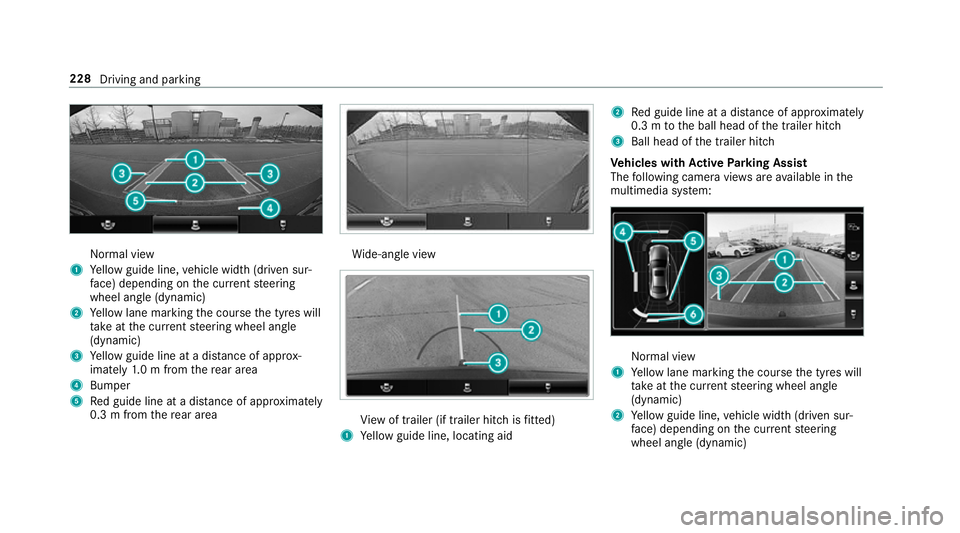
Normal view
1 Yello wg uide line, vehicle widt h(driven sur‐
fa ce) depending on thec urrent steering
wheel angle (dynamic)
2 Yello wl ane markin gthe course thet yres will
ta ke atthec urrent steering wheel angle
(dynamic)
3 Yello wg uide line at adista nce of appr ox‐
imatel y1.0mf romt herear area
4 Bumper
5 Redg uide line at adista nce of appr oximately
0. 3mf romt herear area Wi
de-angle view Vi
ew of trailer (if trailer hitc hisfitted)
1 Yello wg uide line, locating aid 2
Redg uide line at adista nce of appr oximately
0. 3mtot he ball head of thet railer hitch
3 Ball head of thet railer hitch
Ve hicles with Activ eP arking Assist
The following camera vie wsarea vailable in the
multimedia sy stem: Normal view
1 Yello wl ane markin gthe course thet yres will
ta ke atthec urrent steering wheel angle
(dynamic)
2 Yello wg uide line, vehicle widt h(driven sur‐
fa ce) depending on thec urrent steering
wheel angle (dynamic) 228
Driving and parking
Page 233 of 585
The 360° Camer
aisonlyana id. It is no tasub‐
st itut efor your attentio ntothe sur roundings.
The responsibility fors afem anoeuvring and
parking remains wit hyou. Mak esuret hat there
ar enop ersons, animals or objects in the
manoeuvring area whil emanoeuvring and park‐
ing in parking spaces.
The sy stem evaluates images from thef ollowing
cameras:
R Reversing camera
R Front camera
R Twos ide cameras in theo utside mir rors
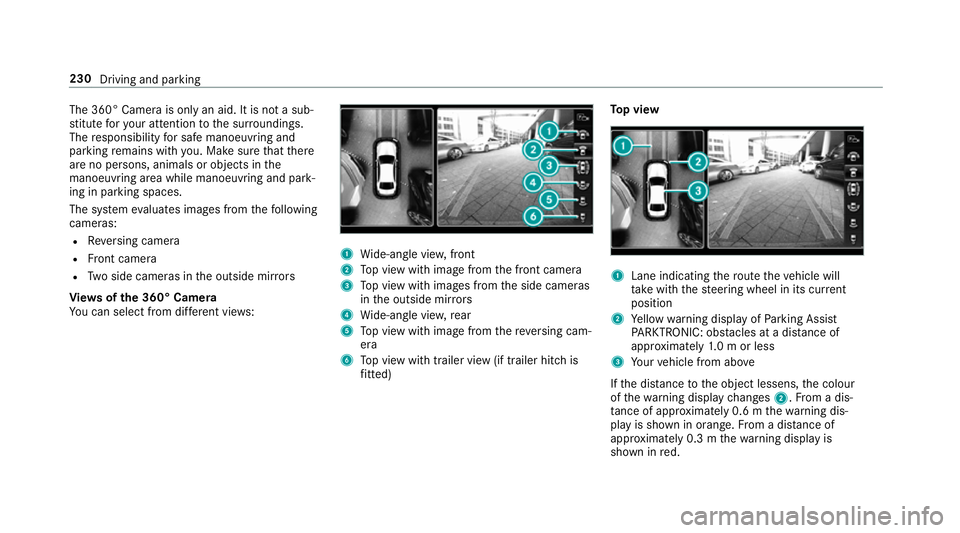
Vi ew soft he 360 °Camera
Yo uc an select from dif fere nt vie ws: 1
Wide-angle vie w,front
2 Topv ieww ithi mag efromt he front camera
3 Topv ieww ithi mages from thes ide cameras
in theo utside mir rors
4 Wide-angle vie w,rear
5 Topv ieww ithi mag efromt hereve rsing cam‐
era
6 Topv ieww itht railer vie w(if trailer hitc his
fi tted) To
pv iew 1
Lane indicating ther out ethe vehicle will
ta ke wit hthe steering wheel in its cur rent
position
2 Yello ww arning displa yofParking Assist
PA RKTRONIC: obstacles at adista nce of
appr oximatel y1.0morl ess
3 Your vehicle from abo ve
If th ed ista nce totheo bjec tlessens, thec olour
of thew arning displa ychanges 2.Fromad is‐
ta nce of appr oximatel y0.6mt hewarning dis‐
pla yiss hown in orange. From adistan ce of
appr oximatel y0.3mt hewarning displa yis
shown in red. 230
Driving and parking
Page 234 of 585
When
Parking Assis tPARKTRONIC is operational
an dnoo bjectisd etected, thes egment softhe
wa rning displa yareshown in grey.
% Ifth ee ntir esystemf ails, thes egment sof
th ew arning displa yareshown in red. The
indicator lam ponthePARKTRONI Cbutton
light supa ndthe é symbol appear sin
th em ultifunction displa y.
If th es ystemf ails at ther ear ,the displa yof
th es egment schanges as follo ws:
R The rear segment sareshown in red
when reve rsing.
R The rear segment sarehidde nwhen driv‐
ing forw ards.
If Pa rking Assis tPARKTRONIC is deactivated,
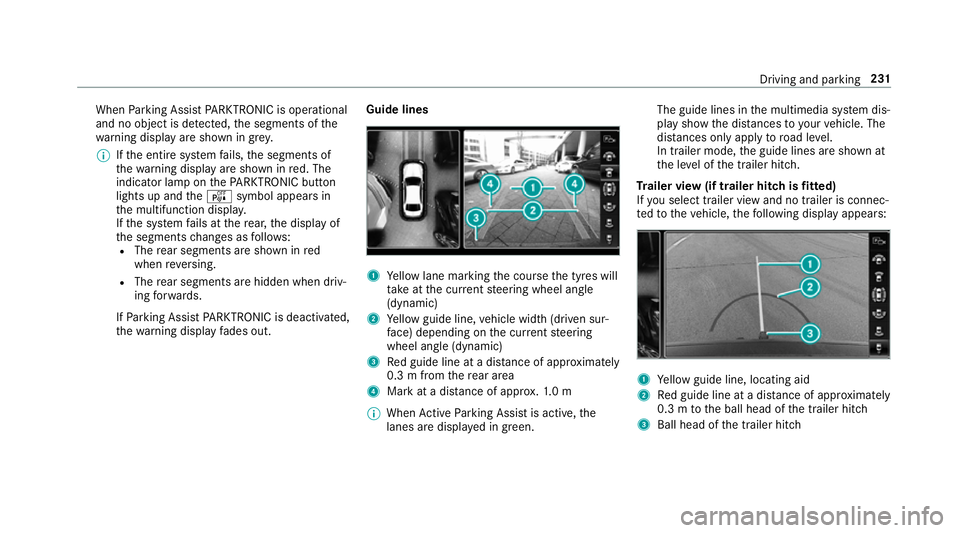
th ew arning displa yfades out. Guid
elines 1
Yello wl ane markin gthe course thet yres will
ta ke atthec urrent steering wheel angle
(dynamic)
2 Yello wg uide line, vehicle widt h(driven sur‐
fa ce) depending on thec urrent steering
wheel angle (dynamic)
3 Redg uide line at adista nce of appr oximately
0. 3mf romt herear area
4 Markatad istance of appr ox.1 .0 m
% When ActiveP arking Assis tisactive, the
lanes ar edispla yeding reen. The guide lines in
them ultimedia sy stem dis‐
pla yshowt he dis tances toyour vehicle. The
dis tances only apply toroad le vel.
In trailer mode, theg uide lines ar eshown at
th el eve loft he trailer hitch.
Tr aile rview( if traile rhitchisf itted)
If yo us elect trailer vie wand no trailer is connec‐
te dtot hevehicle, thef ollowing displa yappears: 1
Yello wg uide line, locating aid
2 Redg uide line at adista nce of appr oximately
0. 3mtot he ball head of thet railer hitch
3 Ball head of thet railer hitch Driving and parking
231
Page 235 of 585
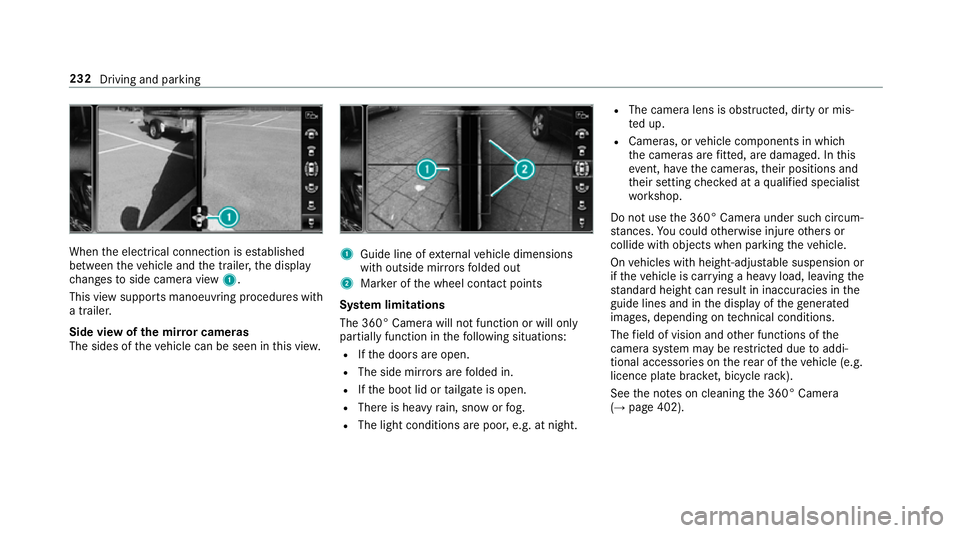
When
thee lectrical connection is es tablished
between thev ehicle and thet railer ,the display
ch anges toside camer aview 1.
This vie wsupports manoeuvring procedures with
at railer.
Side vie wofthe mir rorc ameras
The side softhevehicle can be seen in this vie w. 1
Guide line of extern al vehicle dimensions
wit ho utside mir rors folded out
2 Markeroft he wheel contact points
Sy stem limitations
The 360° Camera will no tfunction or will only
partiall yfunction in thef ollowing situations:
R Ifth ed oor sareopen.
R The side mir rors aref olded in.
R Ifth eb ootlid or tailgat eiso pen.
R Ther eish eavyrain, sno worfog.
R The light conditions ar epoor ,e.g. at night. R
The camer alens is obstructed, dirty or mis‐
te du p.
R Cameras, or vehicle componentsinw hich
th ec ameras ar efitted, ar edamaged .Inthis
eve nt, ha vethec ameras, their position sand
th eir setting checkedataq ualified specialist
wo rkshop.
Do no tuse the3 60° Camer aunder suc hcircum‐
st ances. Youc ouldotherwise injur eother sor
collide wit hobjectsw hen parking thev ehicle.
On vehicles wit hheight-adjus table suspension or
if th ev ehicle is car rying aheavy load, leavin gthe
st andar dheigh tcan result in inaccuracies in the
guide lines and in thed ispla yoft hegenerated
ima ges, depending on tech nica lconditions.
The field of vision and other functions of the
came rasystem ma yberestricted due toaddi‐
tional accesso ries on ther ear of thev ehicle (e.g.
licence plat ebrack et,b icyc le rack ).
See then otes on cleaning the3 60° Camera
(→ pag e402). 232
Driving and parking
Page 239 of 585
&
WARNING Risk of accident du etovehi‐
cle swinging out while parking or pulling
out of aparking space
While parking or exitin gap arkin gspace, the
ve hicle swings out and can driv eontoa reas
of theo ncoming lane.
This could cause youtoc ollidewitho bjects
or other road users. #
Paya ttention toobject sand other road
users. #
Wher enecessar y,stop thev ehicle or
cancel thep arking procedur ewith
Ac tiveP arking Assist. #
If,fore xamp le,the Engage reverse gear mes‐
sag eappear sinthe multimedia sy stem dis‐
play: select thec orresponding transmission
position.
The vehicle drives int othe selected parking
space.
On completion of thep arking procedure, the
Active Parking Assist finished, take contro lofthe vehicle.
displaymessa geappears. Further
manoeuvring ma ystillben ecessar y. #
Afterc ompletion of thep arking procedure,
safeguar dthe vehicle agains trolling away.
When requ ired bylegal requirements or local
conditions: tur nthe wheels towa rdst he kerb.
% Youc an stop thev ehicle and chang ethe
transmiss ionp osit iond urin gthe parking pro‐
cedure. The sy stem then calculates anew
ve hicle path. The parking procedur ecan
th en be continued. If no ne wvehicle pat his
av ailable, thet ransmission position will be
ch anged again. If thev ehicle has no tyet
re ached thep arking space, thep arking pro‐
cedur ewill be cancelled, should agear be
ch anged.
Exiting aparki ng space wit hActive Parking
Assist
Re quirement:
Yo uc an on lyex itap arkin gspace wit hActive
Pa rking Assis tifyou ha veprev iousl yparke dt he
ve hicle wit hActiv eParking Assist. Please no
tethat youa re re sponsible fort he vehi‐
cle and sur rounding sduring thee ntir eparking
procedure. #
Startt he vehicle. #
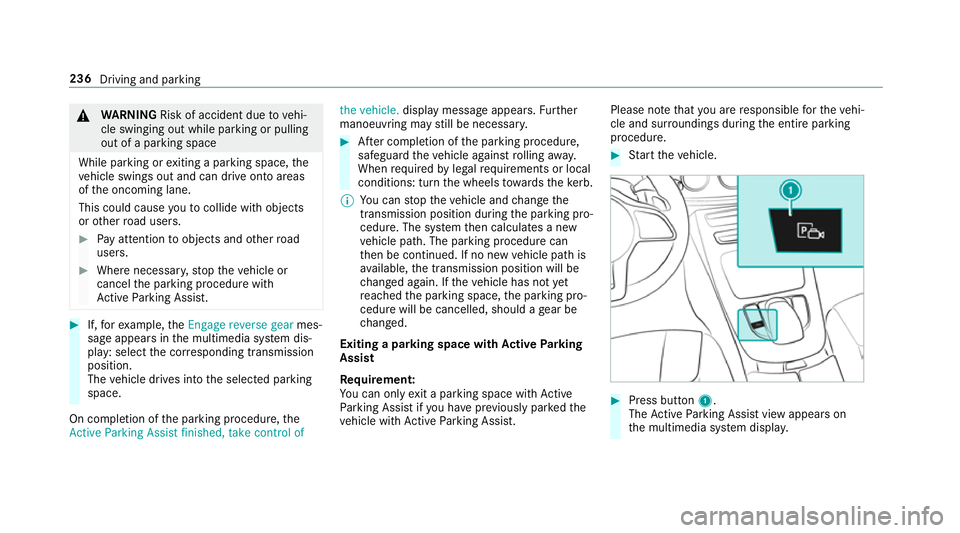
Press button 1.
The ActiveP arking Assis tviewa ppear son
th em ultimedia sy stem displa y. 236
Driving and parking
Page 244 of 585
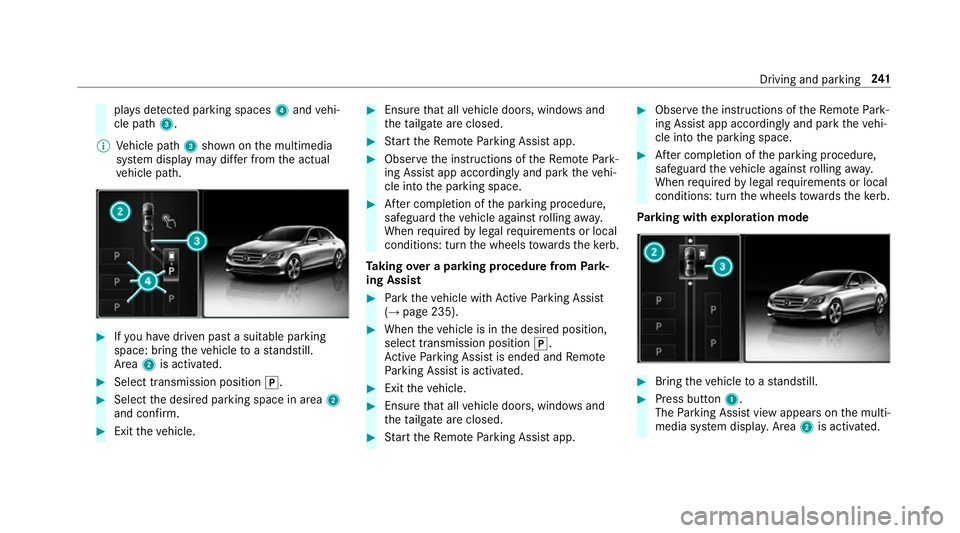
pla
ysdetected pa rking spaces 4and vehi‐
cle path 3.
% Vehicle path 3shown on them ultimedia
sy stem displa ymaydifferf romt he actual
ve hicle path. #
Ifyo uh ave driven pas tasuitable parking
space: bring thev ehicle toas tandstill.
Area 2is activated. #
Select transmissio nposition j. #
Select thed esired parking space in area 2
and confi rm. #
Exit thev ehicle. #
Ensur ethat all vehicle doors, windo wsand
th et ailgat eareclosed. #
Startt he Remo teParking Assis tapp. #
Obser vethei nstruction softheRemo tePark‐
ing Assis tapp accordingly and par kthe vehi‐
cle int othe parking space. #
Afterc ompletion of thep arking procedure,
safeguar dthe vehicle agains trolling away.
When requ ired bylegal requirements or local
conditions: tur nthe wheels towa rdst he kerb.
Ta king overap arkin gproce du re from Park‐
ing Assist #
Park thev ehicle wit hActiv eParking Assist
(→ pag e235). #
When thev ehicle is in thed esired position,
select transmission position j.
Ac tiveP arking Assis tisended and Remo te
Pa rking Assis tisactivated. #
Exit thev ehicle. #
Ensur ethat all vehicle doors, windo wsand
th et ailgat eareclosed. #
Startt he Remo teParking Assis tapp. #
Obser vethei nstruction softheRemo tePark‐
ing Assis tapp accordingly and par kthe vehi‐
cle int othe parking space. #
Afterc ompletion of thep arking procedure,
safeguar dthe vehicle agains trolling away.
When requ ired bylegal requirements or local
conditions: tur nthe wheels towa rdst he kerb.
Pa rking wit hexploration mode #
Bring thev ehicle toas tandstill. #
Press button 1.
The Parking Assis tviewa ppear sonthe multi‐
media sy stem displa y.Area 2is acti vated. Driving and parking
241
Page 245 of 585
#
Toactivat eRemo teParking Assist, select
transmissio nposition j. #
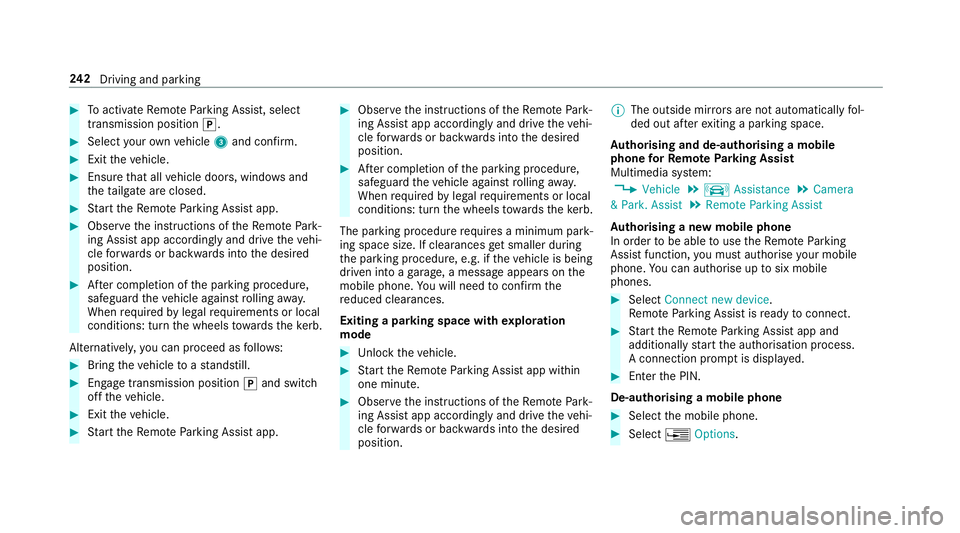
Selec tyour ownv ehicle 3and confirm. #
Exit thev ehicle. #
Ensur ethat all vehicle doors, windo wsand
th et ailgat eareclosed. #
Startt he Remo teParking Assis tapp. #
Obser vethei nstruction softheRemo tePark‐
ing Assis tapp accordingly and driv ethe vehi‐
cle forw ards or backwards int othe desired
position. #
Afterc ompletion of thep arking procedure,
safeguar dthe vehicle agains trolling away.
When requ ired bylegal requirements or local
conditions: tur nthe wheels towa rdst he kerb.
Alternatively ,you can proceed as follo ws: #
Bring thev ehicle toas tandstill. #
Engage transmission position jand switch
of ft he vehicle. #
Exit thev ehicle. #
Startt he Remo teParking Assis tapp. #
Obser vethei nstruction softheRemo tePark‐
ing Assis tapp accordingly and driv ethe vehi‐
cle forw ards or backwards int othe desired
position. #
Afterc ompletion of thep arking procedure,
safeguar dthe vehicle agains trolling away.
When requ ired bylegal requirements or local
conditions: tur nthe wheels towa rdst he kerb.
The parking procedu re requiresaminimum park‐
ing space size .Ifclearances getsmaller during
th ep arking procedure, e.g. if thev ehicle is being
driven int oagarage, amessag eappear sonthe
mobile phone. Youw ill need toconfir mthe
re duced clearances.
Exiting aparking space wit hexploration
mode #
Unloc kthe vehicle. #
Startt he Remo teParking Assis tapp within
one minute. #
Obser vethei nstruction softheRemo tePark‐
ing Assis tapp accordingly and driv ethe vehi‐
cle forw ards or backwards int othe desired
position. %
The outside mir rors aren otautomaticall yfol‐
ded out af tere xiting aparkin gspace.
Au thorising and de-authorising amobile
phone forR emo teParking Assist
Multimedia sy stem:
, Vehicle .
k Assistance .
Camera
&P ark. Assist .
Remote Parkin gAssist
Au thorisin ganewmobil ephone
In orde rtobea bletouse theR emo teParking
Assis tfunction ,you mus tauthorise your mobile
phone. Youc an authorise up tosix mobile
phones. #
Select Connect new device .
Re mo teParking Assis tisready toconnect. #
Startt he Remo teParking Assis tapp and
additionall ystart thea uthorisation process.
Ac onnection prom ptis displa yed. #
Ente rthe PIN.
De-authorising amobile phone #
Select them obile phone. #
Select ¥Options. 242
Driving and pa rking
Page 253 of 585
ma
ybei nterrupte data nytime if yous teer
slightl yinthe opposit edirection or accelera te.
Sy stem limitations
Either acourse-cor recting brak eappli cation
appropria teto thed riving situation ,ornoneat
all, ma yoccur in thef ollowing situations:
R Vehicles or obs tacles, e.g. crash ba rriers, are
located on bo thsides of your vehicle.
R Avehicle approaches tooc losely on thes ide.
R Youh avea dop tedas porty driving stylew ith
high cornering speeds.
R Youb rake or accelerat esignificantl y.
R Adriving sa fety sy stem inter venes, su chas
ESP ®
or ActiveB rake Assi st.
R ESP ®
is deacti vated.
R Aloss of tyr epressur eorad efectivetyreis
de tected.
R Youa redrivin gwithat railer and thee lectri‐
cal connection tothet railer hitc hhas been
cor rectly es tablished. Ac
tivatin gordeactivatin gBlind Spo tAssist
or Activ eB lind Spo tAssist
Multimedia sy stem:
, Vehicle .
k Assistance .
Blind
Spot Assist #
Activate Oor deacti vate ª thef unction. Ac
tiv eL aneK eeping Assist Fu
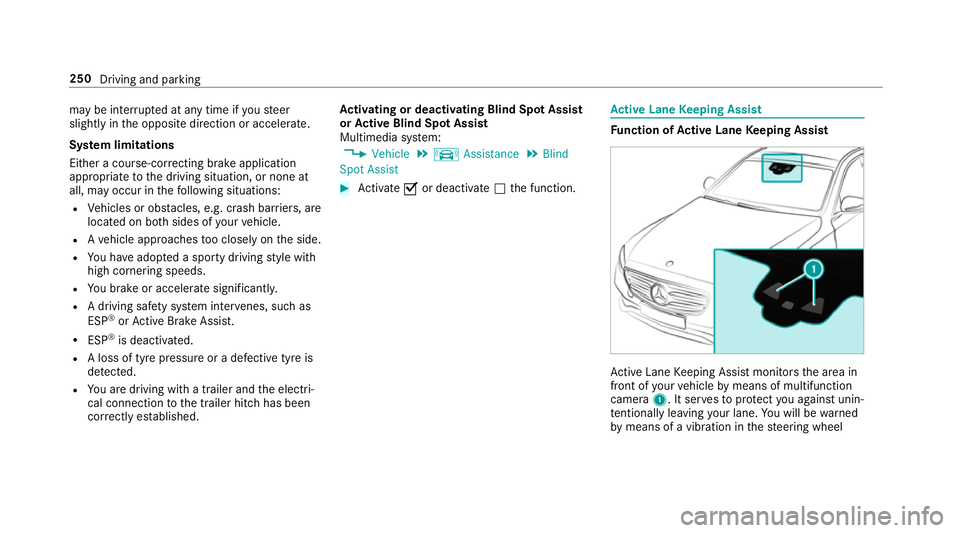
nction of Activ eL aneK eeping Assist Ac
tiveL aneK eeping Assis tmonitor sthe area in
front of your vehicle bymeans of multifunction
camera 1.Itserve stop rotect youa gains tunin‐
te ntional lyleavin gyour lane. Youw ill be warned
by means of avibration in thes teering wheel 250
Driving and parking
Page 254 of 585
and
acourse-cor recting brak eappli cation guides
yo ub acki ntoy our lane.
Yo ua rewa rned byvibration pulses in thes teer‐
ing wheel in thef ollowing circums tances:
R ActiveL aneK eeping Assis tdetects lane
markings.
R Afront wheel passe soverthe lane markings.
Yo uw ill also be guided bac kintoy our lane by
means of acourse-cor recting brak eappli cation
if th ef ollowing condition sareme t:
R ActiveL aneK eeping Assis tdetects lane
markings on bo thsides.
R Afront wheel drives overas olidl ane mark‐
ing.
Whe ther aw arning is issued and when this
occur salso depends on thes elected sensitivity
setting (s tanda rdor adaptive).
If yo uf ail toadap tyour driving style, Ac tiveL ane
Ke eping Assis tcan neither reduce ther isk of an
accident nor override thel aw sofp hysics. It can‐
no ttak ei ntoa ccount road, weather or traf fic
conditions .Activ eLaneK eeping Assis tisonlyan
aid. Youa re re sponsible fort he dis tance tothe ve
hicle in front, forv ehicle speed, forb raking in
good time and fors taying in lane.
Ve hicles with Lane Tracking pac kage:Ifthe
lane markings ar esolid lines and youdon ot
re act tothew arning ,alane-cor recting brake
application can bring thev ehicle bac kintot he
original lane.
Ve hicles with Drivin gAssistanc epacka ge or
Driving Assistance Plus pa ckage: Ifyo udon ot
re act tothew arning ,alane-cor recting brake
application can bring thev ehicle bac kintot he
original lane. In thec ase of abroke nl ane mark‐
ing being de tected, abrake application will only
be mad eifavehicle has been de tected in the
adjacent lane .Oncoming vehicles, overtaking
ve hicles and vehicles in adjacent lanes can be
de tected.
The brak eappli cation is available in thes peed
ra ng eb etwe en 60 km/h and 200 km/h. If
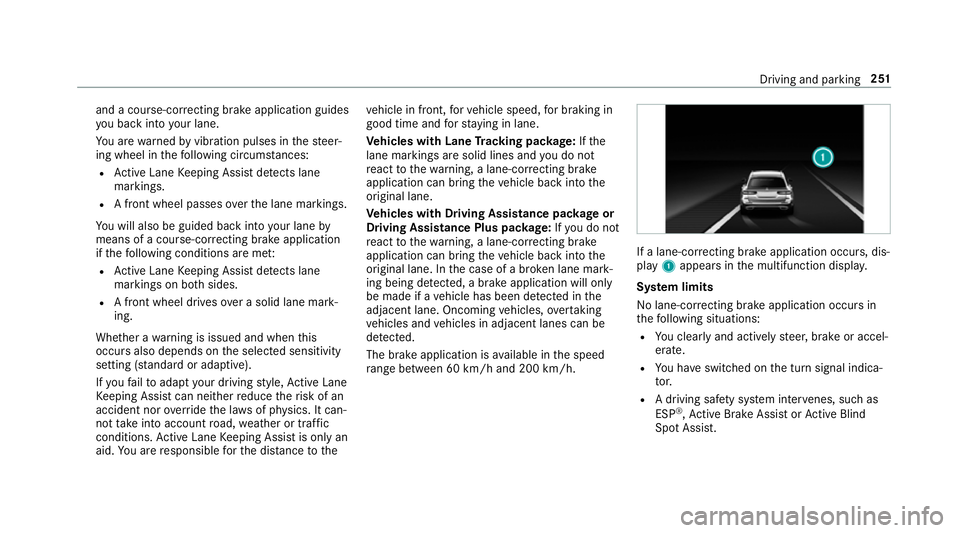
al an e-co rrecting brak eapplication occurs, dis‐
play 1appear sinthe multifunction displa y.
Sy stem limits
No lane-cor recting brak eappli cation occu rsin
th ef ollowing situations:
R Youc lear lyand activel ysteer,b rake or accel‐
erate.
R Youh ave switched on thet urns ignal indica‐
to r.
R Adriving sa fety sy stem inter venes, su chas
ESP ®
,A ctiv eBrake Assi stor ActiveB lind
Spo tAssist. Driving and pa
rking 251
Page 265 of 585
R
Limiter (→ page206)
R ActiveD ista nce Assi stDISTRONIC
(→ page 209)
* NO
TEEngine dama gedue toexc essively
high engine speeds The engine will be damaged if
youd rive with
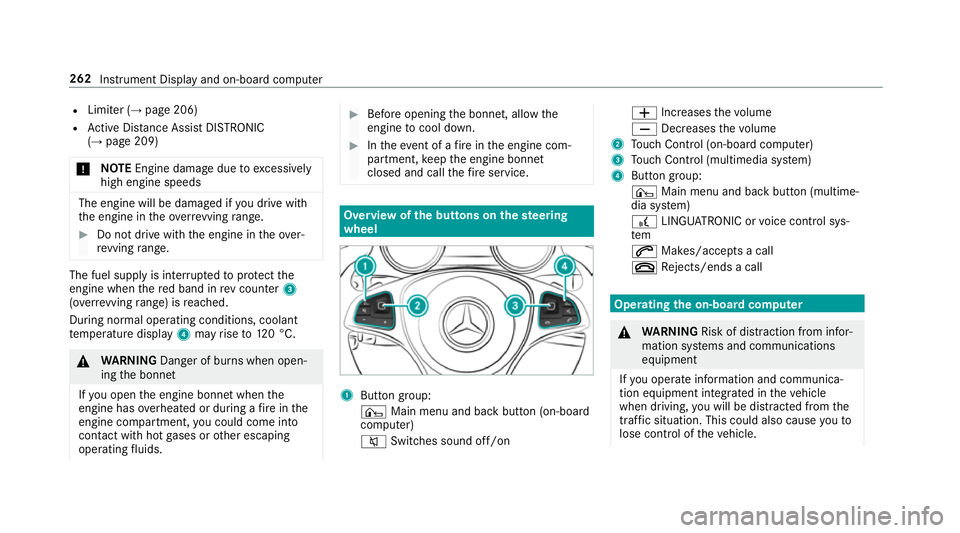
th ee ngine in theo verrev ving range. #
Do no tdrive with th eengine in theo ver‐
re vving range. The fue
lsuppl yisi nterrupted toprotect the
engine when ther ed band in revc ounter 3
(o ve rrev ving range) is reached.
During no rmal operatin gconditions, coolant
te mp eratur edisplay 4mayrise to120° C. &
WARNING Danger of bu rnsw hen open‐
ing theb onnet
If yo uo pen thee ngine bonn etwhen the
engine has overheated or during afireint he
engine compartment, youc ould come into
contact wit hhotgases or other escaping
operating fluids. #
Befor eopening theb onnet ,allowt he
engine tocool down. #
Inthee vent of afireint he engine com‐
partment, keep thee ngine bonn et
closed and cal lthe fire service. Overvie
wofthe buttons on thes teering
wheel 1
Buttong roup:
¤ Main menu and ba ckbutton (on-board
computer)
8 Switches sound off/on W
Increases thev olume
X Decreases thev olume
2 Touc hC ontrol (on-boar dcompu ter)
3 Touc hC ontrol (multimedia sy stem)
4 Button group:
¤ Main menu and bac kbutton (multime‐
dia sy stem)
£ LINGU ATRO NIC or voice control sys‐
tem
6 Makes/accepts acall
~ Rejects/end sacall Ope
ratin gthe on-boar dcom puter &
WARNING Risk of di stra ction from infor‐
mation sy stems and communications
equipment
If yo uo perat einformation and communica‐
tio ne quipment integ ratedint hevehicle
when driving, youw ill be distracted from the
traf fics ituation. Thi scould also cause youto
lose control of thev ehicle. 262
Instrument Displa yand on-boar dcomputer