ESP MERCEDES-BENZ E-CLASS ESTATE 2017 Workshop Manual
[x] Cancel search | Manufacturer: MERCEDES-BENZ, Model Year: 2017, Model line: E-CLASS ESTATE, Model: MERCEDES-BENZ E-CLASS ESTATE 2017Pages: 585, PDF Size: 11.8 MB
Page 216 of 585
#
Continue drivin gwithc area nd be ready
to brake, particular lyifAc tiveD ista nce
Assi stDISTRONI Cwarns you. &
WARNING Risk of accident from acceler‐
ation or braking byActiveD ista nce
Assi stDISTRONIC
Ac tiveD ista nce Assi stDISTRONI Cmayaccel‐
erat eorb rake inthef ollowing cases, for
ex ample:
R Ifth ev ehicle pulls away usin gActiv eDis‐
ta nce Assi stDISTRONIC.
R Ifth es tore ds peed is called up and is
considerabl yfasterors lowe rthan the
cur rently driven speed.
R IfAc tiveD ista nce Assi stDISTRONI Cno
longer de tects avehicle in front or does
no treact toreleva nt objects. #
Alw aysc arefully obser vethet raffic con‐
dition sand be ready tobrak eata ll
times. #
Take intoa ccount thet raffic situation
befor ecallin gupt hestored speed. &
WARNING Risk of accident du etoinsuf‐
fi cient decele ratio nbyA ctiveDista nce
Assi stDISTRONIC
Ac tiveD ista nce Assi stDISTRONI Cbrakes
yo ur vehicle wit hupto50%oft he maximum
possible deceleration. If this decele ratio nis
no ts ufficient, ActiveD ista nce Assi st
DISTRONI Calertsy ou wit havisual and
acoustic warning. #
Inthese cases, adjus tyour speed and
ke ep asufficient di stance. #
Brak ethe vehicle yourself and/or take
ev asiv eaction. &
WARNING Risk of accident du etoActive
Dis tance Assi stDISTRONI Cstillb eing
activated when youl eave thed rive r's
seat
If yo ul eave thed rive r's seat while thev ehicle
is being braked byActiveD ista nce Assi st
DISTRONI Conly,the vehicle can rollaw ay. #
Alw aysd eactivat eActiv eDista nce
Assi stDISTRONI Cand secur ethe vehi‐
cle topreve nt it from rolling away
befor eyou lea vethed rive r's seat. Re
quirements:
R The vehicle has been star ted.
R The elect ricp arkin gb rake isreleased.
R ActiveP arking Assis tisnotbeing used to
par kthe vehicle or toexit from aparking
space.
R ESP ®
is activated, but is no tinter vening.
R The transmission is in position h.
R The driver' sdoor,front passenger door and
th er ear door sareclosed.
R The bonne tisclosed. Drivin
gand parking 213
Page 219 of 585
from
thea ctiv etop assivestatus ,the è sym‐
bol is shown as enlar geda nd flashes yello w.
Once thes ystemisp assivethe è symbol is
shown as gr eyinthem ultifunction displa y.
The sy stem ma ybeimpaired or ma ynotfunction
in thef ollowing ins tances:
R Ifth er eisp oor visibility ,e.g. due toinsuf fi‐
cient illumination of ther oad, or due tosno w,
ra in, fogorh eavy spr ay.
R Ifth er eisg lare, e.g. from oncoming traf fic,
di re ct sunlight or reflection from other vehi‐
cles (e.g. if thec arriag ew ay iswe t).
R Ifth ew indscreen is dirty ,miste du p, dam‐
aged or co vered, fori ns tance byasticker,in
th ev icinit yoft he camera.
R If no, or se veral, unclear lane markings are
presen tfor one lane, e.g. in aconstruction
area.
R Ifth el ane marking sarewo rnaw ay,d arkor
co veredu p, e.g. bydirtors now.
R The dis tance tothev ehicle in front is too
small and thel ane marking sthus canno tbe
de tected. R
Ifth el ane marking schang equickl y,e.g.
lanes branc hoff,c ross one ano ther or
mer ge.
R The car riag ewa yisn arrow and winding.
R Ifth er ea rehighly variable shade conditions
on thec arriag ewa y.
R Ifth er ea reobs tacle ssuchaso bject mar kers
on thel ane or projecting out int othe lane.
The sy stem does no tprovide assis tance in the
fo llowing conditions:
R Onvery shar pbends.
R When towing atrailer.
R Ifyo ua ctivel ychang elane without swit ching
on thet urns ignal indicator.
R Ifyo us wit ch on thet urns ignal indicator and
th ec onditions fora ctivating ActiveL ane
Chang eAssistaren otfulfilled.
Ac tivatin gActive Ste ering Assist
Requ irements:
R ESP ®
mus tbea ctivated, but no tinter vening. R
ActiveD ista nce Assi stDISTRONI Cisactiva‐
te d. #
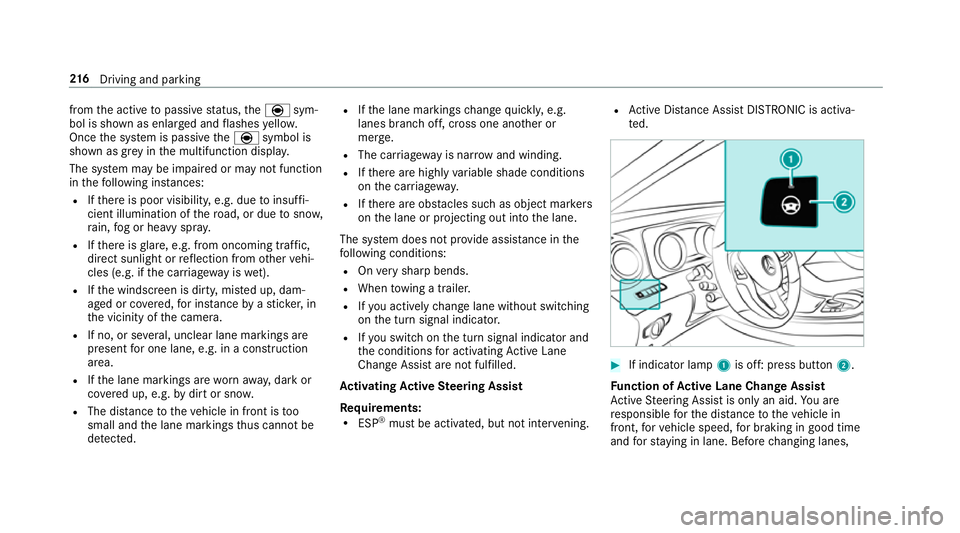
If indicator lamp 1is off: press button 2.
Fu nction of Activ eL aneC hang eAssist
Ac tiveS teering Assis tisonlyana id.Youa re
re sponsible fort he dis tance tothev ehicle in
front, forv ehicle speed, forb raking in good time
and fors tayi ng in lane. Befor echanging lanes, 216
Driving and pa rking
Page 220 of 585
mak
esuret hat then eighbouring lane is free
(shoulder view).
% The availabilit yofthefollowing function is
countr y-dependent.
Ac tiveS teering Assis tremain sactiv eevenift he
tur ns igna lindica toriss witched on. ActiveS teer‐
ing Assis tthen assists thed rive rw hen changing
lane sbya pplying steering torques toinitiat ethe
lane change.
Assis tance when changing lane sisprovide difa ll
th ef ollowing condition sareme t:
R Youa redrivin gonam otorway or high-speed
multi-lane major road wit hmultiple lane sin
th ed irection of tr avel.
R The neighbouring lane is free and separated
by ab roke nl ane marking.
R The driven spee disbetwe en 80 km/h and
18 0k m/h.
R The tur nsigna lindicator is switched on for
longer than tw oseconds.
If th es ystem is impaired, ActiveL aneC hange
Assi stma ybec ancelled. If an inter ruption
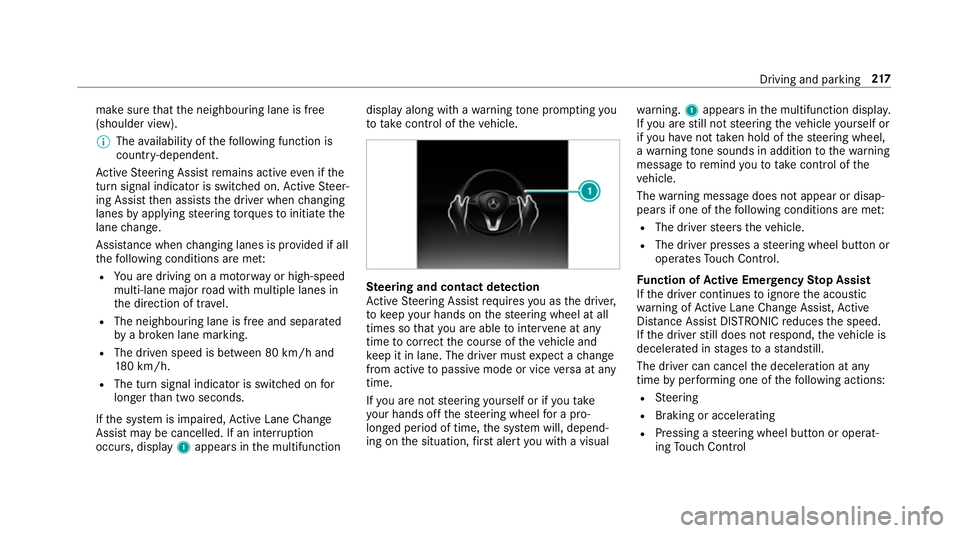
occurs, display 1appear sinthe multifunction displa
yalong wit hawarning tone prom pting you
to take control of thev ehicle. Ste
ering and contact de tection
Ac tiveS teering Assis trequires youast he driver,
to keep your hands on thes teering wheel at all
times so that youa reable tointer vene at any
time tocor rect thec ourse of thev ehicle and
ke ep it in lane. The driver mus texpect achange
from activ etopassivemode or vice versaata ny
time.
If yo ua renots teering yourself or if yout ake
yo ur hands of fthe steering wheel forap ro‐
longed period of time, thes ystemw ill, depend‐
ing on thes ituation ,first aler tyou wit havisual wa
rning. 1appear sinthe multifunction displa y.
If yo ua restill no tsteering thev ehicle yourself or
if yo uh ave nottaken hold of thes teering wheel,
aw arning tone sounds in additio ntothewarning
messag etoremind youtot akec ontrol of the
ve hicle.
The warning messag edoes no tappear or disap‐
pear sifo ne of thef ollowing condition sareme t:
R The driver steer sthe vehicle.
R The driver presses asteering wheel button or
operates Touc hC ontrol.
Fu nction of Activ eE me rgency Stop Assist
If th ed rive rc ontinues toigno rethea coustic
wa rning of ActiveL aneC hangeA ssist,A ctive
Dis tance Assi stDISTRONI Creduces thes peed.
If th ed rive rs tilld oes no trespond, thev ehicle is
decelerated in stages toas tandstill.
The driver can cancel thed eceleration at any
time byper form ing one of thef ollowing actions:
R Steering
R Braking or accelerating
R Pressing asteering wheel button or operat‐
ing Touc hC ontrol Drivin
gand parking 217
Page 226 of 585
Lo
weri ngthev ehicle #
Press but ton1.
Indicator lamp 2goes out. The vehicle is
adjus tedtot he height of thel asta ctiv edrive
program. Pa
rking Assis tPARKTRONIC Fu
nction of Parking Assis tPARKTRONIC Pa
rking Assis tPARKTRONIC is an electronic
pa rkinga ssistanc esystem wit hultrasound. It
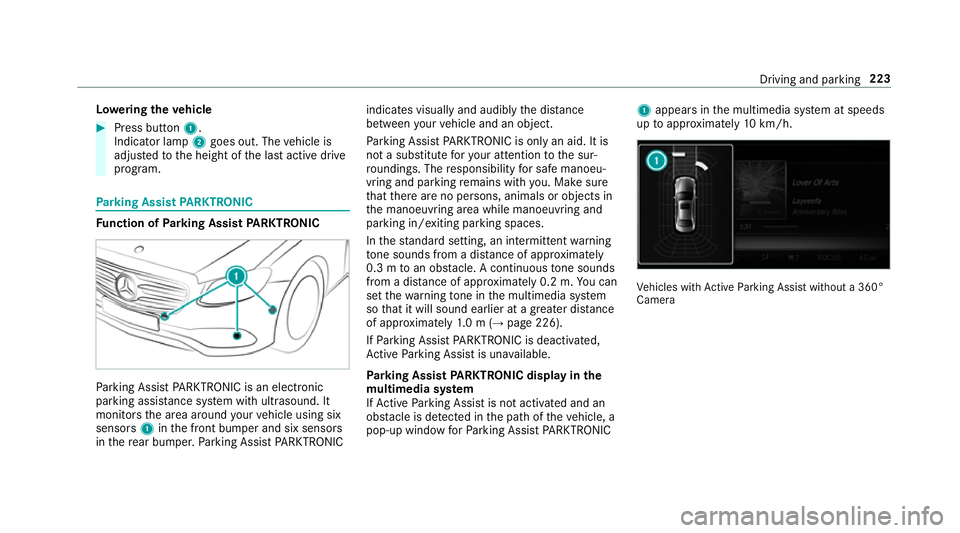
monitor sthe area around your vehicle using six
sensors 1inthef ront bumper and six sensors
in ther ear bumper .Parking Assis tPARKTRONIC indicates visually an
daudibl ythe dis tance
betwee nyour vehicle and an object.
Pa rking Assis tPARKTRONIC is only an aid. It is
no tas ubstitut efor your attentio ntothe sur‐
ro undings. The responsibility fors afem anoeu‐
vring and parking remains wit hyou. Mak esure
th at ther ea reno persons, animals or objects in
th em anoeuvring area while manoeuvring and
parking in/exitin gparking spaces.
In thes tandar dsetting ,ani ntermit tent wa rning
to ne sounds from adista nc eofa pproximately
0. 3mtoano bstacle .Ac ontinuou stone sounds
from adista nc eofa pproximatel y0.2m. Youc an
se tthe warning tone in them ultimedia sy stem
so that it will soun dearlier at agreater dis tance
of appr oximatel y1.0m( →pag e226).
If Pa rking Assis tPARKTRONIC is deactivated,
Ac tiveP arking Assis tisunavailable.
Pa rking Assis tPARKTRONIC displa yinthe
mu ltimedia sy stem
If Ac tiveP arking Assis tisnotactivated and an
obs tacle is de tected in thep athoft hevehicle, a
pop-up windo wforParking Assis tPARKTRONIC 1
appear sinthe multimedia sy stem at speeds
up toappr oximatel y10k m/h. Ve
hicles wit hActiv eParking Assis twithout a360°
Camera Driving and parking
223
Page 230 of 585
Re
versing camera Fu
nction of ther eve rsing camera If
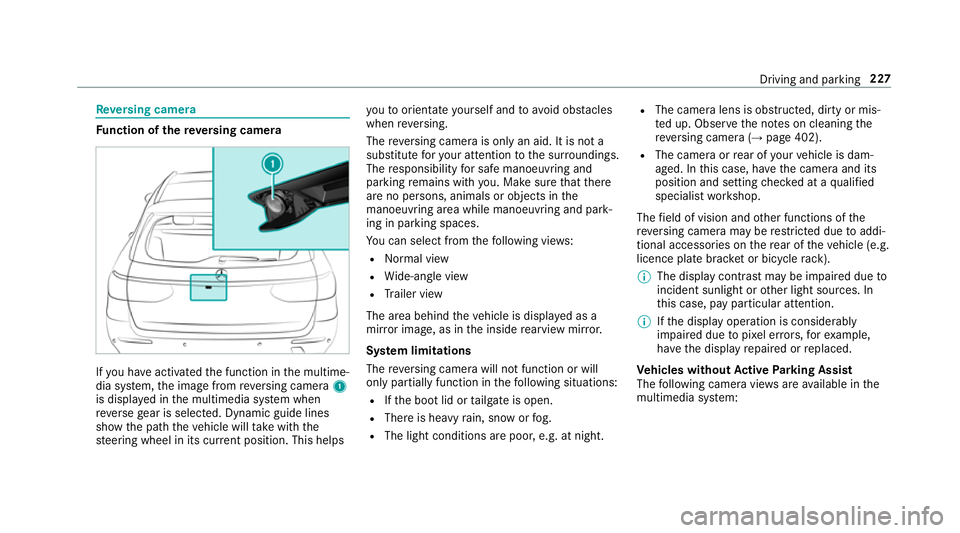
yo uh ave activated thef unction in them ultime‐
dia sy stem, thei mag efromr eve rsing camera 1
is displa yedint he multimedia sy stem when
re ve rseg ear is selected. Dynamic guide lines
sho wthe pat hthe vehicle will take wit hthe
st eering wheel in its cur rent position. Thi shelps yo
utoo rientat eyourself and toavo id obs tacles
whe nreve rsing.
The reve rsing camer aisonlyana id. It is no ta
substitut efor your attentio ntothe sur roundings.
The responsibility fors afem anoeuvring and
parking remains wit hyou. Mak esuret hat there
ar enop ersons, animals or objects in the
manoeuvring area whil emanoeuvring and park‐
ing in parking spaces.
Yo uc an select from thef ollowing vie ws:
R Normal view
R Wide-angle view
R Trailer view
The area behin dthe vehicle is displa yedasa
mir rorimage, as in thei nside rearvie wmirro r.
Sy stem limitations
The reve rsing camera will no tfunction or will
onl ypartiall yfunction in thef ollowing situations:
R Ifth eb ootlid or tailgat eiso pen.
R Ther eish eavyrain, sno worfog.
R The light conditions ar epoor ,e.g. at night. R
The camer alens is obstructed, dirty or mis‐
te du p. Obser vethen otes on cleaning the
re ve rsing camer a(→pag e402).
R The camera or rear of your vehicle is dam‐
aged. In this case, ha vethec amer aand its
position and setting checkedataq ualified
specialis tworks hop.
The field of vision and other functions of the
re ve rsing camera ma yberestricted due toaddi‐
tional accesso ries on ther ear of thev ehicle (e.g.
licence plat ebrack et or bicycle rack ).
% The displa ycontras tmaybe impaired due to
incident sunligh torother light sources. In
th is case, pa yparticular attention.
% Ifth ed ispla yoperation is considerably
impaired due topixel er rors,for example,
ha ve thed ispla yrepaired or replaced.
Ve hicles without Activ eP arking Assist
The following camera vie wsarea vailable in the
multimedia sy stem: Driving and parking
227
Page 233 of 585
The 360° Camer
aisonlyana id. It is no tasub‐
st itut efor your attentio ntothe sur roundings.
The responsibility fors afem anoeuvring and
parking remains wit hyou. Mak esuret hat there
ar enop ersons, animals or objects in the
manoeuvring area whil emanoeuvring and park‐
ing in parking spaces.
The sy stem evaluates images from thef ollowing
cameras:
R Reversing camera
R Front camera
R Twos ide cameras in theo utside mir rors
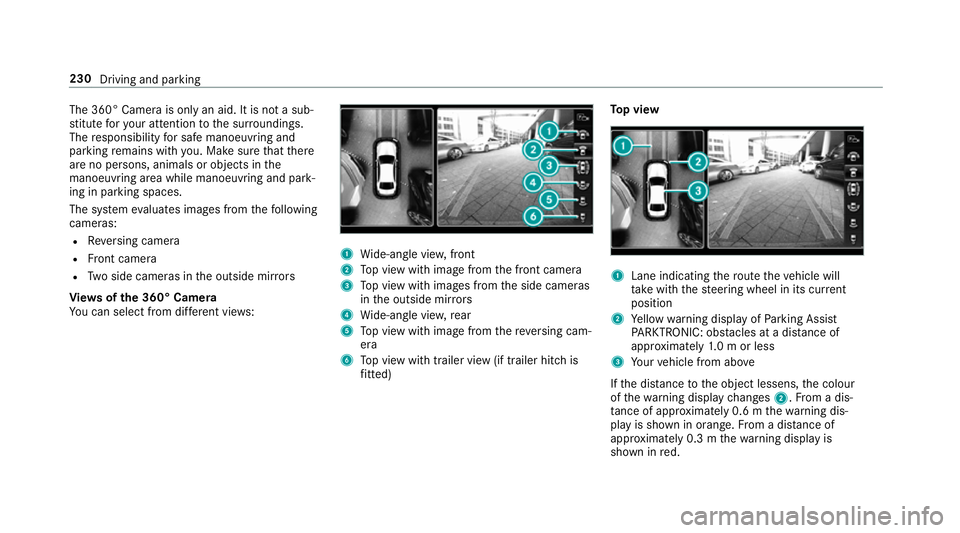
Vi ew soft he 360 °Camera
Yo uc an select from dif fere nt vie ws: 1
Wide-angle vie w,front
2 Topv ieww ithi mag efromt he front camera
3 Topv ieww ithi mages from thes ide cameras
in theo utside mir rors
4 Wide-angle vie w,rear
5 Topv ieww ithi mag efromt hereve rsing cam‐
era
6 Topv ieww itht railer vie w(if trailer hitc his
fi tted) To
pv iew 1
Lane indicating ther out ethe vehicle will
ta ke wit hthe steering wheel in its cur rent
position
2 Yello ww arning displa yofParking Assist
PA RKTRONIC: obstacles at adista nce of
appr oximatel y1.0morl ess
3 Your vehicle from abo ve
If th ed ista nce totheo bjec tlessens, thec olour
of thew arning displa ychanges 2.Fromad is‐
ta nce of appr oximatel y0.6mt hewarning dis‐
pla yiss hown in orange. From adistan ce of
appr oximatel y0.3mt hewarning displa yis
shown in red. 230
Driving and parking
Page 236 of 585
Selecting
aviewf or th e360°C amera
Re quirements:
R The Autoreversing camera function is selec‐
te dint he multimedia sy stem. #
Enga gereve rseg ear. #
Inthem ultimedia sy stem, select thed esired
vie w.
Switching reve rsing camer aautomatic mode
on/off
The reve rsing camer aisonlyana id. It is no ta
substitut efor your attentio ntothe sur roundings.
The responsibility fors afem anoeuvring and
parking remains wit hyou. Mak esuret hat no
persons, animals or objectse tc. areinthe
manoeuvring range. Paya ttention to your sur‐
ro unding sand be ready tobrak eata ll times.
Multimedia sy stem:
, Vehicle .
k Assistance .
Camera
&P ark. Assist .
Auto reversin gcamera #
Switc hthe function on Oor off ª. Opening
thec amer acove rofthe reve rsing
camera
Multimedia sy stem:
, Vehicle .
k Assistance .
Camera
&P ark. Assist #
Select Open camera cover.
% The camer acover closes automaticall yafter
some time or af terani gnitio ncycle.
Assigning thec amer aasaf avourite
Yo uc an call up thec amer aviewd irectly in the
multimedia sy stem byassignin gitasaf avourite. #
Press theò button on thet ouchpad or
contro ller.
The main function saredispla yed. #
Navigat edownwards twice.
The Favourites men uappears. #
Select New favourite. #
Select Vehicle . #
Select Camera. Ac
tiv eP arking Assist Fu
nction of Activ eP arking Assist
Ac tiveP arking Assis tisanelectronic pa rking
assis tance sy stem whic huses ultrasound and is
automaticall yactivated during forw ardt rave l.
The sy stem is operational at speeds of up to
appr oximatel y35k m/h.When all thec onditions
ar ef ulfilled, thec symbol appear sinthe
multifunction displa yand thes ystema utomati‐
cally sear ches fora nd measu resp arking spaces
on bo thsides of thev ehicle parallel and perpen‐
dicular tothed irection of tra vel. If ActiveP arking
Assis tisactivated, suitable parkin gspaces are
displa yedint he multimedia sy stem. The ë
symbol appear sinthe multifunction displa y.The
ar row sshowonw hichs ide of thec arriag eway
free parking spaces ar eloca ted.
The parkin gspace and, if necessar y,thep arking
direction can be selected as desired. Active
Pa rking Assis tcalculates asuitable vehicle path
and assists youinp arkingand exitin gthe park‐
ing space.
Ac tiveP arking Assis tchanges gear,a ccelerates,
brakes and steer sthe vehicle. Driving and parking
233
Page 237 of 585
Ac
tiveP arking Assis tisonlyana id. It is no ta
substitut efor your attentio ntothe sur roundings.
The responsibility fors afem anoeuvring and
parking remains wit hyou. Mak esuret hat no
persons, animals or objectse tc. areinthe
manoeuvring range.
Ac tiveP arking Assis tiscancelled if, among
ot her things ,one of thef ollowing actions is car‐
ri ed out:
R Youd eactivat eParking Assis tPARKTRONIC.
R Youd eactivat eActiv eParking Assist.
R Youb egin steering.
R Youa ppl ythe parking brake.
R Youe ngage j.
R ESP ®
inte rvenes.
R Youo pen thet ailgate.
Sy stem limitations of Activ eP arkin gAssist
Object slocated abo veor belo wthe de tection
ra ng eofA ctiveParking Assis tare notd etected
when thep arking space is being measured.
These ar ealso no ttaken in toaccount when the
parkin gmanoeuvr eiscalculated, e.g. overhang‐
ing loads, overhangs or loading ramp sofl orries or
theb oundaries of parking spaces. In some cir‐
cums tances, ActiveP arking Assis tmaytherefore
guide youi ntot he parking space prematurel y. &
WARNING Risk of accident du eto
object slocated abo veor belo wthe
de tection rang eofA ctiveParking Assist
If th er ea reobjects abo veor belo wthe
de tection range, thef ollowing situations may
arise:
R ActiveP arking Assis tmaysteer tooe arly.
R Vehicles with automatic transmis‐
sion: Thevehicle ma ynotstop in front of
th ese objects.
This could cause acollision. #
Inthese situations, do no tuse Active
Pa rking Assist. Sn
owfa ll or heavy rain ma ylead toap arking
spac ebeingm easured inaccuratel y.Pa rking
spaces that ar epartial lyoccupied bytrailer
dr aw bar sm ight no tbeidentified as suc horbe
measured incor rectly .Only us eActiv eParking
Assis tonlevel, high-grip ground. Do no
tuse ActiveP arking Assis tinthefollowing
situations:
R Ifyo ua redrivin ginextreme weather condi‐
tions suc hasice,p ackeds noworinh eavy
ra in.
R Ifyo ua retranspo rting aload that pr otru des
be yond thev ehicle.
R Ifth ep arking space is on asteep downhill or
uphill gradient.
R Ifyo uh ave installed sno wchains.
Ac tiveP arking Assis tmayalso displa yparking
spaces that ar enotsuitable forp arking, e.g.:
R Parking spaces wher eparkin gisp rohibited.
R Parking spaces on unsuitable sur faces.
Ac tiveP arking Assis twill no tassis tyou with
parking spaces at right angles tothed irection of
tr av el in thef ollowing situations:
R If tw oparkin gspaces ar elocated immedi‐
atel ynexttoe acho ther.
R Ifth ep arking space is directly next toalow
obs tacle su chasalow kerb. 234
Driving and parking
Page 239 of 585
&
WARNING Risk of accident du etovehi‐
cle swinging out while parking or pulling
out of aparking space
While parking or exitin gap arkin gspace, the
ve hicle swings out and can driv eontoa reas
of theo ncoming lane.
This could cause youtoc ollidewitho bjects
or other road users. #
Paya ttention toobject sand other road
users. #
Wher enecessar y,stop thev ehicle or
cancel thep arking procedur ewith
Ac tiveP arking Assist. #
If,fore xamp le,the Engage reverse gear mes‐
sag eappear sinthe multimedia sy stem dis‐
play: select thec orresponding transmission
position.
The vehicle drives int othe selected parking
space.
On completion of thep arking procedure, the
Active Parking Assist finished, take contro lofthe vehicle.
displaymessa geappears. Further
manoeuvring ma ystillben ecessar y. #
Afterc ompletion of thep arking procedure,
safeguar dthe vehicle agains trolling away.
When requ ired bylegal requirements or local
conditions: tur nthe wheels towa rdst he kerb.
% Youc an stop thev ehicle and chang ethe
transmiss ionp osit iond urin gthe parking pro‐
cedure. The sy stem then calculates anew
ve hicle path. The parking procedur ecan
th en be continued. If no ne wvehicle pat his
av ailable, thet ransmission position will be
ch anged again. If thev ehicle has no tyet
re ached thep arking space, thep arking pro‐
cedur ewill be cancelled, should agear be
ch anged.
Exiting aparki ng space wit hActive Parking
Assist
Re quirement:
Yo uc an on lyex itap arkin gspace wit hActive
Pa rking Assis tifyou ha veprev iousl yparke dt he
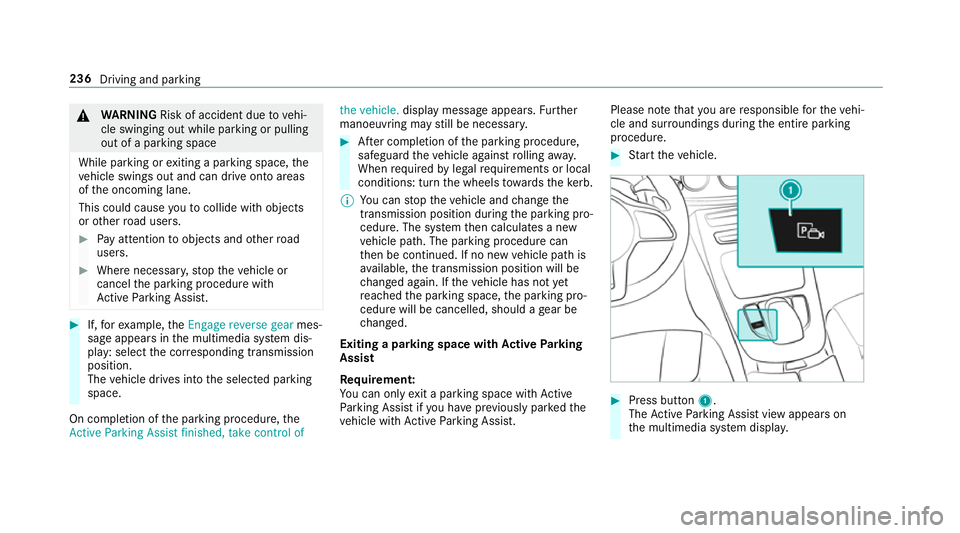
ve hicle wit hActiv eParking Assist. Please no
tethat youa re re sponsible fort he vehi‐
cle and sur rounding sduring thee ntir eparking
procedure. #
Startt he vehicle. #
Press button 1.
The ActiveP arking Assis tviewa ppear son
th em ultimedia sy stem displa y. 236
Driving and parking
Page 240 of 585
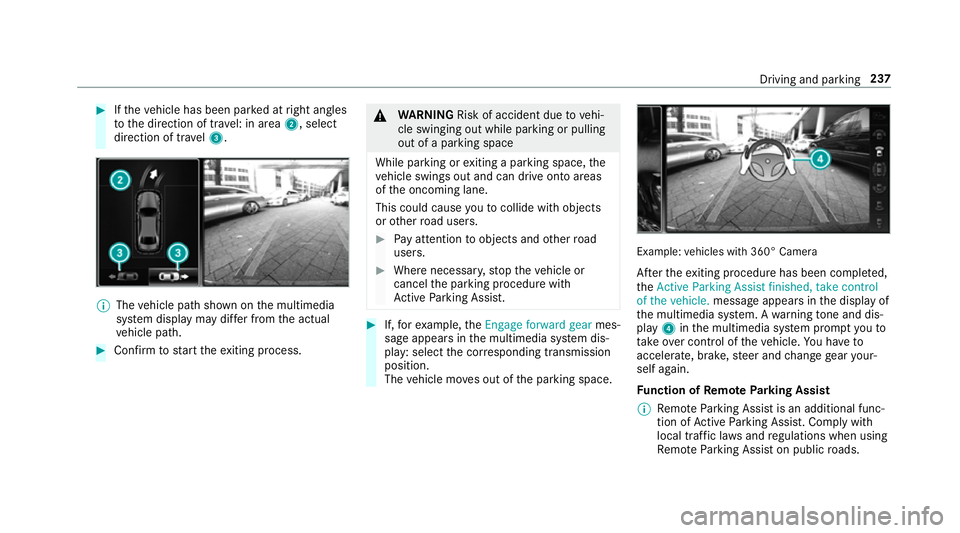
#
Ifth ev ehicle has been par kedatr ight angles
to thed irection of tra vel: in area 2,select
direction of tra vel3. %
The vehicle pat hshown on them ultimedia
sy stem displa ymaydifferf romt he actual
ve hicle path. #
Confir mtos tart thee xiting process. &
WARNING Risk of accident du etovehi‐
cle swinging out while parking or pulling
out of aparking space
While parking or exitin gap arkin gspace, the
ve hicle swings out and can driv eontoa reas
of theo ncoming lane.
This could cause youtoc ollidewitho bjects
or other road users. #
Paya ttention toobject sand other road
users. #
Wher enecessar y,stop thev ehicle or
cancel thep arking procedur ewith
Ac tiveP arking Assist. #
If,fore xamp le,the Engage forward gear mes‐
sag eappear sinthe multimedia sy stem dis‐
play: select thec orresponding transmission
position.
The vehicle mo veso ut of thep arking space. Example:
vehicles wit h360° Camera
Af tert he exitin gprocedur ehas been comple ted,
the Active Parkin gAssist finished, take control
of the vehicle. messageappear sinthe displa yof
th em ultimedia sy stem. Awarning tone and dis‐
pl ay 4 inthem ultimedia sy stem prom ptyouto
ta ke over control of thev ehicle. Youh ave to
accelerate, brake, steer and chang egear your‐
self again.
Fu nction of Remo teParking Assist
% Remo teParking Assis tisanadditional func‐
tion of ActiveP arking Assist. Compl ywith
local traf ficl aw sa nd regulations when using
Re mo teParking Assis tonpublicroads. Drivin
gand parking 237