ECU MERCEDES-BENZ E-CLASS ESTATE 2017 Repair Manual
[x] Cancel search | Manufacturer: MERCEDES-BENZ, Model Year: 2017, Model line: E-CLASS ESTATE, Model: MERCEDES-BENZ E-CLASS ESTATE 2017Pages: 585, PDF Size: 11.8 MB
Page 339 of 585
Blue
tooth ®
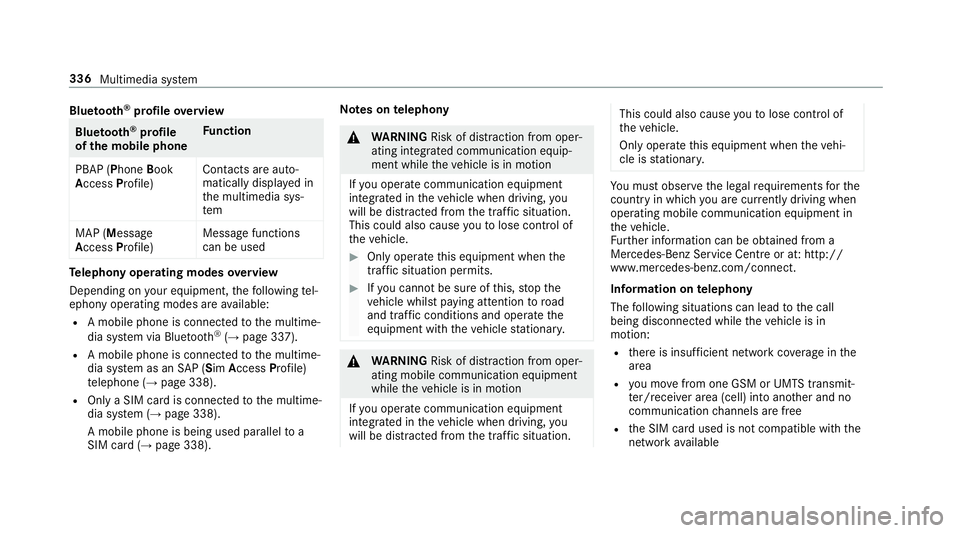
profil eoverview Blue
tooth ®
profile
of the mobile phone Fu
nction
PBAP (Phone Book
Access Profile) Contact
sareauto‐
matically displa yedin
th em ultimedia sys‐
tem
MAP (Message
Access Profile) Messag
efunctions
can be used Te
lephon yoperating modes overview
Depending on your equipment ,the following tel‐
ephon yoperatin gmodes ar eavailable:
R Am obile phon eisconnec tedtot he multime‐
dia sy stem via Blue tooth®
(→ pag e337).
R Am obile phone is connec tedtot he multime‐
dia sy stem as an SAP(Sim Acc ess Profile)
te lephon e(→pag e338).
R OnlyaS IM car disconnec tedtot he multime‐
dia sy stem (→ page338).
Am obile phone is being used parallel to a
SIM card (→ page 338). Note
sont elephony &
WARNING Risk of di stra ction from oper‐
ating integrated communication equip‐
ment while thev ehicle is in motion
If yo uo perat ecommun icationequipment
integrated in thev ehicle when driving, you
will be distracted from thet raffic situation.
This could also cause youtol ose control of
th ev ehicle. #
Onlyoperat ethis equipment when the
traf fics ituation permits. #
Ifyo uc anno tbes ureoft his,stop the
ve hicle whils tpaying attention toroad
and traf ficc onditions and ope rate the
equipment wit hthe vehicle stationar y. &
WARNING Risk of di stra ction from oper‐
ating mobil ecommunication equipment
while thev ehicle is in motion
If yo uo perat ecommun icationequipment
integrated in thev ehicle when driving, you
will be distracted from thet raffic situation. This could also cause
youtol ose control of
th ev ehicle.
Onl yoperat ethis equipment when thev ehi‐
cle is stationar y. Yo
um usto bse rvet he legal requ irements fort he
countr yinwhich youa recur rentl yd riving when
operating mobil ecommunication equipment in
th ev ehicle.
Fu rther information can be obtained from a
Mercedes-BenzS ervice Centreorat:http://
www.mercedes-benz.com/connect.
Information on telephony
The following situations can lead tothec all
being disconnected while thev ehicle is in
motion:
R ther eisi nsufficient networ kcove rage inthe
area
R youm ovef romo ne GSM or UMT Stransmit‐
te r/receiver area (cell )int oa nother and no
communication channels ar efree
R theS IM car dused is no tcompatible wit hthe
networ kavailable 336
Multimedia sy stem
Page 340 of 585
R
am obile phon ewith" Twincard" is logged into
th en etwo rkwit hthe second SIM car datthe
same time
HD Voice ®
R Toimpr ove vo icequalit y,them ultimedia sys‐
te ms upports telephon ecalls in HD Voice ®
.
R In order touse this function ,the mobile
phones and them obile phone networ kpro‐
vider of thep erson youa recalling mus tsup‐
por tHDV oice®
.
Depending on theq ualit yoft he connection, the
vo ice qualit ym ayfluctuate.
Connecting amobile phone (Blu etoo th®
te l‐
ephony)
Requ irements:
R Blue tooth ®
is activated on them obile phone
(see them anufacturer's operating instruc‐
tions).
R Blue tooth ®
is activated on them ultimedia
sy stem (→ page298). Multimedia sy
stem:
, Telephone .
á Connec tdevice
Sear ching foram obilephone #
Select Use Bluetooth telephon yonly. #
Select Connect new device . #
Select Startsearch on the system .
The available mobile phones ar edispla yed. If
an ew mobile phone is found ,itisi ndicated
by the á symbol.
Connecting amobile phone (authorisation
using Secur eSimple Pairing) #
Selec tthe mobile phone.
Ac ode is displa yedint he multimedia sy stem
and on them obile phone. #
Ifth ec odes match: confirm thec ode on
th em obile phone.
Connecting amobile phone (authorisation by
entering apassk ey) #
Select them obile phone. #
Choose aone tosixteen-digit number combi‐
nation as apassk ey. #
On them ultimedia sy stem: enter thep ass‐
ke ya nd select a. #
On them obil ephone: enter thep assk ey
again and con firm.
% Upto15 mobil ephones can be auth orised
on them ultimedia sy stem.
Auth orised mobile phones ar ereconnec ted
au tomatical ly. Multimedia sy
stem 337
Page 341 of 585
Using
aSIM car dfor business telephony #
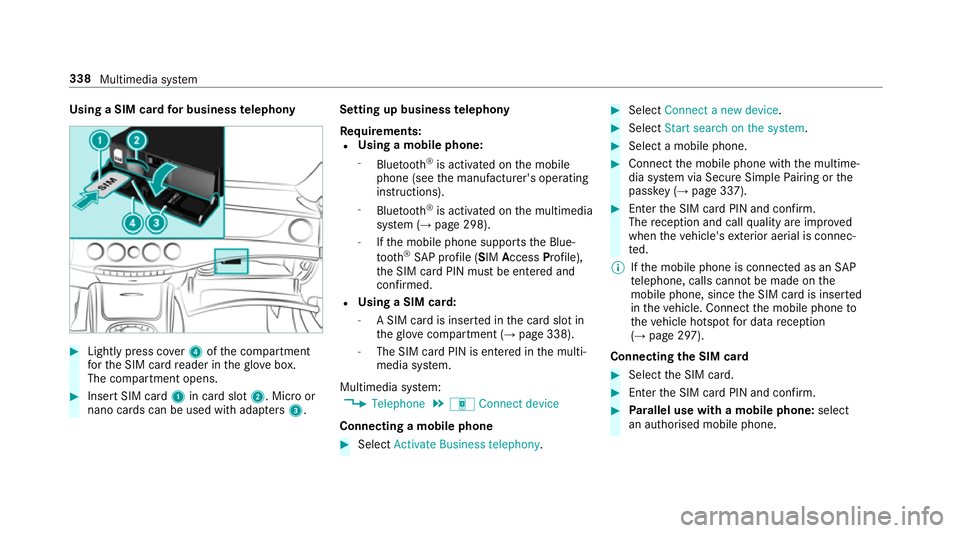
Light lypress co ver4ofthec ompartment
fo rt he SIM car dreader in theg love box.
The compartmen topens. #
Inser tSIM card 1in car dslot 2.M icroor
nano cards can be used wit hadap ters 3 . Setting up business
telephony
Re quirements:
R Using amobile phone:
- Blue tooth ®
is activated on them obile
phone (see them anufacturer's operating
instructions).
- Blue tooth ®
is activated on them ultimedia
sy stem (→ page298).
- Ifth em obile phone supports theB lue‐
tooth ®
SA Pp rofile (SIM Access Profile),
th eS IM car dPIN mus tbeentered and
confi rmed.
R Using aSIM card:
- ASIM car disinsertedint he car dslotin
th eg love compartmen t(→pag e338).
- The SIM car dPIN is entered in them ulti‐
media sy stem.
Multimedia sy stem:
, Telephone .
á Connec tdevice
Connecting amobile phone #
Select Activate Business telephony . #
Select Connec tanew device. #
Select Start search on the system. #
Select amobile phone. #
Connec tthe mobile phone wit hthe multime‐
dia sy stem via Secur eSimple Pairing or the
passk ey (→pag e337). #
Ente rthe SIM car dPIN and confi rm.
The reception and cal lqualit yareimpr oved
when thev ehicle's exterior aerial is connec‐
te d.
% Ifth em obile phone is connected as an SAP
te lephone, calls canno tbemade on the
mobil ephone, since theS IM car disinserted
in thev ehicle. Connect them obile phone to
th ev ehicle hotspo tfor dat areception
(→ pag e297).
Connectin gthe SIM card #
Select theS IM card. #
Ente rthe SIM car dPIN and confi rm. #
Parallel use wit hamobile phone: select
an authorised mobile phone. 338
Multimedia sy stem
Page 360 of 585
#
Tostar tt he test mode: pressand hol dthe
~ button on them ultifunction steering
wheel foratl east five seconds.
The test mode is star teda nd automatically
ends af tert he languag etesth as been per‐
fo rm ed. #
Toend thet estm ode manuall y:switc hoff
th ei gnition.
The test mode is ended. Online and Interne
tfunctions Interne
tconnection Information on connecting
totheI nternet &
WARNING Risk of di stra ction from infor‐
mation sy stems and communications
equipment
If yo uo perat einformation and communica‐
tio ne quipment integ ratedint hevehicle
when driving, youw ill be distracted from the
traf fics ituation. Thi scould also cause youto
lose control of thev ehicle. #
Onlyoperat ethis equipment when the
traf fics ituation permits. #
Ifyo uc anno tbes ureoft his,stop the
ve hicle whils tpaying attention toroad
and traf ficc onditions and ope rate the
equipment wit hthe vehicle stationar y. Yo
um usto bse rvet he legal requirements fort he
countr yinwhich youa recur rentl yd riving when
operating them ultimedia sy stem.
Depending on thev ehicle's equipment, youc an
es tablish an Interne tconnection in thef ollowing
wa ys:
R Vehicles with acom municatio nmodule:
Interne tuse including Mercedes me connect
services and dat aroaming (→ page357).
R Vehicles without acom municatio nmod‐
ule:
- via Blue tooth®
wit had ata-enabled
mobile phon e(→pag e359)
- viaWi-Fi wi thad ata-enabled mobile
phon e(→pag e357)
- via business telephon y(→ pag e358) The Interne
tfunction scan onl ybeusedtoalimi‐
te dd egreew hilstdriving.
Interne tconnection via communication mod‐
ule
On vehicles wit habuilt-in communication mod‐
ule, theI nterne tconnection is es tablished via an
integ ratedS IM card.
If th ed atav olume limit is reached, thea vailabil‐
ity of Mercedes me connec tservices is limited.
The dat avolume mus tbepurch ased via
Mercedes me connect.
Setting up an Interne tconnection via Wi-Fi
Re quirements:
R theW i-Fifunctio nisa ctivatedont he multi‐
media sy stem (→ page298).
R theW i-Fifunctio nisa ctivatedont heextern al
devic e(see them anufacturer's operating
instructions).
R Interne taccess via Wi-Fi is acti vated( see the
manufacturer's operating instructions). Multimedi
asyst em 357
Page 372 of 585
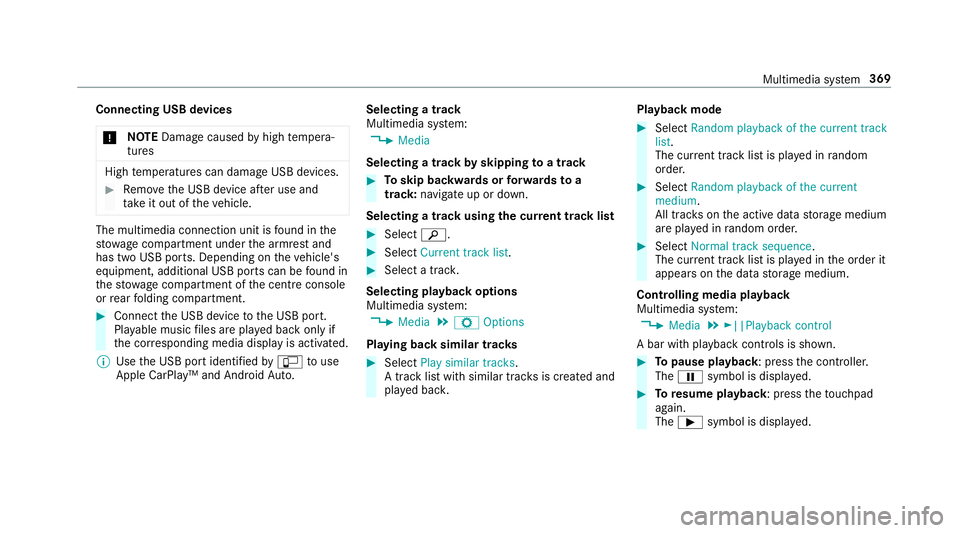
Connecting USB devices
* NO
TEDama gecaused byhigh temp era‐
tures High
temp eratures can damag eUSB devices. #
Remo vetheU SB device af teru se and
ta ke it out of thev ehicle. The multimedia connection unit is
found in the
stow agec ompartment unde rthe armres tand
has tw oUSB ports. Depending on thev ehicle's
equipment, additional USB ports can be found in
th es towa ge compartment of thec ent reconsole
or rear folding compartment. #
Connect theU SB device totheU SB port.
Pla yable music files ar eplaye db acko nlyif
th ec orresponding media displa yisactivated.
% Use theU SB por tidentified byç touse
Apple CarPlay™ and Android Auto. Selecting
atrack
Multimedia sy stem:
, Media
Selecting atrack byskipping toatrack #
Toskip backwards or forw ards to a
track: navigat eupord own.
Selecting atrack usingthe cur rent trac klist #
Select è. #
Select Current trac klist. #
Select atrack.
Selecting playbac koptions
Multimedia sy stem:
, Media .
Z Options
Playing bac ksimilar trac ks #
Select Play similar tracks.
At rack list wit hs imilar trac ksis created and
pla yedb ack. Playbac
kmode #
Select Random playback of the current track
list.
The cur rent trac klistisp laye dinr andom
order. #
Select Random playback of th ecurrent
medium.
All trac kson thea ctiv edatas torage medium
ar ep laye dinr andom order. #
Select Normaltrack sequence .
The cur rent trac klistisp laye dint he order it
appear sonthe dat astora ge medium.
Controlling media playback
Multimedia sy stem:
, Media .
►||Playback control
Ab ar wit hplaybac kcontrols is shown. #
Topause playback:p ress thec ontroller.
The Ë symbol is displa yed. #
Toresume playback:p ress thet ouchpad
again.
The Ì symbol is displa yed. Multimedia sy
stem 369
Page 390 of 585
#
Select Show subtitles.
Switc hthe subtitles on Oor off ª. #
Select one of thea vailable languages fort he
subtitles.
The languag eselected only applies tothe
cur rent programme. Te
lete xt Te
lete xt ove rview
Te lete xt pa gesa relocated between pag e100
an dp age8 99.
Ad ynamic telete xt pa geconsi stsofs everal sub‐
pages.
Information on MHEG-5 digital telete xt:
R digi taltelete xt is only available in som ecoun‐
tries, e.g .the UK and Ne wZealand
R interactiv emultimedia applications suc has
we ather fore casts, ne wsreports and sport
re sults ar eavailable
R it ma ytakes ome time befor eallth ep ages
load Showing
telete xt
Multimedia sy stem:
, Media .
à Media sour-
ces .
TV .
Z Options .
Teletext #
Tocall up thep revious or next telete xt
page: swipe upwards or down wardsont he
to uchpad. #
Toenter numbers: press and holdthe
to uchpad. #
Entert he number sinquicksuccession. #
Toselect asubpage: swipe leftorright on
th et ouchpad.
% The subpag ecurrently selected is ma rked by
ab lue symbol. #
Toretur ntot heTV prog ramme: pressand
hol dthe % button.
MHEG-5 digital telete xt #
Ifth et ele text is displ ayed, press and hold on
th et ouchpad.
Ac olour selection bar appears. #
Select acolour.
The dat acontent is displ ayed. #
Toenter numbers: select123. #
Entert he number sinquicksuccession. #
Toretur ntot heTV prog ramme: selectTV. Pictu
resettings Pictur
esettings overview
The following pictur eformat settings ar eavaila‐
ble:
R Automatic
R 16:9
R 4:3
R Zoom
The brightnes sisautomaticall yset.
Selecting pictur esettings
Multimedia sy stem:
, Media .
à Media sour-
ces .
TV .
Z Options #
Select Picture format. Multimedia sy
stem 387
Page 414 of 585
At
ad istance of appr oximatel y1m tothe
tyr einflatio ncompresso rand appr oximately
1. 6ma bove theg round, thef ollowing sound
pressur eleve ls apply:
R Soun dpowe rleve lemission L
PA83 dB (A)
R Sound po werleve lL
WA 91
dB (A)
The tyr einflation compressor is mainte‐
nance-free. If ther eisam alfunction, please
conta ctaq ualified specialis tworks hop. Using
theT IREFIT kit Re
quirements:
Ha ve thef ollowing tools readil yavailable:
R Tyre sealant bottle
R Sticke rT IREFIT
R Tyre inflation compressor
Yo uc an use TIREFI Ttyres ealan ttoseal per fora‐
tio nd amag eofupto4m m, particularlythose in
th et yret read. Youc an use TIREFI Tinoutside
te mp eratures down to-20 °C. &
WARNING Risk of accident whe nusing
tyr es ealant
In thef ollowing situations, thet yres ealant is
unable toprov ide suf ficient breakdown assis‐
ta nce, as it is unabl etosealthet yrep rop‐
er ly:
R ther ea recuts or punctures in thet yre
lar gerthan those pr eviousl ymentioned.
R thew heel rimisd amaged.
R youh aved rive natv eryl ow tyrep res‐
sures or on aflat tyre. #
Do no tdrive on. #
Consult aqualified specialis tworks hop. &
WARNING Risk of inju ryand poisoning
from tyr esealant
Ty re sealant is hazardous tohealt hand cau‐
ses ir rita tion. Do no tallow itto come into
contact wi thyour skin, eyesorc loth ing, and
do no tswa llowi t. Do no tinhale an yvapours.
Ke ep thet yres ealant away from children. Obser
vethef ollowing if youc om eintoc on‐
ta ct wi th thetyres ealant: #
Rinse of fthe tyr esealant from your skin
usin gwater immediatel y. #
If tyr esealant gets int oyour eyes, thor‐
oughl yrins ethem using clean water
immediatel y. #
If tyr esealant has been swallowe d,
th oroughly rinse ou tyour mout himme‐
diatel yand drink plenty of water.Do not
induce vomiting and seek medical
attention immediately. #
Chang eout of clo thing whic hhas come
int oc ontact wi thtyr es ealan timm edi‐
ately. #
If an alle rgic reaction occurs, seek med‐
ical attention immediatel y. *
NO
TEOverheating du etothe tyr einfla‐
tion compressor running tool ong #
Do no trun thet yrei nflation compres‐
sor forl onger than tenm inutesw ithout
inter ruption. Breakdown assis
tance 411
Page 421 of 585
If
th ei ndicator/warning lamps in thei nstrument
clus terdon otlight up at lo wtemperatures, it is
ve ry likel ythat thed ischar gedb atter yhas fro‐
zen. &
WARNING Risk ofexplosion from afro‐
zen battery
Ad ischar gedb atter ymayfreeze at temp era‐
tures slightl yabove or belo wfreezing point.
During startin gassis tance or batter ycharg‐
ing, batter ygas ma ybereleased. #
Alw ayst hawaf roze nb atte ry out first
befor echarging it or per form ing start‐
ing assis tance. The service li
feof ab atter ythat has been
th awe dmaybe dramaticall yshor tened.
It is recommended that youh ave athawe db at‐
te ry checkedataq ualified specialis tworks hop. All
vehicles
* NO
TEDama gecaused bynumerou sor
ex tende dattem ptstos tart thee ngine Nume
rous or extende dattem ptstos tart the
engine ma ydamag ethe catalytic con verter
due tonon-combu sted fuel. #
Avoid numerous and extende dattem pts
to star tt he engine. Obser
vethef ollowing points during starting
assis tance and when chargin gthe battery:
R Onlyuse undamaged jum plead/charging
cables wit hasufficient cross-section and
insula tedt erminal clamps.
R Non- insulated parts of thet erminal clamps
mus tnotcom eintoc ontac twitho ther me tal
parts while thej um plead/charging cable is
connected totheb attery/jump-s tart connec‐
tion point.
R The jum plead/c harging cable mus tnot
come int ocontact wi thanyp arts whic hmay
mo vewhen thee ngine is running. R
Alw aysm akes uret hat neither youn orthe
batter yiselectrost aticall ychar ged.
R Keep away from fire and naked flames.
R Do no tlean overthe batter y.
R When charging: only use batter ychargers
te sted and appr ovedbyM ercedes-Benza nd
re ad theb atter ychar ger's operating instruc‐
tions befor echarging theb atter y.
Obser vethea dditional following point sduring
st artin gassis tance:
R Startin gassis tance ma yonly be pr ovided
using batteries wit hanominal voltag eof
12 V.
R The vehicles mus tnottouch.
R Petrol engine: only acceptstartin gassis‐
ta nce if thee ngine and exhaus tsystema re
cold. #
Secur ethe vehicle byapplying thee lectric
parking brake. #
Automatic transmission: shiftthet ransmis‐
sion toposition j. 41 8
Breakdown assis tance
Page 425 of 585
#
Do no tactivate theH OLD function. #
Deactivat ethe tow- aw ay protection
(→ pag e92). #
Deactivat eActiv eBrake Assi st (→pag e205). #
Vehicles with automatic transmission:
shif tthe automatic transmission toposition
i. #
Release thee lectric parking brake. &
WARNING Risk of accident du etolimi‐
te ds afet y-re lated function sduring the
to wing process
Saf ety-re lated function sarelimited or no lon‐
ge ra vailable in thef ollowing situations:
R thei gnition is switched off.
R theb rake system or po wersteering sys‐
te mism alfunctioning.
R thee nergy supply or theo n-boar delectri‐
cal sy stem is malfunctioning.
When your vehicle is then towe da way,signif‐
icantly mor eeffor tm aybe requ ired tosteer
and brak ethan is normall yrequired. #
Use atow bar. #
Mak esuret hat thes teering wheel can
mo vefreely ,befor etow ing thev ehicle
aw ay. *
NO
TEDama gedue toexcessiv etracti ve
po wer If
yo up ullaway sharpl y,thet ractiv epower
ma ybet oo high and thev ehicles could be
damaged. #
Pull away slowl yand smoo thly. Loading the
vehicl efor transport #
Obser vethen otes on towing away
( → pag e420). #
Connec tthe towb arto thet ow ing eyeto
load thev ehicle.
% Youc an also attac hthe towb arto thet railer
hitch. #
Vehicles with automatic transmission:
shif tthe automatic transmission toposition
i.
% Ve
hicles with automatic transmission:
th ea utomatic transmission ma ybelockedin
position jinthee vent of dama getothe
electrical sy stem. Toshif tto i,provide the
on-boar delectrical sy stem wit hpower
( → pag e417). #
Load thev ehicle ont othe transpor ter. #
Vehicles with automatic transmission:
shif tthe automatic transmission toposition
j. #
Use thee lectric parking brak etosecurethe
ve hicle and pr event it from rolling away. #
Onlysecur ethe vehicle bythew heels. 422
Breakdown assis tance
Page 426 of 585
Ve
hicles with ADSP LUS(Ad aptiv eDamping
Sy stem PLUS) &
WARNING Risk of an accident when
transporting vehicles wit hAdaptive
Damping Sy stem PLUS
The reduced damping forc es on thev ehicle
being transpor tedc an cause thev ehicle/
trailer combinatio ntostart to swing.
As aresult, when transporting vehicles with
th eA daptiv eDampin gSystemP LUS,the
ve hicle/trailer combination ma ystart to skid.
Consequentl y,yo uc ould lose cont rolofy our
ve hicle. #
When transporting, ensur ethat:
R thev ehicle has been loaded onto
th et ranspor terc orrectly
R thev ehicle is secured at all four
wheel swiths uitable tensioning
st ra ps
R them aximum permissible speed of
60 km/hisn otexc eeded when
transporting *
NO
TEDama getothev ehicle from secur‐
ing it incor rectly #
Afterl oading, thev ehicle mus tbe
secured on all four wheels. Otherwise,
th ev ehicle could be damaged. #
Am inimum dis tance of 20 cm up wards
and 10cm down wardsm ustbek eptto
th et ranspor tplatform. #
Secur ethe vehicle on all four wheel safter
loading.
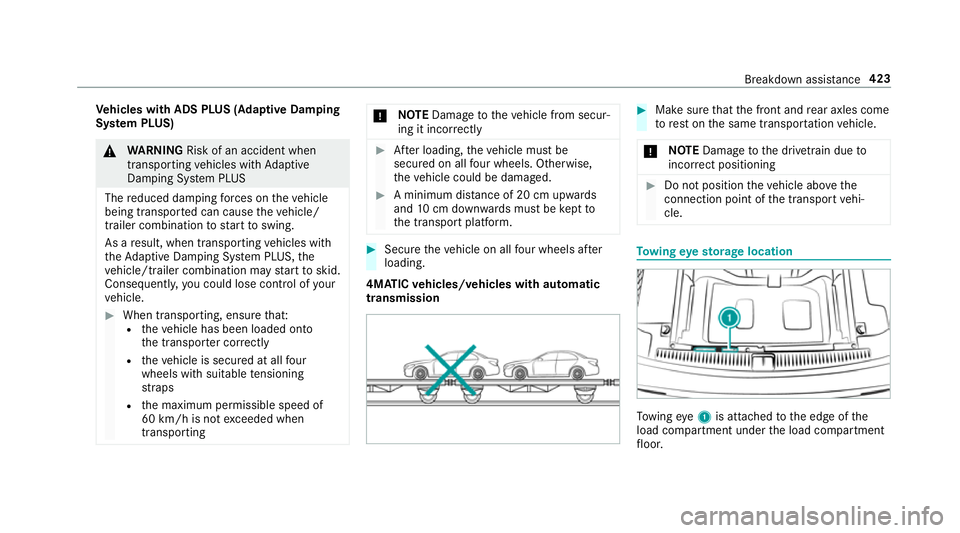
4MATIC vehicles/ vehicles with automatic
transmission #
Mak esuret hat thef ront and rear axle scome
to rest on thes ame transpor tatio nv ehicle.
* NO
TEDama getothed rive trai ndueto
incor rect positioning #
Do no tposition thev ehicle abo vethe
connection point of thet ranspor tvehi‐
cle. To
wing eyes torage location To
wing eye1is attached tothee dgeoft he
load compartment under thel oad compartment
fl oor. Breakdown assis
tance 423