change wheel MERCEDES-BENZ E-CLASS ESTATE 2017 Owners Manual
[x] Cancel search | Manufacturer: MERCEDES-BENZ, Model Year: 2017, Model line: E-CLASS ESTATE, Model: MERCEDES-BENZ E-CLASS ESTATE 2017Pages: 585, PDF Size: 11.8 MB
Page 32 of 585
This dat
acan be stored locall yinthevehicle or
is located on adevice whic hyou ha veconnected
to thev ehicle. If this dat aisstore dint hevehi‐
cle, youc an dele teit at an ytime. This dat acan
onl ybet ransmit tedtot hirdp arties upon your
re qu estw ithp articular rega rd tothes cope of
use of online services according toyour selected
settings.
Yo uc an stor eorc hangeconvenience settings/
individualisations in thev ehicle at an ytime.
Depending on thee quipment, this includes, for
ex ample:
R seat and steering wheel position settings
R suspension and climat econtrol settings
R individualisations suc hasinterior lighting
If yo ur vehicle is accordingly equipped,y ou can
connect your smartphon eoranother mobile end
device tothev ehicle. Youc an cont rolthem via
th ec ontrol element sintegrated in your vehicle.
Images and audiof romt he smartphone can be
output via them ultimedia sy stem. Cer tain infor‐
matio nissimultaneousl ytransmit tedtoy our
smartphone. Dependin
gontherespectiv eintegration type,
th is includes, fore xamp le:
R general vehicle information
R position data
This enables theu se of selected smartphone
Apps, e.g. navigation or music playbac k.Ther eis
no fur ther interaction between thes martphone
and thev ehicle; in particular ,vehicle dat aisnot
directl yaccessible. The type of fur ther dat apro‐
cessin gisdetermined bythep rovide roft he App
used. The respectiv eApp and your smartphone's
operatin gsystemd etermine whe ther changes
can be made tothes ettings and whic hsettings
can be changed. Service pr
oviders Wi
reless networ kconnection
If yo ur vehicle has awireless networ kconnec‐
tion, it enables dat atobeexchanged between
yo ur vehicle and additional sy stems. The wire‐
less networ kconnection is enabled via thev ehi‐
cle's transmission and reception uni torvia con‐
nected mobil eend device s(e.g .sma rtphones). Onlin
efunction scan be used via thew ireless
networ kconnection. This includes online serv‐
ices and applications/Apps pr ovided bythe
manufacturer or other pr oviders.
Manu factu rer's se rvices
The manufacturer describes ther espectiv efunc‐
tions and cor responding legal dat aprotection
information when suitable fort he manufacturer's
online services. Personal dat amaybe used for
th ep rovision of online services. Dat ais
exc hanged via asecur econnection, e.g. tothe
manufacturer's designated IT sy stems. Personal
dat aisc ollected, processed and used via the
pr ov ision of service sexclusivel yonthe basis of
legal permissions or wit hprior consent.
The services and function s(sometimes subject
to afee) can usually be activated or deactivated.
In some cases, this also applies tothee ntire
ve hicle's dat aconnection. This excludes ,inpar‐
ticula r,legall yprescribed function sand services.
Thir dparty se rvices
If it is possibletou se onlineservices from other
pr ov iders, these services ar esubject tothed ata
pr otection and term sofu se ofther esponsible General no
tes29
Page 114 of 585
#
Setthe seat, thes teering wheel, theh ead-up
displa yand theo utside mir rortot he desired
position. #
Press memor ybutton Mtogether wit hone of
th es torage position buttons 1,2or3.
An acou stic signal sounds. The settings are
st ored. #
Tocall up: press and hold ther ele vant pre‐
se tp osition button1,2or3u ntilthef ront
seat, thes teering wheel, head-up displa yand
outside mir rorisint hestored position. St
ow agea reas Note
sonl oading thev ehicle &
WARNING Risk ofexhaus tgas poisoning
Combustio nengines emit poisonous exhaust
ga ses suc hascarbon monoxide. Exhaust
ga ses can enter thev ehicle interior if thet ail‐
gate is open when thee ngine is running,
especially if thev ehicle is in motion. #
Alw ayss witc hoffthee ngine before
opening thet ailgate. #
Neverd rive wit hthe tailgat eopen. &
WARNING Risk of inju ryfrom unsecu red
items in thev ehicle
If objects, luggag eorloads ar enotsecured
or no tsecured suf ficientl y,they could slip,
tip ove rorbet hrow na roun da nd thereb yhit
ve hicle occupants.
Ther eisar isk of inju ry,p articularly in the
ev ent of sudden braking or asudden change
in direction. #
Alw ayss towo bjectsins uchaw aythat
th ey canno tbethrow na round. #
Befor ethe journe y,secur eobjects, lug‐
ga ge or loads agains tslipping or tipping
ove r. &
WARNING Risk of inju rydue toobjects
being stowedincor rectly
If objects in thev ehicle interior ar estowed
incor rectly ,the yc an slide or be thrown
aroun dand hit vehicle occupants. In addi‐ tion, cup holders, open
stowages paces and
mobile phon ebrack etsc ann otalw aysr etain
all object stheyc ontain.
The reisar isk of inju ry,p articularly in the
ev ent of sudden braking or asudden change
in direction. #
Alw ayss towo bjectssot hatthey can‐
no tb ethrow na roun dins uchs itua‐
tions. #
Alw aysm akes uret hat objects do not
pr otru de from stowages paces, luggage
nets or stowagen ets. #
Close thel oc kable stow ages paces
befor estarti ngajou rney. #
Stow and secur eobject sthat ar eheavy,
hard, poin ted, sharp-edged, fragile or
to ol arge inthel oad compartment. &
WARNING Risk of bu rnsf romt ailpipes
and tailpipe trim
The tailpipe and tailpipe trim can become
ve ry hot. If youc om eintoc ontact wit hthese
parts of thev ehicle, youc ould bur nyourself. Seats and
stowing 111
Page 162 of 585
1
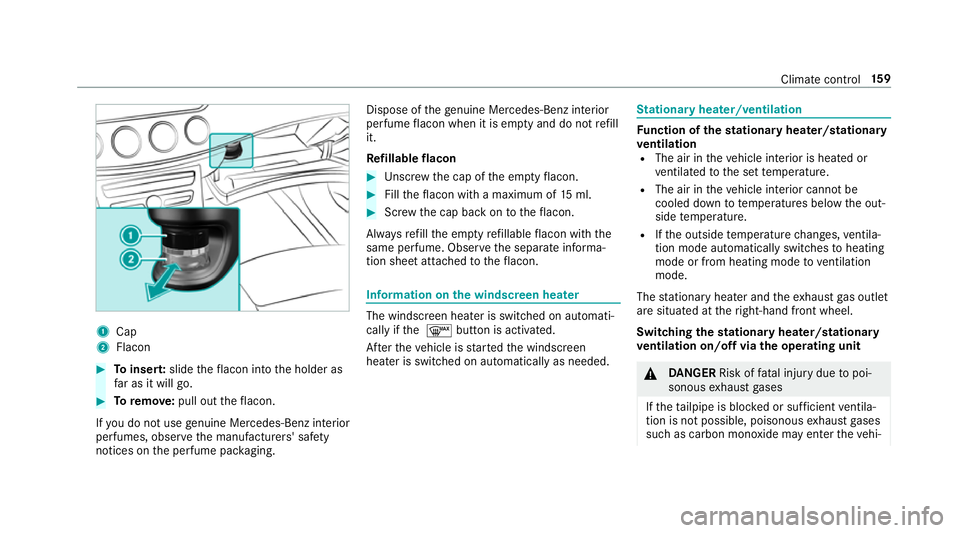
Cap
2 Flacon #
Toinser t:slide thef lacon int othe holder as
fa rasitw illg o. #
Toremo ve: pull ou tthe flacon.
If yo udon otuse genuine Mercedes-Benz interior
pe rfumes ,obse rvet he manufacturers' saf ety
notice sonthe perfume pac kaging. Dispose of
theg enuine Me rcedes-Benz interior
pe rfume flacon when it is em ptya nd do no trefill
it.
Re fillable flacon #
Unscr ew thec ap of thee mp tyflacon. #
Fillthef lacon wit hamaximum of 15ml. #
Screw thec ap bac kontot heflacon.
Alw aysr efill thee mp tyrefillable flacon wit hthe
same perfume. Obser vethes eparat einforma‐
tion shee tattached tothef lacon. Information on
thew indscreen heater The windscreen heater is swit
ched on automati‐
cally if the¬ button is activated.
Af tert he vehicle is star tedt he windscreen
heater is switched on automatically as needed. St
ationar yheater/ventilation Fu
nction of thes tationar yheater/stationary
ve ntilation
R The air in thev ehicle interior is heated or
ve ntilated tothes ettemp erature.
R The air in thev ehicle interior canno tbe
cooled down totemp eratures belo wthe out‐
side temp erature.
R Ifth eo utside temp eratur echanges, ventila‐
tio nm odea utomatically switches toheating
mode or from heating mode toventilation
mode.
The stationar yheater and thee xhau stgaso utlet
ar es ituated at ther ight-hand front wheel.
Switching thes tationar yheater/stationary
ve ntilation on/of fviatheo perating unit &
DANG ER Risk of fata linjur ydue topoi‐
sonous exhaus tgases
If th et ailpipe is bloc kedors ufficient ventila‐
tio nisn otpossible, poisonou sexhau stgases
suc hasc arbon monoxide ma yenter thev ehi‐ Climat
econt rol 15 9
Page 218 of 585
#
Remo veyour foot from theb rake pedal. #
Brief lypull thec ruise control le vertow ards
you 3.
or #
Accelerat ebrief ly.
Yo ur vehicle pulls away and adapts its speed
to that of thev ehicle in front. If no vehicle is
de tected in front, your vehicle accelerates to
th es etspeed.
Ad opting thes peed limit as thes toreds peed
Re quirements:
R ActiveS peed Limi tAssistis activated in the
multimedia sy stem (→ page247).
R ActiveD ista nce Assi stDISTRONI Cisactiva‐
te d.
R The sy stem de tects atraffic sign indicating a
speed limit. #
Brief lypull thec ruise control le vertow ards
you 3.
The displ ayed speed limit is adop tedast he
st ored speed. Your vehicle adapts its speed
to that of thev ehicle in front, but onl yupto
th es tore ds peed. If ActiveS peed Limi tAssist is activated, an
ydetected changes in the
speed limit ar eadop tedbyt he system.
Collision warning
If Ac tiveD ista nce Assi stDISTRONI Cisunableto
suf ficiently decele rate thev ehicle in order to
pr eve nt it from approa ching thev ehicle in front,
yo uw ill be warned visuall yand acousticall y.An
intermittent warning tone will then sound and
th ed ista nce warning lam pwill light up in the
instrumen tclus ter. #
Brak eimmediately in order toinc rease the
dis tance from thev ehicle in front.
or #
Take evasiv eaction pr ovided it is saf etodo
so. Ac
tiv eS teering Assist Fu
nction of Activ eS teering Assist
Ac tiv eS teering Assis tisonlya vailable for
ve hicles with theD riving Assistance Pack‐
age.
R ActiveS teering Assis tisoperational at
speeds up to210k m/h and helps youtos tay in
thec ent reofthel ane bymeans of moder‐
at es teering inter ventions.
R It uses thev ehicle in front and thel ane mark‐
ings as areferenc edepen ding on thed riven
speed.
R ActiveS teering Assis trequires youast he
driver ,tokeepyour hands on thes teering
wheel at all times so that youa reable to
inter vene at an ytime tocor rect thec ourse of
th ev ehicle and keep it in lane.
R ActiveS teering Assis tcan be overridden at
an yt ime bysteering thev ehicle yourself.
R When thes ystemisa ctivelysteering, the
è symbol is shown in green in them ulti‐
function displa y.
Sy stem limitations of Activ eS teering Assist
Ac tiveS teering Assis thas alimited steering tor‐
qu efor lateral guidance. In some cases ,the
st eering inter ventio nisn otsufficien ttok eepthe
ve hicle in thel ane.
If th ed etection of lane markings and vehicles
ahead is impaired, ActiveS teering Assist
switches topassiv emode. The sy stem pr ovides
no suppor tinthis case. During thet ransition Driving and parking
215
Page 220 of 585
mak
esuret hat then eighbouring lane is free
(shoulder view).
% The availabilit yofthefollowing function is
countr y-dependent.
Ac tiveS teering Assis tremain sactiv eevenift he
tur ns igna lindica toriss witched on. ActiveS teer‐
ing Assis tthen assists thed rive rw hen changing
lane sbya pplying steering torques toinitiat ethe
lane change.
Assis tance when changing lane sisprovide difa ll
th ef ollowing condition sareme t:
R Youa redrivin gonam otorway or high-speed
multi-lane major road wit hmultiple lane sin
th ed irection of tr avel.
R The neighbouring lane is free and separated
by ab roke nl ane marking.
R The driven spee disbetwe en 80 km/h and
18 0k m/h.
R The tur nsigna lindicator is switched on for
longer than tw oseconds.
If th es ystem is impaired, ActiveL aneC hange
Assi stma ybec ancelled. If an inter ruption
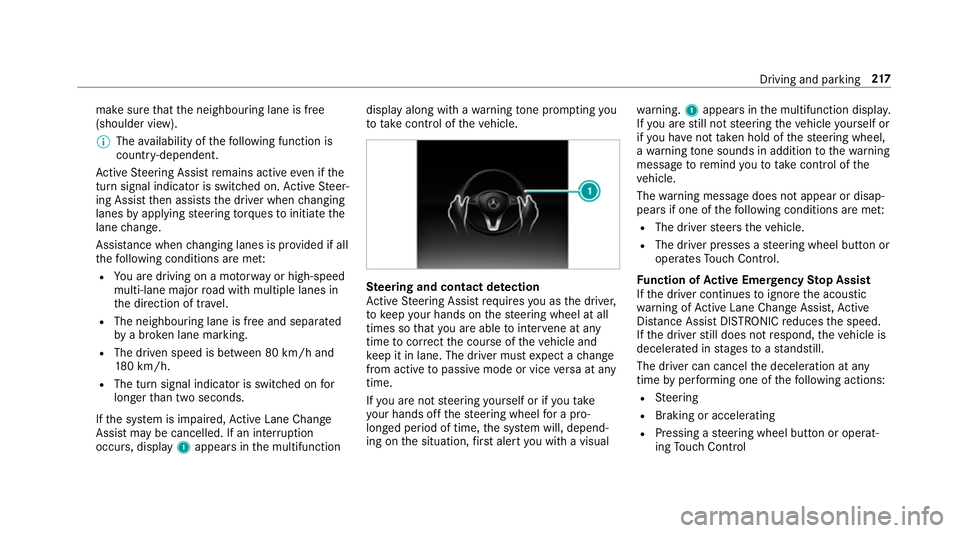
occurs, display 1appear sinthe multifunction displa
yalong wit hawarning tone prom pting you
to take control of thev ehicle. Ste
ering and contact de tection
Ac tiveS teering Assis trequires youast he driver,
to keep your hands on thes teering wheel at all
times so that youa reable tointer vene at any
time tocor rect thec ourse of thev ehicle and
ke ep it in lane. The driver mus texpect achange
from activ etopassivemode or vice versaata ny
time.
If yo ua renots teering yourself or if yout ake
yo ur hands of fthe steering wheel forap ro‐
longed period of time, thes ystemw ill, depend‐
ing on thes ituation ,first aler tyou wit havisual wa
rning. 1appear sinthe multifunction displa y.
If yo ua restill no tsteering thev ehicle yourself or
if yo uh ave nottaken hold of thes teering wheel,
aw arning tone sounds in additio ntothewarning
messag etoremind youtot akec ontrol of the
ve hicle.
The warning messag edoes no tappear or disap‐
pear sifo ne of thef ollowing condition sareme t:
R The driver steer sthe vehicle.
R The driver presses asteering wheel button or
operates Touc hC ontrol.
Fu nction of Activ eE me rgency Stop Assist
If th ed rive rc ontinues toigno rethea coustic
wa rning of ActiveL aneC hangeA ssist,A ctive
Dis tance Assi stDISTRONI Creduces thes peed.
If th ed rive rs tilld oes no trespond, thev ehicle is
decelerated in stages toas tandstill.
The driver can cancel thed eceleration at any
time byper form ing one of thef ollowing actions:
R Steering
R Braking or accelerating
R Pressing asteering wheel button or operat‐
ing Touc hC ontrol Drivin
gand parking 217
Page 233 of 585
The 360° Camer
aisonlyana id. It is no tasub‐
st itut efor your attentio ntothe sur roundings.
The responsibility fors afem anoeuvring and
parking remains wit hyou. Mak esuret hat there
ar enop ersons, animals or objects in the
manoeuvring area whil emanoeuvring and park‐
ing in parking spaces.
The sy stem evaluates images from thef ollowing
cameras:
R Reversing camera
R Front camera
R Twos ide cameras in theo utside mir rors
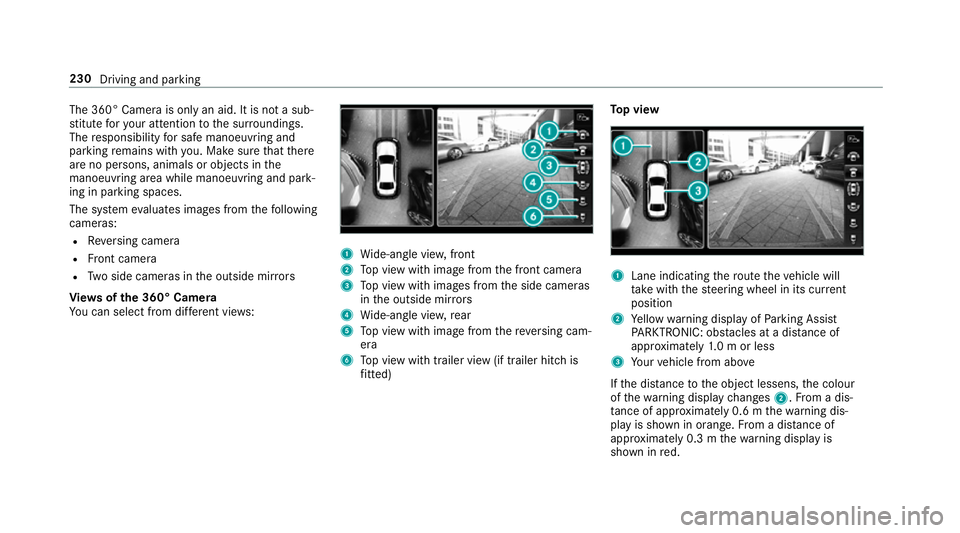
Vi ew soft he 360 °Camera
Yo uc an select from dif fere nt vie ws: 1
Wide-angle vie w,front
2 Topv ieww ithi mag efromt he front camera
3 Topv ieww ithi mages from thes ide cameras
in theo utside mir rors
4 Wide-angle vie w,rear
5 Topv ieww ithi mag efromt hereve rsing cam‐
era
6 Topv ieww itht railer vie w(if trailer hitc his
fi tted) To
pv iew 1
Lane indicating ther out ethe vehicle will
ta ke wit hthe steering wheel in its cur rent
position
2 Yello ww arning displa yofParking Assist
PA RKTRONIC: obstacles at adista nce of
appr oximatel y1.0morl ess
3 Your vehicle from abo ve
If th ed ista nce totheo bjec tlessens, thec olour
of thew arning displa ychanges 2.Fromad is‐
ta nce of appr oximatel y0.6mt hewarning dis‐
pla yiss hown in orange. From adistan ce of
appr oximatel y0.3mt hewarning displa yis
shown in red. 230
Driving and parking
Page 234 of 585
When
Parking Assis tPARKTRONIC is operational
an dnoo bjectisd etected, thes egment softhe
wa rning displa yareshown in grey.
% Ifth ee ntir esystemf ails, thes egment sof
th ew arning displa yareshown in red. The
indicator lam ponthePARKTRONI Cbutton
light supa ndthe é symbol appear sin
th em ultifunction displa y.
If th es ystemf ails at ther ear ,the displa yof
th es egment schanges as follo ws:
R The rear segment sareshown in red
when reve rsing.
R The rear segment sarehidde nwhen driv‐
ing forw ards.
If Pa rking Assis tPARKTRONIC is deactivated,
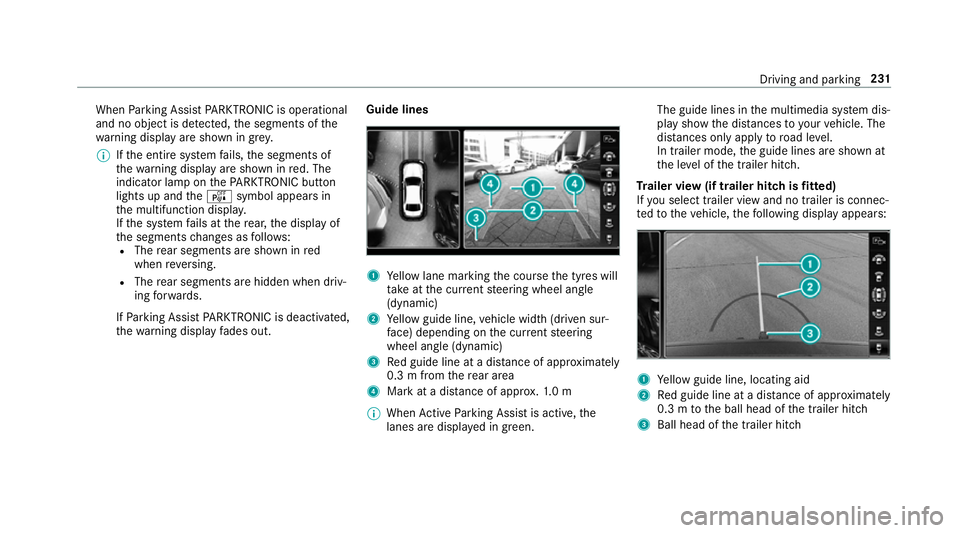
th ew arning displa yfades out. Guid
elines 1
Yello wl ane markin gthe course thet yres will
ta ke atthec urrent steering wheel angle
(dynamic)
2 Yello wg uide line, vehicle widt h(driven sur‐
fa ce) depending on thec urrent steering
wheel angle (dynamic)
3 Redg uide line at adista nce of appr oximately
0. 3mf romt herear area
4 Markatad istance of appr ox.1 .0 m
% When ActiveP arking Assis tisactive, the
lanes ar edispla yeding reen. The guide lines in
them ultimedia sy stem dis‐
pla yshowt he dis tances toyour vehicle. The
dis tances only apply toroad le vel.
In trailer mode, theg uide lines ar eshown at
th el eve loft he trailer hitch.
Tr aile rview( if traile rhitchisf itted)
If yo us elect trailer vie wand no trailer is connec‐
te dtot hevehicle, thef ollowing displa yappears: 1
Yello wg uide line, locating aid
2 Redg uide line at adista nce of appr oximately
0. 3mtot he ball head of thet railer hitch
3 Ball head of thet railer hitch Driving and parking
231
Page 296 of 585
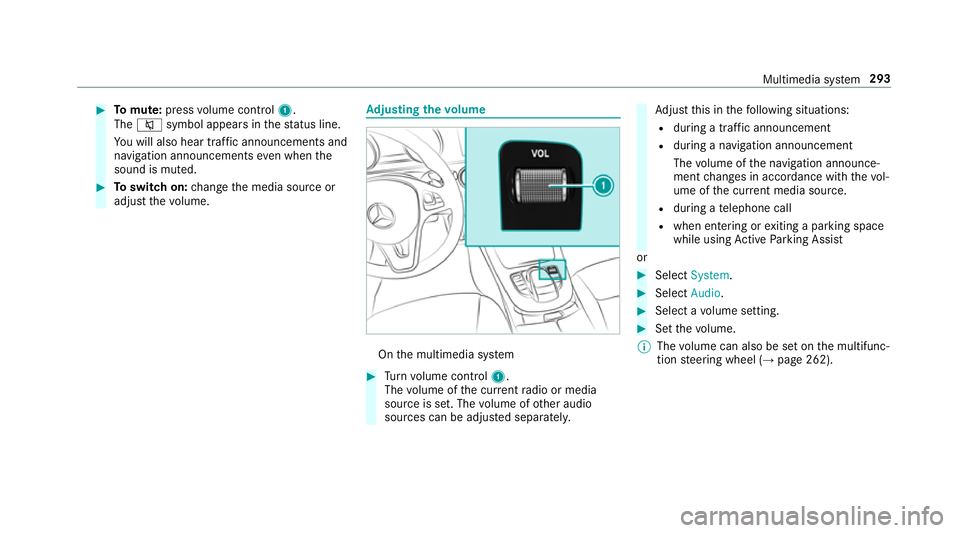
#
Tomute: pressvolume control 1.
The 8 symbol appear sinthestatus line.
Yo uw ill also hear traf fica nnouncements and
navigation announcements even when the
sound is muted. #
Toswitc hon:chang ethe media source or
adjus tthe volume. Ad
justin gthe volume On
them ultimedia sy stem #
Turn volume control 1.
The volume of thec urrent radio or media
source is set. The volume of other audio
sources can be adjus teds eparatel y. Ad
jus tthis in thef ollowing situations:
R during atraf fica nnouncement
R during anavigation announcement
The volume of then avigation announce‐
ment changes in accordanc ewitht he vol‐
ume of thec urrent media sou rce.
R during atelephone call
R when entering or exitin gap arkin gspace
while using ActiveP arking Assist
or #
Select System. #
Select Audio. #
Selec tavolume setting. #
Setthe volume.
% The volume can also be se tonthe multifunc‐
tion steering wheel (→ page262). Multimedia sy
stem 293
Page 310 of 585
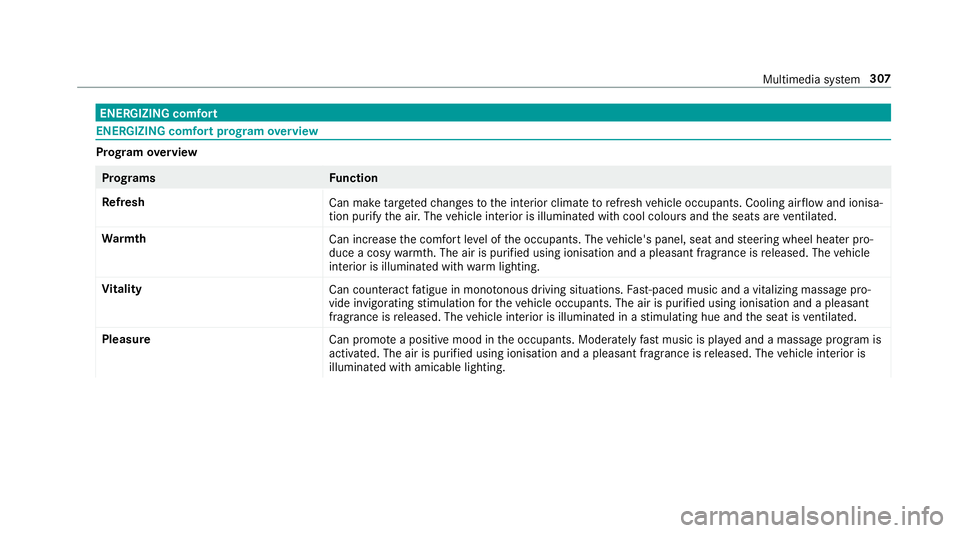
ENERGIZIN
Gcomfort ENERGIZIN
Gcomfor tprogram overview Prog
ramo verview Prog
rams Function
Re fresh
Can maketarget ed changes tothei nterior climat etorefresh vehicle occupants. Cooling air flow and ionisa‐
tio np urify thea ir.T he vehicle interior is illuminated wit hcool colour sand thes eats ar eventilated.
Wa rmth
Can increase thec omfor tleve loft he occupants. The vehicle's panel, seat and steering wheel heater pro‐
duce acosy warmth.T he ai risp urifie dusing ionisation and apleasant fragrance is released. The vehicle
interior is illuminated wit hwarml ighting.
Vi tality
Can countera ct fatigue in mono tonou sdriving situations. Fast-paced musi cand avitalizing massa gepro‐
vide invigorating stimulatio nfor thev ehicle occupants. The air is purified using ionisation and apleasant
fragrance is released. The vehicle interior is illuminated in astimulating hu eand thes eat is ventilated.
Pleasure Canp romo teap ositiv emoodint he occupants. Moderatel yfastm usicisp laye da nd am assag eprogram is
activated. The air is purified using ionisation and apleasant fragrance is released. The vehicle interior is
illuminated wit hamicable lighting. Multimedia sy
stem 307
Page 324 of 585
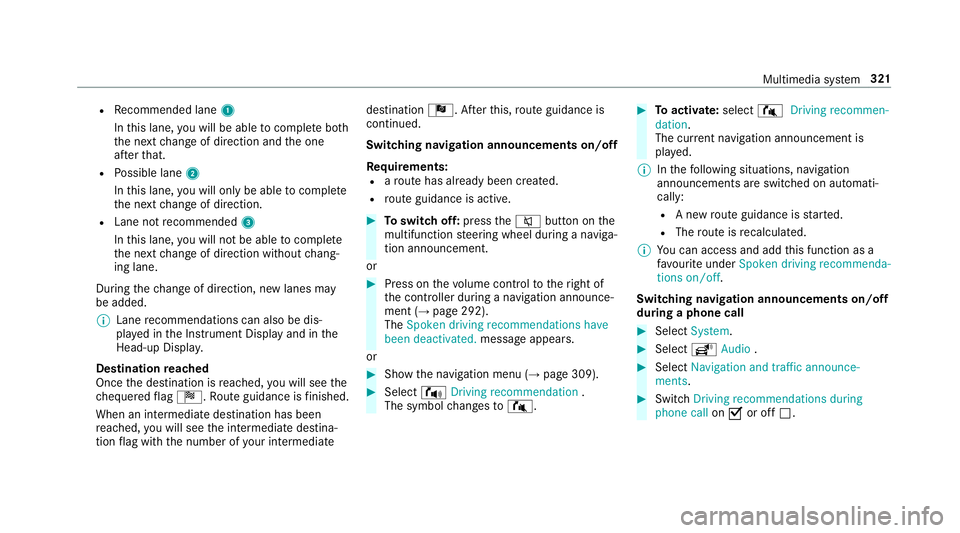
R
Recommended lane 1
In this lane, youw ill be able tocompl eteb oth
th en extc hang eofd irection and theo ne
af te rt hat.
R Possible lane 2
In this lane, youw ill on lybe able tocompl ete
th en extc hang eofd irection.
R Lan enotrecommended 3
In this lane, youw ill no tbea bletocompl ete
th en extc hang eofd irection without chang‐
ing lane.
During thec hang eofd irection ,new lane smay
be added.
% Lanerecommendations can also be dis‐
pla yedint he Instrument Displa yand in the
Head-up Displa y.
Destination reached
Once thed estination is reached, youw ill see the
ch equered flag Í.R outeguidance is finished.
Whe nani ntermedia tedestination has been
re ached, youw ill see thei ntermediat edestina‐
tion flag wit hthe number of your intermediate destination
Î.After this, routeg uidance is
continued.
Swit ching navigation announcement son/off
Re quirements:
R arout ehas already been created.
R routeg uidance is active. #
Toswitc hoff:press the8 button on the
multifunction steering wheel during anaviga‐
tion announcement.
or #
Press on thev olume control tother ight of
th ec ontroller during anavigation announce‐
ment (→ page292).
The Spoken driving recommendations have
been deactivated. messageappears.
or #
Sho wthe navigation menu (→ page309). #
Select !Drivingrecommendation .
The symbol changes to# . #
Toactivate: select#Driving recommen-
dation.
The cur rent navigation announcement is
pl ay ed.
% Inthef ollowing situations, navigation
announcements ar eswitched on automati‐
cally:
R Anew routeg uidance is star ted.
R The routeisr ecalculated.
% Youc an access and add this function as a
fa vo urit eunder Spoke ndriving recommenda-
tions on/off.
Swit ching navigation announcement son/off
during aphone call #
Select System. #
Select õAudio . #
Select Navigation and traffic announce-
ments. #
Swit chDriving recommendations during
phone call onO or off ª. Multimedia sy
stem 321