tow MERCEDES-BENZ E-CLASS ESTATE 2017 Manual PDF
[x] Cancel search | Manufacturer: MERCEDES-BENZ, Model Year: 2017, Model line: E-CLASS ESTATE, Model: MERCEDES-BENZ E-CLASS ESTATE 2017Pages: 585, PDF Size: 11.8 MB
Page 219 of 585
from
thea ctiv etop assivestatus ,the è sym‐
bol is shown as enlar geda nd flashes yello w.
Once thes ystemisp assivethe è symbol is
shown as gr eyinthem ultifunction displa y.
The sy stem ma ybeimpaired or ma ynotfunction
in thef ollowing ins tances:
R Ifth er eisp oor visibility ,e.g. due toinsuf fi‐
cient illumination of ther oad, or due tosno w,
ra in, fogorh eavy spr ay.
R Ifth er eisg lare, e.g. from oncoming traf fic,
di re ct sunlight or reflection from other vehi‐
cles (e.g. if thec arriag ew ay iswe t).
R Ifth ew indscreen is dirty ,miste du p, dam‐
aged or co vered, fori ns tance byasticker,in
th ev icinit yoft he camera.
R If no, or se veral, unclear lane markings are
presen tfor one lane, e.g. in aconstruction
area.
R Ifth el ane marking sarewo rnaw ay,d arkor
co veredu p, e.g. bydirtors now.
R The dis tance tothev ehicle in front is too
small and thel ane marking sthus canno tbe
de tected. R
Ifth el ane marking schang equickl y,e.g.
lanes branc hoff,c ross one ano ther or
mer ge.
R The car riag ewa yisn arrow and winding.
R Ifth er ea rehighly variable shade conditions
on thec arriag ewa y.
R Ifth er ea reobs tacle ssuchaso bject mar kers
on thel ane or projecting out int othe lane.
The sy stem does no tprovide assis tance in the
fo llowing conditions:
R Onvery shar pbends.
R When towing atrailer.
R Ifyo ua ctivel ychang elane without swit ching
on thet urns ignal indicator.
R Ifyo us wit ch on thet urns ignal indicator and
th ec onditions fora ctivating ActiveL ane
Chang eAssistaren otfulfilled.
Ac tivatin gActive Ste ering Assist
Requ irements:
R ESP ®
mus tbea ctivated, but no tinter vening. R
ActiveD ista nce Assi stDISTRONI Cisactiva‐
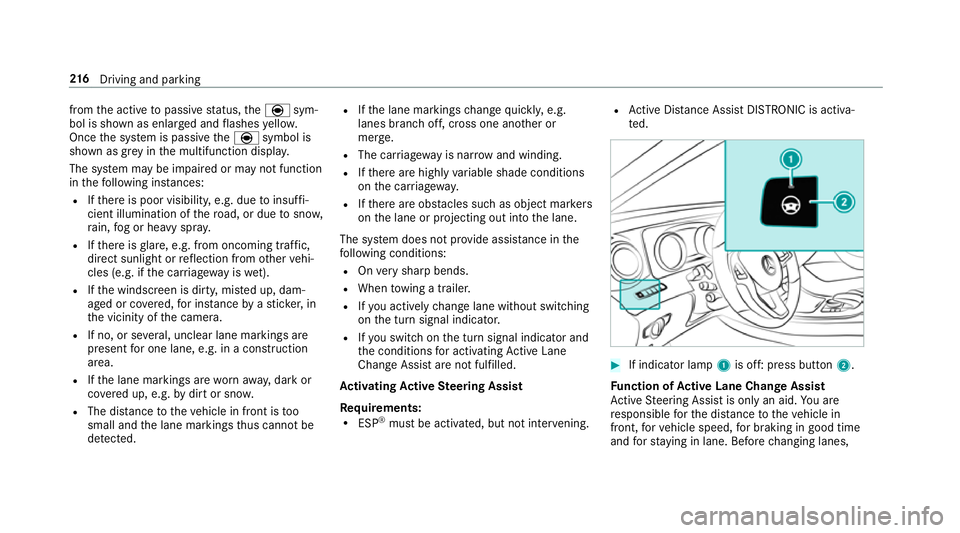
te d. #
If indicator lamp 1is off: press button 2.
Fu nction of Activ eL aneC hang eAssist
Ac tiveS teering Assis tisonlyana id.Youa re
re sponsible fort he dis tance tothev ehicle in
front, forv ehicle speed, forb raking in good time
and fors tayi ng in lane. Befor echanging lanes, 216
Driving and pa rking
Page 221 of 585
R
Activating or deacti vating ActiveS teering
Assis torD ista nce Assi stDISTRONIC
The driver mu stbe ready totake control of the
ve hicle at an ytime. Information on Hill
StartA ssist Hill
StartA ssisth olds thev ehicle foras hort
time when pulling away on ahill under thef ol‐
lowing conditions:
R The transmission is in position hork.
R The electric parking brak eisreleased.
This gives youe nough tim etomoveyour foot
from theb rake pedal tothea ccelerator pedal
and depress it befor ethe vehicle begins toroll. &
WARNING Risk of accident and inju ry
caused bythev ehicle rolling away
Af teras horttime, Hill StartA ssistnol onger
holds thev ehicle and it can rollaw ay. #
Therefore, swiftl ymove your foot from
th eb rake pedal tothea ccelerator pedal. Ne
vera ttem pttolea vethev ehi‐
cle if it is being held byHillStart Assist. HOLD function
HOLD function
The HOL
Dfunction holds thev ehicle at astand‐
st ill without requ iring youtod epress theb rake
pedal, e.g. when pulling away on steep slopes.
Sy stem limitations
R The incline mus tnotbe grea tert han 30%.
Ac tivating/deactivatin gthe HOL Dfunction &
WARNING Risk of an accident du etothe
HOLD function being acti vatedw heny ou
lea vethev ehicle
If yo ul eave thev ehicle while onl ythe HOLD
function is braking thev ehicle, thev ehicle
can rollaw ay inthef ollowing situations:
R Ifth er eisam alfunction in thes ystemor
in thep owe rsupply. R
Ifth eH OLD function is deactivated by
depressing thea ccelera torp eda lort he
brak epedal, e.g. byavehicle occupant.
R Ifth ee lectrics in thee ngine compart‐
ment ,the batter yorthe fuses ar etam‐
pered wit horifthe batter yisdisconnec‐
te d. #
Alw aysd eactivat ethe HOLD function
and secur ethe vehicle agains trolling
aw ay befor eleaving thev ehicle. *
NO
TEDama gefrom auto matic braking When
ActiveB rake Assi st,A ctiv eDista nce
Assi stDISTRONI Corthe HOLD function are
activated, thev ehicle brakes autonomously
in cer tain situations.
To avo id damag etothevehicle, deactivate
th ese sy stems in thef ollowing or similars it‐
uations: #
During towing #
Inac arwa sh 218
Driving and pa rking
Page 239 of 585
&
WARNING Risk of accident du etovehi‐
cle swinging out while parking or pulling
out of aparking space
While parking or exitin gap arkin gspace, the
ve hicle swings out and can driv eontoa reas
of theo ncoming lane.
This could cause youtoc ollidewitho bjects
or other road users. #
Paya ttention toobject sand other road
users. #
Wher enecessar y,stop thev ehicle or
cancel thep arking procedur ewith
Ac tiveP arking Assist. #
If,fore xamp le,the Engage reverse gear mes‐
sag eappear sinthe multimedia sy stem dis‐
play: select thec orresponding transmission
position.
The vehicle drives int othe selected parking
space.
On completion of thep arking procedure, the
Active Parking Assist finished, take contro lofthe vehicle.
displaymessa geappears. Further
manoeuvring ma ystillben ecessar y. #
Afterc ompletion of thep arking procedure,
safeguar dthe vehicle agains trolling away.
When requ ired bylegal requirements or local
conditions: tur nthe wheels towa rdst he kerb.
% Youc an stop thev ehicle and chang ethe
transmiss ionp osit iond urin gthe parking pro‐
cedure. The sy stem then calculates anew
ve hicle path. The parking procedur ecan
th en be continued. If no ne wvehicle pat his
av ailable, thet ransmission position will be
ch anged again. If thev ehicle has no tyet
re ached thep arking space, thep arking pro‐
cedur ewill be cancelled, should agear be
ch anged.
Exiting aparki ng space wit hActive Parking
Assist
Re quirement:
Yo uc an on lyex itap arkin gspace wit hActive
Pa rking Assis tifyou ha veprev iousl yparke dt he
ve hicle wit hActiv eParking Assist. Please no
tethat youa re re sponsible fort he vehi‐
cle and sur rounding sduring thee ntir eparking
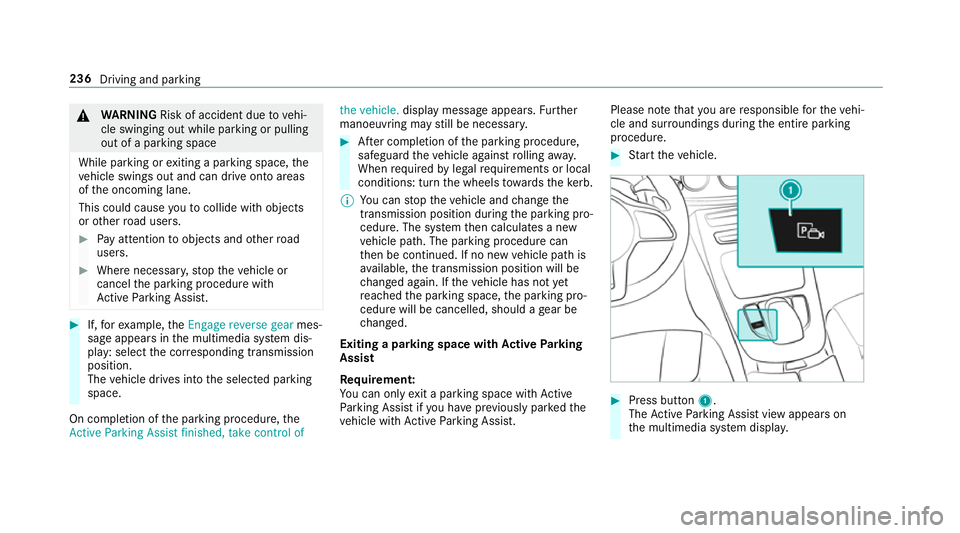
procedure. #
Startt he vehicle. #
Press button 1.
The ActiveP arking Assis tviewa ppear son
th em ultimedia sy stem displa y. 236
Driving and parking
Page 244 of 585
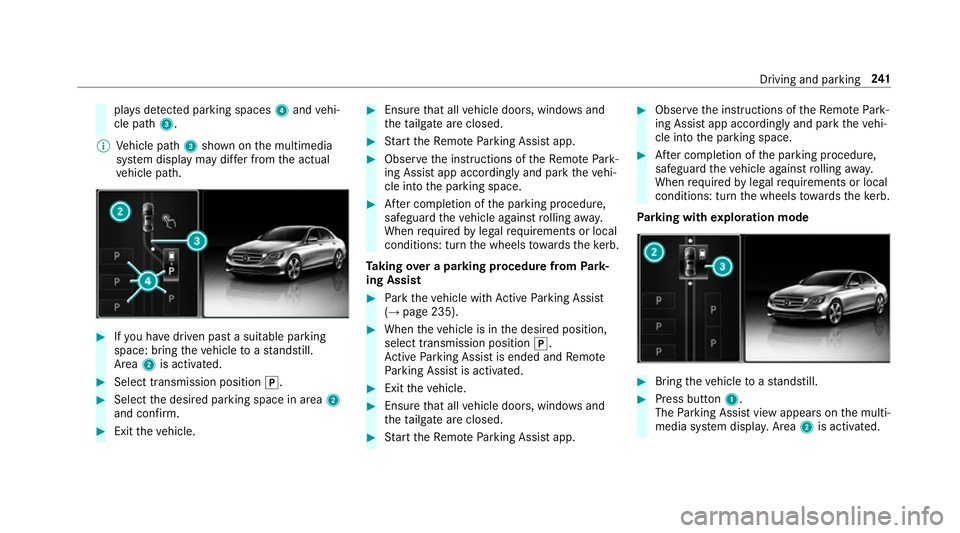
pla
ysdetected pa rking spaces 4and vehi‐
cle path 3.
% Vehicle path 3shown on them ultimedia
sy stem displa ymaydifferf romt he actual
ve hicle path. #
Ifyo uh ave driven pas tasuitable parking
space: bring thev ehicle toas tandstill.
Area 2is activated. #
Select transmissio nposition j. #
Select thed esired parking space in area 2
and confi rm. #
Exit thev ehicle. #
Ensur ethat all vehicle doors, windo wsand
th et ailgat eareclosed. #
Startt he Remo teParking Assis tapp. #
Obser vethei nstruction softheRemo tePark‐
ing Assis tapp accordingly and par kthe vehi‐
cle int othe parking space. #
Afterc ompletion of thep arking procedure,
safeguar dthe vehicle agains trolling away.
When requ ired bylegal requirements or local
conditions: tur nthe wheels towa rdst he kerb.
Ta king overap arkin gproce du re from Park‐
ing Assist #
Park thev ehicle wit hActiv eParking Assist
(→ pag e235). #
When thev ehicle is in thed esired position,
select transmission position j.
Ac tiveP arking Assis tisended and Remo te
Pa rking Assis tisactivated. #
Exit thev ehicle. #
Ensur ethat all vehicle doors, windo wsand
th et ailgat eareclosed. #
Startt he Remo teParking Assis tapp. #
Obser vethei nstruction softheRemo tePark‐
ing Assis tapp accordingly and par kthe vehi‐
cle int othe parking space. #
Afterc ompletion of thep arking procedure,
safeguar dthe vehicle agains trolling away.
When requ ired bylegal requirements or local
conditions: tur nthe wheels towa rdst he kerb.
Pa rking wit hexploration mode #
Bring thev ehicle toas tandstill. #
Press button 1.
The Parking Assis tviewa ppear sonthe multi‐
media sy stem displa y.Area 2is acti vated. Driving and parking
241
Page 245 of 585
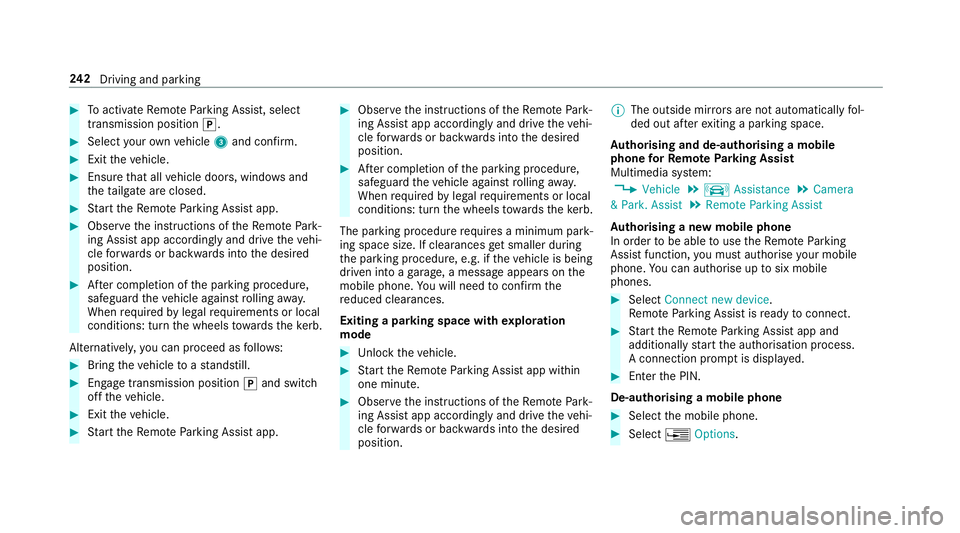
#
Toactivat eRemo teParking Assist, select
transmissio nposition j. #
Selec tyour ownv ehicle 3and confirm. #
Exit thev ehicle. #
Ensur ethat all vehicle doors, windo wsand
th et ailgat eareclosed. #
Startt he Remo teParking Assis tapp. #
Obser vethei nstruction softheRemo tePark‐
ing Assis tapp accordingly and driv ethe vehi‐
cle forw ards or backwards int othe desired
position. #
Afterc ompletion of thep arking procedure,
safeguar dthe vehicle agains trolling away.
When requ ired bylegal requirements or local
conditions: tur nthe wheels towa rdst he kerb.
Alternatively ,you can proceed as follo ws: #
Bring thev ehicle toas tandstill. #
Engage transmission position jand switch
of ft he vehicle. #
Exit thev ehicle. #
Startt he Remo teParking Assis tapp. #
Obser vethei nstruction softheRemo tePark‐
ing Assis tapp accordingly and driv ethe vehi‐
cle forw ards or backwards int othe desired
position. #
Afterc ompletion of thep arking procedure,
safeguar dthe vehicle agains trolling away.
When requ ired bylegal requirements or local
conditions: tur nthe wheels towa rdst he kerb.
The parking procedu re requiresaminimum park‐
ing space size .Ifclearances getsmaller during
th ep arking procedure, e.g. if thev ehicle is being
driven int oagarage, amessag eappear sonthe
mobile phone. Youw ill need toconfir mthe
re duced clearances.
Exiting aparking space wit hexploration
mode #
Unloc kthe vehicle. #
Startt he Remo teParking Assis tapp within
one minute. #
Obser vethei nstruction softheRemo tePark‐
ing Assis tapp accordingly and driv ethe vehi‐
cle forw ards or backwards int othe desired
position. %
The outside mir rors aren otautomaticall yfol‐
ded out af tere xiting aparkin gspace.
Au thorising and de-authorising amobile
phone forR emo teParking Assist
Multimedia sy stem:
, Vehicle .
k Assistance .
Camera
&P ark. Assist .
Remote Parkin gAssist
Au thorisin ganewmobil ephone
In orde rtobea bletouse theR emo teParking
Assis tfunction ,you mus tauthorise your mobile
phone. Youc an authorise up tosix mobile
phones. #
Select Connect new device .
Re mo teParking Assis tisready toconnect. #
Startt he Remo teParking Assis tapp and
additionall ystart thea uthorisation process.
Ac onnection prom ptis displa yed. #
Ente rthe PIN.
De-authorising amobile phone #
Select them obile phone. #
Select ¥Options. 242
Driving and pa rking
Page 257 of 585
Tr
aile rhitch Tr
aile roperation no tes Mercedes‑AMG
vehicles: alwayso bser vethe
no tesint he Supplement. Otherwise, youm ay
fa ilto recognise dangers.
Obser vethef ollowing no tesont hetongue
we ight:
R use atongue weight as clos easpossible to
th em aximum tongu eweight
R do no tuse atongue weight that exc eeds or
fa lls belo wthe permissible tongu eweight
Do no texceed thef ollowing values:
R thep ermissible towing capacity
R thep ermissible rear axle load of thet ow ing
ve hicle
R thep ermissible gross mass of thet ow ing
ve hicle
R thep ermissible gross mass of thet railer
R them aximum permissible speed of thet railer Mak
esureoft hefollowing befor estartin gaj our‐
ney:
R thet yrep ressur eont herear axle of thet ow‐
ing vehicle is se tfor am aximu mload
R thel ighting of thec onnected trailer is opera‐
tional
R Vehicles without LED headlamps or MUL‐
TIBEA MLED headlamps: The headlamps
ha ve been se tcorrectly.
In thee vent of increased rear axle load, thec ar/
trailer combination ma ynot exc eedamaximum
speed of 100k m/h forr easons concerning the
operating permit. This also applies in countri es
in whic hthe permissible maximum speed for
car/traile rcombinations is ab ove1 00 km/h. Extending/
retracting the bal lneckf ullye lec‐
trically &
WARNING Risk of accident du etothe
ball nec knotbeing engaged
If th eb all nec kisnotengaged, thet railer
ma ycome loose. #
Mak esuret hat theb all nec ksecurely
engages and loc ksintop lace. *
NO
TEDama getothef ully-electric trailer
hitch The fully-elect
rict railer hitchcould be
mechanically damaged byapplying additional
pressur ewhen theb all nec kisbeingexten‐
de dorr etra cted. #
Do no tmaket he ball nec kextend/
re tract faster by applying additional
pressure. Re
quirements:
Mak esureoft hefollowing befor eextending/
re tracting theb all nec kfullye lectrically:
R Shif tthe transmission toposition jori.
R The rang eofm ovement is clear.
R Onl yw hen retracting: remo vethet railer
cables or adap terp lugs. 254
Driving and parking
Page 271 of 585
Re
setting values on theT ripm enu of theo n-
boar dcompu ter On-boar
dcomputer:
, Trip
% The spelling ma ydiffe rint he main menu dis‐
pla yed. Therefore, obser vethem enu over‐
vie wf orthei nstrument display
(→ pag e262).
Yo uc an rese tthe values of thef ollowing func‐
tions:
R Trip dis tance
R Trip computer Froms tart and Fromr eset
R ECOd ispla y(→ pag e174 ) #
Toselect thef unction tobe rese t:swipe
upwards or down wardsont he left-hand
to uc hc ontrol. #
Pres sthe left-hand touc hc ontrol. #
Select Yes. #
Pres sthe left-hand touc hc ontrol.
If yo up ress and hold thel eft-hand touc hc ontrol,
th ef unction will be rese timmediately. Calling up navigation instructions in
theo n-
boar dcompu ter On-boar
dcomputer:
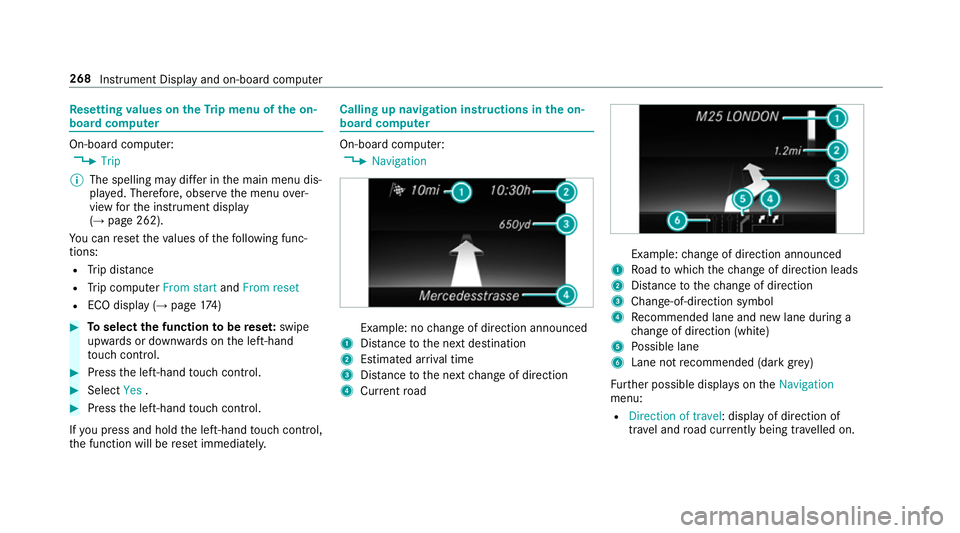
, Navigation Example: no
chang eofd irection announced
1 Distance tothen extd estination
2 Estimated ar riva ltime
3 Distance tothen extc hang eofd irection
4 Current road Example:
chang eofd irection announced
1 Road towhic hthe chang eofd irection leads
2 Distance tothec hang eofd irection
3 Chan ge-of-direction symbol
4 Recommended lane and ne wlaned urin ga
ch ang eofd irection (white)
5 Possible lane
6 Lane no trecommende d(dark grey)
Fu rther possible displa yson the Navigation
menu:
R Direction of travel:d isplayofd irection of
tra vela nd road cur rentl yb eing tr avelled on. 268
Instrumen tDispla yand on-boar dcomputer
Page 282 of 585
Vo
ice command Function
Navigate to contact
toac ontact in thea ddress book
Enter country
Enter town
Enter district
Enter street
Enter junction
Enter house number
Enter postcode Ente
rsac ountry/t own/di strict/street/junction/house number/postcode
Nearest restaurant
Nearest car park
Nearest rest are awitht oilets
Nearest filling station Sea
rches forn earb yrestaurants, parkin gspaces, rest areas wit htoilets and filling stations
Restauran talon gthe route
Parking alon gthe route
Rest area with toilet salon gthe route
Filling stations alon gthe route Sear
ches forr es taurants, parkin gspaces, rest areas wit htoilets and filling stations alon gthe route LINGU
ATRO NIC 279
Page 343 of 585
%
Onlyone mobile phone can be connecte dat
an yo ne time. The connec tedm obile phone
is displa yedatt hetopoft he list.
Disconnecting amobile phone (deauthoris‐
ing)
Multimedia sy stem:
, Telephone .
á Connec tdevice #
Select them obile phone from thed evice list. #
Select ¥. #
Select Deauthorise. #
Select Yes.
Information on NearField Communication
(NFC)
NFC enables short- rang ew ireles sdatat ransfer
or (re)connection of amobile phon ewitht he
multimedia sy stem.
The following function sareavailable without
havin gauthorised amobile phone:
R Trans ferring aURLtobe vie wedint he multi‐
media sy stem (see them anufacturer's oper‐
ating instructions). R
Setting up thev ehicle's Wi-Fi access da tavia
th es ystems ettings (→ page299).
Fu rther information can be found at :http://
www.mercedes-benz.com/connect
Using them obil ephone wit hNear Field Com‐
munication (NFC)
Re quirements:
R NFC is activated on them obile phone (see
th em anufacturer's operating instructions)
R The mobile phone's screen is switched on
and unloc ked( see them anufacturer's oper‐
ating instructions)
It is possible touse amobile phon evia NF Cwith
Blue toothtelephon y. #
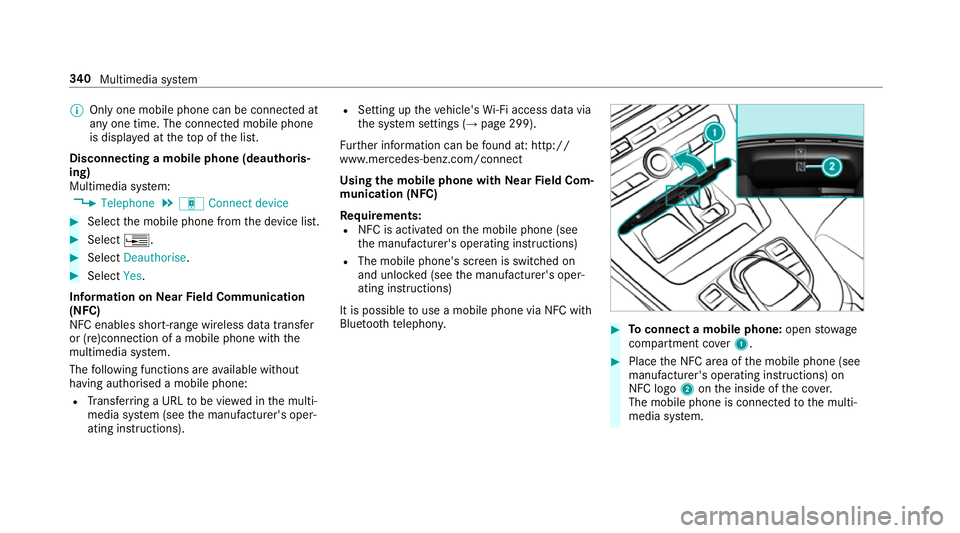
Toconnect amobile phone: openstowage
compartment co ver1. #
Place theN FC area of them obile phone (see
manufacturer's operating instructions) on
NFC logo 2onthei nside of thec over.
The mobile phone is connected tothem ulti‐
media sy stem. 340
Multimedia sy stem
Page 353 of 585
R
The mobile phone supports Android Auto
from Android 5.0.
R The Android AutoApp is ins talled on the
mobil ephone.
R In order touse thet elephone functions, the
mobil ephone mus tbeconnected tothem ul‐
timedia sy stem via Blue tooth®
(→ pag e337).
If th er ew as no prior Interne tconnection, this
is es tablished wit hthe use of them obile
phone wit hAndroid Au to.
R The mobile phone is connected tothem ulti‐
media sy stem via theU SB port çusing a
suitable cable (→ page369).
R Ther eisanI nternetconnection fort he full
ra ng eoff unctions forA ndroid Auto.
Multimedia sy stem:
, Connect .
Android Auto #
Select them obile phone from thed evice list.
Ac cepting/rejecting thed atap rote ction reg‐
ulations
Am essag ewitht he dat aprotection regulations
appears. #
Select Accept &Start .
or #
Select Decline &End.
Ac tivatin gautomati cstart #
Select Startautomatically O.
St arting manually #
Select them obile phone from thed evice list.
Exiting Android Auto #
Press theò button on them ultifunction
st eering wheel, fore xamp le.
% If Android Autowa sn otdispla yedint hefore‐
ground befor edisconnecting, thea pplication
st arts in theb ackg round when reconnected.
Yo uc an call up Android Autointhem ain
menu.
Calling up theA ndroid Autosound settings
Multimedia sy stem:
, Connect .
Android Auto .
Sound #
Selecting thet one men u(→ page 388). Ending Android
Auto
Multimedia sy stem:
, Connect .
Android Auto #
Select Disconnect.
The connection is ended.
The mobile phone continues tobe supplied
wit he lect ricity.
or #
Disconnect thec onnecting cable between
th em obile phone and multimedia sy stem.
Mercedes-Benz recommends disconnecting
th ec onnecting cable onl ywhen thev ehicle is
st ationar y. Tr
ansfer redv ehicle dat awhenu sing Apple
CarPlay™ and Android Auto Information on trans
ferred vehicl edata
When using Android Autoor Apple CarPlay™,
cer tain vehicle dat aistransfer redtot he mobile
phone. This enables youtog ettheb esto ut of
selected mobile phone services. Vehicle dat ais
no td irectl yaccessible. 350
Multimedia sy stem