wheel MERCEDES-BENZ E-CLASS ESTATE 2020 Workshop Manual
[x] Cancel search | Manufacturer: MERCEDES-BENZ, Model Year: 2020, Model line: E-CLASS ESTATE, Model: MERCEDES-BENZ E-CLASS ESTATE 2020Pages: 489, PDF Size: 9.15 MB
Page 240 of 489
select
the cor responding transmission posi‐
tion.
The vehicle drives into the selected parking
space.
% During the parking procedure with Active
Pa rking Assist, the lane markings are dis‐
pla yed in green in the camera image.
On completion of the parking procedure, the
Ø Parking Assist finished, take control of
vehicle message appears. Further manoeuvring
may still be necessar y. #
Secu retheve hicle against rolling away.
When requ ired bylegal requirements or local
conditions: turn the wheels towa rdsth eke rb.
% You can stop theve hicle and change the
transmission position du ring the parking pro‐
cedure. The sy stem then calculates a new
ve hicle path. If no new vehicle path is availa‐
ble, the transmission position can be
ch anged again, or the process can be can‐
celled. You can also inter rupt the parking
procedure bybraking, forex ample tolet peo‐
ple get in or out of theve hicle. The parking procedure can
then be continued bybriefly
pressing the accelerator pedal.
Exiting a parking space with Active Parking
Assist
Re quirements:
R The vehicle is equipped with a 360° Camera.
R The vehicle has been par ked parallel tothe
ro ad with Active Parking Assist.
Please no tethat you are responsible forth eve hi‐
cle and sur roundings during the entire parking
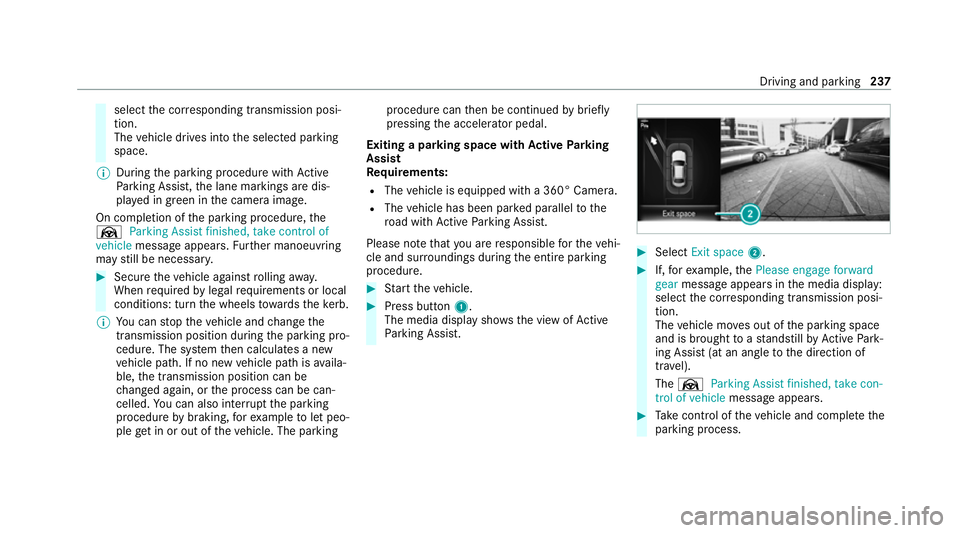
procedure. #
Start theve hicle. #
Press button 1.
The media display sho wsthe view of Active
Pa rking Assist. #
Select Exit space 2. #
If,forex ample, thePlease engage forward
gear message appears in the media display:
select the cor responding transmission posi‐
tion.
The vehicle mo ves out of the parking space
and is brought toast andstill byActive Park‐
ing Assist (at an angle tothe direction of
tra vel).
The Ø Parking Assist finished, take con-
trol of vehicle message appears. #
Take control of theve hicle and comple tethe
parking process. Driving and parking
237
Page 249 of 489
or
#
Activate or deacti vate Act. Blind Spot Assist .Ac
tive Lane Keeping Assist Fu
nction of Active Lane Keeping Assist
Ac tive Lane Keeping Assist monitors the area in
front of your vehicle bymeans of the multifunc‐
tion camera (/ page194). It ser vesto protect
yo u against unin tentionally le aving your lane.
Yo u will be warned byvibration pulses in the
st eering wheel and guided bya course-cor rect‐
ing brake application ba ckinto your lane.
Ac tive Lane Keeping Assist is available in the
speed range between 60 km/h and 200 km/h.
Ac tive Lane Keeping Assist can neither reduce
th erisk of an accident if youfa ilto adapt your
driving style nor override the la wsof ph ysics. It
cannot take into account road, weather or traf fic
conditions. Active Lane Keeping Assist is only an
aid. You are responsible for maintaining a safe
dis tance totheve hicle in front, forve hicle
speed, for braking in good time and forst ay ing
in lane. The
status of Active Lane Keeping Assist is dis‐
pla yed in the on-board computer:
R Ã (green): Active Lane Keeping Assist is
active and operating.
R Ã (grey):Ac tive Lane Keeping Assist is
active but not operating.
R ·: Active Lane Keeping Assist is deactiva‐
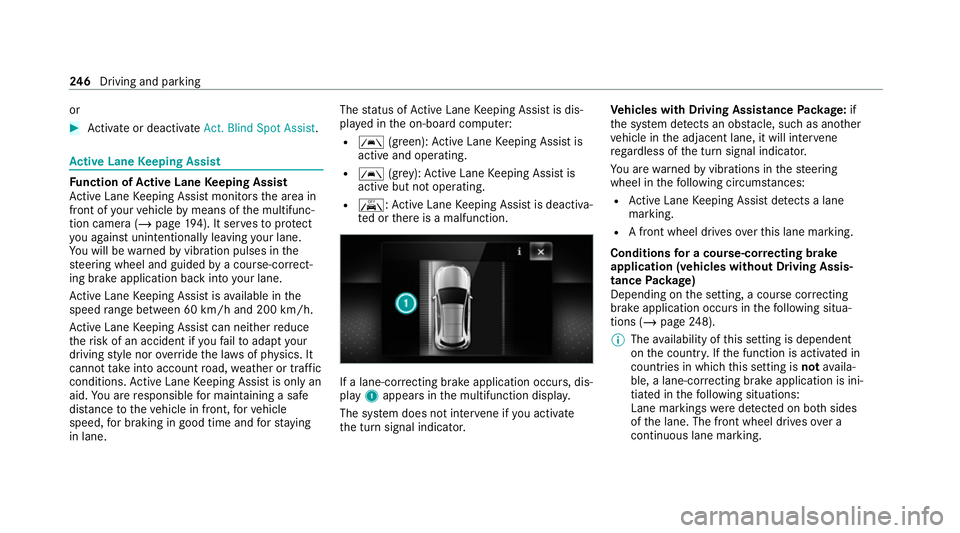
te d or there is a malfunction. If a lane-cor
recting brake application occu rs, dis‐
play 1appears in the multifunction displa y.
The sy stem does not inter vene if you activate
th e turn signal indicator. Ve
hicles with Driving Assistance Package: if
th e sy stem de tects an obs tacle, su chas ano ther
ve hicle in the adjacent lane, it will inter vene
re ga rdless of the turn signal indicator.
Yo u are warned byvibrations in thesteering
wheel in thefo llowing circums tances:
R Active Lane Keeping Assist de tects a lane
marking.
R A front wheel drives over this lane marking.
Conditions for a course-cor recting brake
application (vehicles without Driving Assis‐
tance Package)
Depending on the setting, a course cor recting
brake application occu rsinthefo llowing situa‐
tions (/ page248).
% The availability of this setting is dependent
on the count ry. If the function is activated in
count ries in which this setting is notavaila‐
ble, a lane-cor recting brake application is ini‐
tia ted in thefo llowing situations:
Lane markings weredetected on bo thsides
of the lane. The front wheel drives over a
continuous lane marking. 246
Driving and pa rking
Page 250 of 489
Standard
Setting
R Lane markings weredetected on bo thsides
of the lane. The front wheel drives over a
continuous lane marking.
R A lane marking and the edge of a firm road
sur face weredetected. The front wheel
drives over a lane marking on the edge of the
fi rm road sur face.
R A lane marking and an oncoming vehicle
we redetected. The front wheel drives over
th e lane marking.
Sensitive Setting
R All situations described under theStandard
setting.
R A continuous lane marking was de tected and
driven over with the front wheel.
% A brake application may be inter rupte d at
any time if yousteer slightly in the opposite
direction. Conditions
for a course-cor recting brake
application (vehicles with Driving Assistance
Pa ckage)
Depending on the setting, a course cor recting
brake application occu rsinthefo llowing situa‐
tions (/ page248).
% The availability of this setting is dependent
on the count ry. If the function is activated in
count ries in which this setting is notavaila‐
ble, a lane-cor recting brake application is ini‐
tia ted in all situations described under Sen-
sitive.
Standard Setting
R A lane marking and an approaching vehicle,
an ove rtaking vehicle or vehicles driving par‐
allel to yo urvehicle weredetected in the
adjacent lane. The front wheel drives over
th e lane marking.
Sensitive Setting
R The situations described under theStandard
setting.
R A continuous lane marking was de tected and
driven over with the front wheel. %
A brake application may be inter rupte d at
any time if yousteer slightly in the opposite
direction.
Sy stem limits
No lane-cor recting brake application occu rsin
th efo llowing situations:
R You clear lyand actively steer, brake or accel‐
erate.
R If a driving saf ety sy stem inter venes, su chas
ESP ®
,Ac tive Brake Assi stor Active Blind
Spot Assi st.
R You ha veadop ted a sporty driving style with
high cornering speeds or high rates of accel‐
eration.
R When ESP ®
is deactivated.
R When driving with a trailer, the electrical con‐
nection tothe trailer has been cor rectly
es tablished.
R If a loss of tyre pressure or a defective tyre
has been de tected and displ ayed.
If yo u deactivate theAc tive Lane Keeping Assist
wa rning and the lane markings cann otbe clearly Driving and parking
247
Page 256 of 489
Und
erthefo llowing conditions, a message may
appear on the multifunction display even if the
trailer has been connected cor rectly:
R LEDs ha vebeen ins talled in the trailer light‐
ing sy stem
R The cur rent has fallen below the trailer light‐
ing sy stem's minimum cur rent (50 mA)
% Accessories can be connected tothe perma‐
nent po wer supp lyup to180 W and tothe
po we r supp lythat is swit ched on via the igni‐
tion loc k.
Un coupling a trailer &
WARNING Risk of being crushed and
becoming trapped when uncoupling a
trailer
When uncoupling a trailer wi than engaged
ine rtia-activated brake, your hand may
become trapped between theve hicle and the
trailer dr awbar. #
Do not uncouple trailers with an
engaged overrun brake. *
NO
TEDama gewhen uncoupling in a
st ate of overrun Uncou
pling in a state of overru n can dama ge
th eve hicle. #
Do not uncouple trailers with an
engaged overrun brake. &
WARNING Risk of becoming trapped
when disconnecting the trailer cable
Ve hicles with le vel control sy stem: The
ve hicle may lo wer when the trailer cable is
disconnected.
This could result in you or other people
becoming trapped if your or their limbs are
between theve hicle body and the tyres or
underneath theve hicle. #
Make sure that nobody is unde rneath
th eve hicle or in the immediate vicinity
of the wheel ar ches when you discon‐
nect the trailer cable. *
NO
TEDama getothere ar bumper from
ins talling adap ter cables or adapte r plugs The
following parts could be damaged when
swiveling the ball neck fully electrically:
R Bumper
R Adapter cable
R Adapter plug #
Alw aysre mo vethe adap ter cable or
adapte r plug before swive lingthe ball
neck fully electrically. #
Secure the trailer against rolling away. #
Disconnect the electrical connection
between theve hicle and the trailer. #
Uncouple the trailer. #
Place the co ver cap on the ball head. Driving and parking
253
Page 262 of 489
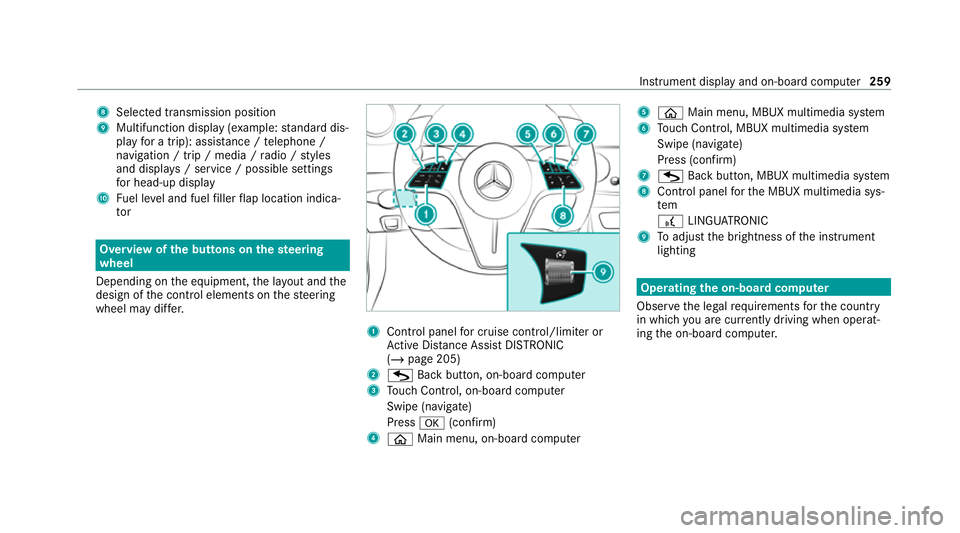
8
Selected transmission position
9 Multifunction displ ay(exa mp le:standard dis‐
play for a trip): assi stance / telephone /
navigation / trip / media / radio / styles
and displa ys/ service / possible settings
fo r head-up display
A Fuel le vel and fuel filler flap location indica‐
tor Overview of
the but tons on thest eering
wheel
Depending on the equipment, the la yout and the
design of the control elements on thesteering
wheel may dif fer. 1
Control panel for cruise control/limiter or
Ac tive Dis tance Assi stDISTRONIC
(/ page 205)
2 G Back button, on-boa rdcompu ter
3 Touch Control, on-board co mputer
Swipe (navigate)
Press a(confirm)
4 ò Main menu, on-board co mputer 5
ò Main menu, MBUX multimedia sy stem
6 Touch Control, MBUX multimedia sy stem
Swipe (navigate)
Press (confirm)
7 G Back button, MBUX multimedia sy stem
8 Control panel forth e MBUX multimedia sys‐
tem
£ LINGU ATRO NIC
9 Toadjust the brightness of the instrument
lighting Operating
the on-boa rdcompu ter
Obser vethe legal requ irements forth e count ry
in which you are cur rently driving when operat‐
ing the on-board computer. Instrument display and on-board computer
259
Page 276 of 489
The driver's seat is equipped with an access pre‐
ve nter.
If th e driver's door is open, the driver's seat will
not be set af ter calling up the driver's profile.
Profiles store your vehicle settings and settings
fo rth e multimedia sy stem. If theve hicle is used
by several drivers, the driver can select their
ow n profile wi thout changing thestored profile
settings of other drivers.
% Information on profiles from Mercedes me
connect can be found in the Digital Opera‐
to r's Manual.
Ve hicle settings are, forex ample, driver's seat,
st eering wheel and mir ror settings, clima tecon‐
trol and ambient lighting. Forth e settings of the
multimedia sy stem, you can select, forex ample,
ra dio stations, pr evious destinations as well as
th emes, suggestions and favo urites.
Fo rre cur ring driving situations, su chas long
drives on the mo torw ay,yo u can sa veyour pre‐
fe rred settings in a theme in theve hicle. In a
th eme you can sa vethe display of the digital
map, your prefer redra dio station and prefer red
drive prog ram, forex ample. The
vehicle can learn the habits of the driver. It
th en of fers suggestions forth e most probable
navigation destinations, media sources, radio
st ations or con tacts. The pre-requirements for
th at are the selection of a profile, your consent
to there cording of da taand suf ficient collected
da ta.
Fa vourites pr ovide quick access toapplications
th at are used of ten. You can select favo urites
from categories or add them directly toan appli‐
cation. Configuring profiles,
themes and sugges‐
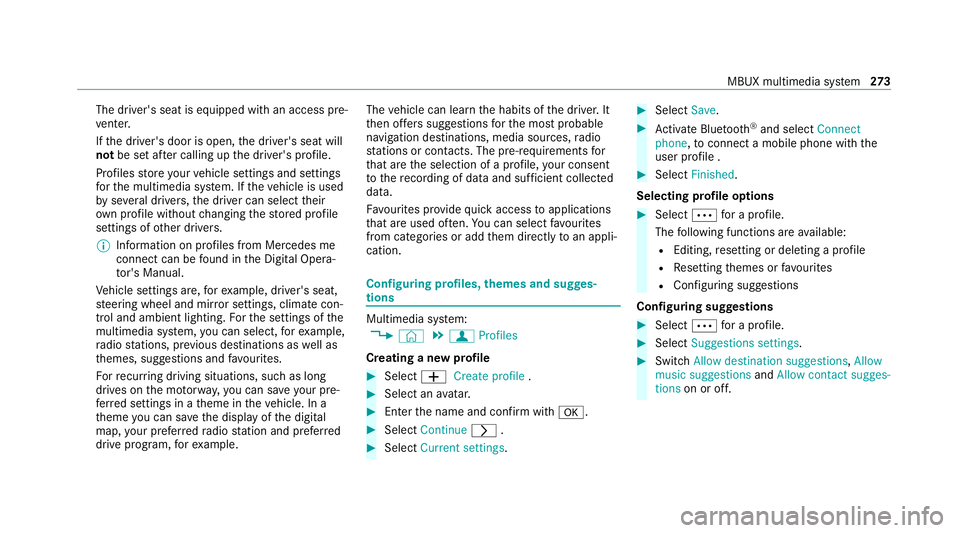
tions Multimedia sy
stem:
4 © 5
f Profiles
Creating a new profile #
Select WCreate profile . #
Select an avatar. #
Enterth e name and confi rmwith a. #
Select Continue r. #
Select Current settings. #
Select Save. #
Activate Blu etoo th®
and select Connect
phone, toconnect a mobile phone wi th the
user profile . #
Select Finished.
Selecting profile options #
Select Äfor a profile.
The following functions are available:
R Editing, resetting or deleting a profile
R Resetting themes or favo urites
R Con figuring suggestions
Configuring suggestions #
Select Äfor a profile. #
Select Suggestions settings . #
Switch Allow destination suggestions, Allow
music suggestions andAllow contact sugges-
tions on or off. MBUX multimedia sy
stem 273
Page 301 of 489
#
Dial the emer gency number 11 2onyour
mobile phone.
If an eme rgency call has been initiated:
R Remain in theve hicle if thero ad and traf fic
conditions permit youto do so until a voice
connection is es tablished with the emer‐
ge ncy call centre operator.
R Based on the call, the operator decides
whe ther it is necessary tocall rescue teams
and/or the police tothe accident site.
R If no vehicle occupant answers, an ambu‐
lance is sent totheve hicle immediately. Tr
iggering a manual Mercedes-Benz emer‐
ge ncy call #
Touse the SOS but ton in theov erhead
control panel: press and holdthe SOS but‐
to nfo r at least one second (/ page 289).#
Touse voice control: usethe LINGUA‐
TRONIC voice commands . The emer
gency call has been made:
R Avo ice connection is made tothe Mercedes-
Benz emer gency call centre.
R A messa gewith accident data is transmit ted
to the Mercedes-Benz emer gency call centre.
The Mercedes-Benz eme rgency call cent re
can transmit theve hicle position data toone
of the public emer gency services call cen‐
tres.
R Under cer tain circums tances da tais also
transmitte d inthevo ice channel tothe
Mercedes-Benz emer gency call centre.
This allo wsmeasu resfo rre scue, reco very or
to wing toa Mercedes-Benz Service Cent reto
be initiated quickl y.
R Remain in theve hicle if thero ad and traf fic
conditions permit youto do so until a voice
connection is es tablished with the emer‐
ge ncy call centre operator.
R Based on the call, the operator decides
whe ther it is necessary tocall rescue teams
and/or the police tothe accident site. If
th e Mercedes-Benz emer gency call sy stem
cann otconnect tothe Mercedes-Benz emer‐
ge ncy call centre, the emer gency call is au tomat‐
ical lysent tothe public emer gency services call
centre.
If no connection can be made tothe public
emer gency services, a cor responding message
appears inthe media displa y. #
Dial the emer gency number 11 2onyour
mobile phone.
Ending an unin tentionally triggered manual
Mercedes-Benz emer gency call #
On the multifunction steering wheel:
select ~. Data transfer of
the Mercedes-Benz emer‐
ge ncy call sy stem In
theeve nt of an au tomatic or manual emer‐
ge ncy call thefo llowing data is transmitte d,for
ex ample:
R Vehicle's GPS position data
R GPS position data on thero ute
(a few hund red metres before the incident) 298
MBUX multimedia sy stem
Page 302 of 489
R
Direction of tr avel
R Vehicle identification number
R Vehicle drive type
R Number of people de term ined tobe in the
ve hicle
R Whe ther Mercedes me connect is available
or not
R Whe ther the emer gency call was initiated
manually or automatically
R Time of the accident
R Language setting on the multimedia sy stem
Fo r accident clarification purposes, thefo llowing
measures can be take n up toan hour af terthe
emer gency call has been initia ted:
R The cur rent vehicle position can be de ter‐
mined.
R Avo ice connection totheve hicle occupants
can be es tablished.
% ForRu ssia: various functions, e.g. receiving
traf fic information, cannot be per form ed for
up totwo hou rsafte r sending an emer gency
call. Fu
nction of the emer gency call sy stem self-
diagnosis (Russia) Yo
ur car verifies the operability of the emer‐
ge ncy call sy stem each time the ignition is ON.
In case of sy stem failure, you will be informed
with text messa geon the instrument clus ter and
with red indicator SOS NOT READY onthe dis‐
pla y.
Please, make sure, that during 30 seconds af ter
switching ignition ON there d indicator SOS
NOT READY inthe upper right corner of display
is switched OFF, this means the emer gency call
sy stem passed diagnostics successfully. St
arting/ending ERA-GLONASS test mode
(Russia) Re
quirements:
R The star ter battery is suf ficiently charge d.
R The ignition is switched on.
R The vehicle has been stationary for at least
one minute. #
Tostart thete st mode: press and hold the
~ button on the multifunction steering
wheel for at least five seconds.
The test mode is star ted and automatically
ends af terth e language test has been per‐
fo rm ed. #
Toend thete st mode manuall y:switch off
th e ignition.
The test mode is ended. MBUX multimedia sy
stem 299
Page 311 of 489
ASS
YST PLUS se rvice inter val display Fu
nction of the ASS YST PLUS se rvice inter val
displ ay The ASS
YST PLUS service inter val display on the
instrument display pr ovides information on the
re maining time or dis tance be fore the next
service due date.
Yo u can hide this service display using the back
button on the left-hand side of thesteering
wheel.
Depending on how theve hicle is used, the
ASS YST PLUS service inter val display may
shor tenth e service inter val, e.g. in thefo llowing
cases:
R mainly short-dis tance driving
R when the engine is of ten le ftidling for long
periods
R intheeve nt of frequent cold start phases
R vehicles with a diesel particulate filter: in
th eev ent of frequently inter rupted rege nera‐
tion of the diesel particulate filter Mercedes-Benz
recommends avoiding such
operating conditions.
Yo u can obtain information concerning the serv‐
icing of your vehicle from a qualified specialist
wo rkshop, e.g. a Mercedes-Benz Service Centre. Displaying
the service due da te On-board computer:
4 Service 5
ASSYST PLUS
The next service due date is displa yed. #
Toexitth e displa y:press the back button
on the left-hand side of thesteering wheel.
Bear in mind thefo llowing related topic:
R Operating the on-board computer
(/ page 259). Information on
regular maintenance work *
NO
TEPremature wearthro ugh failure to
obser veservice due dates Service
workwhich is not car ried out at the
ri ght time or incomple tely can lead to
inc reased wear and damage totheve hicle. #
Alw ays obser vethe prescribed service
inter vals. #
Alw ays ha vethe prescribed service
wo rkcar ried out at a qualified specialist
wo rkshop. Special service
requ irements The prescribed service inter
val is based on nor‐
mal operation of theve hicle. Maintenance work
will need tobe per form ed more of ten if theve hi‐
cle is operated under arduous conditions or
increased loads.
The ASS YST PLUS service inter val display is only
an aid. The driver of theve hicle bears responsi‐
bility as rega rdsto whe ther maintenance work
needs tobe per form ed more of tenth an speci‐ 308
Maintenance and care
Page 321 of 489
Wa
shing theve hicle byhand *
NO
TEEngine dama gedue towater
ing ress #
Take care not topoint thewate r jet
directly towa rdsth e air inlet grille below
th e bonn et. obser
vethe legal requ irements, e.g. in a number
of countries, washing byhand is only permitted
in specially designated wash ba ys. #
Use a mild cleaning agent, e.g. car shampoo. #
Washtheve hicle with luk ewarmwate r using
a soft car sponge. When doing so, do not
ex pose theve hicle todirect sunlight. #
Carefully hose theve hicle off with water and
dry using a chamois.
% Obse rveth e no tes on the care of car parts
(/ page 319). Note
s on paint work/matt finish paint work
care Obse
rveth e no tes on cleaning and care toavo id
damaging the paintwor k.
Pa int
R Insect remains: soak with insect remo ver and
ri nse off the treated areas af terw ards.
R Bird droppings: soak with water and rinse off
af te rw ards.
R Tree resin, oils, fuels and greases: remo veby
ru bbing gently wi tha clo thsoaked in petro‐
leum ether or lighter fluid.
R Coolant and brake fluid: remo vewith a damp
clo thand clean water.
R Tarst ains: use tar remo ver.
R Wax: use silicone remo ver.
R Do not attach sticke rs,fi lms or similar mate‐
ri als.
R Remo vedirt immediately, where possible.
Matt finish
R Only use care products appr ovedfor
Mercedes-Benz. R
Do not polish theve hicle and light-alloy
wheels.
R Only use car washes that cor respond tothe
latest engineering standards.
R Do not use car wash programmes with a final
hot wax treatment.
R Do not use paint cleane rs, buf fing or polish‐
ing products, gloss preser vers, e.g. wax.
R Alw ays ha vepaintwork repairs car ried out at
a qu alified specialist workshop. Note
s on cleaning decorative foils Obser
vethe no tes on matt finish care in the
ch ap ter "No tes on paintwork/matt finish paint‐
wo rkcare" (/ page 318). They also app lyto
matt decorative foils.
Obser vethe no tes on cleaning decorative foils to
av oid vehicle damage.
Cleaning
R For cleaning, use plenty of water and a mild
cleaning agent without additives or abrasive
subs tances, e.g. a car sha mpoo appr ovedfor
Mercedes-Benz. 318
Maintenance and care